fuel FORD MAVERICK 2023 User Guide
[x] Cancel search | Manufacturer: FORD, Model Year: 2023, Model line: MAVERICK, Model: FORD MAVERICK 2023Pages: 556, PDF Size: 14.79 MB
Page 63 of 556
WHAT IS 911 ASSIST
911 Assist is a SYNC system feature thatcan call for help.
For more information, visitwww.owner.ford.com.
HOW DOES 911 ASSIST WORK
If a crash deploys an airbag, excluding kneeairbags and rear inflatable seatbelts, oractivates the fuel pump shut-off, yourvehicle may be able to contact emergencyservices by dialing 911 through a paired andconnected Bluetooth® enabled phone.
Not all crashes deploy an airbag or activatethe fuel pump shut-off. If a connected cellphone sustains damage or loses itsconnection to SYNC during a crash, SYNCsearches for and tries to connect to apreviously paired cell phone. SYNC thenattempts to call the emergency services.
Before making the call:
•SYNC provides about 10 seconds tocancel the call. If you fail to cancel thecall, SYNC attempts to dial 911.
•SYNC says the following, or a similarmessage: SYNC will attempt to call 911,to cancel the call, press Cancel on yourscreen or press and hold the phonebutton on your steering wheel.
If you do not cancel the call and SYNCmakes a successful call a pre-recordedmessage plays for the 911 operator. Theoccupants in your vehicle are able to talkwith the operator. Be prepared to provideyour name, phone number and locationimmediately because not all 911 systemsare capable of receiving this informationelectronically.
During an emergency call the systemtransmits vehicle data to the emergencyservice.
EMERGENCY CALL
REQUIREMENTS
WARNING: Do not wait for 911Assist to make an emergency call if youcan do it yourself. Dial emergencyservices immediately to avoid delayedresponse time which could increase therisk of serious injury or death after acrash. If you do not hear 911 Assist withinfive seconds of the crash, the system orphone may be damaged ornon-functional.
WARNING: Always place yourphone in a secure location in your vehicleso it does not become a projectile or getdamaged in a crash. Failure to do so maycause serious injury to someone ordamage the phone which could prevent911 Assist from working properly.
WARNING: Unless the 911 Assistsetting is set on before a crash, thesystem will not dial for help which coulddelay response time, potentiallyincreasing the risk of serious injury ordeath after a crash.
•SYNC is powered and working properlyat the time of the incident andthroughout feature activation and use.
•The 911 Assist feature must be set onbefore the incident.
•You must pair and connect aBluetooth® enabled and compatiblecell phone to SYNC.
•A connected Bluetooth® enabledphone must have the ability to makeand maintain an outgoing call at thetime of the incident.
59
2023 Maverick (CFE) Canada/United States of America, enUSA, Edition date: 202208, First-Printing911 Assist
Page 71 of 556
WHAT IS MYKEY
MyKey allows you to program keys withrestricted driving modes to promote gooddriving habits.
You can program the restrictions to all keysexcept one. Any keys that you did notprogram are administrator keys or adminkeys.
Note:Every MyKey receives the samerestrictions and settings. You cannotprogram them individually.
MYKEY SETTINGS
NON-CONFIGURABLE MYKEYSETTINGS
Seatbelt Reminder or Belt-Minder™
MyKey mutes the audio system until thefront seat passengers buckle the front seatbelts.
Note:If your vehicle includes an AM/FMradio or a very basic audio system, the radiomay not mute.
Satellite Radio (If Equipped)
Some satellite radio channels haverestricted access to adult radio content.
Early Low Fuel
The low fuel level warning lamp turns onearlier.
Driving and Parking Aids
You cannot configure settings for parkingaids, blind spot information system, andcross traffic alert. These systems turn onwhen the vehicle turns on, and you cannotswitch them off with a MyKey.
You cannot configure settings forpre-collision assist and lane keeping. Thesesystems turn on when the vehicle turns on.
A new destination in the navigation systemcan only be set using voice commandswhen using a MyKey, and with your vehiclemoving.
Note:MyKey drivers may be able to switchthe lane keeping assist off, but this featureturns back on automatically with every newkey cycle.
CONFIGURABLE MYKEYSETTINGS
You can configure the following settingsafter creating a MyKey. See Creating aMyKey (page 68).
Speed Limit
WARNING: Do not set MyKeymaximum speed limit to a limit that willprevent the driver from maintaining asafe speed considering posted speedlimits and prevailing road conditions. Thedriver is always responsible to drive inaccordance with local laws andprevailing conditions. Failure to do socould result in accident or injury.
You can set a speed limit for your vehicle.Warning messages appear on thetouchscreen and a tone sounds if yourvehicle reaches the set speed. You cannotoverride the set speed when using a MyKey.
Speed Minder
You can set a speed reminder for yourvehicle. Warning messages appear on thetouchscreen and a tone sounds if yourvehicle exceeds the set speed.
67
2023 Maverick (CFE) Canada/United States of America, enUSA, Edition date: 202208, First-PrintingMyKey™
Page 106 of 556
INTERIOR MIRROR
PRECAUTIONS
WARNING: Do not adjust themirrors when your vehicle is moving. Thiscould result in the loss of control of yourvehicle, serious personal injury or death.
Note:Do not clean the mirror housing orglass with harsh abrasives, fuel or otherpetroleum-based cleaning products.
MANUALLY DIMMING THE
INTERIOR MIRROR
Pull the tab below the mirror toward youto reduce glare at night.
102
2023 Maverick (CFE) Canada/United States of America, enUSA, Edition date: 202208, First-PrintingInterior Mirror
Page 111 of 556
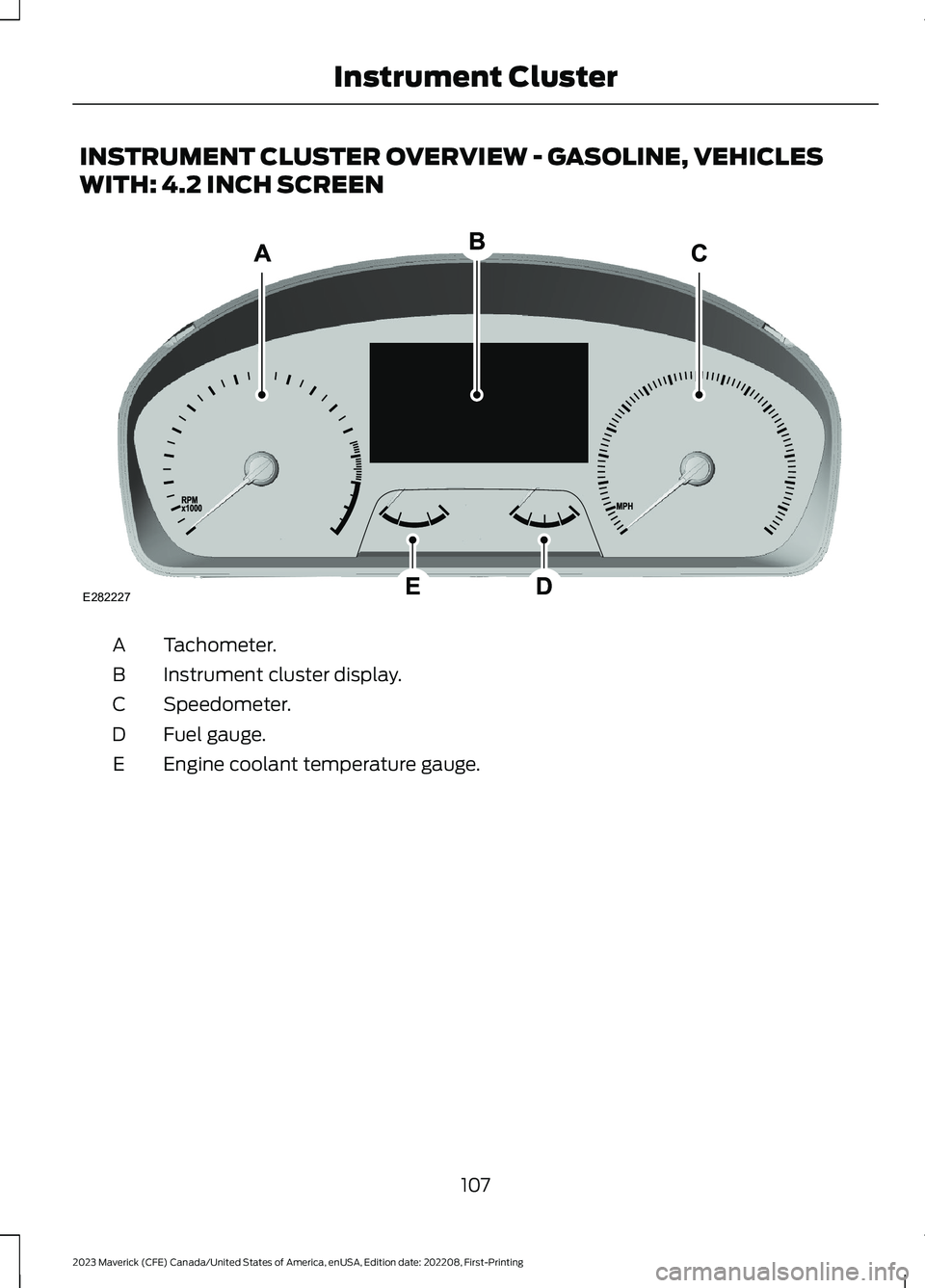
INSTRUMENT CLUSTER OVERVIEW - GASOLINE, VEHICLES
WITH: 4.2 INCH SCREEN
Tachometer.A
Instrument cluster display.B
Speedometer.C
Fuel gauge.D
Engine coolant temperature gauge.E
107
2023 Maverick (CFE) Canada/United States of America, enUSA, Edition date: 202208, First-PrintingInstrument ClusterE282227
Page 112 of 556
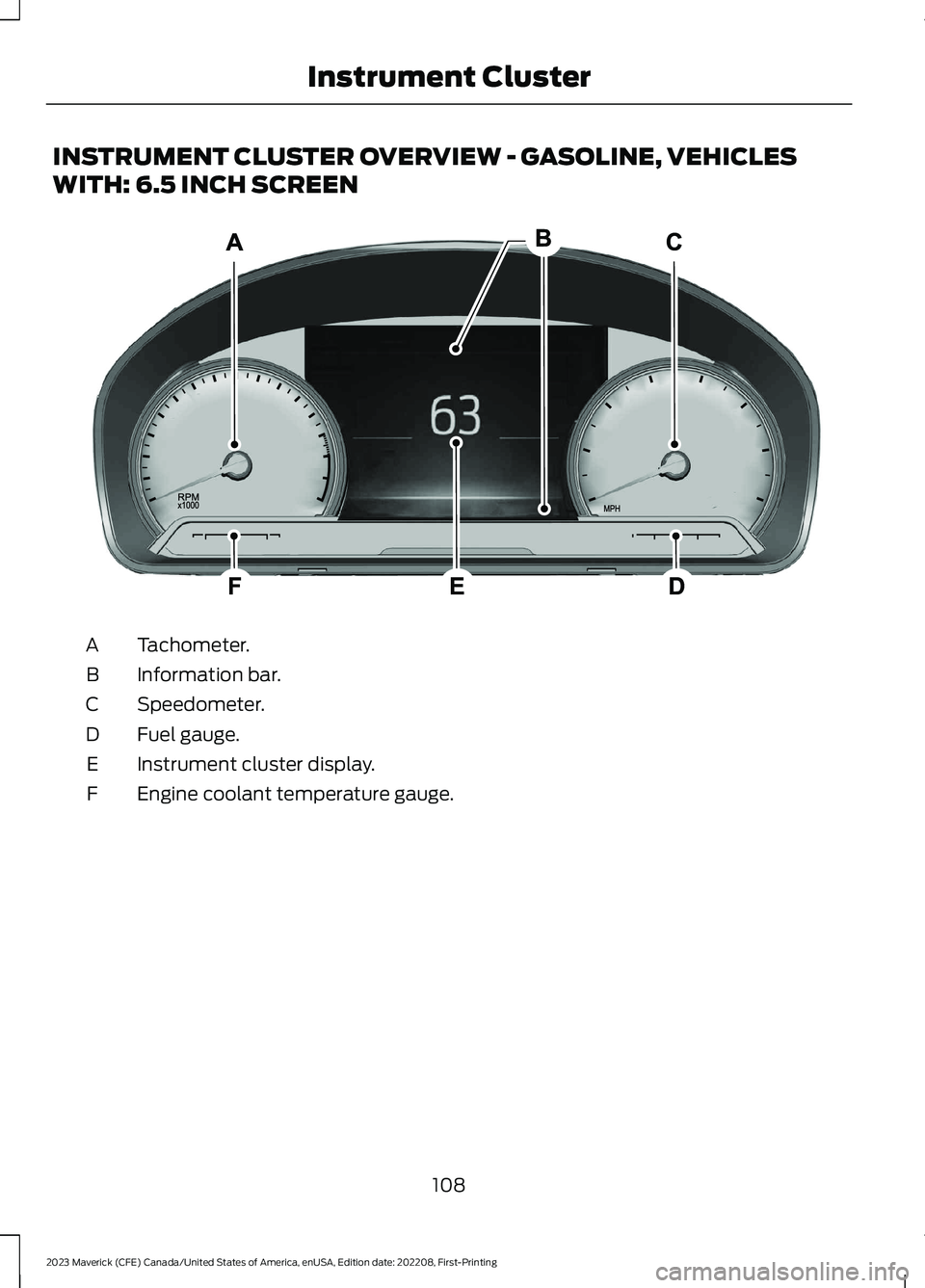
INSTRUMENT CLUSTER OVERVIEW - GASOLINE, VEHICLES
WITH: 6.5 INCH SCREEN
Tachometer.A
Information bar.B
Speedometer.C
Fuel gauge.D
Instrument cluster display.E
Engine coolant temperature gauge.F
108
2023 Maverick (CFE) Canada/United States of America, enUSA, Edition date: 202208, First-PrintingInstrument ClusterE282067
Page 113 of 556
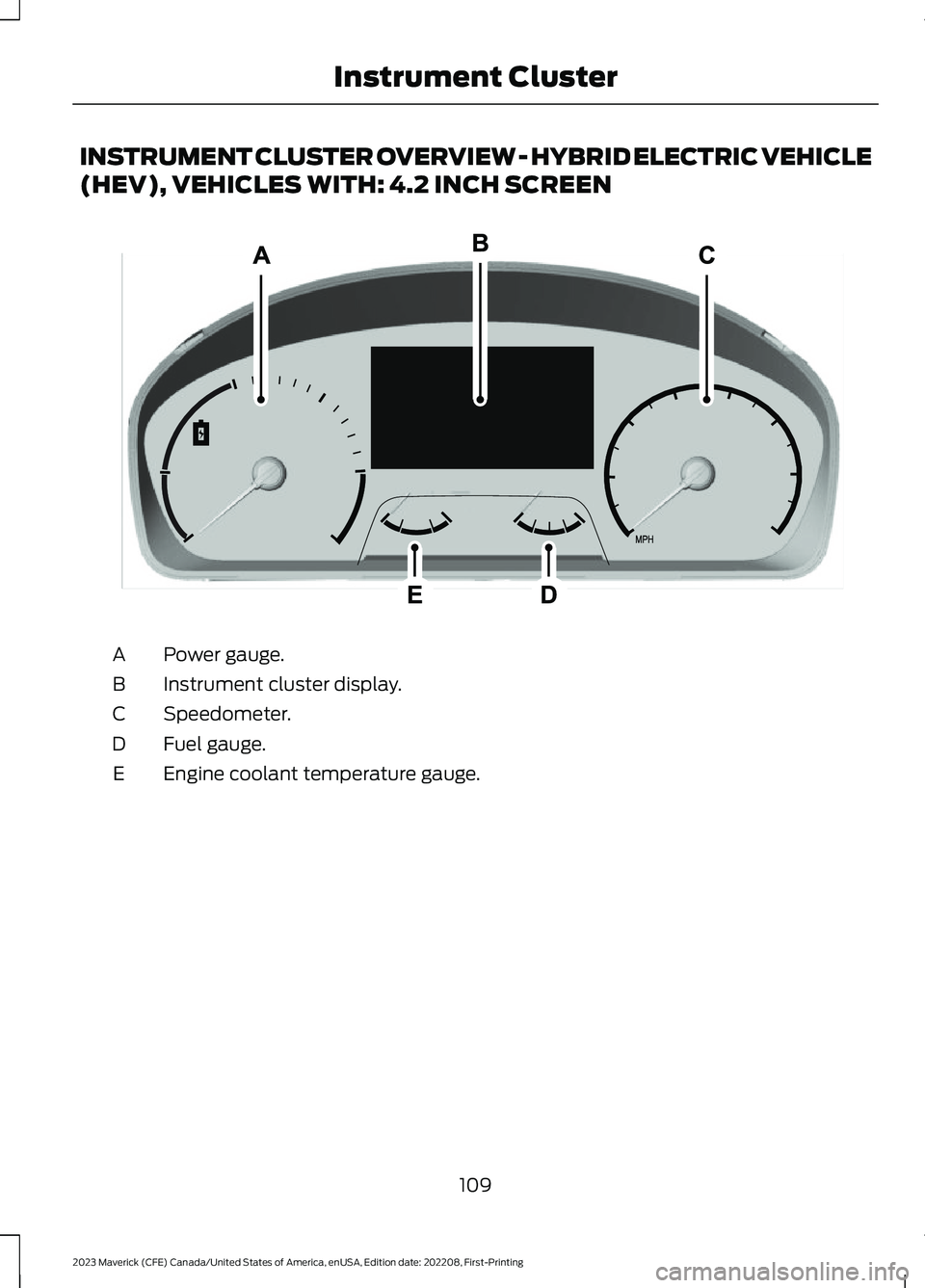
INSTRUMENT CLUSTER OVERVIEW - HYBRID ELECTRIC VEHICLE
(HEV), VEHICLES WITH: 4.2 INCH SCREEN
Power gauge.A
Instrument cluster display.B
Speedometer.C
Fuel gauge.D
Engine coolant temperature gauge.E
109
2023 Maverick (CFE) Canada/United States of America, enUSA, Edition date: 202208, First-PrintingInstrument Cluster E354646
Page 114 of 556
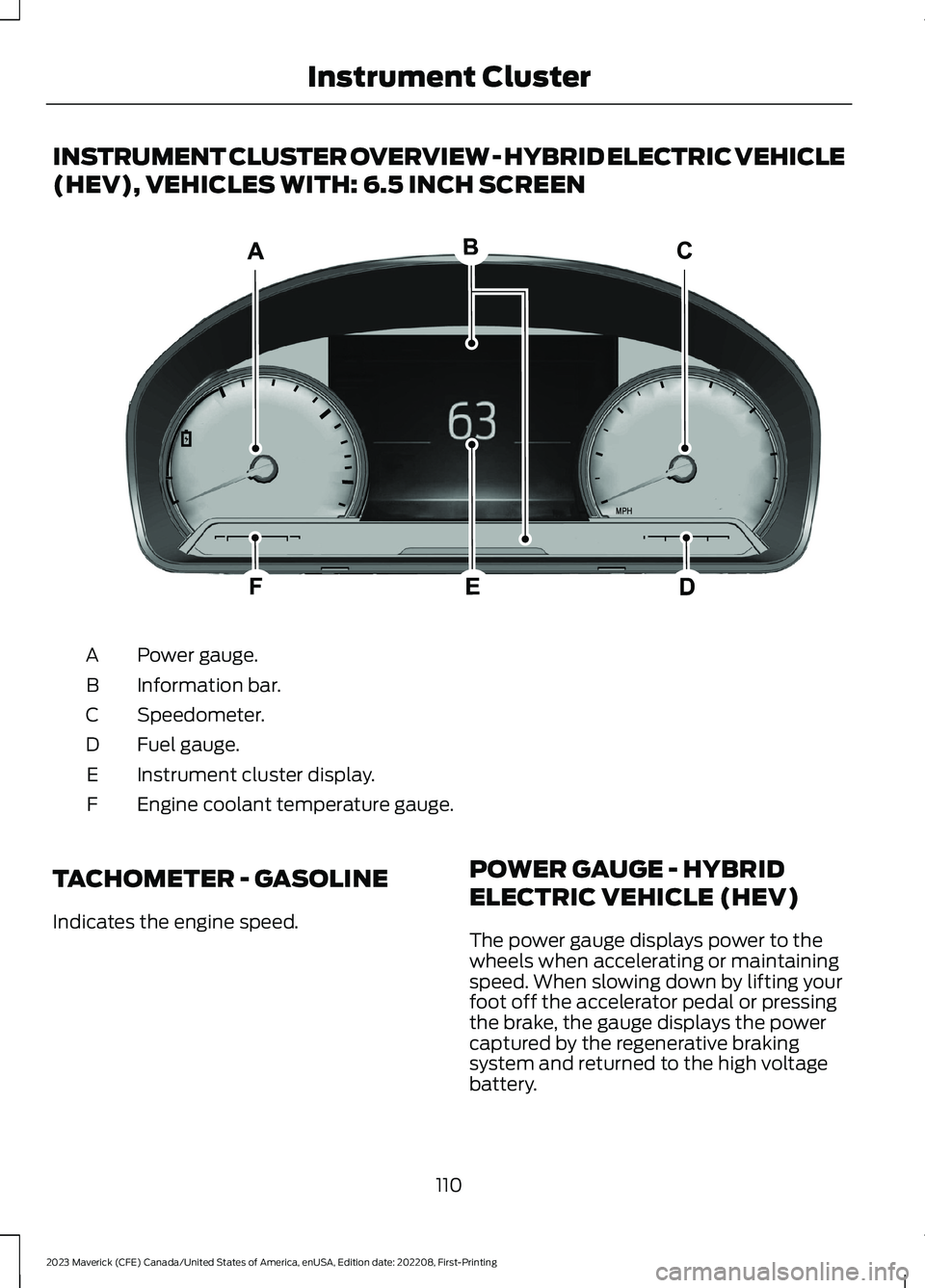
INSTRUMENT CLUSTER OVERVIEW - HYBRID ELECTRIC VEHICLE
(HEV), VEHICLES WITH: 6.5 INCH SCREEN
Power gauge.A
Information bar.B
Speedometer.C
Fuel gauge.D
Instrument cluster display.E
Engine coolant temperature gauge.F
TACHOMETER - GASOLINE
Indicates the engine speed.
POWER GAUGE - HYBRID
ELECTRIC VEHICLE (HEV)
The power gauge displays power to thewheels when accelerating or maintainingspeed. When slowing down by lifting yourfoot off the accelerator pedal or pressingthe brake, the gauge displays the powercaptured by the regenerative brakingsystem and returned to the high voltagebattery.
110
2023 Maverick (CFE) Canada/United States of America, enUSA, Edition date: 202208, First-PrintingInstrument ClusterE385954
Page 115 of 556
SPEEDOMETER
Indicates the vehicle speed.
FUEL GAUGE
WHAT IS THE FUEL GAUGE
Indicates approximately how much fuel isin the fuel tank.
FUEL GAUGE LIMITATIONS
The fuel gauge may not provide anaccurate reading when your vehicle is onan incline.
LOCATING THE FUEL FILLERDOOR
The arrow adjacent to the fuel pumpsymbol indicates on which side of yourvehicle the fuel filler door is located.
WHAT IS THE LOW FUELREMINDER
A low fuel level reminder displays andsounds when the distance to emptyreaches 75 mi (120 km) to empty forMyKey, and at 50 mi (80 km),25 mi(40 km),12 mi (20 km) and 0 mi (0 km)for all vehicle keys.
Note:The low fuel reminder can appear atdifferent fuel gauge positions depending onfuel economy conditions. This variation isnormal.
WHAT IS DISTANCE TO EMPTY
Indicates the approximate distance yourvehicle can travel on the fuel remaining inthe tank. Changes in driving pattern cancause the value to not only decrease butalso increase or stay constant for periodsof time.
ENGINE COOLANT
TEMPERATURE GAUGE
Indicates the engine coolant temperature.
WHAT IS THE INFORMATION
BAR
The information bar displays informationrelated to the ambient air temperature,odometer, compass, indicators andwarning lamps.
WHAT ARE THE INSTRUMENT
CLUSTER WARNING LAMPS
Warning lamps alert you to a vehiclecondition that could become serious.Some lamps illuminate when you startyour vehicle to make sure they work. If anylamps remain on after starting your vehicle,refer to the respective system warninglamp for further information.
111
2023 Maverick (CFE) Canada/United States of America, enUSA, Edition date: 202208, First-PrintingInstrument Cluster
Page 117 of 556
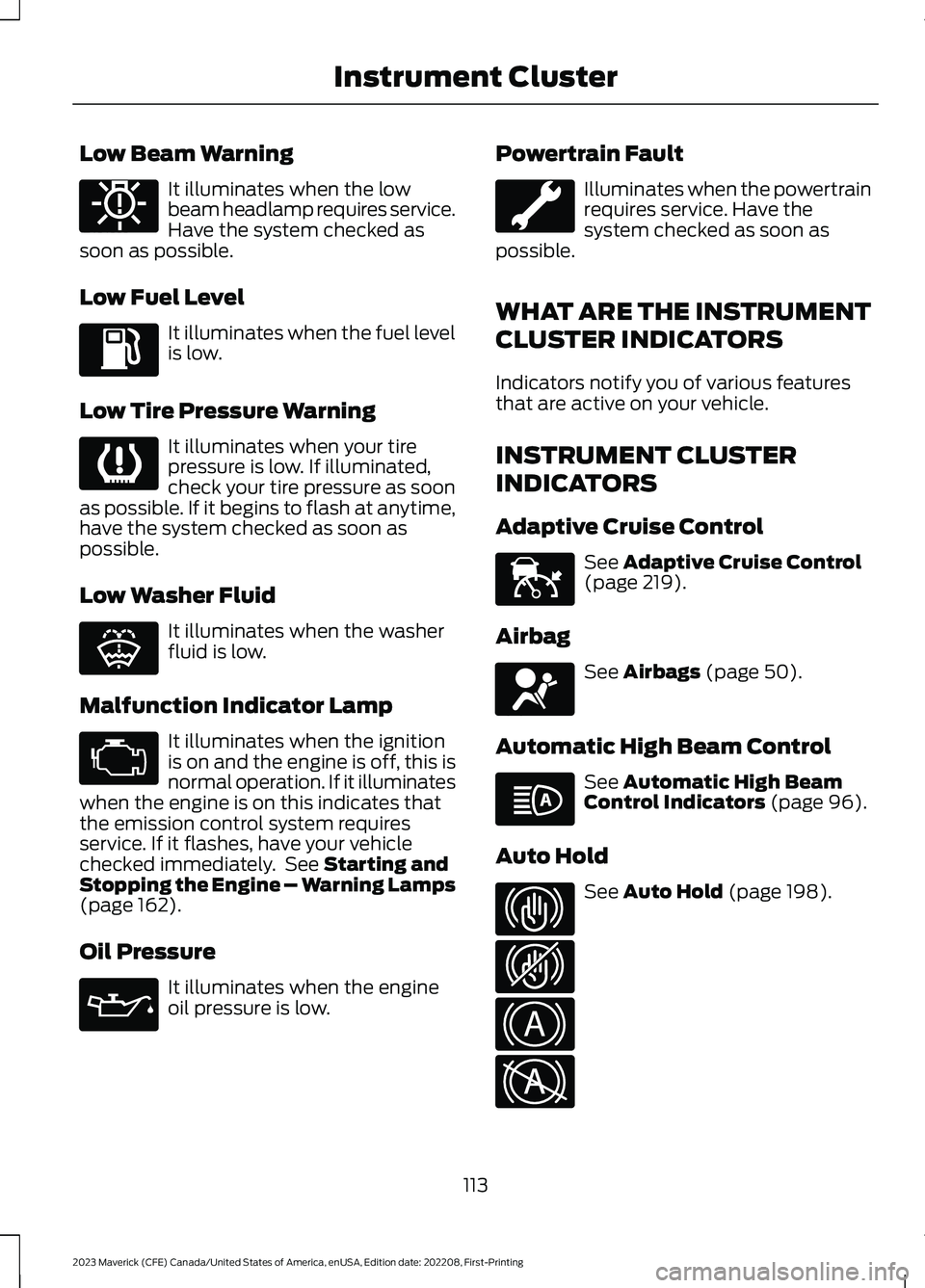
Low Beam Warning
It illuminates when the lowbeam headlamp requires service.Have the system checked assoon as possible.
Low Fuel Level
It illuminates when the fuel levelis low.
Low Tire Pressure Warning
It illuminates when your tirepressure is low. If illuminated,check your tire pressure as soonas possible. If it begins to flash at anytime,have the system checked as soon aspossible.
Low Washer Fluid
It illuminates when the washerfluid is low.
Malfunction Indicator Lamp
It illuminates when the ignitionis on and the engine is off, this isnormal operation. If it illuminateswhen the engine is on this indicates thatthe emission control system requiresservice. If it flashes, have your vehiclechecked immediately. See Starting andStopping the Engine – Warning Lamps(page 162).
Oil Pressure
It illuminates when the engineoil pressure is low.
Powertrain Fault
Illuminates when the powertrainrequires service. Have thesystem checked as soon aspossible.
WHAT ARE THE INSTRUMENT
CLUSTER INDICATORS
Indicators notify you of various featuresthat are active on your vehicle.
INSTRUMENT CLUSTER
INDICATORS
Adaptive Cruise Control
See Adaptive Cruise Control(page 219).
Airbag
See Airbags (page 50).
Automatic High Beam Control
See Automatic High BeamControl Indicators (page 96).
Auto Hold
See Auto Hold (page 198).
113
2023 Maverick (CFE) Canada/United States of America, enUSA, Edition date: 202208, First-PrintingInstrument ClusterE181350 E139232 E132353 E67028 E67022 E144524 E67017 E146105 E323448 E323449 E322410 E322411
Page 120 of 556
INSTRUMENT CLUSTER
DISPLAY MAIN MENU -
VEHICLES WITH: 6.5 INCH
SCREEN
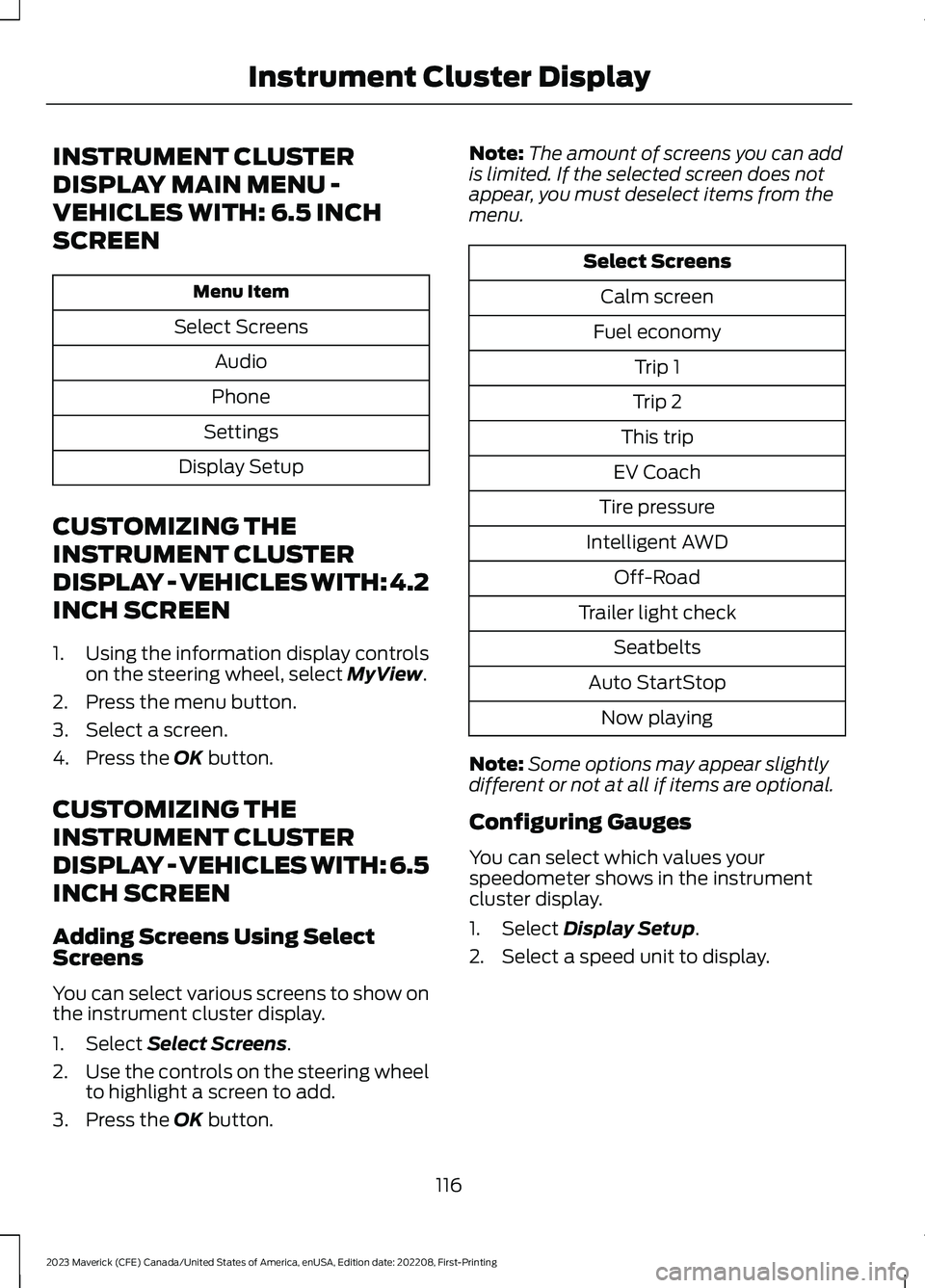
Menu Item
Select Screens
Audio
Phone
Settings
Display Setup
CUSTOMIZING THE
INSTRUMENT CLUSTER
DISPLAY - VEHICLES WITH: 4.2
INCH SCREEN
1.Using the information display controlson the steering wheel, select MyView.
2.Press the menu button.
3.Select a screen.
4.Press the OK button.
CUSTOMIZING THE
INSTRUMENT CLUSTER
DISPLAY - VEHICLES WITH: 6.5
INCH SCREEN
Adding Screens Using SelectScreens
You can select various screens to show onthe instrument cluster display.
1.Select Select Screens.
2.Use the controls on the steering wheelto highlight a screen to add.
3.Press the OK button.
Note:The amount of screens you can addis limited. If the selected screen does notappear, you must deselect items from themenu.
Select Screens
Calm screen
Fuel economy
Trip 1
Trip 2
This trip
EV Coach
Tire pressure
Intelligent AWD
Off-Road
Trailer light check
Seatbelts
Auto StartStop
Now playing
Note:Some options may appear slightlydifferent or not at all if items are optional.
Configuring Gauges
You can select which values yourspeedometer shows in the instrumentcluster display.
1.Select Display Setup.
2.Select a speed unit to display.
116
2023 Maverick (CFE) Canada/United States of America, enUSA, Edition date: 202208, First-PrintingInstrument Cluster Display