seats FORD MAVERICK 2023 User Guide
[x] Cancel search | Manufacturer: FORD, Model Year: 2023, Model line: MAVERICK, Model: FORD MAVERICK 2023Pages: 556, PDF Size: 14.79 MB
Page 56 of 556
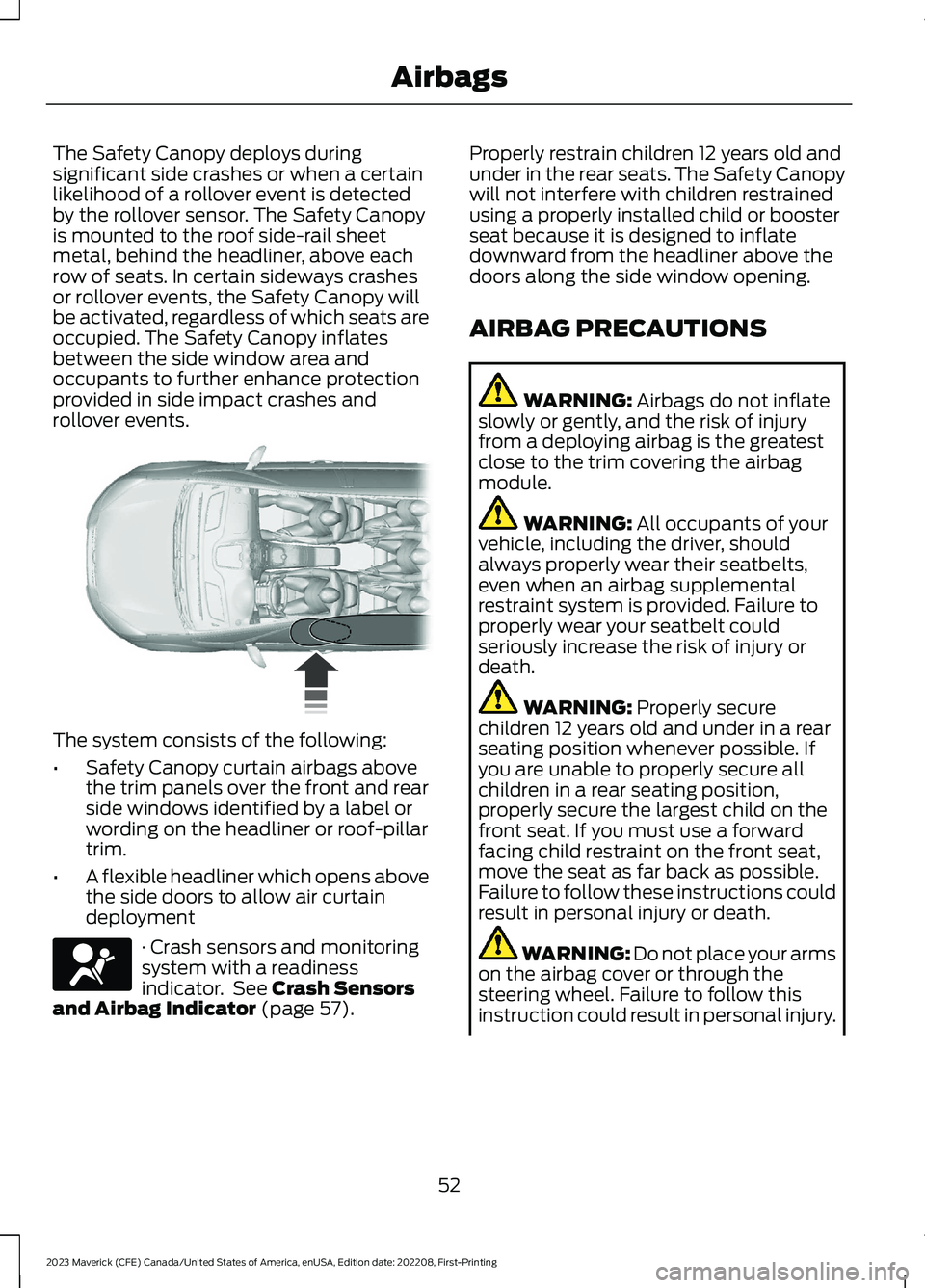
The Safety Canopy deploys duringsignificant side crashes or when a certainlikelihood of a rollover event is detectedby the rollover sensor. The Safety Canopyis mounted to the roof side-rail sheetmetal, behind the headliner, above eachrow of seats. In certain sideways crashesor rollover events, the Safety Canopy willbe activated, regardless of which seats areoccupied. The Safety Canopy inflatesbetween the side window area andoccupants to further enhance protectionprovided in side impact crashes androllover events.
The system consists of the following:
•Safety Canopy curtain airbags abovethe trim panels over the front and rearside windows identified by a label orwording on the headliner or roof-pillartrim.
•A flexible headliner which opens abovethe side doors to allow air curtaindeployment
· Crash sensors and monitoringsystem with a readinessindicator. See Crash Sensorsand Airbag Indicator (page 57).
Properly restrain children 12 years old andunder in the rear seats. The Safety Canopywill not interfere with children restrainedusing a properly installed child or boosterseat because it is designed to inflatedownward from the headliner above thedoors along the side window opening.
AIRBAG PRECAUTIONS
WARNING: Airbags do not inflateslowly or gently, and the risk of injuryfrom a deploying airbag is the greatestclose to the trim covering the airbagmodule.
WARNING: All occupants of yourvehicle, including the driver, shouldalways properly wear their seatbelts,even when an airbag supplementalrestraint system is provided. Failure toproperly wear your seatbelt couldseriously increase the risk of injury ordeath.
WARNING: Properly securechildren 12 years old and under in a rearseating position whenever possible. Ifyou are unable to properly secure allchildren in a rear seating position,properly secure the largest child on thefront seat. If you must use a forwardfacing child restraint on the front seat,move the seat as far back as possible.Failure to follow these instructions couldresult in personal injury or death.
WARNING: Do not place your armson the airbag cover or through thesteering wheel. Failure to follow thisinstruction could result in personal injury.
52
2023 Maverick (CFE) Canada/United States of America, enUSA, Edition date: 202208, First-PrintingAirbags E75004 E67017
Page 57 of 556
WARNING: Keep the areas in frontof the airbags free from obstruction. Donot affix anything to or over the airbagcovers. Objects could become projectilesduring airbag deployment. Failure tofollow this instruction could result inpersonal injury or death.
WARNING: To reduce risk of injury,do not obstruct or place objects in thedeployment path of the airbag.
WARNING: Do not place arearward facing child restraint in front ofan active airbag. Failure to follow thisinstruction could result in personal injuryor death.
WARNING: Do not attempt toservice, repair, or modify thesupplementary restraint system orassociated components. Failure tofollow this instruction could result inpersonal injury or death.
WARNING: Several airbag systemcomponents get hot after inflation. Toreduce the risk of injury, do not touchthem after inflation.
WARNING: If a supplementaryrestraint system component hasdeployed, it will not function again. Havethe system and associated componentsinspected as soon as possible. Failure tofollow this instruction could result inpersonal injury or death.
PROPERLY ADJUSTING THE
DRIVER AND FRONT
PASSENGER SEATS
WARNING: National HighwayTraffic Safety Administration (NHTSA)recommends a minimum distance of atleast 10 in (25 cm) between anoccupant's chest and the driver airbagmodule.
To properly position yourself away fromthe airbag:
•Move your seat to the rear as far as youcan while still reaching the pedalscomfortably.
•Recline the seat slightly one or twodegrees from the upright position.
After all occupants have adjusted theirseats and put on seatbelts, it is veryimportant that they continue to sitproperly. Properly seated occupants situpright, lean against the seat backrest, andcenter themselves on the seat cushion,with their feet comfortably extended onthe floor. Sitting improperly can increasethe chance of injury in a crash event. Forexample, if an occupant slouches, liesdown, turns sideways, sits forward, leansforward or sideways, or puts one or bothfeet up, the chance of injury during a crashgreatly increases.
CHILDREN AND AIRBAGS
WARNING: Do not place arearward facing child restraint in front ofan active airbag. Failure to follow thisinstruction could result in personal injuryor death.
53
2023 Maverick (CFE) Canada/United States of America, enUSA, Edition date: 202208, First-PrintingAirbags
Page 59 of 556
•When the front passenger sensingsystem enables the front passengerfrontal airbag, the passenger airbagstatus indicator illuminates the onlamp.
If a person of adult size is sitting in the frontpassenger seat, but the passenger airbagstatus indicator off lamp is illuminated, itis possible that the person is not sittingproperly in the seat. If this happens:
•Switch your vehicle off and ask theperson to place the seat backrest in anupright position.
•Have the person sit upright in the seat,centered on the seat cushion, with theperson's legs comfortably extended.
•Restart your vehicle and have theperson remain in this position for abouttwo minutes. This allows the systemto detect that person and enable thepassenger frontal airbag.
•If the indicator off lamp remainsilluminated even after this, advise theperson to ride in the rear seat.
After all occupants have adjusted theirseats and put on seatbelts, it is veryimportant that they continue to sit upright,leaning against the seat backrest, andcentered on the seat cushion, with theirfeet comfortably extended on the floor.
Sitting improperly can increase the chanceof injury in a crash event. For example, ifan occupant slouches, lies down, turnssideways, sits forward, leans forward orsideways, or puts one or both feet up, thechance of injury during a crash greatlyincreases.
If you think that the state of the passengerairbag status indicator lamp is incorrect,check the following:
•Objects lodged underneath the seat.
•Objects between the seat cushion andthe center console.
•Objects hanging off the seat backrest.
•Objects stowed in the seat backrestmap pocket.
•Objects placed on the occupant's lap.
•Cargo interference with the seat
•Other passengers pushing or pulling onthe seat.
•Rear passenger feet and knees restingor pushing on the seat.
The listed conditions could cause theweight of a properly seated occupant tobe incorrectly interpreted by the frontpassenger sensing system. The person inthe front passenger seat could appearheavier or lighter due to the conditionslisted.
Make sure the front passengersensing system is operatingproperly. See Crash Sensorsand Airbag Indicator (page 57).
If the airbag readiness light is on, do thefollowing:
•Pull your vehicle over.
•Switch your vehicle off.
•Check for any objects lodgedunderneath the front passenger seator cargo interfering with the seat.
•Remove the obstruction if found.
•Restart your vehicle.
•Wait at least two minutes and verifythat the airbag readiness light in theinstrument cluster is no longerilluminated.
•If the airbag readiness light in theinstrument cluster remains illuminated,there may be a problem due to thefront passenger sensing system.
Do not attempt to repair or service thesystem. Take your vehicle in for serviceimmediately.
55
2023 Maverick (CFE) Canada/United States of America, enUSA, Edition date: 202208, First-PrintingAirbagsE67017
Page 85 of 556
TAILGATE PRECAUTIONS
WARNING: It is extremelydangerous to ride in a cargo area, insideor outside of a vehicle. In a crash, peopleriding in these areas are more likely to beseriously injured or killed. Do not allowpeople to ride in any area of your vehiclethat is not equipped with seats andseatbelts. Make sure everyone in yourvehicle is in a seat and properly using aseatbelt. Failure to follow this warningcould result in serious personal injury ordeath.
OPENING THE TAILGATE
OPENING THE TAILGATE FROMOUTSIDE YOUR VEHICLE
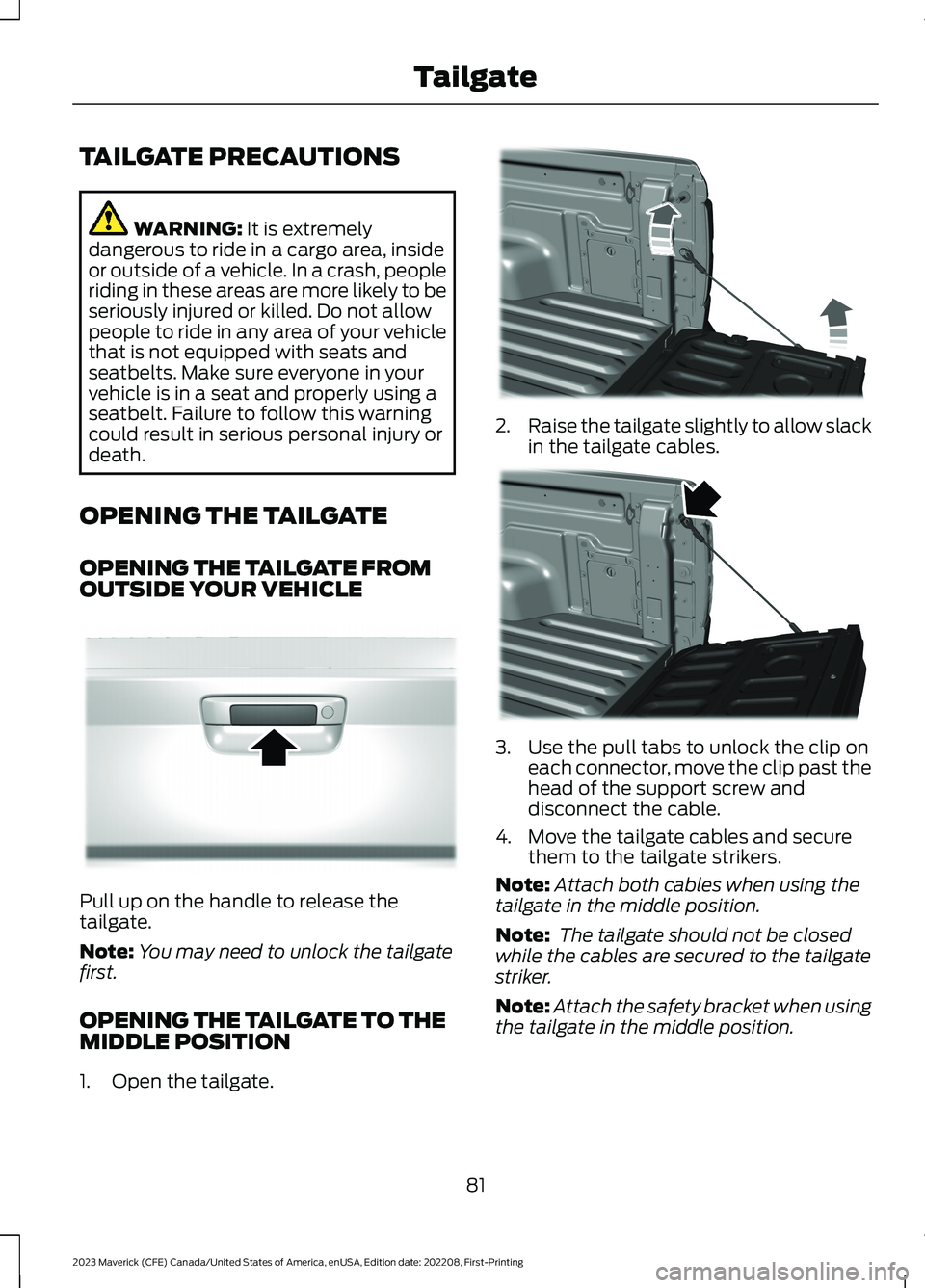
Pull up on the handle to release thetailgate.
Note:You may need to unlock the tailgatefirst.
OPENING THE TAILGATE TO THEMIDDLE POSITION
1.Open the tailgate.
2.Raise the tailgate slightly to allow slackin the tailgate cables.
3.Use the pull tabs to unlock the clip oneach connector, move the clip past thehead of the support screw anddisconnect the cable.
4.Move the tailgate cables and securethem to the tailgate strikers.
Note:Attach both cables when using thetailgate in the middle position.
Note: The tailgate should not be closedwhile the cables are secured to the tailgatestriker.
Note:Attach the safety bracket when usingthe tailgate in the middle position.
81
2023 Maverick (CFE) Canada/United States of America, enUSA, Edition date: 202208, First-PrintingTailgateE348034 E351595 E351596
Page 127 of 556
Within three seconds, press thebutton on the remote control.
Within three seconds, press thebutton again.
If the duration is set to 15 minutes, theduration extends by another 15 minutes.This provides a total of 30 minutes.
Note:Remote start can only be extendedonce.
Note:A maximum of two remote starts, orone remote start with an extension, areallowed. To reset the restart procedureswitch the vehicle to on, then to off.
REMOTE START REMOTE
CONTROL INDICATORS
Remote Control Feedback
An LED on the remote control providesstatus feedback of remote start or stopcommands.
StatusLED
Remote startsuccessful.Solid green.
Remote stopsuccessful.Solid red.
Request failed orstatus not received.Blinking red.
Status incomplete.Blinking green.
REMOTE START SETTINGS
Switching Climate Control AutoMode On and Off
1.Using the instrument cluster displaycontrols on the steering wheel, selectSettings.
2.Select Vehicle.
3.Select Remote Start.
4.Select Climate Control.
5.Select Auto or Last settings.
Note:If you switch the auto mode on, thesystem attempts to heat or cool the interiorto 72°F (22°C). When you switch the vehicleon, the climate control system returns tothe last used settings.
Note:If you switch the last settings on, thesystem remembers the last used settings.
Heated Seat Settings (If Equipped)
1.Using the instrument cluster displaycontrols on the steering wheel, selectSettings.
2.Select Vehicle.
3.Select Remote Start.
4.Select Seats.
5.Select Auto or Off.
Note:If you switch the heated seat settingson, the heated seats turn on during coldweather.
Note:You cannot adjust the heated seatsettings when you remotely start yourvehicle.
Heated Steering Wheel Settings (If
Equipped)
1.Using the instrument cluster displaycontrols on the steering wheel, selectSettings.
2.Select Vehicle.
3.Select Remote Start.
4.Select Seats and Wheel.
5.Select Auto or Off.
Note:If you switch the heated steeringwheel settings on, the heated steering wheelturns on during cold weather.
123
2023 Maverick (CFE) Canada/United States of America, enUSA, Edition date: 202208, First-PrintingRemote Start (If Equipped)E138625
Page 132 of 556
SWITCHING DUAL MODE ON ANDOFF
Press the button.
CLIMATE CONTROL HINTS
General Hints
•Prolonged use of recirculated air maycause the windows to fog up.
•You may feel a small amount of airfrom the footwell air vents regardlessof the air distribution setting.
•To reduce humidity build-up inside yourvehicle, do not drive with the systemswitched off or with recirculated airalways switched on.
•Do not place objects under the frontseats as this may interfere with theairflow to the rear seats.
•Remove any snow, ice or leaves fromthe air intake area at the base of thewindshield.
•To improve the time to reach acomfortable temperature in hotweather, drive with the windows openuntil you feel cold air through the airvents.
Automatic Climate Control
•Adjusting the settings when yourvehicle interior is extremely hot or coldis not necessary. Automatic mode isbest recommended to maintain settemperature.
•The system adjusts to heat or cool theinterior to the temperature you selectas quickly as possible.
•For the system to function efficiently,the instrument panel and side air ventsshould be fully open.
•If you press AUTO during cold outsidetemperatures, the system directs airflow to the windshield and side windowair vents.In addition, the blower motormay run at a slower speed until theengine warms up.
•If you press AUTO during hottemperatures and the inside of thevehicle is hot, the system usesrecirculated air to maximize interiorcooling. Blower motor speed may alsoreduce until the air cools.
Quickly Heating the Interior
1.Press AUTO.
2.Adjust the temperature function to thesetting you prefer.
Recommended Settings forHeating
1.Press AUTO.
2.Adjust the temperature function to thesetting you prefer. Use 72°F (22°C) asa starting point, then adjust the settingas necessary.
Quickly Cooling the Interior
1.Press MAX A/C.
2.Drive with the windows open for a shortperiod of time.
Recommended Settings forCooling
1.Press AUTO.
2.Adjust the temperature function to thesetting you prefer. Use 72°F (22°C) asa starting point, then adjust the settingas necessary.
Defogging the Side Windows inCold Weather
1.Press and release defrost or maximumdefrost.
128
2023 Maverick (CFE) Canada/United States of America, enUSA, Edition date: 202208, First-PrintingClimate Control - Vehicles With: Dual Automatic TemperatureControl (DATC)E265280
Page 136 of 556
AUTO MODE
SWITCHING AUTO MODE ON ANDOFF
Press the button to switch automode on. Repeatedly press thebutton to adjust auto mode.
Note:When you switch auto mode on,lights on the blower motor control do notilluminate to indicate the blower motorspeed.
Adjust the blower motor control or airdistribution control to switch auto modeoff.
AUTO MODE INDICATORS
The indicators are on the Auto Modebutton.
DescriptionAuto Mode IndicatorStatus
The blower motor speed is reduced. Use this setting tominimize the amount of noise from the blower motor. Thissetting increases the time taken to cool the interior.
One indicator illumin-ated.
The blower motor speed is moderate.Two indicators illumin-ated.
The blower motor speed is increased. Use this setting toreduce the time taken to cool the interior. This settingincreases the amount of noise from the blower motor.
Three indicators illumin-ated.
CLIMATE CONTROL HINTS
General Hints
•Prolonged use of recirculated air maycause the windows to fog up.
•You may feel a small amount of airfrom the footwell air vents regardlessof the air distribution setting.
•To reduce humidity build-up inside yourvehicle, do not drive with the systemswitched off or with recirculated airalways switched on.
•Do not place objects under the frontseats as this may interfere with theairflow to the rear seats.
•Remove any snow, ice or leaves fromthe air intake area at the base of thewindshield.
•To improve the time to reach acomfortable temperature in hotweather, drive with the windows openuntil you feel cold air through the airvents.
Automatic Climate Control
•Adjusting the settings when yourvehicle interior is extremely hot or coldis not necessary. Automatic mode isbest recommended to maintain settemperature.
•The system adjusts to heat or cool theinterior to the temperature you selectas quickly as possible.
132
2023 Maverick (CFE) Canada/United States of America, enUSA, Edition date: 202208, First-PrintingClimate Control - Vehicles With: Electronic Automatic TemperatureControl (EATC)
Page 139 of 556
FRONT SEAT PRECAUTIONS
WARNING: Sitting improperly, outof position or with the seatback reclinedtoo far can take weight off the seatcushion and affect the decision of thepassenger sensing system, resulting inserious injury or death in the event of acrash. Always sit upright against yourseat back, with your feet on the floor.
WARNING: Do not recline the seatbackrest too far as this can cause theoccupant to slide under the seatbelt,resulting in personal injury in the eventof a crash.
WARNING: Do not place objectshigher than the top of the seat backrest.Failure to follow this instruction couldresult in personal injury or death in theevent of a sudden stop or crash.
WARNING: Do not adjust the driverseat or seat backrest when your vehicleis moving. This may result in sudden seatmovement, causing the loss of controlof your vehicle.
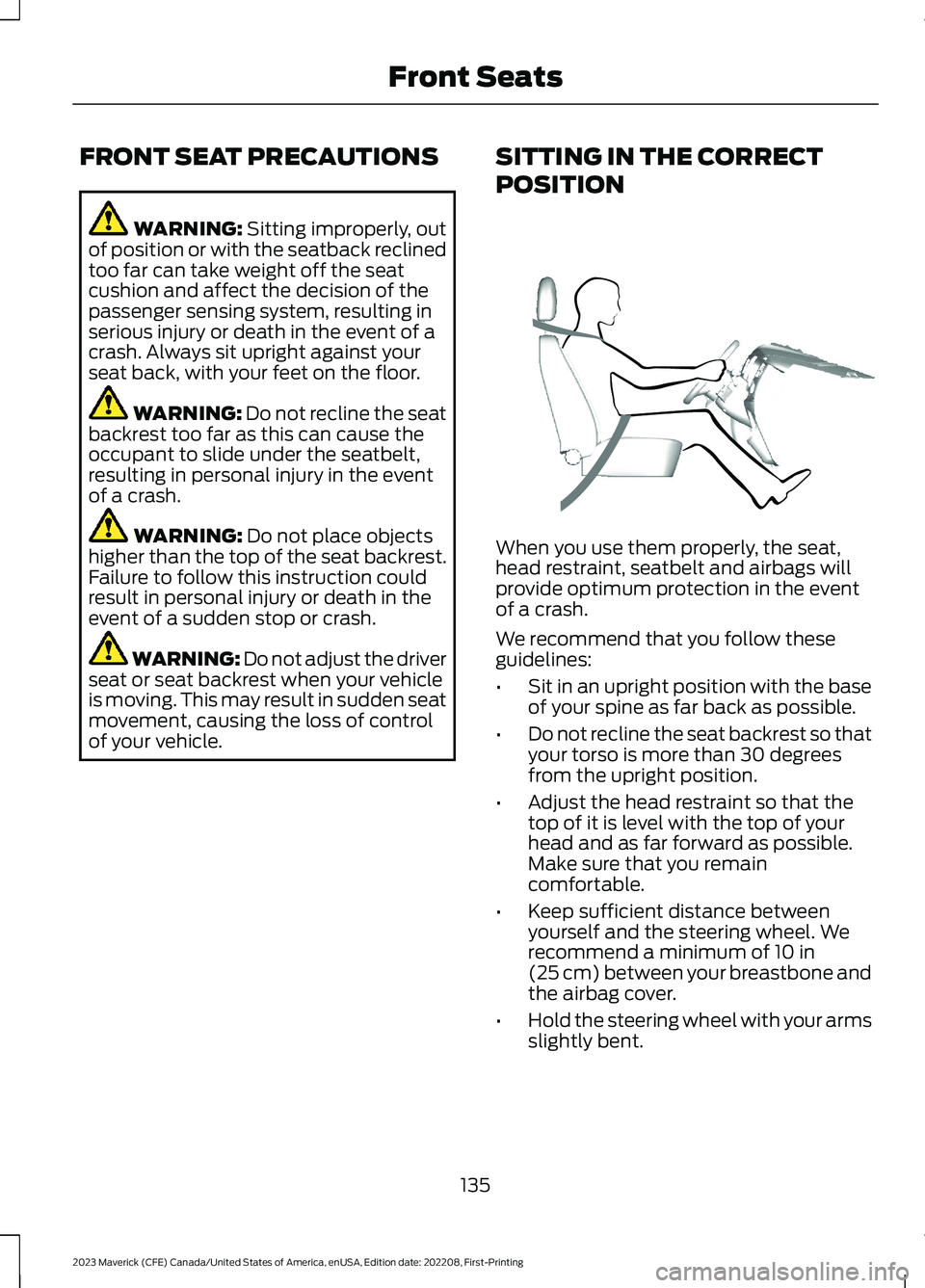
SITTING IN THE CORRECT
POSITION
When you use them properly, the seat,head restraint, seatbelt and airbags willprovide optimum protection in the eventof a crash.
We recommend that you follow theseguidelines:
•Sit in an upright position with the baseof your spine as far back as possible.
•Do not recline the seat backrest so thatyour torso is more than 30 degreesfrom the upright position.
•Adjust the head restraint so that thetop of it is level with the top of yourhead and as far forward as possible.Make sure that you remaincomfortable.
•Keep sufficient distance betweenyourself and the steering wheel. Werecommend a minimum of 10 in(25 cm) between your breastbone andthe airbag cover.
•Hold the steering wheel with your armsslightly bent.
135
2023 Maverick (CFE) Canada/United States of America, enUSA, Edition date: 202208, First-PrintingFront SeatsE68595
Page 140 of 556
•Bend your legs slightly so that you canpress the pedals fully.
•Position the shoulder strap of theseatbelt over the center of yourshoulder and position the lap straptightly across your hips.
Make sure that your driving position iscomfortable and that you can maintain fullcontrol of your vehicle.
MANUAL SEATS
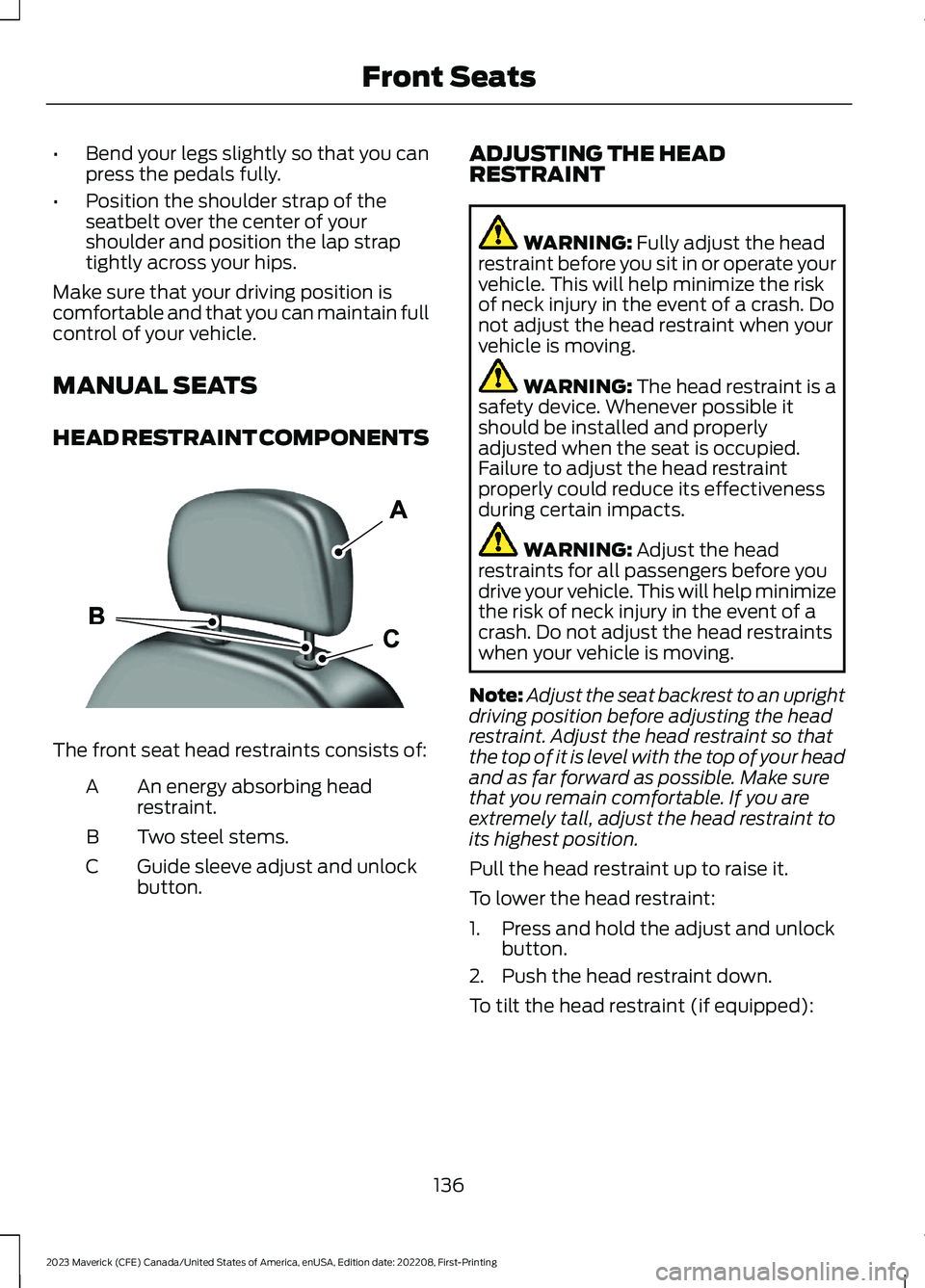
HEAD RESTRAINT COMPONENTS
The front seat head restraints consists of:
An energy absorbing headrestraint.A
Two steel stems.B
Guide sleeve adjust and unlockbutton.C
ADJUSTING THE HEADRESTRAINT
WARNING: Fully adjust the headrestraint before you sit in or operate yourvehicle. This will help minimize the riskof neck injury in the event of a crash. Donot adjust the head restraint when yourvehicle is moving.
WARNING: The head restraint is asafety device. Whenever possible itshould be installed and properlyadjusted when the seat is occupied.Failure to adjust the head restraintproperly could reduce its effectivenessduring certain impacts.
WARNING: Adjust the headrestraints for all passengers before youdrive your vehicle. This will help minimizethe risk of neck injury in the event of acrash. Do not adjust the head restraintswhen your vehicle is moving.
Note:Adjust the seat backrest to an uprightdriving position before adjusting the headrestraint. Adjust the head restraint so thatthe top of it is level with the top of your headand as far forward as possible. Make surethat you remain comfortable. If you areextremely tall, adjust the head restraint toits highest position.
Pull the head restraint up to raise it.
To lower the head restraint:
1.Press and hold the adjust and unlockbutton.
2.Push the head restraint down.
To tilt the head restraint (if equipped):
136
2023 Maverick (CFE) Canada/United States of America, enUSA, Edition date: 202208, First-PrintingFront SeatsE291139
Page 141 of 556
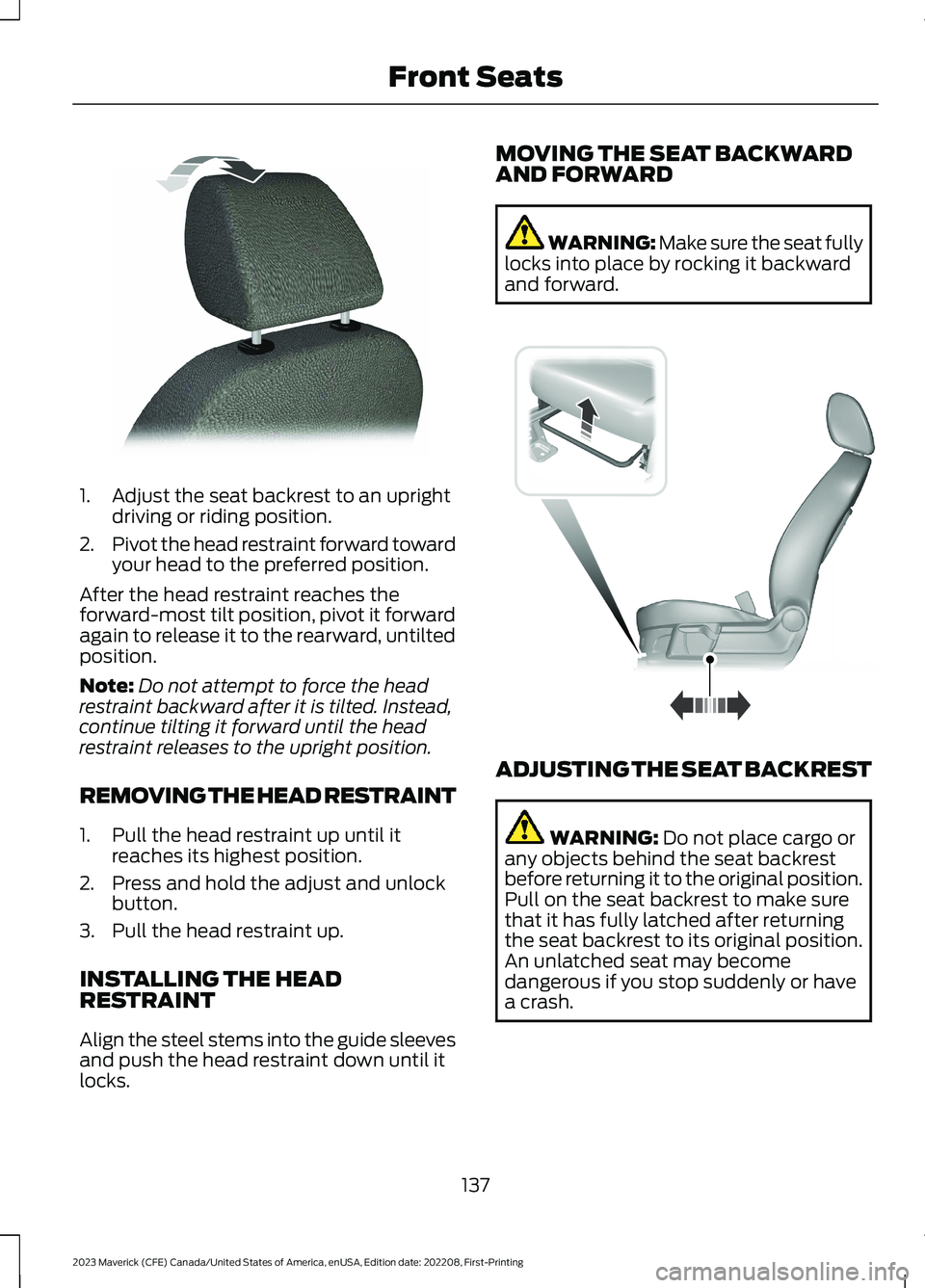
1.Adjust the seat backrest to an uprightdriving or riding position.
2.Pivot the head restraint forward towardyour head to the preferred position.
After the head restraint reaches theforward-most tilt position, pivot it forwardagain to release it to the rearward, untiltedposition.
Note:Do not attempt to force the headrestraint backward after it is tilted. Instead,continue tilting it forward until the headrestraint releases to the upright position.
REMOVING THE HEAD RESTRAINT
1.Pull the head restraint up until itreaches its highest position.
2.Press and hold the adjust and unlockbutton.
3.Pull the head restraint up.
INSTALLING THE HEADRESTRAINT
Align the steel stems into the guide sleevesand push the head restraint down until itlocks.
MOVING THE SEAT BACKWARDAND FORWARD
WARNING: Make sure the seat fullylocks into place by rocking it backwardand forward.
ADJUSTING THE SEAT BACKREST
WARNING: Do not place cargo orany objects behind the seat backrestbefore returning it to the original position.Pull on the seat backrest to make surethat it has fully latched after returningthe seat backrest to its original position.An unlatched seat may becomedangerous if you stop suddenly or havea crash.
137
2023 Maverick (CFE) Canada/United States of America, enUSA, Edition date: 202208, First-PrintingFront SeatsE144727 E163870