cruise control FORD MAVERICK 2023 Owner's Manual
[x] Cancel search | Manufacturer: FORD, Model Year: 2023, Model line: MAVERICK, Model: FORD MAVERICK 2023Pages: 556, PDF Size: 14.79 MB
Page 233 of 556
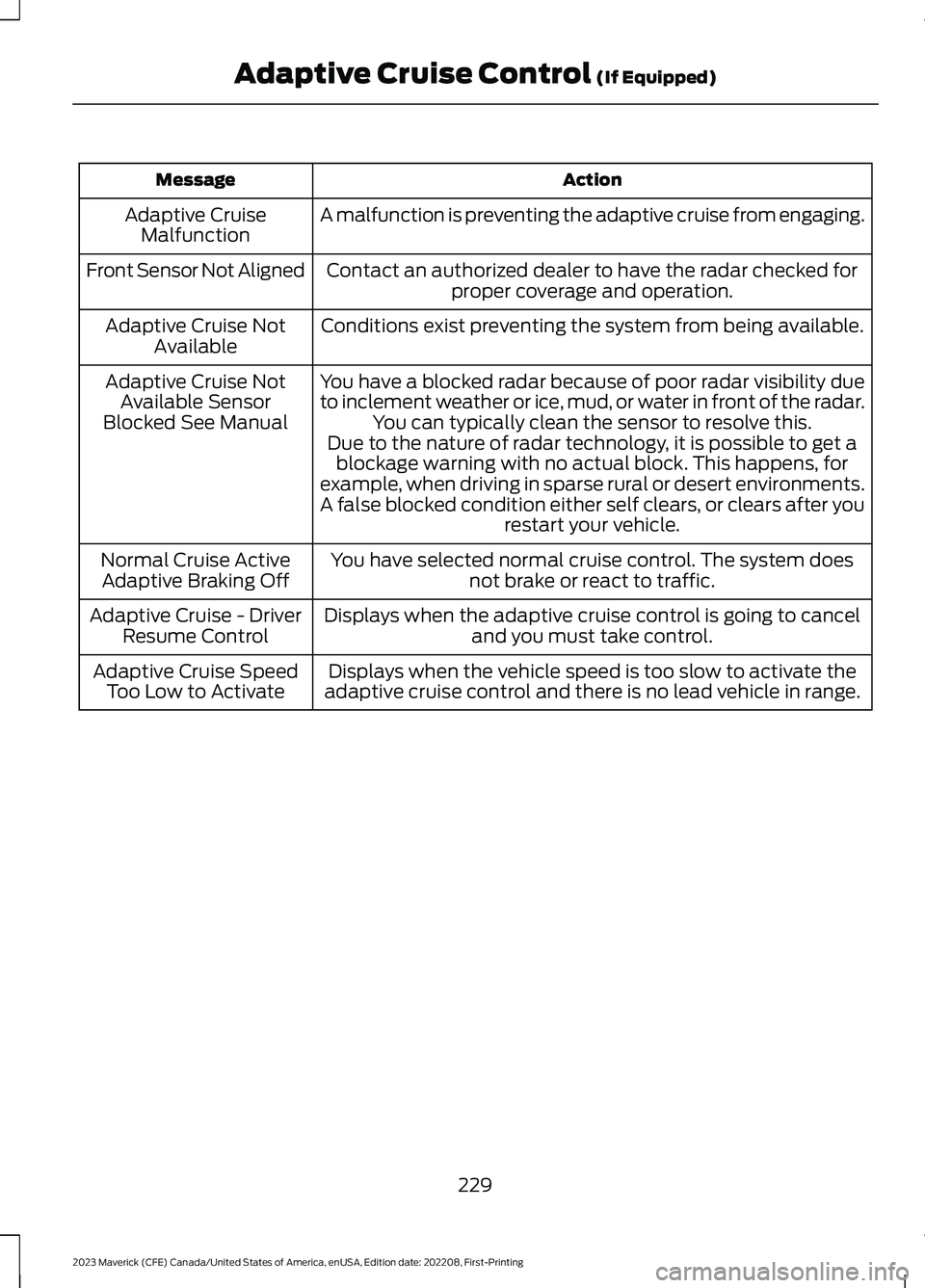
ActionMessage
A malfunction is preventing the adaptive cruise from engaging.Adaptive CruiseMalfunction
Front Sensor Not AlignedContact an authorized dealer to have the radar checked forproper coverage and operation.
Conditions exist preventing the system from being available.Adaptive Cruise NotAvailable
You have a blocked radar because of poor radar visibility dueto inclement weather or ice, mud, or water in front of the radar.You can typically clean the sensor to resolve this.
Adaptive Cruise NotAvailable SensorBlocked See ManualDue to the nature of radar technology, it is possible to get ablockage warning with no actual block. This happens, forexample, when driving in sparse rural or desert environments.A false blocked condition either self clears, or clears after yourestart your vehicle.
You have selected normal cruise control. The system doesnot brake or react to traffic.Normal Cruise ActiveAdaptive Braking Off
Displays when the adaptive cruise control is going to canceland you must take control.Adaptive Cruise - DriverResume Control
Displays when the vehicle speed is too slow to activate theadaptive cruise control and there is no lead vehicle in range.Adaptive Cruise SpeedToo Low to Activate
229
2023 Maverick (CFE) Canada/United States of America, enUSA, Edition date: 202208, First-PrintingAdaptive Cruise Control (If Equipped)
Page 241 of 556
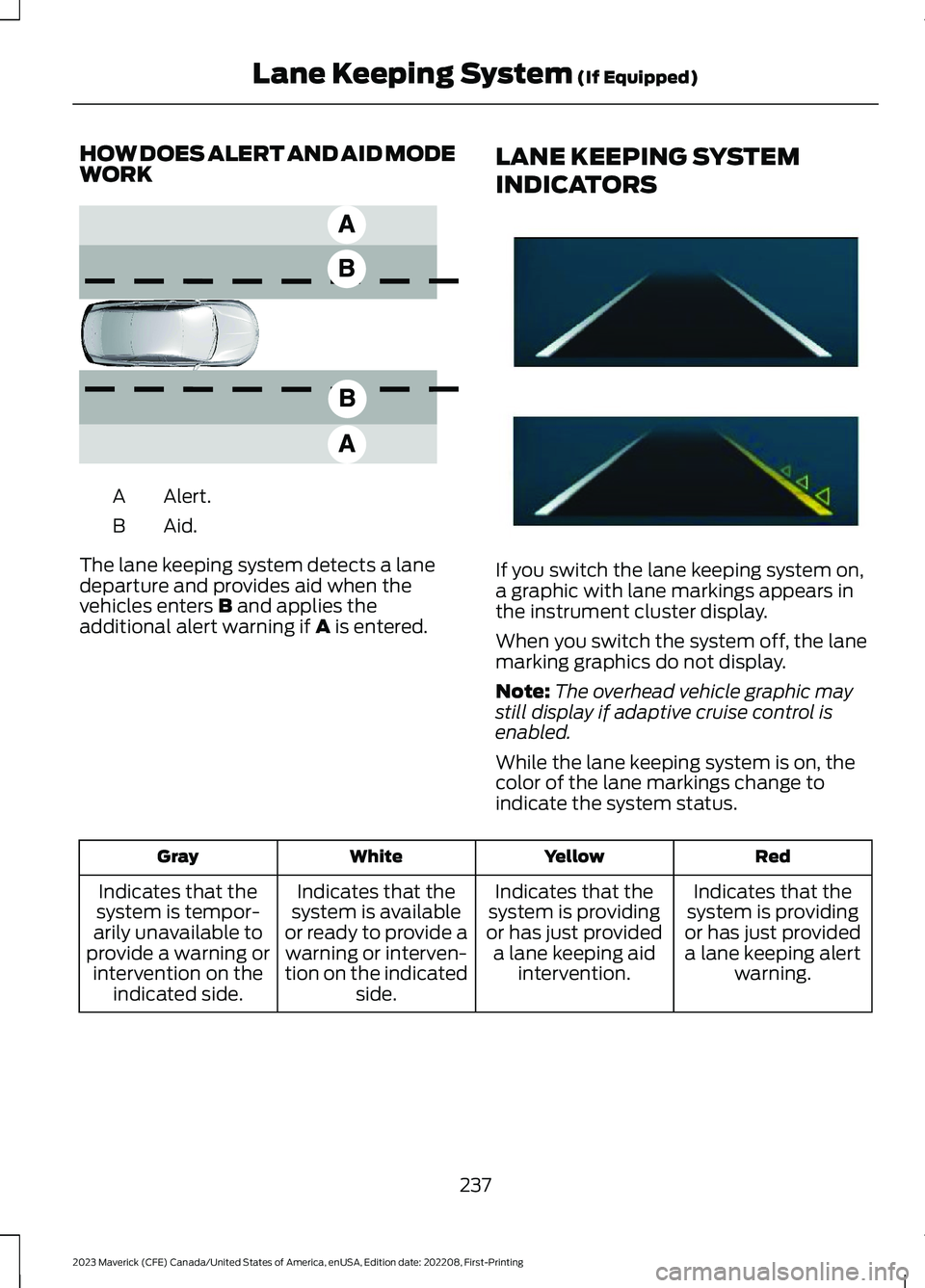
HOW DOES ALERT AND AID MODEWORK
Alert.A
Aid.B
The lane keeping system detects a lanedeparture and provides aid when thevehicles enters B and applies theadditional alert warning if A is entered.
LANE KEEPING SYSTEM
INDICATORS
If you switch the lane keeping system on,a graphic with lane markings appears inthe instrument cluster display.
When you switch the system off, the lanemarking graphics do not display.
Note:The overhead vehicle graphic maystill display if adaptive cruise control isenabled.
While the lane keeping system is on, thecolor of the lane markings change toindicate the system status.
RedYellowWhiteGray
Indicates that thesystem is providingor has just provideda lane keeping alertwarning.
Indicates that thesystem is providingor has just provideda lane keeping aidintervention.
Indicates that thesystem is availableor ready to provide awarning or interven-tion on the indicatedside.
Indicates that thesystem is tempor-arily unavailable toprovide a warning orintervention on theindicated side.
237
2023 Maverick (CFE) Canada/United States of America, enUSA, Edition date: 202208, First-PrintingLane Keeping System (If Equipped)E165517 E294544
Page 252 of 556
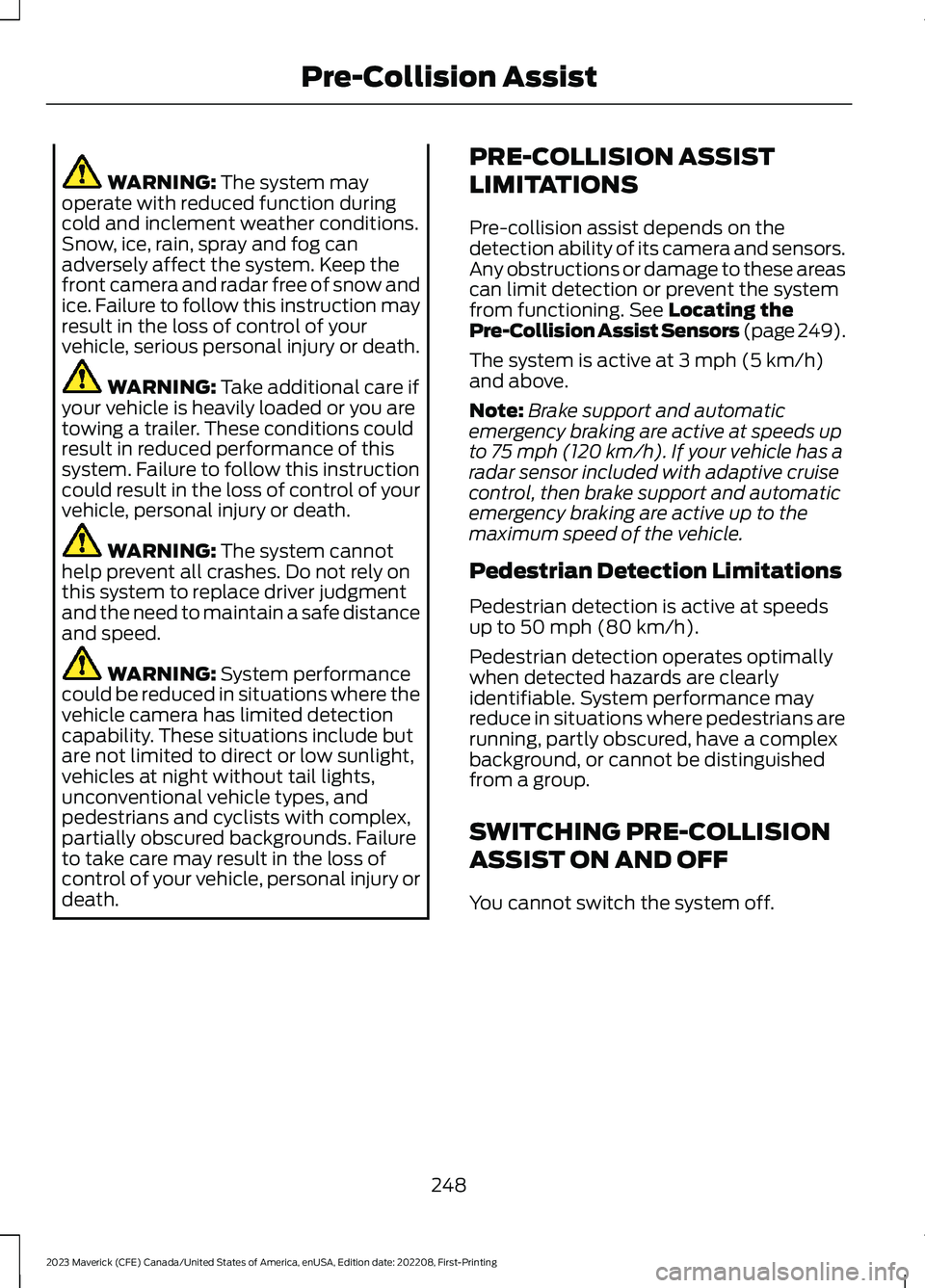
WARNING: The system mayoperate with reduced function duringcold and inclement weather conditions.Snow, ice, rain, spray and fog canadversely affect the system. Keep thefront camera and radar free of snow andice. Failure to follow this instruction mayresult in the loss of control of yourvehicle, serious personal injury or death.
WARNING: Take additional care ifyour vehicle is heavily loaded or you aretowing a trailer. These conditions couldresult in reduced performance of thissystem. Failure to follow this instructioncould result in the loss of control of yourvehicle, personal injury or death.
WARNING: The system cannothelp prevent all crashes. Do not rely onthis system to replace driver judgmentand the need to maintain a safe distanceand speed.
WARNING: System performancecould be reduced in situations where thevehicle camera has limited detectioncapability. These situations include butare not limited to direct or low sunlight,vehicles at night without tail lights,unconventional vehicle types, andpedestrians and cyclists with complex,partially obscured backgrounds. Failureto take care may result in the loss ofcontrol of your vehicle, personal injury ordeath.
PRE-COLLISION ASSIST
LIMITATIONS
Pre-collision assist depends on thedetection ability of its camera and sensors.Any obstructions or damage to these areascan limit detection or prevent the systemfrom functioning. See Locating thePre-Collision Assist Sensors (page 249).
The system is active at 3 mph (5 km/h)and above.
Note:Brake support and automaticemergency braking are active at speeds upto 75 mph (120 km/h). If your vehicle has aradar sensor included with adaptive cruisecontrol, then brake support and automaticemergency braking are active up to themaximum speed of the vehicle.
Pedestrian Detection Limitations
Pedestrian detection is active at speedsup to 50 mph (80 km/h).
Pedestrian detection operates optimallywhen detected hazards are clearlyidentifiable. System performance mayreduce in situations where pedestrians arerunning, partly obscured, have a complexbackground, or cannot be distinguishedfrom a group.
SWITCHING PRE-COLLISION
ASSIST ON AND OFF
You cannot switch the system off.
248
2023 Maverick (CFE) Canada/United States of America, enUSA, Edition date: 202208, First-PrintingPre-Collision Assist
Page 253 of 556
Adjusting the Pre-Collision AssistSettings
You can adjust the following settings byusing the controls in the pre-collision assistmenu:
•Change alert and distance alertsensitivity to one of three possiblesettings.
•Switch distance indication and alert onor off.
•If required, switch automaticemergency braking on or off.
•If required, switch evasive steeringassist on or off.
Note:Automatic emergency braking andevasive steering automatically turns onevery time you switch the ignition on.
Note:If you switch automatic emergencybraking off, evasive steering assist switchesoff.
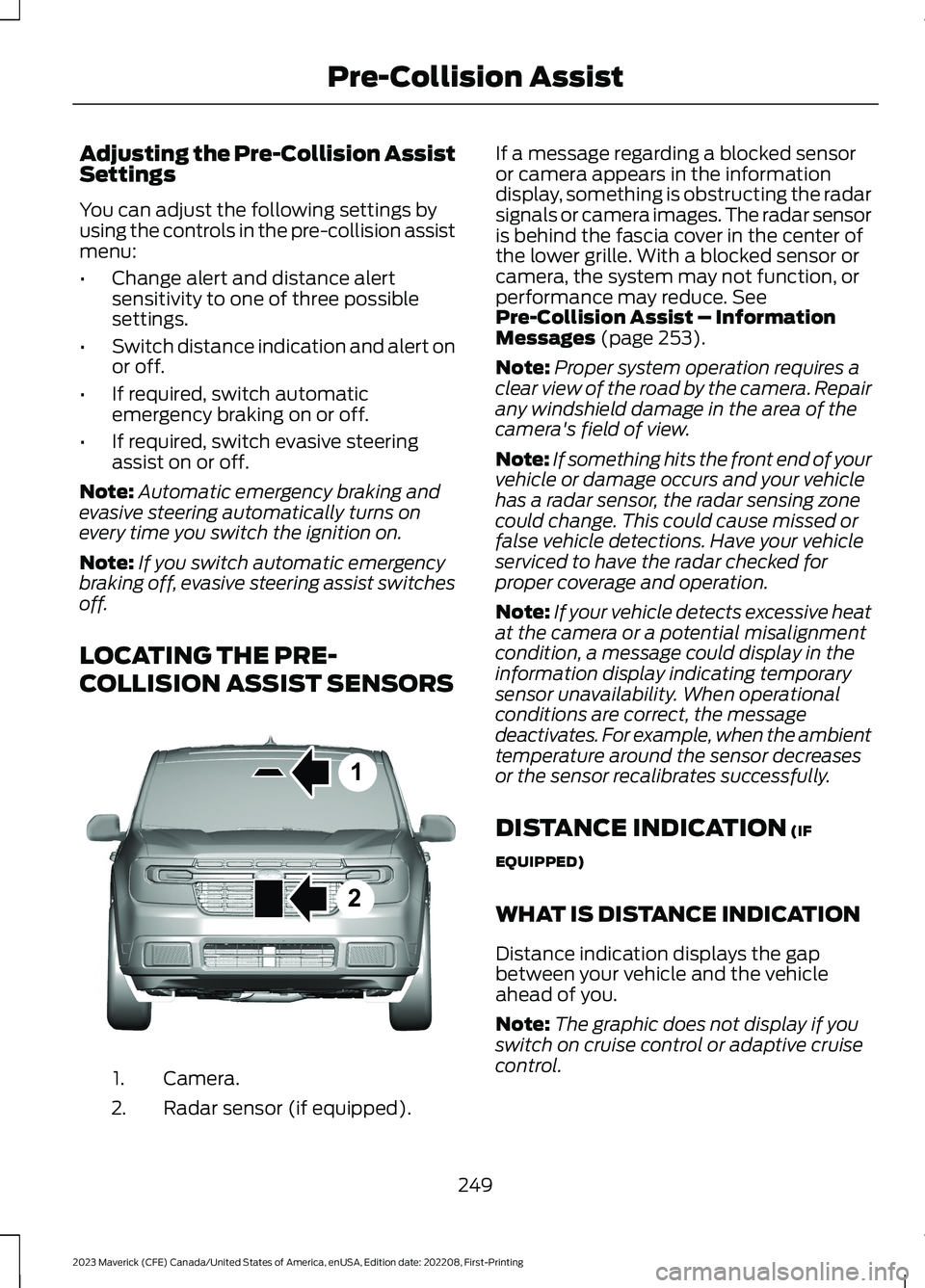
LOCATING THE PRE-
COLLISION ASSIST SENSORS
Camera.1.
Radar sensor (if equipped).2.
If a message regarding a blocked sensoror camera appears in the informationdisplay, something is obstructing the radarsignals or camera images. The radar sensoris behind the fascia cover in the center ofthe lower grille. With a blocked sensor orcamera, the system may not function, orperformance may reduce. SeePre-Collision Assist – InformationMessages (page 253).
Note:Proper system operation requires aclear view of the road by the camera. Repairany windshield damage in the area of thecamera's field of view.
Note:If something hits the front end of yourvehicle or damage occurs and your vehiclehas a radar sensor, the radar sensing zonecould change. This could cause missed orfalse vehicle detections. Have your vehicleserviced to have the radar checked forproper coverage and operation.
Note:If your vehicle detects excessive heatat the camera or a potential misalignmentcondition, a message could display in theinformation display indicating temporarysensor unavailability. When operationalconditions are correct, the messagedeactivates. For example, when the ambienttemperature around the sensor decreasesor the sensor recalibrates successfully.
DISTANCE INDICATION (IF
EQUIPPED)
WHAT IS DISTANCE INDICATION
Distance indication displays the gapbetween your vehicle and the vehicleahead of you.
Note:The graphic does not display if youswitch on cruise control or adaptive cruisecontrol.
249
2023 Maverick (CFE) Canada/United States of America, enUSA, Edition date: 202208, First-PrintingPre-Collision Assist12E355015
Page 255 of 556
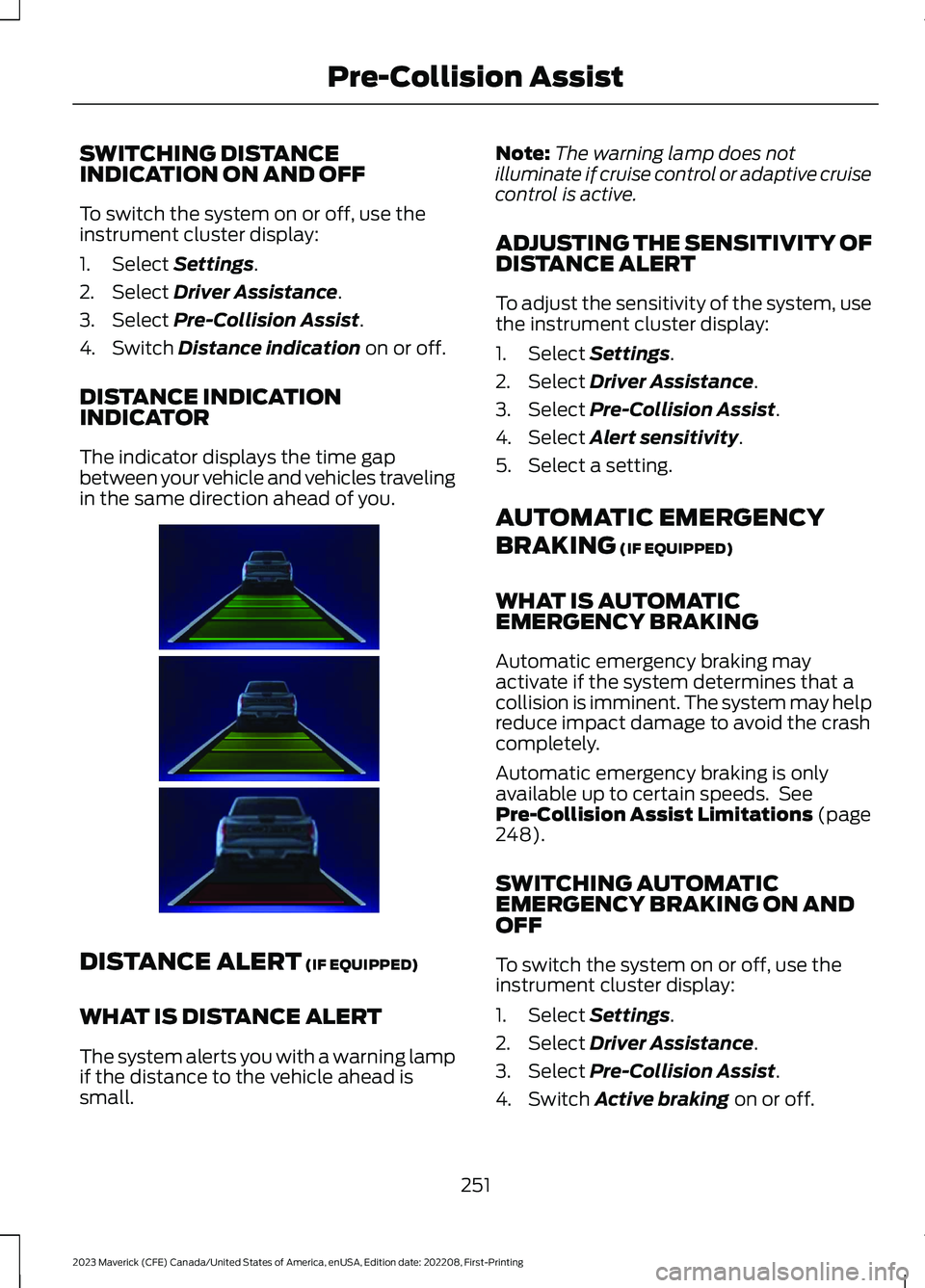
SWITCHING DISTANCEINDICATION ON AND OFF
To switch the system on or off, use theinstrument cluster display:
1.Select Settings.
2.Select Driver Assistance.
3.Select Pre-Collision Assist.
4.Switch Distance indication on or off.
DISTANCE INDICATIONINDICATOR
The indicator displays the time gapbetween your vehicle and vehicles travelingin the same direction ahead of you.
DISTANCE ALERT (IF EQUIPPED)
WHAT IS DISTANCE ALERT
The system alerts you with a warning lampif the distance to the vehicle ahead issmall.
Note:The warning lamp does notilluminate if cruise control or adaptive cruisecontrol is active.
ADJUSTING THE SENSITIVITY OFDISTANCE ALERT
To adjust the sensitivity of the system, usethe instrument cluster display:
1.Select Settings.
2.Select Driver Assistance.
3.Select Pre-Collision Assist.
4.Select Alert sensitivity.
5.Select a setting.
AUTOMATIC EMERGENCY
BRAKING (IF EQUIPPED)
WHAT IS AUTOMATICEMERGENCY BRAKING
Automatic emergency braking mayactivate if the system determines that acollision is imminent. The system may helpreduce impact damage to avoid the crashcompletely.
Automatic emergency braking is onlyavailable up to certain speeds. SeePre-Collision Assist Limitations (page248).
SWITCHING AUTOMATICEMERGENCY BRAKING ON ANDOFF
To switch the system on or off, use theinstrument cluster display:
1.Select Settings.
2.Select Driver Assistance.
3.Select Pre-Collision Assist.
4.Switch Active braking on or off.
251
2023 Maverick (CFE) Canada/United States of America, enUSA, Edition date: 202208, First-PrintingPre-Collision AssistE383896
Page 301 of 556
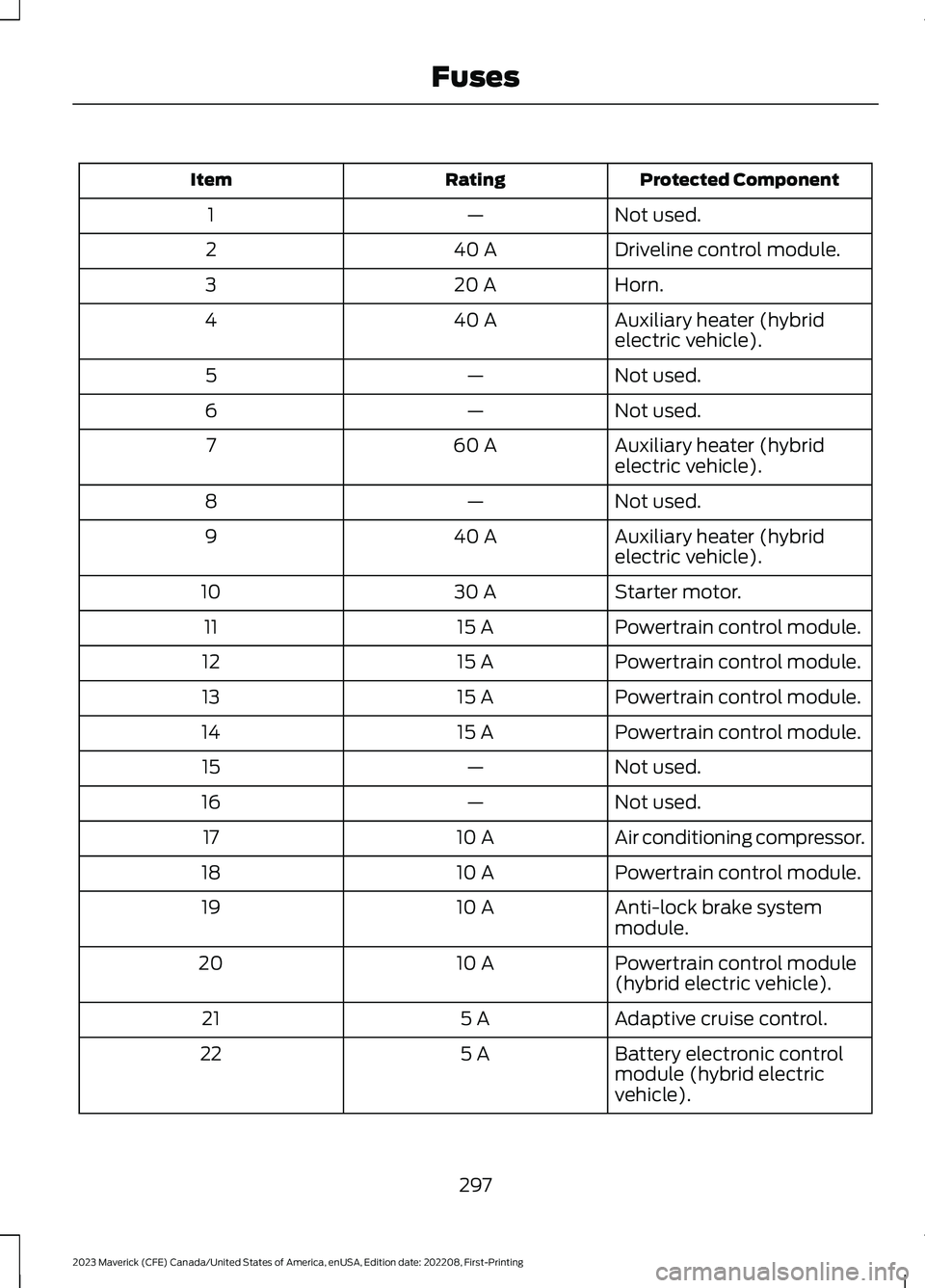
Protected ComponentRatingItem
Not used.—1
Driveline control module.40 A2
Horn.20 A3
Auxiliary heater (hybridelectric vehicle).40 A4
Not used.—5
Not used.—6
Auxiliary heater (hybridelectric vehicle).60 A7
Not used.—8
Auxiliary heater (hybridelectric vehicle).40 A9
Starter motor.30 A10
Powertrain control module.15 A11
Powertrain control module.15 A12
Powertrain control module.15 A13
Powertrain control module.15 A14
Not used.—15
Not used.—16
Air conditioning compressor.10 A17
Powertrain control module.10 A18
Anti-lock brake systemmodule.10 A19
Powertrain control module(hybrid electric vehicle).10 A20
Adaptive cruise control.5 A21
Battery electronic controlmodule (hybrid electricvehicle).
5 A22
297
2023 Maverick (CFE) Canada/United States of America, enUSA, Edition date: 202208, First-PrintingFuses
Page 477 of 556
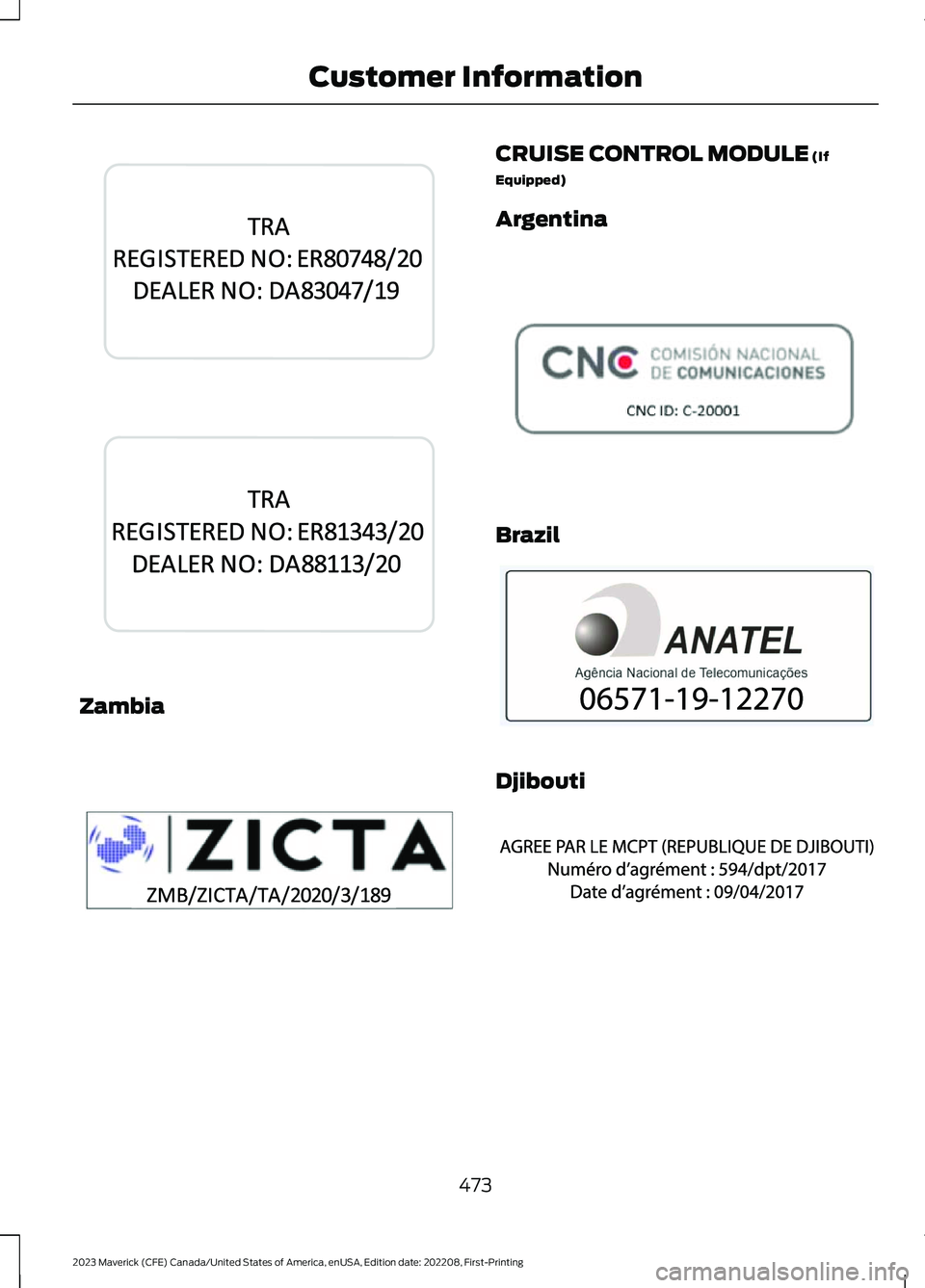
Zambia
CRUISE CONTROL MODULE (If
Equipped)
Argentina
Brazil
Djibouti
473
2023 Maverick (CFE) Canada/United States of America, enUSA, Edition date: 202208, First-PrintingCustomer InformationE345312 E345743 E345310 E308030 E340118 E342394
Page 539 of 556
1
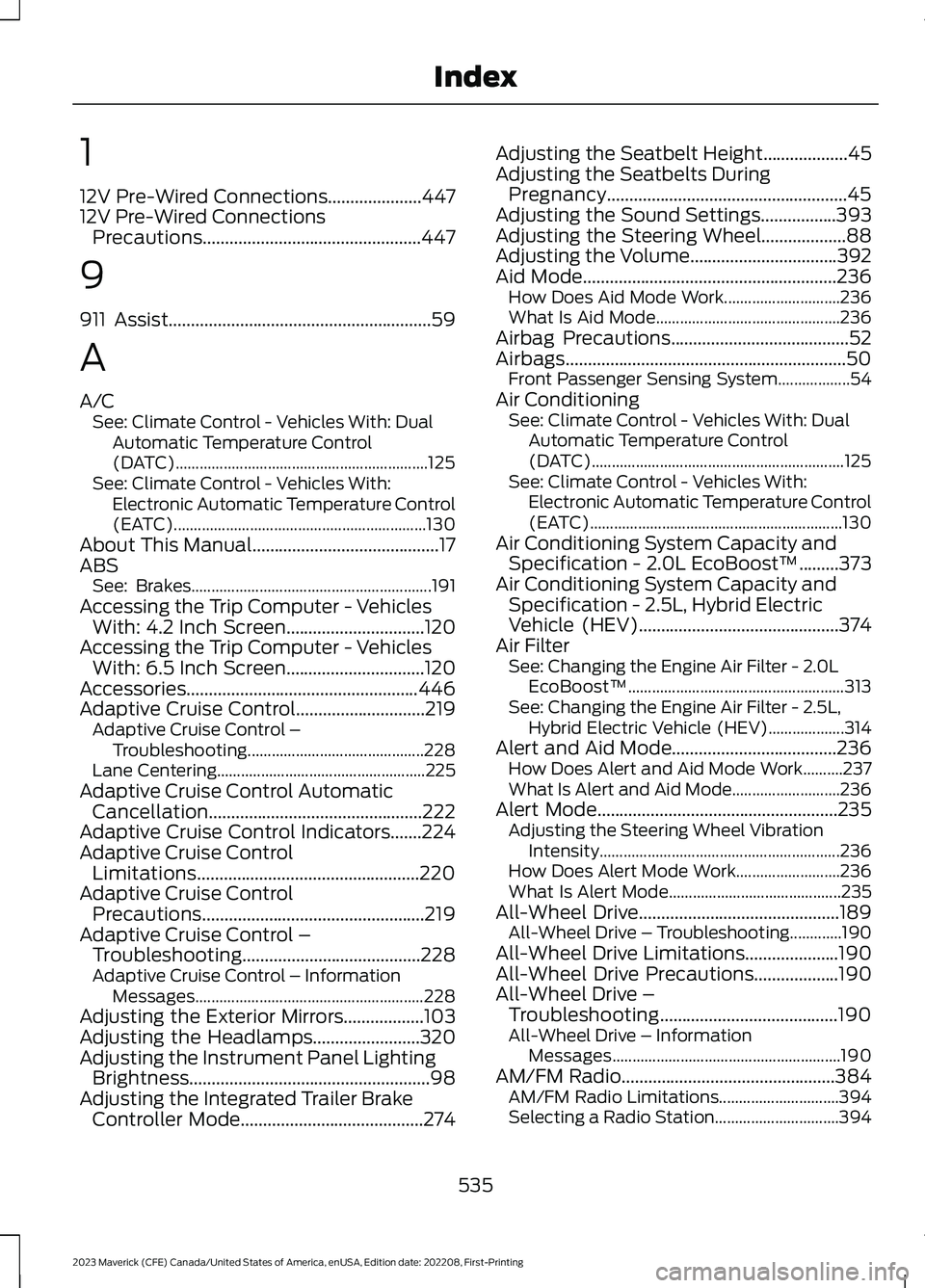
12V Pre-Wired Connections.....................44712V Pre-Wired ConnectionsPrecautions.................................................447
9
911 Assist...........................................................59
A
A/CSee: Climate Control - Vehicles With: DualAutomatic Temperature Control(DATC)...............................................................125See: Climate Control - Vehicles With:Electronic Automatic Temperature Control(EATC)...............................................................130About This Manual..........................................17ABSSee: Brakes............................................................191Accessing the Trip Computer - VehiclesWith: 4.2 Inch Screen...............................120Accessing the Trip Computer - VehiclesWith: 6.5 Inch Screen...............................120Accessories....................................................446Adaptive Cruise Control.............................219Adaptive Cruise Control –Troubleshooting............................................228Lane Centering....................................................225Adaptive Cruise Control AutomaticCancellation................................................222Adaptive Cruise Control Indicators.......224Adaptive Cruise ControlLimitations..................................................220Adaptive Cruise ControlPrecautions..................................................219Adaptive Cruise Control –Troubleshooting........................................228Adaptive Cruise Control – InformationMessages.........................................................228Adjusting the Exterior Mirrors..................103Adjusting the Headlamps........................320Adjusting the Instrument Panel LightingBrightness......................................................98Adjusting the Integrated Trailer BrakeController Mode.........................................274
Adjusting the Seatbelt Height...................45Adjusting the Seatbelts DuringPregnancy......................................................45Adjusting the Sound Settings.................393Adjusting the Steering Wheel...................88Adjusting the Volume.................................392Aid Mode.........................................................236How Does Aid Mode Work.............................236What Is Aid Mode..............................................236Airbag Precautions........................................52Airbags...............................................................50Front Passenger Sensing System..................54Air ConditioningSee: Climate Control - Vehicles With: DualAutomatic Temperature Control(DATC)...............................................................125See: Climate Control - Vehicles With:Electronic Automatic Temperature Control(EATC)...............................................................130Air Conditioning System Capacity andSpecification - 2.0L EcoBoost™.........373Air Conditioning System Capacity andSpecification - 2.5L, Hybrid ElectricVehicle (HEV).............................................374Air FilterSee: Changing the Engine Air Filter - 2.0LEcoBoost™......................................................313See: Changing the Engine Air Filter - 2.5L,Hybrid Electric Vehicle (HEV)...................314Alert and Aid Mode.....................................236How Does Alert and Aid Mode Work..........237What Is Alert and Aid Mode...........................236Alert Mode......................................................235Adjusting the Steering Wheel VibrationIntensity............................................................236How Does Alert Mode Work..........................236What Is Alert Mode...........................................235All-Wheel Drive.............................................189All-Wheel Drive – Troubleshooting.............190All-Wheel Drive Limitations.....................190All-Wheel Drive Precautions...................190All-Wheel Drive –Troubleshooting........................................190All-Wheel Drive – InformationMessages.........................................................190AM/FM Radio................................................384AM/FM Radio Limitations..............................394Selecting a Radio Station...............................394
535
2023 Maverick (CFE) Canada/United States of America, enUSA, Edition date: 202208, First-PrintingIndex
Page 543 of 556
Connected Vehicle – Troubleshooting -Vehicles With: SYNC 3/SYNC 2.5.......379Connecting a Bluetooth® Device..........385Connecting a Trailer....................................265Connecting a Trailer Precautions..........265Connecting the Vehicle to a MobileNetwork.........................................................377Connecting FordPass to the Modem..........377Enabling and Disabling the Modem............377What Is the Modem...........................................377Connecting the Vehicle to a Wi-FiNetwork.........................................................377Contacting Us...................................................15Cooling System Capacity andSpecification - 2.0L EcoBoost™........369Cooling System Capacity andSpecification - 2.5L, Hybrid ElectricVehicle (HEV).............................................370Crash and BreakdownInformation.................................................282Automatic Crash Shutoff...............................288Jump Starting the Vehicle..............................284Post-Crash Alert System.................................287Post Impact Braking.........................................288Recovery Towing................................................289Crash Sensors and Airbag Indicator........57Creating a MyKey...........................................68Creating a Vehicle Wi-Fi Hotspot...........381Cross Traffic Alert........................................244Cross Traffic Alert –Troubleshooting............................................246Cross Traffic Alert Indicators...................245Cross Traffic Alert Limitations................244Cross Traffic Alert Precautions...............244Cross Traffic Alert –Troubleshooting........................................246Cross Traffic Alert – InformationMessages.........................................................246Cruise Control.................................................217Cruise Control Indicators...........................218Cup Holders....................................................153Cup Holder Precautions...................................153Customer Information...............................459Radio Frequency CertificationLabels...............................................................463Customizing the Instrument ClusterDisplay - Vehicles With: 4.2 InchScreen.............................................................116
Customizing the Instrument ClusterDisplay - Vehicles With: 6.5 InchScreen.............................................................116
D
Data Privacy......................................................22Department of Transportation UniformTire Quality Grades..................................335Digital Radio..................................................395Digital Radio Indicators...................................395Digital Radio Limitations................................395How Does Digital Radio Work.......................395Switching Digital Radio Reception On andOff......................................................................395What Is Digital Radio........................................395Directing the Flow of Air.............................126Disposing of Airbags.....................................58Distance Alert.................................................251Adjusting the Sensitivity of DistanceAlert.....................................................................251What Is Distance Alert......................................251Distance Indication.....................................249Distance Indication Indicator.........................251Switching Distance Indication On andOff........................................................................251What Is Distance Indication...........................249Door Lock Switch Inhibitor..........................73How Does the Door Lock Switch InhibitorWork......................................................................73Doors and Locks Audible Warnings.........74Doors and Locks..............................................72Autolock...................................................................73Autounlock..............................................................73Door Lock Switch Inhibitor................................73Doors and Locks – Troubleshooting.............74Mislock......................................................................73Operating the Doors From Inside YourVehicle..................................................................72Operating the Doors From Outside YourVehicle..................................................................72Doors and Locks – Troubleshooting.......74Doors and Locks – Frequently AskedQuestions...........................................................75Doors and Locks – InformationMessages............................................................74Doors and Locks – Warning Lamps...............74
539
2023 Maverick (CFE) Canada/United States of America, enUSA, Edition date: 202208, First-PrintingIndex
Page 546 of 556
Fuel Tank Capacity - Hybrid ElectricVehicle (HEV).............................................372Fuse Precautions.........................................295Fuses................................................................295Body Control Module Fuse Box.....................301Fuses – Troubleshooting................................303Under Hood Fuse Box......................................295Fuses – Troubleshooting..........................303Fuses – Frequently Asked Questions........303
G
General Maintenance Information.......450Glasses Holder..............................................154Locating the Glasses Holder..........................154Glossary of Tire Terminology...................341Glove Compartment....................................153Opening the Glove Compartment................153Grade Assist - Hybrid Electric Vehicle(HEV).............................................................185What Is Grade Assist.........................................185
H
Headlamp AdjustingSee: Adjusting the Headlamps.....................320Headlamps.......................................................92Headlamp Indicators..........................................92Switching Headlamp Exit Delay On andOff.........................................................................92Using the High Beam Headlamps.................92Headlamps – Troubleshooting.................93Headlamps – Frequently AskedQuestions...........................................................93Heated Seats.................................................140Heated Seat Precautions................................140Switching the Heated Seats On andOff.......................................................................140HeatingSee: Climate Control - Vehicles With: DualAutomatic Temperature Control(DATC)...............................................................125See: Climate Control - Vehicles With:Electronic Automatic Temperature Control(EATC)...............................................................130High Voltage Battery....................................181High Voltage Battery Precautions...........181
High Voltage Battery VehiclePrecautions - Hybrid Electric Vehicle(HEV)............................................................283Hill Descent Control...................................206Hill Descent Control –Troubleshooting............................................207Hill Descent Control Indicator................206Hill Descent Control Precautions..........206Hill Descent Control –Troubleshooting........................................207Hill Descent Control – InformationMessages.........................................................207Hill Start Assist..............................................197Hill Start Assist – Troubleshooting..............197Hill Start Assist Precautions.....................197Hill Start Assist – Troubleshooting........197Hill Start Assist – InformationMessages..........................................................197Hood LockSee: Opening and Closing the Hood..........304Horn....................................................................88How Does 911 Assist Work..........................59How Does Adaptive Cruise Control WithStop and Go Work.....................................219How Does a Hybrid Electric VehicleWork...............................................................166How Does All-Wheel Drive Work -Excluding: FX4 Off Road/Tremor........189How Does All-Wheel Drive Work - FX4Off Road/Tremor.......................................189How Does Auto Hold Work.......................198How Does Blind Spot InformationSystem Work...............................................241How Does Cross Traffic AlertWork..............................................................244How Does Drive Mode ControlWork..............................................................230How Does Driver Alert Work....................255How Does Hill Descent ControlWork..............................................................206How Does Hill Start Assist Work.............197How Does Pre-Collision AssistWork...............................................................247How Does Stability Control Work.........202How Does the Lane Keeping SystemWork...............................................................234How Does the Personal Safety SystemWork.................................................................49
542
2023 Maverick (CFE) Canada/United States of America, enUSA, Edition date: 202208, First-PrintingIndex