remote control FORD MAVERICK 2023 Owner's Guide
[x] Cancel search | Manufacturer: FORD, Model Year: 2023, Model line: MAVERICK, Model: FORD MAVERICK 2023Pages: 556, PDF Size: 14.79 MB
Page 198 of 556
WHAT IS THE ELECTRIC
PARKING BRAKE
The electric parking brake is used to holdyour vehicle on slopes and flat roads.
APPLYING THE ELECTRIC
PARKING BRAKE
WARNING: Apply the parking brakeand make sure your vehicle is in park (P).Power the vehicle off and remove thekeys or remote control whenever youleave your vehicle. Failure to follow thisinstruction could result in personal injuryor death.
WARNING: If you drive extendeddistances with the parking brake applied,you could cause damage to the brakesystem.
WARNING: The electric parkingbrake does not operate if the vehiclebattery has run out of charge.
The electronic parking brakeswitch is on the center console.
1.Pull the switch up.
The red warning lamp flashes duringoperation and illuminates when the parkingbrake is applied.
Note:You can apply the electric parkingbrake when the power is off.
Note:The electric parking brake couldapply when you shift into park (P). See Park(P) (page 182).
APPLYING THE ELECTRIC
PARKING BRAKE IN AN
EMERGENCY
You can use the electric parking brake toslow or stop your vehicle in an emergency.
Pull the switch up and hold it.
The red warning lamp illuminates, a tonesounds and the stoplamps turn on whenyou use the electric parking brake in anemergency.
The electric parking brake continues toslow your vehicle down unless you releasethe switch.
Note:Do not apply the electric parkingbrake when your vehicle is moving, exceptin an emergency. If you repeatedly use theelectric parking brake to slow or stop yourvehicle, you could cause damage to thebrake system.
MANUALLY RELEASING THE
ELECTRIC PARKING BRAKE
1.Switch the ignition on.
2.Press and hold the brake pedal.
3.Push the switch down.
The red warning lamp turns off.
Pulling Away on a Hill When Towing aTrailer
1.Press and hold the brake pedal.
2.Pull the switch upward and hold it.
3.Shift into gear.
4.Press the accelerator pedal until enginehas developed sufficient torque toprevent your vehicle from rolling downthe hill.
5.Release the switch and pull away in anormal manner.
194
2023 Maverick (CFE) Canada/United States of America, enUSA, Edition date: 202208, First-PrintingElectric Parking BrakeE267156
Page 292 of 556
HOW DOES THE POST-CRASHALERT SYSTEM WORK
The system is designed to turn the hazardflashers on, turn the courtesy lamps on,intermittently sound the horn and unlockall doors in the event of a serious impactthat deploys an airbag or the seatbeltpretensioners.
POST-CRASH ALERT SYSTEMLIMITATIONS
Depending on applicable laws in thecountry your vehicle was built for, the horndoes not sound in the event of a seriousimpact.
SWITCHING THE POST-CRASHALERT SYSTEM OFF
Press the hazard flasher switch, the unlockbutton on the remote control, the panicbutton on the remote control or cycle theignition to switch the system off.
Note:The alert turns off when the vehiclebattery runs out of charge.
POST IMPACT BRAKING
HOW DOES POST IMPACTBRAKING WORK
In the event of a moderate to severe crash,the braking system reduces the vehicle’sspeed to prevent or reduce the impact ofa potential secondary crash.
POST IMPACT BRAKINGLIMITATIONS
Post impact braking does not activate ifany of the following occur:
•The anti-lock braking system isdamaged during the collision.
•Electronic stability control is disabled.
OVERRIDING POST IMPACTBRAKING
You can override post impact braking bypressing the brake or accelerator pedal.
POST IMPACT BRAKINGINDICATORS
It flashes when a post impactbraking event is occurring.
AUTOMATIC CRASH SHUTOFF
WHAT IS AUTOMATIC CRASHSHUTOFF
The automatic crash shutoff is designedto stop the fuel going to the engine in theevent of a moderate or severe crash.
Note:Not every impact causes a shutoff.
AUTOMATIC CRASH SHUTOFFPRECAUTIONS
WARNING: If your vehicle has beeninvolved in a crash, have the fuel systemchecked. Failure to follow this instructioncould result in fire, personal injury ordeath.
RE-ENABLING YOUR VEHICLE
1.Switch the ignition off.
2.Attempt to start your vehicle.
3.Switch the ignition off.
4.Attempt to start your vehicle.
288
2023 Maverick (CFE) Canada/United States of America, enUSA, Edition date: 202208, First-PrintingCrash and Breakdown InformationE138639
Page 346 of 556
*Tread area of the tire: Area ofthe perimeter of the tire thatcontacts the road when mountedon the vehicle.
*Rim: The metal support (wheel)for a tire or a tire and tubeassembly upon which the tirebeads are seated.
TIRE REPLACEMENT
REQUIREMENTS
Your vehicle is equipped with tiresdesigned to provide a safe rideand handling capability.
WARNING: Only usereplacement tires and wheelsthat are the same size, loadindex, speed rating, and type asthose originally provided for yourvehicle. The recommended tireand wheel sizes can be found onthe Tire Label on the driver sidedoor frame or the edge of thedriver door. If this information isnot found in those locations, orfor additional options, contactyour authorized dealer. Use ofany tire or wheel notrecommended, could affect thesafety and performance of yourvehicle, which could result in anincreased risk of loss of vehiclecontrol, vehicle rollover, personalinjury and death.
WARNING: To reduce therisk of serious injury, whenmounting replacement tires andwheels, you should not exceedthe maximum pressure indicatedon the sidewall of the tire to setthe beads without additionalprecautions listed below. If thebeads do not seat at themaximum pressure indicated,re-lubricate and try again.
WARNING: For a mountingpressure more than 20 psi(1.38 bar) greater than themaximum pressure, a Forddealer or other tire serviceprofessional should do themounting.
WARNING: Always inflatesteel carcass tires with a remoteair fill with the person inflatingstanding at a minimum of 12 ft(3.66 m) away from the wheeland tire assembly.
WARNING: Only use thespecified jacking points. If youuse any other locations youcould damage vehiclecomponents, such as brake lines.
342
2023 Maverick (CFE) Canada/United States of America, enUSA, Edition date: 202208, First-PrintingWheel and Tire Information
Page 381 of 556
WHAT IS A CONNECTED
VEHICLE
A connected vehicle has technology thatallows your vehicle to connect to a mobilenetwork and for you to access a range offeatures. When used in conjunction withthe FordPass app, it could allow you tomonitor and control your vehicle further,for example checking the tire pressures,and the vehicle location. For additionalinformation, refer to the local Ford website.
CONNECTED VEHICLE
REQUIREMENTS
Connected service and related featurefunctionality requires a compatible vehiclenetwork.
Some remote features require additionalservice activation. Log in to your Fordaccount for details. Some restrictions, thirdparty terms and message or data ratesmay apply.
CONNECTED VEHICLE
LIMITATIONS
Evolving technology, cellular networks, orregulations could affect functionality andavailability, or continued provision of somefeatures. These changes could even stopsome features from functioning.
CONNECTING THE VEHICLE TO
A MOBILE NETWORK
WHAT IS THE MODEM
The modem allows access to arange of features built into yourvehicle.
ENABLING AND DISABLING THEMODEM
1.Press Settings.
2.Press FordPass Connect.
3.Press Connectivity Settings.
4.Switch connectivity features on or off.
CONNECTING FORDPASS TO THEMODEM
1.Make sure that the modem is enabledusing the vehicle settings menu.
2.Open the FordPass app on your deviceand log in.
3.Add your vehicle or select your vehicleif already added.
4.Select the option to activate yourvehicle.
5.Make sure that the name on the screenmatches the name shown in yourFordPass account.
6.Confirm that FordPass account isconnected to the modem.
CONNECTING THE VEHICLE TO
A WI-FI NETWORK
1.Press Settings.
2.Press Wi-Fi.
3.Switch Wi-Fi on.
4.Press View Available Networks.
5.Select an available Wi-Fi network.
Note:Enter the network password toconnect to a secure network.
377
2023 Maverick (CFE) Canada/United States of America, enUSA, Edition date: 202208, First-PrintingConnected Vehicle
Page 446 of 556
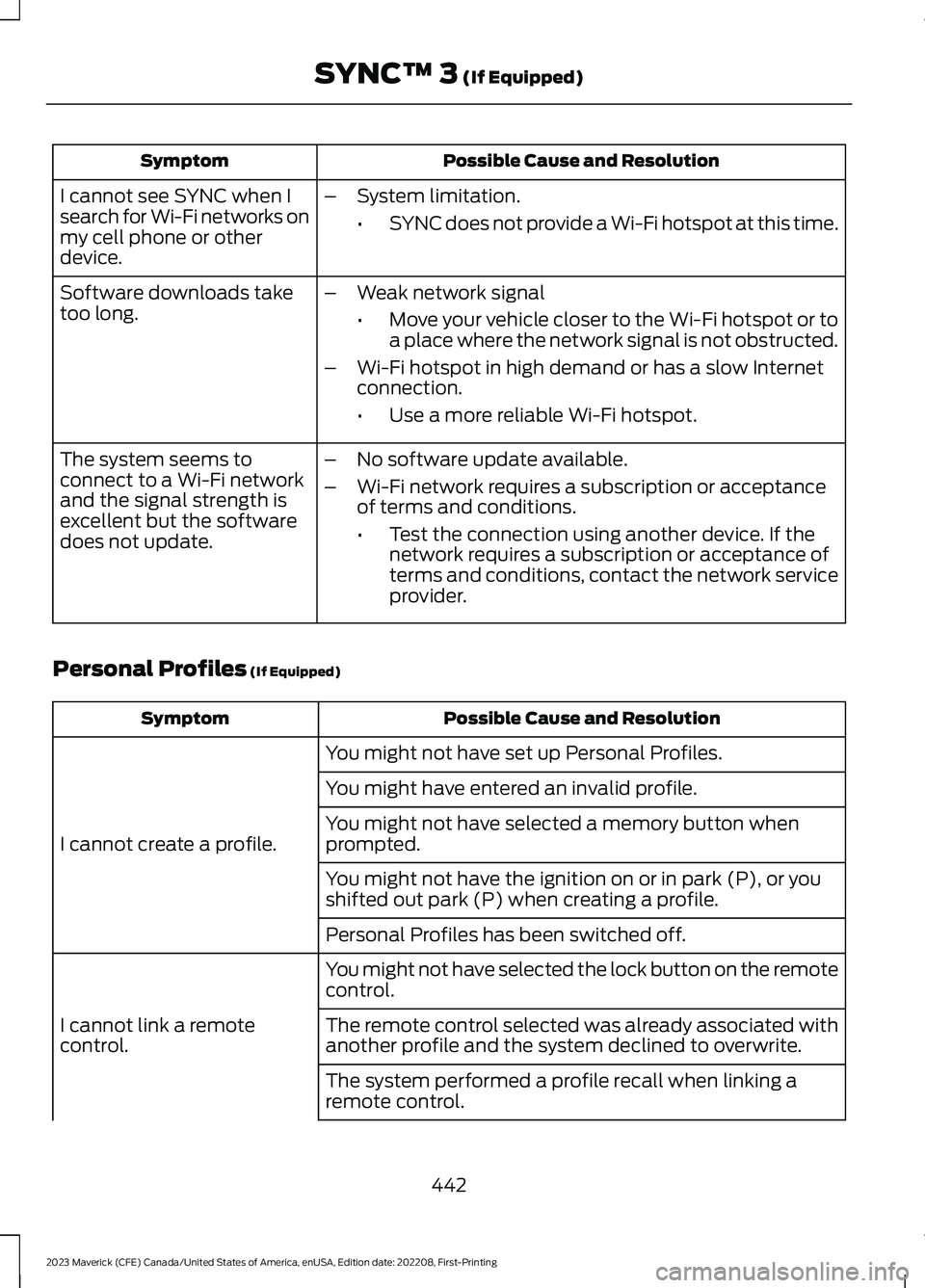
Possible Cause and ResolutionSymptom
I cannot see SYNC when Isearch for Wi-Fi networks onmy cell phone or otherdevice.
–System limitation.
•SYNC does not provide a Wi-Fi hotspot at this time.
–Weak network signal
•Move your vehicle closer to the Wi-Fi hotspot or toa place where the network signal is not obstructed.
–Wi-Fi hotspot in high demand or has a slow Internetconnection.
•Use a more reliable Wi-Fi hotspot.
Software downloads taketoo long.
–No software update available.
–Wi-Fi network requires a subscription or acceptanceof terms and conditions.
•Test the connection using another device. If thenetwork requires a subscription or acceptance ofterms and conditions, contact the network serviceprovider.
The system seems toconnect to a Wi-Fi networkand the signal strength isexcellent but the softwaredoes not update.
Personal Profiles (If Equipped)
Possible Cause and ResolutionSymptom
You might not have set up Personal Profiles.
I cannot create a profile.
You might have entered an invalid profile.
You might not have selected a memory button whenprompted.
You might not have the ignition on or in park (P), or youshifted out park (P) when creating a profile.
Personal Profiles has been switched off.
You might not have selected the lock button on the remotecontrol.
I cannot link a remotecontrol.The remote control selected was already associated withanother profile and the system declined to overwrite.
The system performed a profile recall when linking aremote control.
442
2023 Maverick (CFE) Canada/United States of America, enUSA, Edition date: 202208, First-PrintingSYNC™ 3 (If Equipped)
Page 447 of 556
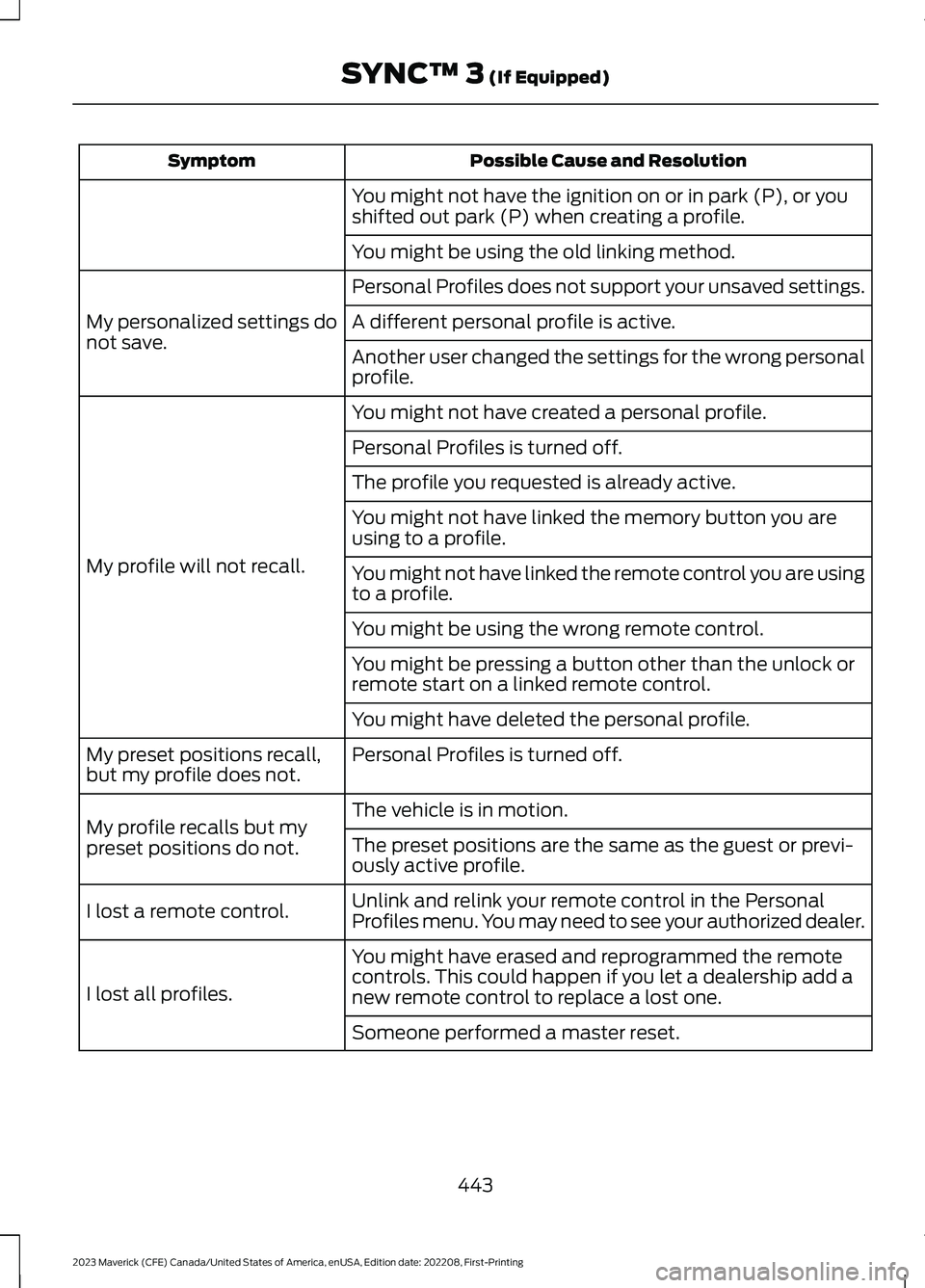
Possible Cause and ResolutionSymptom
You might not have the ignition on or in park (P), or youshifted out park (P) when creating a profile.
You might be using the old linking method.
Personal Profiles does not support your unsaved settings.
My personalized settings donot save.A different personal profile is active.
Another user changed the settings for the wrong personalprofile.
You might not have created a personal profile.
My profile will not recall.
Personal Profiles is turned off.
The profile you requested is already active.
You might not have linked the memory button you areusing to a profile.
You might not have linked the remote control you are usingto a profile.
You might be using the wrong remote control.
You might be pressing a button other than the unlock orremote start on a linked remote control.
You might have deleted the personal profile.
Personal Profiles is turned off.My preset positions recall,but my profile does not.
The vehicle is in motion.My profile recalls but mypreset positions do not.The preset positions are the same as the guest or previ-ously active profile.
Unlink and relink your remote control in the PersonalProfiles menu. You may need to see your authorized dealer.I lost a remote control.
You might have erased and reprogrammed the remotecontrols. This could happen if you let a dealership add anew remote control to replace a lost one.I lost all profiles.
Someone performed a master reset.
443
2023 Maverick (CFE) Canada/United States of America, enUSA, Edition date: 202208, First-PrintingSYNC™ 3 (If Equipped)
Page 481 of 556
This device complies with Part 15 of theFCC Rules and with Innovation, Scienceand Economic Development Canada’slicence-exempt RSS(s). Operation issubject to the following two conditions:
1.This device may not cause harmfulinterference, and
2.This device must accept anyinterference received, includinginterference that may cause undesiredoperation.
Zambia
KEYS AND REMOTE CONTROLS
Argentina
477
2023 Maverick (CFE) Canada/United States of America, enUSA, Edition date: 202208, First-PrintingCustomer InformationE340196 E339844 E342143 E340119 E346171
Page 506 of 556
PERCHLORATE
Certain components in your vehicle suchas airbag modules, seatbelt pretensionersand remote control batteries may containperchlorate material. Special handlingmay apply for service or vehicle end of lifedisposal.
For more information visit:www.dtsc.ca.gov/hazardouswaste/perchlorate.
REPLACEMENT PARTS
RECOMMENDATION
We have built your vehicle to the higheststandards using quality parts. Werecommend that you demand the use ofgenuine Ford and Motorcraft partswhenever your vehicle requires scheduledmaintenance or repair. You can clearlyidentify genuine Ford and Motorcraft partsby looking for the Ford, FoMoCo orMotorcraft branding on the parts or theirpackaging.
Scheduled Maintenance andMechanical Repairs
One of the best ways for you to make surethat your vehicle provides years of serviceis to have it maintained in line with ourrecommendations using parts thatconform to the specifications detailed inthis Owner’s Manual.
Genuine Ford and Motorcraft parts meetor exceed these specifications.
Collision Repairs
We hope that you never experience acollision, but accidents happen sometimes.
Genuine Ford replacement collision partsmeet our stringent requirements for fit,finish, structural integrity, corrosionprotection and dent resistance. Duringvehicle development we validate thatthese parts deliver the intended level ofprotection as a whole system. A great wayto know for sure you are getting this levelof protection is to use genuine Fordreplacement collision parts.
Warranty on Replacement Parts
Genuine Ford and Motorcraft replacementparts are the only replacement parts thatbenefit from a Ford Warranty.
The Ford Warranty may not cover damagecaused to your vehicle as a result of failednon-Ford parts.
For additional information, refer to theterms and conditions of the Ford Warranty.
MOBILE COMMUNICATIONS
EQUIPMENT
WARNING: Driving while distractedcan result in loss of vehicle control, crashand injury. We strongly recommend thatyou use extreme caution when using anydevice that may take your focus off theroad. Your primary responsibility is thesafe operation of your vehicle. Werecommend against the use of any
502
2023 Maverick (CFE) Canada/United States of America, enUSA, Edition date: 202208, First-PrintingCustomer InformationE369444
Page 542 of 556
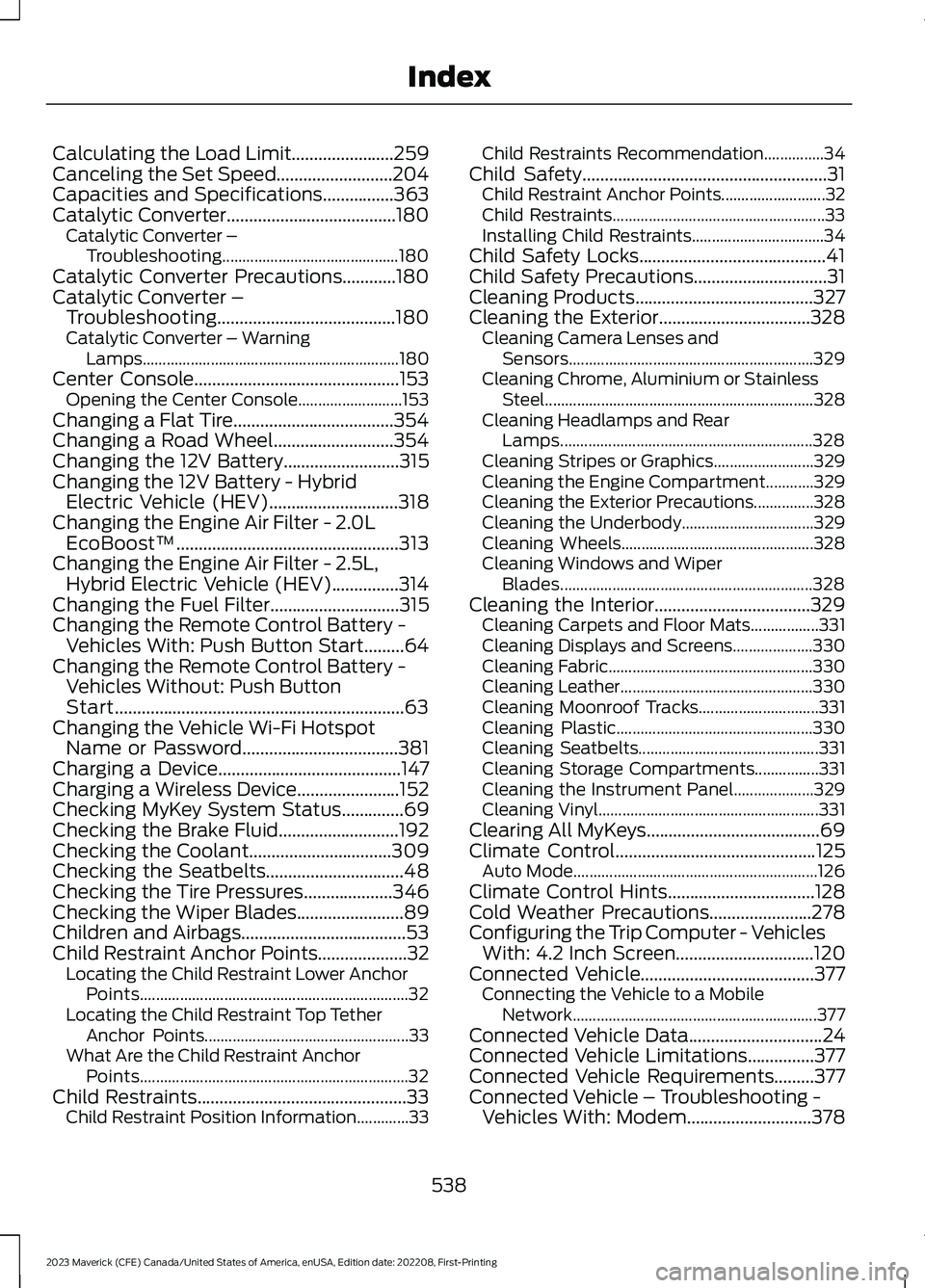
Calculating the Load Limit.......................259Canceling the Set Speed..........................204Capacities and Specifications................363Catalytic Converter......................................180Catalytic Converter –Troubleshooting............................................180Catalytic Converter Precautions............180Catalytic Converter –Troubleshooting........................................180Catalytic Converter – WarningLamps................................................................180Center Console..............................................153Opening the Center Console..........................153Changing a Flat Tire....................................354Changing a Road Wheel...........................354Changing the 12V Battery..........................315Changing the 12V Battery - HybridElectric Vehicle (HEV).............................318Changing the Engine Air Filter - 2.0LEcoBoost™..................................................313Changing the Engine Air Filter - 2.5L,Hybrid Electric Vehicle (HEV)...............314Changing the Fuel Filter.............................315Changing the Remote Control Battery -Vehicles With: Push Button Start.........64Changing the Remote Control Battery -Vehicles Without: Push ButtonStart.................................................................63Changing the Vehicle Wi-Fi HotspotName or Password...................................381Charging a Device.........................................147Charging a Wireless Device.......................152Checking MyKey System Status..............69Checking the Brake Fluid...........................192Checking the Coolant................................309Checking the Seatbelts...............................48Checking the Tire Pressures....................346Checking the Wiper Blades........................89Children and Airbags.....................................53Child Restraint Anchor Points....................32Locating the Child Restraint Lower AnchorPoints...................................................................32Locating the Child Restraint Top TetherAnchor Points...................................................33What Are the Child Restraint AnchorPoints...................................................................32Child Restraints...............................................33Child Restraint Position Information.............33
Child Restraints Recommendation...............34Child Safety.......................................................31Child Restraint Anchor Points..........................32Child Restraints.....................................................33Installing Child Restraints.................................34Child Safety Locks..........................................41Child Safety Precautions..............................31Cleaning Products........................................327Cleaning the Exterior..................................328Cleaning Camera Lenses andSensors.............................................................329Cleaning Chrome, Aluminium or StainlessSteel...................................................................328Cleaning Headlamps and RearLamps...............................................................328Cleaning Stripes or Graphics.........................329Cleaning the Engine Compartment............329Cleaning the Exterior Precautions...............328Cleaning the Underbody.................................329Cleaning Wheels................................................328Cleaning Windows and WiperBlades...............................................................328Cleaning the Interior...................................329Cleaning Carpets and Floor Mats.................331Cleaning Displays and Screens....................330Cleaning Fabric...................................................330Cleaning Leather................................................330Cleaning Moonroof Tracks..............................331Cleaning Plastic.................................................330Cleaning Seatbelts.............................................331Cleaning Storage Compartments................331Cleaning the Instrument Panel....................329Cleaning Vinyl.......................................................331Clearing All MyKeys.......................................69Climate Control.............................................125Auto Mode.............................................................126Climate Control Hints.................................128Cold Weather Precautions.......................278Configuring the Trip Computer - VehiclesWith: 4.2 Inch Screen...............................120Connected Vehicle.......................................377Connecting the Vehicle to a MobileNetwork.............................................................377Connected Vehicle Data..............................24Connected Vehicle Limitations...............377Connected Vehicle Requirements.........377Connected Vehicle – Troubleshooting -Vehicles With: Modem............................378
538
2023 Maverick (CFE) Canada/United States of America, enUSA, Edition date: 202208, First-PrintingIndex
Page 544 of 556
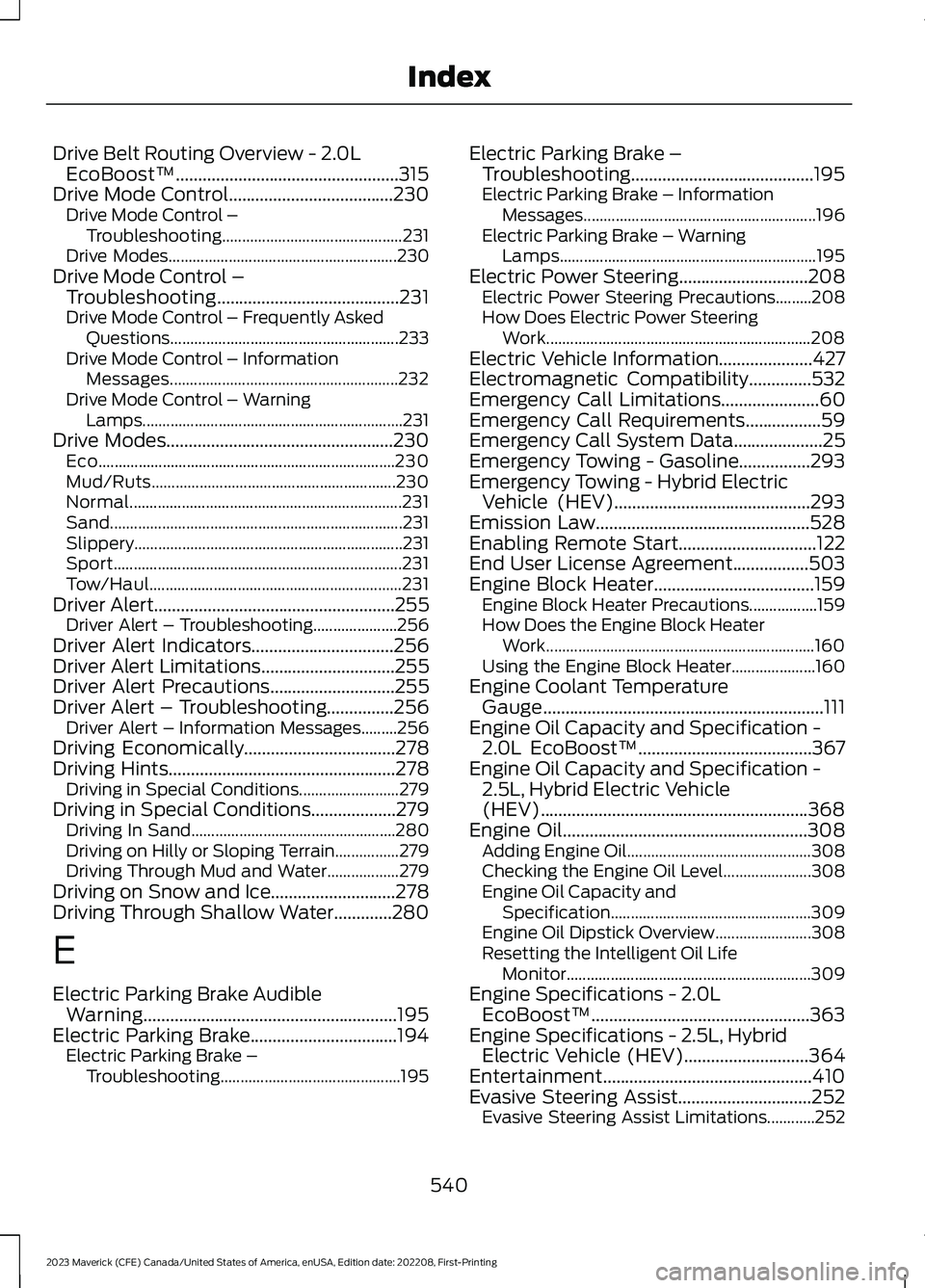
Drive Belt Routing Overview - 2.0LEcoBoost™..................................................315Drive Mode Control.....................................230Drive Mode Control –Troubleshooting.............................................231Drive Modes.........................................................230Drive Mode Control –Troubleshooting.........................................231Drive Mode Control – Frequently AskedQuestions.........................................................233Drive Mode Control – InformationMessages.........................................................232Drive Mode Control – WarningLamps.................................................................231Drive Modes...................................................230Eco..........................................................................230Mud/Ruts.............................................................230Normal....................................................................231Sand.........................................................................231Slippery...................................................................231Sport........................................................................231Tow/Haul...............................................................231Driver Alert......................................................255Driver Alert – Troubleshooting.....................256Driver Alert Indicators................................256Driver Alert Limitations..............................255Driver Alert Precautions............................255Driver Alert – Troubleshooting...............256Driver Alert – Information Messages.........256Driving Economically..................................278Driving Hints...................................................278Driving in Special Conditions.........................279Driving in Special Conditions...................279Driving In Sand...................................................280Driving on Hilly or Sloping Terrain................279Driving Through Mud and Water..................279Driving on Snow and Ice............................278Driving Through Shallow Water.............280
E
Electric Parking Brake AudibleWarning.........................................................195Electric Parking Brake.................................194Electric Parking Brake –Troubleshooting.............................................195
Electric Parking Brake –Troubleshooting.........................................195Electric Parking Brake – InformationMessages..........................................................196Electric Parking Brake – WarningLamps................................................................195Electric Power Steering.............................208Electric Power Steering Precautions.........208How Does Electric Power SteeringWork..................................................................208Electric Vehicle Information.....................427Electromagnetic Compatibility..............532Emergency Call Limitations......................60Emergency Call Requirements.................59Emergency Call System Data....................25Emergency Towing - Gasoline................293Emergency Towing - Hybrid ElectricVehicle (HEV)............................................293Emission Law................................................528Enabling Remote Start...............................122End User License Agreement.................503Engine Block Heater....................................159Engine Block Heater Precautions.................159How Does the Engine Block HeaterWork...................................................................160Using the Engine Block Heater.....................160Engine Coolant TemperatureGauge...............................................................111Engine Oil Capacity and Specification -2.0L EcoBoost™.......................................367Engine Oil Capacity and Specification -2.5L, Hybrid Electric Vehicle(HEV)............................................................368Engine Oil.......................................................308Adding Engine Oil..............................................308Checking the Engine Oil Level......................308Engine Oil Capacity andSpecification..................................................309Engine Oil Dipstick Overview........................308Resetting the Intelligent Oil LifeMonitor.............................................................309Engine Specifications - 2.0LEcoBoost™.................................................363Engine Specifications - 2.5L, HybridElectric Vehicle (HEV)............................364Entertainment...............................................410Evasive Steering Assist..............................252Evasive Steering Assist Limitations............252
540
2023 Maverick (CFE) Canada/United States of America, enUSA, Edition date: 202208, First-PrintingIndex