warning FORD MONDEO 2014 4.G Owners Manual
[x] Cancel search | Manufacturer: FORD, Model Year: 2014, Model line: MONDEO, Model: FORD MONDEO 2014 4.GPages: 446, PDF Size: 29.09 MB
Page 188 of 446
Downloaded from www.Manualslib.com manuals search engine Overriding the System
WARNING
Whenever the driver is overriding thesystem by pressing the acceleratorpedal, the system does notautomatically apply the brakes to maintainseparation from any vehicle ahead.
You can override the set speed and gap bypressing the accelerator pedal.
When you override the system,the green indicator lightilluminates and the lead vehiclegraphic does not show in theinformation display.
The system resumes operation when yourelease the accelerator pedal. The vehiclespeed decreases to the set speed, or alower speed if following a slower vehicle.
Automatic Switch Off
The system does not operate below12 mph (20 km/h). An audible warningsounds and the automatic braking releasesif the vehicle drops below this speed.
Automatic cancellation can also occur if:
•The tires lose traction.
•The engine speed is too low.
•You apply the parking brake.
Note:If the engine speed drops too low,the information display indicates low enginespeed. Shift to a lower gear (manualtransmission only) to avoid automaticcancellation.
Hilly Condition Usage
You should select a lower gear positionwhen the system is active in situationssuch as prolonged downhill driving onsteep grades, for example in mountainousareas. The system needs additional enginebraking in these situations to reduce theload on the vehicle’s regular brake systemto prevent them from overheating.
Note:An audible warning sounds and thesystem shuts down if it applies brakes foran extended period of time. This allows thebrakes to cool down. The system functionsnormally again when the brakes have cooleddown.
Detection Beam Issues
The radar sensor has a limited field ofvision. It may not detect vehicles at all ordetect a vehicle later than expected insome situations. The lead vehicle graphicdoes not illuminate if the system does notdetect a vehicle in front of you.
186Mondeo (CNG) Vehicles Built From: 08-09-2014 Vehicles Built Up To: 19-04-2015, CG3633en enGBR, Edition date: 10/2014, First PrintingCruise Control
Page 190 of 446
Downloaded from www.Manualslib.com manuals search engine The following table lists possible causes and actions for this message displaying.
ActionCause
Clean the grille surface in front of the radaror remove the object causing the obstruc-tion.
The surface of the radar in the grille is dirtyor obstructed in some way.
Wait a short time. It may take severalminutes for the radar to detect that it is freefrom obstruction.
The surface of the radar in the grille is cleanbut the message remains in the display.
Do not use the system in these conditionsbecause it may not detect any vehiclesahead.
Heavy rain or snow is interfering with theradar signals.
Do not use the system in these conditionsbecause it may not detect any vehiclesahead.
Swirling water, snow or ice on the surfaceof the road may interfere with the radarsignals.
It is possible to get a blockage warning andnot be blocked. A false blocked conditionself clears or clears after a key cycle.
Switching to Normal CruiseControl
WARNING
Normal cruise control does not brakedue to slower vehicles. Always beaware of which mode you haveselected and apply the brakes whennecessary.
You can manually change from adaptivecruise control to normal cruise controlthrough the information display.
The cruise control indicator lightreplaces the adaptive cruisecontrol indicator light if youselect normal cruise control. The gapsetting does not display, the system doesnot automatically respond to lead vehiclesand automatic braking does not activate.The system remembers the last settingwhen you start your vehicle.
188Mondeo (CNG) Vehicles Built From: 08-09-2014 Vehicles Built Up To: 19-04-2015, CG3633en enGBR, Edition date: 10/2014, First PrintingCruise Control
Page 191 of 446
Downloaded from www.Manualslib.com manuals search engine SPEED LIMITER
Principle of Operation
WARNING
When you are going downhill, yourspeed may increase above the setspeed. The system will not apply thebrakes but a warning will be given.
The system allows you to set a speed, towhich your vehicle then becomes limited.The set speed will become the effectivemaximum speed of your vehicle, but withthe option to temporarily exceed this limitif required.
Using the System
Note:The set speed limit can beintentionally exceeded for a short period oftime if required, for example whenovertaking.
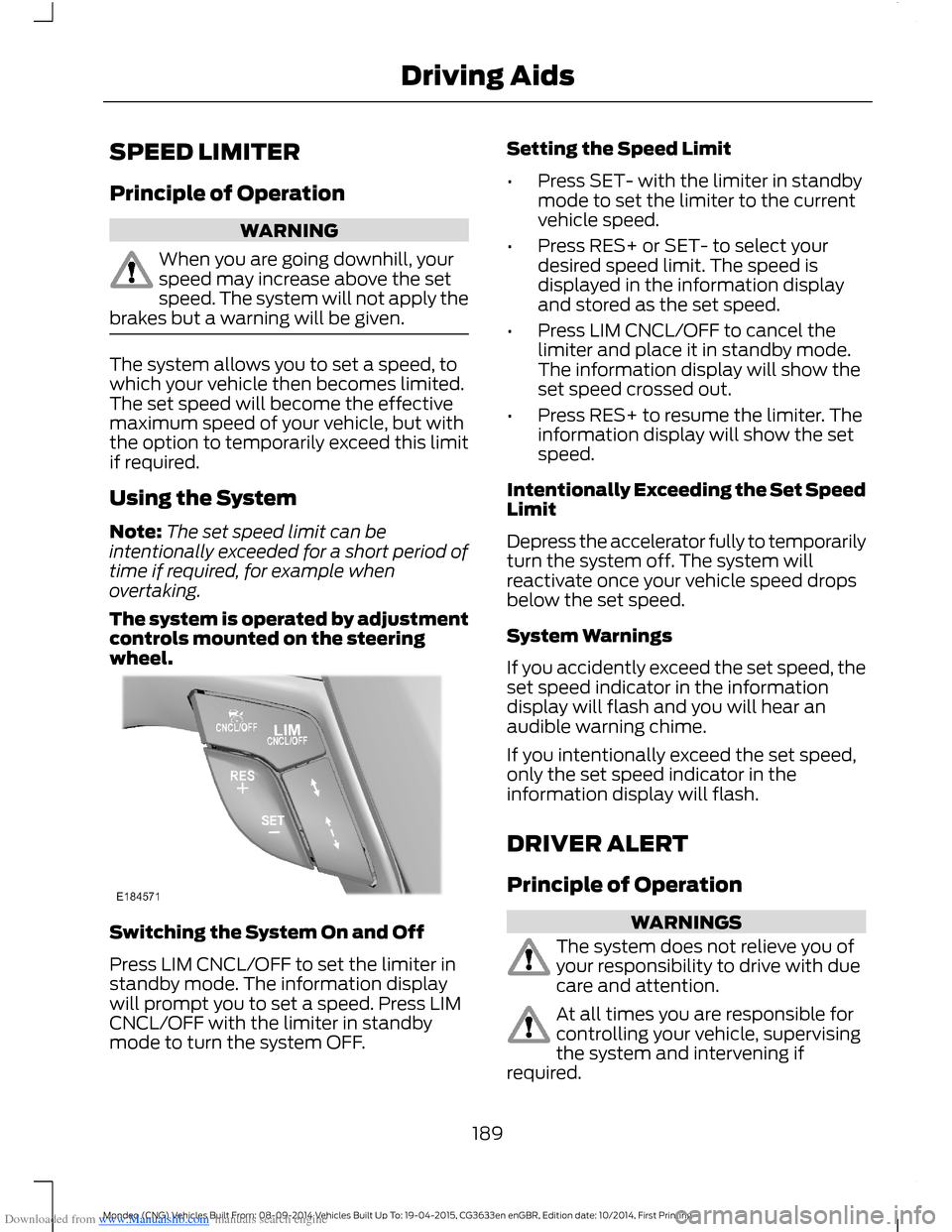
The system is operated by adjustmentcontrols mounted on the steeringwheel.
Switching the System On and Off
Press LIM CNCL/OFF to set the limiter instandby mode. The information displaywill prompt you to set a speed. Press LIMCNCL/OFF with the limiter in standbymode to turn the system OFF.
Setting the Speed Limit
•Press SET- with the limiter in standbymode to set the limiter to the currentvehicle speed.
•Press RES+ or SET- to select yourdesired speed limit. The speed isdisplayed in the information displayand stored as the set speed.
•Press LIM CNCL/OFF to cancel thelimiter and place it in standby mode.The information display will show theset speed crossed out.
•Press RES+ to resume the limiter. Theinformation display will show the setspeed.
Intentionally Exceeding the Set SpeedLimit
Depress the accelerator fully to temporarilyturn the system off. The system willreactivate once your vehicle speed dropsbelow the set speed.
System Warnings
If you accidently exceed the set speed, theset speed indicator in the informationdisplay will flash and you will hear anaudible warning chime.
If you intentionally exceed the set speed,only the set speed indicator in theinformation display will flash.
DRIVER ALERT
Principle of Operation
WARNINGS
The system does not relieve you ofyour responsibility to drive with duecare and attention.
At all times you are responsible forcontrolling your vehicle, supervisingthe system and intervening ifrequired.
189Mondeo (CNG) Vehicles Built From: 08-09-2014 Vehicles Built Up To: 19-04-2015, CG3633en enGBR, Edition date: 10/2014, First PrintingDriving Aids
Page 192 of 446
Downloaded from www.Manualslib.com manuals search engine WARNINGS
If the sensor becomes blocked thesystem may not function.
Take regular rest breaks as requiredand do not wait for the system towarn you if you feel tired.
Take rest breaks only where it is safeto do so.
Certain driving styles and behaviormay result in the system issuing awarning even if you are not feelingtired.
In cold and severe weatherconditions the system may notfunction. Rain, snow, spray and largecontrasts in lighting can all influence thesensor.
The system will not operate if thesensor cannot track the road lanemarkings.
The system may not operate in areasduring roadwork construction.
The system may not operate onroads with sharp bends or narrowlanes.
Do not carry out windshield repairsin the immediate area surroundingthe sensor.
If your vehicle has a suspension kitnot approved by us, the system maynot function correctly.
Note:Keep the windshield free fromobstructions such as bird droppings, insectsand snow or ice.
Note:The system assists you when drivingon fast main roads and freeways.
Note:The system calculates an alertnesslevel at vehicle speeds above approximately40 mph (65 km/h).
The system automatically monitors yourdriving behavior.
The system is designed to alert you if itdetects that you are becoming drowsy orif your driving deteriorates.
Using Driver Alert
Switching the System On and Off
Note:The system will remain on or offdepending on how it was last set.
Switch the system on using the informationdisplay. See Information Displays (page86).
The system will calculate your alertnesslevel based upon your driving behavior inrelation to the lane markings and otherfactors.
System Warnings
Note:The system will not issue warningsbelow approximately 40 mph (65 km/h).
The warning system has two stages:
1.A temporary warning is issued to adviseyou to take a rest. This message onlyappears for a short time.
2.If you do not rest and the systemcontinues to detect that your drivingdeteriorates, it will issue a furtherwarning. This will remain in theinformation display until you cancel it.See Information Messages (page96).
Press OK on the steering wheel control toremove the warning.
System Display
When active the system will runautomatically in the background and onlyissue warnings if required. You can viewthe status at any time using theinformation display. See GeneralInformation (page 86).
190Mondeo (CNG) Vehicles Built From: 08-09-2014 Vehicles Built Up To: 19-04-2015, CG3633en enGBR, Edition date: 10/2014, First PrintingDriving Aids
Page 193 of 446
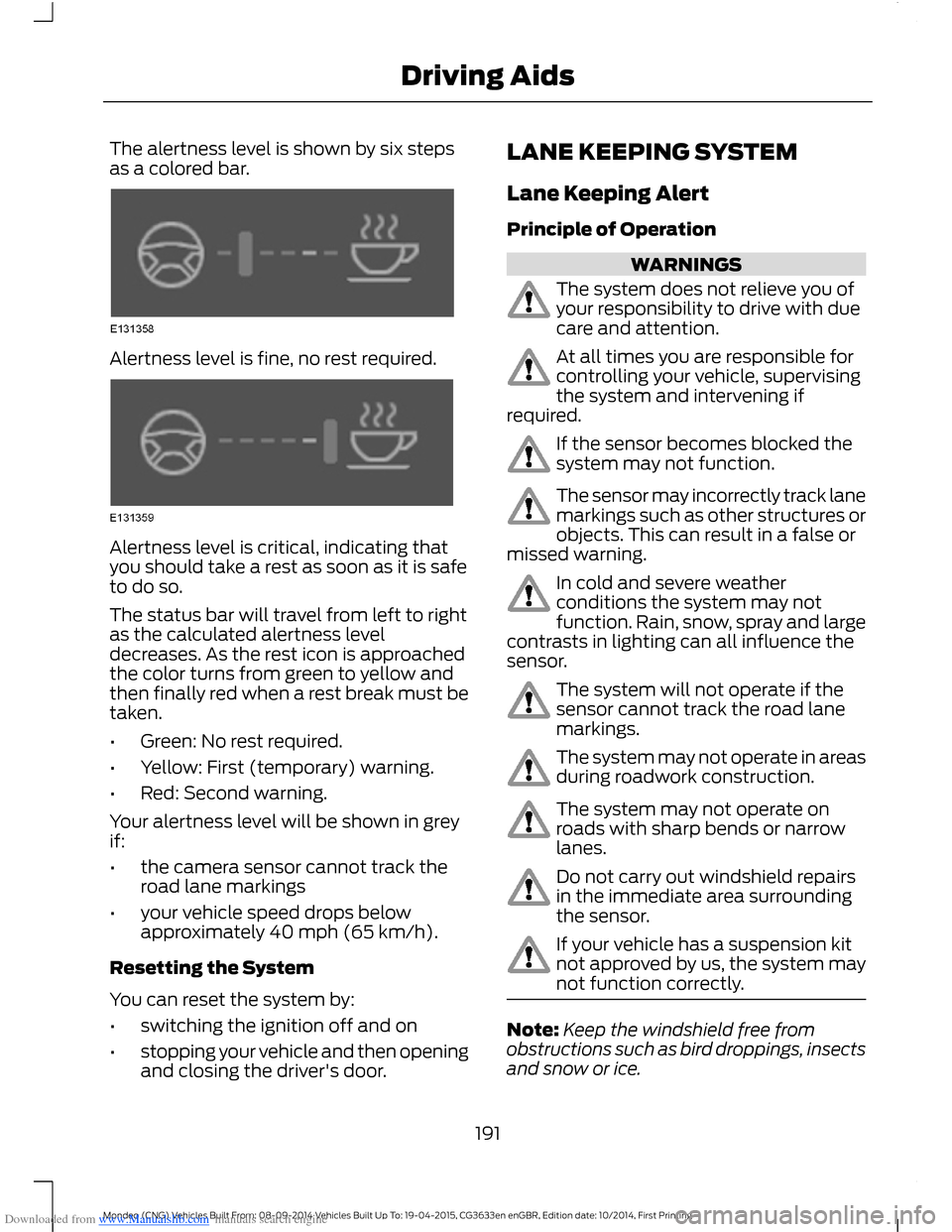
Downloaded from www.Manualslib.com manuals search engine The alertness level is shown by six stepsas a colored bar.
Alertness level is fine, no rest required.
Alertness level is critical, indicating thatyou should take a rest as soon as it is safeto do so.
The status bar will travel from left to rightas the calculated alertness leveldecreases. As the rest icon is approachedthe color turns from green to yellow andthen finally red when a rest break must betaken.
•Green: No rest required.
•Yellow: First (temporary) warning.
•Red: Second warning.
Your alertness level will be shown in greyif:
•the camera sensor cannot track theroad lane markings
•your vehicle speed drops belowapproximately 40 mph (65 km/h).
Resetting the System
You can reset the system by:
•switching the ignition off and on
•stopping your vehicle and then openingand closing the driver's door.
LANE KEEPING SYSTEM
Lane Keeping Alert
Principle of Operation
WARNINGS
The system does not relieve you ofyour responsibility to drive with duecare and attention.
At all times you are responsible forcontrolling your vehicle, supervisingthe system and intervening ifrequired.
If the sensor becomes blocked thesystem may not function.
The sensor may incorrectly track lanemarkings such as other structures orobjects. This can result in a false ormissed warning.
In cold and severe weatherconditions the system may notfunction. Rain, snow, spray and largecontrasts in lighting can all influence thesensor.
The system will not operate if thesensor cannot track the road lanemarkings.
The system may not operate in areasduring roadwork construction.
The system may not operate onroads with sharp bends or narrowlanes.
Do not carry out windshield repairsin the immediate area surroundingthe sensor.
If your vehicle has a suspension kitnot approved by us, the system maynot function correctly.
Note:Keep the windshield free fromobstructions such as bird droppings, insectsand snow or ice.
191Mondeo (CNG) Vehicles Built From: 08-09-2014 Vehicles Built Up To: 19-04-2015, CG3633en enGBR, Edition date: 10/2014, First PrintingDriving Aids
Page 194 of 446
Downloaded from www.Manualslib.com manuals search engine Note:The system may assist you whendriving on fast main roads and freeways.
Note:The system may not operate duringhard braking or acceleration and when youare intentionally steering your vehicle.
Note:The system will operate with aminimum of one tracked lane marking.
Note:The system will only operate abovevehicle speeds of approximately 40 mph(65 km/h).
The sensor is located behind the interiormirror. It continuously monitors conditionsto alert you of unintentional lane driftingat high speeds.
The system will automatically detect andtrack the lane markings on the road. If yourvehicle unintentionally drifts toward theroad lane markings, a warning will beshown in the display. There is also awarning given in the form of a vibration feltthrough the steering wheel.
Using Lane Keeping Alert
Switching the System On and Off
Note:When you switch the system off, awarning indicator will remain illuminated inthe information display. See WarningLamps and Indicators (page 81).
Note:The system status and settings willremain unchanged when you switch theignition on and off.
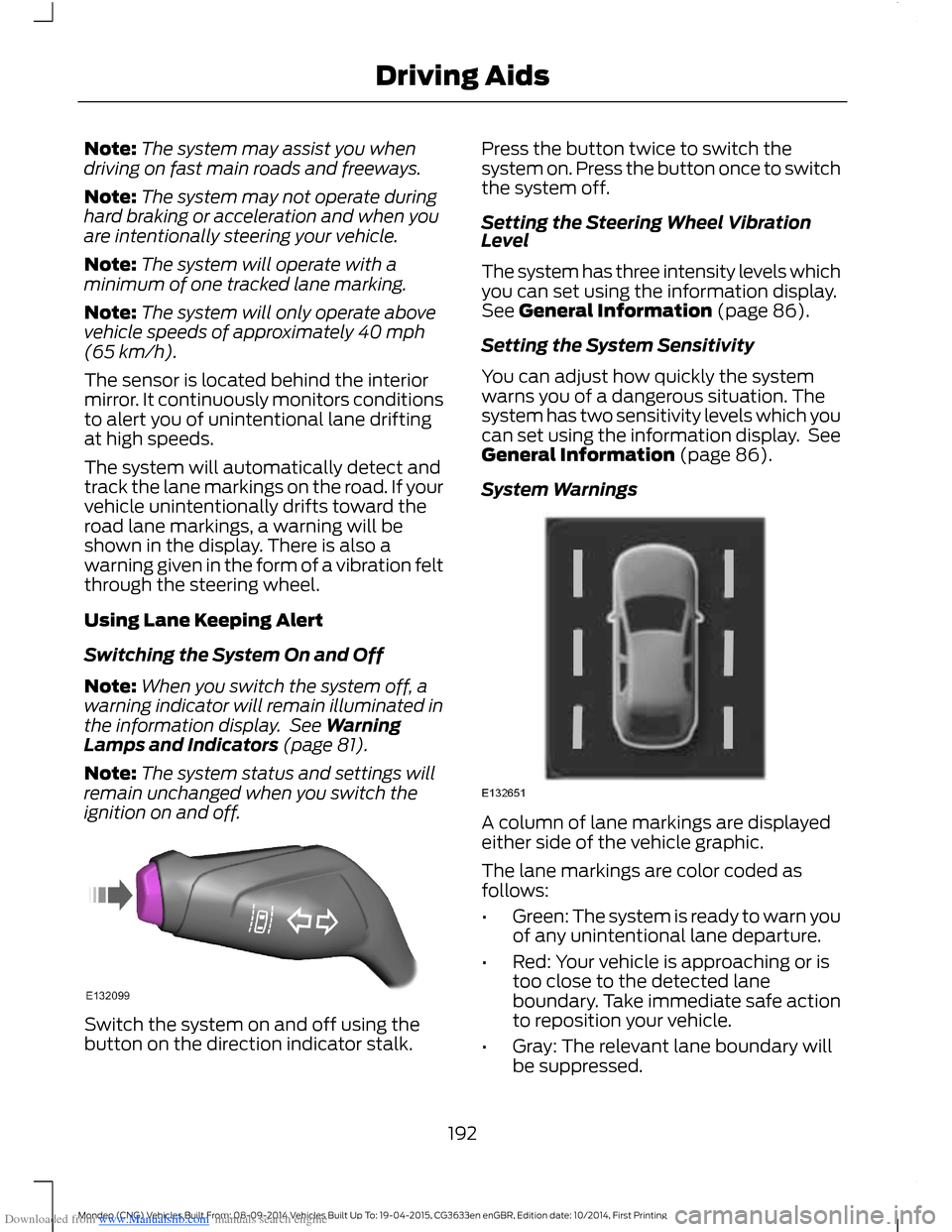
Switch the system on and off using thebutton on the direction indicator stalk.
Press the button twice to switch thesystem on. Press the button once to switchthe system off.
Setting the Steering Wheel VibrationLevel
The system has three intensity levels whichyou can set using the information display.See General Information (page 86).
Setting the System Sensitivity
You can adjust how quickly the systemwarns you of a dangerous situation. Thesystem has two sensitivity levels which youcan set using the information display. SeeGeneral Information (page 86).
System Warnings
A column of lane markings are displayedeither side of the vehicle graphic.
The lane markings are color coded asfollows:
•Green: The system is ready to warn youof any unintentional lane departure.
•Red: Your vehicle is approaching or istoo close to the detected laneboundary. Take immediate safe actionto reposition your vehicle.
•Gray: The relevant lane boundary willbe suppressed.
192Mondeo (CNG) Vehicles Built From: 08-09-2014 Vehicles Built Up To: 19-04-2015, CG3633en enGBR, Edition date: 10/2014, First PrintingDriving Aids
Page 195 of 446
Downloaded from www.Manualslib.com manuals search engine Instances where a lane boundary may besuppressed:
•Lane markings on the road may not bedetected by the sensor.
•You turn the direction indicator for thatside of your vehicle on.
•If you apply direct steering, acceleratefast or brake hard.
•Your vehicle speed is outside theoperating limits.
•If there is an anti-lock brake or stabilitycontrol intervention.
•Narrow lane width.
If the lane markings in the display turn redor you feel a vibration through the steeringwheel you must take immediate and safeaction to align your vehicle. Correct anyunintended lane drift immediately.
Lane Keeping Aid
Switching the System On and Off
Note:The system does not automaticallyturn on every time you switch the ignitionon.
Note:When you switch the system on, thiswill automatically turn lane keeping alerton.
Switch the system on and off using thebutton on the indicator stalk.
Press the button three times to switch thesystem on. Press the button again toswitch the system off.
Setting the System Sensitivity
You can adjust how quickly the systemintervenes in a dangerous situation. Thesystem has two sensitivity levels which youcan set using the information display. SeeGeneral Information (page 86).
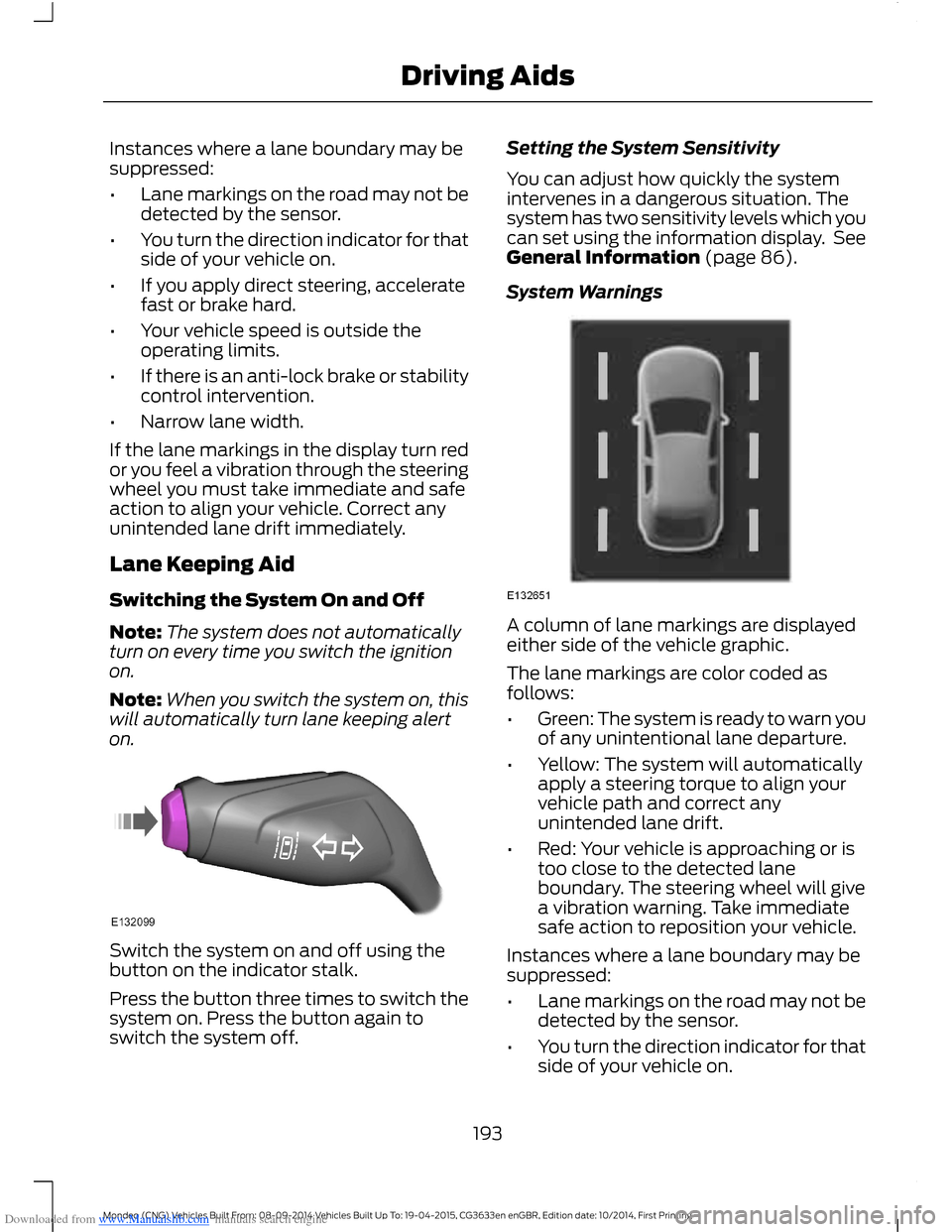
System Warnings
A column of lane markings are displayedeither side of the vehicle graphic.
The lane markings are color coded asfollows:
•Green: The system is ready to warn youof any unintentional lane departure.
•Yellow: The system will automaticallyapply a steering torque to align yourvehicle path and correct anyunintended lane drift.
•Red: Your vehicle is approaching or istoo close to the detected laneboundary. The steering wheel will givea vibration warning. Take immediatesafe action to reposition your vehicle.
Instances where a lane boundary may besuppressed:
•Lane markings on the road may not bedetected by the sensor.
•You turn the direction indicator for thatside of your vehicle on.
193Mondeo (CNG) Vehicles Built From: 08-09-2014 Vehicles Built Up To: 19-04-2015, CG3633en enGBR, Edition date: 10/2014, First PrintingDriving Aids
Page 196 of 446
Downloaded from www.Manualslib.com manuals search engine •If you apply direct steering, acceleratefast or brake hard.
•Your vehicle speed is outside theoperating limits.
•If there is an anti-lock brake or stabilitycontrol intervention.
•Narrow lane width.
Note:You can override the system at anytime during its operation by turning thesteering wheel.
BLIND SPOT INFORMATION
SYSTEM
Blind Spot Information System(BLIS™) with Cross Traffic Alert
(If Equipped)
WARNING
Do not use the system as areplacement for using the mirrors orlooking over your shoulder beforechanging lanes. You should only use thesystem as an aid. It is not a replacementfor careful driving.
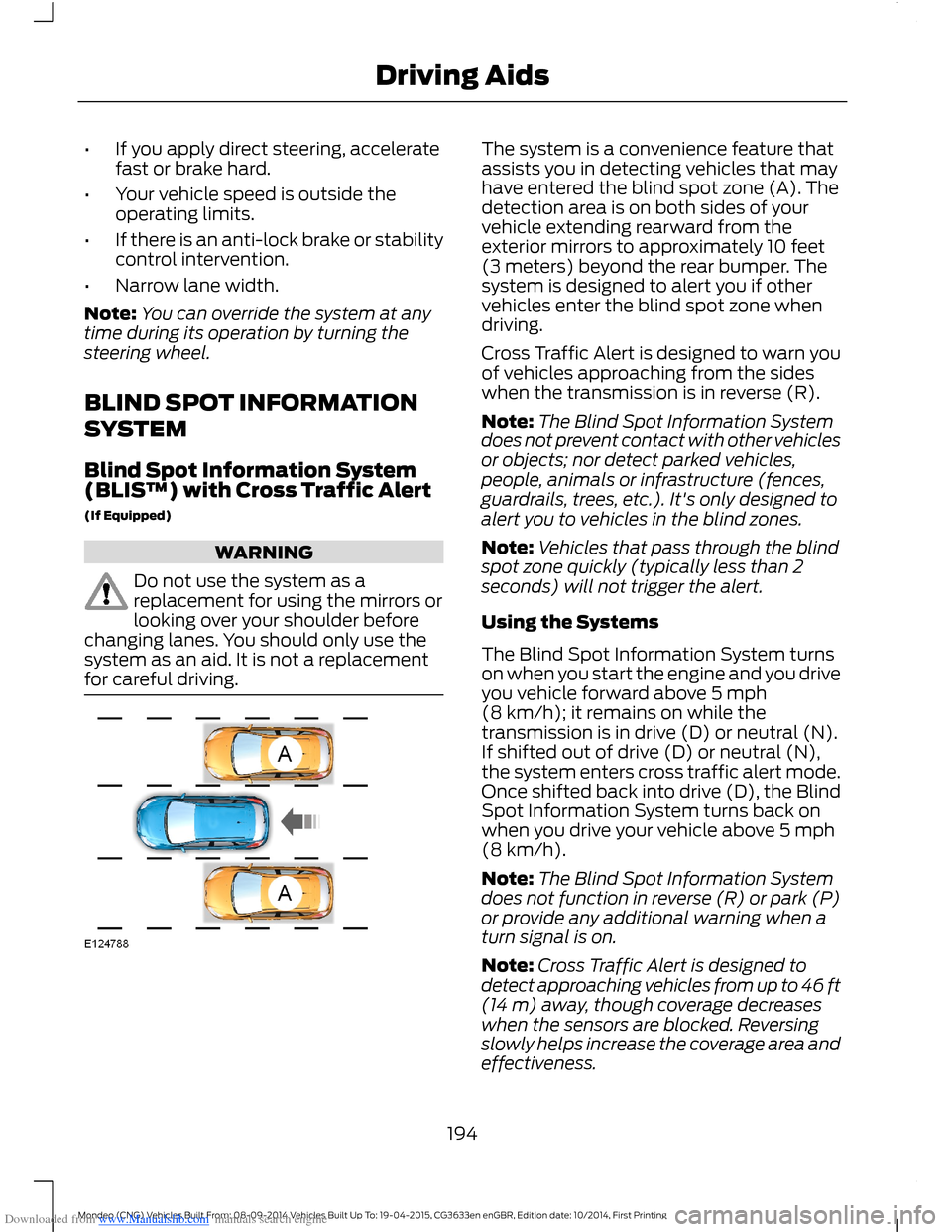
The system is a convenience feature thatassists you in detecting vehicles that mayhave entered the blind spot zone (A). Thedetection area is on both sides of yourvehicle extending rearward from theexterior mirrors to approximately 10 feet(3 meters) beyond the rear bumper. Thesystem is designed to alert you if othervehicles enter the blind spot zone whendriving.
Cross Traffic Alert is designed to warn youof vehicles approaching from the sideswhen the transmission is in reverse (R).
Note:The Blind Spot Information Systemdoes not prevent contact with other vehiclesor objects; nor detect parked vehicles,people, animals or infrastructure (fences,guardrails, trees, etc.). It's only designed toalert you to vehicles in the blind zones.
Note:Vehicles that pass through the blindspot zone quickly (typically less than 2seconds) will not trigger the alert.
Using the Systems
The Blind Spot Information System turnson when you start the engine and you driveyou vehicle forward above 5 mph(8 km/h); it remains on while thetransmission is in drive (D) or neutral (N).If shifted out of drive (D) or neutral (N),the system enters cross traffic alert mode.Once shifted back into drive (D), the BlindSpot Information System turns back onwhen you drive your vehicle above 5 mph(8 km/h).
Note:The Blind Spot Information Systemdoes not function in reverse (R) or park (P)or provide any additional warning when aturn signal is on.
Note:Cross Traffic Alert is designed todetect approaching vehicles from up to 46 ft(14 m) away, though coverage decreaseswhen the sensors are blocked. Reversingslowly helps increase the coverage area andeffectiveness.
194Mondeo (CNG) Vehicles Built From: 08-09-2014 Vehicles Built Up To: 19-04-2015, CG3633en enGBR, Edition date: 10/2014, First PrintingDriving Aids
Page 197 of 446
Downloaded from www.Manualslib.com manuals search engine Note:For manual transmission vehicles,the Cross Traffic Alert will be active only ifthe transmission is in reverse (R). If yourvehicle is rolling backwards and thetransmission is not in reverse (R) then CrossTraffic Alert will not be active.
WARNING
Do not use the system as areplacement for using the mirrors orlooking over your shoulder beforechanging lanes. You should only use thesystem as an aid. It is not a replacementfor careful driving.
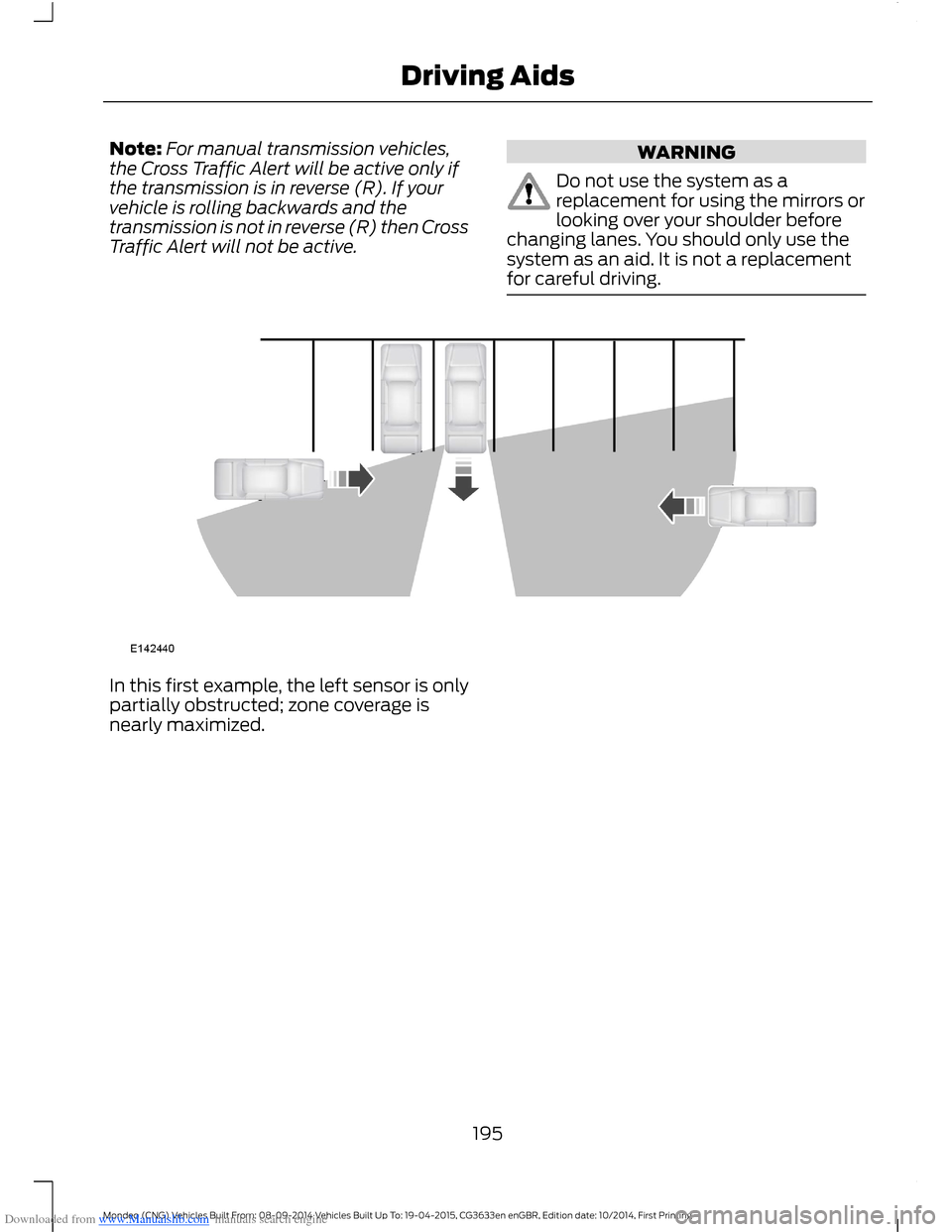
In this first example, the left sensor is onlypartially obstructed; zone coverage isnearly maximized.
195Mondeo (CNG) Vehicles Built From: 08-09-2014 Vehicles Built Up To: 19-04-2015, CG3633en enGBR, Edition date: 10/2014, First PrintingDriving Aids
Page 198 of 446
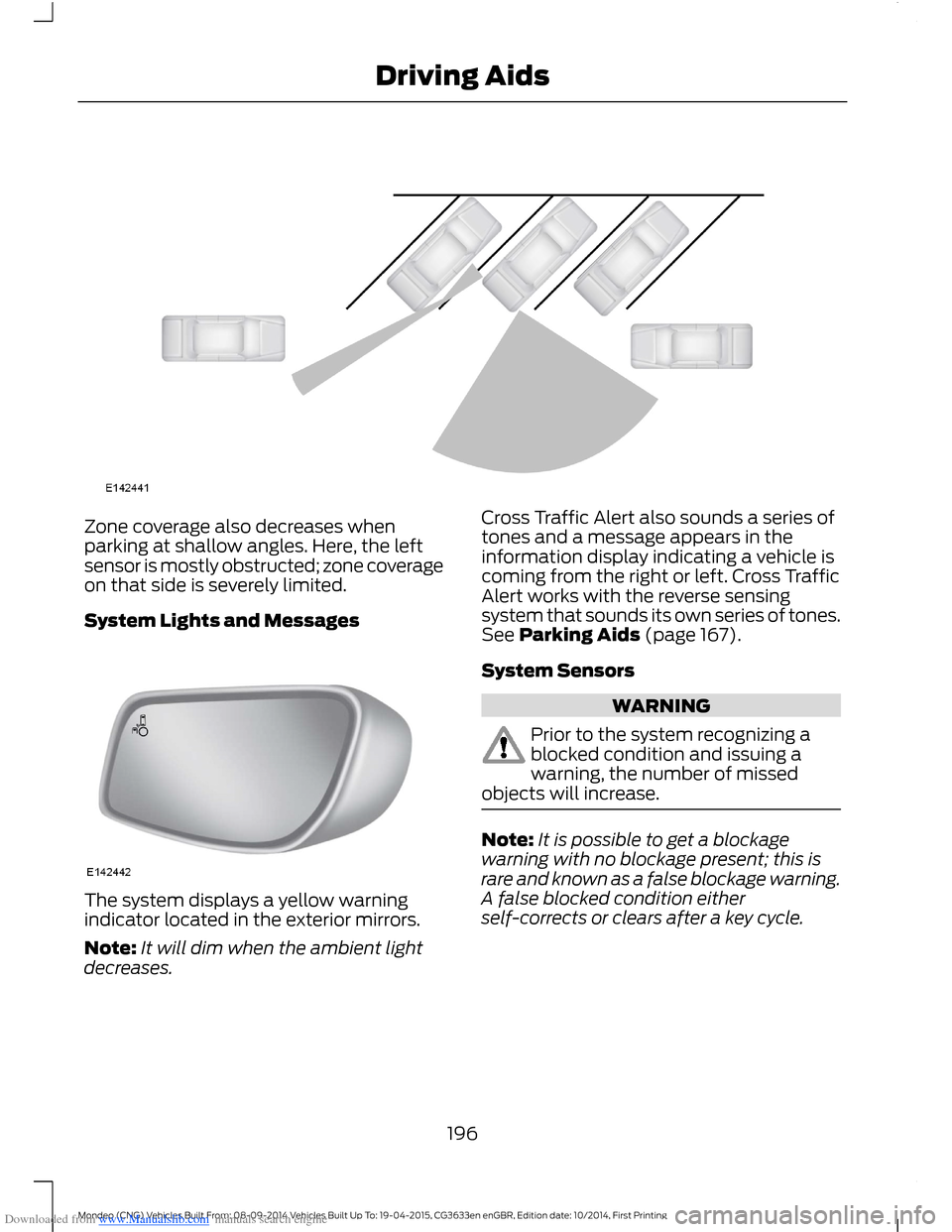
Downloaded from www.Manualslib.com manuals search engine Zone coverage also decreases whenparking at shallow angles. Here, the leftsensor is mostly obstructed; zone coverageon that side is severely limited.
System Lights and Messages
The system displays a yellow warningindicator located in the exterior mirrors.
Note:It will dim when the ambient lightdecreases.
Cross Traffic Alert also sounds a series oftones and a message appears in theinformation display indicating a vehicle iscoming from the right or left. Cross TrafficAlert works with the reverse sensingsystem that sounds its own series of tones.See Parking Aids (page 167).
System Sensors
WARNING
Prior to the system recognizing ablocked condition and issuing awarning, the number of missedobjects will increase.
Note:It is possible to get a blockagewarning with no blockage present; this israre and known as a false blockage warning.A false blocked condition eitherself-corrects or clears after a key cycle.
196Mondeo (CNG) Vehicles Built From: 08-09-2014 Vehicles Built Up To: 19-04-2015, CG3633en enGBR, Edition date: 10/2014, First PrintingDriving Aids