warning FORD MONDEO 2014 4.G Manual Online
[x] Cancel search | Manufacturer: FORD, Model Year: 2014, Model line: MONDEO, Model: FORD MONDEO 2014 4.GPages: 446, PDF Size: 29.09 MB
Page 171 of 446
Downloaded from www.Manualslib.com manuals search engine WARNINGS
Traffic control systems, inclementweather, air brakes and externalmotors and fans may affect correctoperation of the sensing system; this mayinclude reduced performance or a falsealerts.
Front Sensing System
The front sensors are active when thetransmission is in any position other thanpark (P).
You can also press the parking aid buttonto switch the front parking aid system onwithout selecting reverse (R).
Note:Keep the sensors located on thebumper or fascia free from snow, ice andlarge accumulations of dirt. If the sensorsare covered, the system’s accuracy can beaffected. Do not clean the sensors withsharp objects.
Note:If your vehicle sustains damage tothe bumper or fascia, leaving it misalignedor bent, the sensing zone may be alteredcausing inaccurate measurement ofobstacles or false beeps.
When the parking aid system produces anaudible warning, the audio system mayreduce the set volume to a predeterminedlevel.
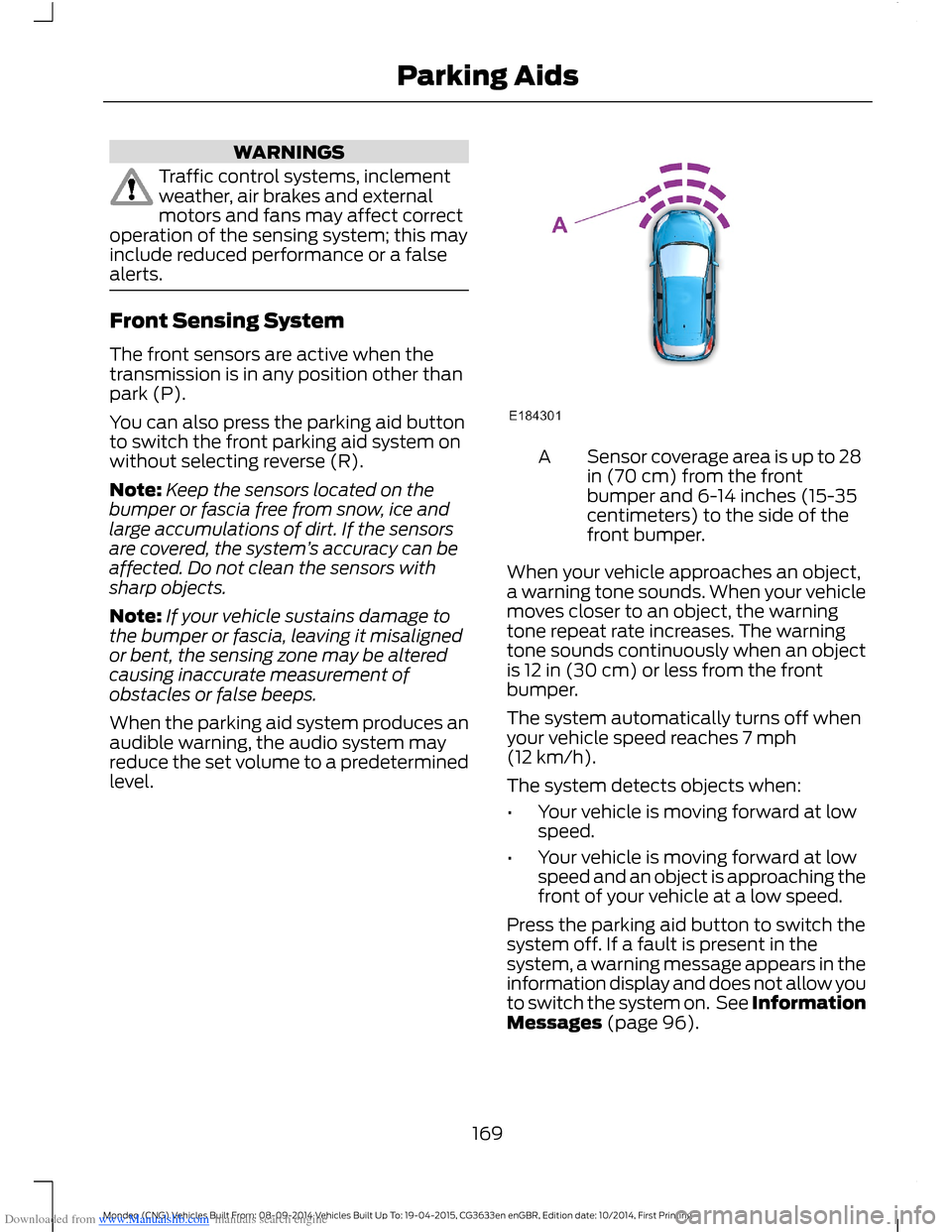
Sensor coverage area is up to 28in (70 cm) from the frontbumper and 6-14 inches (15-35centimeters) to the side of thefront bumper.
A
When your vehicle approaches an object,a warning tone sounds. When your vehiclemoves closer to an object, the warningtone repeat rate increases. The warningtone sounds continuously when an objectis 12 in (30 cm) or less from the frontbumper.
The system automatically turns off whenyour vehicle speed reaches 7 mph(12 km/h).
The system detects objects when:
•Your vehicle is moving forward at lowspeed.
•Your vehicle is moving forward at lowspeed and an object is approaching thefront of your vehicle at a low speed.
Press the parking aid button to switch thesystem off. If a fault is present in thesystem, a warning message appears in theinformation display and does not allow youto switch the system on. See InformationMessages (page 96).
169Mondeo (CNG) Vehicles Built From: 08-09-2014 Vehicles Built Up To: 19-04-2015, CG3633en enGBR, Edition date: 10/2014, First PrintingParking Aids
Page 172 of 446
Downloaded from www.Manualslib.com manuals search engine If the transmission is in reverse (R), thefront sensing system provides audiowarnings when your vehicle is moving andthe detected obstacle is moving towardsyour vehicle. Once the vehicle is stationary,the audio warning will be stopped after 2seconds.
Obstacle Distance Indicator (If
Equipped)
The system provides obstacle distanceindication through the information display.The distance indicator displays when thetransmission is in reverse (R).
The indicator displays:
•As the distance to the obstacledecreases the indicator blocksilluminate and move towards thevehicle icon.
•If there is no obstacle detected, thedistance indicator blocks are greyedout.
Vehicles with automatic transmission
If the gearshift is in neutral (N), the systemprovides obstacle distance indicationthrough the information display. If yourvehicle moves the front sensing systemprovides an audible warning when thevehicle is moving at 7 mph (12 km/h) orbelow and an obstacle is located insidethe detection area. Once the vehicle isstationary, the audio warning will bestopped after 4 seconds.
If the gearshift is in drive (D) or any otherforward gear, the front sensing systemprovides audio warnings when the vehicleis moving and an obstacle is located insidethe detection area. Once the vehicle isstationary, the audio warning will bestopped after 2 seconds.
SIDE SENSING SYSTEM
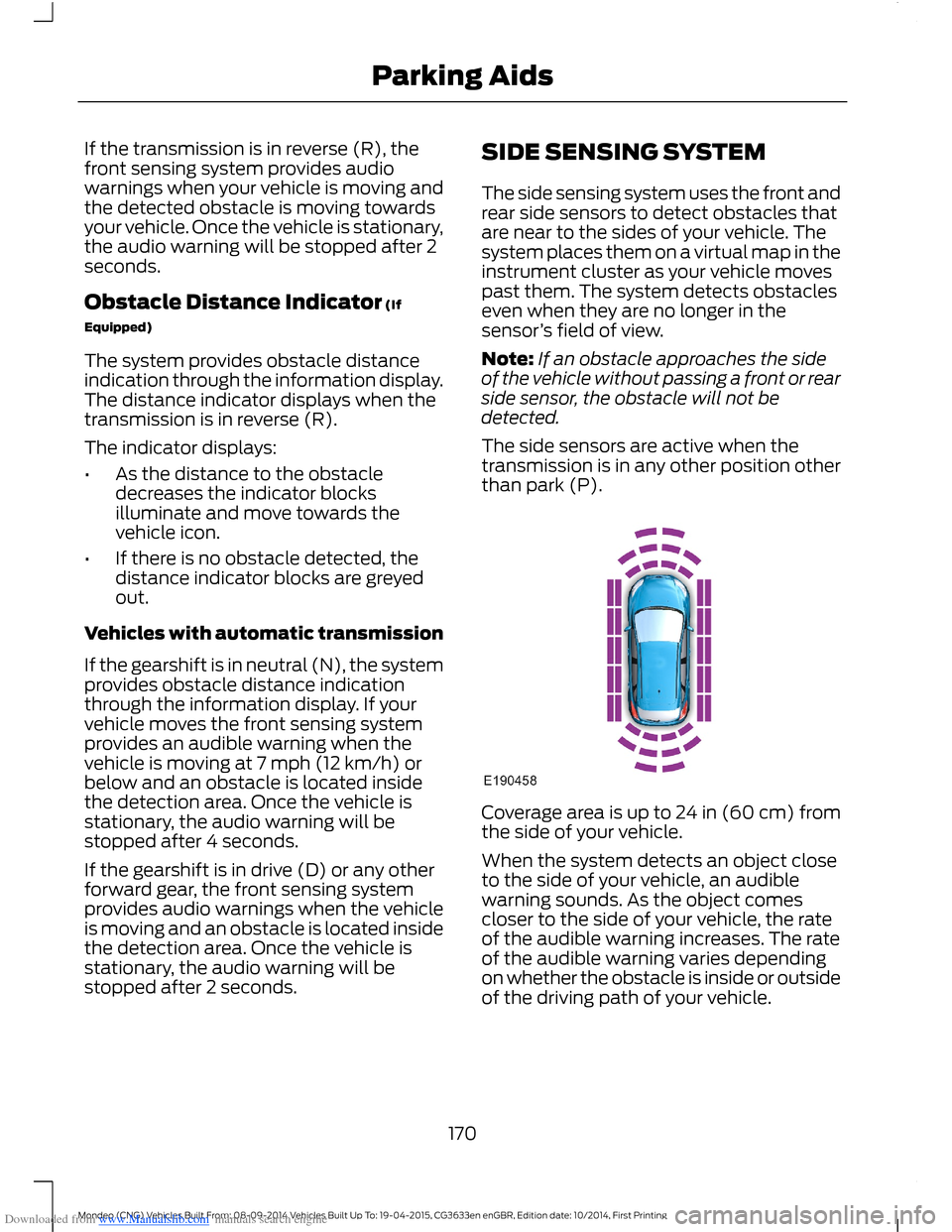
The side sensing system uses the front andrear side sensors to detect obstacles thatare near to the sides of your vehicle. Thesystem places them on a virtual map in theinstrument cluster as your vehicle movespast them. The system detects obstacleseven when they are no longer in thesensor’s field of view.
Note:If an obstacle approaches the sideof the vehicle without passing a front or rearside sensor, the obstacle will not bedetected.
The side sensors are active when thetransmission is in any other position otherthan park (P).
Coverage area is up to 24 in (60 cm) fromthe side of your vehicle.
When the system detects an object closeto the side of your vehicle, an audiblewarning sounds. As the object comescloser to the side of your vehicle, the rateof the audible warning increases. The rateof the audible warning varies dependingon whether the obstacle is inside or outsideof the driving path of your vehicle.
170Mondeo (CNG) Vehicles Built From: 08-09-2014 Vehicles Built Up To: 19-04-2015, CG3633en enGBR, Edition date: 10/2014, First PrintingParking Aids
Page 173 of 446
Downloaded from www.Manualslib.com manuals search engine Distance Indication (If Equipped)
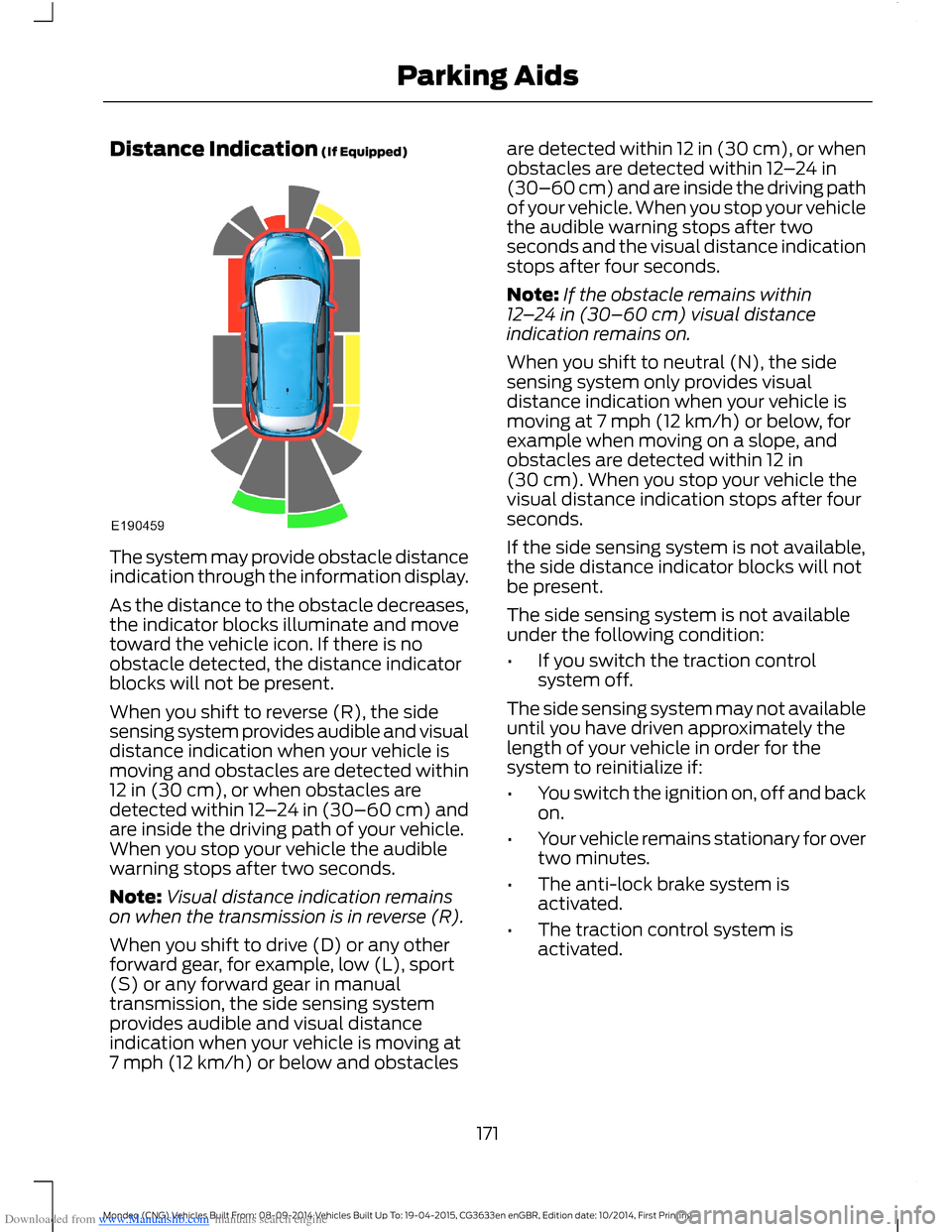
The system may provide obstacle distanceindication through the information display.
As the distance to the obstacle decreases,the indicator blocks illuminate and movetoward the vehicle icon. If there is noobstacle detected, the distance indicatorblocks will not be present.
When you shift to reverse (R), the sidesensing system provides audible and visualdistance indication when your vehicle ismoving and obstacles are detected within12 in (30 cm), or when obstacles aredetected within 12–24 in (30–60 cm) andare inside the driving path of your vehicle.When you stop your vehicle the audiblewarning stops after two seconds.
Note:Visual distance indication remainson when the transmission is in reverse (R).
When you shift to drive (D) or any otherforward gear, for example, low (L), sport(S) or any forward gear in manualtransmission, the side sensing systemprovides audible and visual distanceindication when your vehicle is moving at7 mph (12 km/h) or below and obstacles
are detected within 12 in (30 cm), or whenobstacles are detected within 12–24 in(30–60 cm) and are inside the driving pathof your vehicle. When you stop your vehiclethe audible warning stops after twoseconds and the visual distance indicationstops after four seconds.
Note:If the obstacle remains within12–24 in (30–60 cm) visual distanceindication remains on.
When you shift to neutral (N), the sidesensing system only provides visualdistance indication when your vehicle ismoving at 7 mph (12 km/h) or below, forexample when moving on a slope, andobstacles are detected within 12 in(30 cm). When you stop your vehicle thevisual distance indication stops after fourseconds.
If the side sensing system is not available,the side distance indicator blocks will notbe present.
The side sensing system is not availableunder the following condition:
•If you switch the traction controlsystem off.
The side sensing system may not availableuntil you have driven approximately thelength of your vehicle in order for thesystem to reinitialize if:
•You switch the ignition on, off and backon.
•Your vehicle remains stationary for overtwo minutes.
•The anti-lock brake system isactivated.
•The traction control system isactivated.
171Mondeo (CNG) Vehicles Built From: 08-09-2014 Vehicles Built Up To: 19-04-2015, CG3633en enGBR, Edition date: 10/2014, First PrintingParking Aids
Page 174 of 446
Downloaded from www.Manualslib.com manuals search engine ACTIVE PARK ASSIST
Parallel Parking, PerpendicularParking, Park Out Assist
WARNINGS
You must remain in your vehiclewhen the system turns on. At alltimes, you are responsible forcontrolling your vehicle, supervising thesystem and intervening if required. Failureto take care may result in the loss ofcontrol of your vehicle, serious personalinjury or death.
The sensors may not detect objectsin heavy rain or other conditions thatcause disruptive reflections.
The system scans the area adjacent toboth sides of your vehicle to locate asuitable parking space.
The system informs you when it locates asuitable parking space. When you stopyour vehicle, the system takes control ofthe steering to guide your vehicle into theparking space.
Park Out Assist automatically steers yourvehicle out of a parallel parking space(hands-free) while you control theaccelerator, gearshift and brakes. Thesystem visually and audibly instructs youto enter traffic.
The system may not correctly operate inany of the following conditions:
•a spare tire or a significantly worn tiremore than the other tires is used
•you use a tire size not recommendedby us
•you try to park on a tight curve
•if the edge of the neighboring parkedvehicle is high off the ground (forexample, a bus, tow truck or flatbedtruck)
•the weather conditions are poor (heavyrain, snow, fog, etc).
Note:Keep the sensors, located on thebumper or fascia, free from snow, ice andlarge accumulations of dirt. Covered sensorscan affect the system's accuracy. Do notclean the sensors with sharp objects.
Do not use the system if:
•You have attached a foreign object(bike rack or trailer) to the front or rearof your vehicle or close to the sensors.
•You have attached an overhangingobject (surfboard) to the roof.
•A foreign object damages or obstructsthe front or rear bumper or sidesensors.
•The correct tire size is not in use on yourvehicle (for example, a mini-spare tire).
Using Active Park Assist - ParallelParking
Press the button located on thecenter console near the gearshiftlever once.
When driving at a speed less than 19 mph(30 km/h) the system automatically scansboth sides of your vehicle for an availableparking space. The system displays amessage and a corresponding graphic toindicate it is searching for a parking space.Use the direction indicator to selectsearching either to the left-hand side orright-hand side of your vehicle.
Note:If you do not make a selection thesystem will default to the passenger's side.
172Mondeo (CNG) Vehicles Built From: 08-09-2014 Vehicles Built Up To: 19-04-2015, CG3633en enGBR, Edition date: 10/2014, First PrintingParking Aids
Page 178 of 446
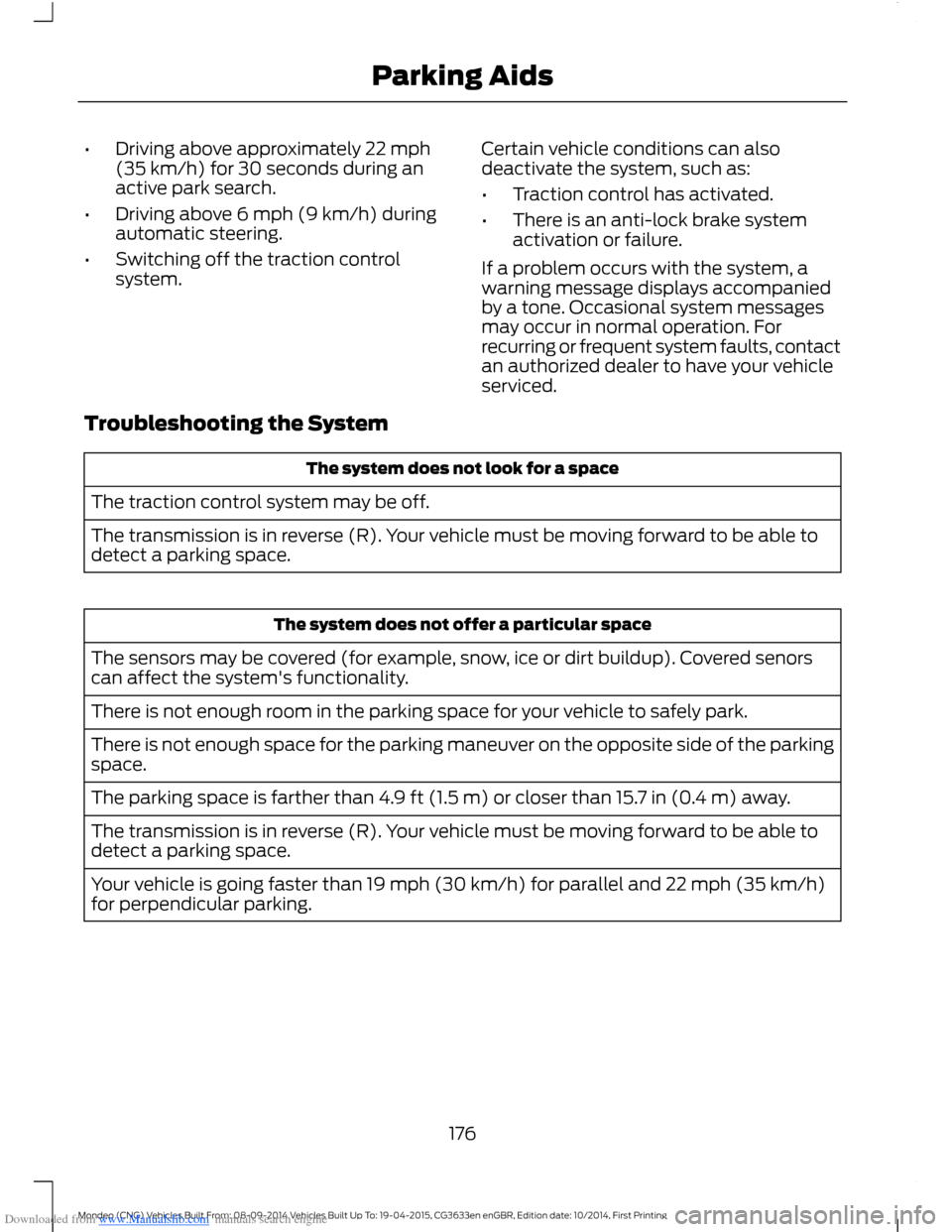
Downloaded from www.Manualslib.com manuals search engine •Driving above approximately 22 mph(35 km/h) for 30 seconds during anactive park search.
•Driving above 6 mph (9 km/h) duringautomatic steering.
•Switching off the traction controlsystem.
Certain vehicle conditions can alsodeactivate the system, such as:
•Traction control has activated.
•There is an anti-lock brake systemactivation or failure.
If a problem occurs with the system, awarning message displays accompaniedby a tone. Occasional system messagesmay occur in normal operation. Forrecurring or frequent system faults, contactan authorized dealer to have your vehicleserviced.
Troubleshooting the System
The system does not look for a space
The traction control system may be off.
The transmission is in reverse (R). Your vehicle must be moving forward to be able todetect a parking space.
The system does not offer a particular space
The sensors may be covered (for example, snow, ice or dirt buildup). Covered senorscan affect the system's functionality.
There is not enough room in the parking space for your vehicle to safely park.
There is not enough space for the parking maneuver on the opposite side of the parkingspace.
The parking space is farther than 4.9 ft (1.5 m) or closer than 15.7 in (0.4 m) away.
The transmission is in reverse (R). Your vehicle must be moving forward to be able todetect a parking space.
Your vehicle is going faster than 19 mph (30 km/h) for parallel and 22 mph (35 km/h)for perpendicular parking.
176Mondeo (CNG) Vehicles Built From: 08-09-2014 Vehicles Built Up To: 19-04-2015, CG3633en enGBR, Edition date: 10/2014, First PrintingParking Aids
Page 179 of 446
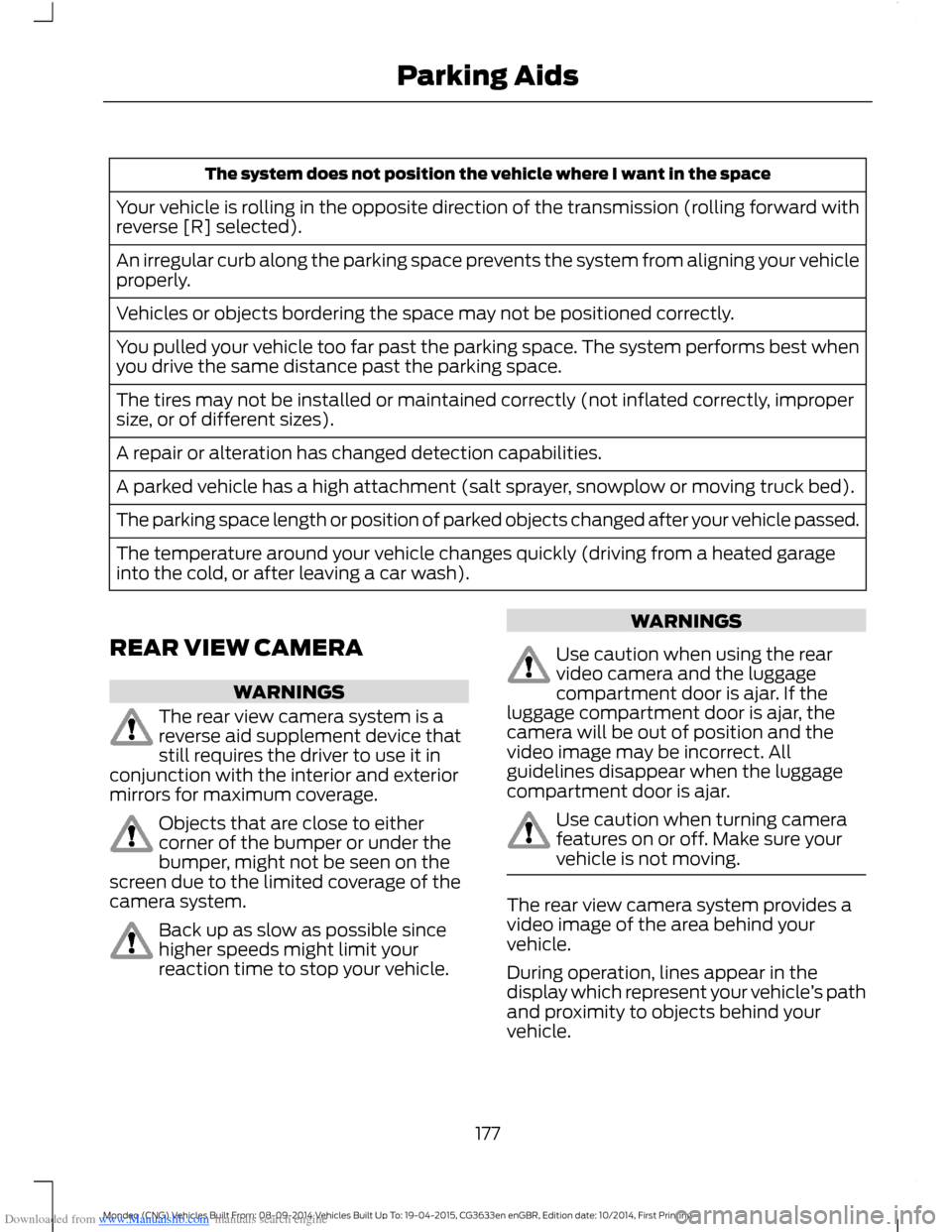
Downloaded from www.Manualslib.com manuals search engine The system does not position the vehicle where I want in the space
Your vehicle is rolling in the opposite direction of the transmission (rolling forward withreverse [R] selected).
An irregular curb along the parking space prevents the system from aligning your vehicleproperly.
Vehicles or objects bordering the space may not be positioned correctly.
You pulled your vehicle too far past the parking space. The system performs best whenyou drive the same distance past the parking space.
The tires may not be installed or maintained correctly (not inflated correctly, impropersize, or of different sizes).
A repair or alteration has changed detection capabilities.
A parked vehicle has a high attachment (salt sprayer, snowplow or moving truck bed).
The parking space length or position of parked objects changed after your vehicle passed.
The temperature around your vehicle changes quickly (driving from a heated garageinto the cold, or after leaving a car wash).
REAR VIEW CAMERA
WARNINGS
The rear view camera system is areverse aid supplement device thatstill requires the driver to use it inconjunction with the interior and exteriormirrors for maximum coverage.
Objects that are close to eithercorner of the bumper or under thebumper, might not be seen on thescreen due to the limited coverage of thecamera system.
Back up as slow as possible sincehigher speeds might limit yourreaction time to stop your vehicle.
WARNINGS
Use caution when using the rearvideo camera and the luggagecompartment door is ajar. If theluggage compartment door is ajar, thecamera will be out of position and thevideo image may be incorrect. Allguidelines disappear when the luggagecompartment door is ajar.
Use caution when turning camerafeatures on or off. Make sure yourvehicle is not moving.
The rear view camera system provides avideo image of the area behind yourvehicle.
During operation, lines appear in thedisplay which represent your vehicle’s pathand proximity to objects behind yourvehicle.
177Mondeo (CNG) Vehicles Built From: 08-09-2014 Vehicles Built Up To: 19-04-2015, CG3633en enGBR, Edition date: 10/2014, First PrintingParking Aids
Page 181 of 446
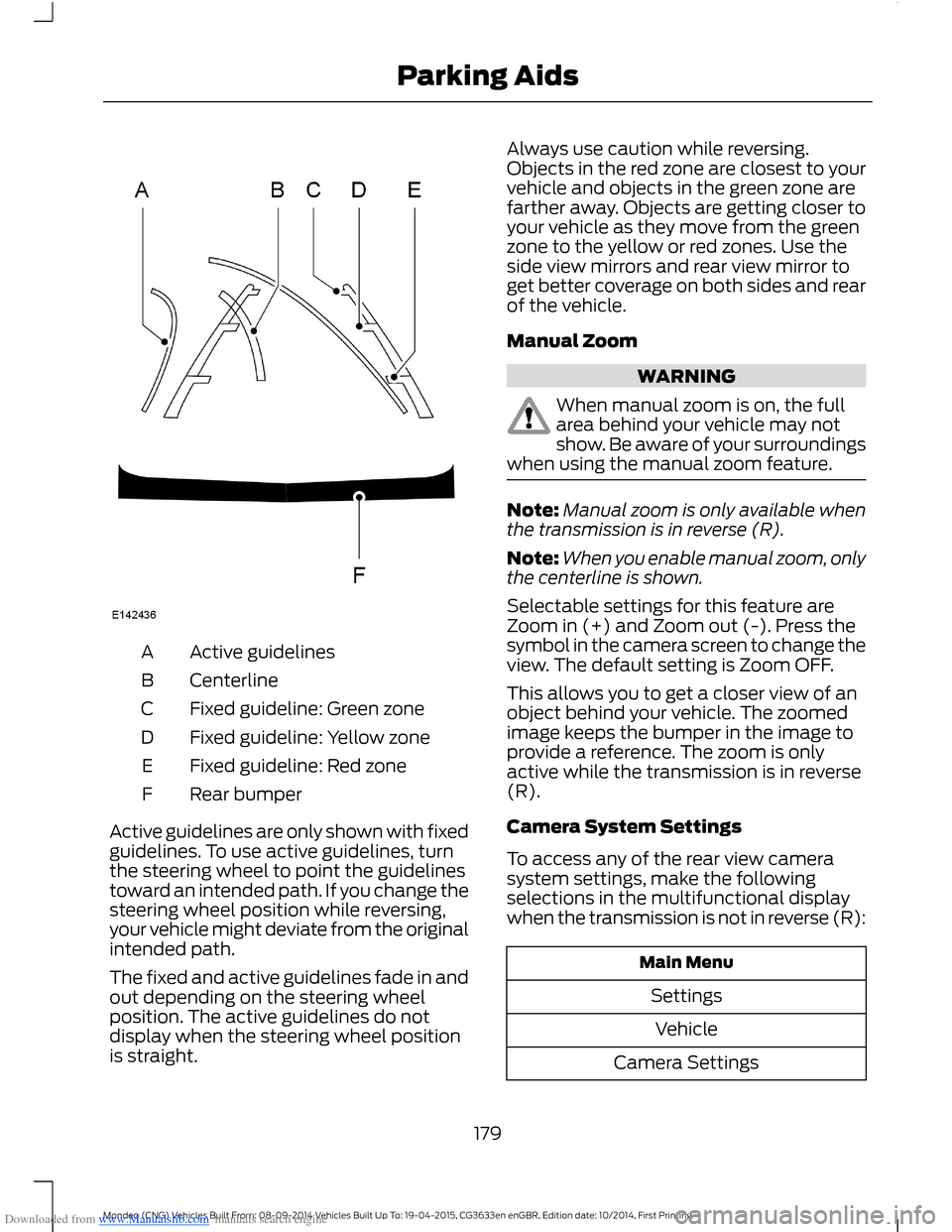
Downloaded from www.Manualslib.com manuals search engine Active guidelinesA
CenterlineB
Fixed guideline: Green zoneC
Fixed guideline: Yellow zoneD
Fixed guideline: Red zoneE
Rear bumperF
Active guidelines are only shown with fixedguidelines. To use active guidelines, turnthe steering wheel to point the guidelinestoward an intended path. If you change thesteering wheel position while reversing,your vehicle might deviate from the originalintended path.
The fixed and active guidelines fade in andout depending on the steering wheelposition. The active guidelines do notdisplay when the steering wheel positionis straight.
Always use caution while reversing.Objects in the red zone are closest to yourvehicle and objects in the green zone arefarther away. Objects are getting closer toyour vehicle as they move from the greenzone to the yellow or red zones. Use theside view mirrors and rear view mirror toget better coverage on both sides and rearof the vehicle.
Manual Zoom
WARNING
When manual zoom is on, the fullarea behind your vehicle may notshow. Be aware of your surroundingswhen using the manual zoom feature.
Note:Manual zoom is only available whenthe transmission is in reverse (R).
Note:When you enable manual zoom, onlythe centerline is shown.
Selectable settings for this feature areZoom in (+) and Zoom out (-). Press thesymbol in the camera screen to change theview. The default setting is Zoom OFF.
This allows you to get a closer view of anobject behind your vehicle. The zoomedimage keeps the bumper in the image toprovide a reference. The zoom is onlyactive while the transmission is in reverse(R).
Camera System Settings
To access any of the rear view camerasystem settings, make the followingselections in the multifunctional displaywhen the transmission is not in reverse (R):
Main Menu
Settings
Vehicle
Camera Settings
179Mondeo (CNG) Vehicles Built From: 08-09-2014 Vehicles Built Up To: 19-04-2015, CG3633en enGBR, Edition date: 10/2014, First PrintingParking Aids
Page 183 of 446
Downloaded from www.Manualslib.com manuals search engine PRINCIPLE OF OPERATION
Cruise control lets you maintain a setspeed without keeping your foot on theaccelerator pedal. You can use cruisecontrol when your vehicle speed is greaterthan 20 mph (30 km/h).
USING CRUISE CONTROL
WARNINGS
Do not use cruise control on windingroads, in heavy traffic or, when theroad surface is slippery. This couldresult in loss of vehicle control, seriousinjury or death.
When you are going downhill, yourvehicle speed may increase abovethe set speed. The system will notapply the brakes but a warning displays.
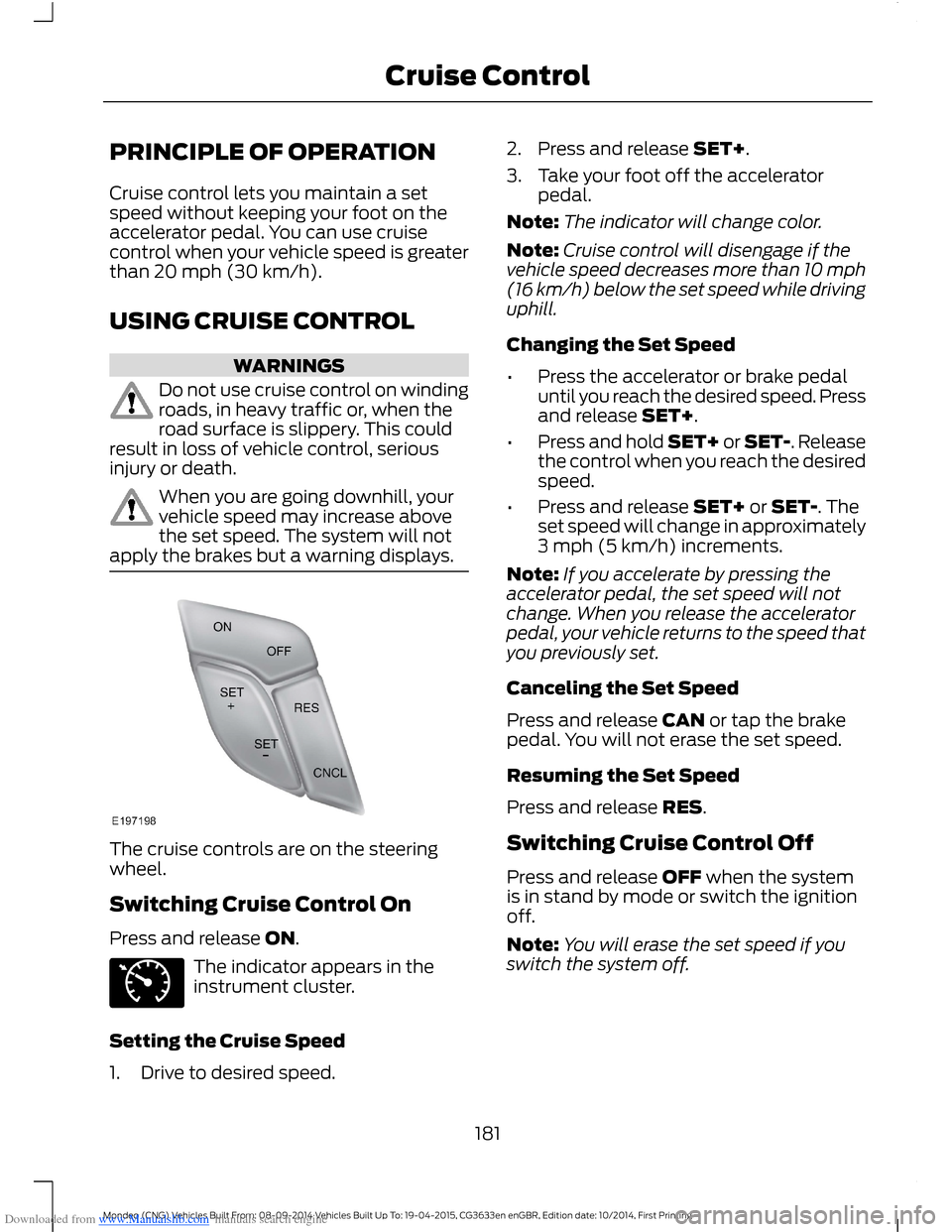
The cruise controls are on the steeringwheel.
Switching Cruise Control On
Press and release ON.
The indicator appears in theinstrument cluster.
Setting the Cruise Speed
1.Drive to desired speed.
2.Press and release SET+.
3.Take your foot off the acceleratorpedal.
Note:The indicator will change color.
Note:Cruise control will disengage if thevehicle speed decreases more than 10 mph(16 km/h) below the set speed while drivinguphill.
Changing the Set Speed
•Press the accelerator or brake pedaluntil you reach the desired speed. Pressand release SET+.
•Press and hold SET+ or SET-. Releasethe control when you reach the desiredspeed.
•Press and release SET+ or SET-. Theset speed will change in approximately3 mph (5 km/h) increments.
Note:If you accelerate by pressing theaccelerator pedal, the set speed will notchange. When you release the acceleratorpedal, your vehicle returns to the speed thatyou previously set.
Canceling the Set Speed
Press and release CAN or tap the brakepedal. You will not erase the set speed.
Resuming the Set Speed
Press and release RES.
Switching Cruise Control Off
Press and release OFF when the systemis in stand by mode or switch the ignitionoff.
Note:You will erase the set speed if youswitch the system off.
181Mondeo (CNG) Vehicles Built From: 08-09-2014 Vehicles Built Up To: 19-04-2015, CG3633en enGBR, Edition date: 10/2014, First PrintingCruise Control
Page 184 of 446
Downloaded from www.Manualslib.com manuals search engine USING ADAPTIVE CRUISE
CONTROL (If Equipped)
WARNINGS
Always pay close attention tochanging road conditions, especiallywhen using adaptive cruise control.Adaptive cruise control cannot replaceattentive driving. Failing to follow any ofthe warnings below or failing to payattention to the road may result in a crash,serious injury or death.
The system is not a crash warning oravoidance system. You mustintervene if the system does notdetect a vehicle in front of you.
Adaptive cruise control does notdetect stationary or slow movingvehicles below 6 mph (10 km/h).
The system does not brake for slowor stationary vehicles, pedestrians,objects in the road, oncoming andcrossing vehicles.
Do not use the system when enteringor leaving a freeway.
Do not use adaptive cruise controlon winding roads, in heavy traffic orwhen the road surface is slippery.This could result in loss of vehicle control,serious injury or death.
Do not use the system in poorvisibility, specifically fog, heavy rain,spray or snow.
WARNINGS
Do not use the system when towinga trailer with electronic aftermarkettrailer brake controls. Electronicaftermarket trailer brakes do not functionproperly when you switch on the systembecause the brakes are electronicallycontrolled. Failing to do so may result inloss of vehicle control, which could resultin serious injury. Overrun brakes, surgebrakes and other non-electronictrailer-brake controllers are not affected.
Do not use tire sizes other than thoserecommended because this canaffect the normal operation of thesystem. Failing to do so may result in a lossof vehicle control, which could result inserious injury.
The system is designed to help youmaintain a gap from the vehicle in front ofyou. If there is no vehicle in front of you thesystem will maintain a set speed. Thesystem is intended to provide enhancedoperation of your vehicle when followingother vehicles which are in the same laneand traveling in the same direction. Youcan select from one of five gap settings.
The system is based on the use of a radarsensor which projects a beam directlyforward of your vehicle. This beam willdetect any vehicle ahead within thesystem's range.
If there is no vehicle in front of you, thesystem maintains your set speed.
182Mondeo (CNG) Vehicles Built From: 08-09-2014 Vehicles Built Up To: 19-04-2015, CG3633en enGBR, Edition date: 10/2014, First PrintingCruise Control
Page 186 of 446
Downloaded from www.Manualslib.com manuals search engine Resuming the Set Speed
Press and release RES+. The vehiclereturns to the previously set speed and gapsetting. The set speed displayscontinuously in the information displaywhile the system is active.
Switching the System Off
Press and release the Adaptive CruiseControl CAN/OFF button when thesystem is in stand by mode or switch theignition off.
Note:The set speed memory erases whenyou switch off the system.
Following a Vehicle
WARNINGS
When following a vehicle, yourvehicle does not decelerateautomatically to a stop, nor doesyour vehicle always decelerate quicklyenough to avoid a crash without driverintervention. Always apply the brakes whennecessary. Failing to do so may result in acrash, serious injury or death.
Adaptive cruise control only warnsof vehicles detected by the radarsensor. In some cases there may beno warning or a delayed warning. Youshould always apply the brakes whennecessary. Failing to do so may result in acrash, serious injury or death.
When a vehicle ahead of you enters thesame lane or a slower vehicle is ahead inthe same lane, the vehicle speed adjuststo maintain a preset gap.
The lead vehicle graphic illuminates.
Your vehicle maintains a constant gapbehind the vehicle ahead until:
•The vehicle in front of you acceleratesto a speed above the set speed.
•The vehicle in front of you moves outof your lane or out of view.
•The vehicle speed falls below 12 mph(20 km/h).
•A new gap is set.
The system applies the brakes to slow yourvehicle to maintain a safe gap from thevehicle in front. The maximum brakingwhich the system can apply is limited. Youcan override the system by applying thebrakes.
If the system predicts that its maximumbraking level is insufficient, an audiblewarning sounds and a message appearsin the information display while the systemcontinues to brake.
The system is designed to assist you bywarning you of the risk of a crash with thevehicle in front of you.
The system is designed to alert you bywarning chimes and a visual warning in theinformation display.
Brake support is turned on to enable fullbraking effectiveness and reduce theseverity of a crash with the vehicle in frontof you.
Note:The brakes may emit a sound whenmodulated by the adaptive cruise controlsystem.
184Mondeo (CNG) Vehicles Built From: 08-09-2014 Vehicles Built Up To: 19-04-2015, CG3633en enGBR, Edition date: 10/2014, First PrintingCruise Control