audio FORD MONDEO 2014 4.G User Guide
[x] Cancel search | Manufacturer: FORD, Model Year: 2014, Model line: MONDEO, Model: FORD MONDEO 2014 4.GPages: 446, PDF Size: 29.09 MB
Page 107 of 446
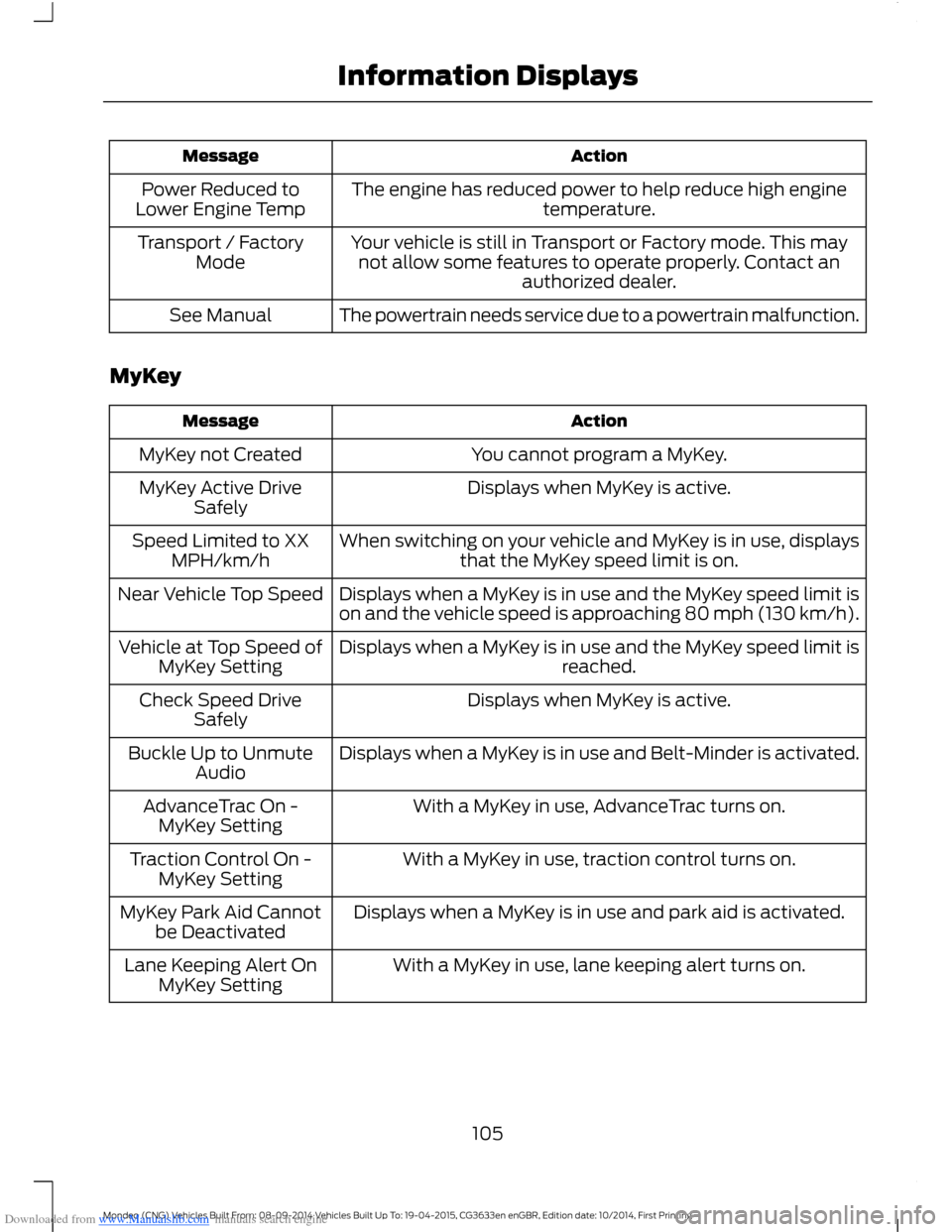
Downloaded from www.Manualslib.com manuals search engine ActionMessage
The engine has reduced power to help reduce high enginetemperature.Power Reduced toLower Engine Temp
Your vehicle is still in Transport or Factory mode. This maynot allow some features to operate properly. Contact anauthorized dealer.
Transport / FactoryMode
The powertrain needs service due to a powertrain malfunction.See Manual
MyKey
ActionMessage
You cannot program a MyKey.MyKey not Created
Displays when MyKey is active.MyKey Active DriveSafely
When switching on your vehicle and MyKey is in use, displaysthat the MyKey speed limit is on.Speed Limited to XXMPH/km/h
Displays when a MyKey is in use and the MyKey speed limit ison and the vehicle speed is approaching 80 mph (130 km/h).Near Vehicle Top Speed
Displays when a MyKey is in use and the MyKey speed limit isreached.Vehicle at Top Speed ofMyKey Setting
Displays when MyKey is active.Check Speed DriveSafely
Displays when a MyKey is in use and Belt-Minder is activated.Buckle Up to UnmuteAudio
With a MyKey in use, AdvanceTrac turns on.AdvanceTrac On -MyKey Setting
With a MyKey in use, traction control turns on.Traction Control On -MyKey Setting
Displays when a MyKey is in use and park aid is activated.MyKey Park Aid Cannotbe Deactivated
With a MyKey in use, lane keeping alert turns on.Lane Keeping Alert OnMyKey Setting
105Mondeo (CNG) Vehicles Built From: 08-09-2014 Vehicles Built Up To: 19-04-2015, CG3633en enGBR, Edition date: 10/2014, First PrintingInformation Displays
Page 119 of 446
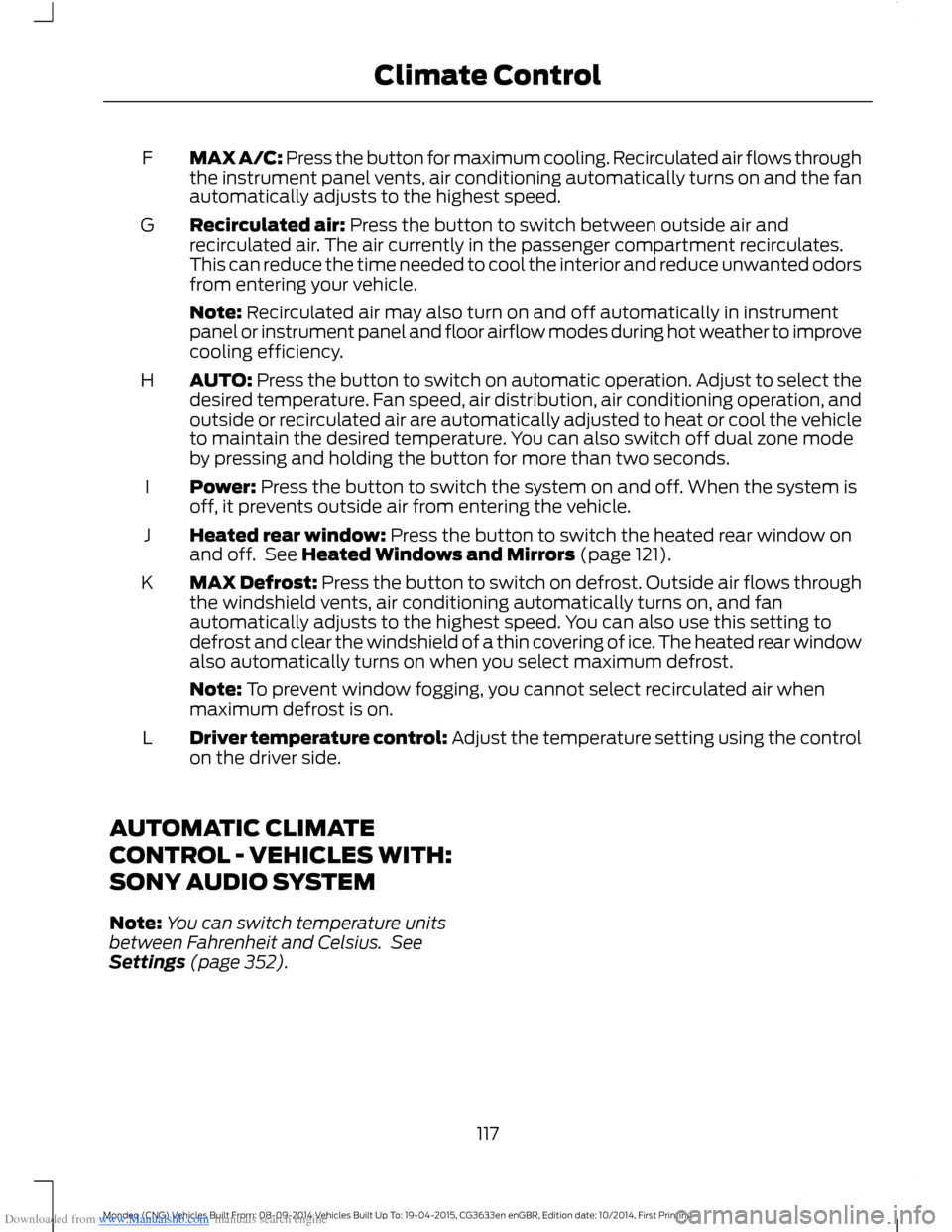
Downloaded from www.Manualslib.com manuals search engine MAX A/C: Press the button for maximum cooling. Recirculated air flows throughthe instrument panel vents, air conditioning automatically turns on and the fanautomatically adjusts to the highest speed.
F
Recirculated air: Press the button to switch between outside air andrecirculated air. The air currently in the passenger compartment recirculates.This can reduce the time needed to cool the interior and reduce unwanted odorsfrom entering your vehicle.
G
Note: Recirculated air may also turn on and off automatically in instrumentpanel or instrument panel and floor airflow modes during hot weather to improvecooling efficiency.
AUTO: Press the button to switch on automatic operation. Adjust to select thedesired temperature. Fan speed, air distribution, air conditioning operation, andoutside or recirculated air are automatically adjusted to heat or cool the vehicleto maintain the desired temperature. You can also switch off dual zone modeby pressing and holding the button for more than two seconds.
H
Power: Press the button to switch the system on and off. When the system isoff, it prevents outside air from entering the vehicle.I
Heated rear window: Press the button to switch the heated rear window onand off. See Heated Windows and Mirrors (page 121).J
MAX Defrost: Press the button to switch on defrost. Outside air flows throughthe windshield vents, air conditioning automatically turns on, and fanautomatically adjusts to the highest speed. You can also use this setting todefrost and clear the windshield of a thin covering of ice. The heated rear windowalso automatically turns on when you select maximum defrost.
K
Note: To prevent window fogging, you cannot select recirculated air whenmaximum defrost is on.
Driver temperature control: Adjust the temperature setting using the controlon the driver side.L
AUTOMATIC CLIMATE
CONTROL - VEHICLES WITH:
SONY AUDIO SYSTEM
Note:You can switch temperature unitsbetween Fahrenheit and Celsius. SeeSettings (page 352).
117Mondeo (CNG) Vehicles Built From: 08-09-2014 Vehicles Built Up To: 19-04-2015, CG3633en enGBR, Edition date: 10/2014, First PrintingClimate Control
Page 169 of 446
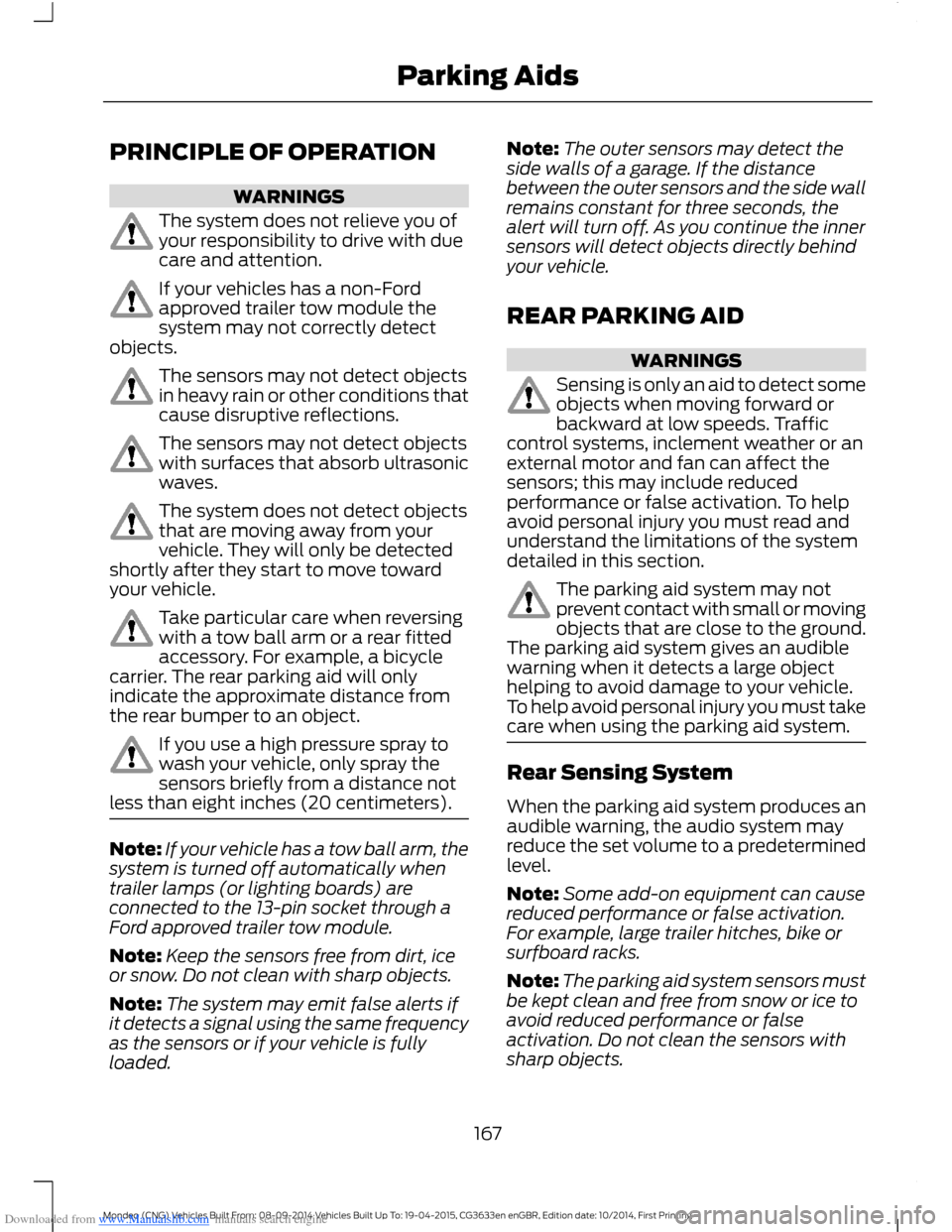
Downloaded from www.Manualslib.com manuals search engine PRINCIPLE OF OPERATION
WARNINGS
The system does not relieve you ofyour responsibility to drive with duecare and attention.
If your vehicles has a non-Fordapproved trailer tow module thesystem may not correctly detectobjects.
The sensors may not detect objectsin heavy rain or other conditions thatcause disruptive reflections.
The sensors may not detect objectswith surfaces that absorb ultrasonicwaves.
The system does not detect objectsthat are moving away from yourvehicle. They will only be detectedshortly after they start to move towardyour vehicle.
Take particular care when reversingwith a tow ball arm or a rear fittedaccessory. For example, a bicyclecarrier. The rear parking aid will onlyindicate the approximate distance fromthe rear bumper to an object.
If you use a high pressure spray towash your vehicle, only spray thesensors briefly from a distance notless than eight inches (20 centimeters).
Note:If your vehicle has a tow ball arm, thesystem is turned off automatically whentrailer lamps (or lighting boards) areconnected to the 13-pin socket through aFord approved trailer tow module.
Note:Keep the sensors free from dirt, iceor snow. Do not clean with sharp objects.
Note:The system may emit false alerts ifit detects a signal using the same frequencyas the sensors or if your vehicle is fullyloaded.
Note:The outer sensors may detect theside walls of a garage. If the distancebetween the outer sensors and the side wallremains constant for three seconds, thealert will turn off. As you continue the innersensors will detect objects directly behindyour vehicle.
REAR PARKING AID
WARNINGS
Sensing is only an aid to detect someobjects when moving forward orbackward at low speeds. Trafficcontrol systems, inclement weather or anexternal motor and fan can affect thesensors; this may include reducedperformance or false activation. To helpavoid personal injury you must read andunderstand the limitations of the systemdetailed in this section.
The parking aid system may notprevent contact with small or movingobjects that are close to the ground.The parking aid system gives an audiblewarning when it detects a large objecthelping to avoid damage to your vehicle.To help avoid personal injury you must takecare when using the parking aid system.
Rear Sensing System
When the parking aid system produces anaudible warning, the audio system mayreduce the set volume to a predeterminedlevel.
Note:Some add-on equipment can causereduced performance or false activation.For example, large trailer hitches, bike orsurfboard racks.
Note:The parking aid system sensors mustbe kept clean and free from snow or ice toavoid reduced performance or falseactivation. Do not clean the sensors withsharp objects.
167Mondeo (CNG) Vehicles Built From: 08-09-2014 Vehicles Built Up To: 19-04-2015, CG3633en enGBR, Edition date: 10/2014, First PrintingParking Aids
Page 171 of 446
Downloaded from www.Manualslib.com manuals search engine WARNINGS
Traffic control systems, inclementweather, air brakes and externalmotors and fans may affect correctoperation of the sensing system; this mayinclude reduced performance or a falsealerts.
Front Sensing System
The front sensors are active when thetransmission is in any position other thanpark (P).
You can also press the parking aid buttonto switch the front parking aid system onwithout selecting reverse (R).
Note:Keep the sensors located on thebumper or fascia free from snow, ice andlarge accumulations of dirt. If the sensorsare covered, the system’s accuracy can beaffected. Do not clean the sensors withsharp objects.
Note:If your vehicle sustains damage tothe bumper or fascia, leaving it misalignedor bent, the sensing zone may be alteredcausing inaccurate measurement ofobstacles or false beeps.
When the parking aid system produces anaudible warning, the audio system mayreduce the set volume to a predeterminedlevel.
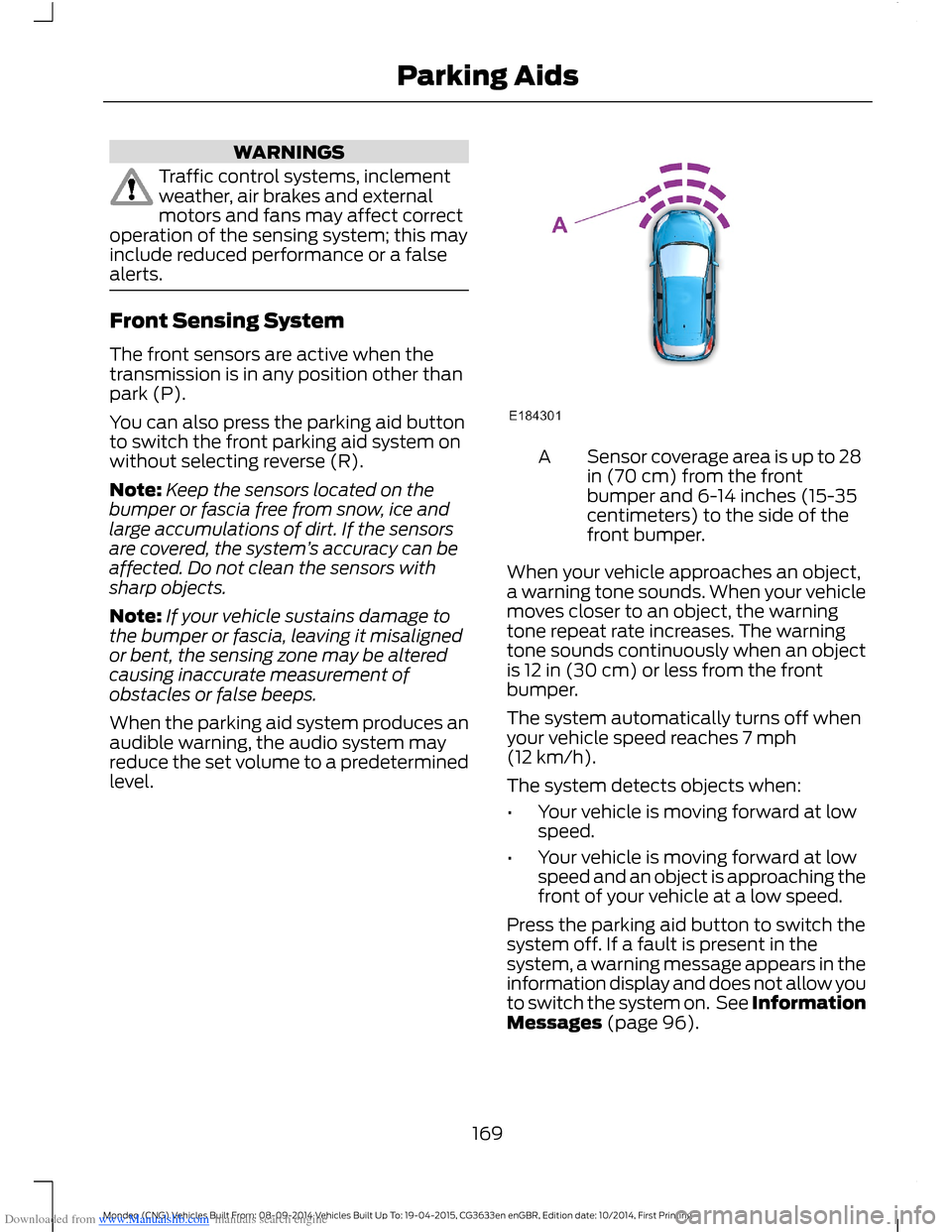
Sensor coverage area is up to 28in (70 cm) from the frontbumper and 6-14 inches (15-35centimeters) to the side of thefront bumper.
A
When your vehicle approaches an object,a warning tone sounds. When your vehiclemoves closer to an object, the warningtone repeat rate increases. The warningtone sounds continuously when an objectis 12 in (30 cm) or less from the frontbumper.
The system automatically turns off whenyour vehicle speed reaches 7 mph(12 km/h).
The system detects objects when:
•Your vehicle is moving forward at lowspeed.
•Your vehicle is moving forward at lowspeed and an object is approaching thefront of your vehicle at a low speed.
Press the parking aid button to switch thesystem off. If a fault is present in thesystem, a warning message appears in theinformation display and does not allow youto switch the system on. See InformationMessages (page 96).
169Mondeo (CNG) Vehicles Built From: 08-09-2014 Vehicles Built Up To: 19-04-2015, CG3633en enGBR, Edition date: 10/2014, First PrintingParking Aids
Page 172 of 446
Downloaded from www.Manualslib.com manuals search engine If the transmission is in reverse (R), thefront sensing system provides audiowarnings when your vehicle is moving andthe detected obstacle is moving towardsyour vehicle. Once the vehicle is stationary,the audio warning will be stopped after 2seconds.
Obstacle Distance Indicator (If
Equipped)
The system provides obstacle distanceindication through the information display.The distance indicator displays when thetransmission is in reverse (R).
The indicator displays:
•As the distance to the obstacledecreases the indicator blocksilluminate and move towards thevehicle icon.
•If there is no obstacle detected, thedistance indicator blocks are greyedout.
Vehicles with automatic transmission
If the gearshift is in neutral (N), the systemprovides obstacle distance indicationthrough the information display. If yourvehicle moves the front sensing systemprovides an audible warning when thevehicle is moving at 7 mph (12 km/h) orbelow and an obstacle is located insidethe detection area. Once the vehicle isstationary, the audio warning will bestopped after 4 seconds.
If the gearshift is in drive (D) or any otherforward gear, the front sensing systemprovides audio warnings when the vehicleis moving and an obstacle is located insidethe detection area. Once the vehicle isstationary, the audio warning will bestopped after 2 seconds.
SIDE SENSING SYSTEM
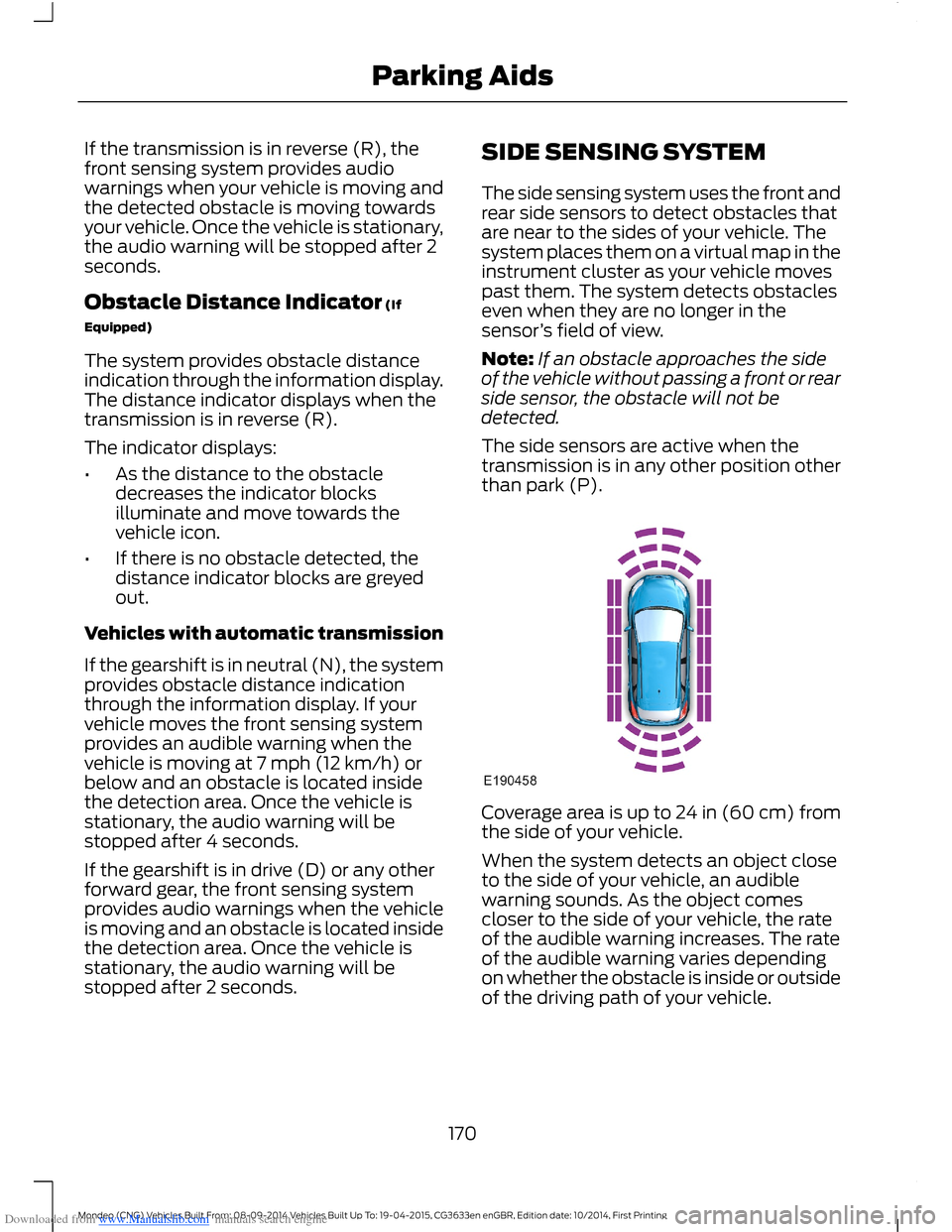
The side sensing system uses the front andrear side sensors to detect obstacles thatare near to the sides of your vehicle. Thesystem places them on a virtual map in theinstrument cluster as your vehicle movespast them. The system detects obstacleseven when they are no longer in thesensor’s field of view.
Note:If an obstacle approaches the sideof the vehicle without passing a front or rearside sensor, the obstacle will not bedetected.
The side sensors are active when thetransmission is in any other position otherthan park (P).
Coverage area is up to 24 in (60 cm) fromthe side of your vehicle.
When the system detects an object closeto the side of your vehicle, an audiblewarning sounds. As the object comescloser to the side of your vehicle, the rateof the audible warning increases. The rateof the audible warning varies dependingon whether the obstacle is inside or outsideof the driving path of your vehicle.
170Mondeo (CNG) Vehicles Built From: 08-09-2014 Vehicles Built Up To: 19-04-2015, CG3633en enGBR, Edition date: 10/2014, First PrintingParking Aids
Page 237 of 446
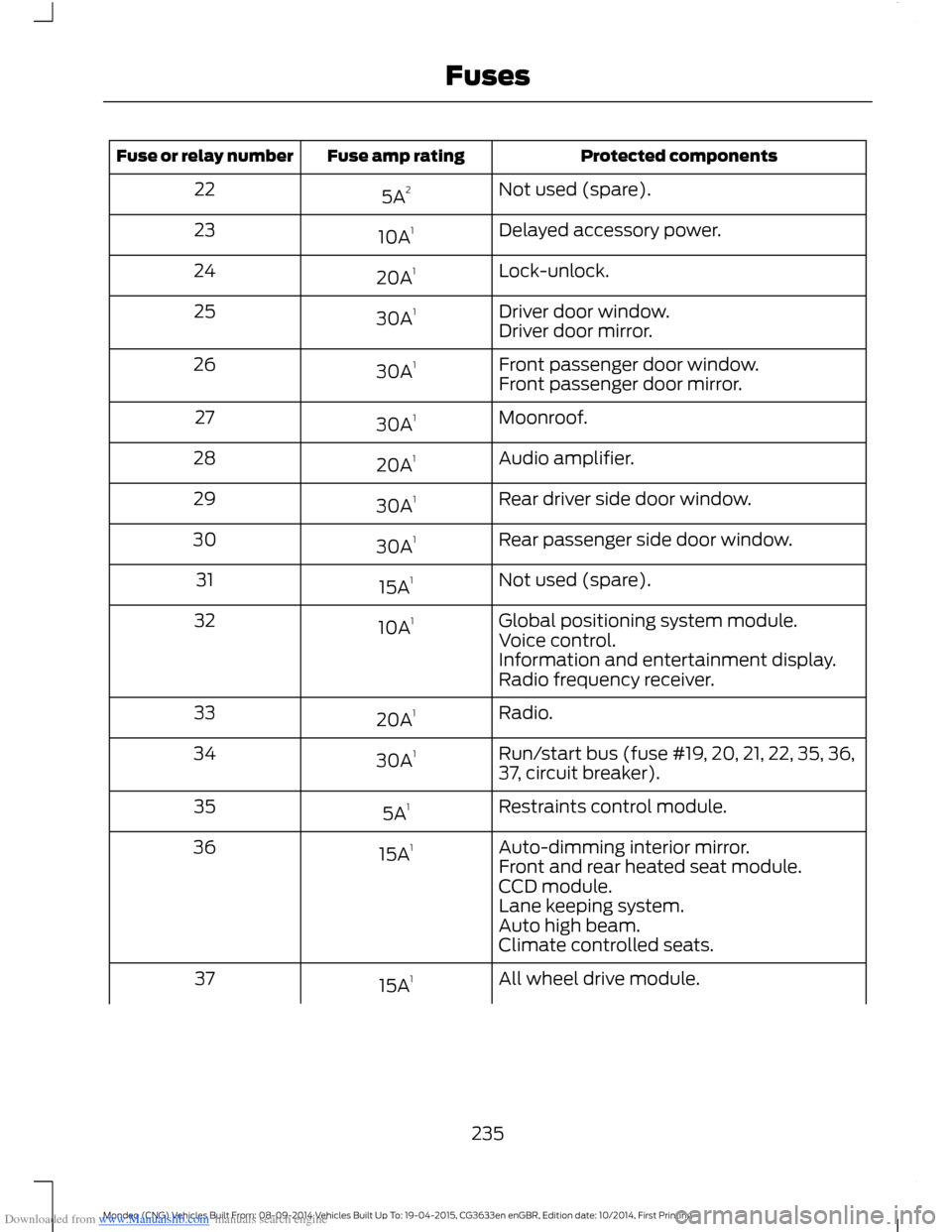
Downloaded from www.Manualslib.com manuals search engine Protected componentsFuse amp ratingFuse or relay number
Not used (spare).5A222
Delayed accessory power.10A123
Lock-unlock.20A124
Driver door window.30A125Driver door mirror.
Front passenger door window.30A126Front passenger door mirror.
Moonroof.30A127
Audio amplifier.20A128
Rear driver side door window.30A129
Rear passenger side door window.30A130
Not used (spare).15A131
Global positioning system module.10A132Voice control.Information and entertainment display.Radio frequency receiver.
Radio.20A133
Run/start bus (fuse #19, 20, 21, 22, 35, 36,37, circuit breaker).30A134
Restraints control module.5A135
Auto-dimming interior mirror.15A136Front and rear heated seat module.CCD module.Lane keeping system.Auto high beam.Climate controlled seats.
All wheel drive module.15A137
235Mondeo (CNG) Vehicles Built From: 08-09-2014 Vehicles Built Up To: 19-04-2015, CG3633en enGBR, Edition date: 10/2014, First PrintingFuses
Page 294 of 446
Downloaded from www.Manualslib.com manuals search engine GENERAL INFORMATION
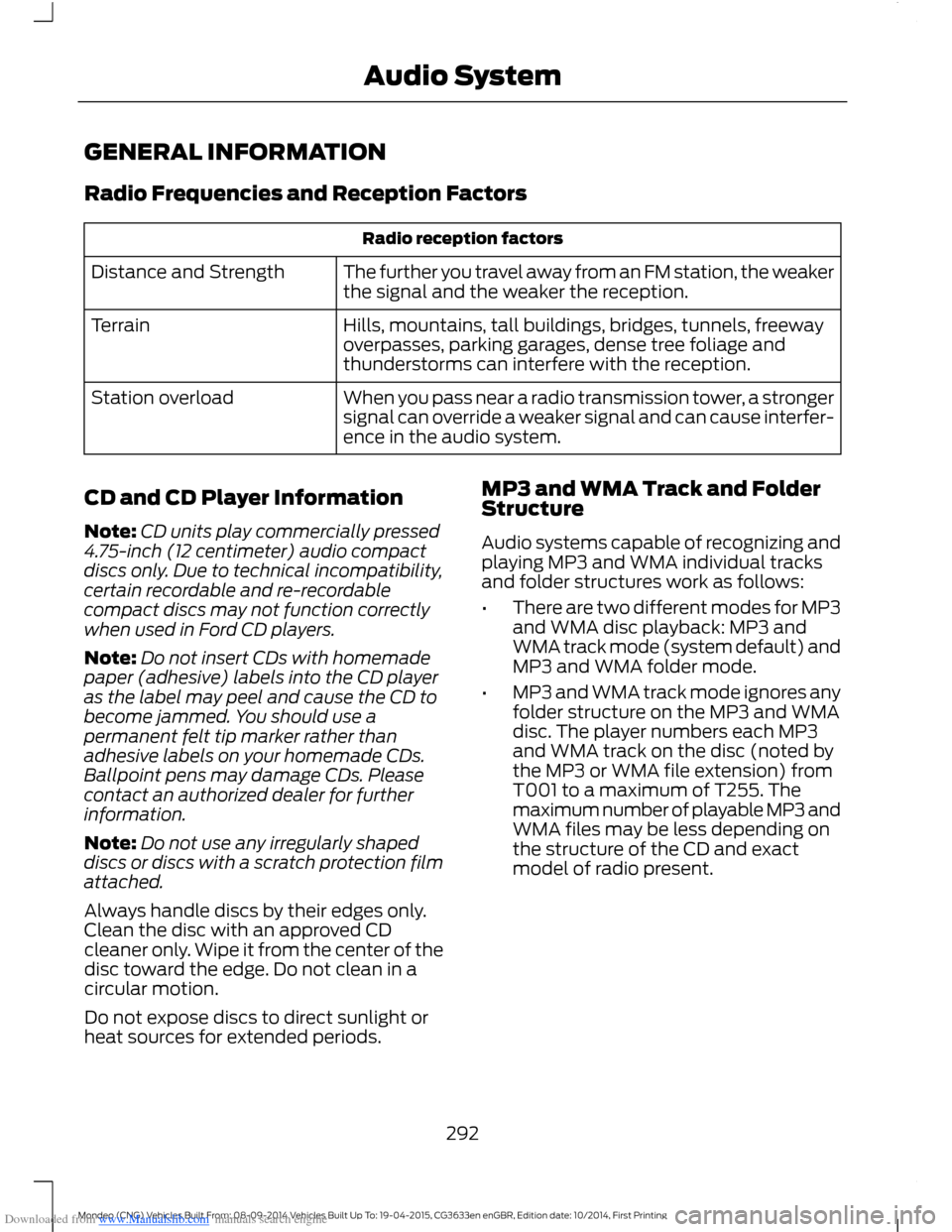
Radio Frequencies and Reception Factors
Radio reception factors
The further you travel away from an FM station, the weakerthe signal and the weaker the reception.Distance and Strength
Hills, mountains, tall buildings, bridges, tunnels, freewayoverpasses, parking garages, dense tree foliage andthunderstorms can interfere with the reception.
Terrain
When you pass near a radio transmission tower, a strongersignal can override a weaker signal and can cause interfer-ence in the audio system.
Station overload
CD and CD Player Information
Note:CD units play commercially pressed4.75-inch (12 centimeter) audio compactdiscs only. Due to technical incompatibility,certain recordable and re-recordablecompact discs may not function correctlywhen used in Ford CD players.
Note:Do not insert CDs with homemadepaper (adhesive) labels into the CD playeras the label may peel and cause the CD tobecome jammed. You should use apermanent felt tip marker rather thanadhesive labels on your homemade CDs.Ballpoint pens may damage CDs. Pleasecontact an authorized dealer for furtherinformation.
Note:Do not use any irregularly shapeddiscs or discs with a scratch protection filmattached.
Always handle discs by their edges only.Clean the disc with an approved CDcleaner only. Wipe it from the center of thedisc toward the edge. Do not clean in acircular motion.
Do not expose discs to direct sunlight orheat sources for extended periods.
MP3 and WMA Track and FolderStructure
Audio systems capable of recognizing andplaying MP3 and WMA individual tracksand folder structures work as follows:
•There are two different modes for MP3and WMA disc playback: MP3 andWMA track mode (system default) andMP3 and WMA folder mode.
•MP3 and WMA track mode ignores anyfolder structure on the MP3 and WMAdisc. The player numbers each MP3and WMA track on the disc (noted bythe MP3 or WMA file extension) fromT001 to a maximum of T255. Themaximum number of playable MP3 andWMA files may be less depending onthe structure of the CD and exactmodel of radio present.
292Mondeo (CNG) Vehicles Built From: 08-09-2014 Vehicles Built Up To: 19-04-2015, CG3633en enGBR, Edition date: 10/2014, First PrintingAudio System
Page 295 of 446
Downloaded from www.Manualslib.com manuals search engine •MP3 and WMA folder mode representsa folder structure consisting of onelevel of folders. The CD player numbersall MP3 and WMA tracks on the disc(noted by the MP3 or WMA fileextension) and all folders containingMP3 and WMA files, from F001 (folder)T001 (track) to F253 T255.
•Creating discs with only one level offolders helps with navigation throughthe disc files.
If you are burning your own MP3 and WMAdiscs, it is important to understand howthe system reads the structures you create.While various files may be present, (fileswith extensions other than MP3 andWMA), only files with the MP3 and WMAextension are played; other files areignored by the system. This enables you touse the same MP3 and WMA disc for avariety of tasks on your work computer,home computer and your in-vehiclesystem.
In track mode, the system displays andplays the structure as if it were only onelevel deep (all MP3 and WMA files play,regardless of being in a specific folder). Infolder mode, the system only plays theMP3 and WMA files in the current folder.
AUDIO UNIT
WARNING
Driving while distracted can result inloss of vehicle control, crash andinjury. We strongly recommend thatyou use extreme caution when using anydevice that may take your focus off theroad. Your primary responsibility is the safeoperation of your vehicle. We recommendagainst the use of any hand-held devicewhile driving and encourage the use ofvoice-operated systems when possible.Make sure you are aware of all applicablelocal laws that may affect the use ofelectronic devices while driving.
Note:Depending on your vehicle optionpackage, your system may look differentfrom what you see here.
Note:Some features, such as Sirius satelliteradio, may not be available in your location.Check with an authorized dealer.
293Mondeo (CNG) Vehicles Built From: 08-09-2014 Vehicles Built Up To: 19-04-2015, CG3633en enGBR, Edition date: 10/2014, First PrintingAudio System
Page 296 of 446
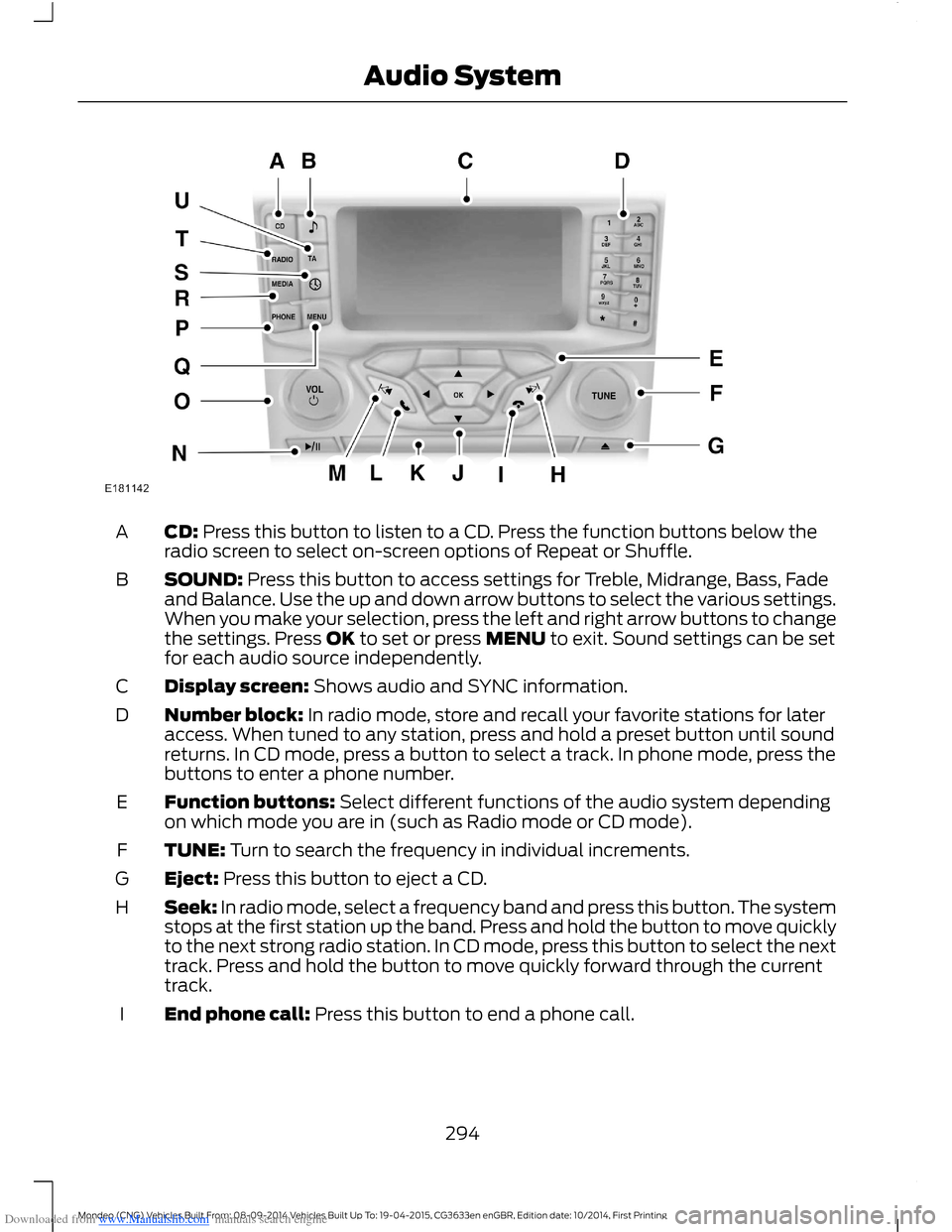
Downloaded from www.Manualslib.com manuals search engine CD: Press this button to listen to a CD. Press the function buttons below theradio screen to select on-screen options of Repeat or Shuffle.A
SOUND: Press this button to access settings for Treble, Midrange, Bass, Fadeand Balance. Use the up and down arrow buttons to select the various settings.When you make your selection, press the left and right arrow buttons to changethe settings. Press OK to set or press MENU to exit. Sound settings can be setfor each audio source independently.
B
Display screen: Shows audio and SYNC information.C
Number block: In radio mode, store and recall your favorite stations for lateraccess. When tuned to any station, press and hold a preset button until soundreturns. In CD mode, press a button to select a track. In phone mode, press thebuttons to enter a phone number.
D
Function buttons: Select different functions of the audio system dependingon which mode you are in (such as Radio mode or CD mode).E
TUNE: Turn to search the frequency in individual increments.F
Eject: Press this button to eject a CD.G
Seek: In radio mode, select a frequency band and press this button. The systemstops at the first station up the band. Press and hold the button to move quicklyto the next strong radio station. In CD mode, press this button to select the nexttrack. Press and hold the button to move quickly forward through the currenttrack.
H
End phone call: Press this button to end a phone call.I
294Mondeo (CNG) Vehicles Built From: 08-09-2014 Vehicles Built Up To: 19-04-2015, CG3633en enGBR, Edition date: 10/2014, First PrintingAudio System
Page 297 of 446
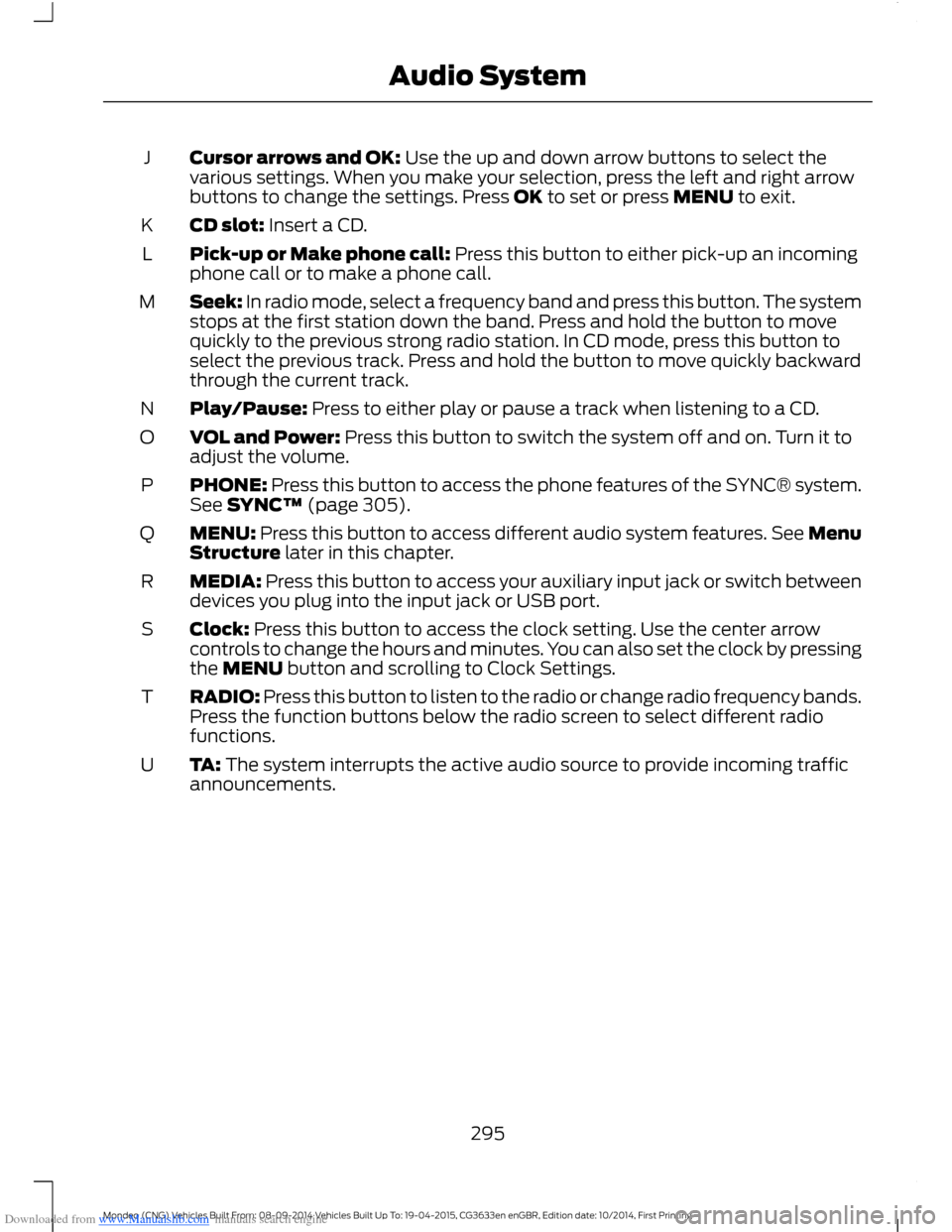
Downloaded from www.Manualslib.com manuals search engine Cursor arrows and OK: Use the up and down arrow buttons to select thevarious settings. When you make your selection, press the left and right arrowbuttons to change the settings. Press OK to set or press MENU to exit.
J
CD slot: Insert a CD.K
Pick-up or Make phone call: Press this button to either pick-up an incomingphone call or to make a phone call.L
Seek: In radio mode, select a frequency band and press this button. The systemstops at the first station down the band. Press and hold the button to movequickly to the previous strong radio station. In CD mode, press this button toselect the previous track. Press and hold the button to move quickly backwardthrough the current track.
M
Play/Pause: Press to either play or pause a track when listening to a CD.N
VOL and Power: Press this button to switch the system off and on. Turn it toadjust the volume.O
PHONE: Press this button to access the phone features of the SYNC® system.See SYNC™ (page 305).P
MENU: Press this button to access different audio system features. See MenuStructure later in this chapter.Q
MEDIA: Press this button to access your auxiliary input jack or switch betweendevices you plug into the input jack or USB port.R
Clock: Press this button to access the clock setting. Use the center arrowcontrols to change the hours and minutes. You can also set the clock by pressingthe MENU button and scrolling to Clock Settings.
S
RADIO: Press this button to listen to the radio or change radio frequency bands.Press the function buttons below the radio screen to select different radiofunctions.
T
TA: The system interrupts the active audio source to provide incoming trafficannouncements.U
295Mondeo (CNG) Vehicles Built From: 08-09-2014 Vehicles Built Up To: 19-04-2015, CG3633en enGBR, Edition date: 10/2014, First PrintingAudio System