audio FORD MONDEO 2014 4.G Owner's Manual
[x] Cancel search | Manufacturer: FORD, Model Year: 2014, Model line: MONDEO, Model: FORD MONDEO 2014 4.GPages: 446, PDF Size: 29.09 MB
Page 298 of 446
Downloaded from www.Manualslib.com manuals search engine AUDIO UNIT - VEHICLES WITH:
AM/FM/CD/SYNC
WARNING
Driving while distracted can result inloss of vehicle control, crash andinjury. We strongly recommend thatyou use extreme caution when using anydevice that may take your focus off theroad. Your primary responsibility is the safeoperation of your vehicle. We recommendagainst the use of any hand-held devicewhile driving and encourage the use ofvoice-operated systems when possible.Make sure you are aware of all applicablelocal laws that may affect the use ofelectronic devices while driving.
Note:Depending on your vehicle optionpackage, your system may look differentfrom what you see here.
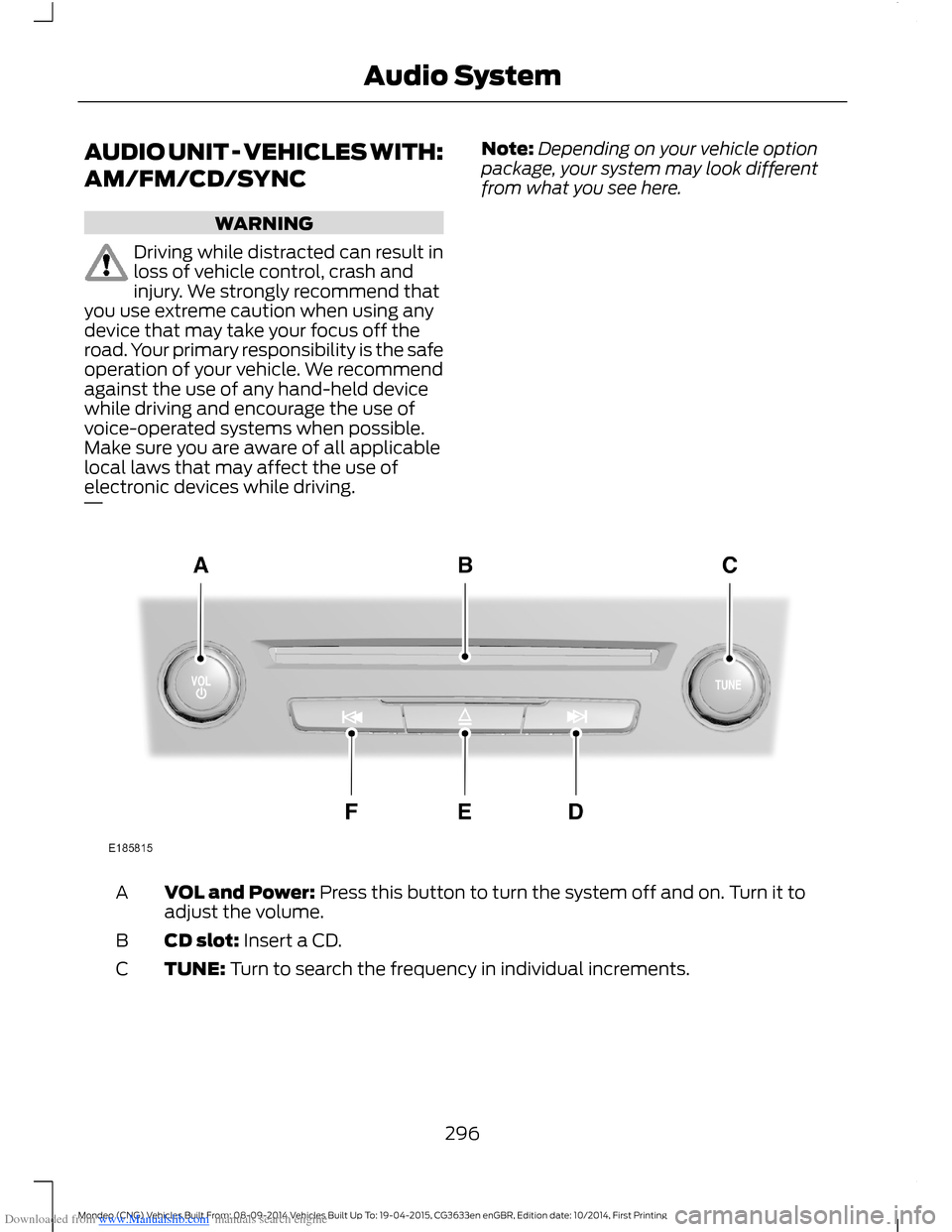
VOL and Power: Press this button to turn the system off and on. Turn it toadjust the volume.A
CD slot: Insert a CD.B
TUNE: Turn to search the frequency in individual increments.C
296Mondeo (CNG) Vehicles Built From: 08-09-2014 Vehicles Built Up To: 19-04-2015, CG3633en enGBR, Edition date: 10/2014, First PrintingAudio System
Page 299 of 446
Downloaded from www.Manualslib.com manuals search engine Seek: In radio mode, select a frequency and press this button. The system stopsat the first station up the band. Press and hold the button to move quickly tothe next strong radio station. In CD mode, press this button to select the nexttrack. Press and hold the button to move quickly forward through the currenttrack.
D
Eject: Press this button to eject a CD.E
Seek: In radio mode, select a frequency and press this button. The system stopsat the first station down the band. Press and hold the button to move quicklyto the previous strong radio station. In CD mode, press this button to select theprevious track. Press and hold the button to move quickly backward throughthe current track.
F
AUDIO UNIT - VEHICLES WITH:
SONY AM/FM/CD
WARNING
Driving while distracted can result inloss of vehicle control, crash andinjury. We strongly recommend thatyou use extreme caution when using anydevice that may take your focus off theroad. Your primary responsibility is the safeoperation of your vehicle. We recommendagainst the use of any hand-held devicewhile driving and encourage the use ofvoice-operated systems when possible.Make sure you are aware of all applicablelocal laws that may affect the use ofelectronic devices while driving.
Note:The touchscreen system controlsmost of the audio features. See SYNC™ 2(page 343).
297Mondeo (CNG) Vehicles Built From: 08-09-2014 Vehicles Built Up To: 19-04-2015, CG3633en enGBR, Edition date: 10/2014, First PrintingAudio System
Page 300 of 446
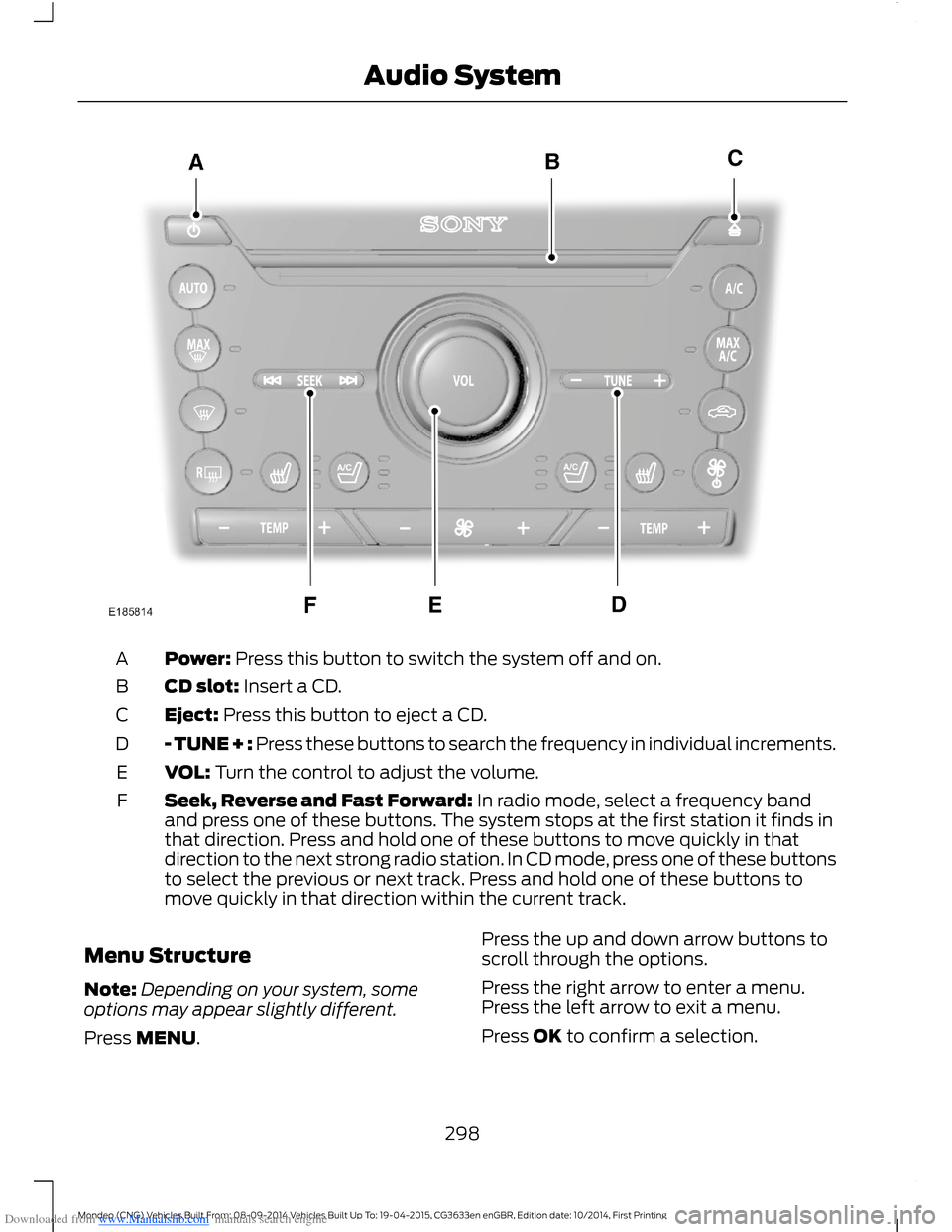
Downloaded from www.Manualslib.com manuals search engine Power: Press this button to switch the system off and on.A
CD slot: Insert a CD.B
Eject: Press this button to eject a CD.C
- TUNE + : Press these buttons to search the frequency in individual increments.D
VOL: Turn the control to adjust the volume.E
Seek, Reverse and Fast Forward: In radio mode, select a frequency bandand press one of these buttons. The system stops at the first station it finds inthat direction. Press and hold one of these buttons to move quickly in thatdirection to the next strong radio station. In CD mode, press one of these buttonsto select the previous or next track. Press and hold one of these buttons tomove quickly in that direction within the current track.
F
Menu Structure
Note:Depending on your system, someoptions may appear slightly different.
Press MENU.
Press the up and down arrow buttons toscroll through the options.
Press the right arrow to enter a menu.Press the left arrow to exit a menu.
Press OK to confirm a selection.
298Mondeo (CNG) Vehicles Built From: 08-09-2014 Vehicles Built Up To: 19-04-2015, CG3633en enGBR, Edition date: 10/2014, First PrintingAudio System
Page 301 of 446
Downloaded from www.Manualslib.com manuals search engine Radio
Select for a brief sampling of all availablechannels.Scan
Select to store the six strongest localstations on the AM-AST and FM-ASTfrequency bands.
AST
Select to display extra information such asartist name.*Radio Text
With the alternative frequency option active,the system re-tunes to a different frequencywith better reception for the same station.
Alternative Frequency
Regional mode controls the behavior ofalternative frequencies, switching betweenregionally related networks.
Regional Mode
With the news announcement option active,the system interrupts the active audio sourceto provide incoming news announcements,if the currently tuned station (or last tunedstation in case of other active media )supports news.
News announcement
With Service Linking active the systemautomatically switches from DAB to FM, incase DAB becomes unavailable.
**Service Linking
*Extra information may not always be available.** Only within DAB variants.
299Mondeo (CNG) Vehicles Built From: 08-09-2014 Vehicles Built Up To: 19-04-2015, CG3633en enGBR, Edition date: 10/2014, First PrintingAudio System
Page 302 of 446
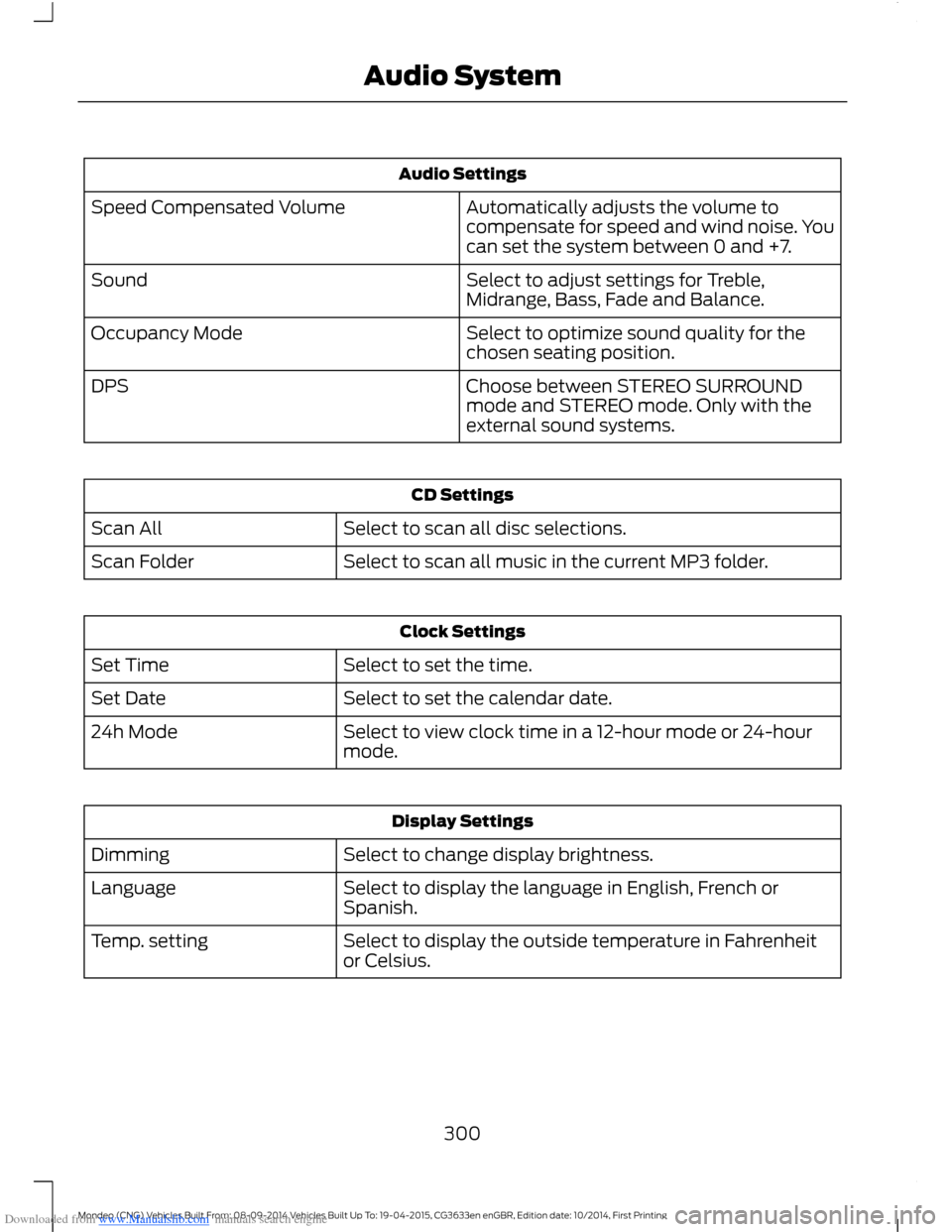
Downloaded from www.Manualslib.com manuals search engine Audio Settings
Automatically adjusts the volume tocompensate for speed and wind noise. Youcan set the system between 0 and +7.
Speed Compensated Volume
Select to adjust settings for Treble,Midrange, Bass, Fade and Balance.Sound
Select to optimize sound quality for thechosen seating position.Occupancy Mode
Choose between STEREO SURROUNDmode and STEREO mode. Only with theexternal sound systems.
DPS
CD Settings
Select to scan all disc selections.Scan All
Select to scan all music in the current MP3 folder.Scan Folder
Clock Settings
Select to set the time.Set Time
Select to set the calendar date.Set Date
Select to view clock time in a 12-hour mode or 24-hourmode.24h Mode
Display Settings
Select to change display brightness.Dimming
Select to display the language in English, French orSpanish.Language
Select to display the outside temperature in Fahrenheitor Celsius.Temp. setting
300Mondeo (CNG) Vehicles Built From: 08-09-2014 Vehicles Built Up To: 19-04-2015, CG3633en enGBR, Edition date: 10/2014, First PrintingAudio System
Page 303 of 446
Downloaded from www.Manualslib.com manuals search engine DIGITAL RADIO
General Information
The system allows you to listen to DAB(Digital Audio Broadcast) radio stations.
Note:Coverage differs from region to regionand influences the quality of reception. It isbroadcast nationwide, regionally andlocally.
The following formats are supported:
•DAB.
•DAB+.
•DMB-Audio (Digital MultimediaBroadcasting).
Ensembles
Ensembles contain a group of radiostations. Each ensemble can consist ofseveral different radio stations.
The radio station name displays below theensemble name.
Note:When you tune from one ensembleto another, it can take a while until thesystem synchronizes to the next ensemble.The system mutes during synchronization.
Service Linking
If you leave the coverage area of a DABradio station, the system automaticallyswitches to the corresponding FM radiostation.
You can switch this feature on and offusing the information display. See GeneralInformation (page 292).
Note:If a DAB radio station has nocorresponding FM radio station, the audiomutes when attempting to switch.
Note:The system displays the FM symbolwhen DAB and FM radio stations link.
Note:The sound quality changes when yoursystem switches from DAB to thecorresponding FM station.
Using Digital Audio Broadcast ona Non-Touchscreen
Selecting Radio Band
DAB1 and DAB2 operate in the same way.You can store up to 10 different presets oneach band.
1.Press the RADIO button.
2.Press the left arrow button to displaythe available wavebands.
3.Select DAB1 orDAB2.
Radio Station Tuning Control
Press the RADIO button and select DAB1orDAB2. All preset banks operate in thesame way and can store up to 10 differentpreset radio stations.
Note:When you reach the first or last radiostation within an ensemble, further tuningskips to the next ensemble. There may be adelay during this change and the audiobriefly mutes.
Seek Tuning
1.Press a seek button. The system stopsat the first radio station it finds in thedirection chosen.
Radio Station List
This feature displays all the available radiostations in a list.
1.Press function button 1.
2.Press the left or right arrow buttons tochange ensembles. Press the up ordown arrow button to navigate to yourrequired radio station.
3.Press OK to confirm your selection.
Note:The display only shows radio stationsin the current ensemble.
301Mondeo (CNG) Vehicles Built From: 08-09-2014 Vehicles Built Up To: 19-04-2015, CG3633en enGBR, Edition date: 10/2014, First PrintingAudio System
Page 304 of 446
Downloaded from www.Manualslib.com manuals search engine Manual Tuning
1.Press function button 2.
2.Press the left or right arrow button totune up or down the waveband in smallincrements. Press and hold to movethrough the waveband quickly.
3.Press OK to confirm your selection.
Note:Seek tuning is also possible withinthis screen.
Radio Station Preset Buttons
This feature allows you to store up to 10favorite radio stations from any ensemblein each preset bank.
1.Select a radio station.
2.Press and hold one of the presetbuttons. A progress bar and messageappear. When the progress barcompletes, the radio station has beenstored. The system mutes momentarilyas confirmation.
Once stored, press a preset button at anytime to select a favorite radio station.
Note:Radio stations stored on the presetbuttons may not always be available if youhave left the coverage area. The system willmute when this happens.
Radio Text
You can display extra information. Forexample; artist name. To switch this optionon, select a radio station and pressfunction button 3.
Note:Extra information may not always beavailable.
Using Digital Audio Broadcast andSYNC with Touchscreen
Selecting Radio Band
DAB1, DAB2 and DAB3 operate in the sameway. You can store up to 6 differentpresets on each band.
1.Press the RADIO button.
2.Press the left arrow button to displaythe available wavebands.
3.Select DAB1,DAB2 or DAB3.
Radio Station Tuning Control
Press the RADIO button and select DAB1,DAB2 or DAB3. All preset banks operatein the same way and can store up to 10different preset radio stations.
Note:When you reach the first or last radiostation within an ensemble, further tuningskips to the next ensemble. There may be adelay during this change and the audiobriefly mutes.
Seek Tuning
1.Press a seek button. The system stopsat the first radio station it finds in thedirection chosen.
Radio Station List
This feature displays all the available radiostations in a list.
1.Press the browse button.
2.Press the previous ensemble or nextensemble to change ensembles.Navigate through the list and select thestation by pressing the touchscreenarea displaying your selection.
3.Press OK to confirm your selection.
Note:The display only shows radio stationsin the current ensemble.
Manual Tuning
1.Press the + tune - button.
Radio Station Preset Buttons
This feature allows you to store up to 6favorite radio stations from any ensemblein each preset bank.
1.Select a radio station.
302Mondeo (CNG) Vehicles Built From: 08-09-2014 Vehicles Built Up To: 19-04-2015, CG3633en enGBR, Edition date: 10/2014, First PrintingAudio System
Page 305 of 446
Downloaded from www.Manualslib.com manuals search engine 2.Press and hold one of the presetbuttons. A message appears when theradio station has been stored. Thesystem mutes momentarily asconfirmation.
Once stored, press a preset button at anytime to select a favorite radio station.
Note:Radio stations stored on the presetbuttons may not always be available if youhave left the coverage area. The system willmute when this happens.
Radio Text
You can display extra information. Forexample; artist name. To switch this optionon select Options > Radio Text On.
Note:Extra information may not always beavailable.
AUDIO INPUT JACK
WARNINGS
Driving while distracted can result inloss of vehicle control, crash andinjury. We strongly recommend thatyou use extreme caution when using anydevice that may take your focus off theroad. Your primary responsibility is the safeoperation of your vehicle. We recommendagainst the use of any hand-held devicewhile driving and encourage the use ofvoice-operated systems when possible.Make sure you are aware of all applicablelocal laws that may affect the use ofelectronic devices while driving.
For safety reasons, do not connector adjust the settings on yourportable music player while yourvehicle is moving.
WARNINGS
Store the portable music player in asecure location, such as the centerconsole or the glove box, when yourvehicle is moving. Hard objects maybecome projectiles in a collision or suddenstop, which may increase the risk of seriousinjury. The audio extension cable must belong enough to allow the portable musicplayer to be safely stored while yourvehicle is moving.
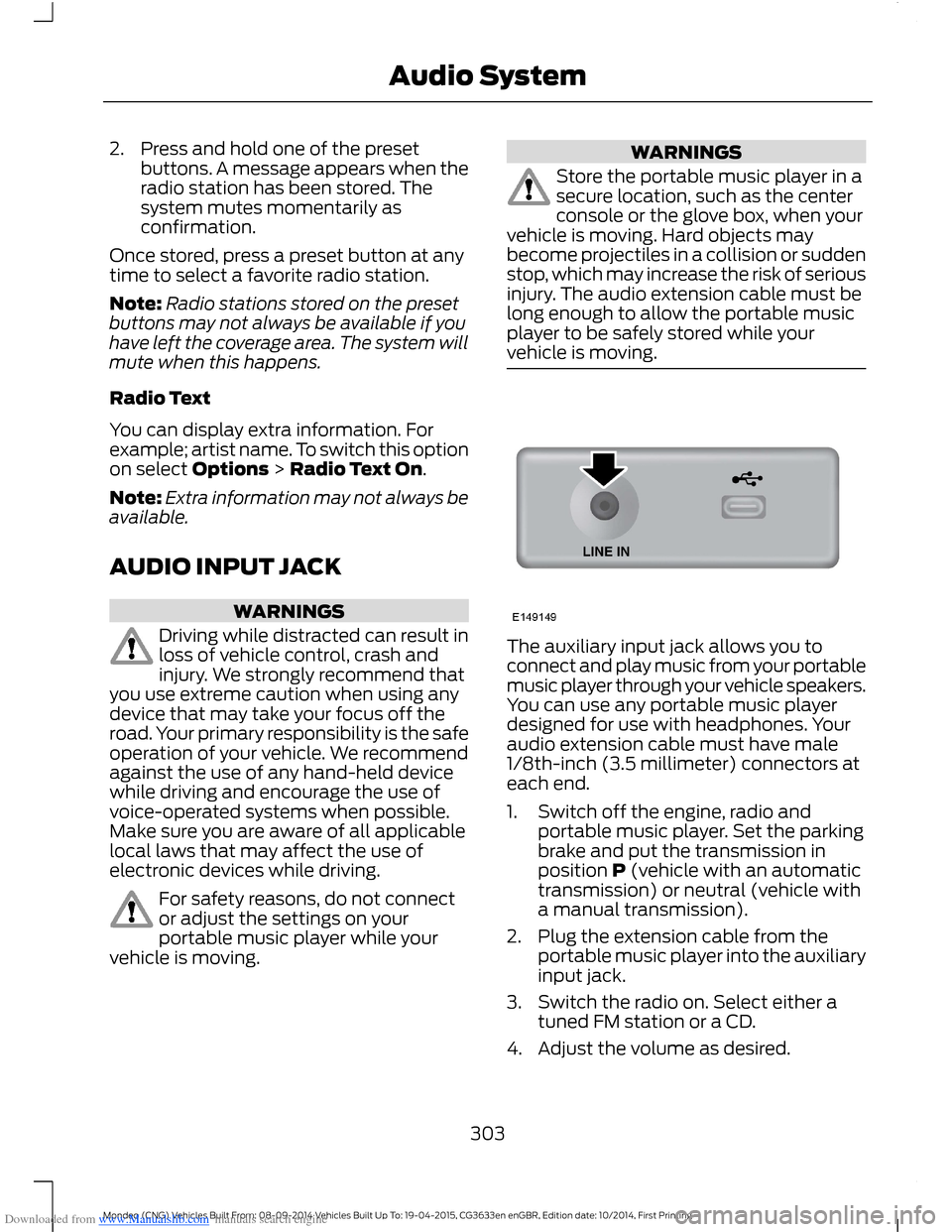
The auxiliary input jack allows you toconnect and play music from your portablemusic player through your vehicle speakers.You can use any portable music playerdesigned for use with headphones. Youraudio extension cable must have male1/8th-inch (3.5 millimeter) connectors ateach end.
1.Switch off the engine, radio andportable music player. Set the parkingbrake and put the transmission inposition P (vehicle with an automatictransmission) or neutral (vehicle witha manual transmission).
2.Plug the extension cable from theportable music player into the auxiliaryinput jack.
3.Switch the radio on. Select either atuned FM station or a CD.
4.Adjust the volume as desired.
303Mondeo (CNG) Vehicles Built From: 08-09-2014 Vehicles Built Up To: 19-04-2015, CG3633en enGBR, Edition date: 10/2014, First PrintingAudio System
Page 306 of 446
Downloaded from www.Manualslib.com manuals search engine 5.Switch your portable music player onand adjust its volume to half itsmaximum level.
6.Press AUX until LINE or LINE INappears in the display. You should hearmusic from your device even if it is low.
7.Adjust the volume on your portablemusic player until it reaches the volumelevel of the FM station or CD. Do thisby switching back and forth betweenthe AUX and FM or CD controls.
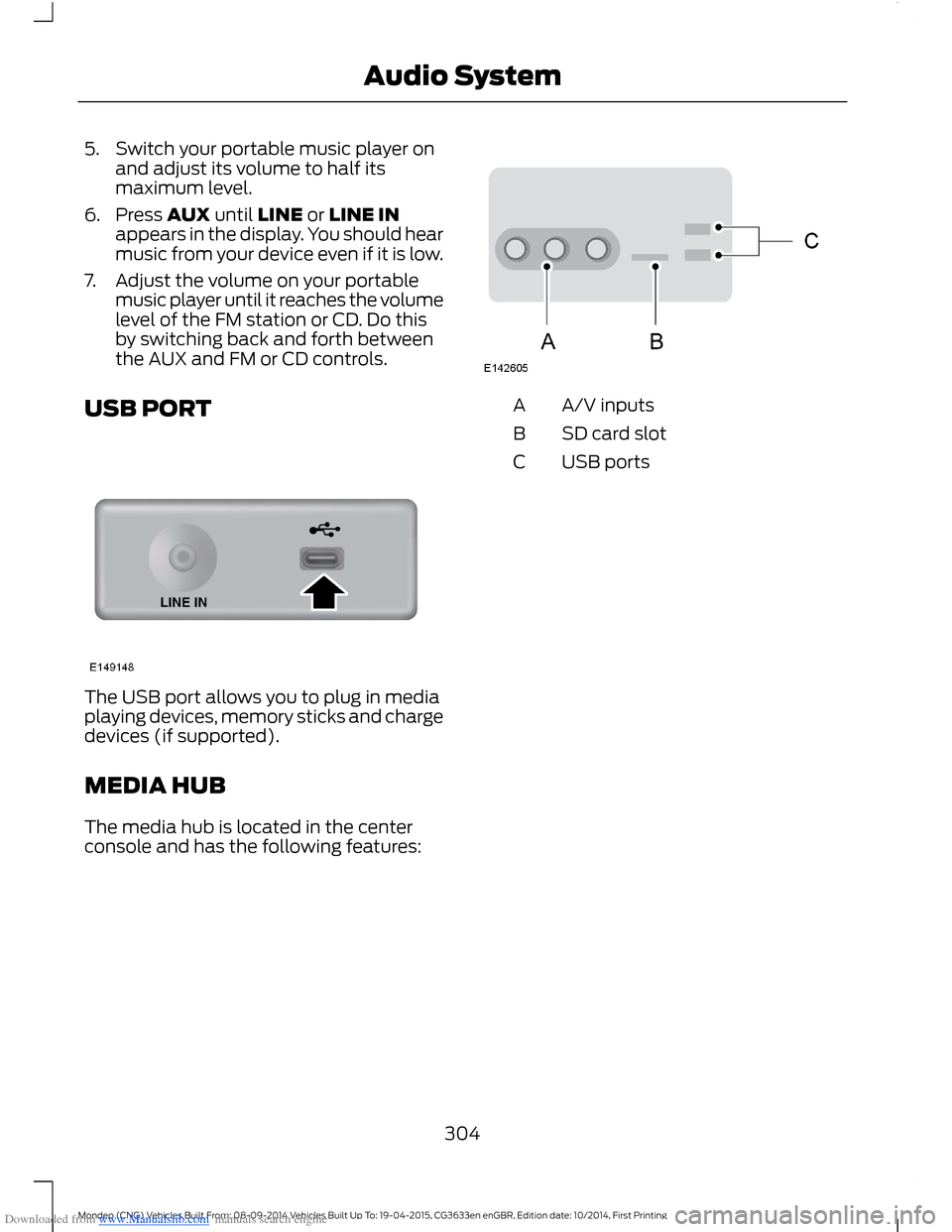
USB PORT
The USB port allows you to plug in mediaplaying devices, memory sticks and chargedevices (if supported).
MEDIA HUB
The media hub is located in the centerconsole and has the following features:
A/V inputsA
SD card slotB
USB portsC
304Mondeo (CNG) Vehicles Built From: 08-09-2014 Vehicles Built Up To: 19-04-2015, CG3633en enGBR, Edition date: 10/2014, First PrintingAudio System
Page 309 of 446
Downloaded from www.Manualslib.com manuals search engine Before giving a voice command, wait forthe system announcement to finishfollowed by a single beep. Any commandspoken before this does not register withthe system.
Speak naturally, without long pausesbetween words.
You can interrupt the system at any timewhile it is speaking by pressing the voicebutton. You can also cancel a voice sessionat any time by pressing and holding thevoice button.
Initiating a Voice Session
Press the voice button. A list ofavailable commands appears inthe display.
DescriptionCommand
Stream audio from your cell phone.Bluetooth audio
Cancel the requested action.(cancel | stop | exit)
Access the device connected to the auxil-iary input jack.((line | AV | audio video) in | AUX | audiovideo)
Make calls.(phone | Blackberry | iPhone | Mobile)
Access the device connected to your USBport.(USB [stick] | iPod | MP3 [player])
Adjust the level of voice interaction andfeedback.voice settings
Hear a list of voice commands available inthe current mode.[main menu] help
System Interaction and Feedback
The system provides feedback throughaudible tones, prompts, questions andspoken confirmations depending on thesituation and your chosen level ofinteraction. You can customize the voicerecognition system to provide more or lessinstruction and feedback.
The default setting is to a higher level ofinteraction in order to help you learn to usethe system. You can change these settingsat any time.
Adjusting the Interaction Level
Press the voice button. Whenprompted:
DescriptionCommand
Provides access to change the interaction level.voice settings
Then any of the following:
307Mondeo (CNG) Vehicles Built From: 08-09-2014 Vehicles Built Up To: 19-04-2015, CG3633en enGBR, Edition date: 10/2014, First PrintingSYNC™