change time FORD MONDEO 2014 4.G User Guide
[x] Cancel search | Manufacturer: FORD, Model Year: 2014, Model line: MONDEO, Model: FORD MONDEO 2014 4.GPages: 446, PDF Size: 29.09 MB
Page 201 of 446
Downloaded from www.Manualslib.com manuals search engine Note:Keep the windshield free fromobstructions such as bird droppings, insectsand snow or ice.
Note:The system may not detect all trafficsigns and may read signs incorrectly.
Note:The system is designed toautomatically detect traffic signs meetingthe Vienna convention.
Note:Traffic sign data provided by thenavigation system contains informationintegrated to the data carrier release.
There is a sensor mounted behind theinterior rear view mirror. It continuouslymonitors road signs to inform you of thecurrent speed limit and overtakingregulations.
The system automatically detectsrecognisable traffic signs, such as:
•Speed limit signs.
•No overtaking signs.
•Speed limit cancellation signs.
When the system recognises a traffic sign,it will be shown in the display.
Using the System
Switching the System On and Off
Note:The system status and settings willremain unchanged during ignition cycles.
You can switch the system on and off usingthe information display. See GeneralInformation (page 86).
Setting the System Speed Warning
The system has a number of speedwarning levels which can be set using theinformation display. See GeneralInformation (page 86).
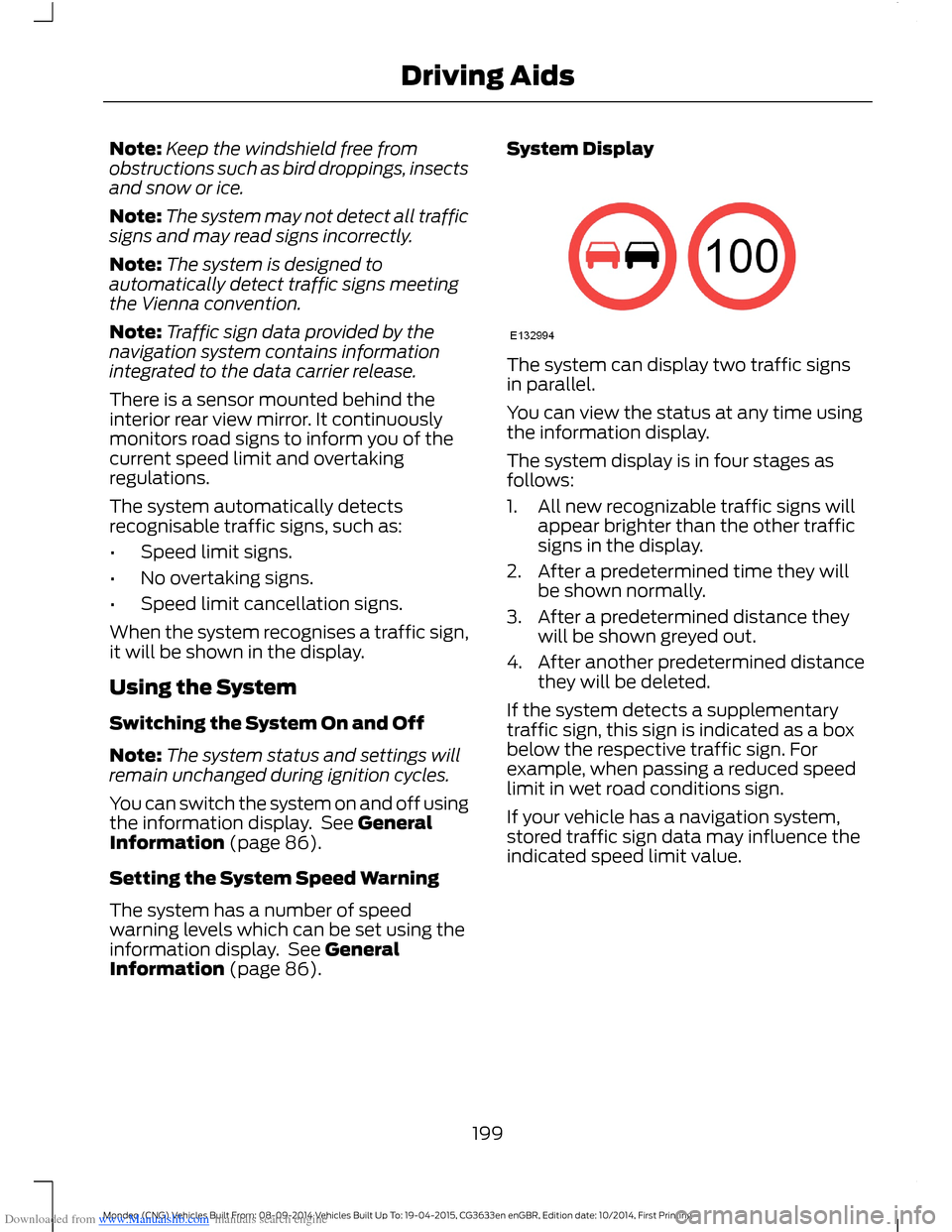
System Display
The system can display two traffic signsin parallel.
You can view the status at any time usingthe information display.
The system display is in four stages asfollows:
1.All new recognizable traffic signs willappear brighter than the other trafficsigns in the display.
2.After a predetermined time they willbe shown normally.
3.After a predetermined distance theywill be shown greyed out.
4.After another predetermined distancethey will be deleted.
If the system detects a supplementarytraffic sign, this sign is indicated as a boxbelow the respective traffic sign. Forexample, when passing a reduced speedlimit in wet road conditions sign.
If your vehicle has a navigation system,stored traffic sign data may influence theindicated speed limit value.
199Mondeo (CNG) Vehicles Built From: 08-09-2014 Vehicles Built Up To: 19-04-2015, CG3633en enGBR, Edition date: 10/2014, First PrintingDriving Aids
Page 206 of 446
Downloaded from www.Manualslib.com manuals search engine ActionCause
Clean the grille surface in front of the radaror remove the object causing the obstruc-tion.
The surface of the radar in the grille is dirtyor obstructed in some way.
Wait a short time. It may take severalminutes for the radar to detect that thereis no obstruction.
The surface of the radar in the grille is cleanbut the message remains in the display.
The Pre-Collision Assist system is tempor-arily disabled. Pre-Collision Assist shouldautomatically reactivate a short time afterthe weather conditions improve.
Heavy rain, spray, snow, or fog is interferingwith the radar signals.
The Pre-Collision Assist system is tempor-arily disabled. Pre-Collision Assist shouldautomatically reactivate a short time afterthe weather conditions improve.
Swirling water, or snow or ice on the surfaceof the road may interfere with the radarsignals.
Contact an authorized dealer to have theradar checked for proper coverage andoperation.
Radar is out of alignment due to a front endimpact.
Clean the outside of the windshield in frontof the camera.The windshield in front of the camera isdirty or obstructed in some way.
Wait a short time. It may take severalminutes for the camera to detect that thereis no obstruction.
The windshield in front of the camera isclean but the message remains in thedisplay.
Note:Proper system operation requires aclear view of the road by the camera. Haveany windshield damage in the area of thecamera's field of view repaired.
Note:If something hits the front end of yourvehicle or damage occurs, the radar sensingzone may change. This could cause missedor false vehicle detections. Contact anauthorized dealer to have the radar checkedfor proper coverage and operation.
Note:If your vehicle detects excessive heatat the camera or a potential misalignmentcondition, a message may display in theinformation display indicating temporarysensor unavailability. This messagedeactivates automatically when operationalconditions are corrected (for example, whenthe ambient temperature around the sensordecreases or the sensor automaticallyrecalibrates successfully).
204Mondeo (CNG) Vehicles Built From: 08-09-2014 Vehicles Built Up To: 19-04-2015, CG3633en enGBR, Edition date: 10/2014, First PrintingDriving Aids
Page 223 of 446
Downloaded from www.Manualslib.com manuals search engine BREAKING-IN
Tires
WARNING
New tires need to be run-in forapproximately 300 miles (500kilometers). During this time, youmay experience different drivingcharacteristics.
Brakes and Clutch
WARNING
Avoid heavy use of the brakes andclutch if possible for the first 100miles (150 kilometers) in town andfor the first 1000 miles (1500 kilometers)on freeways.
Engine
WARNING
Avoid driving too fast during the first1000 miles (1500 kilometers). Varyyour speed frequently and changeup through the gears early. Do not laborthe engine.
Vehicles With a Diesel Engine
During the first 2000 miles (3000kilometers), you may notice a ticking soundwhen your vehicle slows down. This is dueto adjustments of your new diesel engineand is normal.
REDUCED ENGINE
PERFORMANCE
WARNING
Continued operation will increase theengine temperature and cause theengine to shut down completely.
If the engine coolant temperature gaugeneedle moves to the upper limit position,the engine is overheating. See Gauges(page 78).
You must only drive your vehicle for a shortdistance if the engine overheats. Thedistance you can travel depends onambient temperature, vehicle load andterrain. The engine will continue to operatewith limited power for a short time.
If the engine temperature continues to rise,the fuel supply to the engine will reduce.The air conditioning will switch off and theengine cooling fan will operate continually.
1.Reduce your speed gradually and stopyour vehicle as soon as it is safe to doso.
2.Switch the engine off immediately toprevent severe engine damage.
3.Wait for the engine to cool down.
4.Check the coolant level. See EngineCoolant Check (page 247).
5.Have your vehicle checked by anauthorized dealer as soon as possible.
ECONOMICAL DRIVING
The following will help to improve fuelconsumption.
Tire Pressures
Check your tire pressures regularly tooptimize fuel economy. For best resultsuse the economy pressures. See TirePressures (page 273).
Gear Shifting
Use the highest drivable gear appropriatefor the road conditions.
221Mondeo (CNG) Vehicles Built From: 08-09-2014 Vehicles Built Up To: 19-04-2015, CG3633en enGBR, Edition date: 10/2014, First PrintingDriving Hints
Page 273 of 446
Downloaded from www.Manualslib.com manuals search engine WARNINGS
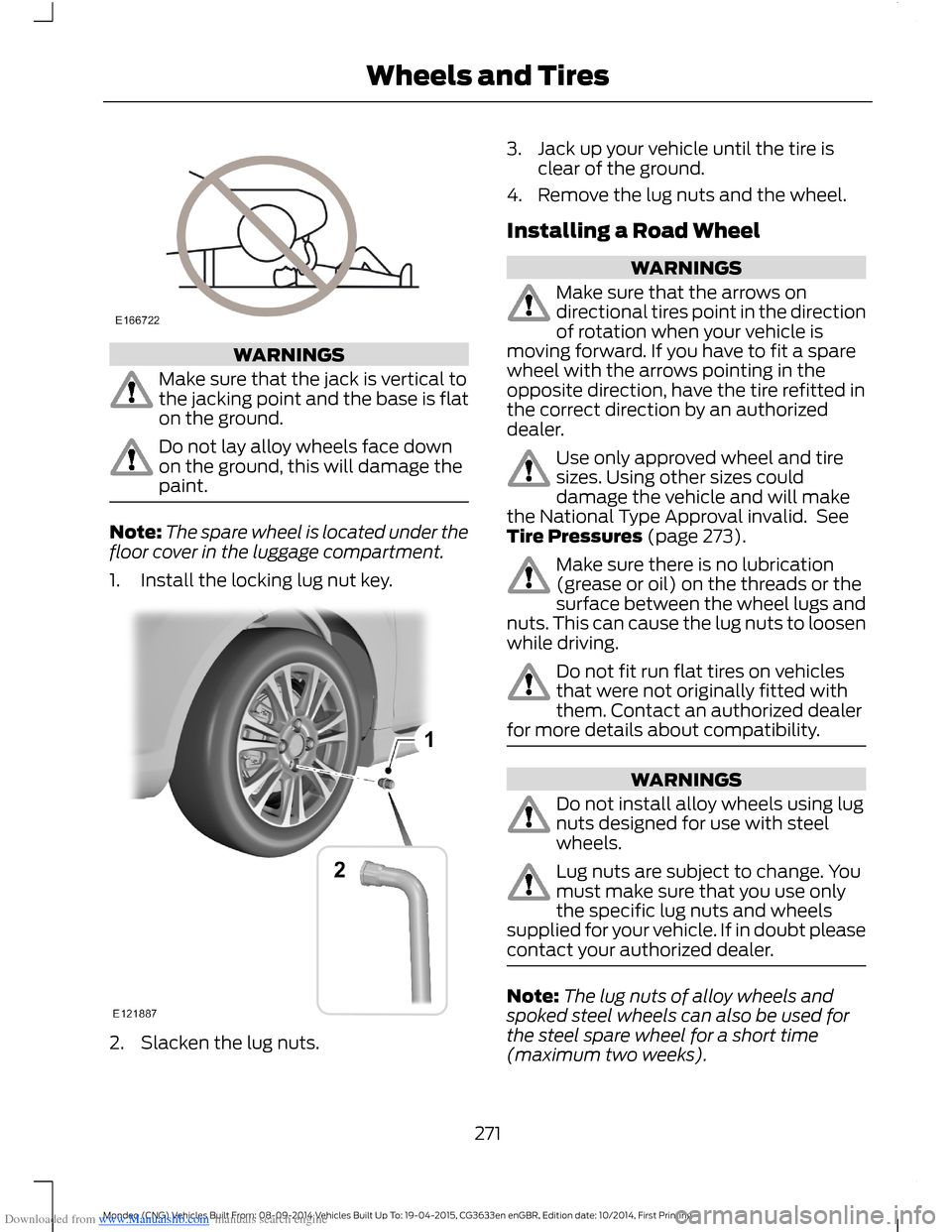
Make sure that the jack is vertical tothe jacking point and the base is flaton the ground.
Do not lay alloy wheels face downon the ground, this will damage thepaint.
Note:The spare wheel is located under thefloor cover in the luggage compartment.
1.Install the locking lug nut key.
2.Slacken the lug nuts.
3.Jack up your vehicle until the tire isclear of the ground.
4.Remove the lug nuts and the wheel.
Installing a Road Wheel
WARNINGS
Make sure that the arrows ondirectional tires point in the directionof rotation when your vehicle ismoving forward. If you have to fit a sparewheel with the arrows pointing in theopposite direction, have the tire refitted inthe correct direction by an authorizeddealer.
Use only approved wheel and tiresizes. Using other sizes coulddamage the vehicle and will makethe National Type Approval invalid. SeeTire Pressures (page 273).
Make sure there is no lubrication(grease or oil) on the threads or thesurface between the wheel lugs andnuts. This can cause the lug nuts to loosenwhile driving.
Do not fit run flat tires on vehiclesthat were not originally fitted withthem. Contact an authorized dealerfor more details about compatibility.
WARNINGS
Do not install alloy wheels using lugnuts designed for use with steelwheels.
Lug nuts are subject to change. Youmust make sure that you use onlythe specific lug nuts and wheelssupplied for your vehicle. If in doubt pleasecontact your authorized dealer.
Note:The lug nuts of alloy wheels andspoked steel wheels can also be used forthe steel spare wheel for a short time(maximum two weeks).
271Mondeo (CNG) Vehicles Built From: 08-09-2014 Vehicles Built Up To: 19-04-2015, CG3633en enGBR, Edition date: 10/2014, First PrintingWheels and Tires
Page 302 of 446
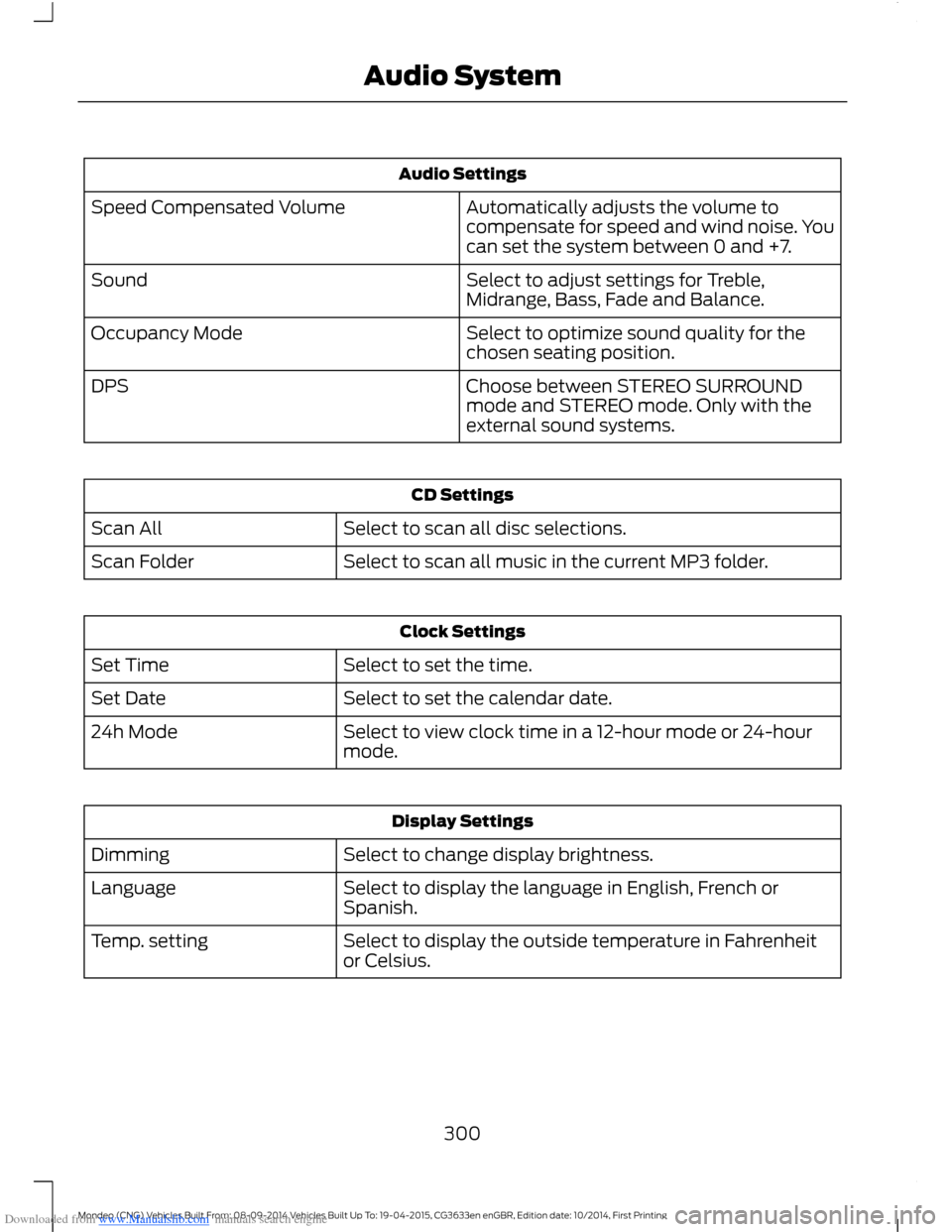
Downloaded from www.Manualslib.com manuals search engine Audio Settings
Automatically adjusts the volume tocompensate for speed and wind noise. Youcan set the system between 0 and +7.
Speed Compensated Volume
Select to adjust settings for Treble,Midrange, Bass, Fade and Balance.Sound
Select to optimize sound quality for thechosen seating position.Occupancy Mode
Choose between STEREO SURROUNDmode and STEREO mode. Only with theexternal sound systems.
DPS
CD Settings
Select to scan all disc selections.Scan All
Select to scan all music in the current MP3 folder.Scan Folder
Clock Settings
Select to set the time.Set Time
Select to set the calendar date.Set Date
Select to view clock time in a 12-hour mode or 24-hourmode.24h Mode
Display Settings
Select to change display brightness.Dimming
Select to display the language in English, French orSpanish.Language
Select to display the outside temperature in Fahrenheitor Celsius.Temp. setting
300Mondeo (CNG) Vehicles Built From: 08-09-2014 Vehicles Built Up To: 19-04-2015, CG3633en enGBR, Edition date: 10/2014, First PrintingAudio System
Page 303 of 446
Downloaded from www.Manualslib.com manuals search engine DIGITAL RADIO
General Information
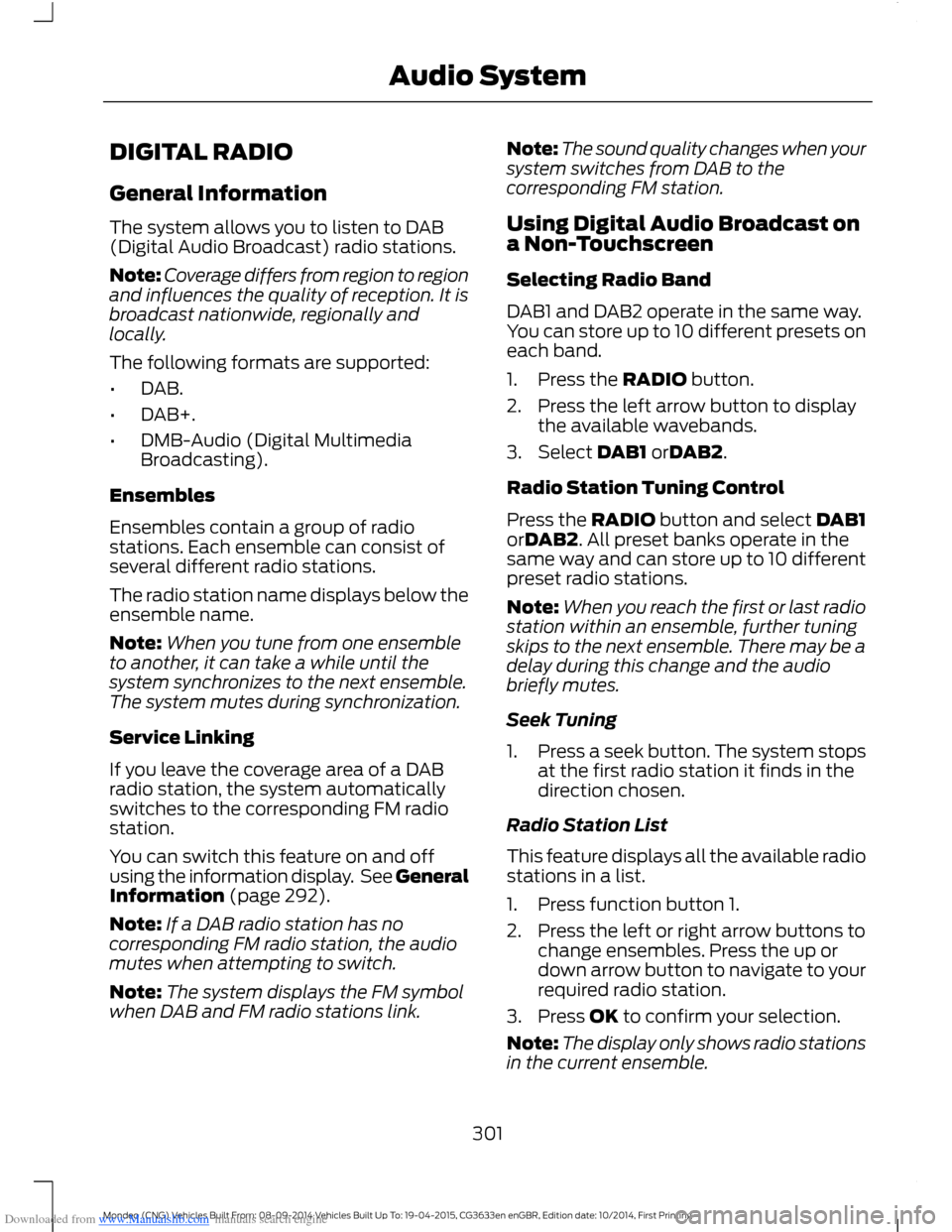
The system allows you to listen to DAB(Digital Audio Broadcast) radio stations.
Note:Coverage differs from region to regionand influences the quality of reception. It isbroadcast nationwide, regionally andlocally.
The following formats are supported:
•DAB.
•DAB+.
•DMB-Audio (Digital MultimediaBroadcasting).
Ensembles
Ensembles contain a group of radiostations. Each ensemble can consist ofseveral different radio stations.
The radio station name displays below theensemble name.
Note:When you tune from one ensembleto another, it can take a while until thesystem synchronizes to the next ensemble.The system mutes during synchronization.
Service Linking
If you leave the coverage area of a DABradio station, the system automaticallyswitches to the corresponding FM radiostation.
You can switch this feature on and offusing the information display. See GeneralInformation (page 292).
Note:If a DAB radio station has nocorresponding FM radio station, the audiomutes when attempting to switch.
Note:The system displays the FM symbolwhen DAB and FM radio stations link.
Note:The sound quality changes when yoursystem switches from DAB to thecorresponding FM station.
Using Digital Audio Broadcast ona Non-Touchscreen
Selecting Radio Band
DAB1 and DAB2 operate in the same way.You can store up to 10 different presets oneach band.
1.Press the RADIO button.
2.Press the left arrow button to displaythe available wavebands.
3.Select DAB1 orDAB2.
Radio Station Tuning Control
Press the RADIO button and select DAB1orDAB2. All preset banks operate in thesame way and can store up to 10 differentpreset radio stations.
Note:When you reach the first or last radiostation within an ensemble, further tuningskips to the next ensemble. There may be adelay during this change and the audiobriefly mutes.
Seek Tuning
1.Press a seek button. The system stopsat the first radio station it finds in thedirection chosen.
Radio Station List
This feature displays all the available radiostations in a list.
1.Press function button 1.
2.Press the left or right arrow buttons tochange ensembles. Press the up ordown arrow button to navigate to yourrequired radio station.
3.Press OK to confirm your selection.
Note:The display only shows radio stationsin the current ensemble.
301Mondeo (CNG) Vehicles Built From: 08-09-2014 Vehicles Built Up To: 19-04-2015, CG3633en enGBR, Edition date: 10/2014, First PrintingAudio System
Page 304 of 446
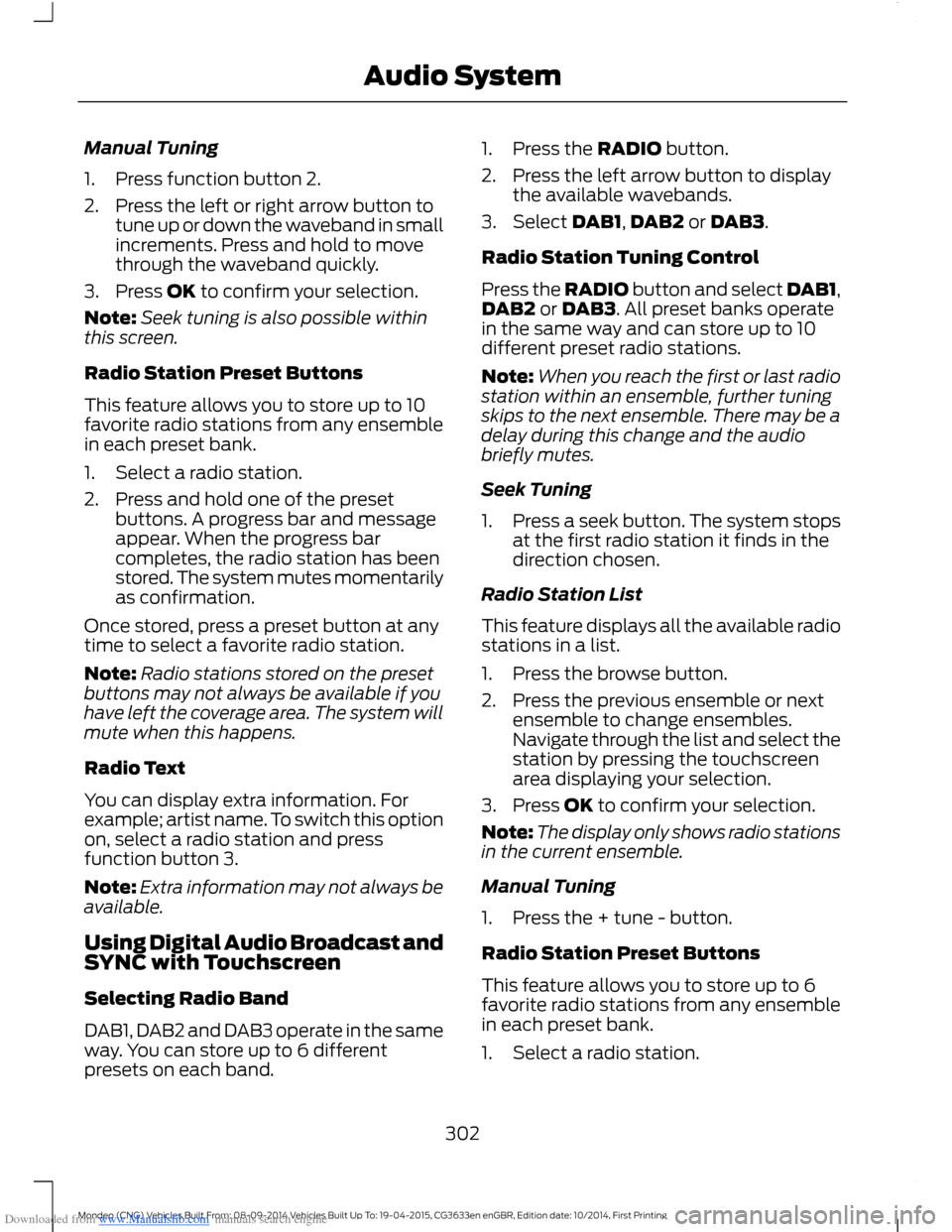
Downloaded from www.Manualslib.com manuals search engine Manual Tuning
1.Press function button 2.
2.Press the left or right arrow button totune up or down the waveband in smallincrements. Press and hold to movethrough the waveband quickly.
3.Press OK to confirm your selection.
Note:Seek tuning is also possible withinthis screen.
Radio Station Preset Buttons
This feature allows you to store up to 10favorite radio stations from any ensemblein each preset bank.
1.Select a radio station.
2.Press and hold one of the presetbuttons. A progress bar and messageappear. When the progress barcompletes, the radio station has beenstored. The system mutes momentarilyas confirmation.
Once stored, press a preset button at anytime to select a favorite radio station.
Note:Radio stations stored on the presetbuttons may not always be available if youhave left the coverage area. The system willmute when this happens.
Radio Text
You can display extra information. Forexample; artist name. To switch this optionon, select a radio station and pressfunction button 3.
Note:Extra information may not always beavailable.
Using Digital Audio Broadcast andSYNC with Touchscreen
Selecting Radio Band
DAB1, DAB2 and DAB3 operate in the sameway. You can store up to 6 differentpresets on each band.
1.Press the RADIO button.
2.Press the left arrow button to displaythe available wavebands.
3.Select DAB1,DAB2 or DAB3.
Radio Station Tuning Control
Press the RADIO button and select DAB1,DAB2 or DAB3. All preset banks operatein the same way and can store up to 10different preset radio stations.
Note:When you reach the first or last radiostation within an ensemble, further tuningskips to the next ensemble. There may be adelay during this change and the audiobriefly mutes.
Seek Tuning
1.Press a seek button. The system stopsat the first radio station it finds in thedirection chosen.
Radio Station List
This feature displays all the available radiostations in a list.
1.Press the browse button.
2.Press the previous ensemble or nextensemble to change ensembles.Navigate through the list and select thestation by pressing the touchscreenarea displaying your selection.
3.Press OK to confirm your selection.
Note:The display only shows radio stationsin the current ensemble.
Manual Tuning
1.Press the + tune - button.
Radio Station Preset Buttons
This feature allows you to store up to 6favorite radio stations from any ensemblein each preset bank.
1.Select a radio station.
302Mondeo (CNG) Vehicles Built From: 08-09-2014 Vehicles Built Up To: 19-04-2015, CG3633en enGBR, Edition date: 10/2014, First PrintingAudio System
Page 309 of 446
Downloaded from www.Manualslib.com manuals search engine Before giving a voice command, wait forthe system announcement to finishfollowed by a single beep. Any commandspoken before this does not register withthe system.
Speak naturally, without long pausesbetween words.
You can interrupt the system at any timewhile it is speaking by pressing the voicebutton. You can also cancel a voice sessionat any time by pressing and holding thevoice button.
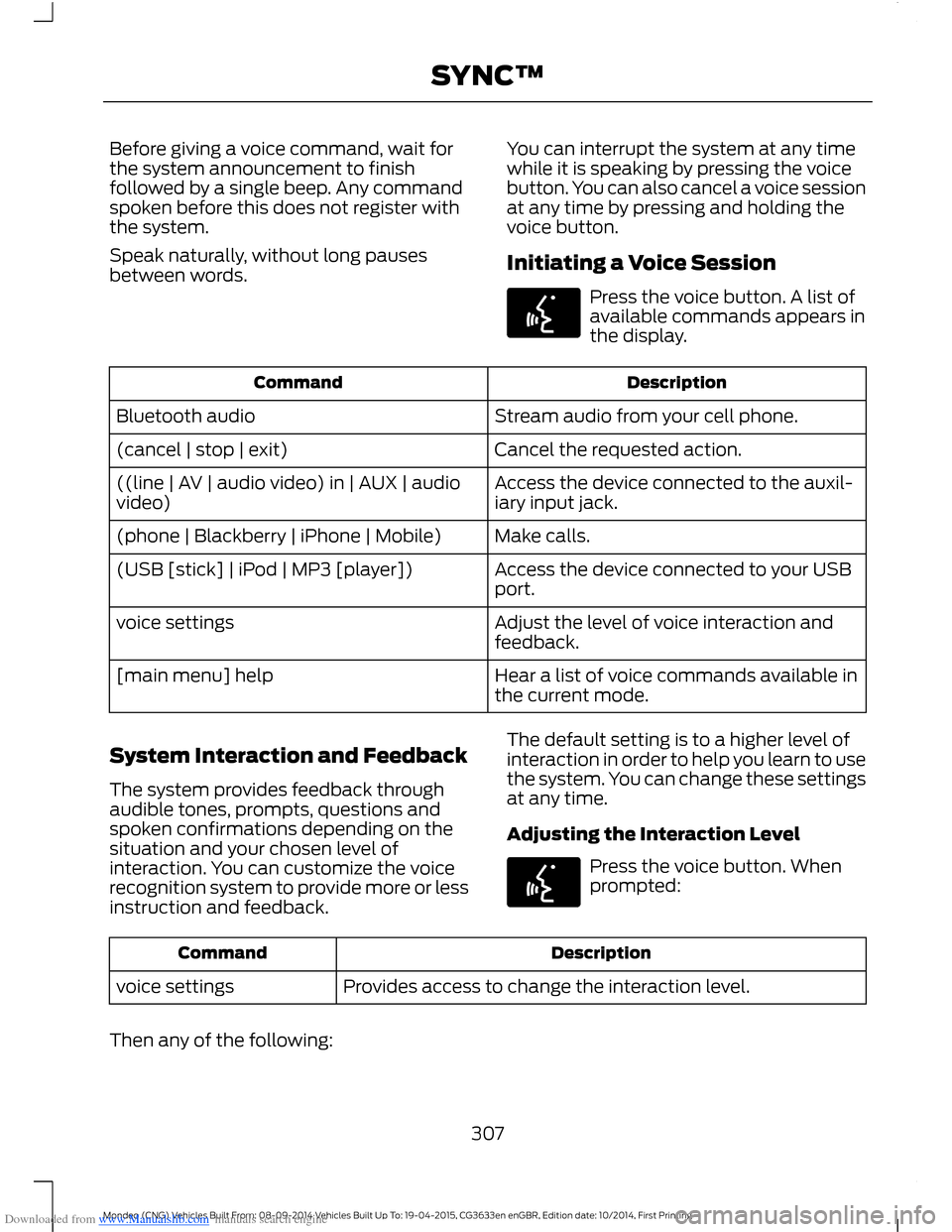
Initiating a Voice Session
Press the voice button. A list ofavailable commands appears inthe display.
DescriptionCommand
Stream audio from your cell phone.Bluetooth audio
Cancel the requested action.(cancel | stop | exit)
Access the device connected to the auxil-iary input jack.((line | AV | audio video) in | AUX | audiovideo)
Make calls.(phone | Blackberry | iPhone | Mobile)
Access the device connected to your USBport.(USB [stick] | iPod | MP3 [player])
Adjust the level of voice interaction andfeedback.voice settings
Hear a list of voice commands available inthe current mode.[main menu] help
System Interaction and Feedback
The system provides feedback throughaudible tones, prompts, questions andspoken confirmations depending on thesituation and your chosen level ofinteraction. You can customize the voicerecognition system to provide more or lessinstruction and feedback.
The default setting is to a higher level ofinteraction in order to help you learn to usethe system. You can change these settingsat any time.
Adjusting the Interaction Level
Press the voice button. Whenprompted:
DescriptionCommand
Provides access to change the interaction level.voice settings
Then any of the following:
307Mondeo (CNG) Vehicles Built From: 08-09-2014 Vehicles Built Up To: 19-04-2015, CG3633en enGBR, Edition date: 10/2014, First PrintingSYNC™
Page 311 of 446
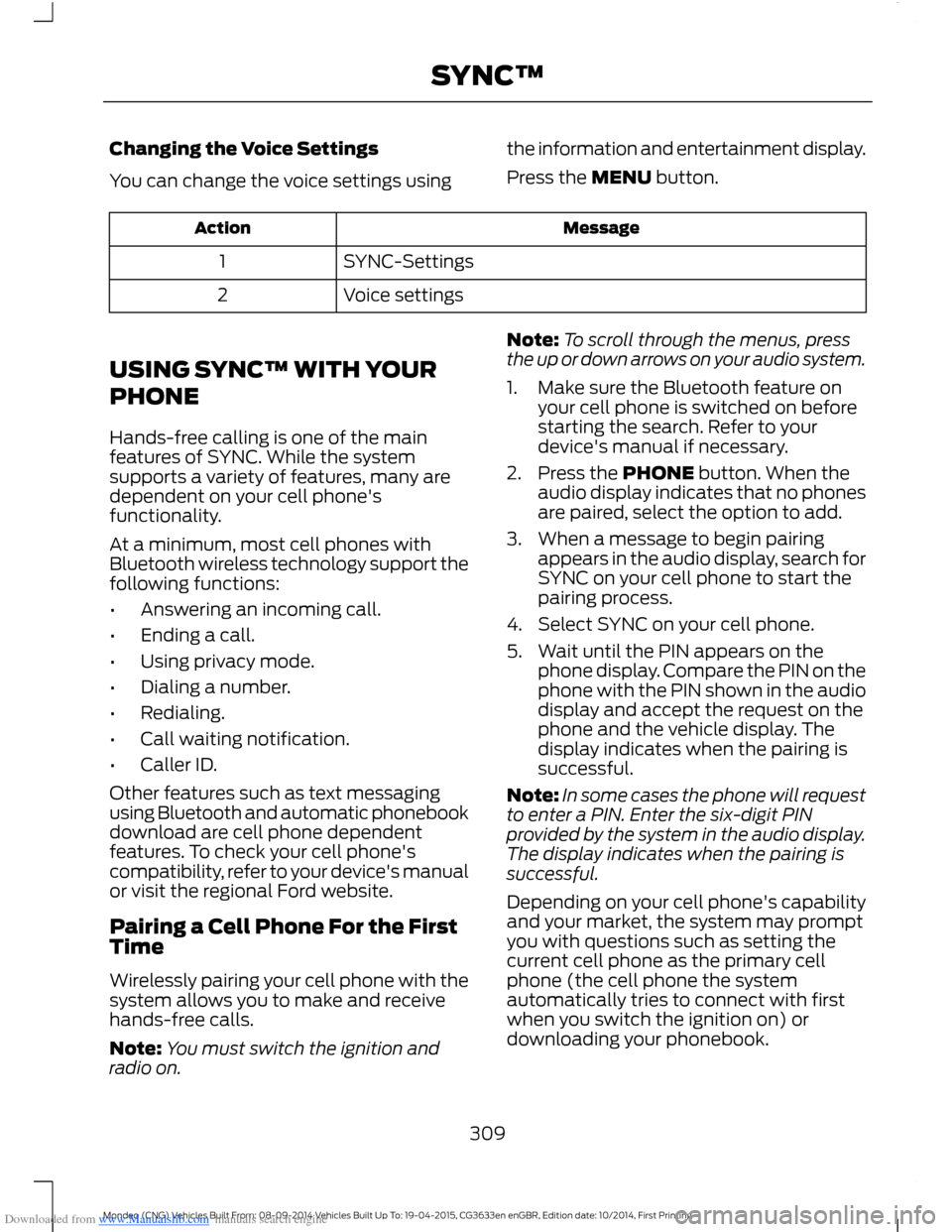
Downloaded from www.Manualslib.com manuals search engine Changing the Voice Settings
You can change the voice settings using
the information and entertainment display.
Press the MENU button.
MessageAction
SYNC-Settings1
Voice settings2
USING SYNC™ WITH YOUR
PHONE
Hands-free calling is one of the mainfeatures of SYNC. While the systemsupports a variety of features, many aredependent on your cell phone'sfunctionality.
At a minimum, most cell phones withBluetooth wireless technology support thefollowing functions:
•Answering an incoming call.
•Ending a call.
•Using privacy mode.
•Dialing a number.
•Redialing.
•Call waiting notification.
•Caller ID.
Other features such as text messagingusing Bluetooth and automatic phonebookdownload are cell phone dependentfeatures. To check your cell phone'scompatibility, refer to your device's manualor visit the regional Ford website.
Pairing a Cell Phone For the FirstTime
Wirelessly pairing your cell phone with thesystem allows you to make and receivehands-free calls.
Note:You must switch the ignition andradio on.
Note:To scroll through the menus, pressthe up or down arrows on your audio system.
1.Make sure the Bluetooth feature onyour cell phone is switched on beforestarting the search. Refer to yourdevice's manual if necessary.
2.Press the PHONE button. When theaudio display indicates that no phonesare paired, select the option to add.
3.When a message to begin pairingappears in the audio display, search forSYNC on your cell phone to start thepairing process.
4.Select SYNC on your cell phone.
5.Wait until the PIN appears on thephone display. Compare the PIN on thephone with the PIN shown in the audiodisplay and accept the request on thephone and the vehicle display. Thedisplay indicates when the pairing issuccessful.
Note:In some cases the phone will requestto enter a PIN. Enter the six-digit PINprovided by the system in the audio display.The display indicates when the pairing issuccessful.
Depending on your cell phone's capabilityand your market, the system may promptyou with questions such as setting thecurrent cell phone as the primary cellphone (the cell phone the systemautomatically tries to connect with firstwhen you switch the ignition on) ordownloading your phonebook.
309Mondeo (CNG) Vehicles Built From: 08-09-2014 Vehicles Built Up To: 19-04-2015, CG3633en enGBR, Edition date: 10/2014, First PrintingSYNC™
Page 320 of 446
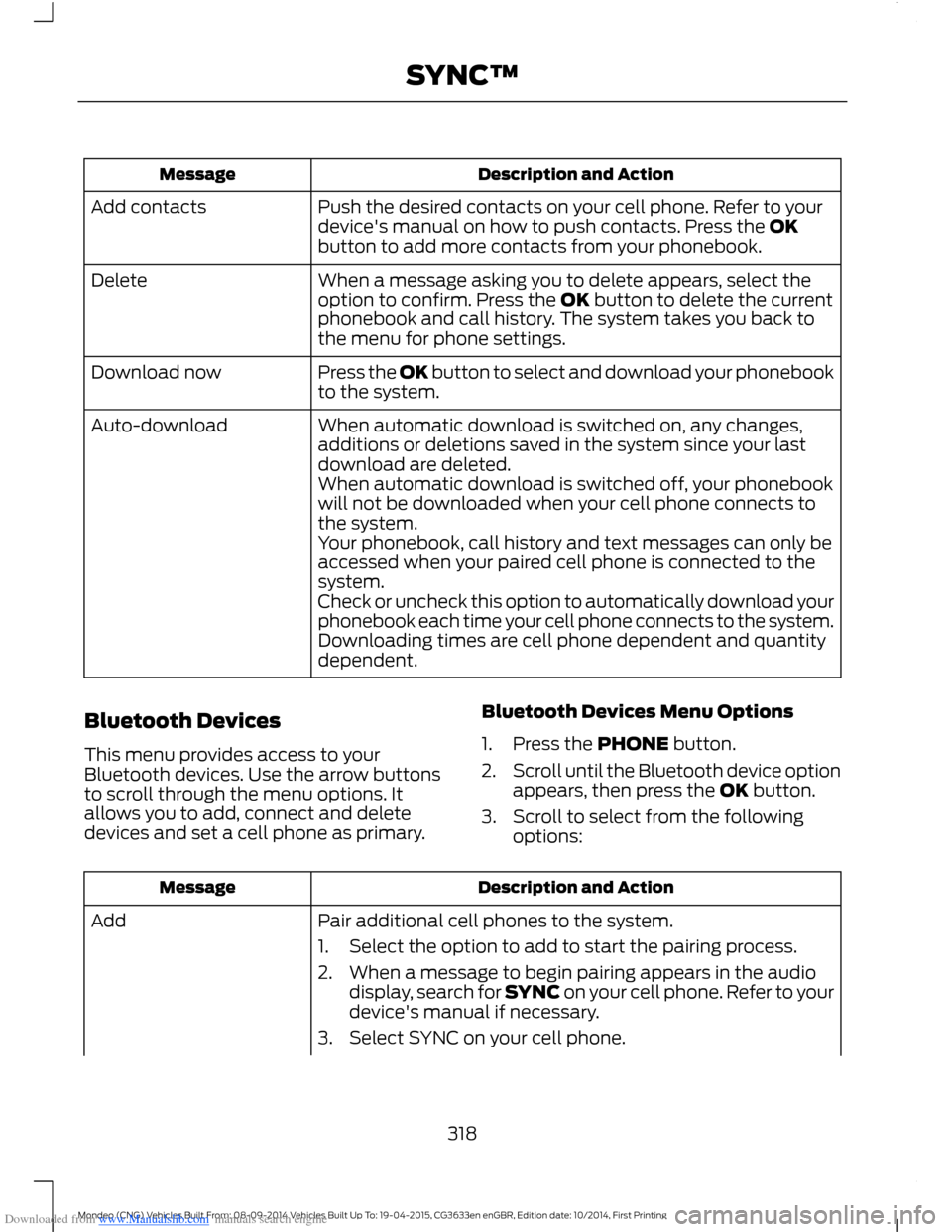
Downloaded from www.Manualslib.com manuals search engine Description and ActionMessage
Push the desired contacts on your cell phone. Refer to yourdevice's manual on how to push contacts. Press the OKbutton to add more contacts from your phonebook.
Add contacts
When a message asking you to delete appears, select theoption to confirm. Press the OK button to delete the currentphonebook and call history. The system takes you back tothe menu for phone settings.
Delete
Press the OK button to select and download your phonebookto the system.Download now
When automatic download is switched on, any changes,additions or deletions saved in the system since your lastdownload are deleted.
Auto-download
When automatic download is switched off, your phonebookwill not be downloaded when your cell phone connects tothe system.Your phonebook, call history and text messages can only beaccessed when your paired cell phone is connected to thesystem.Check or uncheck this option to automatically download yourphonebook each time your cell phone connects to the system.Downloading times are cell phone dependent and quantitydependent.
Bluetooth Devices
This menu provides access to yourBluetooth devices. Use the arrow buttonsto scroll through the menu options. Itallows you to add, connect and deletedevices and set a cell phone as primary.
Bluetooth Devices Menu Options
1.Press the PHONE button.
2.Scroll until the Bluetooth device optionappears, then press the OK button.
3.Scroll to select from the followingoptions:
Description and ActionMessage
Pair additional cell phones to the system.Add
1.Select the option to add to start the pairing process.
2.When a message to begin pairing appears in the audiodisplay, search for SYNC on your cell phone. Refer to yourdevice's manual if necessary.
3.Select SYNC on your cell phone.
318Mondeo (CNG) Vehicles Built From: 08-09-2014 Vehicles Built Up To: 19-04-2015, CG3633en enGBR, Edition date: 10/2014, First PrintingSYNC™