key FORD MONDEO 2014 4.G User Guide
[x] Cancel search | Manufacturer: FORD, Model Year: 2014, Model line: MONDEO, Model: FORD MONDEO 2014 4.GPages: 446, PDF Size: 29.09 MB
Page 39 of 446
Downloaded from www.Manualslib.com manuals search engine Memory Feature
Your intelligent access key will recall yourseat and mirror position each time youenter your vehicle, if linked to a pre-setposition. See Memory Function (page131).
REPLACING A LOST KEY OR
REMOTE CONTROL
Replacement keys or remote controls canbe purchased from an authorized dealer.Authorized dealers can program remotecontrols for your vehicle. See PassiveAnti-Theft System (page 51).
To re-program the passive anti-theftsystem see an authorized dealer.
37Mondeo (CNG) Vehicles Built From: 08-09-2014 Vehicles Built Up To: 19-04-2015, CG3633en enGBR, Edition date: 10/2014, First PrintingKeys and Remote Controls
Page 40 of 446
Downloaded from www.Manualslib.com manuals search engine PRINCIPLE OF OPERATION
The system allows you to program keyswith restricted driving modes to promotegood driving habits. You can use all but oneof the keys programmed to your vehiclewith these restricted modes.
Any keys that have not been programmedare referred to as an administrator key oradmin key. These can be used to:
•create a MyKey
•program optional MyKey settings
•clear all MyKey features.
When you have programmed a MyKey, youcan access the following information usingthe information display:
•How many admin keys and MyKeys areprogrammed to your vehicle.
•The total distance your vehicle hastraveled using a MyKey.
Note:Switch the ignition on to use thesystem.
Note:All MyKeys are programmed to thesame settings. You cannot program themindividually.
Standard Settings
The following settings cannot be changed:
•Safety belt minder. You cannot disablethis feature. The audio system willmute when this feature is activated.
•Early low fuel or charge. The low-fuelor low charge warning activates earlier,giving the MyKey user more time torefuel or recharge.
•Driver assist features, for examplenavigation, parking aids and Blind SpotInformation System (BLIS) with crosstraffic alert. These systems turn onautomatically whenever you switch theignition on.
Optional Settings
You can configure MyKey settings whenyou first create a MyKey. You can alsochange the settings afterward with anadmin key.
The following settings can be configuredusing an admin key:
•Various vehicle speed limits can be set.Warnings will be shown in the displayfollowed by an audible tone when yourvehicle reaches the set speed. Youcannot override the set speed by fullydepressing the accelerator pedal or bysetting cruise control.
•Various vehicle speed reminders canbe set. Warnings will be shown in thedisplay followed by an audible tonewhen the set vehicle speed isexceeded.
•Audio system maximum volume of45%. A message will be shown in thedisplay when you attempt to exceedthe limited volume. Automatic volumecontrol will be disabled.
•Always on setting. When this isselected you will not be able to switchoff Advance Trac, traction control,emergency assistance or the do notdisturb feature.
Vehicles with Keyless Entry
If a MyKey and an admin key are present,your vehicle will recognize the admin keyonly.
CREATING A MYKEY
Use the information display to create aMyKey:
38Mondeo (CNG) Vehicles Built From: 08-09-2014 Vehicles Built Up To: 19-04-2015, CG3633en enGBR, Edition date: 10/2014, First PrintingMyKey™
Page 41 of 446
Downloaded from www.Manualslib.com manuals search engine 1. Insert the key you want to program intothe ignition. If your vehicle is equipped witha push-button start, place the intelligentaccess key fob into the backup slot. Thelocation of your backup slot is in anotherchapter. See Starting and Stopping theEngine (page 138).
2. Switch the ignition on.
3. Access the main menu on theinformation display controls, and selectSettings then MyKey by pressing OK orthe > button.
4. Press OK or the > button to selectCreate MyKey.
5. When prompted, hold the OK buttonuntil you see a message informing you tolabel this key as a MyKey. The key will berestricted at the next start.
MyKey is successfully created. Make sureyou label it so you can distinguish it fromthe admin keys.
You can also program configurablesettings for the key(s). SeeProgramming/Changing ConfigurableSettings.
Programming/ChangingConfigurable Settings
Use the information display to access yourconfigurable MyKey settings.
1.Switch the ignition on using an adminkey or fob.
2.Access the main menu on theinformation display controls, and selectSettings, then MyKey by pressing OKor > button.
3.Use the arrow buttons to get to afeature.
4.Press OK or > to make a selection.
Note:You can clear or change your MyKeysettings at any time during the same keycycle as you created the MyKey. Once youhave switched the vehicle off, however, youwill need an admin key to change or clearyour MyKey settings.
CLEARING ALL MYKEYS
You can clear or change your MyKeysettings using the information displaycontrol on the steering wheel. SeeInformation Displays (page 86).
Switch the ignition on using an admin keyor fob.
To clear all MyKeys of all MyKey settings, press the left arrow button to accessthe main menu and scroll to:
Action and DescriptionMessage
Press the OK button.Settings
Press the OK button.MyKey
Press and hold the OK button until the following messagedisplays.Clear MyKey
39Mondeo (CNG) Vehicles Built From: 08-09-2014 Vehicles Built Up To: 19-04-2015, CG3633en enGBR, Edition date: 10/2014, First PrintingMyKey™
Page 42 of 446
Downloaded from www.Manualslib.com manuals search engine Action and DescriptionMessage
All MyKeys
Cleared
Note:When you clear your MyKeys, you remove all restrictions and return all MyKeys totheir original admin key status.
40Mondeo (CNG) Vehicles Built From: 08-09-2014 Vehicles Built Up To: 19-04-2015, CG3633en enGBR, Edition date: 10/2014, First PrintingMyKey™
Page 43 of 446
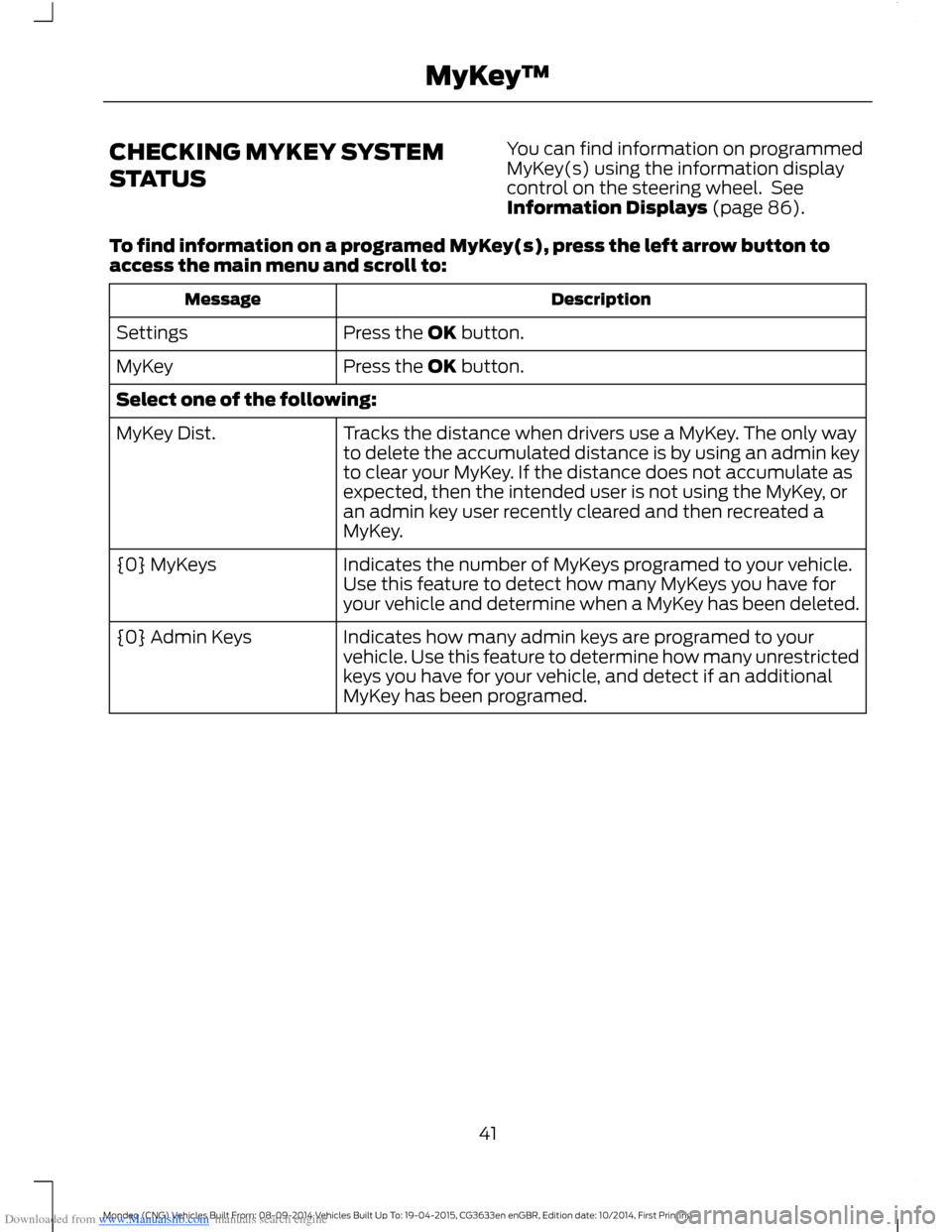
Downloaded from www.Manualslib.com manuals search engine CHECKING MYKEY SYSTEM
STATUS
You can find information on programmedMyKey(s) using the information displaycontrol on the steering wheel. SeeInformation Displays (page 86).
To find information on a programed MyKey(s), press the left arrow button toaccess the main menu and scroll to:
DescriptionMessage
Press the OK button.Settings
Press the OK button.MyKey
Select one of the following:
Tracks the distance when drivers use a MyKey. The only wayto delete the accumulated distance is by using an admin keyto clear your MyKey. If the distance does not accumulate asexpected, then the intended user is not using the MyKey, oran admin key user recently cleared and then recreated aMyKey.
MyKey Dist.
Indicates the number of MyKeys programed to your vehicle.Use this feature to detect how many MyKeys you have foryour vehicle and determine when a MyKey has been deleted.
{0} MyKeys
Indicates how many admin keys are programed to yourvehicle. Use this feature to determine how many unrestrictedkeys you have for your vehicle, and detect if an additionalMyKey has been programed.
{0} Admin Keys
41Mondeo (CNG) Vehicles Built From: 08-09-2014 Vehicles Built Up To: 19-04-2015, CG3633en enGBR, Edition date: 10/2014, First PrintingMyKey™
Page 44 of 446
Downloaded from www.Manualslib.com manuals search engine USING MYKEY WITH REMOTE
START SYSTEMS
MyKey is not compatible with non
Ford-approved, aftermarket remote startsystems. If you choose to install a remotestart system, see an authorized dealer fora Ford-approved remote start system.
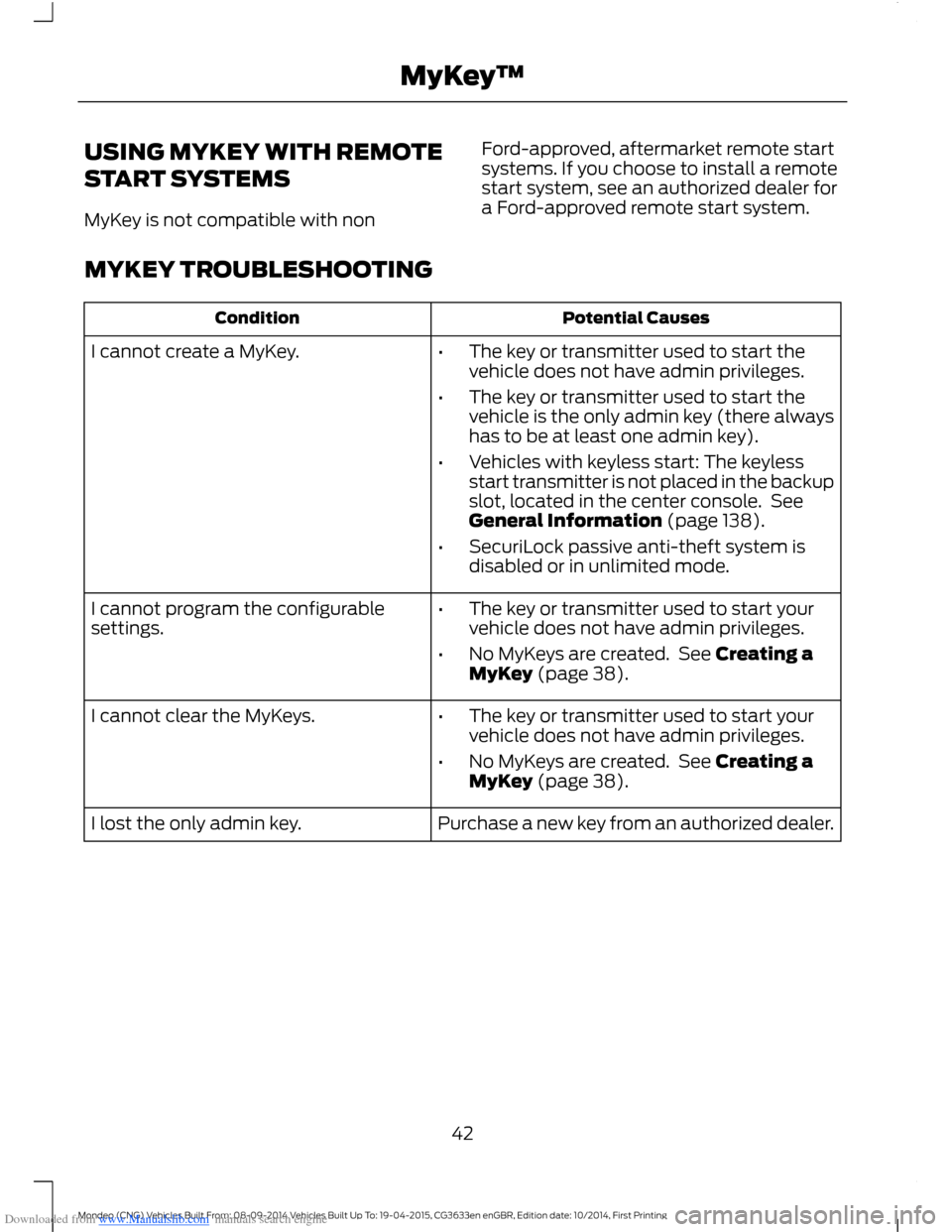
MYKEY TROUBLESHOOTING
Potential CausesCondition
I cannot create a MyKey.•The key or transmitter used to start thevehicle does not have admin privileges.
•The key or transmitter used to start thevehicle is the only admin key (there alwayshas to be at least one admin key).
•Vehicles with keyless start: The keylessstart transmitter is not placed in the backupslot, located in the center console. SeeGeneral Information (page 138).
•SecuriLock passive anti-theft system isdisabled or in unlimited mode.
•The key or transmitter used to start yourvehicle does not have admin privileges.
•No MyKeys are created. See Creating aMyKey (page 38).
I cannot program the configurablesettings.
•The key or transmitter used to start yourvehicle does not have admin privileges.
•No MyKeys are created. See Creating aMyKey (page 38).
I cannot clear the MyKeys.
Purchase a new key from an authorized dealer.I lost the only admin key.
42Mondeo (CNG) Vehicles Built From: 08-09-2014 Vehicles Built Up To: 19-04-2015, CG3633en enGBR, Edition date: 10/2014, First PrintingMyKey™
Page 45 of 446
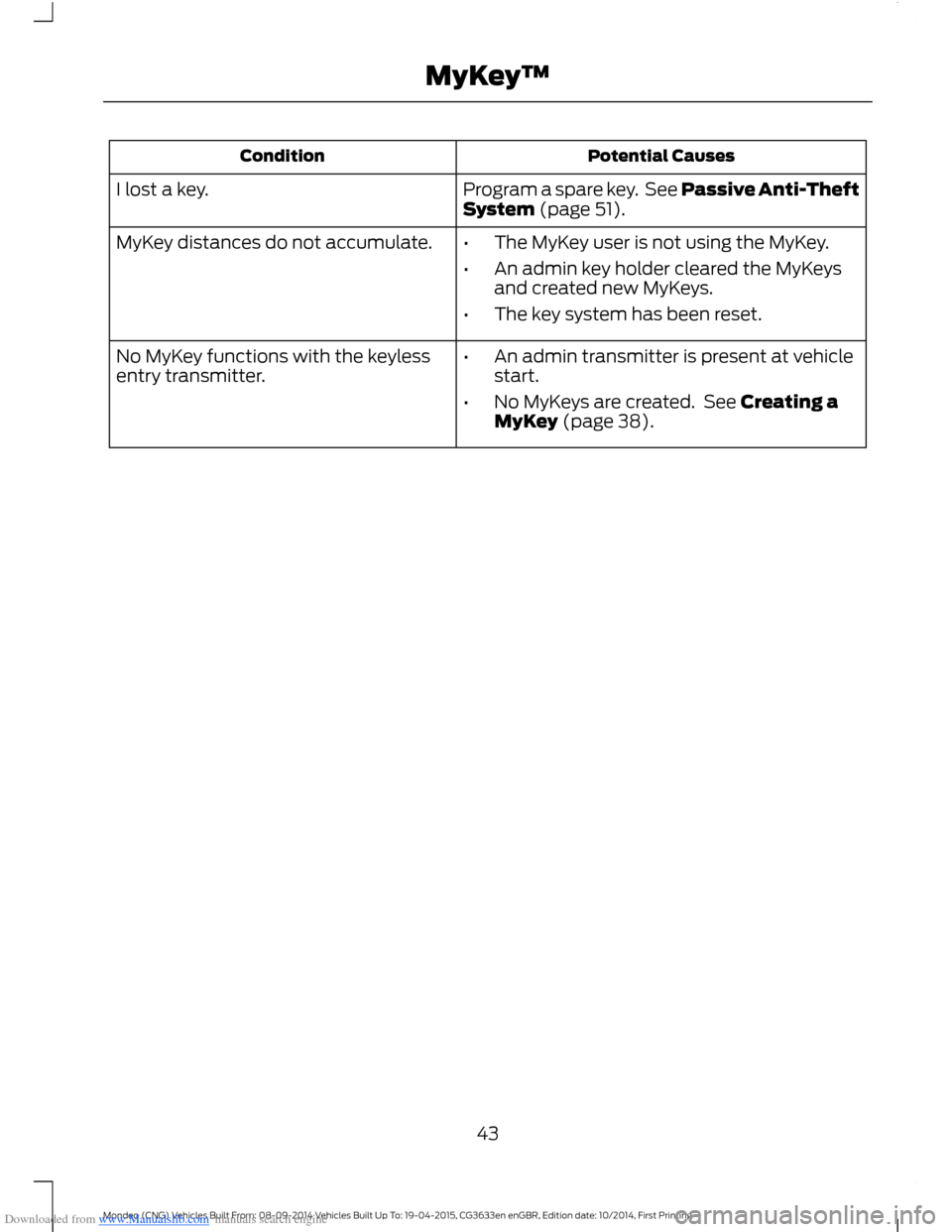
Downloaded from www.Manualslib.com manuals search engine Potential CausesCondition
Program a spare key. See Passive Anti-TheftSystem (page 51).I lost a key.
MyKey distances do not accumulate.•The MyKey user is not using the MyKey.
•An admin key holder cleared the MyKeysand created new MyKeys.
•The key system has been reset.
•An admin transmitter is present at vehiclestart.
•No MyKeys are created. See Creating aMyKey (page 38).
No MyKey functions with the keylessentry transmitter.
43Mondeo (CNG) Vehicles Built From: 08-09-2014 Vehicles Built Up To: 19-04-2015, CG3633en enGBR, Edition date: 10/2014, First PrintingMyKey™
Page 46 of 446
Downloaded from www.Manualslib.com manuals search engine LOCKING AND UNLOCKING
Note:Check your vehicle is locked beforeleaving it unattended.
Note:Do not leave your keys in your vehicle.
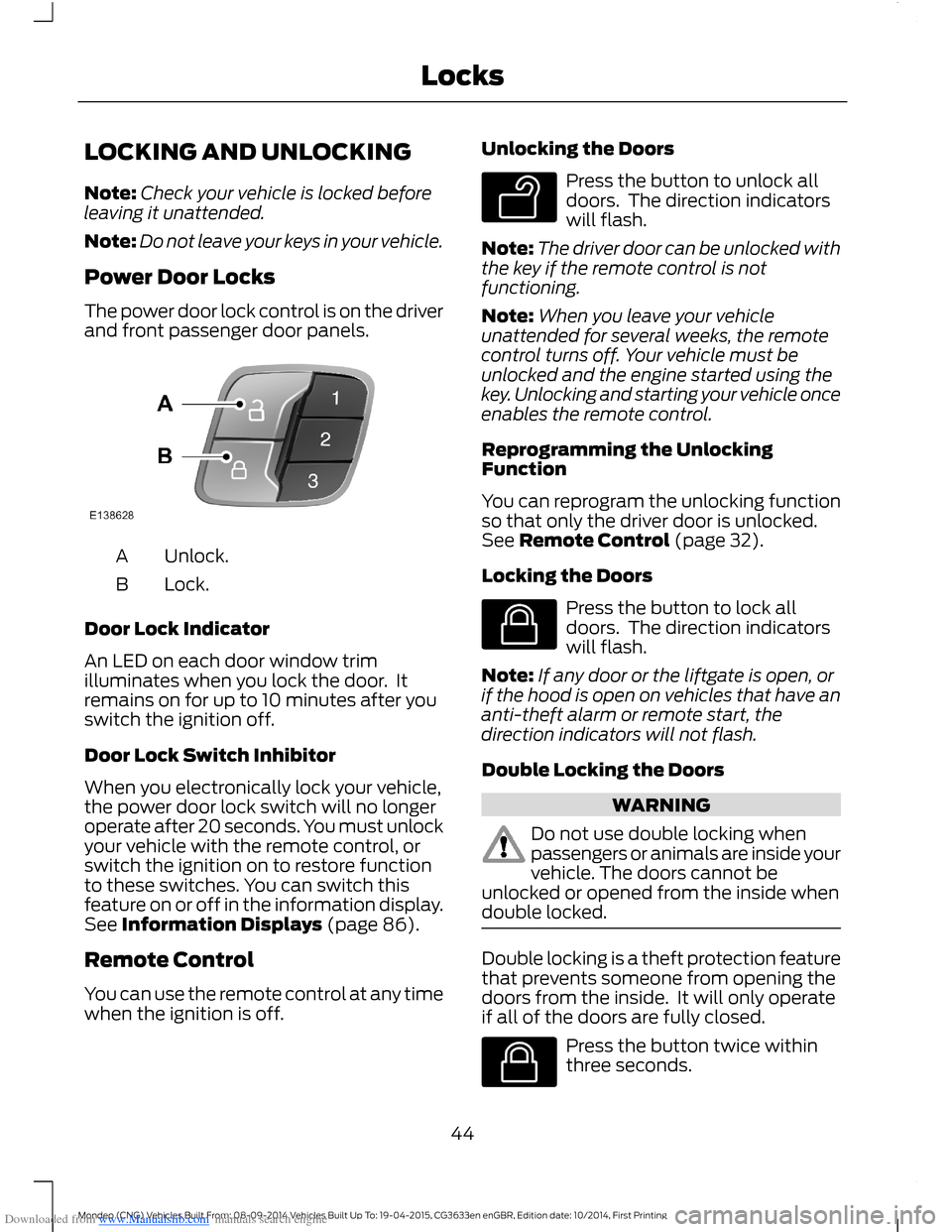
Power Door Locks
The power door lock control is on the driverand front passenger door panels.
Unlock.A
Lock.B
Door Lock Indicator
An LED on each door window trimilluminates when you lock the door. Itremains on for up to 10 minutes after youswitch the ignition off.
Door Lock Switch Inhibitor
When you electronically lock your vehicle,the power door lock switch will no longeroperate after 20 seconds. You must unlockyour vehicle with the remote control, orswitch the ignition on to restore functionto these switches. You can switch thisfeature on or off in the information display.See Information Displays (page 86).
Remote Control
You can use the remote control at any timewhen the ignition is off.
Unlocking the Doors
Press the button to unlock alldoors. The direction indicatorswill flash.
Note:The driver door can be unlocked withthe key if the remote control is notfunctioning.
Note:When you leave your vehicleunattended for several weeks, the remotecontrol turns off. Your vehicle must beunlocked and the engine started using thekey. Unlocking and starting your vehicle onceenables the remote control.
Reprogramming the UnlockingFunction
You can reprogram the unlocking functionso that only the driver door is unlocked.See Remote Control (page 32).
Locking the Doors
Press the button to lock alldoors. The direction indicatorswill flash.
Note:If any door or the liftgate is open, orif the hood is open on vehicles that have ananti-theft alarm or remote start, thedirection indicators will not flash.
Double Locking the Doors
WARNING
Do not use double locking whenpassengers or animals are inside yourvehicle. The doors cannot beunlocked or opened from the inside whendouble locked.
Double locking is a theft protection featurethat prevents someone from opening thedoors from the inside. It will only operateif all of the doors are fully closed.
Press the button twice withinthree seconds.
44Mondeo (CNG) Vehicles Built From: 08-09-2014 Vehicles Built Up To: 19-04-2015, CG3633en enGBR, Edition date: 10/2014, First PrintingLocks
Page 47 of 446
Downloaded from www.Manualslib.com manuals search engine Automatic Relocking
The doors automatically relock if you donot open a door within 45 seconds ofunlocking the doors with the remotecontrol. The door locks and the alarmreturn to their previous state.
Locking and Unlocking the DoorsFrom Inside
Use the power door lock control locatedon the driver and front passenger doorpanels.
Locking and Unlocking the Doorswith the Key Blade
Locking with the Key Blade
Turn the top of the key toward the front ofyour vehicle.
Double Locking with the Key Blade
Turn the top of the key toward the front ofyour vehicle twice within three seconds.
Unlocking with the Key Blade
Turn the top of the key toward the rear ofyour vehicle.
Note:If the child safety locks are on andyou pull the interior door handle, you willonly switch off the emergency locking, notthe child safety lock. You can only open thedoors using the exterior door handle.
Locking and Unlocking the DoorsIndividually with the Key Blade
Locking
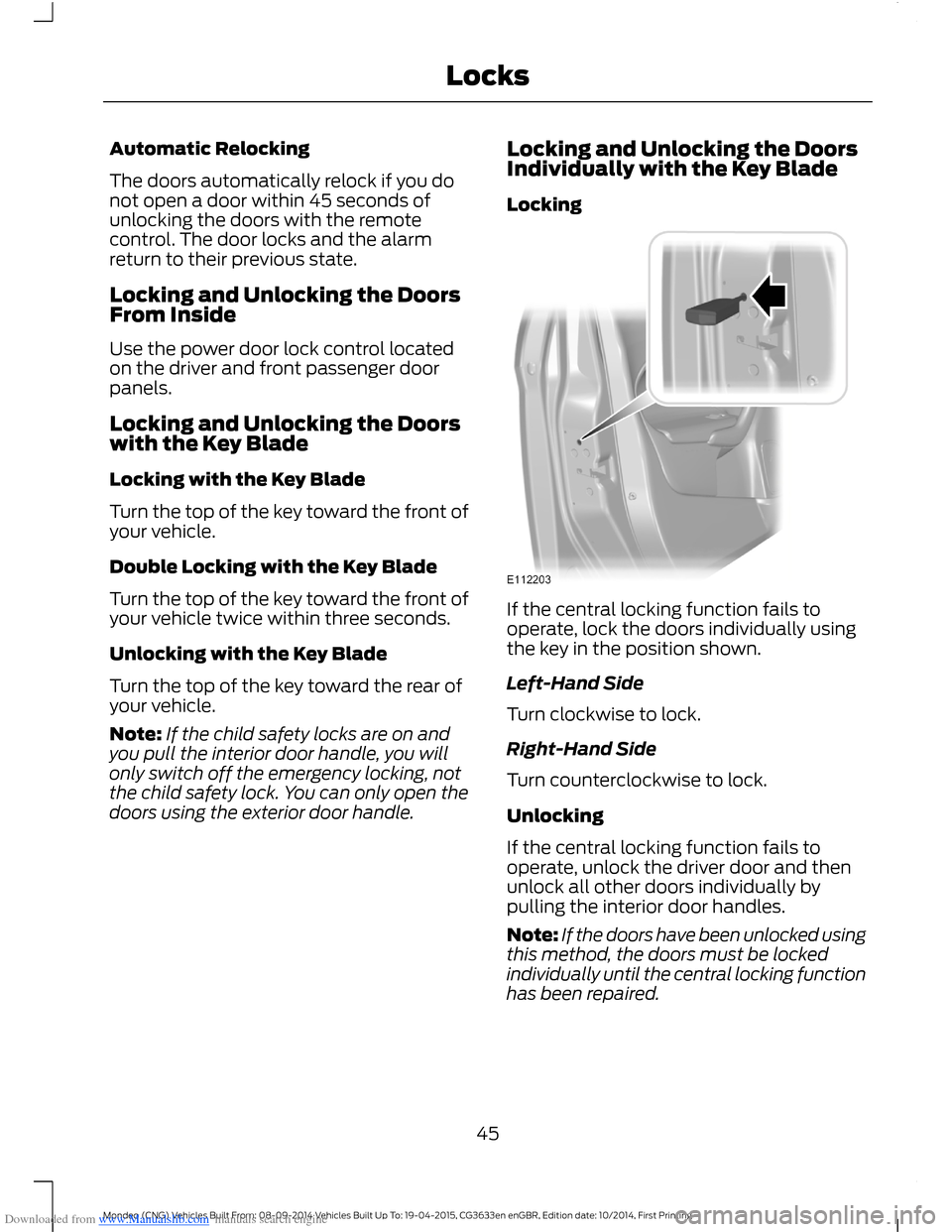
If the central locking function fails tooperate, lock the doors individually usingthe key in the position shown.
Left-Hand Side
Turn clockwise to lock.
Right-Hand Side
Turn counterclockwise to lock.
Unlocking
If the central locking function fails tooperate, unlock the driver door and thenunlock all other doors individually bypulling the interior door handles.
Note:If the doors have been unlocked usingthis method, the doors must be lockedindividually until the central locking functionhas been repaired.
45Mondeo (CNG) Vehicles Built From: 08-09-2014 Vehicles Built Up To: 19-04-2015, CG3633en enGBR, Edition date: 10/2014, First PrintingLocks
Page 50 of 446
Downloaded from www.Manualslib.com manuals search engine Closing the Liftgate
WARNING
The bounce-back feature will notwork and it will not detect obstacleswhen the liftgate is in contact withthe vehicle body.
Note:Do not leave a passive key in yourvehicle when closing the liftgate. A messagewill be shown in the display. SeeInformation Messages (page 96).
Note:A recessed grip is located inside theliftgate to help with closing.
You can either:
•Press the button on the remote controltwice within three seconds.
•Press the center console switch or theliftgate switch.
•Use the liftgate release handle.
•Manually close the liftgate
The liftgate will close automatically whenit comes into contact with the vehicle body.
Programming the Liftgate
1.Open the liftgate.
2.Manually move the liftgate to the newrequired position.
3.Press and hold the liftgate switch forat least three seconds. You will hear achime.
KEYLESS ENTRY
General Information
The system will not function if:
•Your vehicle battery has no charge.
•The passive key frequencies arejammed.
•The passive key battery has no charge.
Note:If the system does not function, youwill need to use the key blade to lock andunlock your vehicle.
The system allows you to operate yourvehicle without the use of a key or remotecontrol.
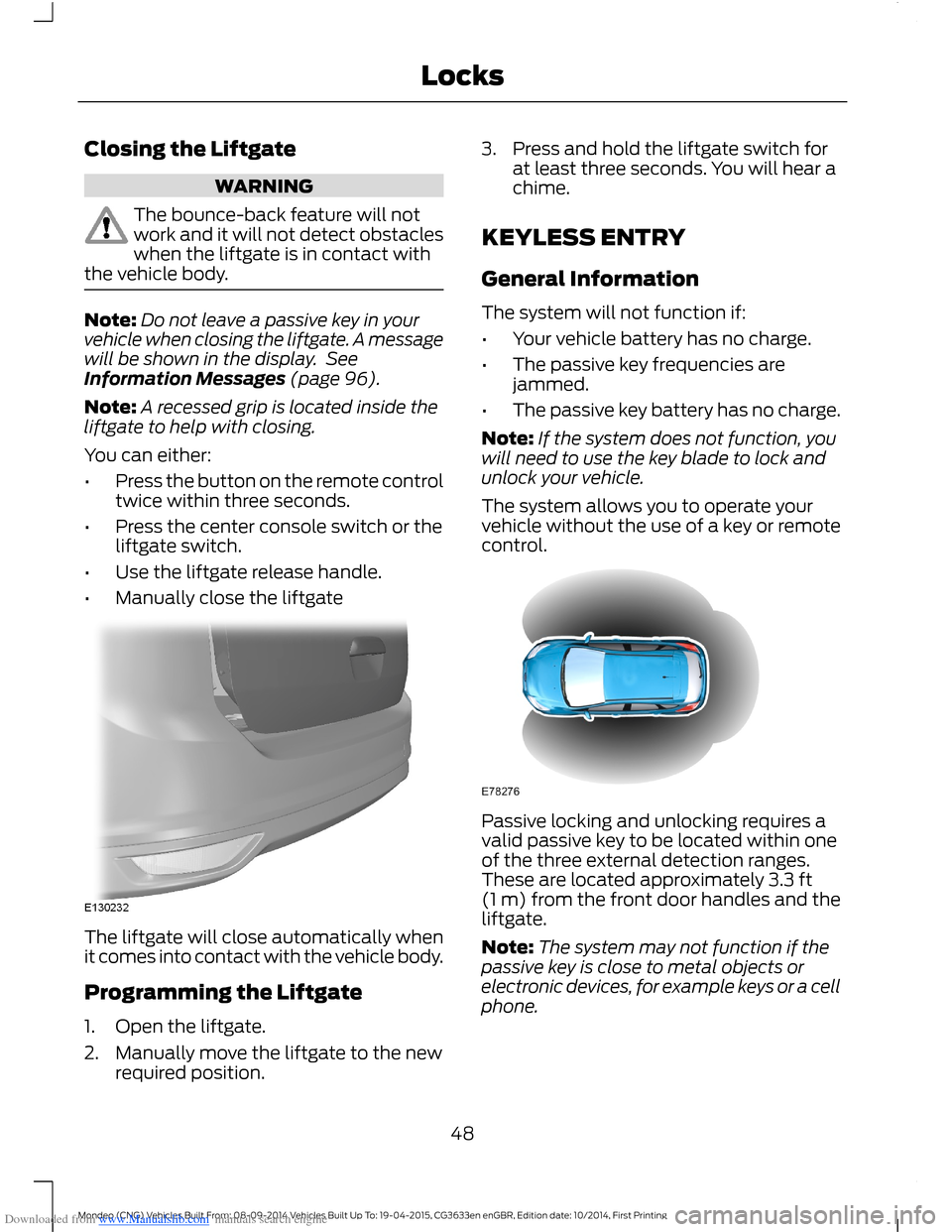
Passive locking and unlocking requires avalid passive key to be located within oneof the three external detection ranges.These are located approximately 3.3 ft(1 m) from the front door handles and theliftgate.
Note:The system may not function if thepassive key is close to metal objects orelectronic devices, for example keys or a cellphone.
48Mondeo (CNG) Vehicles Built From: 08-09-2014 Vehicles Built Up To: 19-04-2015, CG3633en enGBR, Edition date: 10/2014, First PrintingLocks