key FORD MONDEO 2014 4.G Workshop Manual
[x] Cancel search | Manufacturer: FORD, Model Year: 2014, Model line: MONDEO, Model: FORD MONDEO 2014 4.GPages: 446, PDF Size: 29.09 MB
Page 274 of 446
Downloaded from www.Manualslib.com manuals search engine Note:Make sure the wheel and hub contactsurfaces are free from foreign matter.
Note:Make sure that the cones on the lugnuts are against the wheel.
1.Install the wheel.
2.Install the lug nuts finger tight.
3.Install the locking lug nut key.
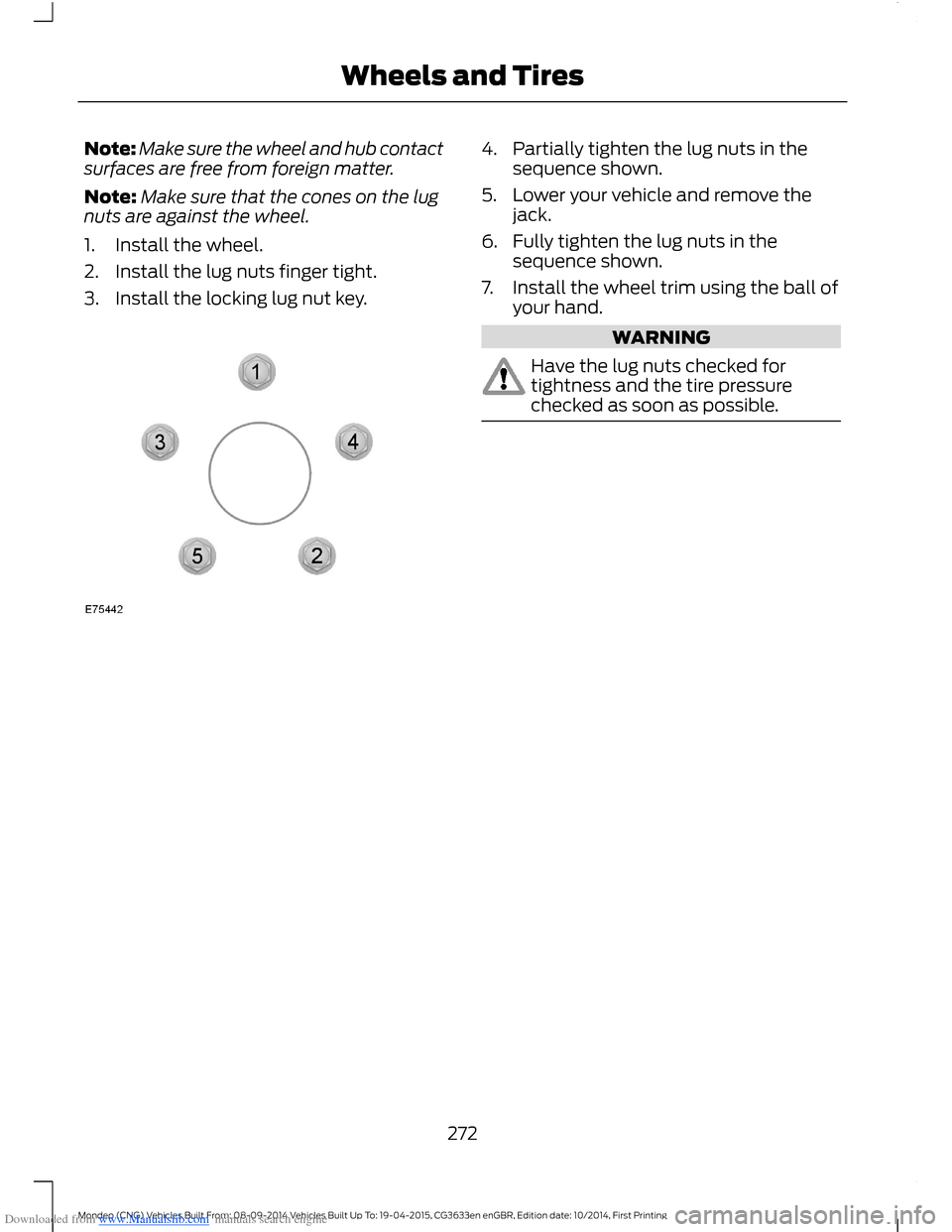
4.Partially tighten the lug nuts in thesequence shown.
5.Lower your vehicle and remove thejack.
6.Fully tighten the lug nuts in thesequence shown.
7.Install the wheel trim using the ball ofyour hand.
WARNING
Have the lug nuts checked fortightness and the tire pressurechecked as soon as possible.
272Mondeo (CNG) Vehicles Built From: 08-09-2014 Vehicles Built Up To: 19-04-2015, CG3633en enGBR, Edition date: 10/2014, First PrintingWheels and Tires
Page 315 of 446
Downloaded from www.Manualslib.com manuals search engine Receiving a Call
When receiving a call, you can:
•Answer the call by pressing the acceptcall button on the steering wheel or byselecting the accept call option in theaudio display. Press the OK button.
•Reject the call by pressing the rejectcall button on the steering wheel or byselecting the reject call option in theaudio display. Press the OK button.
•Ignore the call by doing nothing.
Cell Phone Options During anActive Call
During an active call, you have extra menufeatures which become available, forexample putting a call on hold.
To access this menu, choose one of theoptions available at the bottom of theaudio display or select the option for more.
Description and ActionMessage
Turn your vehicle's microphone off. To turn the microphoneon, select the option again.Mic. off
Switch a call from an active hands-free environment to yourcell phone for a more private conversation. When selected,the audio display will indicate the call is private.
Privacy
Put an active call on hold. When selected, the audio displaywill indicate the call is on hold.Hold
Enter numbers using the audio system numeric keypad, forexample numbers for passwords.Dial a number
Join two separate calls. The system supports a maximum ofthree callers on a multi-party or conference call.Join calls
1.Select the option for more.
2.Access the desired contact through the system or usevoice commands to place the second call. Once activelyin the second call, select the option for more.
3.Scroll to the option to join calls and press the OK button.
Access your phonebook contacts.Phonebook
1.Select the option for more.
2.Scroll to the option for phonebook and press the OKbutton.
3.Scroll through your phonebook contacts.
313Mondeo (CNG) Vehicles Built From: 08-09-2014 Vehicles Built Up To: 19-04-2015, CG3633en enGBR, Edition date: 10/2014, First PrintingSYNC™
Page 316 of 446
Downloaded from www.Manualslib.com manuals search engine Description and ActionMessage
4.Press the OK button again when the desired selectionappears in the audio display.
5.Press the OK button or dial button to call the selection.
Access your call history log.Call history
1.Select the option for more.
2.Scroll to the option until call history appears. Press theOK button.
3.Scroll through your call history options (incoming,outgoing or missed).
4.Press the OK button again when the desired selectionappears in the audio display.
5.Press the OK button or dial button to call the selection.
Accessing Features Through theCell Phone Menu
You can access your call history,phonebook, sent text messages as well asaccess cell phone and system settings.You can also access advanced featuressuch as emergency assistance.
The system attempts to automaticallyre-download your phonebook and callhistory each time your cell phone connectsto the system. You must turn on the autodownload feature if your cell phonesupports it.
Note:This is a cell phone dependentfeature.
1.Press the PHONE button to enter thecell phone menu.
2.Select one of the options available.
Description and ActionMessage
Dial a number using the audio system numeric keypad.Dial a number
Redial the last number called (if available). Press the OKbutton to select.Redial
Access your downloaded phonebook.Phonebook
1.Press the OK button to confirm and enter. You can usethe options at the bottom of the screen to quickly accessan alphabetical category. You can also use the letters onthe keypad to jump in the list.
2.Scroll through your phonebook contacts.
314Mondeo (CNG) Vehicles Built From: 08-09-2014 Vehicles Built Up To: 19-04-2015, CG3633en enGBR, Edition date: 10/2014, First PrintingSYNC™
Page 317 of 446
Downloaded from www.Manualslib.com manuals search engine Description and ActionMessage
3.Press the OK button again when the desired selectionappears in the audio display.
4.Press the OK button or dial button to call the selection.
Access any previously dialed, received or missed calls.Call history
1.Press the OK button to select.
2.Scroll to select either incoming calls, outgoing calls ormissed calls. Press the OK button to make your selection.
3.Press the OK button or dial button to call the selection.
Select one of 10 speed dial entries. To set a speed dial entry,go to the phonebook and press and hold one of the numberson the audio system numeric keypad.
Speed Dial
Send, download and delete text messages.Text messaging
Access the option for Bluetooth device menu listings (add,connect, set as primary, on or off, delete).BT Devices
View various settings and features on your cell phone.Phone settings
Turn the SYNC emergency assistance feature on or off.Emergency Assistance
Text Messaging
The system allows you to receive, send,download and delete text messages. Thesystem can also read incoming textmessages to you so that you do not haveto take your eyes off the road.
Note:This is a cell phone dependentfeature.
Receiving a Text Message
When a new message arrives, an audibletone sounds and the audio displayindicates you have a new message.
You have these options:
•Select the listen option to have thesystem read the message to you.
•Select the view option to open the textmessage. Select the ignore option ordo nothing and the message goes intoyour text message inbox. Onceselected, you have the ability to havethe message read out to you, to viewother messages or to select the moreoption.
•Press the voice button and say "Readtext message".
•Select the more option and use thearrow buttons to scroll through furtheroptions.
Note:Your cell phone must supportdownloading text messages using Bluetoothto receive incoming text messages.
Choose from the following:
315Mondeo (CNG) Vehicles Built From: 08-09-2014 Vehicles Built Up To: 19-04-2015, CG3633en enGBR, Edition date: 10/2014, First PrintingSYNC™
Page 328 of 446
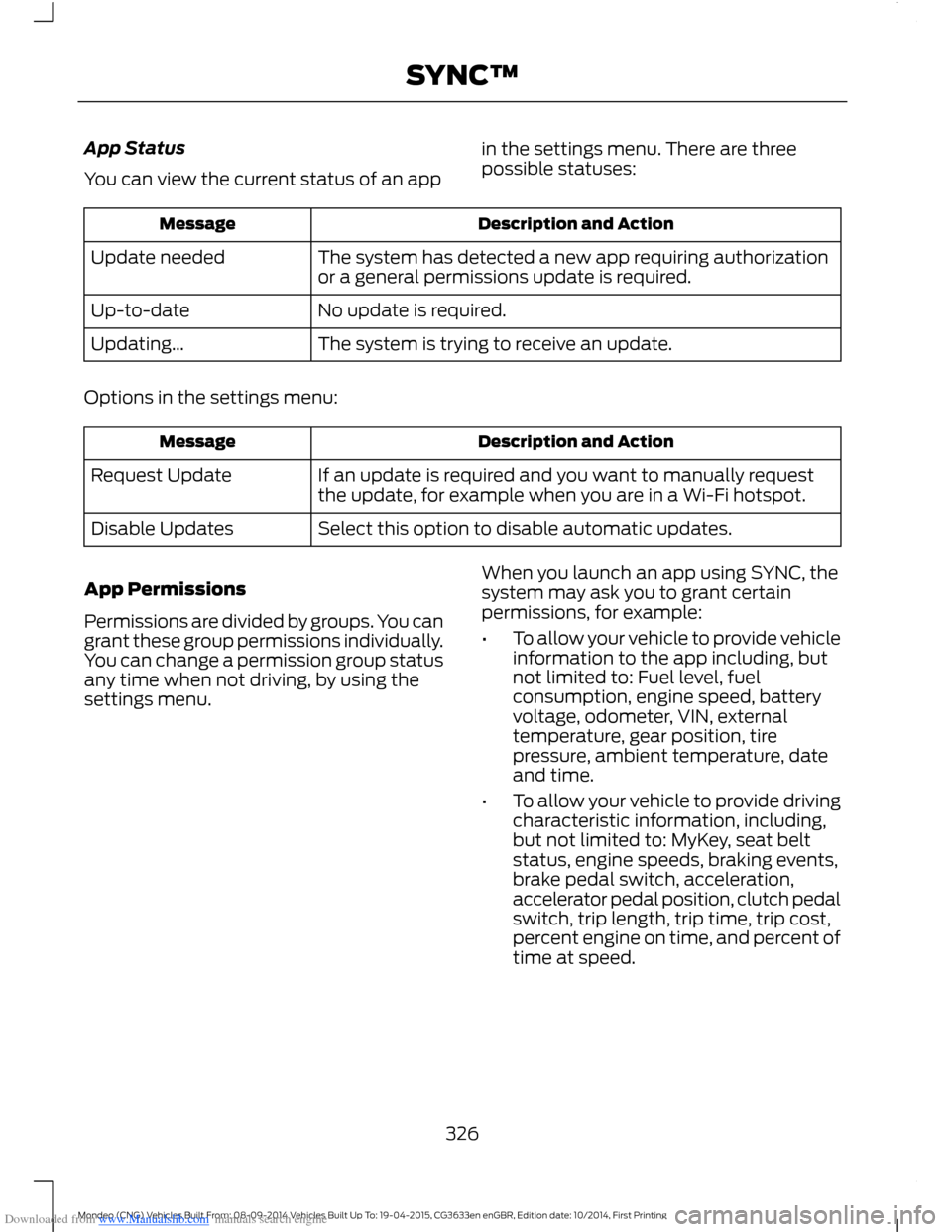
Downloaded from www.Manualslib.com manuals search engine App Status
You can view the current status of an app
in the settings menu. There are threepossible statuses:
Description and ActionMessage
The system has detected a new app requiring authorizationor a general permissions update is required.Update needed
No update is required.Up-to-date
The system is trying to receive an update.Updating...
Options in the settings menu:
Description and ActionMessage
If an update is required and you want to manually requestthe update, for example when you are in a Wi-Fi hotspot.Request Update
Select this option to disable automatic updates.Disable Updates
App Permissions
Permissions are divided by groups. You cangrant these group permissions individually.You can change a permission group statusany time when not driving, by using thesettings menu.
When you launch an app using SYNC, thesystem may ask you to grant certainpermissions, for example:
•To allow your vehicle to provide vehicleinformation to the app including, butnot limited to: Fuel level, fuelconsumption, engine speed, batteryvoltage, odometer, VIN, externaltemperature, gear position, tirepressure, ambient temperature, dateand time.
•To allow your vehicle to provide drivingcharacteristic information, including,but not limited to: MyKey, seat beltstatus, engine speeds, braking events,brake pedal switch, acceleration,accelerator pedal position, clutch pedalswitch, trip length, trip time, trip cost,percent engine on time, and percent oftime at speed.
326Mondeo (CNG) Vehicles Built From: 08-09-2014 Vehicles Built Up To: 19-04-2015, CG3633en enGBR, Edition date: 10/2014, First PrintingSYNC™
Page 335 of 446
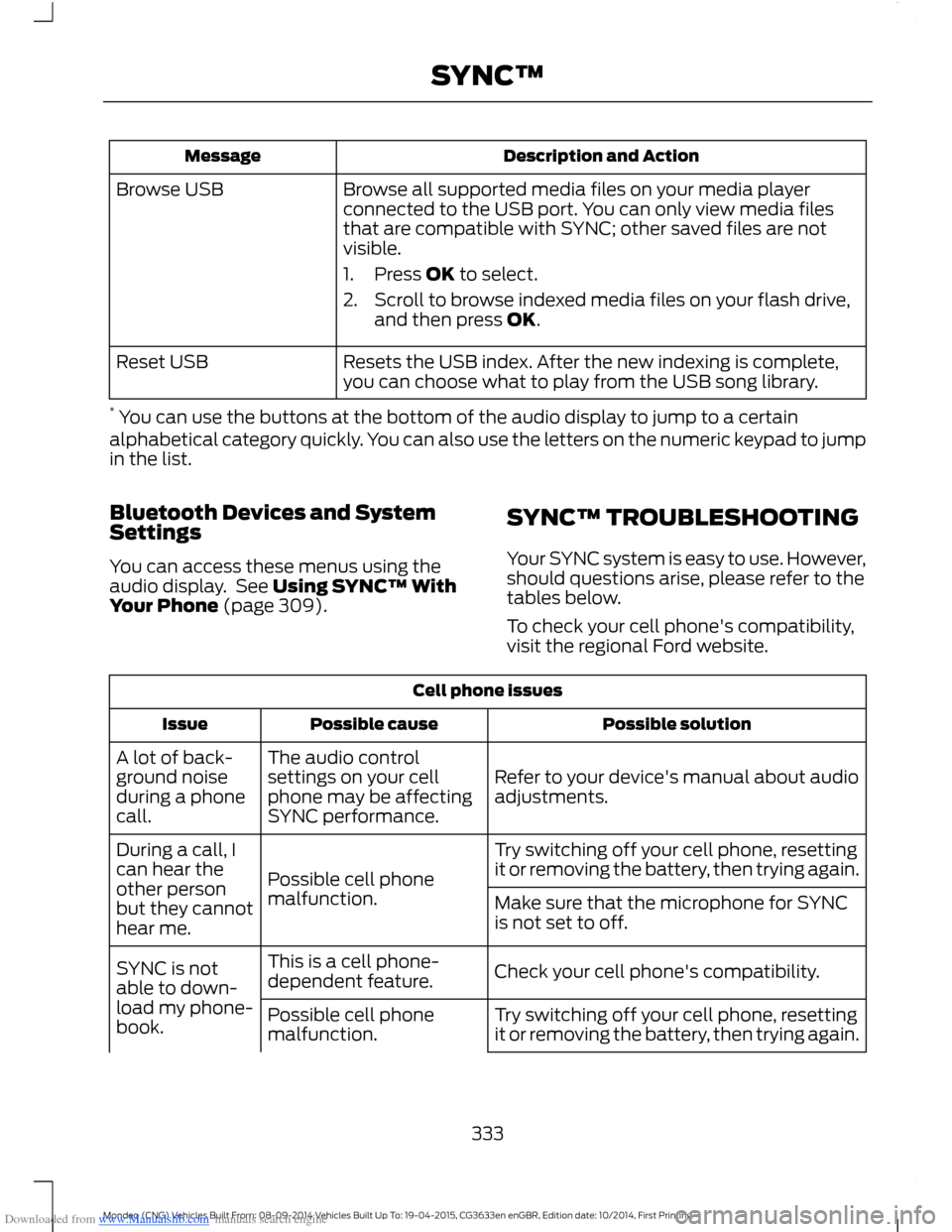
Downloaded from www.Manualslib.com manuals search engine Description and ActionMessage
Browse all supported media files on your media playerconnected to the USB port. You can only view media filesthat are compatible with SYNC; other saved files are notvisible.
1.Press OK to select.
2.Scroll to browse indexed media files on your flash drive,and then press OK.
Browse USB
Resets the USB index. After the new indexing is complete,you can choose what to play from the USB song library.Reset USB
* You can use the buttons at the bottom of the audio display to jump to a certainalphabetical category quickly. You can also use the letters on the numeric keypad to jumpin the list.
Bluetooth Devices and SystemSettings
You can access these menus using theaudio display. See Using SYNC™ WithYour Phone (page 309).
SYNC™ TROUBLESHOOTING
Your SYNC system is easy to use. However,should questions arise, please refer to thetables below.
To check your cell phone's compatibility,visit the regional Ford website.
Cell phone issues
Possible solutionPossible causeIssue
Refer to your device's manual about audioadjustments.
The audio controlsettings on your cellphone may be affectingSYNC performance.
A lot of back-ground noiseduring a phonecall.
Try switching off your cell phone, resettingit or removing the battery, then trying again.Possible cell phonemalfunction.
During a call, Ican hear theother personbut they cannothear me.
Make sure that the microphone for SYNCis not set to off.
Check your cell phone's compatibility.This is a cell phone-dependent feature.SYNC is notable to down-load my phone-book.Try switching off your cell phone, resettingit or removing the battery, then trying again.Possible cell phonemalfunction.
333Mondeo (CNG) Vehicles Built From: 08-09-2014 Vehicles Built Up To: 19-04-2015, CG3633en enGBR, Edition date: 10/2014, First PrintingSYNC™
Page 340 of 446
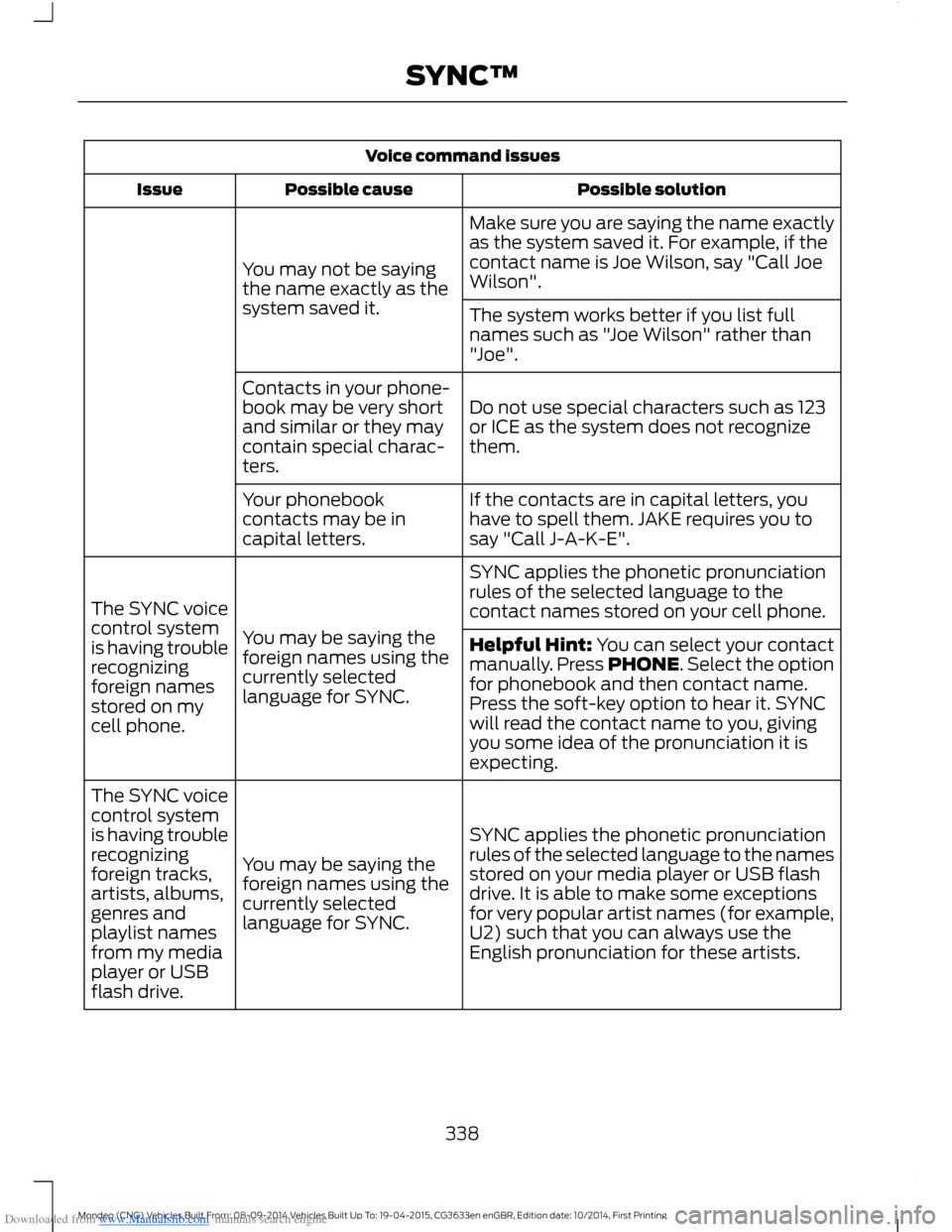
Downloaded from www.Manualslib.com manuals search engine Voice command issues
Possible solutionPossible causeIssue
Make sure you are saying the name exactlyas the system saved it. For example, if thecontact name is Joe Wilson, say "Call JoeWilson".You may not be sayingthe name exactly as thesystem saved it.The system works better if you list fullnames such as "Joe Wilson" rather than"Joe".
Do not use special characters such as 123or ICE as the system does not recognizethem.
Contacts in your phone-book may be very shortand similar or they maycontain special charac-ters.
If the contacts are in capital letters, youhave to spell them. JAKE requires you tosay "Call J-A-K-E".
Your phonebookcontacts may be incapital letters.
SYNC applies the phonetic pronunciationrules of the selected language to thecontact names stored on your cell phone.
You may be saying theforeign names using thecurrently selectedlanguage for SYNC.
The SYNC voicecontrol systemis having troublerecognizingforeign namesstored on mycell phone.
Helpful Hint: You can select your contactmanually. Press PHONE. Select the optionfor phonebook and then contact name.Press the soft-key option to hear it. SYNCwill read the contact name to you, givingyou some idea of the pronunciation it isexpecting.
SYNC applies the phonetic pronunciationrules of the selected language to the namesstored on your media player or USB flashdrive. It is able to make some exceptionsfor very popular artist names (for example,U2) such that you can always use theEnglish pronunciation for these artists.
You may be saying theforeign names using thecurrently selectedlanguage for SYNC.
The SYNC voicecontrol systemis having troublerecognizingforeign tracks,artists, albums,genres andplaylist namesfrom my mediaplayer or USBflash drive.
338Mondeo (CNG) Vehicles Built From: 08-09-2014 Vehicles Built Up To: 19-04-2015, CG3633en enGBR, Edition date: 10/2014, First PrintingSYNC™
Page 359 of 446
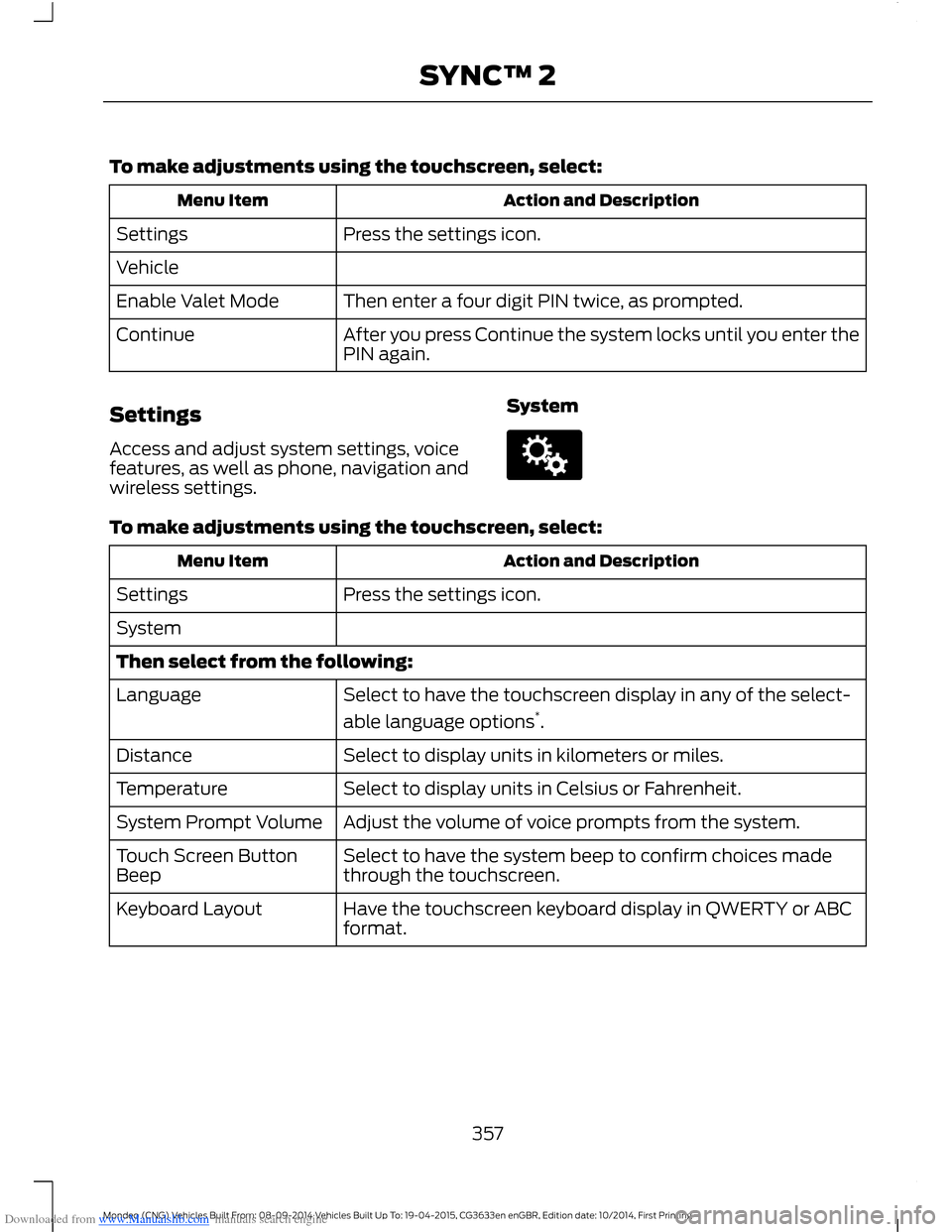
Downloaded from www.Manualslib.com manuals search engine To make adjustments using the touchscreen, select:
Action and DescriptionMenu Item
Press the settings icon.Settings
Vehicle
Then enter a four digit PIN twice, as prompted.Enable Valet Mode
After you press Continue the system locks until you enter thePIN again.Continue
Settings
Access and adjust system settings, voicefeatures, as well as phone, navigation andwireless settings.
System
To make adjustments using the touchscreen, select:
Action and DescriptionMenu Item
Press the settings icon.Settings
System
Then select from the following:
Select to have the touchscreen display in any of the select-
able language options*.
Language
Select to display units in kilometers or miles.Distance
Select to display units in Celsius or Fahrenheit.Temperature
Adjust the volume of voice prompts from the system.System Prompt Volume
Select to have the system beep to confirm choices madethrough the touchscreen.Touch Screen ButtonBeep
Have the touchscreen keyboard display in QWERTY or ABCformat.Keyboard Layout
357Mondeo (CNG) Vehicles Built From: 08-09-2014 Vehicles Built Up To: 19-04-2015, CG3633en enGBR, Edition date: 10/2014, First PrintingSYNC™ 2
Page 407 of 446
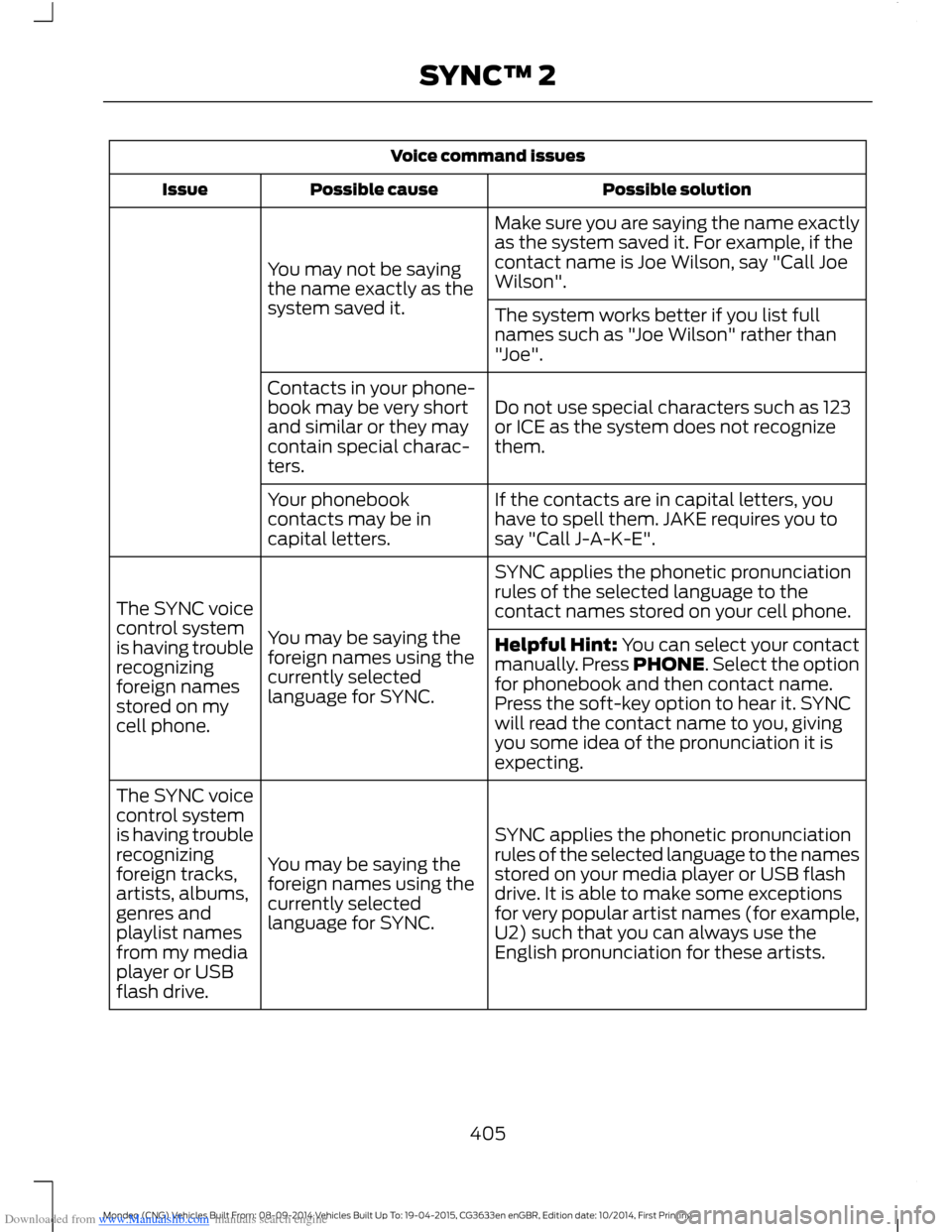
Downloaded from www.Manualslib.com manuals search engine Voice command issues
Possible solutionPossible causeIssue
Make sure you are saying the name exactlyas the system saved it. For example, if thecontact name is Joe Wilson, say "Call JoeWilson".You may not be sayingthe name exactly as thesystem saved it.The system works better if you list fullnames such as "Joe Wilson" rather than"Joe".
Do not use special characters such as 123or ICE as the system does not recognizethem.
Contacts in your phone-book may be very shortand similar or they maycontain special charac-ters.
If the contacts are in capital letters, youhave to spell them. JAKE requires you tosay "Call J-A-K-E".
Your phonebookcontacts may be incapital letters.
SYNC applies the phonetic pronunciationrules of the selected language to thecontact names stored on your cell phone.
You may be saying theforeign names using thecurrently selectedlanguage for SYNC.
The SYNC voicecontrol systemis having troublerecognizingforeign namesstored on mycell phone.
Helpful Hint: You can select your contactmanually. Press PHONE. Select the optionfor phonebook and then contact name.Press the soft-key option to hear it. SYNCwill read the contact name to you, givingyou some idea of the pronunciation it isexpecting.
SYNC applies the phonetic pronunciationrules of the selected language to the namesstored on your media player or USB flashdrive. It is able to make some exceptionsfor very popular artist names (for example,U2) such that you can always use theEnglish pronunciation for these artists.
You may be saying theforeign names using thecurrently selectedlanguage for SYNC.
The SYNC voicecontrol systemis having troublerecognizingforeign tracks,artists, albums,genres andplaylist namesfrom my mediaplayer or USBflash drive.
405Mondeo (CNG) Vehicles Built From: 08-09-2014 Vehicles Built Up To: 19-04-2015, CG3633en enGBR, Edition date: 10/2014, First PrintingSYNC™ 2
Page 433 of 446
Downloaded from www.Manualslib.com manuals search engine A
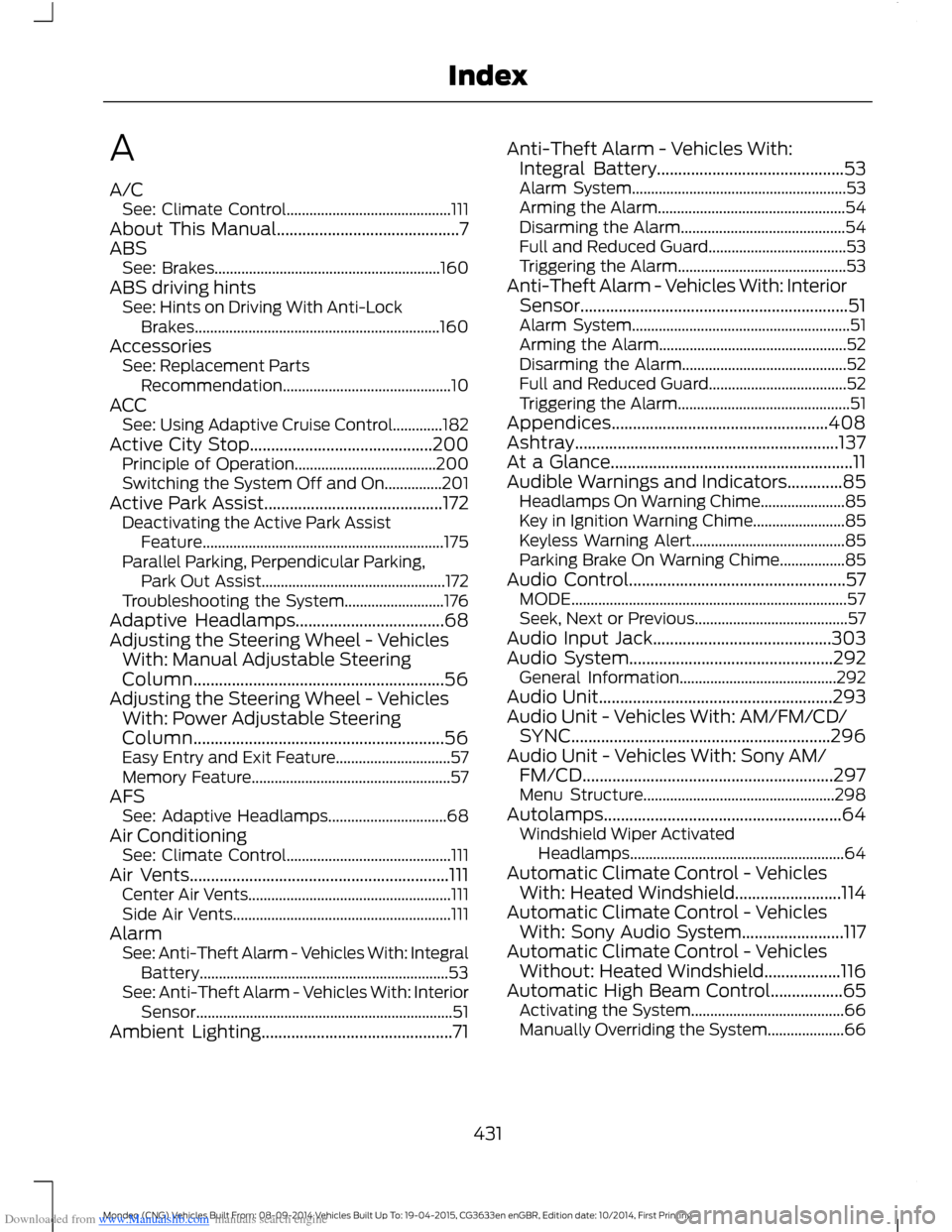
A/CSee: Climate Control...........................................111About This Manual...........................................7ABSSee: Brakes...........................................................160ABS driving hintsSee: Hints on Driving With Anti-LockBrakes................................................................160AccessoriesSee: Replacement PartsRecommendation............................................10ACCSee: Using Adaptive Cruise Control.............182Active City Stop...........................................200Principle of Operation.....................................200Switching the System Off and On...............201Active Park Assist..........................................172Deactivating the Active Park AssistFeature...............................................................175Parallel Parking, Perpendicular Parking,Park Out Assist................................................172Troubleshooting the System..........................176Adaptive Headlamps...................................68Adjusting the Steering Wheel - VehiclesWith: Manual Adjustable SteeringColumn...........................................................56Adjusting the Steering Wheel - VehiclesWith: Power Adjustable SteeringColumn...........................................................56Easy Entry and Exit Feature..............................57Memory Feature....................................................57AFSSee: Adaptive Headlamps...............................68Air ConditioningSee: Climate Control...........................................111Air Vents.............................................................111Center Air Vents.....................................................111Side Air Vents.........................................................111AlarmSee: Anti-Theft Alarm - Vehicles With: IntegralBattery.................................................................53See: Anti-Theft Alarm - Vehicles With: InteriorSensor...................................................................51Ambient Lighting.............................................71
Anti-Theft Alarm - Vehicles With:Integral Battery............................................53Alarm System........................................................53Arming the Alarm.................................................54Disarming the Alarm...........................................54Full and Reduced Guard....................................53Triggering the Alarm............................................53Anti-Theft Alarm - Vehicles With: InteriorSensor...............................................................51Alarm System.........................................................51Arming the Alarm.................................................52Disarming the Alarm...........................................52Full and Reduced Guard....................................52Triggering the Alarm.............................................51Appendices...................................................408Ashtray..............................................................137At a Glance.........................................................11Audible Warnings and Indicators.............85Headlamps On Warning Chime......................85Key in Ignition Warning Chime........................85Keyless Warning Alert........................................85Parking Brake On Warning Chime.................85Audio Control...................................................57MODE........................................................................57Seek, Next or Previous........................................57Audio Input Jack..........................................303Audio System................................................292General Information.........................................292Audio Unit.......................................................293Audio Unit - Vehicles With: AM/FM/CD/SYNC.............................................................296Audio Unit - Vehicles With: Sony AM/FM/CD...........................................................297Menu Structure..................................................298Autolamps........................................................64Windshield Wiper ActivatedHeadlamps........................................................64Automatic Climate Control - VehiclesWith: Heated Windshield.........................114Automatic Climate Control - VehiclesWith: Sony Audio System........................117Automatic Climate Control - VehiclesWithout: Heated Windshield..................116Automatic High Beam Control.................65Activating the System........................................66Manually Overriding the System....................66
431Mondeo (CNG) Vehicles Built From: 08-09-2014 Vehicles Built Up To: 19-04-2015, CG3633en enGBR, Edition date: 10/2014, First PrintingIndex