remote start FORD MONDEO 2014 4.G User Guide
[x] Cancel search | Manufacturer: FORD, Model Year: 2014, Model line: MONDEO, Model: FORD MONDEO 2014 4.GPages: 446, PDF Size: 29.09 MB
Page 105 of 446
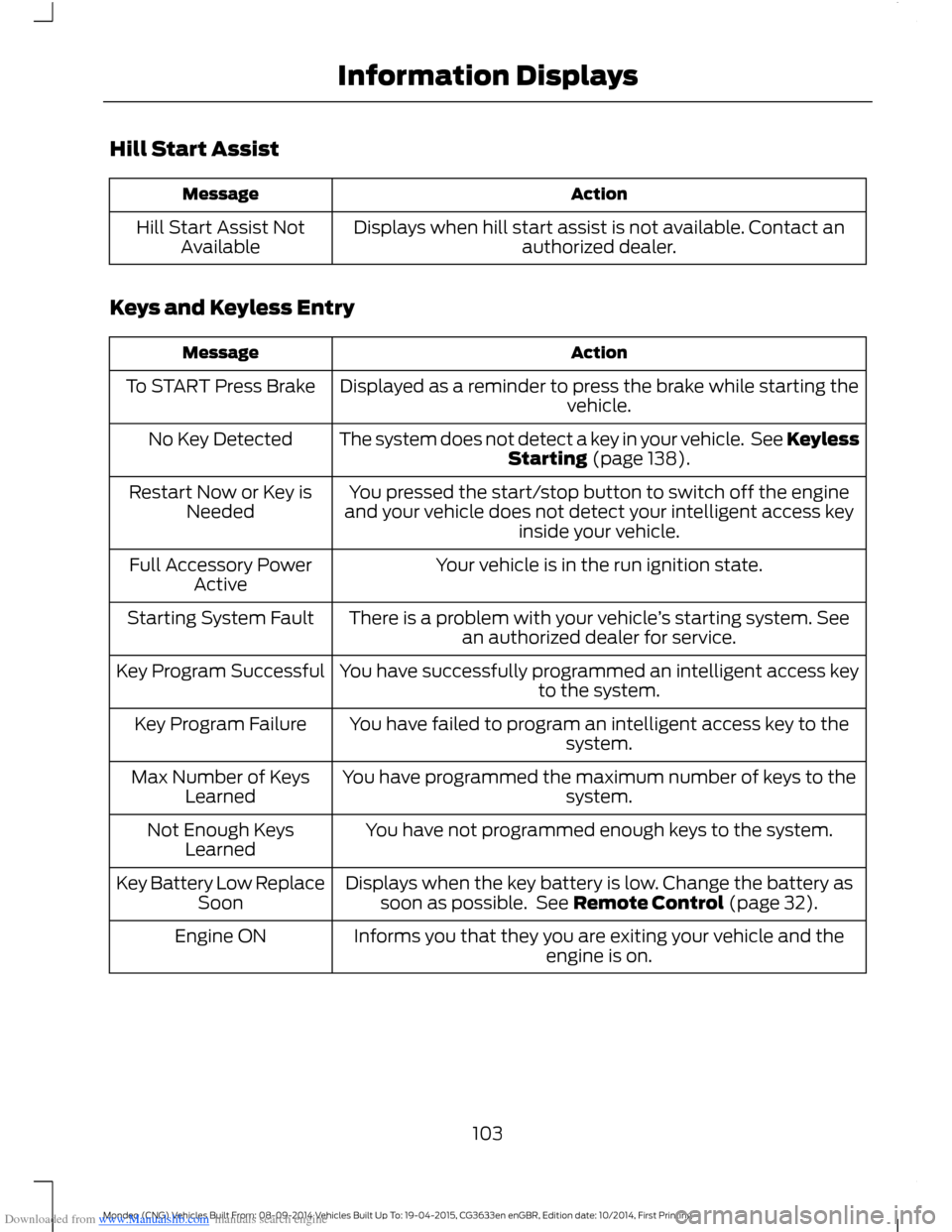
Downloaded from www.Manualslib.com manuals search engine Hill Start Assist
ActionMessage
Displays when hill start assist is not available. Contact anauthorized dealer.Hill Start Assist NotAvailable
Keys and Keyless Entry
ActionMessage
Displayed as a reminder to press the brake while starting thevehicle.To START Press Brake
The system does not detect a key in your vehicle. See KeylessStarting (page 138).No Key Detected
You pressed the start/stop button to switch off the engineand your vehicle does not detect your intelligent access keyinside your vehicle.
Restart Now or Key isNeeded
Your vehicle is in the run ignition state.Full Accessory PowerActive
There is a problem with your vehicle’s starting system. Seean authorized dealer for service.Starting System Fault
You have successfully programmed an intelligent access keyto the system.Key Program Successful
You have failed to program an intelligent access key to thesystem.Key Program Failure
You have programmed the maximum number of keys to thesystem.Max Number of KeysLearned
You have not programmed enough keys to the system.Not Enough KeysLearned
Displays when the key battery is low. Change the battery assoon as possible. See Remote Control (page 32).Key Battery Low ReplaceSoon
Informs you that they you are exiting your vehicle and theengine is on.Engine ON
103Mondeo (CNG) Vehicles Built From: 08-09-2014 Vehicles Built Up To: 19-04-2015, CG3633en enGBR, Edition date: 10/2014, First PrintingInformation Displays
Page 134 of 446
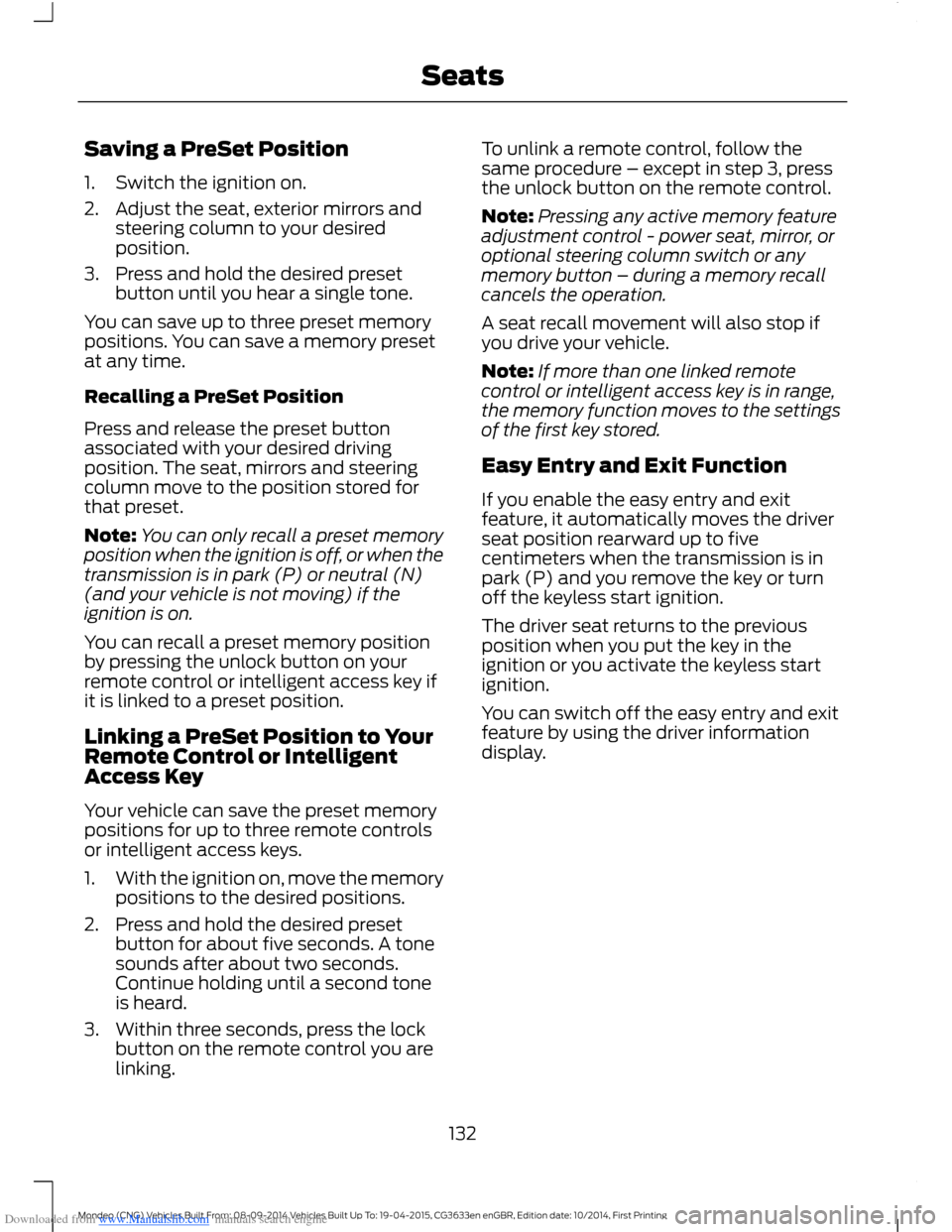
Downloaded from www.Manualslib.com manuals search engine Saving a PreSet Position
1.Switch the ignition on.
2.Adjust the seat, exterior mirrors andsteering column to your desiredposition.
3.Press and hold the desired presetbutton until you hear a single tone.
You can save up to three preset memorypositions. You can save a memory presetat any time.
Recalling a PreSet Position
Press and release the preset buttonassociated with your desired drivingposition. The seat, mirrors and steeringcolumn move to the position stored forthat preset.
Note:You can only recall a preset memoryposition when the ignition is off, or when thetransmission is in park (P) or neutral (N)(and your vehicle is not moving) if theignition is on.
You can recall a preset memory positionby pressing the unlock button on yourremote control or intelligent access key ifit is linked to a preset position.
Linking a PreSet Position to YourRemote Control or IntelligentAccess Key
Your vehicle can save the preset memorypositions for up to three remote controlsor intelligent access keys.
1.With the ignition on, move the memorypositions to the desired positions.
2.Press and hold the desired presetbutton for about five seconds. A tonesounds after about two seconds.Continue holding until a second toneis heard.
3.Within three seconds, press the lockbutton on the remote control you arelinking.
To unlink a remote control, follow thesame procedure – except in step 3, pressthe unlock button on the remote control.
Note:Pressing any active memory featureadjustment control - power seat, mirror, oroptional steering column switch or anymemory button – during a memory recallcancels the operation.
A seat recall movement will also stop ifyou drive your vehicle.
Note:If more than one linked remotecontrol or intelligent access key is in range,the memory function moves to the settingsof the first key stored.
Easy Entry and Exit Function
If you enable the easy entry and exitfeature, it automatically moves the driverseat position rearward up to fivecentimeters when the transmission is inpark (P) and you remove the key or turnoff the keyless start ignition.
The driver seat returns to the previousposition when you put the key in theignition or you activate the keyless startignition.
You can switch off the easy entry and exitfeature by using the driver informationdisplay.
132Mondeo (CNG) Vehicles Built From: 08-09-2014 Vehicles Built Up To: 19-04-2015, CG3633en enGBR, Edition date: 10/2014, First PrintingSeats
Page 140 of 446
Downloaded from www.Manualslib.com manuals search engine GENERAL INFORMATION
WARNINGS
Extended idling at high enginespeeds can produce very hightemperatures in the engine andexhaust system, creating the risk of fire orother damage.
Do not park, idle or drive your vehicleon dry grass or other dry groundcover. The emission system heats upthe engine compartment and exhaustsystem, creating the risk of fire.
Do not start the engine in a closedgarage or in other enclosed areas.Exhaust fumes can be toxic. Alwaysopen the garage door before you start theengine.
If you smell exhaust fumes insideyour vehicle, have your vehiclechecked by an authorized dealerimmediately. Do not drive your vehicle ifyou smell exhaust fumes.
If you disconnect the battery, your vehiclemay exhibit some unusual drivingcharacteristics for approximately 5 miles(8 kilometers) after you reconnect it. Thisis because the engine management systemmust realign itself with the engine. You candisregard any unusual drivingcharacteristics during this period.
The powertrain control system meets allCanadian interference-causing equipmentstandard requirements regulating theimpulse electrical field or radio noise.
When you start the engine, avoid pressingthe accelerator pedal before and duringoperation. Only use the accelerator pedalwhen you have difficulty starting theengine.
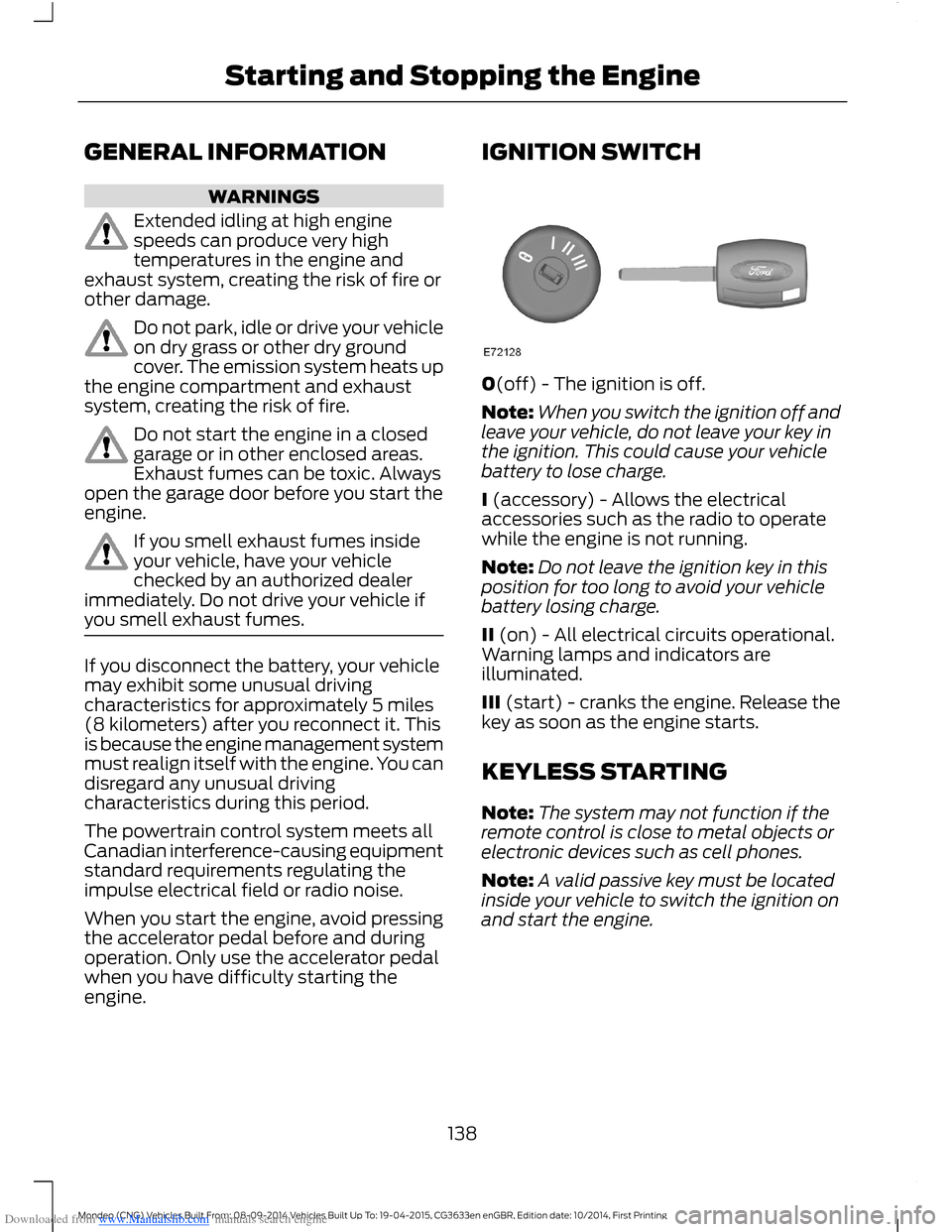
IGNITION SWITCH
0(off) - The ignition is off.
Note:When you switch the ignition off andleave your vehicle, do not leave your key inthe ignition. This could cause your vehiclebattery to lose charge.
I (accessory) - Allows the electricalaccessories such as the radio to operatewhile the engine is not running.
Note:Do not leave the ignition key in thisposition for too long to avoid your vehiclebattery losing charge.
II (on) - All electrical circuits operational.Warning lamps and indicators areilluminated.
III (start) - cranks the engine. Release thekey as soon as the engine starts.
KEYLESS STARTING
Note:The system may not function if theremote control is close to metal objects orelectronic devices such as cell phones.
Note:A valid passive key must be locatedinside your vehicle to switch the ignition onand start the engine.
138Mondeo (CNG) Vehicles Built From: 08-09-2014 Vehicles Built Up To: 19-04-2015, CG3633en enGBR, Edition date: 10/2014, First PrintingStarting and Stopping the Engine
Page 228 of 446
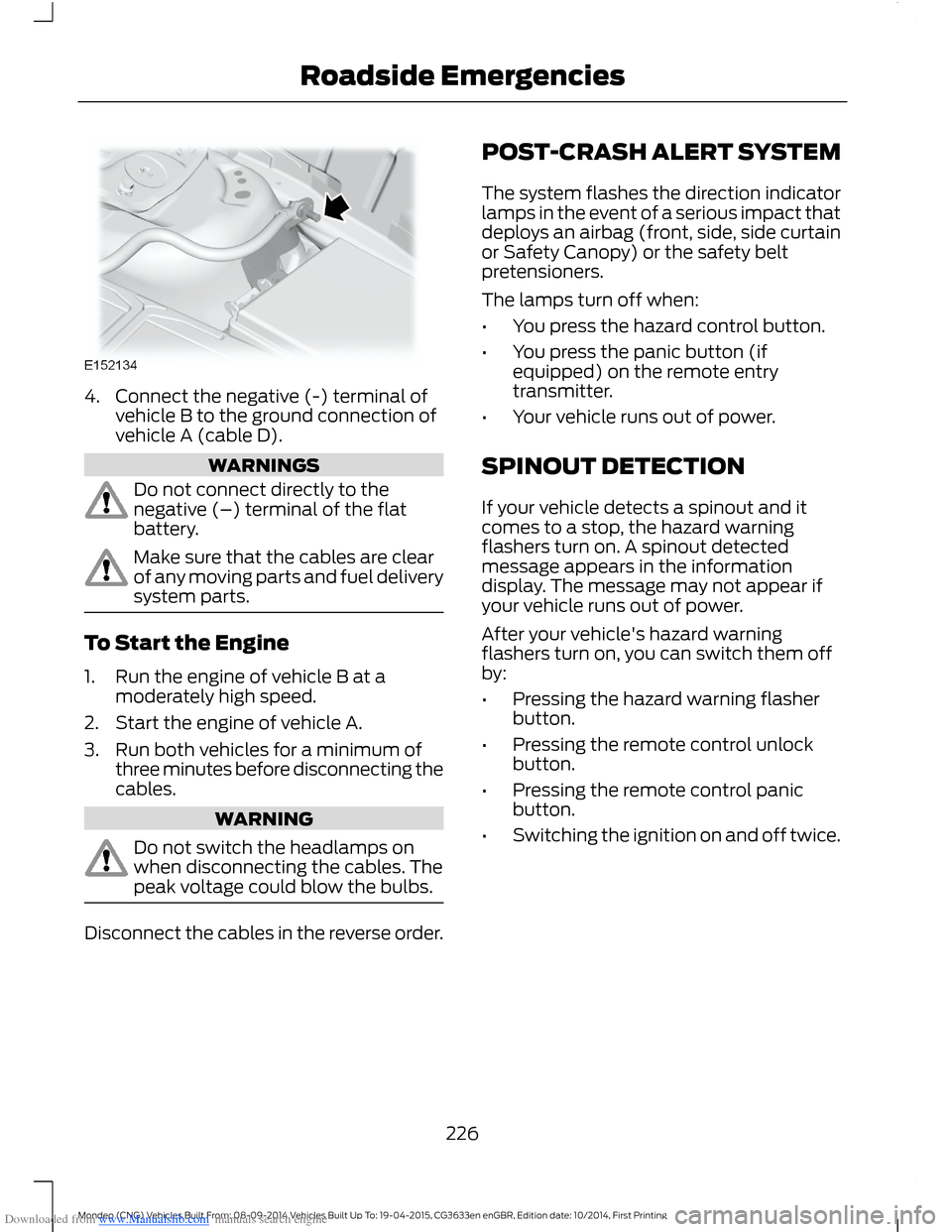
Downloaded from www.Manualslib.com manuals search engine 4.Connect the negative (-) terminal ofvehicle B to the ground connection ofvehicle A (cable D).
WARNINGS
Do not connect directly to thenegative (–) terminal of the flatbattery.
Make sure that the cables are clearof any moving parts and fuel deliverysystem parts.
To Start the Engine
1.Run the engine of vehicle B at amoderately high speed.
2.Start the engine of vehicle A.
3.Run both vehicles for a minimum ofthree minutes before disconnecting thecables.
WARNING
Do not switch the headlamps onwhen disconnecting the cables. Thepeak voltage could blow the bulbs.
Disconnect the cables in the reverse order.
POST-CRASH ALERT SYSTEM
The system flashes the direction indicatorlamps in the event of a serious impact thatdeploys an airbag (front, side, side curtainor Safety Canopy) or the safety beltpretensioners.
The lamps turn off when:
•You press the hazard control button.
•You press the panic button (ifequipped) on the remote entrytransmitter.
•Your vehicle runs out of power.
SPINOUT DETECTION
If your vehicle detects a spinout and itcomes to a stop, the hazard warningflashers turn on. A spinout detectedmessage appears in the informationdisplay. The message may not appear ifyour vehicle runs out of power.
After your vehicle's hazard warningflashers turn on, you can switch them offby:
•Pressing the hazard warning flasherbutton.
•Pressing the remote control unlockbutton.
•Pressing the remote control panicbutton.
•Switching the ignition on and off twice.
226Mondeo (CNG) Vehicles Built From: 08-09-2014 Vehicles Built Up To: 19-04-2015, CG3633en enGBR, Edition date: 10/2014, First PrintingRoadside Emergencies
Page 438 of 446
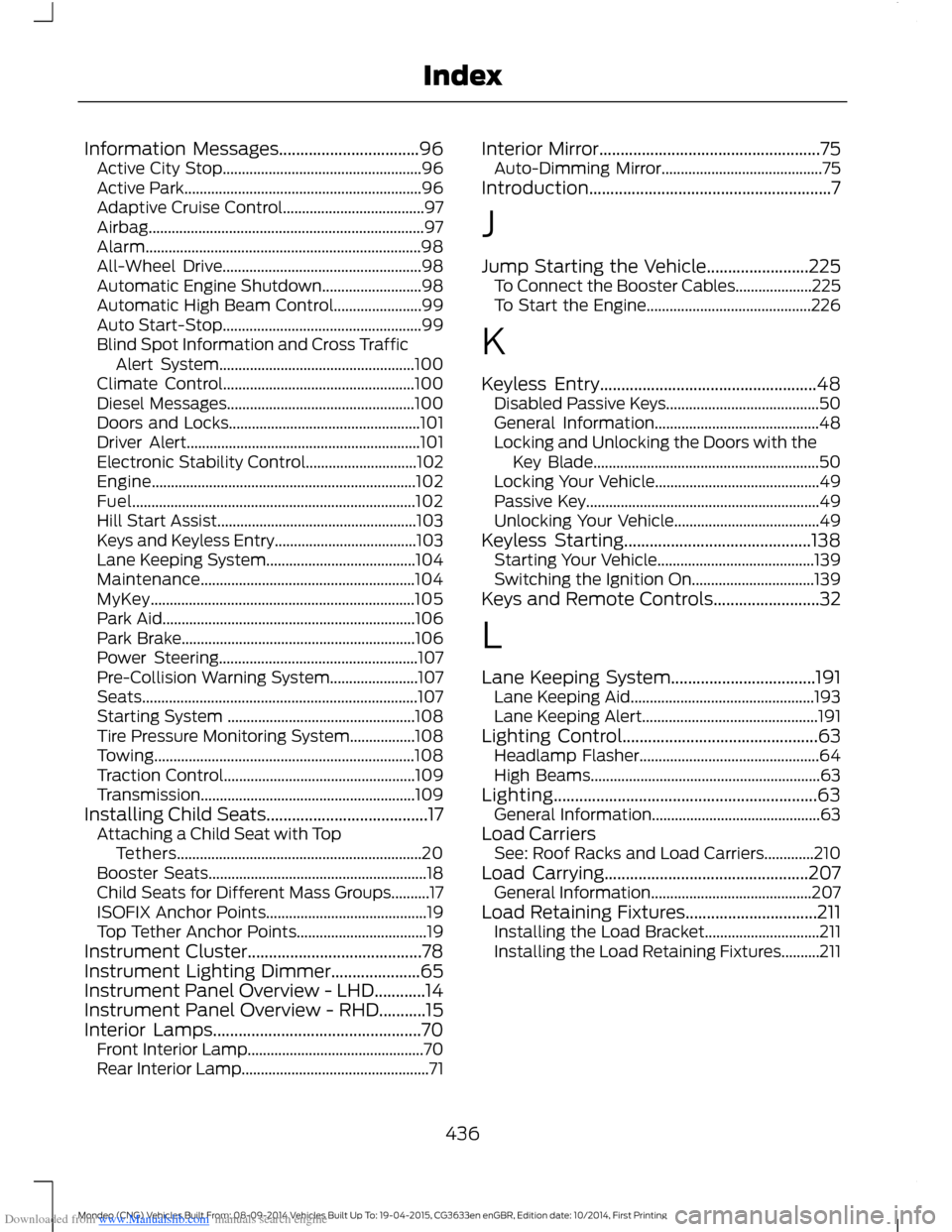
Downloaded from www.Manualslib.com manuals search engine Information Messages.................................96Active City Stop....................................................96Active Park..............................................................96Adaptive Cruise Control.....................................97Airbag........................................................................97Alarm........................................................................98All-Wheel Drive....................................................98Automatic Engine Shutdown..........................98Automatic High Beam Control.......................99Auto Start-Stop....................................................99Blind Spot Information and Cross TrafficAlert System...................................................100Climate Control..................................................100Diesel Messages.................................................100Doors and Locks..................................................101Driver Alert.............................................................101Electronic Stability Control.............................102Engine.....................................................................102Fuel..........................................................................102Hill Start Assist....................................................103Keys and Keyless Entry.....................................103Lane Keeping System.......................................104Maintenance........................................................104MyKey.....................................................................105Park Aid..................................................................106Park Brake.............................................................106Power Steering....................................................107Pre-Collision Warning System.......................107Seats........................................................................107Starting System .................................................108Tire Pressure Monitoring System.................108Towing....................................................................108Traction Control..................................................109Transmission........................................................109Installing Child Seats......................................17Attaching a Child Seat with TopTethers................................................................20Booster Seats.........................................................18Child Seats for Different Mass Groups..........17ISOFIX Anchor Points..........................................19Top Tether Anchor Points..................................19Instrument Cluster.........................................78Instrument Lighting Dimmer.....................65Instrument Panel Overview - LHD............14Instrument Panel Overview - RHD...........15Interior Lamps.................................................70Front Interior Lamp..............................................70Rear Interior Lamp.................................................71
Interior Mirror....................................................75Auto-Dimming Mirror..........................................75Introduction.........................................................7
J
Jump Starting the Vehicle........................225To Connect the Booster Cables....................225To Start the Engine...........................................226
K
Keyless Entry...................................................48Disabled Passive Keys........................................50General Information...........................................48Locking and Unlocking the Doors with theKey Blade...........................................................50Locking Your Vehicle...........................................49Passive Key.............................................................49Unlocking Your Vehicle......................................49Keyless Starting............................................138Starting Your Vehicle.........................................139Switching the Ignition On................................139Keys and Remote Controls.........................32
L
Lane Keeping System..................................191Lane Keeping Aid................................................193Lane Keeping Alert..............................................191Lighting Control..............................................63Headlamp Flasher...............................................64High Beams............................................................63Lighting..............................................................63General Information............................................63Load CarriersSee: Roof Racks and Load Carriers.............210Load Carrying................................................207General Information..........................................207Load Retaining Fixtures...............................211Installing the Load Bracket..............................211Installing the Load Retaining Fixtures..........211
436Mondeo (CNG) Vehicles Built From: 08-09-2014 Vehicles Built Up To: 19-04-2015, CG3633en enGBR, Edition date: 10/2014, First PrintingIndex
Page 440 of 446
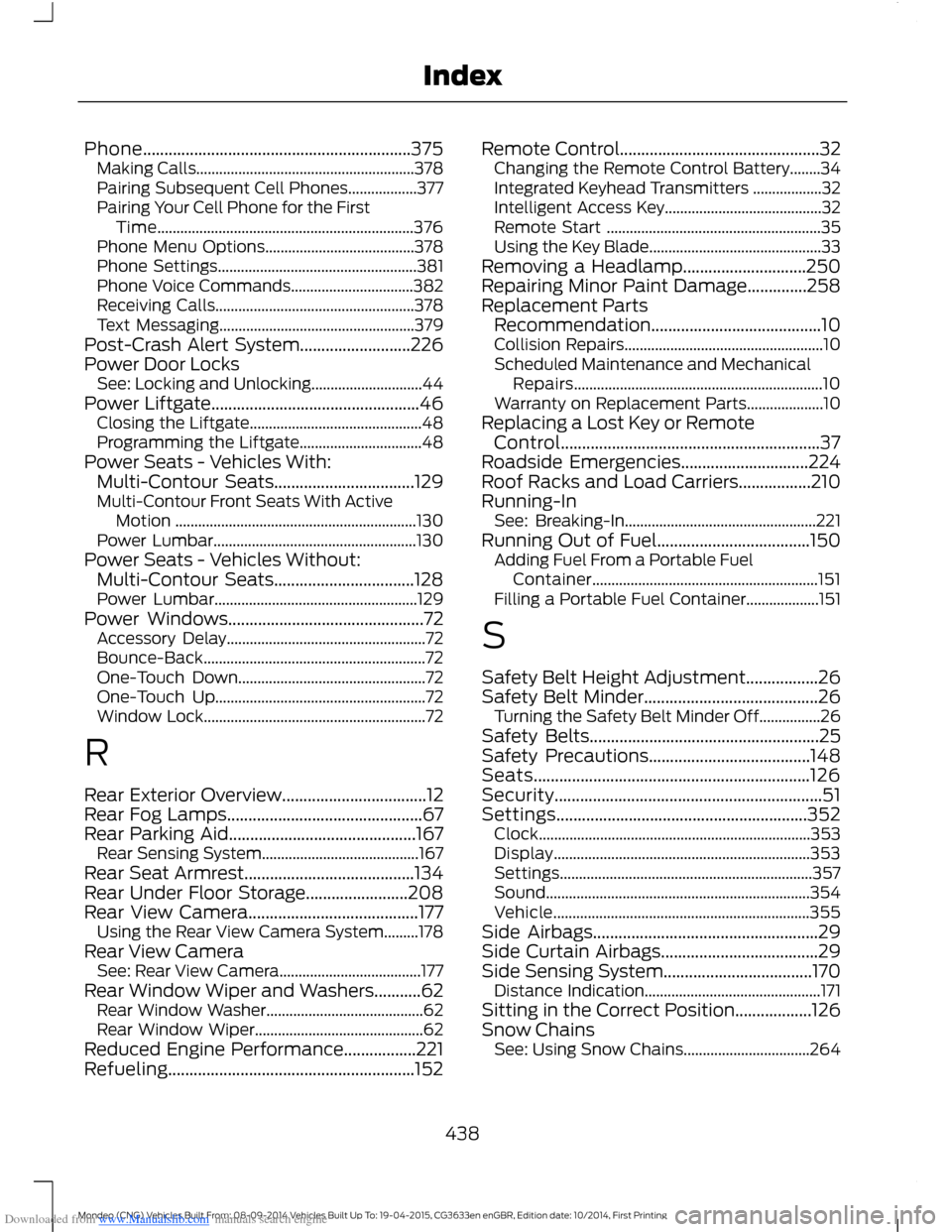
Downloaded from www.Manualslib.com manuals search engine Phone...............................................................375Making Calls.........................................................378Pairing Subsequent Cell Phones..................377Pairing Your Cell Phone for the FirstTime...................................................................376Phone Menu Options.......................................378Phone Settings....................................................381Phone Voice Commands................................382Receiving Calls....................................................378Text Messaging...................................................379Post-Crash Alert System..........................226Power Door LocksSee: Locking and Unlocking.............................44Power Liftgate.................................................46Closing the Liftgate.............................................48Programming the Liftgate................................48Power Seats - Vehicles With:Multi-Contour Seats.................................129Multi-Contour Front Seats With ActiveMotion ...............................................................130Power Lumbar.....................................................130Power Seats - Vehicles Without:Multi-Contour Seats.................................128Power Lumbar.....................................................129Power Windows..............................................72Accessory Delay....................................................72Bounce-Back..........................................................72One-Touch Down.................................................72One-Touch Up.......................................................72Window Lock..........................................................72
R
Rear Exterior Overview..................................12Rear Fog Lamps..............................................67Rear Parking Aid............................................167Rear Sensing System.........................................167Rear Seat Armrest........................................134Rear Under Floor Storage........................208Rear View Camera........................................177Using the Rear View Camera System.........178Rear View CameraSee: Rear View Camera.....................................177Rear Window Wiper and Washers...........62Rear Window Washer.........................................62Rear Window Wiper............................................62Reduced Engine Performance.................221Refueling..........................................................152
Remote Control...............................................32Changing the Remote Control Battery........34Integrated Keyhead Transmitters ..................32Intelligent Access Key.........................................32Remote Start ........................................................35Using the Key Blade.............................................33Removing a Headlamp.............................250Repairing Minor Paint Damage..............258Replacement PartsRecommendation........................................10Collision Repairs....................................................10Scheduled Maintenance and MechanicalRepairs.................................................................10Warranty on Replacement Parts....................10Replacing a Lost Key or RemoteControl.............................................................37Roadside Emergencies..............................224Roof Racks and Load Carriers.................210Running-InSee: Breaking-In..................................................221Running Out of Fuel....................................150Adding Fuel From a Portable FuelContainer...........................................................151Filling a Portable Fuel Container...................151
S
Safety Belt Height Adjustment.................26Safety Belt Minder.........................................26Turning the Safety Belt Minder Off................26Safety Belts......................................................25Safety Precautions......................................148Seats.................................................................126Security...............................................................51Settings...........................................................352Clock.......................................................................353Display...................................................................353Settings..................................................................357Sound.....................................................................354Vehicle...................................................................355Side Airbags.....................................................29Side Curtain Airbags.....................................29Side Sensing System...................................170Distance Indication..............................................171Sitting in the Correct Position..................126Snow ChainsSee: Using Snow Chains.................................264
438Mondeo (CNG) Vehicles Built From: 08-09-2014 Vehicles Built Up To: 19-04-2015, CG3633en enGBR, Edition date: 10/2014, First PrintingIndex
Page 442 of 446
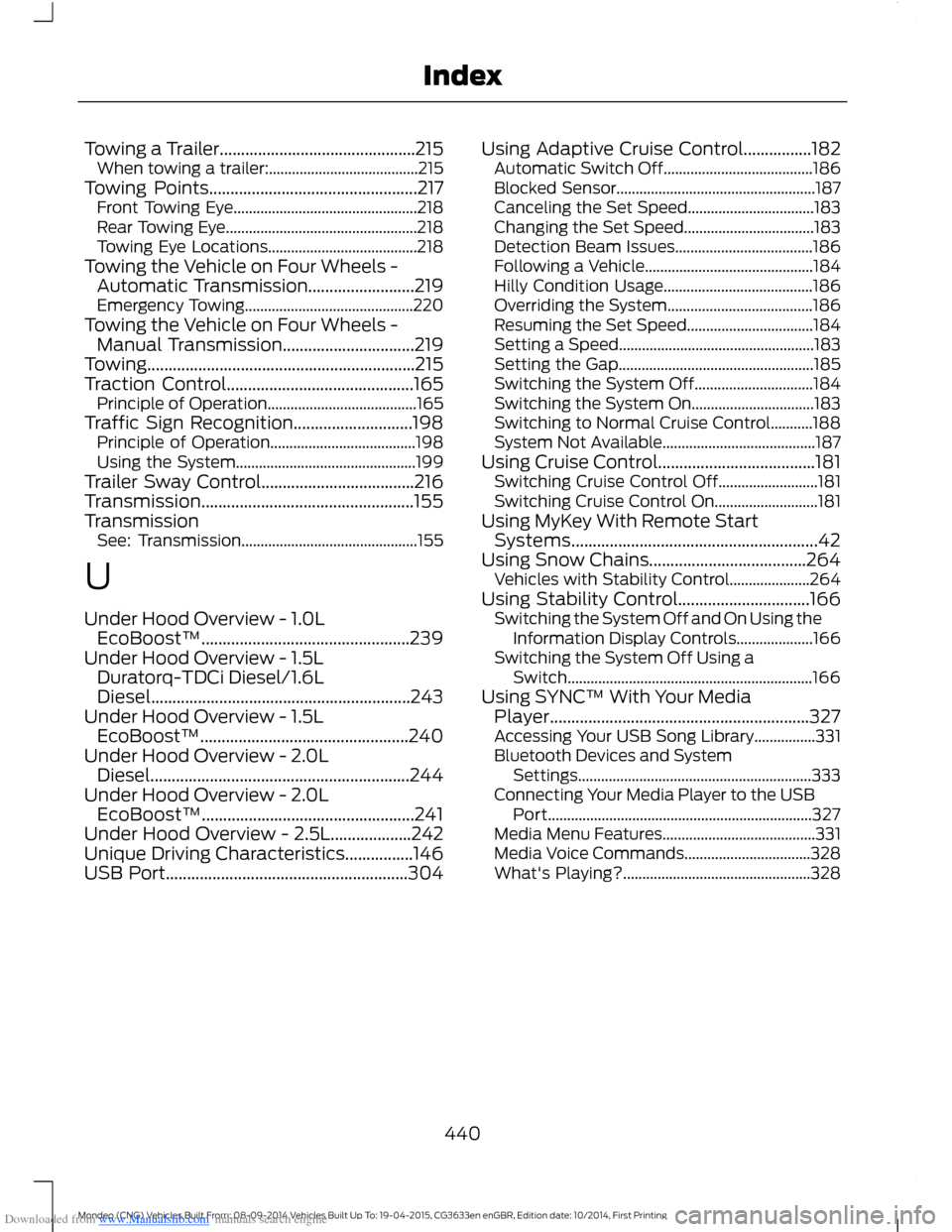
Downloaded from www.Manualslib.com manuals search engine Towing a Trailer..............................................215When towing a trailer:.......................................215Towing Points.................................................217Front Towing Eye................................................218Rear Towing Eye..................................................218Towing Eye Locations.......................................218Towing the Vehicle on Four Wheels -Automatic Transmission.........................219Emergency Towing............................................220Towing the Vehicle on Four Wheels -Manual Transmission...............................219Towing...............................................................215Traction Control............................................165Principle of Operation.......................................165Traffic Sign Recognition............................198Principle of Operation......................................198Using the System...............................................199Trailer Sway Control....................................216Transmission..................................................155TransmissionSee: Transmission..............................................155
U
Under Hood Overview - 1.0LEcoBoost™.................................................239Under Hood Overview - 1.5LDuratorq-TDCi Diesel/1.6LDiesel.............................................................243Under Hood Overview - 1.5LEcoBoost™.................................................240Under Hood Overview - 2.0LDiesel.............................................................244Under Hood Overview - 2.0LEcoBoost™..................................................241Under Hood Overview - 2.5L...................242Unique Driving Characteristics................146USB Port.........................................................304
Using Adaptive Cruise Control................182Automatic Switch Off.......................................186Blocked Sensor....................................................187Canceling the Set Speed.................................183Changing the Set Speed..................................183Detection Beam Issues....................................186Following a Vehicle............................................184Hilly Condition Usage.......................................186Overriding the System......................................186Resuming the Set Speed.................................184Setting a Speed...................................................183Setting the Gap...................................................185Switching the System Off...............................184Switching the System On................................183Switching to Normal Cruise Control...........188System Not Available........................................187Using Cruise Control.....................................181Switching Cruise Control Off..........................181Switching Cruise Control On...........................181Using MyKey With Remote StartSystems..........................................................42Using Snow Chains.....................................264Vehicles with Stability Control.....................264Using Stability Control...............................166Switching the System Off and On Using theInformation Display Controls....................166Switching the System Off Using aSwitch................................................................166Using SYNC™ With Your MediaPlayer.............................................................327Accessing Your USB Song Library................331Bluetooth Devices and SystemSettings.............................................................333Connecting Your Media Player to the USBPort.....................................................................327Media Menu Features........................................331Media Voice Commands.................................328What's Playing?.................................................328
440Mondeo (CNG) Vehicles Built From: 08-09-2014 Vehicles Built Up To: 19-04-2015, CG3633en enGBR, Edition date: 10/2014, First PrintingIndex