wheel FORD MONDEO 2014 4.G User Guide
[x] Cancel search | Manufacturer: FORD, Model Year: 2014, Model line: MONDEO, Model: FORD MONDEO 2014 4.GPages: 446, PDF Size: 29.09 MB
Page 41 of 446
Downloaded from www.Manualslib.com manuals search engine 1. Insert the key you want to program intothe ignition. If your vehicle is equipped witha push-button start, place the intelligentaccess key fob into the backup slot. Thelocation of your backup slot is in anotherchapter. See Starting and Stopping theEngine (page 138).
2. Switch the ignition on.
3. Access the main menu on theinformation display controls, and selectSettings then MyKey by pressing OK orthe > button.
4. Press OK or the > button to selectCreate MyKey.
5. When prompted, hold the OK buttonuntil you see a message informing you tolabel this key as a MyKey. The key will berestricted at the next start.
MyKey is successfully created. Make sureyou label it so you can distinguish it fromthe admin keys.
You can also program configurablesettings for the key(s). SeeProgramming/Changing ConfigurableSettings.
Programming/ChangingConfigurable Settings
Use the information display to access yourconfigurable MyKey settings.
1.Switch the ignition on using an adminkey or fob.
2.Access the main menu on theinformation display controls, and selectSettings, then MyKey by pressing OKor > button.
3.Use the arrow buttons to get to afeature.
4.Press OK or > to make a selection.
Note:You can clear or change your MyKeysettings at any time during the same keycycle as you created the MyKey. Once youhave switched the vehicle off, however, youwill need an admin key to change or clearyour MyKey settings.
CLEARING ALL MYKEYS
You can clear or change your MyKeysettings using the information displaycontrol on the steering wheel. SeeInformation Displays (page 86).
Switch the ignition on using an admin keyor fob.
To clear all MyKeys of all MyKey settings, press the left arrow button to accessthe main menu and scroll to:
Action and DescriptionMessage
Press the OK button.Settings
Press the OK button.MyKey
Press and hold the OK button until the following messagedisplays.Clear MyKey
39Mondeo (CNG) Vehicles Built From: 08-09-2014 Vehicles Built Up To: 19-04-2015, CG3633en enGBR, Edition date: 10/2014, First PrintingMyKey™
Page 43 of 446
Downloaded from www.Manualslib.com manuals search engine CHECKING MYKEY SYSTEM
STATUS
You can find information on programmedMyKey(s) using the information displaycontrol on the steering wheel. SeeInformation Displays (page 86).
To find information on a programed MyKey(s), press the left arrow button toaccess the main menu and scroll to:
DescriptionMessage
Press the OK button.Settings
Press the OK button.MyKey
Select one of the following:
Tracks the distance when drivers use a MyKey. The only wayto delete the accumulated distance is by using an admin keyto clear your MyKey. If the distance does not accumulate asexpected, then the intended user is not using the MyKey, oran admin key user recently cleared and then recreated aMyKey.
MyKey Dist.
Indicates the number of MyKeys programed to your vehicle.Use this feature to detect how many MyKeys you have foryour vehicle and determine when a MyKey has been deleted.
{0} MyKeys
Indicates how many admin keys are programed to yourvehicle. Use this feature to determine how many unrestrictedkeys you have for your vehicle, and detect if an additionalMyKey has been programed.
{0} Admin Keys
41Mondeo (CNG) Vehicles Built From: 08-09-2014 Vehicles Built Up To: 19-04-2015, CG3633en enGBR, Edition date: 10/2014, First PrintingMyKey™
Page 58 of 446
Downloaded from www.Manualslib.com manuals search engine ADJUSTING THE STEERING
WHEEL - VEHICLES WITH:
MANUAL ADJUSTABLE
STEERING COLUMN
WARNING
Do not adjust the steering wheelwhen your vehicle is moving.
Note:Make sure that you are sitting in thecorrect position. See Sitting in the CorrectPosition (page 126).
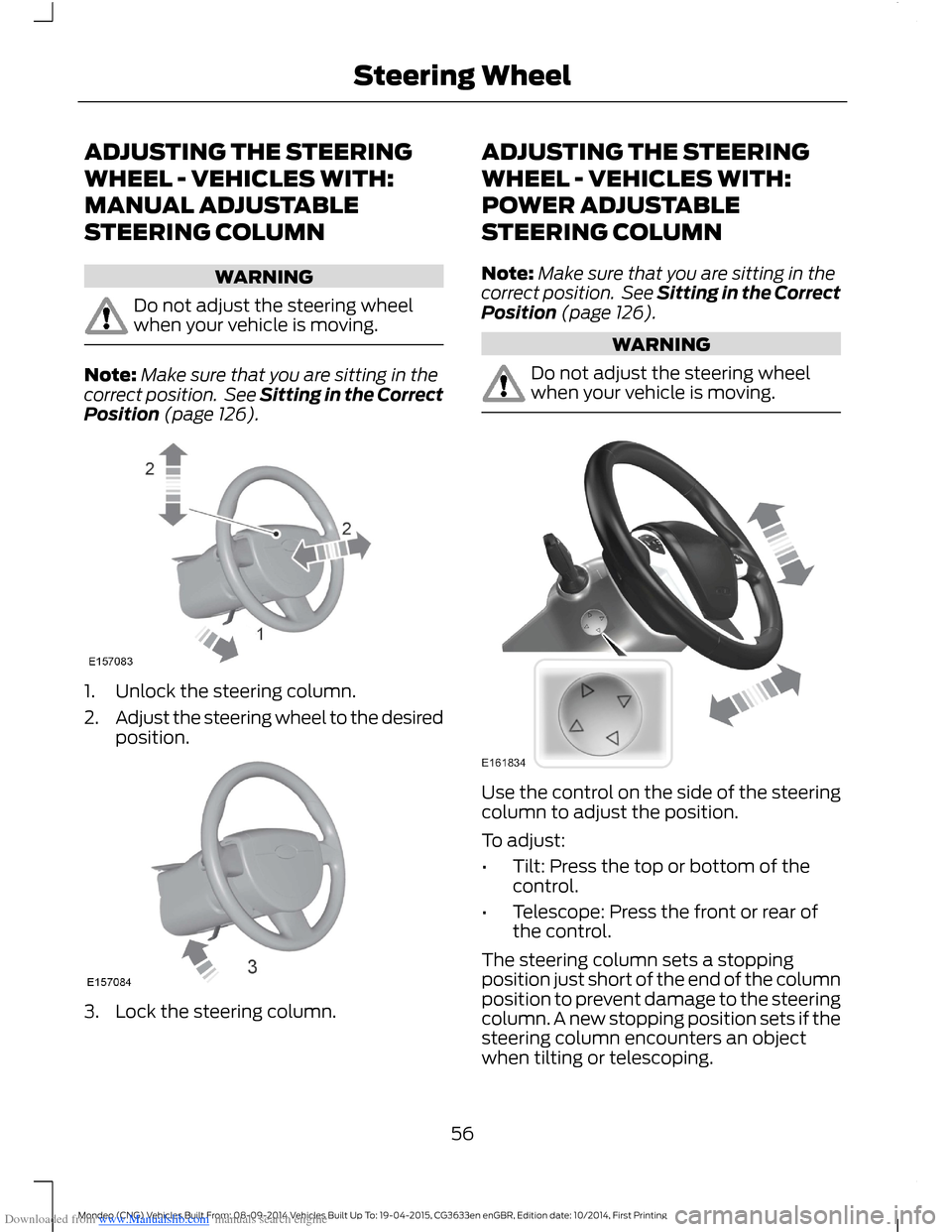
1.Unlock the steering column.
2.Adjust the steering wheel to the desiredposition.
3.Lock the steering column.
ADJUSTING THE STEERING
WHEEL - VEHICLES WITH:
POWER ADJUSTABLE
STEERING COLUMN
Note:Make sure that you are sitting in thecorrect position. See Sitting in the CorrectPosition (page 126).
WARNING
Do not adjust the steering wheelwhen your vehicle is moving.
Use the control on the side of the steeringcolumn to adjust the position.
To adjust:
•Tilt: Press the top or bottom of thecontrol.
•Telescope: Press the front or rear ofthe control.
The steering column sets a stoppingposition just short of the end of the columnposition to prevent damage to the steeringcolumn. A new stopping position sets if thesteering column encounters an objectwhen tilting or telescoping.
56Mondeo (CNG) Vehicles Built From: 08-09-2014 Vehicles Built Up To: 19-04-2015, CG3633en enGBR, Edition date: 10/2014, First PrintingSteering Wheel
Page 59 of 446
Downloaded from www.Manualslib.com manuals search engine To reset the steering column to its normalstopping position:
1.Press the steering column control againafter encountering the new stoppingposition.
2.Continue pressing the control until itreaches the end of the column position.
A new stopping position is set. The nexttime you tilt or telescope the steeringcolumn, it will stop just short of the end ofthe column position.
Memory Feature
You can save and recall the steeringcolumn position with the memory function.See Memory Function (page 131).
Note:Pressing the adjustment controlduring memory recall cancels the operation.The column responds to the adjustmentcontrol.
Easy Entry and Exit Feature (If
Equipped)
When you switch the ignition off, thesteering column will move to the full upposition to allow extra room to exit yourvehicle. The column will return to theprevious setting when you switch theignition on. You can enable or disable thisfeature in the information display. SeeInformation Displays (page 86).
AUDIO CONTROL
Select the required source on the audiounit.
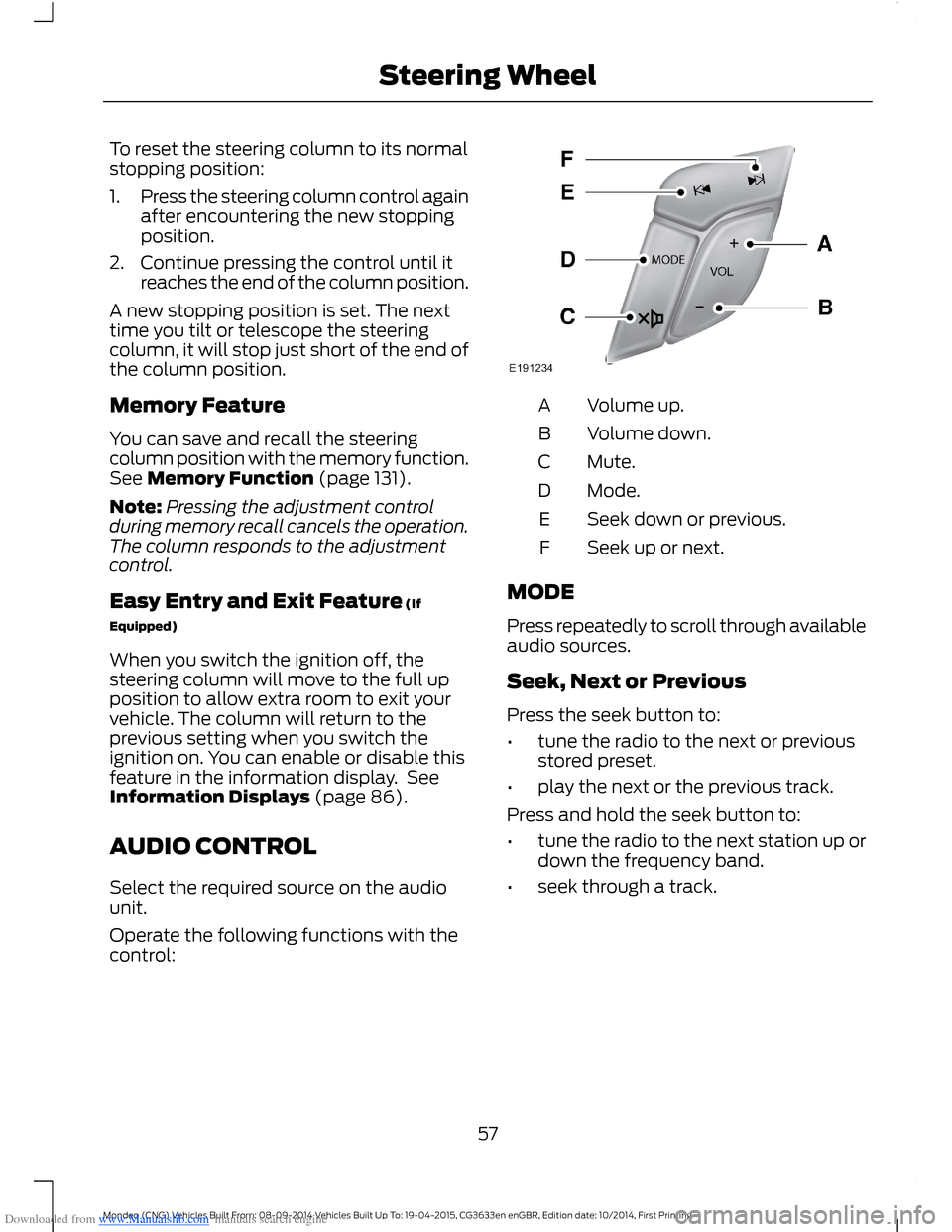
Operate the following functions with thecontrol:
Volume up.A
Volume down.B
Mute.C
Mode.D
Seek down or previous.E
Seek up or next.F
MODE
Press repeatedly to scroll through availableaudio sources.
Seek, Next or Previous
Press the seek button to:
•tune the radio to the next or previousstored preset.
•play the next or the previous track.
Press and hold the seek button to:
•tune the radio to the next station up ordown the frequency band.
•seek through a track.
57Mondeo (CNG) Vehicles Built From: 08-09-2014 Vehicles Built Up To: 19-04-2015, CG3633en enGBR, Edition date: 10/2014, First PrintingSteering Wheel
Page 60 of 446
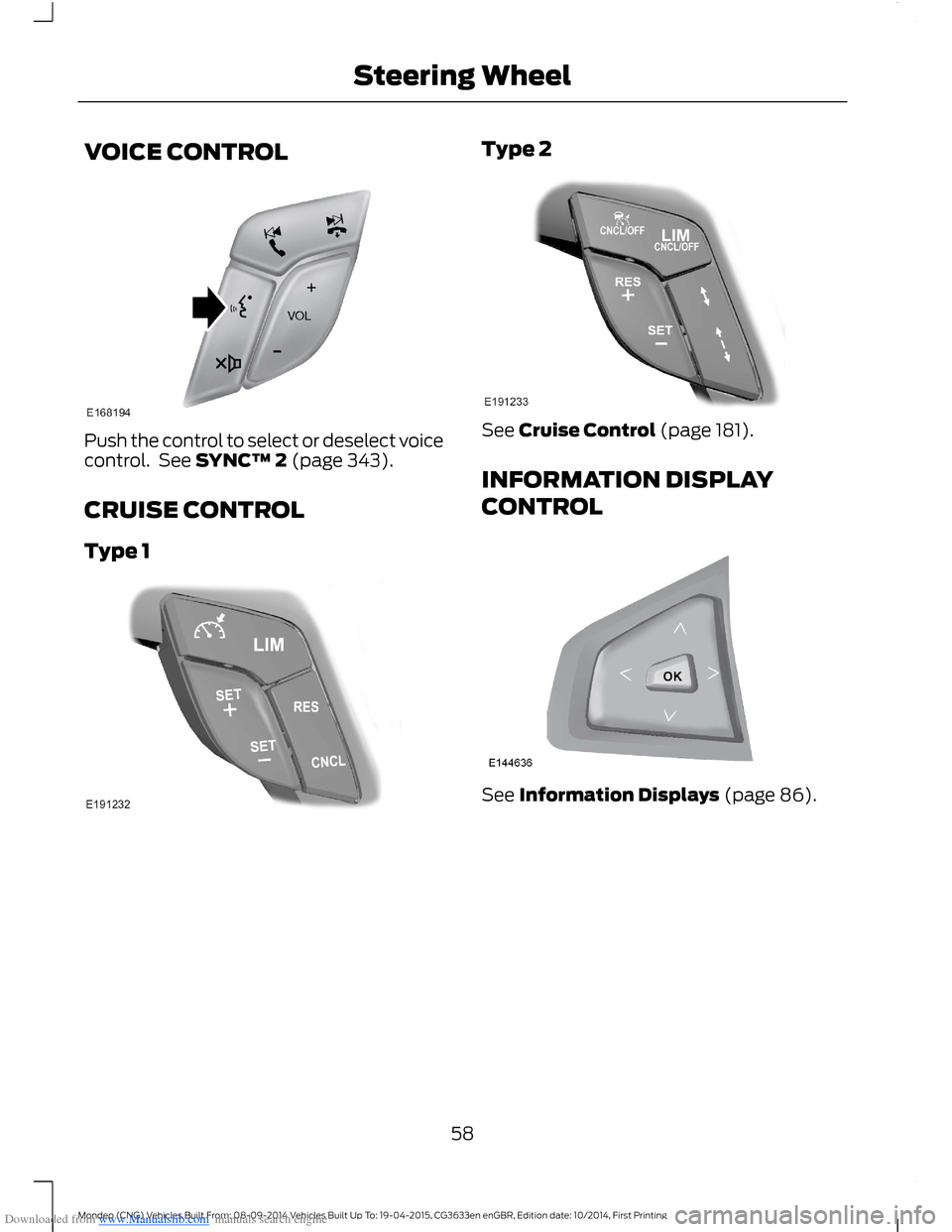
Downloaded from www.Manualslib.com manuals search engine VOICE CONTROL
Push the control to select or deselect voicecontrol. See SYNC™ 2 (page 343).
CRUISE CONTROL
Type 1
Type 2
See Cruise Control (page 181).
INFORMATION DISPLAY
CONTROL
See Information Displays (page 86).
58Mondeo (CNG) Vehicles Built From: 08-09-2014 Vehicles Built Up To: 19-04-2015, CG3633en enGBR, Edition date: 10/2014, First PrintingSteering Wheel
Page 61 of 446
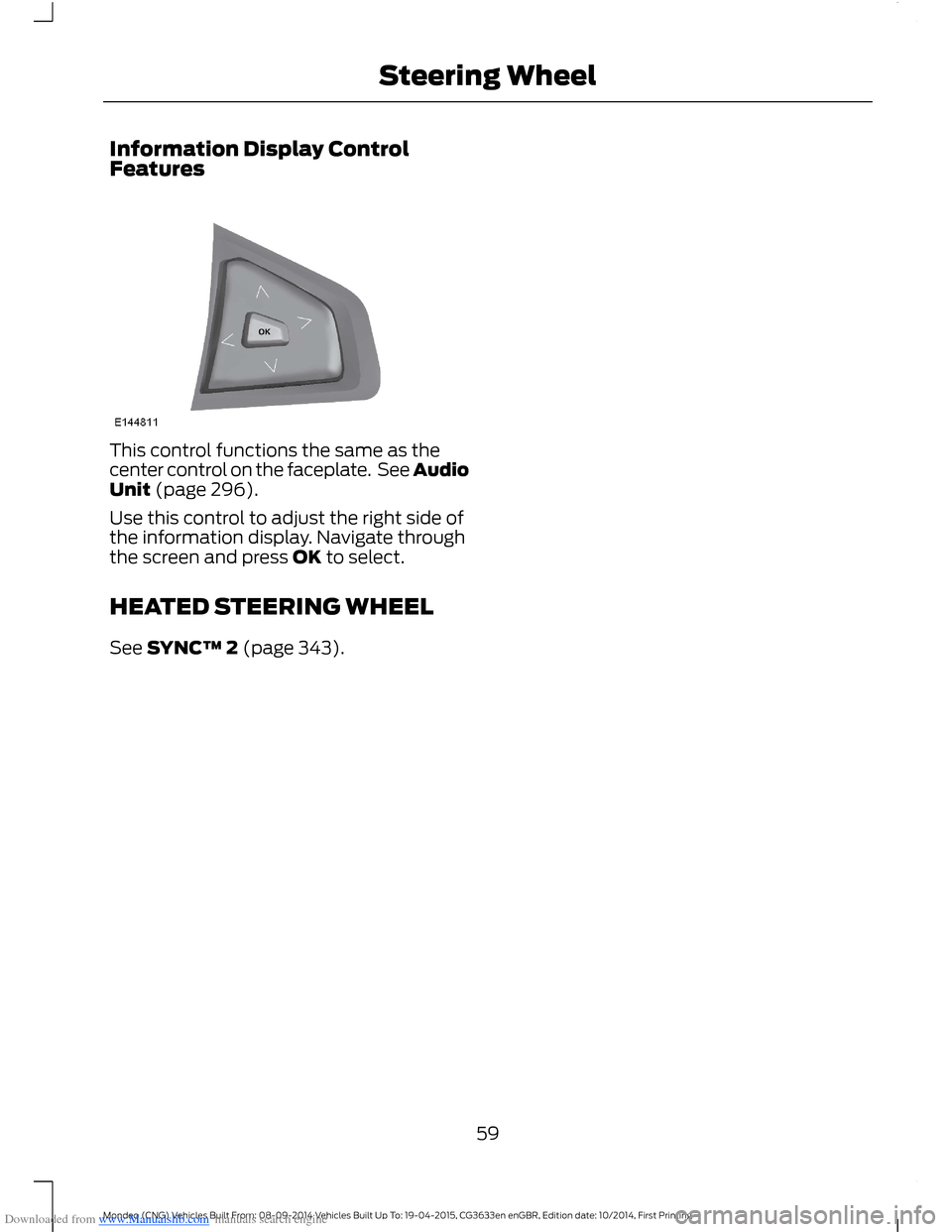
Downloaded from www.Manualslib.com manuals search engine Information Display ControlFeatures
This control functions the same as thecenter control on the faceplate. See AudioUnit (page 296).
Use this control to adjust the right side ofthe information display. Navigate throughthe screen and press OK to select.
HEATED STEERING WHEEL
See SYNC™ 2 (page 343).
59Mondeo (CNG) Vehicles Built From: 08-09-2014 Vehicles Built Up To: 19-04-2015, CG3633en enGBR, Edition date: 10/2014, First PrintingSteering Wheel
Page 70 of 446
Downloaded from www.Manualslib.com manuals search engine 3.Press to close the control.
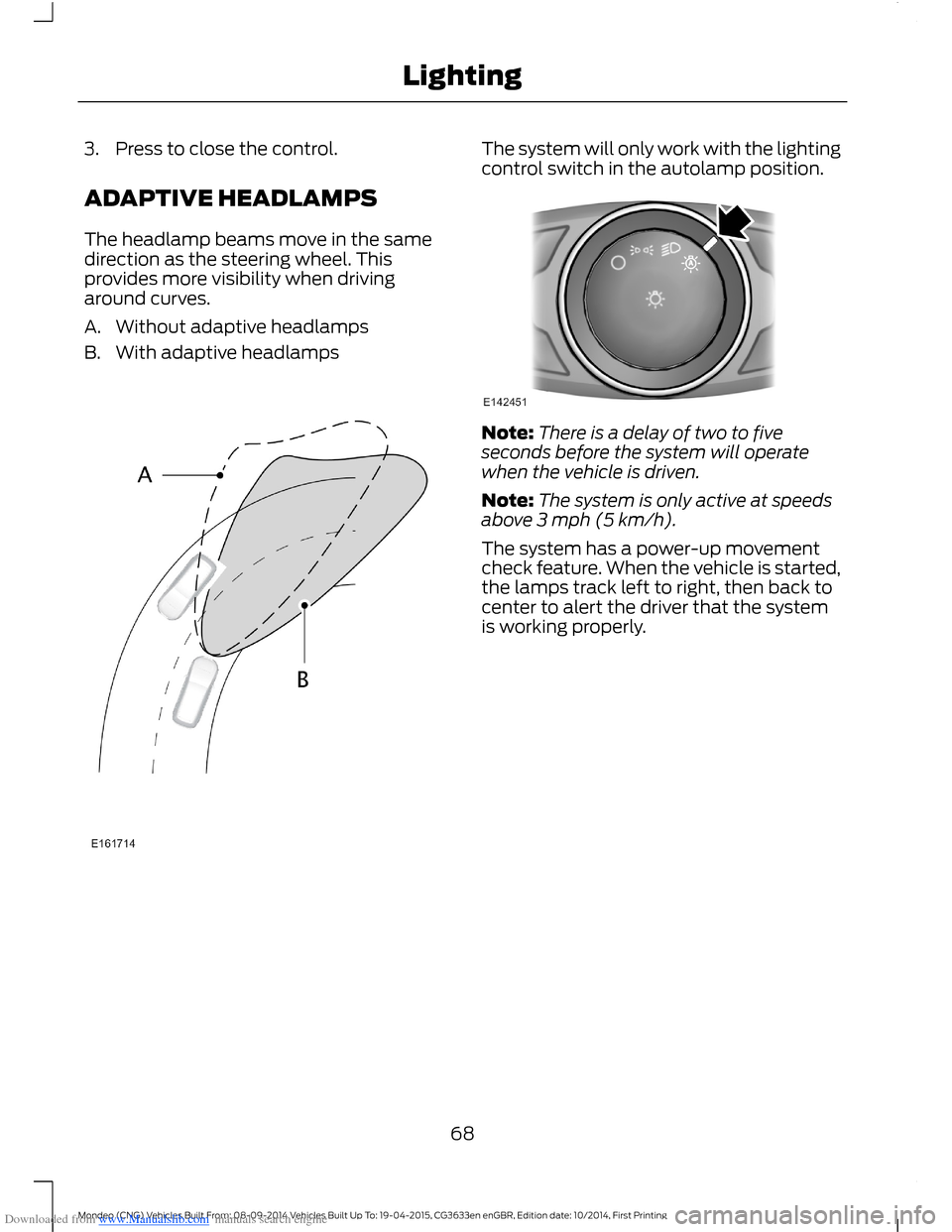
ADAPTIVE HEADLAMPS
The headlamp beams move in the samedirection as the steering wheel. Thisprovides more visibility when drivingaround curves.
A.Without adaptive headlamps
B.With adaptive headlamps
The system will only work with the lightingcontrol switch in the autolamp position.
Note:There is a delay of two to fiveseconds before the system will operatewhen the vehicle is driven.
Note:The system is only active at speedsabove 3 mph (5 km/h).
The system has a power-up movementcheck feature. When the vehicle is started,the lamps track left to right, then back tocenter to alert the driver that the systemis working properly.
68Mondeo (CNG) Vehicles Built From: 08-09-2014 Vehicles Built Up To: 19-04-2015, CG3633en enGBR, Edition date: 10/2014, First PrintingLighting
Page 86 of 446
Downloaded from www.Manualslib.com manuals search engine It will also illuminate momentarily whenyou switch the ignition on to confirm thelamp is functional. If it does not illuminatewhen you switch the ignition on, or beginsto flash at any time, have the systemchecked by an authorized dealer.
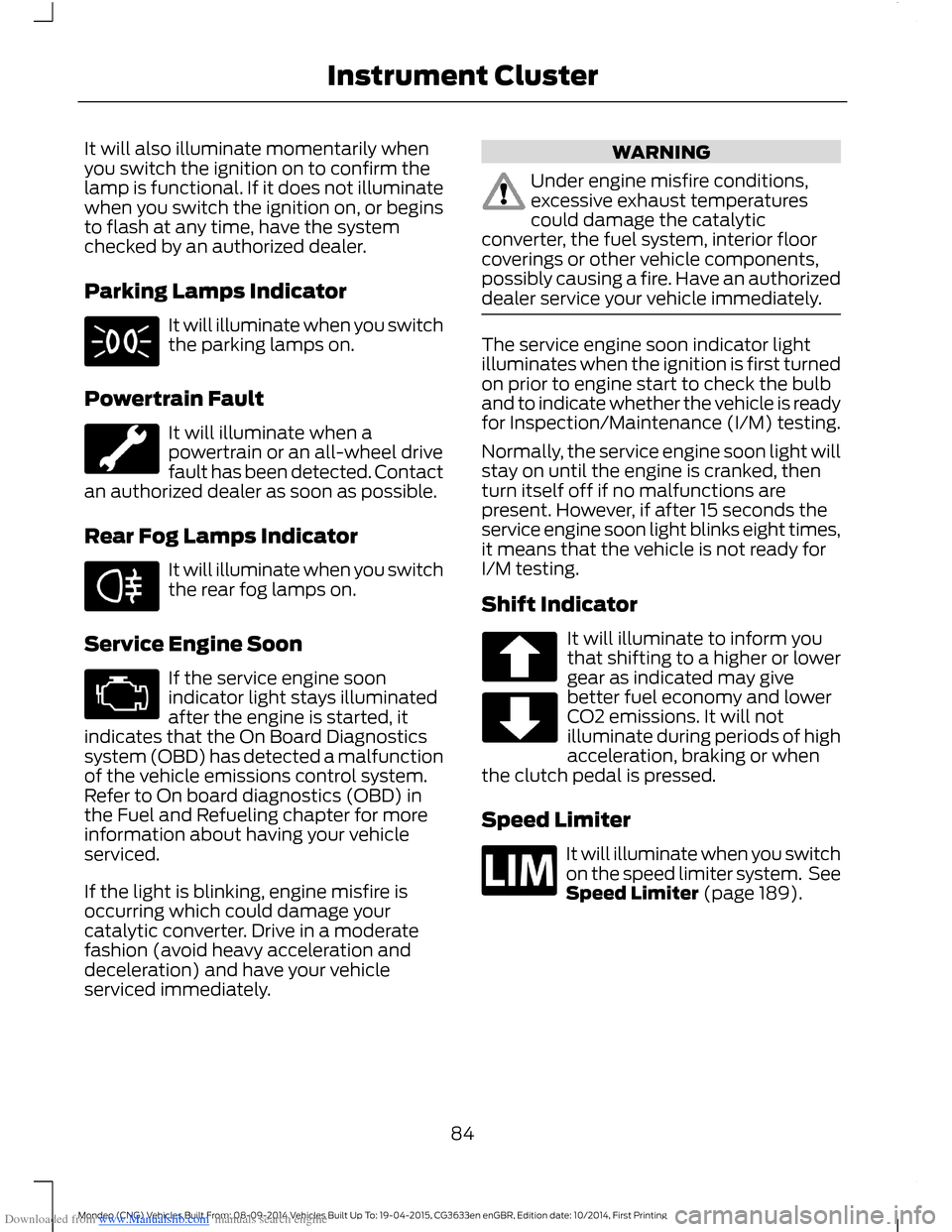
Parking Lamps Indicator
It will illuminate when you switchthe parking lamps on.
Powertrain Fault
It will illuminate when apowertrain or an all-wheel drivefault has been detected. Contactan authorized dealer as soon as possible.
Rear Fog Lamps Indicator
It will illuminate when you switchthe rear fog lamps on.
Service Engine Soon
If the service engine soonindicator light stays illuminatedafter the engine is started, itindicates that the On Board Diagnosticssystem (OBD) has detected a malfunctionof the vehicle emissions control system.Refer to On board diagnostics (OBD) inthe Fuel and Refueling chapter for moreinformation about having your vehicleserviced.
If the light is blinking, engine misfire isoccurring which could damage yourcatalytic converter. Drive in a moderatefashion (avoid heavy acceleration anddeceleration) and have your vehicleserviced immediately.
WARNING
Under engine misfire conditions,excessive exhaust temperaturescould damage the catalyticconverter, the fuel system, interior floorcoverings or other vehicle components,possibly causing a fire. Have an authorizeddealer service your vehicle immediately.
The service engine soon indicator lightilluminates when the ignition is first turnedon prior to engine start to check the bulband to indicate whether the vehicle is readyfor Inspection/Maintenance (I/M) testing.
Normally, the service engine soon light willstay on until the engine is cranked, thenturn itself off if no malfunctions arepresent. However, if after 15 seconds theservice engine soon light blinks eight times,it means that the vehicle is not ready forI/M testing.
Shift Indicator
It will illuminate to inform youthat shifting to a higher or lowergear as indicated may givebetter fuel economy and lowerCO2 emissions. It will notilluminate during periods of highacceleration, braking or whenthe clutch pedal is pressed.
Speed Limiter
It will illuminate when you switchon the speed limiter system. SeeSpeed Limiter (page 189).
84Mondeo (CNG) Vehicles Built From: 08-09-2014 Vehicles Built Up To: 19-04-2015, CG3633en enGBR, Edition date: 10/2014, First PrintingInstrument Cluster
Page 88 of 446
Downloaded from www.Manualslib.com manuals search engine GENERAL INFORMATION
WARNING
Driving while distracted can result inloss of vehicle control, crash andinjury. We strongly recommend thatyou use extreme caution when using anydevice that may take your focus off theroad. Your primary responsibility is the safeoperation of your vehicle. We recommendagainst the use of any hand-held devicewhile driving and encourage the use ofvoice-operated systems when possible.Make sure you are aware of all applicablelocal laws that may affect the use ofelectronic devices while driving.
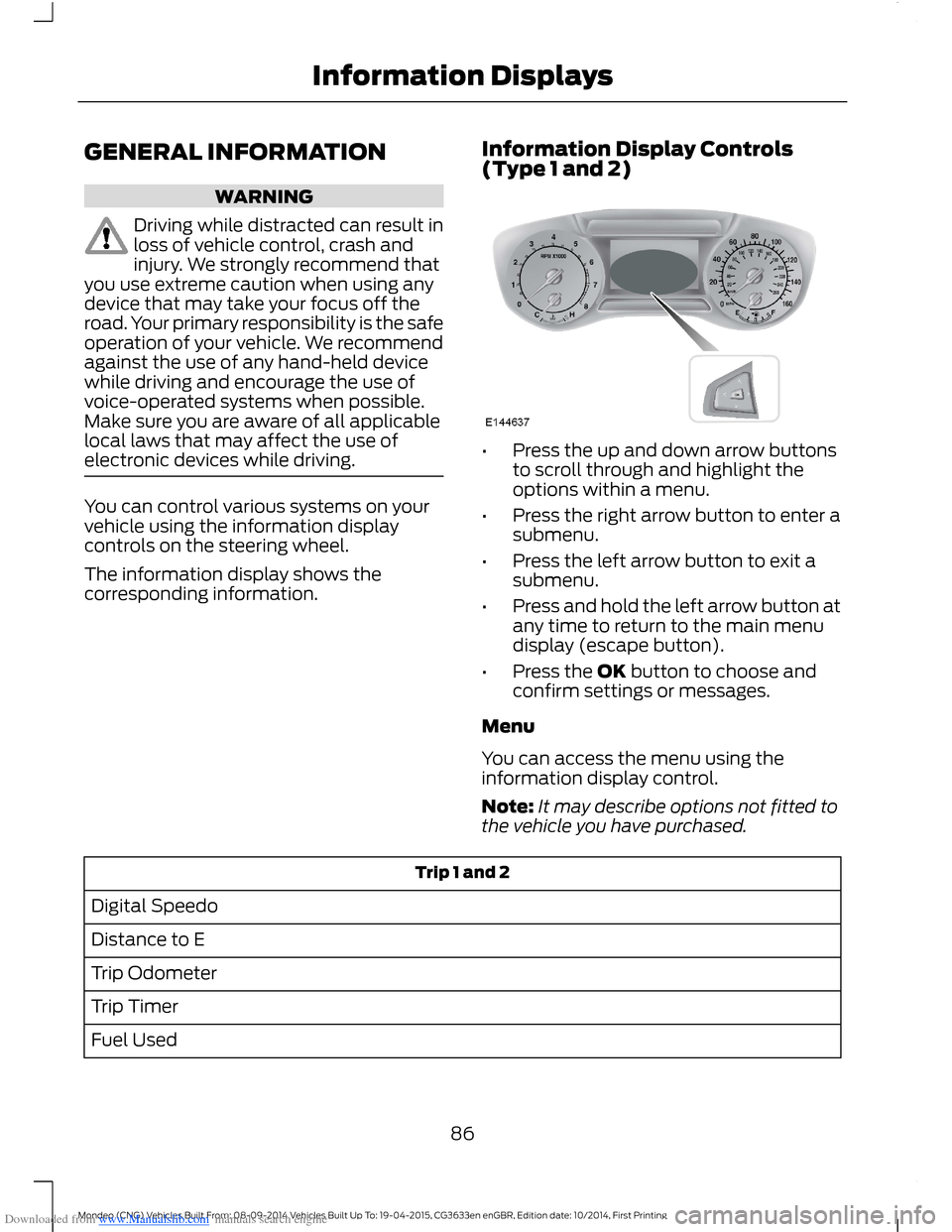
You can control various systems on yourvehicle using the information displaycontrols on the steering wheel.
The information display shows thecorresponding information.
Information Display Controls(Type 1 and 2)
•Press the up and down arrow buttonsto scroll through and highlight theoptions within a menu.
•Press the right arrow button to enter asubmenu.
•Press the left arrow button to exit asubmenu.
•Press and hold the left arrow button atany time to return to the main menudisplay (escape button).
•Press the OK button to choose andconfirm settings or messages.
Menu
You can access the menu using theinformation display control.
Note:It may describe options not fitted tothe vehicle you have purchased.
Trip 1 and 2
Digital Speedo
Distance to E
Trip Odometer
Trip Timer
Fuel Used
86Mondeo (CNG) Vehicles Built From: 08-09-2014 Vehicles Built Up To: 19-04-2015, CG3633en enGBR, Edition date: 10/2014, First PrintingInformation Displays
Page 90 of 446
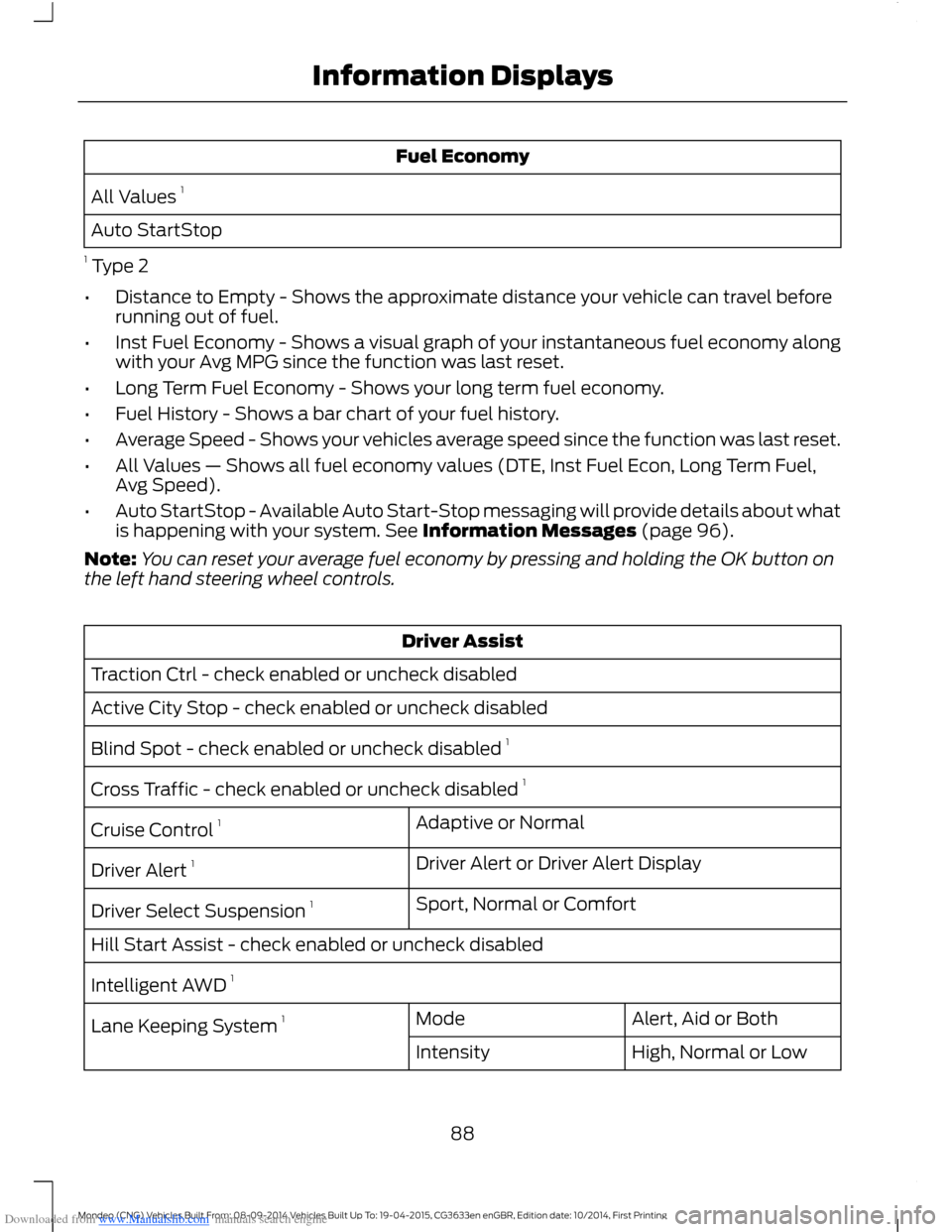
Downloaded from www.Manualslib.com manuals search engine Fuel Economy
All Values 1
Auto StartStop
1 Type 2
•Distance to Empty - Shows the approximate distance your vehicle can travel beforerunning out of fuel.
•Inst Fuel Economy - Shows a visual graph of your instantaneous fuel economy alongwith your Avg MPG since the function was last reset.
•Long Term Fuel Economy - Shows your long term fuel economy.
•Fuel History - Shows a bar chart of your fuel history.
•Average Speed - Shows your vehicles average speed since the function was last reset.
•All Values — Shows all fuel economy values (DTE, Inst Fuel Econ, Long Term Fuel,Avg Speed).
•Auto StartStop - Available Auto Start-Stop messaging will provide details about whatis happening with your system. See Information Messages (page 96).
Note:You can reset your average fuel economy by pressing and holding the OK button onthe left hand steering wheel controls.
Driver Assist
Traction Ctrl - check enabled or uncheck disabled
Active City Stop - check enabled or uncheck disabled
Blind Spot - check enabled or uncheck disabled 1
Cross Traffic - check enabled or uncheck disabled 1
Adaptive or NormalCruise Control 1
Driver Alert or Driver Alert DisplayDriver Alert 1
Sport, Normal or ComfortDriver Select Suspension 1
Hill Start Assist - check enabled or uncheck disabled
Intelligent AWD 1
Alert, Aid or BothModeLane Keeping System 1
High, Normal or LowIntensity
88Mondeo (CNG) Vehicles Built From: 08-09-2014 Vehicles Built Up To: 19-04-2015, CG3633en enGBR, Edition date: 10/2014, First PrintingInformation Displays