USB FORD MONDEO 2014 4.G Owner's Manual
[x] Cancel search | Manufacturer: FORD, Model Year: 2014, Model line: MONDEO, Model: FORD MONDEO 2014 4.GPages: 446, PDF Size: 29.09 MB
Page 348 of 446
Downloaded from www.Manualslib.com manuals search engine Action and DescriptionMessage
Adjust the settings for:Sound
Bass
Treble
Midrange
Set Balance and Fade
DSP
EQ Mode
Speed Compensated Volume
Using the Steering Wheel Controls
Depending on your vehicle and optionpackage, you can use your steering wheelcontrols to interact with the touchscreensystem.
•VOL: Control the volume of audiooutput.
•Mute: Mute the audio output.
•Voice: Press to start a voice session.Press again and hold to end a voicesession.
•SEEK and PHONE ACCEPT:
•While in radio mode, press to seekbetween memory presets or pressand hold to seek between stations.
•While in USB or CD mode, press toseek between stations or press andhold to fast seek.
•While in phone mode, press toanswer a call, or to switch betweencalls.
•SEEK and PHONE REJECT:
•While in radio mode, press to seekbetween memory presets or pressand hold to seek between stations.
•While in USB or CD mode, press toseek between stations or press andhold to fast seek.
•While in phone mode, press to enda call, or to reject an incoming call.
•Source: Touch the control repeatedlyto switch between media modes.
•Sound: Touch the control to adjust thesound settings. See Settings (page352).
See Steering Wheel (page 56).
Cleaning the Touchscreen Display
Use a dry, clean, soft cloth. If dirt orfingerprints are still visible, apply a smallamount of alcohol to the cloth. Do not pouror spray alcohol onto the display. Do notuse detergent or any type of solvent toclean the display.
Support
For further support, contact an authorizeddealer. For more information, visit theregional Ford website.
346Mondeo (CNG) Vehicles Built From: 08-09-2014 Vehicles Built Up To: 19-04-2015, CG3633en enGBR, Edition date: 10/2014, First PrintingSYNC™ 2
Page 352 of 446
Downloaded from www.Manualslib.com manuals search engine The selection menu expands and differentoptions appear.
•Press the up and down arrows to scrollthrough the modes.
•Press the right arrow to enter the mode.
•Press the left or right arrows to makeadjustments within the chosen mode.
•Press OK to confirm your selection.
Note:If your vehicle is not equipped withNavigation, Compass appears in the displayinstead of Navigation. If you press the rightarrow to go into the Compass menu, youcan see the compass graphic. The compassdisplays the direction in which the vehicleis traveling, not true direction (for example,if the vehicle is traveling west, the middleof the compass graphic displays west; northdisplays to the left of west though its truedirection is to the right of west).
Using Voice Recognition
This system helps you control manyfeatures using voice commands. Thisallows you to keep your hands on thewheel and focus on what is in front of you.The system provides feedback throughaudible tones, prompts, questions andspoken confirmations depending on thesituation and the chosen level ofinteraction (voice settings).
The system also asks short questions(confirmation prompts) when it is not sureof your request or when there are multiplepossible responses to your request.
When using voice commands, words andicons may appear in the lower left statusbar indicating the status of the voicecommand session.
How to Use Voice Commands
The following are some of thevoice commands that you cansay at any time during a voicecommand session.
Press the voice button and whenprompted say:
Voice command
Main Menu
What Can I Say
Previous Page
Go Back
Help
Helpful Hints
•Make sure the interior of your vehicle isas quiet as possible. Wind noise fromopen windows and road vibrations mayprevent the system from correctlyrecognizing spoken voice commands.
•After pressing the voice command icon,wait until after the tone sounds and amessage appears before saying a voicecommand. Any voice command spokenprior to this does not register with thesystem.
•Speak naturally, without long pausesbetween words.
•At any time, you can interrupt thesystem while it is speaking by pressingthe voice command icon.
Accessing a List of Available VoiceCommands
To access a list of available voicecommands you can do either of thefollowing.
Using the touchscreen, press:
Menu Item
Settings
Help
Voice Command List
350Mondeo (CNG) Vehicles Built From: 08-09-2014 Vehicles Built Up To: 19-04-2015, CG3633en enGBR, Edition date: 10/2014, First PrintingSYNC™ 2
Page 356 of 446
Downloaded from www.Manualslib.com manuals search engine Action and DescriptionMenu Item
Allows you to display the default photo or upload your own.Edit Wallpaper
When set to On, lets you use the automatic dimming feature.Auto DimWhen set to Off you are able to adjust the brightness of the screen.
Make the screen display brighter or dimmer.Brightness
Allows you to adjust screen dimming as the outside lighting conditionschange from day to night.Auto DimManual Offset
To make adjustments using the voicebutton, press the button and whenprompted, say:
Voice command
Display Settings
Uploading Photos for Your HomeScreen Wallpaper
Note:You cannot load photos directly fromyour camera. You must access the photoseither from your USB mass storage deviceor from an SD card.
Note:Photographs with extremely largedimensions (such as 2048 x 1536) may notbe compatible and appear as a blank(black) image on the display.
The system allows you to upload and viewup to 32 photos.
To access, press:
To upload your photos, select:
Action and DescriptionMenu Item
Press the settings icon.Settings
Display
Follow the system prompts to upload your photographs.Edit Wallpaper
Only the photograph(s), which meets thefollowing conditions display:
•Compatible file formats are as follows:JPG, GIF, PNG, BMP.
•Each file must be 1.5 MB or less.
•Recommended dimensions: 800 x 384.
Sound
354Mondeo (CNG) Vehicles Built From: 08-09-2014 Vehicles Built Up To: 19-04-2015, CG3633en enGBR, Edition date: 10/2014, First PrintingSYNC™ 2
Page 364 of 446
Downloaded from www.Manualslib.com manuals search engine Action and DescriptionMenu Item
If compatible with your phone, you can adjust your internetdata connection. Select to make your connection profile withthe personal area network or to switch off your connection.You can also choose to adjust your settings or have thesystem always connect, never connect when roaming, orquery on connect. Press ? for more information.
Internet Data Connection
Access features, such as automatic phonebook download,re-download your phonebook, add contacts from your phoneas well as delete or upload your phonebook.
Manage Phonebook
Have the system alert you when in Roaming mode.Roaming Warning
Wireless and Internet
Your system has a Wi-Fi featurethat creates a wireless networkwithin your vehicle, therebyallowing other devices (such as personalcomputers or phones) in your vehicle tospeak to each other, share files or play
games. Using this Wi-Fi feature, everyonein your vehicle can also access the internetif you have a USB mobile broadbandconnection inside your vehicle, your phonesupports personal area networking or ifyou park outside a wireless hotspot.
To make adjustments using the touchscreen, select:
Action and DescriptionMenu Item
Press the settings icon.Settings
Wireless & Internet
Then select from the following:
Wi-Fi Network (Client) ModeWi-Fi Settings
Turns the Wi-Fi feature on and off in your vehicle. Make sureyou switch it on for connectivity purposes.
Choose a Wireless Network
Allows you to use a previously stored wireless network. Youcan categorize by alphabetical listing, priority and signalstrength. You can also choose to search for a network,connect to a network, disconnect from a network, receivemore information, prioritize a network or delete a network.
Gateway (Access Point) Mode
362Mondeo (CNG) Vehicles Built From: 08-09-2014 Vehicles Built Up To: 19-04-2015, CG3633en enGBR, Edition date: 10/2014, First PrintingSYNC™ 2
Page 365 of 446
Downloaded from www.Manualslib.com manuals search engine Action and DescriptionMenu Item
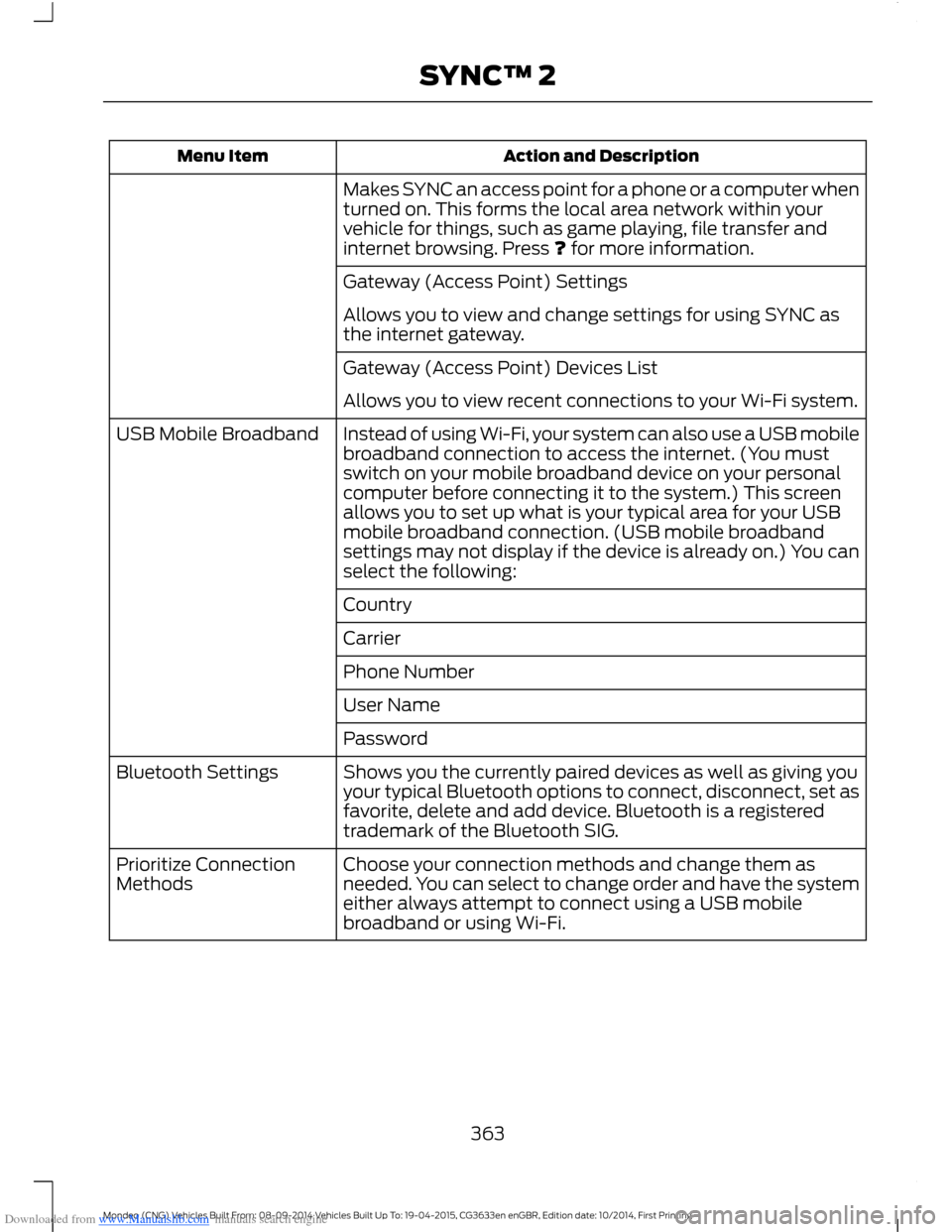
Makes SYNC an access point for a phone or a computer whenturned on. This forms the local area network within yourvehicle for things, such as game playing, file transfer andinternet browsing. Press ? for more information.
Gateway (Access Point) Settings
Allows you to view and change settings for using SYNC asthe internet gateway.
Gateway (Access Point) Devices List
Allows you to view recent connections to your Wi-Fi system.
Instead of using Wi-Fi, your system can also use a USB mobilebroadband connection to access the internet. (You mustswitch on your mobile broadband device on your personalcomputer before connecting it to the system.) This screenallows you to set up what is your typical area for your USBmobile broadband connection. (USB mobile broadbandsettings may not display if the device is already on.) You canselect the following:
USB Mobile Broadband
Country
Carrier
Phone Number
User Name
Password
Shows you the currently paired devices as well as giving youyour typical Bluetooth options to connect, disconnect, set asfavorite, delete and add device. Bluetooth is a registeredtrademark of the Bluetooth SIG.
Bluetooth Settings
Choose your connection methods and change them asneeded. You can select to change order and have the systemeither always attempt to connect using a USB mobilebroadband or using Wi-Fi.
Prioritize ConnectionMethods
363Mondeo (CNG) Vehicles Built From: 08-09-2014 Vehicles Built Up To: 19-04-2015, CG3633en enGBR, Edition date: 10/2014, First PrintingSYNC™ 2
Page 368 of 446
Downloaded from www.Manualslib.com manuals search engine ENTERTAINMENT
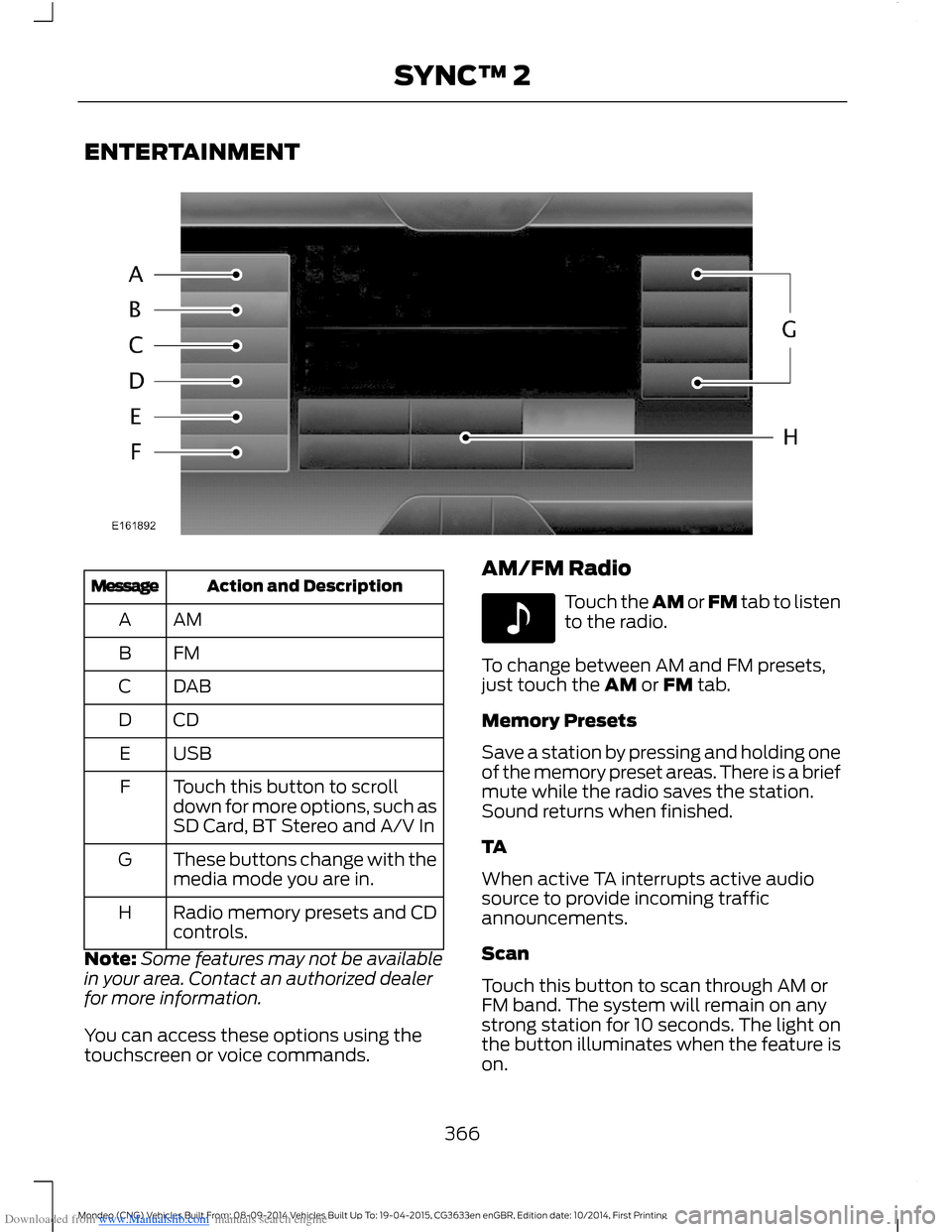
Action and DescriptionMessage
AMA
FMB
DABC
CDD
USBE
Touch this button to scrolldown for more options, such asSD Card, BT Stereo and A/V In
F
These buttons change with themedia mode you are in.G
Radio memory presets and CDcontrols.H
Note:Some features may not be availablein your area. Contact an authorized dealerfor more information.
You can access these options using thetouchscreen or voice commands.
AM/FM Radio
Touch the AM or FM tab to listento the radio.
To change between AM and FM presets,just touch the AM or FM tab.
Memory Presets
Save a station by pressing and holding oneof the memory preset areas. There is a briefmute while the radio saves the station.Sound returns when finished.
TA
When active TA interrupts active audiosource to provide incoming trafficannouncements.
Scan
Touch this button to scan through AM orFM band. The system will remain on anystrong station for 10 seconds. The light onthe button illuminates when the feature ison.
366Mondeo (CNG) Vehicles Built From: 08-09-2014 Vehicles Built Up To: 19-04-2015, CG3633en enGBR, Edition date: 10/2014, First PrintingSYNC™ 2
Page 372 of 446
Downloaded from www.Manualslib.com manuals search engine SD Card Slot and USB Port
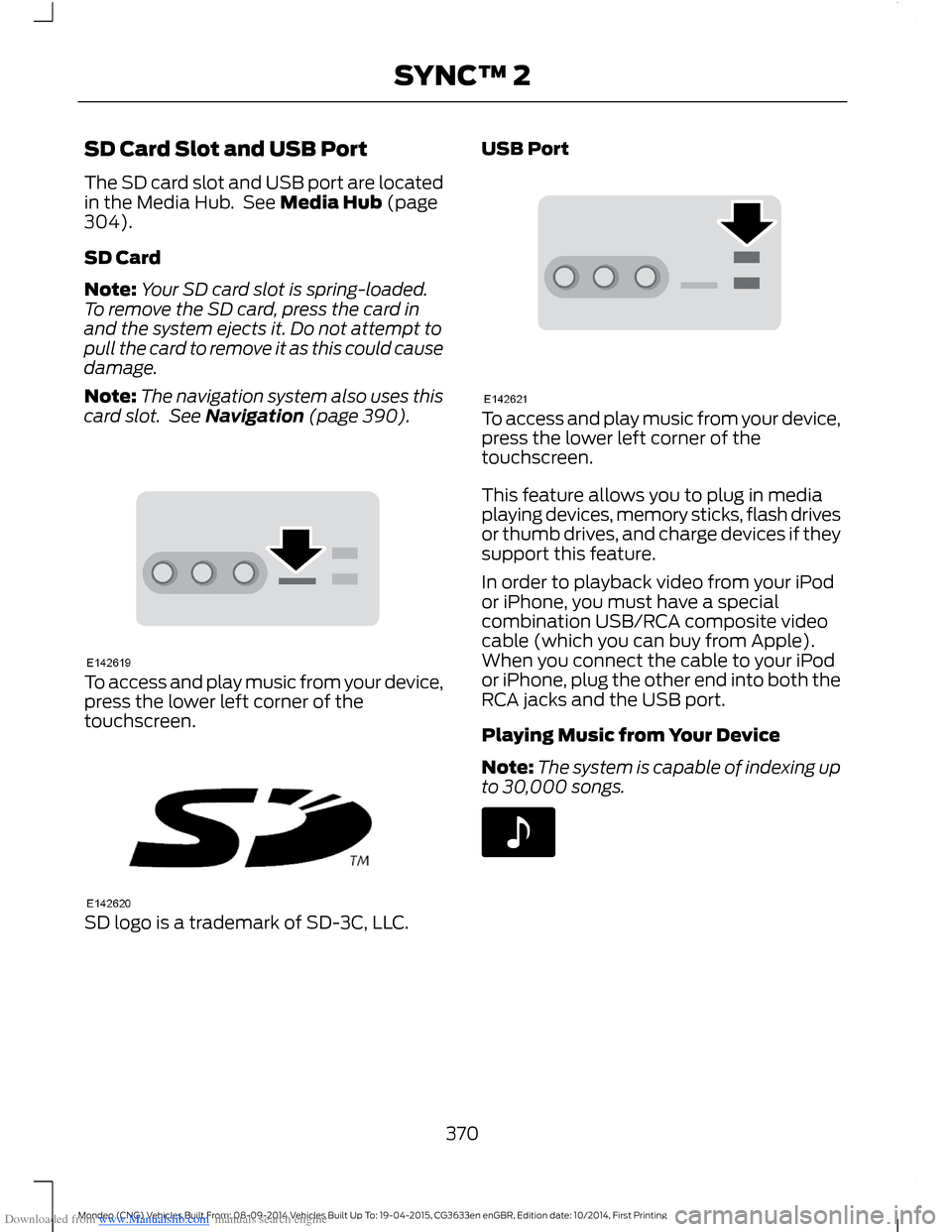
The SD card slot and USB port are locatedin the Media Hub. See Media Hub (page304).
SD Card
Note:Your SD card slot is spring-loaded.To remove the SD card, press the card inand the system ejects it. Do not attempt topull the card to remove it as this could causedamage.
Note:The navigation system also uses thiscard slot. See Navigation (page 390).
To access and play music from your device,press the lower left corner of thetouchscreen.
SD logo is a trademark of SD-3C, LLC.
USB Port
To access and play music from your device,press the lower left corner of thetouchscreen.
This feature allows you to plug in mediaplaying devices, memory sticks, flash drivesor thumb drives, and charge devices if theysupport this feature.
In order to playback video from your iPodor iPhone, you must have a specialcombination USB/RCA composite videocable (which you can buy from Apple).When you connect the cable to your iPodor iPhone, plug the other end into both theRCA jacks and the USB port.
Playing Music from Your Device
Note:The system is capable of indexing upto 30,000 songs.
370Mondeo (CNG) Vehicles Built From: 08-09-2014 Vehicles Built Up To: 19-04-2015, CG3633en enGBR, Edition date: 10/2014, First PrintingSYNC™ 2
Page 373 of 446
Downloaded from www.Manualslib.com manuals search engine Insert your device and select:
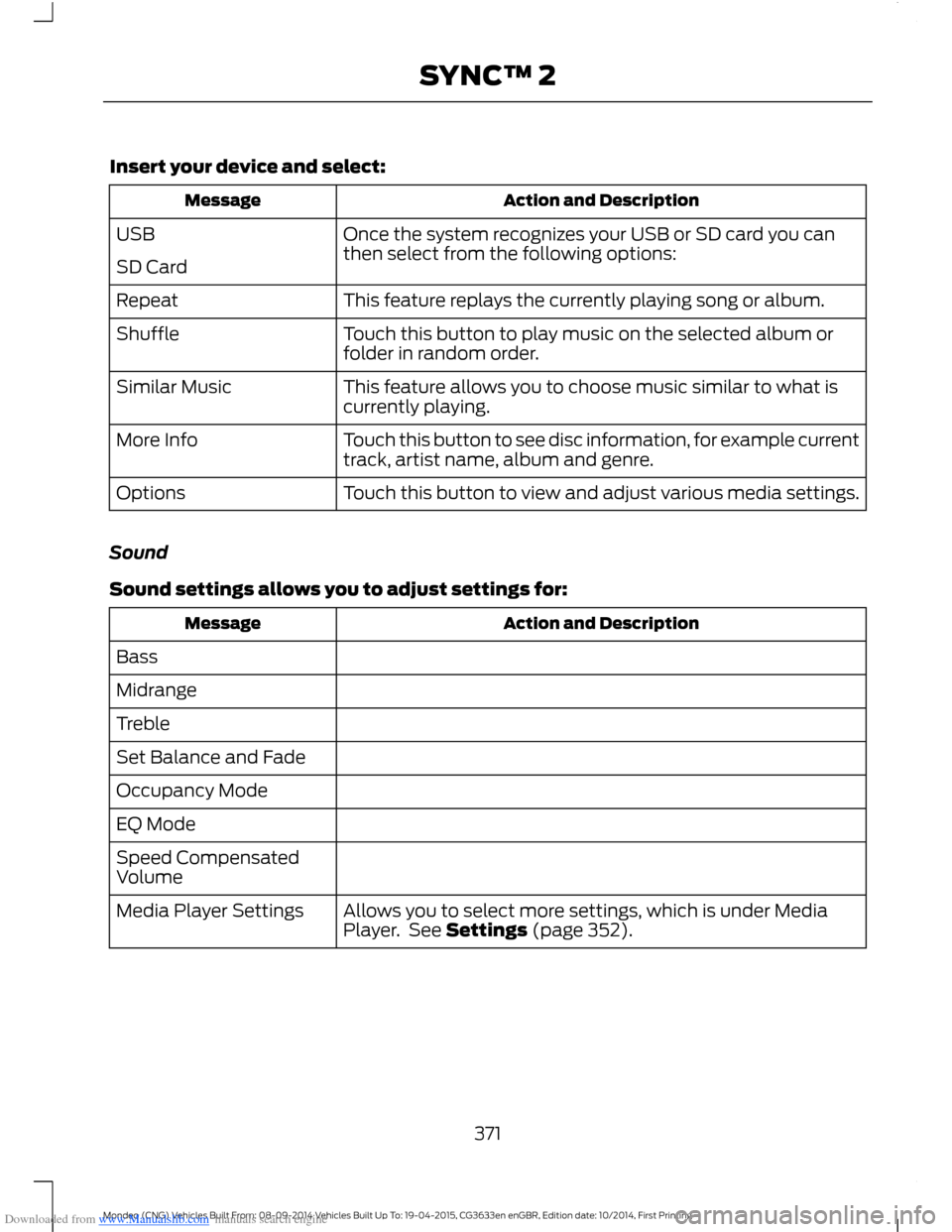
Action and DescriptionMessage
Once the system recognizes your USB or SD card you canthen select from the following options:USB
SD Card
This feature replays the currently playing song or album.Repeat
Touch this button to play music on the selected album orfolder in random order.Shuffle
This feature allows you to choose music similar to what iscurrently playing.Similar Music
Touch this button to see disc information, for example currenttrack, artist name, album and genre.More Info
Touch this button to view and adjust various media settings.Options
Sound
Sound settings allows you to adjust settings for:
Action and DescriptionMessage
Bass
Midrange
Treble
Set Balance and Fade
Occupancy Mode
EQ Mode
Speed CompensatedVolume
Allows you to select more settings, which is under MediaPlayer. See Settings (page 352).Media Player Settings
371Mondeo (CNG) Vehicles Built From: 08-09-2014 Vehicles Built Up To: 19-04-2015, CG3633en enGBR, Edition date: 10/2014, First PrintingSYNC™ 2
Page 374 of 446
Downloaded from www.Manualslib.com manuals search engine Action and DescriptionMessage
Displays software and firmware information about thecurrently connected media device.Device Information
Indexes your device when you connect it for the first time andeach time the content changes (for example adding orremoving tracks) to make sure you have the latest voicecommands available for all media on the device.
Update Media Index
Note:Your vehicle may not have all these sound settings.
Browse
This feature allows you to view thecontents of the device. It also allows youto search by categories, for example genre,artist or album.
If you want to view song information, forexample Title, Artist, File, Folder, Album,and Genre, touch the on-screen album art.
You can also select:
Action and DescriptionMessage
To hear how the system pronounces the current band andsong. This can be helpful when using voice commands tomake sure the system correctly plays your request.
What’s Playing?
Playing Video from Your Device
To access and play video from your device,your vehicle's transmission must be in park(P) with the ignition in accessory mode.See Starting and Stopping the Engine(page 138).
USB and SD Card Voice Commands
The voice system allows you to controlyour media with voice commands. Forexample, if you are listening to music onyour USB device, and wish to changesongs, you can press the voice button andthe system provides you with audioprompts.
Press the voice button and when prompted say:
Voice command
SD Card
USB
Then commands such as the following:
372Mondeo (CNG) Vehicles Built From: 08-09-2014 Vehicles Built Up To: 19-04-2015, CG3633en enGBR, Edition date: 10/2014, First PrintingSYNC™ 2
Page 375 of 446
Downloaded from www.Manualslib.com manuals search engine Voice command
Browse
Next Track
Pause
Say the name of what you would like to listen to such asa band, song, album or playlist.Play
Similar Music
Help
Supported Media Players, Formatsand Metadata Information
SYNC is capable of hosting nearly anydigital media player, including iPod,Zune™, plays from device players, andmost USB drives. Supported audio formatsinclude MP3, WMA, WAV and AAC.
It is also able to organize your indexedmedia from your playing device bymetadata tags. Metadata tags, which aredescriptive software identifiers embeddedin the media files, provide informationabout the file.
If your indexed media files contain noinformation embedded in these metadatatags, SYNC may classify the emptymetadata tags as unknown.
In order to playback video from your iPodor iPhone, you must have a specialcombination USB/RCA composite videocable (which you can buy from Apple).When you connect the cable to your iPodor iPhone, plug the other end into both theRCA jacks and the USB port.
Bluetooth Audio
The system allows you to stream audioover your vehicle's speakers from yourconnected, Bluetooth-enabled cell phone.
To access, press the lower left corneron the touchscreen, then select:
Message
BT Stereo
Bluetooth Audio Voice Commands
The voice system allows you to controlyour media with a simple voice command.For example to change songs, press thevoice button and follow the systemprompts.
A/V Inputs
WARNINGS
Driving while distracted can result inloss of vehicle control, crash andinjury. We strongly recommend thatyou use extreme caution when using anydevice that may take your focus off theroad. Your primary responsibility is the safeoperation of your vehicle. We recommend
373Mondeo (CNG) Vehicles Built From: 08-09-2014 Vehicles Built Up To: 19-04-2015, CG3633en enGBR, Edition date: 10/2014, First PrintingSYNC™ 2