engine number FORD MONDEO 2014 4.G Owner's Manual
[x] Cancel search | Manufacturer: FORD, Model Year: 2014, Model line: MONDEO, Model: FORD MONDEO 2014 4.GPages: 446, PDF Size: 29.09 MB
Page 282 of 446
Downloaded from www.Manualslib.com manuals search engine Maximum Permissible Nose Weight
lb (kg)
198.4 lb (90 kg)
VEHICLE IDENTIFICATION
PLATE
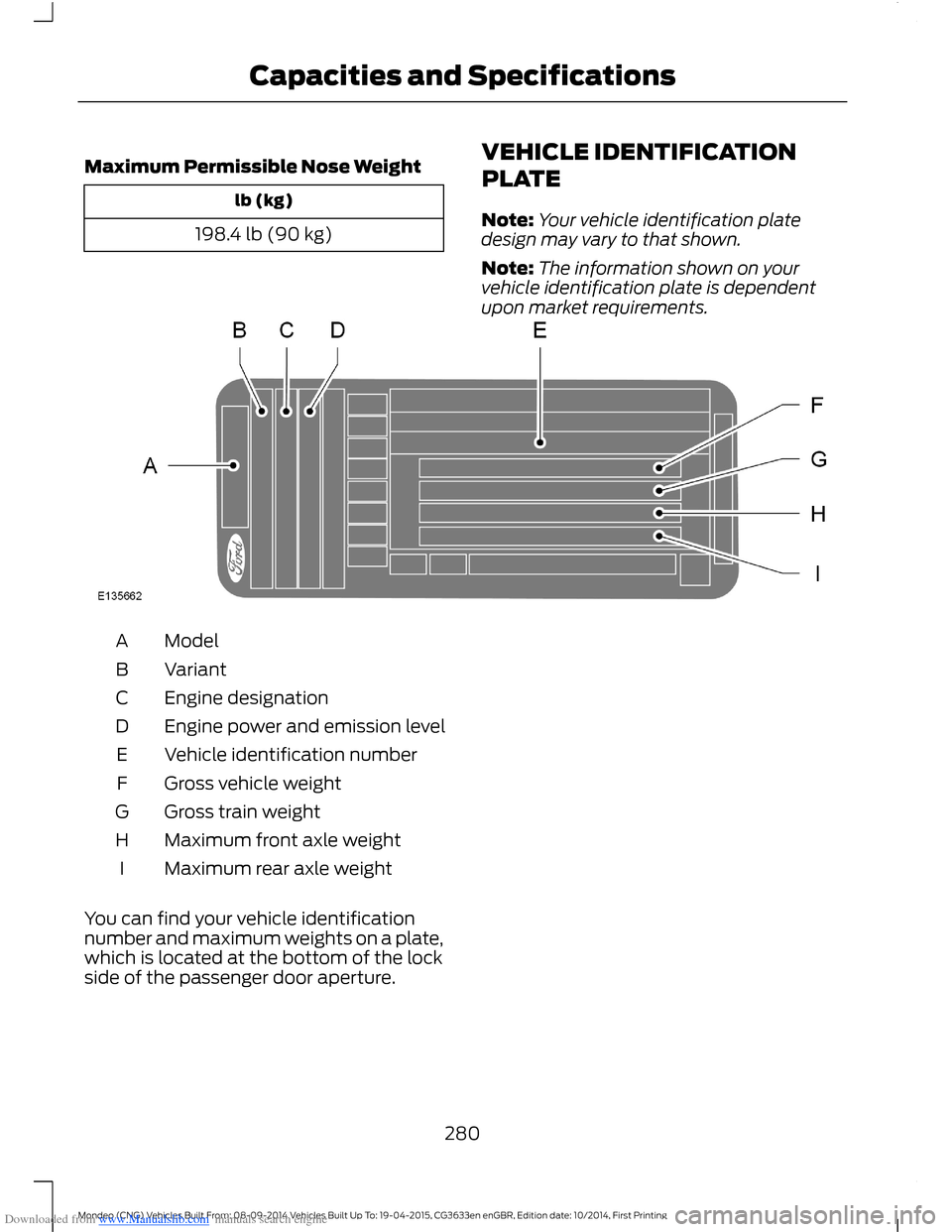
Note:Your vehicle identification platedesign may vary to that shown.
Note:The information shown on yourvehicle identification plate is dependentupon market requirements.
ModelA
VariantB
Engine designationC
Engine power and emission levelD
Vehicle identification numberE
Gross vehicle weightF
Gross train weightG
Maximum front axle weightH
Maximum rear axle weightI
You can find your vehicle identificationnumber and maximum weights on a plate,which is located at the bottom of the lockside of the passenger door aperture.
280Mondeo (CNG) Vehicles Built From: 08-09-2014 Vehicles Built Up To: 19-04-2015, CG3633en enGBR, Edition date: 10/2014, First PrintingCapacities and Specifications
Page 283 of 446
Downloaded from www.Manualslib.com manuals search engine VEHICLE IDENTIFICATION
NUMBER
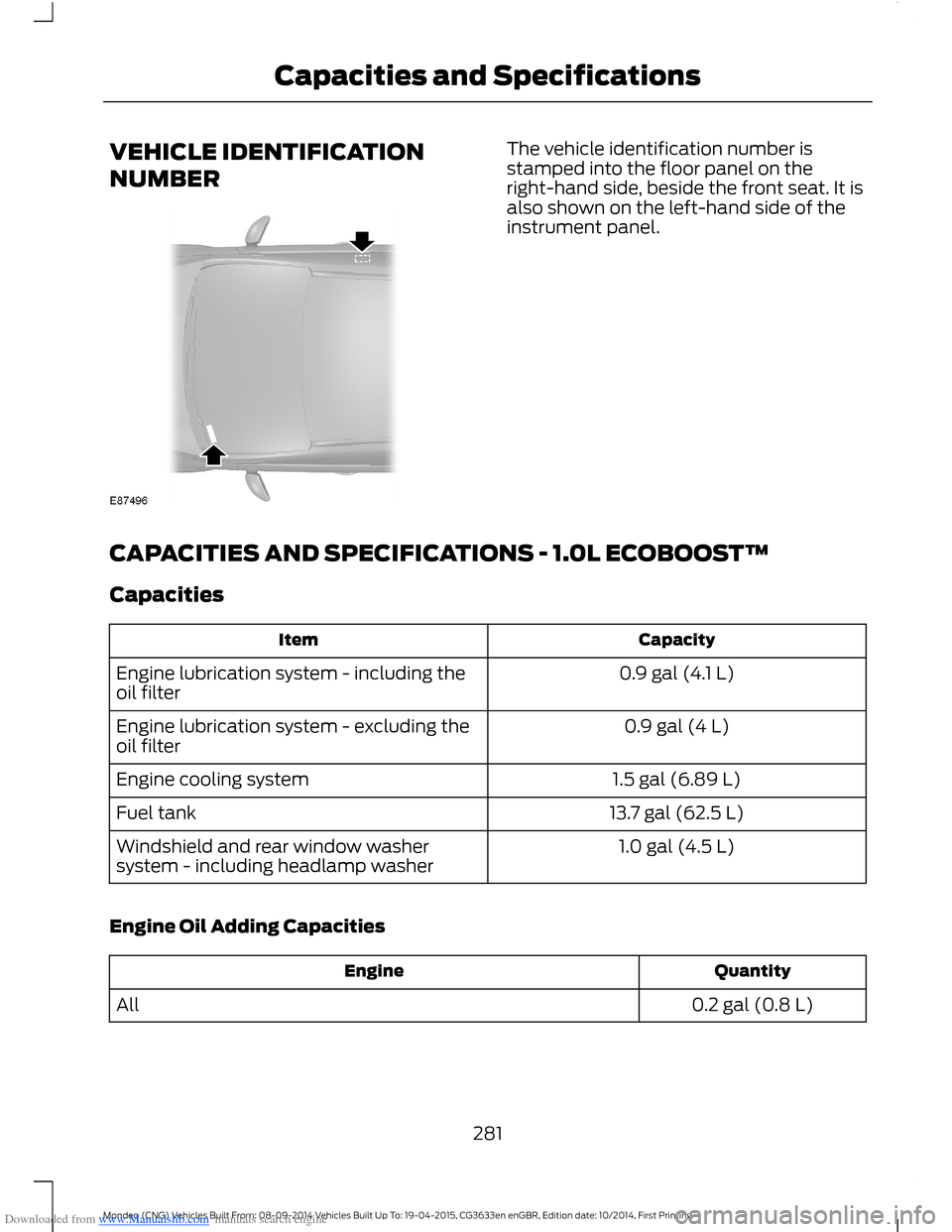
The vehicle identification number isstamped into the floor panel on theright-hand side, beside the front seat. It isalso shown on the left-hand side of theinstrument panel.
CAPACITIES AND SPECIFICATIONS - 1.0L ECOBOOST™
Capacities
CapacityItem
0.9 gal (4.1 L)Engine lubrication system - including theoil filter
0.9 gal (4 L)Engine lubrication system - excluding theoil filter
1.5 gal (6.89 L)Engine cooling system
13.7 gal (62.5 L)Fuel tank
1.0 gal (4.5 L)Windshield and rear window washersystem - including headlamp washer
Engine Oil Adding Capacities
QuantityEngine
0.2 gal (0.8 L)All
281Mondeo (CNG) Vehicles Built From: 08-09-2014 Vehicles Built Up To: 19-04-2015, CG3633en enGBR, Edition date: 10/2014, First PrintingCapacities and Specifications
Page 294 of 446
Downloaded from www.Manualslib.com manuals search engine GENERAL INFORMATION
Radio Frequencies and Reception Factors
Radio reception factors
The further you travel away from an FM station, the weakerthe signal and the weaker the reception.Distance and Strength
Hills, mountains, tall buildings, bridges, tunnels, freewayoverpasses, parking garages, dense tree foliage andthunderstorms can interfere with the reception.
Terrain
When you pass near a radio transmission tower, a strongersignal can override a weaker signal and can cause interfer-ence in the audio system.
Station overload
CD and CD Player Information
Note:CD units play commercially pressed4.75-inch (12 centimeter) audio compactdiscs only. Due to technical incompatibility,certain recordable and re-recordablecompact discs may not function correctlywhen used in Ford CD players.
Note:Do not insert CDs with homemadepaper (adhesive) labels into the CD playeras the label may peel and cause the CD tobecome jammed. You should use apermanent felt tip marker rather thanadhesive labels on your homemade CDs.Ballpoint pens may damage CDs. Pleasecontact an authorized dealer for furtherinformation.
Note:Do not use any irregularly shapeddiscs or discs with a scratch protection filmattached.
Always handle discs by their edges only.Clean the disc with an approved CDcleaner only. Wipe it from the center of thedisc toward the edge. Do not clean in acircular motion.
Do not expose discs to direct sunlight orheat sources for extended periods.
MP3 and WMA Track and FolderStructure
Audio systems capable of recognizing andplaying MP3 and WMA individual tracksand folder structures work as follows:
•There are two different modes for MP3and WMA disc playback: MP3 andWMA track mode (system default) andMP3 and WMA folder mode.
•MP3 and WMA track mode ignores anyfolder structure on the MP3 and WMAdisc. The player numbers each MP3and WMA track on the disc (noted bythe MP3 or WMA file extension) fromT001 to a maximum of T255. Themaximum number of playable MP3 andWMA files may be less depending onthe structure of the CD and exactmodel of radio present.
292Mondeo (CNG) Vehicles Built From: 08-09-2014 Vehicles Built Up To: 19-04-2015, CG3633en enGBR, Edition date: 10/2014, First PrintingAudio System
Page 295 of 446
Downloaded from www.Manualslib.com manuals search engine •MP3 and WMA folder mode representsa folder structure consisting of onelevel of folders. The CD player numbersall MP3 and WMA tracks on the disc(noted by the MP3 or WMA fileextension) and all folders containingMP3 and WMA files, from F001 (folder)T001 (track) to F253 T255.
•Creating discs with only one level offolders helps with navigation throughthe disc files.
If you are burning your own MP3 and WMAdiscs, it is important to understand howthe system reads the structures you create.While various files may be present, (fileswith extensions other than MP3 andWMA), only files with the MP3 and WMAextension are played; other files areignored by the system. This enables you touse the same MP3 and WMA disc for avariety of tasks on your work computer,home computer and your in-vehiclesystem.
In track mode, the system displays andplays the structure as if it were only onelevel deep (all MP3 and WMA files play,regardless of being in a specific folder). Infolder mode, the system only plays theMP3 and WMA files in the current folder.
AUDIO UNIT
WARNING
Driving while distracted can result inloss of vehicle control, crash andinjury. We strongly recommend thatyou use extreme caution when using anydevice that may take your focus off theroad. Your primary responsibility is the safeoperation of your vehicle. We recommendagainst the use of any hand-held devicewhile driving and encourage the use ofvoice-operated systems when possible.Make sure you are aware of all applicablelocal laws that may affect the use ofelectronic devices while driving.
Note:Depending on your vehicle optionpackage, your system may look differentfrom what you see here.
Note:Some features, such as Sirius satelliteradio, may not be available in your location.Check with an authorized dealer.
293Mondeo (CNG) Vehicles Built From: 08-09-2014 Vehicles Built Up To: 19-04-2015, CG3633en enGBR, Edition date: 10/2014, First PrintingAudio System
Page 296 of 446
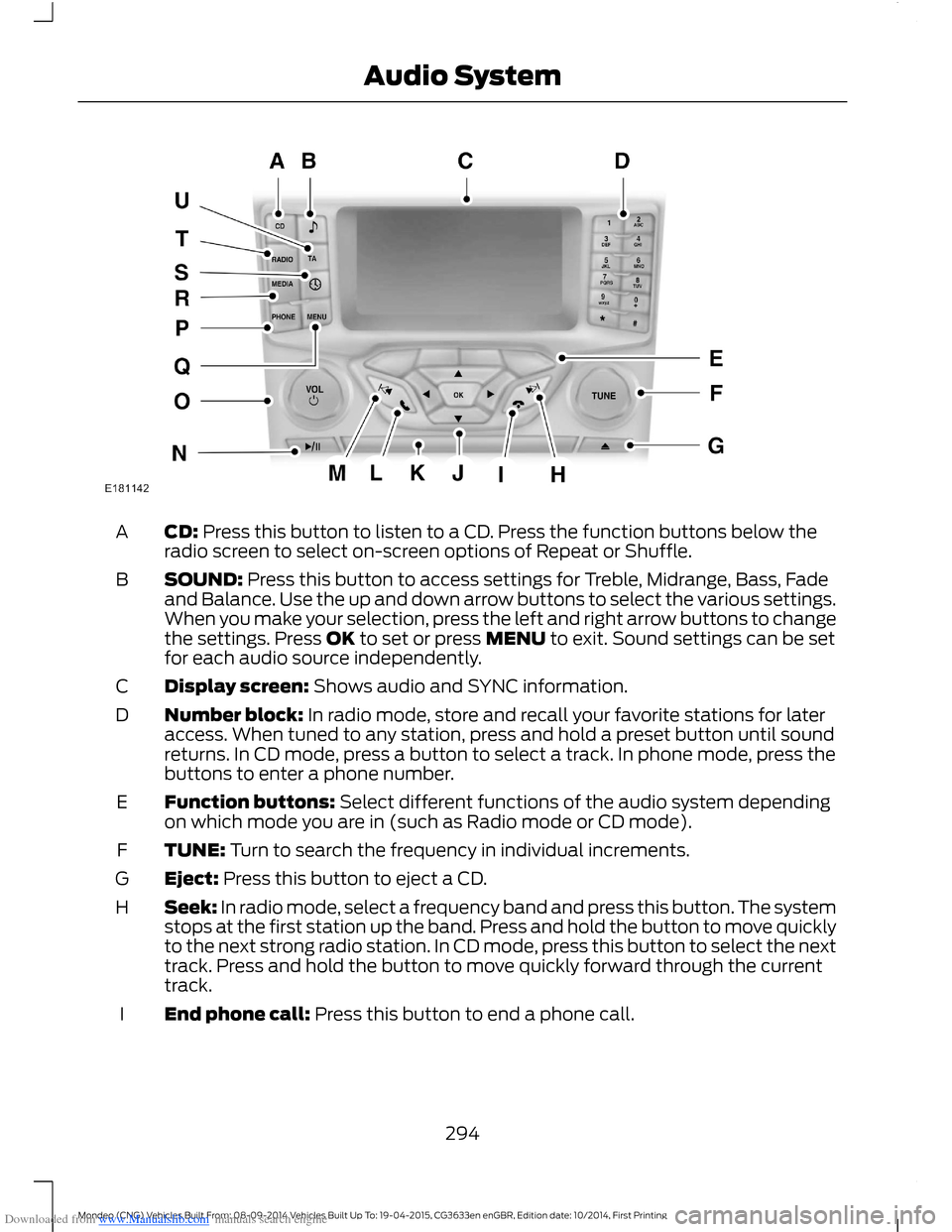
Downloaded from www.Manualslib.com manuals search engine CD: Press this button to listen to a CD. Press the function buttons below theradio screen to select on-screen options of Repeat or Shuffle.A
SOUND: Press this button to access settings for Treble, Midrange, Bass, Fadeand Balance. Use the up and down arrow buttons to select the various settings.When you make your selection, press the left and right arrow buttons to changethe settings. Press OK to set or press MENU to exit. Sound settings can be setfor each audio source independently.
B
Display screen: Shows audio and SYNC information.C
Number block: In radio mode, store and recall your favorite stations for lateraccess. When tuned to any station, press and hold a preset button until soundreturns. In CD mode, press a button to select a track. In phone mode, press thebuttons to enter a phone number.
D
Function buttons: Select different functions of the audio system dependingon which mode you are in (such as Radio mode or CD mode).E
TUNE: Turn to search the frequency in individual increments.F
Eject: Press this button to eject a CD.G
Seek: In radio mode, select a frequency band and press this button. The systemstops at the first station up the band. Press and hold the button to move quicklyto the next strong radio station. In CD mode, press this button to select the nexttrack. Press and hold the button to move quickly forward through the currenttrack.
H
End phone call: Press this button to end a phone call.I
294Mondeo (CNG) Vehicles Built From: 08-09-2014 Vehicles Built Up To: 19-04-2015, CG3633en enGBR, Edition date: 10/2014, First PrintingAudio System
Page 311 of 446
Downloaded from www.Manualslib.com manuals search engine Changing the Voice Settings
You can change the voice settings using
the information and entertainment display.
Press the MENU button.
MessageAction
SYNC-Settings1
Voice settings2
USING SYNC™ WITH YOUR
PHONE
Hands-free calling is one of the mainfeatures of SYNC. While the systemsupports a variety of features, many aredependent on your cell phone'sfunctionality.
At a minimum, most cell phones withBluetooth wireless technology support thefollowing functions:
•Answering an incoming call.
•Ending a call.
•Using privacy mode.
•Dialing a number.
•Redialing.
•Call waiting notification.
•Caller ID.
Other features such as text messagingusing Bluetooth and automatic phonebookdownload are cell phone dependentfeatures. To check your cell phone'scompatibility, refer to your device's manualor visit the regional Ford website.
Pairing a Cell Phone For the FirstTime
Wirelessly pairing your cell phone with thesystem allows you to make and receivehands-free calls.
Note:You must switch the ignition andradio on.
Note:To scroll through the menus, pressthe up or down arrows on your audio system.
1.Make sure the Bluetooth feature onyour cell phone is switched on beforestarting the search. Refer to yourdevice's manual if necessary.
2.Press the PHONE button. When theaudio display indicates that no phonesare paired, select the option to add.
3.When a message to begin pairingappears in the audio display, search forSYNC on your cell phone to start thepairing process.
4.Select SYNC on your cell phone.
5.Wait until the PIN appears on thephone display. Compare the PIN on thephone with the PIN shown in the audiodisplay and accept the request on thephone and the vehicle display. Thedisplay indicates when the pairing issuccessful.
Note:In some cases the phone will requestto enter a PIN. Enter the six-digit PINprovided by the system in the audio display.The display indicates when the pairing issuccessful.
Depending on your cell phone's capabilityand your market, the system may promptyou with questions such as setting thecurrent cell phone as the primary cellphone (the cell phone the systemautomatically tries to connect with firstwhen you switch the ignition on) ordownloading your phonebook.
309Mondeo (CNG) Vehicles Built From: 08-09-2014 Vehicles Built Up To: 19-04-2015, CG3633en enGBR, Edition date: 10/2014, First PrintingSYNC™
Page 312 of 446
Downloaded from www.Manualslib.com manuals search engine The information display mayshow your cell phone's batterycharge level and signal strength.
Pairing Subsequent Cell Phones
Wirelessly pairing your cell phone with thesystem allows you to make and receivehands-free calls.
Note:You must switch the ignition andradio on.
Note:To scroll through the menus, pressthe up or down arrows on your audio system.
1.Make sure the Bluetooth feature onyour cell phone is switched on beforestarting the search. Refer to yourdevice's manual if necessary.
2.Press the PHONE button.
3.Select the option for Bluetooth devices.
4.Press the OK button.
5.Select the option to add. This startsthe pairing process.
6.When a message to begin pairingappears in the audio display, search forSYNC on your device to start thepairing process.
7.Select SYNC on your cell phone.
8.Wait until the PIN appears on thephone display. Compare the PIN on thephone with the PIN shown in the audiodisplay and accept the request on thephone and the vehicle display. Thedisplay indicates when the pairing issuccessful.
Note:In some cases the phone will requestto enter a PIN. Enter the six-digit PINprovided by the system in the audio display.The display indicates when the pairing issuccessful.
The system may prompt you withquestions such as setting the current cellphone as the primary cell phone ordownloading your phonebook.
Cell Phone Voice Commands
Press the voice button and whenprompted say either:
ActionCommand
You do not need to say "phone" prior to these commands.call (someone | [[a]name])
You do not need to say "phone" prior to these commands.Call
You do not need to say "phone" prior to these commands.Call
You do not need to say "phone" prior to these commands.Call
You do not need to say "phone" prior to these commands.Call
You do not need to say "phone" prior to these commands.Call
You do not need to say "phone" prior to these commands.dial [[a] number]
These commands are only available during a call.([go to] privacy [on] |transfer to phone |handsfree off)
310Mondeo (CNG) Vehicles Built From: 08-09-2014 Vehicles Built Up To: 19-04-2015, CG3633en enGBR, Edition date: 10/2014, First PrintingSYNC™
Page 313 of 446
![FORD MONDEO 2014 4.G Owners Manual Downloaded from www.Manualslib.com manuals search engine ActionCommand
These commands are only available during a call.(hold call [on] | (put |place) call on hold)
These commands are only available du](/img/11/5483/w960_5483-312.png "FORD MONDEO 2014 4.G Owners Manual Downloaded from www.Manualslib.com manuals search engine ActionCommand
These commands are only available during a call.(hold call [on] | (put |place) call on hold)
These commands are only available du")
Downloaded from www.Manualslib.com manuals search engine ActionCommand
These commands are only available during a call.(hold call [on] | (put |place) call on hold)
These commands are only available during a call.(hold call off | take calloff hold)
These commands are only available during a call.mute [call] [on]
These commands are only available during a call.(mute [call] off | Unmute[call])
These commands are only available during a call.join (call | calls)
Phonebook Commands
When you ask the system to access aphonebook name or number the requestedinformation appears in the audio display.
Press the voice button and when promptedsay either:
ActionCommand
To call the contact.call (someone | [[a]name])
112 (one-one-two), 700 (seven hundred) etc.dial [[a] number]
Pound
0 (zero) to 9 (nine)Number
Asterisk
Deletes all entered digitsclear
Deletes the last set of entered digits.(delete | correct)
Plus
Star
Note:To exit dial mode, press and hold the phone button or any button on the audio unit.
Menu Commands
Press the voice button and when promptedsay either:
311Mondeo (CNG) Vehicles Built From: 08-09-2014 Vehicles Built Up To: 19-04-2015, CG3633en enGBR, Edition date: 10/2014, First PrintingSYNC™
Page 314 of 446
![FORD MONDEO 2014 4.G Owners Manual Downloaded from www.Manualslib.com manuals search engine Command
(turn ringer on | silent mode off)
(turn ringer off | silent mode [on])
Words in parentheses or brackets are optional and do not have t](/img/11/5483/w960_5483-313.png "FORD MONDEO 2014 4.G Owners Manual Downloaded from www.Manualslib.com manuals search engine Command
(turn ringer on | silent mode off)
(turn ringer off | silent mode [on])
Words in parentheses or brackets are optional and do not have t")
Downloaded from www.Manualslib.com manuals search engine Command
(turn ringer on | silent mode off)
(turn ringer off | silent mode [on])
Words in parentheses or brackets are optional and do not have to be spoken for thesystem to understand the command.
Making a Call
Press the voice button and when promptedsay either:
ActionCommand
call (someone | [[a]name])
dial [[a]number]Followed by a number. When the systemconfirms the number say:dial [[a] number]
To erase the last spoken digit say:
ActionCommand
Or press the left arrow button on the audio unit.(delete | correct)
To erase all spoken digits say:
ActionCommand
Or press and hold the left arrow button on the audio unit.clear
To end the call, press the end call buttonon the steering wheel or select the end calloption in the audio display and press OK.
312Mondeo (CNG) Vehicles Built From: 08-09-2014 Vehicles Built Up To: 19-04-2015, CG3633en enGBR, Edition date: 10/2014, First PrintingSYNC™
Page 315 of 446
Downloaded from www.Manualslib.com manuals search engine Receiving a Call
When receiving a call, you can:
•Answer the call by pressing the acceptcall button on the steering wheel or byselecting the accept call option in theaudio display. Press the OK button.
•Reject the call by pressing the rejectcall button on the steering wheel or byselecting the reject call option in theaudio display. Press the OK button.
•Ignore the call by doing nothing.
Cell Phone Options During anActive Call
During an active call, you have extra menufeatures which become available, forexample putting a call on hold.
To access this menu, choose one of theoptions available at the bottom of theaudio display or select the option for more.
Description and ActionMessage
Turn your vehicle's microphone off. To turn the microphoneon, select the option again.Mic. off
Switch a call from an active hands-free environment to yourcell phone for a more private conversation. When selected,the audio display will indicate the call is private.
Privacy
Put an active call on hold. When selected, the audio displaywill indicate the call is on hold.Hold
Enter numbers using the audio system numeric keypad, forexample numbers for passwords.Dial a number
Join two separate calls. The system supports a maximum ofthree callers on a multi-party or conference call.Join calls
1.Select the option for more.
2.Access the desired contact through the system or usevoice commands to place the second call. Once activelyin the second call, select the option for more.
3.Scroll to the option to join calls and press the OK button.
Access your phonebook contacts.Phonebook
1.Select the option for more.
2.Scroll to the option for phonebook and press the OKbutton.
3.Scroll through your phonebook contacts.
313Mondeo (CNG) Vehicles Built From: 08-09-2014 Vehicles Built Up To: 19-04-2015, CG3633en enGBR, Edition date: 10/2014, First PrintingSYNC™