light FORD MUSTANG 2008 5.G User Guide
[x] Cancel search | Manufacturer: FORD, Model Year: 2008, Model line: MUSTANG, Model: FORD MUSTANG 2008 5.GPages: 280, PDF Size: 2.69 MB
Page 24 of 280
3.Menu: Press to cycle through the
following modes:
BASS: Press
//SEEK, SEEKto adjust the bass setting.
Press OK to close and return to the main menu.
TREBLE: Press
//SEEK, SEEKto adjust the treble
setting. Press OK to close and return to the main menu.
BALANCE: Press
//SEEK, SEEKto adjust the audio
between the left and right speakers. Press OK to close and return to the
main menu.
FADE: Press
//SEEK, SEEKto adjust the audio between
the front and rear speakers. Press OK to close and return to the main
menu.
SSV (Speed sensitive volume): Radio volume changes automatically
and slightly with vehicle speed to compensate for road and wind noise.
Recommended level is 1–3. Level 0 turns the feature off and level 7 is
the maximum setting.
Press MENU to access and use
//SEEK, SEEKto adjust
the volume setting. The level will appear in the display. Press OK to
close and return to the main menu.
RBDS : Available only in FM mode. This feature allows you to search
RBDS-equipped stations for a certain category of music format:
CLASSIC, COUNTRY, INFORM, JAZZ/RB, ROCK, etc.
To activate, press MENU repeatedly until RBDS (ON/OFF) appears in
the display. Use
/to toggle RBDS ON/OFF. When RBDS is OFF,
you will not be able to search for RBDS equipped stations or view the
station name or type.
To search for specific RBDS music categories: When the desired
category appears in the display, press
/to find the desired type,
then press and release or press and hold SCAN to begin the search.
To view the station name or type: When the desired category appears
in the display, press TEXT/SCAN to toggle between displaying the station
type (COUNTRY, ROCK, etc.) or the station name (WYCD, WXYZ, etc.).
2008 05+ Mustang (197)
Owners Guide (post-2002-fmt)
USA (fus)
Entertainment Systems
24
Page 31 of 280
AUTOSET:Allows you to set the strongest local radio stations without
losing your original manually set preset stations for AM/FM1/FM2. Press
MENU to access. Use
/to set or turn on/off.
When the six strongest stations are filled, the station stored in preset 1
will begin playing. If there are less than six strong stations, the system
will store the last one in the remaining presets. You can then access the
stations by pressing the memory presets. To disengage, press MENU to
access and press
/to turn the feature off.
BASS:Press MENU to access the bass setting. Use
/to adjust.
TREB (Treble):Press MENU to reach the treble setting. Use
/to
adjust.
BAL (Balance):Press MENU to reach the balance setting. Use
/
to adjust the audio between the left (L) and right (R) speakers.
FADE:Press MENU to reach the fade setting. Use
/to adjust the
audio between the back (B) and front (F) speakers.
OCCUPANCY mode:Use
/select and optimize sound for ALL
SEATS, DRIVERS SEAT, REAR SEATS or CONVERTIBLE (if equipped).
SPEEDVOL (Speed sensitive volume):Press MENU to reach the
SPEEDVOL setting. Radio volume automatically gets louder with
increasing vehicle speed to compensate for road and wind noise.
Use
/to adjust.
The default setting isoff;increasing your vehicle speed will not change
the volume level.
Adjust1–7:Increasing this setting from 1 (lowest setting) to 7 (highest
setting) allows the radio volume to automatically change slightly with
vehicle speed to compensate for road and wind noise.
Recommended level is1–3;SPEED OFF turns the feature off and level 7
is the maximum setting.
RBDS: Available only in FM mode. This feature allows you to search
RBDS-equipped stations for a certain category of music format:
CLASSIC, COUNTRY, INFORM, JAZZ/RB, ROCK, etc.
To activate,press MENU repeatedly until RBDS (ON/OFF) appears in
the display. Use
/to toggle RBDS ON/OFF. When RBDS is OFF,
you will not be able to search for RBDS equipped stations or view the
station name or type.
2008 05+ Mustang(197)
Owners Guide (post-2002-fmt)
USA(fus)
Entertainment Systems
31
Page 36 of 280
Troubleshooting:
1. Do not connect the audio input jack to a line level output. Line level
outputs are intended for connection to a home stereo and are not
compatible with the AIJ. The AIJ will only work correctly with devices
that have a headphone output with a volume control.
2. Do not set the portable music player’s volume level higher than is
necessary to match the volume of the CD or FM radio in your audio
system as this will cause distortion and will reduce sound quality. Many
portable music players have different output levels, so not all players
should be set at the same levels. Some players will sound best at full
volume and others will need to be set at a lower volume.
3. If the music sounds distorted at lower listening levels, turn the
portable music player volume down. If the problems persists, replace or
recharge the batteries in the portable music player.
4. The portable music player must be controlled in the same manner
when it is used with headphones as the AIJ does not provide control
(play, pause, etc.) over the attached portable music player.
5. For safety reasons, connecting or adjusting the settings on your
portable music player should not be attempted while the vehicle is
moving. Also, the portable music player should be stored in a secure
location, such as the center console or the glove box, when the vehicle is
in motion. The audio extension cable must be long enough to allow the
portable music player to be safely stored while the vehicle is in motion.
GENERAL AUDIO INFORMATION
Radio frequencies:
AM and FM frequencies are established by the Federal Communications
Commission (FCC) and the Canadian Radio and Telecommunications
Commission (CRTC). Those frequencies are:
AM - 530, 540–1600, 1710 kHz
FM- 87.7, 87.9–107.7, 107.9 MHz
Radio reception factors:
There are three factors that can affect radio reception:
•Distance/strength: The further you travel from a station, the weaker
the signal and the weaker the reception.
•Terrain: Hills, mountains, tall buildings, power lines, electric fences,
traffic lights and thunderstorms can interfere with your reception.
•Station overload: When you pass a broadcast tower, a stronger signal
may overtake a weaker one and play while the weak station frequency
is displayed.
2008 05+ Mustang(197)
Owners Guide (post-2002-fmt)
USA(fus)
Entertainment Systems
36
Page 37 of 280
CD player care:
Do:
•Handle discs by their edges only. Never touch the playing surface.
•Inspect discs before playing. Clean only with an approved CD cleaner
and wipe from the center out.
Don’t:
•Expose discs to direct sunlight or heat sources for extended periods
of time.
•Insert more than one disc into each slot of the CD changer magazine.
•Clean using a circular motion.
CD units are designed to play commercially pressed 4.75 in
(12 cm) audio compact discs only. Due to technical
incompatibility, certain recordable and re-recordable compact
discs may not function correctly when used in Ford CD players.
Irregular shaped CDs, CDs with a scratch protection film
attached, and CDs with homemade paper (adhesive) labels should
not be inserted into the CD player. The label may peel and cause
the CD to become jammed. It is recommended that homemade
CDs be identified with permanent felt tip marker rather than
adhesive labels. Ball point pens may damage CDs. Please contact
your authorized dealer for further information.
Audio system warranty and service:
Refer to theWarranty Guidefor audio system warranty information. If
service is necessary, see your dealer or qualified technician.
MP3 track and folder structure
Your MP3 system recognizes MP3 individual tracks and folder structure
as follows:
•There are two different modes for MP3 disc playback: MP3 track mode
(system default) and MP3 folder mode.
•MP3 track mode ignores any folder structure present on the MP3 disc.
The player sequentially numbers each MP3 track on the disc (denoted
by the .mp3 file extension) from T001 to a maximum of T255. (The
maximum will vary depending on the amount of data.)
•MP3 folder mode represents a folder structure consisting of one level
of folders. The CD player sequentially numbers all MP3 tracks on the
disc (denoted by the .mp3 extension) and all folders containing MP3
files, from 01–01 to 99–99. The first two digits denote the folder
number and the last two digits denote the track number within that
folder.
2008 05+ Mustang(197)
Owners Guide (post-2002-fmt)
USA(fus)
Entertainment Systems
37
Page 43 of 280
4.Passenger heated seat:Press to activate or deactivate the
passenger side heated seat.Note:The passenger heated seat will turn
off automatically after 10 minutes of use.
5.Rear defroster (R
):Press to activate/deactivate the rear window
defroster. Refer toRear window defrosterlater in this section for more
information.
6.
Driver heated seat:Press to activate or deactive on the driver
side heated seat.Note:The driver heated seat will turn off automatically
after 10 minutes of use.
7.A/C:Press to activate/deactivate air conditioning. Use with
recirculated air to improve cooling performance. Engages automatically
in MAX A/C,
(defrost) and(floor/defrost).
8.Fan speed adjustment:Controls the volume of air circulated in the
vehicle.
Operating tips
•To reduce fog build up on the windshield during humid weather, place
the air flow selector in the
(defrost) position.
•To reduce humidity build up inside the vehicle, do not drive with the
airflow selector in the O (OFF) position or with recirculated air
engaged.
•Do not put objects under the front seats that will interfere with the
airflow to the back seats.
•Remove any snow, ice or leaves from the air intake area at the base of
the windshield.
•To improve the A/C cool down, drive with the windows slightly open
for 2-3 minutes after start up or until the vehicle has been “aired out.”
For maximum cooling performance in MAX A/C mode:
1. Move temperature control to the coolest setting.
2. Set the fan to the highest speed initially, then adjust to maintain
comfort.
For maximum cooling performance in panel or panel/floor modes:
1. Move temperature control to the coolest setting.
2. Select A/C and recirculated air (
) to provide colder airflow.
3. Set the fan to the highest speed initially, then adjust to maintain
comfort.
2008 05+ Mustang(197)
Owners Guide (post-2002-fmt)
USA(fus)
Climate Controls
43
Page 46 of 280

HEADLAMP CONTROL
Turns the lamps off.
Turns on the parking lamps,
instrument panel lamps, license
plate lamps and tail lamps.
Turns the headlamps on.
Foglamp control (if equipped)
The foglamps can be turned on
when the ignition is in the ON
position, the headlamp control is in
the
orposition and the
high beams are not on.
Pull the headlamp control towards
you to turn on the foglamps. The
indicator light under the foglamp
symbol will illuminate.
High beams
Pull the lever towards you, to the
second detent, to activate. Pull the
lever towards you again to
deactivate.
Note:Vehicles equipped with HID
headlamps will hear an audible click
when activating this feature.
P
2008 05+ Mustang(197)
Owners Guide (post-2002-fmt)
USA(fus)
Lights
46
Page 47 of 280

Flash to pass
Pull toward you, to the first detent,
to activate and release to deactivate.
Note:Vehicles equipped with HID
headlamps will hear an audible click
when activating this feature.
Daytime running lamps (DRL) (if equipped)
Turns the headlamps on with a reduced output. When activated, the DRL
telltale is illuminated.
To activate:
•the ignition must be in the ON position,
•the headlamp control is in the OFF or parking lamp position and
•the parking brake must be disengaged.
Always remember to turn on your headlamps at dusk or during
inclement weather. The Daytime Running Lamp (DRL) system
does not activate the tail lamps and generally may not provide
adequate lighting during these conditions. Failure to activate your
headlamps under these conditions may result in a collision.
PANEL DIMMER CONTROL
Use to adjust the brightness of the
instrument panel and all applicable
switches in the vehicle during
headlamp and parklamp operation.
Move the control to the full upright
position, past detent, to turn on the
interior lamps.
Note:If the battery is disconnected,
discharged, or a new battery is
installed, the dimmer switch
requires re-calibration. Rotate the dimmer switch from the full dim
position to the full Dome/ON position to reset. This will ensure that your
displays are visible under all lighting conditions.
2008 05+ Mustang(197)
Owners Guide (post-2002-fmt)
USA(fus)
Lights
47
Page 48 of 280
AIMING THE HEADLAMPS
The headlamps on your vehicle are properly aimed at the assembly plant.
If your vehicle has been in an accident the alignment of your headlamps
should be checked by your authorized dealer.
Vertical aim adjustment
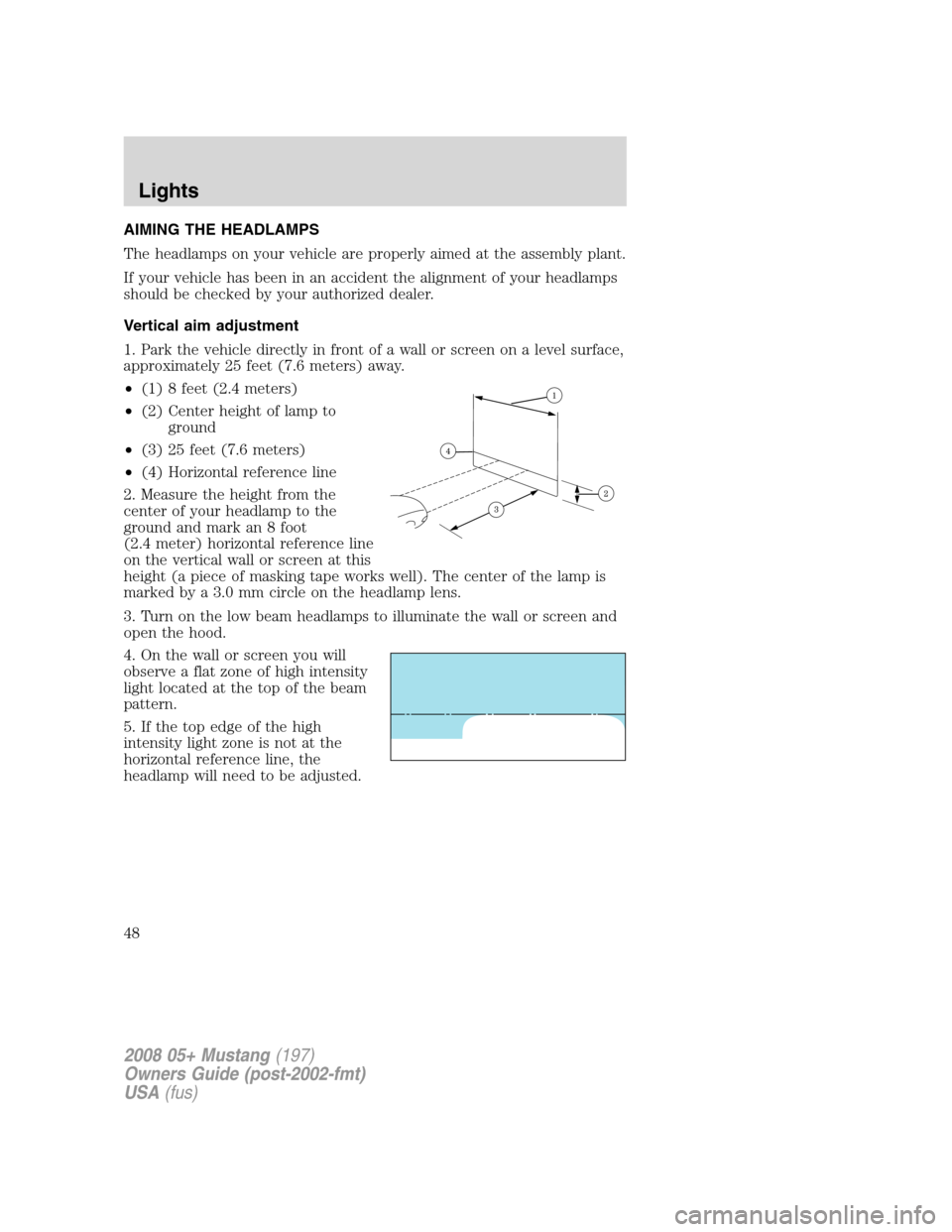
1. Park the vehicle directly in front of a wall or screen on a level surface,
approximately 25 feet (7.6 meters) away.
•(1) 8 feet (2.4 meters)
•(2) Center height of lamp to
ground
•(3) 25 feet (7.6 meters)
•(4) Horizontal reference line
2. Measure the height from the
center of your headlamp to the
ground and mark an 8 foot
(2.4 meter) horizontal reference line
on the vertical wall or screen at this
height (a piece of masking tape works well). The center of the lamp is
marked by a 3.0 mm circle on the headlamp lens.
3. Turn on the low beam headlamps to illuminate the wall or screen and
open the hood.
4. On the wall or screen you will
observe a flat zone of high intensity
light located at the top of the beam
pattern.
5. If the top edge of the high
intensity light zone is not at the
horizontal reference line, the
headlamp will need to be adjusted.
2008 05+ Mustang(197)
Owners Guide (post-2002-fmt)
USA(fus)
Lights
48
Page 49 of 280

6. Locate the vertical adjuster on
each headlamp, then usea7mm
Allen wrench or a Phillips
screwdriver to adjust the headlamp
up or down.
7. HORIZONTAL AIM IS NOT
REQUIRED FOR THIS VEHICLE
AND IS NON-ADJUSTABLE.
8. Close the hood and turn off the
lamps.
TURN SIGNAL CONTROL
•Push down to activate the left
turn signal.
•Push up to activate the right turn
signal.
The flash rate of the turn signal indicator will speed up considerably if
the Lighting Control Module detects a left or right turn lamp bulb (front
or rear) is burned out.
INTERIOR LAMPS
Map lamps
Press the controls on either side of
the lamp to turn the light on.
2008 05+ Mustang(197)
Owners Guide (post-2002-fmt)
USA(fus)
Lights
49
Page 50 of 280

Ambient/Mood lighting (if equipped)
Never adjust the ambient/mood lighting when the vehicle is
moving.
Illuminates 4 footwells and
2 cupholders with a choice of
7 colors. The ambient lighting
control switch is located on the
center console. To activate, press
and release the control switch to
cycle through the 7 color choices
plus the off state.
The lights come on whenever the ignition is in the ON or ACCESSORY
position.
BULB REPLACEMENT
Headlamp Condensation
The headlamps are vented to equalize pressure. When moist air enters
the headlamp(s) through the vents, there is a possibility that
condensation can occur. This condensation is normal and will clear
within 45 minutes of headlamp operation.
Using the right bulbs
Replacement bulbs are specified in the chart below. Headlamp bulbs
must be marked with an authorized “D.O.T.” for North America and an
“E” for Europe to ensure lamp performance, light brightness and pattern
and safe visibility. The correct bulbs will not damage the lamp assembly
or void the lamp assembly warranty and will provide quality bulb burn
time.
2008 05+ Mustang(197)
Owners Guide (post-2002-fmt)
USA(fus)
Lights
50