reset FORD MUSTANG 2010 5.G Owner's Manual
[x] Cancel search | Manufacturer: FORD, Model Year: 2010, Model line: MUSTANG, Model: FORD MUSTANG 2010 5.GPages: 318, PDF Size: 2.91 MB
Page 39 of 318
OK. The song will appear in the display for confirmation. Press OK
again and the display will read SONG DELETED. If you do not want
to delete the currently listed song, press
SEEKto select either
RETURN or CANCEL.
Note:If there are no songs presently saved, the display will read NO
SONGS.
c. DELETE ALL SONGS:Press OK to delete all song’s from the
system’s memory. The display will read ARE YOU SURE ? Press OK to
confirm deletion of all saved songs and the display will read ALL
DELETED.
Note:If there are no songs presently saved, the display will read NO
SONGS.
d. DISABLE ALERTS/ENABLE ALERTS:Press OK to
enable/disable the satellite alert status which alerts you when your
selected songs are playing on a satellite radio channel. (The system
default is disabled.) SONG ALERTS ENABLED/DISABLED will appear
in the display. The menu listing will display the opposite state. For
example, if you have chosen to enable the song alerts, the menu
listing will read DISABLE as the alerts are currently on, so your other
optionistoturnthemoff.
•CHANNEL LOCKOUT MENU-Press OK to enter the Channel
Lockout menu. Press the
SEEKto scroll through the following
options:
a. LOCK/UNLOCK THIS CHANNEL:Press OK when
LOCK/UNLOCK THIS CHANNEL is displayed and the display will read
ENTER PIN. Enter your four-digit PIN number (initial PIN is 1234)
and the system will lock/unlock the channel and CHANNEL LOCKED
or UNLOCKED will be displayed.
Note:you must be tuned to the specific channel you want to
lock/unlock when using this feature.
b. CHANGE PIN:Press OK when CHANGE PIN is displayed. The
display will read ENTER OLD PIN. Enter your current (old) PIN
number and when the system accepts your entry it will display
ENTER NEW PIN. Enter your new four-digit PIN and the system will
save the new PIN and PIN SAVED will display.
c. UNLOCK ALL CHANNELS:Press OK when UNLOCK ALL
CHANNELS is displayed and the display will read ENTER PIN. Enter
your four-digit PIN and the system will unlock all channels and the
display will read CHANNEL UNLOCKED.
d. RESET PIN:Press OK when RESET PIN is displayed. The display
will read ARE YOUR SURE. Press OK again to automatically reset the
2010 05+ Mustang(197)
Owners Guide, 1st Printing
USA(fus)
Entertainment Systems
39
Page 40 of 318
PIN number to its initial password setting (1234). PIN RESET TO
DEFAULT PIN will be displayed.
e. RETURN:Press OK when RETURN is displayed and the system
will exit back to the satellite radio menu.
Sound Adjustments
Press SOUND repeatedly to cycle
through the following features:
BASS:Press
SEEKto
adjust the level of bass.
TREBLE:Press
SEEKto adjust the level of treble.
BALANCE:Press
SEEKto adjust the audio between the left
(L) and right (R) speakers.
FADE:Press
SEEKto adjust the audio between the back (B)
and front (F) speakers.
SPEED COMPENSATED VOLUME:With this feature on, radio volume
automatically gets louder with increasing vehicle speed to compensate
for road and wind noise.
The default setting isoff.
Use
SEEKto adjust between SPEED OFF and levels1–7:
Increasing the level from 1 (lowest setting) to 7 (highest setting) allows
the radio volume to automatically change slightly with vehicle speed to
compensate for road and wind noise.
Recommended level is1–3;SPEED OFF turns the feature off and level 7
is the maximum setting.
DSP MODE (if equipped):Press
SEEKto choose between
STEREO SURROUND mode and STEREO mode.
2010 05+ Mustang(197)
Owners Guide, 1st Printing
USA(fus)
Entertainment Systems
40
Page 48 of 318
•Terrain: Hills, mountains, tall buildings, bridges, tunnels, freeway
overpasses, parking garages, dense tree foliage and thunderstorms can
interfere with your reception.
•Station overload: When you pass a ground based broadcast repeating
tower, a stronger signal may overtake a weaker one and result in an
audio mute.
Unlike AM/FM audible static, you will hear an audio mute when there is
a satellite radio signal interference. Your radio display may display NO
SIGNAL to indicate the interference.
SIRIUS satellite radio service:SIRIUS Satellite Radio is a subscription
based satellite radio service that broadcasts music, sports, news and
entertainment programming. A service fee is required in order to receive
SIRIUS service. Vehicles that are equipped with a factory installed
SIRIUS Satellite Radio system include:
•Hardware and limited subscription term, which begins on the date of
sale or lease of the vehicle.
•Use of online media player providing access to all SIRIUS music
channels over the internet using any computer connected to the
internet (U.S. customers only)
For information on extended subscription terms, contact SIRIUS at
1–888–539–7474.
Note:SIRIUS reserves the unrestricted right to change, rearrange, add
or delete programming including canceling, moving or adding particular
channels, and its prices, at any time, with or without notice to you. Ford
Motor Company shall not be responsible for any such programming
changes.
Satellite Radio Electronic Serial Number (ESN):This 12-digit
Satellite Serial Number is needed to activate, modify or track your
satellite radio account. You will need this number when communicating
with SIRIUS. While in Satellite Radio mode, you can view this number on
the radio display by pressing the SIRIUS and Preset 1 buttons at the
same time.
2010 05+ Mustang(197)
Owners Guide, 1st Printing
USA(fus)
Entertainment Systems
48
Page 49 of 318
Radio Display Condition Action Required
ACQUIRING Radio requires more
than two seconds to
produce audio for
the selected
channel.No action required. This
message should disappear
shortly.
SAT FAULT Internal module or
system failure
present.If this message does not
clear within a short period
of time, or with an ignition
key cycle, your receiver
may have a fault. See your
authorized dealer for
service.
INVALID CHNL Channel no longer
available.This previously available
channel is no longer
available. Tune to another
channel. If the channel was
one of your presets, you
may choose another
channel for that preset
button.
UNSUBSCRIBED Subscription not
available for this
channel.Contact SIRIUS at
1–888–539–7474 to
subscribe to the channel or
tune to another channel.
NO TEXT Artist information
not available.Artist information not
available at this time on
this channel. The system is
working properly.
NO TEXT Song title
information not
available.Song title information not
available at this time on
this channel. The system is
working properly.
2010 05+ Mustang(197)
Owners Guide, 1st Printing
USA(fus)
Entertainment Systems
49
Page 62 of 318
Note:If the battery is disconnected, discharged, or a new battery is
installed, the dimmer switch requires re-calibration. Rotate the dimmer
switch from the full dim position to the full dome/on position to reset.
This will ensure that your displays are visible under all lighting
conditions.
AIMING THE HEADLAMPS
The headlamps on your vehicle are properly aimed at the assembly plant.
If your vehicle has been in an accident the alignment of your headlamps
should be checked by your authorized dealer.
Vertical aim adjustment
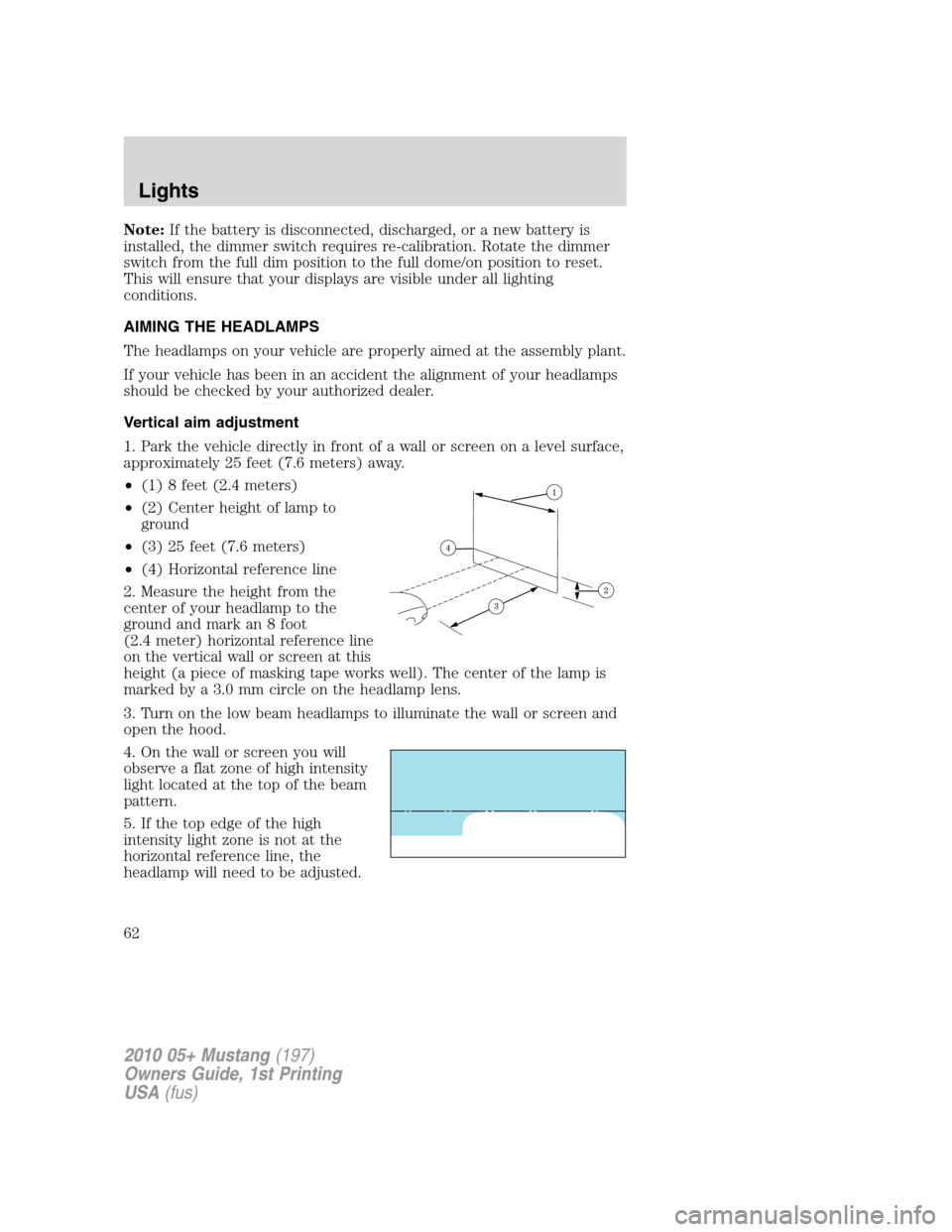
1. Park the vehicle directly in front of a wall or screen on a level surface,
approximately 25 feet (7.6 meters) away.
•(1) 8 feet (2.4 meters)
•(2) Center height of lamp to
ground
•(3) 25 feet (7.6 meters)
•(4) Horizontal reference line
2. Measure the height from the
center of your headlamp to the
ground and mark an 8 foot
(2.4 meter) horizontal reference line
on the vertical wall or screen at this
height (a piece of masking tape works well). The center of the lamp is
marked by a 3.0 mm circle on the headlamp lens.
3. Turn on the low beam headlamps to illuminate the wall or screen and
open the hood.
4. On the wall or screen you will
observe a flat zone of high intensity
light located at the top of the beam
pattern.
5. If the top edge of the high
intensity light zone is not at the
horizontal reference line, the
headlamp will need to be adjusted.
2010 05+ Mustang(197)
Owners Guide, 1st Printing
USA(fus)
Lights
62
Page 74 of 318
Compass zone adjustment
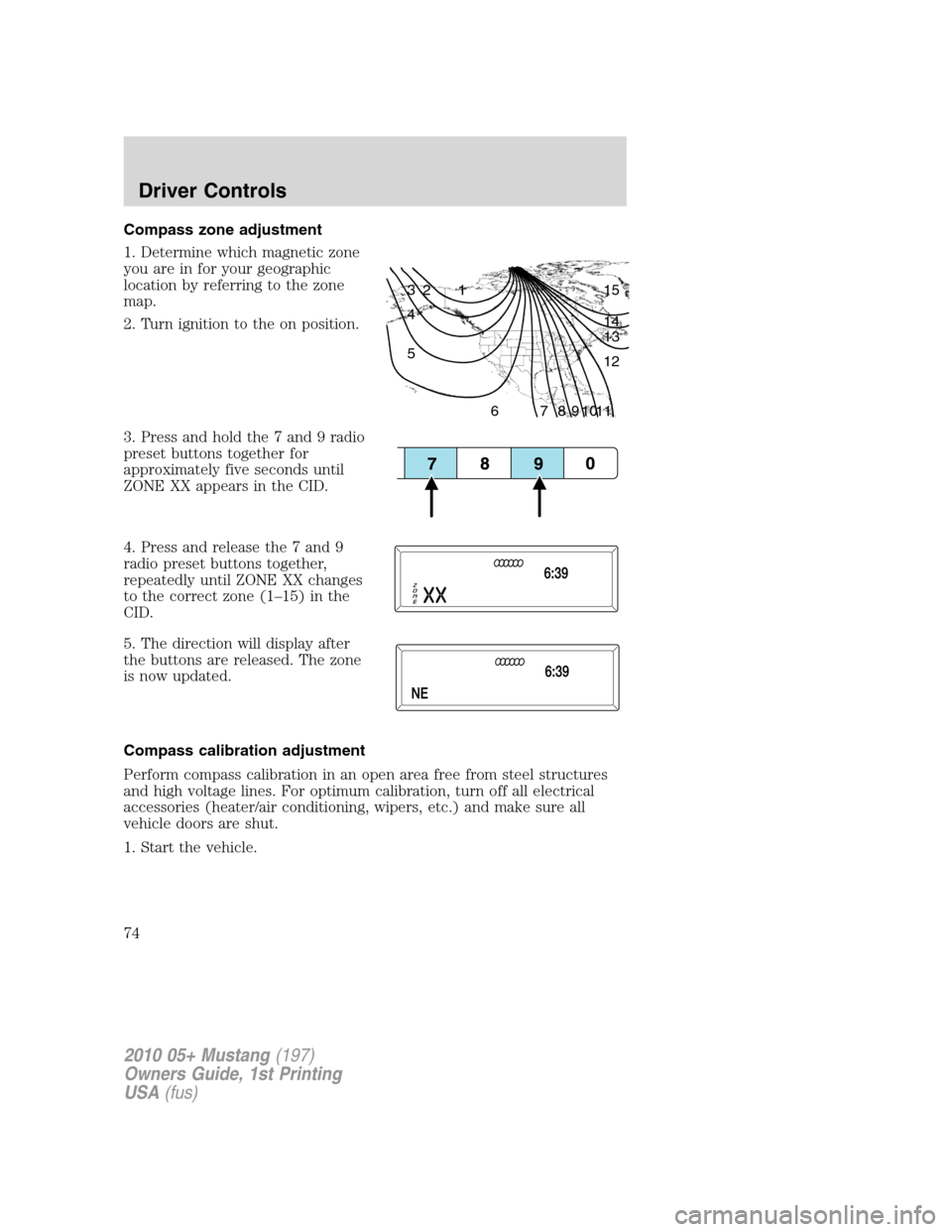
1. Determine which magnetic zone
you are in for your geographic
location by referring to the zone
map.
2. Turn ignition to the on position.
3. Press and hold the 7 and 9 radio
preset buttons together for
approximately five seconds until
ZONE XX appears in the CID.
4. Press and release the 7 and 9
radio preset buttons together,
repeatedly until ZONE XX changes
to the correct zone (1–15) in the
CID.
5. The direction will display after
the buttons are released. The zone
is now updated.
Compass calibration adjustment
Perform compass calibration in an open area free from steel structures
and high voltage lines. For optimum calibration, turn off all electrical
accessories (heater/air conditioning, wipers, etc.) and make sure all
vehicle doors are shut.
1. Start the vehicle.
1 2 3
4
5
6 7 8 9 101112 13 14 15
2010 05+ Mustang(197)
Owners Guide, 1st Printing
USA(fus)
Driver Controls
74
Page 75 of 318
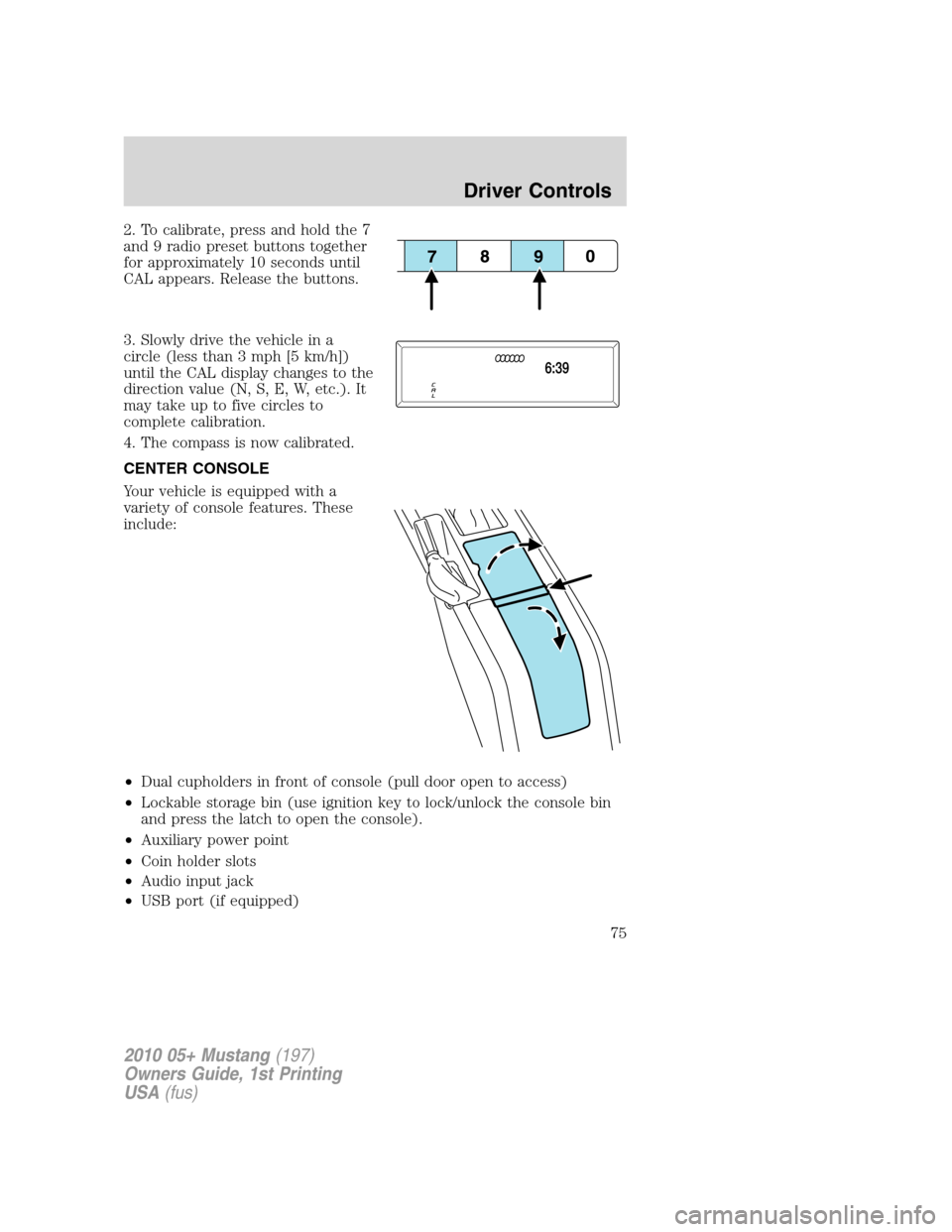
2. To calibrate, press and hold the 7
and 9 radio preset buttons together
for approximately 10 seconds until
CAL appears. Release the buttons.
3. Slowly drive the vehicle in a
circle (less than 3 mph [5 km/h])
until the CAL display changes to the
direction value (N, S, E, W, etc.). It
may take up to five circles to
complete calibration.
4. The compass is now calibrated.
CENTER CONSOLE
Your vehicle is equipped with a
variety of console features. These
include:
•Dual cupholders in front of console (pull door open to access)
•Lockable storage bin (use ignition key to lock/unlock the console bin
and press the latch to open the console).
•Auxiliary power point
•Coin holder slots
•Audio input jack
•USB port (if equipped)
2010 05+ Mustang(197)
Owners Guide, 1st Printing
USA(fus)
Driver Controls
75
Page 78 of 318
Restoring the Express up functionality (Front windows only)
Under low battery power conditions, Express Up only functionality may
be lost. To reset this function after restoring full battery power, pull the
switch to the Express Up position, hold the switch until the glass
reaches the stall position and continue to hold for two seconds. Push the
window switch DOWN and operate the window to the full down position.
Express UP will now be functional.Perform Express UP
re-calibration with door closed only. Calibrating with door open
will cause the window to continuously bounce back.
Bounce back (front windows only)
When an obstacle has been detected in the window opening as the
window is moving upward, the window will automatically move down and
stop at a prescribed position.
Bounce back override (front windows only)
To override bounce back, within two seconds after reaching bounce back
position, if the switch is moved from the neutral to the express up
positionthe window will travel up with no bounce back protection.
If the switch is released before the window reaches fully closed position,
the window will stop. For example: bounce back override can be used to
overcome the resistance of ice on the window or seals.
Short drop glass (Front windows only)
In order to improve door efforts and sealing, your vehicle is equipped
with short drop glass. This feature lowers the glass when either door is
opened. The glass returns to its closed position when the door is closed.
Proper operation of the short drop glass requires that the windows be
calibrated.Though your windows will have been calibrated before
your vehicle is delivered to you, it is possible for the windows to
lose calibration.If a window loses its calibration, your short drop
feature will lower the window, but will not raise it again when the door is
closed. To re-calibrate the window, pull the switch up to raise the
window until it completes its travel and hold the switch up for two
seconds. Another possible effect of lost calibration is that the feature
may not lower the window. To re-calibrate the window in this case, lower
the window until it completes its travel and hold the switch down for
two seconds. Immediately after releasing the window down switch, pull
the switch up to raise the window until it completes its travel and hold
the switch up for two seconds.Perform Short drop re-calibration
with doors closed only. Re-calibrating with doors open will cause
the window to continuously bounce back.
2010 05+ Mustang(197)
Owners Guide, 1st Printing
USA(fus)
Driver Controls
78
Page 209 of 318
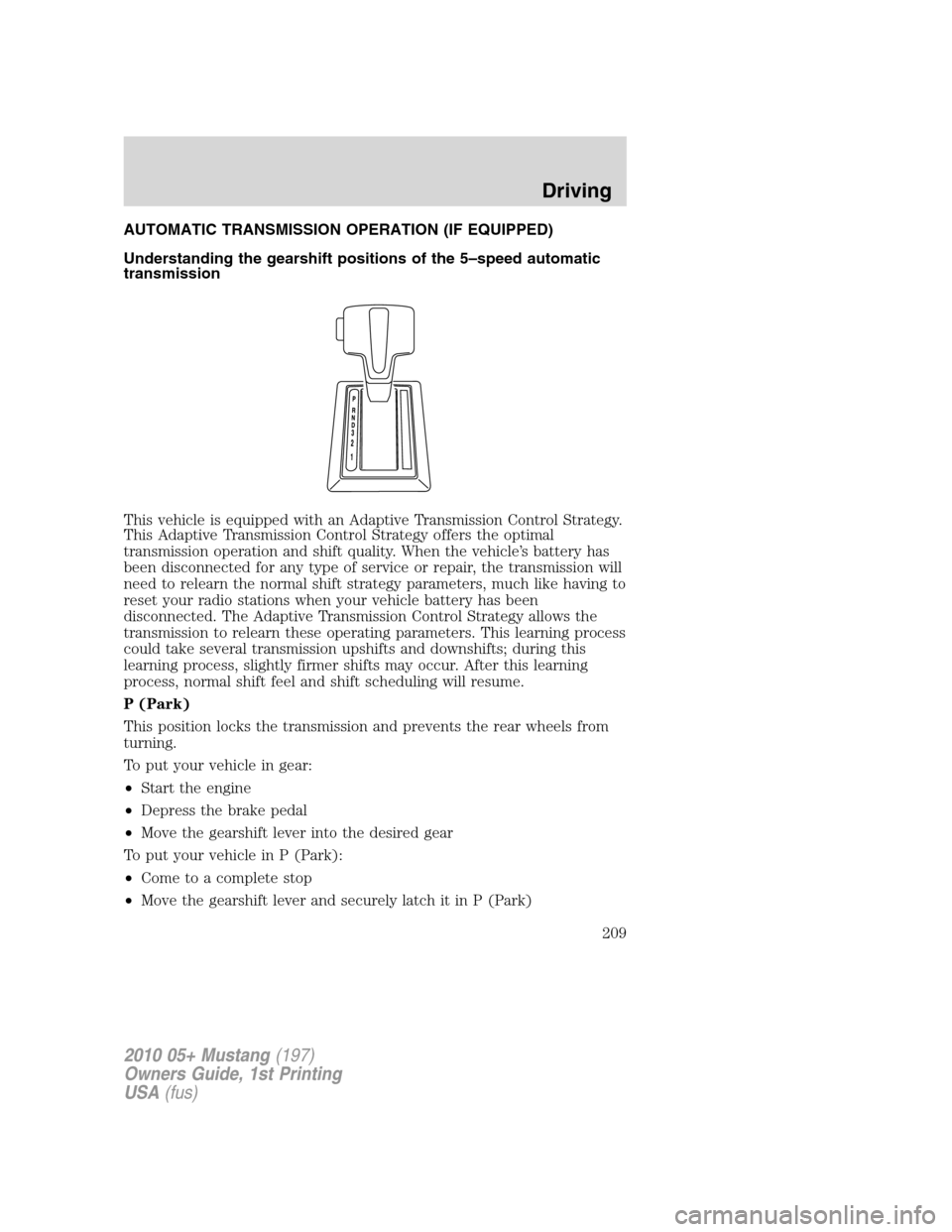
AUTOMATIC TRANSMISSION OPERATION (IF EQUIPPED)
Understanding the gearshift positions of the 5–speed automatic
transmission
This vehicle is equipped with an Adaptive Transmission Control Strategy.
This Adaptive Transmission Control Strategy offers the optimal
transmission operation and shift quality. When the vehicle’s battery has
been disconnected for any type of service or repair, the transmission will
need to relearn the normal shift strategy parameters, much like having to
reset your radio stations when your vehicle battery has been
disconnected. The Adaptive Transmission Control Strategy allows the
transmission to relearn these operating parameters. This learning process
could take several transmission upshifts and downshifts; during this
learning process, slightly firmer shifts may occur. After this learning
process, normal shift feel and shift scheduling will resume.
P (Park)
This position locks the transmission and prevents the rear wheels from
turning.
To put your vehicle in gear:
•Start the engine
•Depress the brake pedal
•Move the gearshift lever into the desired gear
To put your vehicle in P (Park):
•Come to a complete stop
•Move the gearshift lever and securely latch it in P (Park)
2010 05+ Mustang(197)
Owners Guide, 1st Printing
USA(fus)
Driving
209
Page 219 of 318
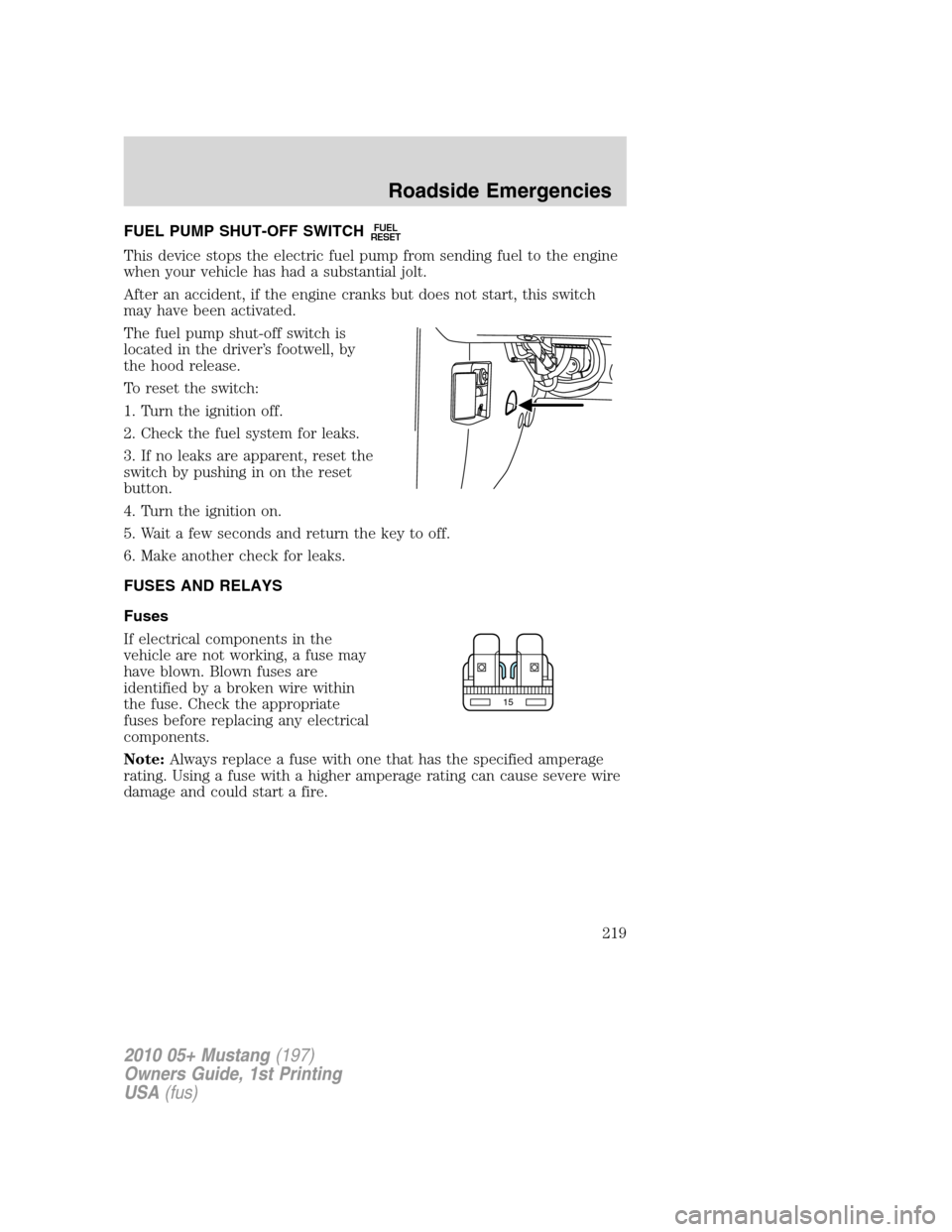
FUEL PUMP SHUT-OFF SWITCHFUEL
RESET
This device stops the electric fuel pump from sending fuel to the engine
when your vehicle has had a substantial jolt.
After an accident, if the engine cranks but does not start, this switch
may have been activated.
The fuel pump shut-off switch is
located in the driver’s footwell, by
the hood release.
To reset the switch:
1. Turn the ignition off.
2. Check the fuel system for leaks.
3. If no leaks are apparent, reset the
switch by pushing in on the reset
button.
4. Turn the ignition on.
5. Wait a few seconds and return the key to off.
6. Make another check for leaks.
FUSES AND RELAYS
Fuses
If electrical components in the
vehicle are not working, a fuse may
have blown. Blown fuses are
identified by a broken wire within
the fuse. Check the appropriate
fuses before replacing any electrical
components.
Note:Always replace a fuse with one that has the specified amperage
rating. Using a fuse with a higher amperage rating can cause severe wire
damage and could start a fire.
15
2010 05+ Mustang(197)
Owners Guide, 1st Printing
USA(fus)
Roadside Emergencies
219