display FORD MUSTANG 2014 5.G Owners Manual
[x] Cancel search | Manufacturer: FORD, Model Year: 2014, Model line: MUSTANG, Model: FORD MUSTANG 2014 5.GPages: 461, PDF Size: 5.47 MB
Page 434 of 461
Navigation Preferences
Calibrate Positionallows you to adjust the direction of
your vehicle by pressing the arrow buttons on
the screen.
Distanceallows you to recalibrate the
distance to the destination while your vehicle
is moving.
Restore Default
SettingsTouch theResetbutton to return the settings
to factory defaults.
*This feature requires activation of SIRIUS® Travel Link™, which is only
available in the United States.
Avoid Areas
AddAdd items and areas that you want the
system to avoid when creating a route for
you. The system does its best to avoid these.
*
*
There may be some situations where it is impossible to avoid the
selection(s) completely. For example, if a destination or waypoint is
located in the area that is set to avoid, the system cannot avoid it.
Map Mode
Press theMAPhard button to view map mode. When in map mode, an
icon appears on the upper left side of the screen; this is a toggle button
to change the view of the map display.
Roads on the map display in a variety of colors. Building footprints
display areas of major buildings in the 20 largest cities in the U.S. These
areas may be displayed depending on their size and the map zoom level.
Heading Upalways shows the direction of forward travel to be
upward on the screen. This view is available for map scales up to
2.5 miles (4 kilometers). The system remembers this setting for
larger map scales, but shows the map in North Up only. If the scale
returns below this level, the system restores Heading Up.
Heading Up Bird’s Eye Viewprovides an elevated perspective of
the map. You can adjust the viewing angle through the map
preferences.
Navigation System (If Equipped)433
2014 05+ Mustang(197)
Owners Guide gf, 1st Printing, November 2012
USA(fus)
Page 435 of 461
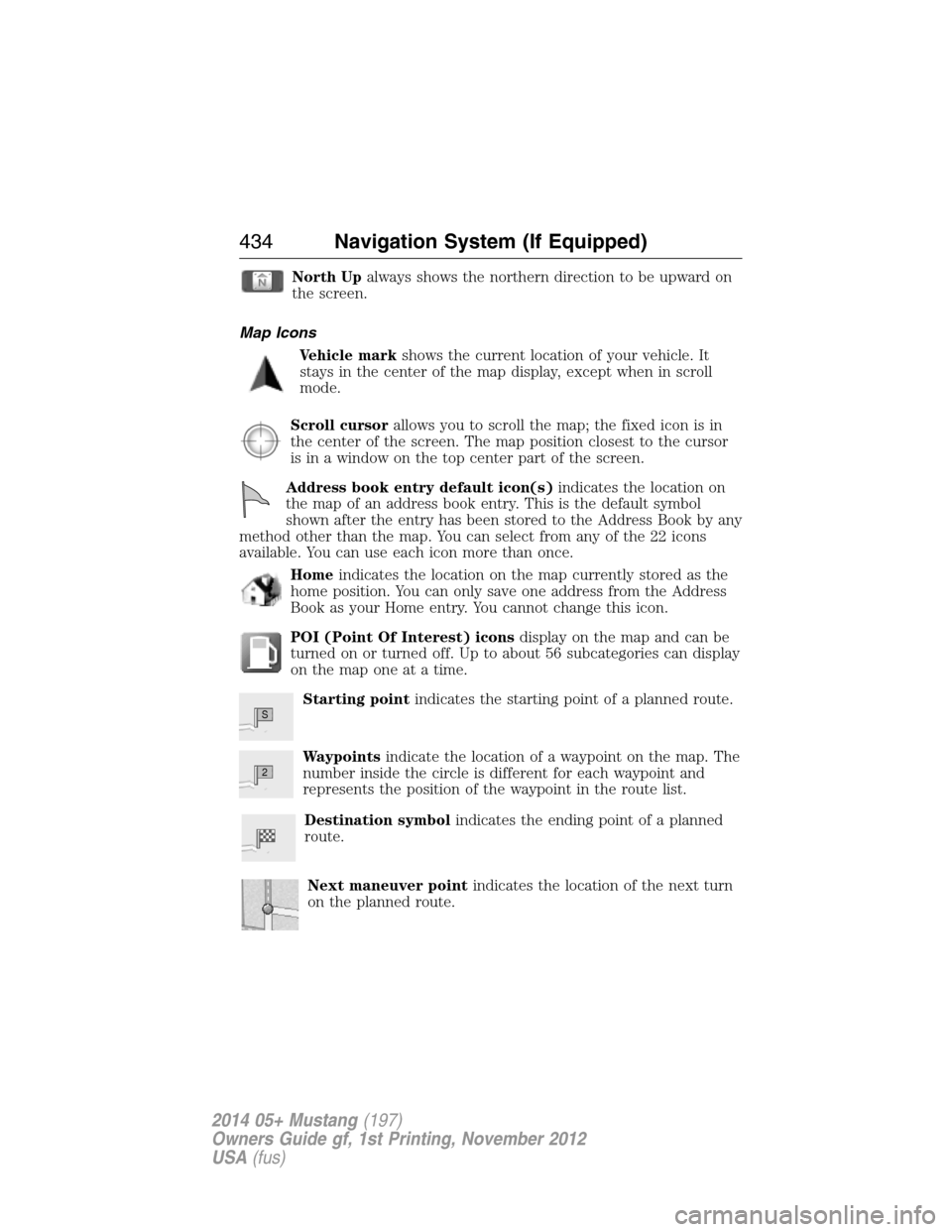
North Upalways shows the northern direction to be upward on
the screen.
Map Icons
Vehicle markshows the current location of your vehicle. It
stays in the center of the map display, except when in scroll
mode.
Scroll cursorallows you to scroll the map; the fixed icon is in
the center of the screen. The map position closest to the cursor
is in a window on the top center part of the screen.
Address book entry default icon(s)indicates the location on
the map of an address book entry. This is the default symbol
shown after the entry has been stored to the Address Book by any
method other than the map. You can select from any of the 22 icons
available. You can use each icon more than once.
Homeindicates the location on the map currently stored as the
home position. You can only save one address from the Address
Book as your Home entry. You cannot change this icon.
POI (Point Of Interest) iconsdisplay on the map and can be
turned on or turned off. Up to about 56 subcategories can display
on the map one at a time.
Starting pointindicates the starting point of a planned route.
Waypointsindicate the location of a waypoint on the map. The
number inside the circle is different for each waypoint and
represents the position of the waypoint in the route list.
Destination symbolindicates the ending point of a planned
route.
Next maneuver pointindicates the location of the next turn
on the planned route.
S
2
434Navigation System (If Equipped)
2014 05+ Mustang(197)
Owners Guide gf, 1st Printing, November 2012
USA(fus)
Page 436 of 461
No GPS symbolindicates that insufficient GPS satellite signals
are available for accurate map positioning. This icon may display
under normal operation in an area with poor GPS access.
Map Scale
The map display scale has 17 levels, ranging from
0.02 miles (.03 kilometers) to 1000 miles (1600 kilometers).
The system synchronizes the zoom scales for North Up,
Heading Up and 3D Map views.
In Map Mode, you can zoom in or out, changing the display
scale, by touching an arrow button on the left side of the
screen.
In Full Screen Map Mode, touch this button to use the Zoom Direct
buttons. The Zoom Direct buttons represent the most common map
scales. Touch a button to show the map at the desired scale. The scale is
approximate and based on the width of the map scale button. The size of
the scale varies based on the screen size.
Map Scrolling
Single scroll modeallows you to press and release on the map display
to bring the pressed position to the center of the screen. The scroll
mode times out after five minutes of inactivity.
Continuous scroll modeallows you to touch and hold the map to
begin scrolling continuously in one of eight directions closest to the point
that is touched. The scroll continues until you release the map, and
increases in speed after three seconds. This is not possible if your
vehicle is moving. The scroll mode times out after five minutes of
inactivity.
Bird’s eye view scroll modeis available after you touch the map twice,
and then selecting one of the eight buttons that appear on the map, in
an oval pattern, in the center of the screen. The two scroll buttons
located in the farthest east and west points of the oval, scroll in a circle
around the vehicle. The remaining buttons scroll in a straight line in the
arrow direction.
0.1 mi
Navigation System (If Equipped)435
2014 05+ Mustang(197)
Owners Guide gf, 1st Printing, November 2012
USA(fus)
Page 437 of 461
Quick-touch Buttons
When in map mode, touch anywhere on the map display to access the
following options:
When you select: You can:
Set as DestSelect a scrolled location on the map as your
destination. You may scroll the map by
pressing your index finger on the map display.
When you reach the desired location, simply
let go and then press Set as Dest.
Set as WaypointSet the current location as a waypoint.
Save to Address
BookSave the current location to the address book.
POI Icons On/OffSelect point of interest icons to display on the
map. You can select up to three icons to
display on the map at the same time.
View TrafficAdjust the map display to the right scale. This
scale allows the entire route to be visible in
the screen.
View/Edit RouteAccess these features when a route is active:
Cancel route.
Edit route preferences.
Edit destination/waypoints.
View route.
Edit traffic preferences.
*
Edit turn list.
*This feature requires activation of SIRIUS® Travel Link™, which is only
available in the United States.
Navteq is the digital map provider for the navigation application. If you
find map data errors, you may report them directly to Navteq by going to
http://mapreporter.navteq.com. Navteq evaluates all reported map errors
and responds with the result of their investigation by e-mail.
Navigation Map Updates
Annual navigation map updates are available for purchase through your
dealership, by calling 1-800-NAVMAPS (in Mexico, call 01–800–557–5539) or
going to www.navigation.com/ford. You need to specify the make and model
of your vehicle to determine if there is an update available.
436Navigation System (If Equipped)
2014 05+ Mustang(197)
Owners Guide gf, 1st Printing, November 2012
USA(fus)
Page 439 of 461
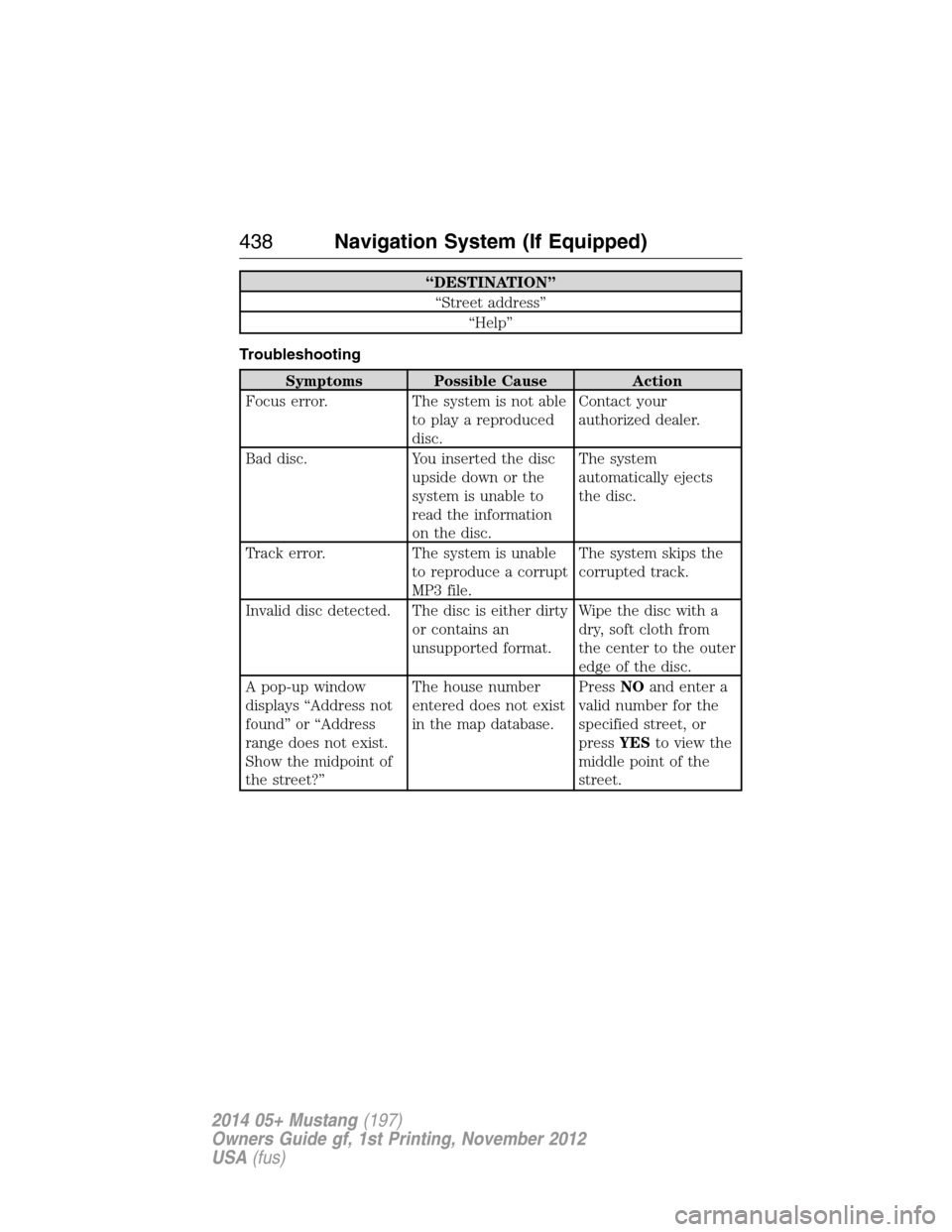
“DESTINATION”
“Street address”
“Help”
Troubleshooting
Symptoms Possible Cause Action
Focus error. The system is not able
to play a reproduced
disc.Contact your
authorized dealer.
Bad disc. You inserted the disc
upside down or the
system is unable to
read the information
on the disc.The system
automatically ejects
the disc.
Track error. The system is unable
to reproduce a corrupt
MP3 file.The system skips the
corrupted track.
Invalid disc detected. The disc is either dirty
or contains an
unsupported format.Wipe the disc with a
dry, soft cloth from
the center to the outer
edge of the disc.
A pop-up window
displays “Address not
found” or “Address
range does not exist.
Show the midpoint of
the street?”The house number
entered does not exist
in the map database.PressNOand enter a
valid number for the
specified street, or
pressYESto view the
middle point of the
street.
438Navigation System (If Equipped)
2014 05+ Mustang(197)
Owners Guide gf, 1st Printing, November 2012
USA(fus)
Page 440 of 461
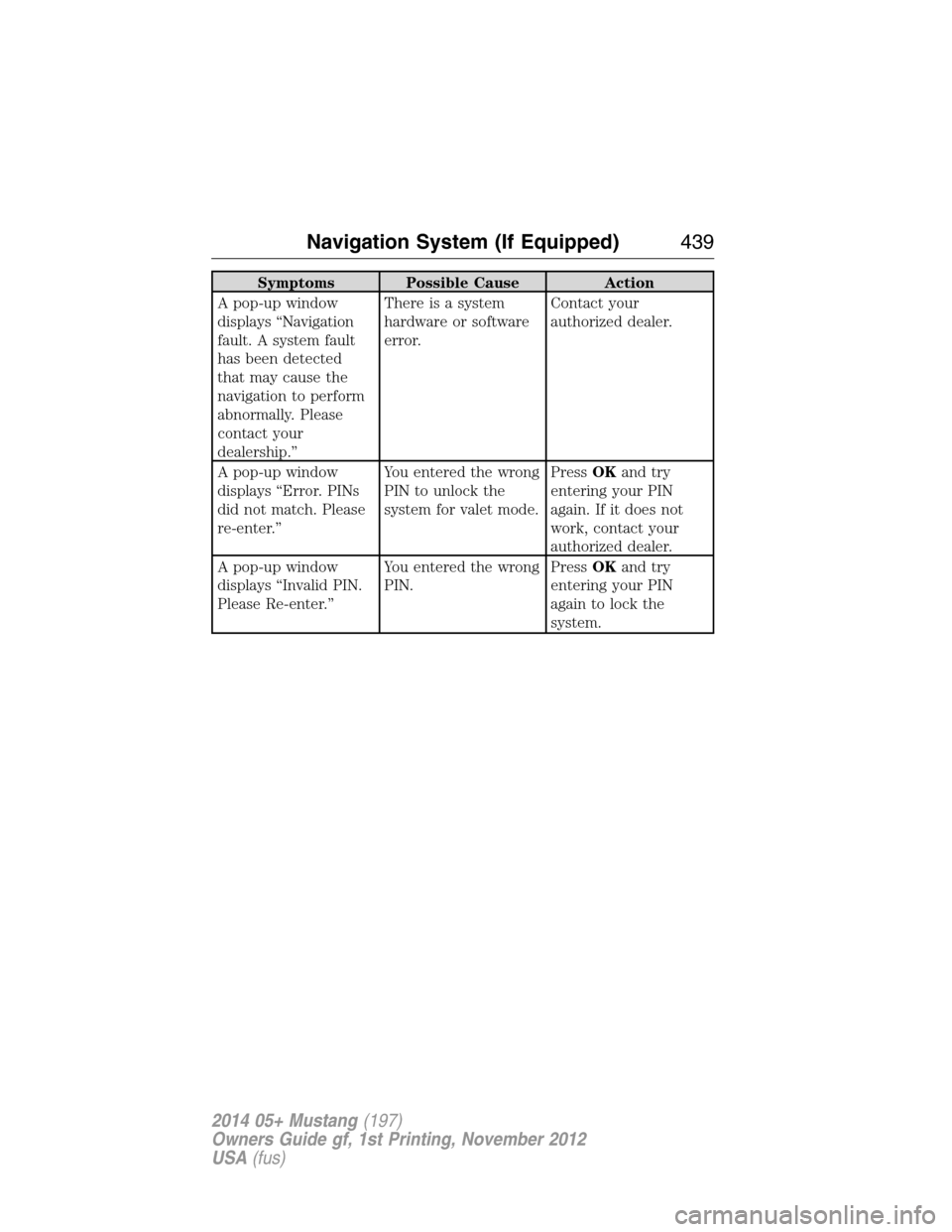
Symptoms Possible Cause Action
A pop-up window
displays “Navigation
fault. A system fault
has been detected
that may cause the
navigation to perform
abnormally. Please
contact your
dealership.”There is a system
hardware or software
error.Contact your
authorized dealer.
A pop-up window
displays “Error. PINs
did not match. Please
re-enter.”You entered the wrong
PIN to unlock the
system for valet mode.PressOKand try
entering your PIN
again. If it does not
work, contact your
authorized dealer.
A pop-up window
displays “Invalid PIN.
Please Re-enter.”You entered the wrong
PIN.PressOKand try
entering your PIN
again to lock the
system.
Navigation System (If Equipped)439
2014 05+ Mustang(197)
Owners Guide gf, 1st Printing, November 2012
USA(fus)
Page 457 of 461
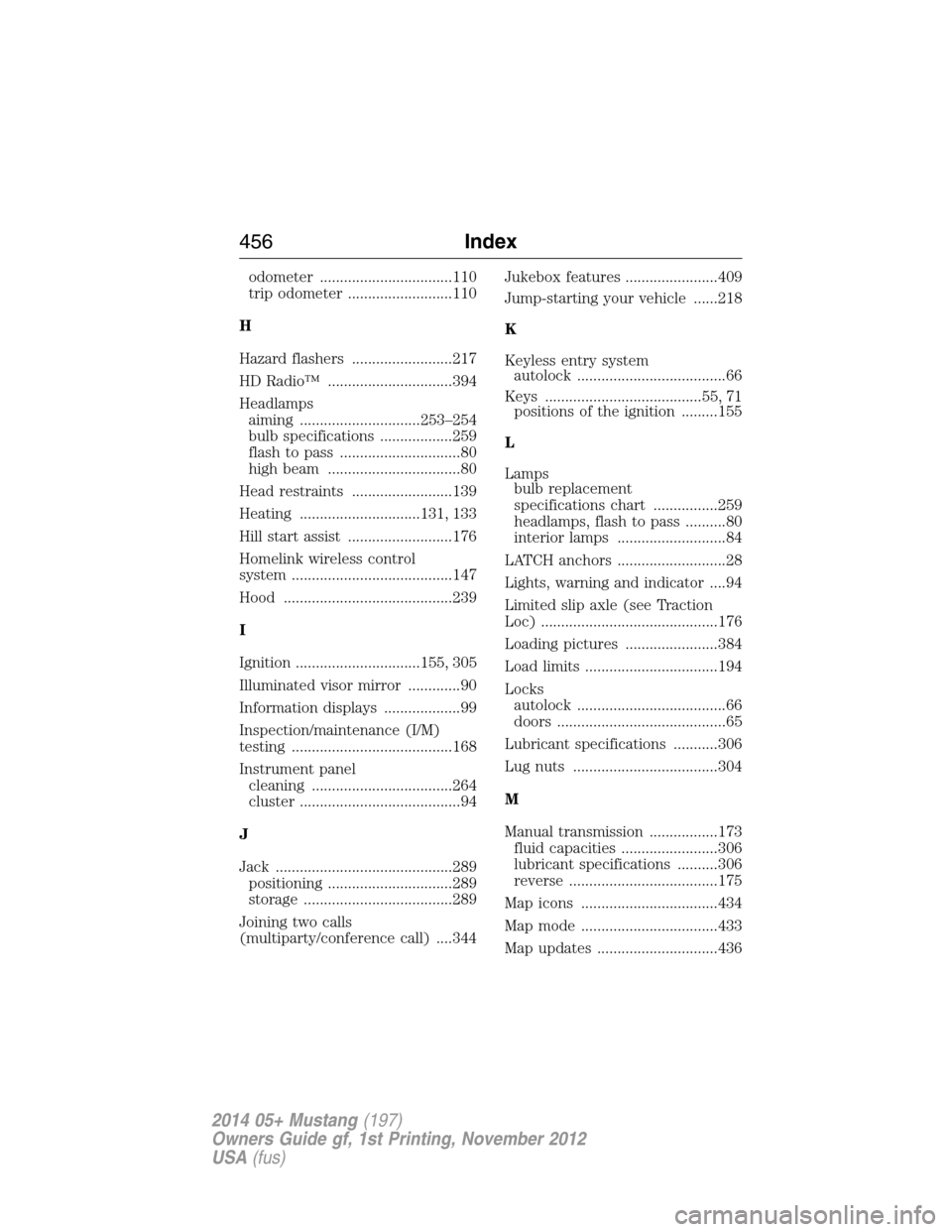
odometer .................................110
trip odometer ..........................110
H
Hazard flashers .........................217
HD Radio™ ...............................394
Headlamps
aiming ..............................253–254
bulb specifications ..................259
flash to pass ..............................80
high beam .................................80
Head restraints .........................139
Heating ..............................131, 133
Hill start assist ..........................176
Homelink wireless control
system ........................................147
Hood ..........................................239
I
Ignition ...............................155, 305
Illuminated visor mirror .............90
Information displays ...................99
Inspection/maintenance (I/M)
testing ........................................168
Instrument panel
cleaning ...................................264
cluster ........................................94
J
Jack ............................................289
positioning ...............................289
storage .....................................289
Joining two calls
(multiparty/conference call) ....344Jukebox features .......................409
Jump-starting your vehicle ......218
K
Keyless entry system
autolock .....................................66
Keys .......................................55, 71
positions of the ignition .........155
L
Lamps
bulb replacement
specifications chart ................259
headlamps, flash to pass ..........80
interior lamps ...........................84
LATCH anchors ...........................28
Lights, warning and indicator ....94
Limited slip axle (see Traction
Loc) ............................................176
Loading pictures .......................384
Load limits .................................194
Locks
autolock .....................................66
doors ..........................................65
Lubricant specifications ...........306
Lug nuts ....................................304
M
Manual transmission .................173
fluid capacities ........................306
lubricant specifications ..........306
reverse .....................................175
Map icons ..................................434
Map mode ..................................433
Map updates ..............................436
456Index
2014 05+ Mustang(197)
Owners Guide gf, 1st Printing, November 2012
USA(fus)
Page 458 of 461
Media Bluetooth menu options
(adding, connecting, deleting,
turning on/off) ..........................367
Message center ...........................99
display color ............................104
english/metric button .............104
MyColor display ......................104
system check button ..............104
warning messages ...........104, 114
Mirrors ...................................87, 89
side view mirrors (power) .......87
Motorcraft® parts .............260, 310
MyKey ..........................................58
N
Navigation end user license
agreement ..................................448
Navigation features ...................418
O
Octane rating ............................161
P
Pairing other phones ................341
Pairing your phone for the first
time ............................................341
Parental MyKey programming ...58
Parking brake ............................180
Parts (see Motorcraft®
parts) .........................................310
Phone Bluetooth menu options
(adding, connecting, deleting,
turning on/off) ..........................350
Phone redial ..............................345Playing music (by artist,
album, genre, playlist, tracks,
similar) ......................................365
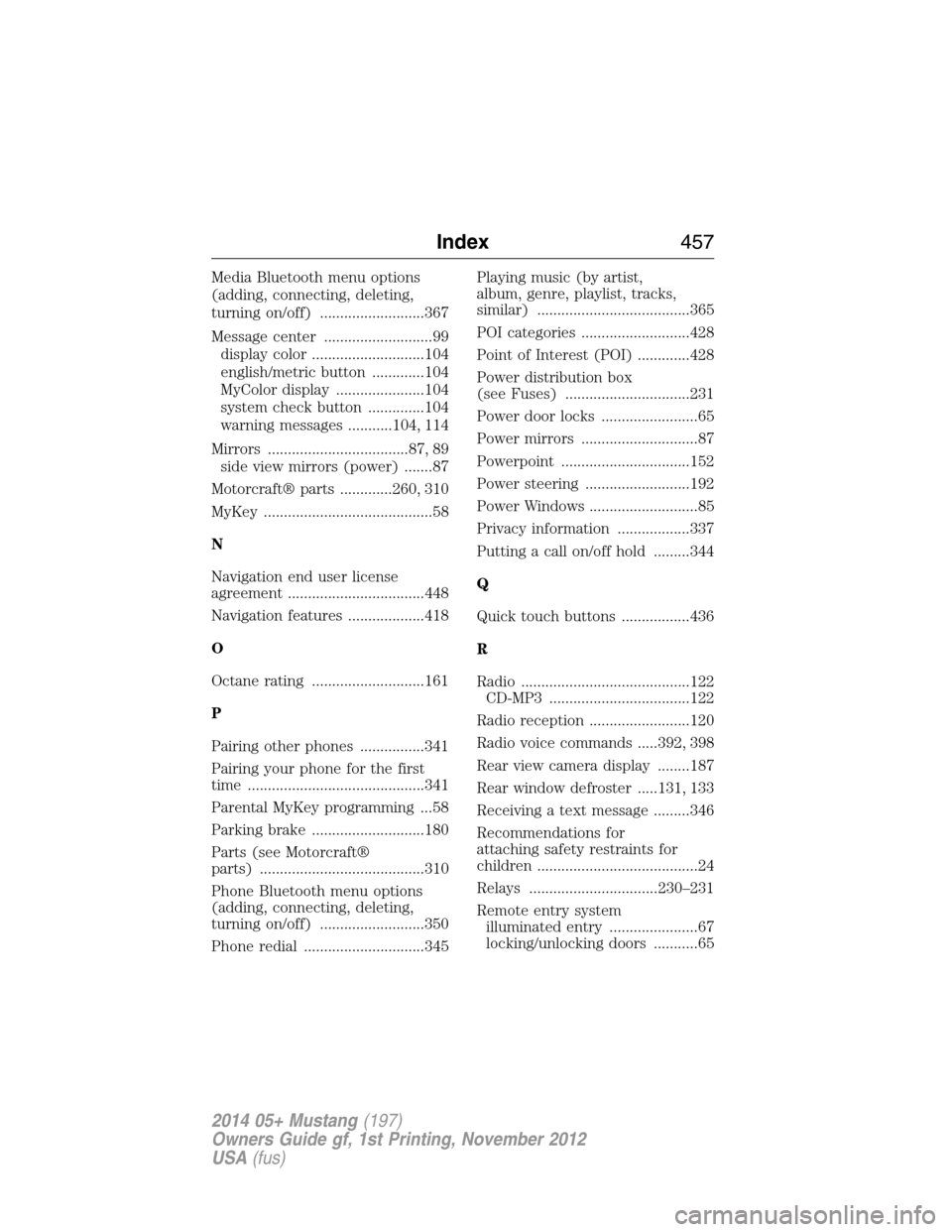
POI categories ...........................428
Point of Interest (POI) .............428
Power distribution box
(see Fuses) ...............................231
Power door locks ........................65
Power mirrors .............................87
Powerpoint ................................152
Power steering ..........................192
Power Windows ...........................85
Privacy information ..................337
Putting a call on/off hold .........344
Q
Quick touch buttons .................436
R
Radio ..........................................122
CD-MP3 ...................................122
Radio reception .........................120
Radio voice commands .....392, 398
Rear view camera display ........187
Rear window defroster .....131, 133
Receiving a text message .........346
Recommendations for
attaching safety restraints for
children ........................................24
Relays ................................230–231
Remote entry system
illuminated entry ......................67
locking/unlocking doors ...........65
Index457
2014 05+ Mustang(197)
Owners Guide gf, 1st Printing, November 2012
USA(fus)