display FORD MUSTANG 2014 5.G Repair Manual
[x] Cancel search | Manufacturer: FORD, Model Year: 2014, Model line: MUSTANG, Model: FORD MUSTANG 2014 5.GPages: 461, PDF Size: 5.47 MB
Page 330 of 461
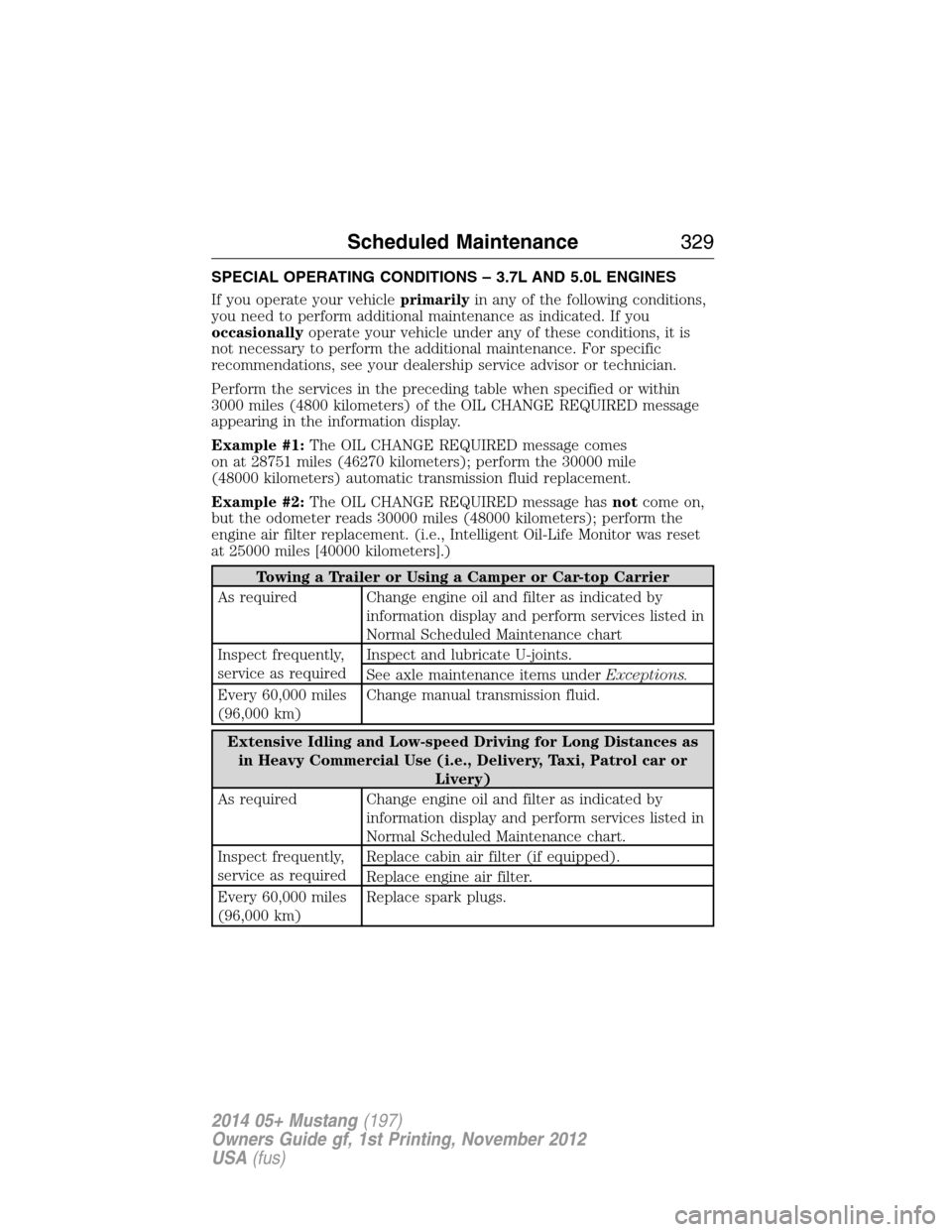
SPECIAL OPERATING CONDITIONS – 3.7L AND 5.0L ENGINES
If you operate your vehicleprimarilyin any of the following conditions,
you need to perform additional maintenance as indicated. If you
occasionallyoperate your vehicle under any of these conditions, it is
not necessary to perform the additional maintenance. For specific
recommendations, see your dealership service advisor or technician.
Perform the services in the preceding table when specified or within
3000 miles (4800 kilometers) of the OIL CHANGE REQUIRED message
appearing in the information display.
Example #1:The OIL CHANGE REQUIRED message comes
on at 28751 miles (46270 kilometers); perform the 30000 mile
(48000 kilometers) automatic transmission fluid replacement.
Example #2:The OIL CHANGE REQUIRED message hasnotcome on,
but the odometer reads 30000 miles (48000 kilometers); perform the
engine air filter replacement. (i.e., Intelligent Oil-Life Monitor was reset
at 25000 miles [40000 kilometers].)
Towing a Trailer or Using a Camper or Car-top Carrier
As required Change engine oil and filter as indicated by
information display and perform services listed in
Normal Scheduled Maintenance chart
Inspect frequently,
service as requiredInspect and lubricate U-joints.
See axle maintenance items underExceptions.
Every 60,000 miles
(96,000 km)Change manual transmission fluid.
Extensive Idling and Low-speed Driving for Long Distances as
in Heavy Commercial Use (i.e., Delivery, Taxi, Patrol car or
Livery)
As required Change engine oil and filter as indicated by
information display and perform services listed in
Normal Scheduled Maintenance chart.
Inspect frequently,
service as requiredReplace cabin air filter (if equipped).
Replace engine air filter.
Every 60,000 miles
(96,000 km)Replace spark plugs.
Scheduled Maintenance329
2014 05+ Mustang(197)
Owners Guide gf, 1st Printing, November 2012
USA(fus)
Page 331 of 461
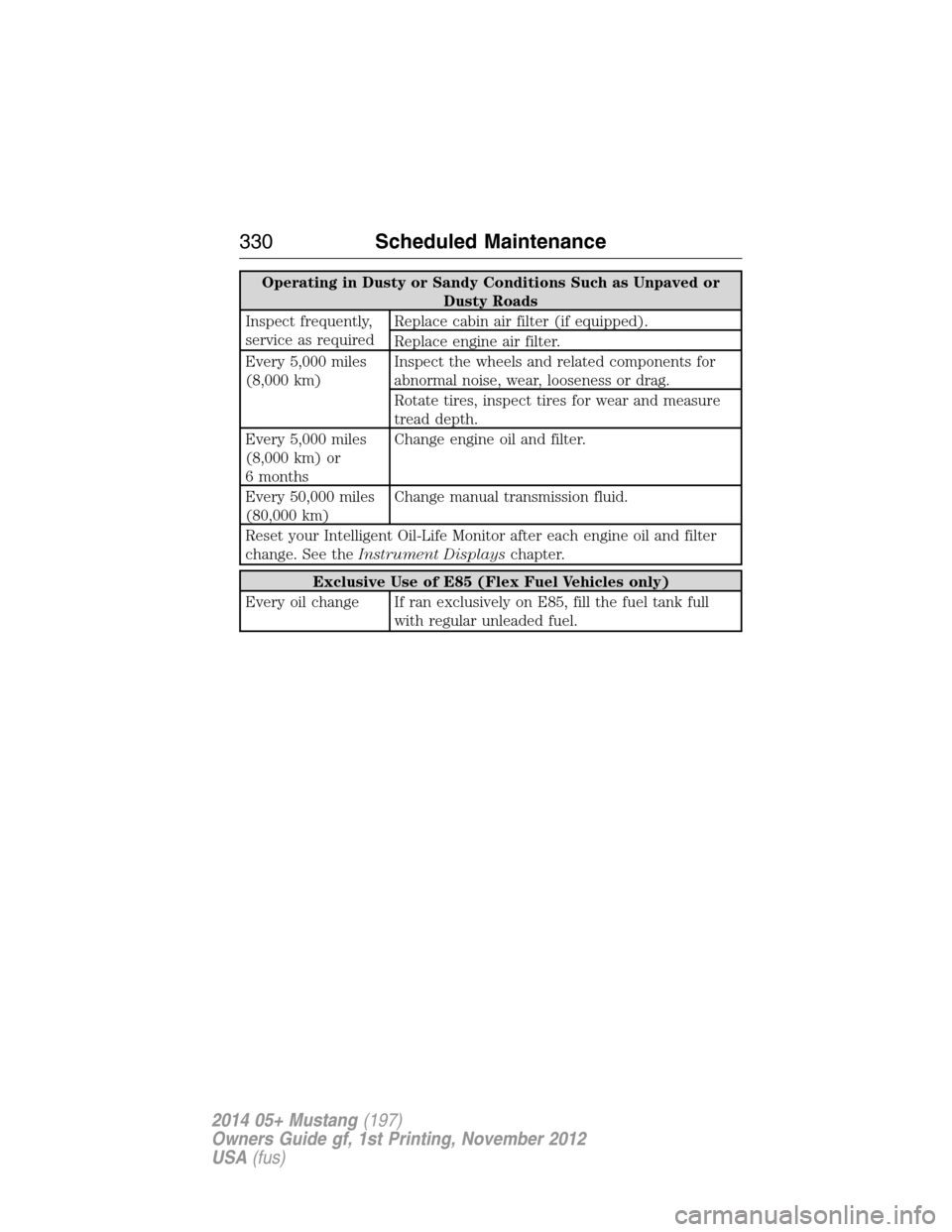
Operating in Dusty or Sandy Conditions Such as Unpaved or
Dusty Roads
Inspect frequently,
service as requiredReplace cabin air filter (if equipped).
Replace engine air filter.
Every 5,000 miles
(8,000 km)Inspect the wheels and related components for
abnormal noise, wear, looseness or drag.
Rotate tires, inspect tires for wear and measure
tread depth.
Every 5,000 miles
(8,000 km) or
6 monthsChange engine oil and filter.
Every 50,000 miles
(80,000 km)Change manual transmission fluid.
Reset your Intelligent Oil-Life Monitor after each engine oil and filter
change. See theInstrument Displayschapter.
Exclusive Use of E85 (Flex Fuel Vehicles only)
Every oil change If ran exclusively on E85, fill the fuel tank full
with regular unleaded fuel.
330Scheduled Maintenance
2014 05+ Mustang(197)
Owners Guide gf, 1st Printing, November 2012
USA(fus)
Page 339 of 461
The cellular profile, media device index, and development log remain in
the vehicle unless you delete them and are generally accessible only in
the vehicle when the cellular phone or media player is connected. If you
no longer plan to use the system or the vehicle, we recommend you
perform a Master Reset to erase all stored information.
System data cannot be accessed without special equipment and access to the
vehicle’s SYNC module. Ford Motor Company and Ford of Canada do not
access the system data for any purpose other than as described absent
consent, a court order, or where required by law enforcement, other
government authorities, or other third parties acting with lawful authority.
Other parties may seek to access the information independently of Ford
Motor Company and Ford of Canada. For further privacy information, see the
sections on 911 Assist®, Vehicle Health Report, and Traffic, Directions and
Information.
USING VOICE RECOGNITION
This system helps you control many features using voice commands.
This allows you to keep your hands on the wheel and focus on what is in
front of you.
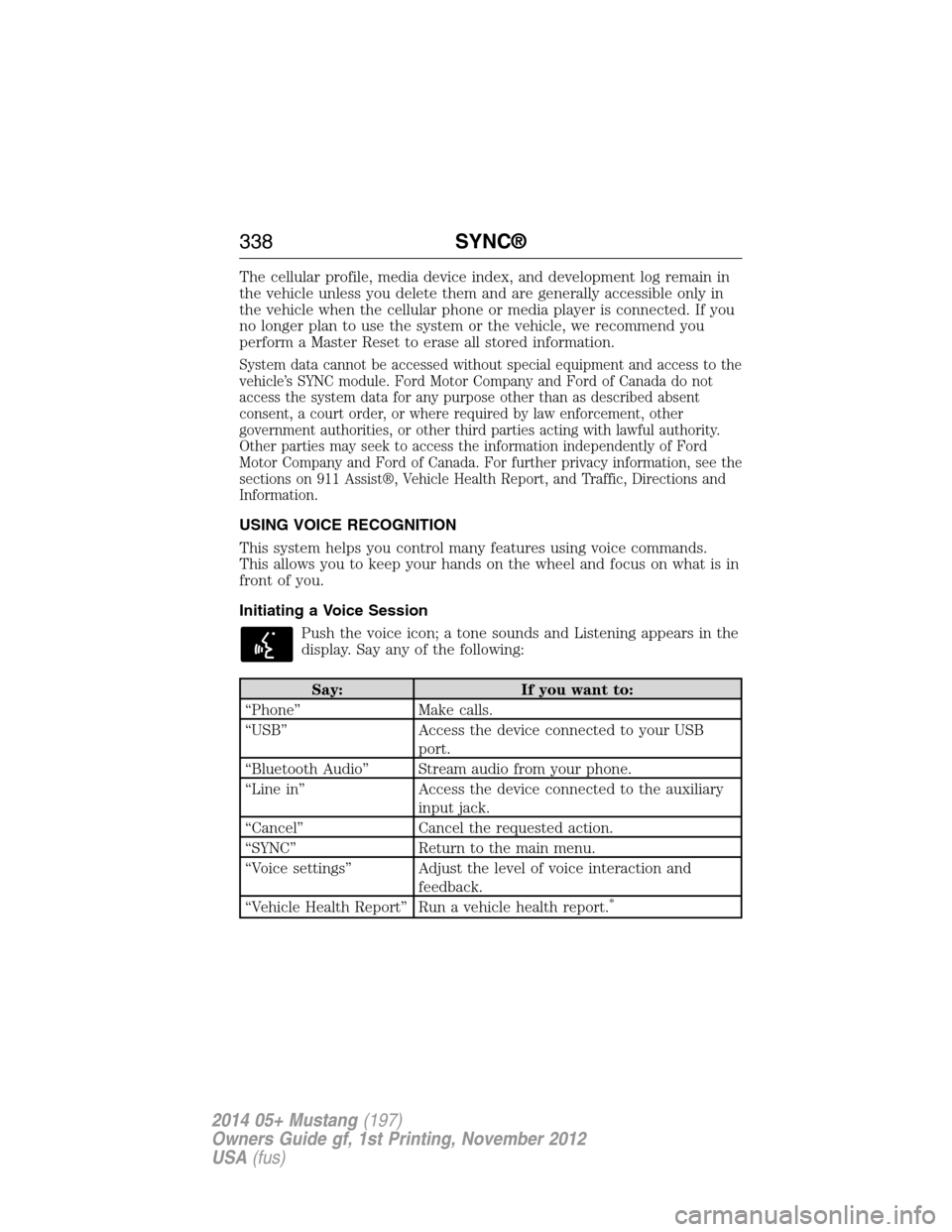
Initiating a Voice Session
Push the voice icon; a tone sounds and Listening appears in the
display. Say any of the following:
Say: If you want to:
“Phone” Make calls.
“USB” Access the device connected to your USB
port.
“Bluetooth Audio” Stream audio from your phone.
“Line in” Access the device connected to the auxiliary
input jack.
“Cancel” Cancel the requested action.
“SYNC” Return to the main menu.
“Voice settings” Adjust the level of voice interaction and
feedback.
“Vehicle Health Report” Run a vehicle health report.
*
338SYNC®
2014 05+ Mustang(197)
Owners Guide gf, 1st Printing, November 2012
USA(fus)
Page 342 of 461
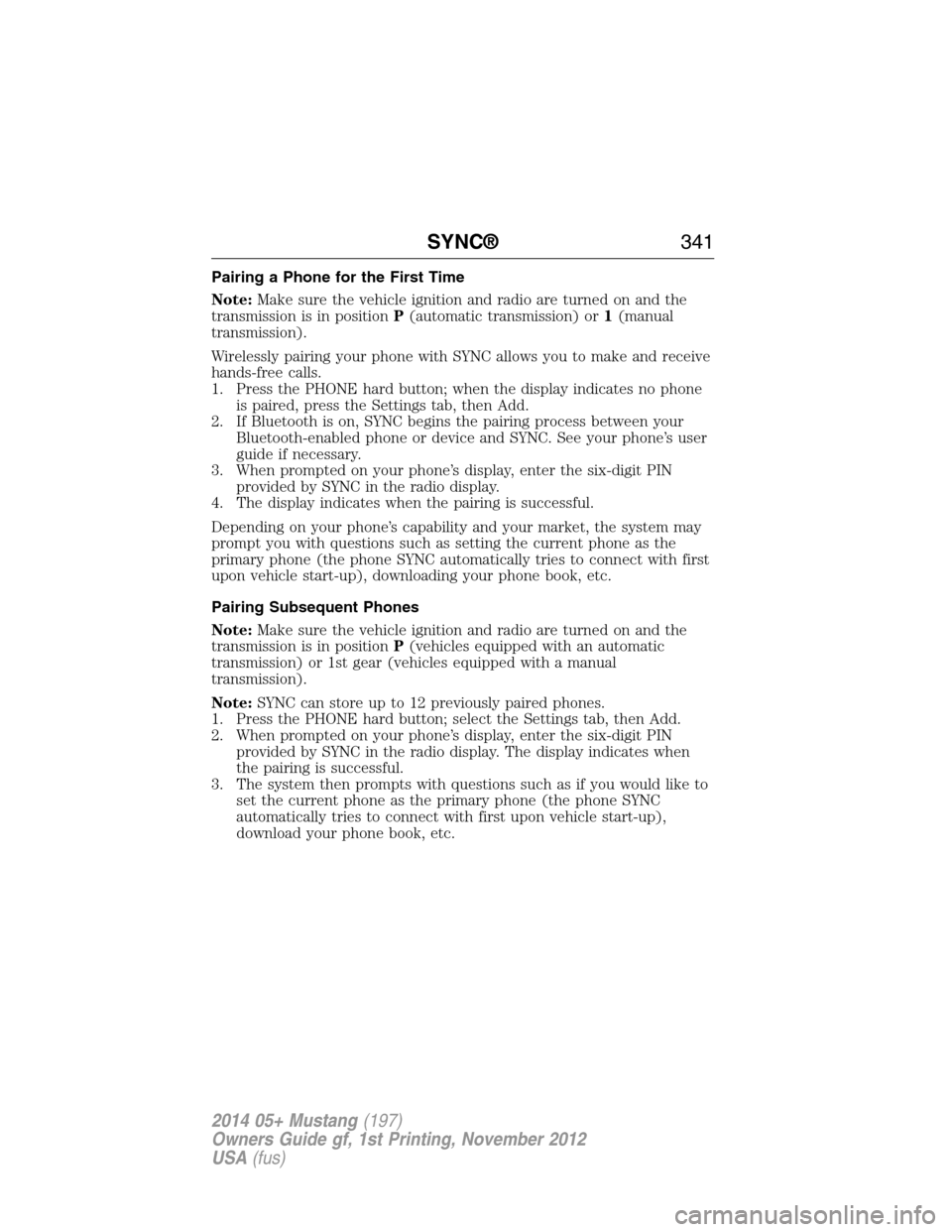
Pairing a Phone for the First Time
Note:Make sure the vehicle ignition and radio are turned on and the
transmission is in positionP(automatic transmission) or1(manual
transmission).
Wirelessly pairing your phone with SYNC allows you to make and receive
hands-free calls.
1. Press the PHONE hard button; when the display indicates no phone
is paired, press the Settings tab, then Add.
2. If Bluetooth is on, SYNC begins the pairing process between your
Bluetooth-enabled phone or device and SYNC. See your phone’s user
guide if necessary.
3. When prompted on your phone’s display, enter the six-digit PIN
provided by SYNC in the radio display.
4. The display indicates when the pairing is successful.
Depending on your phone’s capability and your market, the system may
prompt you with questions such as setting the current phone as the
primary phone (the phone SYNC automatically tries to connect with first
upon vehicle start-up), downloading your phone book, etc.
Pairing Subsequent Phones
Note:Make sure the vehicle ignition and radio are turned on and the
transmission is in positionP(vehicles equipped with an automatic
transmission) or 1st gear (vehicles equipped with a manual
transmission).
Note:SYNC can store up to 12 previously paired phones.
1. Press the PHONE hard button; select the Settings tab, then Add.
2. When prompted on your phone’s display, enter the six-digit PIN
provided by SYNC in the radio display. The display indicates when
the pairing is successful.
3. The system then prompts with questions such as if you would like to
set the current phone as the primary phone (the phone SYNC
automatically tries to connect with first upon vehicle start-up),
download your phone book, etc.
SYNC®341
2014 05+ Mustang(197)
Owners Guide gf, 1st Printing, November 2012
USA(fus)
Page 347 of 461
Text Messaging
Note:This is a phone-dependent feature.
SYNC allows you to receive, send, download and delete text messages.
The system can also read incoming text messages to you so that you do
not have to take your eyes off the road.
Receiving a Text Message
Note:This is a phone-dependent feature. Your phone must support
downloading text messages using Bluetooth to receive incoming text
messages.
Note:Forwarding a text message is a speed-dependent feature and can
only be done when the vehicle is traveling at 3 mph (5 km/h) or less.
Note:Only one recipient is allowed per text message.
When a new message arrives, an audible tone sounds and the display
indicates you have a new message. You have these options:
1. Press View to receive and open the text message.
2. Press Listen to have SYNC read the message to you.
3. Press Reply to send a message back to the sender.
4. Press Dial to call the sender.
5. Press Cancel to exit the screen.
If you select View, you can:
•Listen as SYNC reads the message to you aloud.
•Compose your own message.
*
•Reply to the message.*
•Forward the text message to someone in your phone book or to a
phone number.*
*
This is a speed-dependent feature.
346SYNC®
2014 05+ Mustang(197)
Owners Guide gf, 1st Printing, November 2012
USA(fus)
Page 348 of 461
Sending Text Messages
Text messaging is a phone-dependent feature. If your phone is
compatible, SYNC allows you to receive, send, download and delete text
messages.
1. Press the PHONE hard button.
2. Select the Text Messaging tab, then press Compose.
3. Scroll to select from the following options:
Send Text Message?enables you to send a new text message based on
a pre-defined set of 15 messages.
1. Press OK to select. If the system detects your phone does not
support this feature, Unsupported appears in the display and SYNC
returns to the main menu.
2. Scroll to cycle through the message options in the following chart.
3. Select the desired text message. Each text message is sent with the
following signature: “This message was sent from my
4. Press Recipients, then choose who to send it to using the Phone
Book or Phone Number.
Pre-defined text message options
Be there in 10 minutes
Be there in 20 minutes
Call me
Call you later
Can’t talk right now
Can’t wait to see you
I love you
I need more directions
I’m stuck in traffic
No
Thanks
Too funny
Where R you?
Why?
Ye s
SYNC®347
2014 05+ Mustang(197)
Owners Guide gf, 1st Printing, November 2012
USA(fus)
Page 354 of 461
Note:If 911 Assist is turned on or off by any user, that setting applies
for all paired phones. If 911 Assist is turned off, a voice message plays
and/or a display message/icon comes on when the vehicle is started after
a previously paired phone connects.
Note:Every phone operates differently. While SYNC 911 Assist works
with most cellular phones, some may have trouble using this feature.
If a crash deploys an airbag (excludes knee airbags and rear inflatable
safety belts [if equipped]) or activates the fuel pump shut-off, your SYNC
equipped vehicle may be able to contact emergency services by dialing
911 through a paired and connected Bluetooth-enabled phone.
For more information about 911 Assist, visit www.SYNCMyRide.com,
www.SYNCMyRide.ca or www.syncmaroute.ca.
•For information on airbag deployment, see theSupplementary
Restraints Systemchapter.
•For information on the fuel pump shut-off, see theRoadside
Emergencieschapter.
Setting 911 Assist On
If your vehicleis notequipped with a navigation system, perform the
following:
1. Press the phone button to enter the Phone Menu.
2. Scroll until 911 Assist appears in the display.
3. Scroll to select ON, then press OK. Set On appears in the display.
If your vehicleisequipped with a navigation system, perform the
following:
1. Press the PHONE hard button.
2. Select the Settings tab.
3. Press Advanced. Select 911 Assist, then turn the system on.
To make sure that 911 Assist works properly:
•SYNC must be powered and working properly at the time of the
incident and throughout feature activation and use.
•SYNC 911 Assist feature must be set on prior to the incident.
•A Bluetooth-enabled and compatible phone has to be paired and
connected to SYNC.
•A connected Bluetooth-enabled phone must have the ability to make
and maintain an outgoing call at the time of the incident.
SYNC®353
2014 05+ Mustang(197)
Owners Guide gf, 1st Printing, November 2012
USA(fus)
Page 357 of 461
To run a report using the phone button and your vehicleis not
equipped with a navigation system,
1. Press the phone button to enter the Phone Menu.
2. Scroll until Vehicle Health appears in the display, then press OK.
3. Select from one of the options listed in the following table.
To run a report using the phone button and your vehicleisequipped
with a navigation system:
1. Press the PHONE hard button.
2. Select the Settings tab.
3. Press Advanced, then select Vehicle Health Report.
4. Select from one of the options listed in the following table.
Vehicle Health Report Options
Automatic ReportsPress OK and select on or off. Select On to
have SYNC automatically prompt you to run a
health report at certain mileage intervals.
Note:You must first turn this feature on
before you can select the mileage intervals at
which you would like to be prompted.
Mileage IntervalsPress OK. Scroll to select between 5000, 7500
or 10000 mile intervals and press OK to make
your selection.
Run Report?Press OK for SYNC to run a health report of
your vehicle’s diagnostic systems and send the
results to Ford where it is combined with
scheduled maintenance information, open
recalls and other field service actions and
unserviced vehicle inspection items from your
authorized dealer.
Vehicle Health Report Privacy Notice
When you run a Vehicle Health Report, Ford Motor Company may collect
your cellular phone number (to process your report request) and
diagnostic information about your vehicle. Certain versions or updates to
Vehicle Health Report may also collect additional vehicle information. Ford
may use the vehicle information it collects for any purpose. If you do not
want to disclose your cellular phone number or vehicle information, do not
run the feature or set up your Vehicle Health Report profile at
www.SYNCMyRide.com. See www.SYNCMyRide.com - Vehicle Health Report
Terms and Conditions, and Privacy Statement - for more information.
356SYNC®
2014 05+ Mustang(197)
Owners Guide gf, 1st Printing, November 2012
USA(fus)
Page 359 of 461
Connecting to SYNC Services Using Voice Commands
1. Press the voice button.
2. When prompted, say “Services”. This initiates an outgoing call to
SYNC Services using your paired and connected Bluetooth-enabled
cellular phone.
3. Once you are connected to the service, follow the voice prompts to
request the desired service, such as “Traffic” or “Directions”. You can
also say “What are my choices?” to receive a complete list of available
services from which to choose.
4. Say “Services” to return to the services main menu or for help, say
“Help”.
Connecting to SYNC Services Using the Phone Menu
1. Press the phone button to enter the Phone Menu.
2. Scroll untilServicesappears in the display.
3. Press OK to confirm and enter the Services menu. The display
indicates the system is connecting.
4. Press OK. SYNC initiates the call to the Services portal.
5. Once connected, follow the voice prompts to request your desired
Service, such as Traffic or Directions. You can also say “What are my
choices?” to receive a complete list of available services from which
to choose.
6. To return to the Services menu, say “Services” or for help, say
“Help”.
Receiving Turn-by-Turn Directions
1. When connected to SYNC Services, say “Directions” or “Business
search”. To find the closest business or type of business to your
current location, just say “Business search” and then “Search near
me”. If you need further assistance in finding a location you can say
“Operator” at any time within a Directions or Business search to
speak with a live operator. You may also be prompted to speak with
an operator when the automatic system has difficulty matching your
voice request. The live operator can assist you by searching for
businesses by name or by category, residential addresses by street
address or by name or specific street intersections. Operator Assist is
a feature of your SYNC Services subscription. For more information
on Operator Assist visit www.SYNCMyRide.com/support.
358SYNC®
2014 05+ Mustang(197)
Owners Guide gf, 1st Printing, November 2012
USA(fus)
Page 361 of 461
SYNC Services Quick Tips
PortableYour subscription is associated with your
Bluetooth-enabled cellular phone number, not
your VIN (Vehicle Identification Number).
You can pair and connect your phone to any
vehicle equipped with Traffic, Directions and
Information and continue enjoying your
personalized services.
You can even access your account outside the
vehicle. Just use the number on your phone’s
call history. Traffic and Directions features do
not function properly but information services
and the 411 connect and text message
features are available.
SYNC AppLink™
Note:Your smartphone must be paired and connected to SYNC to access
AppLink.
Note:iPhone® users need to connect the phone to the USB port in
order to start the application. It is recommended to lock your iPhone®
after starting an application.
Note:The AppLink feature is not available if your vehicle is equipped
with the MyFord Touch® or MyLincoln Touch™ system.
Depending on your display type, you can access AppLink from the media
menu, the phone menu, or by using voice commands. Once an app is
running through AppLink, you can control main features of the app
through voice commands and steering wheel controls.
To Access Using the Phone Menu
1. Press the Phone button.
2. Browse to Mobile Applications and press OK.
3. Browse to your desired app and press OK.
4. Once an app is running through SYNC, you can access an app’s menu
by pressing the MENU button to first access the SYNC menu.
5. Scroll until “
then press OK. From here, you can access an application’s features,
such as Thumbs up, Thumbs down, etc. For more information, please
visit www.SYNCMyRide.com.
360SYNC®
2014 05+ Mustang(197)
Owners Guide gf, 1st Printing, November 2012
USA(fus)