AUX FORD MUSTANG 2014 5.G User Guide
[x] Cancel search | Manufacturer: FORD, Model Year: 2014, Model line: MUSTANG, Model: FORD MUSTANG 2014 5.GPages: 461, PDF Size: 5.47 MB
Page 240 of 461
Working with the Engine On
WARNING:To reduce the risk of vehicle damage or personal
burn injuries, do not start your engine with the air cleaner
removed and do not remove it while the engine is running.
1. Set the parking brake and shift to positionP.
2. Block the wheels.
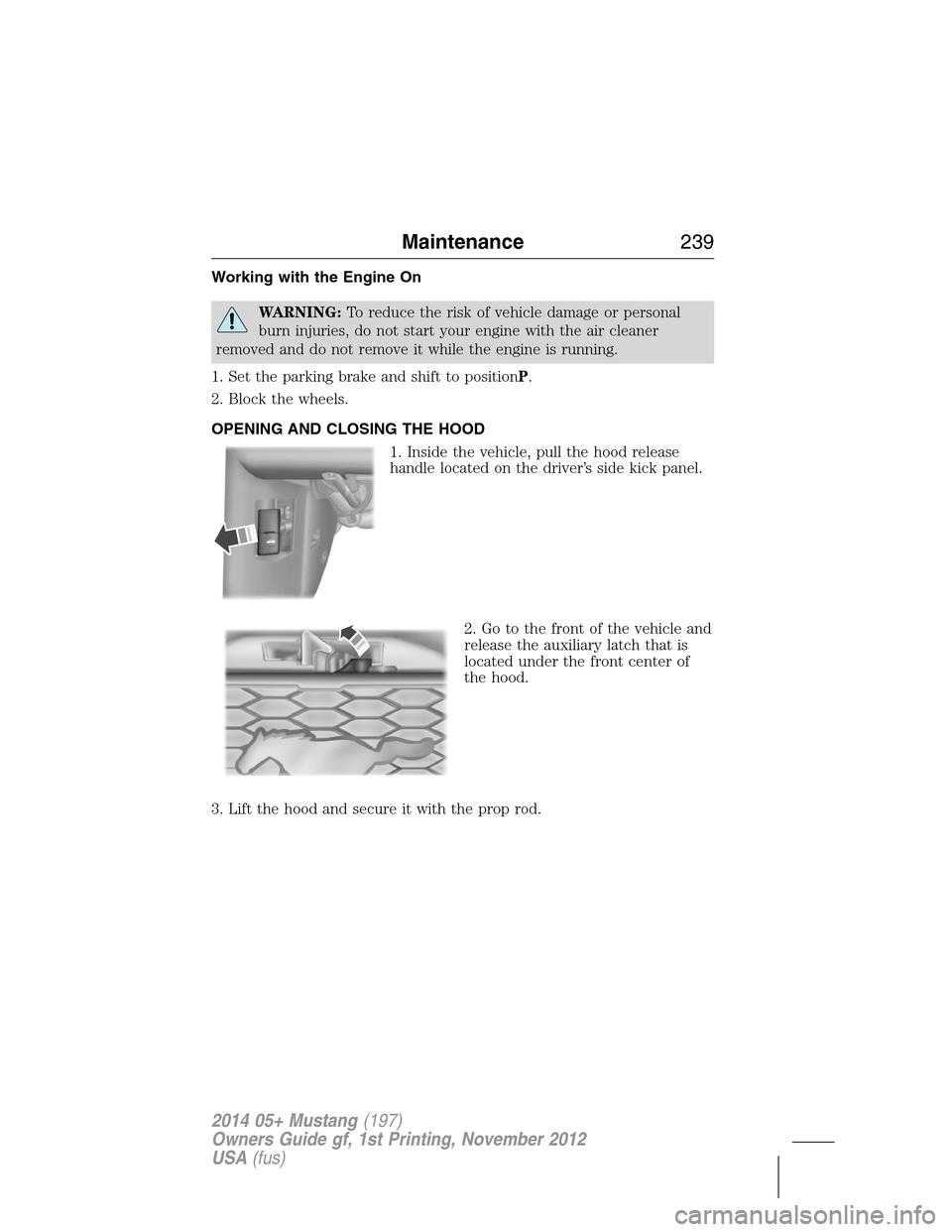
OPENING AND CLOSING THE HOOD
1. Inside the vehicle, pull the hood release
handle located on the driver’s side kick panel.
2. Go to the front of the vehicle and
release the auxiliary latch that is
located under the front center of
the hood.
3. Lift the hood and secure it with the prop rod.
Maintenance239
2014 05+ Mustang(197)
Owners Guide gf, 1st Printing, November 2012
USA(fus)
Page 307 of 461
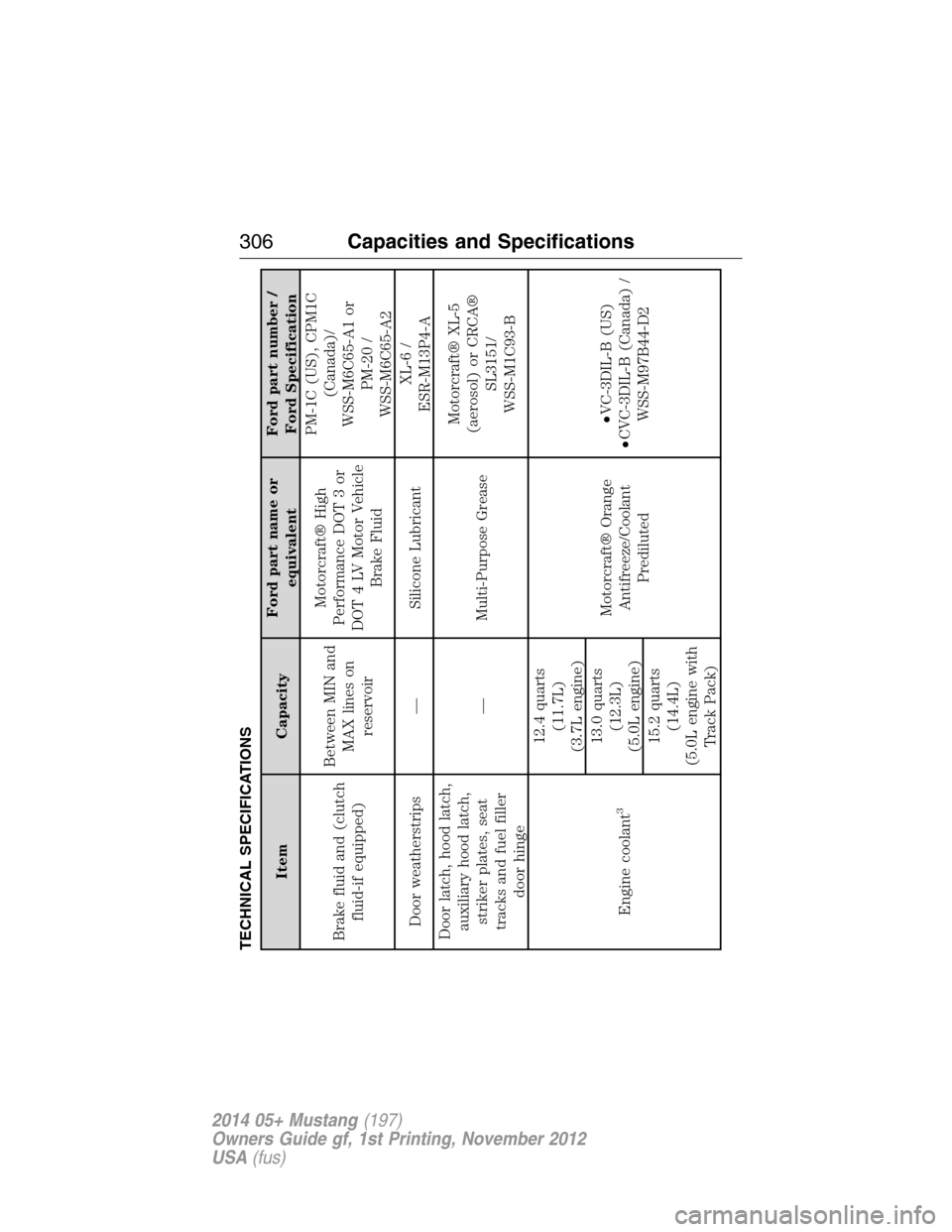
TECHNICAL SPECIFICATIONS
Item CapacityFord part name or
equivalentFord part number /
Ford Specification
Brake fluid and (clutch
fluid-if equipped)Between MIN and
MAX lines on
reservoirMotorcraft® High
Performance DOT 3 or
DOT 4 LV Motor Vehicle
Brake FluidPM-1C (US), CPM1C
(Canada)/
WSS-M6C65-A1 or
PM-20 /
WSS-M6C65-A2
Door weatherstrips — Silicone LubricantXL-6 /
ESR-M13P4-A
Door latch, hood latch,
auxiliary hood latch,
striker plates, seat
tracks and fuel filler
door hinge— Multi-Purpose GreaseMotorcraft® XL-5
(aerosol) or CRCA®
SL3151/
WSS-M1C93-B
Engine coolant
3
12.4 quarts
(11.7L)
(3.7L engine)
Motorcraft® Orange
Antifreeze/Coolant
Prediluted•VC-3DIL-B (US)
•CVC-3DIL-B (Canada) /
WSS-M97B44-D2 13.0 quarts
(12.3L)
(5.0L engine)
15.2 quarts
(14.4L)
(5.0L engine with
Track Pack)
306Capacities and Specifications
2014 05+ Mustang(197)
Owners Guide gf, 1st Printing, November 2012
USA(fus)
Page 339 of 461
The cellular profile, media device index, and development log remain in
the vehicle unless you delete them and are generally accessible only in
the vehicle when the cellular phone or media player is connected. If you
no longer plan to use the system or the vehicle, we recommend you
perform a Master Reset to erase all stored information.
System data cannot be accessed without special equipment and access to the
vehicle’s SYNC module. Ford Motor Company and Ford of Canada do not
access the system data for any purpose other than as described absent
consent, a court order, or where required by law enforcement, other
government authorities, or other third parties acting with lawful authority.
Other parties may seek to access the information independently of Ford
Motor Company and Ford of Canada. For further privacy information, see the
sections on 911 Assist®, Vehicle Health Report, and Traffic, Directions and
Information.
USING VOICE RECOGNITION
This system helps you control many features using voice commands.
This allows you to keep your hands on the wheel and focus on what is in
front of you.
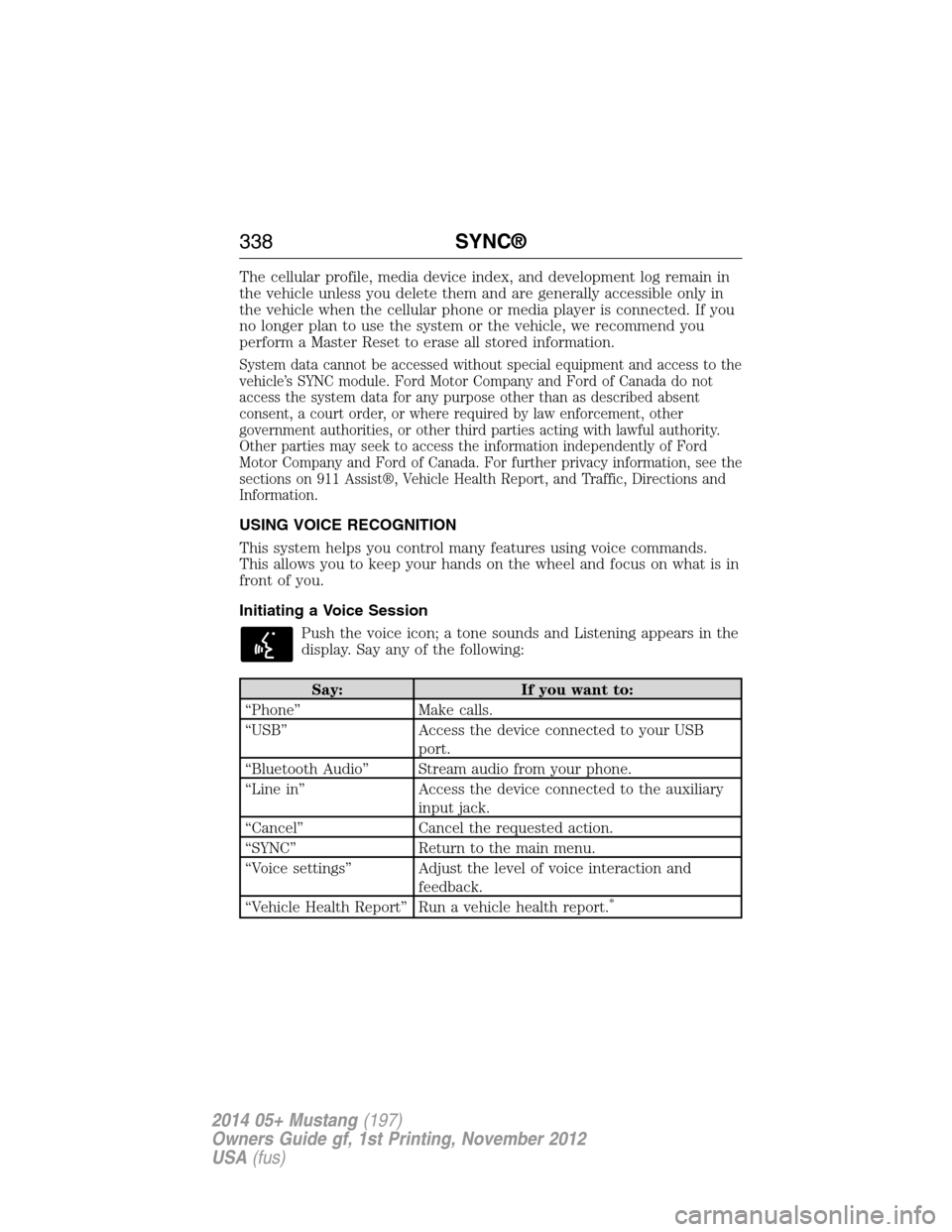
Initiating a Voice Session
Push the voice icon; a tone sounds and Listening appears in the
display. Say any of the following:
Say: If you want to:
“Phone” Make calls.
“USB” Access the device connected to your USB
port.
“Bluetooth Audio” Stream audio from your phone.
“Line in” Access the device connected to the auxiliary
input jack.
“Cancel” Cancel the requested action.
“SYNC” Return to the main menu.
“Voice settings” Adjust the level of voice interaction and
feedback.
“Vehicle Health Report” Run a vehicle health report.
*
338SYNC®
2014 05+ Mustang(197)
Owners Guide gf, 1st Printing, November 2012
USA(fus)
Page 362 of 461
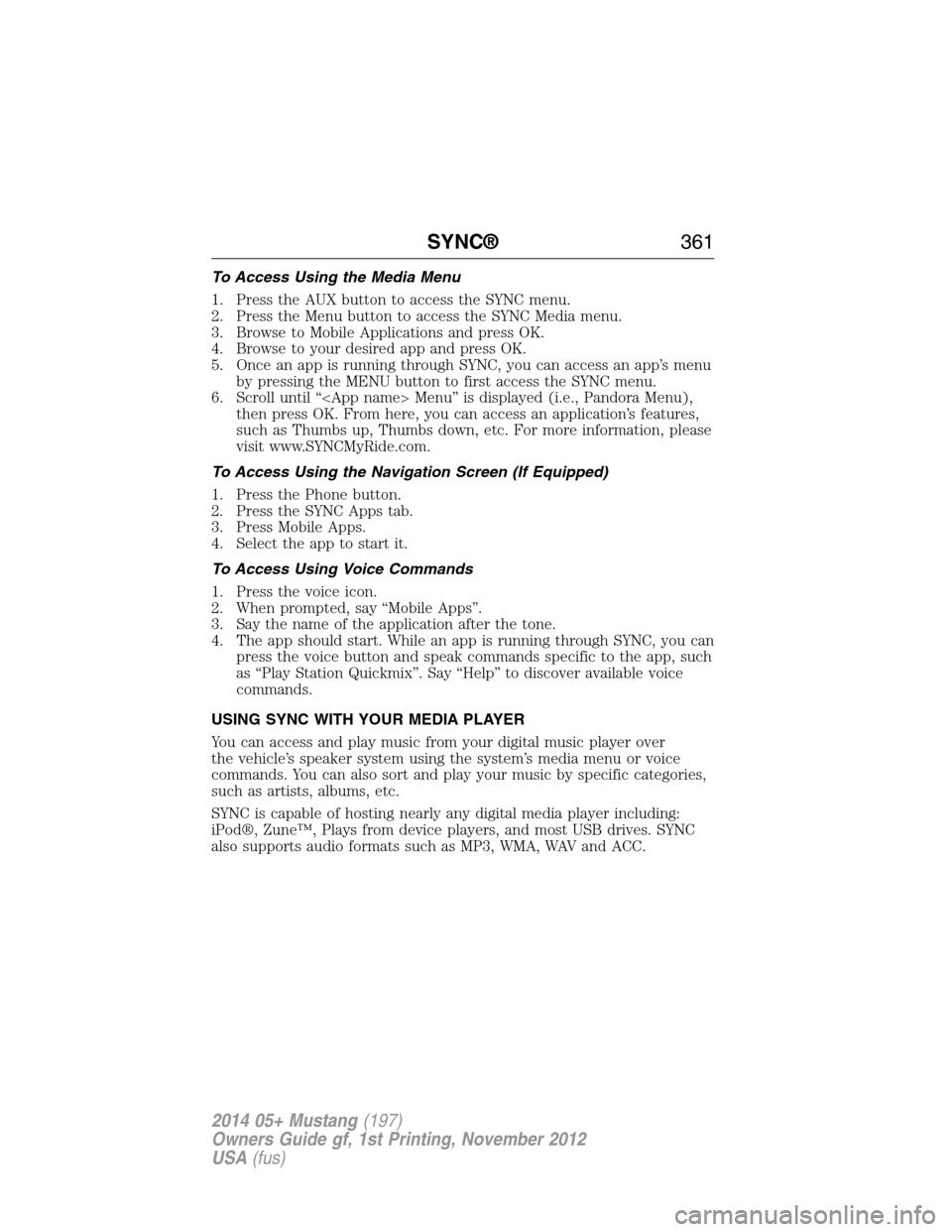
To Access Using the Media Menu
1. Press the AUX button to access the SYNC menu.
2. Press the Menu button to access the SYNC Media menu.
3. Browse to Mobile Applications and press OK.
4. Browse to your desired app and press OK.
5. Once an app is running through SYNC, you can access an app’s menu
by pressing the MENU button to first access the SYNC menu.
6. Scroll until “
then press OK. From here, you can access an application’s features,
such as Thumbs up, Thumbs down, etc. For more information, please
visit www.SYNCMyRide.com.
To Access Using the Navigation Screen (If Equipped)
1. Press the Phone button.
2. Press the SYNC Apps tab.
3. Press Mobile Apps.
4. Select the app to start it.
To Access Using Voice Commands
1. Press the voice icon.
2. When prompted, say “Mobile Apps”.
3. Say the name of the application after the tone.
4. The app should start. While an app is running through SYNC, you can
press the voice button and speak commands specific to the app, such
as “Play Station Quickmix”. Say “Help” to discover available voice
commands.
USING SYNC WITH YOUR MEDIA PLAYER
You can access and play music from your digital music player over
the vehicle’s speaker system using the system’s media menu or voice
commands. You can also sort and play your music by specific categories,
such as artists, albums, etc.
SYNC is capable of hosting nearly any digital media player including:
iPod®, Zune™, Plays from device players, and most USB drives. SYNC
also supports audio formats such as MP3, WMA, WAV and ACC.
SYNC®361
2014 05+ Mustang(197)
Owners Guide gf, 1st Printing, November 2012
USA(fus)
Page 367 of 461
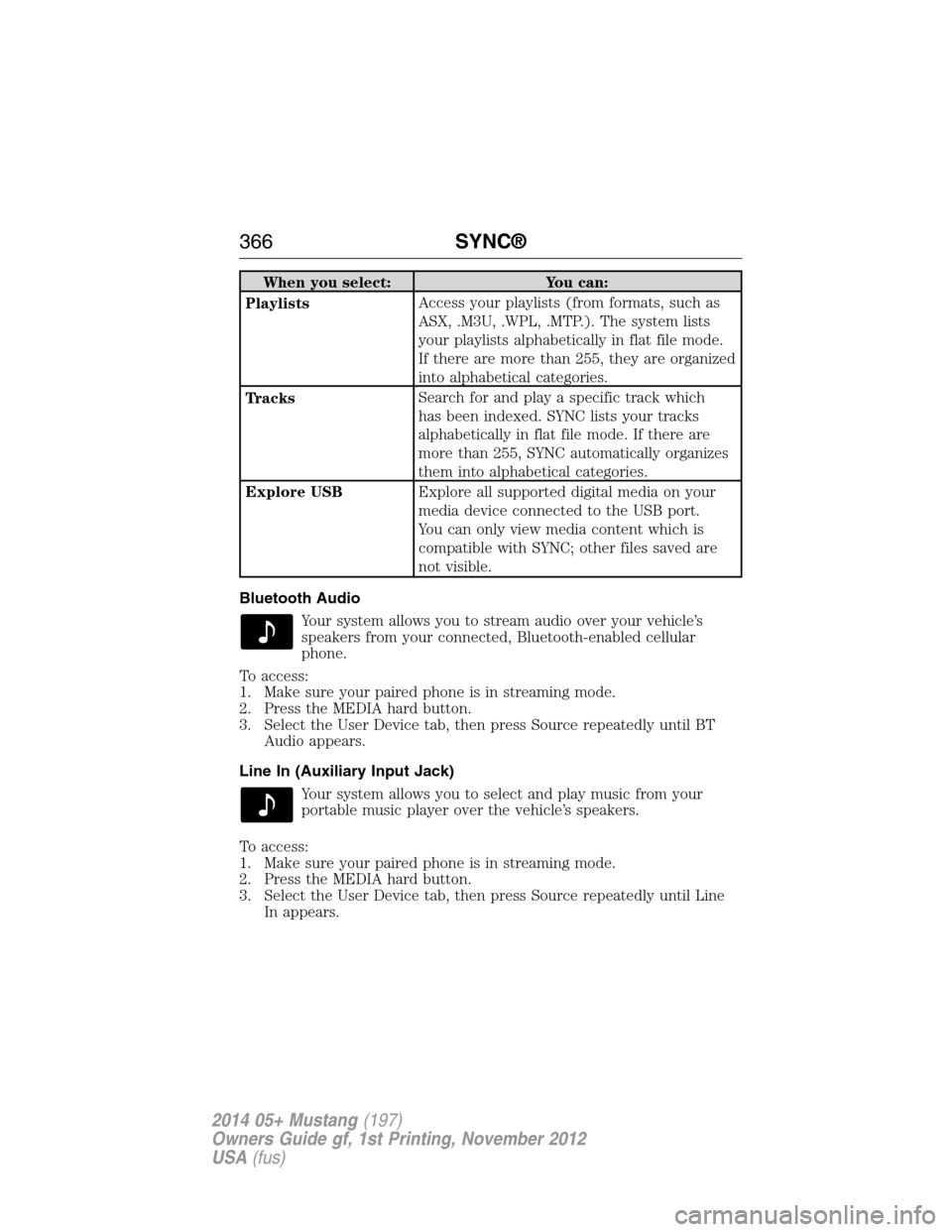
When you select: You can:
PlaylistsAccess your playlists (from formats, such as
ASX, .M3U, .WPL, .MTP.). The system lists
your playlists alphabetically in flat file mode.
If there are more than 255, they are organized
into alphabetical categories.
TracksSearch for and play a specific track which
has been indexed. SYNC lists your tracks
alphabetically in flat file mode. If there are
more than 255, SYNC automatically organizes
them into alphabetical categories.
Explore USBExplore all supported digital media on your
media device connected to the USB port.
You can only view media content which is
compatible with SYNC; other files saved are
not visible.
Bluetooth Audio
Your system allows you to stream audio over your vehicle’s
speakers from your connected, Bluetooth-enabled cellular
phone.
To access:
1. Make sure your paired phone is in streaming mode.
2. Press the MEDIA hard button.
3. Select the User Device tab, then press Source repeatedly until BT
Audio appears.
Line In (Auxiliary Input Jack)
Your system allows you to select and play music from your
portable music player over the vehicle’s speakers.
To access:
1. Make sure your paired phone is in streaming mode.
2. Press the MEDIA hard button.
3. Select the User Device tab, then press Source repeatedly until Line
In appears.
366SYNC®
2014 05+ Mustang(197)
Owners Guide gf, 1st Printing, November 2012
USA(fus)
Page 413 of 461
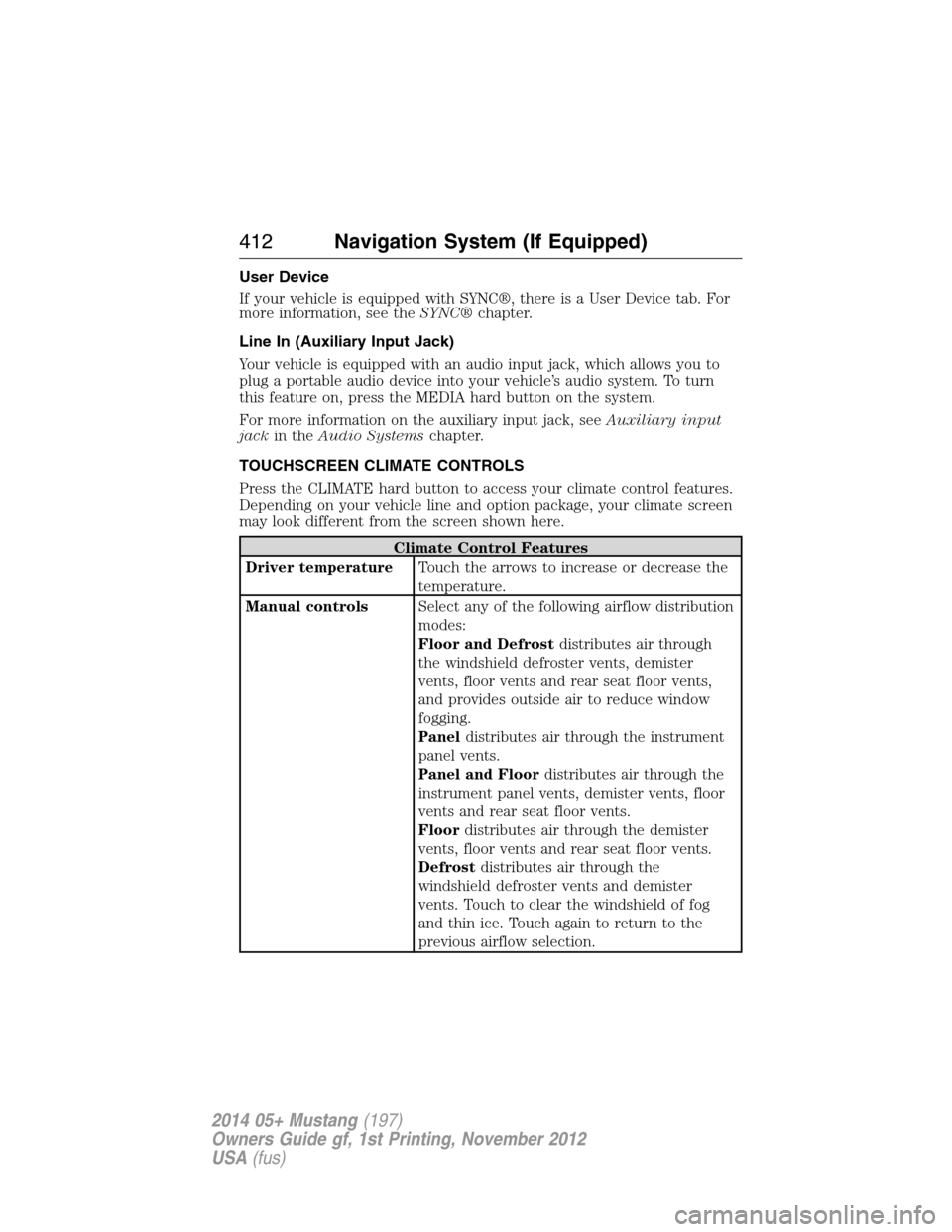
User Device
If your vehicle is equipped with SYNC®, there is a User Device tab. For
more information, see theSYNC®chapter.
Line In (Auxiliary Input Jack)
Your vehicle is equipped with an audio input jack, which allows you to
plug a portable audio device into your vehicle’s audio system. To turn
this feature on, press the MEDIA hard button on the system.
For more information on the auxiliary input jack, seeAuxiliary input
jackin theAudio Systemschapter.
TOUCHSCREEN CLIMATE CONTROLS
Press the CLIMATE hard button to access your climate control features.
Depending on your vehicle line and option package, your climate screen
may look different from the screen shown here.
Climate Control Features
Driver temperatureTouch the arrows to increase or decrease the
temperature.
Manual controlsSelect any of the following airflow distribution
modes:
Floor and Defrostdistributes air through
the windshield defroster vents, demister
vents, floor vents and rear seat floor vents,
and provides outside air to reduce window
fogging.
Paneldistributes air through the instrument
panel vents.
Panel and Floordistributes air through the
instrument panel vents, demister vents, floor
vents and rear seat floor vents.
Floordistributes air through the demister
vents, floor vents and rear seat floor vents.
Defrostdistributes air through the
windshield defroster vents and demister
vents. Touch to clear the windshield of fog
and thin ice. Touch again to return to the
previous airflow selection.
412Navigation System (If Equipped)
2014 05+ Mustang(197)
Owners Guide gf, 1st Printing, November 2012
USA(fus)
Page 454 of 461
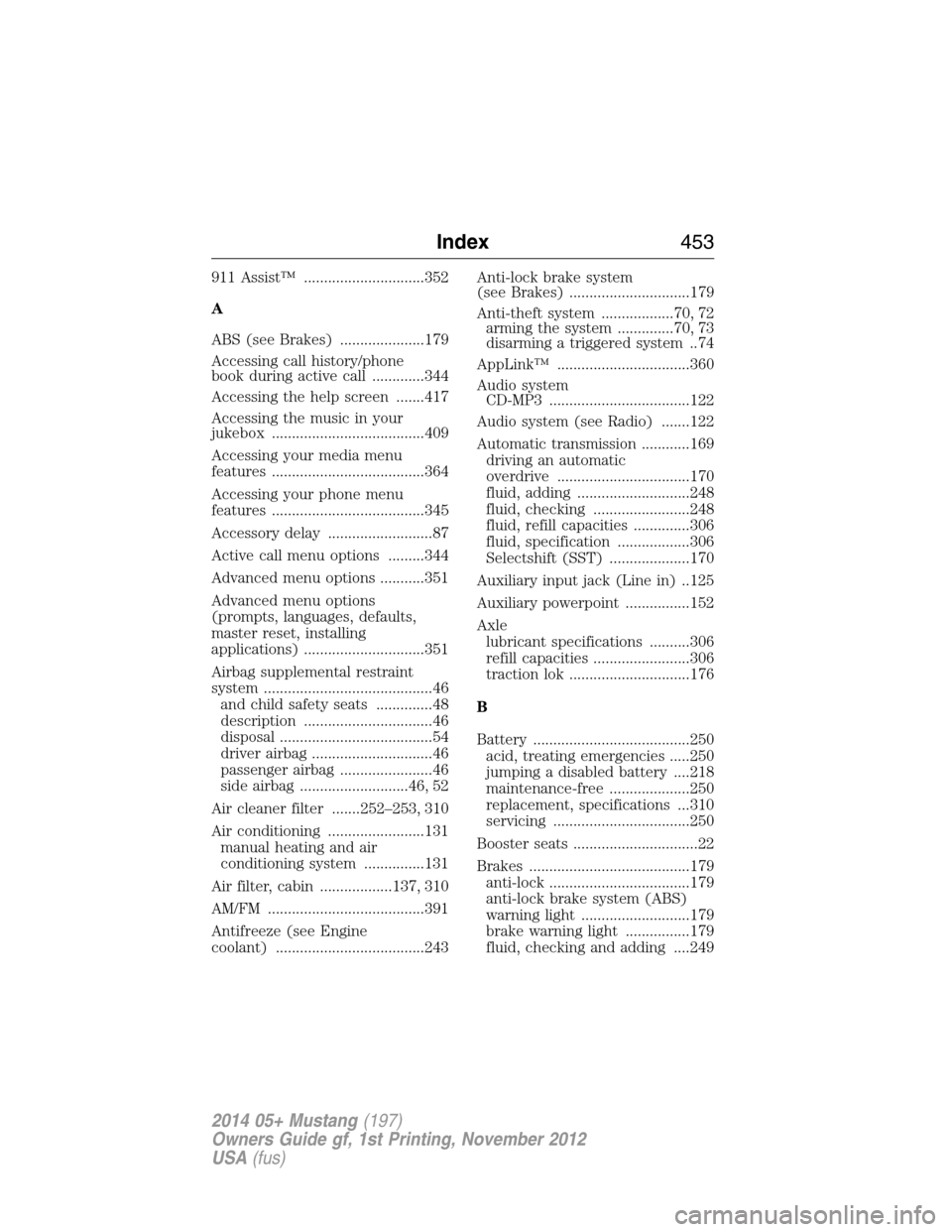
911 Assist™ ..............................352
A
ABS (see Brakes) .....................179
Accessing call history/phone
book during active call .............344
Accessing the help screen .......417
Accessing the music in your
jukebox ......................................409
Accessing your media menu
features ......................................364
Accessing your phone menu
features ......................................345
Accessory delay ..........................87
Active call menu options .........344
Advanced menu options ...........351
Advanced menu options
(prompts, languages, defaults,
master reset, installing
applications) ..............................351
Airbag supplemental restraint
system ..........................................46
and child safety seats ..............48
description ................................46
disposal ......................................54
driver airbag ..............................46
passenger airbag .......................46
side airbag ...........................46, 52
Air cleaner filter .......252–253, 310
Air conditioning ........................131
manual heating and air
conditioning system ...............131
Air filter, cabin ..................137, 310
AM/FM .......................................391
Antifreeze (see Engine
coolant) .....................................243Anti-lock brake system
(see Brakes) ..............................179
Anti-theft system ..................70, 72
arming the system ..............70, 73
disarming a triggered system ..74
AppLink™ .................................360
Audio system
CD-MP3 ...................................122
Audio system (see Radio) .......122
Automatic transmission ............169
driving an automatic
overdrive .................................170
fluid, adding ............................248
fluid, checking ........................248
fluid, refill capacities ..............306
fluid, specification ..................306
Selectshift (SST) ....................170
Auxiliary input jack (Line in) ..125
Auxiliary powerpoint ................152
Axle
lubricant specifications ..........306
refill capacities ........................306
traction lok ..............................176
B
Battery .......................................250
acid, treating emergencies .....250
jumping a disabled battery ....218
maintenance-free ....................250
replacement, specifications ...310
servicing ..................................250
Booster seats ...............................22
Brakes ........................................179
anti-lock ...................................179
anti-lock brake system (ABS)
warning light ...........................179
brake warning light ................179
fluid, checking and adding ....249
Index453
2014 05+ Mustang(197)
Owners Guide gf, 1st Printing, November 2012
USA(fus)