reset FORD MUSTANG 2014 5.G Owner's Manual
[x] Cancel search | Manufacturer: FORD, Model Year: 2014, Model line: MUSTANG, Model: FORD MUSTANG 2014 5.GPages: 461, PDF Size: 5.47 MB
Page 123 of 461
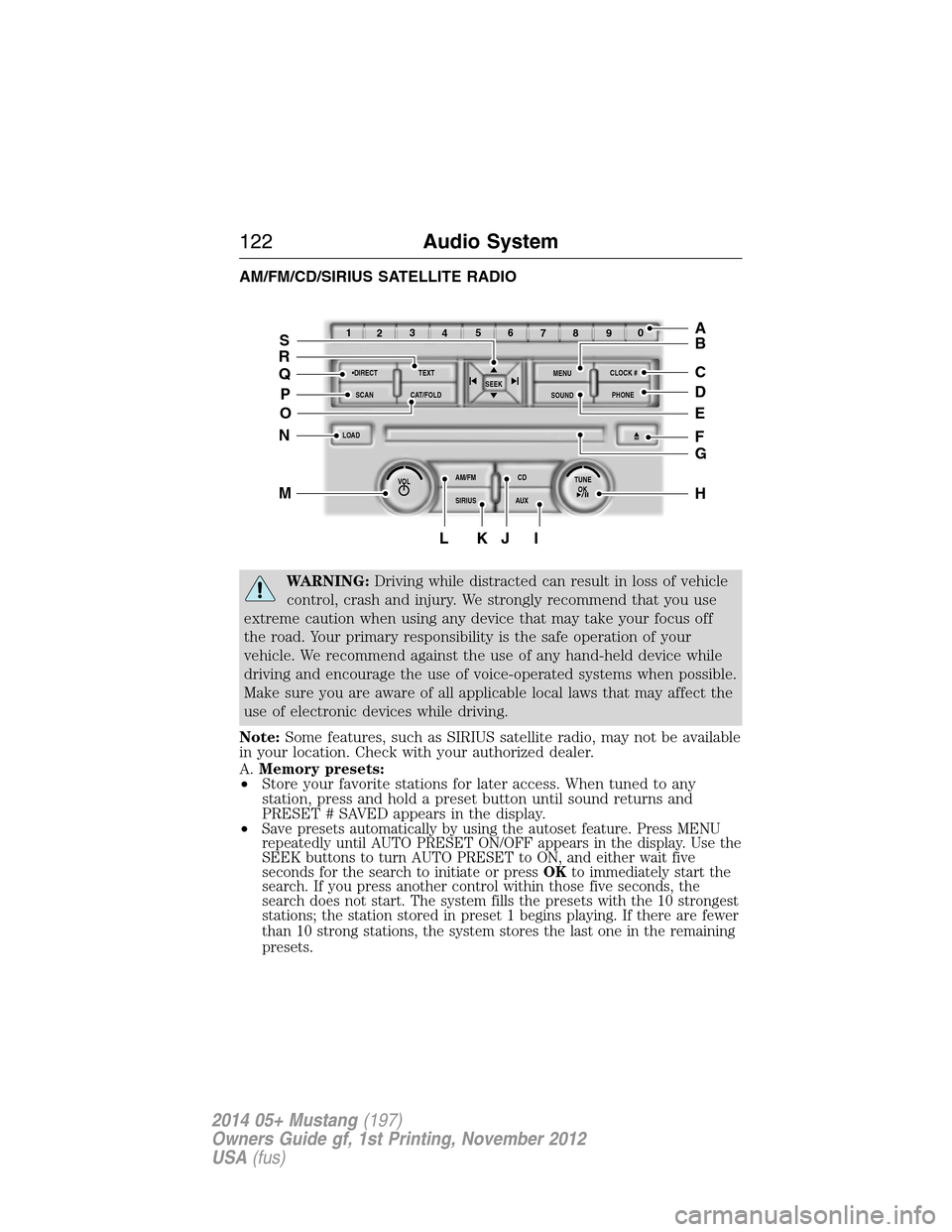
AM/FM/CD/SIRIUS SATELLITE RADIO
WARNING:Driving while distracted can result in loss of vehicle
control, crash and injury. We strongly recommend that you use
extreme caution when using any device that may take your focus off
the road. Your primary responsibility is the safe operation of your
vehicle. We recommend against the use of any hand-held device while
driving and encourage the use of voice-operated systems when possible.
Make sure you are aware of all applicable local laws that may affect the
use of electronic devices while driving.
Note:Some features, such as SIRIUS satellite radio, may not be available
in your location. Check with your authorized dealer.
A.Memory presets:
•Store your favorite stations for later access. When tuned to any
station, press and hold a preset button until sound returns and
PRESET # SAVED appears in the display.
•
Save presets automatically by using the autoset feature. Press MENU
repeatedly until AUTO PRESET ON/OFF appears in the display. Use the
SEEK buttons to turn AUTO PRESET to ON, and either wait five
seconds for the search to initiate or pressOKto immediately start the
search. If you press another control within those five seconds, the
search does not start. The system fills the presets with the 10 strongest
stations; the station stored in preset 1 begins playing. If there are fewer
than 10 strong stations, the system stores the last one in the remaining
presets.
OKTUNE LOAD
VOLCD
AUX AM/FM
SIRIUS TEXT
SCANCAT/FOLDCLOCK #
SOUNDMENU
SEEK
1
23
45
6
78
90
PHONE
BRC
D
F
IKJL
HM
N
P
Q
EO
G
A
S
122Audio System
2014 05+ Mustang(197)
Owners Guide gf, 1st Printing, November 2012
USA(fus)
Page 124 of 461
Note:Autoset does not delete your original preset stations.
Note:In order to re-run the autoset features, you must first turn it off
before turning it back on.
B.MENU:Press this button to access different audio features:
•Compressionbrings the soft and loud CD passages together for a
more consistent listening level.
•Shuffleplays the current CD tracks in random order.
•RDS Radioallows you to search RDS-equipped stations for a certain
category of music format such as CLASSIC, COUNTRY, JAZZ/RB or
ROCK.
•SIRIUSallows you to access different satellite radio options.
C.CLOCK:Press this button to set the time. Use the memory presets
buttons to enter the time, and then pressOK.
D.PHONE:Press this button to access the phone features of the
SYNC® system. See theSYNC®chapter for more information. If your
vehicle is not equipped with SYNC®, the display reads NO PHONE.
E.SOUND:Press this button to access settings for Treble, Middle, Bass,
Balance and Fade. Use theSEEKorTUNEcontrols to change the
settings.
•Basslevels can be increased or decreased.
•Treblelevels can be increased or decreased.
•Balanceadjusts the sound between left and right speakers.
•Fadeadjusts the sound between the front and back speakers.
•Speed Compensated Volumeadjusts the volume to compensate for
speed and wind noise. You can set the system between off and +7.
•All Seat Mode/Driver Seat Mode/Top Down Mode (if equipped)
optimizes sound quality for the chosen seating position.
•DSP Mode (if equipped)allows you to choose between STEREO
SURROUND mode and STEREO mode.
F.Eject:Press this button to eject a CD.
G.CD slot:Insert a CD.
H.TUNE/OK/Play/Pause:
•In radio mode, turn the control to manually search through the radio
frequency band.
•In SIRIUS mode, turn the control to find the next or previous
available satellite radio station.
•OKallows you to confirm commands with phone and media features.
If your vehicle is equipped with SYNC®, see theSYNC®chapter for
more information.
•
Play/Pause allows you to play or pause a track when listening to a CD.
Audio System123
2014 05+ Mustang(197)
Owners Guide gf, 1st Printing, November 2012
USA(fus)
Page 126 of 461
Q.DIRECT:
•In radio mode, press this button to select the desired radio frequency
(such as 93.9) using the memory preset numbers (0–9).
•
In SIRIUS mode, press this button to enter the desired channel (such as
002) using the memory preset buttons. If you only enter one digit, and
pressOK,the system goes to that channel. If you enter three digits,
the system automatically goes to that channel, if available. You may
cancel your entry by pressingDIRECT.If you enter an invalid station
number,INVALID CHANNELappears in the display and the system
continues playing the current station.
•In CD mode, press this button to enter the desired track number using
the memory preset buttons. The system then begins playing that track.
•In MP3 mode, press this button to enter a memory preset button of the
desired folder. The system advances to that specific folder.
R.TEXT:
•MP3 mode, press this button to view Album (AL), Folder (FL), Song
(SO) and Artist (AR) in the display, if available.
•In text mode, sometimes the display requires additional text to show.
When theindicatorison,press this button, then use theSEEK
buttons to view the additional text.
S.SEEK:
•In radio mode, select a frequency band and press one of these
buttons. The system stops at the first station it finds in that direction.
•In SIRIUS mode, press one of these buttons to select the previous or
next channel. If a specific category is selected (such as Jazz, Rock or
News), use these buttons to find the previous or next channel in the
selected category.
•In CD and MP3 modes, press one of these buttons to select the
previous or next track.
AUXILIARY INPUT JACK
WARNING:Driving while distracted can result in loss of vehicle
control, crash and injury. We strongly recommend that you use
extreme caution when using any device that may take your focus off
the road. Your primary responsibility is the safe operation of your
vehicle. We recommend against the use of any hand-held device while
driving and encourage the use of voice-operated systems when possible.
Make sure you are aware of all applicable local laws that may affect the
use of electronic devices while driving.
Audio System125
2014 05+ Mustang(197)
Owners Guide gf, 1st Printing, November 2012
USA(fus)
Page 130 of 461
SIRIUS Satellite Radio Service
Note:SIRIUS reserves the unrestricted right to change, rearrange, add
or delete programming including canceling, moving or adding particular
channels, and its prices, at any time, with or without notice to you. Ford
Motor Company shall not be responsible for any such programming
changes.
SIRIUS satellite radio is a
subscription-based satellite radio
service that broadcasts a variety of
music, sports, news, weather, traffic
and entertainment programming.
Your factory-installed SIRIUS satellite
radio system includes hardware and
a limited subscription term which begins on the date of sale or lease of
your vehicle. See an authorized dealer for availability.
For more information on extended subscription terms (a service fee is
required), the online media player and a complete list of SIRIUS satellite
radio channels, and other features, please visit www.siriusxm.com in the
United States, www.sirius.ca in Canada, or call SIRIUS at 1–888–539–7474.
Satellite Radio Electronic Serial Number (ESN)
You need your ESN to activate, modify or track your satellite radio
account. When in satellite radio mode, you can view this number by
pressingSIRIUSand memory preset 1 at the same time. To access your
ESN, press the bottom left corner of the touchscreen, thenSIRIUS>
Options.
Troubleshooting
Radio display Condition Possible action
Acquiring Radio requires more
than two seconds to
produce audio for the
selected channel.No action required.
This message should
disappear shortly.
Sat Fault/SIRIUS
system failureThere is an internal
module or system
failure present.If this message does
not clear shortly, or
with an ignition key
cycle, your receiver
may have a fault. See
an authorized dealer
for service.
Audio System129
2014 05+ Mustang(197)
Owners Guide gf, 1st Printing, November 2012
USA(fus)
Page 131 of 461
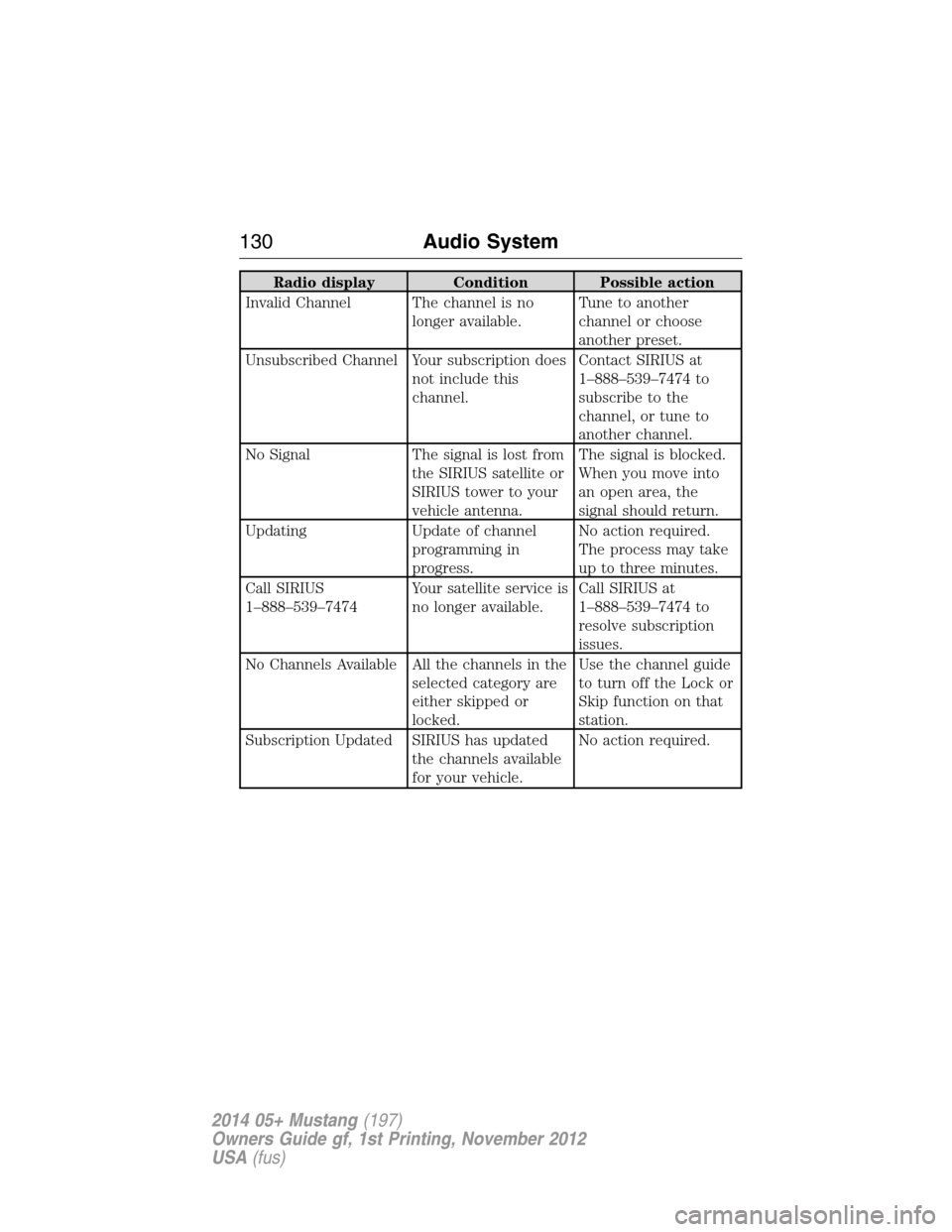
Radio display Condition Possible action
Invalid Channel The channel is no
longer available.Tune to another
channel or choose
another preset.
Unsubscribed Channel Your subscription does
not include this
channel.Contact SIRIUS at
1–888–539–7474 to
subscribe to the
channel, or tune to
another channel.
No Signal The signal is lost from
the SIRIUS satellite or
SIRIUS tower to your
vehicle antenna.The signal is blocked.
When you move into
an open area, the
signal should return.
Updating Update of channel
programming in
progress.No action required.
The process may take
up to three minutes.
Call SIRIUS
1–888–539–7474Your satellite service is
no longer available.Call SIRIUS at
1–888–539–7474 to
resolve subscription
issues.
No Channels Available All the channels in the
selected category are
either skipped or
locked.Use the channel guide
to turn off the Lock or
Skip function on that
station.
Subscription Updated SIRIUS has updated
the channels available
for your vehicle.No action required.
130Audio System
2014 05+ Mustang(197)
Owners Guide gf, 1st Printing, November 2012
USA(fus)
Page 165 of 461
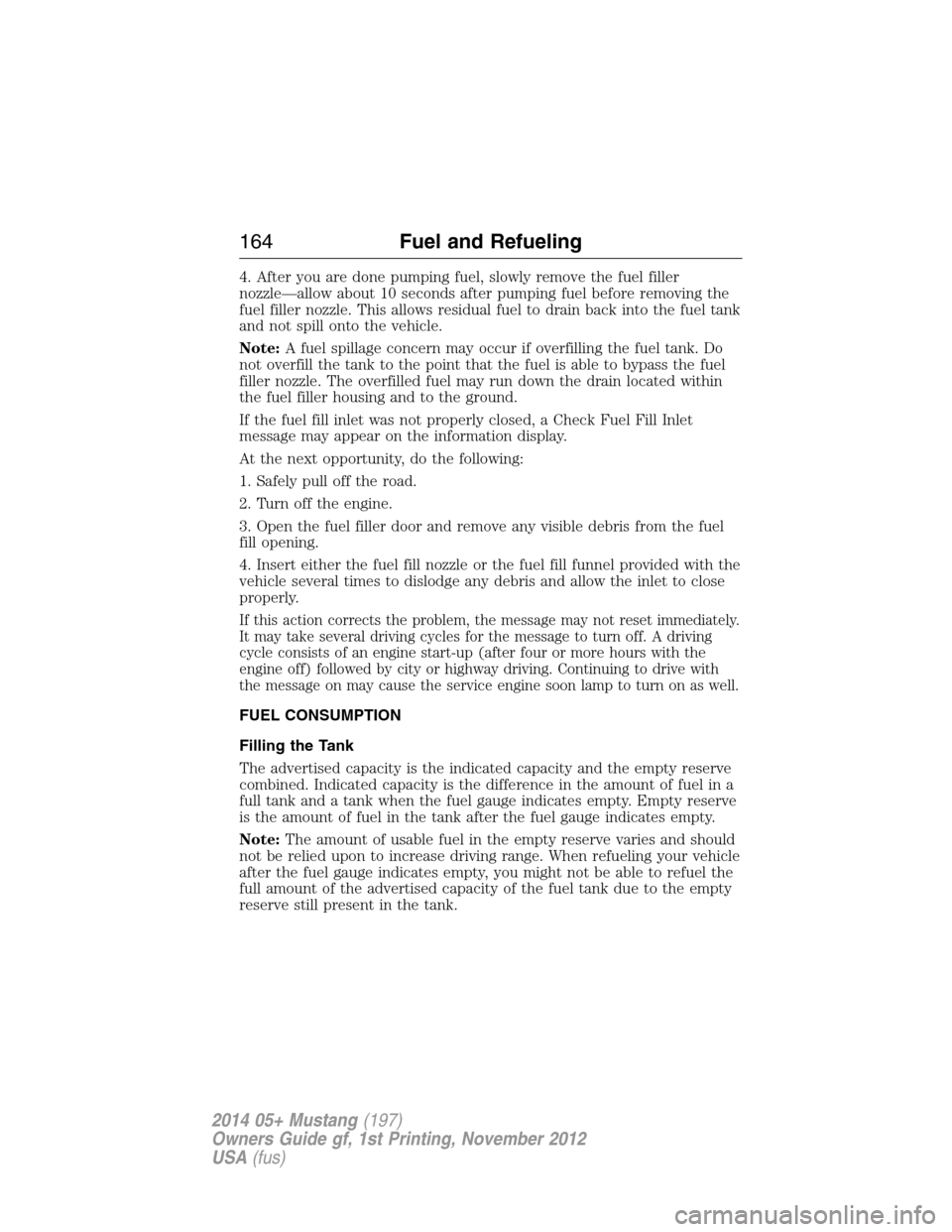
4. After you are done pumping fuel, slowly remove the fuel filler
nozzle—allow about 10 seconds after pumping fuel before removing the
fuel filler nozzle. This allows residual fuel to drain back into the fuel tank
and not spill onto the vehicle.
Note:A fuel spillage concern may occur if overfilling the fuel tank. Do
not overfill the tank to the point that the fuel is able to bypass the fuel
filler nozzle. The overfilled fuel may run down the drain located within
the fuel filler housing and to the ground.
If the fuel fill inlet was not properly closed, a Check Fuel Fill Inlet
message may appear on the information display.
At the next opportunity, do the following:
1. Safely pull off the road.
2. Turn off the engine.
3. Open the fuel filler door and remove any visible debris from the fuel
fill opening.
4. Insert either the fuel fill nozzle or the fuel fill funnel provided with the
vehicle several times to dislodge any debris and allow the inlet to close
properly.
If this action corrects the problem, the message may not reset immediately.
It may take several driving cycles for the message to turn off. A driving
cycle consists of an engine start-up (after four or more hours with the
engine off) followed by city or highway driving. Continuing to drive with
the message on may cause the service engine soon lamp to turn on as well.
FUEL CONSUMPTION
Filling the Tank
The advertised capacity is the indicated capacity and the empty reserve
combined. Indicated capacity is the difference in the amount of fuel in a
full tank and a tank when the fuel gauge indicates empty. Empty reserve
is the amount of fuel in the tank after the fuel gauge indicates empty.
Note:The amount of usable fuel in the empty reserve varies and should
not be relied upon to increase driving range. When refueling your vehicle
after the fuel gauge indicates empty, you might not be able to refuel the
full amount of the advertised capacity of the fuel tank due to the empty
reserve still present in the tank.
164Fuel and Refueling
2014 05+ Mustang(197)
Owners Guide gf, 1st Printing, November 2012
USA(fus)
Page 193 of 461
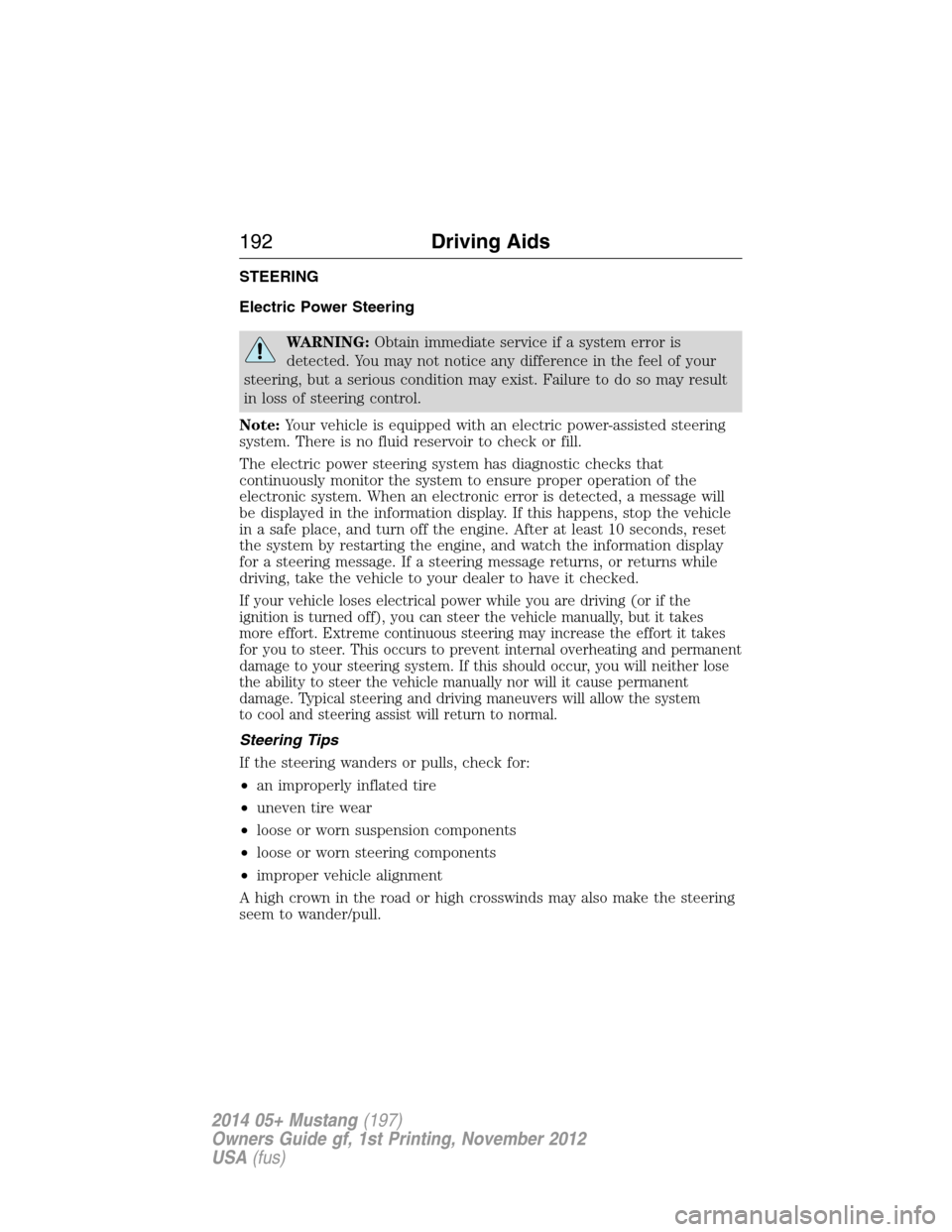
STEERING
Electric Power Steering
WARNING:Obtain immediate service if a system error is
detected. You may not notice any difference in the feel of your
steering, but a serious condition may exist. Failure to do so may result
in loss of steering control.
Note:Your vehicle is equipped with an electric power-assisted steering
system. There is no fluid reservoir to check or fill.
The electric power steering system has diagnostic checks that
continuously monitor the system to ensure proper operation of the
electronic system. When an electronic error is detected, a message will
be displayed in the information display. If this happens, stop the vehicle
in a safe place, and turn off the engine. After at least 10 seconds, reset
the system by restarting the engine, and watch the information display
for a steering message. If a steering message returns, or returns while
driving, take the vehicle to your dealer to have it checked.
If your vehicle loses electrical power while you are driving (or if the
ignition is turned off), you can steer the vehicle manually, but it takes
more effort. Extreme continuous steering may increase the effort it takes
for you to steer. This occurs to prevent internal overheating and permanent
damage to your steering system. If this should occur, you will neither lose
the ability to steer the vehicle manually nor will it cause permanent
damage. Typical steering and driving maneuvers will allow the system
to cool and steering assist will return to normal.
Steering Tips
If the steering wanders or pulls, check for:
•an improperly inflated tire
•uneven tire wear
•loose or worn suspension components
•loose or worn steering components
•improper vehicle alignment
A high crown in the road or high crosswinds may also make the steering
seem to wander/pull.
192Driving Aids
2014 05+ Mustang(197)
Owners Guide gf, 1st Printing, November 2012
USA(fus)
Page 247 of 461
Vehicles driven year-round in non-extreme climates should use
prediluted engine coolant for optimum cooling system and engine
protection.
What You Should Know About Fail-Safe Cooling
If the engine coolant supply is depleted, this feature allows the vehicle to
be driven temporarily before incremental component damage is incurred.
The fail-safe distance depends on ambient temperatures, vehicle load and
terrain.
How Fail-Safe Cooling Works
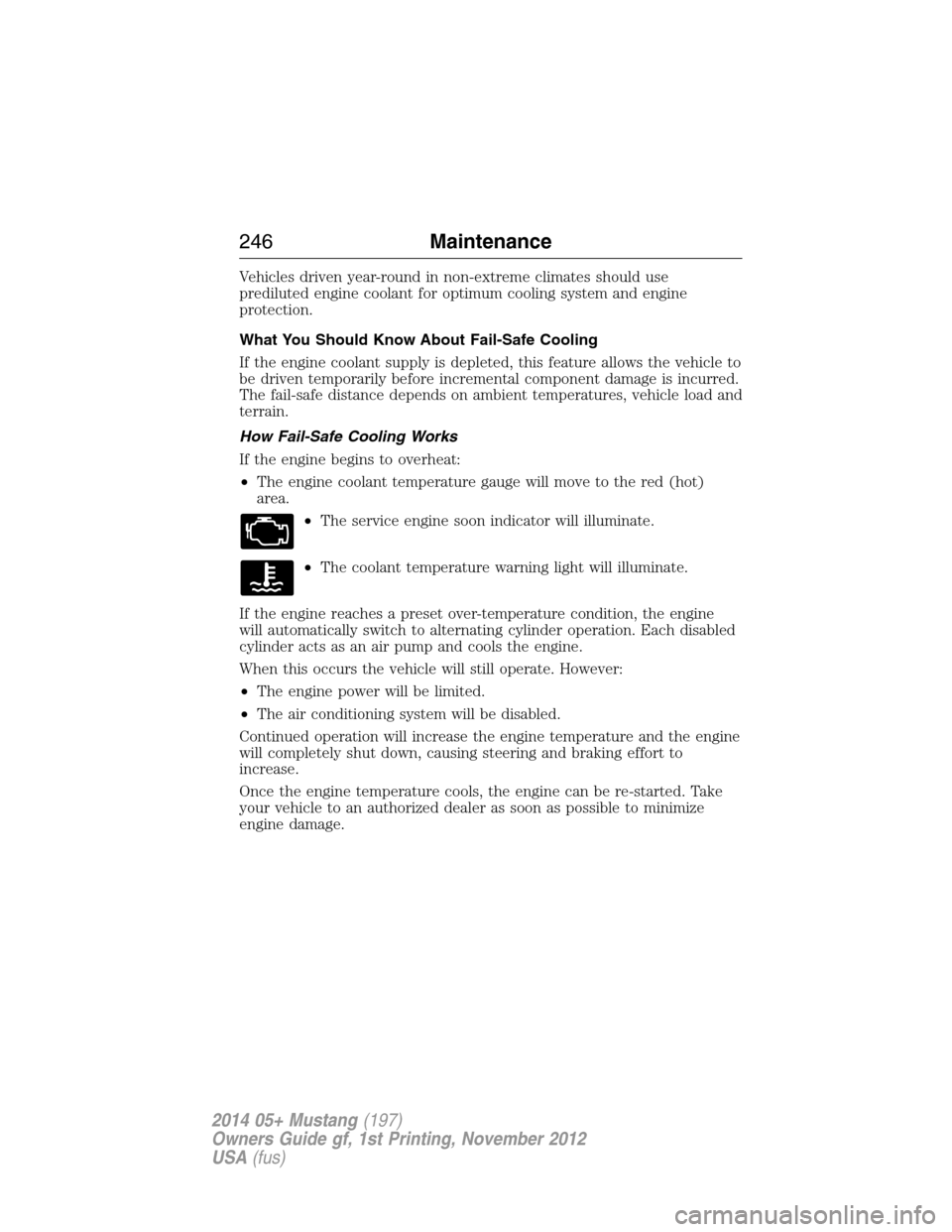
If the engine begins to overheat:
•The engine coolant temperature gauge will move to the red (hot)
area.
•The service engine soon indicator will illuminate.
•The coolant temperature warning light will illuminate.
If the engine reaches a preset over-temperature condition, the engine
will automatically switch to alternating cylinder operation. Each disabled
cylinder acts as an air pump and cools the engine.
When this occurs the vehicle will still operate. However:
•The engine power will be limited.
•The air conditioning system will be disabled.
Continued operation will increase the engine temperature and the engine
will completely shut down, causing steering and braking effort to
increase.
Once the engine temperature cools, the engine can be re-started. Take
your vehicle to an authorized dealer as soon as possible to minimize
engine damage.
246Maintenance
2014 05+ Mustang(197)
Owners Guide gf, 1st Printing, November 2012
USA(fus)
Page 252 of 461
Battery Relearn
Because your vehicle’s engine is electronically controlled by a computer,
some control conditions are maintained by power from the battery. When
the battery is disconnected or a new battery is installed, the engine must
relearn its idle and fuel trim strategy for optimum driveability and
performance. To begin this process:
1. With the vehicle at a complete stop, set the parking brake.
2. Put the gearshift in position P (automatic transmission) or the neutral
position (manual transmission), turn off all accessories and start the
engine.
3. Run the engine until it reaches normal operating temperature.
4. Allow the engine to idle for at least one minute.
5. Turn the A/C on and allow the engine to idle for at least one minute.
6. Drive the vehicle to complete the relearning process.
•The vehicle may need to be driven 10 mi (16 km) or more to relearn
the idle and fuel trim strategy.
•Note:If you do not allow the engine to relearn its idle trim, the idle
quality of your vehicle may be adversely affected until the idle trim is
eventually relearned.
When the battery is disconnected or a new battery installed, the
transmission must relearn its adaptive strategy. As a result of this, the
transmission may shift firmly. This operation is considered normal and
will not affect function or durability of the transmission. Over time the
adaptive learning process will fully update transmission operation to its
optimum shift feel.
If the battery has been disconnected or a new battery has been installed,
the clock and the preset radio stations must be reset once the battery is
reconnected.
Always dispose of automotive batteries in a responsible manner. Follow
your local authorized standards for disposal. Call your local authorized
recycling center to find out more about recycling automotive batteries.
Maintenance251
2014 05+ Mustang(197)
Owners Guide gf, 1st Printing, November 2012
USA(fus)
Page 268 of 461
•Cover chrome and stainless steel parts with a thick coat of auto wax
to prevent discoloration. Re-wax as necessary when the vehicle is
washed.
•Lubricate hood latch, all door latches and trunk lid hinges with a light
grade oil.
•Cover interior trim to prevent fading.
•Keep all rubber parts free from oil and solvents.
Engine
•The engine oil and filter should be changed prior to storage, as used
engine oil contains contaminates that may cause engine damage.
•Start the engine every 15 days. Run at fast idle until it reaches normal
operating temperature.
•With your foot on the brake, shift through all the gears while the
engine is running.
Fuel system
•Fill the fuel tank with high-quality fuel until the first automatic shutoff
of the fuel pump nozzle.
Note:During extended periods of vehicle storage (30 days or more),
fuel may deteriorate due to oxidation. Add a quality gas stabilizer
product to the vehicle fuel system whenever actual or expected storage
periods exceed 30 days. Follow the instructions on the additive label.
The vehicle should then be operated at idle speed to circulate the
additive throughout the fuel system.
Cooling system
•Protect against freezing temperatures.
•When removing vehicle from storage, check coolant fluid level.
Confirm there are no cooling system leaks, and fluid is at the
recommended level.
Battery
•Check and recharge as necessary. Keep connections clean.
•If storing your vehicle for more than 30 days without recharging the
battery, it may be advisable to disconnect the battery cables to ensure
battery charge is maintained for quick starting.
Note:If battery cables are disconnected, it will be necessary to reset
memory features.
Vehicle Care267
2014 05+ Mustang(197)
Owners Guide gf, 1st Printing, November 2012
USA(fus)