navigation FORD MUSTANG 2014 5.G Service Manual
[x] Cancel search | Manufacturer: FORD, Model Year: 2014, Model line: MUSTANG, Model: FORD MUSTANG 2014 5.GPages: 461, PDF Size: 5.47 MB
Page 407 of 461
DVD
Note:Your system only plays NTSC formatted discs. The system does
not support PAL format.
Your system allows you to play DVD audio and video discs. Make sure
your vehicle is in positionP(vehicles equipped with an automatic
transmission) or the parking brake is engaged (vehicles equipped with a
manual transmission). This allows you to be able to view and hear the
DVD. If your vehicle is moving, the video does not play.
When you select: You can:
Ti t l eGo to the disc’s main title screen.
MenuGo to the disc’s main menu.
Cursor ControlsNavigate to the desired menu selections.
Settings Video Display Settingsallows you to adjust
the brightness and contrast. You can also
choose to return to the default settings by
pressing Restore Default.
Audio Languageallows you to choose which
language you would like the DVD audio track
to play in.
Subtitle Displayallows you to turn subtitles
off and on.
Subtitle Languageallows you to choose the
subtitle language.
Aspect Ratioallows you to choose wide, full,
normal or cinema display.
Angle Mark Notificationallows you to have
more viewing angles from which to select.
Once you have made your selection, press
ENTER to confirm.
SearchGo to a specific title or chapter using the
keypad.
Note:Some of the above settings are disc-dependent and availability and
operation may vary.
406Navigation System (If Equipped)
2014 05+ Mustang(197)
Owners Guide gf, 1st Printing, November 2012
USA(fus)
Page 408 of 461
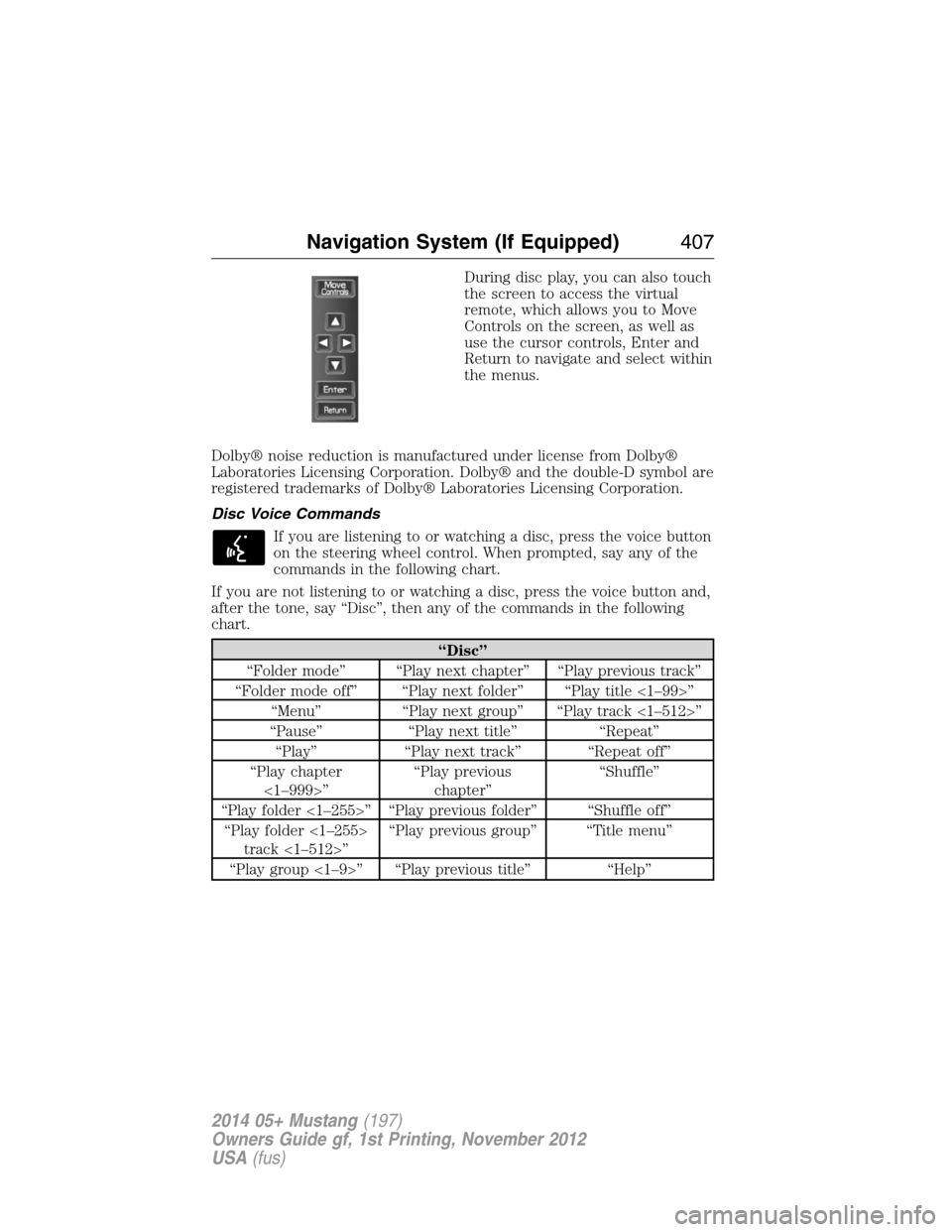
During disc play, you can also touch
the screen to access the virtual
remote, which allows you to Move
Controls on the screen, as well as
use the cursor controls, Enter and
Return to navigate and select within
the menus.
Dolby® noise reduction is manufactured under license from Dolby®
Laboratories Licensing Corporation. Dolby® and the double-D symbol are
registered trademarks of Dolby® Laboratories Licensing Corporation.
Disc Voice Commands
If you are listening to or watching a disc, press the voice button
on the steering wheel control. When prompted, say any of the
commands in the following chart.
If you are not listening to or watching a disc, press the voice button and,
after the tone, say “Disc”, then any of the commands in the following
chart.
“Disc”
“Folder mode” “Play next chapter” “Play previous track”
“Folder mode off” “Play next folder” “Play title <1–99>”
“Menu” “Play next group” “Play track <1–512>”
“Pause” “Play next title” “Repeat”
“Play” “Play next track” “Repeat off”
“Play chapter
<1–999>”“Play previous
chapter”“Shuffle”
“Play folder <1–255>” “Play previous folder” “Shuffle off”
“Play folder <1–255>
track <1–512>”“Play previous group” “Title menu”
“Play group <1–9>” “Play previous title” “Help”
Navigation System (If Equipped)407
2014 05+ Mustang(197)
Owners Guide gf, 1st Printing, November 2012
USA(fus)
Page 409 of 461
DVD Voice Commands
If you are watching a DVD, press the voice button on the
steering wheel control. When prompted, say any of the
commands in the following chart.
If you are not watching a DVD, press the voice button and, after the
tone, say “DVD”, then any of the commands in the following chart.
“DVD”
“Menu” “Play next title”
“Menu title” “Play next track <1–512>”
“Pause” “Play previous chapter”
“Play” “Play previous title”
“Play chapter <1–999>” “Play previous track”
“Play group <1–9>” “Play title <1–99>”
“Play next chapter” “Repeat”
“Play next group” “Repeat off”
Video CD Voice Commands
If you are watching a video CD, press the voice button on
the steering wheel control. When prompted, say any of the
commands in the following chart.
If you are not watching a video CD, press the voice button and, after the
tone, say “Video CD”, then any of the commands in the following chart.
Video CD voice commands
“Play”
“Pause”
“Play next track”
“Play previous track”
“Play track <1–512>”
“Help”
408Navigation System (If Equipped)
2014 05+ Mustang(197)
Owners Guide gf, 1st Printing, November 2012
USA(fus)
Page 410 of 461
Jukebox
Your system has a Jukebox feature, which allows you to save desired tracks
or CDs to the hard drive for later access. The hard drive can store up to
10 GB* (164 hours; approximately 2472 tracks) of music. The system
contains a Gracenote® media database that allows for display of song title,
album title, and album cover art. After saving music to the hard drive, you
can access and play your music by specific tracks, artists, albums or
genres. You can even choose to create and access your own playlists.
*Note:1 GB equals one billion bytes (1000000000B).
Recording Music to Your Jukebox
To record music to your jukebox:
1. Insert a CD, and then select Record on the touchscreen.
2. Select individual tracks or press Select All to record the entire CD.
Note:The system automatically saves all tracks if you do not select
any.
3. Press the Start Recording button.
The progress shows at the bottom of the screen.
Note:If you are not actively listening to the disc during recording, the
record rate is much quicker (as fast as five minutes).
Accessing the Music in Your Jukebox
Once you have saved music to your jukebox, you can then choose
different ways to play the music.
1. Press the MEDIA hard button on the navigation system.
2. Select the Jukebox tab on the touchscreen. You can then select from
the following options:
When you select: You can:
ScanHear a brief sampling of all listenable tracks.
RepeatHear the selected track continuously.
ShufflePlay the tracks in a random order.
Navigation System (If Equipped)409
2014 05+ Mustang(197)
Owners Guide gf, 1st Printing, November 2012
USA(fus)
Page 411 of 461
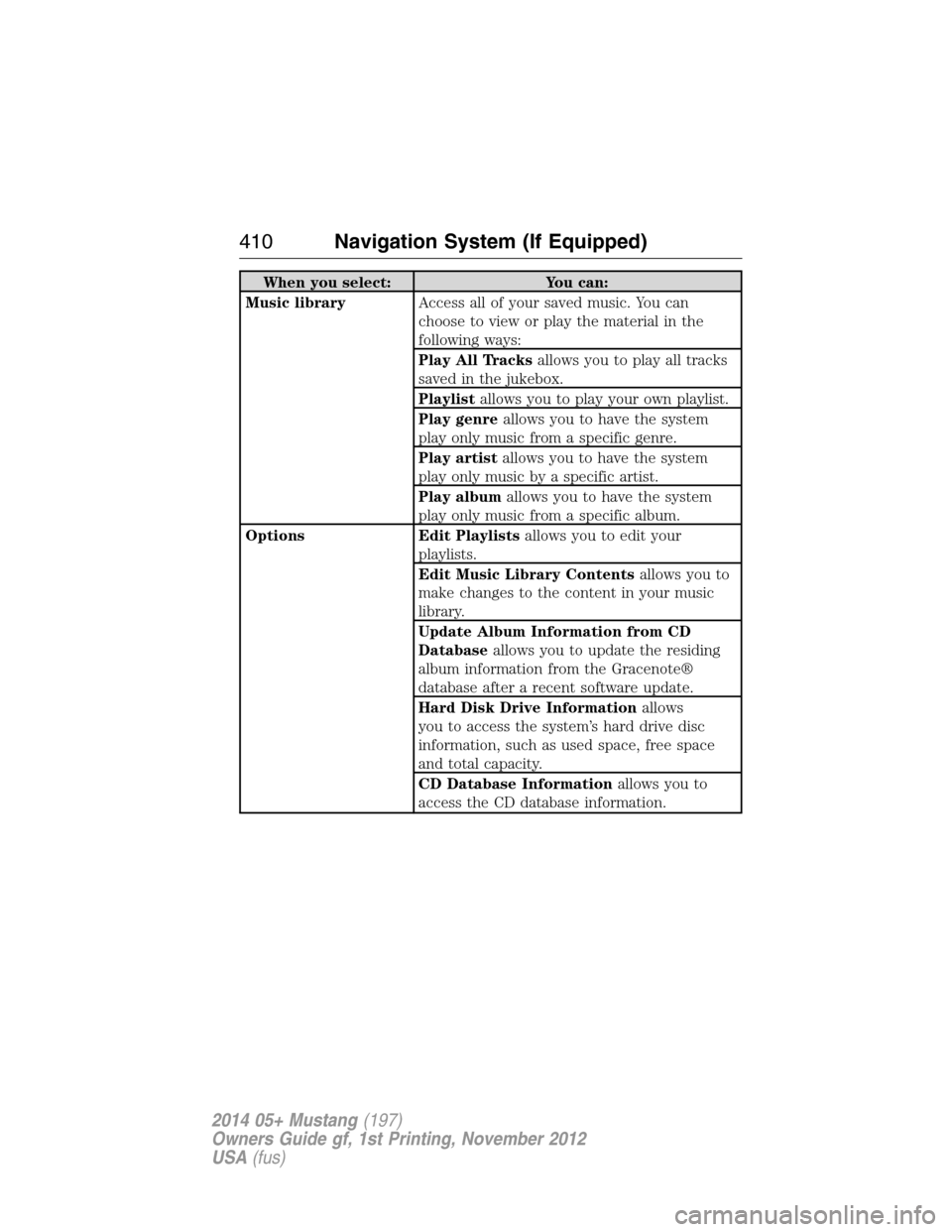
When you select: You can:
Music libraryAccess all of your saved music. You can
choose to view or play the material in the
following ways:
Play All Tracksallows you to play all tracks
saved in the jukebox.
Playlistallows you to play your own playlist.
Play genreallows you to have the system
play only music from a specific genre.
Play artistallows you to have the system
play only music by a specific artist.
Play albumallows you to have the system
play only music from a specific album.
Options Edit Playlistsallows you to edit your
playlists.
Edit Music Library Contentsallows you to
make changes to the content in your music
library.
Update Album Information from CD
Databaseallows you to update the residing
album information from the Gracenote®
database after a recent software update.
Hard Disk Drive Informationallows
you to access the system’s hard drive disc
information, such as used space, free space
and total capacity.
CD Database Informationallows you to
access the CD database information.
410Navigation System (If Equipped)
2014 05+ Mustang(197)
Owners Guide gf, 1st Printing, November 2012
USA(fus)
Page 412 of 461
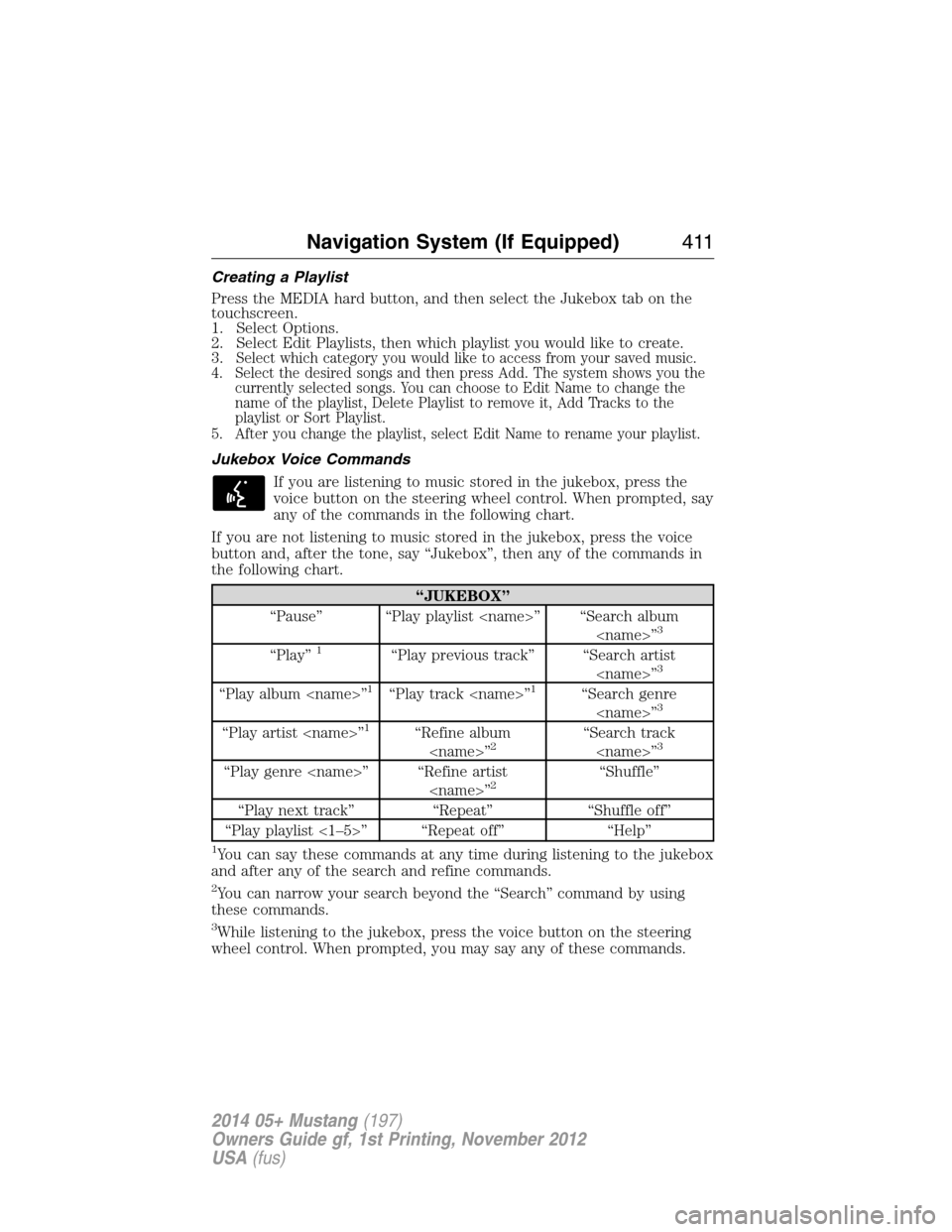
Creating a Playlist
Press the MEDIA hard button, and then select the Jukebox tab on the
touchscreen.
1. Select Options.
2. Select Edit Playlists, then which playlist you would like to create.
3.
Select which category you would like to access from your saved music.
4. Select the desired songs and then press Add. The system shows you the
currently selected songs. You can choose to Edit Name to change the
name of the playlist, Delete Playlist to remove it, Add Tracks to the
playlist or Sort Playlist.
5. After you change the playlist, select Edit Name to rename your playlist.
Jukebox Voice Commands
If you are listening to music stored in the jukebox, press the
voice button on the steering wheel control. When prompted, say
any of the commands in the following chart.
If you are not listening to music stored in the jukebox, press the voice
button and, after the tone, say “Jukebox”, then any of the commands in
the following chart.
“JUKEBOX”
“Pause” “Play playlist
3
“Play”1“Play previous track” “Search artist
“Play album
“Play artist
“Play genre
“Play next track” “Repeat” “Shuffle off”
“Play playlist <1–5>” “Repeat off” “Help”
1You can say these commands at any time during listening to the jukebox
and after any of the search and refine commands.
2You can narrow your search beyond the “Search” command by using
these commands.
3While listening to the jukebox, press the voice button on the steering
wheel control. When prompted, you may say any of these commands.
Navigation System (If Equipped)411
2014 05+ Mustang(197)
Owners Guide gf, 1st Printing, November 2012
USA(fus)
Page 413 of 461
User Device
If your vehicle is equipped with SYNC®, there is a User Device tab. For
more information, see theSYNC®chapter.
Line In (Auxiliary Input Jack)
Your vehicle is equipped with an audio input jack, which allows you to
plug a portable audio device into your vehicle’s audio system. To turn
this feature on, press the MEDIA hard button on the system.
For more information on the auxiliary input jack, seeAuxiliary input
jackin theAudio Systemschapter.
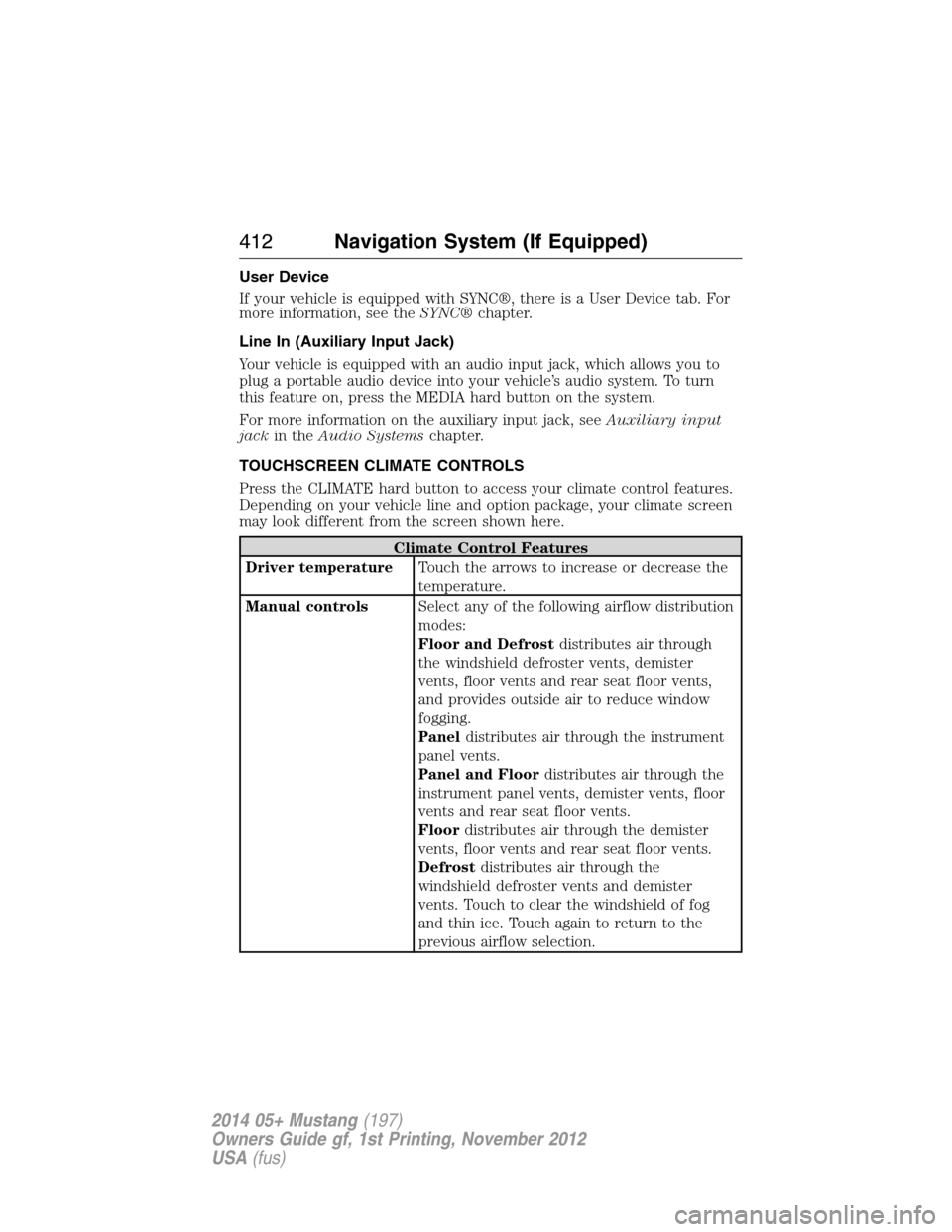
TOUCHSCREEN CLIMATE CONTROLS
Press the CLIMATE hard button to access your climate control features.
Depending on your vehicle line and option package, your climate screen
may look different from the screen shown here.
Climate Control Features
Driver temperatureTouch the arrows to increase or decrease the
temperature.
Manual controlsSelect any of the following airflow distribution
modes:
Floor and Defrostdistributes air through
the windshield defroster vents, demister
vents, floor vents and rear seat floor vents,
and provides outside air to reduce window
fogging.
Paneldistributes air through the instrument
panel vents.
Panel and Floordistributes air through the
instrument panel vents, demister vents, floor
vents and rear seat floor vents.
Floordistributes air through the demister
vents, floor vents and rear seat floor vents.
Defrostdistributes air through the
windshield defroster vents and demister
vents. Touch to clear the windshield of fog
and thin ice. Touch again to return to the
previous airflow selection.
412Navigation System (If Equipped)
2014 05+ Mustang(197)
Owners Guide gf, 1st Printing, November 2012
USA(fus)
Page 414 of 461
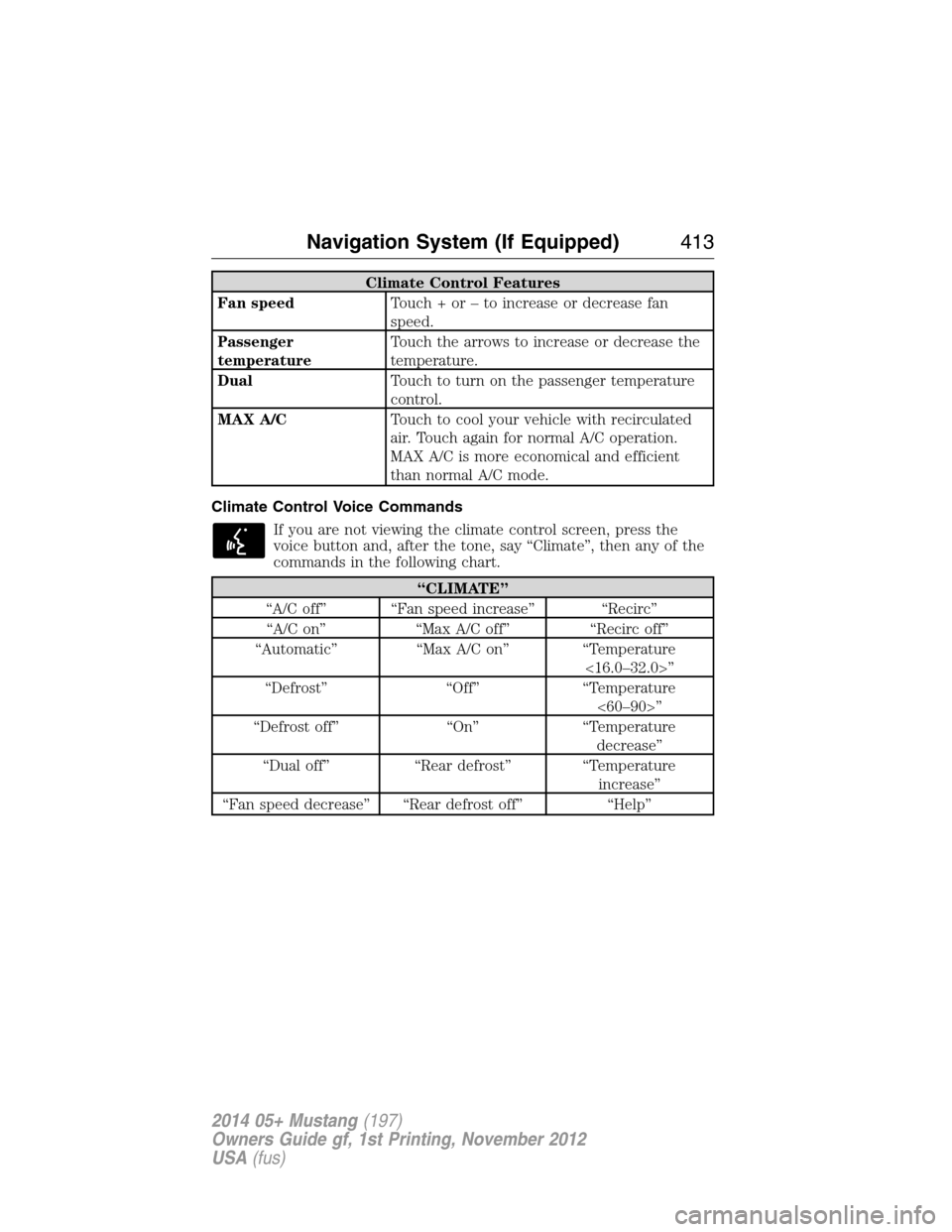
Climate Control Features
Fan speedTouch + or – to increase or decrease fan
speed.
Passenger
temperatureTouch the arrows to increase or decrease the
temperature.
DualTouch to turn on the passenger temperature
control.
MAX A/CTouch to cool your vehicle with recirculated
air. Touch again for normal A/C operation.
MAX A/C is more economical and efficient
than normal A/C mode.
Climate Control Voice Commands
If you are not viewing the climate control screen, press the
voice button and, after the tone, say “Climate”, then any of the
commands in the following chart.
“CLIMATE”
“A/C off” “Fan speed increase” “Recirc”
“A/C on” “Max A/C off” “Recirc off”
“Automatic” “Max A/C on” “Temperature
<16.0–32.0>”
“Defrost” “Off” “Temperature
<60–90>”
“Defrost off” “On” “Temperature
decrease”
“Dual off” “Rear defrost” “Temperature
increase”
“Fan speed decrease” “Rear defrost off” “Help”
Navigation System (If Equipped)413
2014 05+ Mustang(197)
Owners Guide gf, 1st Printing, November 2012
USA(fus)
Page 415 of 461
INFORMATION
Under the Information menu, you can access features such as Where
Am I? and SIRIUS® Travel Link™, view your calendar, see system
information and get basic system help.
Press the I (Information) hard button to access these features.
Where Am I?
Press the I button and select the Where Am I? tab. The system gives you
your current GPS location (latitude and longitude), the current street
you are on as well as the street in front and behind your vehicle position
along with distance information.
Note:Not all tab selections shown here are available in all markets.
Check with your authorized dealer for availability.
SIRIUS® Travel Link™
WARNING:Driving while distracted can result in loss of vehicle
control, crash and injury. We strongly recommend that you use
extreme caution when using any device that may take your focus off
the road. Your primary responsibility is the safe operation of your
vehicle. We recommend against the use of any hand-held device while
driving and encourage the use of voice-operated systems when possible.
Make sure you are aware of all applicable local laws that may affect the
use of electronic devices while driving.
Note:A paid subscription is required to access and use these features.
Go to www.siriusxm.com/travellink for more information.
SIRIUS Travel Link can help you locate the best gas prices, find movie
listings, get current traffic alerts, access the current weather map, get
accurate ski conditions and scores to current sports games.
414Navigation System (If Equipped)
2014 05+ Mustang(197)
Owners Guide gf, 1st Printing, November 2012
USA(fus)
Page 416 of 461
Press the I (information) button, then select Sirius Travel Link.
Choose from any of the following services:
When you select: You can:
Traffic On RouteIdentify traffic incidents on your route, nearby
your vehicle’s current location or near any of
your favorite places (if programmed). Traffic Nearby
My Places
WeatherView the nearby weather, current weather, or
the 5–day forecast for the chosen area. Select
Weather Map to see storms, radar
information, charts and winds. Select Area to
select from a listing of weather locations.
In addition, you can view ski conditions for a
specific area.
Fuel PricesView fuel prices at stations close to your
vehicle’s location or on an active navigation
route.
Movie ListingsView nearby movie theaters and their show
times (if available).
Sports Info.
View scores and schedules from a variety of
sports. You can also save up to 10 favorite teams
for easier access. The score automatically
refreshes when a game is in progress.
SIRIUS Travel Link Voice Commands
Press the voice button and, after the tone, say “Travel Link”,
then any of the commands in the following chart:
“TRAVEL LINK”
“5–day weather forecast” “NBA schedule”
“Baseball schedule” “NBA scores”
“Baseball scores” “NFL schedule”
“College basketball schedule” “NFL scores”
“College basketball scores” “NHL schedule”
“College football schedule” “NHL scores”
“College football scores” “Sports schedule”
*
Navigation System (If Equipped)415
2014 05+ Mustang(197)
Owners Guide gf, 1st Printing, November 2012
USA(fus)