stop start FORD MUSTANG 2017 6.G Owner's Guide
[x] Cancel search | Manufacturer: FORD, Model Year: 2017, Model line: MUSTANG, Model: FORD MUSTANG 2017 6.GPages: 475, PDF Size: 6.93 MB
Page 348 of 475
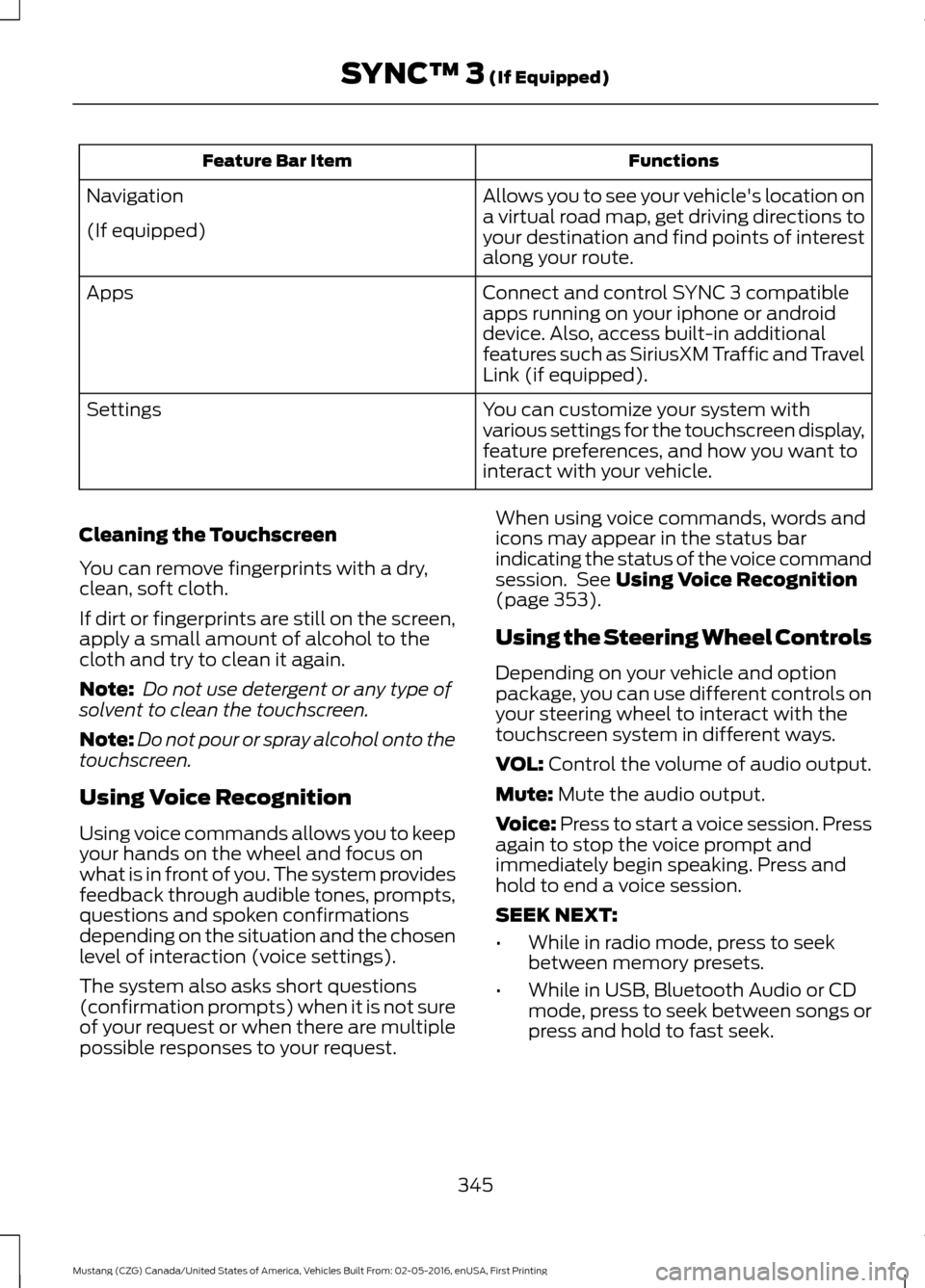
Functions
Feature Bar Item
Allows you to see your vehicle's location on
a virtual road map, get driving directions to
your destination and find points of interest
along your route.
Navigation
(If equipped)
Connect and control SYNC 3 compatible
apps running on your iphone or android
device. Also, access built-in additional
features such as SiriusXM Traffic and Travel
Link (if equipped).
Apps
You can customize your system with
various settings for the touchscreen display,
feature preferences, and how you want to
interact with your vehicle.
Settings
Cleaning the Touchscreen
You can remove fingerprints with a dry,
clean, soft cloth.
If dirt or fingerprints are still on the screen,
apply a small amount of alcohol to the
cloth and try to clean it again.
Note: Do not use detergent or any type of
solvent to clean the touchscreen.
Note: Do not pour or spray alcohol onto the
touchscreen.
Using Voice Recognition
Using voice commands allows you to keep
your hands on the wheel and focus on
what is in front of you. The system provides
feedback through audible tones, prompts,
questions and spoken confirmations
depending on the situation and the chosen
level of interaction (voice settings).
The system also asks short questions
(confirmation prompts) when it is not sure
of your request or when there are multiple
possible responses to your request. When using voice commands, words and
icons may appear in the status bar
indicating the status of the voice command
session. See Using Voice Recognition
(page 353).
Using the Steering Wheel Controls
Depending on your vehicle and option
package, you can use different controls on
your steering wheel to interact with the
touchscreen system in different ways.
VOL:
Control the volume of audio output.
Mute:
Mute the audio output.
Voice:
Press to start a voice session. Press
again to stop the voice prompt and
immediately begin speaking. Press and
hold to end a voice session.
SEEK NEXT:
• While in radio mode, press to seek
between memory presets.
• While in USB, Bluetooth Audio or CD
mode, press to seek between songs or
press and hold to fast seek.
345
Mustang (CZG) Canada/United States of America, Vehicles Built From: 02-05-2016, enUSA, First Printing SYNC™ 3
(If Equipped)
Page 382 of 475
You can adjust the view in preset
increments. You can also pinch to zoom in
or out of the map.
The information bar tells you the names
of streets, cities or landmarks as you hover
over them with the crosshair curser.
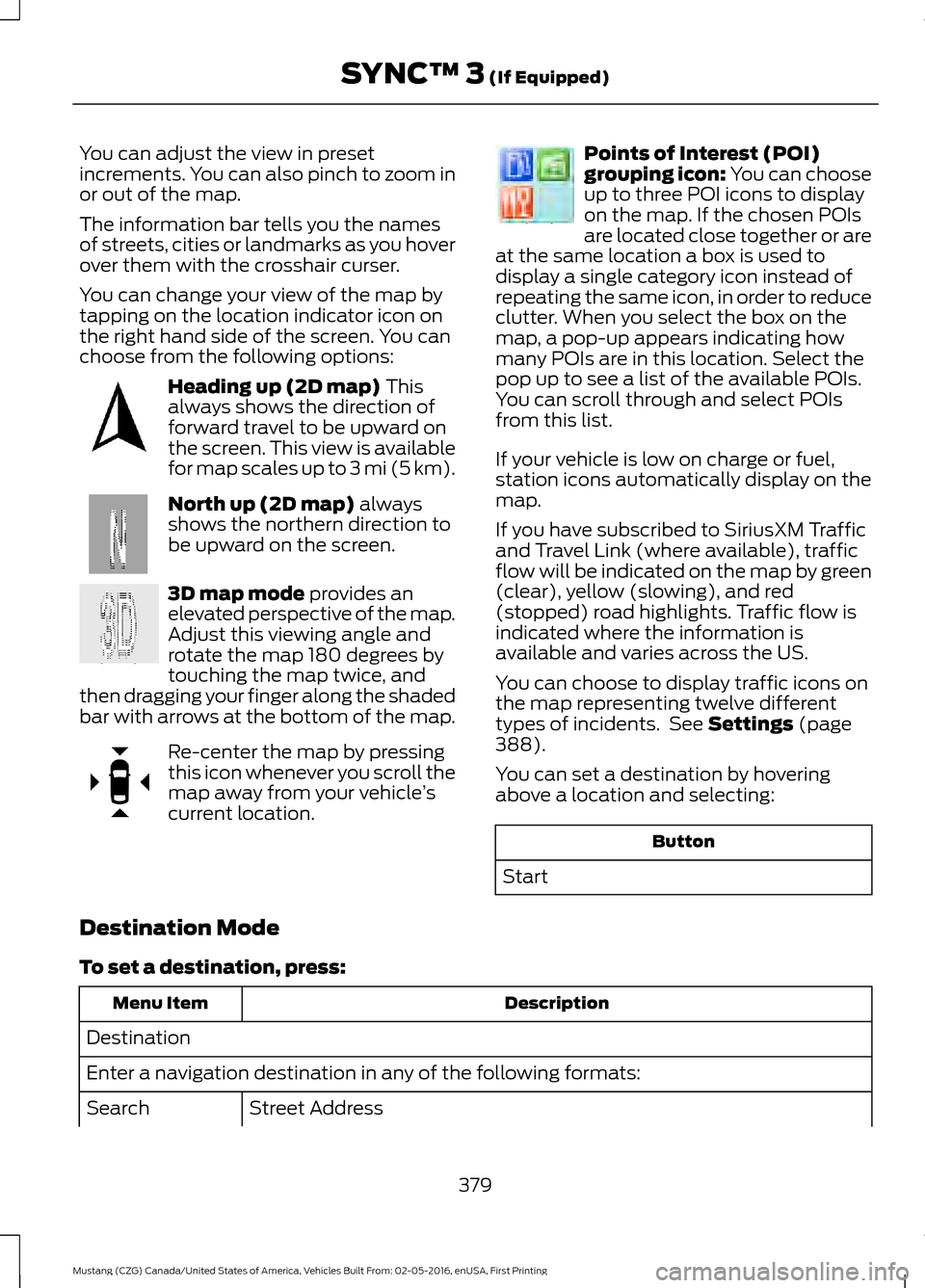
You can change your view of the map by
tapping on the location indicator icon on
the right hand side of the screen. You can
choose from the following options:
Heading up (2D map) This
always shows the direction of
forward travel to be upward on
the screen. This view is available
for map scales up to
3 mi (5 km). North up (2D map)
always
shows the northern direction to
be upward on the screen. 3D map mode
provides an
elevated perspective of the map.
Adjust this viewing angle and
rotate the map 180 degrees by
touching the map twice, and
then dragging your finger along the shaded
bar with arrows at the bottom of the map. Re-center the map by pressing
this icon whenever you scroll the
map away from your vehicle
’s
current location. Points of Interest (POI)
grouping icon: You can choose
up to three POI icons to display
on the map. If the chosen POIs
are located close together or are
at the same location a box is used to
display a single category icon instead of
repeating the same icon, in order to reduce
clutter. When you select the box on the
map, a pop-up appears indicating how
many POIs are in this location. Select the
pop up to see a list of the available POIs.
You can scroll through and select POIs
from this list.
If your vehicle is low on charge or fuel,
station icons automatically display on the
map.
If you have subscribed to SiriusXM Traffic
and Travel Link (where available), traffic
flow will be indicated on the map by green
(clear), yellow (slowing), and red
(stopped) road highlights. Traffic flow is
indicated where the information is
available and varies across the US.
You can choose to display traffic icons on
the map representing twelve different
types of incidents. See
Settings (page
388).
You can set a destination by hovering
above a location and selecting: Button
Start
Destination Mode
To set a destination, press: Description
Menu Item
Destination
Enter a navigation destination in any of the following formats: Street Address
Search
379
Mustang (CZG) Canada/United States of America, Vehicles Built From: 02-05-2016, enUSA, First Printing SYNC™ 3
(If Equipped)E207750 E207749 E207748 E207751 E207754
Page 410 of 475
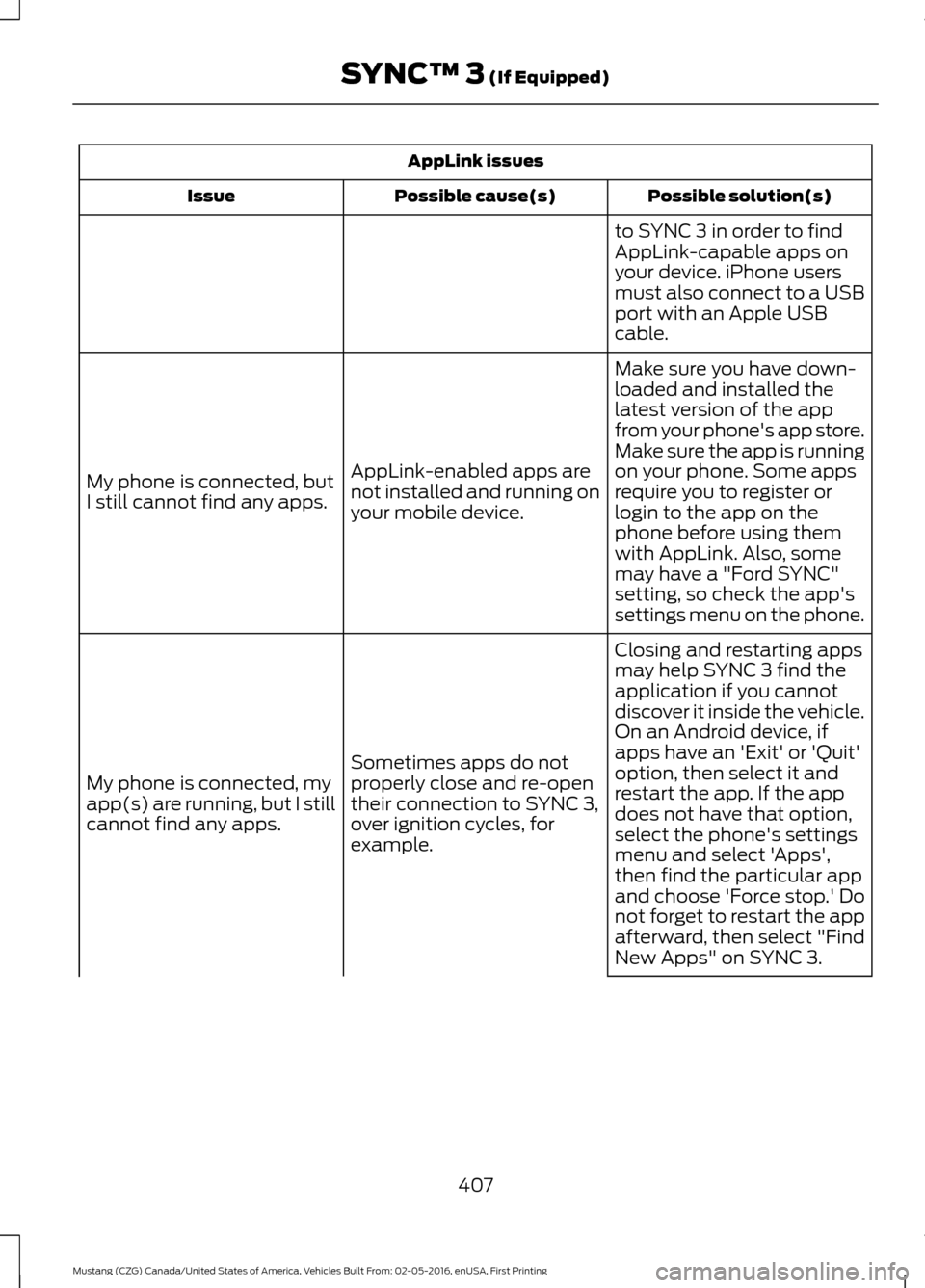
AppLink issues
Possible solution(s)
Possible cause(s)
Issue
to SYNC 3 in order to find
AppLink-capable apps on
your device. iPhone users
must also connect to a USB
port with an Apple USB
cable.
Make sure you have down-
loaded and installed the
latest version of the app
from your phone's app store.
Make sure the app is running
on your phone. Some apps
AppLink-enabled apps are
not installed and running on
your mobile device.
My phone is connected, but
I still cannot find any apps.
require you to register or
login to the app on the
phone before using them
with AppLink. Also, some
may have a "Ford SYNC"
setting, so check the app's
settings menu on the phone.
Closing and restarting apps
may help SYNC 3 find the
application if you cannot
discover it inside the vehicle.
On an Android device, if
apps have an 'Exit' or 'Quit'
Sometimes apps do not
properly close and re-open
their connection to SYNC 3,
over ignition cycles, for
example.
My phone is connected, my
app(s) are running, but I still
cannot find any apps.
option, then select it and
restart the app. If the app
does not have that option,
select the phone's settings
menu and select 'Apps',
then find the particular app
and choose 'Force stop.' Do
not forget to restart the app
afterward, then select "Find
New Apps" on SYNC 3.
407
Mustang (CZG) Canada/United States of America, Vehicles Built From: 02-05-2016, enUSA, First Printing SYNC™ 3 (If Equipped)
Page 473 of 475
Vehicle...................................................................
399
Voice Control...................................................... 400
Wi-Fi....................................................................... 398
Side Airbags.....................................................39
Sitting in the Correct Position.................108
Snow Chains See: Using Snow Chains................................. 260
Special Notices................................................12 Additional Warranty Information.................... 12
New Vehicle Limited Warranty......................... 12
On Board Diagnostics Data Link Connector............................................................ 13
Special Instructions.............................................. 13
Special Operating Conditions Scheduled Maintenance...............................................423
Exceptions............................................................ 424
Speed Control See: Cruise Control............................................ 154
Stability Control
............................................145
Principle of Operation....................................... 145
Starting a Gasoline Engine........................122 Automatic Engine Shutdown......................... 123
Failure to Start..................................................... 123
Fast Restart........................................................... 123
Guarding Against Exhaust Fumes................124
Important Ventilating Information...............124
Stopping the Engine When Your Vehicle is Moving................................................................ 124
Stopping the Engine When Your Vehicle is Stationary......................................................... 123
Starting and Stopping the Engine...........121 General Information............................................ 121
Steering............................................................167 Electric Power Steering..................................... 167
Steering Wheel Lock
....................................122
Steering Wheel...............................................62
Storage Compartments.............................120
Sun Visors..........................................................74
Illuminated Vanity Mirror.................................... 74
Supplementary Restraints System.........35 Principle of Operation......................................... 35
Symbols Glossary
.............................................7
SYNC™ 3.........................................................341
General Information.......................................... 341
SYNC™ 3 Troubleshooting.....................400
SYNC™ Applications and Services.......319 911 Assist................................................................ 319
SYNC Mobile Apps............................................. 321SYNC™
...........................................................303
General Information......................................... 303
SYNC™ Troubleshooting
..........................333
T
Technical Specifications See: Capacities and Specifications.............272
The Better Business Bureau (BBB) Auto Line Program (U.S. Only)........................197
Tire Care
..........................................................245
Glossary of Tire Terminology......................... 247
Information About Uniform Tire Quality Grading............................................................. 245
Information Contained on the Tire Sidewall........................................................... 248
Temperature A B C............................................ 246
Traction AA A B C.............................................. 246
Treadwear............................................................ 246
Tire Inflation When Punctured See: Tire Sealant and Inflator Kit.................239
Tire Pressure Monitoring System............261 Changing Tires With a Tire Pressure
Monitoring System....................................... 262
Understanding Your Tire Pressure Monitoring System ...................................... 262
Tire Repair Kit See: Tire Sealant and Inflator Kit.................239
Tire Sealant and Inflator Kit....................239 First Stage: Inflating the Tire with Sealing
Compound and Air........................................ 241
General Information......................................... 240
Second Stage: Checking Tire Pressure............................................................ 243
Tips for Use of the Kit...................................... 240
What to Do After the Tire has Been Sealed............................................................... 243
What to do When a Tire Is Punctured.........241
Tires See: Wheels and Tires..................................... 239
Towing a Trailer..............................................178 Load Placement.................................................. 178
Towing the Vehicle on Four Wheels............................................................181
Emergency Towing.............................................. 181
Recreational Towing.......................................... 182
Towing...............................................................178
470
Mustang (CZG) Canada/United States of America, Vehicles Built From: 02-05-2016, enUSA, First Printing Index