ECO mode FORD MUSTANG 2020 User Guide
[x] Cancel search | Manufacturer: FORD, Model Year: 2020, Model line: MUSTANG, Model: FORD MUSTANG 2020Pages: 464, PDF Size: 7.44 MB
Page 62 of 464
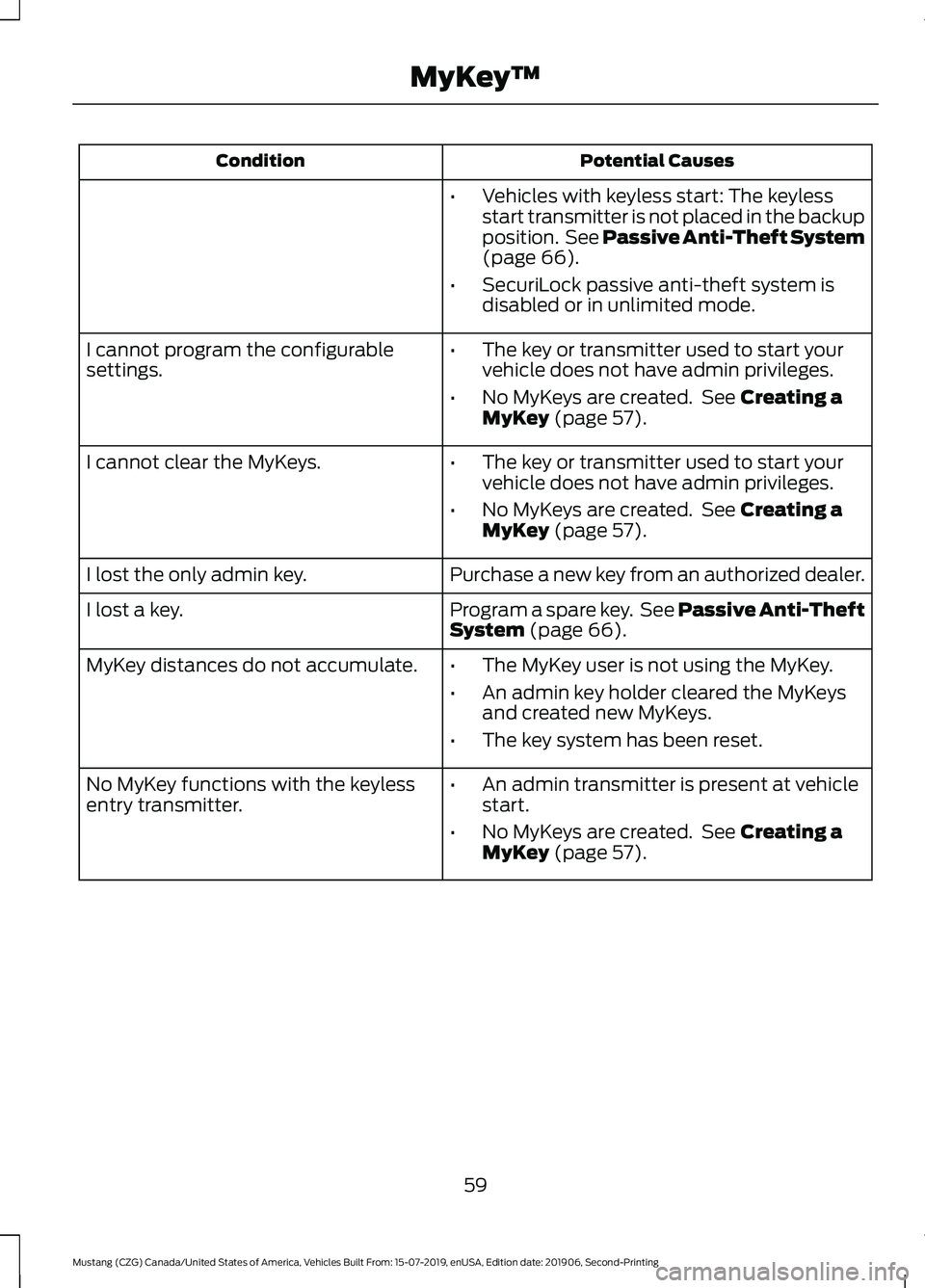
Potential Causes
Condition
•Vehicles with keyless start: The keyless
start transmitter is not placed in the backup
position. See Passive Anti-Theft System
(page 66).
• SecuriLock passive anti-theft system is
disabled or in unlimited mode.
• The key or transmitter used to start your
vehicle does not have admin privileges.
• No MyKeys are created. See
Creating a
MyKey (page 57).
I cannot program the configurable
settings.
•The key or transmitter used to start your
vehicle does not have admin privileges.
• No MyKeys are created. See
Creating a
MyKey (page 57).
I cannot clear the MyKeys.
Purchase a new key from an authorized dealer.
I lost the only admin key.
Program a spare key. See Passive Anti-Theft
System
(page 66).
I lost a key.
MyKey distances do not accumulate.
•The MyKey user is not using the MyKey.
• An admin key holder cleared the MyKeys
and created new MyKeys.
• The key system has been reset.
• An admin transmitter is present at vehicle
start.
• No MyKeys are created. See
Creating a
MyKey (page 57).
No MyKey functions with the keyless
entry transmitter.
59
Mustang (CZG) Canada/United States of America, Vehicles Built From: 15-07-2019, enUSA, Edition date: 201906, Second-Printing MyKey
™
Page 63 of 464
LOCKING AND UNLOCKING
You can use the power door lock control
or the remote control to lock and unlock
your vehicle.
Power Door Locks
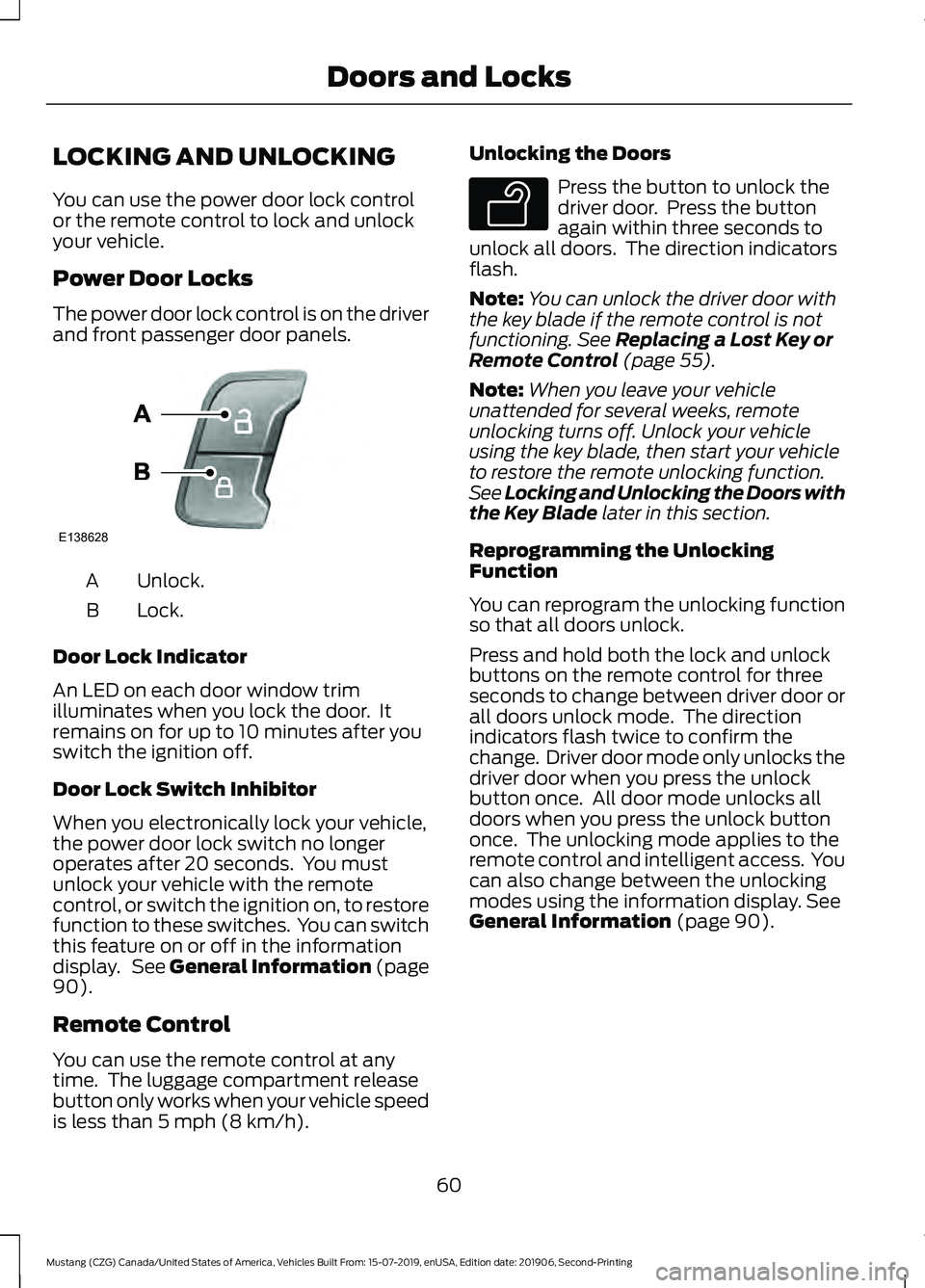
The power door lock control is on the driver
and front passenger door panels.
Unlock.
A
Lock.
B
Door Lock Indicator
An LED on each door window trim
illuminates when you lock the door. It
remains on for up to 10 minutes after you
switch the ignition off.
Door Lock Switch Inhibitor
When you electronically lock your vehicle,
the power door lock switch no longer
operates after 20 seconds. You must
unlock your vehicle with the remote
control, or switch the ignition on, to restore
function to these switches. You can switch
this feature on or off in the information
display. See General Information (page
90).
Remote Control
You can use the remote control at any
time. The luggage compartment release
button only works when your vehicle speed
is less than
5 mph (8 km/h). Unlocking the Doors Press the button to unlock the
driver door. Press the button
again within three seconds to
unlock all doors. The direction indicators
flash.
Note: You can unlock the driver door with
the key blade if the remote control is not
functioning.
See Replacing a Lost Key or
Remote Control (page 55).
Note: When you leave your vehicle
unattended for several weeks, remote
unlocking turns off. Unlock your vehicle
using the key blade, then start your vehicle
to restore the remote unlocking function.
See Locking and Unlocking the Doors with
the Key Blade
later in this section.
Reprogramming the Unlocking
Function
You can reprogram the unlocking function
so that all doors unlock.
Press and hold both the lock and unlock
buttons on the remote control for three
seconds to change between driver door or
all doors unlock mode. The direction
indicators flash twice to confirm the
change. Driver door mode only unlocks the
driver door when you press the unlock
button once. All door mode unlocks all
doors when you press the unlock button
once. The unlocking mode applies to the
remote control and intelligent access. You
can also change between the unlocking
modes using the information display.
See
General Information (page 90).
60
Mustang (CZG) Canada/United States of America, Vehicles Built From: 15-07-2019, enUSA, Edition date: 201906, Second-Printing Doors and LocksE138628 E138629
Page 68 of 464
Illuminated Exit
The interior lamps and select exterior
lamps illuminate when all doors are closed
and you switch the ignition off.
The lamps turn off if all the doors remain
closed and:
•
25 seconds elapse.
• You press the START/STOP button.
Battery Saver
If you leave on the courtesy lamps, dome
lamps or headlamps, the battery saver
turns them off 10 minutes after you switch
off the ignition.
Accessory Mode Battery Saver for
Intelligent Access Keys
If you leave your vehicle in the run ignition
state, it turns off once it detects a certain
amount of battery drain or after 45
minutes.
INTERIOR LUGGAGE
COMPARTMENT RELEASE WARNING: Keep vehicle doors and
luggage compartment locked and keep
keys and remote transmitters out of a
child ’s reach. Unsupervised children
could lock themselves in the trunk and
risk injury. Children should be taught not
to play in vehicles. WARNING:
Do not leave children
or animals unattended in the vehicle. On
hot days, the temperature in the trunk or
vehicle interior can rise very quickly.
Exposure of people or animals to these
high temperatures for even a short time
can cause death or serious heat-related
injuries, including brain damage. Small
children are particularly at risk. Your vehicle is equipped with a release
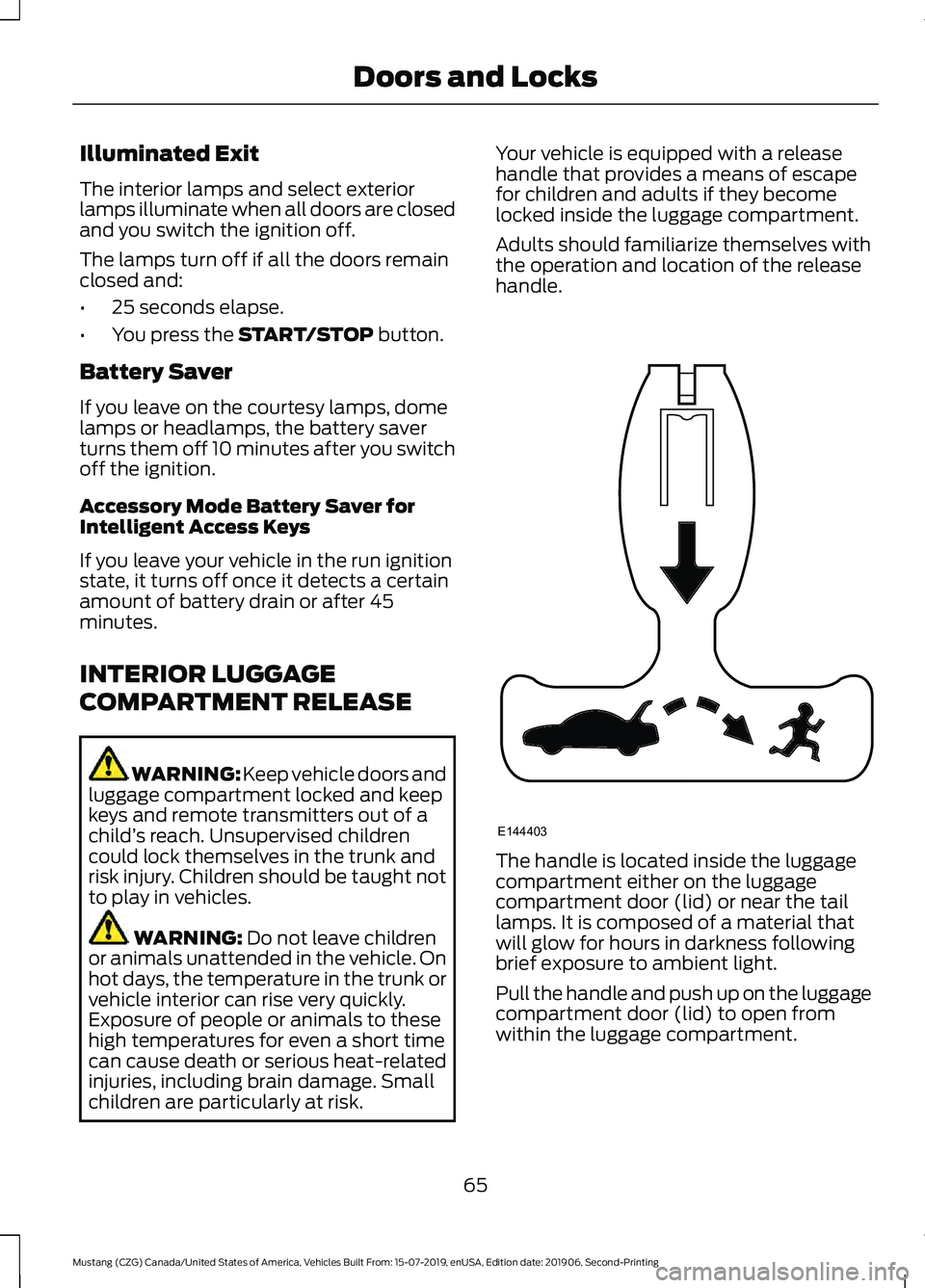
handle that provides a means of escape
for children and adults if they become
locked inside the luggage compartment.
Adults should familiarize themselves with
the operation and location of the release
handle.
The handle is located inside the luggage
compartment either on the luggage
compartment door (lid) or near the tail
lamps. It is composed of a material that
will glow for hours in darkness following
brief exposure to ambient light.
Pull the handle and push up on the luggage
compartment door (lid) to open from
within the luggage compartment.
65
Mustang (CZG) Canada/United States of America, Vehicles Built From: 15-07-2019, enUSA, Edition date: 201906, Second-Printing Doors and LocksE144403
Page 77 of 464
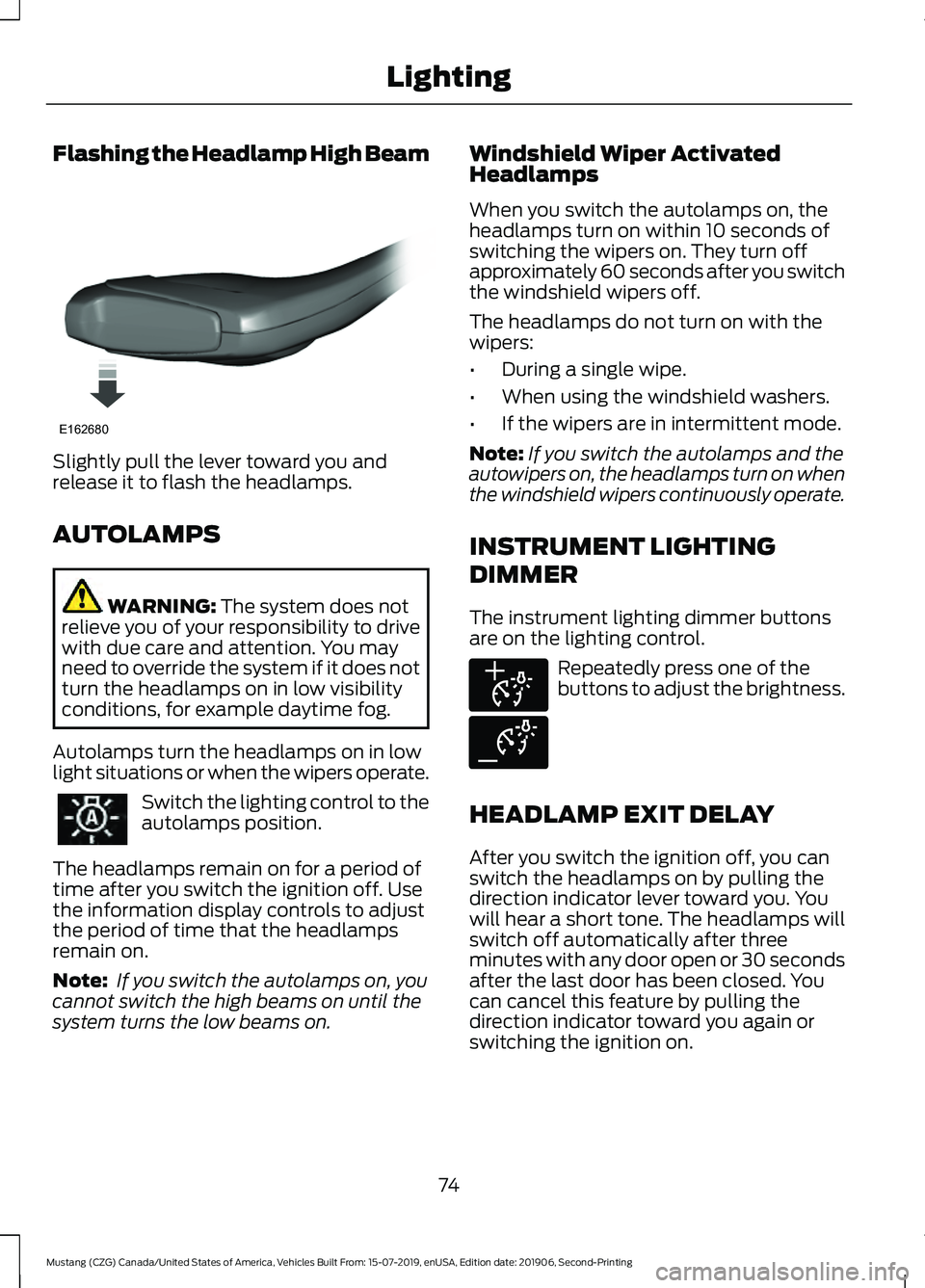
Flashing the Headlamp High Beam
Slightly pull the lever toward you and
release it to flash the headlamps.
AUTOLAMPS
WARNING: The system does not
relieve you of your responsibility to drive
with due care and attention. You may
need to override the system if it does not
turn the headlamps on in low visibility
conditions, for example daytime fog.
Autolamps turn the headlamps on in low
light situations or when the wipers operate. Switch the lighting control to the
autolamps position.
The headlamps remain on for a period of
time after you switch the ignition off. Use
the information display controls to adjust
the period of time that the headlamps
remain on.
Note: If you switch the autolamps on, you
cannot switch the high beams on until the
system turns the low beams on. Windshield Wiper Activated
Headlamps
When you switch the autolamps on, the
headlamps turn on within 10 seconds of
switching the wipers on. They turn off
approximately 60 seconds after you switch
the windshield wipers off.
The headlamps do not turn on with the
wipers:
•
During a single wipe.
• When using the windshield washers.
• If the wipers are in intermittent mode.
Note: If you switch the autolamps and the
autowipers on, the headlamps turn on when
the windshield wipers continuously operate.
INSTRUMENT LIGHTING
DIMMER
The instrument lighting dimmer buttons
are on the lighting control. Repeatedly press one of the
buttons to adjust the brightness.
HEADLAMP EXIT DELAY
After you switch the ignition off, you can
switch the headlamps on by pulling the
direction indicator lever toward you. You
will hear a short tone. The headlamps will
switch off automatically after three
minutes with any door open or 30 seconds
after the last door has been closed. You
can cancel this feature by pulling the
direction indicator toward you again or
switching the ignition on.
74
Mustang (CZG) Canada/United States of America, Vehicles Built From: 15-07-2019, enUSA, Edition date: 201906, Second-Printing LightingE162680 E291299 E291298
Page 80 of 464
WHAT IS AUTOMATIC HIGH
BEAM CONTROL
The system turns on high beams if it is dark
enough and no other traffic is present. If it
detects an approaching vehicle
’s
headlamps or tail lamps, or street lighting
ahead, the system turns the high beams
off. Low beams remain on.
A camera sensor, centrally mounted
behind the windshield of your vehicle,
continuously monitors conditions to turn
the high beams on and off.
SWITCHING AUTOMATIC HIGH
BEAM CONTROL ON AND OFF
Switch the system on or off using the
information display. See General
Information (page 90).
Activating the Automatic High
Beam Control Switch the lighting control to the
autolamps position to activate.
See
Autolamps (page 74).
Note: Automatic high beams are not
available when autolamps are not turned
on.
When active, the high beams turn on if:
• The ambient light level is low enough.
• There is no traffic in front of your
vehicle.
• The vehicle speed is greater than
approximately
32 mph (52 km/h).
When active, the high beams turn off if:
• The ambient light level is high enough
that high beams are not required.
• The system detects an approaching
vehicle's headlamps or tail lamps.
• The system detects severe rain, snow
or fog. •
The camera is blocked.
• The vehicle speed falls below
approximately
27 mph (44 km/h).
Note: The deactivation speed is lower on
curves.
Note: High beam reactivation may be
delayed in certain curvy road situations.
Note: The system may not operate properly
if the sensor is blocked. Keep the windshield
free from obstruction or damage.
Note: The system may not operate properly
in cold or inclement conditions. You can
switch on the high beams by overriding the
system.
Note: If the system detects a blockage, for
example bird droppings, bug splatter, snow
or ice, the system goes into low beam mode
until you clear the blockage. A message may
appear in the information display if the
camera is blocked.
Note: Using much larger tires or equipping
vehicle accessories such as snowplows can
modify your vehicle's ride height and
degrade automatic high beam control
performance.
AUTOMATIC HIGH BEAM
CONTROL INDICATORS The indicator illuminates to
confirm when the system is
ready to assist.
OVERRIDING AUTOMATIC
HIGH BEAM CONTROL WARNING:
The system does not
relieve you of your responsibility to drive
with due care and attention. You may
need to override the system if it does not
turn the high beams on or off.
77
Mustang (CZG) Canada/United States of America, Vehicles Built From: 15-07-2019, enUSA, Edition date: 201906, Second-Printing Automatic High Beam Control
(If Equipped)
Page 89 of 464
Adaptive Cruise Control Indicator
(If Equipped)
It illuminates when you switch
the system on.
It illuminates white when the
system is in standby mode. It illuminates
green when you set the adaptive cruise
speed.
See Using Adaptive Cruise Control
(page 168).
Airbag Warning Lamp If it does not illuminate when you
switch the ignition on, continues
to flash or remains on when the
engine is running, this indicates a
malfunction. Have your vehicle checked
as soon as possible.
Anti-Lock Brake System Warning
Lamp If it illuminates when you are
driving, this indicates a
malfunction. Your vehicle
continues to have normal braking without
the anti-lock brake system function. Have
your vehicle checked as soon as possible.
Automatic Headlamp High Beam
Indicator
(If Equipped) It illuminates when the system
automatically turns the
headlamp high beam on.
Battery If it illuminates while driving, it
indicates a malfunction. Switch
off all unnecessary electrical
equipment and have the system checked
by your authorized dealer immediately. Blind Spot Information System
Indicator
(If Equipped) It illuminates when you switch
the system off.
See
Blind Spot Information
System (page 179).
Brake System Warning Lamp WARNING:
Driving your vehicle
with the warning lamp on is dangerous.
A significant decrease in braking
performance may occur. It may take you
longer to stop your vehicle. Have your
vehicle checked as soon as possible.
Driving extended distances with the
parking brake engaged can cause brake
failure and the risk of personal injury.
Note: Indicators vary depending on region.
This lamp is a dual function lamp and will
illuminate when:
• You apply the parking brake with the
ignition on.
• Your vehicle has a brake fault or low
brake fluid level, regardless of parking
brake position. If the lamp illuminates when you
are moving, you may have the
parking brake applied. Make sure
the parking brake is off. Have
your vehicle checked as soon as
possible if the lamp continues to
illuminate.
Cruise Control Indicator It illuminates when you switch
the system on.
See
What Is Cruise Control
(page 167).
86
Mustang (CZG) Canada/United States of America, Vehicles Built From: 15-07-2019, enUSA, Edition date: 201906, Second-Printing Instrument ClusterE144524 E67017 E151262 E270480 E71340
Page 91 of 464
It also illuminates momentarily when you
switch the ignition on to confirm the lamp
is functional. If it does not illuminate when
you switch the ignition on, or begins to
flash at any time, have the system checked
by your authorized dealer.
Low Washer Fluid Level Warning
Lamp
Illuminates when the washer
fluid is low.
Oil Pressure Warning Lamp Illuminates when you switch the
ignition on.
If it illuminates when the engine
is running this indicates a malfunction.
Stop your vehicle as soon as it is safe to
do so and switch the engine off. Check the
engine oil level. If the oil level is sufficient,
this indicates a system malfunction. Have
your vehicle checked as soon as possible.
See Engine Oil Check (page 237).
Parking Lamps Illuminate when you switch the
parking lamps on.
Powertrain Fault Illuminates when the system
detects a powertrain fault.
Contact an authorized dealer as
soon as possible.
Service Engine Soon If it illuminates when the engine
is running this indicates a
malfunction. The On Board
Diagnostics system has detected a
malfunction of the vehicle emission control
system. If it flashes, engine misfire may be
occurring. Increased exhaust gas
temperatures could damage the catalytic
converter or other vehicle components.
Drive in a moderate fashion (avoid heavy
acceleration and deceleration) and have
your vehicle immediately serviced.
It illuminates when you switch the ignition
on prior to engine start to check the bulb
and to indicate whether your vehicle is
ready for Inspection and Maintenance
(I/M) testing.
Normally, it illuminates until the engine is
cranked and automatically turns off if no
malfunctions are present. However, if after
15 seconds it flashes eight times, this
indicates that your vehicle is not ready for
Inspection and Maintenance (I/M) testing.
See
Catalytic Converter (page 144).
Shift Indicator
(If Equipped) Illuminates to inform you that
shifting to a higher gear as
indicated may give better fuel
economy and lower CO2
emissions. It will not illuminate during
periods of high acceleration, braking or
when you press the clutch pedal.
Stability Control and Traction
Control Indicator Flashes during operation.
If it does not illuminate when you
switch the ignition on, or remains
on when the engine is running, this
indicates a malfunction. Have your vehicle
checked as soon as possible.
Note: The system automatically turns off
if there is a malfunction.
See
Using Stability Control (page 159).
See Using Traction Control (page 157).
88
Mustang (CZG) Canada/United States of America, Vehicles Built From: 15-07-2019, enUSA, Edition date: 201906, Second-Printing Instrument ClusterE132353 E138639
Page 94 of 464
Main Menu
Gauge Mode
Trip/Fuel
Track Apps
™
Driver Assist Settings
This icon shows the features on
or off status. A check in the box
indicates the feature is on, and
unchecked indicates the feature is off.
Note: Some items are optional and may
not appear.
Gauge Mode Gauge Mode
Distance to Empty
Speedometer km/h or Speedometer MPH
Tire Pressure Air/Fuel Ratio
Gauge Detail
Axle Oil Temp
Boost/Vacuum
Cylinder Head Temp
Inlet Air Temp
Oil Pressure
Oil Temp
Trans Oil Temp
91
Mustang (CZG) Canada/United States of America, Vehicles Built From: 15-07-2019, enUSA, Edition date: 201906, Second-Printing Information DisplaysE204495
Page 95 of 464
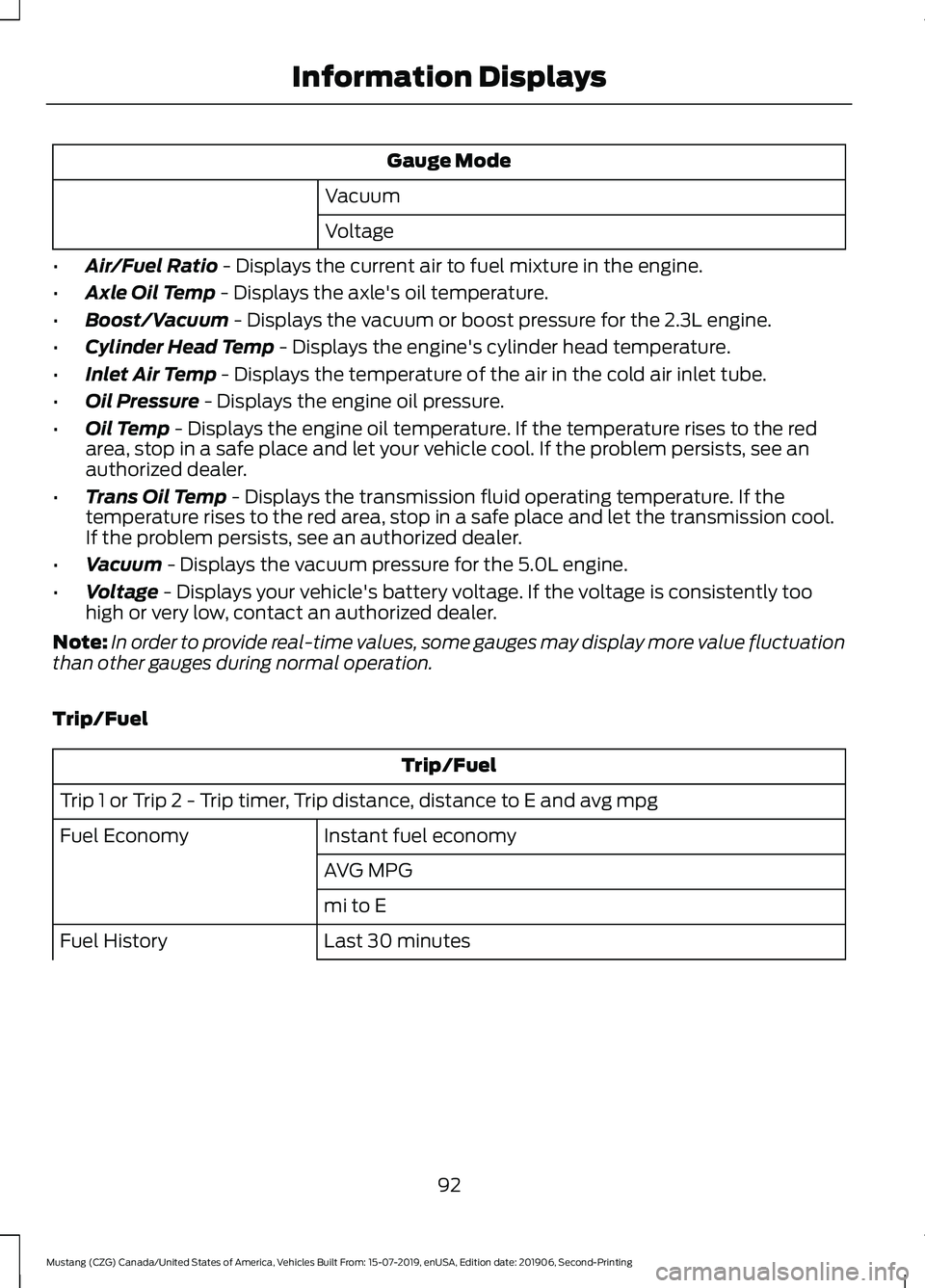
Gauge Mode
Vacuum
Voltage
• Air/Fuel Ratio - Displays the current air to fuel mixture in the engine.
• Axle Oil Temp
- Displays the axle's oil temperature.
• Boost/Vacuum
- Displays the vacuum or boost pressure for the 2.3L engine.
• Cylinder Head Temp
- Displays the engine's cylinder head temperature.
• Inlet Air Temp
- Displays the temperature of the air in the cold air inlet tube.
• Oil Pressure
- Displays the engine oil pressure.
• Oil Temp
- Displays the engine oil temperature. If the temperature rises to the red
area, stop in a safe place and let your vehicle cool. If the problem persists, see an
authorized dealer.
• Trans Oil Temp
- Displays the transmission fluid operating temperature. If the
temperature rises to the red area, stop in a safe place and let the transmission cool.
If the problem persists, see an authorized dealer.
• Vacuum
- Displays the vacuum pressure for the 5.0L engine.
• Voltage
- Displays your vehicle's battery voltage. If the voltage is consistently too
high or very low, contact an authorized dealer.
Note: In order to provide real-time values, some gauges may display more value fluctuation
than other gauges during normal operation.
Trip/Fuel Trip/Fuel
Trip 1 or Trip 2 - Trip timer, Trip distance, distance to E and avg mpg Instant fuel economy
Fuel Economy
AVG MPG
mi to E
Last 30 minutes
Fuel History
92
Mustang (CZG) Canada/United States of America, Vehicles Built From: 15-07-2019, enUSA, Edition date: 201906, Second-Printing Information Displays
Page 96 of 464

Trip/Fuel
AVG MPG
mi to E
• Trip Timer - Registers the time of individual journeys.
• Trip Distance - Registers the distance of individual journeys.
• Distance to E - Shows the approximate distance your vehicle can travel before running
out of fuel.
• Avg MPG - Shows the average fuel usage based on time.
• Instant fuel economy - Shows your instantaneous fuel usage.
• Fuel History - Shows fuel usage as a bar graph based on time. The graph is updated
each minute with the fuel economy that you achieved during 30 minutes of driving.
Note: Press and hold OK to reset the currently displayed information.
Track Apps ™ WARNING:
Track Apps™
is for
track use only. Remember that even
advanced technology cannot defy the
laws of physics. It is always possible to
lose control of a vehicle due to
inappropriate driver input for the
conditions. Aggressive driving on any
road condition can cause you to lose
control of your vehicle increasing the risk
of personal injury or property damage. Track Apps
™
provides a suite of options
to record and optimize your track
performances. See Track Use (page 252). Track Apps
™
Status Screen Virtual gauge shown
Accelerometer
Select your speed, distance and start
settings
Acceleration Timer
Choose your applicable setting.
Brake Performance
Choose your applicable setting.
Exhaust Mode
Quiet Start
Line Lock
93
Mustang (CZG) Canada/United States of America, Vehicles Built From: 15-07-2019, enUSA, Edition date: 201906, Second-Printing Information Displays