change wheel FORD MUSTANG 2021 User Guide
[x] Cancel search | Manufacturer: FORD, Model Year: 2021, Model line: MUSTANG, Model: FORD MUSTANG 2021Pages: 530, PDF Size: 10.22 MB
Page 214 of 530
To create or save MyMode, press the
button on the steering wheel and access
the menu. See General Information
(page 99). The available systems display.
Select your desired settings using the
appropriate buttons and menus. Press and
hold OK to save your settings. MyMode is
added to the drive mode list and can be
selected the next time you drive your
vehicle.
Note: The system has diagnostic checks
that continuously monitor the system to
make sure it properly operates. If a mode is
unavailable due to a system fault or change
in gear position, the selected mode defaults
to normal.
Note: Pre-Collision Assist is automatically
disabled when track mode is selected.
See
Pre-Collision Assist (page 202).
Note: If your vehicle has adaptive dampers,
the steering setting is optimized to work with
each drive mode. Other steering settings
may not be available.
Selectable Steering
Note: The steering setting defaults to
normal if the battery is disconnected or
removed. Press the steering button on the
instrument panel to change the
steering feel. The first press
illuminates the selected mode. Each time
you press the button, it changes the mode.
Modes:
• Normal - Default factory setting.
• Sport - Slightly higher effort required
for steering with more road force felt
through the steering wheel.
• Comfort - Slightly less effort required
for steering with less road force felt
through the steering wheel. Note:
A soft feedback bump in the steering
wheel may be felt after you make a
selection.
Adaptive Dampers
(If Equipped) Press the button on the steering
wheel to adjust the suspension.
The first press illuminates the
current mode. Each time you press the
button, it changes the mode.
Adaptive damper modes:
• Normal — Available in normal and
sport drive modes.
• Sport — Available in normal, sport and
track drive modes.
• Track — Available only in track drive
mode.
• Drag Strip — Available only in drag strip
drive mode.
Active Exhaust
(If Equipped) Press the button on the
instrument panel under the
display to adjust the tone of the
exhaust.
Active Exhaust modes:
• Quiet - Lowers the noise of the exhaust.
• Normal - Default factory setting.
• Sport - Raises the noise of the exhaust.
• Track - Tunes the exhaust for track
performance.
Note: The track exhaust mode setting is
only for use at tracks and not for use on
public roadways. Use of this setting results
in increased exterior noise, which may not
meet state and local laws and regulations.
It is the obligation of the driver to operate
the vehicle in a manner that complies with
state and local requirements. Only use the
track exhaust mode setting at a competition
track or an off-road course where elevated
exterior vehicle noise is acceptable.
211
Mustang (CZG) Canada/United States of America, Vehicles Built From: 14-09-2020, enUSA, Edition date: 202010, Second-Printing Driving AidsE174705 E282723 E287122
Page 264 of 530
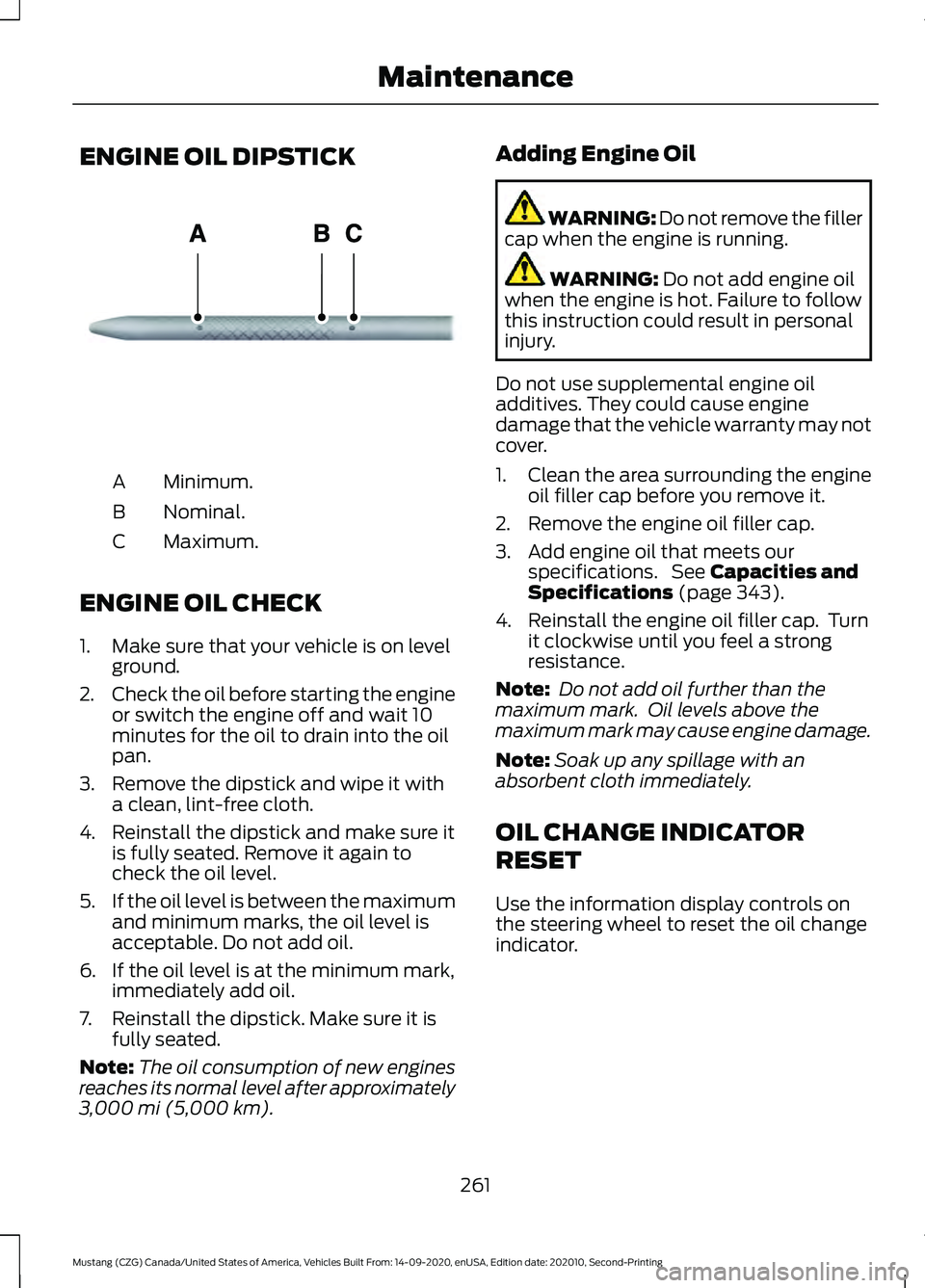
ENGINE OIL DIPSTICK
Minimum.
A
Nominal.
B
Maximum.
C
ENGINE OIL CHECK
1. Make sure that your vehicle is on level ground.
2. Check the oil before starting the engine
or switch the engine off and wait 10
minutes for the oil to drain into the oil
pan.
3. Remove the dipstick and wipe it with a clean, lint-free cloth.
4. Reinstall the dipstick and make sure it is fully seated. Remove it again to
check the oil level.
5. If the oil level is between the maximum
and minimum marks, the oil level is
acceptable. Do not add oil.
6. If the oil level is at the minimum mark, immediately add oil.
7. Reinstall the dipstick. Make sure it is fully seated.
Note: The oil consumption of new engines
reaches its normal level after approximately
3,000 mi (5,000 km). Adding Engine Oil WARNING: Do not remove the filler
cap when the engine is running. WARNING:
Do not add engine oil
when the engine is hot. Failure to follow
this instruction could result in personal
injury.
Do not use supplemental engine oil
additives. They could cause engine
damage that the vehicle warranty may not
cover.
1. Clean the area surrounding the engine oil filler cap before you remove it.
2. Remove the engine oil filler cap.
3. Add engine oil that meets our specifications. See
Capacities and
Specifications (page 343).
4. Reinstall the engine oil filler cap. Turn it clockwise until you feel a strong
resistance.
Note: Do not add oil further than the
maximum mark. Oil levels above the
maximum mark may cause engine damage.
Note: Soak up any spillage with an
absorbent cloth immediately.
OIL CHANGE INDICATOR
RESET
Use the information display controls on
the steering wheel to reset the oil change
indicator.
261
Mustang (CZG) Canada/United States of America, Vehicles Built From: 14-09-2020, enUSA, Edition date: 202010, Second-Printing MaintenanceE270482
Page 279 of 530
TRACK USE - MACH 1
Operating at High Speeds and
Track Days
Your vehicle is capable of sustained high
speeds and track day driving.
Before operating your vehicle at high
speeds:
•
Verify your tires have the correct
pressures.
• Inspect wheels and tires for wear and
damage. Replace any damaged wheels
and tires.
• Check and set lug nut torque. See
Technical Specifications (page 334).
• Verify fluid levels for oil, coolant, brake
and hydraulic fluid. See
Capacities
and Specifications (page 335).
• Change the engine oil and replace the
engine oil filter prior to use on the track.
Change the engine oil and filter again
after every four hours of track time.
Maintain the engine oil level at or near
the max mark on the engine oil dipstick.
See
Engine Oil Check (page 261).
• Replace the brake fluid with fresh
Motorcraft/Ford DOT 4 LV High
Performance Brake Fluid or other DOT
compliant fluid with a dry boiling point
greater than
500°F (260°C) from a
sealed container. Do not use silicone
or DOT 5 brake fluids. •
If you are operating your Mach 1 on a
drag strip, use drag strip selectable
drive mode in addition to using line lock
and launch control to provide a specific
set-up tuned for the quickest straight
line elapsed times.
• If you are operating your Mach 1 on a
road course, use sport or track
selectable drive modes to provide a
specific set-up tuned for optimal shift
and suspension set-up that is tuned
towards handling prowess on closed
course surfaces.
After operating your vehicle at high speeds
or track day driving, do the following:
• Set the tire pressure to the proper
specification.
• Check and set the lug nut torque. See
Technical Specifications
(page 334).
• Check all fluid levels.
• Refer to the track maintenance interval
chart. See
Normal Scheduled
Maintenance (page 444).
• Check the front and rear wheel
bearings for abnormal wear.
• Inspect brake caliper dust boots for
abnormal wear.
Track Apps WARNING:
Track Apps™
is for
track use only. Remember that even
advanced technology cannot defy the
laws of physics. It is always possible to
lose control of a vehicle due to
inappropriate driver input for the
conditions. Aggressive driving on any
road condition can cause you to lose
control of your vehicle increasing the risk
of personal injury or property damage.
276
Mustang (CZG) Canada/United States of America, Vehicles Built From: 14-09-2020, enUSA, Edition date: 202010, Second-Printing Track Use
Page 282 of 530
time before line lock is released
automatically. If you exceed the time limit,
or another vehicle condition requires line
lock to release, the system safely
disengages and normal vehicle function
resumes.
Note:
If you apply the brake pedal while
line lock is engaged, line lock automatically
cancels and normal brake function resumes.
Performance Shift Indicator
The performance shift indicator displays
a row of colored lights that represent
engine RPM.
The performance shift indicator menu
allows you to:
• Choose whether the indicator is shown
on the windshield or information
display.
• Set a shift point within the allowable
RPM range in increments of 100.
• Enable or disable the associated shift
tone, based on the set shift point.
• Set the between off, change with drive
mode, tach, track and drag.
• Set the light intensity. The intensity
adjusts between day time and night
time. Start Option
Allows you to select the type of countdown
the information display shows before
starting an event.
Status Screen
Provides the status of your chosen
performance-related settings.
View/Clear Results
Allows you to view and clear the last and
saved results of the Acceleration Timer,
Brake Performance, and All Time Best
results.
Road Course Alignment
Recommendations
Note:
After your track day is complete,
return your car to the street alignment and
tire pressures.
Note: Using these wheel alignment settings
may cause excessive tire wear. Only use
these settings for racing or competitive
driving. Excessive tire wear is not covered
under the vehicle warranty.
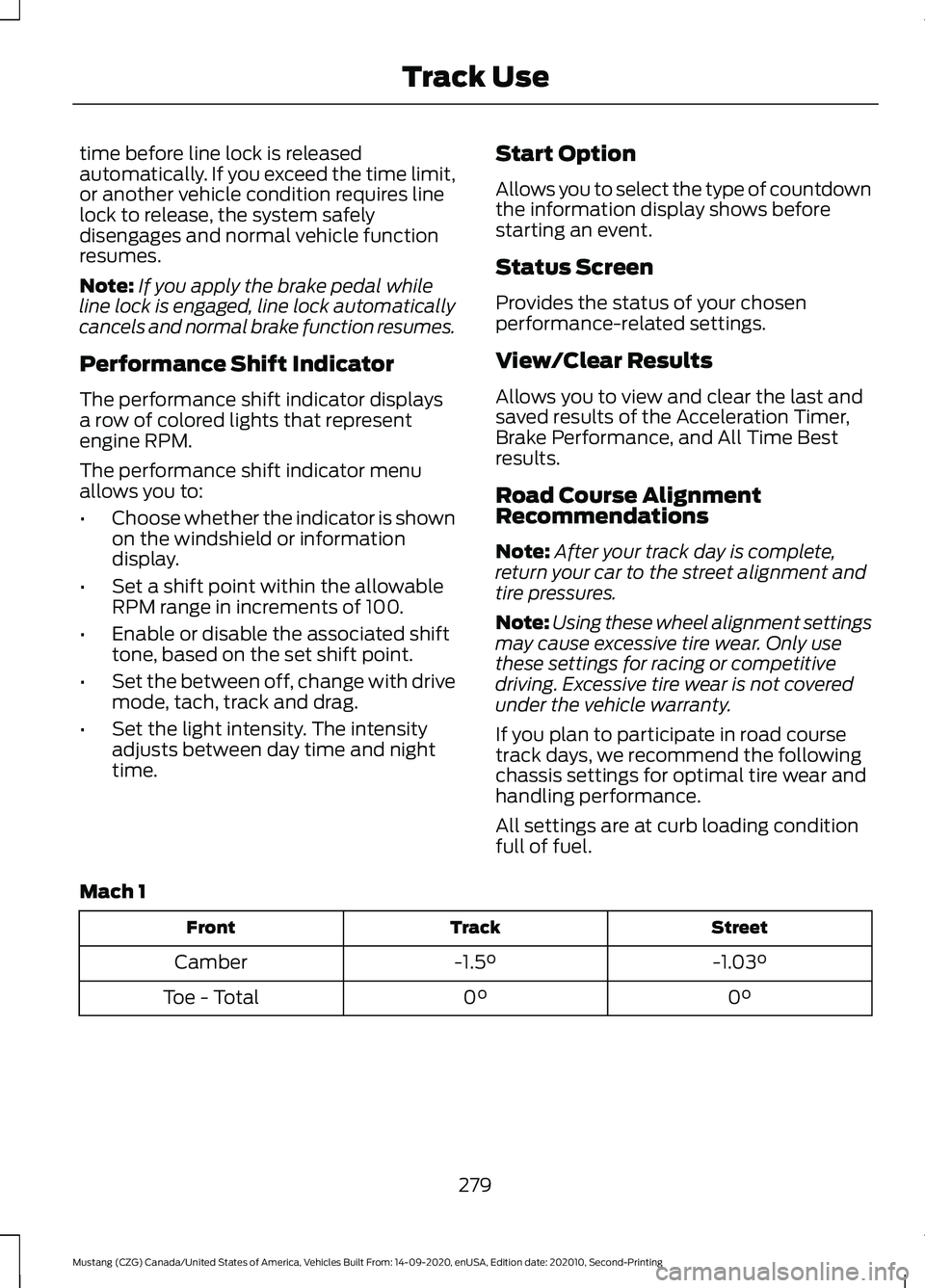
If you plan to participate in road course
track days, we recommend the following
chassis settings for optimal tire wear and
handling performance.
All settings are at curb loading condition
full of fuel.
Mach 1 Street
Track
Front
-1.03°
-1.5°
Camber
0°
0°
Toe - Total
279
Mustang (CZG) Canada/United States of America, Vehicles Built From: 14-09-2020, enUSA, Edition date: 202010, Second-Printing Track Use
Page 286 of 530
TRACK USE
Appropriately change the engine oil for
racing and other track events:
•
2.3L: Prior to the track event, drain the
engine oil, replace the oil filter and
change the engine oil to 5W-50. After
the track event, drain the engine oil,
replace the oil filter and refill the engine
oil with 5W-30. See Capacities and
Specifications (page 343).
• 5.0L: Prior to the track event, drain the
engine oil, replace the oil filter and
change the engine oil to 5W-30. After
the track event, drain the engine oil,
replace the oil filter and refill the engine
oil with 5W-20.
See Capacities and
Specifications (page 343).
Regularly check the engine oil level during
the event. Maintain the engine oil level at
or near the max mark on the engine oil
dipstick. See Engine Oil Check (page 261).
Operating at High Speeds and
Track Days
Your vehicle is capable of sustained high
speeds and track day driving.
Before operating your vehicle at high
speeds:
• Verify your tires have the correct
pressures.
• Inspect wheels and tires for wear and
damage. Replace any damaged wheels
and tires.
• Check and set lug nut torque. See
Technical Specifications
(page 334).
• Verify fluid levels for oil, coolant, brake
and hydraulic fluid. See
Capacities
and Specifications (page 335).
• Change the oil and filter prior to use on
the track. After operating your vehicle at high speeds
or track day driving, do the following:
•
Set the tire pressure to the proper
specification.
• Check and set the lug nut torque. See
Technical Specifications
(page 334).
• Check all fluid levels.
• Refer to the track maintenance interval
chart. See
Normal Scheduled
Maintenance (page 444).
• Check the front and rear wheel
bearings for abnormal wear.
• Inspect brake caliper dust boots for
abnormal wear.
Track Apps WARNING:
Track Apps™
is for
track use only. Remember that even
advanced technology cannot defy the
laws of physics. It is always possible to
lose control of a vehicle due to
inappropriate driver input for the
conditions. Aggressive driving on any
road condition can cause you to lose
control of your vehicle increasing the risk
of personal injury or property damage.
This information display driven feature
provides a suite of menu options to record
and optimize your track performances.
See
General Information (page 99).
Note: Track Apps are for track use only. Do
not use them under any other driving
conditions.
Note: You cannot view or clear your results
unless your vehicle is at a complete stop
with the right arrow on the display menu
inactive. If your vehicle does not reach
100 mph (160 km/h)
during the track run,
your display may not show your selected
interval's results.
283
Mustang (CZG) Canada/United States of America, Vehicles Built From: 14-09-2020, enUSA, Edition date: 202010, Second-Printing Track Use
Page 288 of 530
Initiating Line Lock
The initiation stage verifies that the vehicle
is ready for line lock function, and confirms
driver intent. Follow the prompts in the
information display to initiate line lock.
The following conditions must be met to
initialize line lock:
•
The vehicle is on a level surface.
• The engine is running.
• The vehicle is traveling less than
25 mph (40 km/h).
• Selectable drive mode is not in wet
mode (if equipped).
• There are no electronic stability control
faults.
If you want to cancel line lock once it is
initialized, press the left information
display control. Once initiated, line lock is
prepared for activation and remains
initiated up to 25 mph (40 km/h). If vehicle
speed exceeds 25 mph (40 km/h), line lock
automatically cancels.
Engaging Line Lock
Follow the prompts in the information
display to engage line lock after it is
initialized. To engage, firmly apply the
brakes. Then press the OK button. Once
engaged, release the brake pedal. The
front brakes remain applied and the rear
brakes release. At this point, the
engagement timer is initiated and shown
on the driver information display.
The following conditions must be met to
engage line lock:
• The vehicle is on a level surface.
• The engine is running.
• The vehicle is stopped.
• The parking brake is not applied.
• The driver door is closed.
• The transmission is in a forward gear. •
Selectable drive mode is not in wet
mode (if equipped).
• There are no electronic stability control
faults.
• The steering wheel must be in the
straight ahead position.
Releasing Line Lock
While line lock is engaged, you can exit
(release) the feature using the OK button.
When you press the OK button, line lock
releases immediately and normal vehicle
function resumes. When line lock engages,
a countdown timer shows the remaining
time before line lock is released
automatically. If you exceed the time limit,
or another vehicle condition requires line
lock to release, the system safely
disengages and normal vehicle function
resumes.
Note: If you apply the brake pedal while
line lock is engaged, line lock automatically
cancels and normal brake function resumes.
Performance Shift Indicator
The performance shift indicator displays
a row of colored lights that represent
engine RPM.
The performance shift indicator menu
allows you to:
• Choose whether the indicator is shown
on the windshield or information
display.
• Set a shift point within the allowable
RPM range in increments of 100.
• Enable or disable the associated shift
tone, based on the set shift point.
• Set the between off, change with drive
mode, tach, track and drag.
• Set the light intensity. The intensity
adjusts between day time and night
time.
285
Mustang (CZG) Canada/United States of America, Vehicles Built From: 14-09-2020, enUSA, Edition date: 202010, Second-Printing Track Use
Page 294 of 530
Specification
Name
WSS-M14P19-A
Motorcraft® Premium Windshield Wash Concentrate with
Bitterant, ZC-32-B2 (U.S.)
WSS-M14P19-A
Motorcraft® Premium Quality Windshield Washer Fluid, CXC-37-
F/M (Canada)
Motorcraft® Professional Strength Carpet & Upholstery Cleaner,
ZC-54 (U.S. & Canada)
ESR-M14P5-A
Motorcraft® Premium Glass Cleaner, CXC-100 (Canada)
Motorcraft® Spot and Stain Remover, ZC-14 (U.S.)
ESR-M14P5-A
Motorcraft® Ultra-Clear Spray Glass Cleaner, ZC-23 (U.S.)
Motorcraft® Wheel and Tire Cleaner, ZC-37-A (U.S. & Canada)
CLEANING THE EXTERIOR -
MACH 1
Washing Your Vehicle
Note: Do not use a touchless car wash or
any kind of commercial car wash equipment
with front splitter wickers installed.
Note: Always hand wash your vehicle if you
have vinyl stripes.
Do not drive your vehicle through an
automated, commercial car wash due to
the vehicle ’s low ground clearance and tire
width. Wash your vehicle by hand, or by
using a touchless commercial wash with
no mechanical tracks on the floor. Do not
use a power washer or high pressure wand.
To maintain proper cooling and
aerodynamics at high speeds, your vehicle
has heat exchangers integrated with the
front fascia designed to maximize
performance. Do not use a power washer
or high powered spray nozzle as damage
to the cooling fins could occur. Note:
For heavy accumulation of debris or
dirt, clean with a non-metallic soft bristle
car wash brush and warm soapy water as
needed.
CLEANING THE EXTERIOR
Wash your vehicle regularly with cool or
lukewarm water and a neutral pH
shampoo, we recommend Motorcraft
Detail Wash.
• Never use strong household detergents
or soap, for example dish washing or
laundry liquid. These products can
discolor and spot painted surfaces.
• Never wash your vehicle when it is hot
to the touch, or during strong or direct
sunlight.
• Dry your vehicle with a chamois or soft
terry cloth towel to eliminate water
spotting.
• Immediately remove fuel spillages, bird
droppings, insect deposits and road tar.
These may cause damage to your
vehicle ’s paintwork or trim over time.
We recommend Motorcraft Bug and
Tar Remover.
291
Mustang (CZG) Canada/United States of America, Vehicles Built From: 14-09-2020, enUSA, Edition date: 202010, Second-Printing Vehicle Care
Page 300 of 530
Body
•
Wash your vehicle thoroughly to
remove dirt, grease, oil, tar or mud from
exterior surfaces, rear-wheel housing
and the underside of front fenders.
• Periodically wash your vehicle if it is
stored in exposed locations.
• Touch-up exposed or primed metal to
prevent rust.
• Cover chrome and stainless steel parts
with a thick coat of auto wax to prevent
discoloration. Re-wax as necessary
when you wash your vehicle.
• Lubricate all hood, door and luggage
compartment hinges and latches with
a light grade oil.
• Cover interior trim to prevent fading.
• Keep all rubber parts free from oil and
solvents.
Engine
• Change the engine oil and filter prior to
storage because used engine oil
contains contaminates which may
cause engine damage.
• Start the engine every 15 days for a
minimum of 15 minutes. Run at fast
idle with the climate controls set to
defrost until the engine reaches normal
operating temperature.
• With your foot on the brake, shift
through all the gears while the engine
is running.
• We recommend that you change the
engine oil before you use your vehicle
again.
Fuel system
• Fill the fuel tank with high-quality fuel
until the first automatic shutoff of the
fuel pump nozzle. Cooling system
•
Protect against freezing temperatures.
• When removing your vehicle from
storage, check coolant fluid level.
Confirm that there are no cooling
system leaks and that fluid is at the
recommended level.
Disconnecting Your 12 Volt Battery
• Check and recharge as necessary. Keep
connections clean.
• If storing your vehicle for more than 30
days without recharging the battery,
we recommend that you disconnect
the battery cables to maintain battery
charge for quick starting.
Note: It is necessary to reset memory
features if you disconnect the battery
cables.
Brakes
• Make sure the brakes and parking brake
release fully.
Tires
• Maintain recommended air pressure.
Miscellaneous
• Make sure all linkages, cables, levers
and pins under your vehicle are covered
with grease to prevent rust.
• Move vehicles at least 25 ft (7.5 m)
every 15 days to lubricate working parts
and prevent corrosion.
297
Mustang (CZG) Canada/United States of America, Vehicles Built From: 14-09-2020, enUSA, Edition date: 202010, Second-Printing Vehicle Care
Page 311 of 530
Information Contained on the
Tire Sidewall
Both United States and Canada
Federal regulations require tire
manufacturers to place
standardized information on the
sidewall of all tires. This
information identifies and
describes the fundamental
characteristics of the tire and also
provides a U.S. DOT Tire
Identification Number for safety
standard certification and in case
of a recall.
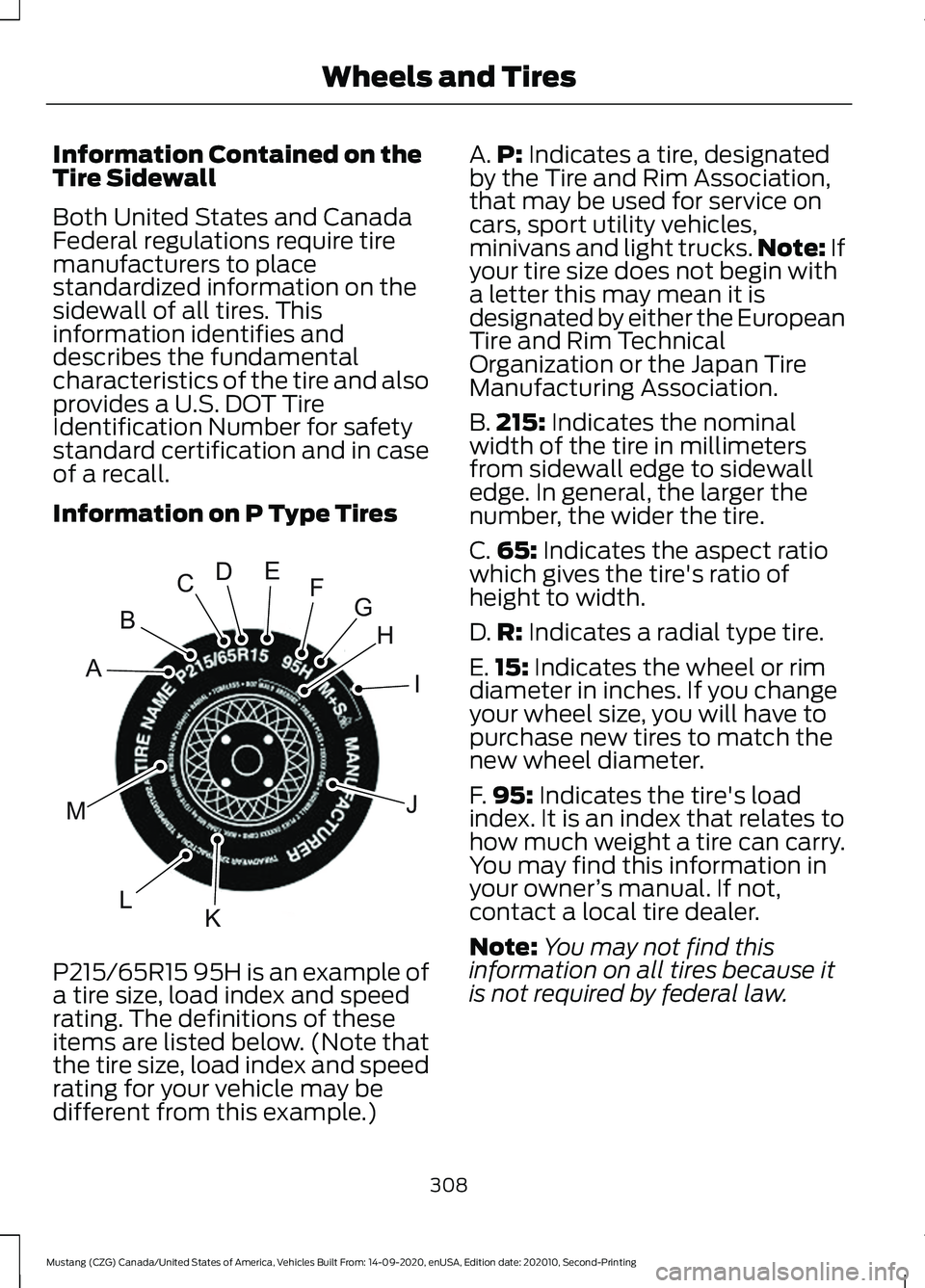
Information on P Type Tires
P215/65R15 95H is an example of
a tire size, load index and speed
rating. The definitions of these
items are listed below. (Note that
the tire size, load index and speed
rating for your vehicle may be
different from this example.) A.
P: Indicates a tire, designated
by the Tire and Rim Association,
that may be used for service on
cars, sport utility vehicles,
minivans and light trucks. Note:
If
your tire size does not begin with
a letter this may mean it is
designated by either the European
Tire and Rim Technical
Organization or the Japan Tire
Manufacturing Association.
B. 215:
Indicates the nominal
width of the tire in millimeters
from sidewall edge to sidewall
edge. In general, the larger the
number, the wider the tire.
C. 65:
Indicates the aspect ratio
which gives the tire's ratio of
height to width.
D. R:
Indicates a radial type tire.
E. 15:
Indicates the wheel or rim
diameter in inches. If you change
your wheel size, you will have to
purchase new tires to match the
new wheel diameter.
F. 95:
Indicates the tire's load
index. It is an index that relates to
how much weight a tire can carry.
You may find this information in
your owner ’s manual. If not,
contact a local tire dealer.
Note: You may not find this
information on all tires because it
is not required by federal law.
308
Mustang (CZG) Canada/United States of America, Vehicles Built From: 14-09-2020, enUSA, Edition date: 202010, Second-Printing Wheels and TiresH
I
J
KL
M
A
B
CDEFGE142543
Page 315 of 530
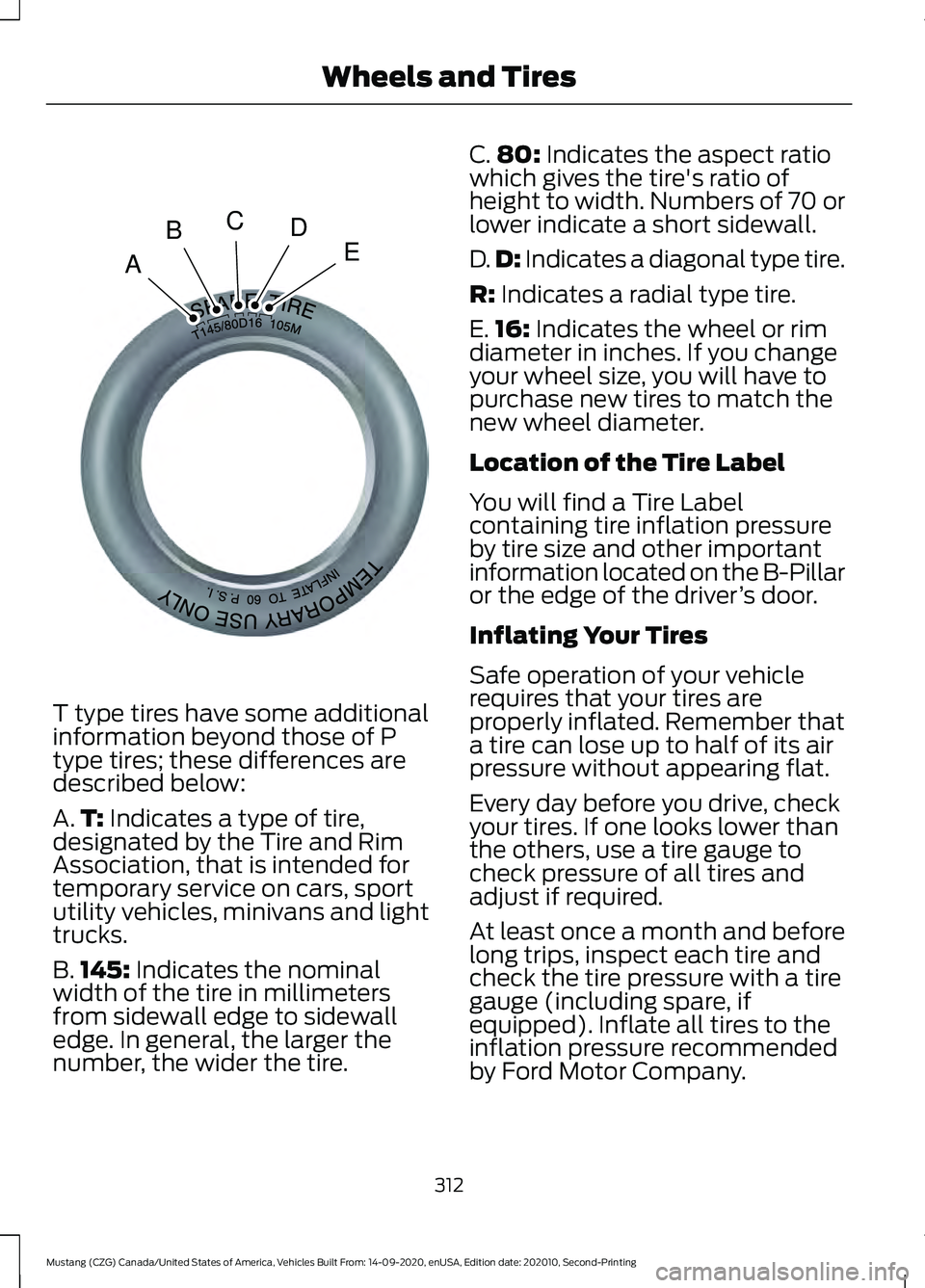
T type tires have some additional
information beyond those of P
type tires; these differences are
described below:
A.
T: Indicates a type of tire,
designated by the Tire and Rim
Association, that is intended for
temporary service on cars, sport
utility vehicles, minivans and light
trucks.
B. 145:
Indicates the nominal
width of the tire in millimeters
from sidewall edge to sidewall
edge. In general, the larger the
number, the wider the tire. C.
80:
Indicates the aspect ratio
which gives the tire's ratio of
height to width. Numbers of 70 or
lower indicate a short sidewall.
D. D:
Indicates a diagonal type tire.
R:
Indicates a radial type tire.
E. 16:
Indicates the wheel or rim
diameter in inches. If you change
your wheel size, you will have to
purchase new tires to match the
new wheel diameter.
Location of the Tire Label
You will find a Tire Label
containing tire inflation pressure
by tire size and other important
information located on the B-Pillar
or the edge of the driver ’s door.
Inflating Your Tires
Safe operation of your vehicle
requires that your tires are
properly inflated. Remember that
a tire can lose up to half of its air
pressure without appearing flat.
Every day before you drive, check
your tires. If one looks lower than
the others, use a tire gauge to
check pressure of all tires and
adjust if required.
At least once a month and before
long trips, inspect each tire and
check the tire pressure with a tire
gauge (including spare, if
equipped). Inflate all tires to the
inflation pressure recommended
by Ford Motor Company.
312
Mustang (CZG) Canada/United States of America, Vehicles Built From: 14-09-2020, enUSA, Edition date: 202010, Second-Printing Wheels and TiresA
BCDEE142545