USB FORD MUSTANG 2021 Owner's Manual
[x] Cancel search | Manufacturer: FORD, Model Year: 2021, Model line: MUSTANG, Model: FORD MUSTANG 2021Pages: 530, PDF Size: 10.22 MB
Page 424 of 530
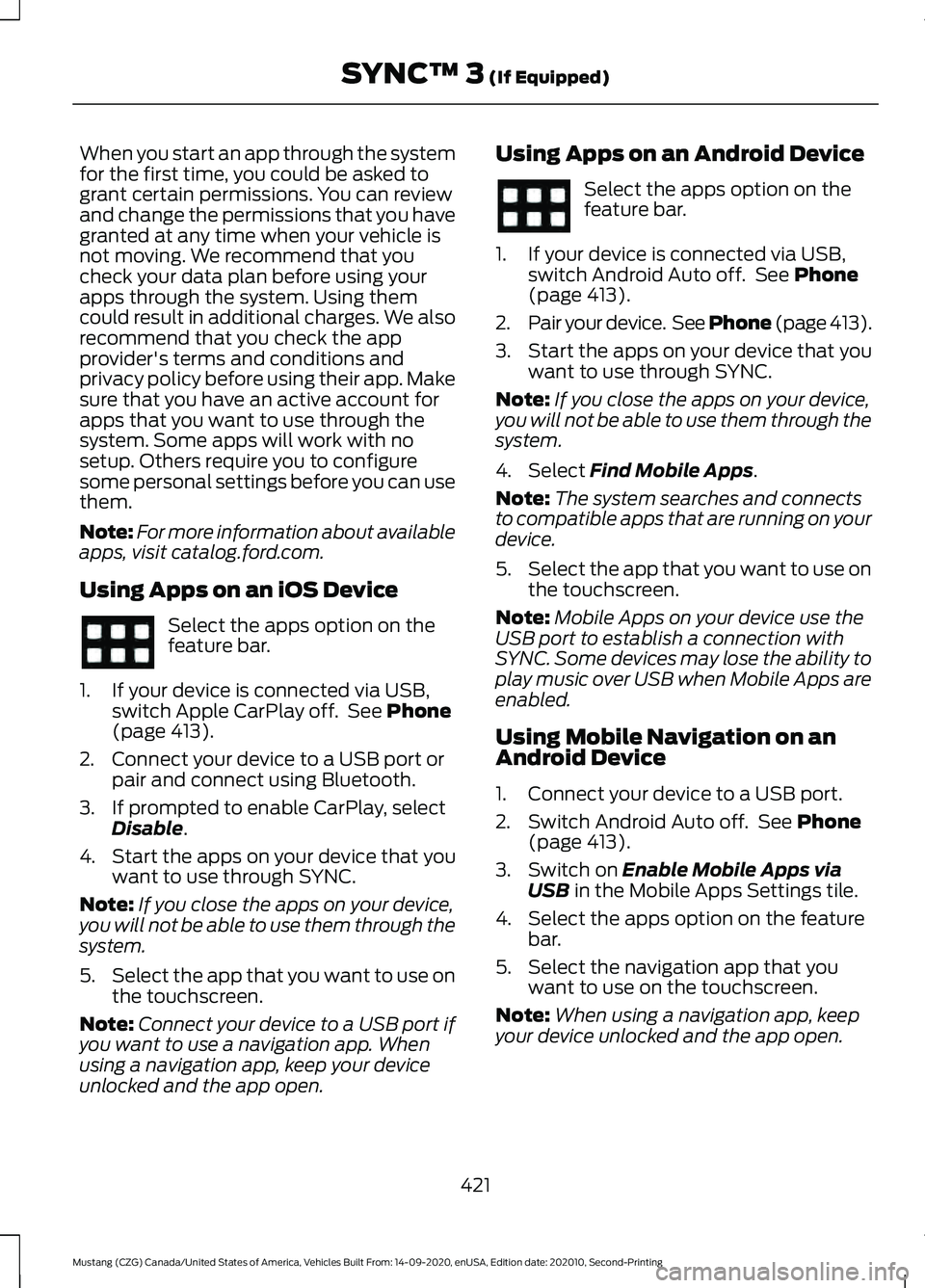
When you start an app through the system
for the first time, you could be asked to
grant certain permissions. You can review
and change the permissions that you have
granted at any time when your vehicle is
not moving. We recommend that you
check your data plan before using your
apps through the system. Using them
could result in additional charges. We also
recommend that you check the app
provider's terms and conditions and
privacy policy before using their app. Make
sure that you have an active account for
apps that you want to use through the
system. Some apps will work with no
setup. Others require you to configure
some personal settings before you can use
them.
Note:
For more information about available
apps, visit catalog.ford.com.
Using Apps on an iOS Device Select the apps option on the
feature bar.
1. If your device is connected via USB, switch Apple CarPlay off. See Phone
(page 413).
2. Connect your device to a USB port or pair and connect using Bluetooth.
3. If prompted to enable CarPlay, select Disable
.
4. Start the apps on your device that you want to use through SYNC.
Note: If you close the apps on your device,
you will not be able to use them through the
system.
5. Select the app that you want to use on
the touchscreen.
Note: Connect your device to a USB port if
you want to use a navigation app. When
using a navigation app, keep your device
unlocked and the app open. Using Apps on an Android Device Select the apps option on the
feature bar.
1. If your device is connected via USB, switch Android Auto off. See
Phone
(page 413).
2. Pair your device. See Phone (page 413).
3. Start the apps on your device that you want to use through SYNC.
Note: If you close the apps on your device,
you will not be able to use them through the
system.
4. Select
Find Mobile Apps.
Note: The system searches and connects
to compatible apps that are running on your
device.
5. Select the app that you want to use on
the touchscreen.
Note: Mobile Apps on your device use the
USB port to establish a connection with
SYNC. Some devices may lose the ability to
play music over USB when Mobile Apps are
enabled.
Using Mobile Navigation on an
Android Device
1. Connect your device to a USB port.
2. Switch Android Auto off. See
Phone
(page 413).
3. Switch on
Enable Mobile Apps via
USB in the Mobile Apps Settings tile.
4. Select the apps option on the feature bar.
5. Select the navigation app that you want to use on the touchscreen.
Note: When using a navigation app, keep
your device unlocked and the app open.
421
Mustang (CZG) Canada/United States of America, Vehicles Built From: 14-09-2020, enUSA, Edition date: 202010, Second-Printing SYNC™ 3
(If Equipped)
Page 428 of 530
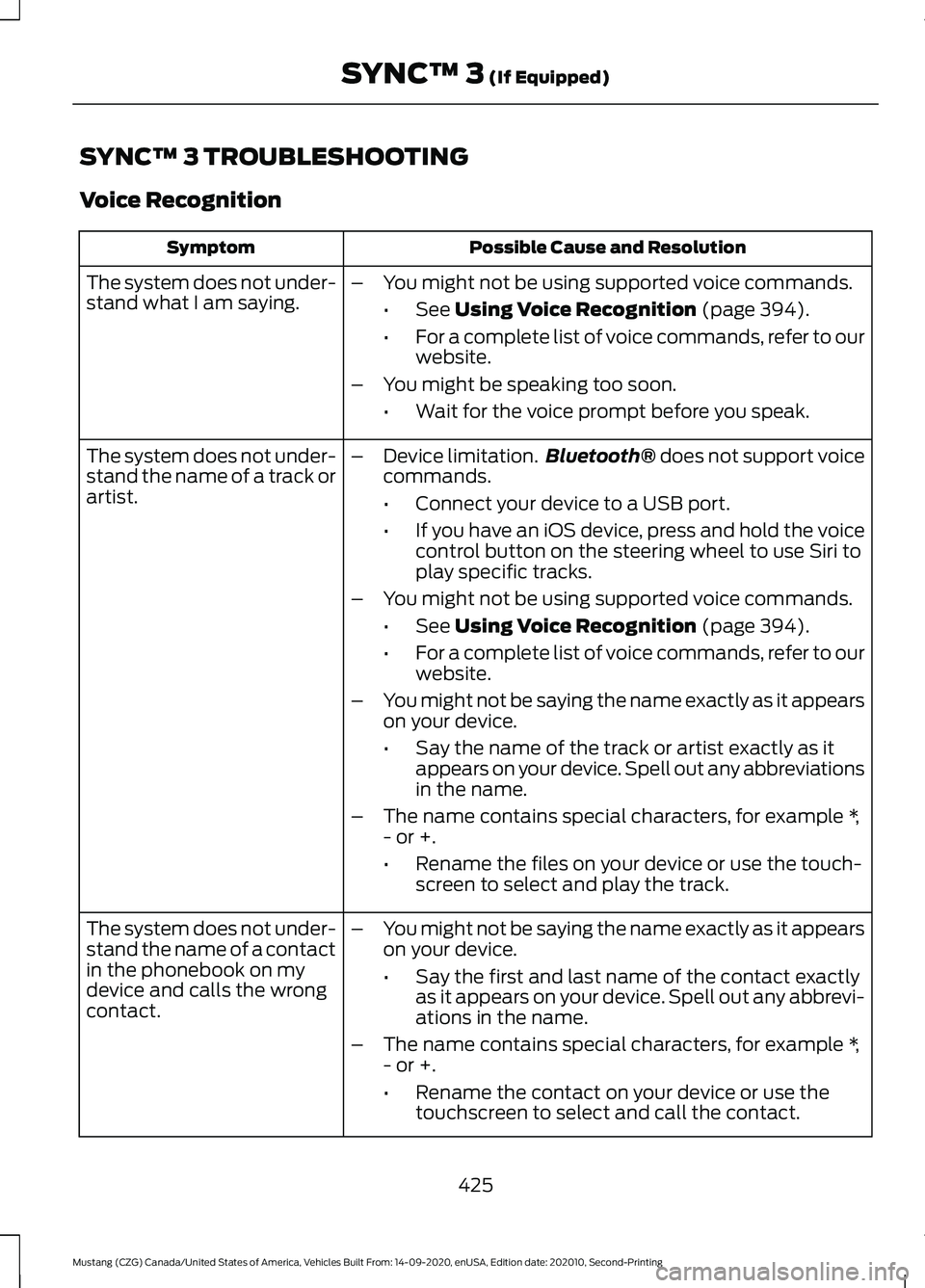
SYNC™ 3 TROUBLESHOOTING
Voice Recognition
Possible Cause and Resolution
Symptom
The system does not under-
stand what I am saying. –
You might not be using supported voice commands.
•See Using Voice Recognition (page 394).
• For a complete list of voice commands, refer to our
website.
– You might be speaking too soon.
•Wait for the voice prompt before you speak.
The system does not under-
stand the name of a track or
artist. –
Device limitation. Bluetooth®
does not support voice
commands.
• Connect your device to a USB port.
• If you have an iOS device, press and hold the voice
control button on the steering wheel to use Siri to
play specific tracks.
– You might not be using supported voice commands.
•See
Using Voice Recognition (page 394).
• For a complete list of voice commands, refer to our
website.
– You might not be saying the name exactly as it appears
on your device.
•Say the name of the track or artist exactly as it
appears on your device. Spell out any abbreviations
in the name.
– The name contains special characters, for example *,
- or +.
•Rename the files on your device or use the touch-
screen to select and play the track.
The system does not under-
stand the name of a contact
in the phonebook on my
device and calls the wrong
contact. –
You might not be saying the name exactly as it appears
on your device.
•Say the first and last name of the contact exactly
as it appears on your device. Spell out any abbrevi-
ations in the name.
– The name contains special characters, for example *,
- or +.
•Rename the contact on your device or use the
touchscreen to select and call the contact.
425
Mustang (CZG) Canada/United States of America, Vehicles Built From: 14-09-2020, enUSA, Edition date: 202010, Second-Printing SYNC™ 3
(If Equipped)
Page 429 of 530
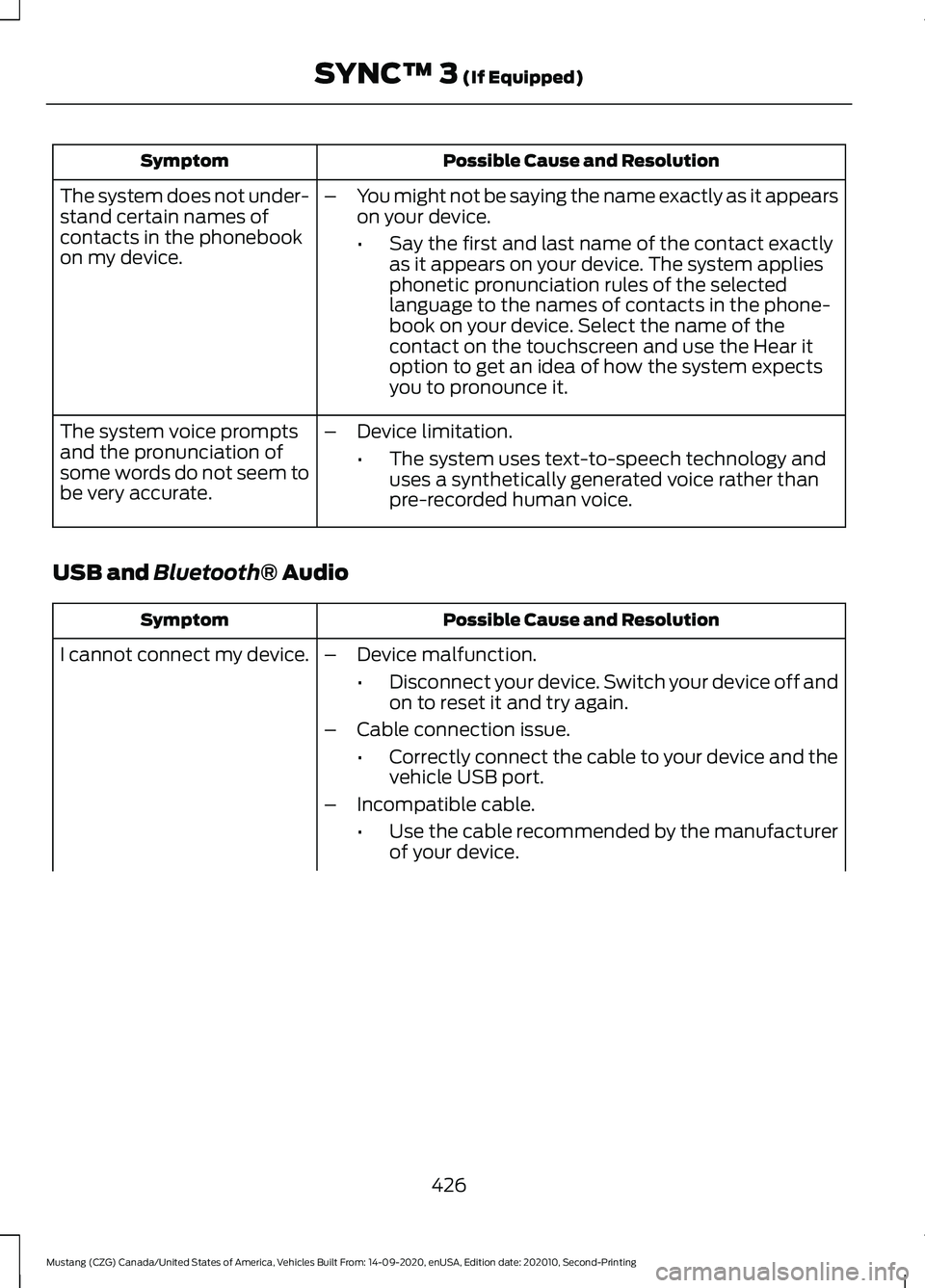
Possible Cause and Resolution
Symptom
–You might not be saying the name exactly as it appears
on your device.
•Say the first and last name of the contact exactly
as it appears on your device. The system applies
phonetic pronunciation rules of the selected
language to the names of contacts in the phone-
book on your device. Select the name of the
contact on the touchscreen and use the Hear it
option to get an idea of how the system expects
you to pronounce it.
The system does not under-
stand certain names of
contacts in the phonebook
on my device.
–Device limitation.
•The system uses text-to-speech technology and
uses a synthetically generated voice rather than
pre-recorded human voice.
The system voice prompts
and the pronunciation of
some words do not seem to
be very accurate.
USB and Bluetooth® Audio Possible Cause and Resolution
Symptom
I cannot connect my device. –Device malfunction.
•Disconnect your device. Switch your device off and
on to reset it and try again.
– Cable connection issue.
•Correctly connect the cable to your device and the
vehicle USB port.
– Incompatible cable.
•Use the cable recommended by the manufacturer
of your device.
426
Mustang (CZG) Canada/United States of America, Vehicles Built From: 14-09-2020, enUSA, Edition date: 202010, Second-Printing SYNC™ 3
(If Equipped)
Page 430 of 530
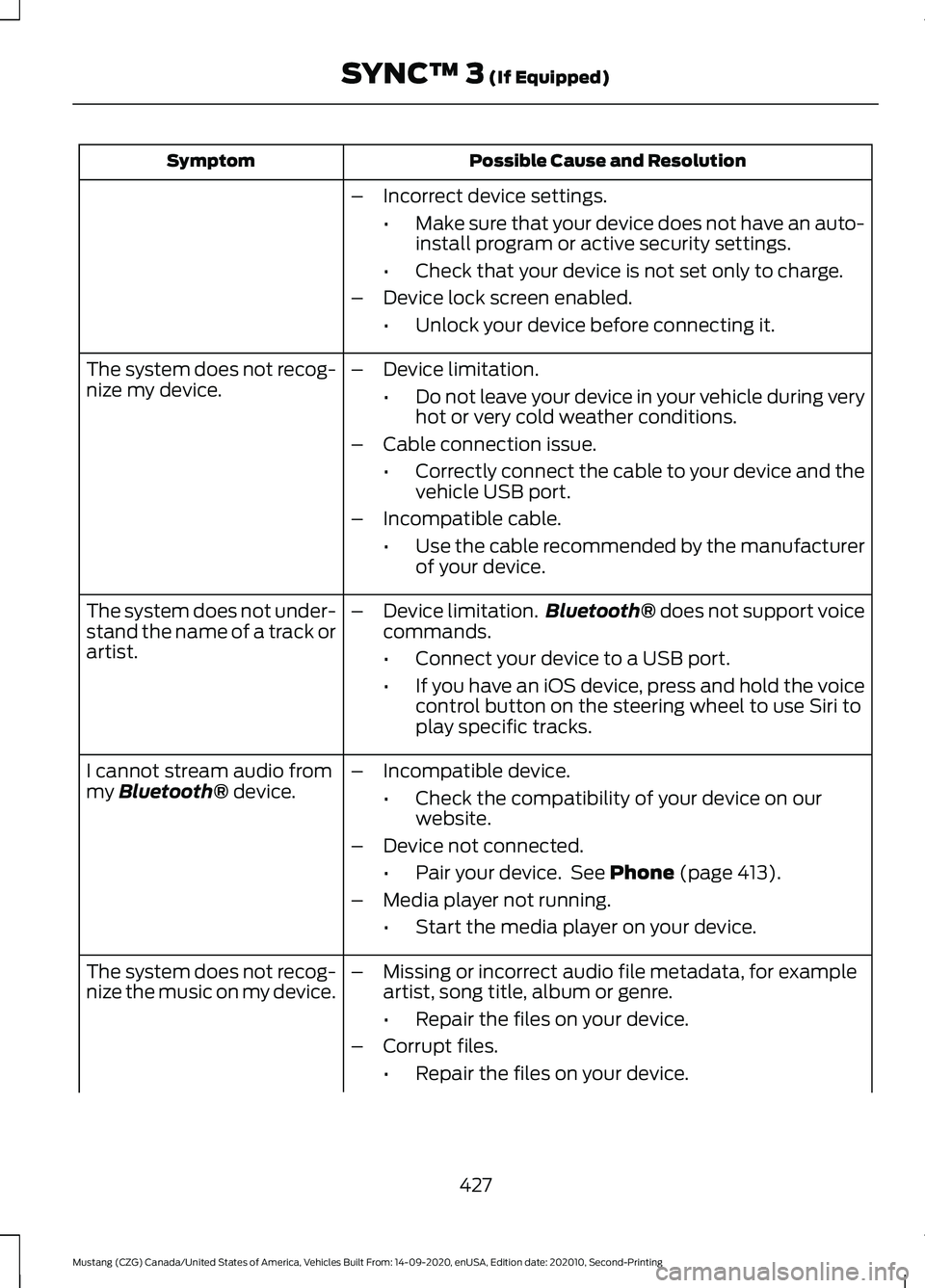
Possible Cause and Resolution
Symptom
–Incorrect device settings.
•Make sure that your device does not have an auto-
install program or active security settings.
• Check that your device is not set only to charge.
– Device lock screen enabled.
•Unlock your device before connecting it.
The system does not recog-
nize my device. –
Device limitation.
•Do not leave your device in your vehicle during very
hot or very cold weather conditions.
– Cable connection issue.
•Correctly connect the cable to your device and the
vehicle USB port.
– Incompatible cable.
•Use the cable recommended by the manufacturer
of your device.
The system does not under-
stand the name of a track or
artist. –
Device limitation. Bluetooth® does not support voice
commands.
• Connect your device to a USB port.
• If you have an iOS device, press and hold the voice
control button on the steering wheel to use Siri to
play specific tracks.
I cannot stream audio from
my
Bluetooth® device. –
Incompatible device.
•Check the compatibility of your device on our
website.
– Device not connected.
•Pair your device. See
Phone (page 413).
– Media player not running.
•Start the media player on your device.
The system does not recog-
nize the music on my device. –
Missing or incorrect audio file metadata, for example
artist, song title, album or genre.
•Repair the files on your device.
– Corrupt files.
•Repair the files on your device.
427
Mustang (CZG) Canada/United States of America, Vehicles Built From: 14-09-2020, enUSA, Edition date: 202010, Second-Printing SYNC™ 3
(If Equipped)
Page 431 of 530
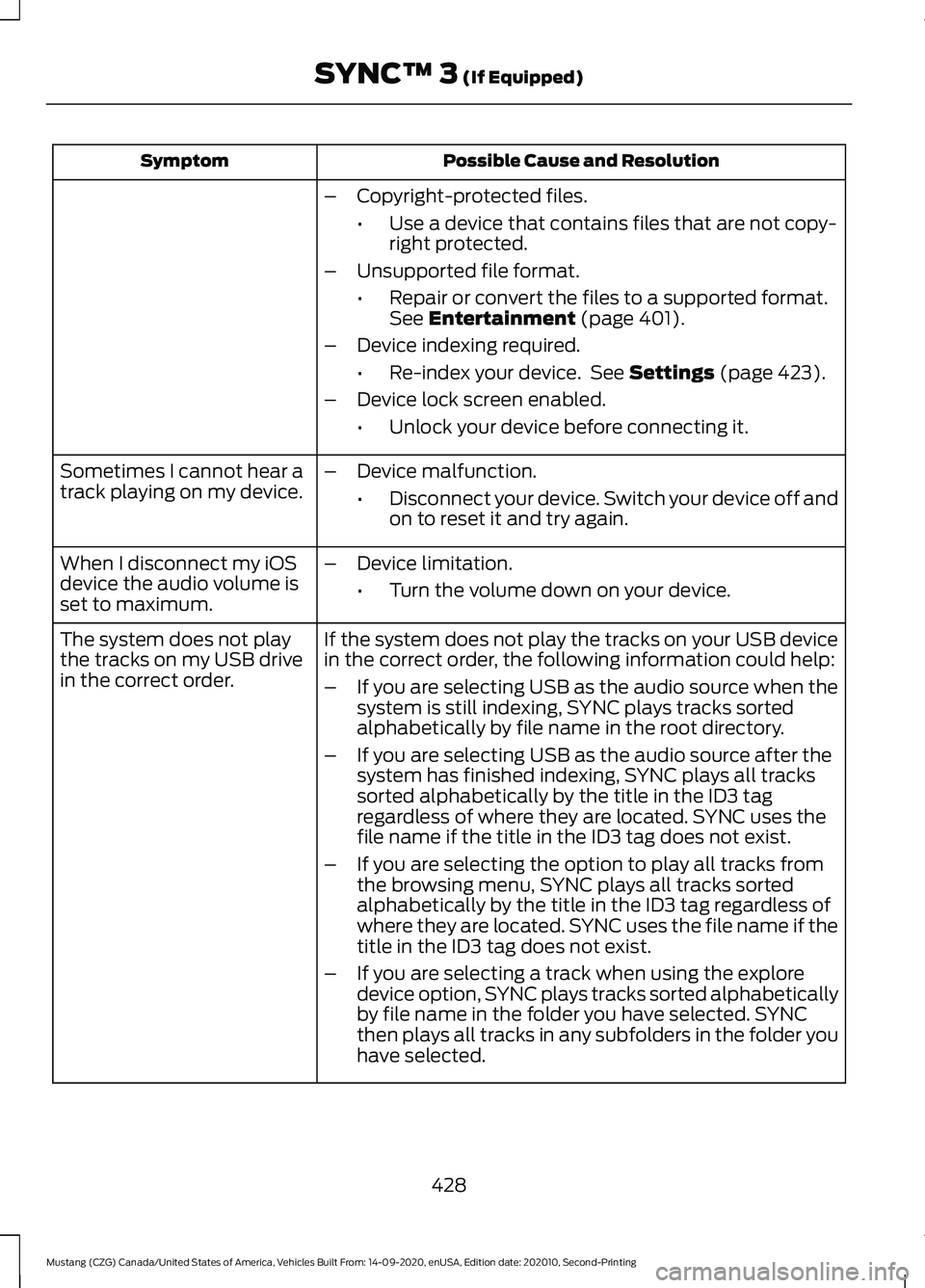
Possible Cause and Resolution
Symptom
–Copyright-protected files.
•Use a device that contains files that are not copy-
right protected.
– Unsupported file format.
•Repair or convert the files to a supported format.
See Entertainment (page 401).
– Device indexing required.
•Re-index your device. See
Settings (page 423).
– Device lock screen enabled.
•Unlock your device before connecting it.
Sometimes I cannot hear a
track playing on my device. –
Device malfunction.
•Disconnect your device. Switch your device off and
on to reset it and try again.
When I disconnect my iOS
device the audio volume is
set to maximum. –
Device limitation.
•Turn the volume down on your device.
If the system does not play the tracks on your USB device
in the correct order, the following information could help:
The system does not play
the tracks on my USB drive
in the correct order.
–If you are selecting USB as the audio source when the
system is still indexing, SYNC plays tracks sorted
alphabetically by file name in the root directory.
– If you are selecting USB as the audio source after the
system has finished indexing, SYNC plays all tracks
sorted alphabetically by the title in the ID3 tag
regardless of where they are located. SYNC uses the
file name if the title in the ID3 tag does not exist.
– If you are selecting the option to play all tracks from
the browsing menu, SYNC plays all tracks sorted
alphabetically by the title in the ID3 tag regardless of
where they are located. SYNC uses the file name if the
title in the ID3 tag does not exist.
– If you are selecting a track when using the explore
device option, SYNC plays tracks sorted alphabetically
by file name in the folder you have selected. SYNC
then plays all tracks in any subfolders in the folder you
have selected.
428
Mustang (CZG) Canada/United States of America, Vehicles Built From: 14-09-2020, enUSA, Edition date: 202010, Second-Printing SYNC™ 3
(If Equipped)
Page 432 of 530
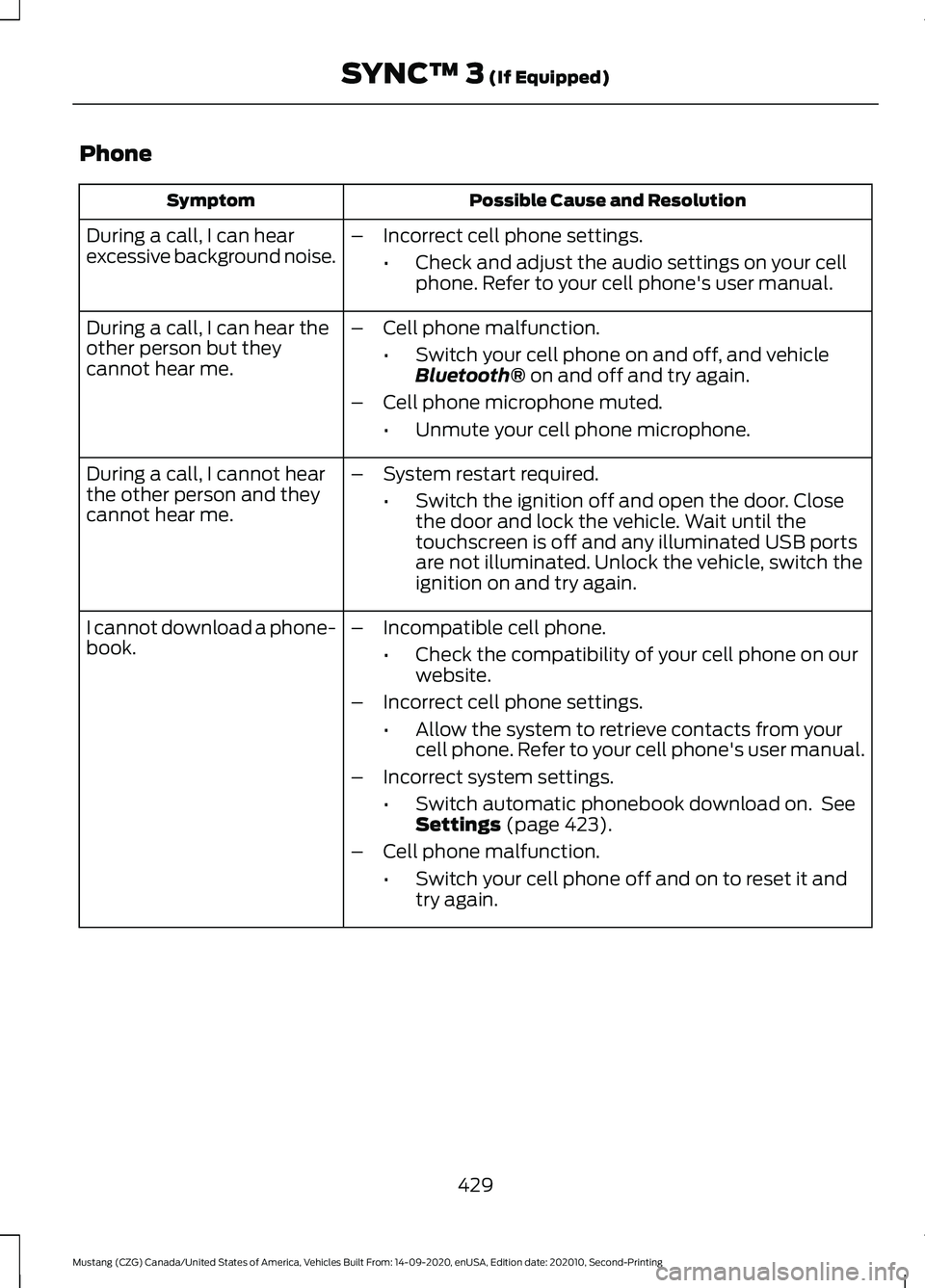
Phone
Possible Cause and Resolution
Symptom
During a call, I can hear
excessive background noise. –
Incorrect cell phone settings.
•Check and adjust the audio settings on your cell
phone. Refer to your cell phone's user manual.
– Cell phone malfunction.
•Switch your cell phone on and off, and vehicle
Bluetooth® on and off and try again.
– Cell phone microphone muted.
•Unmute your cell phone microphone.
During a call, I can hear the
other person but they
cannot hear me.
During a call, I cannot hear
the other person and they
cannot hear me.
–
System restart required.
•Switch the ignition off and open the door. Close
the door and lock the vehicle. Wait until the
touchscreen is off and any illuminated USB ports
are not illuminated. Unlock the vehicle, switch the
ignition on and try again.
I cannot download a phone-
book. –
Incompatible cell phone.
•Check the compatibility of your cell phone on our
website.
– Incorrect cell phone settings.
•Allow the system to retrieve contacts from your
cell phone. Refer to your cell phone's user manual.
– Incorrect system settings.
•Switch automatic phonebook download on. See
Settings
(page 423).
– Cell phone malfunction.
•Switch your cell phone off and on to reset it and
try again.
429
Mustang (CZG) Canada/United States of America, Vehicles Built From: 14-09-2020, enUSA, Edition date: 202010, Second-Printing SYNC™ 3
(If Equipped)
Page 435 of 530
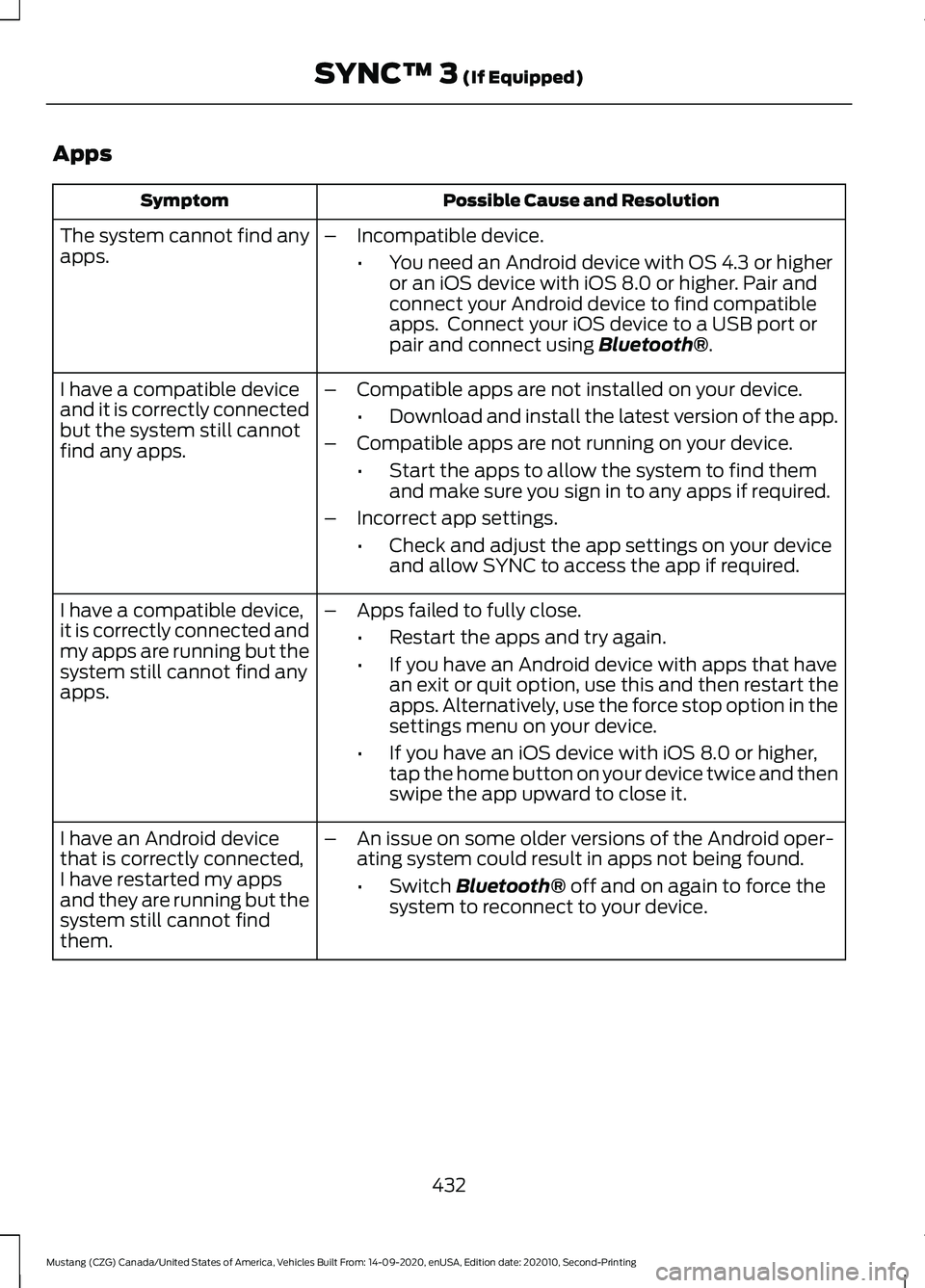
Apps
Possible Cause and Resolution
Symptom
The system cannot find any
apps. –
Incompatible device.
•You need an Android device with OS 4.3 or higher
or an iOS device with iOS 8.0 or higher. Pair and
connect your Android device to find compatible
apps. Connect your iOS device to a USB port or
pair and connect using Bluetooth®.
I have a compatible device
and it is correctly connected
but the system still cannot
find any apps. –
Compatible apps are not installed on your device.
•Download and install the latest version of the app.
– Compatible apps are not running on your device.
•Start the apps to allow the system to find them
and make sure you sign in to any apps if required.
– Incorrect app settings.
•Check and adjust the app settings on your device
and allow SYNC to access the app if required.
I have a compatible device,
it is correctly connected and
my apps are running but the
system still cannot find any
apps. –
Apps failed to fully close.
•Restart the apps and try again.
• If you have an Android device with apps that have
an exit or quit option, use this and then restart the
apps. Alternatively, use the force stop option in the
settings menu on your device.
• If you have an iOS device with iOS 8.0 or higher,
tap the home button on your device twice and then
swipe the app upward to close it.
I have an Android device
that is correctly connected,
I have restarted my apps
and they are running but the
system still cannot find
them. –
An issue on some older versions of the Android oper-
ating system could result in apps not being found.
•Switch
Bluetooth® off and on again to force the
system to reconnect to your device.
432
Mustang (CZG) Canada/United States of America, Vehicles Built From: 14-09-2020, enUSA, Edition date: 202010, Second-Printing SYNC™ 3
(If Equipped)
Page 520 of 530
Rev Match............................................................
208
Selectable Drive Modes.................................. 206
Selectable Steering.......................................... 208
Driver Alert.......................................................191
Using Driver Alert................................................. 191
Driver and Passenger Airbags...................49 Children and Airbags.......................................... 50
Proper Driver and Front Passenger Seating Adjustment........................................................ 49
Driver and Passenger Knee Airbags........54
Driving Aids
......................................................191
Driving at High Speed.................................333
Driving Hints...................................................229
Driving Through Water
...............................230
DRL See: Daytime Running Lamps - Vehicles With:
Configurable Daytime Running
Lamps.................................................................. 82
See: Daytime Running Lamps - Vehicles With: Daytime Running Lamps (DRL)................82
E
Economical Driving
.....................................229
Electromagnetic Compatibility..............483
Emission Law.................................................160 Tampering With a Noise Control
System.............................................................. 160
Enabling Remote Start
...............................124
End User License Agreement.................486 VEHICLE SOFTWARE END USER LICENSE
AGREEMENT (EULA) ................................ 486
Engine Block Heater....................................150 Using the Engine Block Heater....................... 151
Engine Coolant Check
...............................264
Adding Coolant.................................................. 264
Coolant Change................................................. 266
Engine Coolant Temperature Management.................................................. 267
Fail-Safe Cooling............................................... 266
Recycled Coolant............................................... 265
Severe Climates................................................. 266
Engine Emission Control...........................160
Engine Immobilizer See: Passive Anti-Theft System.....................73
Engine Oil Check...........................................261 Adding Engine Oil............................................... 261
Engine Oil Dipstick
.......................................261 Engine Specifications - 2.3L
EcoBoost™.................................................335
Drivebelt Routing............................................... 335
Engine Specifications - 5.0L, Mach 1........................................................................\
335
Drivebelt Routing............................................... 336
Engine Specifications - 5.0L....................337 Drivebelt Routing................................................ 337
Entertainment...............................................401 AM/FM Radio...................................................... 402
Apps........................................................................\
410
CD........................................................................\
... 408
HD Radio ™ Information (If
Available)........................................................ 405
SiriusXM® Satellite Radio (If Activated)....................................................... 403
Sources.................................................................. 401
Stereo or USB..................................................... 409
Supported Media Players, Formats and Metadata Information................................. 410
USB Ports.............................................................. 410
Environment.....................................................22
Essential Towing Checks..........................220 Before Towing a Trailer.................................... 220
Hitches................................................................... 220
Launching or Retrieving a Boat or Personal Watercraft (PWC)......................................... 221
Safety Chains...................................................... 220
Trailer Brakes....................................................... 220
Trailer Lamps....................................................... 220
When Towing a Trailer....................................... 221
Event Data Recording See: Data Recording............................................. 15
Export Unique Options
..................................21
Extending the Remote Start Duration.........................................................124
Exterior Mirrors
................................................87
Blind Spot Monitor.............................................. 88
Fold-Away Exterior Mirrors............................... 87
Heated Exterior Mirrors...................................... 87
Integrated Blind Spot Mirrors........................... 87
Memory Mirrors..................................................... 87
Power Exterior Mirrors........................................ 87
Projection Lights................................................... 87
Signal Indicator Mirrors...................................... 87
517
Mustang (CZG) Canada/United States of America, Vehicles Built From: 14-09-2020, enUSA, Edition date: 202010, Second-Printing Index
Page 527 of 530
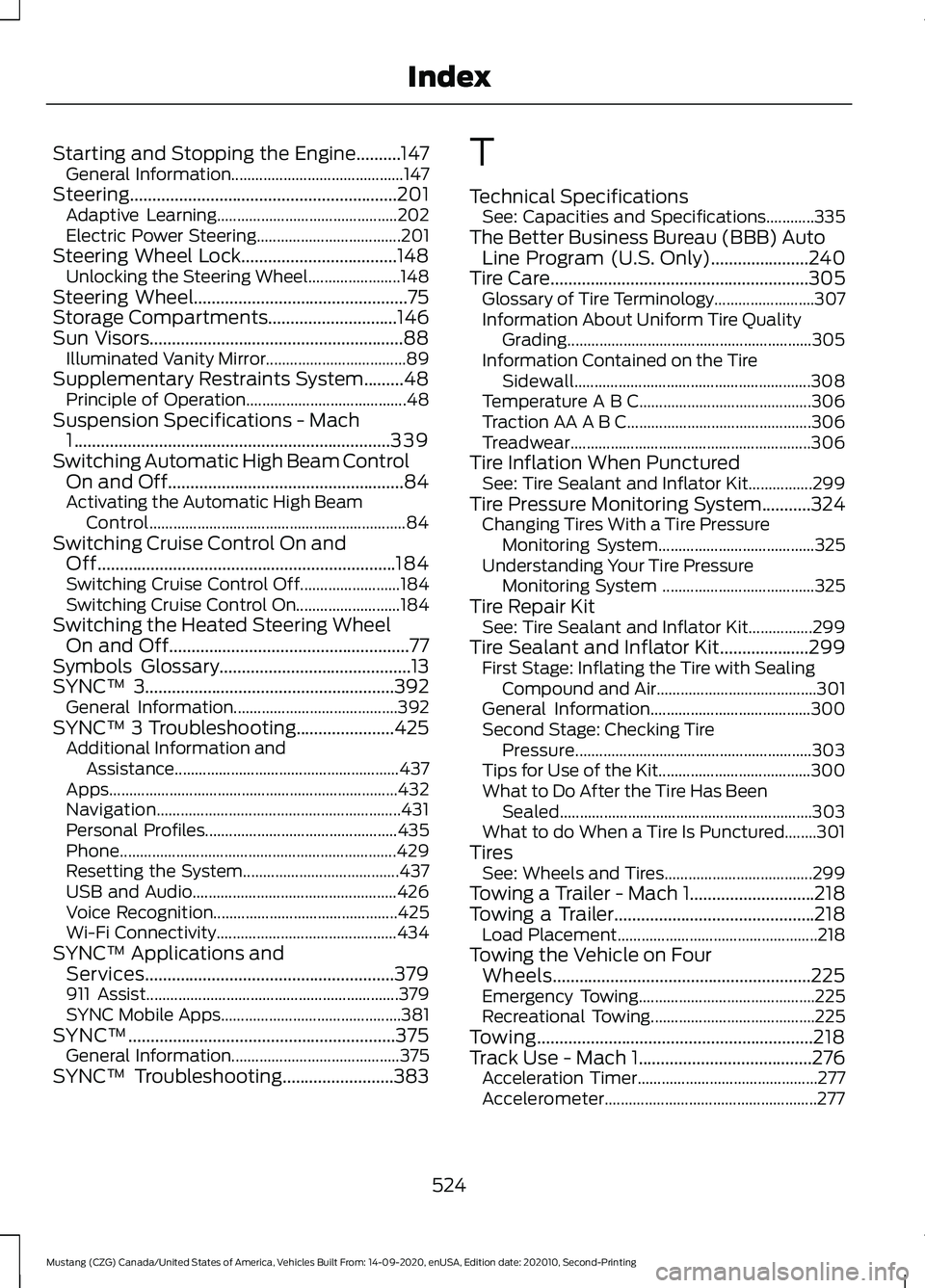
Starting and Stopping the Engine..........147
General Information........................................... 147
Steering............................................................201 Adaptive Learning............................................. 202
Electric Power Steering.................................... 201
Steering Wheel Lock...................................148 Unlocking the Steering Wheel....................... 148
Steering Wheel................................................75
Storage Compartments.............................146
Sun Visors.........................................................88 Illuminated Vanity Mirror................................... 89
Supplementary Restraints System.........48 Principle of Operation........................................ 48
Suspension Specifications - Mach 1
.......................................................................339
Switching Automatic High Beam Control On and Off.....................................................84
Activating the Automatic High Beam Control................................................................ 84
Switching Cruise Control On and Off...................................................................184
Switching Cruise Control Off.........................184
Switching Cruise Control On.......................... 184
Switching the Heated Steering Wheel On and Off......................................................77
Symbols Glossary
...........................................13
SYNC™ 3........................................................392
General Information......................................... 392
SYNC™ 3 Troubleshooting......................425 Additional Information and
Assistance........................................................ 437
Apps........................................................................\
432
Navigation............................................................. 431
Personal Profiles................................................ 435
Phone..................................................................... 429
Resetting the System....................................... 437
USB and Audio................................................... 426
Voice Recognition.............................................. 425
Wi-Fi Connectivity............................................. 434
SYNC™ Applications and Services........................................................379
911 Assist............................................................... 379
SYNC Mobile Apps............................................. 381
SYNC™............................................................375 General Information.......................................... 375
SYNC™ Troubleshooting
.........................383 T
Technical Specifications
See: Capacities and Specifications............335
The Better Business Bureau (BBB) Auto Line Program (U.S. Only)
......................240
Tire Care..........................................................305
Glossary of Tire Terminology......................... 307
Information About Uniform Tire Quality Grading............................................................. 305
Information Contained on the Tire Sidewall........................................................... 308
Temperature A B C........................................... 306
Traction AA A B C.............................................. 306
Treadwear............................................................ 306
Tire Inflation When Punctured See: Tire Sealant and Inflator Kit................299
Tire Pressure Monitoring System
...........324
Changing Tires With a Tire Pressure
Monitoring System....................................... 325
Understanding Your Tire Pressure Monitoring System ...................................... 325
Tire Repair Kit See: Tire Sealant and Inflator Kit................299
Tire Sealant and Inflator Kit
....................299
First Stage: Inflating the Tire with Sealing
Compound and Air........................................ 301
General Information........................................ 300
Second Stage: Checking Tire Pressure........................................................... 303
Tips for Use of the Kit...................................... 300
What to Do After the Tire Has Been Sealed............................................................... 303
What to do When a Tire Is Punctured........301
Tires See: Wheels and Tires..................................... 299
Towing a Trailer - Mach 1............................218
Towing a Trailer.............................................218 Load Placement.................................................. 218
Towing the Vehicle on Four Wheels..........................................................225
Emergency Towing............................................ 225
Recreational Towing......................................... 225
Towing
..............................................................218
Track Use - Mach 1.......................................276 Acceleration Timer............................................. 277
Accelerometer..................................................... 277
524
Mustang (CZG) Canada/United States of America, Vehicles Built From: 14-09-2020, enUSA, Edition date: 202010, Second-Printing Index
Page 528 of 530
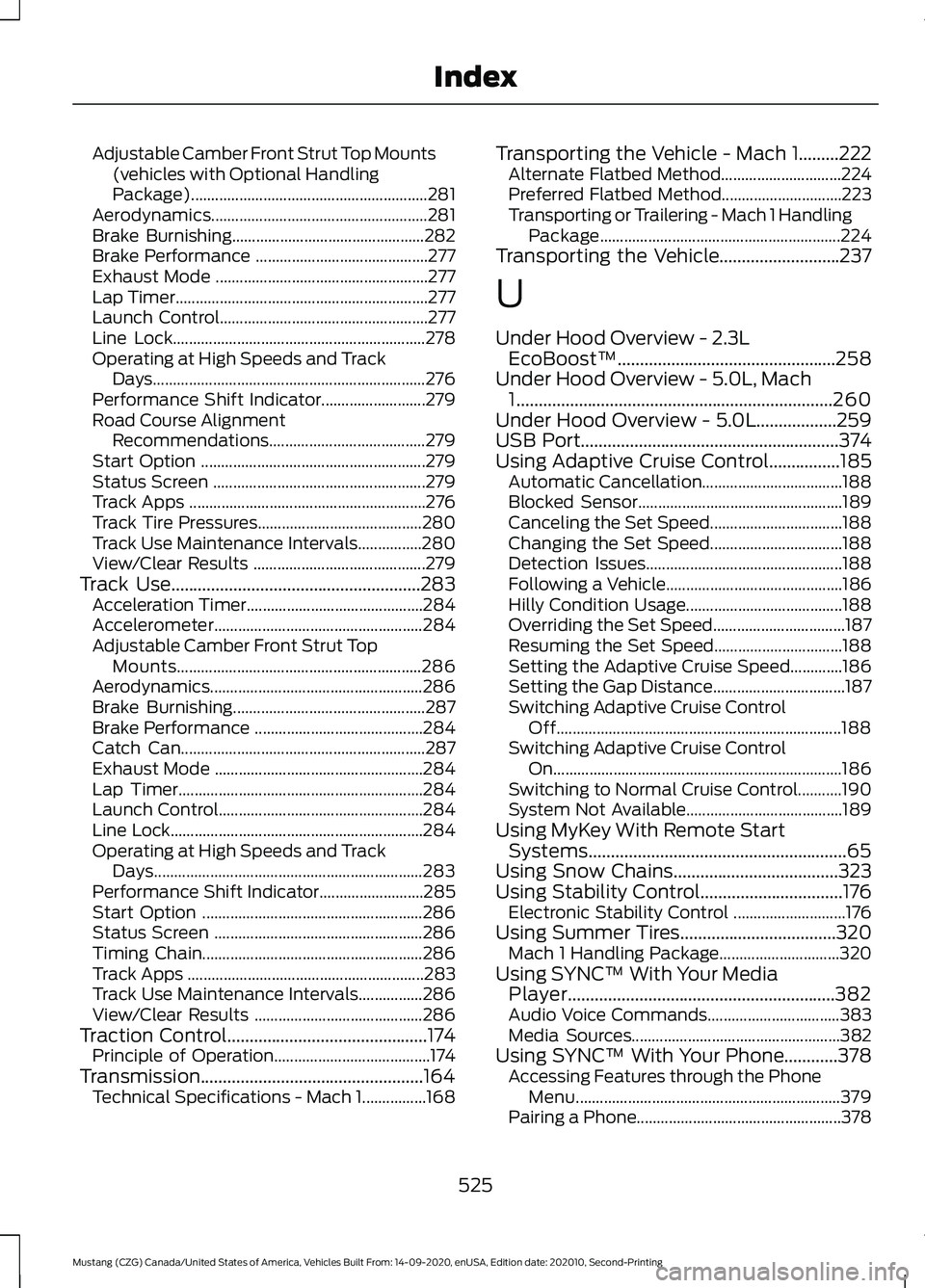
Adjustable Camber Front Strut Top Mounts
(vehicles with Optional Handling
Package)........................................................... 281
Aerodynamics...................................................... 281
Brake Burnishing................................................ 282
Brake Performance ........................................... 277
Exhaust Mode ..................................................... 277
Lap Timer............................................................... 277
Launch Control.................................................... 277
Line Lock............................................................... 278
Operating at High Speeds and Track Days.................................................................... 276
Performance Shift Indicator.......................... 279
Road Course Alignment Recommendations....................................... 279
Start Option ........................................................ 279
Status Screen ..................................................... 279
Track Apps ........................................................... 276
Track Tire Pressures......................................... 280
Track Use Maintenance Intervals................280
View/Clear Results ........................................... 279
Track Use
........................................................283
Acceleration Timer............................................ 284
Accelerometer.................................................... 284
Adjustable Camber Front Strut Top Mounts............................................................. 286
Aerodynamics..................................................... 286
Brake Burnishing................................................ 287
Brake Performance .......................................... 284
Catch Can............................................................. 287
Exhaust Mode .................................................... 284
Lap Timer............................................................. 284
Launch Control................................................... 284
Line Lock............................................................... 284
Operating at High Speeds and Track Days................................................................... 283
Performance Shift Indicator.......................... 285
Start Option ....................................................... 286
Status Screen .................................................... 286
Timing Chain....................................................... 286
Track Apps ........................................................... 283
Track Use Maintenance Intervals................286
View/Clear Results .......................................... 286
Traction Control.............................................174 Principle of Operation....................................... 174
Transmission..................................................164 Technical Specifications - Mach 1................168 Transporting the Vehicle - Mach 1.........222
Alternate Flatbed Method.............................. 224
Preferred Flatbed Method.............................. 223
Transporting or Trailering - Mach 1 Handling Package............................................................ 224
Transporting the Vehicle
...........................237
U
Under Hood Overview - 2.3L EcoBoost™.................................................258
Under Hood Overview - 5.0L, Mach 1
.......................................................................260
Under Hood Overview - 5.0L..................259
USB Port..........................................................374
Using Adaptive Cruise Control................185 Automatic Cancellation................................... 188
Blocked Sensor................................................... 189
Canceling the Set Speed................................. 188
Changing the Set Speed................................. 188
Detection Issues................................................. 188
Following a Vehicle............................................ 186
Hilly Condition Usage....................................... 188
Overriding the Set Speed................................. 187
Resuming the Set Speed................................ 188
Setting the Adaptive Cruise Speed.............186
Setting the Gap Distance................................. 187
Switching Adaptive Cruise Control Off....................................................................... 188
Switching Adaptive Cruise Control On........................................................................\
186
Switching to Normal Cruise Control...........190
System Not Available....................................... 189
Using MyKey With Remote Start Systems..........................................................65
Using Snow Chains.....................................323
Using Stability Control................................176 Electronic Stability Control ............................ 176
Using Summer Tires
...................................320
Mach 1 Handling Package.............................. 320
Using SYNC™ With Your Media Player............................................................382
Audio Voice Commands................................. 383
Media Sources.................................................... 382
Using SYNC™ With Your Phone............378 Accessing Features through the Phone
Menu.................................................................. 379
Pairing a Phone................................................... 378
525
Mustang (CZG) Canada/United States of America, Vehicles Built From: 14-09-2020, enUSA, Edition date: 202010, Second-Printing Index