USB FORD MUSTANG 2023 User Guide
[x] Cancel search | Manufacturer: FORD, Model Year: 2023, Model line: MUSTANG, Model: FORD MUSTANG 2023Pages: 535, PDF Size: 15.46 MB
Page 403 of 535
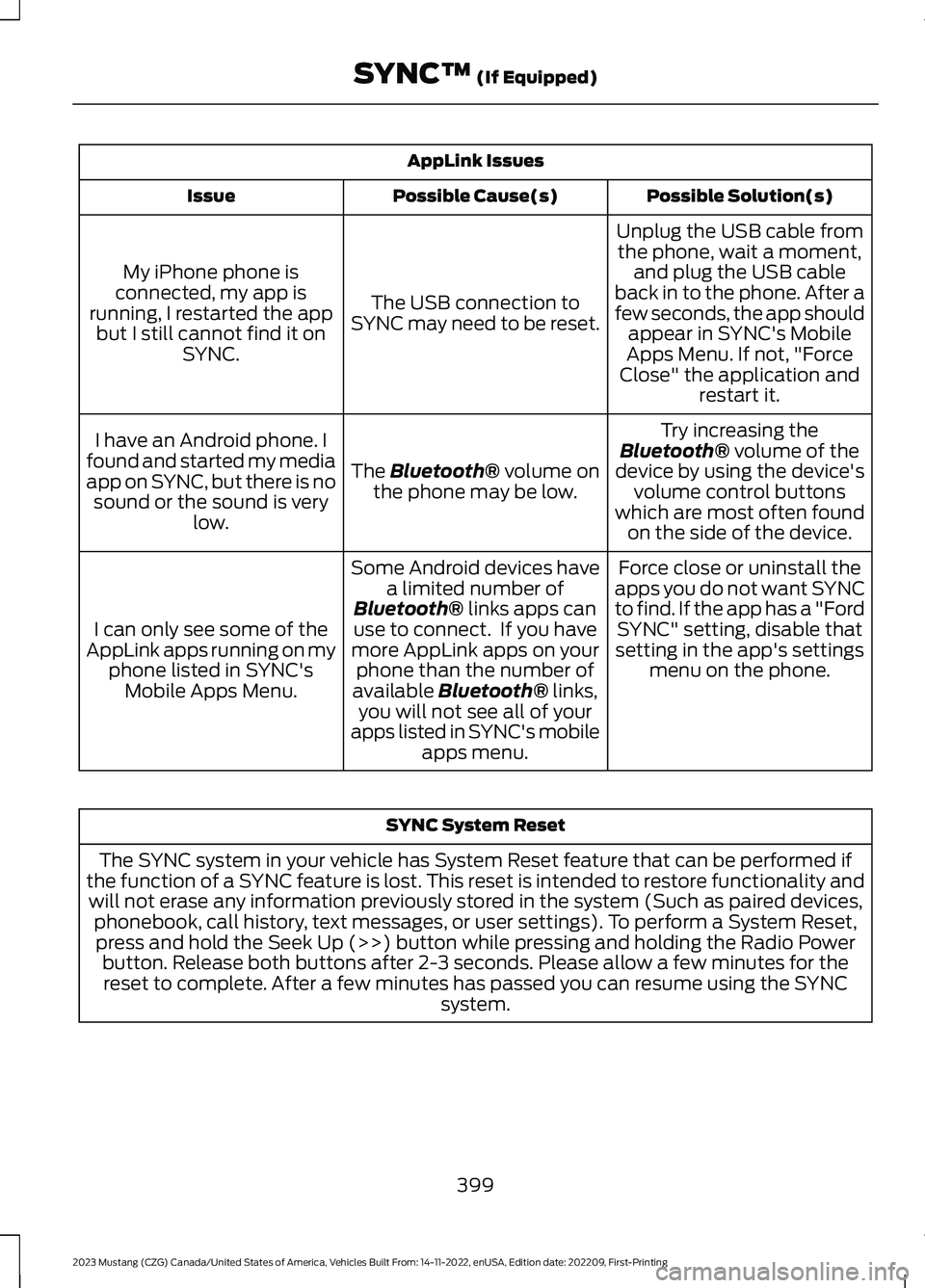
AppLink Issues
Possible Solution(s)Possible Cause(s)Issue
Unplug the USB cable fromthe phone, wait a moment,and plug the USB cableback in to the phone. After afew seconds, the app shouldappear in SYNC's MobileApps Menu. If not, "ForceClose" the application andrestart it.
The USB connection toSYNC may need to be reset.
My iPhone phone isconnected, my app isrunning, I restarted the appbut I still cannot find it onSYNC.
Try increasing theBluetooth® volume of thedevice by using the device'svolume control buttonswhich are most often foundon the side of the device.
The Bluetooth® volume onthe phone may be low.
I have an Android phone. Ifound and started my mediaapp on SYNC, but there is nosound or the sound is verylow.
Force close or uninstall theapps you do not want SYNCto find. If the app has a "FordSYNC" setting, disable thatsetting in the app's settingsmenu on the phone.
Some Android devices havea limited number ofBluetooth® links apps canuse to connect. If you havemore AppLink apps on yourphone than the number ofavailable Bluetooth® links,you will not see all of yourapps listed in SYNC's mobileapps menu.
I can only see some of theAppLink apps running on myphone listed in SYNC'sMobile Apps Menu.
SYNC System Reset
The SYNC system in your vehicle has System Reset feature that can be performed ifthe function of a SYNC feature is lost. This reset is intended to restore functionality andwill not erase any information previously stored in the system (Such as paired devices,phonebook, call history, text messages, or user settings). To perform a System Reset,press and hold the Seek Up (>>) button while pressing and holding the Radio Powerbutton. Release both buttons after 2-3 seconds. Please allow a few minutes for thereset to complete. After a few minutes has passed you can resume using the SYNCsystem.
399
2023 Mustang (CZG) Canada/United States of America, Vehicles Built From: 14-11-2022, enUSA, Edition date: 202209, First-PrintingSYNC™ (If Equipped)
Page 405 of 535
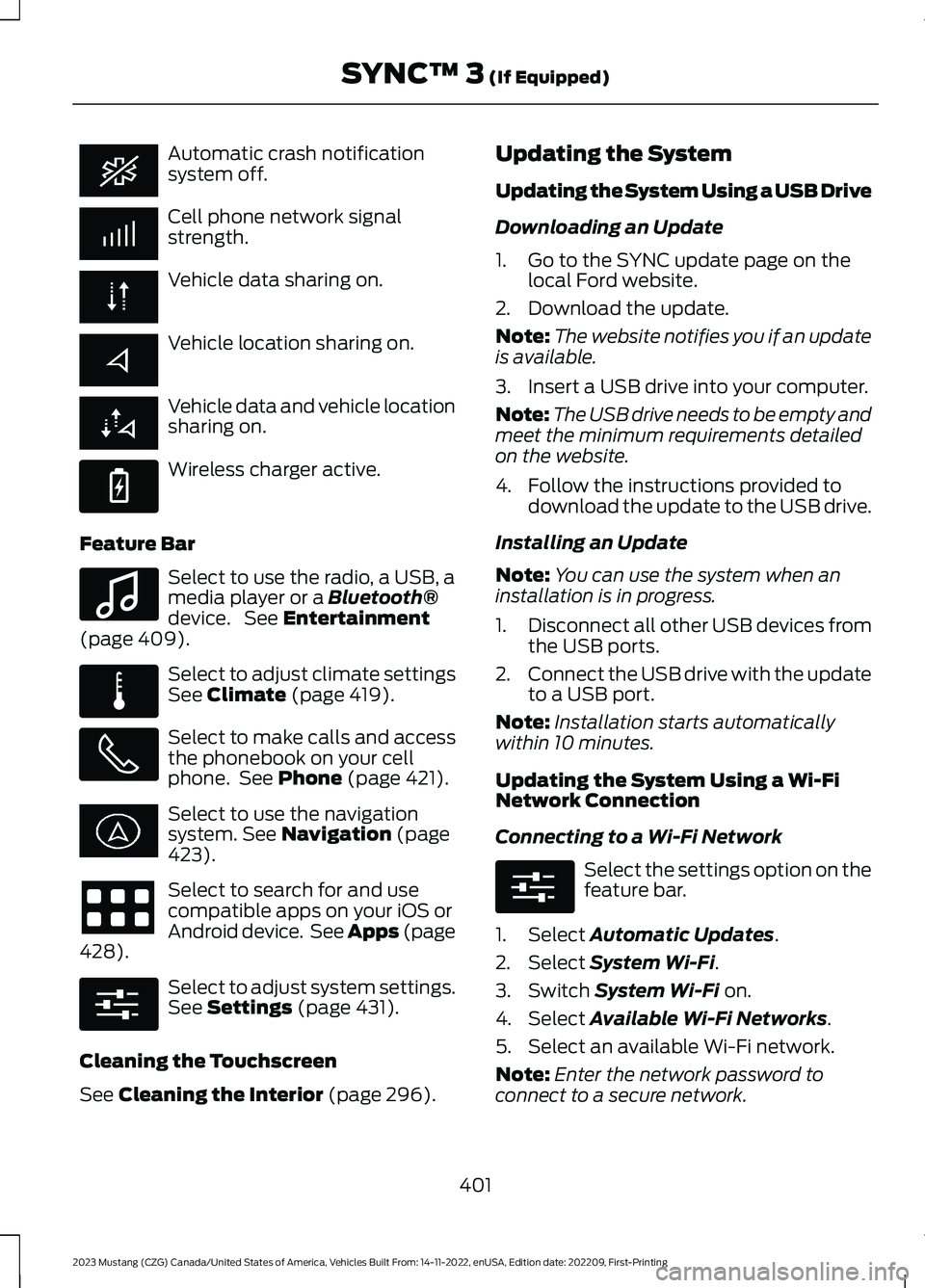
Automatic crash notificationsystem off.
Cell phone network signalstrength.
Vehicle data sharing on.
Vehicle location sharing on.
Vehicle data and vehicle locationsharing on.
Wireless charger active.
Feature Bar
Select to use the radio, a USB, amedia player or a Bluetooth®device. See Entertainment(page 409).
Select to adjust climate settingsSee Climate (page 419).
Select to make calls and accessthe phonebook on your cellphone. See Phone (page 421).
Select to use the navigationsystem. See Navigation (page423).
Select to search for and usecompatible apps on your iOS orAndroid device. See Apps (page428).
Select to adjust system settings.See Settings (page 431).
Cleaning the Touchscreen
See Cleaning the Interior (page 296).
Updating the System
Updating the System Using a USB Drive
Downloading an Update
1.Go to the SYNC update page on thelocal Ford website.
2.Download the update.
Note:The website notifies you if an updateis available.
3.Insert a USB drive into your computer.
Note:The USB drive needs to be empty andmeet the minimum requirements detailedon the website.
4.Follow the instructions provided todownload the update to the USB drive.
Installing an Update
Note:You can use the system when aninstallation is in progress.
1.Disconnect all other USB devices fromthe USB ports.
2.Connect the USB drive with the updateto a USB port.
Note:Installation starts automaticallywithin 10 minutes.
Updating the System Using a Wi-FiNetwork Connection
Connecting to a Wi-Fi Network
Select the settings option on thefeature bar.
1.Select Automatic Updates.
2.Select System Wi-Fi.
3.Switch System Wi-Fi on.
4.Select Available Wi-Fi Networks.
5.Select an available Wi-Fi network.
Note:Enter the network password toconnect to a secure network.
401
2023 Mustang (CZG) Canada/United States of America, Vehicles Built From: 14-11-2022, enUSA, Edition date: 202209, First-PrintingSYNC™ 3 (If Equipped) E263583 E100027 E283811 E280315 E280315
Page 407 of 535
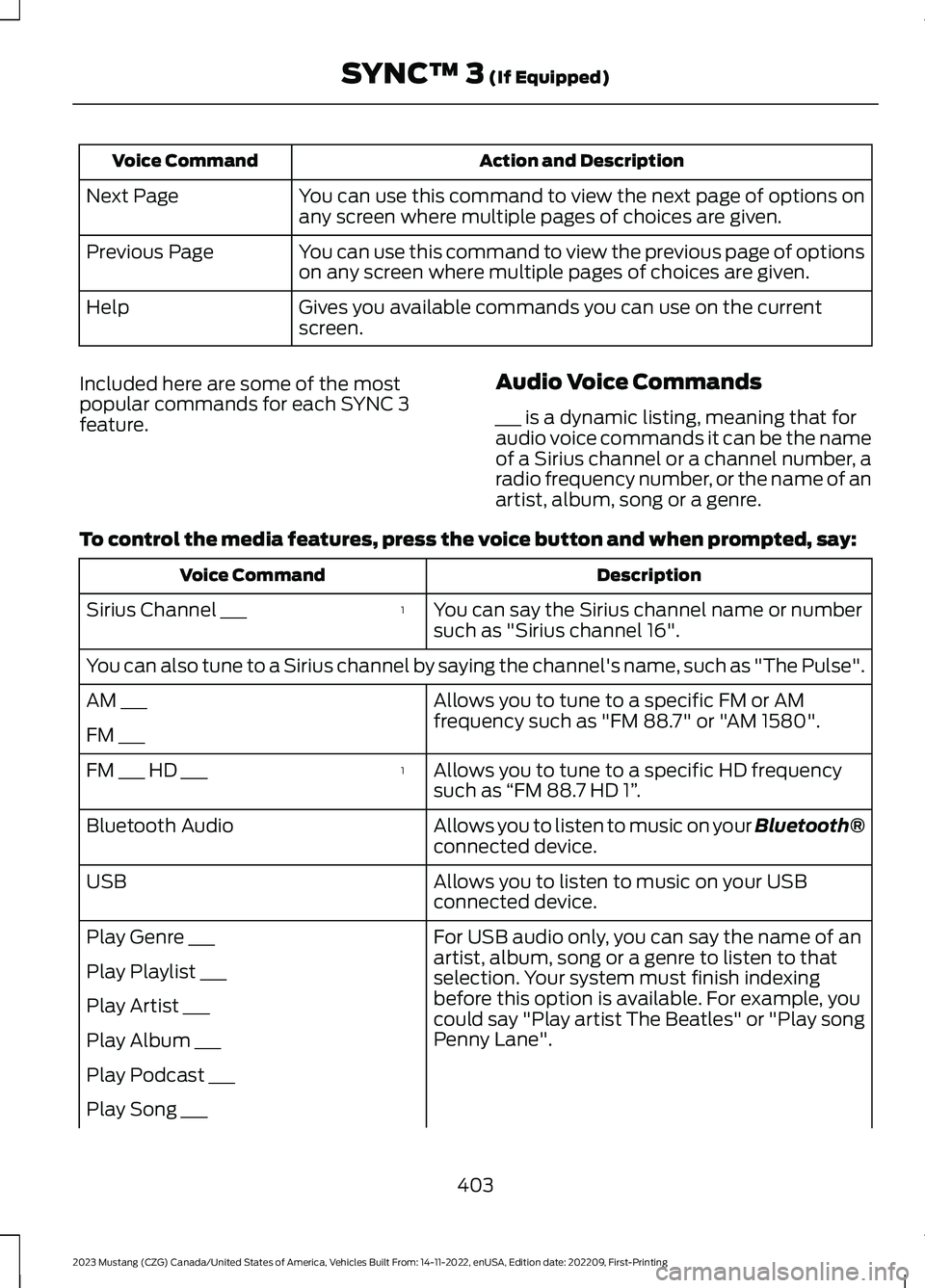
Action and DescriptionVoice Command
You can use this command to view the next page of options onany screen where multiple pages of choices are given.Next Page
You can use this command to view the previous page of optionson any screen where multiple pages of choices are given.Previous Page
Gives you available commands you can use on the currentscreen.Help
Included here are some of the mostpopular commands for each SYNC 3feature.
Audio Voice Commands
___ is a dynamic listing, meaning that foraudio voice commands it can be the nameof a Sirius channel or a channel number, aradio frequency number, or the name of anartist, album, song or a genre.
To control the media features, press the voice button and when prompted, say:
DescriptionVoice Command
You can say the Sirius channel name or numbersuch as "Sirius channel 16".
1Sirius Channel ___
You can also tune to a Sirius channel by saying the channel's name, such as "The Pulse".
Allows you to tune to a specific FM or AMfrequency such as "FM 88.7" or "AM 1580".AM ___
FM ___
Allows you to tune to a specific HD frequencysuch as “FM 88.7 HD 1”.
1FM ___ HD ___
Allows you to listen to music on your Bluetooth®connected device.Bluetooth Audio
Allows you to listen to music on your USBconnected device.USB
For USB audio only, you can say the name of anartist, album, song or a genre to listen to thatselection. Your system must finish indexingbefore this option is available. For example, youcould say "Play artist The Beatles" or "Play songPenny Lane".
Play Genre ___
Play Playlist ___
Play Artist ___
Play Album ___
Play Podcast ___
Play Song ___
403
2023 Mustang (CZG) Canada/United States of America, Vehicles Built From: 14-11-2022, enUSA, Edition date: 202209, First-PrintingSYNC™ 3 (If Equipped)
Page 408 of 535
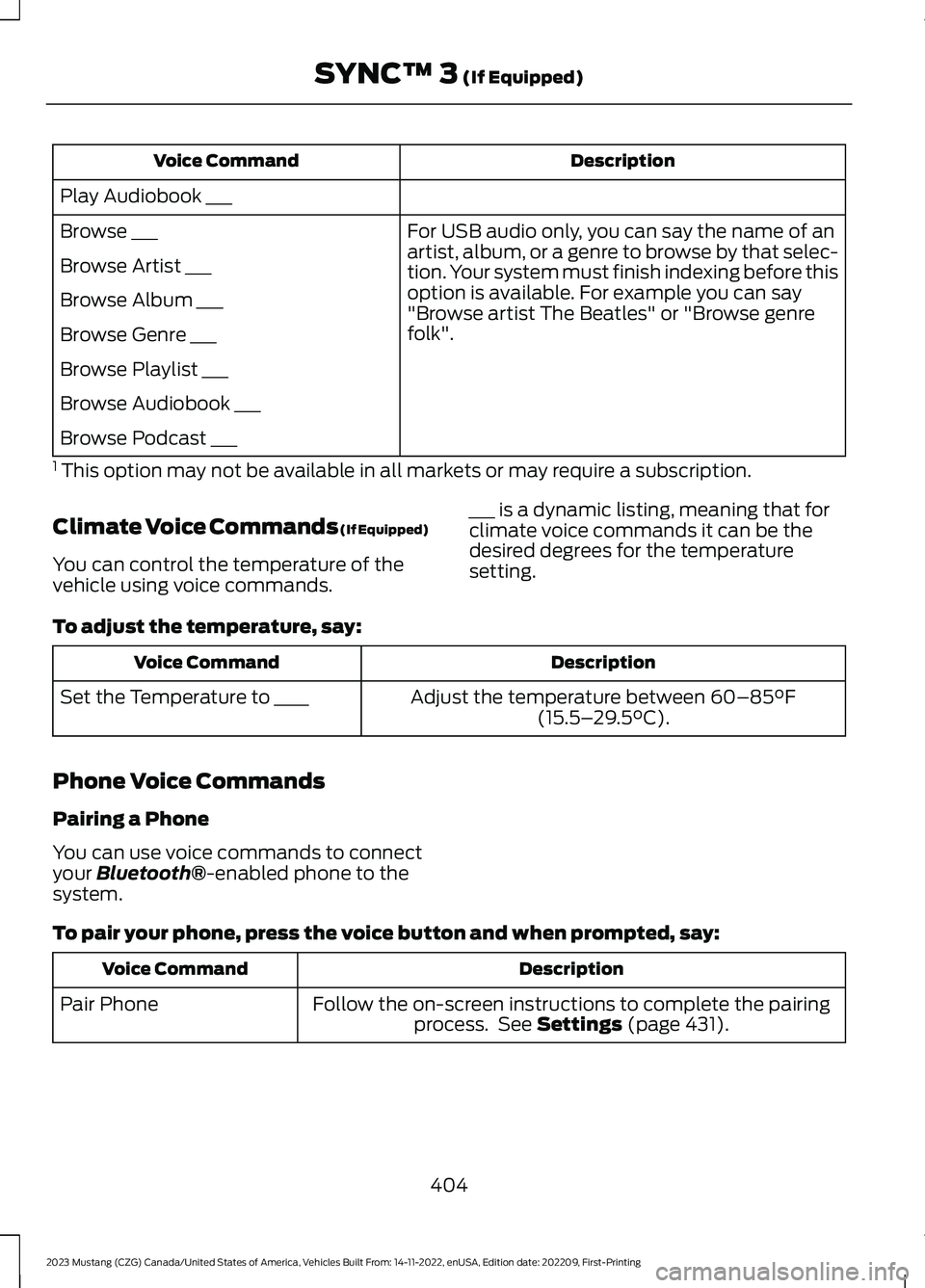
DescriptionVoice Command
Play Audiobook ___
For USB audio only, you can say the name of anartist, album, or a genre to browse by that selec-tion. Your system must finish indexing before thisoption is available. For example you can say"Browse artist The Beatles" or "Browse genrefolk".
Browse ___
Browse Artist ___
Browse Album ___
Browse Genre ___
Browse Playlist ___
Browse Audiobook ___
Browse Podcast ___
1 This option may not be available in all markets or may require a subscription.
Climate Voice Commands (If Equipped)
You can control the temperature of thevehicle using voice commands.
___ is a dynamic listing, meaning that forclimate voice commands it can be thedesired degrees for the temperaturesetting.
To adjust the temperature, say:
DescriptionVoice Command
Adjust the temperature between 60–85°F(15.5–29.5°C).Set the Temperature to ____
Phone Voice Commands
Pairing a Phone
You can use voice commands to connectyour Bluetooth®-enabled phone to thesystem.
To pair your phone, press the voice button and when prompted, say:
DescriptionVoice Command
Follow the on-screen instructions to complete the pairingprocess. See Settings (page 431).Pair Phone
404
2023 Mustang (CZG) Canada/United States of America, Vehicles Built From: 14-11-2022, enUSA, Edition date: 202209, First-PrintingSYNC™ 3 (If Equipped)
Page 414 of 535
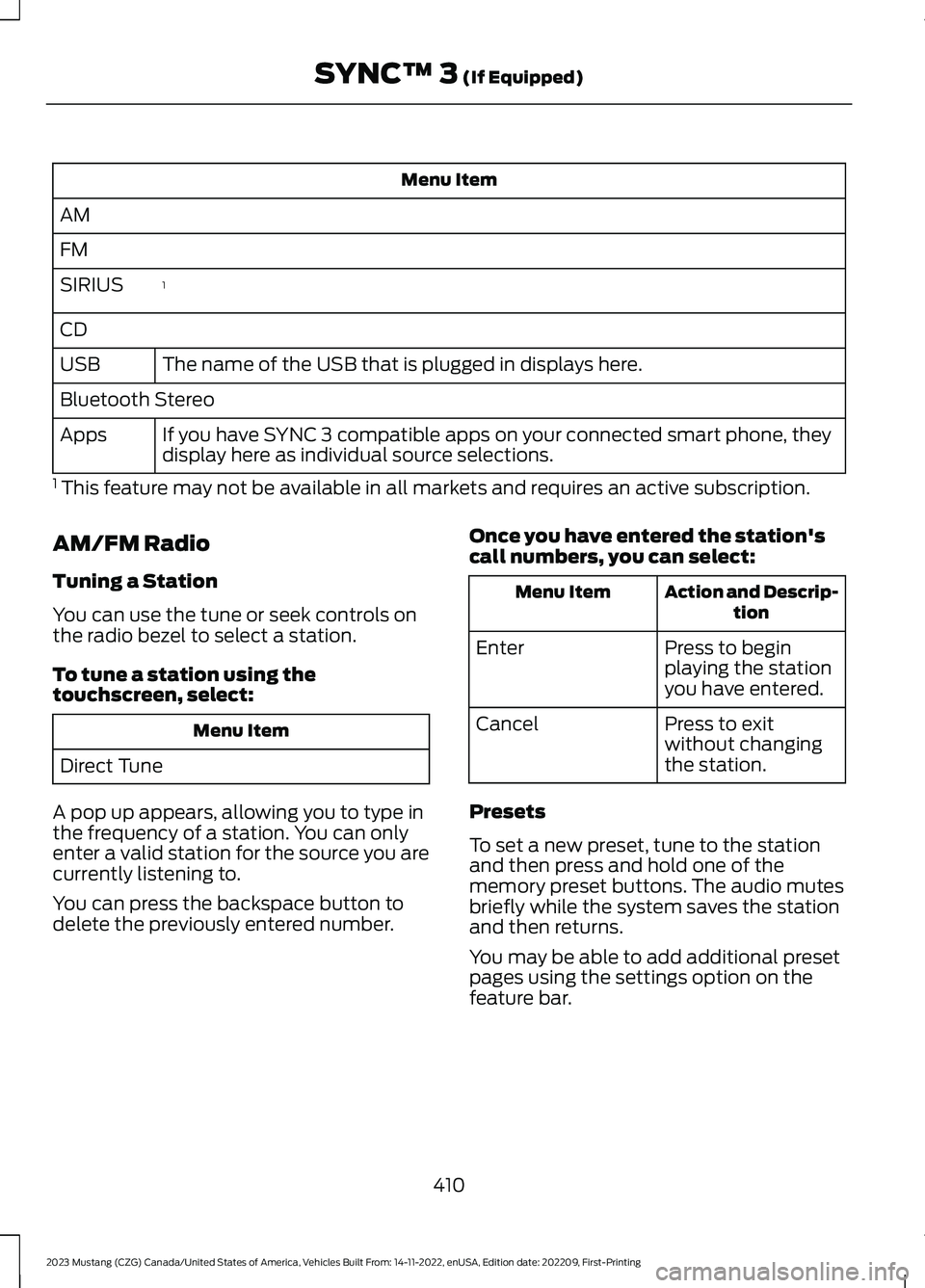
Menu Item
AM
FM
1SIRIUS
CD
The name of the USB that is plugged in displays here.USB
Bluetooth Stereo
If you have SYNC 3 compatible apps on your connected smart phone, theydisplay here as individual source selections.Apps
1 This feature may not be available in all markets and requires an active subscription.
AM/FM Radio
Tuning a Station
You can use the tune or seek controls onthe radio bezel to select a station.
To tune a station using thetouchscreen, select:
Menu Item
Direct Tune
A pop up appears, allowing you to type inthe frequency of a station. You can onlyenter a valid station for the source you arecurrently listening to.
You can press the backspace button todelete the previously entered number.
Once you have entered the station'scall numbers, you can select:
Action and Descrip-tionMenu Item
Press to beginplaying the stationyou have entered.
Enter
Press to exitwithout changingthe station.
Cancel
Presets
To set a new preset, tune to the stationand then press and hold one of thememory preset buttons. The audio mutesbriefly while the system saves the stationand then returns.
You may be able to add additional presetpages using the settings option on thefeature bar.
410
2023 Mustang (CZG) Canada/United States of America, Vehicles Built From: 14-11-2022, enUSA, Edition date: 202209, First-PrintingSYNC™ 3 (If Equipped)
Page 421 of 535
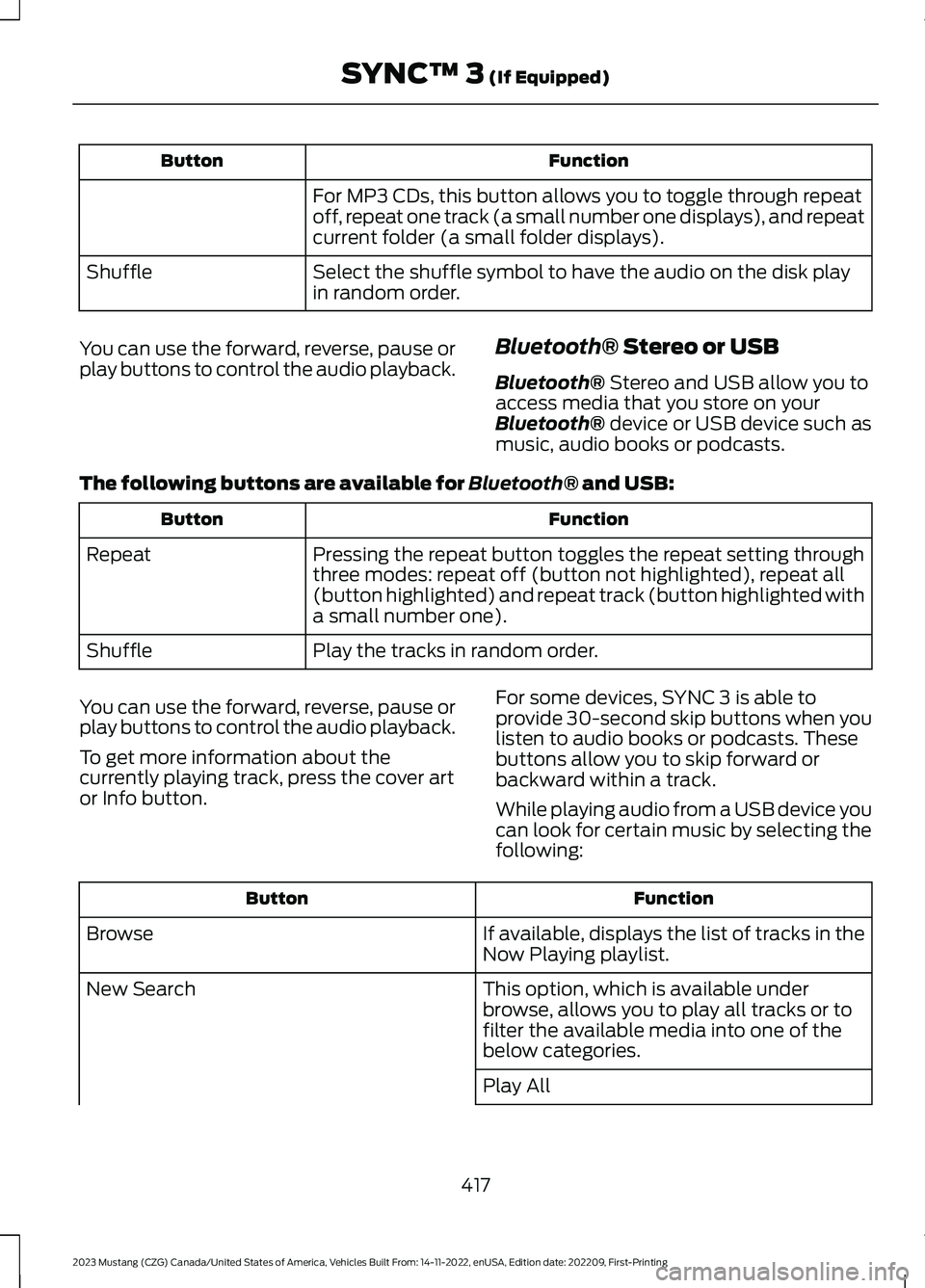
FunctionButton
For MP3 CDs, this button allows you to toggle through repeatoff, repeat one track (a small number one displays), and repeatcurrent folder (a small folder displays).
Select the shuffle symbol to have the audio on the disk playin random order.Shuffle
You can use the forward, reverse, pause orplay buttons to control the audio playback.Bluetooth® Stereo or USB
Bluetooth® Stereo and USB allow you toaccess media that you store on yourBluetooth® device or USB device such asmusic, audio books or podcasts.
The following buttons are available for Bluetooth® and USB:
FunctionButton
Pressing the repeat button toggles the repeat setting throughthree modes: repeat off (button not highlighted), repeat all(button highlighted) and repeat track (button highlighted witha small number one).
Repeat
Play the tracks in random order.Shuffle
You can use the forward, reverse, pause orplay buttons to control the audio playback.
To get more information about thecurrently playing track, press the cover artor Info button.
For some devices, SYNC 3 is able toprovide 30-second skip buttons when youlisten to audio books or podcasts. Thesebuttons allow you to skip forward orbackward within a track.
While playing audio from a USB device youcan look for certain music by selecting thefollowing:
FunctionButton
If available, displays the list of tracks in theNow Playing playlist.Browse
This option, which is available underbrowse, allows you to play all tracks or tofilter the available media into one of thebelow categories.
New Search
Play All
417
2023 Mustang (CZG) Canada/United States of America, Vehicles Built From: 14-11-2022, enUSA, Edition date: 202209, First-PrintingSYNC™ 3 (If Equipped)
Page 422 of 535
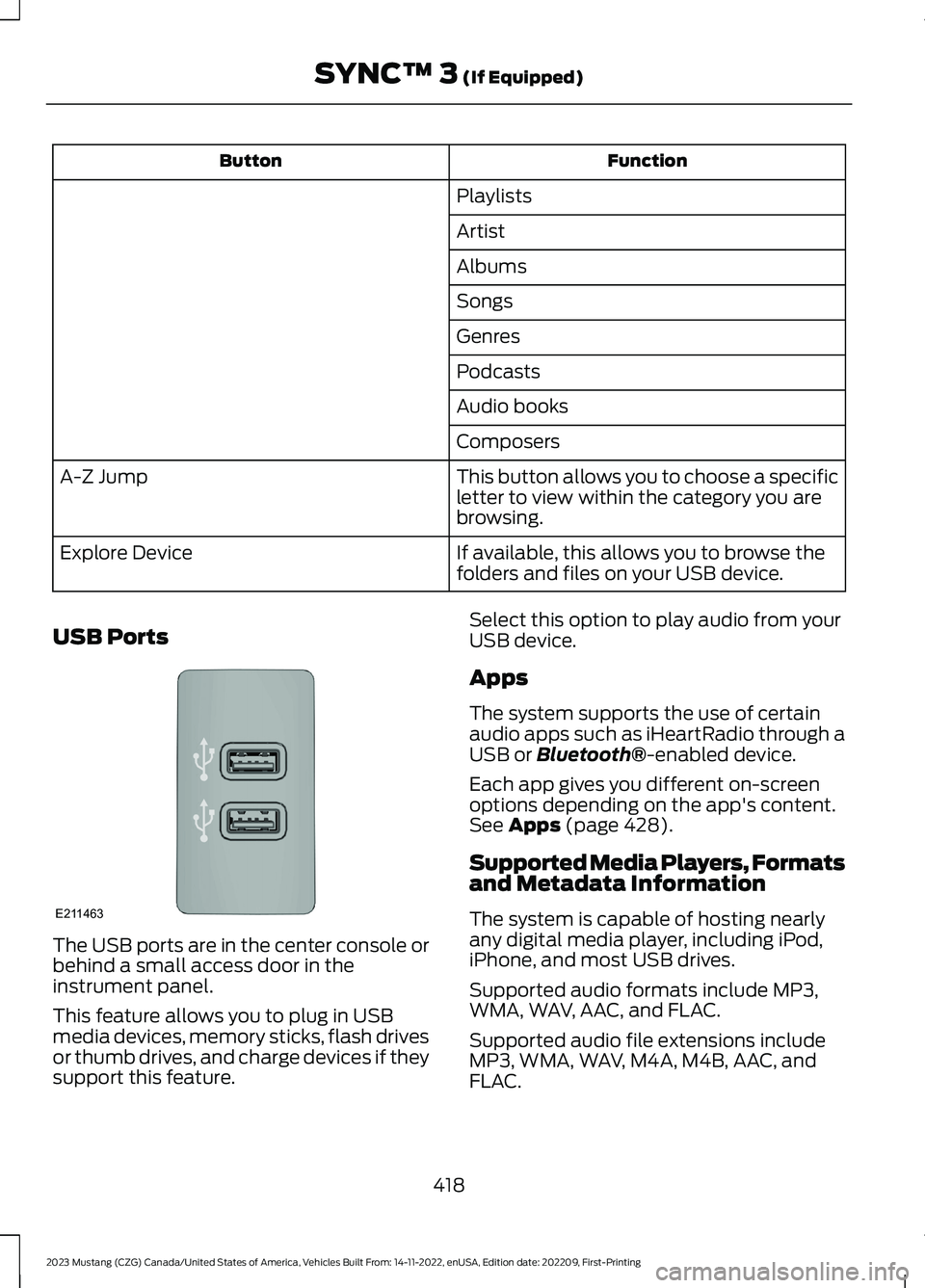
FunctionButton
Playlists
Artist
Albums
Songs
Genres
Podcasts
Audio books
Composers
This button allows you to choose a specificletter to view within the category you arebrowsing.
A-Z Jump
If available, this allows you to browse thefolders and files on your USB device.Explore Device
USB Ports
The USB ports are in the center console orbehind a small access door in theinstrument panel.
This feature allows you to plug in USBmedia devices, memory sticks, flash drivesor thumb drives, and charge devices if theysupport this feature.
Select this option to play audio from yourUSB device.
Apps
The system supports the use of certainaudio apps such as iHeartRadio through aUSB or Bluetooth®-enabled device.
Each app gives you different on-screenoptions depending on the app's content.See Apps (page 428).
Supported Media Players, Formatsand Metadata Information
The system is capable of hosting nearlyany digital media player, including iPod,iPhone, and most USB drives.
Supported audio formats include MP3,WMA, WAV, AAC, and FLAC.
Supported audio file extensions includeMP3, WMA, WAV, M4A, M4B, AAC, andFLAC.
418
2023 Mustang (CZG) Canada/United States of America, Vehicles Built From: 14-11-2022, enUSA, Edition date: 202209, First-PrintingSYNC™ 3 (If Equipped)E211463
Page 423 of 535
Supported USB file systems include: FAT,exFAT, and NTFS.
SYNC 3 is also able to organize the mediafrom your USB device by metadata tags.Metadata tags, which are descriptivesoftware identifiers embedded in themedia files, provide information about thefile.
If your indexed media files contain noinformation embedded in these metadatatags, SYNC 3 may classify the emptymetadata tags as unknown.
SYNC 3 is capable of indexing up to50,000 songs per USB device, for up to 10devices.
CLIMATE
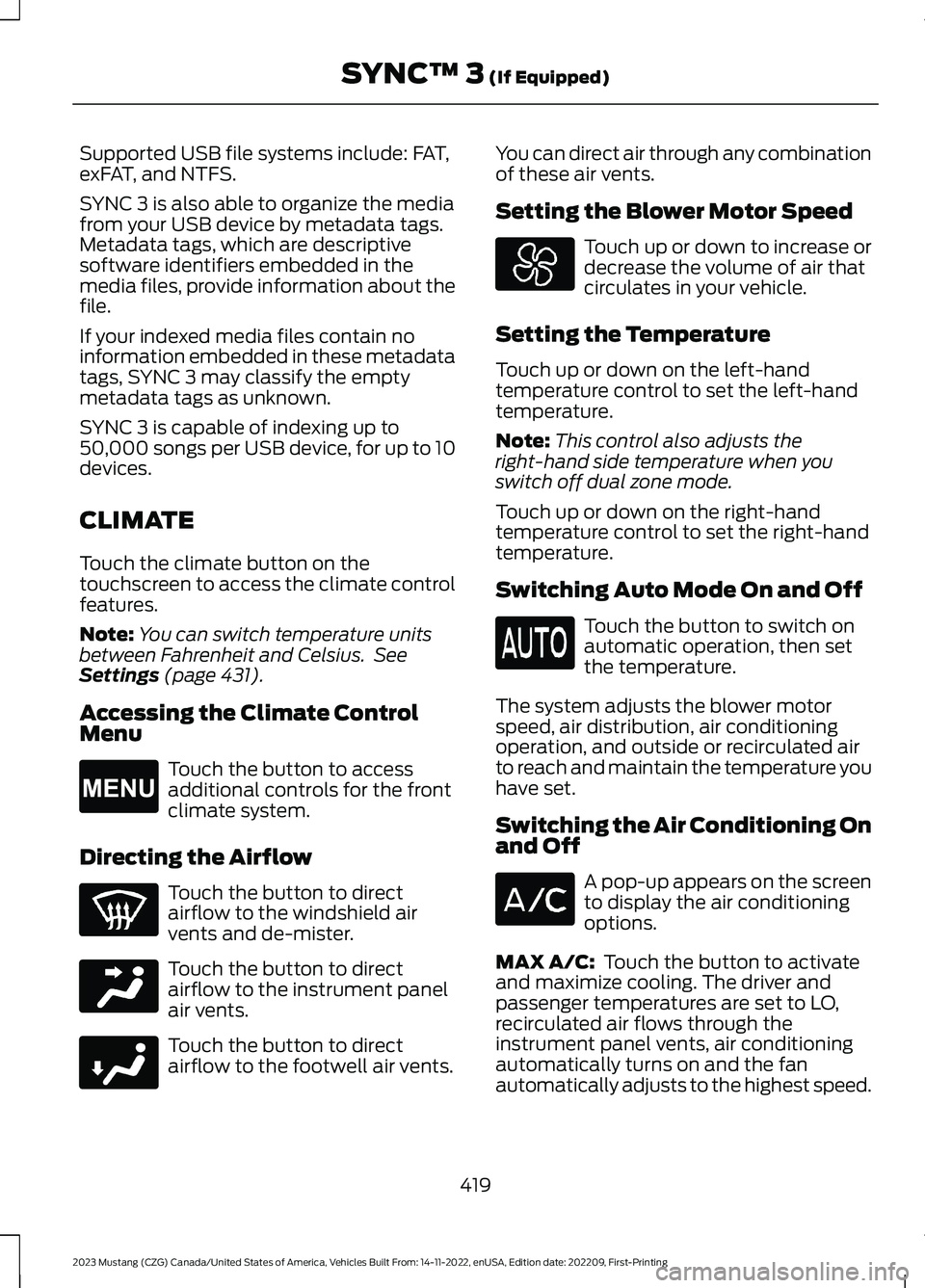
Touch the climate button on thetouchscreen to access the climate controlfeatures.
Note:You can switch temperature unitsbetween Fahrenheit and Celsius. SeeSettings (page 431).
Accessing the Climate ControlMenu
Touch the button to accessadditional controls for the frontclimate system.
Directing the Airflow
Touch the button to directairflow to the windshield airvents and de-mister.
Touch the button to directairflow to the instrument panelair vents.
Touch the button to directairflow to the footwell air vents.
You can direct air through any combinationof these air vents.
Setting the Blower Motor Speed
Touch up or down to increase ordecrease the volume of air thatcirculates in your vehicle.
Setting the Temperature
Touch up or down on the left-handtemperature control to set the left-handtemperature.
Note:This control also adjusts theright-hand side temperature when youswitch off dual zone mode.
Touch up or down on the right-handtemperature control to set the right-handtemperature.
Switching Auto Mode On and Off
Touch the button to switch onautomatic operation, then setthe temperature.
The system adjusts the blower motorspeed, air distribution, air conditioningoperation, and outside or recirculated airto reach and maintain the temperature youhave set.
Switching the Air Conditioning Onand Off
A pop-up appears on the screento display the air conditioningoptions.
MAX A/C: Touch the button to activateand maximize cooling. The driver andpassenger temperatures are set to LO,recirculated air flows through theinstrument panel vents, air conditioningautomatically turns on and the fanautomatically adjusts to the highest speed.
419
2023 Mustang (CZG) Canada/United States of America, Vehicles Built From: 14-11-2022, enUSA, Edition date: 202209, First-PrintingSYNC™ 3 (If Equipped)E265038 E244097 E244098
Page 427 of 535
Using Text Messaging
DescriptionMenu Item
Hear the text message.Hear It
View the text message.View
Call the sender.Call
Reply to the text message with a standard text message.Reply
Apple CarPlay (If Equipped)
1.Connect your device to a USB port.
2.Follow the instructions on thetouchscreen.
Note:Certain features of the system arenot available when you are using AppleCarPlay.
Switching Apple CarPlay Off
Select the settings option on thefeature bar.
1.Select Apple CarPlay Preferences.
2.Switch Apple CarPlay off.
Android Auto (If Equipped)
1.Connect your device to a USB port.
2.Follow the instructions on thetouchscreen.
Note:You might need to enable AndroidAuto from the settings menu.
Note:Certain features of the system arenot available when you are using AndroidAuto.
Switching Android Auto Off
Select the settings option on thefeature bar.
1.Select Android Auto.
2.Switch Android Auto off.
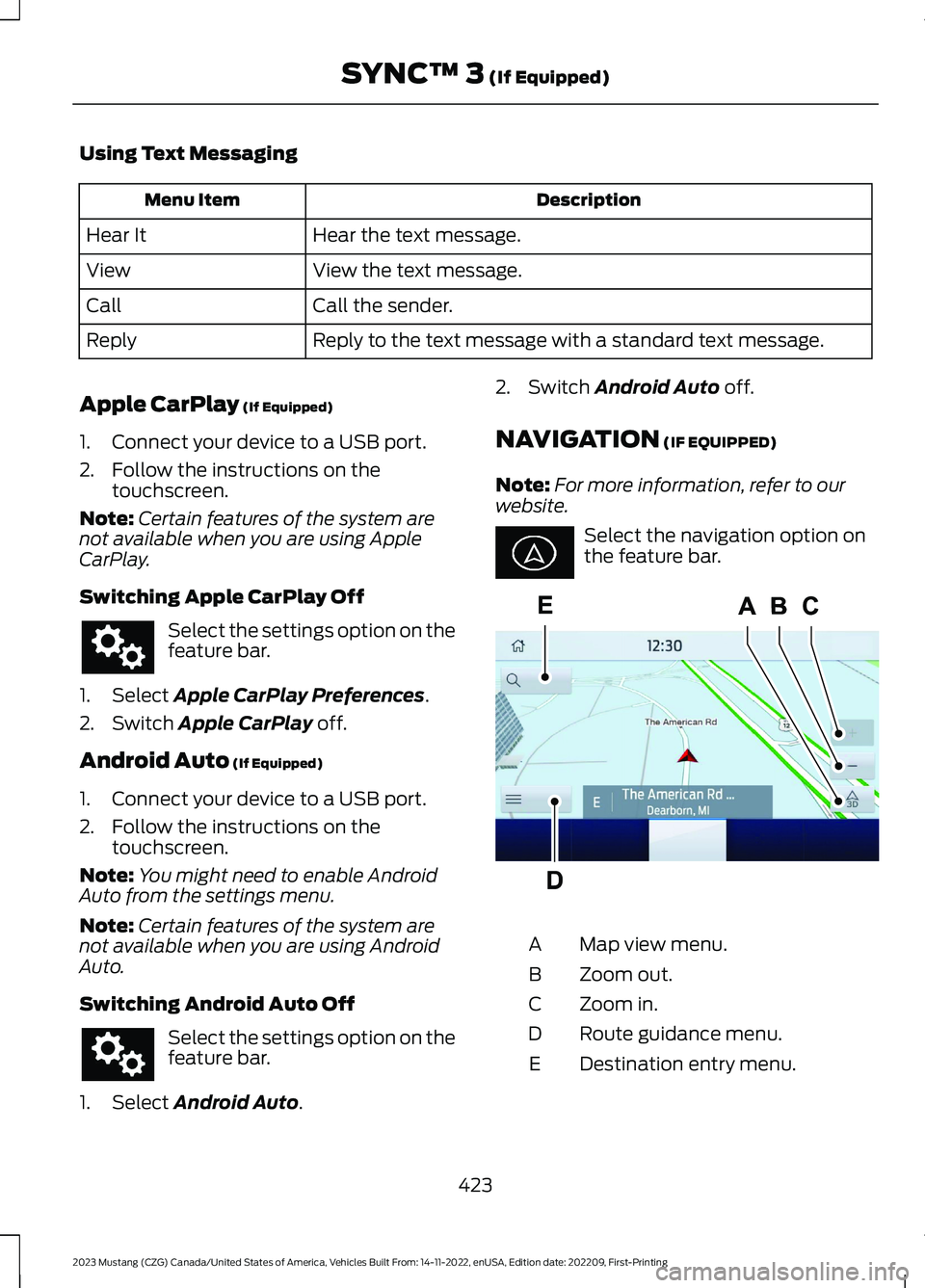
NAVIGATION (IF EQUIPPED)
Note:For more information, refer to ourwebsite.
Select the navigation option onthe feature bar.
Map view menu.A
Zoom out.B
Zoom in.C
Route guidance menu.D
Destination entry menu.E
423
2023 Mustang (CZG) Canada/United States of America, Vehicles Built From: 14-11-2022, enUSA, Edition date: 202209, First-PrintingSYNC™ 3 (If Equipped) E297557
Page 432 of 535
SiriusXM Traffic and Travel Link (If
Equipped)
SiriusXM Traffic and Travel Link is availableon vehicles equipped with navigation andonly in select markets. You must activateand subscribe to receive SiriusXM Trafficand Travel Link information. It helps youlocate the best gas prices, find movielistings, get current traffic alerts, view theweather map, get accurate ski conditionsand see current sports scores.
The system calculates a reasonableefficient route based on available speedlimits, traffic, and road conditions. You mayknow a local shortcut that is more efficientat a given time than the route provided bySYNC 3, but you should expect a slightdifference in minutes or miles with theSYNC 3 route.
Michelin Travel Guide (If Equipped)
The Michelin travel guide is a service thatprovides additional information aboutcertain places of interest, for examplerestaurants, hotels and tourist sites. Pointsof interest that have Michelin travel guideinformation display a button to show youmore information. Push the button to seethe additional information. If you havepaired your phone with the system, youcan press the phone button to directlyestablish a call with the selected point ofinterest.
Navigation Map Accuracy andUpdates
HERE is the digital map provider for thenavigation application. If you find map dataerrors, you may report them directly toHERE by going to www.here.com. HEREevaluates all reported map errors andresponds with the result of theirinvestigation by e-mail.
The navigation system map data maycontain inaccurate or incompleteinformation due to the passage of time,changing circumstances, sources used andthe nature of collecting comprehensivegeographic data, any of which may lead toincorrect results. Inaccurate speed limitinformation, turn restrictions and otherroad attributes may affect the determinedroute and associated guidance
Annual navigation map updates areavailable for purchase through yourdealership. Depending on your purchaseagreement, you might be eligible for a freemap update. You can choose to downloadthe map data update onto a USB, order aUSB, or use Wi-Fi to deliver automaticupdates. To update your map data overWi-Fi, your vehicle must be connected toa Wi-Fi access point. Map data files arelarge, so it is highly recommended toperform the update when free Wi-Fi isavailable otherwise high data rates mayapply. For USB updates, free map updateeligibility, and other details, contactdealers at 1-866-462-8837 in the UnitedStates and Canada or 800-557-5539 inMexico or visit our local website for moreinformation.
APPS
The system allows you interact with selectmobile apps while keeping your eyes onthe road. Voice commands, your steeringwheel buttons, or a quick tap on yourtouchscreen give you advanced control ofcompatible mobile apps. You can alsostream your favorite music or podcasts,share your time of arrival with friends, andkeep connected safely.
428
2023 Mustang (CZG) Canada/United States of America, Vehicles Built From: 14-11-2022, enUSA, Edition date: 202209, First-PrintingSYNC™ 3 (If Equipped)