key FORD MUSTANG 2023 Owner's Manual
[x] Cancel search | Manufacturer: FORD, Model Year: 2023, Model line: MUSTANG, Model: FORD MUSTANG 2023Pages: 535, PDF Size: 15.46 MB
Page 95 of 535
Information Display
Odometer
Located in the bottom of the informationdisplay. Registers the accumulateddistance your vehicle has traveled.
Trip Computer
See General Information (page 98).
Vehicle Settings and Personalization
See General Information (page 98).
Fuel Gauge
The fuel gauge indicates about how muchfuel is in the fuel tank.
The arrow adjacent to the fuel pumpsymbol indicates on which side of yourvehicle the fuel filler door is located.
Note:The fuel gauge may vary slightlywhen your vehicle is moving or on a slope.
Low Fuel Reminder
A low fuel level reminder displays andsounds when the distance to emptyreaches 75 mi (120 km) to empty forMyKey, and at 50 mi (80 km),25 mi(40 km),10 mi (20 km) and 0 mi (0 km)for all vehicle keys.
Note:The low fuel reminder can appear atdifferent fuel gauge positions depending onfuel economy conditions. This variation isnormal.
Information Bar
Displays information such as compassdirection, outside air temperature,odometer and transmission gear selector.
Engine Coolant TemperatureGauge
WARNING: Do not remove thecoolant reservoir cap when the engine ison or the cooling system is hot. Wait 10minutes for the cooling system to cooldown. Cover the coolant reservoir capwith a thick cloth to prevent thepossibility of scalding and slowly removethe cap. Failure to follow this instructioncould result in personal injury.
Indicates engine coolant temperature. Atnormal operating temperature, the levelindicator will be in the normal range. If theengine coolant temperature exceeds thenormal range, stop your vehicle as soon assafely possible, switch off the engine andlet the engine cool.
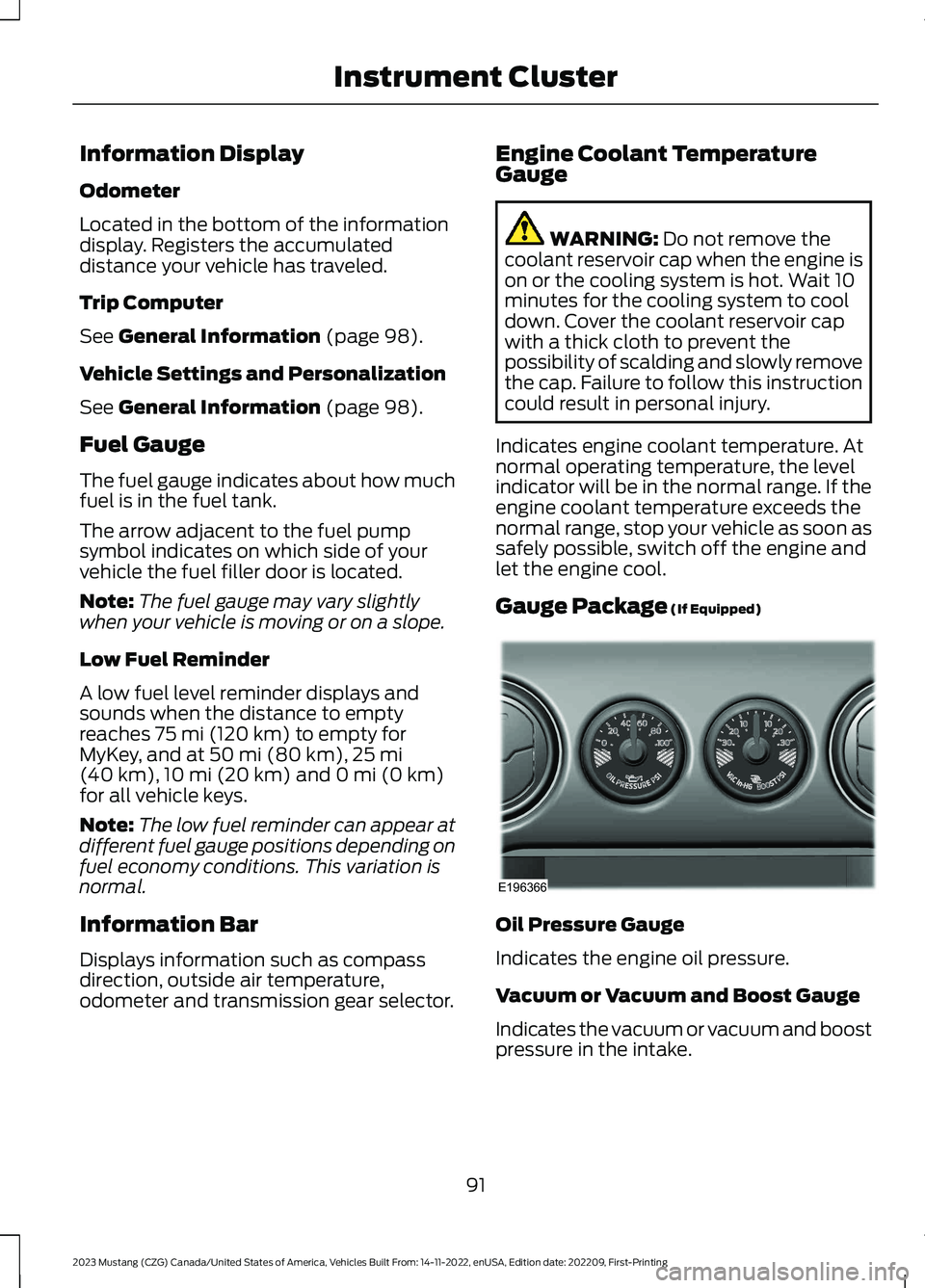
Gauge Package (If Equipped)
Oil Pressure Gauge
Indicates the engine oil pressure.
Vacuum or Vacuum and Boost Gauge
Indicates the vacuum or vacuum and boostpressure in the intake.
91
2023 Mustang (CZG) Canada/United States of America, Vehicles Built From: 14-11-2022, enUSA, Edition date: 202209, First-PrintingInstrument ClusterE196366
Page 97 of 535
Fuel Gauge
The fuel gauge indicates about how muchfuel is in the fuel tank.
The arrow adjacent to the fuel pumpsymbol indicates on which side of yourvehicle the fuel filler door is located.
Note:The fuel gauge may vary slightlywhen your vehicle is moving or on a slope.
Low Fuel Reminder
A low fuel level reminder displays andsounds when the distance to emptyreaches 75 mi (120 km) to empty forMyKey, and at 50 mi (80 km),25 mi(40 km),10 mi (20 km) and 0 mi (0 km)for all vehicle keys.
Note:The low fuel reminder can appear atdifferent fuel gauge positions depending onfuel economy conditions. This variation isnormal.
Information Bar
Displays information such as compassdirection, outside air temperature,odometer and transmission gear selector.
Engine Coolant TemperatureGauge
WARNING: Do not remove thecoolant reservoir cap when the engine ison or the cooling system is hot. Wait 10minutes for the cooling system to cooldown. Cover the coolant reservoir capwith a thick cloth to prevent thepossibility of scalding and slowly removethe cap. Failure to follow this instructioncould result in personal injury.
Indicates engine coolant temperature. Atnormal operating temperature, the levelindicator will be in the normal range. If theengine coolant temperature exceeds thenormal range, stop your vehicle as soon assafely possible, switch off the engine andlet the engine cool.
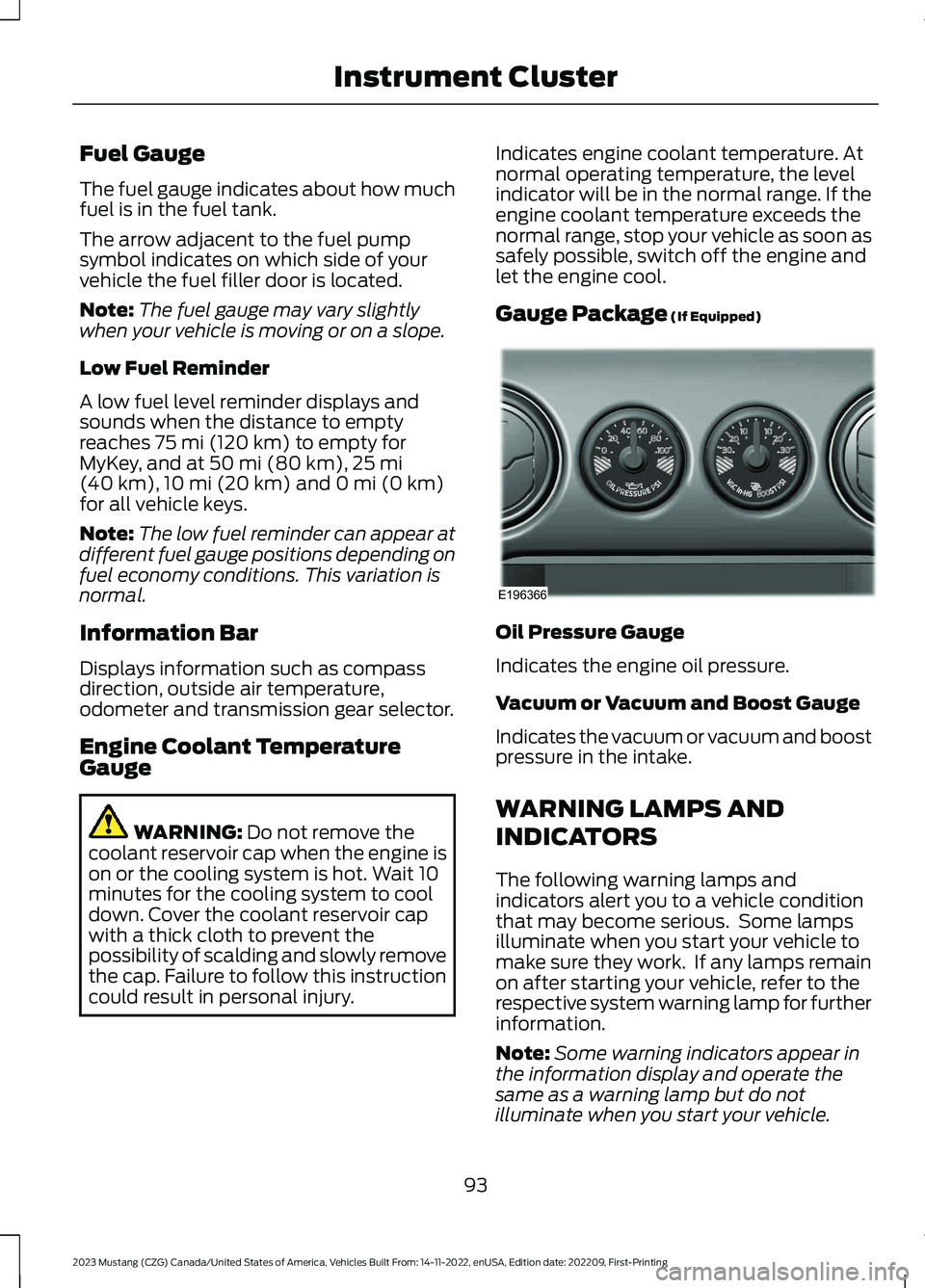
Gauge Package (If Equipped)
Oil Pressure Gauge
Indicates the engine oil pressure.
Vacuum or Vacuum and Boost Gauge
Indicates the vacuum or vacuum and boostpressure in the intake.
WARNING LAMPS AND
INDICATORS
The following warning lamps andindicators alert you to a vehicle conditionthat may become serious. Some lampsilluminate when you start your vehicle tomake sure they work. If any lamps remainon after starting your vehicle, refer to therespective system warning lamp for furtherinformation.
Note:Some warning indicators appear inthe information display and operate thesame as a warning lamp but do notilluminate when you start your vehicle.
93
2023 Mustang (CZG) Canada/United States of America, Vehicles Built From: 14-11-2022, enUSA, Edition date: 202209, First-PrintingInstrument ClusterE196366
Page 101 of 535
Stability Control and TractionControl Off Warning Lamp
Illuminates when you switch thesystem off.
Trunk Ajar
Illuminates when the ignition ison and you do not have the trunkcompletely closed.
AUDIBLE WARNINGS AND
INDICATORS
Keyless Warning Alert
The horn sounds twice when you exit yourvehicle with the passive key and yourvehicle is in ON, indicating your vehicle isstill on. The horn also sounds twice whenyou exit your vehicle and attempt to lockthe doors manually when the passive keyis still in the vehicle. The doors will not lockif the passive key remains in the vehicle.
Headlamps On Warning Tone
Sounds when you remove the key from thevehicle and you have left the headlampsor parking lamps on.
Parking Brake On Warning Tone
Sounds when you have left the parkingbrake on and drive your vehicle. If thewarning tone remains on after you releasethe parking brake, have the systemchecked by your authorized dealerimmediately.
Transmission Not in Park
Sounds when the gear selector is in anyposition other than park (P), and youswitch the vehicle ignition off or to theaccessory position. If the door is ajar, thetone is continuous. Once you close thedoor, the tone continues for a period oftime.
Direction Indicator Left On
Sounds when the direction indicator doesnot disengage after 2.0 mi (3.2 km) ofdriving.
Beltminder Warning
Sounds when the system detects anunfastened seatbelt in an occupied seatand your vehicle is moving.
97
2023 Mustang (CZG) Canada/United States of America, Vehicles Built From: 14-11-2022, enUSA, Edition date: 202209, First-PrintingInstrument ClusterE130458 E159323
Page 103 of 535
•Press the OK button.
•Press (A) to exit a menu.
•Press the open menu's quick actionmenu button at any time to close themenu.
•Press the OK button to choose andconfirm settings or messages.
Settings
Settings
Trip/Fuel Info
Auto Engine OffDriverAssistBlindspot
Pre-Collision Assist
Cross Traffic Alert
Cruise Control
Driver Alert
Hill Start Assist
Rear Park Aid
Lane Keeping System
Tire Monitor
Wipers
Speedometer MPH
Speedometer km/h
VehicleAdvancedSettingsMyKey
Display Setup
99
2023 Mustang (CZG) Canada/United States of America, Vehicles Built From: 14-11-2022, enUSA, Edition date: 202209, First-PrintingInformation Displays
Page 111 of 535
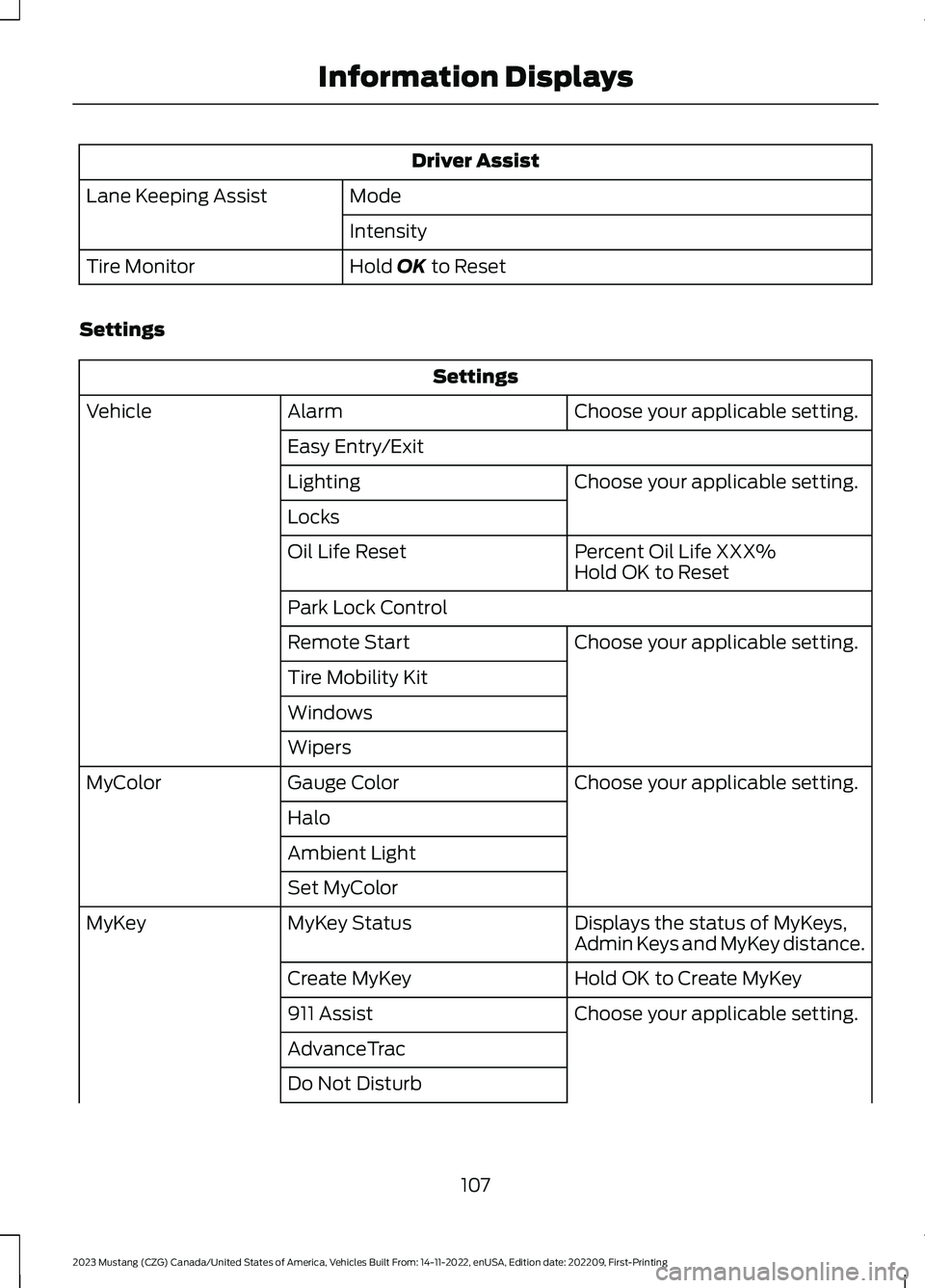
Driver Assist
ModeLane Keeping Assist
Intensity
Hold OK to ResetTire Monitor
Settings
Settings
Choose your applicable setting.AlarmVehicle
Easy Entry/Exit
Choose your applicable setting.Lighting
Locks
Percent Oil Life XXX%Oil Life ResetHold OK to Reset
Park Lock Control
Choose your applicable setting.Remote Start
Tire Mobility Kit
Windows
Wipers
Choose your applicable setting.Gauge ColorMyColor
Halo
Ambient Light
Set MyColor
Displays the status of MyKeys,Admin Keys and MyKey distance.MyKey StatusMyKey
Hold OK to Create MyKeyCreate MyKey
Choose your applicable setting.911 Assist
AdvanceTrac
Do Not Disturb
107
2023 Mustang (CZG) Canada/United States of America, Vehicles Built From: 14-11-2022, enUSA, Edition date: 202209, First-PrintingInformation Displays
Page 112 of 535
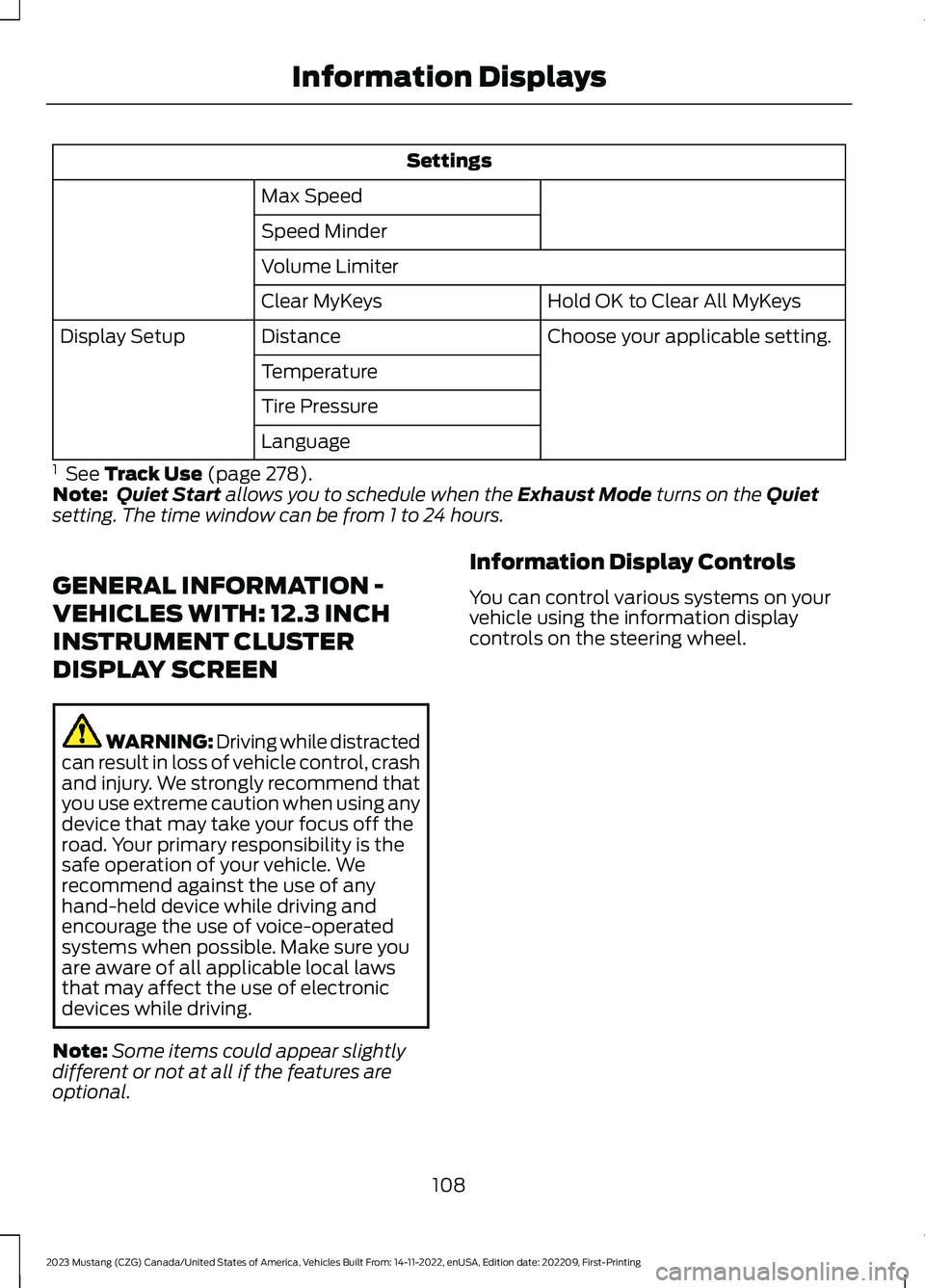
Settings
Max Speed
Speed Minder
Volume Limiter
Hold OK to Clear All MyKeysClear MyKeys
Choose your applicable setting.DistanceDisplay Setup
Temperature
Tire Pressure
Language
1 See Track Use (page 278).Note:Quiet Start allows you to schedule when the Exhaust Mode turns on the Quietsetting. The time window can be from 1 to 24 hours.
GENERAL INFORMATION -
VEHICLES WITH: 12.3 INCH
INSTRUMENT CLUSTER
DISPLAY SCREEN
WARNING: Driving while distractedcan result in loss of vehicle control, crashand injury. We strongly recommend thatyou use extreme caution when using anydevice that may take your focus off theroad. Your primary responsibility is thesafe operation of your vehicle. Werecommend against the use of anyhand-held device while driving andencourage the use of voice-operatedsystems when possible. Make sure youare aware of all applicable local lawsthat may affect the use of electronicdevices while driving.
Note:Some items could appear slightlydifferent or not at all if the features areoptional.
Information Display Controls
You can control various systems on yourvehicle using the information displaycontrols on the steering wheel.
108
2023 Mustang (CZG) Canada/United States of America, Vehicles Built From: 14-11-2022, enUSA, Edition date: 202209, First-PrintingInformation Displays
Page 114 of 535
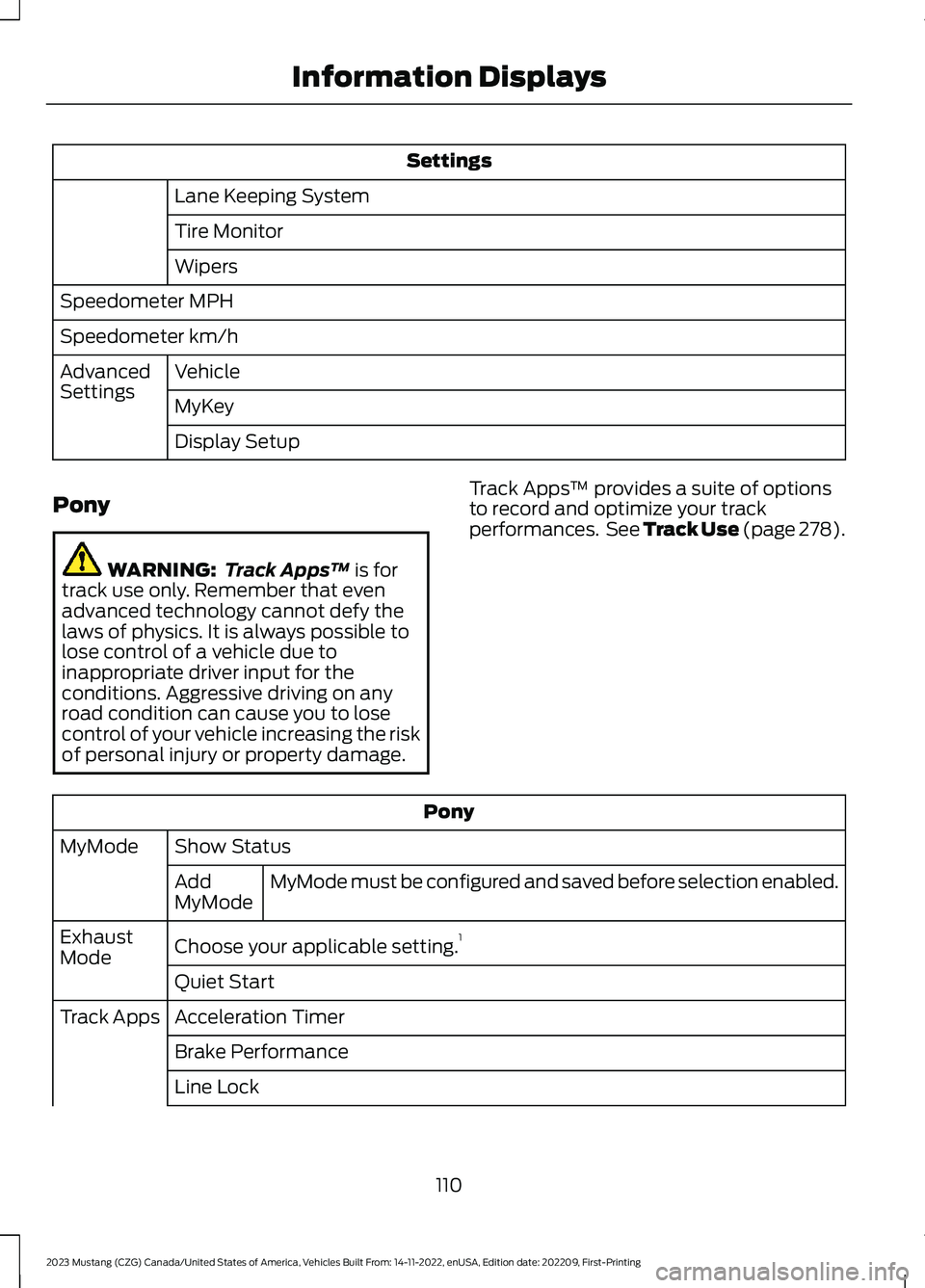
Settings
Lane Keeping System
Tire Monitor
Wipers
Speedometer MPH
Speedometer km/h
VehicleAdvancedSettingsMyKey
Display Setup
Pony
WARNING: Track Apps™ is fortrack use only. Remember that evenadvanced technology cannot defy thelaws of physics. It is always possible tolose control of a vehicle due toinappropriate driver input for theconditions. Aggressive driving on anyroad condition can cause you to losecontrol of your vehicle increasing the riskof personal injury or property damage.
Track Apps™ provides a suite of optionsto record and optimize your trackperformances. See Track Use (page 278).
Pony
Show StatusMyMode
MyMode must be configured and saved before selection enabled.AddMyMode
Choose your applicable setting.1ExhaustMode
Quiet Start
Acceleration TimerTrack Apps
Brake Performance
Line Lock
110
2023 Mustang (CZG) Canada/United States of America, Vehicles Built From: 14-11-2022, enUSA, Edition date: 202209, First-PrintingInformation Displays
Page 120 of 535
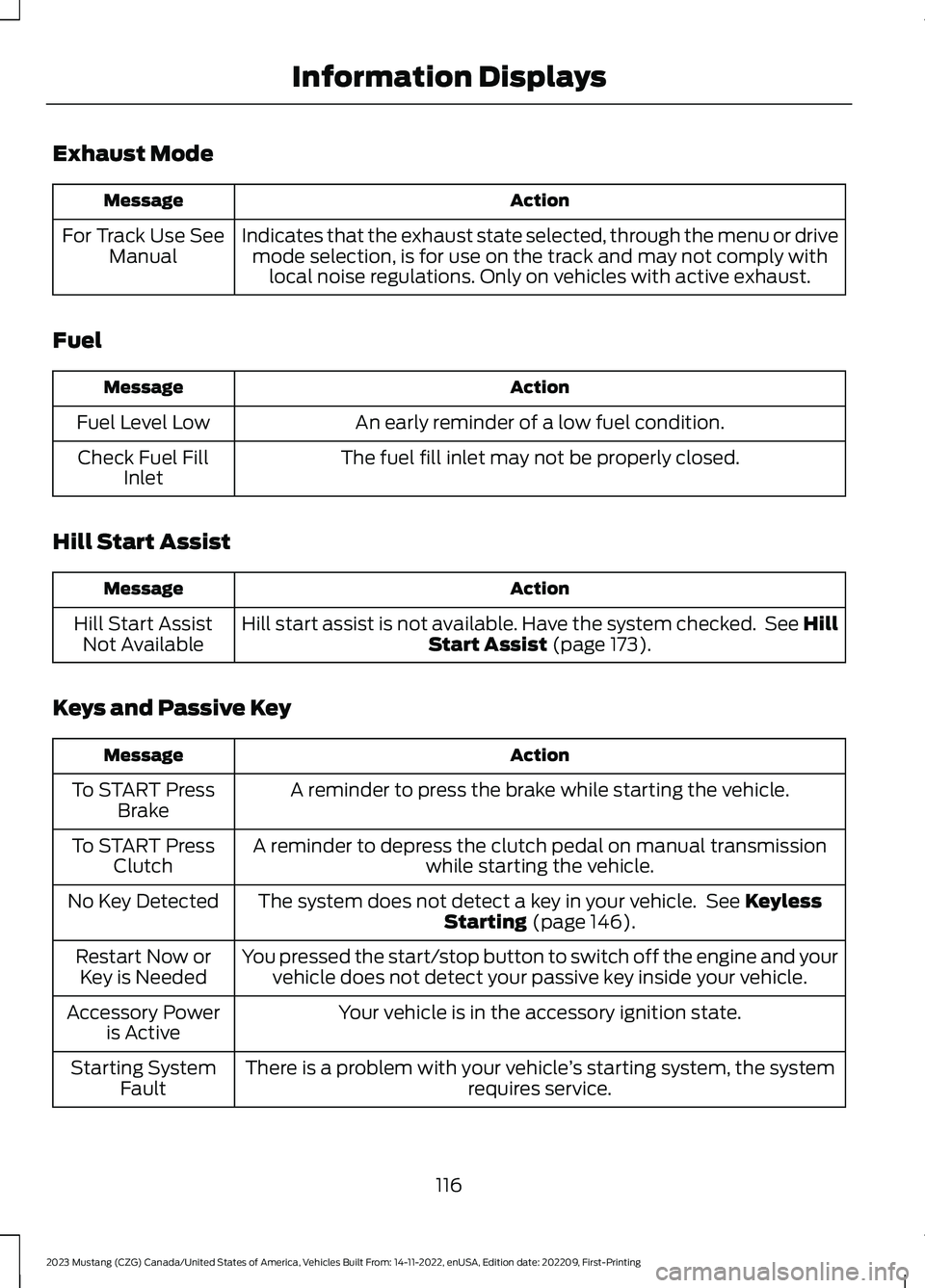
Exhaust Mode
ActionMessage
Indicates that the exhaust state selected, through the menu or drivemode selection, is for use on the track and may not comply withlocal noise regulations. Only on vehicles with active exhaust.
For Track Use SeeManual
Fuel
ActionMessage
An early reminder of a low fuel condition.Fuel Level Low
The fuel fill inlet may not be properly closed.Check Fuel FillInlet
Hill Start Assist
ActionMessage
Hill start assist is not available. Have the system checked. See HillStart Assist (page 173).Hill Start AssistNot Available
Keys and Passive Key
ActionMessage
A reminder to press the brake while starting the vehicle.To START PressBrake
A reminder to depress the clutch pedal on manual transmissionwhile starting the vehicle.To START PressClutch
The system does not detect a key in your vehicle. See KeylessStarting (page 146).No Key Detected
You pressed the start/stop button to switch off the engine and yourvehicle does not detect your passive key inside your vehicle.Restart Now orKey is Needed
Your vehicle is in the accessory ignition state.Accessory Poweris Active
There is a problem with your vehicle’s starting system, the systemrequires service.Starting SystemFault
116
2023 Mustang (CZG) Canada/United States of America, Vehicles Built From: 14-11-2022, enUSA, Edition date: 202209, First-PrintingInformation Displays
Page 121 of 535
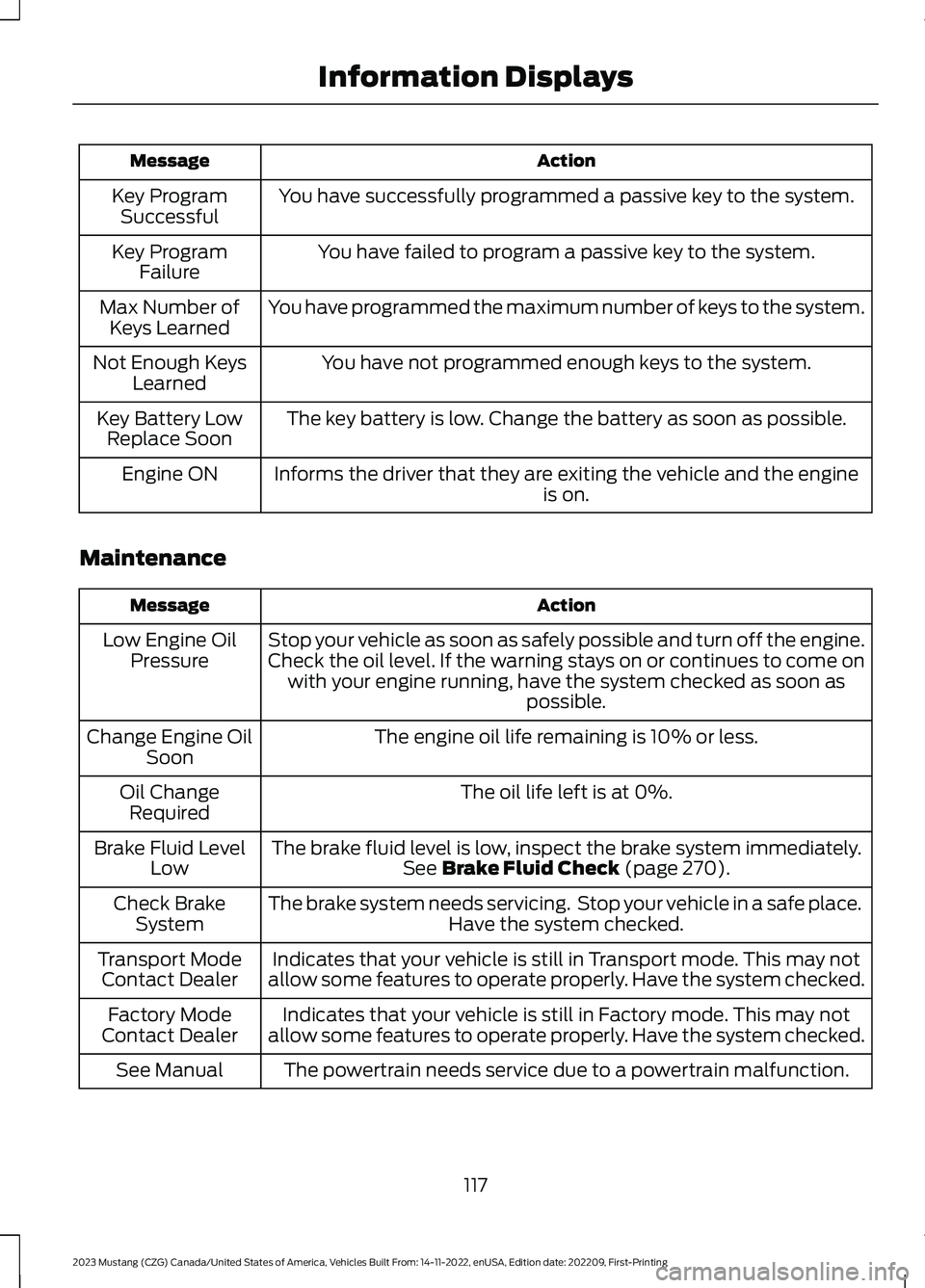
ActionMessage
You have successfully programmed a passive key to the system.Key ProgramSuccessful
You have failed to program a passive key to the system.Key ProgramFailure
You have programmed the maximum number of keys to the system.Max Number ofKeys Learned
You have not programmed enough keys to the system.Not Enough KeysLearned
The key battery is low. Change the battery as soon as possible.Key Battery LowReplace Soon
Informs the driver that they are exiting the vehicle and the engineis on.Engine ON
Maintenance
ActionMessage
Stop your vehicle as soon as safely possible and turn off the engine.Check the oil level. If the warning stays on or continues to come onwith your engine running, have the system checked as soon aspossible.
Low Engine OilPressure
The engine oil life remaining is 10% or less.Change Engine OilSoon
The oil life left is at 0%.Oil ChangeRequired
The brake fluid level is low, inspect the brake system immediately.See Brake Fluid Check (page 270).Brake Fluid LevelLow
The brake system needs servicing. Stop your vehicle in a safe place.Have the system checked.Check BrakeSystem
Indicates that your vehicle is still in Transport mode. This may notallow some features to operate properly. Have the system checked.Transport ModeContact Dealer
Indicates that your vehicle is still in Factory mode. This may notallow some features to operate properly. Have the system checked.Factory ModeContact Dealer
The powertrain needs service due to a powertrain malfunction.See Manual
117
2023 Mustang (CZG) Canada/United States of America, Vehicles Built From: 14-11-2022, enUSA, Edition date: 202209, First-PrintingInformation Displays
Page 122 of 535
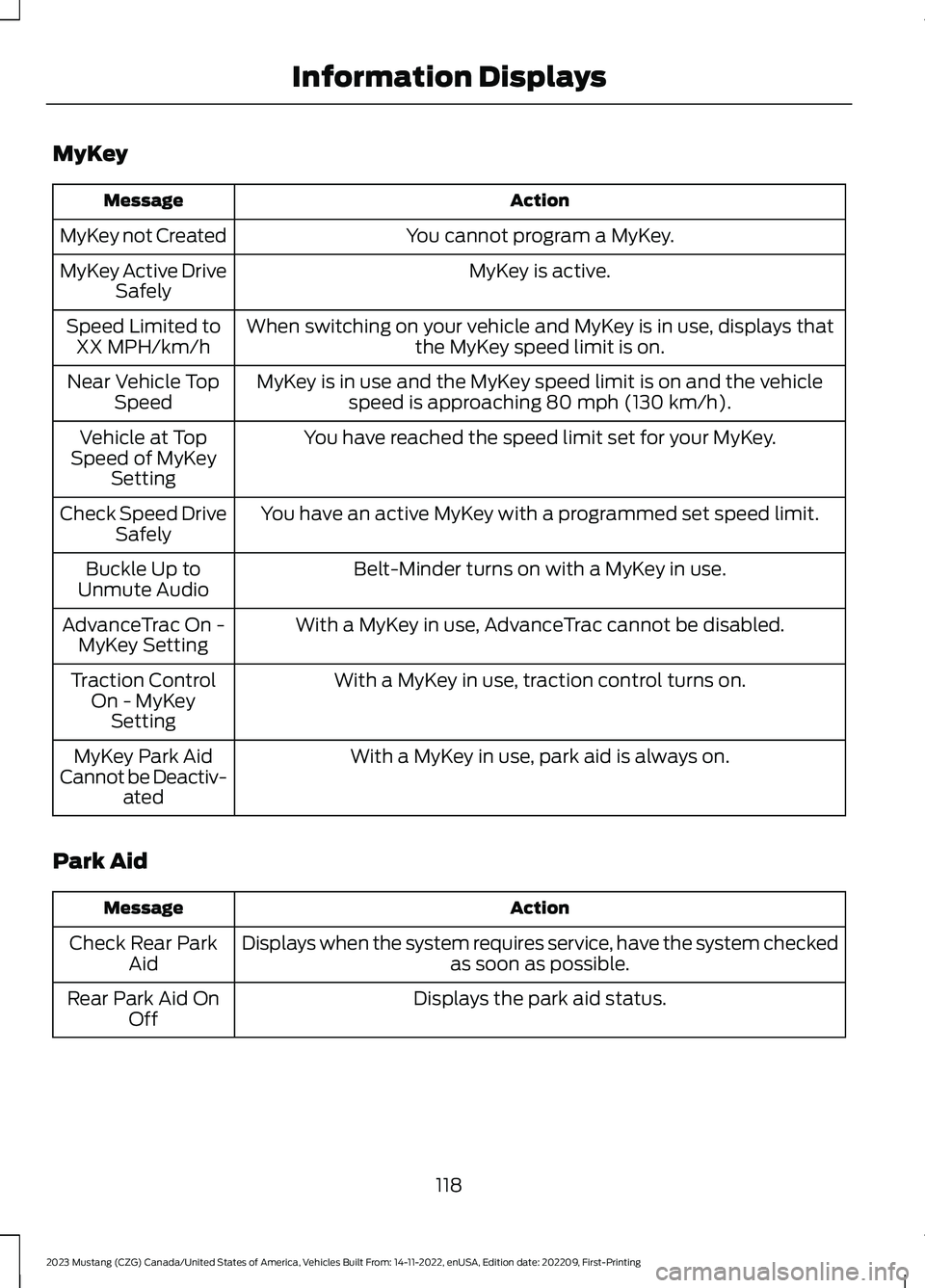
MyKey
ActionMessage
You cannot program a MyKey.MyKey not Created
MyKey is active.MyKey Active DriveSafely
When switching on your vehicle and MyKey is in use, displays thatthe MyKey speed limit is on.Speed Limited toXX MPH/km/h
MyKey is in use and the MyKey speed limit is on and the vehiclespeed is approaching 80 mph (130 km/h).Near Vehicle TopSpeed
You have reached the speed limit set for your MyKey.Vehicle at TopSpeed of MyKeySetting
You have an active MyKey with a programmed set speed limit.Check Speed DriveSafely
Belt-Minder turns on with a MyKey in use.Buckle Up toUnmute Audio
With a MyKey in use, AdvanceTrac cannot be disabled.AdvanceTrac On -MyKey Setting
With a MyKey in use, traction control turns on.Traction ControlOn - MyKeySetting
With a MyKey in use, park aid is always on.MyKey Park AidCannot be Deactiv-ated
Park Aid
ActionMessage
Displays when the system requires service, have the system checkedas soon as possible.Check Rear ParkAid
Displays the park aid status.Rear Park Aid OnOff
118
2023 Mustang (CZG) Canada/United States of America, Vehicles Built From: 14-11-2022, enUSA, Edition date: 202209, First-PrintingInformation Displays