warning light FORD MUSTANG 2023 Owner's Guide
[x] Cancel search | Manufacturer: FORD, Model Year: 2023, Model line: MUSTANG, Model: FORD MUSTANG 2023Pages: 535, PDF Size: 15.46 MB
Page 176 of 535
•You take corners too fast.
•The road surface is poor.
Note: If the system activates, the brakepedal could pulse and may travel further.Maintain pressure on the brake pedal. Youmay also hear a noise from the system. Thisis normal.
PARKING BRAKE
Vehicles With AutomaticTransmission
WARNING: Always set the parkingbrake and leave your vehicle with thetransmission in park (P).
Note:If you park your vehicle on a hill andfacing uphill, shift into park (P) and turn thesteering wheel away from the curb.
Note:If you park your vehicle on a hill andfacing downhill, shift into park (P) and turnthe steering wheel toward the curb.
Vehicles with ManualTransmission
WARNING: Always set the parkingbrake fully and make sure you shift thegearshift lever to first gear. Switch theignition off and remove the key wheneveryou leave your vehicle.
Note:If you park your vehicle on a hill andfacing uphill, select first gear and turn thesteering wheel away from the curb.
Note:If you park your vehicle on a hill andfacing downhill, select reverse gear and turnthe steering wheel toward the curb.
To park your vehicle:
1.Apply the brake and shift into theneutral position.
2.Fully apply the parking brake, hold theclutch pedal down, then shift into first(1).
3.Turn the ignition off.
After you turn the engine off you can nowrelease the clutch pedal.
All Vehicles
WARNING: If the parking brake isfully released, but the brake warninglamp remains illuminated, the brakesmay not be working properly. Have yourvehicle checked as soon as possible.
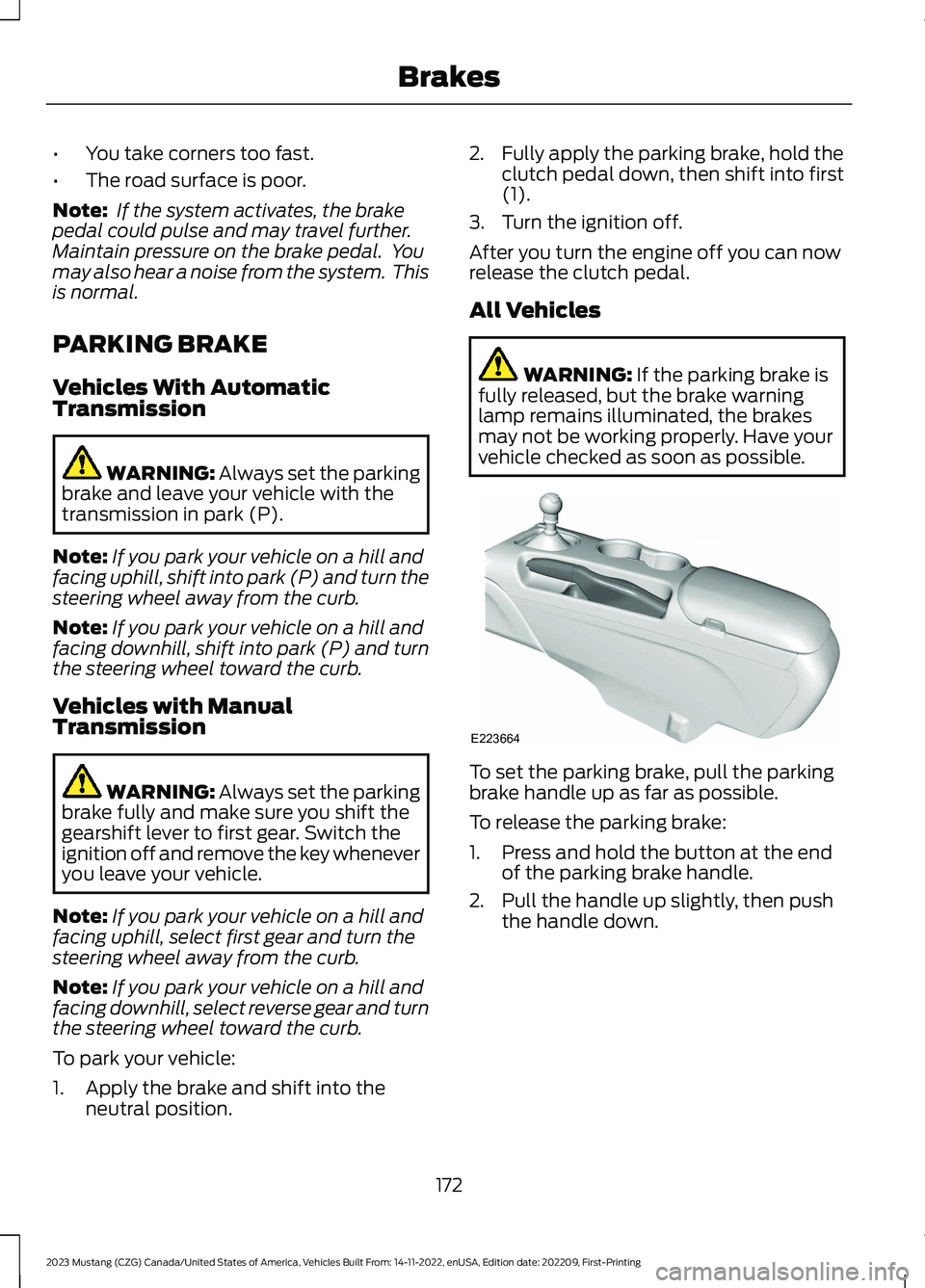
To set the parking brake, pull the parkingbrake handle up as far as possible.
To release the parking brake:
1.Press and hold the button at the endof the parking brake handle.
2.Pull the handle up slightly, then pushthe handle down.
172
2023 Mustang (CZG) Canada/United States of America, Vehicles Built From: 14-11-2022, enUSA, Edition date: 202209, First-PrintingBrakesE223664
Page 177 of 535
HILL START ASSIST
WARNING: The system does notreplace the parking brake. When youleave your vehicle, always apply theparking brake and shift the transmissioninto park (P) for automatic transmissionor first gear for manual transmission.
WARNING: You must remain inyour vehicle when the system turns on.At all times, you are responsible forcontrolling your vehicle, supervising thesystem and intervening, if required.Failure to take care may result in the lossof control of your vehicle, seriouspersonal injury or death.
WARNING: The system will turnoff if a malfunction is apparent. Failureto take care may result in the loss ofcontrol of your vehicle, serious personalinjury or death.
The system makes it easier to pull awaywhen your vehicle is on a slope without theneed to use the parking brake.
When the system activates, your vehicleremains stationary on a slope for a fewseconds after you release the brake pedal.This allows you time to move your footfrom the brake to the accelerator pedal.The brakes release when the engine hasdeveloped sufficient torque to prevent yourvehicle from rolling down the slope. Thisis an advantage when pulling away on aslope, for example from a car park ramp,traffic lights or when reversing uphill intoa parking space.
The system activates on any slope thatcauses your vehicle to roll.
Note: There is no warning lamp to indicatethe system is either on or off.
Using Hill Start Assist
1.Press the brake pedal to bring yourvehicle to a complete standstill. Keepthe brake pedal pressed and shift intofirst gear when facing uphill or reverse(R) when facing downhill.
2.The system activates if the sensorsdetect that your vehicle is on a slope.
3.When you remove your foot from thebrake pedal, your vehicle remains onthe slope without rolling away for a fewseconds. This hold time increases if youare in the process of driving off.
4.Pull away in the normal manner.
Switching the System On and Off
Vehicles with Manual Transmission
You can switch this feature on or off in theinformation display. The systemremembers the last setting when you startyour vehicle.
Vehicles with Automatic Transmission
The system turns on when you switch theignition on and you cannot switch thesystem off.
173
2023 Mustang (CZG) Canada/United States of America, Vehicles Built From: 14-11-2022, enUSA, Edition date: 202209, First-PrintingBrakes
Page 178 of 535
PRINCIPLE OF OPERATION
The traction control system helps avoiddrive wheel spin and loss of traction.
If your vehicle begins to slide, the systemapplies the brakes to individual wheelsand, when needed, reduces engine powerat the same time. If the wheels spin whenaccelerating on slippery or loose surfaces,the system reduces engine power in orderto increase traction.
USING TRACTION CONTROL
WARNING: Operating your vehiclewith the traction control disabled couldlead to an increased risk of loss of vehiclecontrol, vehicle rollover, personal injuryand death.
The system automatically turns on eachtime you switch the ignition on.
If your vehicle is stuck in mud or snow,switching traction control off may bebeneficial as this allows the wheels to spin.
Note:When you switch traction control off,stability control remains fully active.
Switching the System Off
When you switch the system off,a message and an illuminatedicon appear on the instrumentcluster.
Use the switch again to return the tractioncontrol system to normal operation.
The switch for the stability and tractioncontrol system is on the instrument panel.
Your vehicle could have MyKey restrictionsregarding this feature. See What IsMyKey (page 63).
System Indicator Lights andMessages
The stability and traction controllight temporarily illuminates onengine start-up and flashes:
•When a driving condition activateseither of the systems.
•If a problem occurs in either of thesystems.
The stability and traction controloff light temporarily illuminateson engine start-up and stays on:
•When you switch the traction controlsystem off.
•When you select an alternative stabilitycontrol mode.
174
2023 Mustang (CZG) Canada/United States of America, Vehicles Built From: 14-11-2022, enUSA, Edition date: 202209, First-PrintingTraction ControlE130458 E138639 E130458
Page 179 of 535
PRINCIPLE OF OPERATION
WARNING: Vehicle modificationsinvolving braking system, aftermarketroof racks, suspension, steering system,tire construction and wheel and tire sizemay change the handling characteristicsof your vehicle and may adversely affectthe performance of the electronicstability control system. In addition,installing any stereo loudspeakers mayinterfere with and adversely affect theelectronic stability control system. Installany aftermarket stereo loudspeaker asfar as possible from the front centerconsole, the tunnel, and the front seatsin order to minimize the risk of interferingwith the electronic stability controlsensors. Reducing the effectiveness ofthe electronic stability control systemcould lead to an increased risk of loss ofvehicle control, vehicle rollover, personalinjury and death.
WARNING: Remember that evenadvanced technology cannot defy thelaws of physics. It’s always possible tolose control of a vehicle due toinappropriate driver input for theconditions. Aggressive driving on anyroad condition can cause you to losecontrol of your vehicle increasing the riskof personal injury or property damage.Activation of the electronic stabilitycontrol system is an indication that atleast some of the tires have exceededtheir ability to grip the road; this couldreduce the operator’s ability to controlthe vehicle potentially resulting in a lossof vehicle control, vehicle rollover,personal injury and death. If yourelectronic stability control systemactivates, SLOW DOWN.
The system automatically turns on eachtime you switch the ignition on.
If a fault occurs in either the stabilitycontrol or the traction control system, youmay experience the following conditions:
•The stability and traction control lightilluminates steadily.
•The stability control and tractioncontrol systems do not enhance yourvehicle's ability to maintain traction ofthe wheels.
If a driving condition activates either thestability control or the traction controlsystem you may experience the followingconditions:
•The stability and traction control lightflashes.
•Your vehicle slows down.
•Reduced engine power.
•A vibration in the brake pedal.
•The brake pedal is stiffer than usual.
•If the driving condition is severe andyour foot is not on the brake, the brakepedal may move as the system applieshigher brake force.
The stability control system has severalfeatures built into it to help you maintaincontrol of your vehicle:
Electronic Stability Control
The system enhances your vehicle’s abilityto prevent skids or lateral slides byapplying brakes to one or more of thewheels individually and, if necessary,reducing engine power.
Traction Control
The system enhances your vehicle’s abilityto maintain traction of the wheels bydetecting and controlling wheel spin. SeeUsing Traction Control (page 174).
175
2023 Mustang (CZG) Canada/United States of America, Vehicles Built From: 14-11-2022, enUSA, Edition date: 202209, First-PrintingStability Control
Page 190 of 535
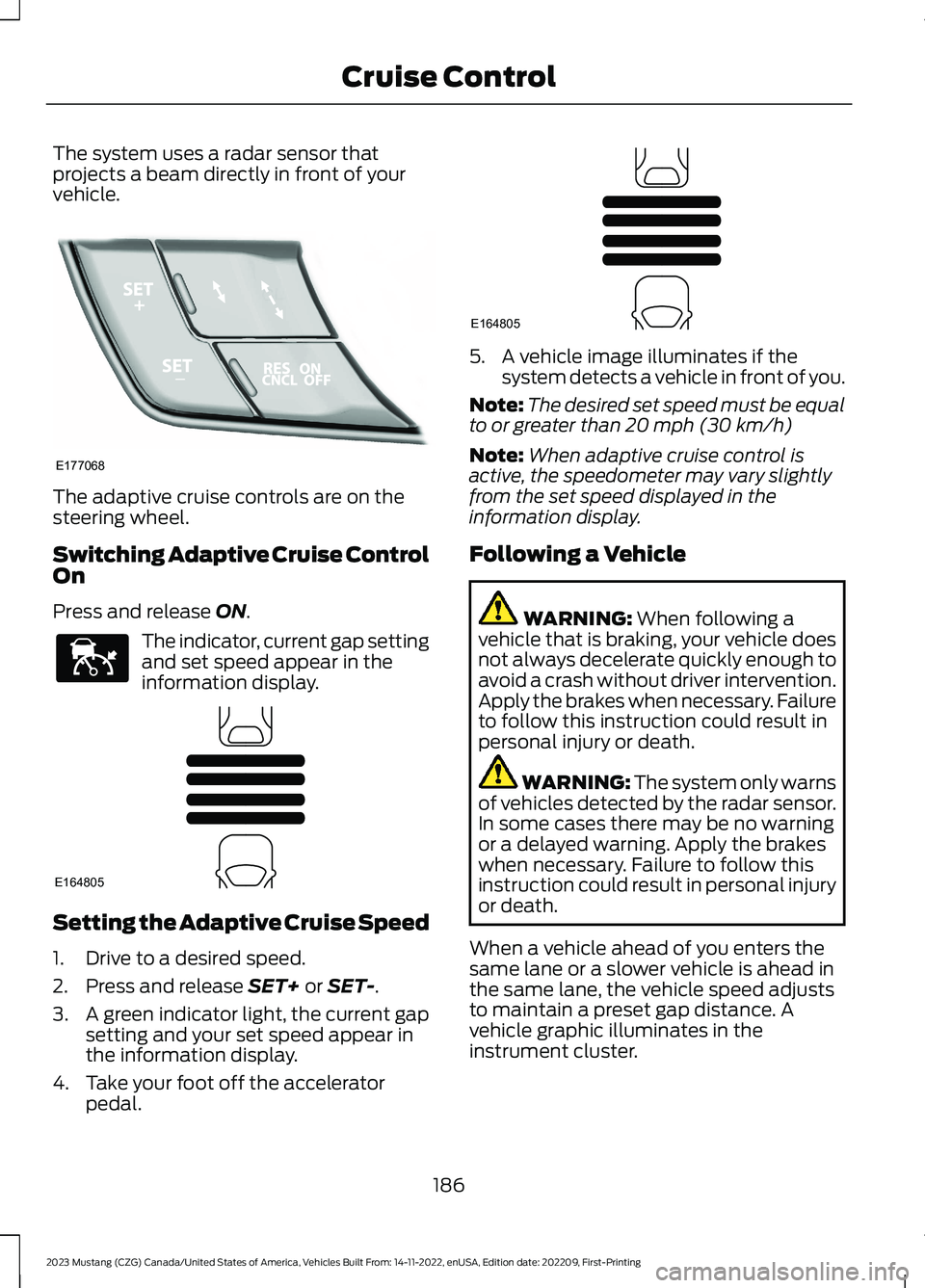
The system uses a radar sensor thatprojects a beam directly in front of yourvehicle.
The adaptive cruise controls are on thesteering wheel.
Switching Adaptive Cruise ControlOn
Press and release ON.
The indicator, current gap settingand set speed appear in theinformation display.
Setting the Adaptive Cruise Speed
1.Drive to a desired speed.
2.Press and release SET+ or SET-.
3.A green indicator light, the current gapsetting and your set speed appear inthe information display.
4.Take your foot off the acceleratorpedal.
5.A vehicle image illuminates if thesystem detects a vehicle in front of you.
Note:The desired set speed must be equalto or greater than 20 mph (30 km/h)
Note:When adaptive cruise control isactive, the speedometer may vary slightlyfrom the set speed displayed in theinformation display.
Following a Vehicle
WARNING: When following avehicle that is braking, your vehicle doesnot always decelerate quickly enough toavoid a crash without driver intervention.Apply the brakes when necessary. Failureto follow this instruction could result inpersonal injury or death.
WARNING: The system only warnsof vehicles detected by the radar sensor.In some cases there may be no warningor a delayed warning. Apply the brakeswhen necessary. Failure to follow thisinstruction could result in personal injuryor death.
When a vehicle ahead of you enters thesame lane or a slower vehicle is ahead inthe same lane, the vehicle speed adjuststo maintain a preset gap distance. Avehicle graphic illuminates in theinstrument cluster.
186
2023 Mustang (CZG) Canada/United States of America, Vehicles Built From: 14-11-2022, enUSA, Edition date: 202209, First-PrintingCruise ControlE177068 E144529 E164805 E164805
Page 192 of 535
When you press the accelerator pedal, youoverride the set speed and gap distance.
When you override the system,the green indicator lightilluminates and the vehicleimage does not appear in the informationdisplay.
The system resumes operation when yourelease the accelerator pedal. The vehiclespeed decreases to the set speed, or alower speed if following a slower vehicle.
Changing the Set Speed
Press and release the button toincrease the set speed in smallincrements. Press and hold thebutton to increase the set speed in largeincrements. Release the button when theset speed is equal to your desired speed.
Press and release the button todecrease the set speed in smallincrements. Press and hold thebutton to decrease the set speed in largeincrements. Release the button when theset speed is equal to your desired speed.
You can use the accelerator or brake pedalto adjust the set speed. Press either buttonto set the speed.
The system may apply the brakes to slowthe vehicle to the new set speed. The setspeed displays continuously in theinformation display when the system isactive.
Canceling the Set Speed
Press and release the button.The set speed does not erase.
Note:For vehicles with manualtransmission, if you press the clutch pedalfor an extended period, this action alsocancels the set speed.
Resuming the Set Speed
Press and release the button.Your vehicle speed returns to thepreviously set speed and gapsetting. The set speed displayscontinuously in the information displaywhen the system is active.
Note:Only use resume if you are aware ofthe set speed and intend to return to it.
Automatic Cancellation
The system does not operate below12 mph (20 km/h).
Note:If the engine speed drops too low, anaudible warning sounds and a messageappears in the information display.Automatic braking releases.
Hilly Condition Usage
Select a lower gear when the system isactive in situations such as prolongeddownhill driving on steep slopes, forexample in mountainous areas. Thesystem needs additional engine braking inthese situations to reduce the load on thevehicle’s regular brake system to preventit from overheating.
Note:An audible alarm sounds and thesystem shuts down if it applies brakes foran extended period of time. This allows thebrakes to cool. The system functionsnormally again after the brakes cool.
Switching Adaptive Cruise ControlOff
Press and release OFF, or on vehicles withspeed limiter, the speedometer icon whenthe system is in standby mode to switchthe system off.
Note:You erase the set speed and gapsetting when you switch the system off.
188
2023 Mustang (CZG) Canada/United States of America, Vehicles Built From: 14-11-2022, enUSA, Edition date: 202209, First-PrintingCruise ControlE144529 E246884 E246885 E265298
Page 195 of 535
Switching to Normal CruiseControl
WARNING: Normal cruise controlwill not brake when your vehicle isapproaching slower vehicles. Always beaware of which mode you have selectedand apply the brakes when necessary.
You can change from adaptive cruisecontrol to normal cruise control throughthe information display. See GeneralInformation (page 108).
The cruise control indicator lightreplaces the adaptive cruisecontrol indicator light if youselect normal cruise control. The gapsetting does not display, and the systemdoes not respond to lead vehicles.Automatic braking remains active tomaintain set speed.
191
2023 Mustang (CZG) Canada/United States of America, Vehicles Built From: 14-11-2022, enUSA, Edition date: 202209, First-PrintingCruise ControlE71340
Page 197 of 535
The warning system is in two stages. Atfirst the system issues a temporary warningthat you need to take a rest. This messagewill only appear for a short time. If thesystem detects further reduction in drivingalertness, another warning may be issuedwhich will remain in the information displayfor a longer time. Press OK on the steeringwheel control to clear the warning
System Display
When active the system will runautomatically in the background and onlyissue a warning if required.
Note:If the camera sensor cannot track theroad lane markings or if your vehicle speeddrops below approximately 40 mph(64 km/h), the system does not issuewarnings.
Resetting the System
You can reset the system by either:
•Switching the ignition off and on.
•Stopping the vehicle and then openingand closing the driver’s door.
LANE KEEPING SYSTEM
WARNING: You are responsible forcontrolling your vehicle at all times. Thesystem is designed to be an aid and doesnot relieve you of your responsibility todrive with due care and attention. Failureto follow this instruction could result inthe loss of control of your vehicle,personal injury or death.
WARNING: Always drive with duecare and attention when using andoperating the controls and features onyour vehicle.
WARNING: In cold and severeweather conditions the system may notfunction. Rain, snow and spray can alllimit sensor performance.
WARNING: The system will notoperate if the sensor cannot track theroad lane markings.
WARNING: The sensor mayincorrectly track lane markings as otherstructures or objects. This can result ina false or missed warning.
WARNING: Large contrasts inoutside lighting can limit sensorperformance.
WARNING: The system may notoperate properly if the sensor is blocked.Keep the windshield free fromobstruction.
WARNING: If damage occurs in theimmediate area surrounding the sensor,have your vehicle checked as soon aspossible.
WARNING: The system may notcorrectly operate if your vehicle is fittedwith a suspension kit not approved byus.
Note:The system works above 40 mph(64 km/h).
Note:The system works as long as thecamera can detect one lane marking.
Note:The system may not function with ablocked camera, or with a damaged or dirtywindshield.
193
2023 Mustang (CZG) Canada/United States of America, Vehicles Built From: 14-11-2022, enUSA, Edition date: 202209, First-PrintingDriving Aids
Page 198 of 535
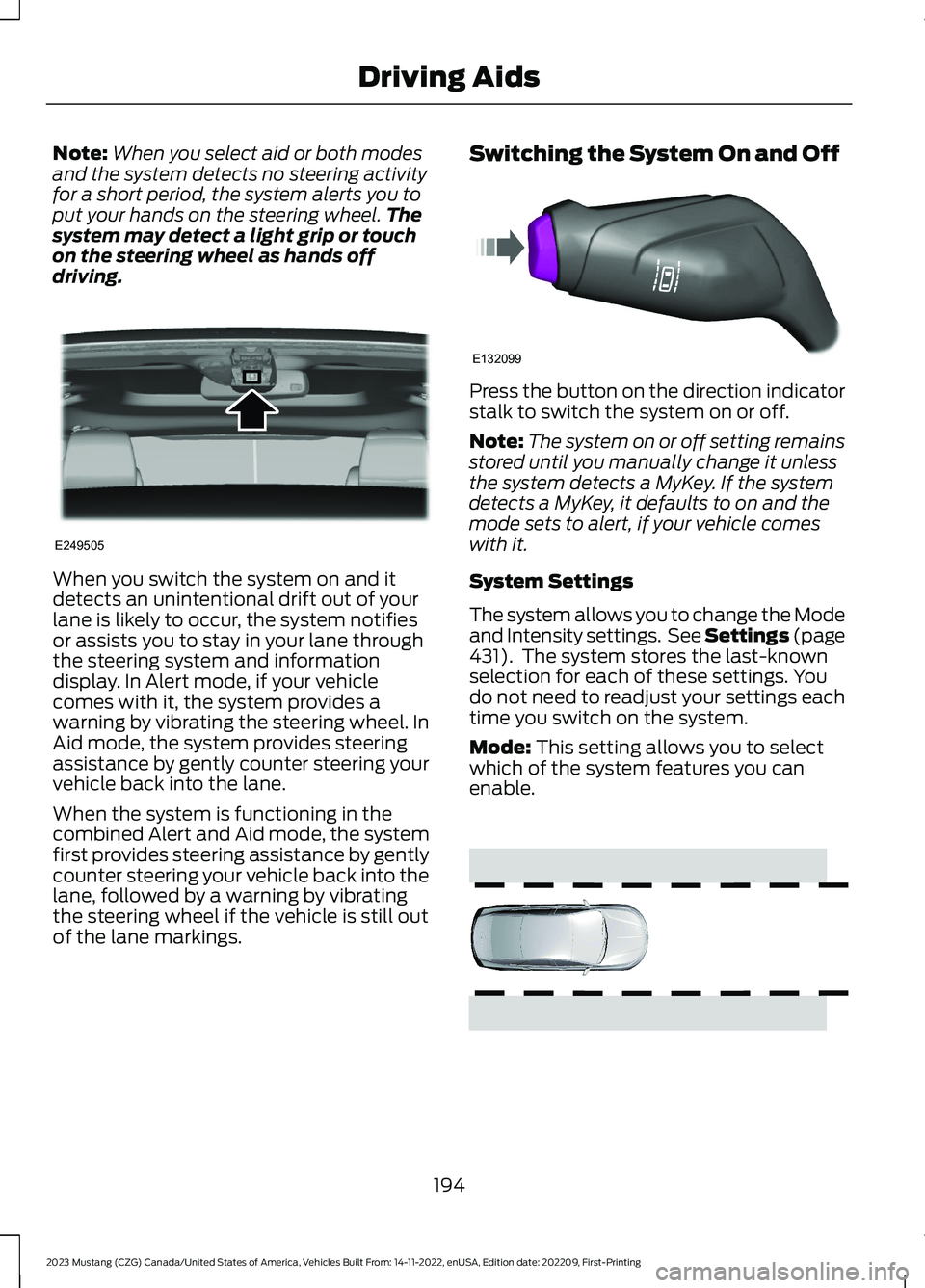
Note:When you select aid or both modesand the system detects no steering activityfor a short period, the system alerts you toput your hands on the steering wheel.Thesystem may detect a light grip or touchon the steering wheel as hands offdriving.
When you switch the system on and itdetects an unintentional drift out of yourlane is likely to occur, the system notifiesor assists you to stay in your lane throughthe steering system and informationdisplay. In Alert mode, if your vehiclecomes with it, the system provides awarning by vibrating the steering wheel. InAid mode, the system provides steeringassistance by gently counter steering yourvehicle back into the lane.
When the system is functioning in thecombined Alert and Aid mode, the systemfirst provides steering assistance by gentlycounter steering your vehicle back into thelane, followed by a warning by vibratingthe steering wheel if the vehicle is still outof the lane markings.
Switching the System On and Off
Press the button on the direction indicatorstalk to switch the system on or off.
Note:The system on or off setting remainsstored until you manually change it unlessthe system detects a MyKey. If the systemdetects a MyKey, it defaults to on and themode sets to alert, if your vehicle comeswith it.
System Settings
The system allows you to change the Modeand Intensity settings. See Settings (page431). The system stores the last-knownselection for each of these settings. Youdo not need to readjust your settings eachtime you switch on the system.
Mode: This setting allows you to selectwhich of the system features you canenable.
194
2023 Mustang (CZG) Canada/United States of America, Vehicles Built From: 14-11-2022, enUSA, Edition date: 202209, First-PrintingDriving AidsE249505 E132099 E165515
Page 200 of 535
When you switch off the system, the lanemarking graphics do not display.
When the system is on, the color of thelane markings changes to indicate thesystem status.
Gray: Indicates that the system istemporarily unable to provide a warningor intervention on the indicated side. Thismay be because:
•Your vehicle is under the activationspeed.
•The direction indicator is active.
•Your vehicle is in a dynamic maneuver.
•The road has no or poor lane markingsin the camera field-of-view.
•You have a blocked camera, or it isunable to detect the lane markings dueto environmental, traffic or vehicleconditions. For example, significant sunangles, shadows, snow, heavy rain orfog, following a large vehicle that isblocking or shadowing the lane or poorheadlamp illumination.
See Troubleshooting for additionalinformation.
Green: Indicates that the system isavailable or ready to provide a warning orintervention, on the indicated side.
Yellow or Animated Graphics: Indicate thatthe system is providing or has just provideda lane keeping aid intervention.
Red: Indicates that the system is providingor has just provided a lane keeping alertwarning.
You can temporarily suppress the systemat any time by the following:
•Quick braking.
•Fast acceleration.
•Using the direction indicator.
•Evasive steering maneuver.
•Driving too close to the lane markings.
Troubleshooting
Why is the feature not available (line markings are gray) when I can see the lane markingson the road?
Your vehicle speed is outside the operational range of the feature.
The sun is shining directly into the camera lens.
A quick intentional lane change has occurred.
Your vehicle stays too close to the lane markings.
Driving at high speeds in curves.
The last alert warning or aid intervention occurred a short time ago.
Ambiguous lane markings, for example in construction zones.
Rapid transition from light to dark, or from dark to light.
Sudden offset in lane markings.
ABS or AdvanceTrac™ is active.
196
2023 Mustang (CZG) Canada/United States of America, Vehicles Built From: 14-11-2022, enUSA, Edition date: 202209, First-PrintingDriving Aids