Battery FORD MUSTANG MACH-E 2021 User Guide
[x] Cancel search | Manufacturer: FORD, Model Year: 2021, Model line: MUSTANG MACH-E, Model: FORD MUSTANG MACH-E 2021Pages: 460, PDF Size: 7.29 MB
Page 68 of 460
WHAT IS 911 ASSIST
911 Assist is a SYNC system feature that
can call for help.
For more information, visit
www
. o wner .f or d . c om .
HOW DOES 911 ASSIST WORK
If a crash deploys an airbag, excluding knee
airbags and rear inflatable seatbelts, or
activates the battery shut-off, your vehicle
may be able to contact emergency services
by dialing 911 through a paired and
connected Bluetooth®-enabled phone.
Not all crashes will deploy an airbag or
activate the battery shut-off. If a
connected cell phone sustains damage or
loses its connection to SYNC during a
crash, SYNC will search for and try to
connect to a previously paired cell phone.
SYNC will then attempt to call the
emergency services.
Before making the call:
• SYNC provides about 10 seconds to
cancel the call. If you fail to cancel the
call, SYNC attempts to dial 911.
• SYNC says the following, or a similar
message: "SYNC will attempt to call
911, to cancel the call, press Cancel on
your screen or press and hold the
phone button on your steering wheel."
If you do not cancel the call and SYNC
makes a successful call a pre-recorded
message plays for the 911 operator. The
occupants in your vehicle are able to talk
with the operator. Be prepared to provide
your name, phone number and location
immediately because not all 911 systems
are capable of receiving this information
electronically.
During an emergency call the system
transmits vehicle data to the emergency
service. EMERGENCY CALL
REQUIREMENTS WARNING:
Do not wait for 911
Assist to make an emergency call if you
can do it yourself. Dial emergency
services immediately to avoid delayed
response time which could increase the
risk of serious injury or death after a
crash. If you do not hear 911 Assist within
five seconds of the crash, the system or
phone may be damaged or
non-functional. WARNING:
Always place your
phone in a secure location in your vehicle
so it does not become a projectile or get
damaged in a crash. Failure to do so may
cause serious injury to someone or
damage the phone which could prevent
911 Assist from working properly. WARNING:
Unless the 911 Assist
setting is set on before a crash, the
system will not dial for help which could
delay response time, potentially
increasing the risk of serious injury or
death after a crash.
• SYNC is powered and working properly
at the time of the incident and
throughout feature activation and use.
• The 911 Assist feature must be set on
before the incident.
• You must pair and connect a
Bluetooth®
enabled and compatible
cell phone to SYNC.
• A connected
Bluetooth® enabled
phone must have the ability to make
and maintain an outgoing call at the
time of the incident.
64
2021 Mustang Mach-E (CGW) Canada/United States of America, Vehicles Built From: 07-06-2021, enUSA, Edition date: 202104, First-Printing 911 Assist
Page 69 of 460
•
A connected Bluetooth® enabled
phone must have adequate network
coverage, battery power and signal
strength.
• The vehicle must have battery power
and be located in the U.S., Canada or
in a territory in which 911 is the
emergency number.
Note: If any user sets 911 Assist to on or off,
that setting applies for all paired phones. If
911 Assist is off and the phone connected
to SYNC, an icon displays on the status bar.
Note: Every phone operates differently.
While SYNC 911 Assist works with most
cellular phones, some may have trouble
using this feature.
EMERGENCY CALL
LIMITATIONS
The SYNC 911 Assist feature only operates
in the U.S., Canada or in a territory in which
911 is the emergency number. The following
are limitations of this feature:
• Your cellular phone or 911 Assist
hardware sustains damage in a crash.
• The vehicle's battery or the SYNC
system has no power.
• The phone(s) thrown from your vehicle
are the ones paired and connected to
the system.
65
2021 Mustang Mach-E (CGW) Canada/United States of America, Vehicles Built From: 07-06-2021, enUSA, Edition date: 202104, First-Printing 911 Assist
Page 70 of 460
REMOTE CONTROL
LIMITATIONS
WARNING: Changes or
modifications not expressively approved
by the party responsible for compliance
could void the user's authority to operate
the equipment. The term "IC:" before the
radio certification number only signifies
that Industry Canada technical
specifications were met.
This device complies with Part 15 of the
FCC Rules and with Industry Canada
license-exempt RSS standard(s).
Operation is subject to the following two
conditions: (1) This device may not cause
harmful interference, and (2) This device
must accept any interference received,
including interference that may cause
undesired operation.
Make sure a valid remote control is within
5 ft (1.5 m)
from the front door handles
and rear of vehicle.
The system may not function if:
• The remote control remains stationary
for about a minute.
• The vehicle battery has no charge.
• The remote control battery has no
charge.
• There is interference causing issues
with the remote control frequencies.
• The remote control is too close to
metal objects or electronic devices, for
example keys or a cell phone.
USING THE REMOTE CONTROL
Use your remote control to access various
vehicle systems.
Note: The buttons on your remote may vary
depending on the vehicle region or options. One-Stage Unlocking Press the button to unlock all
doors. See
Unlocking and
Locking the Doors Using the
Remote Control
(page 77).
Two-Stage Unlocking
(If Equipped) Press the button to unlock the
driver's door. Press the button
again within three seconds to
unlock all doors. See
Unlocking and
Locking the Doors Using the Remote
Control
(page 77).
Lock Press the button to lock all
doors. See
Unlocking and
Locking the Doors Using the
Remote Control
(page 77).
Panic Alarm Press the button to sound the
panic alarm. See Sounding the
Panic Alarm
(page 66).
Liftgate Press the button twice to open
the liftgate.
SOUNDING THE PANIC ALARM Press the button to sound the
panic alarm. Press the button
again or switch the vehicle on to
turn it off.
Note: The panic alarm only operates when
the vehicle is off.
66
2021 Mustang Mach-E (CGW) Canada/United States of America, Vehicles Built From: 07-06-2021, enUSA, Edition date: 202104, First-Printing Keys and Remote ControlsE138629 E138629 E138623 E138624 E267940 E138624
Page 71 of 460
LOCATING YOUR VEHICLE
Press the lock button twice
within three seconds. The turn
signal lamps flash. We
recommend you use this method to locate
your vehicle.
CHANGING THE REMOTE
CONTROL BATTERY WARNING: Keep batteries away
from children to prevent ingestion.
Failure to follow this instruction could
result in personal injury or death. If
ingested, immediately seek medical
attention. WARNING:
If the battery
compartment does not securely close,
stop using the remote control and
replace it as soon as possible. In the
meantime, keep the remote control away
from children. Failure to follow this
instruction could result in personal injury
or death.
The remote control uses one coin-type
3-volt lithium battery, CR2450, or
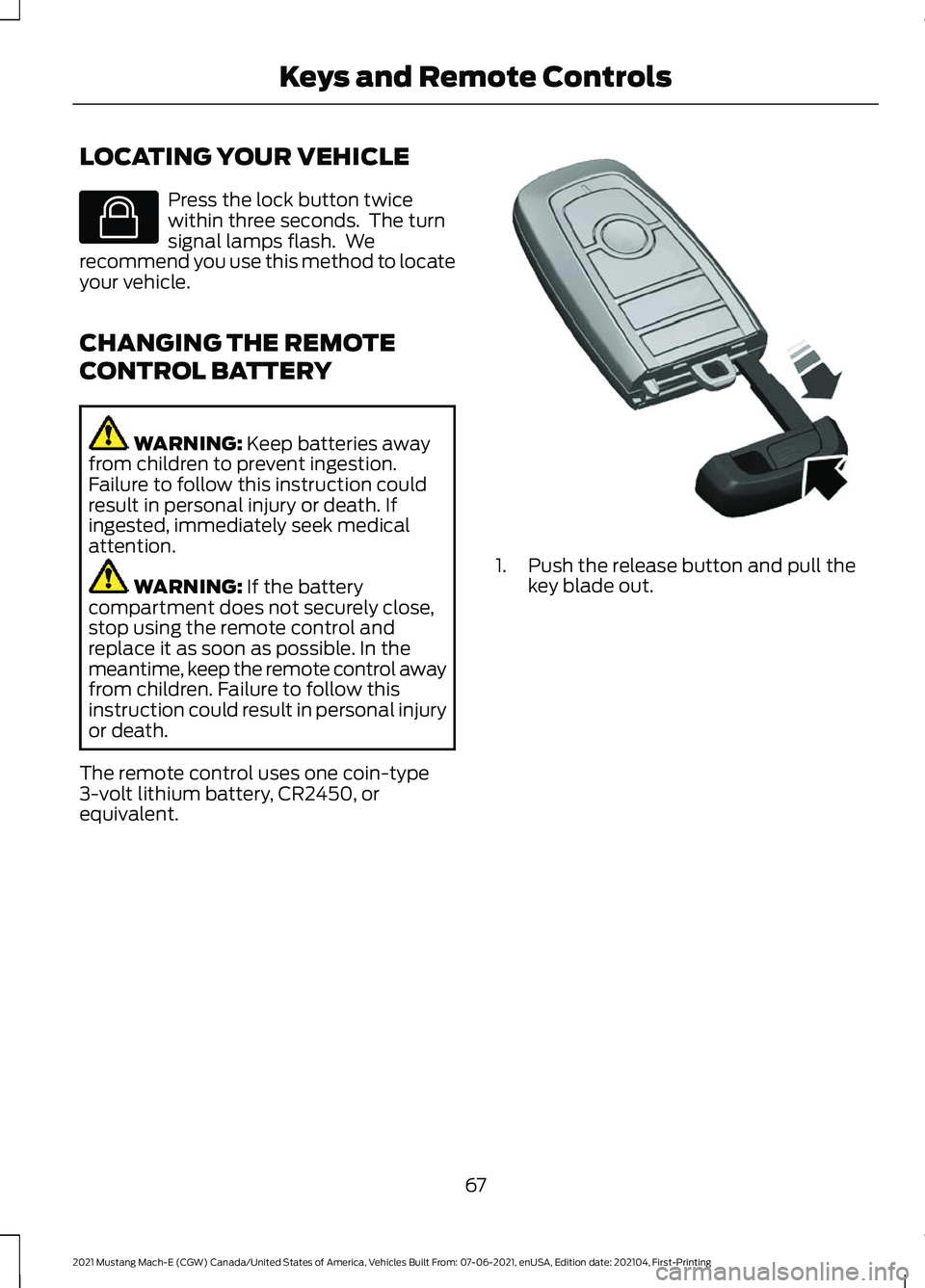
equivalent. 1. Push the release button and pull the
key blade out.
67
2021 Mustang Mach-E (CGW) Canada/United States of America, Vehicles Built From: 07-06-2021, enUSA, Edition date: 202104, First-Printing Keys and Remote ControlsE138623 E322866
Page 72 of 460
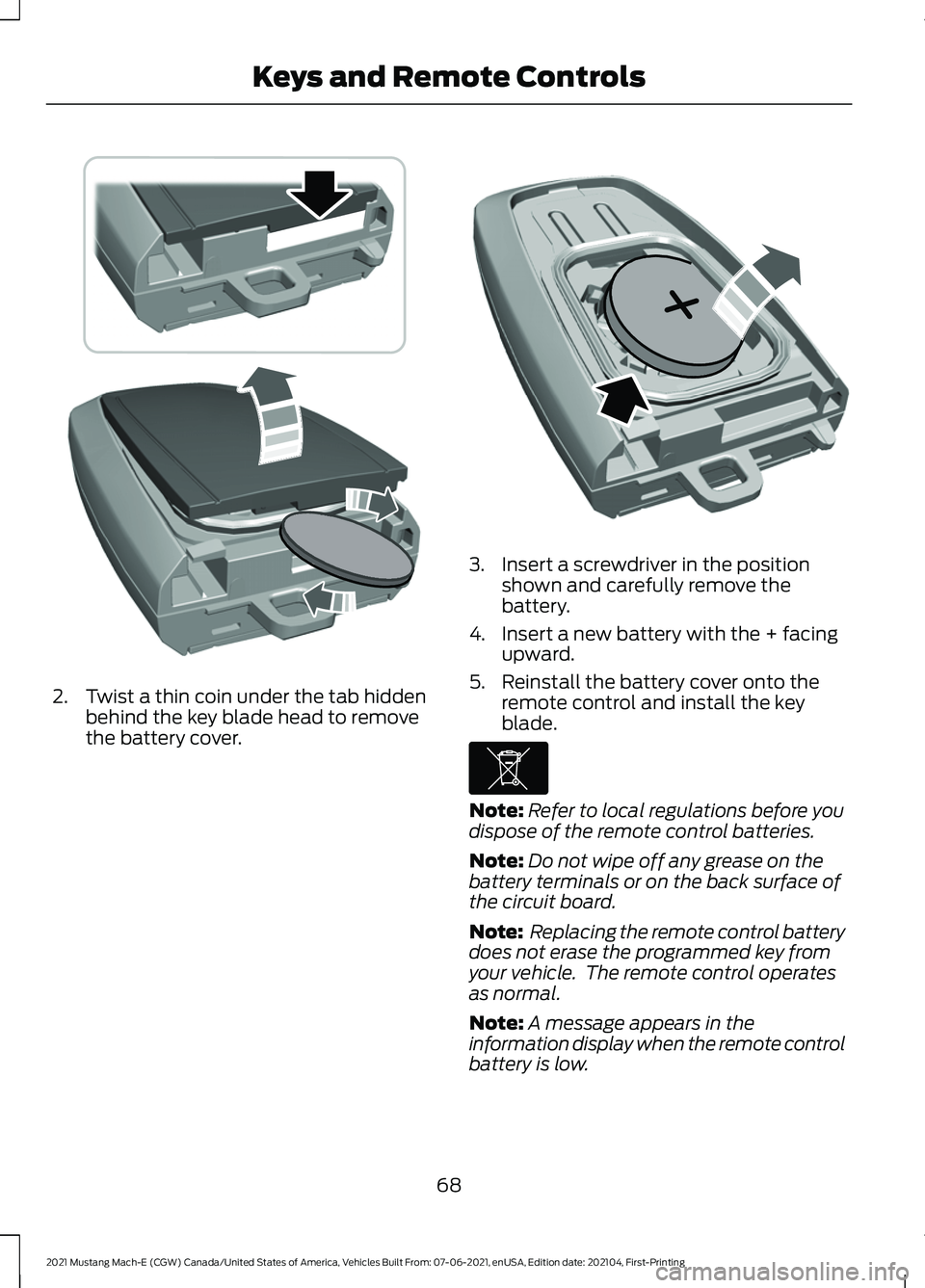
2. Twist a thin coin under the tab hidden
behind the key blade head to remove
the battery cover. 3. Insert a screwdriver in the position
shown and carefully remove the
battery.
4. Insert a new battery with the + facing upward.
5. Reinstall the battery cover onto the remote control and install the key
blade. Note:
Refer to local regulations before you
dispose of the remote control batteries.
Note: Do not wipe off any grease on the
battery terminals or on the back surface of
the circuit board.
Note: Replacing the remote control battery
does not erase the programmed key from
your vehicle. The remote control operates
as normal.
Note: A message appears in the
information display when the remote control
battery is low.
68
2021 Mustang Mach-E (CGW) Canada/United States of America, Vehicles Built From: 07-06-2021, enUSA, Edition date: 202104, First-Printing Keys and Remote ControlsE303824 E218402 E107998
Page 73 of 460
REPLACING A LOST KEY OR
REMOTE CONTROL
You can purchase replacement keys or
remote controls from an authorized dealer.
Authorized dealers can program remote
controls for your vehicle.
PROGRAMMING THE REMOTE
CONTROL
Contact an authorized dealer to program
remote controls for your vehicle.
KEYS AND REMOTE CONTROLS – TROUBLESHOOTING
KEYS AND REMOTE CONTROLS – INFORMATION MESSAGES Action
Message
Replace remote control battery.
Key Battery Low Replace
Soon
69
2021 Mustang Mach-E (CGW) Canada/United States of America, Vehicles Built From: 07-06-2021, enUSA, Edition date: 202104, First-Printing Keys and Remote Controls
Page 74 of 460
WHAT IS PHONE AS A KEY
Phone as a Key allows you to use your
phone in place of a passive key.
You can use your phone for the following
functions:
•
Remote locking and unlocking.
• Passive entry and exit.
• Passive start and drive the vehicle.
• Remote start.
• Memory function recall.
PHONE AS A KEY
LIMITATIONS
Limitations can vary based on the make
and model of your phone, phone location
and physical obstructions.
The following items could impact Phone
as a Key performance or prevent
functionality in some cases:
• The typical operating range for Phone
as a Key is 131 ft (40 m).
• Your
Bluetooth® connection is not
enabled, is disrupted, or out of range.
• Your Phone as a Key is not active or
enabled on at least one phone.
• Your vehicle battery has depleted.
• Your phone battery has depleted.
• Interference from other devices using
radio frequencies or physical
obstructions.
• Your phone is too close to metal
objects or other electronic devices.
Note: Do not leave a duplicate coded key
in the vehicle. Always take your keys and
phone and lock all doors when leaving the
vehicle. PROGRAMMING YOUR PHONE
To program your smartphone as Phone as
a Key:
1. Visit your device's app store to
download the FordPass app.
2. Create or sign-in to the FordPass app and add the vehicle identification
number to your account.
3. Once you add the vehicle identification
number, follow the prompts in the
FordPass app to complete the Sync
Connect Authorization process.
4. After the vehicle authorizes, you can setup Phone as a Key following the
prompts in the FordPass app.
5. After Phone as a Key is setup, you can setup the Backup Start Passcode by
following the prompts on your
touchscreen.
Note: Keep your new Backup Start
Passcode with you in case of an emergency.
Resetting Phone as a Key
If the Phone as a Key belongs to your
account, you can delete it from your phone.
If not, reset Phone as a Key using the
following steps:
1. Press
Settings on the touchscreen.
2. Press
General.
3. Press
Reset.
4. Press the app connect reset option.
5. Press
Reset All.
6. Confirm you would like to continue with
erasing all Phone as a Key, Backup
Start Passcodes.
7. Press
Continue.
8. Confirm you are aware you are de-authorizing all authorized users and
FordPass Connect settings.
9. Press
Continue.
70
2021 Mustang Mach-E (CGW) Canada/United States of America, Vehicles Built From: 07-06-2021, enUSA, Edition date: 202104, First-Printing Phone as a Key
Page 76 of 460
What happens if I cannot unlock the
vehicle with Phone as a Key?
Attempt to move your phone closer to
the vehicle. Check that the FordPass
app is still running and that the Phone
as a Key control screen shows
connected. If the phone is connected,
attempt to press the remote unlock
button in the FordPass app. If the
phone is not connected or the remote
unlock button does not work in the
FordPass app, attempt to force close
and restart the app.
Why do I get a No Key Detected
message in the instrument cluster
display when I am using Phone as a Key
and my phone is in the car? Your phone ’s Bluetooth connection
has been disrupted or is not
connected. Try reconnecting your
phone's Bluetooth connection. Move
the phone closer to the center of the
vehicle near the cup holder or center
console. Verify your Phone as a Key is
still active, enabled and has not been
revoked.
What do I do if my phone is lost,
damaged, or the battery has depleted? Use the Backup Start Passcode that
you created to protect you in the event
that you lose your phone, damage it,
or the battery depletes. See Using
the Backup Start Passcode (page
71).
How many phones can I use for Phone
as a Key? You can program and activate up to
four phones with Phone as a Key to
your vehicle. How does a valet drive my car if I only
use my Phone as a Key?
Have the valet use the temporary valet
passcode that you created when using
valet mode. See
Using the Valet
Mode (page 71).
I uninstalled my FordPass app and
reinstalled it. Why am I not able to get
a new Phone as a Key? Remove the Phone as a Key that was
previously associated with your phone
or reset Phone as a Key from your
vehicle, and then request a new Phone
as a Key. See
Programming Your
Phone (page 70).
Why can I not remotely start the vehicle
with my Phone as a Key? Using the FordPass app, verify your
Phone as a Key setup is complete and
enabled via Bluetooth connection on
at least one phone. If Bluetooth has
connected but Phone as a Key setup
is not complete, complete the setup
of your Phone as a Key, as prompted
from the FordPass app. See
Programming Your Phone
(page
70).
72
2021 Mustang Mach-E (CGW) Canada/United States of America, Vehicles Built From: 07-06-2021, enUSA, Edition date: 202104, First-Printing Phone as a Key
Page 84 of 460
DOORS AND LOCKS –
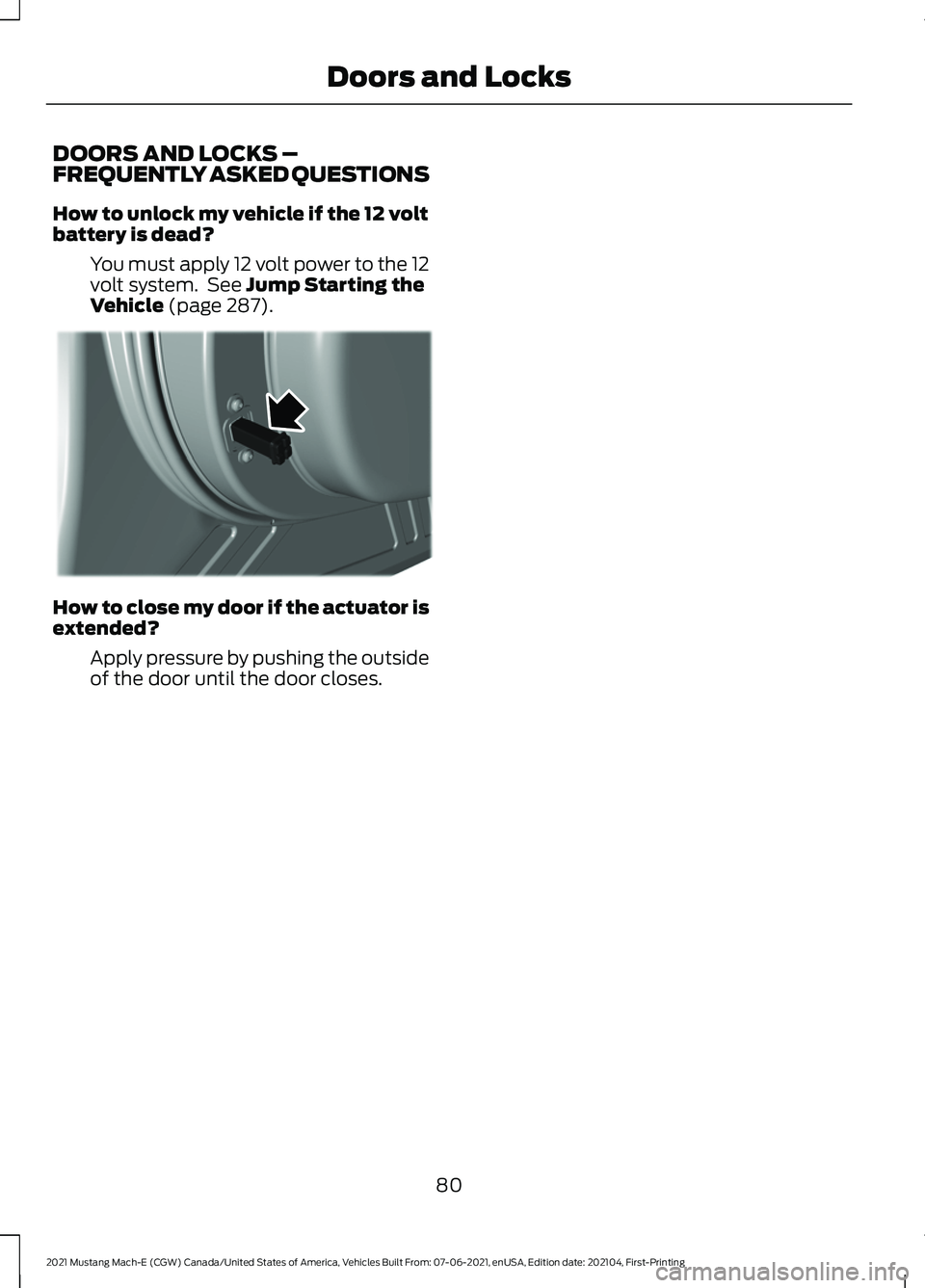
FREQUENTLY ASKED QUESTIONS
How to unlock my vehicle if the 12 volt
battery is dead?
You must apply 12 volt power to the 12
volt system. See Jump Starting the
Vehicle (page 287). How to close my door if the actuator is
extended?
Apply pressure by pushing the outside
of the door until the door closes.
80
2021 Mustang Mach-E (CGW) Canada/United States of America, Vehicles Built From: 07-06-2021, enUSA, Edition date: 202104, First-Printing Doors and LocksE350996
Page 85 of 460
KEYLESS ENTRY LIMITATIONS
Make sure your remote control is within 3 ft
(1 m) from the front door handles and the
tailgate.
The system could not function if:
• The remote control remains stationary
for about a minute.
• The vehicle battery has no charge.
• The remote control battery has no
charge.
• There is interference causing issues
with the remote control frequencies.
• The remote control is too close to
metal objects or electronic devices, for
example keys or a cell phone.
KEYLESS ENTRY SETTINGS
Switching Keyless Entry On and
Off
1. With the admin key in the vehicle, fully
press the brake pedal and press the
push button start.
2. Access the vehicle drawer on the touchscreen.
3. Press
SETTINGS.
4. Press
Vehicle.
5. Press
Locks.
6. Press and hold the OK button until the
system reset confirmation appears.
Reprogramming the Unlocking
Function
You can enable two-stage unlocking
function allowing you to unlock only the
driver door when you touch the unlock
sensor. Press and hold both the lock and unlock
buttons on the remote control for four
seconds to disable or enable two-stage
unlocking.
If you program the unlocking function so
that only the driver door unlocks, you can
unlock all of the other doors from inside
your vehicle using the power door lock
control. You can unlock individual doors
by pulling the interior door handles on
those doors.
USING KEYLESS ENTRY
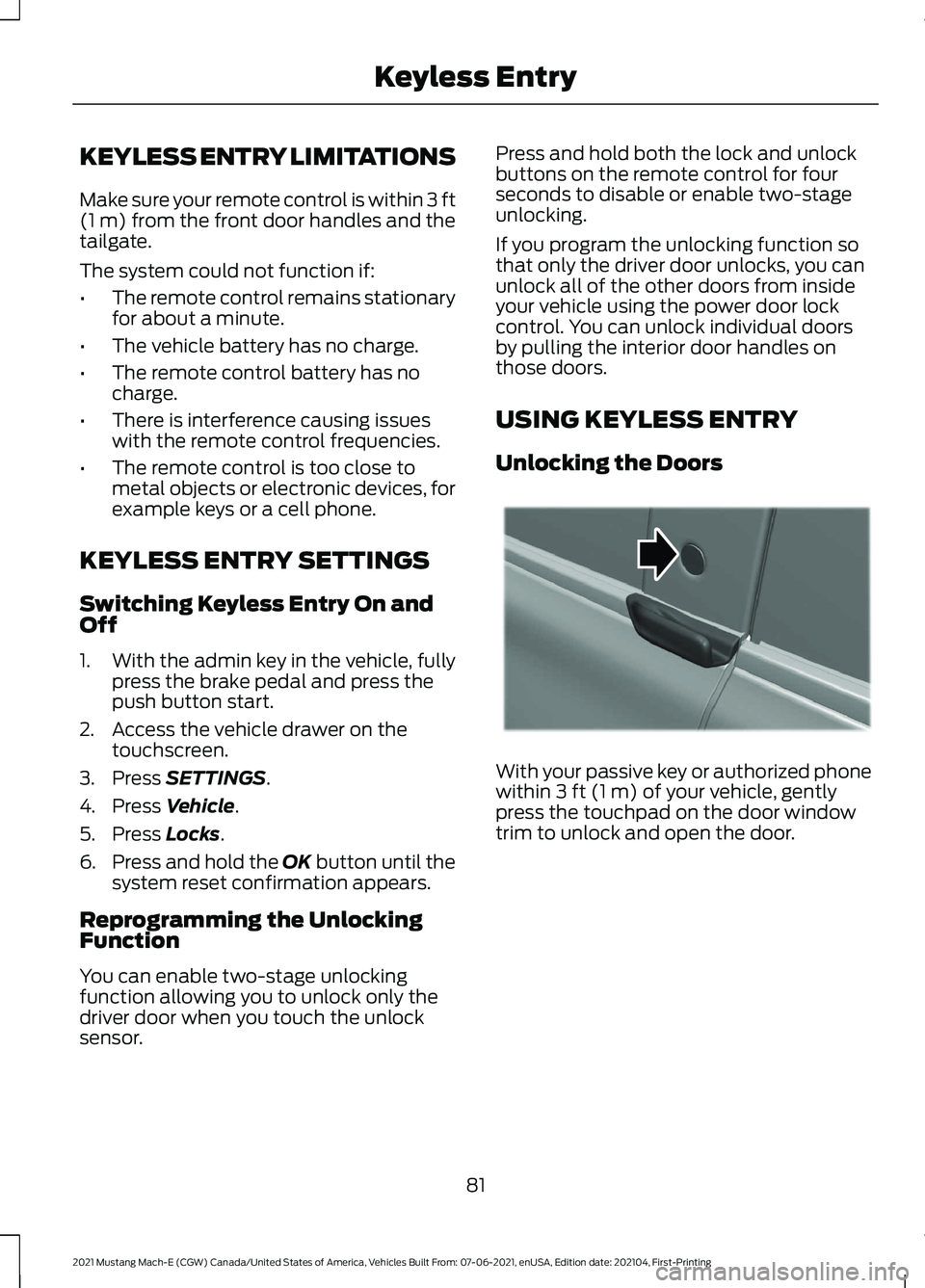
Unlocking the Doors
With your passive key or authorized phone
within
3 ft (1 m) of your vehicle, gently
press the touchpad on the door window
trim to unlock and open the door.
81
2021 Mustang Mach-E (CGW) Canada/United States of America, Vehicles Built From: 07-06-2021, enUSA, Edition date: 202104, First-Printing Keyless EntryE334831