brake light FORD MUSTANG MACH-E 2021 User Guide
[x] Cancel search | Manufacturer: FORD, Model Year: 2021, Model line: MUSTANG MACH-E, Model: FORD MUSTANG MACH-E 2021Pages: 460, PDF Size: 7.29 MB
Page 229 of 460
ADAPTIVE CRUISE CONTROL
AUTOMATIC CANCELLATION
The system may cancel if:
•
The tires lose traction.
• You apply the parking brake.
The system may cancel and set the parking
brake if:
• You unbuckle the seatbelt and open
the driver door after you stop your
vehicle.
• Your vehicle is at a stop continuously
for more than three minutes.
The system may deactivate or prevent
activating when requested if:
• The vehicle has a blocked sensor.
• The brake temperature is too high.
• There is a failure in the system or a
related system.
SETTING THE ADAPTIVE
CRUISE CONTROL SPEED
Drive to the speed you prefer. Press the toggle button upward
or downward to set the current
speed.
Take your foot off the accelerator pedal.
The indicator, current gap setting and set
speed appear in the instrument cluster
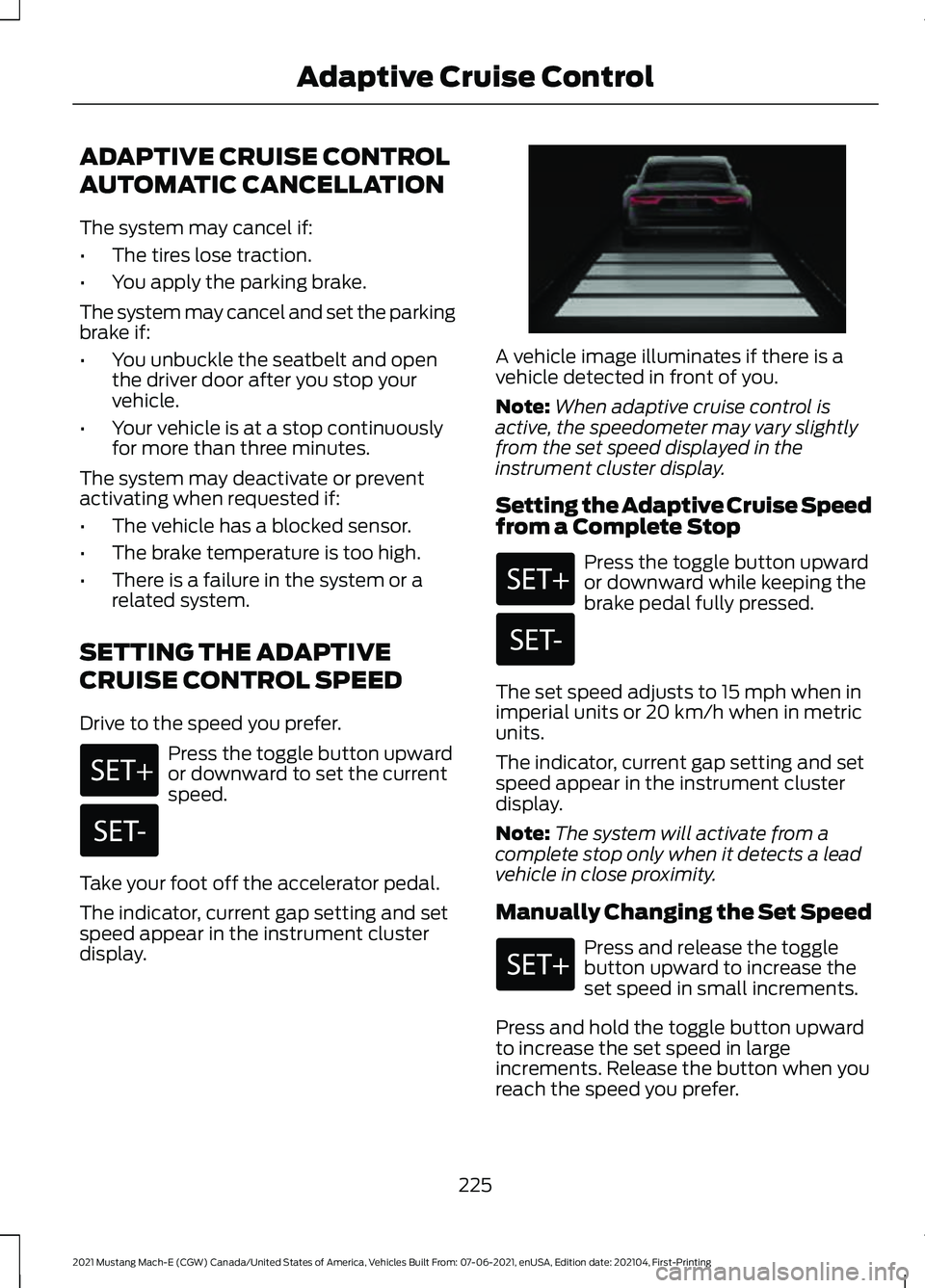
display. A vehicle image illuminates if there is a
vehicle detected in front of you.
Note:
When adaptive cruise control is
active, the speedometer may vary slightly
from the set speed displayed in the
instrument cluster display.
Setting the Adaptive Cruise Speed
from a Complete Stop Press the toggle button upward
or downward while keeping the
brake pedal fully pressed.
The set speed adjusts to 15 mph when in
imperial units or 20 km/h when in metric
units.
The indicator, current gap setting and set
speed appear in the instrument cluster
display.
Note: The system will activate from a
complete stop only when it detects a lead
vehicle in close proximity.
Manually Changing the Set Speed Press and release the toggle
button upward to increase the
set speed in small increments.
Press and hold the toggle button upward
to increase the set speed in large
increments. Release the button when you
reach the speed you prefer.
225
2021 Mustang Mach-E (CGW) Canada/United States of America, Vehicles Built From: 07-06-2021, enUSA, Edition date: 202104, First-Printing Adaptive Cruise Control E255686
Page 261 of 460
WHAT IS PRE-COLLISION
ASSIST
Pre-collision assist detects and warns of
approaching hazards in the roadway. If
your vehicle is rapidly approaching another
stationary vehicle, a vehicle traveling in the
same direction as yours, or a pedestrian
within your driving path, the system
provides multiple levels of assistance to
help avoid a collision.
HOW DOES PRE-COLLISION
ASSIST WORK
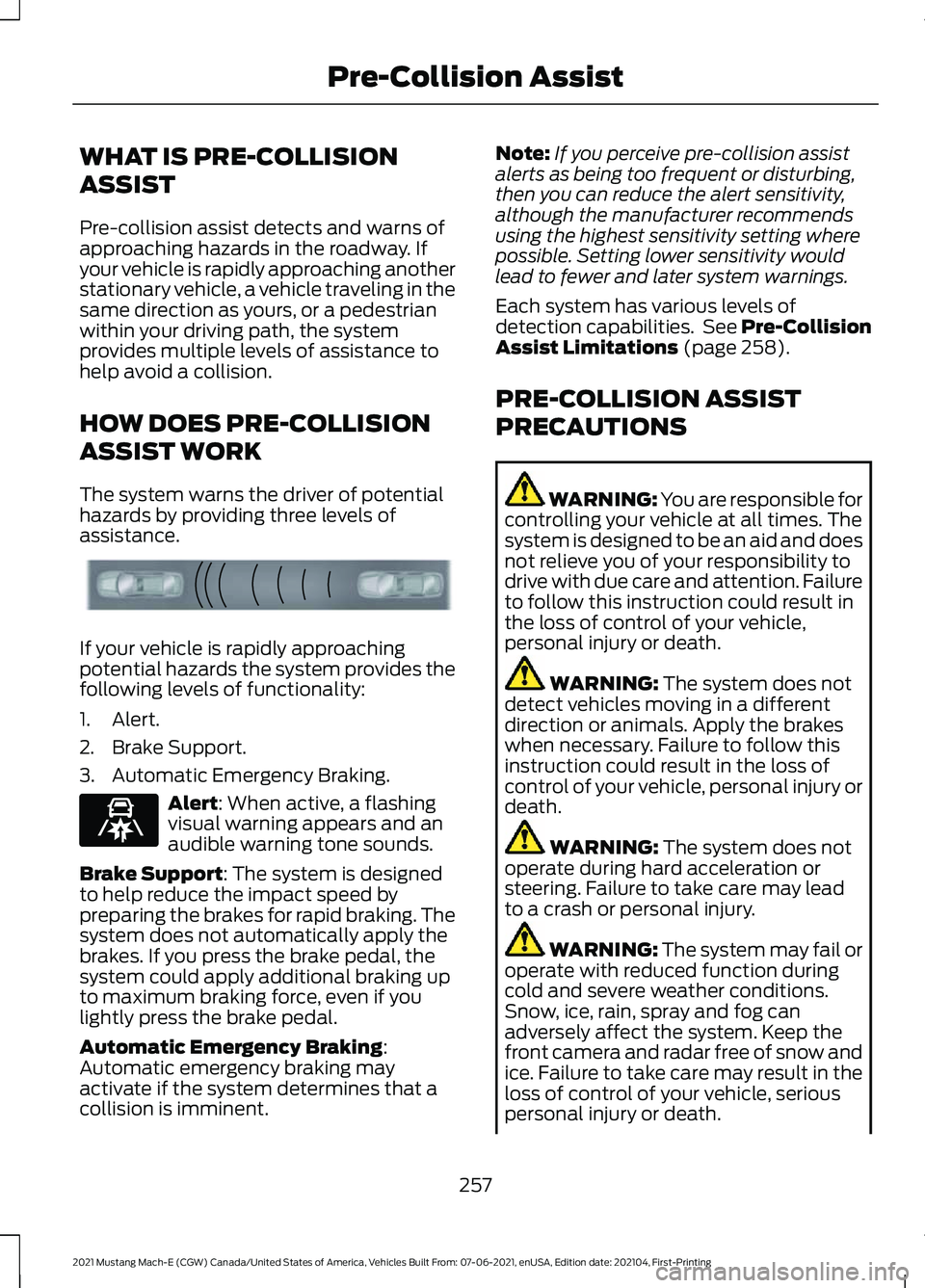
The system warns the driver of potential
hazards by providing three levels of
assistance.
If your vehicle is rapidly approaching
potential hazards the system provides the
following levels of functionality:
1. Alert.
2. Brake Support.
3. Automatic Emergency Braking.
Alert: When active, a flashing
visual warning appears and an
audible warning tone sounds.
Brake Support
: The system is designed
to help reduce the impact speed by
preparing the brakes for rapid braking. The
system does not automatically apply the
brakes. If you press the brake pedal, the
system could apply additional braking up
to maximum braking force, even if you
lightly press the brake pedal.
Automatic Emergency Braking
:
Automatic emergency braking may
activate if the system determines that a
collision is imminent. Note:
If you perceive pre-collision assist
alerts as being too frequent or disturbing,
then you can reduce the alert sensitivity,
although the manufacturer recommends
using the highest sensitivity setting where
possible. Setting lower sensitivity would
lead to fewer and later system warnings.
Each system has various levels of
detection capabilities. See Pre-Collision
Assist Limitations
(page 258).
PRE-COLLISION ASSIST
PRECAUTIONS WARNING: You are responsible for
controlling your vehicle at all times. The
system is designed to be an aid and does
not relieve you of your responsibility to
drive with due care and attention. Failure
to follow this instruction could result in
the loss of control of your vehicle,
personal injury or death. WARNING:
The system does not
detect vehicles moving in a different
direction or animals. Apply the brakes
when necessary. Failure to follow this
instruction could result in the loss of
control of your vehicle, personal injury or
death. WARNING:
The system does not
operate during hard acceleration or
steering. Failure to take care may lead
to a crash or personal injury. WARNING: The system may fail or
operate with reduced function during
cold and severe weather conditions.
Snow, ice, rain, spray and fog can
adversely affect the system. Keep the
front camera and radar free of snow and
ice. Failure to take care may result in the
loss of control of your vehicle, serious
personal injury or death.
257
2021 Mustang Mach-E (CGW) Canada/United States of America, Vehicles Built From: 07-06-2021, enUSA, Edition date: 202104, First-Printing Pre-Collision AssistE156130 E329466
Page 285 of 460
DRIVING THROUGH MUD AND
WATER
Mud
Be cautious of sudden changes in vehicle
speed or direction when you are driving in
mud. Even all-wheel drive and four-wheel
drive vehicles can lose traction in mud. If
your vehicle slides, steer in the direction of
the slide until you regain control of your
vehicle. After driving through mud, clean
off residue stuck to rotating driveshafts
and tires. Excess residue can cause an
imbalance that could damage drive
components.
Note:
If your vehicle gets stuck in mud, it
could be rocked out by shifting between
forward and reverse gears, stopping
between shifts in a steady pattern. Press
lightly on the accelerator in each gear.
Water
If you must drive through water approach
it cautiously. See Driving Through
Shallow Water (page 282).
DRIVING ON HILLY OR SLOPING
TERRAIN
Although natural obstacles could make it
necessary to travel diagonally up or down
a hill or steep incline, you should try to drive
straight up or straight down.
Note: Avoid turning on steep slopes or hills.
A danger lies in losing traction, slipping
sideways and possible vehicle roll over.
Whenever driving on a hill, determine
beforehand the route you can use. Do not
drive over the crest of a hill without seeing
what conditions are on the other side. Do
not drive in reverse over a hill without the
aid of an observer. Apply just enough power to the wheels to
climb the hill. Too much power causes the
tires to slip, spin or lose traction, and you
could lose control of your vehicle. When
descending a steep hill, do not descend
the hill in neutral. Avoid sudden hard
braking to keep the front wheels rolling and
to maintain your vehicle's steering.
Note:
Your vehicle has anti-lock brakes,
apply the brakes steadily. Do not pump the
brakes.
Note: If your vehicle gets stuck driving on
hilly or sloping terrain, it could be rocked out
by shifting between forward and reverse
gears, stopping between shifts in a steady
pattern. Press lightly on the accelerator in
each gear.
DRIVING IN SAND
When driving over sand, try to keep all four
wheels on the most solid area of the trail.
Shift to a lower gear and drive steadily
through the terrain. Apply the accelerator
slowly and avoid excessive wheel slip. Do
not drive your vehicle in deep sand for an
extended period of time. This could
overheat the system. A message appears
in the information display. See All-Wheel
Drive – Information Messages
(page
186).
Note: If your vehicle gets stuck driving on
hilly or sloping terrain, it could be rocked out
by shifting between forward and reverse
gears, stopping between shifts in a steady
pattern. Press lightly on the accelerator in
each gear.
281
2021 Mustang Mach-E (CGW) Canada/United States of America, Vehicles Built From: 07-06-2021, enUSA, Edition date: 202104, First-Printing Driving Hints
Page 287 of 460
•
Lightly press the brake pedal to dry the
brakes and to check that they work.
• Turn the steering wheel to check that
the steering power assist works.
Check the function of the following:
• Horn
• Exterior lights
FLOOR MATS WARNING: Use a floor mat
designed to fit the footwell of your
vehicle that does not obstruct the pedal
area. Failure to follow this instruction
could result in the loss of control of your
vehicle, personal injury or death. WARNING:
Pedals that cannot
move freely can cause loss of vehicle
control and increase the risk of serious
personal injury. WARNING:
Secure the floor mat
to both retention devices so that it
cannot slip out of position and interfere
with the pedals. Failure to follow this
instruction could result in the loss of
control of your vehicle, personal injury or
death. WARNING: Do not place additional
floor mats or any other covering on top
of the original floor mats. This could
result in the floor mat interfering with the
operation of the pedals. Failure to follow
this instruction could result in the loss of
control of your vehicle, personal injury or
death. WARNING:
Always make sure that
objects cannot fall into the driver foot
well while your vehicle is moving. Objects
that are loose can become trapped
under the pedals causing a loss of
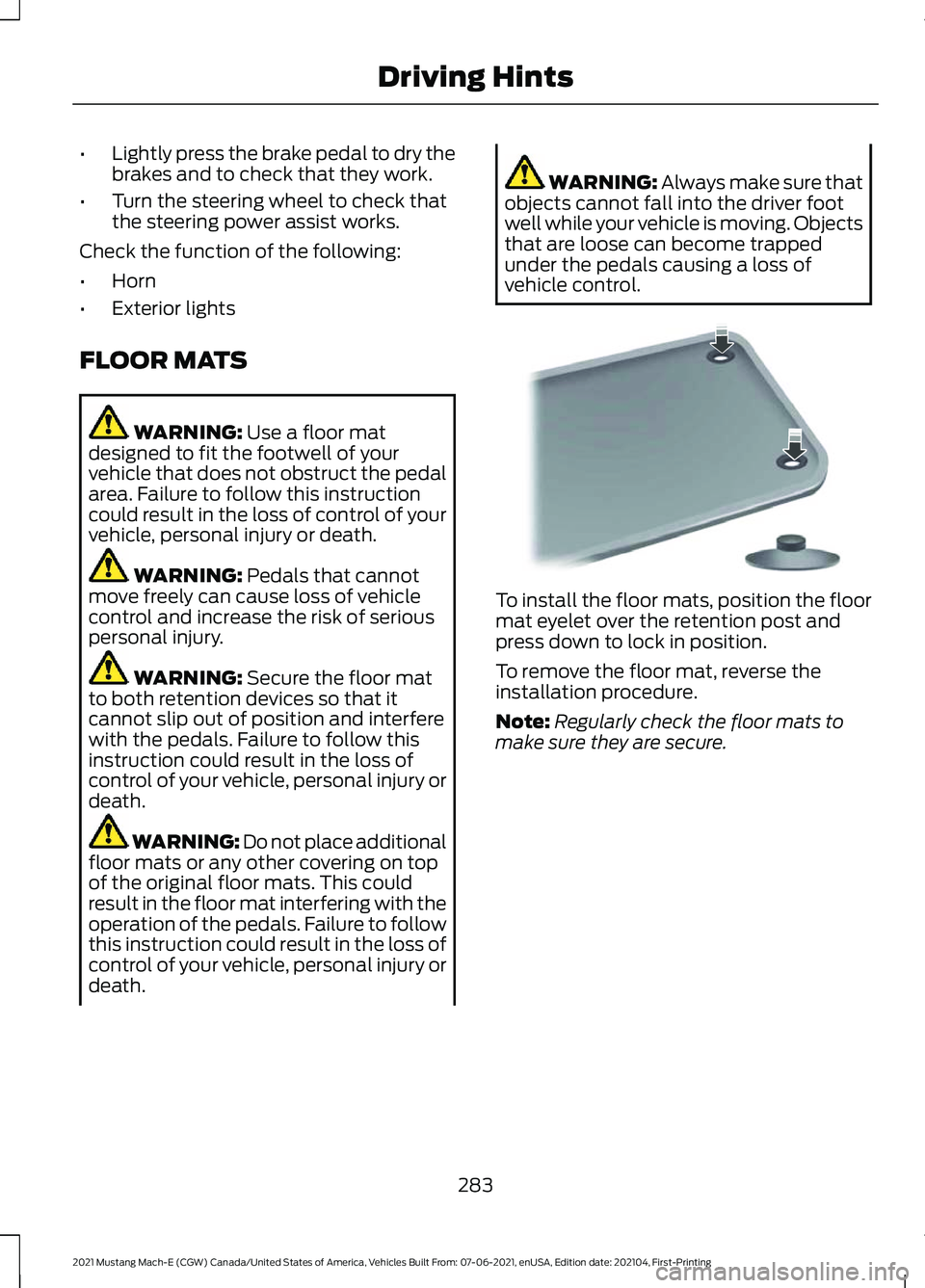
vehicle control. To install the floor mats, position the floor
mat eyelet over the retention post and
press down to lock in position.
To remove the floor mat, reverse the
installation procedure.
Note:
Regularly check the floor mats to
make sure they are secure.
283
2021 Mustang Mach-E (CGW) Canada/United States of America, Vehicles Built From: 07-06-2021, enUSA, Edition date: 202104, First-Printing Driving HintsE142666
Page 311 of 460
12V BATTERY – INFORMATION MESSAGES
Action
Message
Your vehicle has a 12 volt battery problem.
We recommend having the battery system checked by an authorized EV dealer.
12V Battery Fault Service Soon
The electric vehicle range is reduced due
to the park and/or hazard lamps on while your vehicle was off.
Electric Range Reduced due to Park/Hazard
Lamps On While Vehicle Off
Your vehicle has an electrical drain withinthe vehicle. Please check for any after-
market devices that could be draining the
battery. If none are found, please have your
vehicle serviced by an authorized EV dealer.
Electrical System Drain Service Required
ADJUSTING THE HEADLAMPS
Vertical Aim Adjustment
The headlamps on your vehicle are
properly aimed at the assembly plant. If
your vehicle has been in an accident, have
the alignment of your headlamps checked
by an authorized dealer.
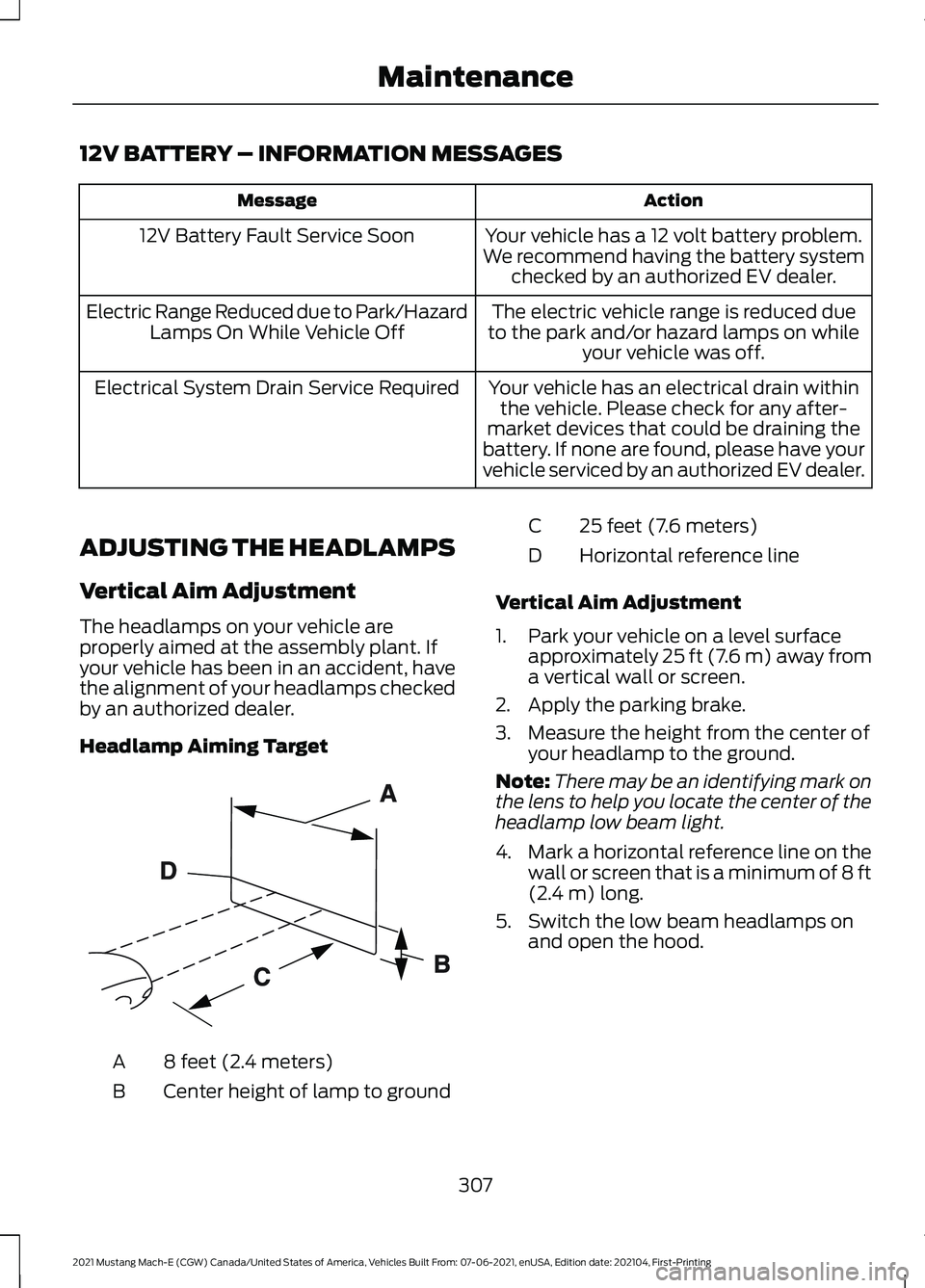
Headlamp Aiming Target 8 feet (2.4 meters)
A
Center height of lamp to ground
B 25 feet (7.6 meters)
C
Horizontal reference line
D
Vertical Aim Adjustment
1. Park your vehicle on a level surface approximately 25 ft (7.6 m) away from
a vertical wall or screen.
2. Apply the parking brake.
3. Measure the height from the center of your headlamp to the ground.
Note: There may be an identifying mark on
the lens to help you locate the center of the
headlamp low beam light.
4. Mark a horizontal reference line on the
wall or screen that is a minimum of 8 ft
(2.4 m)
long.
5. Switch the low beam headlamps on and open the hood.
307
2021 Mustang Mach-E (CGW) Canada/United States of America, Vehicles Built From: 07-06-2021, enUSA, Edition date: 202104, First-Printing MaintenanceE142592
Page 319 of 460
PREPARING YOUR VEHICLE
FOR STORAGE
If you plan on storing your vehicle for 30
days or more, read the following
maintenance recommendations to make
sure your vehicle stays in good operating
condition.
We engineer and test all vehicles and their
components for reliable, regular driving.
Under various conditions, long-term
storage may lead to degraded
performance or failure unless you use
specific precautions to preserve vehicle
components.
General
•
Store all vehicles in a dry, ventilated
place.
• Protect from sunlight, if possible.
• If vehicles are stored outside, they
require regular maintenance to protect
against rust and damage.
Body
• Wash your vehicle thoroughly to
remove dirt, grease, oil, tar or mud from
exterior surfaces, rear-wheel housing
and the underside of front fenders.
• Periodically wash your vehicle if it is
stored in exposed locations.
• Touch-up exposed or primed metal to
prevent rust.
• Cover chrome and stainless steel parts
with a thick coat of auto wax to prevent
discoloration. Re-wax as necessary
when you wash your vehicle.
• Lubricate all hood, door and luggage
compartment hinges and latches with
a light grade oil.
• Cover interior trim to prevent fading.
• Keep all rubber parts free from oil and
solvents. Cooling system
•
Protect against freezing temperatures.
• When removing your vehicle from
storage, check coolant fluid level.
Confirm that there are no cooling
system leaks and that fluid is at the
recommended level.
Battery Systems
We recommend the following actions for
your vehicle:
• When storing your vehicle for greater
than 30 days the state of charge
should be approximately 50%.
Additionally we recommend
disconnecting the 12v battery which
will reduce system loads on the HV
battery.
Brakes
• Make sure the brakes and parking brake
release fully.
Tires
• Maintain recommended air pressure.
Miscellaneous
• Make sure all linkages, cables, levers
and pins under your vehicle are covered
with grease to prevent rust.
• Move vehicles at least 25 ft (7.5 m)
every 15 days to lubricate working parts
and prevent corrosion.
315
2021 Mustang Mach-E (CGW) Canada/United States of America, Vehicles Built From: 07-06-2021, enUSA, Edition date: 202104, First-Printing Storing Your Vehicle
Page 338 of 460
Accessory power plug
H
Casing/housing
I
Bike/raft/sports ball adapters
J
USING THE TIRE SEALANT
AND INFLATOR KIT
Tips for use of the kit
To ensure safe operation of the kit:
• Before operating the kit, make sure
your vehicle is safely off the road and
away from moving traffic.
• Do not remove any foreign objects,
such as nails or screws, from the tire.
• Do not allow the compressor to
operate continuously for more than 15
minutes. This will help prevent the
compressor from overheating.
• Only use the kit when the ambient
temperature is between -22°F (-30°C)
and 158°F (70°C).
• Only use the sealing compound before
the use-by date. The use-by date is on
a label on the sealant canister and can
be seen through the rectangular
viewing window on the bottom of the
compressor. Check the use-by date
regularly and replace the canister when
the sealant expires.
Note: Sealant compound contains latex.
Use appropriate precautions to avoid any
allergic reactions. When inflation only is required
for a tire or other objects, the
selector must be in the Air
position.
What to do when a tire is punctured
A tire puncture within the tire's tread area
can be repaired in two stages with the kit. •
In the first stage, the tire will be
reinflated with a sealing compound
and air. After the tire has been inflated,
you will need to drive the vehicle a
short distance approximately
4 mi
(6 km) to distribute the sealant in the
tire.
• In the second stage, you will need to
check the tire pressure and adjust, if
necessary, to the vehicle's specified
tire inflation pressure.
First Stage: Reinflating the Tire
with sealing compound and air WARNING:
Do not stand directly
over the kit while inflating the tire. If you
notice any unusual bulges or
deformations in the tire's sidewall during
inflation, stop and call roadside
assistance. WARNING:
If the tire does not
inflate to the recommended tire pressure
within 15 minutes, stop and call roadside
assistance.
Park the vehicle in a safe, level and secure
area, away from moving traffic.
Turn the hazard lights on. Apply the parking
brake and power off the vehicle. Inspect
the flat tire for visible damage.
If a puncture is located in the tire sidewall,
stop and call roadside assistance.
1. Remove the valve cap from the tire valve.
2. Unwrap the dual purpose hose (black tube) from the back of the compressor
housing.
3. Fasten the hose to the tire valve by turning the connector clockwise.
Tighten the connection securely.
334
2021 Mustang Mach-E (CGW) Canada/United States of America, Vehicles Built From: 07-06-2021, enUSA, Edition date: 202104, First-Printing Tire Sealant and Inflator KitE175978
Page 389 of 460
UPDATING THE VEHICLE
SYSTEMS WIRELESSLY
Over the air system updates
allow you to update your vehicle
system software wirelessly. To
make sure you receive all updates, set a
recurring schedule and connect to Wi-Fi.
Updates may take longer if not connected
to Wi-Fi, or may not download at all. See
Connected Vehicle (page 350).
Note: Additional over the air update icons
may appear in the status bar. See
Status
Bar (page 366).
Over the Air System Update
Requirements
Before updating, reference this list to make
sure your vehicle is ready be updated. If
these requirements are not met during a
scheduled update, the update will be
canceled and you can reschedule.
• Your vehicle is not running.
• Your vehicle is stopped.
• Your vehicle is parked.
• The hazard indicators are switched off.
• The alarm is not sounding.
• The doors are closed.
• The parking lights are switched off.
• You are not pressing the brake pedal.
• An emergency call is not in progress.
• Your vehicle is not in limp mode.
Scheduling an Over the Air System
Update
Make sure Vehicle Connectivity and
Automatic Updates are switched on.
Using the Settings Menu
1. Open the application drawer.
2. Press the
System Updates button. 3. Press
Schedule Update.
4. Use the controls to set the time and day of the update.
5. Save the schedule.
Note: You can set the updates to occur
every seven days.
Using the Status Bar Icon When an update is available, tap
the notification icon and follow
the prompts on the screen.
Applying an Over the Air System
Update
You can schedule a convenient time for
the update to complete. During scheduled
updates you may not be able to use your
vehicle.
Note: Updates may take up to 30 minutes
to complete.
You can see the progress of the update on
the touchscreen. An update cannot be
canceled once it has been started.
During an update you will not be able to
drive your vehicle, start the vehicle, use
remote controls to lock and unlock the
vehicle. The alarm, central locks, and door
tones are disabled. The electronic door
lock will not function during an update. You
can open the doors using the mechanical
latch if child locks are not on. Pull the
handle until it stops to use the mechanical
latch.
Note: Double locking is switched off and
central locking is switched on during and
after an update.
Note: If your vehicle is plugged in, charging
will stop during an update and resume when
the update is complete.
385
2021 Mustang Mach-E (CGW) Canada/United States of America, Vehicles Built From: 07-06-2021, enUSA, Edition date: 202104, First-Printing Vehicle System UpdatesE327789 E327785
Page 395 of 460
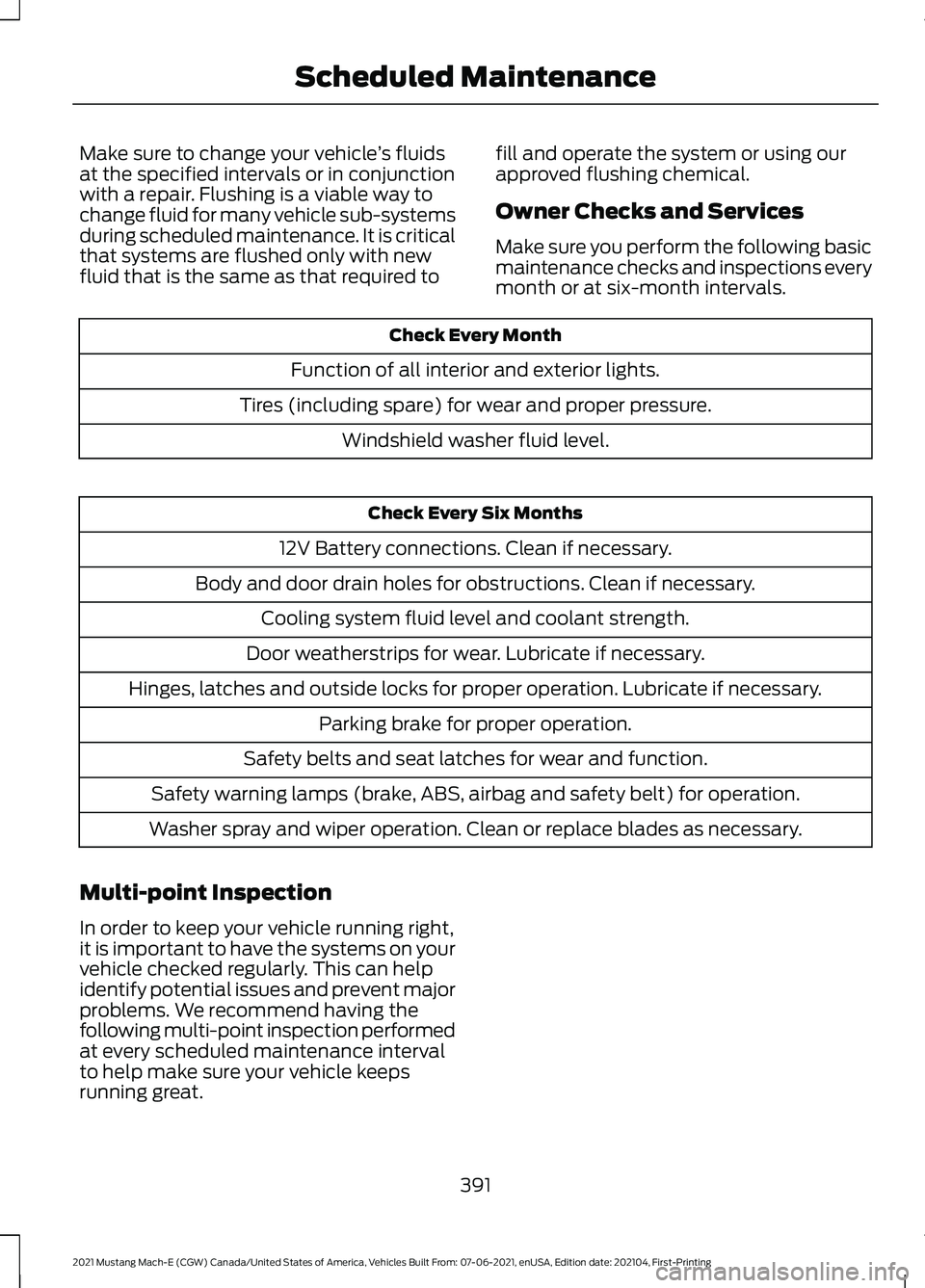
Make sure to change your vehicle
’s fluids
at the specified intervals or in conjunction
with a repair. Flushing is a viable way to
change fluid for many vehicle sub-systems
during scheduled maintenance. It is critical
that systems are flushed only with new
fluid that is the same as that required to fill and operate the system or using our
approved flushing chemical.
Owner Checks and Services
Make sure you perform the following basic
maintenance checks and inspections every
month or at six-month intervals.Check Every Month
Function of all interior and exterior lights.
Tires (including spare) for wear and proper pressure. Windshield washer fluid level. Check Every Six Months
12V Battery connections. Clean if necessary.
Body and door drain holes for obstructions. Clean if necessary. Cooling system fluid level and coolant strength.
Door weatherstrips for wear. Lubricate if necessary.
Hinges, latches and outside locks for proper operation. Lubricate if necessary. Parking brake for proper operation.
Safety belts and seat latches for wear and function.
Safety warning lamps (brake, ABS, airbag and safety belt) for operation.
Washer spray and wiper operation. Clean or replace blades as necessary.
Multi-point Inspection
In order to keep your vehicle running right,
it is important to have the systems on your
vehicle checked regularly. This can help
identify potential issues and prevent major
problems. We recommend having the
following multi-point inspection performed
at every scheduled maintenance interval
to help make sure your vehicle keeps
running great.
391
2021 Mustang Mach-E (CGW) Canada/United States of America, Vehicles Built From: 07-06-2021, enUSA, Edition date: 202104, First-Printing Scheduled Maintenance
Page 441 of 460
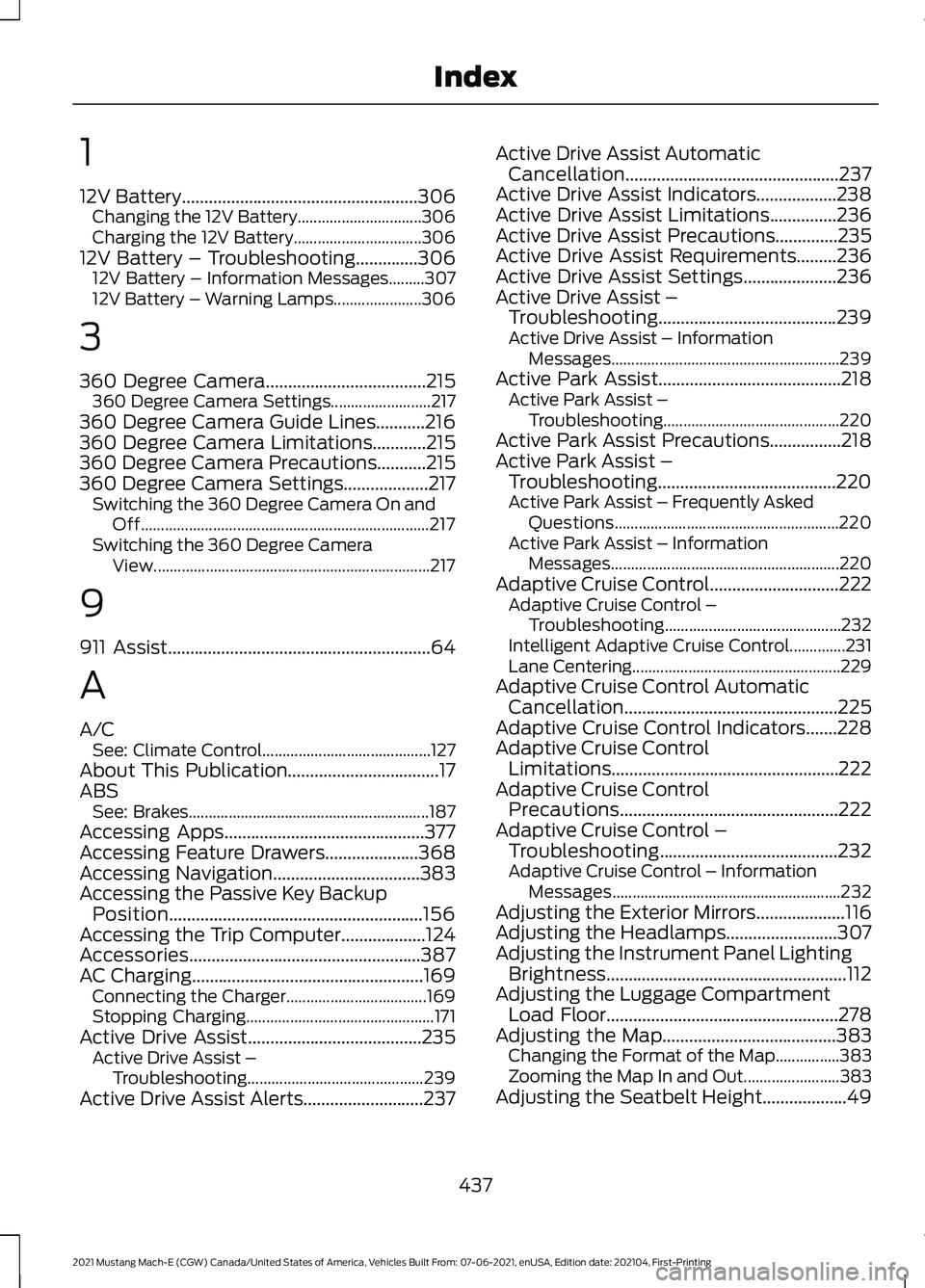
1
12V Battery.....................................................306
Changing the 12V Battery............................... 306
Charging the 12V Battery................................ 306
12V Battery – Troubleshooting
..............306
12V Battery – Information Messages.........307
12V Battery – Warning Lamps...................... 306
3
360 Degree Camera
....................................215
360 Degree Camera Settings......................... 217
360 Degree Camera Guide Lines...........216
360 Degree Camera Limitations
............215
360 Degree Camera Precautions...........215
360 Degree Camera Settings...................217 Switching the 360 Degree Camera On and
Off........................................................................\
217
Switching the 360 Degree Camera View..................................................................... 217
9
911 Assist
...........................................................64
A
A/C See: Climate Control.......................................... 127
About This Publication..................................17
ABS See: Brakes............................................................ 187
Accessing Apps
.............................................377
Accessing Feature Drawers.....................368
Accessing Navigation
.................................383
Accessing the Passive Key Backup Position.........................................................156
Accessing the Trip Computer
...................124
Accessories....................................................387
AC Charging....................................................169 Connecting the Charger................................... 169
Stopping Charging............................................... 171
Active Drive Assist.......................................235 Active Drive Assist –
Troubleshooting............................................ 239
Active Drive Assist Alerts...........................237 Active Drive Assist Automatic
Cancellation................................................237
Active Drive Assist Indicators..................238
Active Drive Assist Limitations...............236
Active Drive Assist Precautions..............235
Active Drive Assist Requirements
.........236
Active Drive Assist Settings.....................236
Active Drive Assist – Troubleshooting........................................
239
Active Drive Assist – Information
Messages......................................................... 239
Active Park Assist.........................................218 Active Park Assist –
Troubleshooting............................................ 220
Active Park Assist Precautions................218
Active Park Assist – Troubleshooting........................................220
Active Park Assist – Frequently Asked Questions........................................................ 220
Active Park Assist – Information Messages......................................................... 220
Adaptive Cruise Control.............................222 Adaptive Cruise Control –
Troubleshooting............................................ 232
Intelligent Adaptive Cruise Control..............231
Lane Centering.................................................... 229
Adaptive Cruise Control Automatic Cancellation................................................225
Adaptive Cruise Control Indicators.......228
Adaptive Cruise Control Limitations...................................................222
Adaptive Cruise Control Precautions.................................................222
Adaptive Cruise Control – Troubleshooting........................................232
Adaptive Cruise Control – Information Messages......................................................... 232
Adjusting the Exterior Mirrors....................116
Adjusting the Headlamps.........................307
Adjusting the Instrument Panel Lighting Brightness......................................................112
Adjusting the Luggage Compartment Load Floor
....................................................278
Adjusting the Map.......................................383
Changing the Format of the Map................383
Zooming the Map In and Out........................ 383
Adjusting the Seatbelt Height...................49
437
2021 Mustang Mach-E (CGW) Canada/United States of America, Vehicles Built From: 07-06-2021, enUSA, Edition date: 202104, First-Printing Index