instrument panel FORD MUSTANG MACH-E 2021 User Guide
[x] Cancel search | Manufacturer: FORD, Model Year: 2021, Model line: MUSTANG MACH-E, Model: FORD MUSTANG MACH-E 2021Pages: 460, PDF Size: 7.29 MB
Page 156 of 460
WHAT IS THE WIRELESS
ACCESSORY CHARGER
The wireless accessory charger allows you
to charge one compatible Qi wireless
charging device on the charging area.
WIRELESS ACCESSORY
CHARGER PRECAUTIONS
WARNING: Wireless charging
devices can affect the operation of
implanted medical devices, including
cardiac pacemakers. If you have any
implanted medical devices, we
recommend that you consult with your
physician.
Tests on this equipment show that it
complies with part 18 of the FCC Rules.
• This equipment generates, uses and
can radiate radio frequency energy and
may cause harmful interference to
radio communications. There is no
guarantee that the interference will not
occur in a particular installation. If this
equipment does cause harmful
interference to radio or television
reception, please consult the dealer.
• This product is not end-user
serviceable. WARNING:
Changes or
modifications not expressively approved
by the party responsible for compliance
could void the user's authority to operate
the equipment. The term "IC:" before the
radio certification number only signifies
that Industry Canada technical
specifications were met. This device complies with Industry Canada
licence-exempt RSS standard(s).
Operation is subject to:
•
This device may not cause interference.
• This device must accept any
interference, including interference that
may cause undesired operation of the
device.
Keep the charging area clean and remove
foreign objects prior to charging a device.
Do not place items with a magnetic strip
or radio-frequency identification chip, for
example passports, parking tickets,
transportation passes or credit cards, near
the charging area when charging a device.
Damage may occur to the magnetic strip
or radio-frequency identification chip.
Do not place metal objects, for example
remote controls, coins and candy
wrappers, on or near the charging area
when charging a device. Metal objects may
heat up and degrade the charging
performance, in addition to causing
interruptions in charging.
Note: During charging, the device and the
charger could heat up, this is normal. If the
battery gets hotter than usual, the device
may stop charging.
LOCATING THE WIRELESS
ACCESSORY CHARGER The charging area is in the front
console below the instrument
panel.
CHARGING A WIRELESS
DEVICE
Place the device on the center of the
charging surface with the charging side
down. The charging stops after your device
reaches a full charge.
152
2021 Mustang Mach-E (CGW) Canada/United States of America, Vehicles Built From: 07-06-2021, enUSA, Edition date: 202104, First-Printing Wireless Accessory ChargerE297549
Page 203 of 460
WHAT IS TRACTION CONTROL
The traction control system helps to avoid
drive wheel spin and loss of traction.
HOW DOES TRACTION
CONTROL WORK
If your vehicle begins to slide, the system
applies the brakes to individual wheels
and, when needed, reduces power at the
same time. If the wheels spin when
accelerating on slippery or loose surfaces,
the system reduces power in order to
increase traction.
SWITCHING TRACTION
CONTROL ON AND OFF
WARNING: Operating your vehicle
with the traction control disabled could
lead to an increased risk of loss of vehicle
control, vehicle rollover, personal injury
and death.
The traction control system turns on each
time you switch the power on.
The switch for the stability and traction
control system is on the instrument panel.
When you switch the system off, a
message and an illuminated icon appear
on the instrument cluster.
Use the switch again to return the traction
control system to normal operation. If your vehicle is stuck in mud or snow,
switching traction control off may be
beneficial as this allows the wheels to spin.
Note:
When you switch traction control off,
stability control remains fully active.
Your vehicle could have MyKey restrictions
regarding this feature. See
What Is
MyKey (page 73).
TRACTION CONTROL
INDICATOR
System Indicator Lights TRACTION CONTROL –
TROUBLESHOOTING
TRACTION CONTROL – WARNING
LAMPS
System Messages
The traction control light
temporarily illuminates on
start-up and flashes when
activated by a driving condition.
The traction control off light temporarily
illuminates on start-up and stays on:
• When you switch the traction control
system off.
• When you select an alternative stability
control mode.
• If a problem occurs in the system.
199
2021 Mustang Mach-E (CGW) Canada/United States of America, Vehicles Built From: 07-06-2021, enUSA, Edition date: 202104, First-Printing Traction ControlE130458 E138639
Page 314 of 460
CLEANING THE EXTERIOR
CLEANING THE EXTERIOR
PRECAUTIONS
Immediately remove fuel spillages, additive
residuals, bird droppings, insect deposits
and road tar. These may cause damage to
your vehicle
’s paintwork or trim over time.
Remove any exterior accessories, for
example antennas, before entering a car
wash.
CLEANING HEADLAMPS AND
REAR LAMPS
We recommend that you only use cold or
lukewarm water containing car shampoo
to clean the headlamps and the rear
lamps.
Do not scrape the lamps.
Do not wipe lamps when they are dry.
CLEANING WINDOWS AND WIPER
BLADES
To clean the windshield and wiper blades:
• Clean the windshield with a
non-abrasive glass cleaner.
Note: When cleaning the interior of the
windshield, avoid getting any glass cleaner
on the instrument panel or door panels.
Wipe any glass cleaner off these surfaces
immediately.
• Clean the wiper blades with washer
fluid or water applied with a soft
sponge or cloth.
Note: Do not use razor blades or other
sharp objects to clean or remove decals
from the inside of the heated rear window.
This can cause damage not covered by the
vehicle Warranty. CLEANING CHROME, ALUMINIUM
OR STAINLESS STEEL
We recommend that you only use a car
shampoo, a soft cloth and water on
bumpers and other chrome, aluminium or
stainless steel parts.
Note:
For additional information and
assistance, we recommend that you contact
an authorized dealer.
Note: Rinse the area well after cleaning.
Note: Do not use abrasive materials, for
example steel wool or plastic pads, as they
can scratch these surfaces.
Note: Do not use chrome cleaner, metal
cleaner or polish on wheels or wheel covers.
CLEANING WHEELS
Only use a recommended wheel and tire
cleaner to clean the wheels weekly. For
additional information and assistance, we
recommend that you contact an
authorized dealer.
1. Use a sponge to remove heavy deposits of dirt and brake dust.
2. Rinse well after cleaning.
Note: Do not apply a cleaning chemical to
warm or hot wheel rims and covers.
If you intend on parking your vehicle for an
extended period after cleaning the wheels
with a wheel cleaner, drive your vehicle for
a few minutes before parking your vehicle.
This reduces the risk of corrosion of the
brake discs, brake pads and linings.
Do not clean the wheels when they are hot.
Note: Some car washes could damage
wheel rims and covers.
Note: Using non-recommended cleaners,
harsh cleaning products, chrome wheel
cleaners or abrasive materials could
damage wheel rims and covers.
310
2021 Mustang Mach-E (CGW) Canada/United States of America, Vehicles Built From: 07-06-2021, enUSA, Edition date: 202104, First-Printing Vehicle Care
Page 315 of 460
CLEANING STRIPES OR
GRAPHICS
It is recommended to wash your vehicle by
hand however, pressure washing may be
used under the following conditions:
•
Use a spray with a 40° wide spray
angle pattern.
• Keep the nozzle at a
12 in (305 mm)
distance and 90° angle to your
vehicle's surface.
• Do not use water pressure higher than
2,000 psi (14,000 kPa)
.
• Do not use water hotter than
179°F
(82°C).
Note: Holding the pressure washer nozzle
at an angle to the vehicle's surface may
damage graphics and cause the edges to
peel away from the vehicle's surface.
CLEANING CAMERA LENSES AND
SENSORS
We recommend that you only use
lukewarm or cold water and a soft cloth
to clean the camera lens and sensors.
Note: Do not pressure wash camera lens
and sensors.
CLEANING THE UNDERBODY
Flush the complete underside of your
vehicle frequently. Keep body and door
drain holes free from packed dirt.
Rear suspension components may require
regular cleaning with a power washer or a
thorough rinse with a strong stream of
water if the vehicle is operated in dusty or
muddy environments. Rear leaf springs or
other suspension components may emit
squeaking or popping noises while
operating the vehicle if particles, such as
dirt, rocks, or other debris, are present in
the components. WAXING
Wax the high-gloss painted surface of your
prewashed vehicle once or twice a year.
We recommend that you only use an
approved quality wax that does not
contain abrasives. For additional
information and assistance, we
recommend that you contact an
authorized dealer.
When washing and waxing, park your
vehicle in a shaded area out of direct
sunlight.
Note:
Avoid waxing unpainted or low-gloss
black colored parts, they discolor over time.
CLEANING THE INTERIOR
CLEANING THE INSTRUMENT
PANEL WARNING:
Do not use chemical
solvents or strong detergents when
cleaning the steering wheel or
instrument panel to avoid contamination
of the airbag system.
We recommend that you only clean the
instrument panel and cluster lens with a
damp soft cloth. Dry the area with a clean,
soft cloth.
For additional information and assistance,
we recommend that you contact an
authorized dealer.
Note: Avoid cleaners or polishes that
increase the gloss of the upper portion of
the instrument panel. The dull finish in this
area helps protect you from undesirable
windshield reflection.
311
2021 Mustang Mach-E (CGW) Canada/United States of America, Vehicles Built From: 07-06-2021, enUSA, Edition date: 202104, First-Printing Vehicle Care
Page 339 of 460
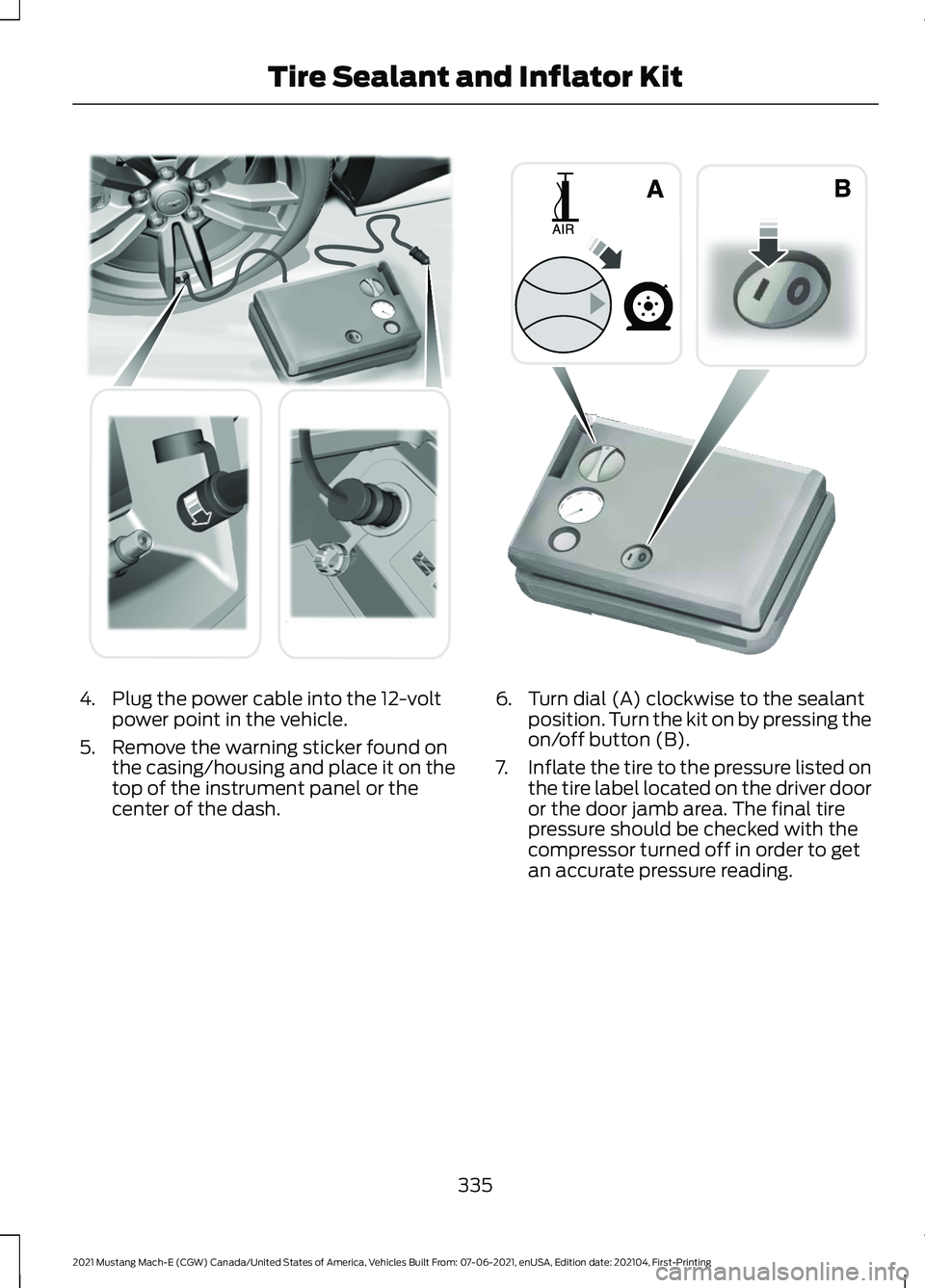
4. Plug the power cable into the 12-volt
power point in the vehicle.
5. Remove the warning sticker found on the casing/housing and place it on the
top of the instrument panel or the
center of the dash. 6. Turn dial (A) clockwise to the sealant
position. Turn the kit on by pressing the
on/off button (B).
7. Inflate the tire to the pressure listed on
the tire label located on the driver door
or the door jamb area. The final tire
pressure should be checked with the
compressor turned off in order to get
an accurate pressure reading.
335
2021 Mustang Mach-E (CGW) Canada/United States of America, Vehicles Built From: 07-06-2021, enUSA, Edition date: 202104, First-Printing Tire Sealant and Inflator Kit E175979 E175981
Page 352 of 460
VEHICLE IDENTIFICATION
NUMBER
LOCATING THE VEHICLE
IDENTIFICATION NUMBER
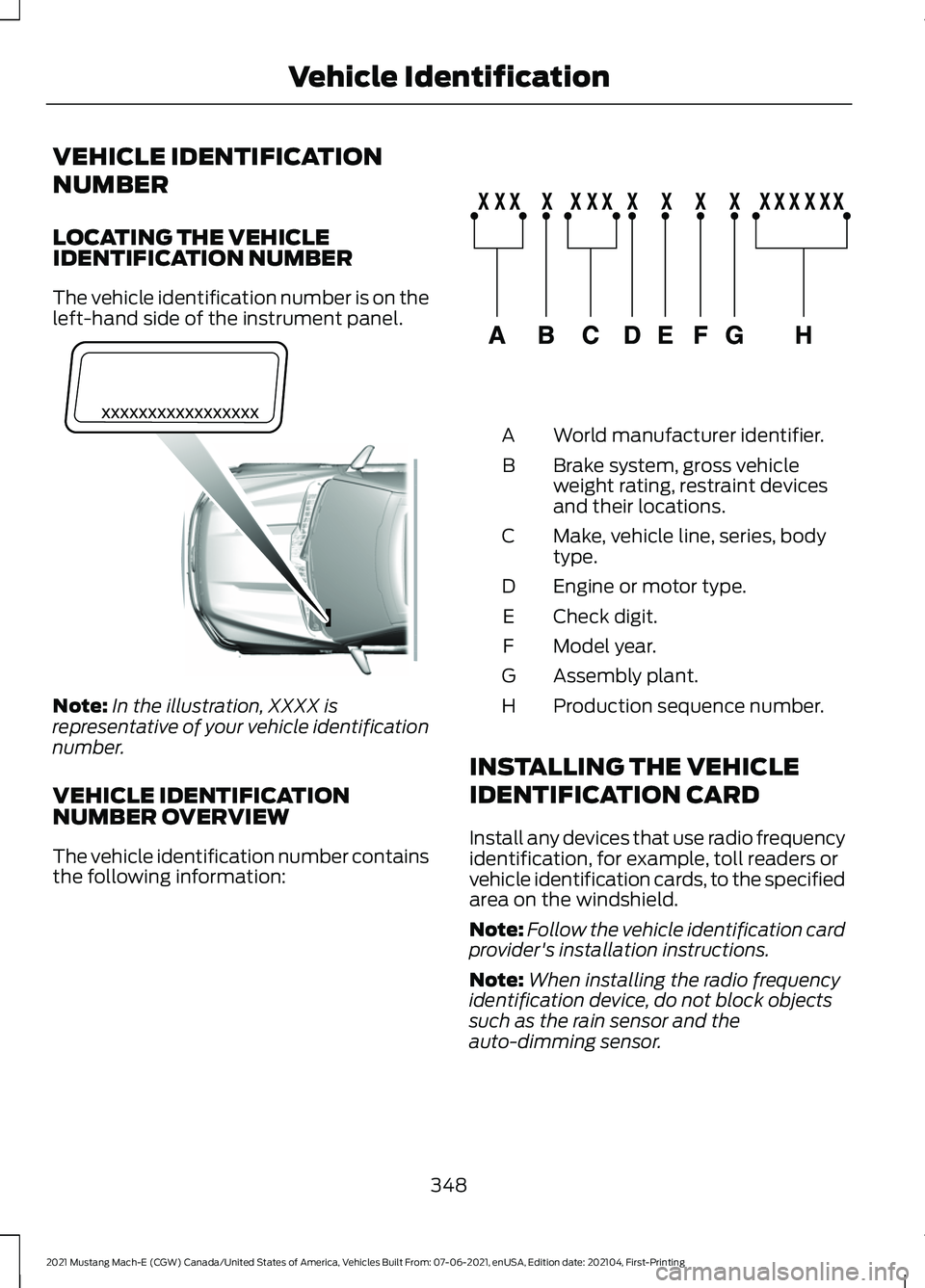
The vehicle identification number is on the
left-hand side of the instrument panel.
Note:
In the illustration, XXXX is
representative of your vehicle identification
number.
VEHICLE IDENTIFICATION
NUMBER OVERVIEW
The vehicle identification number contains
the following information: World manufacturer identifier.
A
Brake system, gross vehicle
weight rating, restraint devices
and their locations.
B
Make, vehicle line, series, body
type.
C
Engine or motor type.
D
Check digit.
E
Model year.
F
Assembly plant.
G
Production sequence number.
H
INSTALLING THE VEHICLE
IDENTIFICATION CARD
Install any devices that use radio frequency
identification, for example, toll readers or
vehicle identification cards, to the specified
area on the windshield.
Note: Follow the vehicle identification card
provider's installation instructions.
Note: When installing the radio frequency
identification device, do not block objects
such as the rain sensor and the
auto-dimming sensor.
348
2021 Mustang Mach-E (CGW) Canada/United States of America, Vehicles Built From: 07-06-2021, enUSA, Edition date: 202104, First-Printing Vehicle IdentificationE311767 E142477
Page 441 of 460
1
12V Battery.....................................................306
Changing the 12V Battery............................... 306
Charging the 12V Battery................................ 306
12V Battery – Troubleshooting
..............306
12V Battery – Information Messages.........307
12V Battery – Warning Lamps...................... 306
3
360 Degree Camera
....................................215
360 Degree Camera Settings......................... 217
360 Degree Camera Guide Lines...........216
360 Degree Camera Limitations
............215
360 Degree Camera Precautions...........215
360 Degree Camera Settings...................217 Switching the 360 Degree Camera On and
Off........................................................................\
217
Switching the 360 Degree Camera View..................................................................... 217
9
911 Assist
...........................................................64
A
A/C See: Climate Control.......................................... 127
About This Publication..................................17
ABS See: Brakes............................................................ 187
Accessing Apps
.............................................377
Accessing Feature Drawers.....................368
Accessing Navigation
.................................383
Accessing the Passive Key Backup Position.........................................................156
Accessing the Trip Computer
...................124
Accessories....................................................387
AC Charging....................................................169 Connecting the Charger................................... 169
Stopping Charging............................................... 171
Active Drive Assist.......................................235 Active Drive Assist –
Troubleshooting............................................ 239
Active Drive Assist Alerts...........................237 Active Drive Assist Automatic
Cancellation................................................237
Active Drive Assist Indicators..................238
Active Drive Assist Limitations...............236
Active Drive Assist Precautions..............235
Active Drive Assist Requirements
.........236
Active Drive Assist Settings.....................236
Active Drive Assist – Troubleshooting........................................
239
Active Drive Assist – Information
Messages......................................................... 239
Active Park Assist.........................................218 Active Park Assist –
Troubleshooting............................................ 220
Active Park Assist Precautions................218
Active Park Assist – Troubleshooting........................................220
Active Park Assist – Frequently Asked Questions........................................................ 220
Active Park Assist – Information Messages......................................................... 220
Adaptive Cruise Control.............................222 Adaptive Cruise Control –
Troubleshooting............................................ 232
Intelligent Adaptive Cruise Control..............231
Lane Centering.................................................... 229
Adaptive Cruise Control Automatic Cancellation................................................225
Adaptive Cruise Control Indicators.......228
Adaptive Cruise Control Limitations...................................................222
Adaptive Cruise Control Precautions.................................................222
Adaptive Cruise Control – Troubleshooting........................................232
Adaptive Cruise Control – Information Messages......................................................... 232
Adjusting the Exterior Mirrors....................116
Adjusting the Headlamps.........................307
Adjusting the Instrument Panel Lighting Brightness......................................................112
Adjusting the Luggage Compartment Load Floor
....................................................278
Adjusting the Map.......................................383
Changing the Format of the Map................383
Zooming the Map In and Out........................ 383
Adjusting the Seatbelt Height...................49
437
2021 Mustang Mach-E (CGW) Canada/United States of America, Vehicles Built From: 07-06-2021, enUSA, Edition date: 202104, First-Printing Index
Page 445 of 460
Cleaning Seats and the Headliner................312
Cleaning Storage Compartments................313
Cleaning the Instrument Panel.......................
311
Clearing All MyKeys.......................................74
Clearing the Garage Door Opener..........147
Climate Control..............................................127 Auto Mode............................................................. 129
Climate Control Hints.................................130
Closing the Liftgate.......................................90 Closing the Hands-Free Liftgate..................... 91
Closing the Liftgate From Inside Your Vehicle................................................................ 90
Closing the Liftgate From Outside Your Vehicle................................................................ 90
Cold Weather Precautions......................280
Connected Vehicle......................................350
Connected Vehicle –
Troubleshooting............................................. 351
Connecting the Vehicle to a Mobile Network - Vehicles With: Modem............................. 350
Connected Vehicle Data..............................23
Connected Vehicle Limitations
..............350
Connected Vehicle Requirements........350
Connected Vehicle – Troubleshooting
.........................................351
Connected Vehicle – Frequently Asked
Questions.......................................................... 351
Connecting a Bluetooth® Device
..........376
Connecting the Vehicle to a Mobile Network - Vehicles With:
Modem.........................................................350
Connecting FordPass to the Modem.........350
Enabling and Disabling the Modem...........350
What Is the Modem.......................................... 350
Connecting the Vehicle to a Wi-Fi Network - Vehicles With: SYNC
4
......................................................................350
Connecting Your Phone.............................372
Contacting Us...................................................15
Cooling System Capacity and Specification..............................................344
Crash and Breakdown Information.................................................284
Automatic Crash Shutoff............................... 288
Jump Starting the Vehicle.............................. 285
Post-Crash Alert System................................. 287
Post Impact Braking......................................... 288
Crash Sensors and Airbag Indicator.........61 Creating a MyKey
............................................74
Creating a Personal Profile.......................381
Creating a Vehicle Wi-Fi Hotspot..........354
Cross Traffic Alert
........................................254
Cross Traffic Alert –
Troubleshooting............................................ 256
Cross Traffic Alert Indicators...................255
Cross Traffic Alert Limitations................254
Cross Traffic Alert Precautions...............254
Cross Traffic Alert – Troubleshooting........................................256
Cross Traffic Alert – Information Messages......................................................... 256
Cup Holders
....................................................154
Cup Holder Precautions................................... 154
Customer Information
...............................394
D
Data Privacy......................................................21
DC Charging
....................................................172
Connecting the Charger.................................... 172
Stopping Charging.............................................. 173
Declaration of Conformity
........................397
Declaration of Conformity - Vehicles With: SYNC
..................................................397
Department of Transportation Uniform Tire Quality Grades....................................317
Digital Radio
..................................................358
Digital Radio Indicators................................... 359
Digital Radio Limitations................................ 359
How Does Digital Radio Work....................... 358
Switching Digital Radio Reception On and Off...................................................................... 359
What Is Digital Radio....................................... 358
Directing the Flow of Air.............................129
Disposing of Airbags.....................................62
Distance Alert
................................................261
Adjusting the Sensitivity of Distance
Alert.................................................................... 261
What Is Distance Alert...................................... 261
Distance Indication
.....................................259
Distance Indication Indicator......................... 261
Switching Distance Indication On and Off........................................................................\
261
What Is Distance Indication........................... 259
Doors and Locks Audible Warnings.........78
441
2021 Mustang Mach-E (CGW) Canada/United States of America, Vehicles Built From: 07-06-2021, enUSA, Edition date: 202104, First-Printing Index
Page 448 of 460
High Voltage Battery –
Troubleshooting.........................................158
High Voltage Battery – Warning Lamps................................................................ 158
Hill Start Assist..............................................197
Hill Start Assist Precautions.....................197
Hood Lock See: Opening and Closing the Hood..........303
Horn....................................................................99
How Does 911 Assist Work..........................64
How Does Active Drive Assist Work...............................................................235
How Does Active Park Assist Work........218
How Does Adaptive Cruise Control With Stop and Go Work....................................222
How Does All-Wheel Drive Work...........186
How Does Auto Hold Work.......................198
How Does Blind Spot Information System Work...............................................251
How Does Cross Traffic Alert Work..............................................................254
How Does Driver Alert Work....................265
How Does Easy Entry and Exit Work.......87
How Does Hill Start Assist Work.............197
How Does Pre-Collision Assist Work...............................................................257
How Does Reverse Braking Assist Work...............................................................193
How Does Speed Sign Recognition Work...............................................................267
How Does Stability Control Work..........201
How Does the 360 Degree Camera Work................................................................215
How Does the Garage Door Opener Work...............................................................145
How Does the Lane Keeping System Work...............................................................243
How Does the Personal Safety System Work.................................................................53
How Does the Rear Occupant Alert System Work...............................................142
How Does the Safety Canopy ™
Work.................................................................55
How Does Traction Control Work..........199
How Do Personal Profiles Work
............380
How Do the Front Airbags Work...............54
How Do the Knee Airbags Work
...............55
How Do the Side Airbags Work................54 I
Identifying Fuse Types...............................302
Identifying the Climate Control
Unit
..................................................................127
Inflating the Tires.........................................329
Information on the Tire Sidewall
............318
Inspecting the Tire for Damage.............330
Inspecting the Tire for Wear....................330
Inspecting the Wheel Valve Stems........331
Installing and Removing the Luggage Compartment Cover
................................277
Installing Child Restraints...........................38 Combining the Seatbelt and Lower Anchors
for Attaching Child Restraints.................... 42
Installing a Child Restraint in a Center Seat....................................................................... 41
Using Lower Anchors and Tethers for Children.............................................................. 40
Using Seatbelts.................................................... 38
Using Tether Straps............................................. 42
Installing the Vehicle Identification Card...............................................................348
Instrument Cluster Display........................123
Instrument Cluster Indicators...................121
Instrument Cluster
........................................118
Instrument Cluster Overview....................118
Instrument Cluster Warning Lamps
............................................................120
Instrument Panel - Excluding: GT............26
Instrument Panel - GT
..................................27
Intelligent Adaptive Cruise Control........231 Adjusting the Set Speed Tolerance.............232
How Does Intelligent Adaptive Cruise
Control Work.................................................... 231
Intelligent Adaptive Cruise Control Alerts.................................................................. 232
Intelligent Adaptive Cruise Control Indicators.......................................................... 232
Intelligent Adaptive Cruise Control Limitations........................................................ 231
Intelligent Adaptive Cruise Control Precautions...................................................... 231
Intelligent Adaptive Cruise Control Requirements.................................................. 231
Switching Intelligent Mode On and Off....................................................................... 232
Interior Air Quality.........................................132
444
2021 Mustang Mach-E (CGW) Canada/United States of America, Vehicles Built From: 07-06-2021, enUSA, Edition date: 202104, First-Printing Index