phone FORD MUSTANG MACH-E 2021 User Guide
[x] Cancel search | Manufacturer: FORD, Model Year: 2021, Model line: MUSTANG MACH-E, Model: FORD MUSTANG MACH-E 2021Pages: 460, PDF Size: 7.29 MB
Page 74 of 460
WHAT IS PHONE AS A KEY
Phone as a Key allows you to use your
phone in place of a passive key.
You can use your phone for the following
functions:
•
Remote locking and unlocking.
• Passive entry and exit.
• Passive start and drive the vehicle.
• Remote start.
• Memory function recall.
PHONE AS A KEY
LIMITATIONS
Limitations can vary based on the make
and model of your phone, phone location
and physical obstructions.
The following items could impact Phone
as a Key performance or prevent
functionality in some cases:
• The typical operating range for Phone
as a Key is 131 ft (40 m).
• Your
Bluetooth® connection is not
enabled, is disrupted, or out of range.
• Your Phone as a Key is not active or
enabled on at least one phone.
• Your vehicle battery has depleted.
• Your phone battery has depleted.
• Interference from other devices using
radio frequencies or physical
obstructions.
• Your phone is too close to metal
objects or other electronic devices.
Note: Do not leave a duplicate coded key
in the vehicle. Always take your keys and
phone and lock all doors when leaving the
vehicle. PROGRAMMING YOUR PHONE
To program your smartphone as Phone as
a Key:
1. Visit your device's app store to
download the FordPass app.
2. Create or sign-in to the FordPass app and add the vehicle identification
number to your account.
3. Once you add the vehicle identification
number, follow the prompts in the
FordPass app to complete the Sync
Connect Authorization process.
4. After the vehicle authorizes, you can setup Phone as a Key following the
prompts in the FordPass app.
5. After Phone as a Key is setup, you can setup the Backup Start Passcode by
following the prompts on your
touchscreen.
Note: Keep your new Backup Start
Passcode with you in case of an emergency.
Resetting Phone as a Key
If the Phone as a Key belongs to your
account, you can delete it from your phone.
If not, reset Phone as a Key using the
following steps:
1. Press
Settings on the touchscreen.
2. Press
General.
3. Press
Reset.
4. Press the app connect reset option.
5. Press
Reset All.
6. Confirm you would like to continue with
erasing all Phone as a Key, Backup
Start Passcodes.
7. Press
Continue.
8. Confirm you are aware you are de-authorizing all authorized users and
FordPass Connect settings.
9. Press
Continue.
70
2021 Mustang Mach-E (CGW) Canada/United States of America, Vehicles Built From: 07-06-2021, enUSA, Edition date: 202104, First-Printing Phone as a Key
Page 75 of 460
Note:
Please wait while the vehicle resets
all the Phone as a Key, Backup Start
Passcodes, FordPass Connect Settings and
de-authorizes previously authorized users.
USING THE VALET MODE
1. Press Settings on the touchscreen.
2. Press Valet Mode.
Note: Have your Backup Start Passcode
completely setup before using Valet Mode.
Note: Once the system detects a valid
Phone as a Key, the temporary passcode
displays in both the touchscreen and mobile
app. If the system does not detect a valid
Phone as a Key, it prompts you to enter your
Backup Start Passcode. Once validated, the
temporary passcode displays on the
touchscreen.
3. Enter the first five digits of the passcode on the keyless entry keypad
to unlock your vehicle.
4. Enter the eight-digit passcode on the touchscreen to start and drive your
vehicle.
To disable Valet Mode, press Exit Valet
Mode on the touchscreen. Once the system
detects an authorized Phone as a Key, it
disables. If the system does not detect a
valid Phone as a Key, it prompts you to
enter your Backup Start Passcode. Once
validated, Valet Mode disables.
USING THE BACKUP START
PASSCODE
If you are unable to start your vehicle with
Phone as a Key, follow the steps below:
1. Press the brake pedal and the ignition button. If the system does not detect
a valid Phone as a Key, a message
appears and the system prompts you
for your Backup Start Passcode. Note:
Make sure you have Phone as a Key
active on at least one phone to use the
previously created Backup Start Passcode.
Note: If the Backup Start Passcode screen
does not appear, it is necessary to press the
ignition button again.
2. Use the touchscreen to enter your Backup Start Passcode.
3. After entering your Backup Start Passcode, you must press Enter within
30 seconds.
4. Once the system validates the Backup
Start Passcode, a message alerts you
to start your vehicle.
5. Press the brake pedal and the ignition button within 20 seconds to start the
vehicle.
6. If your vehicle does not start, repeat steps 1-5.
System Lockout
The system locks after five attempts of
trying to enter a Backup Start Passcode,
resetting a current passcode or entering
an incorrect Valet Mode passcode.
Note: The system remains locked for five
minutes. After five minutes the system
allows codes to be entered again.
PHONE AS A KEY –
TROUBLESHOOTING
PHONE AS A KEY – FREQUENTLY
ASKED QUESTIONS
How can I tell if my vehicle has Phone
as a Key?
The touchscreen shows the Phone as
a Key reset option if your vehicle has
Phone as a Key. If you have registered
your vehicle through the FordPass app,
a control button appears on the home
screen of the FordPass app.
71
2021 Mustang Mach-E (CGW) Canada/United States of America, Vehicles Built From: 07-06-2021, enUSA, Edition date: 202104, First-Printing Phone as a Key
Page 76 of 460
What happens if I cannot unlock the
vehicle with Phone as a Key?
Attempt to move your phone closer to
the vehicle. Check that the FordPass
app is still running and that the Phone
as a Key control screen shows
connected. If the phone is connected,
attempt to press the remote unlock
button in the FordPass app. If the
phone is not connected or the remote
unlock button does not work in the
FordPass app, attempt to force close
and restart the app.
Why do I get a No Key Detected
message in the instrument cluster
display when I am using Phone as a Key
and my phone is in the car? Your phone ’s Bluetooth connection
has been disrupted or is not
connected. Try reconnecting your
phone's Bluetooth connection. Move
the phone closer to the center of the
vehicle near the cup holder or center
console. Verify your Phone as a Key is
still active, enabled and has not been
revoked.
What do I do if my phone is lost,
damaged, or the battery has depleted? Use the Backup Start Passcode that
you created to protect you in the event
that you lose your phone, damage it,
or the battery depletes. See Using
the Backup Start Passcode (page
71).
How many phones can I use for Phone
as a Key? You can program and activate up to
four phones with Phone as a Key to
your vehicle. How does a valet drive my car if I only
use my Phone as a Key?
Have the valet use the temporary valet
passcode that you created when using
valet mode. See
Using the Valet
Mode (page 71).
I uninstalled my FordPass app and
reinstalled it. Why am I not able to get
a new Phone as a Key? Remove the Phone as a Key that was
previously associated with your phone
or reset Phone as a Key from your
vehicle, and then request a new Phone
as a Key. See
Programming Your
Phone (page 70).
Why can I not remotely start the vehicle
with my Phone as a Key? Using the FordPass app, verify your
Phone as a Key setup is complete and
enabled via Bluetooth connection on
at least one phone. If Bluetooth has
connected but Phone as a Key setup
is not complete, complete the setup
of your Phone as a Key, as prompted
from the FordPass app. See
Programming Your Phone
(page
70).
72
2021 Mustang Mach-E (CGW) Canada/United States of America, Vehicles Built From: 07-06-2021, enUSA, Edition date: 202104, First-Printing Phone as a Key
Page 78 of 460
Do Not Disturb
If you set do not disturb to always on, you
cannot switch it off with a MyKey.
Note:
If a phone is connected using Apple
CarPlay or Android Auto while driving with
a MyKey, the driver can receive phone calls
and text messages even if the do not disturb
restriction is on, and if the vehicle comes
with satellite radio, there is no restriction on
the adult content.
Traction and Stability Control
If you set traction control or stability
control to always on, you cannot switch it
off with a MyKey.
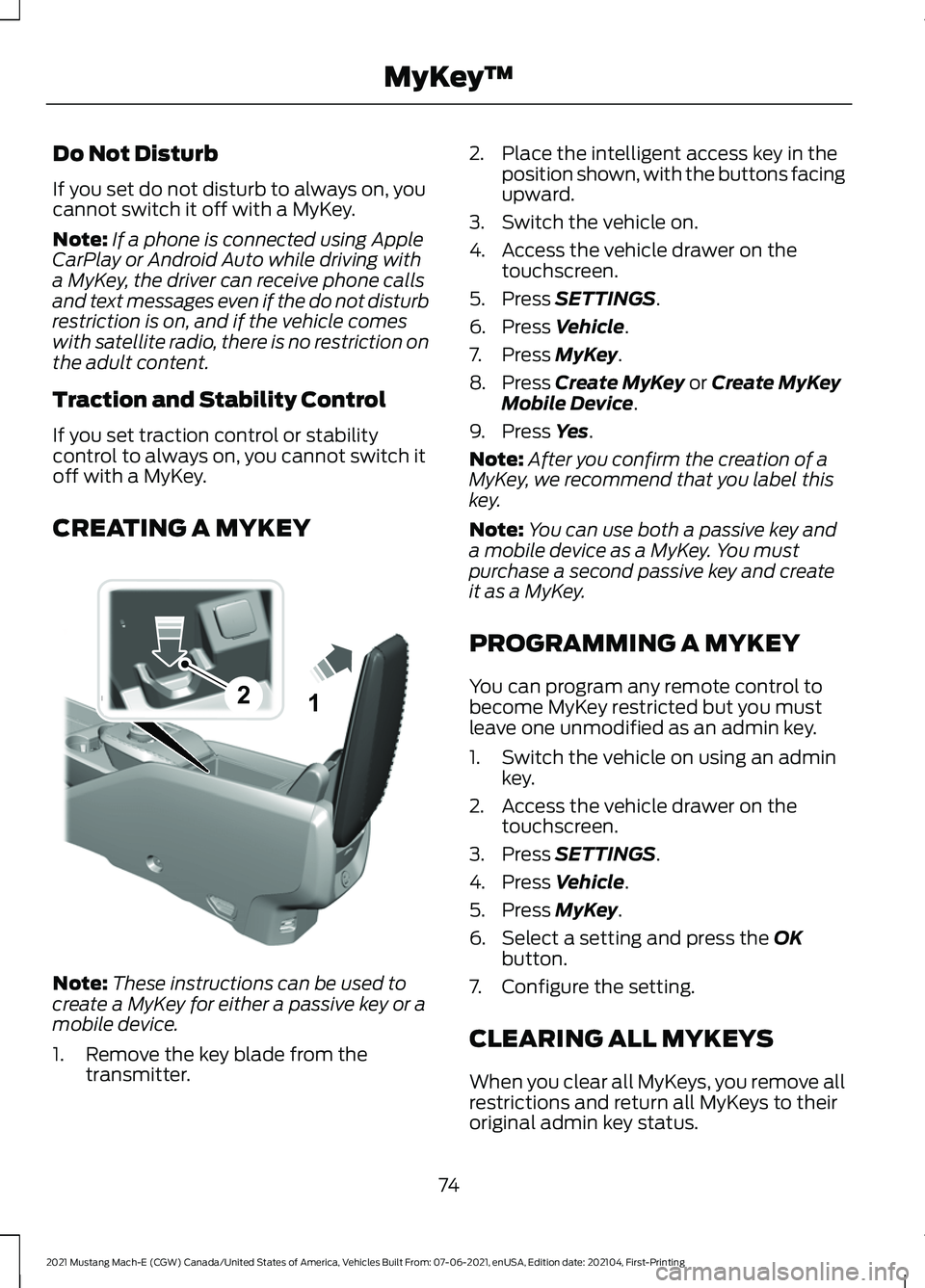
CREATING A MYKEY Note:
These instructions can be used to
create a MyKey for either a passive key or a
mobile device.
1. Remove the key blade from the transmitter. 2. Place the intelligent access key in the
position shown, with the buttons facing
upward.
3. Switch the vehicle on.
4. Access the vehicle drawer on the touchscreen.
5. Press SETTINGS.
6. Press
Vehicle.
7. Press
MyKey.
8. Press
Create MyKey or Create MyKey
Mobile Device.
9. Press
Yes.
Note: After you confirm the creation of a
MyKey, we recommend that you label this
key.
Note: You can use both a passive key and
a mobile device as a MyKey. You must
purchase a second passive key and create
it as a MyKey.
PROGRAMMING A MYKEY
You can program any remote control to
become MyKey restricted but you must
leave one unmodified as an admin key.
1. Switch the vehicle on using an admin key.
2. Access the vehicle drawer on the touchscreen.
3. Press
SETTINGS.
4. Press
Vehicle.
5. Press
MyKey.
6. Select a setting and press the
OK
button.
7. Configure the setting.
CLEARING ALL MYKEYS
When you clear all MyKeys, you remove all
restrictions and return all MyKeys to their
original admin key status.
74
2021 Mustang Mach-E (CGW) Canada/United States of America, Vehicles Built From: 07-06-2021, enUSA, Edition date: 202104, First-Printing MyKey
™21E315884
Page 85 of 460
KEYLESS ENTRY LIMITATIONS
Make sure your remote control is within 3 ft
(1 m) from the front door handles and the
tailgate.
The system could not function if:
• The remote control remains stationary
for about a minute.
• The vehicle battery has no charge.
• The remote control battery has no
charge.
• There is interference causing issues
with the remote control frequencies.
• The remote control is too close to
metal objects or electronic devices, for
example keys or a cell phone.
KEYLESS ENTRY SETTINGS
Switching Keyless Entry On and
Off
1. With the admin key in the vehicle, fully
press the brake pedal and press the
push button start.
2. Access the vehicle drawer on the touchscreen.
3. Press
SETTINGS.
4. Press
Vehicle.
5. Press
Locks.
6. Press and hold the OK button until the
system reset confirmation appears.
Reprogramming the Unlocking
Function
You can enable two-stage unlocking
function allowing you to unlock only the
driver door when you touch the unlock
sensor. Press and hold both the lock and unlock
buttons on the remote control for four
seconds to disable or enable two-stage
unlocking.
If you program the unlocking function so
that only the driver door unlocks, you can
unlock all of the other doors from inside
your vehicle using the power door lock
control. You can unlock individual doors
by pulling the interior door handles on
those doors.
USING KEYLESS ENTRY
Unlocking the Doors
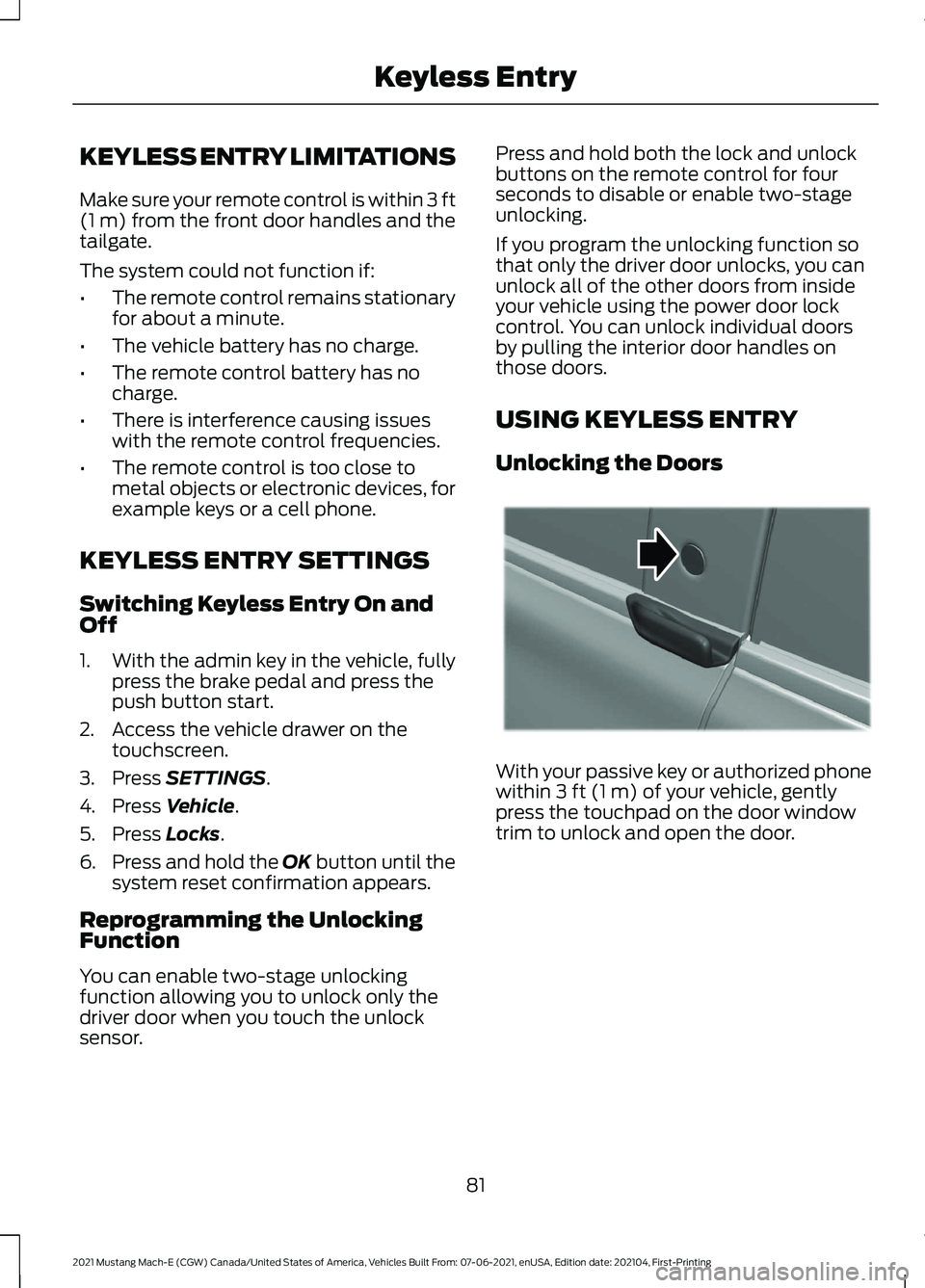
With your passive key or authorized phone
within
3 ft (1 m) of your vehicle, gently
press the touchpad on the door window
trim to unlock and open the door.
81
2021 Mustang Mach-E (CGW) Canada/United States of America, Vehicles Built From: 07-06-2021, enUSA, Edition date: 202104, First-Printing Keyless EntryE334831
Page 86 of 460
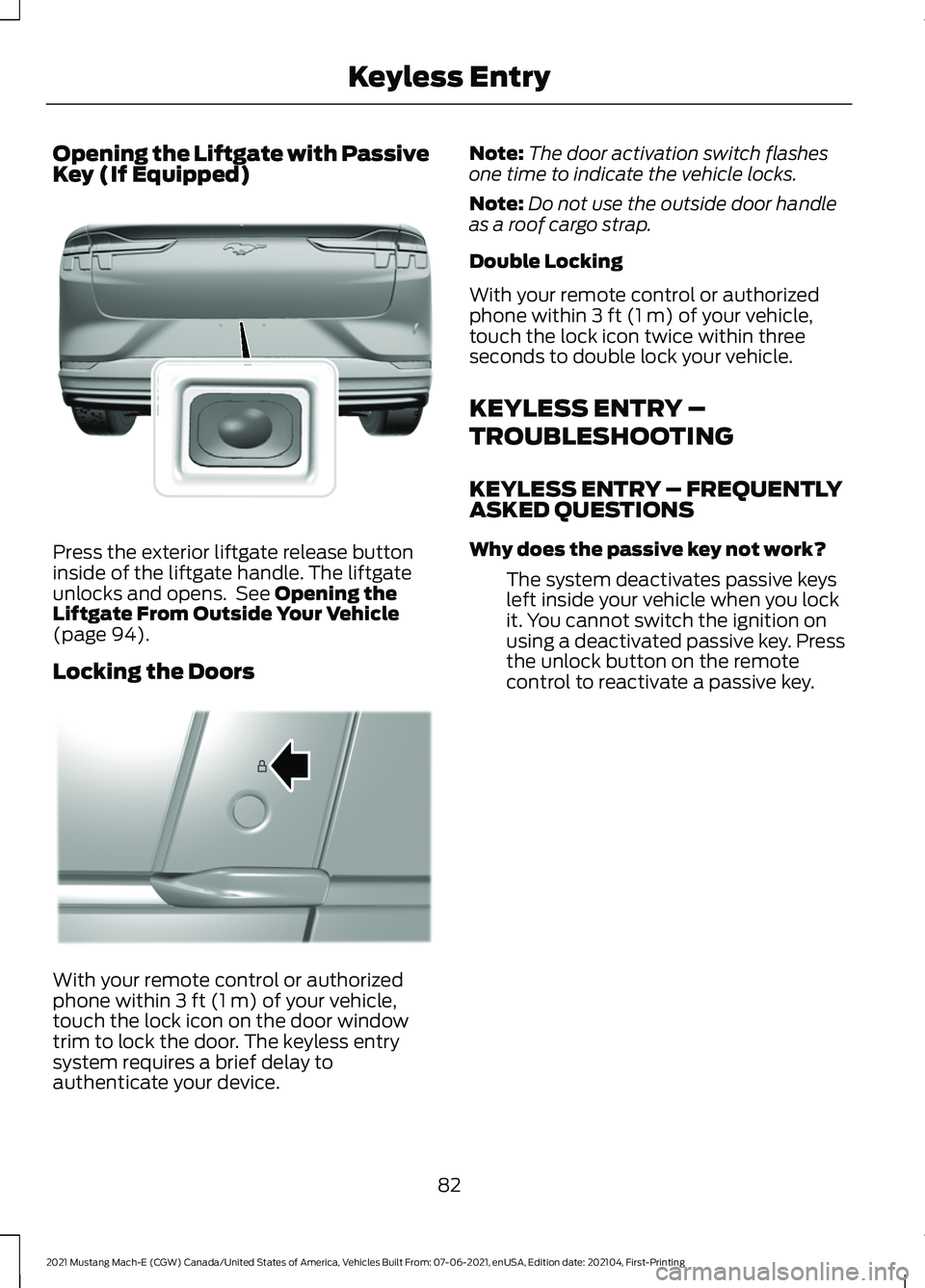
Opening the Liftgate with Passive
Key (If Equipped)
Press the exterior liftgate release button
inside of the liftgate handle. The liftgate
unlocks and opens. See Opening the
Liftgate From Outside Your Vehicle
(page
94).
Locking the Doors With your remote control or authorized
phone within
3 ft (1 m) of your vehicle,
touch the lock icon on the door window
trim to lock the door. The keyless entry
system requires a brief delay to
authenticate your device. Note:
The door activation switch flashes
one time to indicate the vehicle locks.
Note: Do not use the outside door handle
as a roof cargo strap.
Double Locking
With your remote control or authorized
phone within
3 ft (1 m) of your vehicle,
touch the lock icon twice within three
seconds to double lock your vehicle.
KEYLESS ENTRY –
TROUBLESHOOTING
KEYLESS ENTRY – FREQUENTLY
ASKED QUESTIONS
Why does the passive key not work?
The system deactivates passive keys
left inside your vehicle when you lock
it. You cannot switch the ignition on
using a deactivated passive key. Press
the unlock button on the remote
control to reactivate a passive key.
82
2021 Mustang Mach-E (CGW) Canada/United States of America, Vehicles Built From: 07-06-2021, enUSA, Edition date: 202104, First-Printing Keyless EntryE316256 E334918
Page 90 of 460
WHAT IS WALK AWAY LOCK
Walk away lock is a locking feature that
locks the vehicle when you walk away from
the vehicle with the passive key or
authorized phone.
WALK AWAY LOCK
LIMITATIONS
Walk Away Lock will lock all the doors
when all of the following are met:
•
The vehicle is off.
• All doors are closed and unlocked.
• A door has been opened and closed
without a lock or unlock occurring after
all doors have been closed.
• Any passive key or authorized phone is
not inside the vehicle.
• All passive keys or authorized phones
leave the passive entry zone of the
vehicle.
SWITCHING WALK AWAY
LOCK ON AND OFF
1. Access the vehicle drawer on the touchscreen.
2. Press SETTINGS.
3. Press
Vehicle.
4. Switch
Walk Away Lock on or off.
SWITCHING WALK AWAY
LOCK AUDIBLE FEEDBACK ON
AND OFF
1. Access the vehicle drawer on the touchscreen.
2. Press
SETTINGS.
3. Press
Vehicle. 4. Switch
Audible Feedback on or off.
86
2021 Mustang Mach-E (CGW) Canada/United States of America, Vehicles Built From: 07-06-2021, enUSA, Edition date: 202104, First-Printing Walk Away Lock
Page 120 of 460
ADJUSTING THE EXTERIOR
MIRRORS
WARNING: Do not adjust the
mirrors when your vehicle is moving. This
could result in the loss of control of your
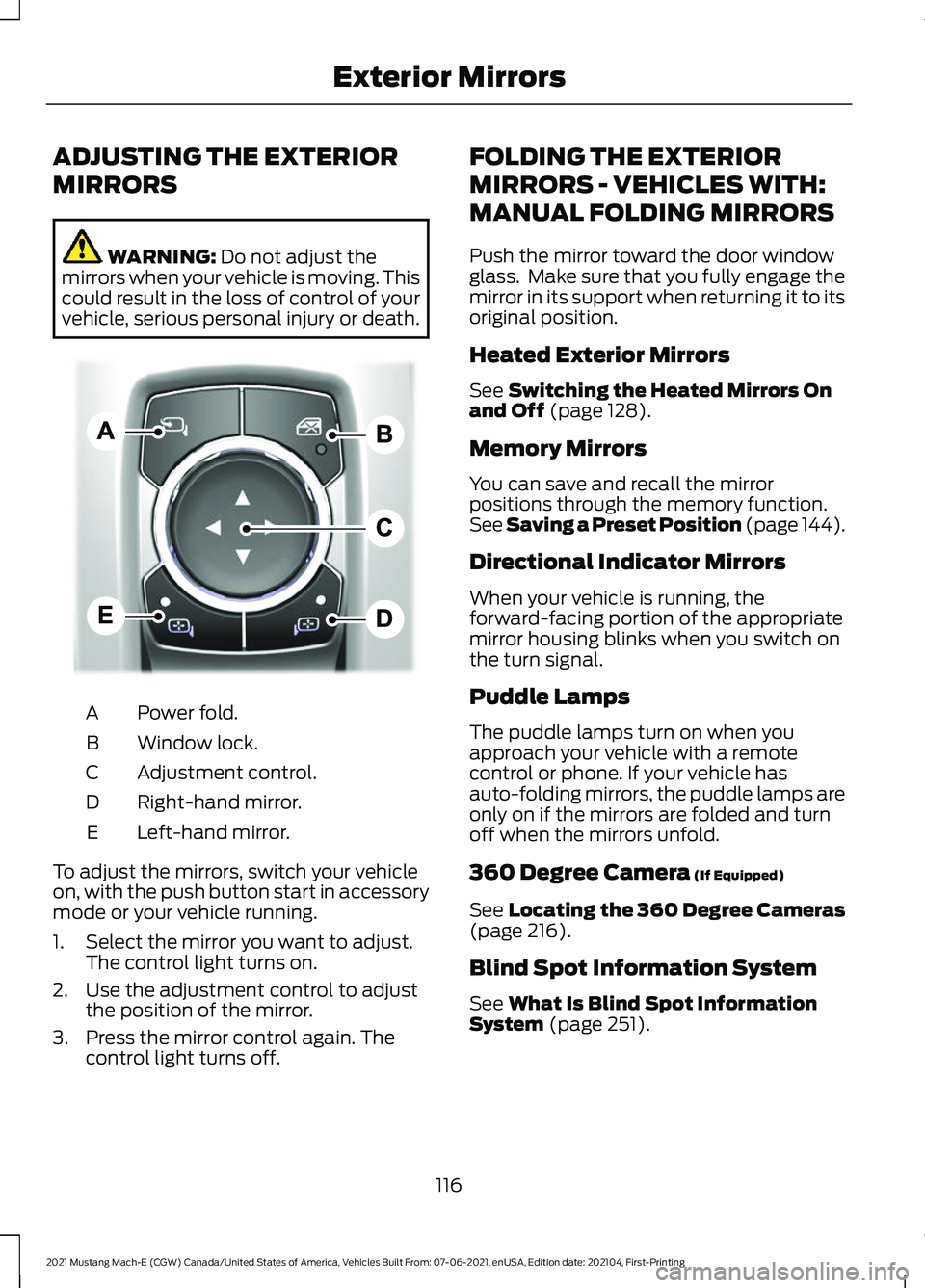
vehicle, serious personal injury or death. Power fold.
A
Window lock.
B
Adjustment control.
C
Right-hand mirror.
D
Left-hand mirror.
E
To adjust the mirrors, switch your vehicle
on, with the push button start in accessory
mode or your vehicle running.
1. Select the mirror you want to adjust. The control light turns on.
2. Use the adjustment control to adjust the position of the mirror.
3. Press the mirror control again. The control light turns off. FOLDING THE EXTERIOR
MIRRORS - VEHICLES WITH:
MANUAL FOLDING MIRRORS
Push the mirror toward the door window
glass. Make sure that you fully engage the
mirror in its support when returning it to its
original position.
Heated Exterior Mirrors
See
Switching the Heated Mirrors On
and Off (page 128).
Memory Mirrors
You can save and recall the mirror
positions through the memory function.
See Saving a Preset Position
(page 144).
Directional Indicator Mirrors
When your vehicle is running, the
forward-facing portion of the appropriate
mirror housing blinks when you switch on
the turn signal.
Puddle Lamps
The puddle lamps turn on when you
approach your vehicle with a remote
control or phone. If your vehicle has
auto-folding mirrors, the puddle lamps are
only on if the mirrors are folded and turn
off when the mirrors unfold.
360 Degree Camera
(If Equipped)
See
Locating the 360 Degree Cameras
(page 216).
Blind Spot Information System
See
What Is Blind Spot Information
System (page 251).
116
2021 Mustang Mach-E (CGW) Canada/United States of America, Vehicles Built From: 07-06-2021, enUSA, Edition date: 202104, First-Printing Exterior MirrorsE311081
Page 129 of 460
WHAT IS REMOTE START
The system allows you to remotely start
your vehicle and to adjust the interior
temperature according to the settings that
you chose.
Note:
If your vehicle is plugged in during the
remote start operation, it will draw power
from the power source and not the vehicle's
battery.
REMOTE START LIMITATIONS
Remote start does not work under the
following conditions:
• The alarm horn is sounding.
• The hood is open.
• The vehicle is not in park (P).
• The vehicle is on.
• Remote start has been disabled in the
touchscreen.
• The high voltage or 12 volt battery is
below the minimum operating voltage.
Note: To use remote start with the Ford
Pass, enable the modem. See Enabling
and Disabling the Modem (page 350). To
use remote start with Phone as a Key,
enable the modem and set up Phone As A
Key. See
Programming Your Phone (page
70).
ENABLING REMOTE START
1. Access the vehicle drawer on the touchscreen.
2. Press
SETTINGS.
3. Press
Vehicle.
4. Press
Remote Start Setup.
5. Switch
Remote Start on or off. Note:
To remote start with FordPass or
Phone as a Key, make sure that the modem
is enabled and Phone as a Key is setup. See
Enabling and Disabling the Modem (page
350). See Programming Your Phone (page
70
).
REMOTELY STARTING AND
STOPPING THE VEHICLE
Remotely Starting the Vehicle
Using your Phone as a Key control screen,
press and hold the start button with your
authorized phone within
131 ft (40 m) of
the vehicle.
Note: You can also use the FordPass App
to start the vehicle.
Note: The direction indicators flash twice.
Note: The parking lamps turn on when the
vehicle is running.
Note: The horn sounds if the system fails
to start.
Note: All other vehicle systems remain off
when you have remotely started the vehicle.
Note: The vehicle remains secured when
you have remotely started the vehicle. A
valid key must be inside your vehicle to
switch the vehicle on and drive your vehicle.
Remotely Stopping the Vehicle
Using your Phone as a Key control screen,
press the remote stop button.
Note: You can also use the FordPass App
to stop the vehicle.
EXTENDING THE REMOTE
START DURATION
Using your Phone as a Key control screen
press the button showing addition time.
125
2021 Mustang Mach-E (CGW) Canada/United States of America, Vehicles Built From: 07-06-2021, enUSA, Edition date: 202104, First-Printing Remote Start
Page 157 of 460
You can use the charger when the vehicle
is in accessory mode, when the vehicle is
running, or when SYNC is on.
Displays on the status bar when
wireless charging is in progress.
Note:
The charging performance may be
affected if your device is in a case. It may be
necessary to remove the case to wirelessly
charge your device.
Note: Software and firmware updates may
affect device compatibility, including the
use of unofficial software or firmware. You
should verify charging functionality with your
specific devices in-vehicle.
WIRELESS ACCESSORY CHARGER – TROUBLESHOOTING
WIRELESS ACCESSORY CHARGER – INFORMATION MESSAGES Description
Behavior
Message
The system stops chargingyour device if the system detects the phone is
misaligned, or a foreign
metal object is on the char- ging surface.
Pop-up window.
Phone misaligned or object
between phone and charger
detected. Correct the condi- tion to resume charging.
153
2021 Mustang Mach-E (CGW) Canada/United States of America, Vehicles Built From: 07-06-2021, enUSA, Edition date: 202104, First-Printing Wireless Accessory Charger