phone FORD MUSTANG MACH-E 2021 Owner's Manual
[x] Cancel search | Manufacturer: FORD, Model Year: 2021, Model line: MUSTANG MACH-E, Model: FORD MUSTANG MACH-E 2021Pages: 460, PDF Size: 7.29 MB
Page 159 of 460
STARTING AND POWERING
OFF PRECAUTIONS
•
The system may not function if the
remote control is close to metal
objects or electronic devices, for
example, keys or a cell phone.
• A valid remote control must be inside
your vehicle to switch the power on and
start your vehicle.
• Remote controls left inside your vehicle
when locked are disabled. A message
may appear in the information display
indicating that there is no key detected
when you try to start your vehicle.
Press the unlock button on the remote
control to enable it, and then start your
vehicle.
• Make sure all occupants fasten their
seat belt.
• Make sure the headlamps and
electrical accessories are off.
• Make sure the parking brake is on.
• Make sure the transmission is in park
(P).
STARTING THE VEHICLE
1. Fully press the brake pedal.
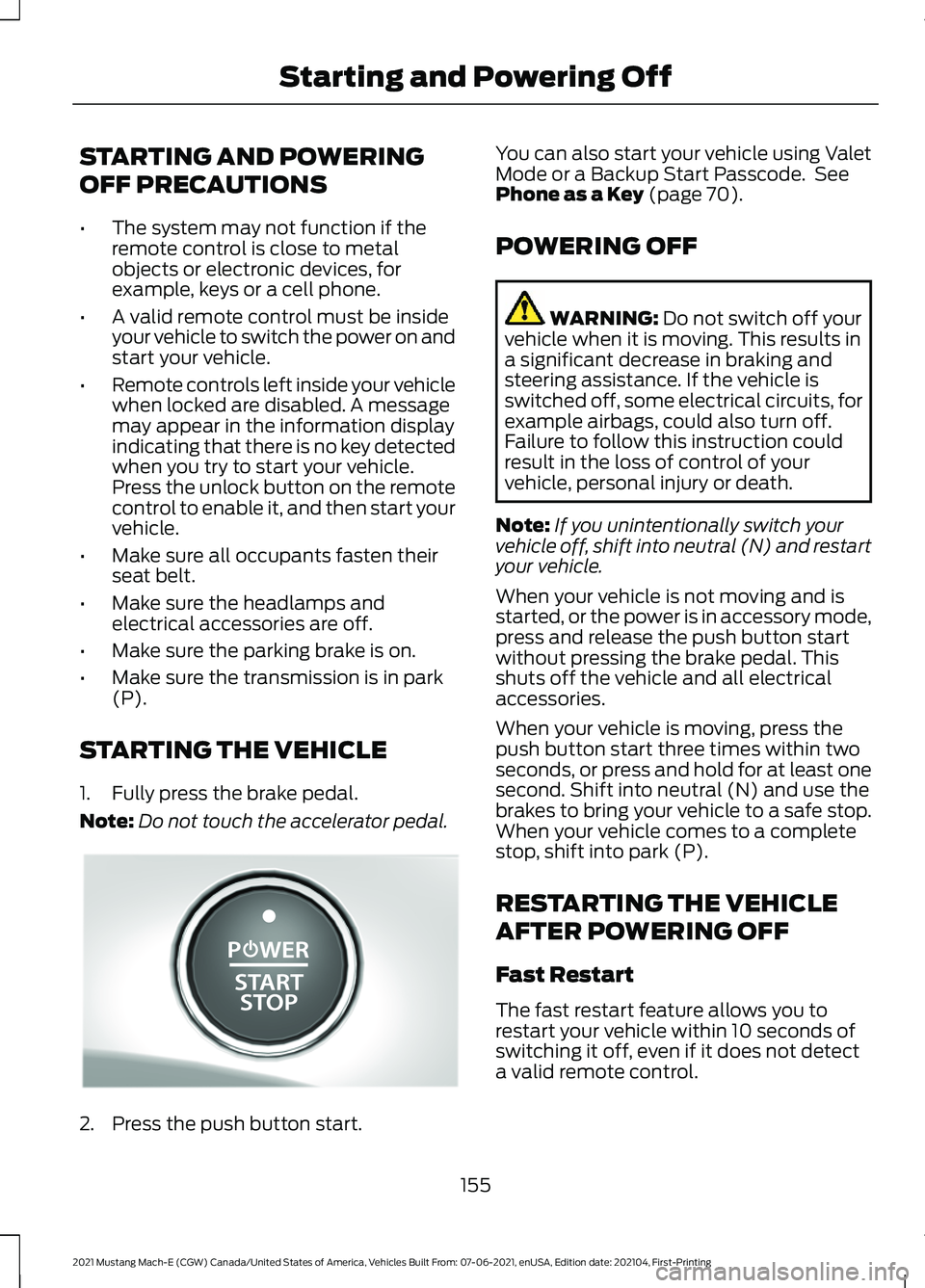
Note: Do not touch the accelerator pedal.2. Press the push button start. You can also start your vehicle using Valet
Mode or a Backup Start Passcode. See
Phone as a Key (page 70).
POWERING OFF WARNING:
Do not switch off your
vehicle when it is moving. This results in
a significant decrease in braking and
steering assistance. If the vehicle is
switched off, some electrical circuits, for
example airbags, could also turn off.
Failure to follow this instruction could
result in the loss of control of your
vehicle, personal injury or death.
Note: If you unintentionally switch your
vehicle off, shift into neutral (N) and restart
your vehicle.
When your vehicle is not moving and is
started, or the power is in accessory mode,
press and release the push button start
without pressing the brake pedal. This
shuts off the vehicle and all electrical
accessories.
When your vehicle is moving, press the
push button start three times within two
seconds, or press and hold for at least one
second. Shift into neutral (N) and use the
brakes to bring your vehicle to a safe stop.
When your vehicle comes to a complete
stop, shift into park (P).
RESTARTING THE VEHICLE
AFTER POWERING OFF
Fast Restart
The fast restart feature allows you to
restart your vehicle within 10 seconds of
switching it off, even if it does not detect
a valid remote control.
155
2021 Mustang Mach-E (CGW) Canada/United States of America, Vehicles Built From: 07-06-2021, enUSA, Edition date: 202104, First-Printing Starting and Powering OffE328849
Page 280 of 460
1. Access the vehicle drawer on the
touchscreen.
2. Press CONTROLS.
3. Press
Access. 4. Press the front luggage
compartment icon.
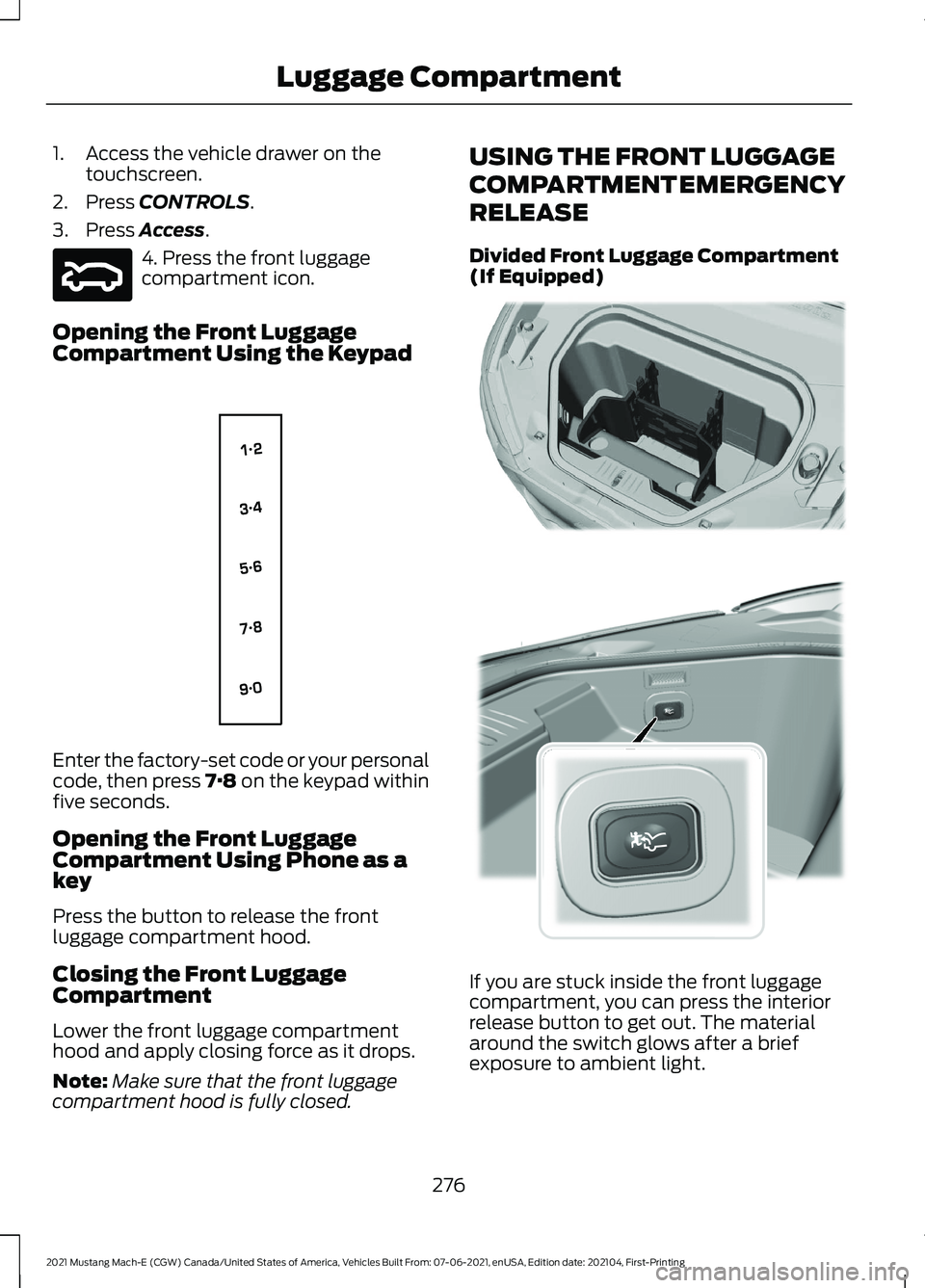
Opening the Front Luggage
Compartment Using the Keypad Enter the factory-set code or your personal
code, then press 7·8 on the keypad within
five seconds.
Opening the Front Luggage
Compartment Using Phone as a
key
Press the button to release the front
luggage compartment hood.
Closing the Front Luggage
Compartment
Lower the front luggage compartment
hood and apply closing force as it drops.
Note:
Make sure that the front luggage
compartment hood is fully closed. USING THE FRONT LUGGAGE
COMPARTMENT EMERGENCY
RELEASE
Divided Front Luggage Compartment
(If Equipped)
If you are stuck inside the front luggage
compartment, you can press the interior
release button to get out. The material
around the switch glows after a brief
exposure to ambient light.
276
2021 Mustang Mach-E (CGW) Canada/United States of America, Vehicles Built From: 07-06-2021, enUSA, Edition date: 202104, First-Printing Luggage CompartmentE316375 E138637 E332921 E315510
Page 357 of 460
Possible Cause and Resolution
Symptom
I cannot see the Wi-Fi
hotspot name when I search
for Wi-Fi networks on my
cell phone or other device. –
System limitation.
•Make sure Wi-Fi hotspot visibility is on.
• The system does not provide a Wi-Fi hotspot at
this time.
– Weak network signal
•Move your vehicle closer to the Wi-Fi router or to
a place where the network signal is not obstructed.
– Wi-Fi hotspot in high demand or has a slow Internet
connection.
•Use a more reliable Wi-Fi hotspot.
Software downloads take
too long.
–No software update available.
– Wi-Fi network requires a subscription or acceptance
of terms and conditions.
•Test the connection using another device. If the
network requires a subscription or acceptance of
terms and conditions, contact the network service
provider.
The system seems to
connect to a Wi-Fi network
and the signal strength is
excellent but the software
does not update.
353
2021 Mustang Mach-E (CGW) Canada/United States of America, Vehicles Built From: 07-06-2021, enUSA, Edition date: 202104, First-Printing Connected Vehicle
Page 371 of 460
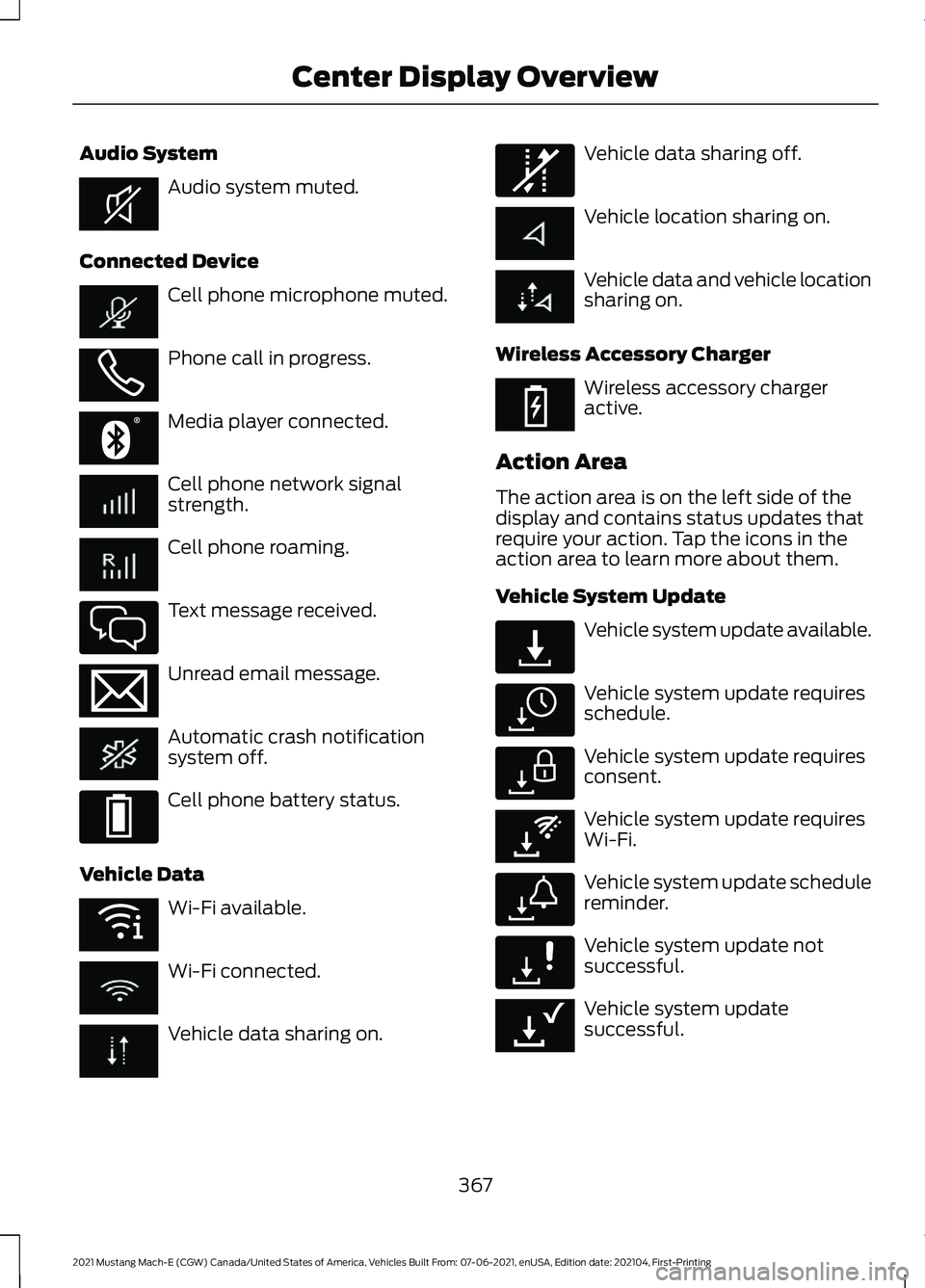
Audio System
Audio system muted.
Connected Device Cell phone microphone muted.
Phone call in progress.
Media player connected.
Cell phone network signal
strength.
Cell phone roaming.
Text message received.
Unread email message.
Automatic crash notification
system off.
Cell phone battery status.
Vehicle Data Wi-Fi available.
Wi-Fi connected.
Vehicle data sharing on. Vehicle data sharing off.
Vehicle location sharing on.
Vehicle data and vehicle location
sharing on.
Wireless Accessory Charger Wireless accessory charger
active.
Action Area
The action area is on the left side of the
display and contains status updates that
require your action. Tap the icons in the
action area to learn more about them.
Vehicle System Update Vehicle system update available.
Vehicle system update requires
schedule.
Vehicle system update requires
consent.
Vehicle system update requires
Wi-Fi.
Vehicle system update schedule
reminder.
Vehicle system update not
successful.
Vehicle system update
successful.
367
2021 Mustang Mach-E (CGW) Canada/United States of America, Vehicles Built From: 07-06-2021, enUSA, Edition date: 202104, First-Printing Center Display OverviewE353221 E353213 E353208 E335295 E353216 E335293 E353219 E335292 E353214 E327789 E327785 E327786 E353217 E327787 E327788 E353218
Page 374 of 460
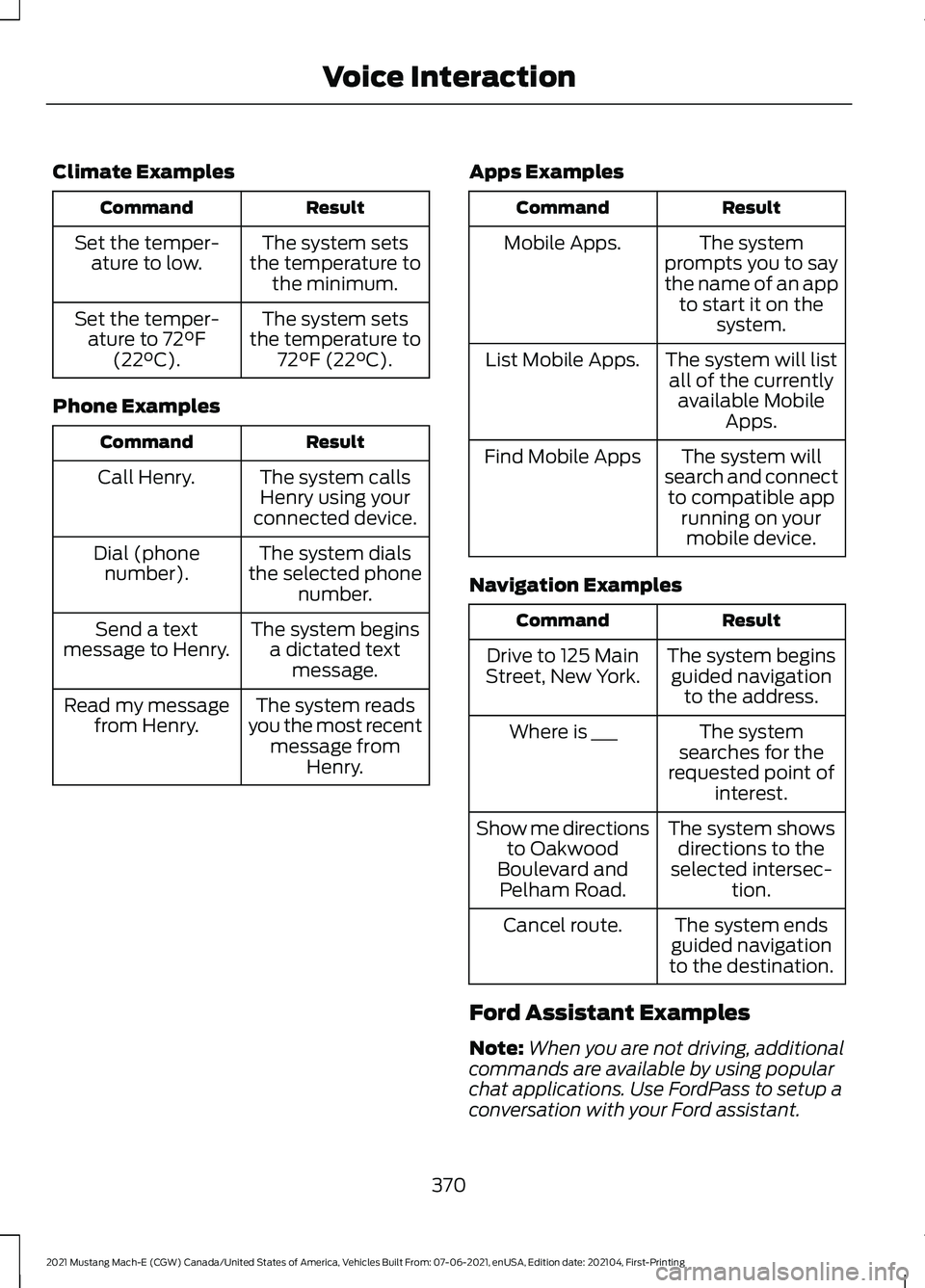
Climate Examples
Result
Command
The system sets
the temperature to the minimum.
Set the temper-
ature to low.
The system sets
the temperature to 72°F (22°C).
Set the temper-
ature to 72°F
(22°C).
Phone Examples Result
Command
The system callsHenry using your
connected device.
Call Henry.
The system dials
the selected phone number.
Dial (phone
number).
The system beginsa dictated text message.
Send a text
message to Henry.
The system reads
you the most recent message from Henry.
Read my message
from Henry. Apps Examples Result
Command
The system
prompts you to say
the name of an app to start it on the system.
Mobile Apps.
The system will listall of the currently available Mobile Apps.
List Mobile Apps.
The system will
search and connect to compatible app running on yourmobile device.
Find Mobile Apps
Navigation Examples Result
Command
The system beginsguided navigation to the address.
Drive to 125 Main
Street, New York.
The system
searches for the
requested point of interest.
Where is ___
The system showsdirections to the
selected intersec- tion.
Show me directions
to Oakwood
Boulevard and Pelham Road.
The system ends
guided navigation
to the destination.
Cancel route.
Ford Assistant Examples
Note: When you are not driving, additional
commands are available by using popular
chat applications. Use FordPass to setup a
conversation with your Ford assistant.
370
2021 Mustang Mach-E (CGW) Canada/United States of America, Vehicles Built From: 07-06-2021, enUSA, Edition date: 202104, First-Printing Voice Interaction
Page 375 of 460
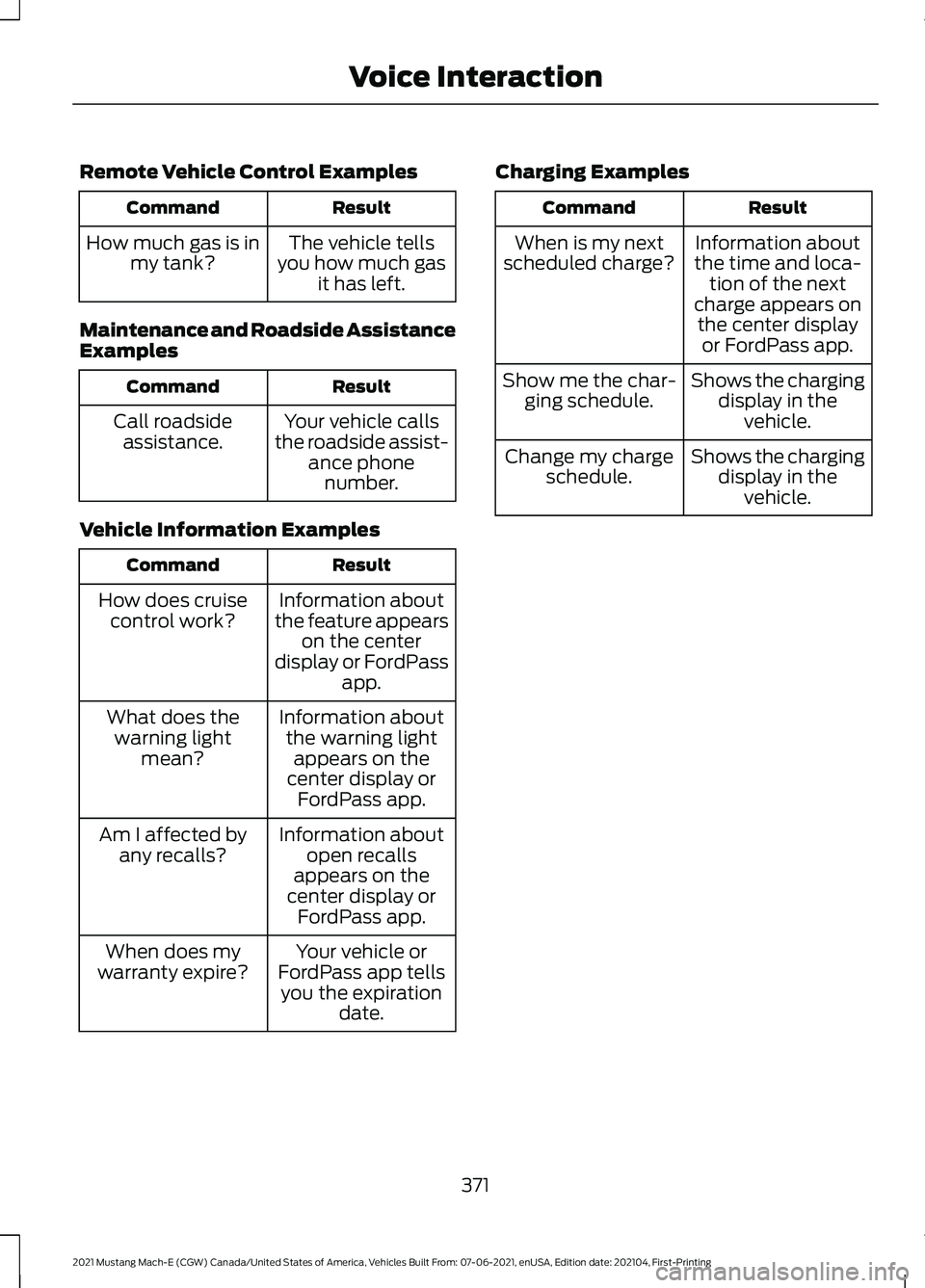
Remote Vehicle Control Examples
Result
Command
The vehicle tells
you how much gas it has left.
How much gas is in
my tank?
Maintenance and Roadside Assistance
Examples Result
Command
Your vehicle calls
the roadside assist- ance phonenumber.
Call roadside
assistance.
Vehicle Information Examples Result
Command
Information about
the feature appears on the center
display or FordPass app.
How does cruise
control work?
Information aboutthe warning light appears on the
center display or FordPass app.
What does the
warning light mean?
Information aboutopen recalls
appears on the
center display or FordPass app.
Am I affected by
any recalls?
Your vehicle or
FordPass app tells you the expiration date.
When does my
warranty expire? Charging Examples Result
Command
Information about
the time and loca- tion of the next
charge appears on the center display or FordPass app.
When is my next
scheduled charge?
Shows the chargingdisplay in thevehicle.
Show me the char-
ging schedule.
Shows the chargingdisplay in thevehicle.
Change my charge
schedule.
371
2021 Mustang Mach-E (CGW) Canada/United States of America, Vehicles Built From: 07-06-2021, enUSA, Edition date: 202104, First-Printing Voice Interaction
Page 376 of 460
PHONE PRECAUTIONS
WARNING: Driving while distracted
can result in loss of vehicle control, crash
and injury. We strongly recommend that
you use extreme caution when using any
device that may take your focus off the
road. Your primary responsibility is the
safe operation of your vehicle. We
recommend against the use of any
hand-held device while driving and
encourage the use of voice-operated
systems when possible. Make sure you
are aware of all applicable local laws
that may affect the use of electronic
devices while driving.
CONNECTING YOUR PHONE
Connecting your phone stores contact and
call data on your vehicle. This data is used
to provide intelligent suggestions. You can
switch this off in the touchscreen settings
menu. See Personal Profile Settings
(page 381).
Note: Unpairing your phone will remove the
contact and call data from your vehicle and
stop intelligent call suggestions.
Go to the settings menu on your device and
switch
Bluetooth® on. Select the phone option in the
feature drawer.
1. Select
Add Phone.
2. Follow the instructions on the screen to pair your device.
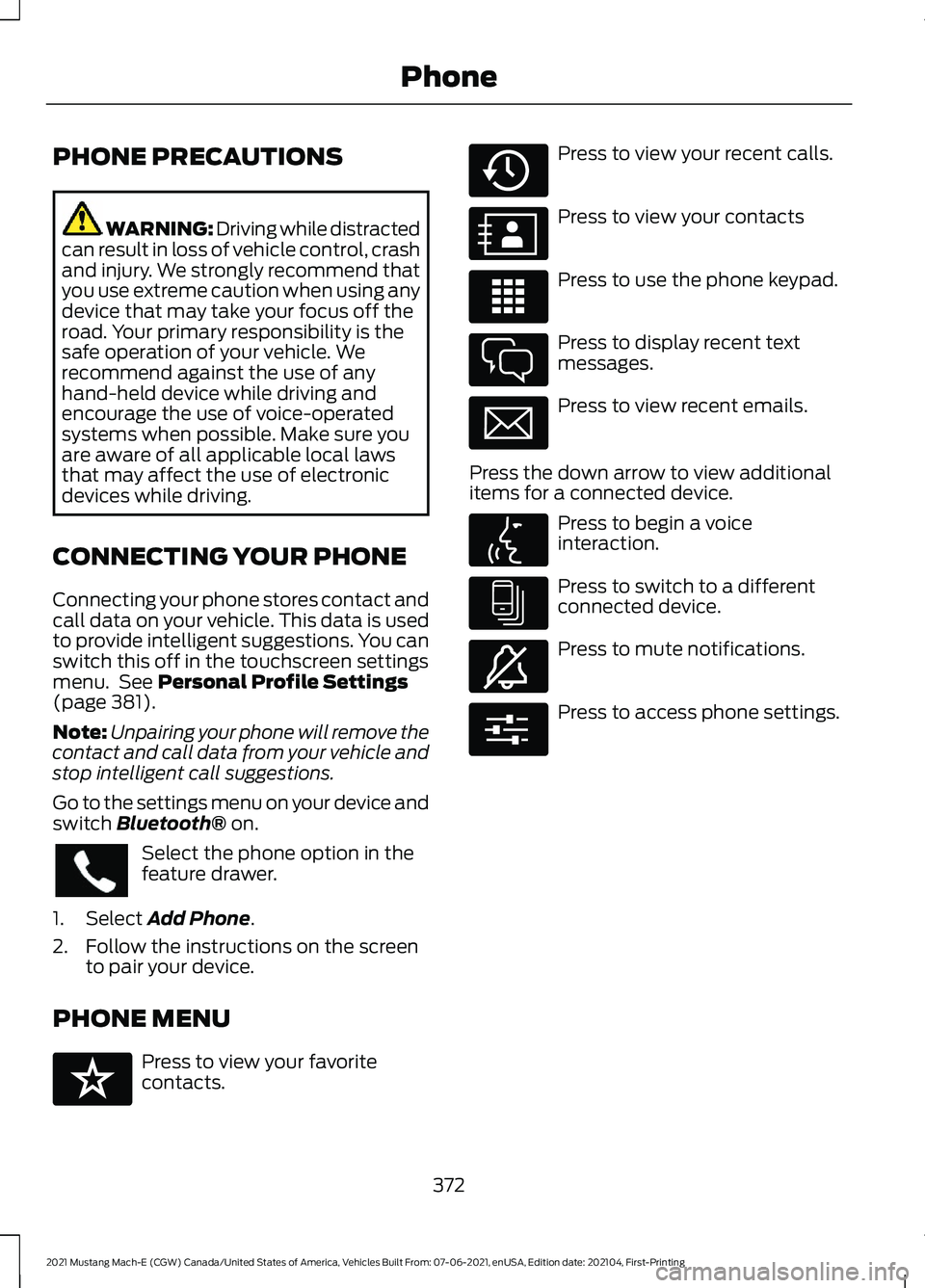
PHONE MENU Press to view your favorite
contacts. Press to view your recent calls.
Press to view your contacts
Press to use the phone keypad.
Press to display recent text
messages.
Press to view recent emails.
Press the down arrow to view additional
items for a connected device. Press to begin a voice
interaction.
Press to switch to a different
connected device.
Press to mute notifications.
Press to access phone settings.
372
2021 Mustang Mach-E (CGW) Canada/United States of America, Vehicles Built From: 07-06-2021, enUSA, Edition date: 202104, First-Printing Phone E329089 E329088 E329086 E329087 E329085 E329084 E329083 E329082 E329081 E280315
Page 377 of 460
MAKING AND RECEIVING A
PHONE CALL
Making Calls
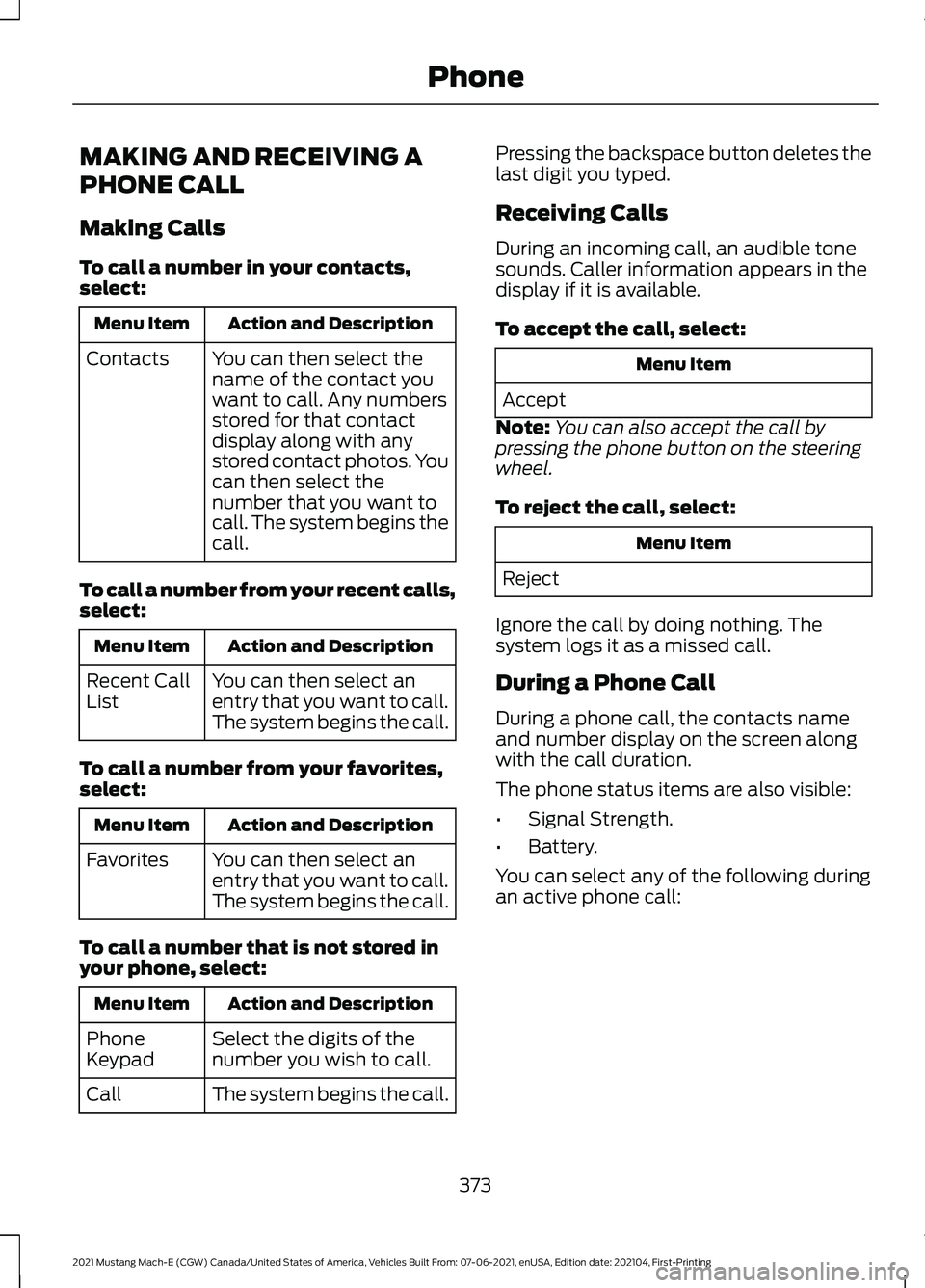
To call a number in your contacts,
select:
Action and Description
Menu Item
You can then select the
name of the contact you
want to call. Any numbers
stored for that contact
display along with any
stored contact photos. You
can then select the
number that you want to
call. The system begins the
call.
Contacts
To call a number from your recent calls,
select: Action and Description
Menu Item
You can then select an
entry that you want to call.
The system begins the call.
Recent Call
List
To call a number from your favorites,
select: Action and Description
Menu Item
You can then select an
entry that you want to call.
The system begins the call.
Favorites
To call a number that is not stored in
your phone, select: Action and Description
Menu Item
Select the digits of the
number you wish to call.
Phone
Keypad
The system begins the call.
Call Pressing the backspace button deletes the
last digit you typed.
Receiving Calls
During an incoming call, an audible tone
sounds. Caller information appears in the
display if it is available.
To accept the call, select:
Menu Item
Accept
Note: You can also accept the call by
pressing the phone button on the steering
wheel.
To reject the call, select: Menu Item
Reject
Ignore the call by doing nothing. The
system logs it as a missed call.
During a Phone Call
During a phone call, the contacts name
and number display on the screen along
with the call duration.
The phone status items are also visible:
• Signal Strength.
• Battery.
You can select any of the following during
an active phone call:
373
2021 Mustang Mach-E (CGW) Canada/United States of America, Vehicles Built From: 07-06-2021, enUSA, Edition date: 202104, First-Printing Phone
Page 378 of 460
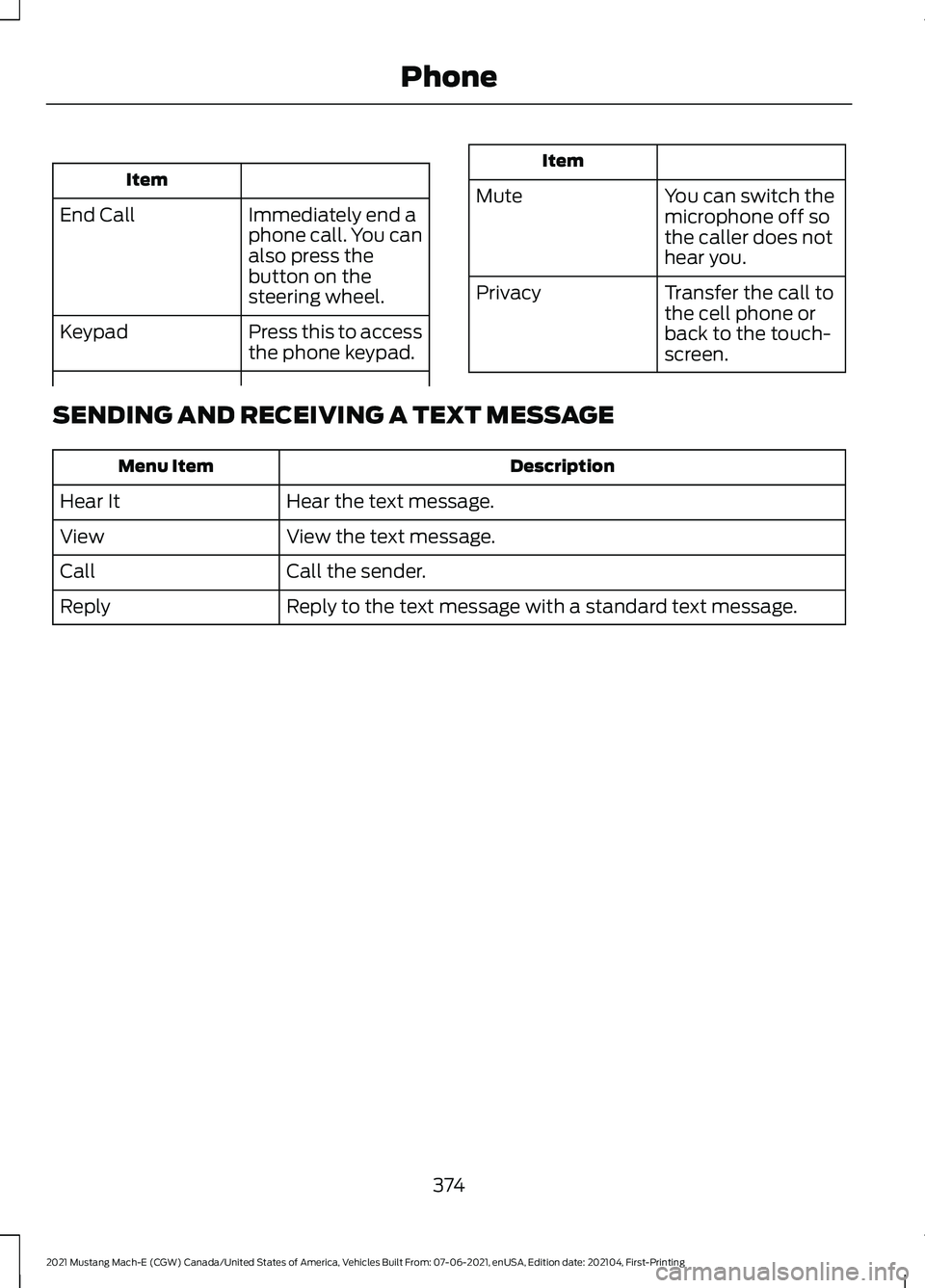
Item
Immediately end a
phone call. You can
also press the
button on the
steering wheel.
End Call
Press this to access
the phone keypad.
Keypad Item
Mute You can switch the
microphone off so
the caller does not
hear you.
Transfer the call to
the cell phone or
back to the touch-
screen.
Privacy
SENDING AND RECEIVING A TEXT MESSAGE Description
Menu Item
Hear the text message.
Hear It
View the text message.
View
Call the sender.
Call
Reply to the text message with a standard text message.
Reply
374
2021 Mustang Mach-E (CGW) Canada/United States of America, Vehicles Built From: 07-06-2021, enUSA, Edition date: 202104, First-Printing Phone
Page 379 of 460
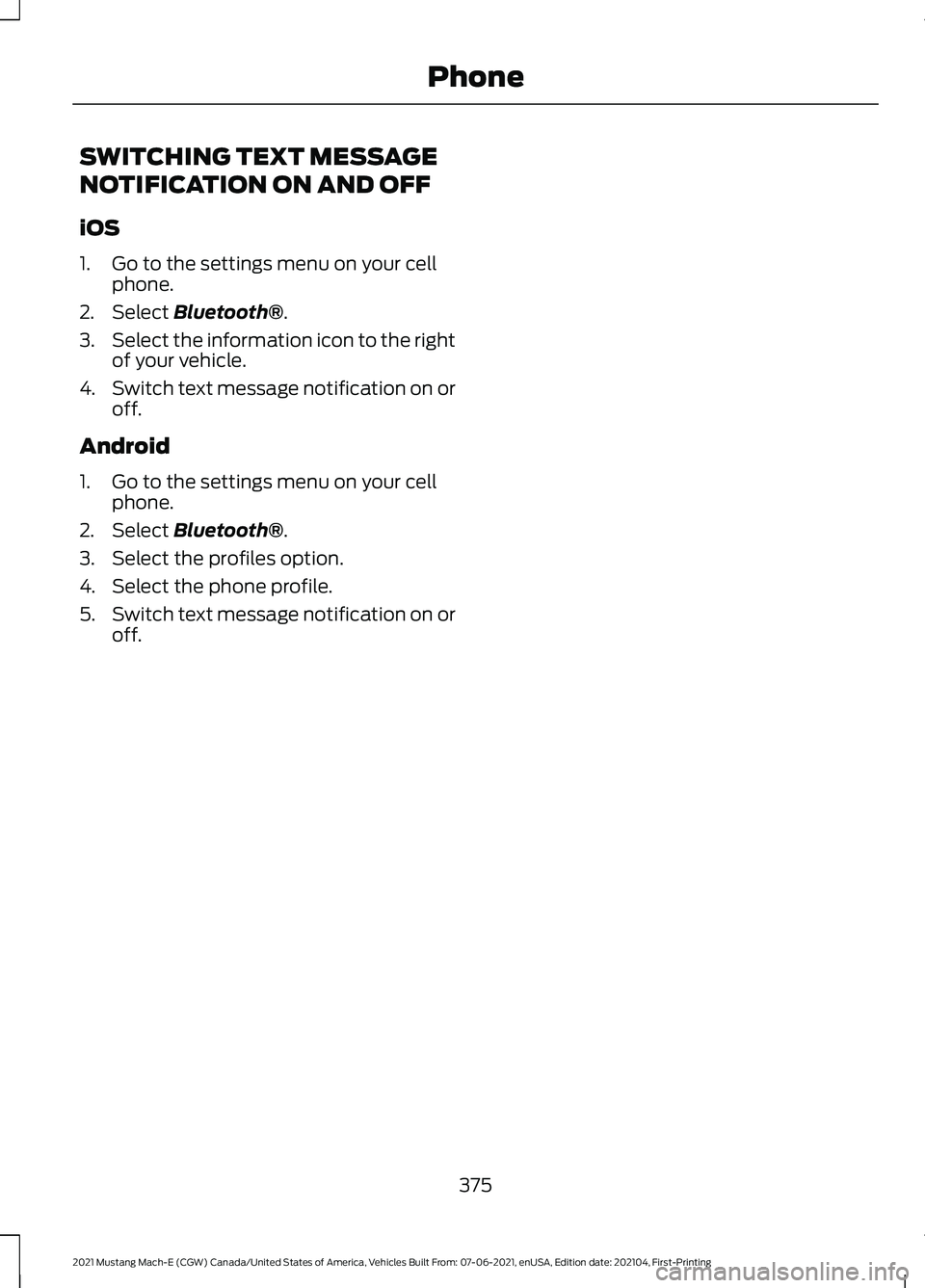
SWITCHING TEXT MESSAGE
NOTIFICATION ON AND OFF
iOS
1. Go to the settings menu on your cell
phone.
2. Select Bluetooth®.
3. Select the information icon to the right
of your vehicle.
4. Switch text message notification on or
off.
Android
1. Go to the settings menu on your cell phone.
2. Select
Bluetooth®.
3. Select the profiles option.
4. Select the phone profile.
5. Switch text message notification on or
off.
375
2021 Mustang Mach-E (CGW) Canada/United States of America, Vehicles Built From: 07-06-2021, enUSA, Edition date: 202104, First-Printing Phone