brake FORD MUSTANG MACH E 2023 User Guide
[x] Cancel search | Manufacturer: FORD, Model Year: 2023, Model line: MUSTANG MACH E, Model: FORD MUSTANG MACH E 2023Pages: 496, PDF Size: 13.09 MB
Page 77 of 496
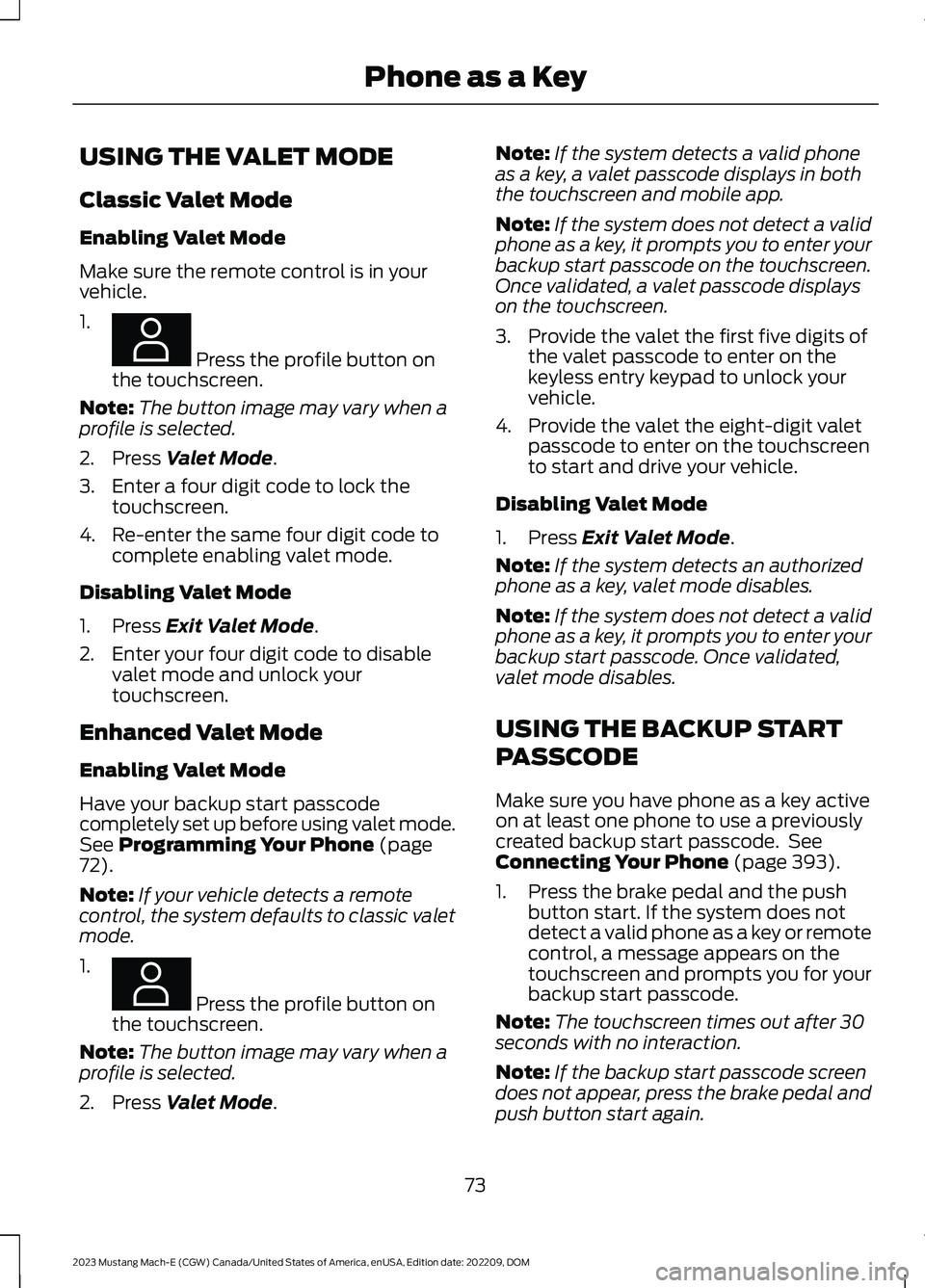
USING THE VALET MODE
Classic Valet Mode
Enabling Valet Mode
Make sure the remote control is in yourvehicle.
1.
Press the profile button onthe touchscreen.
Note:The button image may vary when aprofile is selected.
2.Press Valet Mode.
3.Enter a four digit code to lock thetouchscreen.
4.Re-enter the same four digit code tocomplete enabling valet mode.
Disabling Valet Mode
1.Press Exit Valet Mode.
2.Enter your four digit code to disablevalet mode and unlock yourtouchscreen.
Enhanced Valet Mode
Enabling Valet Mode
Have your backup start passcodecompletely set up before using valet mode.See Programming Your Phone (page72).
Note:If your vehicle detects a remotecontrol, the system defaults to classic valetmode.
1.
Press the profile button onthe touchscreen.
Note:The button image may vary when aprofile is selected.
2.Press Valet Mode.
Note:If the system detects a valid phoneas a key, a valet passcode displays in boththe touchscreen and mobile app.
Note:If the system does not detect a validphone as a key, it prompts you to enter yourbackup start passcode on the touchscreen.Once validated, a valet passcode displayson the touchscreen.
3.Provide the valet the first five digits ofthe valet passcode to enter on thekeyless entry keypad to unlock yourvehicle.
4.Provide the valet the eight-digit valetpasscode to enter on the touchscreento start and drive your vehicle.
Disabling Valet Mode
1.Press Exit Valet Mode.
Note:If the system detects an authorizedphone as a key, valet mode disables.
Note:If the system does not detect a validphone as a key, it prompts you to enter yourbackup start passcode. Once validated,valet mode disables.
USING THE BACKUP START
PASSCODE
Make sure you have phone as a key activeon at least one phone to use a previouslycreated backup start passcode. SeeConnecting Your Phone (page 393).
1.Press the brake pedal and the pushbutton start. If the system does notdetect a valid phone as a key or remotecontrol, a message appears on thetouchscreen and prompts you for yourbackup start passcode.
Note:The touchscreen times out after 30seconds with no interaction.
Note:If the backup start passcode screendoes not appear, press the brake pedal andpush button start again.
73
2023 Mustang Mach-E (CGW) Canada/United States of America, enUSA, Edition date: 202209, DOMPhone as a KeyE387022 E387022
Page 78 of 496
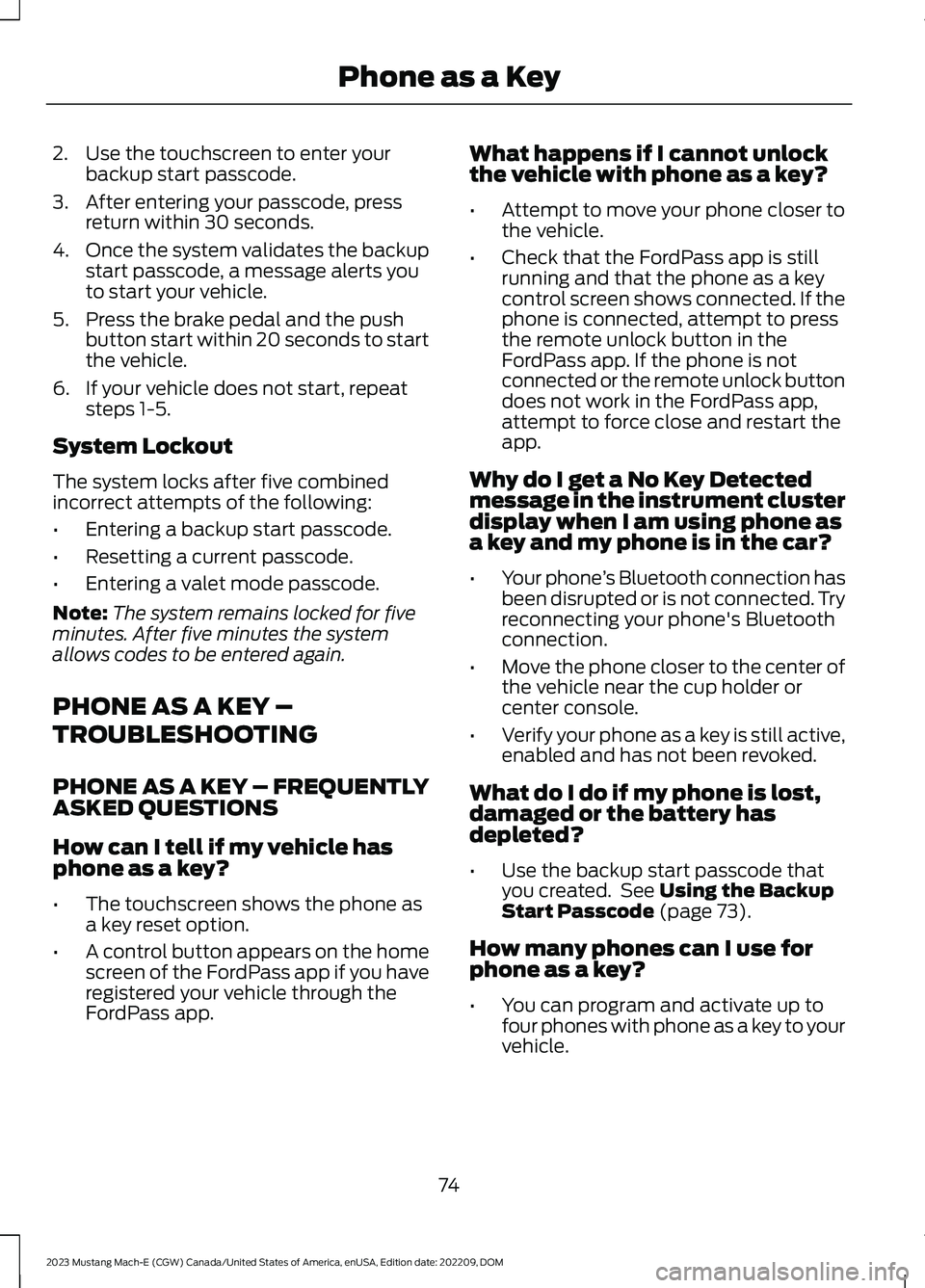
2.Use the touchscreen to enter yourbackup start passcode.
3.After entering your passcode, pressreturn within 30 seconds.
4.Once the system validates the backupstart passcode, a message alerts youto start your vehicle.
5.Press the brake pedal and the pushbutton start within 20 seconds to startthe vehicle.
6.If your vehicle does not start, repeatsteps 1-5.
System Lockout
The system locks after five combinedincorrect attempts of the following:
•Entering a backup start passcode.
•Resetting a current passcode.
•Entering a valet mode passcode.
Note:The system remains locked for fiveminutes. After five minutes the systemallows codes to be entered again.
PHONE AS A KEY –
TROUBLESHOOTING
PHONE AS A KEY – FREQUENTLYASKED QUESTIONS
How can I tell if my vehicle hasphone as a key?
•The touchscreen shows the phone asa key reset option.
•A control button appears on the homescreen of the FordPass app if you haveregistered your vehicle through theFordPass app.
What happens if I cannot unlockthe vehicle with phone as a key?
•Attempt to move your phone closer tothe vehicle.
•Check that the FordPass app is stillrunning and that the phone as a keycontrol screen shows connected. If thephone is connected, attempt to pressthe remote unlock button in theFordPass app. If the phone is notconnected or the remote unlock buttondoes not work in the FordPass app,attempt to force close and restart theapp.
Why do I get a No Key Detectedmessage in the instrument clusterdisplay when I am using phone asa key and my phone is in the car?
•Your phone’s Bluetooth connection hasbeen disrupted or is not connected. Tryreconnecting your phone's Bluetoothconnection.
•Move the phone closer to the center ofthe vehicle near the cup holder orcenter console.
•Verify your phone as a key is still active,enabled and has not been revoked.
What do I do if my phone is lost,damaged or the battery hasdepleted?
•Use the backup start passcode thatyou created. See Using the BackupStart Passcode (page 73).
How many phones can I use forphone as a key?
•You can program and activate up tofour phones with phone as a key to yourvehicle.
74
2023 Mustang Mach-E (CGW) Canada/United States of America, enUSA, Edition date: 202209, DOMPhone as a Key
Page 117 of 496
EXTERIOR LAMPS
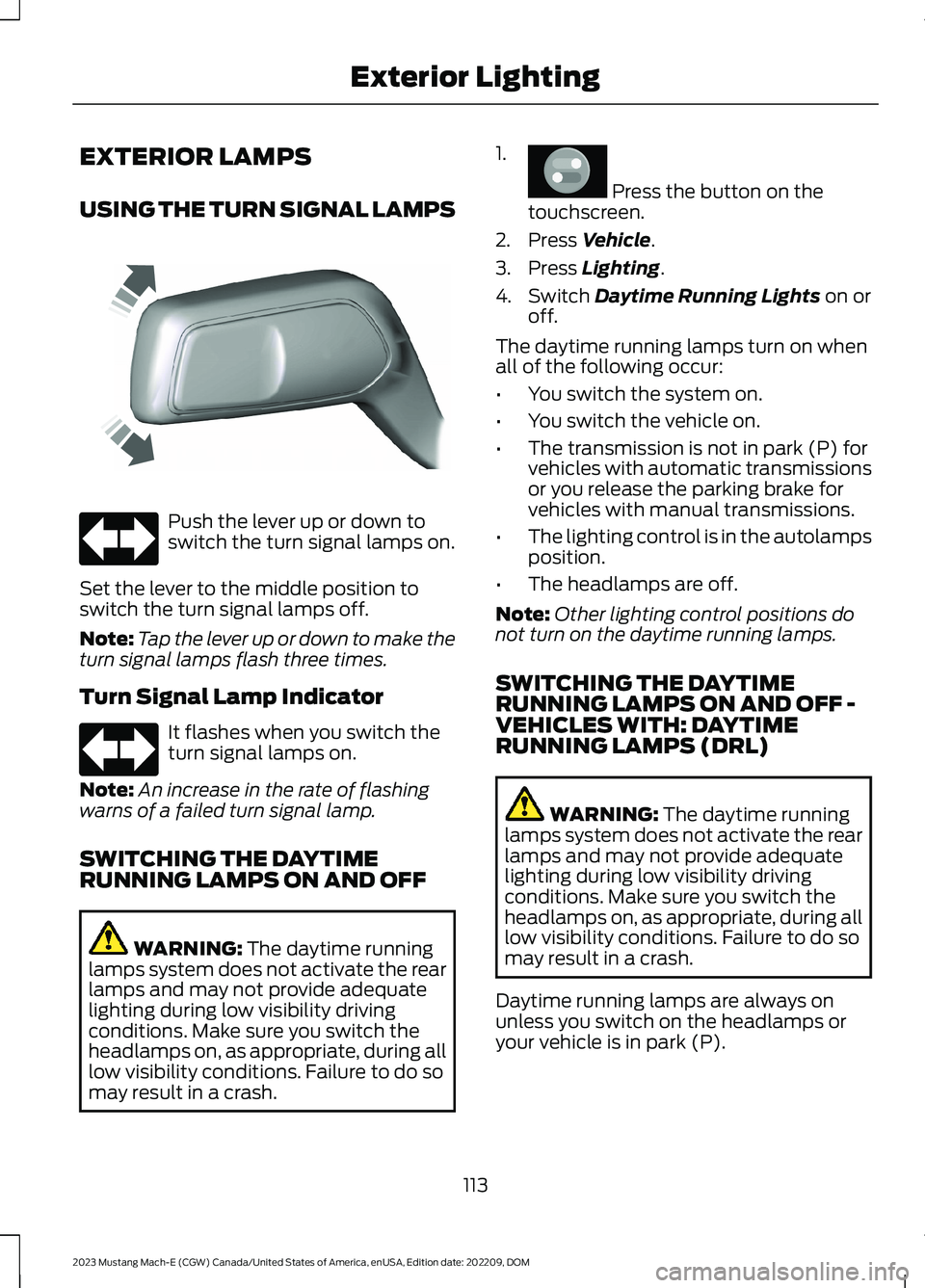
USING THE TURN SIGNAL LAMPS
Push the lever up or down toswitch the turn signal lamps on.
Set the lever to the middle position toswitch the turn signal lamps off.
Note:Tap the lever up or down to make theturn signal lamps flash three times.
Turn Signal Lamp Indicator
It flashes when you switch theturn signal lamps on.
Note:An increase in the rate of flashingwarns of a failed turn signal lamp.
SWITCHING THE DAYTIMERUNNING LAMPS ON AND OFF
WARNING: The daytime runninglamps system does not activate the rearlamps and may not provide adequatelighting during low visibility drivingconditions. Make sure you switch theheadlamps on, as appropriate, during alllow visibility conditions. Failure to do somay result in a crash.
1.
Press the button on thetouchscreen.
2.Press Vehicle.
3.Press Lighting.
4.Switch Daytime Running Lights on oroff.
The daytime running lamps turn on whenall of the following occur:
•You switch the system on.
•You switch the vehicle on.
•The transmission is not in park (P) forvehicles with automatic transmissionsor you release the parking brake forvehicles with manual transmissions.
•The lighting control is in the autolampsposition.
•The headlamps are off.
Note:Other lighting control positions donot turn on the daytime running lamps.
SWITCHING THE DAYTIMERUNNING LAMPS ON AND OFF -VEHICLES WITH: DAYTIMERUNNING LAMPS (DRL)
WARNING: The daytime runninglamps system does not activate the rearlamps and may not provide adequatelighting during low visibility drivingconditions. Make sure you switch theheadlamps on, as appropriate, during alllow visibility conditions. Failure to do somay result in a crash.
Daytime running lamps are always onunless you switch on the headlamps oryour vehicle is in park (P).
113
2023 Mustang Mach-E (CGW) Canada/United States of America, enUSA, Edition date: 202209, DOMExterior LightingE242676 E67018 E67018 E386797
Page 131 of 496
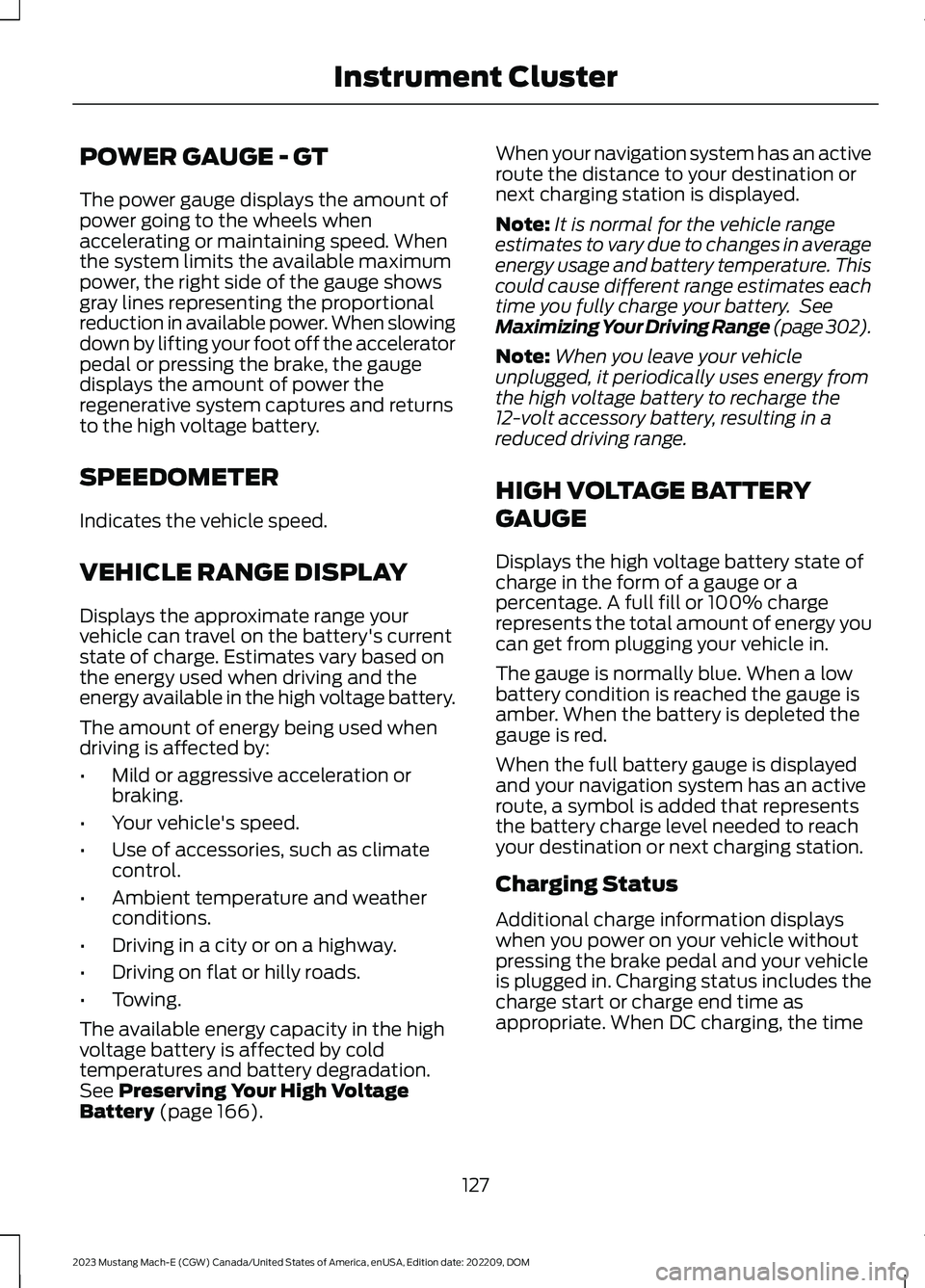
POWER GAUGE - GT
The power gauge displays the amount ofpower going to the wheels whenaccelerating or maintaining speed. Whenthe system limits the available maximumpower, the right side of the gauge showsgray lines representing the proportionalreduction in available power. When slowingdown by lifting your foot off the acceleratorpedal or pressing the brake, the gaugedisplays the amount of power theregenerative system captures and returnsto the high voltage battery.
SPEEDOMETER
Indicates the vehicle speed.
VEHICLE RANGE DISPLAY
Displays the approximate range yourvehicle can travel on the battery's currentstate of charge. Estimates vary based onthe energy used when driving and theenergy available in the high voltage battery.
The amount of energy being used whendriving is affected by:
•Mild or aggressive acceleration orbraking.
•Your vehicle's speed.
•Use of accessories, such as climatecontrol.
•Ambient temperature and weatherconditions.
•Driving in a city or on a highway.
•Driving on flat or hilly roads.
•Towing.
The available energy capacity in the highvoltage battery is affected by coldtemperatures and battery degradation.See Preserving Your High VoltageBattery (page 166).
When your navigation system has an activeroute the distance to your destination ornext charging station is displayed.
Note:It is normal for the vehicle rangeestimates to vary due to changes in averageenergy usage and battery temperature. Thiscould cause different range estimates eachtime you fully charge your battery. SeeMaximizing Your Driving Range (page 302).
Note:When you leave your vehicleunplugged, it periodically uses energy fromthe high voltage battery to recharge the12-volt accessory battery, resulting in areduced driving range.
HIGH VOLTAGE BATTERY
GAUGE
Displays the high voltage battery state ofcharge in the form of a gauge or apercentage. A full fill or 100% chargerepresents the total amount of energy youcan get from plugging your vehicle in.
The gauge is normally blue. When a lowbattery condition is reached the gauge isamber. When the battery is depleted thegauge is red.
When the full battery gauge is displayedand your navigation system has an activeroute, a symbol is added that representsthe battery charge level needed to reachyour destination or next charging station.
Charging Status
Additional charge information displayswhen you power on your vehicle withoutpressing the brake pedal and your vehicleis plugged in. Charging status includes thecharge start or charge end time asappropriate. When DC charging, the time
127
2023 Mustang Mach-E (CGW) Canada/United States of America, enUSA, Edition date: 202209, DOMInstrument Cluster
Page 132 of 496
at 80% displays followed by the time at100%. You can modify your vehicle chargesettings on the information andentertainment display. See Setting theCharging Schedule and Preferences(page 184).
Charge Required to Reach Destination
When the navigation system has an activeroute, the instrument cluster displays thecharge level required in order to reach yourdestination and the time when that chargelevel is available.
WHAT ARE THE INSTRUMENT
CLUSTER WARNING LAMPS
Warning lamps alert you to a vehiclecondition that could become serious.Some lamps illuminate when you startyour vehicle to make sure they work. If anylamps remain on after starting your vehicle,refer to the respective system warninglamp for further information.
INSTRUMENT CLUSTER
WARNING LAMPS
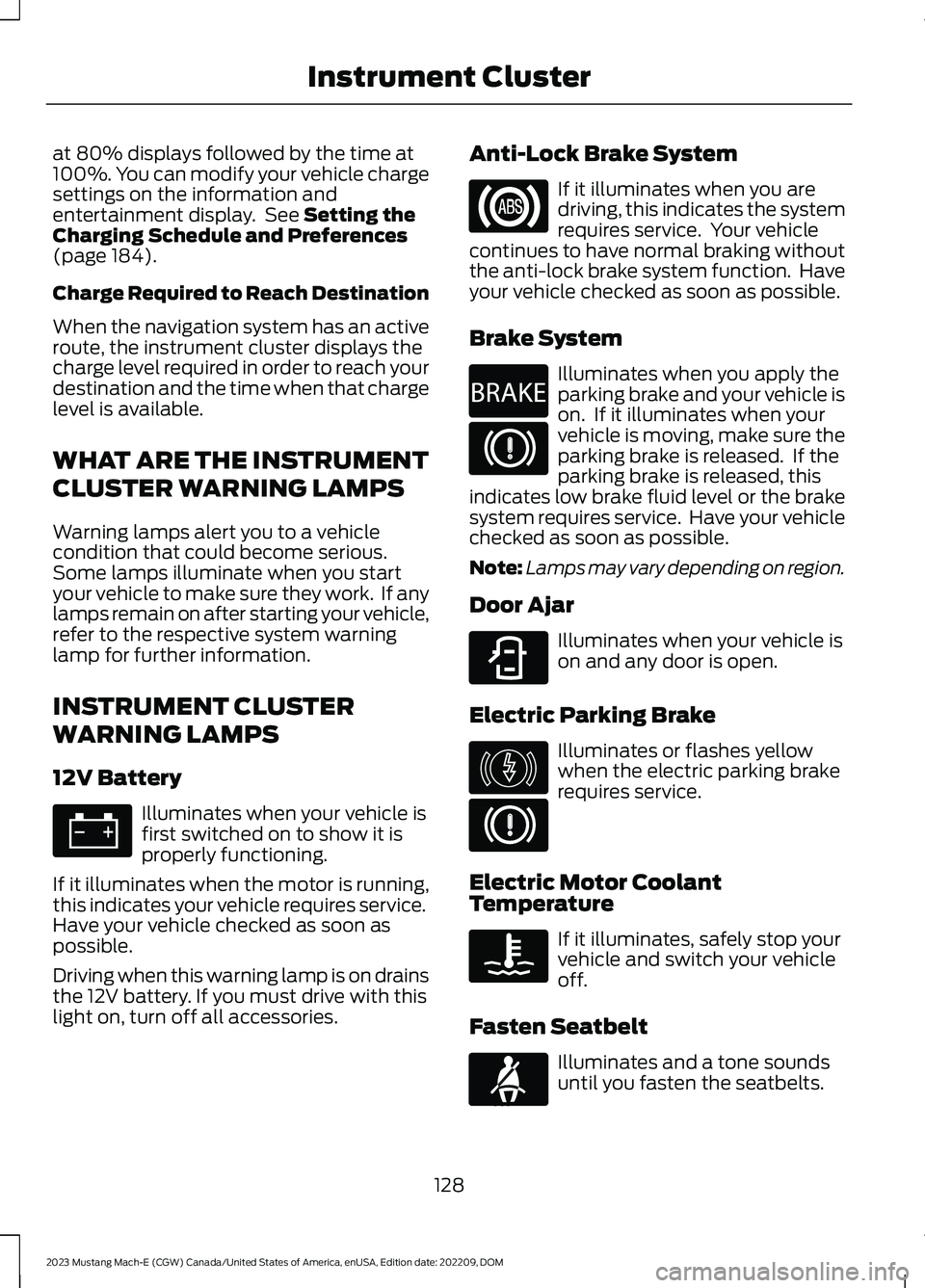
12V Battery
Illuminates when your vehicle isfirst switched on to show it isproperly functioning.
If it illuminates when the motor is running,this indicates your vehicle requires service.Have your vehicle checked as soon aspossible.
Driving when this warning lamp is on drainsthe 12V battery. If you must drive with thislight on, turn off all accessories.
Anti-Lock Brake System
If it illuminates when you aredriving, this indicates the systemrequires service. Your vehiclecontinues to have normal braking withoutthe anti-lock brake system function. Haveyour vehicle checked as soon as possible.
Brake System
Illuminates when you apply theparking brake and your vehicle ison. If it illuminates when yourvehicle is moving, make sure theparking brake is released. If theparking brake is released, thisindicates low brake fluid level or the brakesystem requires service. Have your vehiclechecked as soon as possible.
Note:Lamps may vary depending on region.
Door Ajar
Illuminates when your vehicle ison and any door is open.
Electric Parking Brake
Illuminates or flashes yellowwhen the electric parking brakerequires service.
Electric Motor CoolantTemperature
If it illuminates, safely stop yourvehicle and switch your vehicleoff.
Fasten Seatbelt
Illuminates and a tone soundsuntil you fasten the seatbelts.
128
2023 Mustang Mach-E (CGW) Canada/United States of America, enUSA, Edition date: 202209, DOMInstrument ClusterE67021 E67020 E270480 E67024 E323451 E146190 E67024 E103308 E71880
Page 135 of 496
BRAKE COACH
The brake coach appears after the vehiclehas come to a stop. It coaches you to brakein a manner that maximizes the amountof energy returned through theregenerative braking system.
The percent displayed indicates theregenerative braking efficiency, with 100%representing the maximum amount ofenergy recovery.
Note:While regenerative braking works inall drive modes, brake coach display maynot be available in all drive modes.
You can switch brake coach on or off in thesettings menu on your touchscreen.
1.
Press the button on thetouchscreen.
2.Press Vehicle.
3.Switch Brake Coach on or off.
131
2023 Mustang Mach-E (CGW) Canada/United States of America, enUSA, Edition date: 202209, DOMInstrument Cluster DisplayE386797
Page 168 of 496
STARTING AND POWERING
OFF PRECAUTIONS
•The system may not function if theremote control is close to metalobjects or electronic devices, such askeys or a cell phone.
•A valid remote control must be insideyour vehicle to switch the power on andstart your vehicle.
•Remote controls left inside your vehiclewhen locked are disabled. A messagemay appear in the information displayindicating that there is no key detectedwhen you try to start your vehicle.Press the unlock button on the remotecontrol to enable it, and then start yourvehicle.
•Make sure all occupants fasten theirseat belt.
•Make sure the headlamps andelectrical accessories are off.
•Make sure the parking brake is on.
•Make sure the vehicle is in park (P).
STARTING THE VEHICLE
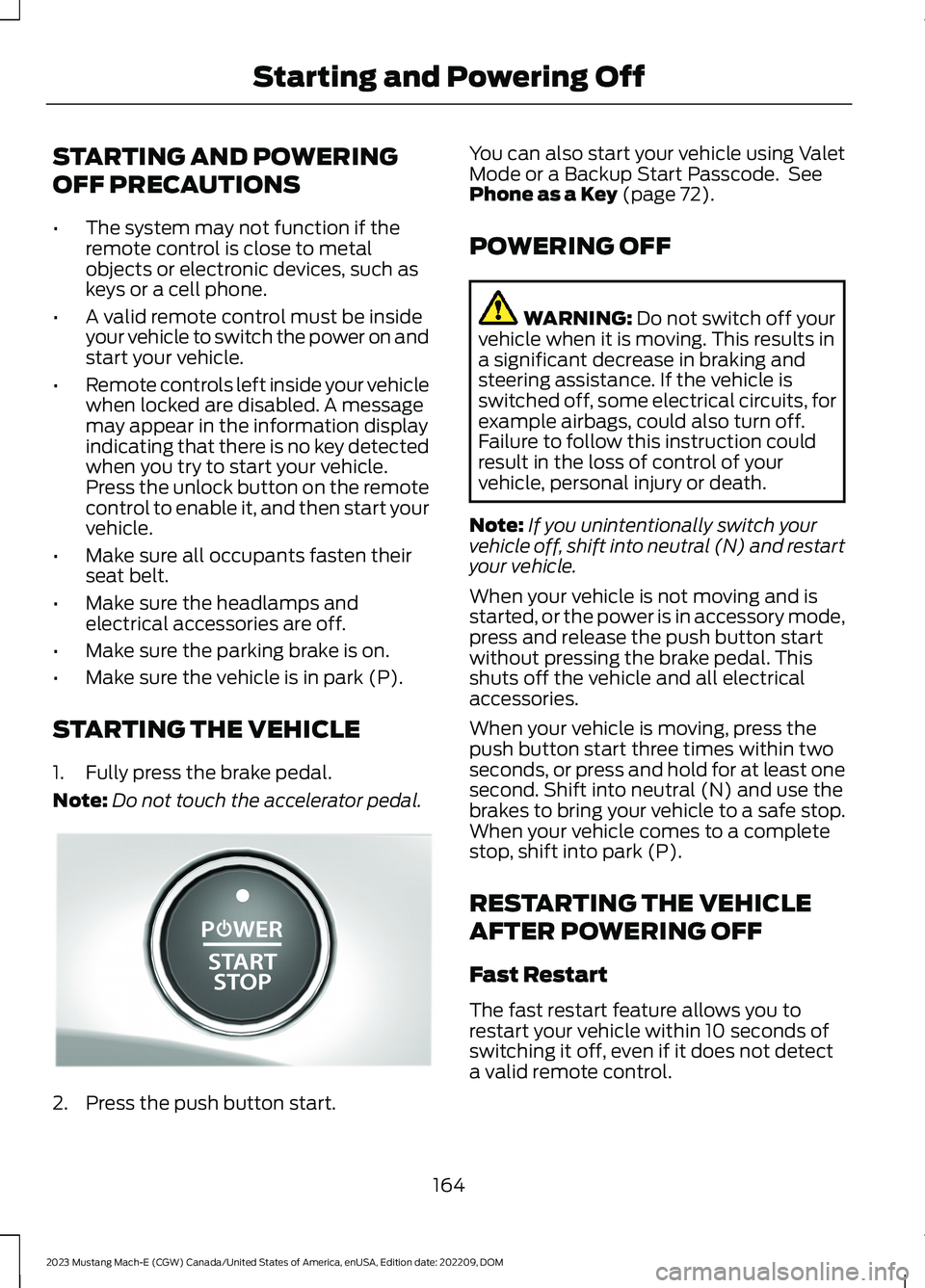
1.Fully press the brake pedal.
Note:Do not touch the accelerator pedal.
2.Press the push button start.
You can also start your vehicle using ValetMode or a Backup Start Passcode. SeePhone as a Key (page 72).
POWERING OFF
WARNING: Do not switch off yourvehicle when it is moving. This results ina significant decrease in braking andsteering assistance. If the vehicle isswitched off, some electrical circuits, forexample airbags, could also turn off.Failure to follow this instruction couldresult in the loss of control of yourvehicle, personal injury or death.
Note:If you unintentionally switch yourvehicle off, shift into neutral (N) and restartyour vehicle.
When your vehicle is not moving and isstarted, or the power is in accessory mode,press and release the push button startwithout pressing the brake pedal. Thisshuts off the vehicle and all electricalaccessories.
When your vehicle is moving, press thepush button start three times within twoseconds, or press and hold for at least onesecond. Shift into neutral (N) and use thebrakes to bring your vehicle to a safe stop.When your vehicle comes to a completestop, shift into park (P).
RESTARTING THE VEHICLE
AFTER POWERING OFF
Fast Restart
The fast restart feature allows you torestart your vehicle within 10 seconds ofswitching it off, even if it does not detecta valid remote control.
164
2023 Mustang Mach-E (CGW) Canada/United States of America, enUSA, Edition date: 202209, DOMStarting and Powering OffE328849
Page 169 of 496
Within 10 seconds of switching your vehicleoff, press the brake pedal and press thepush button start. After 10 seconds, youcan no longer start your vehicle if it doesnot detect a valid remote control.
Once your vehicle starts, it remains on untilyou press the push button start, even if itdoes not detect a valid remote control.
If you open and close a door while yourvehicle is on, the system searches for avalid remote control. You cannot start yourvehicle if the system does not detect avalid remote control within 10 seconds.
ACCESSING THE PASSIVE KEY
BACKUP POSITION
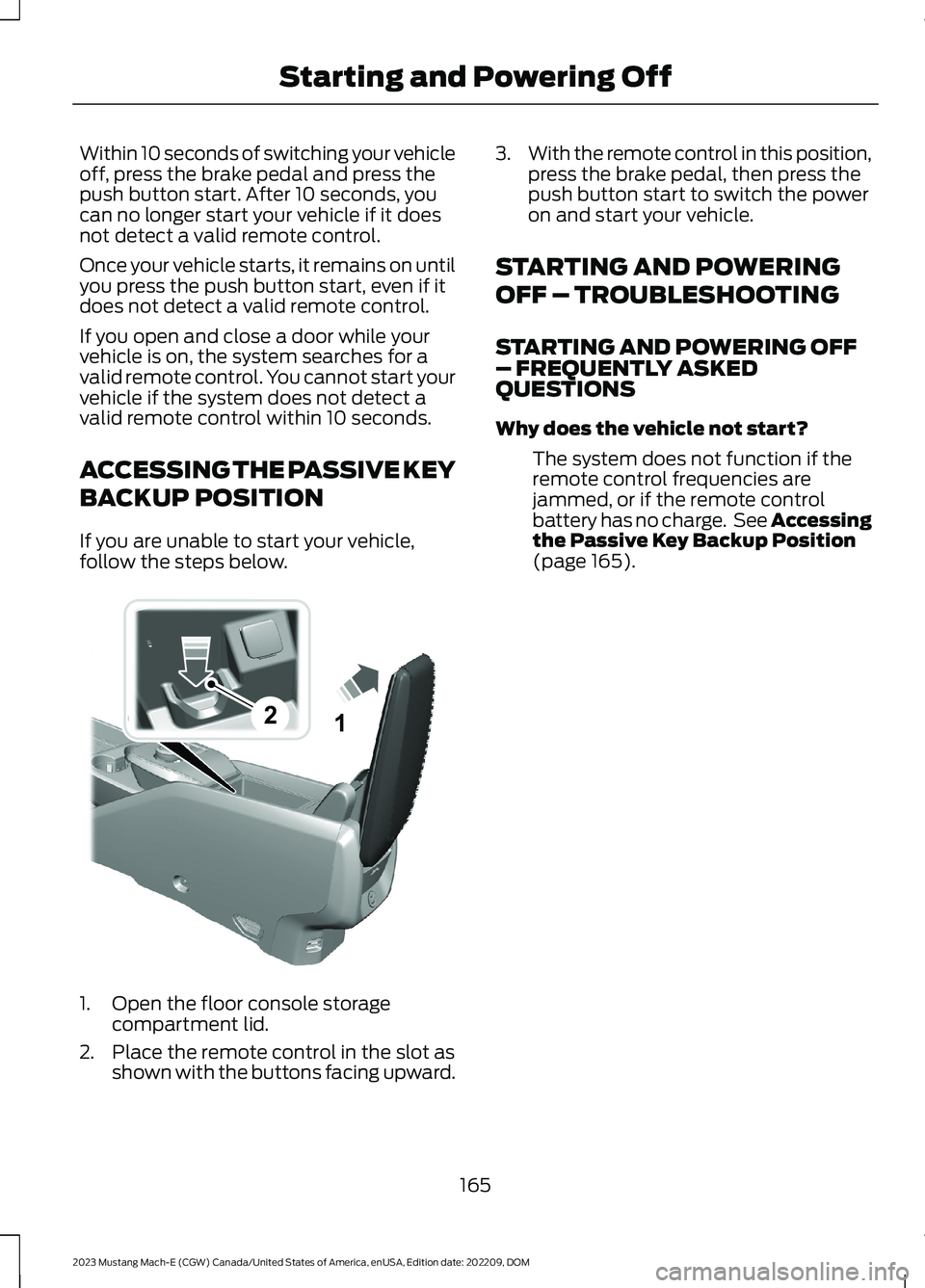
If you are unable to start your vehicle,follow the steps below.
1.Open the floor console storagecompartment lid.
2.Place the remote control in the slot asshown with the buttons facing upward.
3.With the remote control in this position,press the brake pedal, then press thepush button start to switch the poweron and start your vehicle.
STARTING AND POWERING
OFF – TROUBLESHOOTING
STARTING AND POWERING OFF– FREQUENTLY ASKEDQUESTIONS
Why does the vehicle not start?
The system does not function if theremote control frequencies arejammed, or if the remote controlbattery has no charge. See Accessingthe Passive Key Backup Position(page 165).
165
2023 Mustang Mach-E (CGW) Canada/United States of America, enUSA, Edition date: 202209, DOMStarting and Powering Off21E315884
Page 196 of 496
ELECTRIC MOTOR
PRECAUTIONS
WARNING: When your vehicle isstationary, keep the brake pedal fullypressed when shifting gears. Failure tofollow this instruction could result inpersonal injury, death or propertydamage.
WARNING: Do not apply the brakepedal and accelerator pedalsimultaneously. Applying both pedalssimultaneously for more than a fewseconds will limit power, which mayresult in difficulty maintaining speed intraffic and could lead to serious injury.
WARNING: Apply the parkingbrake, shift into park (P), switch thevehicle off and remove the key or remotecontrol before you leave your vehicle.Failure to follow this instruction couldresult in personal injury or death.
Note:You may not be able to shift out ofpark (P) unless the intelligent access key isinside your vehicle.
SELECTOR POSITIONS
PARK (P)
WARNING: Shift into park (P) onlywhen your vehicle is stationary.
In park (P) power is not transmitted to thedriven wheels.
Note:A tone sounds if you attempt to exityour vehicle without the selector in park (P).
Note:Your vehicle may not shift out of park(P) if the vehicle battery has run out ofcharge. See Jump Starting the Vehicle(page 309).
Note:Your vehicle may not shift out of park(P) if a fuse is blown. See Fuses (page 314).
Note:The electronic parking brake couldapply when the selector is in park (P). SeeAutomatically Releasing the ElectricParking Brake (page 200).
Note:Your vehicle could shift into park (P)if you attempt to exit your vehicle withoutthe selector in park (P). See How DoesAutomatic Return to Park (P) Work (page194).
Note:A tone could sound when you selectpark (P).
REVERSE (R)
WARNING: Shift into reverse (R)only when your vehicle is stationary.
In reverse (R) power is transmitted to thedriven wheels.
NEUTRAL (N)
WARNING: In neutral (N) yourvehicle is free to roll.
In neutral (N) power is not transmitted tothe driven wheels.
DRIVE (D)
In drive (D) power is transmitted to thedriven wheels.
192
2023 Mustang Mach-E (CGW) Canada/United States of America, enUSA, Edition date: 202209, DOMElectric Motor
Page 197 of 496
LOW (L)
In low (L) your vehicle decelerates morenoticeably than in drive (D) when yourelease the accelerator pedal.
Note:We recommend using this mode fordriving on hilly or mountainous roads orwhen towing a trailer. See Towing a Trailer(page 300).
SHIFTING YOUR VEHICLE INTO
GEAR
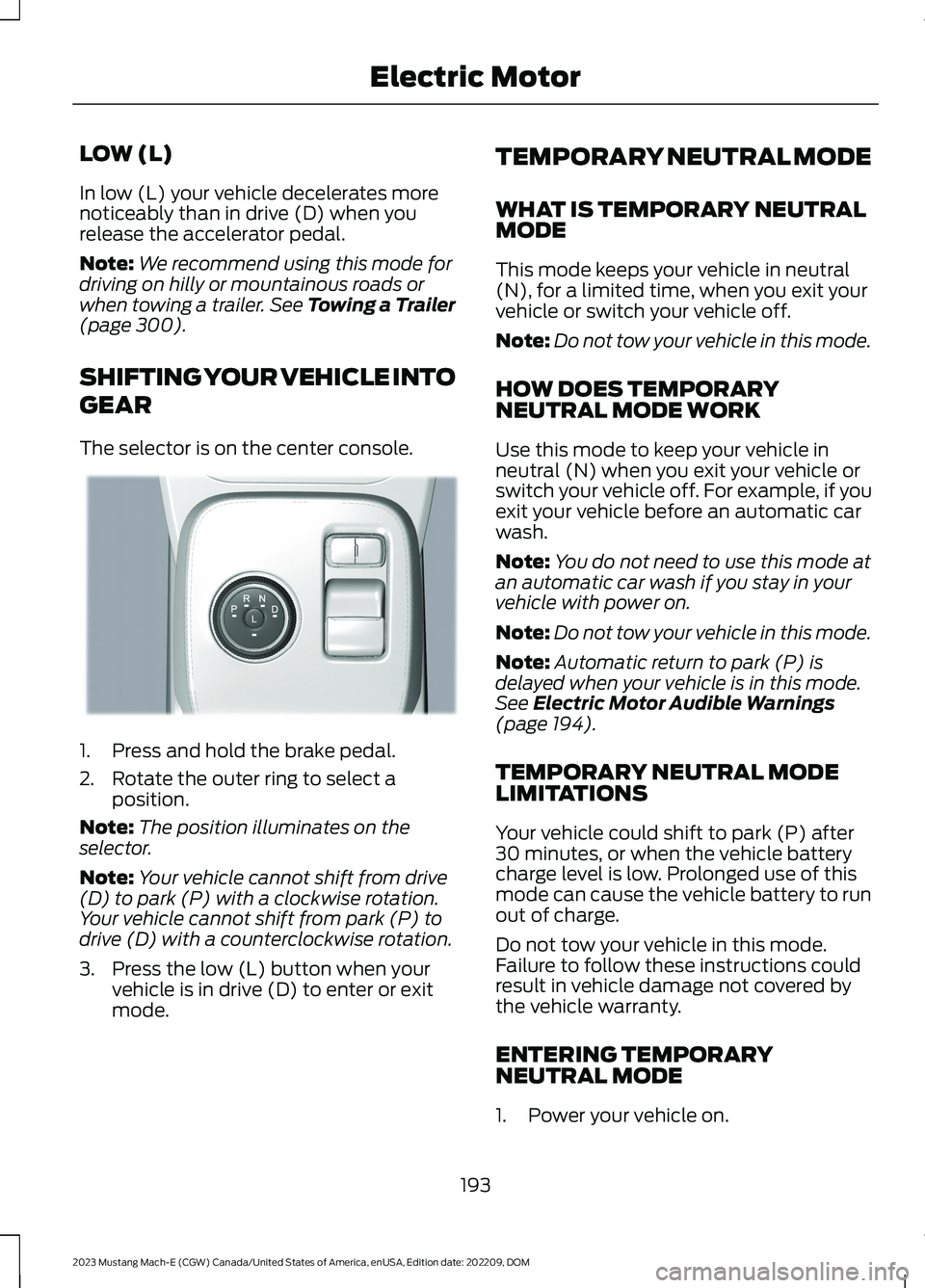
The selector is on the center console.
1.Press and hold the brake pedal.
2.Rotate the outer ring to select aposition.
Note:The position illuminates on theselector.
Note:Your vehicle cannot shift from drive(D) to park (P) with a clockwise rotation.Your vehicle cannot shift from park (P) todrive (D) with a counterclockwise rotation.
3.Press the low (L) button when yourvehicle is in drive (D) to enter or exitmode.
TEMPORARY NEUTRAL MODE
WHAT IS TEMPORARY NEUTRALMODE
This mode keeps your vehicle in neutral(N), for a limited time, when you exit yourvehicle or switch your vehicle off.
Note:Do not tow your vehicle in this mode.
HOW DOES TEMPORARYNEUTRAL MODE WORK
Use this mode to keep your vehicle inneutral (N) when you exit your vehicle orswitch your vehicle off. For example, if youexit your vehicle before an automatic carwash.
Note:You do not need to use this mode atan automatic car wash if you stay in yourvehicle with power on.
Note:Do not tow your vehicle in this mode.
Note:Automatic return to park (P) isdelayed when your vehicle is in this mode.See Electric Motor Audible Warnings(page 194).
TEMPORARY NEUTRAL MODELIMITATIONS
Your vehicle could shift to park (P) after30 minutes, or when the vehicle batterycharge level is low. Prolonged use of thismode can cause the vehicle battery to runout of charge.
Do not tow your vehicle in this mode.Failure to follow these instructions couldresult in vehicle damage not covered bythe vehicle warranty.
ENTERING TEMPORARYNEUTRAL MODE
1.Power your vehicle on.
193
2023 Mustang Mach-E (CGW) Canada/United States of America, enUSA, Edition date: 202209, DOMElectric MotorE334919