phone FORD MUSTANG MACH E 2023 User Guide
[x] Cancel search | Manufacturer: FORD, Model Year: 2023, Model line: MUSTANG MACH E, Model: FORD MUSTANG MACH E 2023Pages: 496, PDF Size: 13.09 MB
Page 76 of 496
WHAT IS PHONE AS A KEY
Phone as a Key with Walk Away Locking
Phone as a Key allows you to use yourphone in place of a passive key.
You can use your phone for the followingfunctions:
•Remote locking and unlocking.
•Passive entry and exit.
•Passive start and drive the vehicle.
•Remote start.
•Memory function recall.
PHONE AS A KEY
LIMITATIONS
Limitations can vary based on the makeand model of your phone, phone locationand physical obstructions.
The following items could impact Phoneas a Key performance or preventfunctionality in some cases:
•The typical operating range for Phoneas a Key is 131 ft (40 m).
•Your Bluetooth® connection is notenabled, is disrupted, or out of range.
•Your Phone as a Key is not active orenabled on at least one phone.
•Your vehicle battery has depleted.
•Your phone battery has depleted.
•Interference from other devices usingradio frequencies or physicalobstructions.
•Your phone is too close to metalobjects or other electronic devices.
Note:Do not leave a duplicate coded keyin the vehicle. Always take your keys andphone and lock all doors when leaving thevehicle.
PROGRAMMING YOUR PHONE
To program your smartphone as phone asa key:
1.Visit your device's app store todownload the FordPass app.
2.Create a new account or sign-in to anexisting account on the FordPass app.
3.Add the vehicle identification numberto your account and follow theprompts in the FordPass app tocomplete the Sync ConnectAuthorization process.
4.After the authorization is complete, youcan set up phone as a key following theprompts in the FordPass app.
5.After phone as a key is set up, you canset up the backup start passcode byfollowing the prompts on yourtouchscreen.
Note:Keep your new backup startpasscode with you in case of an emergency.
Resetting Phone as a Key
1.
Press the button on thetouchscreen.
2.Press General.
3.Press Reset.
4.Press the app connect reset option.
5.Press Reset All.
6.Confirm you would like to continue witherasing all phone as a key settings, keysand backup start passcodes.
7.Press Continue.
8.Confirm you are aware you arede-authorizing all authorized users andFordPass Connect settings.
9.Press Continue.
72
2023 Mustang Mach-E (CGW) Canada/United States of America, enUSA, Edition date: 202209, DOMPhone as a KeyE386797
Page 77 of 496
USING THE VALET MODE
Classic Valet Mode
Enabling Valet Mode
Make sure the remote control is in yourvehicle.
1.
Press the profile button onthe touchscreen.
Note:The button image may vary when aprofile is selected.
2.Press Valet Mode.
3.Enter a four digit code to lock thetouchscreen.
4.Re-enter the same four digit code tocomplete enabling valet mode.
Disabling Valet Mode
1.Press Exit Valet Mode.
2.Enter your four digit code to disablevalet mode and unlock yourtouchscreen.
Enhanced Valet Mode
Enabling Valet Mode
Have your backup start passcodecompletely set up before using valet mode.See Programming Your Phone (page72).
Note:If your vehicle detects a remotecontrol, the system defaults to classic valetmode.
1.
Press the profile button onthe touchscreen.
Note:The button image may vary when aprofile is selected.
2.Press Valet Mode.
Note:If the system detects a valid phoneas a key, a valet passcode displays in boththe touchscreen and mobile app.
Note:If the system does not detect a validphone as a key, it prompts you to enter yourbackup start passcode on the touchscreen.Once validated, a valet passcode displayson the touchscreen.
3.Provide the valet the first five digits ofthe valet passcode to enter on thekeyless entry keypad to unlock yourvehicle.
4.Provide the valet the eight-digit valetpasscode to enter on the touchscreento start and drive your vehicle.
Disabling Valet Mode
1.Press Exit Valet Mode.
Note:If the system detects an authorizedphone as a key, valet mode disables.
Note:If the system does not detect a validphone as a key, it prompts you to enter yourbackup start passcode. Once validated,valet mode disables.
USING THE BACKUP START
PASSCODE
Make sure you have phone as a key activeon at least one phone to use a previouslycreated backup start passcode. SeeConnecting Your Phone (page 393).
1.Press the brake pedal and the pushbutton start. If the system does notdetect a valid phone as a key or remotecontrol, a message appears on thetouchscreen and prompts you for yourbackup start passcode.
Note:The touchscreen times out after 30seconds with no interaction.
Note:If the backup start passcode screendoes not appear, press the brake pedal andpush button start again.
73
2023 Mustang Mach-E (CGW) Canada/United States of America, enUSA, Edition date: 202209, DOMPhone as a KeyE387022 E387022
Page 78 of 496
2.Use the touchscreen to enter yourbackup start passcode.
3.After entering your passcode, pressreturn within 30 seconds.
4.Once the system validates the backupstart passcode, a message alerts youto start your vehicle.
5.Press the brake pedal and the pushbutton start within 20 seconds to startthe vehicle.
6.If your vehicle does not start, repeatsteps 1-5.
System Lockout
The system locks after five combinedincorrect attempts of the following:
•Entering a backup start passcode.
•Resetting a current passcode.
•Entering a valet mode passcode.
Note:The system remains locked for fiveminutes. After five minutes the systemallows codes to be entered again.
PHONE AS A KEY –
TROUBLESHOOTING
PHONE AS A KEY – FREQUENTLYASKED QUESTIONS
How can I tell if my vehicle hasphone as a key?
•The touchscreen shows the phone asa key reset option.
•A control button appears on the homescreen of the FordPass app if you haveregistered your vehicle through theFordPass app.
What happens if I cannot unlockthe vehicle with phone as a key?
•Attempt to move your phone closer tothe vehicle.
•Check that the FordPass app is stillrunning and that the phone as a keycontrol screen shows connected. If thephone is connected, attempt to pressthe remote unlock button in theFordPass app. If the phone is notconnected or the remote unlock buttondoes not work in the FordPass app,attempt to force close and restart theapp.
Why do I get a No Key Detectedmessage in the instrument clusterdisplay when I am using phone asa key and my phone is in the car?
•Your phone’s Bluetooth connection hasbeen disrupted or is not connected. Tryreconnecting your phone's Bluetoothconnection.
•Move the phone closer to the center ofthe vehicle near the cup holder orcenter console.
•Verify your phone as a key is still active,enabled and has not been revoked.
What do I do if my phone is lost,damaged or the battery hasdepleted?
•Use the backup start passcode thatyou created. See Using the BackupStart Passcode (page 73).
How many phones can I use forphone as a key?
•You can program and activate up tofour phones with phone as a key to yourvehicle.
74
2023 Mustang Mach-E (CGW) Canada/United States of America, enUSA, Edition date: 202209, DOMPhone as a Key
Page 79 of 496
How does a valet drive my car if Ionly use my phone as a key?
•Have the valet use the temporary valetpasscode that you created. See Usingthe Valet Mode (page 73).
I uninstalled my FordPass app andreinstalled it. Why am I not able toget a new phone as a key?
•Remove the phone as a key that waspreviously associated with your phone.
•Reset phone as a key from your vehicle,and then request a new phone as a key.See Programming Your Phone (page72).
Why can I not remotely start thevehicle with my phone as a key?
•Using the FordPass app, verify yourphone as a key setup is complete andenabled via Bluetooth connection onat least one phone. If Bluetooth hasconnected but phone as a key setup isnot complete, complete the setup ofyour phone as a key as prompted fromthe FordPass app. See ProgrammingYour Phone (page 72).
75
2023 Mustang Mach-E (CGW) Canada/United States of America, enUSA, Edition date: 202209, DOMPhone as a Key
Page 81 of 496
Audio System Volume Limit
The audio system maximum volumereduces. A message appears on thetouchscreen if you attempt to exceed thevolume limit. Automatic volume controlturns off.
911 Assist
If you set 911 assist to always on, youcannot switch it off with a MyKey.
Do Not Disturb
If you set do not disturb to always on, youcannot switch it off with a MyKey.
Note:If a phone is connected using AppleCarPlay or Android Auto while driving witha MyKey, the driver can receive phone callsand text messages even if the do not disturbrestriction is on. And if the vehicle comeswith satellite radio, there is no restriction onthe adult content.
Traction and Stability Control
If you set traction control or stabilitycontrol to always on, you cannot switch itoff with a MyKey.
CREATING A MYKEY
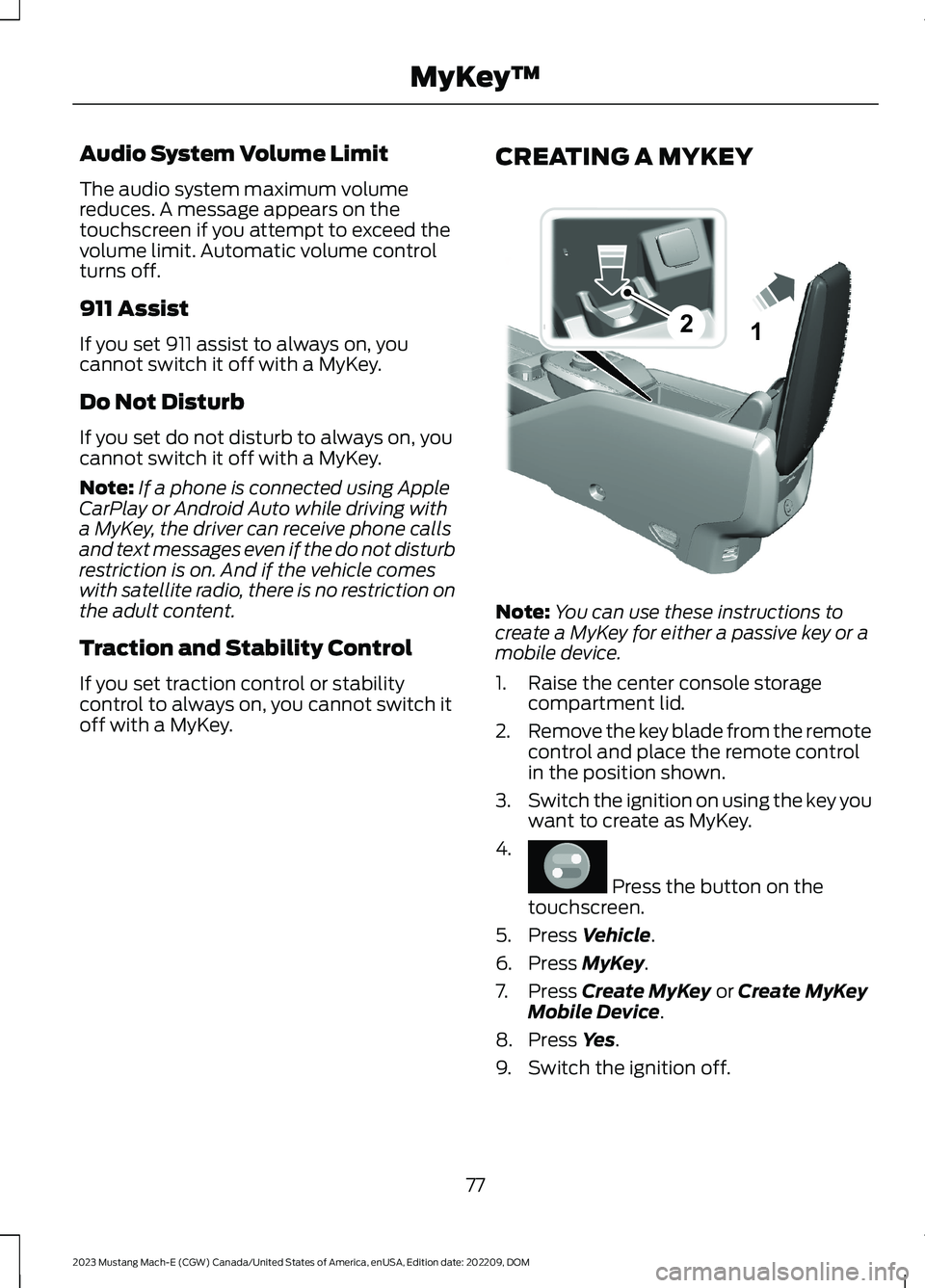
Note:You can use these instructions tocreate a MyKey for either a passive key or amobile device.
1.Raise the center console storagecompartment lid.
2.Remove the key blade from the remotecontrol and place the remote controlin the position shown.
3.Switch the ignition on using the key youwant to create as MyKey.
4.
Press the button on thetouchscreen.
5.Press Vehicle.
6.Press MyKey.
7.Press Create MyKey or Create MyKeyMobile Device.
8.Press Yes.
9.Switch the ignition off.
77
2023 Mustang Mach-E (CGW) Canada/United States of America, enUSA, Edition date: 202209, DOMMyKey™21E315884 E386797
Page 89 of 496
WHAT IS KEYLESS ENTRY
The system allows you to lock and unlockyour vehicle without taking the passive keyout of your pocket or purse.
KEYLESS ENTRY LIMITATIONS
Make sure your remote control is within 3 ft(1 m) from the front door handles and thetailgate.
The system could not function if:
•The remote control remains stationaryfor about a minute.
•The vehicle battery has no charge.
•The remote control battery has nocharge.
•There is interference causing issueswith the remote control frequencies.
•The remote control is too close tometal objects or electronic devices, forexample keys or a cell phone.
KEYLESS ENTRY SETTINGS
Switching Keyless Entry On andOff
1.Switch the ignition on using an originalkey that has not been created as aMyKey.
2.
Press the button on thetouchscreen.
3.Press Vehicle.
4.Press Locks.
Reprogramming the UnlockingFunction
You can enable two-stage unlockingfunction allowing you to unlock only thedriver door when you touch the unlocksensor.
Press and hold both the lock and unlockbuttons on the remote control for fourseconds to disable or enable two-stageunlocking.
If you program the unlocking function sothat only the driver door unlocks, you canunlock all of the other doors from insideyour vehicle using the power door lockcontrol. You can unlock individual doorsby pulling the interior door handles onthose doors.
USING KEYLESS ENTRY
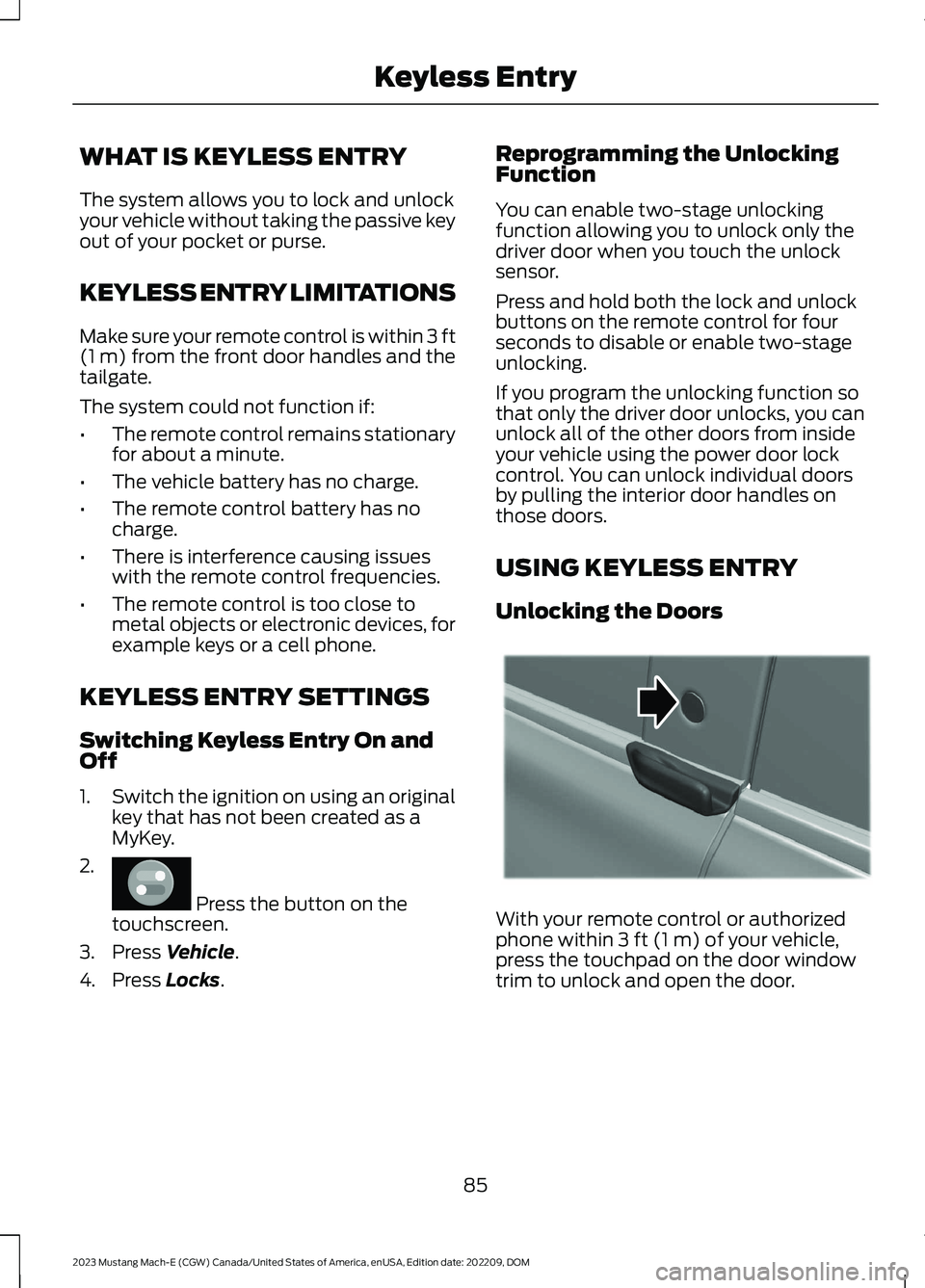
Unlocking the Doors
With your remote control or authorizedphone within 3 ft (1 m) of your vehicle,press the touchpad on the door windowtrim to unlock and open the door.
85
2023 Mustang Mach-E (CGW) Canada/United States of America, enUSA, Edition date: 202209, DOMKeyless EntryE386797 E334831
Page 90 of 496
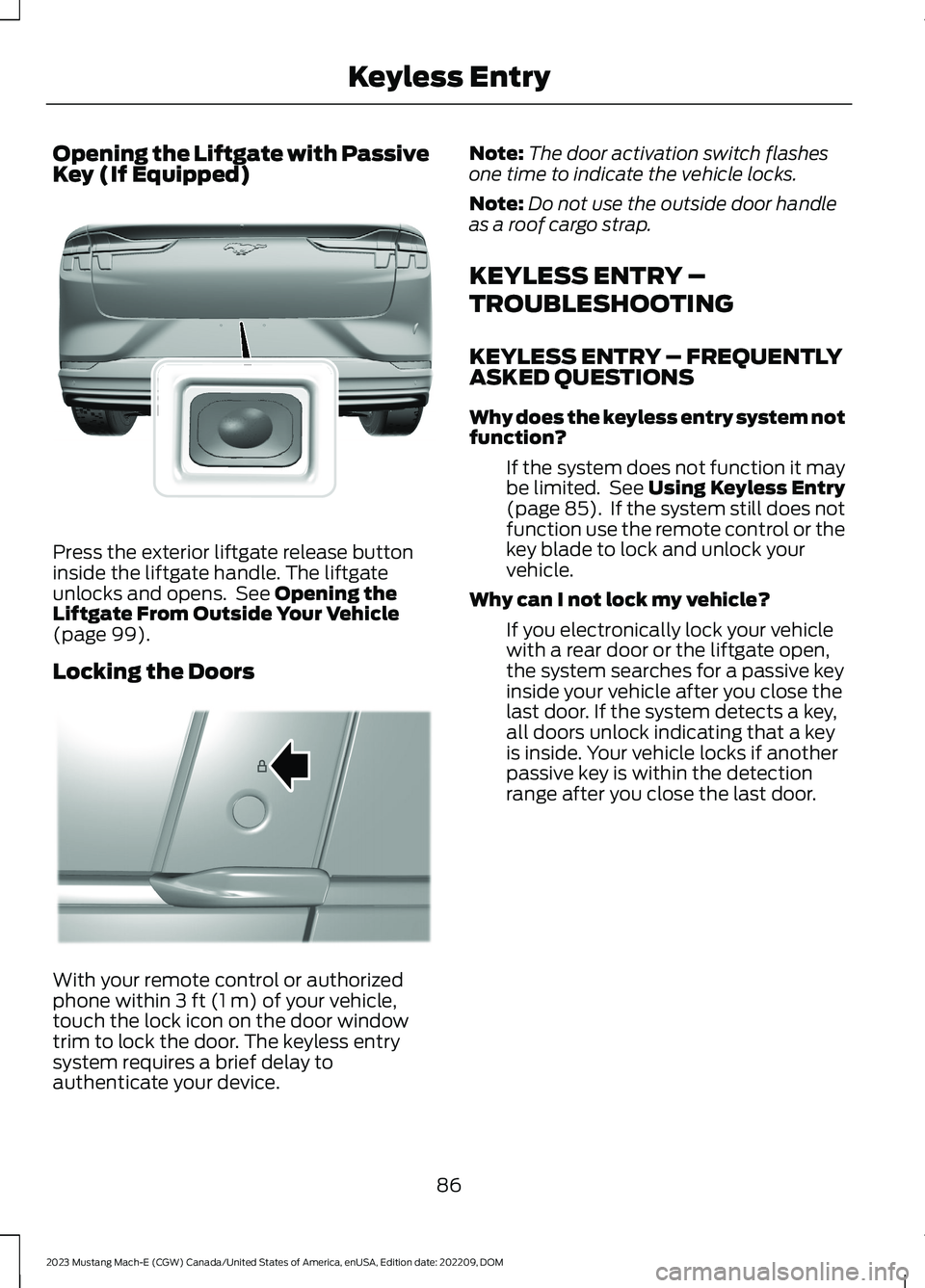
Opening the Liftgate with PassiveKey (If Equipped)
Press the exterior liftgate release buttoninside the liftgate handle. The liftgateunlocks and opens. See Opening theLiftgate From Outside Your Vehicle(page 99).
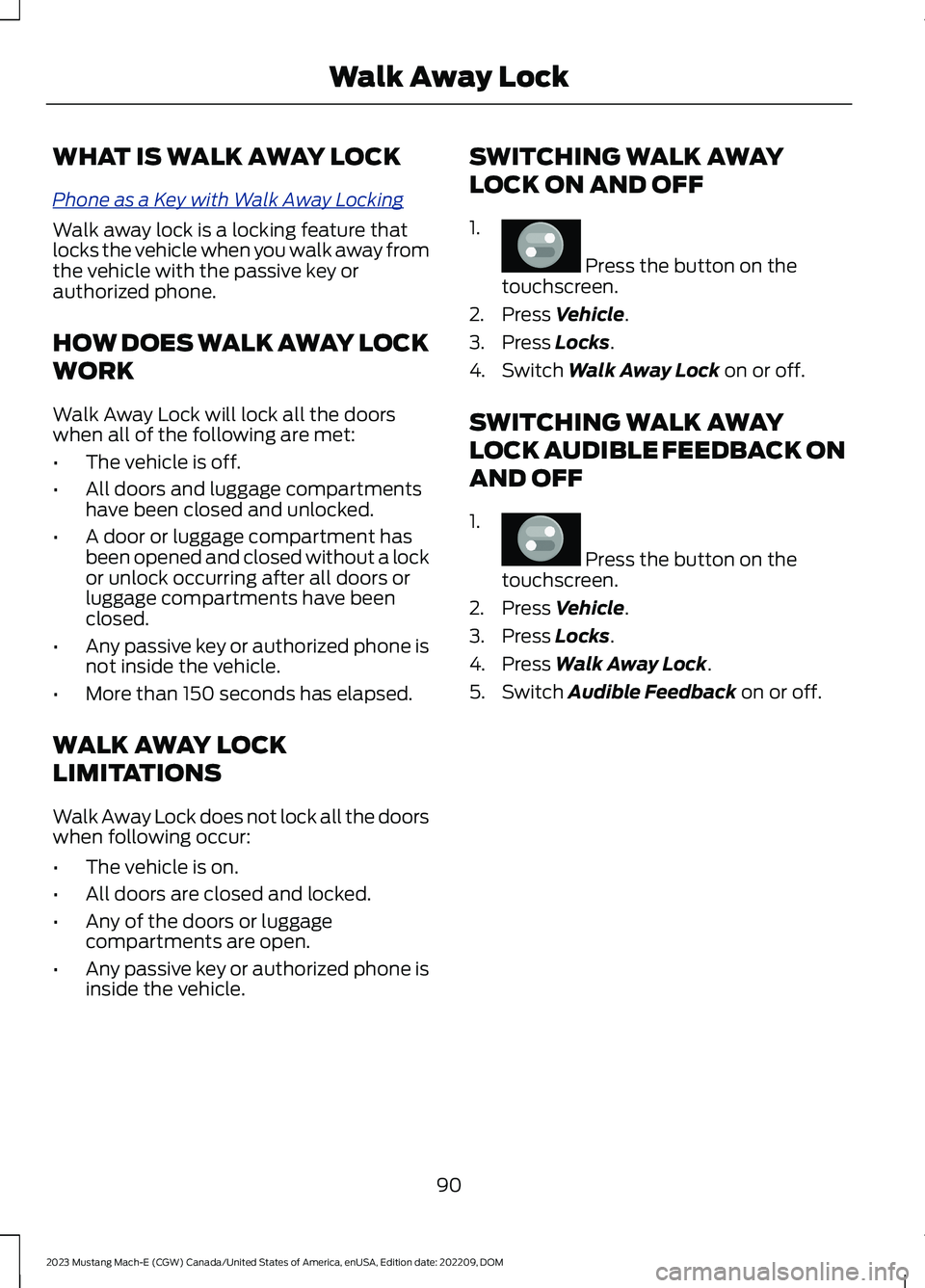
Locking the Doors
With your remote control or authorizedphone within 3 ft (1 m) of your vehicle,touch the lock icon on the door windowtrim to lock the door. The keyless entrysystem requires a brief delay toauthenticate your device.
Note:The door activation switch flashesone time to indicate the vehicle locks.
Note:Do not use the outside door handleas a roof cargo strap.
KEYLESS ENTRY –
TROUBLESHOOTING
KEYLESS ENTRY – FREQUENTLYASKED QUESTIONS
Why does the keyless entry system notfunction?
If the system does not function it maybe limited. See Using Keyless Entry(page 85). If the system still does notfunction use the remote control or thekey blade to lock and unlock yourvehicle.
Why can I not lock my vehicle?
If you electronically lock your vehiclewith a rear door or the liftgate open,the system searches for a passive keyinside your vehicle after you close thelast door. If the system detects a key,all doors unlock indicating that a keyis inside. Your vehicle locks if anotherpassive key is within the detectionrange after you close the last door.
86
2023 Mustang Mach-E (CGW) Canada/United States of America, enUSA, Edition date: 202209, DOMKeyless EntryE316256 E334918
Page 94 of 496
WHAT IS WALK AWAY LOCK
Phone as a Key with Walk Away Locking
Walk away lock is a locking feature thatlocks the vehicle when you walk away fromthe vehicle with the passive key orauthorized phone.
HOW DOES WALK AWAY LOCK
WORK
Walk Away Lock will lock all the doorswhen all of the following are met:
•The vehicle is off.
•All doors and luggage compartmentshave been closed and unlocked.
•A door or luggage compartment hasbeen opened and closed without a lockor unlock occurring after all doors orluggage compartments have beenclosed.
•Any passive key or authorized phone isnot inside the vehicle.
•More than 150 seconds has elapsed.
WALK AWAY LOCK
LIMITATIONS
Walk Away Lock does not lock all the doorswhen following occur:
•The vehicle is on.
•All doors are closed and locked.
•Any of the doors or luggagecompartments are open.
•Any passive key or authorized phone isinside the vehicle.
SWITCHING WALK AWAY
LOCK ON AND OFF
1.
Press the button on thetouchscreen.
2.Press Vehicle.
3.Press Locks.
4.Switch Walk Away Lock on or off.
SWITCHING WALK AWAY
LOCK AUDIBLE FEEDBACK ON
AND OFF
1.
Press the button on thetouchscreen.
2.Press Vehicle.
3.Press Locks.
4.Press Walk Away Lock.
5.Switch Audible Feedback on or off.
90
2023 Mustang Mach-E (CGW) Canada/United States of America, enUSA, Edition date: 202209, DOMWalk Away LockE386797 E386797
Page 128 of 496
To reset the power-fold feature, use thepower-folding mirror control to fold andunfold the mirrors. A loud noise could occurwhen you reset the power-folding mirrors,this sound is normal. Repeat this processas needed each time the mirrors aremanually folded.
FOLDING THE EXTERIOR
MIRRORS - VEHICLES WITH:
MANUAL FOLDING MIRRORS
Push the mirror toward the door windowglass. Make sure that you fully engage themirror in its support when returning it to itsoriginal position.
Heated Exterior Mirrors
See Adjusting the Exterior Mirrors (page123).
Memory Mirrors
You can save and recall the mirrorpositions through the memory function.See Saving a Preset Position (page 154).
Directional Indicator Mirrors
When your vehicle is running, theforward-facing portion of the appropriatemirror housing blinks when you switch onthe turn signal.
Puddle Lamps
The puddle lamps turn on when youapproach your vehicle with a remotecontrol or phone. If your vehicle hasauto-folding mirrors, the puddle lamps areonly on if the mirrors are unfolded and turnoff when the mirrors fold.
360 Degree Camera (If Equipped)
See Locating the 360 Degree Cameras(page 229).
Blind Spot Information System
See What Is Blind Spot InformationSystem (page 271).
124
2023 Mustang Mach-E (CGW) Canada/United States of America, enUSA, Edition date: 202209, DOMExterior Mirrors
Page 138 of 496
WHAT IS REMOTE START
The system allows you to remotely startyour vehicle and to adjust the interiortemperature according to the settings thatyou chose.
Note:If your vehicle is plugged in during theremote start operation, it will draw powerfrom the power source and not the vehicle'sbattery.
REMOTE START
PRECAUTIONS
WARNING: Do not keep electricaldevices plugged in the power pointwhenever the device is not in use. Powerpoints power up during remote start.
REMOTE START LIMITATIONS
Remote start does not work under thefollowing conditions:
•The alarm horn is sounding.
•The hood is open.
•The vehicle is not in park (P).
•The vehicle is on.
•Remote start has been disabled in thetouchscreen.
•The high voltage or 12 volt battery isbelow the minimum operating voltage.
Note:To use remote start with the FordPass, enable the modem. See ConnectingFordPass to the Modem (page 372). To useremote start with Phone as a Key, enablethe modem and set up Phone As A Key. SeeProgramming Your Phone (page 72).
ENABLING REMOTE START
1.
Press the button on thetouchscreen.
2.Press Vehicle.
3.Press Remote Start Setup.
4.Switch Remote Start on or off.
Note:To remote start with FordPass orPhone as a Key, make sure that the modemis enabled and Phone as a Key is setup. SeeEnabling and Disabling the Modem (page372). See Programming Your Phone (page72).
REMOTELY STARTING AND
STOPPING THE VEHICLE
Remotely Starting the Vehicle
Using your FordPass app, press and holdthe start button.
Note:You can also use the phone as a keyto start the vehicle.
•The direction indicators flash twice.
•The parking lamps turn on when thevehicle is running.
•The horn sounds if the system fails tostart.
•All other vehicle systems remain offwhen you have remotely started thevehicle.
•The vehicle remains secured when youhave remotely started the vehicle. Avalid key must be inside your vehicle toswitch the vehicle on and drive yourvehicle.
Remotely Stopping the Vehicle
Using your FordPass app, press the remotestop button.
134
2023 Mustang Mach-E (CGW) Canada/United States of America, enUSA, Edition date: 202209, DOMRemote StartE386797