mirror FORD MUSTANG MACH E 2023 Owner's Manual
[x] Cancel search | Manufacturer: FORD, Model Year: 2023, Model line: MUSTANG MACH E, Model: FORD MUSTANG MACH E 2023Pages: 496, PDF Size: 13.09 MB
Page 289 of 496
WHAT IS DRIVER ALERT
Driver alert alerts you if it determines thatyou are becoming drowsy or if your drivingdeteriorates.
HOW DOES DRIVER ALERT
WORK
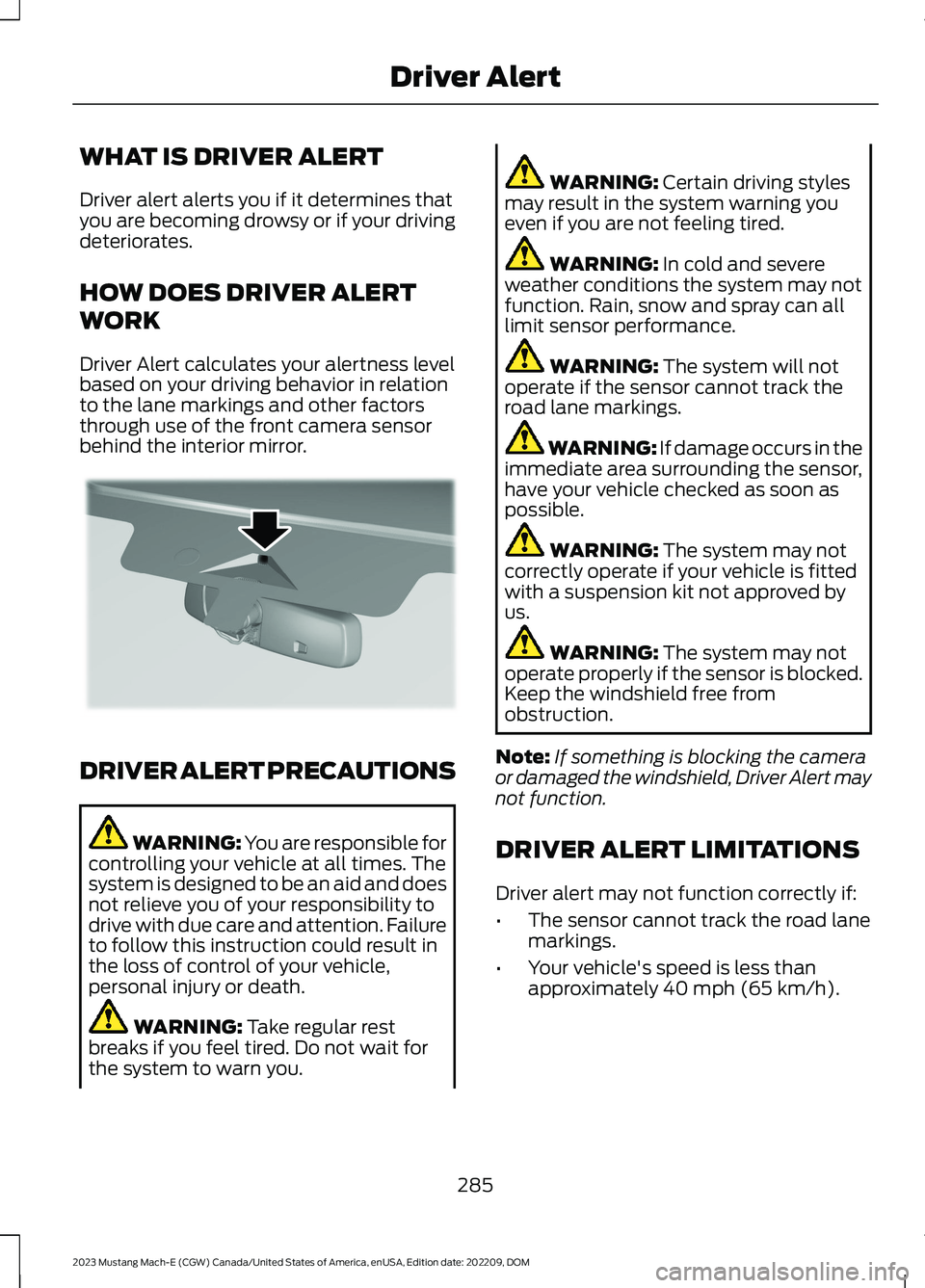
Driver Alert calculates your alertness levelbased on your driving behavior in relationto the lane markings and other factorsthrough use of the front camera sensorbehind the interior mirror.
DRIVER ALERT PRECAUTIONS
WARNING: You are responsible forcontrolling your vehicle at all times. Thesystem is designed to be an aid and doesnot relieve you of your responsibility todrive with due care and attention. Failureto follow this instruction could result inthe loss of control of your vehicle,personal injury or death.
WARNING: Take regular restbreaks if you feel tired. Do not wait forthe system to warn you.
WARNING: Certain driving stylesmay result in the system warning youeven if you are not feeling tired.
WARNING: In cold and severeweather conditions the system may notfunction. Rain, snow and spray can alllimit sensor performance.
WARNING: The system will notoperate if the sensor cannot track theroad lane markings.
WARNING: If damage occurs in theimmediate area surrounding the sensor,have your vehicle checked as soon aspossible.
WARNING: The system may notcorrectly operate if your vehicle is fittedwith a suspension kit not approved byus.
WARNING: The system may notoperate properly if the sensor is blocked.Keep the windshield free fromobstruction.
Note:If something is blocking the cameraor damaged the windshield, Driver Alert maynot function.
DRIVER ALERT LIMITATIONS
Driver alert may not function correctly if:
•The sensor cannot track the road lanemarkings.
•Your vehicle's speed is less thanapproximately 40 mph (65 km/h).
285
2023 Mustang Mach-E (CGW) Canada/United States of America, enUSA, Edition date: 202209, DOMDriver AlertE309385
Page 291 of 496
WHAT IS SPEED SIGN
RECOGNITION
Speed sign recognition detects speed limitsigns to inform you of the current speedlimit. Detected speed signs appear in theinstrument cluster display.
HOW DOES SPEED SIGN
RECOGNITION WORK
Speed sign recognition uses a sensorbehind the interior mirror to detect speedsigns.
If your vehicle has speed sign recognitionwith navigation, stored speed sign datamay influence the indicated speed limitvalue.
SPEED SIGN RECOGNITION
PRECAUTIONS
WARNING: You are responsible forcontrolling your vehicle at all times. Thesystem is designed to be an aid and doesnot relieve you of your responsibility todrive with due care and attention. Failureto follow this instruction could result inthe loss of control of your vehicle,personal injury or death.
WARNING: In cold and severeweather conditions the system may notfunction. Rain, snow and spray can alllimit sensor performance.
WARNING: The system may notoperate properly if the sensor is blocked.Keep the windshield free fromobstruction.
Note:Do not carry out windshield repairsin the immediate area surrounding thesensor.
Note:If your vehicle has a suspension kitnot approved by Ford, the system may notcorrectly function.
Note:The system may not detect all speedsigns and may incorrectly read signs.
Note:Always fit our original parts whenreplacing headlamp bulbs. Other bulbs mayreduce system performance.
SPEED SIGN RECOGNITION
LIMITATIONS
Speed sign recognition may not operatecorrectly due to:
•Outdated map data.
•Incorrect recognition of speed limits bythe sensor of signs on parallel roads orexit ramps.
•Missed recognition of faded, dirty, ordistorted signs.
SPEED SIGN RECOGNITION
INDICATORS
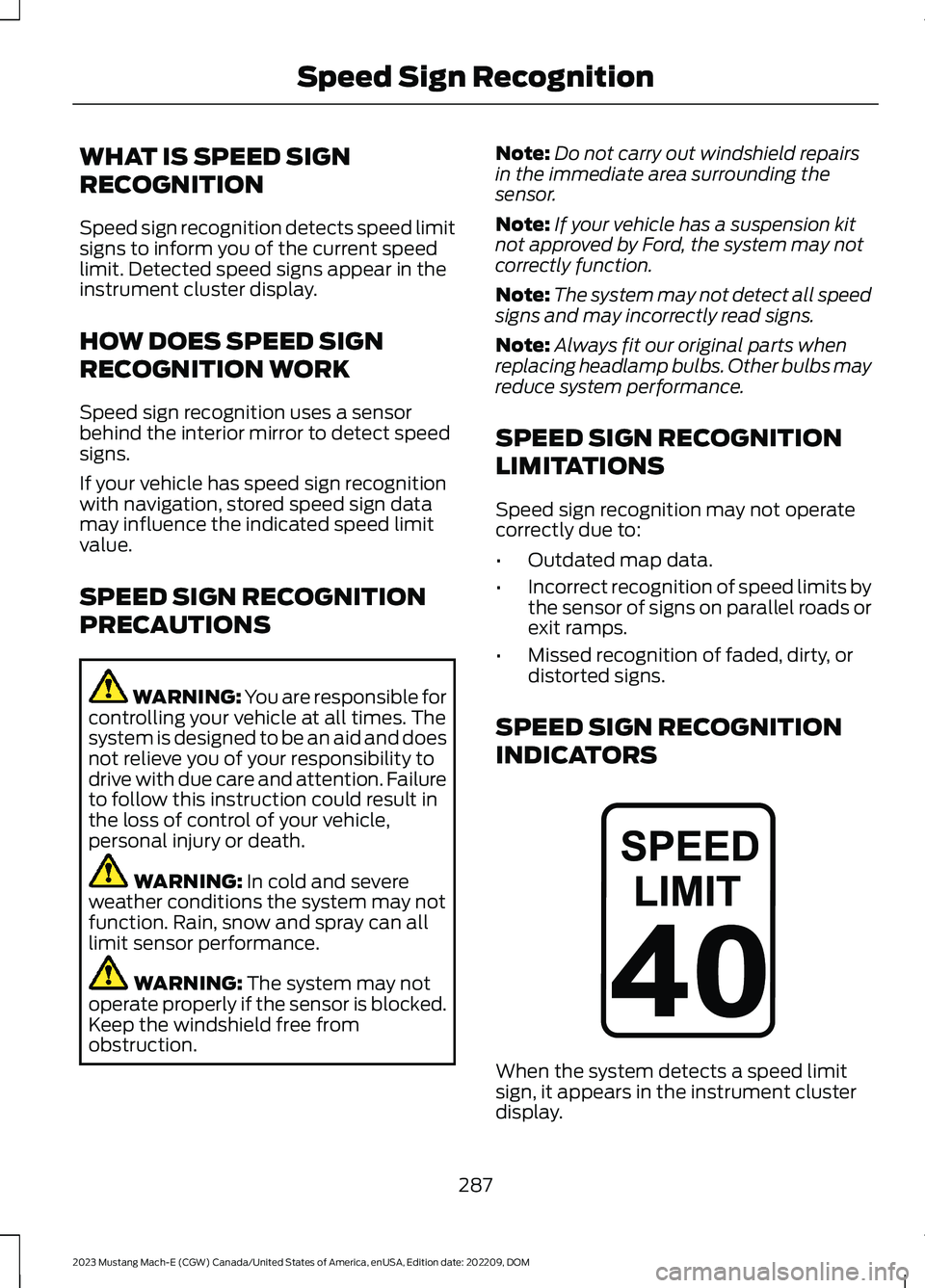
When the system detects a speed limitsign, it appears in the instrument clusterdisplay.
287
2023 Mustang Mach-E (CGW) Canada/United States of America, enUSA, Edition date: 202209, DOMSpeed Sign RecognitionE317824
Page 307 of 496
Preconditioning Your Vehicle
You can precondition your vehicle by usingdeparture and comfort settings to warmor cool your cabin and the high voltagebattery when your vehicle is plugged in. Byusing energy from your charging sourceprior to your departure, batterytemperature can be managed for bestdriving performance and less energy willbe needed for heating or cooling of thecabin at the start of your drive. This helpsmaximize your driving range. See Settingthe Charging Schedule and Preferences(page 184).
Note:You can also access departure andcomfort settings using the FordPass App.
Note:Lower cabin temperature settings onthe climate control system results in bettertrip range.
Parking Your Vehicle
At temperatures just above the freezingpoint and lower, plug your vehicle in whennot in use to maintain high voltage batteryperformance.
When possible park your vehicle under acovered area or in a garage. This will helpto moderate temperatures which affectperformance of the high voltage batteryand require energy to heat or cool thecabin.
Driving Style
Range is reduced when driving aggressivelyor at consistently high speeds. Aggressivedriving for extended periods could alsoresult in reducing your battery’s efficiencyand lifespan. Use the trip application onyour touchscreen to see your driving scores.See Trip Data (page 133).
DRIVING IN COLD WEATHER
Pack a small supply kit with a 12 V jumpbox, blanket, snow scraper and glovesduring winter.
We recommend winter tires with sufficienttread depth for traction.
Clear snow and ice from the roof, hood, allwindows and mirrors. Remove piled upsnow or ice from the wipers and washernozzles. Allow time for windows to defrostand interior controls to warm up beforedriving.
Preconditioning Your Vehicle
You can precondition your vehicle to warmor cool the cabin and the high voltagebattery when you have your vehicleplugged in. You can charge your vehicle tothe targeted level and also make sure yourvehicle is at a comfortable temperaturefor the occupants.
Note:You can precondition your vehicleprior to your departure using the FordPassapp.
Keep your vehicle fully charged beforeheading out into cold weather.
Note:Using seat heaters is more efficientfor warming occupants than using the heatfrom the climate control.
Note:Lower cabin temperature settings onthe climate control system results in bettertrip range.
DRIVING THROUGH SHALLOW
WATER
WARNING: Do not attempt tocross a deep or flowing body of water.Failure to follow this instruction couldresult in the loss of control of yourvehicle, personal injury or death.
303
2023 Mustang Mach-E (CGW) Canada/United States of America, enUSA, Edition date: 202209, DOMDriving Hints
Page 326 of 496
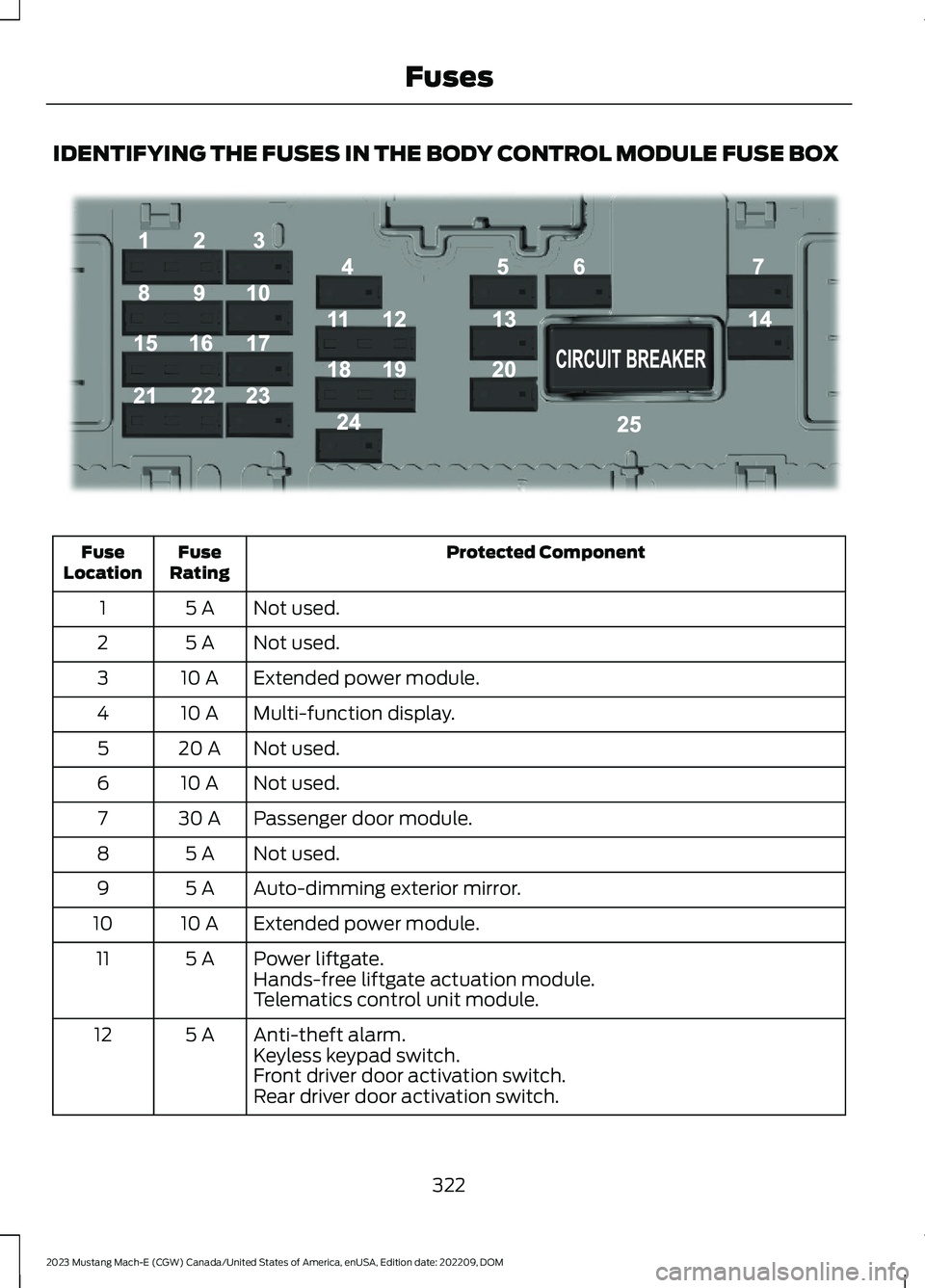
IDENTIFYING THE FUSES IN THE BODY CONTROL MODULE FUSE BOX
Protected ComponentFuseRatingFuseLocation
Not used.5 A1
Not used.5 A2
Extended power module.10 A3
Multi-function display.10 A4
Not used.20 A5
Not used.10 A6
Passenger door module.30 A7
Not used.5 A8
Auto-dimming exterior mirror.5 A9
Extended power module.10 A10
Power liftgate.5 A11Hands-free liftgate actuation module.Telematics control unit module.
Anti-theft alarm.5 A12Keyless keypad switch.Front driver door activation switch.Rear driver door activation switch.
322
2023 Mustang Mach-E (CGW) Canada/United States of America, enUSA, Edition date: 202209, DOMFusesE293328
Page 375 of 496
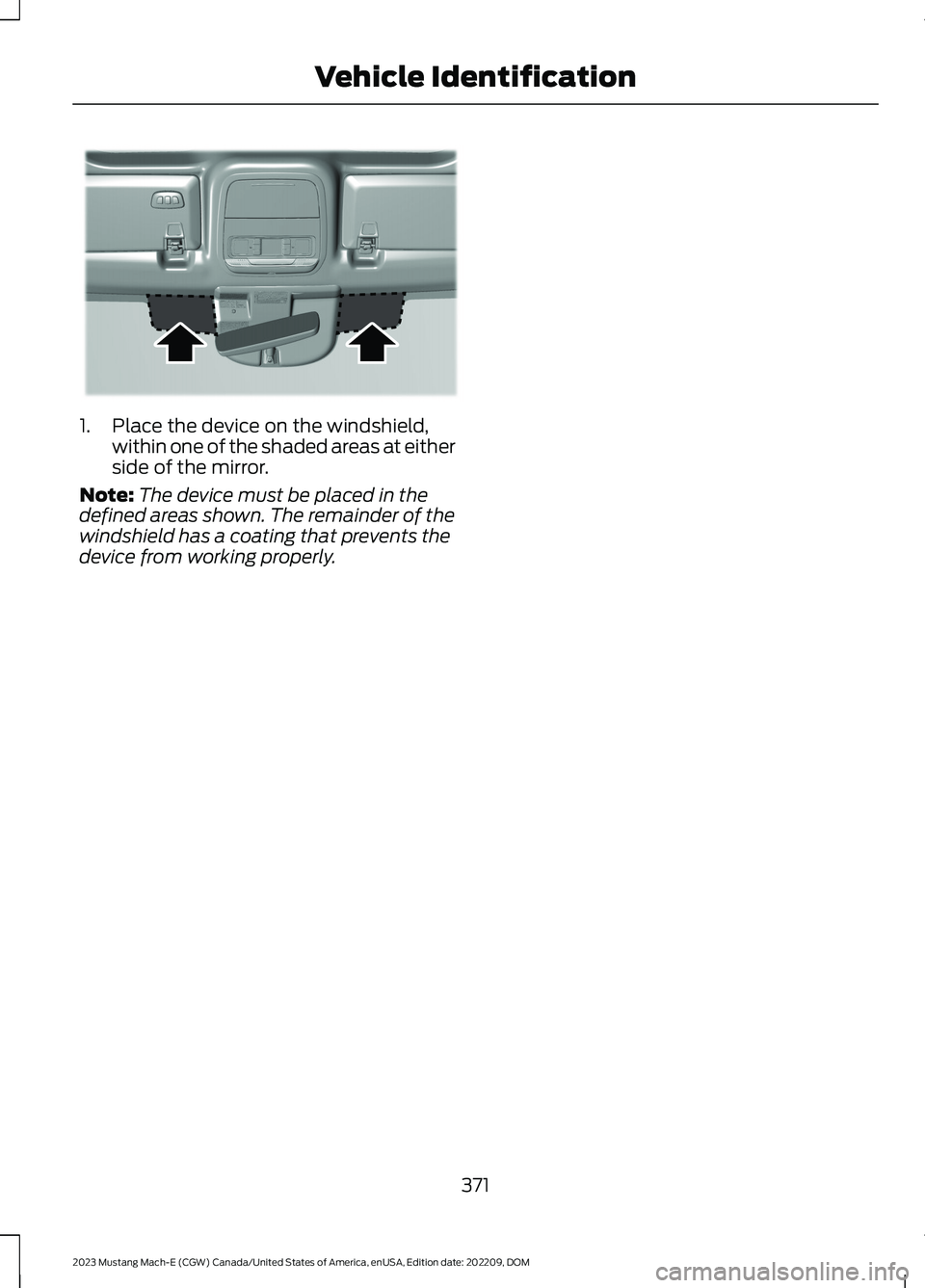
1.Place the device on the windshield,within one of the shaded areas at eitherside of the mirror.
Note:The device must be placed in thedefined areas shown. The remainder of thewindshield has a coating that prevents thedevice from working properly.
371
2023 Mustang Mach-E (CGW) Canada/United States of America, enUSA, Edition date: 202209, DOMVehicle IdentificationE355005
Page 403 of 496
HOW DO PERSONAL PROFILES
WORK
You can create multiple personal profilesenabling users to personalize vehiclesettings such as seats and mirrors, as wellas non-positional settings like radio,navigation and driver assist systemsettings. Positional settings are saved byholding a memory seat button.Non-positional settings are saved whenyou change a setting while a profile isactive.
ENABLING OR DISABLING
PERSONAL PROFILES
1.
Press the profile button onthe touchscreen.
Note:The button image may vary when aprofile is selected.
2.Switch Personal Profiles on or off.
When enabled:
•Unlocking a door with a remote controlor mobile device that is not linked to adriver profile does not change activeprofile, but remains in the last knownprofile. It does not change thepositional settings.
•Pressing a memory seat button that isnot linked to a driver profile or saved toa preset setting does not change activeprofile, but remains in the last knownprofile. It does not change thepositional settings.
•Pressing a memory seat button that isnot linked to a driver profile but is savedto a preset setting does not changeactive profile, but remains in the lastknown profile. It recalls the positionalsettings that you saved to that memoryseat button.
When disabled:
•Unlocking a door with a remote controlor mobile device does not recall anynon-positional settings but still recallspositional settings from the driverprofile which the remote control ormobile device is linked to.
•Pressing a memory seat button that isnot linked to a driver profile or saved toa preset setting recalls non-positionalsettings from the guest profile. It doesnot change the positional settings.
•Pressing a memory seat button that islinked to a driver profile or has savedto a preset setting recallsnon-positional settings from the guestprofile. It recalls the positional settingsthat you saved to that memory seatbutton.
CREATING A PERSONAL
PROFILE
1.Switch the vehicle on and leave thevehicle in park (P).
2.
Press the profile button onthe touchscreen.
Note:The button image may vary when aprofile is selected.
3.Press Add New.
4.Follow the instructions on the display.
LINKING OR UNLINKING A
PERSONAL PROFILE
You can link your profile to a remotecontrol or mobile device so that yoursettings are activated when you use theremote control or mobile device to turn onthe vehicle.
399
2023 Mustang Mach-E (CGW) Canada/United States of America, enUSA, Edition date: 202209, DOMPersonal ProfilesE387022 E387022
Page 477 of 496
1
12V Battery.....................................................328Changing the 12V Battery...............................328Charging the 12V Battery................................32812V Battery – Troubleshooting...............32812V Battery – Information Messages.........32912V Battery – Warning Lamps......................328
3
360 Degree Camera...................................229360 Degree Camera Settings.........................231360 Degree Camera Guide Lines..........230360 Degree Camera Limitations...........229360 Degree Camera Precautions..........229360 Degree Camera Settings..................231Switching the 360 Degree Camera On andOff........................................................................231Switching the 360 Degree CameraView.....................................................................231
9
911 Assist...........................................................66
A
A/CSee: Climate Control.........................................136About This Publication..................................17ABSSee: Brakes............................................................197Accessing Apps............................................397Accessing Navigation.................................401Accessing the Passive Key BackupPosition.........................................................165Accessing the Trip Computer...................133Accessories....................................................407AC Charging....................................................179Connecting the Charger...................................179Stopping Charging..............................................181Active Park Assist.........................................232Active Park Assist –Troubleshooting............................................234Active Park Assist Precautions...............232
Active Park Assist –Troubleshooting........................................234Active Park Assist – Frequently AskedQuestions.........................................................234Active Park Assist – InformationMessages.........................................................234Adaptive Cruise Control............................236Adaptive Cruise Control –Troubleshooting............................................249Lane Centering....................................................243Predictive Speed Assist..................................246Predictive Speed Assist –Troubleshooting............................................249Adaptive Cruise Control AutomaticCancellation...............................................239Adaptive Cruise Control Indicators.......243Adaptive Cruise ControlLimitations..................................................236Adaptive Cruise ControlPrecautions.................................................236Adaptive Cruise Control –Troubleshooting........................................249Adaptive Cruise Control – InformationMessages.........................................................249Adjusting the Exterior Mirrors...................123Adjusting the Headlamps.........................329Adjusting the Instrument Panel LightingBrightness.....................................................118Adjusting the Luggage CompartmentLoad Floor...................................................299Adjusting the Map........................................401Changing the Format of the Map................401Zooming the Map In and Out........................401Adjusting the Seatbelt Height....................51Adjusting the Seatbelts DuringPregnancy.......................................................51Adjusting the Sound Settings.................378Adjusting the Steering Wheel..................105Adjusting the Volume.................................377Aid Mode.........................................................265How Does Aid Mode Work.............................265What Is Aid Mode..............................................265Airbag Precautions........................................58Airbags...............................................................56Front Passenger Sensing System..................60Air ConditioningSee: Climate Control.........................................136
473
2023 Mustang Mach-E (CGW) Canada/United States of America, enUSA, Edition date: 202209, DOMIndex
Page 478 of 496
Air Conditioning System Capacity andSpecification...............................................367Alert and Aid Mode.....................................265How Does Alert and Aid Mode Work.........266What Is Alert and Aid Mode...........................265Alert Mode......................................................265How Does Alert Mode Work..........................265What Is Alert Mode...........................................265Alexa Built-In..................................................391Alexa Built-In Requirements....................391Alexa Built-In Settings................................391All-Wheel Drive.............................................196All-Wheel Drive – Troubleshooting.............196All-Wheel Drive Limitations.....................196All-Wheel Drive Precautions....................196All-Wheel Drive –Troubleshooting........................................196All-Wheel Drive – InformationMessages..........................................................196Ambient Lighting...........................................118Adjusting Ambient Lighting.............................118Switching Ambient Lighting On andOff........................................................................118Anti-Lock Braking System.........................197Anti-Lock Braking SystemLimitations........................................................197Anti-Theft Alarm System...........................101Arming the Anti-Theft Alarm System........102Disarming the Anti-Theft AlarmSystem...............................................................102How Does the Anti-Theft Alarm SystemWork....................................................................101What Are the Inclination Sensors.................101What Are the Interior Sensors........................101What Is the Anti-Theft Alarm System.........101Anti-Theft Alarm System Settings........102Setting the Alarm Security Level..................102Switching Ask on Exit On and Off................102What are the Alarm Security Levels............102What Is Ask on Exit............................................102Appendices....................................................470Applying the Electric ParkingBrake.............................................................200Applying the Electric Parking Brake in anEmergency..................................................200App Precautions...........................................397App Requirements......................................397Apps..................................................................397
Audio System.................................................377Audio System – Troubleshooting................383Digital Radio.........................................................379FM Radio...............................................................378Satellite Radio....................................................380Audio System Precautions.......................377Audio System – Troubleshooting..........383Audio System – InformationMessages.........................................................383Auto-Dimming Interior Mirror...................122Auto-Dimming Interior MirrorLimitations........................................................122What Is the Auto-Dimming InteriorMirror...................................................................122Auto Hold..........................................................211Auto Hold Indicators.....................................211Autolamps........................................................112Autolamp Settings..............................................112What Are Autolamps..........................................112Autolock............................................................82Autolock Requirements.....................................82What Is Autolock..................................................82Automatically Releasing the ElectricParking Brake.............................................200Automatic Crash Shutoff..........................310Re-Enabling Your Vehicle................................310What Is Automatic Crash Shutoff................310Automatic Emergency Braking...............282Switching Automatic Emergency BrakingOn and Off.......................................................282What Is Automatic EmergencyBraking..............................................................282Automatic High Beam Control.................114Automatic High Beam ControlIndicators...........................................................115Automatic High Beam ControlLimitations.........................................................115Automatic High Beam ControlPrecautions.......................................................115Automatic High Beam ControlRequirements...................................................115How Does Automatic High Beam ControlWork.....................................................................114Overriding Automatic High BeamControl................................................................116Switching Automatic High Beam ControlOn and Off.........................................................115
474
2023 Mustang Mach-E (CGW) Canada/United States of America, enUSA, Edition date: 202209, DOMIndex
Page 483 of 496
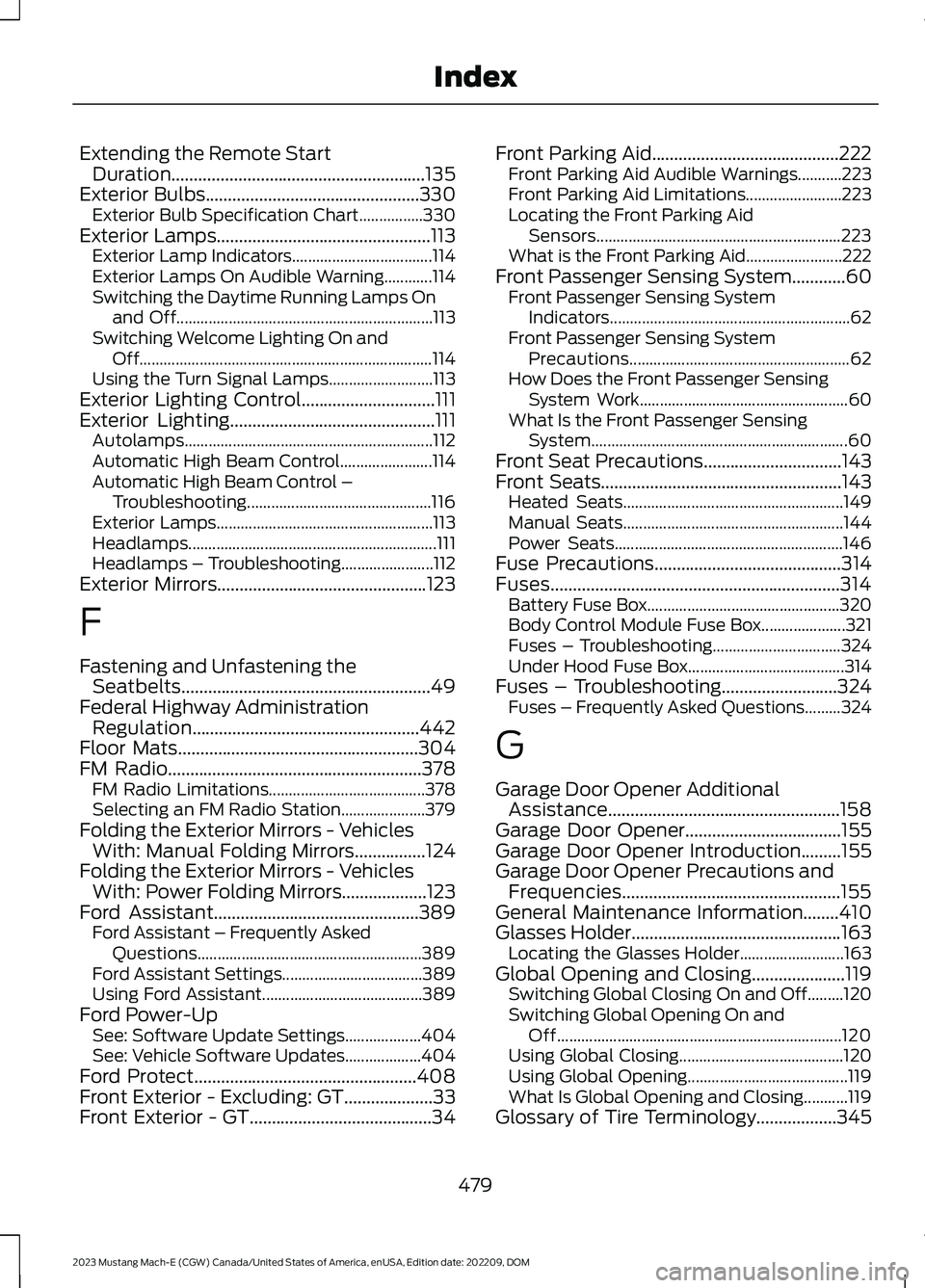
Extending the Remote StartDuration.........................................................135Exterior Bulbs................................................330Exterior Bulb Specification Chart................330Exterior Lamps................................................113Exterior Lamp Indicators...................................114Exterior Lamps On Audible Warning............114Switching the Daytime Running Lamps Onand Off................................................................113Switching Welcome Lighting On andOff.........................................................................114Using the Turn Signal Lamps..........................113Exterior Lighting Control..............................111Exterior Lighting..............................................111Autolamps..............................................................112Automatic High Beam Control.......................114Automatic High Beam Control –Troubleshooting..............................................116Exterior Lamps......................................................113Headlamps..............................................................111Headlamps – Troubleshooting.......................112Exterior Mirrors...............................................123
F
Fastening and Unfastening theSeatbelts........................................................49Federal Highway AdministrationRegulation...................................................442Floor Mats......................................................304FM Radio.........................................................378FM Radio Limitations.......................................378Selecting an FM Radio Station.....................379Folding the Exterior Mirrors - VehiclesWith: Manual Folding Mirrors................124Folding the Exterior Mirrors - VehiclesWith: Power Folding Mirrors...................123Ford Assistant..............................................389Ford Assistant – Frequently AskedQuestions........................................................389Ford Assistant Settings...................................389Using Ford Assistant........................................389Ford Power-UpSee: Software Update Settings...................404See: Vehicle Software Updates...................404Ford Protect..................................................408Front Exterior - Excluding: GT....................33Front Exterior - GT.........................................34
Front Parking Aid..........................................222Front Parking Aid Audible Warnings...........223Front Parking Aid Limitations........................223Locating the Front Parking AidSensors.............................................................223What is the Front Parking Aid........................222Front Passenger Sensing System............60Front Passenger Sensing SystemIndicators............................................................62Front Passenger Sensing SystemPrecautions.......................................................62How Does the Front Passenger SensingSystem Work....................................................60What Is the Front Passenger SensingSystem................................................................60Front Seat Precautions...............................143Front Seats......................................................143Heated Seats.......................................................149Manual Seats.......................................................144Power Seats.........................................................146Fuse Precautions..........................................314Fuses.................................................................314Battery Fuse Box................................................320Body Control Module Fuse Box.....................321Fuses – Troubleshooting................................324Under Hood Fuse Box.......................................314Fuses – Troubleshooting..........................324Fuses – Frequently Asked Questions.........324
G
Garage Door Opener AdditionalAssistance....................................................158Garage Door Opener...................................155Garage Door Opener Introduction.........155Garage Door Opener Precautions andFrequencies.................................................155General Maintenance Information........410Glasses Holder...............................................163Locating the Glasses Holder..........................163Global Opening and Closing.....................119Switching Global Closing On and Off.........120Switching Global Opening On andOff.......................................................................120Using Global Closing.........................................120Using Global Opening........................................119What Is Global Opening and Closing...........119Glossary of Tire Terminology..................345
479
2023 Mustang Mach-E (CGW) Canada/United States of America, enUSA, Edition date: 202209, DOMIndex
Page 485 of 496
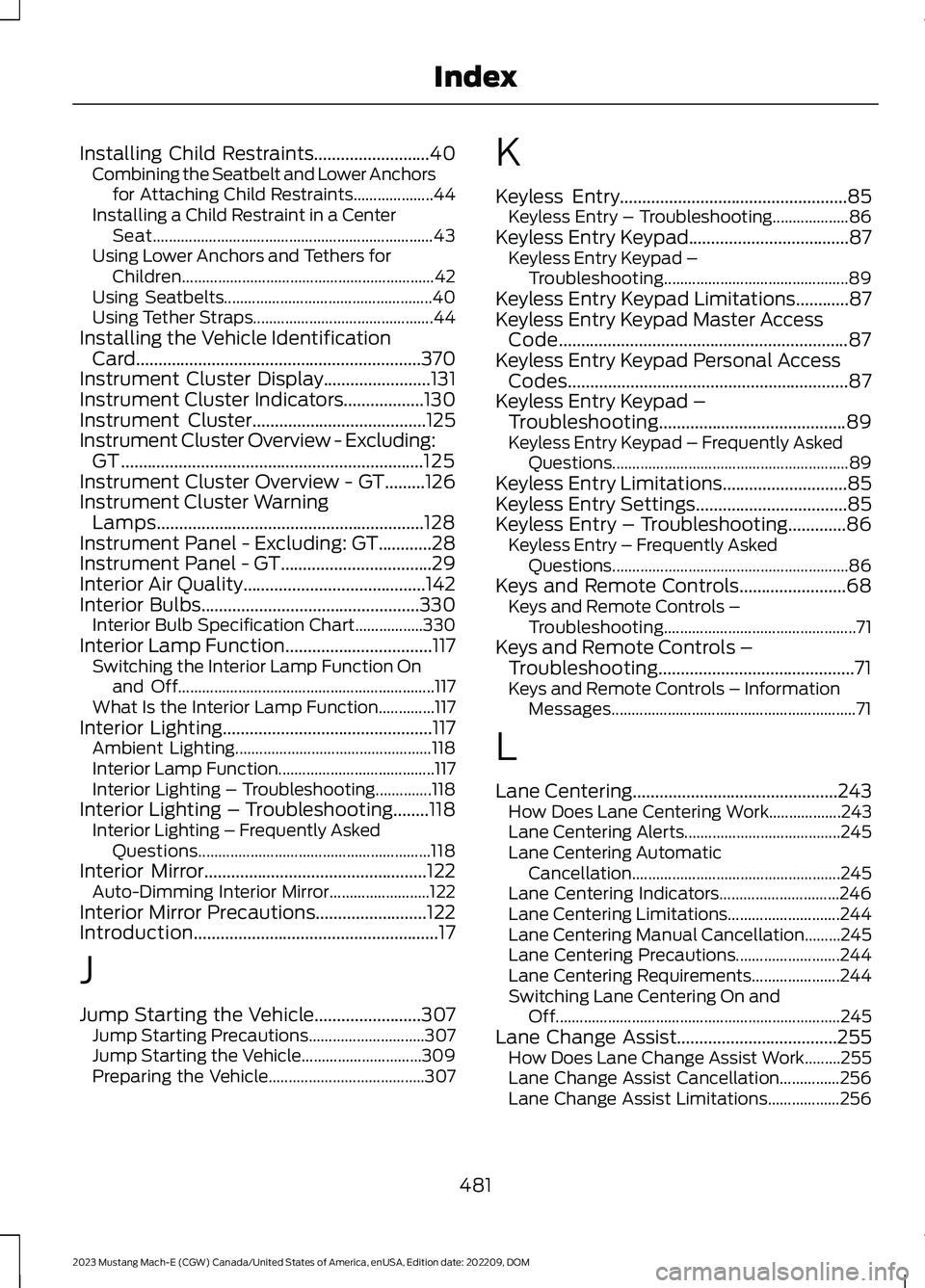
Installing Child Restraints..........................40Combining the Seatbelt and Lower Anchorsfor Attaching Child Restraints....................44Installing a Child Restraint in a CenterSeat......................................................................43Using Lower Anchors and Tethers forChildren...............................................................42Using Seatbelts....................................................40Using Tether Straps.............................................44Installing the Vehicle IdentificationCard................................................................370Instrument Cluster Display........................131Instrument Cluster Indicators..................130Instrument Cluster.......................................125Instrument Cluster Overview - Excluding:GT....................................................................125Instrument Cluster Overview - GT.........126Instrument Cluster WarningLamps............................................................128Instrument Panel - Excluding: GT............28Instrument Panel - GT..................................29Interior Air Quality.........................................142Interior Bulbs.................................................330Interior Bulb Specification Chart.................330Interior Lamp Function.................................117Switching the Interior Lamp Function Onand Off................................................................117What Is the Interior Lamp Function..............117Interior Lighting...............................................117Ambient Lighting.................................................118Interior Lamp Function.......................................117Interior Lighting – Troubleshooting..............118Interior Lighting – Troubleshooting........118Interior Lighting – Frequently AskedQuestions..........................................................118Interior Mirror..................................................122Auto-Dimming Interior Mirror.........................122Interior Mirror Precautions.........................122Introduction.......................................................17
J
Jump Starting the Vehicle........................307Jump Starting Precautions.............................307Jump Starting the Vehicle..............................309Preparing the Vehicle.......................................307
K
Keyless Entry...................................................85Keyless Entry – Troubleshooting...................86Keyless Entry Keypad....................................87Keyless Entry Keypad –Troubleshooting..............................................89Keyless Entry Keypad Limitations............87Keyless Entry Keypad Master AccessCode.................................................................87Keyless Entry Keypad Personal AccessCodes...............................................................87Keyless Entry Keypad –Troubleshooting..........................................89Keyless Entry Keypad – Frequently AskedQuestions...........................................................89Keyless Entry Limitations............................85Keyless Entry Settings..................................85Keyless Entry – Troubleshooting.............86Keyless Entry – Frequently AskedQuestions...........................................................86Keys and Remote Controls........................68Keys and Remote Controls –Troubleshooting................................................71Keys and Remote Controls –Troubleshooting............................................71Keys and Remote Controls – InformationMessages.............................................................71
L
Lane Centering..............................................243How Does Lane Centering Work..................243Lane Centering Alerts.......................................245Lane Centering AutomaticCancellation....................................................245Lane Centering Indicators..............................246Lane Centering Limitations............................244Lane Centering Manual Cancellation.........245Lane Centering Precautions..........................244Lane Centering Requirements......................244Switching Lane Centering On andOff.......................................................................245Lane Change Assist....................................255How Does Lane Change Assist Work.........255Lane Change Assist Cancellation...............256Lane Change Assist Limitations..................256
481
2023 Mustang Mach-E (CGW) Canada/United States of America, enUSA, Edition date: 202209, DOMIndex