mirror FORD MUSTANG MACH E 2023 User Guide
[x] Cancel search | Manufacturer: FORD, Model Year: 2023, Model line: MUSTANG MACH E, Model: FORD MUSTANG MACH E 2023Pages: 496, PDF Size: 13.09 MB
Page 231 of 496
D.Fixed guide line: Yellow zone.
E.Fixed guide line: Red zone.
F.Rear bumper.
Active guide lines only show with fixedguide lines. To use active guide lines, turnthe steering wheel to point the guide linestoward an intended path. If the steeringwheel position changes while reversing,your vehicle might deviate from theintended path.
The fixed and active guide lines fade in andout depending on the steering wheelposition. The active guide lines do notdisplay when the steering wheel positionis straight.
Use caution while reversing. Objects in thered zone are closest to your vehicle andobjects in the green zone are farther away.Objects get closer to your vehicle as theymove from the green zone to the yellow orred zones. Use the side view mirrors andrear view mirror to get better coverage onboth sides and rear of your vehicle.
REAR VIEW CAMERA OBJECT
DISTANCE INDICATORS
The system provides an image of yourvehicle and the sensor zones. The zoneshighlight green, yellow, and red when theparking aid sensors detect an object in thecoverage area.
REAR VIEW CAMERA
SETTINGS
ZOOMING THE REAR VIEWCAMERA IN AND OUT
WARNING: When manual zoom ison, the full area behind your vehicle maynot show. Be aware of your surroundingswhen using the manual zoom feature.
Selectable settings for this feature arezoom in (+) and zoom out (-). Press thesymbol on the camera screen to changethe view. The default setting is zoom off.
This allows you to get a closer view of anobject behind your vehicle. The zoomedimage keeps the bumper in the image toprovide a reference. The zoom is onlyactive while the transmission is in reverse(R).
Note:Manual zoom is only available whenthe transmission is in reverse (R).
Note:Only the centerline shows when youenable manual zoom.
SWITCHING REAR VIEW CAMERADELAY ON AND OFF
1.
Press the button on thetouchscreen.
2.Press Driver Assistance.
3.Switch Rear View Camera Delay on oroff.
227
2023 Mustang Mach-E (CGW) Canada/United States of America, enUSA, Edition date: 202209, DOMRear View CameraE386797
Page 233 of 496
WHAT IS THE 360 DEGREE
CAMERA
The 360 degree camera system providesvisibility around your vehicle in parkingmaneuvers such as:
•Centering in a parking space.
•Obstacles near your vehicle.
•Parallel parking.
The 360 degree camera system consistsof front, side and rear cameras.
HOW DOES THE 360 DEGREE
CAMERA WORK
The 360 Degree Camera system:
•Allows you to see what is directly infront of or behind your vehicle.
•Provides a cross traffic view in front ofand behind your vehicle.
•Allows you to see a top-down view ofthe area outside your vehicle, includingthe blind spots and obstacles near yourvehicle.
360 DEGREE CAMERA
PRECAUTIONS
WARNING: The 360 degreecamera system still requires the driverto use it in conjunction with looking outof the windows, and checking the interiorand exterior mirrors for maximumcoverage.
WARNING: Objects that are closeto either corner of the bumper or underthe bumper, might not be seen on thescreen due to the limited coverage of thecamera system.
WARNING: When manual zoom ison, the full area behind your vehicle maynot show. Be aware of your surroundingswhen using the manual zoom feature.
WARNING: Do not switch thecamera features on or off when yourvehicle is moving.
WARNING: You are responsible forcontrolling your vehicle at all times. Thesystem is designed to be an aid and doesnot relieve you of your responsibility todrive with due care and attention. Failureto follow this instruction could result inthe loss of control of your vehicle,personal injury or death.
360 DEGREE CAMERA
LIMITATIONS
Note:Use caution if a door is ajar. The 360degree camera could be out of position andthe image could be incorrect.
LOCATING THE 360 DEGREE
CAMERAS
Rear View Camera
The rear view camera is on the liftgate. Itprovides a video image of the area behindyour vehicle.
Front View Camera
The front view camera is in the grille. Itprovides a video image of the area in frontof your vehicle.
229
2023 Mustang Mach-E (CGW) Canada/United States of America, enUSA, Edition date: 202209, DOM360 Degree Camera
Page 234 of 496
Side View Camera
The side view camera is on the outsidemirror. It provides a video image of the areaon the sides of your vehicle to aid you whenparking.
360 DEGREE CAMERA GUIDE
LINES
Note:Active guide lines are only availablewhen the transmission is in reverse (R).
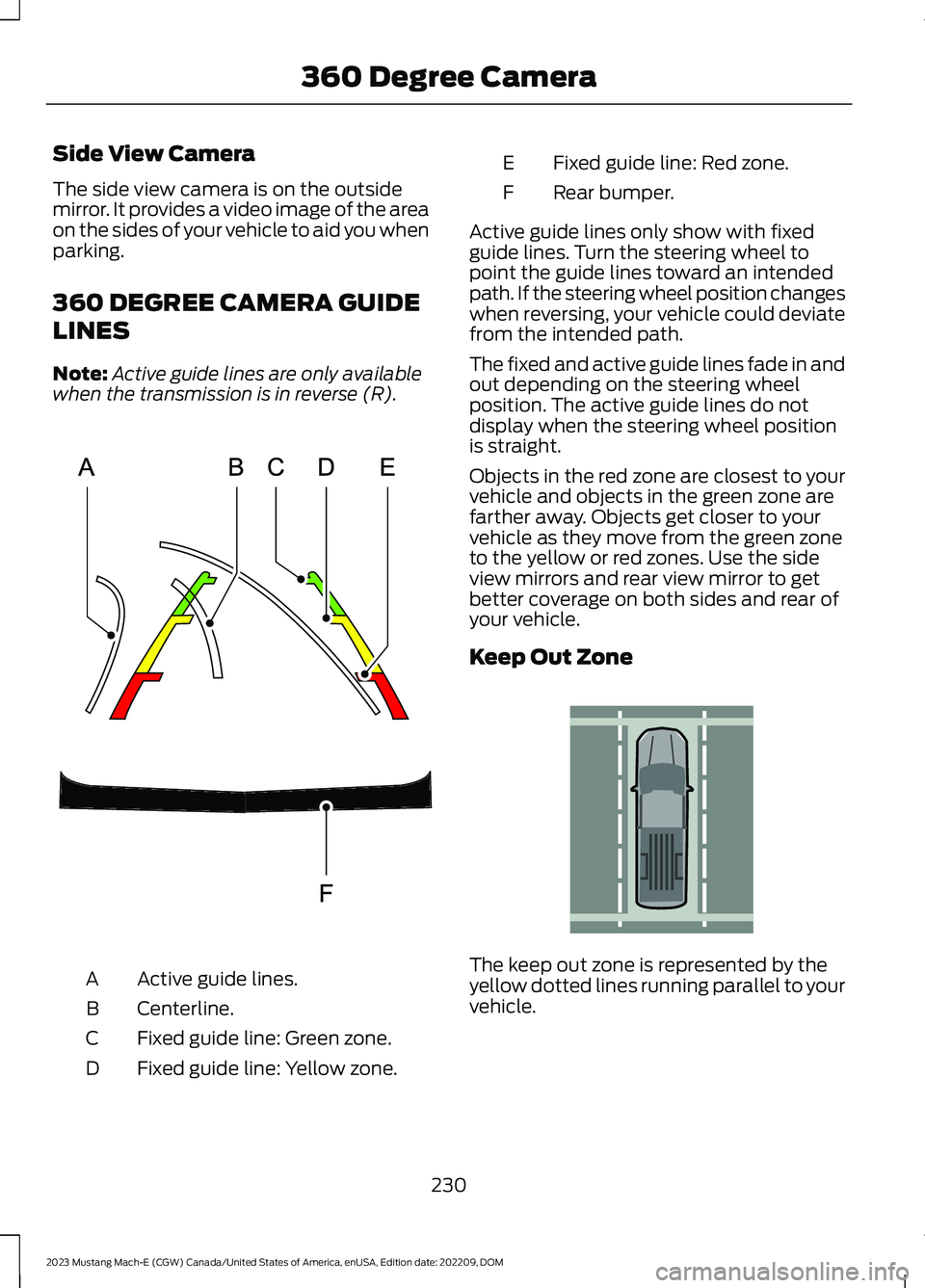
Active guide lines.A
Centerline.B
Fixed guide line: Green zone.C
Fixed guide line: Yellow zone.D
Fixed guide line: Red zone.E
Rear bumper.F
Active guide lines only show with fixedguide lines. Turn the steering wheel topoint the guide lines toward an intendedpath. If the steering wheel position changeswhen reversing, your vehicle could deviatefrom the intended path.
The fixed and active guide lines fade in andout depending on the steering wheelposition. The active guide lines do notdisplay when the steering wheel positionis straight.
Objects in the red zone are closest to yourvehicle and objects in the green zone arefarther away. Objects get closer to yourvehicle as they move from the green zoneto the yellow or red zones. Use the sideview mirrors and rear view mirror to getbetter coverage on both sides and rear ofyour vehicle.
Keep Out Zone
The keep out zone is represented by theyellow dotted lines running parallel to yourvehicle.
230
2023 Mustang Mach-E (CGW) Canada/United States of America, enUSA, Edition date: 202209, DOM360 Degree CameraE306774 E310341
Page 241 of 496
WARNING: The system only warnsof vehicles detected by the radar sensor.In some cases there may be no warningor a delayed warning. Apply the brakeswhen necessary. Failure to follow thisinstruction could result in personal injuryor death.
WARNING: The system may notdetect stationary or slow movingvehicles below 6 mph (10 km/h).
WARNING: The system does notdetect pedestrians or objects in the road.
WARNING: The system does notdetect oncoming vehicles in the samelane.
WARNING: The system may notoperate properly if the sensor is blocked.Keep the windshield free fromobstruction.
WARNING: The sensor mayincorrectly track lane markings as otherstructures or objects. This can result ina false or missed warning.
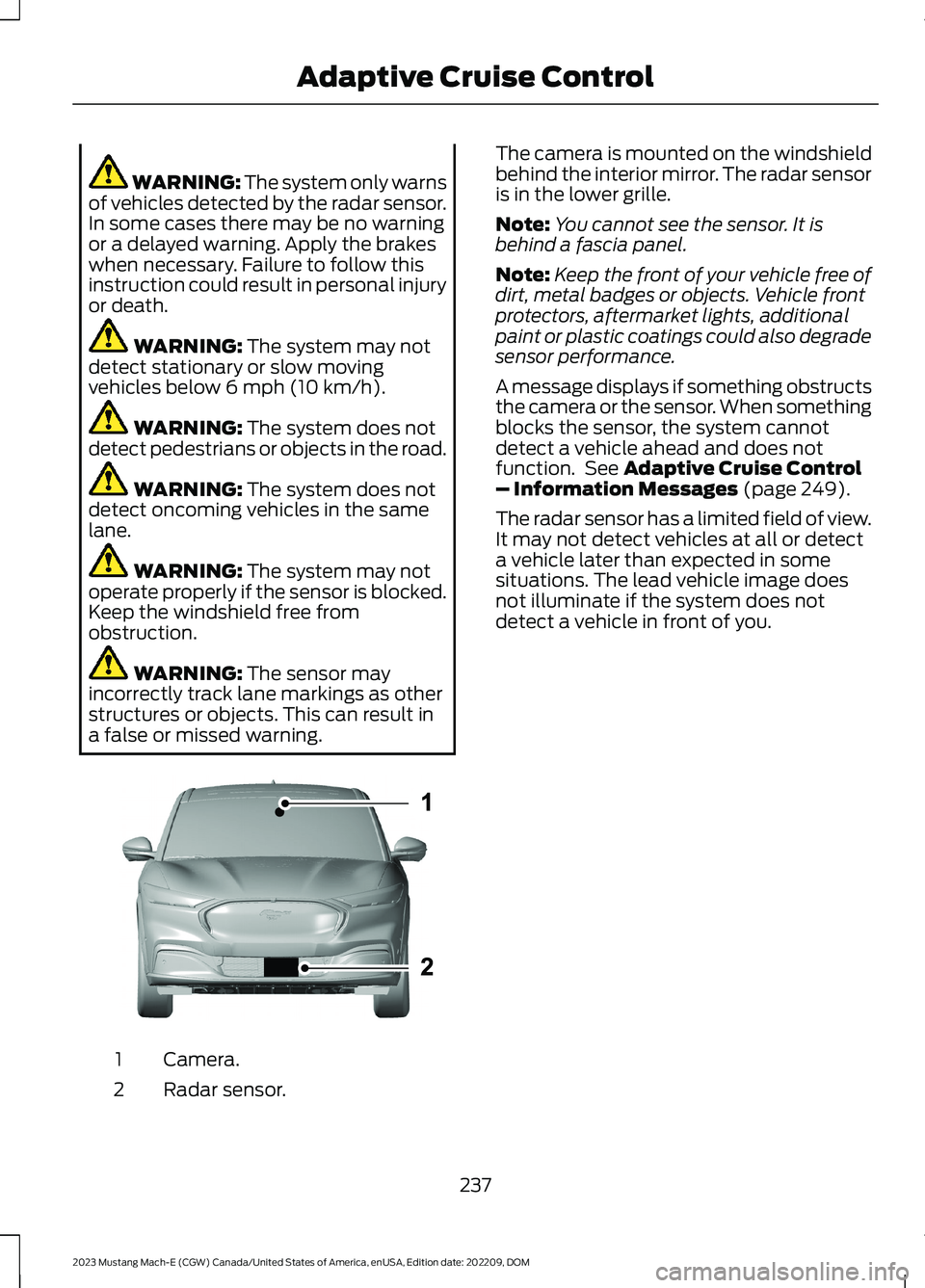
Camera.1
Radar sensor.2
The camera is mounted on the windshieldbehind the interior mirror. The radar sensoris in the lower grille.
Note:You cannot see the sensor. It isbehind a fascia panel.
Note:Keep the front of your vehicle free ofdirt, metal badges or objects. Vehicle frontprotectors, aftermarket lights, additionalpaint or plastic coatings could also degradesensor performance.
A message displays if something obstructsthe camera or the sensor. When somethingblocks the sensor, the system cannotdetect a vehicle ahead and does notfunction. See Adaptive Cruise Control– Information Messages (page 249).
The radar sensor has a limited field of view.It may not detect vehicles at all or detecta vehicle later than expected in somesituations. The lead vehicle image doesnot illuminate if the system does notdetect a vehicle in front of you.
237
2023 Mustang Mach-E (CGW) Canada/United States of America, enUSA, Edition date: 202209, DOMAdaptive Cruise ControlE324212
Page 260 of 496
WARNING: Do not use the lanechange assist system as a replacementfor using the interior and exterior mirrorsor looking over your shoulder beforechanging lanes. The lane change assistsystem is not a replacement for carefuldriving.
1.Make sure the lane you are requestingis clear of traffic or obstacles.
2.Tap or latch the lever in the directionof your planned lane change.
3.Once the lane change is complete,move the turn signal lever back to themiddle position if necessary.
Note: When using lane change assist youcan tap or latch the lever.
Lane Change Suggestion
If you are approaching or have beenfollowing a slower moving vehicle, thesystem may suggest a lane change to passthat vehicle using an available passinglane.
LANE CHANGE ASSISTLIMITATIONS
Lane change assist will not perform therequested maneuver if traffic is identifiedin the selected lane.
SWITCHING LANE CHANGEASSIST ON AND OFF
1.
Press the button on thetouchscreen.
2.Press Driver Assistance.
3.Press Cruise Control.
4.Press Lane Change Assist to togglethe system on and off.
LANE CHANGE ASSISTCANCELLATION
To cancel lane change assist, manuallysteer your vehicle or return the turn signallever to the middle position.
256
2023 Mustang Mach-E (CGW) Canada/United States of America, enUSA, Edition date: 202209, DOMBlueCruise - Vehicles With: Hands Free DrivingE386797
Page 272 of 496
The lane keeping aid warning lamp or redlane marking in your instrument clusterdisplay indicate blind spot assist activation.In addition, the blind spot information
system alert indicator flashes on theexterior mirror on the same side as thedetection. See Blind Spot InformationSystem (page 271).
LANE KEEPING SYSTEM – TROUBLESHOOTING
LANE KEEPING SYSTEM – INFORMATION MESSAGES
ActionMessage
The system has malfunctioned. Have yourvehicle checked as soon as possible.Lane Keeping Sys. Malfunction ServiceRequired
The system has detected a condition thathas caused the system to be temporarilyunavailable.
Front Camera Temporarily Not Available
The system has detected a condition thatrequires you to clean the windshield in orderfor it to operate properly.
Front Camera Low Visibility Clean Screen
The system has malfunctioned. Have yourvehicle checked as soon as possible.Front Camera Malfunction Service Required
The system requests that you keep yourhands on the steering wheel.Keep Hands on Steering Wheel
268
2023 Mustang Mach-E (CGW) Canada/United States of America, enUSA, Edition date: 202209, DOMLane Keeping System
Page 275 of 496
WHAT IS BLIND SPOT
INFORMATION SYSTEM
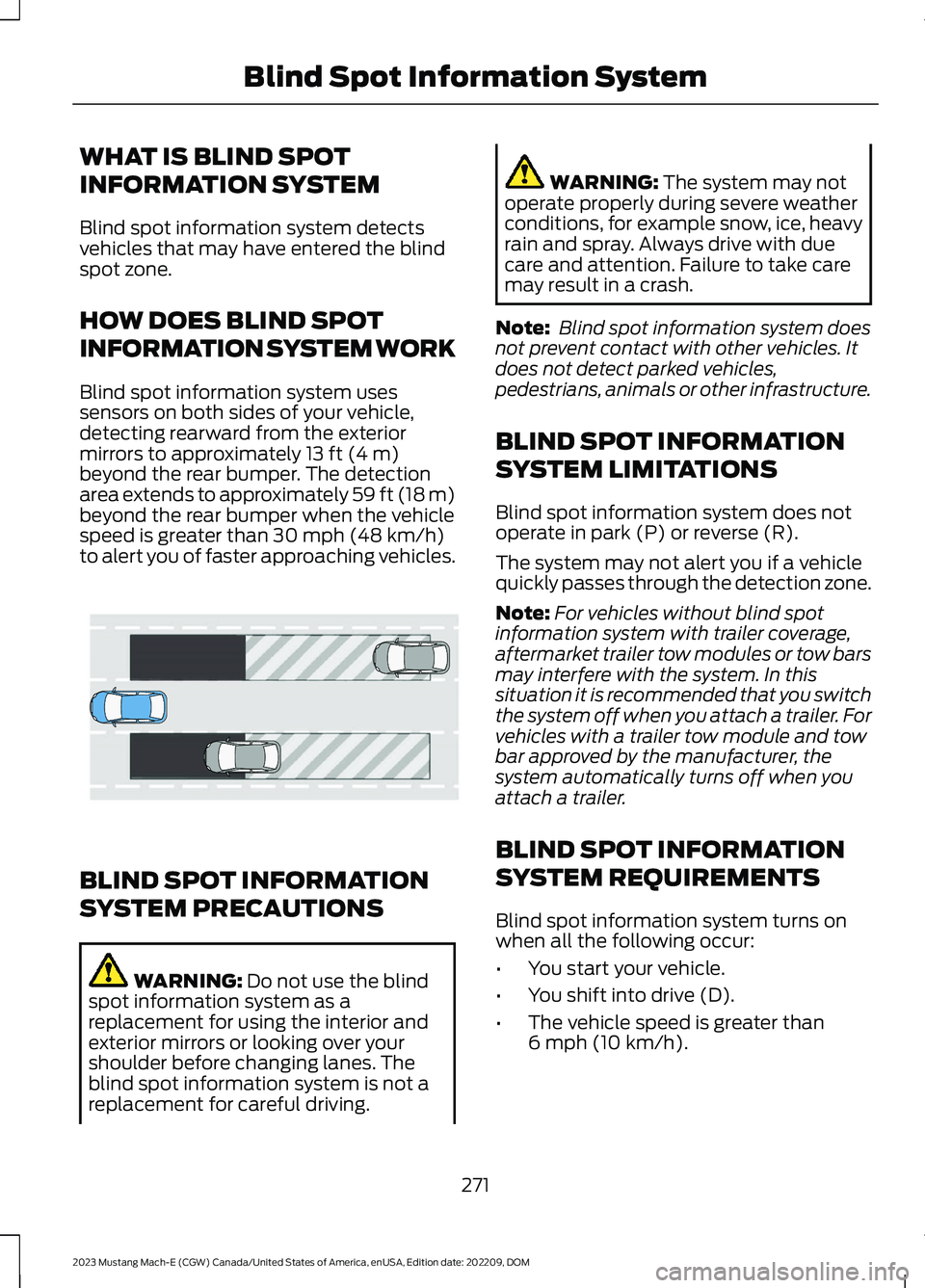
Blind spot information system detectsvehicles that may have entered the blindspot zone.
HOW DOES BLIND SPOT
INFORMATION SYSTEM WORK
Blind spot information system usessensors on both sides of your vehicle,detecting rearward from the exteriormirrors to approximately 13 ft (4 m)beyond the rear bumper. The detectionarea extends to approximately 59 ft (18 m)beyond the rear bumper when the vehiclespeed is greater than 30 mph (48 km/h)to alert you of faster approaching vehicles.
BLIND SPOT INFORMATION
SYSTEM PRECAUTIONS
WARNING: Do not use the blindspot information system as areplacement for using the interior andexterior mirrors or looking over yourshoulder before changing lanes. Theblind spot information system is not areplacement for careful driving.
WARNING: The system may notoperate properly during severe weatherconditions, for example snow, ice, heavyrain and spray. Always drive with duecare and attention. Failure to take caremay result in a crash.
Note: Blind spot information system doesnot prevent contact with other vehicles. Itdoes not detect parked vehicles,pedestrians, animals or other infrastructure.
BLIND SPOT INFORMATION
SYSTEM LIMITATIONS
Blind spot information system does notoperate in park (P) or reverse (R).
The system may not alert you if a vehiclequickly passes through the detection zone.
Note:For vehicles without blind spotinformation system with trailer coverage,aftermarket trailer tow modules or tow barsmay interfere with the system. In thissituation it is recommended that you switchthe system off when you attach a trailer. Forvehicles with a trailer tow module and towbar approved by the manufacturer, thesystem automatically turns off when youattach a trailer.
BLIND SPOT INFORMATION
SYSTEM REQUIREMENTS
Blind spot information system turns onwhen all the following occur:
•You start your vehicle.
•You shift into drive (D).
•The vehicle speed is greater than6 mph (10 km/h).
271
2023 Mustang Mach-E (CGW) Canada/United States of America, enUSA, Edition date: 202209, DOMBlind Spot Information SystemE255695
Page 277 of 496
When blind spot informationsystem detects a vehicle, analert indicator illuminates in theexterior mirror on the side the approaching
vehicle is coming from. If you turn the turnsignal on for that side of your vehicle, thealert indicator flashes.
BLIND SPOT INFORMATION SYSTEM – TROUBLESHOOTING
BLIND SPOT INFORMATION SYSTEM – INFORMATION MESSAGES
ActionMessage
A fault with the system has occurred. Haveyour vehicle checked as soon as possible.Blind Spot System Fault
Something is blocking the sensors. Cleanthe sensors.Blind Spot Not Available Sensor BlockedSee Manual
273
2023 Mustang Mach-E (CGW) Canada/United States of America, enUSA, Edition date: 202209, DOMBlind Spot Information SystemE249861E249861
Page 278 of 496
WHAT IS CROSS TRAFFIC
ALERT
The system alerts you of vehiclesapproaching from the sides behind yourvehicle when you shift into reverse (R).
HOW DOES CROSS TRAFFIC
ALERT WORK
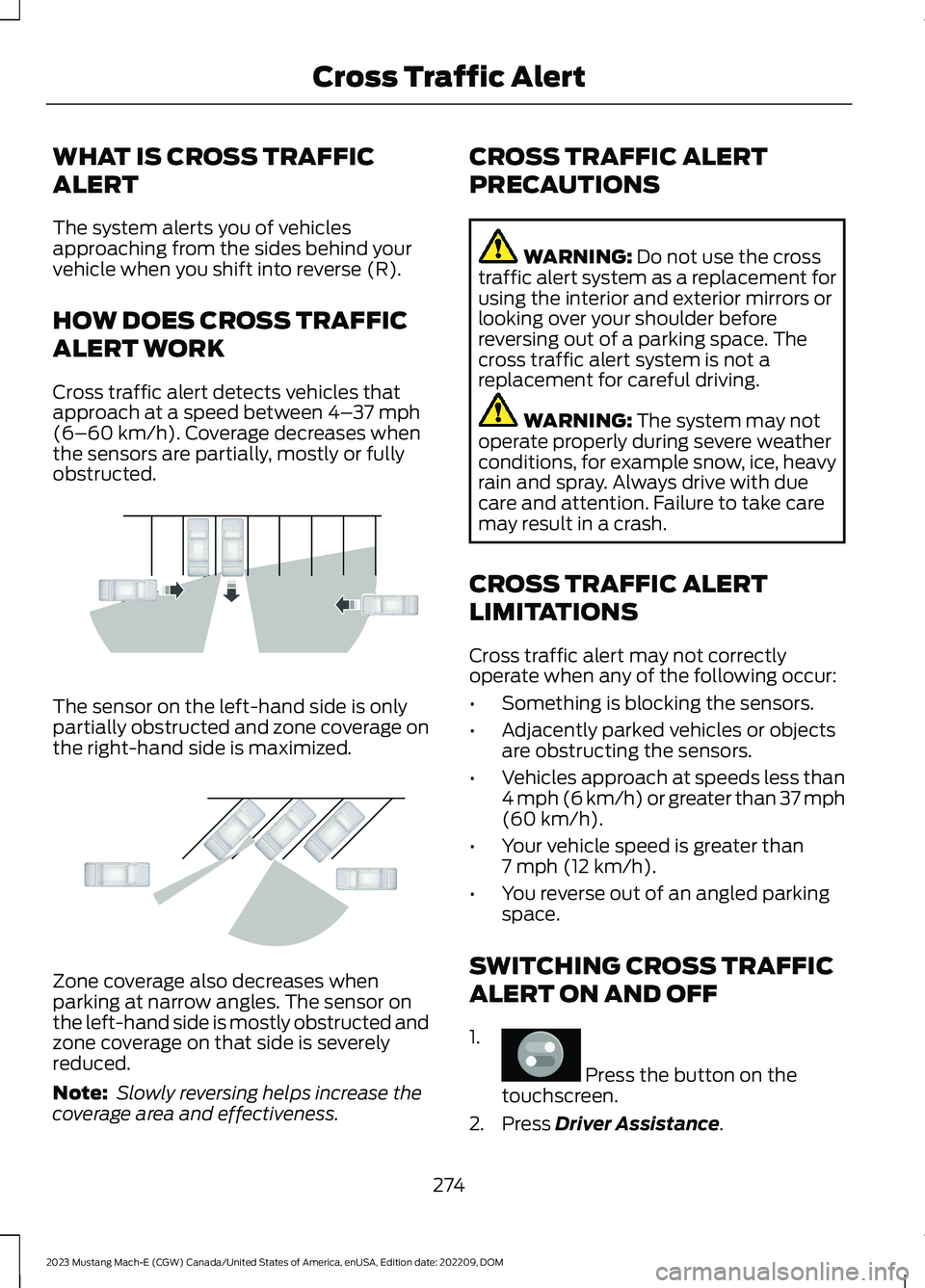
Cross traffic alert detects vehicles thatapproach at a speed between 4–37 mph(6–60 km/h). Coverage decreases whenthe sensors are partially, mostly or fullyobstructed.
The sensor on the left-hand side is onlypartially obstructed and zone coverage onthe right-hand side is maximized.
Zone coverage also decreases whenparking at narrow angles. The sensor onthe left-hand side is mostly obstructed andzone coverage on that side is severelyreduced.
Note: Slowly reversing helps increase thecoverage area and effectiveness.
CROSS TRAFFIC ALERT
PRECAUTIONS
WARNING: Do not use the crosstraffic alert system as a replacement forusing the interior and exterior mirrors orlooking over your shoulder beforereversing out of a parking space. Thecross traffic alert system is not areplacement for careful driving.
WARNING: The system may notoperate properly during severe weatherconditions, for example snow, ice, heavyrain and spray. Always drive with duecare and attention. Failure to take caremay result in a crash.
CROSS TRAFFIC ALERT
LIMITATIONS
Cross traffic alert may not correctlyoperate when any of the following occur:
•Something is blocking the sensors.
•Adjacently parked vehicles or objectsare obstructing the sensors.
•Vehicles approach at speeds less than4 mph (6 km/h) or greater than 37 mph(60 km/h).
•Your vehicle speed is greater than7 mph (12 km/h).
•You reverse out of an angled parkingspace.
SWITCHING CROSS TRAFFIC
ALERT ON AND OFF
1.
Press the button on thetouchscreen.
2.Press Driver Assistance.
274
2023 Mustang Mach-E (CGW) Canada/United States of America, enUSA, Edition date: 202209, DOMCross Traffic AlertE142440 E142441 E386797
Page 279 of 496
3.Switch Cross Traffic Alert on or off.
When you switch the system on or off, thealert indicators flash twice.
Note:The system turns on every time youstart your vehicle. To permanently switchthe system off, contact an authorizeddealer.
LOCATING THE CROSS
TRAFFIC ALERT SENSORS
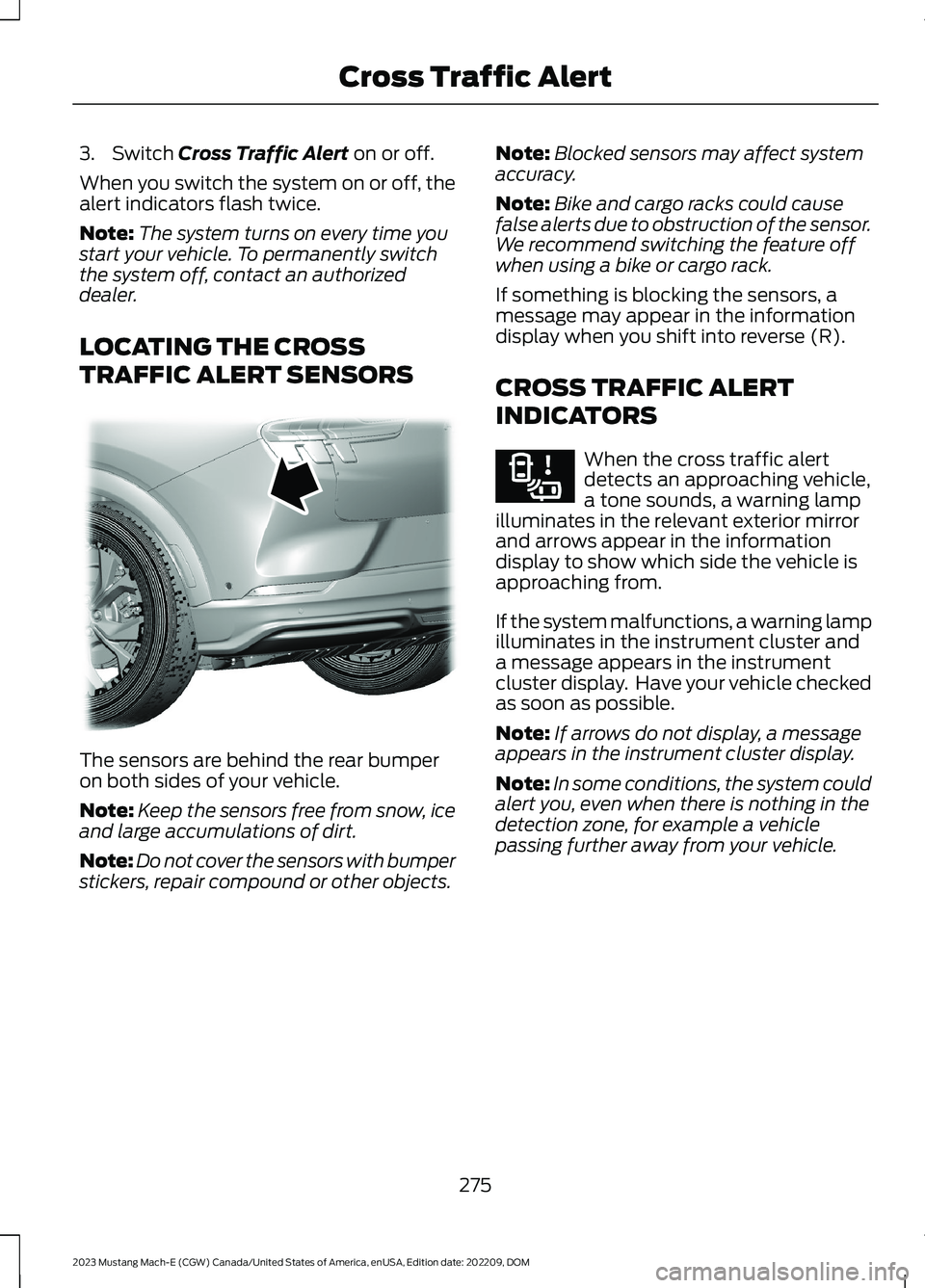
The sensors are behind the rear bumperon both sides of your vehicle.
Note:Keep the sensors free from snow, iceand large accumulations of dirt.
Note:Do not cover the sensors with bumperstickers, repair compound or other objects.
Note:Blocked sensors may affect systemaccuracy.
Note:Bike and cargo racks could causefalse alerts due to obstruction of the sensor.We recommend switching the feature offwhen using a bike or cargo rack.
If something is blocking the sensors, amessage may appear in the informationdisplay when you shift into reverse (R).
CROSS TRAFFIC ALERT
INDICATORS
When the cross traffic alertdetects an approaching vehicle,a tone sounds, a warning lampilluminates in the relevant exterior mirrorand arrows appear in the informationdisplay to show which side the vehicle isapproaching from.
If the system malfunctions, a warning lampilluminates in the instrument cluster anda message appears in the instrumentcluster display. Have your vehicle checkedas soon as possible.
Note:If arrows do not display, a messageappears in the instrument cluster display.
Note:In some conditions, the system couldalert you, even when there is nothing in thedetection zone, for example a vehiclepassing further away from your vehicle.
275
2023 Mustang Mach-E (CGW) Canada/United States of America, enUSA, Edition date: 202209, DOMCross Traffic AlertE324083 E268294