transmission FORD POLICE INTERCEPTOR UTILITY 2016 1.G Owners Manual
[x] Cancel search | Manufacturer: FORD, Model Year: 2016, Model line: POLICE INTERCEPTOR UTILITY, Model: FORD POLICE INTERCEPTOR UTILITY 2016 1.GPages: 350, PDF Size: 3.58 MB
Page 5 of 350
Autolamps........................................................59
Instrument Lighting Dimmer.....................60
Daytime Running Lamps............................60
Direction Indicators........................................61
Interior Lamps..................................................61
Windows and Mirrors
Power Windows..............................................63
Exterior Mirrors................................................64
Interior Mirror
...................................................65
Sun Visors
.........................................................66
Instrument Cluster
Gauges................................................................67
Warning Lamps and Indicators................68
Audible Warnings and Indicators...............71
Information Displays
General Information......................................73
Information Messages..................................76
Climate Control
Manual Climate Control..............................86
Hints on Controlling the Interior Climate...........................................................87
Heated Windows and Mirrors...................88
Cabin Air Filter.................................................89
Seats
Sitting in the Correct Position...................90
Head Restraints
..............................................90
Manual Seats
...................................................92
Power Seats
.....................................................93
Rear Seats.........................................................93
Auxiliary Power Points
Auxiliary Power Points
.................................95 Storage Compartments
Center Console
...............................................96
Overhead Console
.........................................96
Starting and Stopping the Engine
General Information
......................................97
Ignition Switch.................................................97
Starting a Gasoline Engine.........................97
Engine Block Heater.....................................99
Fuel and Refueling
Safety Precautions.......................................101
Fuel Quality
....................................................102
Fuel Quality -
E85........................................102
Fuel Filler Funnel Location
........................103
Running Out of Fuel....................................103
Refueling.........................................................104
Fuel Consumption
.......................................106
Emission Control System..........................107
Transmission
Automatic Transmission............................110
All-Wheel Drive
Using All-Wheel Drive..................................112
Brakes
General Information
.....................................119
Hints on Driving With Anti-Lock Brakes............................................................119
Parking Brake.................................................120
Traction Control
Principle of Operation..................................121
Using Traction Control.................................121
Stability Control
Principle of Operation
.................................122
2
Explorer (TUB), enUSA, Edition date: 03/2015, First Printing Table of Contents
Page 6 of 350
Using Stability Control................................123
Parking Aids
Principle of Operation.................................124
Rear Parking Aid............................................124
Rear View Camera
........................................125
Cruise Control
Principle of Operation.................................129
Using Cruise Control
....................................129
Driving Aids
Blind Spot Information System
................131
Cross Traffic Alert.........................................133
Steering............................................................136
Load Carrying
Rear Loadspace Hatches
...........................137
Rear Under Floor Storage..........................137
Roof Racks and Load Carriers
..................137
Load Limit
.......................................................138
Towing
Towing a Trailer.............................................146
Recommended Towing Weights
.............147
Essential Towing Checks
...........................148
Transporting the Vehicle...........................150
Towing the Vehicle on Four Wheels - 3.5L Ecoboost™/3.7L..............................151
Driving Hints
Breaking-In......................................................153
Economical Driving
......................................153
Driving Through Water
................................154
Floor Mats
.......................................................154
Roadside Emergencies
Roadside Assistance
...................................156
Hazard Warning Flashers...........................157 Fuel Shutoff....................................................157
Jump Starting the Vehicle
.........................158
Post-Crash Alert System...........................160
Customer Assistance
Getting the Services You Need.................161
In California (U.S. Only).............................162
The Better Business Bureau (BBB) Auto Line Program (U.S. Only)......................163
Utilizing the Mediation/Arbitration Program (Canada Only)........................163
Getting Assistance Outside the U.S. and Canada
.........................................................164
Ordering Additional Owner's Literature.....................................................165
Reporting Safety Defects (U.S. Only).............................................................165
Reporting Safety Defects (Canada Only)
.............................................................166
Fuses
Fuse Specification Chart
............................167
Changing a Fuse............................................175
Maintenance
General Information....................................176
Opening and Closing the Hood................177
Under Hood Overview.................................179
Engine Oil Dipstick.......................................180
Engine Oil Check..........................................180
Oil Change Indicator Reset.......................180
Engine Coolant Check.................................181
Automatic Transmission Fluid Check - 3.5L Ecoboost™
.......................................185
Brake Fluid Check........................................186
Power Steering Fluid Check......................187
Washer Fluid Check
.....................................187
Fuel Filter
.........................................................187
Changing the 12V Battery..........................187
Checking the Wiper Blades......................189
Changing the Wiper Blades
.....................189
3
Explorer (TUB), enUSA, Edition date: 03/2015, First Printing Table of Contents
Page 7 of 350
Adjusting the Headlamps.........................190
Removing a Headlamp...............................192
Changing a Bulb............................................192
Bulb Specification Chart...........................195
Changing the Engine Air Filter..................197
Vehicle Care
General Information....................................198
Cleaning Products
.......................................198
Cleaning the Exterior
...................................198
Waxing..............................................................199
Cleaning the Engine....................................199
Cleaning the Windows and Wiper Blades
.........................................................200
Cleaning the Interior
..................................200
Cleaning the Instrument Panel and Instrument Cluster Lens........................201
Cleaning Leather Seats..............................201
Repairing Minor Paint Damage..............202
Cleaning the Alloy Wheels.......................202
Vehicle Storage............................................202
Wheels and Tires
General Information
...................................205
Tire Care
..........................................................207
Using Summer Tires
....................................221
Using Snow Chains.....................................222
Tire Pressure Monitoring System...........223
Changing a Road Wheel............................227
Technical Specifications............................231
Capacities and Specific- ations
Engine Specifications -
3.5L
Ecoboost™................................................233
Engine Specifications -
3.7L.....................233
Motorcraft Parts -
3.5L Ecoboost™......234
Motorcraft Parts - 3.7L...............................235
Vehicle Identification Number................236
Vehicle Certification Label........................237 Transmission Code Designation.............237
Capacities and Specifications -
3.5L
Ecoboost™................................................238
Capacities and Specifications - 3.7L.....242
Audio System
General Information....................................247
Audio Unit - Vehicles With: AM/FM/CD/ SYNC............................................................248
Digital Radio
..................................................250
Satellite Radio
..............................................253
USB Port
.........................................................255
SYNC™
General Information...................................256
Using Voice Recognition...........................258
Using SYNC™ With Your Phone...........260
SYNC™ Applications and Services.......272
Using SYNC™ With Your Media Player............................................................277
SYNC™ Troubleshooting.........................286
Extended Service Plan (ESP)
Extended Service Plan (ESP).................294
Scheduled Maintenance
General Maintenance Information
.......296
Normal Scheduled Maintenance..........299
Special Operating Conditions Scheduled Maintenance
.............................................302
Scheduled Maintenance Record...........305
Appendices
End User License Agreement..................316
4
Explorer (TUB), enUSA, Edition date: 03/2015, First Printing Table of Contents
Page 34 of 350
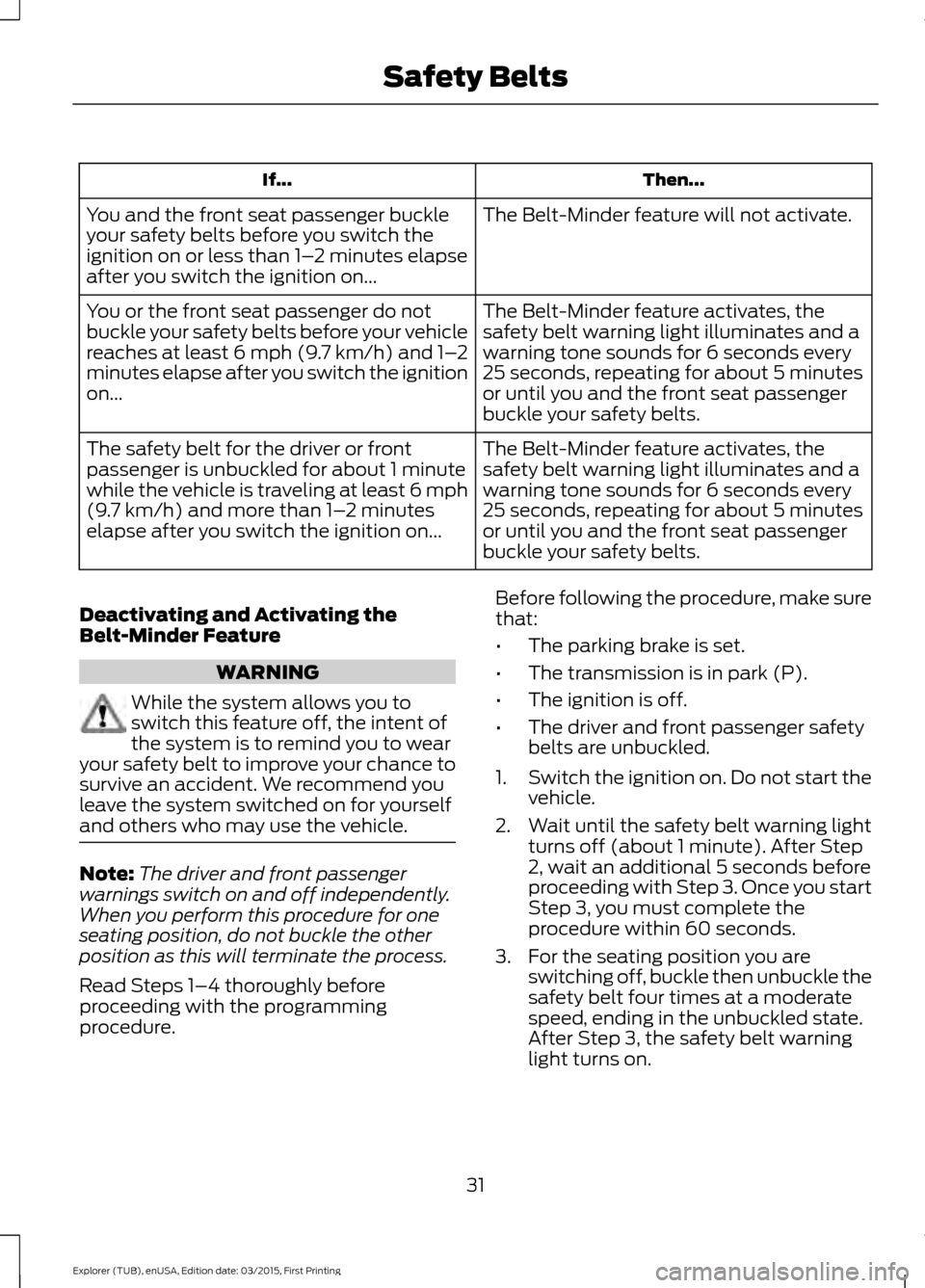
Then...
If...
The Belt-Minder feature will not activate.
You and the front seat passenger buckle
your safety belts before you switch the
ignition on or less than 1– 2 minutes elapse
after you switch the ignition on...
The Belt-Minder feature activates, the
safety belt warning light illuminates and a
warning tone sounds for 6 seconds every
25 seconds, repeating for about 5 minutes
or until you and the front seat passenger
buckle your safety belts.
You or the front seat passenger do not
buckle your safety belts before your vehicle
reaches at least 6 mph (9.7 km/h) and 1–
2
minutes elapse after you switch the ignition
on...
The Belt-Minder feature activates, the
safety belt warning light illuminates and a
warning tone sounds for 6 seconds every
25 seconds, repeating for about 5 minutes
or until you and the front seat passenger
buckle your safety belts.
The safety belt for the driver or front
passenger is unbuckled for about 1 minute
while the vehicle is traveling at least 6 mph
(9.7 km/h) and more than 1–
2 minutes
elapse after you switch the ignition on...
Deactivating and Activating the
Belt-Minder Feature WARNING
While the system allows you to
switch this feature off, the intent of
the system is to remind you to wear
your safety belt to improve your chance to
survive an accident. We recommend you
leave the system switched on for yourself
and others who may use the vehicle. Note:
The driver and front passenger
warnings switch on and off independently.
When you perform this procedure for one
seating position, do not buckle the other
position as this will terminate the process.
Read Steps 1–4 thoroughly before
proceeding with the programming
procedure. Before following the procedure, make sure
that:
•
The parking brake is set.
• The transmission is in park (P).
• The ignition is off.
• The driver and front passenger safety
belts are unbuckled.
1. Switch the ignition on. Do not start the
vehicle.
2. Wait until the safety belt warning light turns off (about 1 minute). After Step
2, wait an additional 5 seconds before
proceeding with Step 3. Once you start
Step 3, you must complete the
procedure within 60 seconds.
3. For the seating position you are switching off, buckle then unbuckle the
safety belt four times at a moderate
speed, ending in the unbuckled state.
After Step 3, the safety belt warning
light turns on.
31
Explorer (TUB), enUSA, Edition date: 03/2015, First Printing Safety Belts
Page 49 of 350
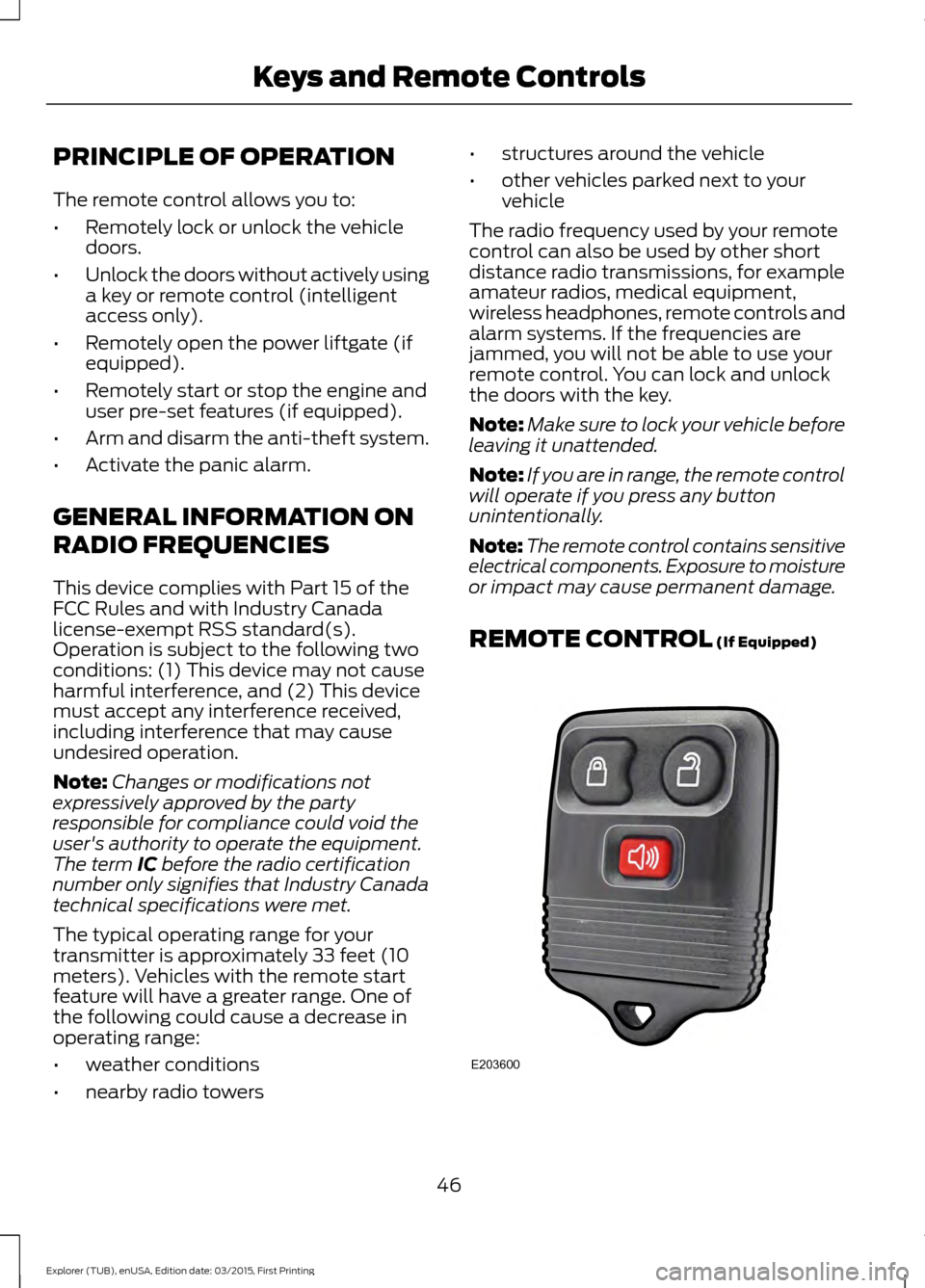
PRINCIPLE OF OPERATION
The remote control allows you to:
•
Remotely lock or unlock the vehicle
doors.
• Unlock the doors without actively using
a key or remote control (intelligent
access only).
• Remotely open the power liftgate (if
equipped).
• Remotely start or stop the engine and
user pre-set features (if equipped).
• Arm and disarm the anti-theft system.
• Activate the panic alarm.
GENERAL INFORMATION ON
RADIO FREQUENCIES
This device complies with Part 15 of the
FCC Rules and with Industry Canada
license-exempt RSS standard(s).
Operation is subject to the following two
conditions: (1) This device may not cause
harmful interference, and (2) This device
must accept any interference received,
including interference that may cause
undesired operation.
Note: Changes or modifications not
expressively approved by the party
responsible for compliance could void the
user's authority to operate the equipment.
The term IC before the radio certification
number only signifies that Industry Canada
technical specifications were met.
The typical operating range for your
transmitter is approximately 33 feet (10
meters). Vehicles with the remote start
feature will have a greater range. One of
the following could cause a decrease in
operating range:
• weather conditions
• nearby radio towers •
structures around the vehicle
• other vehicles parked next to your
vehicle
The radio frequency used by your remote
control can also be used by other short
distance radio transmissions, for example
amateur radios, medical equipment,
wireless headphones, remote controls and
alarm systems. If the frequencies are
jammed, you will not be able to use your
remote control. You can lock and unlock
the doors with the key.
Note: Make sure to lock your vehicle before
leaving it unattended.
Note: If you are in range, the remote control
will operate if you press any button
unintentionally.
Note: The remote control contains sensitive
electrical components. Exposure to moisture
or impact may cause permanent damage.
REMOTE CONTROL
(If Equipped) 46
Explorer (TUB), enUSA, Edition date: 03/2015, First Printing Keys and Remote ControlsE203600
Page 75 of 350
Automatic Transmission Warning
Chime
Sounds when you have not moved the
transmission selector lever to position P.
A message will be shown in the display.
72
Explorer (TUB), enUSA, Edition date: 03/2015, First Printing Instrument Cluster
Page 87 of 350
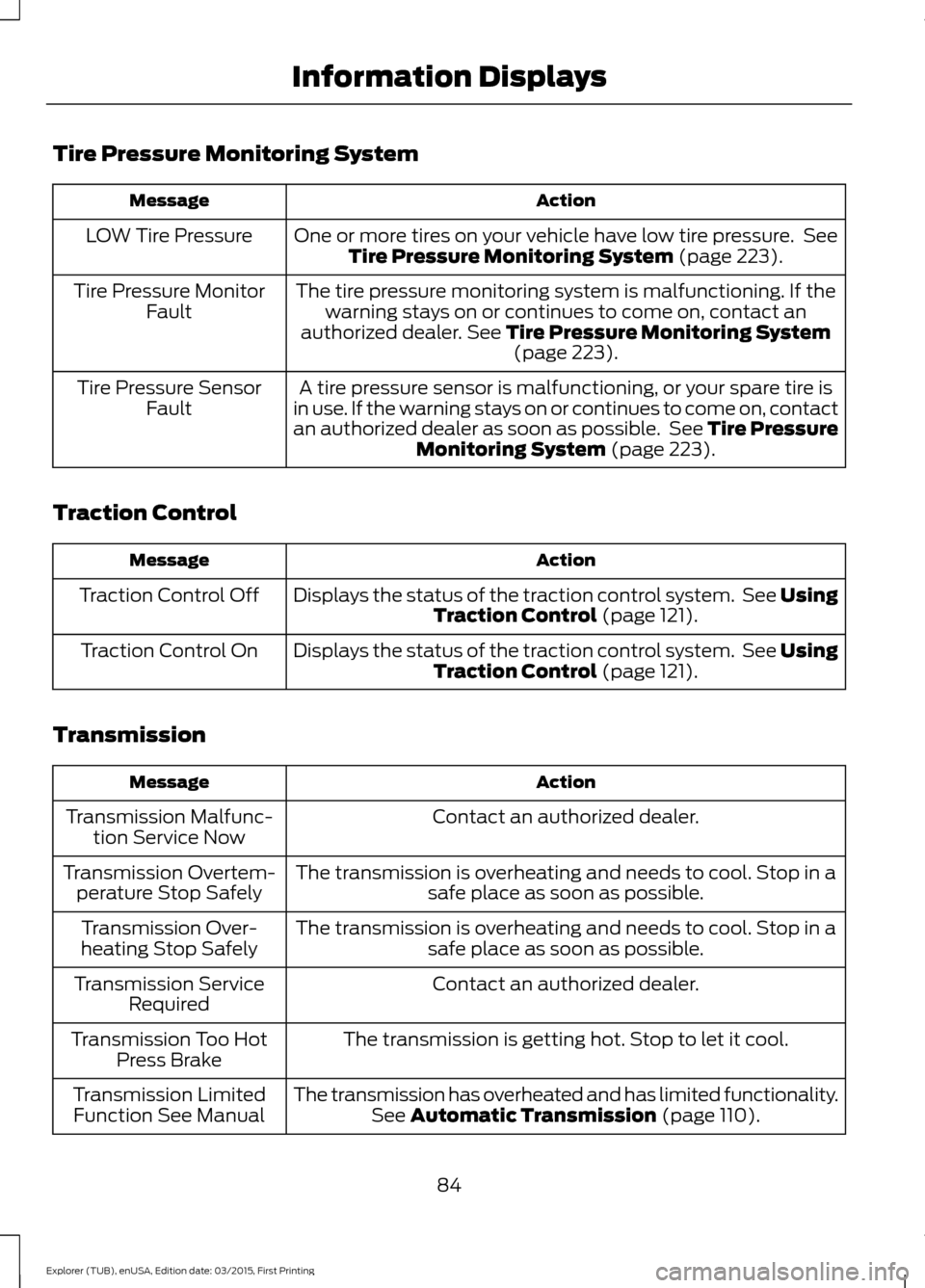
Tire Pressure Monitoring System
Action
Message
One or more tires on your vehicle have low tire pressure. SeeTire Pressure Monitoring System (page 223).
LOW Tire Pressure
The tire pressure monitoring system is malfunctioning. If thewarning stays on or continues to come on, contact an
authorized dealer.
See Tire Pressure Monitoring System (page 223).
Tire Pressure Monitor
Fault
A tire pressure sensor is malfunctioning, or your spare tire is
in use. If the warning stays on or continues to come on, contact
an authorized dealer as soon as possible. See Tire Pressure Monitoring System
(page 223).
Tire Pressure Sensor
Fault
Traction Control Action
Message
Displays the status of the traction control system. See UsingTraction Control
(page 121).
Traction Control Off
Displays the status of the traction control system. See UsingTraction Control
(page 121).
Traction Control On
Transmission Action
Message
Contact an authorized dealer.
Transmission Malfunc-
tion Service Now
The transmission is overheating and needs to cool. Stop in asafe place as soon as possible.
Transmission Overtem-
perature Stop Safely
The transmission is overheating and needs to cool. Stop in asafe place as soon as possible.
Transmission Over-
heating Stop Safely
Contact an authorized dealer.
Transmission Service
Required
The transmission is getting hot. Stop to let it cool.
Transmission Too Hot
Press Brake
The transmission has overheated and has limited functionality.See
Automatic Transmission (page 110).
Transmission Limited
Function See Manual
84
Explorer (TUB), enUSA, Edition date: 03/2015, First Printing Information Displays
Page 88 of 350
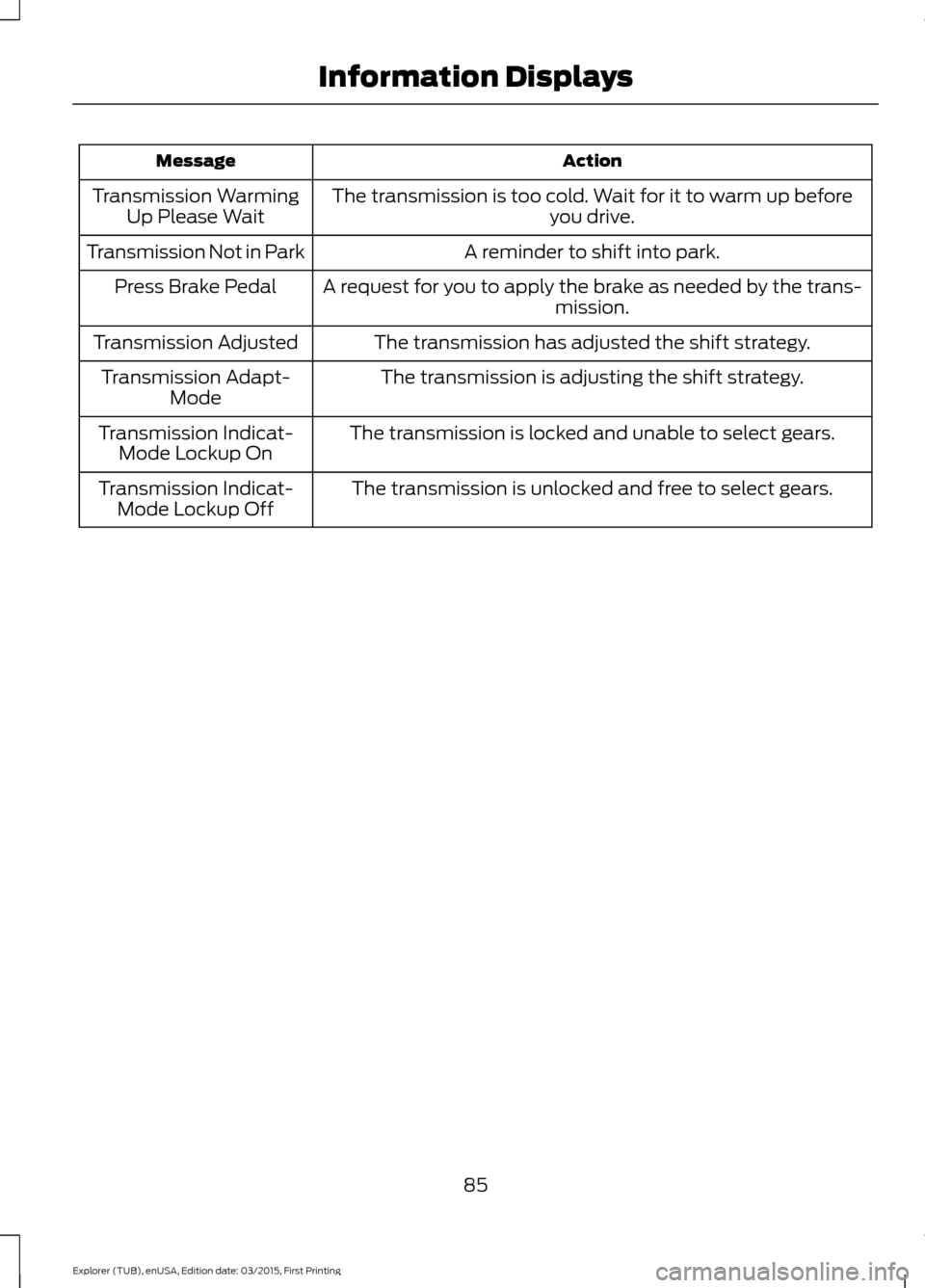
Action
Message
The transmission is too cold. Wait for it to warm up before you drive.
Transmission Warming
Up Please Wait
A reminder to shift into park.
Transmission Not in Park
A request for you to apply the brake as needed by the trans-mission.
Press Brake Pedal
The transmission has adjusted the shift strategy.
Transmission Adjusted
The transmission is adjusting the shift strategy.
Transmission Adapt-
Mode
The transmission is locked and unable to select gears.
Transmission Indicat-
Mode Lockup On
The transmission is unlocked and free to select gears.
Transmission Indicat-
Mode Lockup Off
85
Explorer (TUB), enUSA, Edition date: 03/2015, First Printing Information Displays
Page 91 of 350
Recommended Settings for
Cooling
•
Adjust the fan speed to the second
speed setting.
• Adjust the temperature control to the
midway point of the cold settings.
• Adjust the air distribution control to the
instrument panel air vents position.
Vehicle Stationary for Extended
Periods During Extreme High
Ambient Temperatures
• Apply the parking brake.
• Move the transmission selector lever
to position P or neutral.
• Adjust the temperature control to the
MAX A/C
position.
• Adjust the fan speed to the lowest
speed setting.
Side Window Defogging in Cold
Weather
• Adjust the air distribution control to the
instrument panel and windshield air
vents positions.
• Press the
A/C button.
• Adjust the temperature control to the
desired setting.
• Adjust the fan speed to the highest
setting.
• Direct the instrument panel side air
vents toward the side windows.
• Close the instrument panel vents. Maximum Cooling Performance in
Instrument Panel or Instrument
Panel and Footwell Positions
•
Adjust the temperature control to the
lowest setting.
• Press the
A/C and recirculated air
buttons.
• Adjust the fan speed to the highest
setting initially and then adjust it to suit
the desired comfort level.
HEATED WINDOWS AND
MIRRORS
(If Equipped)
Heated Rear Window
Note: Make sure the engine is running
before operating the heated windows. Press the button to clear the
heated rear window of thin ice
and fog. The heated rear window
will automatically turn off after a short
period of time. Start the engine before you
switch the heated rear window on.
Note: Do not use razor blades or other
sharp objects to clean or remove decals
from the inside of the heated rear window.
The vehicle warranty does not cover
damage caused to the heated rear window
grid lines.
Heated Exterior Mirror
When you switch the heated rear window
on, the heated exterior mirrors will
automatically turn on.
Note: Do not remove ice from the mirrors
with a scraper or adjust the mirror glass
when it is frozen in place.
Note: Do not clean the mirror housing or
glass with harsh abrasives, fuel or other
petroleum-based cleaning products.
88
Explorer (TUB), enUSA, Edition date: 03/2015, First Printing Climate ControlE184884
Page 101 of 350
Note:
You can crank the engine for a total
of 60 seconds without the engine starting
before the starting system temporarily
disables. The 60 seconds does not have to
be all at once. For example, if you crank the
engine three times for 20 seconds each
time, without the engine starting, you
reached the 60-second time limit. A
message appears in the information display
alerting you that you exceeded the cranking
time. You cannot attempt to start the
engine for at least 15 minutes. After 15
minutes, you are limited to a 15-second
engine cranking time. You need to wait 60
minutes before you can crank the engine for
60 seconds again.
Before starting your vehicle, check the
following:
• Make sure all occupants have fastened
their safety belts.
• Make sure the headlamps and
electrical accessories are off.
• Make sure the parking brake is on.
• Make sure the transmission is in park
(P).
• Switch the ignition key to position II.
Note: Do not touch the accelerator pedal.
1. Fully depress the brake pedal.
2. Turn the key to position
III to start the
engine.
Note: The engine may continue cranking
for up to 15 seconds or until it starts.
Note: If you cannot start the engine on the
first try, wait for a short period and try again.
Failure to Start
If you cannot start the engine after three
attempts, wait 10 seconds and follow this
procedure:
1. Fully depress the brake pedal.
2. Shift into park (P). 3.
Fully depress the accelerator pedal and
hold it there.
4. Start the engine.
Stopping the Engine When Your
Vehicle is Stationary
1. Shift into park (P).
2. Turn the key to position
0.
3. Apply the parking brake.
Stopping the Engine When Your
Vehicle is Moving WARNING
Switching off the engine when the
vehicle is still moving will result in a
loss of brake and steering assistance.
The steering will not lock, but higher effort
will be required. When the ignition is
switched off, some electrical circuits,
including air bags, warning lamps and
indicators may also be off. If the ignition
was turned off accidentally, you can shift
into neutral (N) and re-start the engine. 1.
Shift into neutral and use the brakes to
bring your vehicle to a safe stop.
2. When your vehicle has stopped, shift into park (P) and turn the key to
position
0.
3. Apply the parking brake.
Guarding Against Exhaust Fumes WARNING
If you smell exhaust fumes inside
your vehicle, have your vehicle
checked by your authorized dealer
immediately. Do not drive your vehicle if
you smell exhaust fumes. Carbon
monoxide is present in exhaust fumes.
Take precautions to avoid its dangerous
effects. 98
Explorer (TUB), enUSA, Edition date: 03/2015, First Printing Starting and Stopping the Engine