clock FORD RANGER 2004 2.G Owners Manual
[x] Cancel search | Manufacturer: FORD, Model Year: 2004, Model line: RANGER, Model: FORD RANGER 2004 2.GPages: 248, PDF Size: 6.16 MB
Page 18 of 248
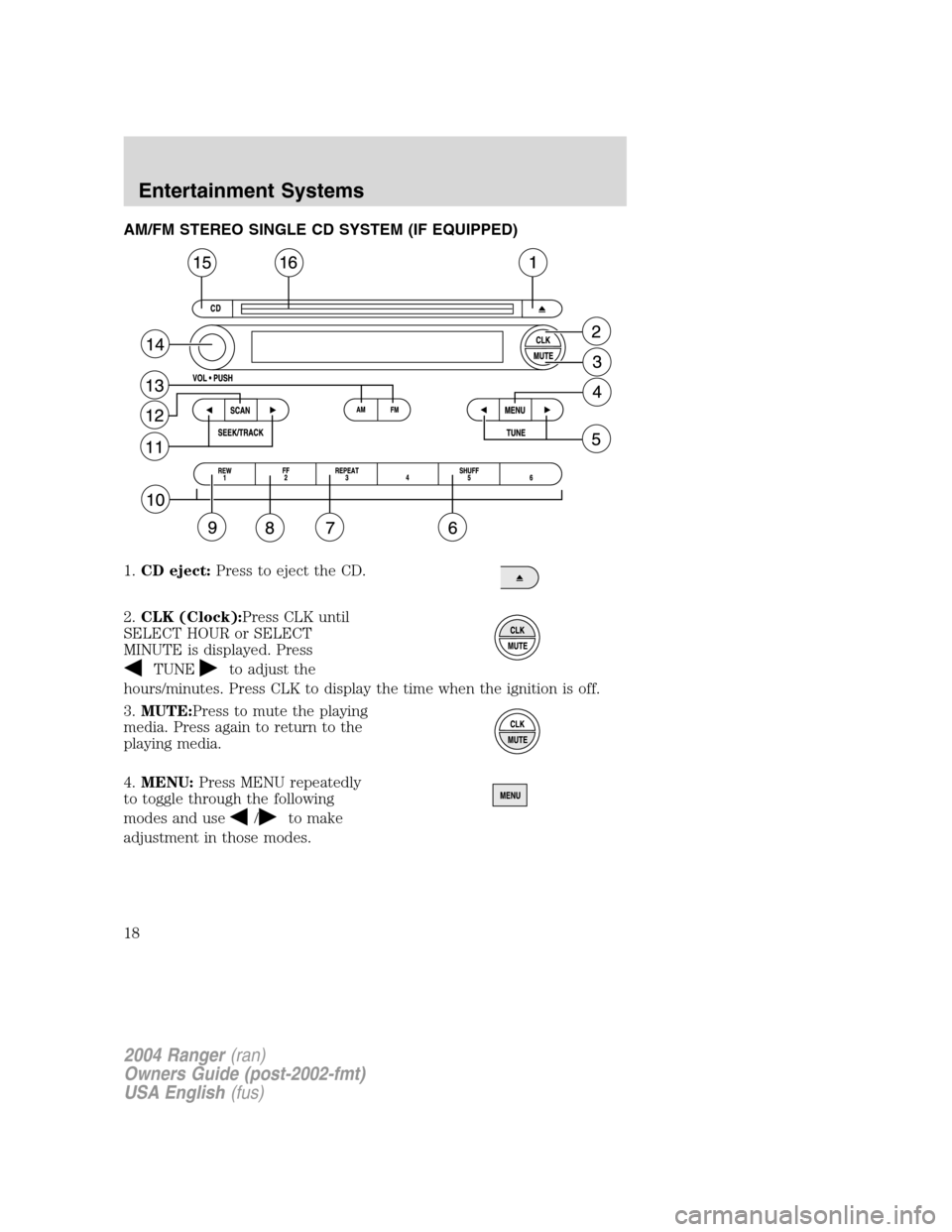
AM/FM STEREO SINGLE CD SYSTEM (IF EQUIPPED)
1.CD eject: Press to eject the CD.
2. CLK (Clock): Press CLK until
SELECT HOUR or SELECT
MINUTE is displayed. Press
TUNEto adjust the
hours/minutes. Press CLK to display the time when the ignition is off.
3. MUTE: Press to mute the playing
media. Press again to return to the
playing media.
4. MENU: Press MENU repeatedly
to toggle through the following
modes and use
/to make
adjustment in those modes.
2004 Ranger (ran)
Owners Guide (post-2002-fmt)
USA English (fus)
Entertainment Systems
18
Page 21 of 248
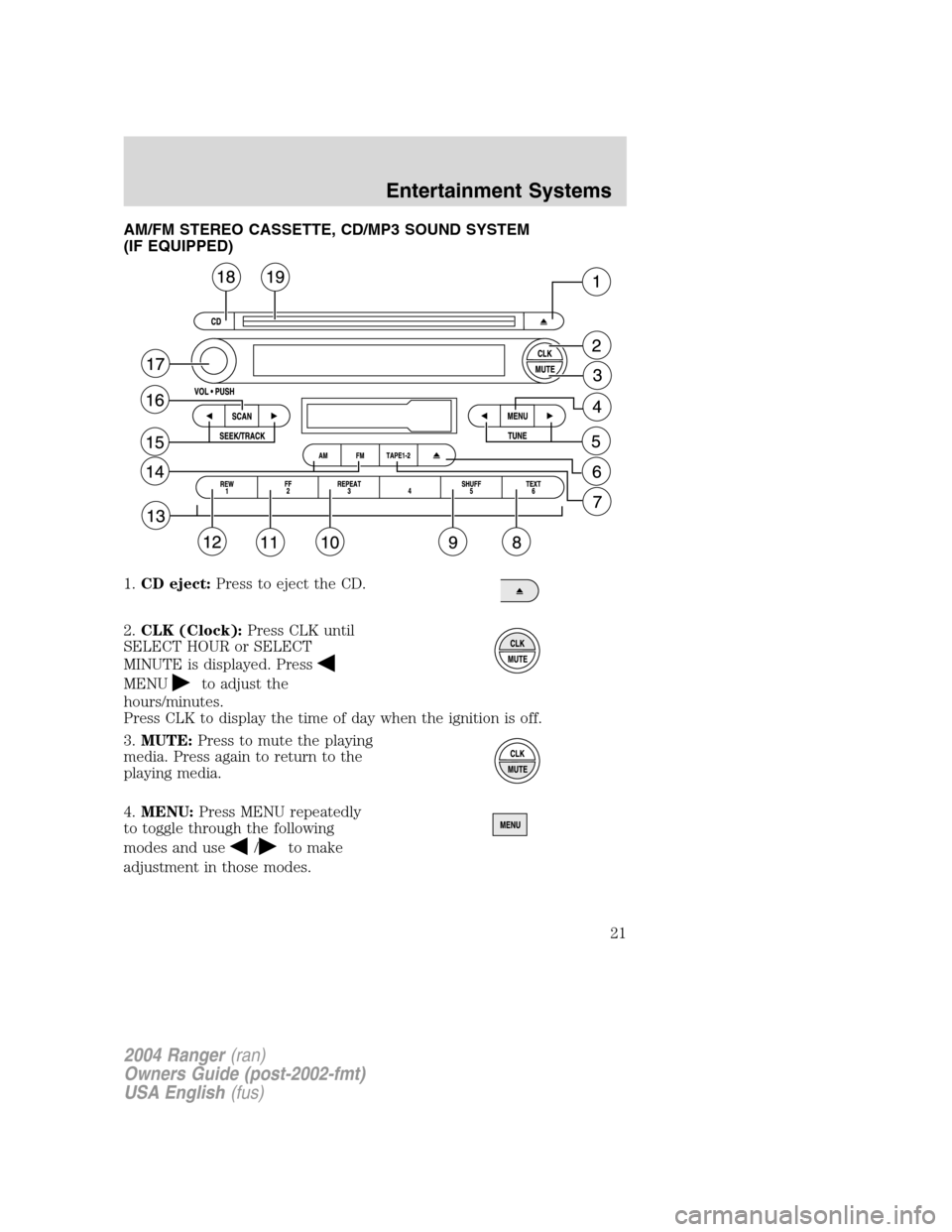
AM/FM STEREO CASSETTE, CD/MP3 SOUND SYSTEM
(IF EQUIPPED)
1.CD eject: Press to eject the CD.
2. CLK (Clock): Press CLK until
SELECT HOUR or SELECT
MINUTE is displayed. Press
MENUto adjust the
hours/minutes.
Press CLK to display the time of day when the ignition is off.
3. MUTE: Press to mute the playing
media. Press again to return to the
playing media.
4. MENU: Press MENU repeatedly
to toggle through the following
modes and use
/to make
adjustment in those modes.
2004 Ranger (ran)
Owners Guide (post-2002-fmt)
USA English (fus)
Entertainment Systems
21
Page 25 of 248
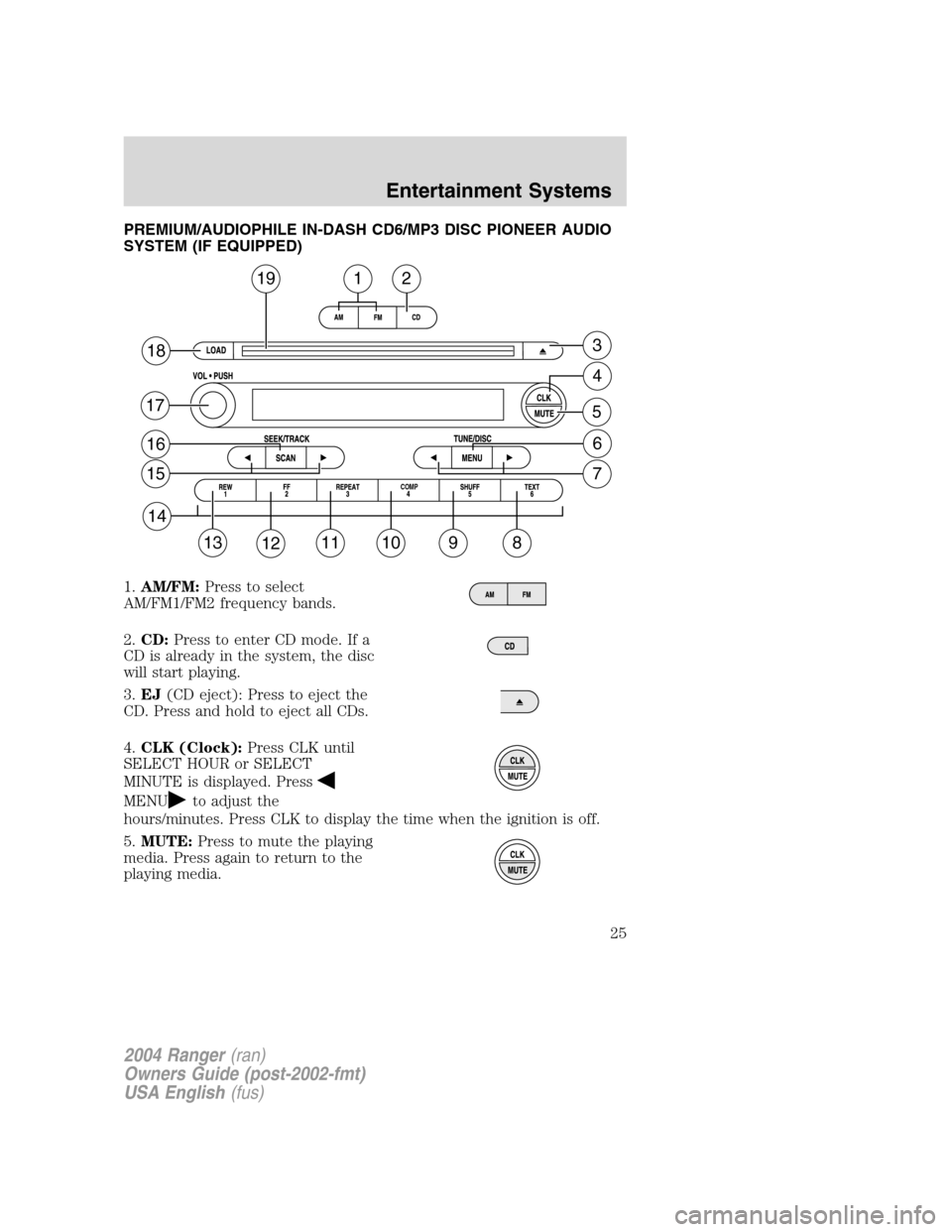
PREMIUM/AUDIOPHILE IN-DASH CD6/MP3 DISC PIONEER AUDIO
SYSTEM (IF EQUIPPED)
1.AM/FM: Press to select
AM/FM1/FM2 frequency bands.
2. CD: Press to enter CD mode. If a
CD is already in the system, the disc
will start playing.
3. EJ (CD eject): Press to eject the
CD. Press and hold to eject all CDs.
4. CLK (Clock): Press CLK until
SELECT HOUR or SELECT
MINUTE is displayed. Press
MENUto adjust the
hours/minutes. Press CLK to display the time when the ignition is off.
5. MUTE: Press to mute the playing
media. Press again to return to the
playing media.
19
18
17
16
15
14
13121110
COMP
98
7
6
5
4
3
12
2004 Ranger (ran)
Owners Guide (post-2002-fmt)
USA English (fus)
Entertainment Systems
25
Page 29 of 248
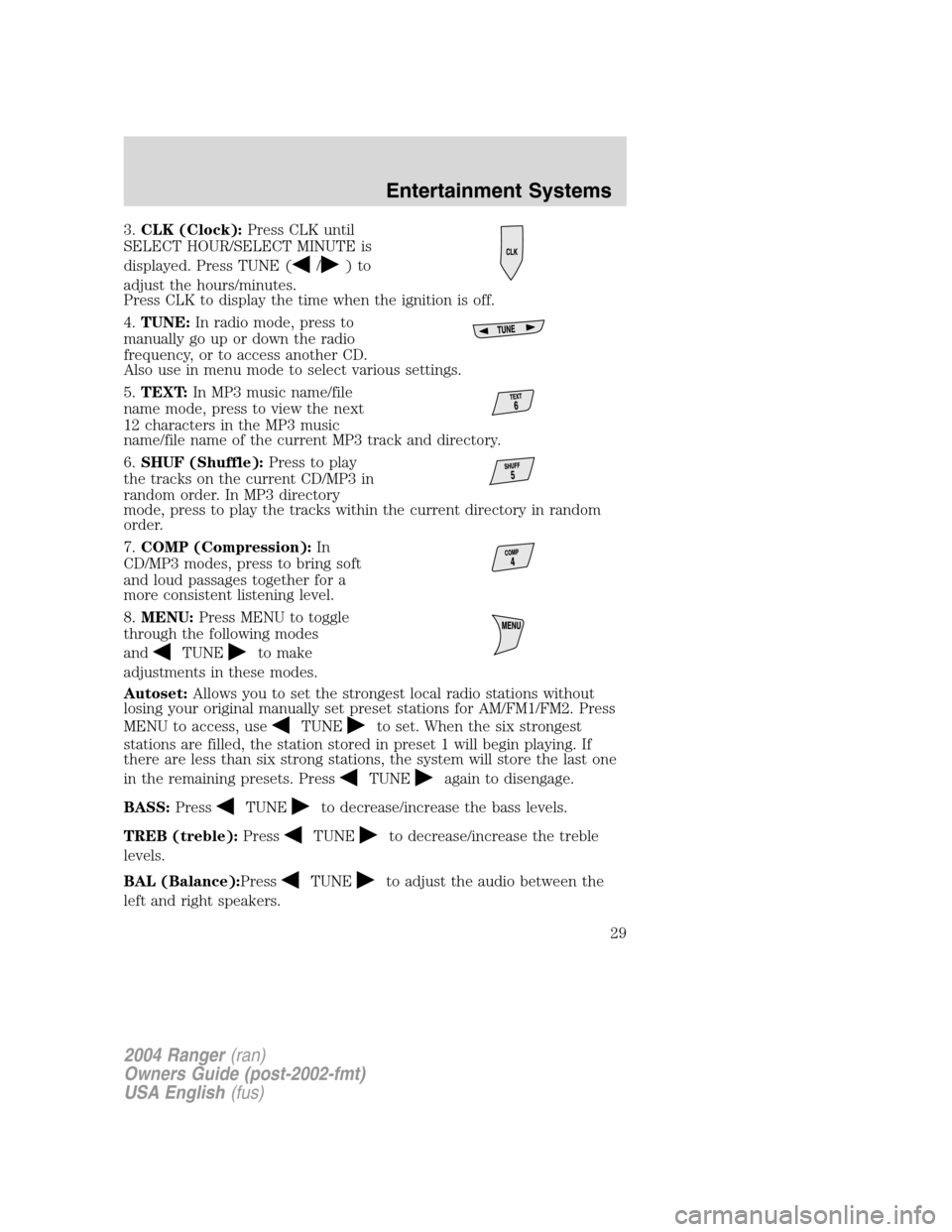
3.CLK (Clock): Press CLK until
SELECT HOUR/SELECT MINUTE is
displayed. Press TUNE (
/)to
adjust the hours/minutes.
Press CLK to display the time when the ignition is off.
4. TUNE: In radio mode, press to
manually go up or down the radio
frequency, or to access another CD.
Also use in menu mode to select various settings.
5. TEXT: In MP3 music name/file
name mode, press to view the next
12 characters in the MP3 music
name/file name of the current MP3 track and directory.
6. SHUF (Shuffle): Press to play
the tracks on the current CD/MP3 in
random order. In MP3 directory
mode, press to play the tracks within the current directory in random
order.
7. COMP (Compression): In
CD/MP3 modes, press to bring soft
and loud passages together for a
more consistent listening level.
8. MENU: Press MENU to toggle
through the following modes
and
TUNEto make
adjustments in these modes.
Autoset: Allows you to set the strongest local radio stations without
losing your original manually set preset stations for AM/FM1/FM2. Press
MENU to access, use
TUNEto set. When the six strongest
stations are filled, the station stored in preset 1 will begin playing. If
there are less than six strong stations, the system will store the last one
in the remaining presets. Press
TUNEagain to disengage.
BASS: Press
TUNEto decrease/increase the bass levels.
TREB (treble): Press
TUNEto decrease/increase the treble
levels.
BAL (Balance): Press
TUNEto adjust the audio between the
left and right speakers.
2004 Ranger (ran)
Owners Guide (post-2002-fmt)
USA English (fus)
Entertainment Systems
29
Page 39 of 248
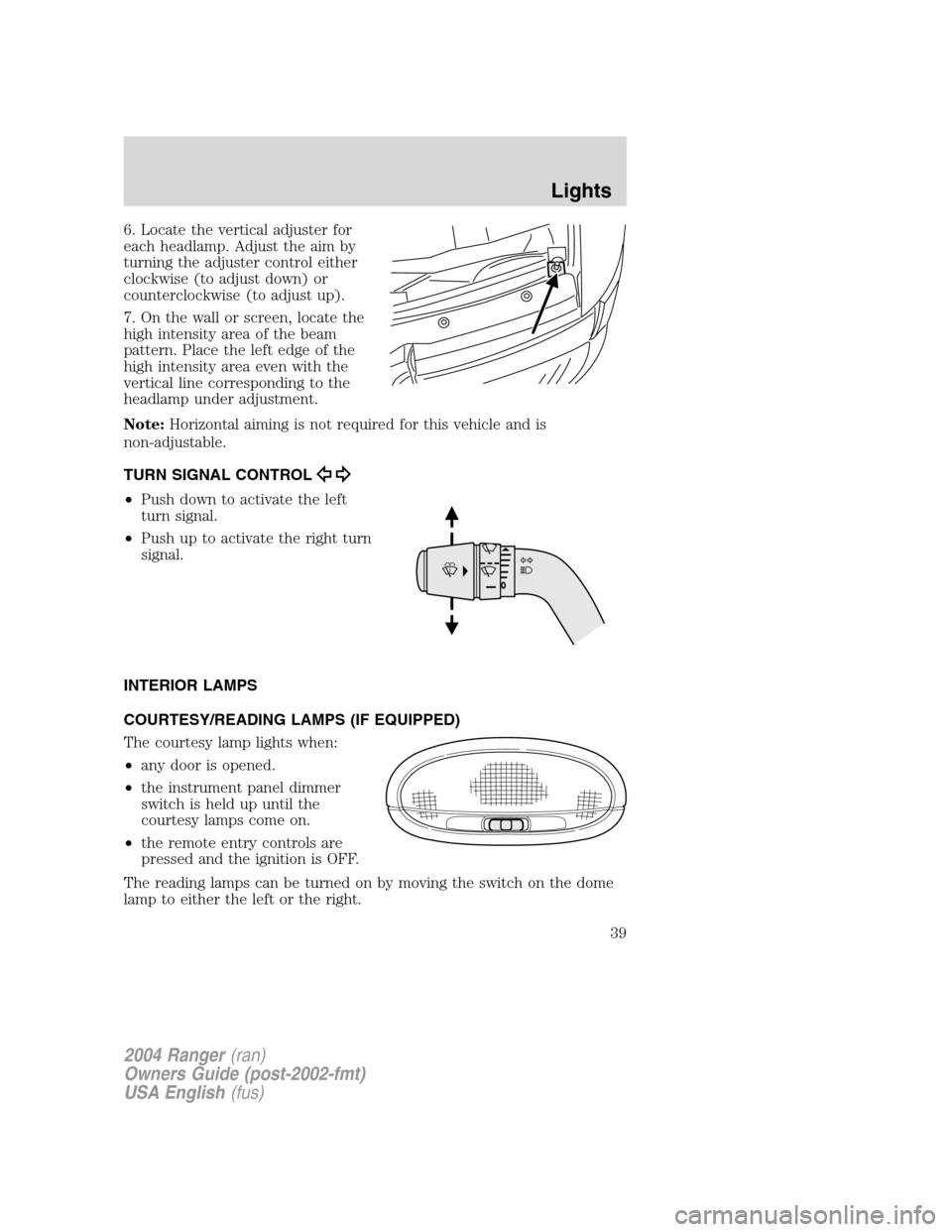
6. Locate the vertical adjuster for
each headlamp. Adjust the aim by
turning the adjuster control either
clockwise (to adjust down) or
counterclockwise (to adjust up).
7. On the wall or screen, locate the
high intensity area of the beam
pattern. Place the left edge of the
high intensity area even with the
vertical line corresponding to the
headlamp under adjustment.
Note:Horizontal aiming is not required for this vehicle and is
non-adjustable.
TURN SIGNAL CONTROL
• Push down to activate the left
turn signal.
• Push up to activate the right turn
signal.
INTERIOR LAMPS
COURTESY/READING LAMPS (IF EQUIPPED)
The courtesy lamp lights when:
• any door is opened.
• the instrument panel dimmer
switch is held up until the
courtesy lamps come on.
• the remote entry controls are
pressed and the ignition is OFF.
The reading lamps can be turned on by moving the switch on the dome
lamp to either the left or the right.
2004 Ranger (ran)
Owners Guide (post-2002-fmt)
USA English (fus)
Lights
39
Page 41 of 248
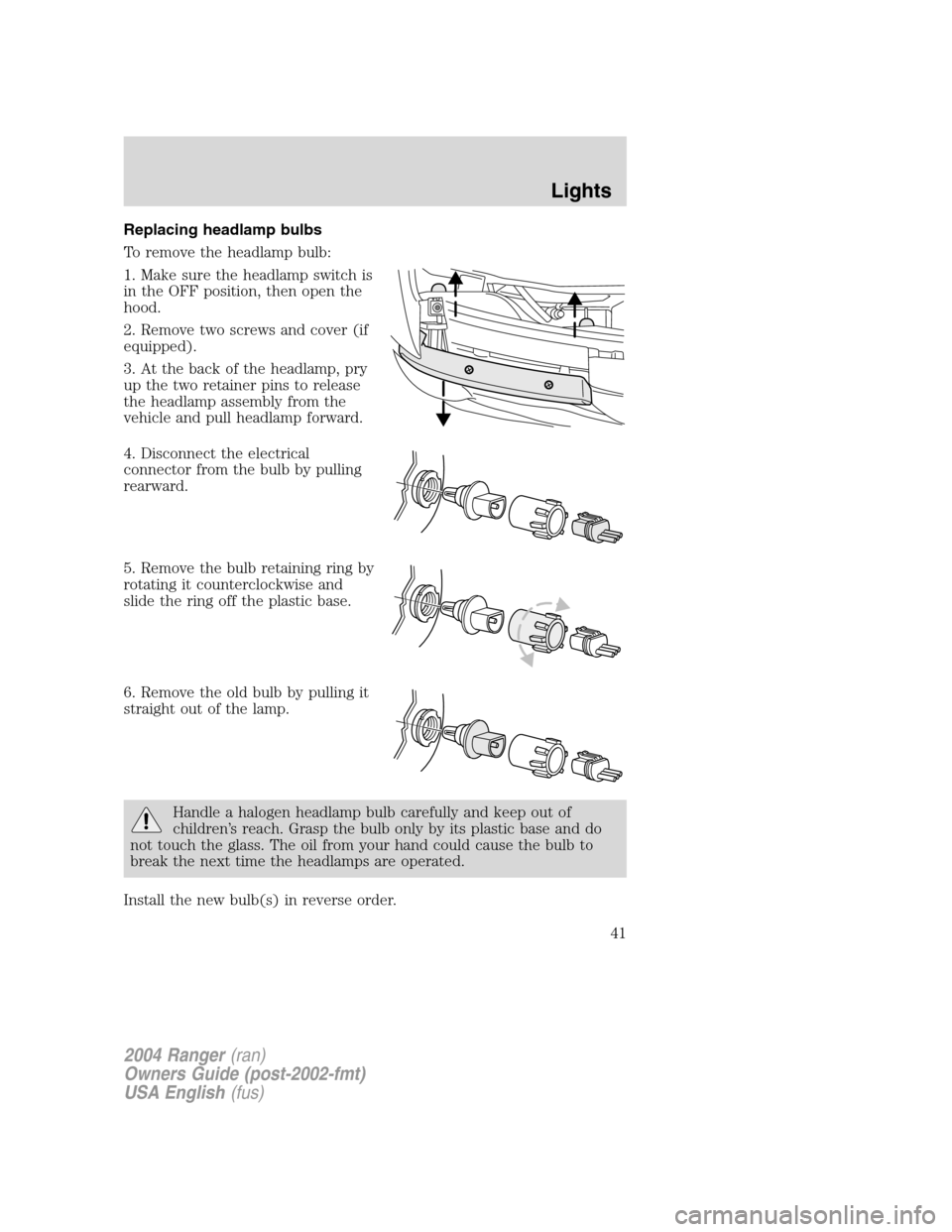
Replacing headlamp bulbs
To remove the headlamp bulb:
1. Make sure the headlamp switch is
in the OFF position, then open the
hood.
2. Remove two screws and cover (if
equipped).
3. At the back of the headlamp, pry
up the two retainer pins to release
the headlamp assembly from the
vehicle and pull headlamp forward.
4. Disconnect the electrical
connector from the bulb by pulling
rearward.
5. Remove the bulb retaining ring by
rotating it counterclockwise and
slide the ring off the plastic base.
6. Remove the old bulb by pulling it
straight out of the lamp.
Handle a halogen headlamp bulb carefully and keep out of
children’s reach. Grasp the bulb only by its plastic base and do
not touch the glass. The oil from your hand could cause the bulb to
break the next time the headlamps are operated.
Install the new bulb(s) in reverse order.
2004 Ranger (ran)
Owners Guide (post-2002-fmt)
USA English (fus)
Lights
41
Page 42 of 248
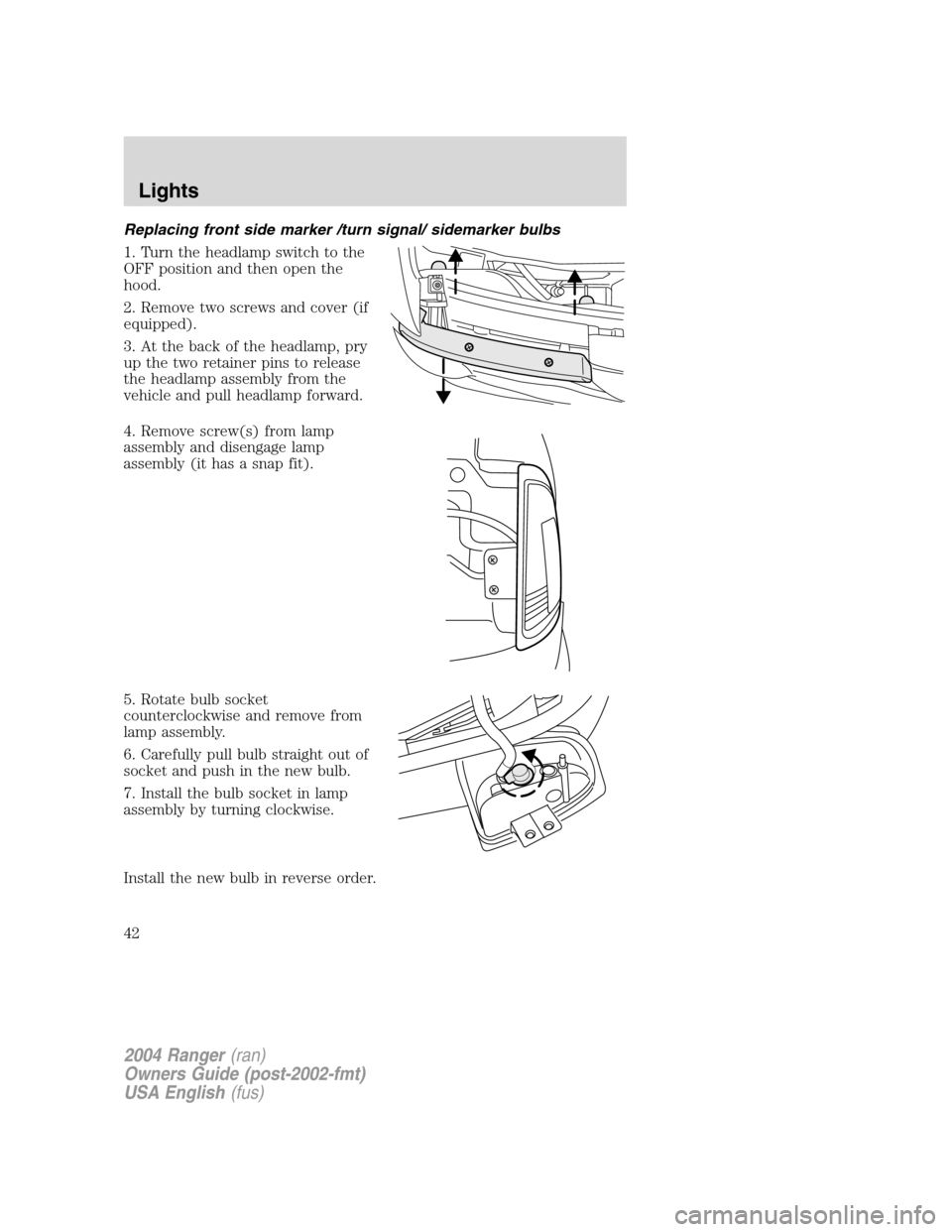
Replacing front side marker /turn signal/ sidemarker bulbs
1. Turn the headlamp switch to the
OFF position and then open the
hood.
2. Remove two screws and cover (if
equipped).
3. At the back of the headlamp, pry
up the two retainer pins to release
the headlamp assembly from the
vehicle and pull headlamp forward.
4. Remove screw(s) from lamp
assembly and disengage lamp
assembly (it has a snap fit).
5. Rotate bulb socket
counterclockwise and remove from
lamp assembly.
6. Carefully pull bulb straight out of
socket and push in the new bulb.
7. Install the bulb socket in lamp
assembly by turning clockwise.
Install the new bulb in reverse order.
2004 Ranger(ran)
Owners Guide (post-2002-fmt)
USA English (fus)
Lights
42
Page 43 of 248
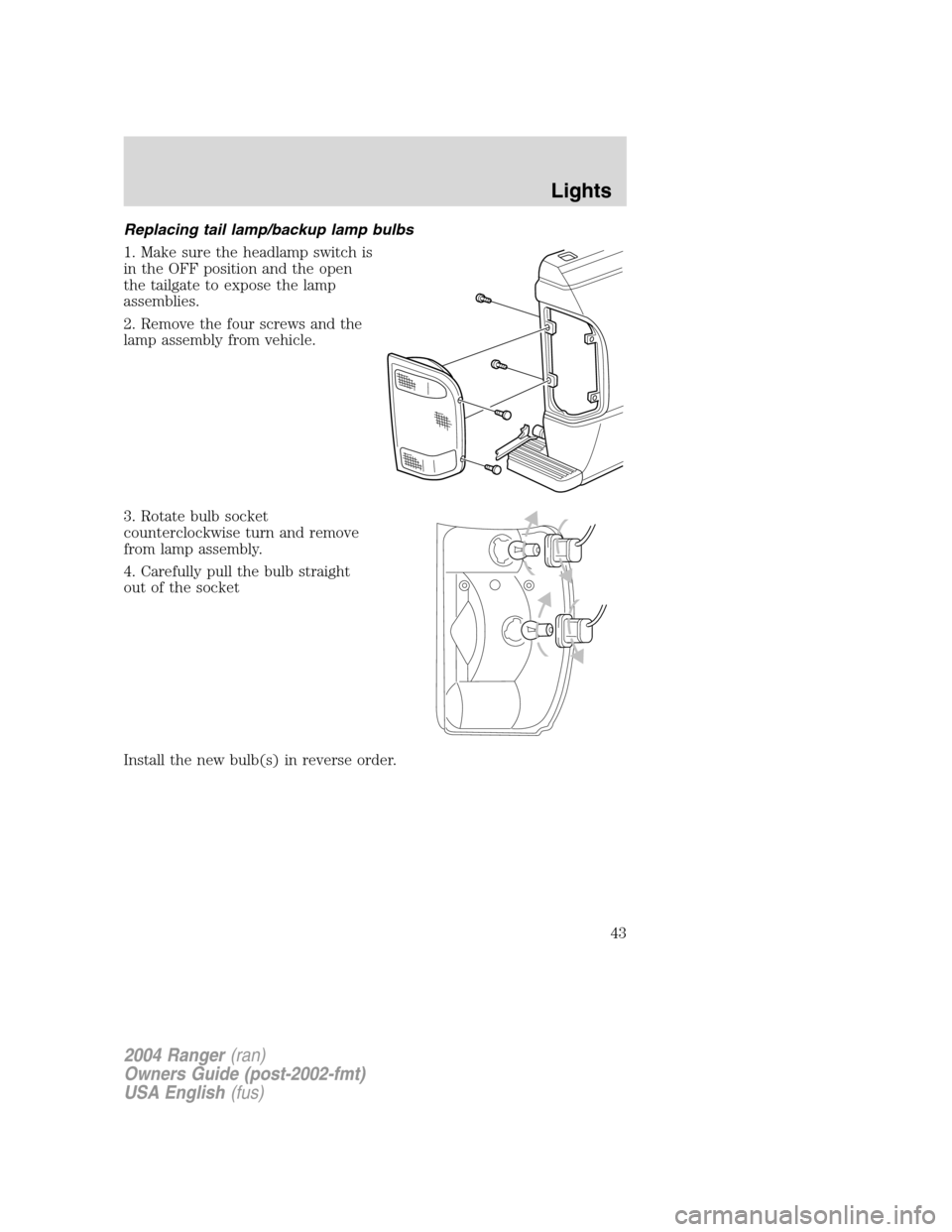
Replacing tail lamp/backup lamp bulbs
1. Make sure the headlamp switch is
in the OFF position and the open
the tailgate to expose the lamp
assemblies.
2. Remove the four screws and the
lamp assembly from vehicle.
3. Rotate bulb socket
counterclockwise turn and remove
from lamp assembly.
4. Carefully pull the bulb straight
out of the socket
Install the new bulb(s) in reverse order.
2004 Ranger(ran)
Owners Guide (post-2002-fmt)
USA English (fus)
Lights
43
Page 44 of 248
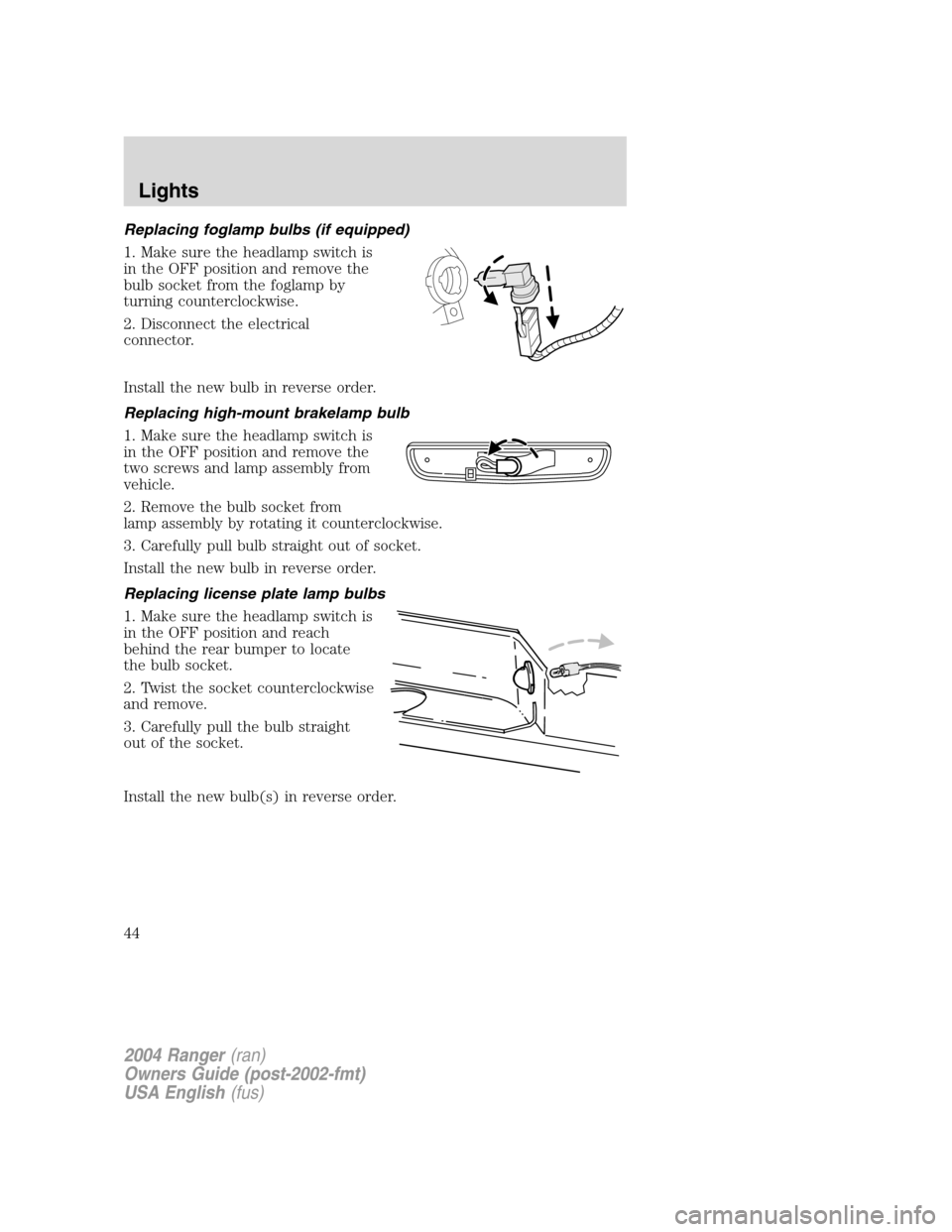
Replacing foglamp bulbs (if equipped)
1. Make sure the headlamp switch is
in the OFF position and remove the
bulb socket from the foglamp by
turning counterclockwise.
2. Disconnect the electrical
connector.
Install the new bulb in reverse order.
Replacing high-mount brakelamp bulb
1. Make sure the headlamp switch is
in the OFF position and remove the
two screws and lamp assembly from
vehicle.
2. Remove the bulb socket from
lamp assembly by rotating it counterclockwise.
3. Carefully pull bulb straight out of socket.
Install the new bulb in reverse order.
Replacing license plate lamp bulbs
1. Make sure the headlamp switch is
in the OFF position and reach
behind the rear bumper to locate
the bulb socket.
2. Twist the socket counterclockwise
and remove.
3. Carefully pull the bulb straight
out of the socket.
Install the new bulb(s) in reverse order.
2004 Ranger(ran)
Owners Guide (post-2002-fmt)
USA English (fus)
Lights
44
Page 52 of 248
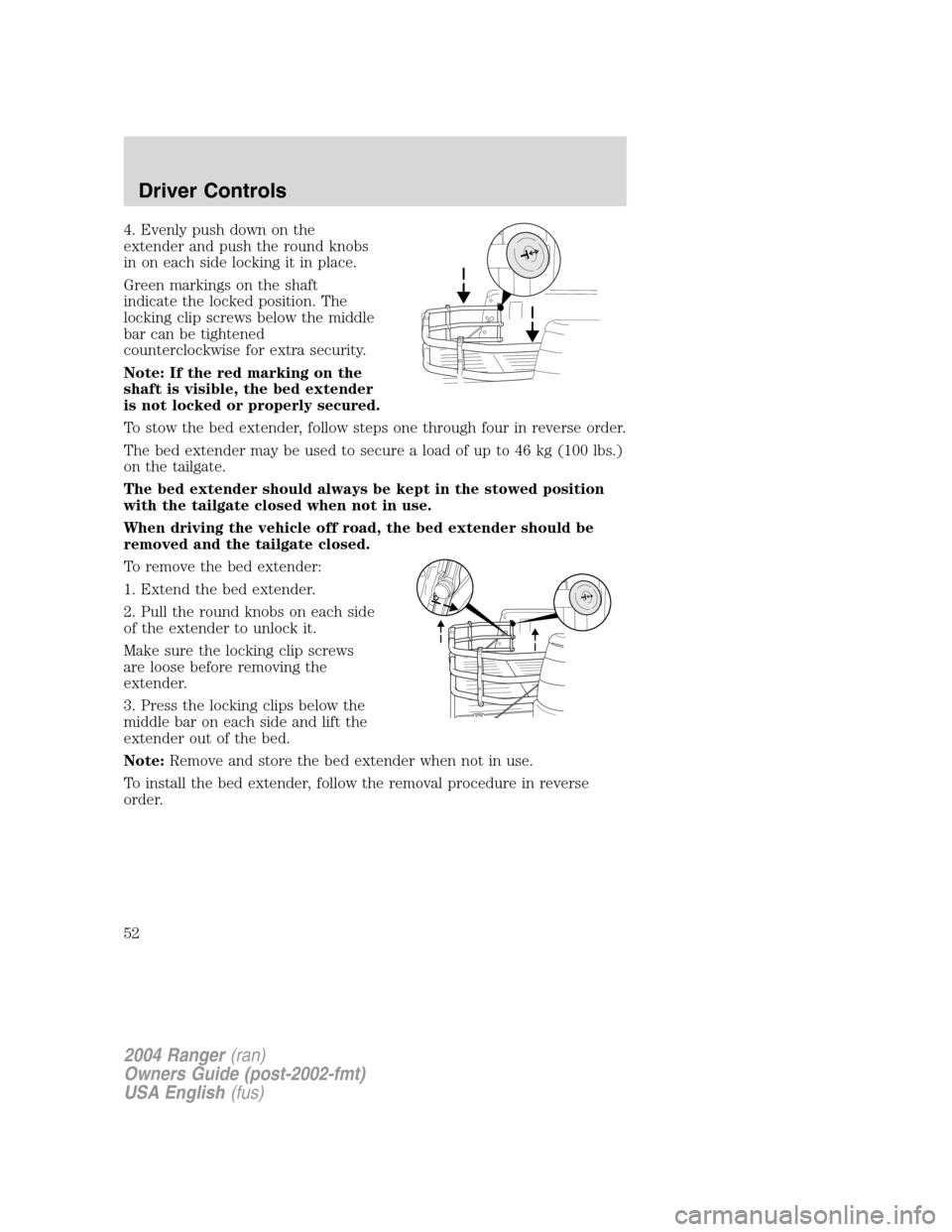
4. Evenly push down on the
extender and push the round knobs
in on each side locking it in place.
Green markings on the shaft
indicate the locked position. The
locking clip screws below the middle
bar can be tightened
counterclockwise for extra security.
Note: If the red marking on the
shaft is visible, the bed extender
is not locked or properly secured.
To stow the bed extender, follow steps one through four in reverse order.
The bed extender may be used to secure a load of up to 46 kg (100 lbs.)
on the tailgate.
The bed extender should always be kept in the stowed position
with the tailgate closed when not in use.
When driving the vehicle off road, the bed extender should be
removed and the tailgate closed.
To remove the bed extender:
1. Extend the bed extender.
2. Pull the round knobs on each side
of the extender to unlock it.
Make sure the locking clip screws
are loose before removing the
extender.
3. Press the locking clips below the
middle bar on each side and lift the
extender out of the bed.
Note:Remove and store the bed extender when not in use.
To install the bed extender, follow the removal procedure in reverse
order.
2004 Ranger (ran)
Owners Guide (post-2002-fmt)
USA English (fus)
Driver Controls
52