key FORD RANGER 2019 User Guide
[x] Cancel search | Manufacturer: FORD, Model Year: 2019, Model line: RANGER, Model: FORD RANGER 2019Pages: 512, PDF Size: 7.63 MB
Page 62 of 512
4. When prompted, hold the OK button
until you see a message informing you
to label this key as a MyKey. The
programmed restrictions apply when
you key off, open and close the driver
door and restart your vehicle with the
programmed key or transmitter.
MyKey is successfully created. Make sure
you label it so you can distinguish it from
the admin keys.
You can also program configurable
settings for the key(s). See
Programming
and Changing Configurable Settings.
Programming and Changing
Configurable Settings
Use the information display to access your
configurable MyKey settings.
1. Switch the ignition on using an admin key or transmitter you want to program.
2. Access the main menu in the information display and then scroll
through the menus to change the
settings of your MyKey. See
Information Displays
(page 90).
3. Follow the instructions in the display. The programmed restrictions apply
when you switch the vehicle off, open
and close the driver door and restart
your vehicle with the programmed key
or transmitter.
Note: You can clear or change your MyKey
settings at any time during the same key
cycle as you created the MyKey. Once you
have switched the vehicle off, however, you
will need an admin key to change or clear
your MyKey settings. When you make any
changes to your MyKey settings, you change
the settings for every MyKey. You cannot
make individual changes to apply to certain
MyKeys. CLEARING ALL MYKEYS
When you clear your MyKeys, you remove
all restrictions and return all MyKeys to
their original admin key status at once. To
clear all MyKeys of all MyKey settings, use
the information display.
1. Switch the ignition on using an admin
key.
2. Access the main menu in the information display and then scroll
through the menus to begin clearing
your MyKey programming. See
Information Displays
(page 90).
3. Follow the instructions in the display.
4. A confirmation message appears in the
display after you finish clearing your
MyKeys.
Note: When you clear your MyKeys, you
remove all restrictions and return all MyKeys
to their original admin key status. You
cannot remove the MyKey restrictions
individually.
CHECKING MYKEY SYSTEM
STATUS
You can find information about your
programmed MyKeys by using the
information display. See
Information
Displays (page 90).
MyKey Distance
Tracks the distance when drivers use a
MyKey. The only way to delete the
accumulated distance is by using an admin
key to clear all MyKeys. If the distance does
not accumulate as expected, then the
intended user is not using the MyKey, or an
admin key user recently cleared and then
recreated a MyKey.
59
Ranger (TFG) Canada/United States of America, enUSA, Edition date: 201809, Fourth-Printing MyKey
™
Page 63 of 512
Number of MyKeys
Indicates the number of MyKeys
programmed to your vehicle. Use this
feature to detect how many MyKeys you
have for your vehicle and determine when
all MyKeys have been deleted.
Number of Admin Keys
Indicates how many admin keys are
programmed to your vehicle. Use this
feature to determine how many admin
keys you have for your vehicle, and detect
if an additional MyKey has been
programmed.
USING MYKEY WITH REMOTE
START SYSTEMS
MyKey is not compatible with non
Ford-approved, aftermarket remote start
systems. If you choose to install a remote
start system, see an authorized dealer for
a Ford-approved remote start system.
MYKEY – TROUBLESHOOTING Potential Causes
Condition
The key or transmitter used to start the vehicle
does not have admin privileges.
I cannot create a MyKey.
Vehicles with keyless start: Make sure you place
the transmitter into the backup slot. See
Passive Key Backup Position (page 56).
The key or transmitter used to start the vehicle
is the only admin key. There always has to be
at least one admin key.
The passive anti-theft system is disabled or in
unlimited mode.
The transmitter used to start your vehicle does
not have admin privileges.
I cannot program the configurable
settings.
There are no MyKeys programmed to the
vehicle.
See Creating a MyKey (page 58).
The key or transmitter used to start the vehicle
does not have admin privileges.
I cannot clear the MyKeys.
No MyKeys are created.
See Creating a MyKey
(page 58).
Purchase a new key or transmitter from an
authorized dealer.
I lost the only admin key.
60
Ranger (TFG) Canada/United States of America, enUSA, Edition date: 201809, Fourth-Printing MyKey
™
Page 64 of 512
Potential Causes
Condition
Program a spare key or transmitter. You may
need to see an authorized dealer. See Passive
Key Backup Position (page 56).
I lost a key.
The MyKey user is not using the MyKey.
The MyKey distance does not accumu-
late. An admin key holder cleared the MyKeys and
created new MyKeys.
The key system has been reset.
An admin transmitter is present at vehicle start.
No MyKey functions with the trans-
mitter. There are no MyKeys programmed to your
vehicle. See
Creating a MyKey (page 58).
61
Ranger (TFG) Canada/United States of America, enUSA, Edition date: 201809, Fourth-Printing MyKey
™
Page 65 of 512
LOCKING AND UNLOCKING
You can use the power door lock control
or the remote control to lock and unlock
your doors and tailgate. See Tailgate Lock
(page 213).
Note: Always take your keys and lock all
doors when leaving your vehicle.
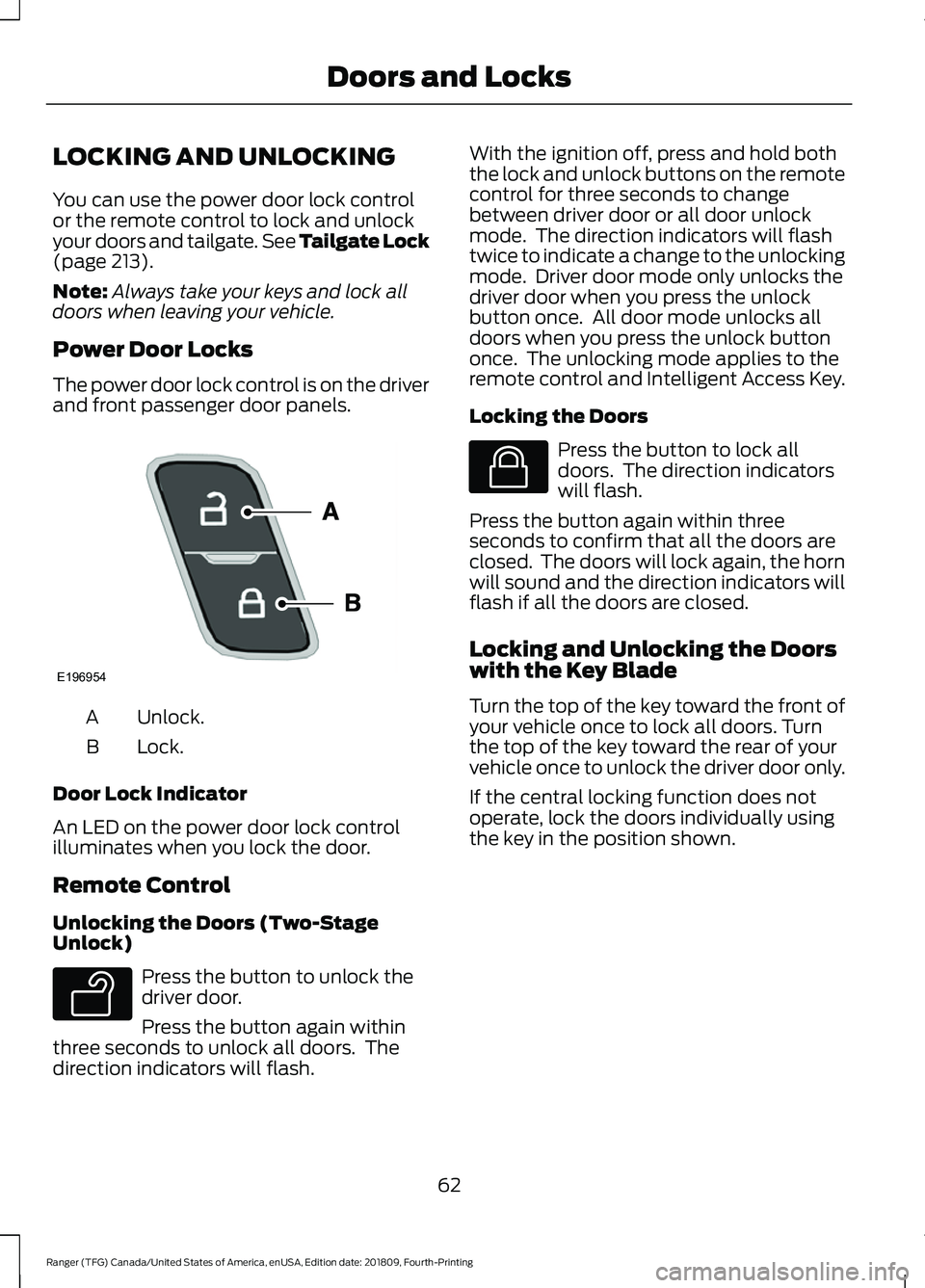
Power Door Locks
The power door lock control is on the driver
and front passenger door panels. Unlock.
A
Lock.
B
Door Lock Indicator
An LED on the power door lock control
illuminates when you lock the door.
Remote Control
Unlocking the Doors (Two-Stage
Unlock) Press the button to unlock the
driver door.
Press the button again within
three seconds to unlock all doors. The
direction indicators will flash. With the ignition off, press and hold both
the lock and unlock buttons on the remote
control for three seconds to change
between driver door or all door unlock
mode. The direction indicators will flash
twice to indicate a change to the unlocking
mode. Driver door mode only unlocks the
driver door when you press the unlock
button once. All door mode unlocks all
doors when you press the unlock button
once. The unlocking mode applies to the
remote control and Intelligent Access Key.
Locking the Doors
Press the button to lock all
doors. The direction indicators
will flash.
Press the button again within three
seconds to confirm that all the doors are
closed. The doors will lock again, the horn
will sound and the direction indicators will
flash if all the doors are closed.
Locking and Unlocking the Doors
with the Key Blade
Turn the top of the key toward the front of
your vehicle once to lock all doors. Turn
the top of the key toward the rear of your
vehicle once to unlock the driver door only.
If the central locking function does not
operate, lock the doors individually using
the key in the position shown.
62
Ranger (TFG) Canada/United States of America, enUSA, Edition date: 201809, Fourth-Printing Doors and LocksE196954 E138629 E138623
Page 66 of 512
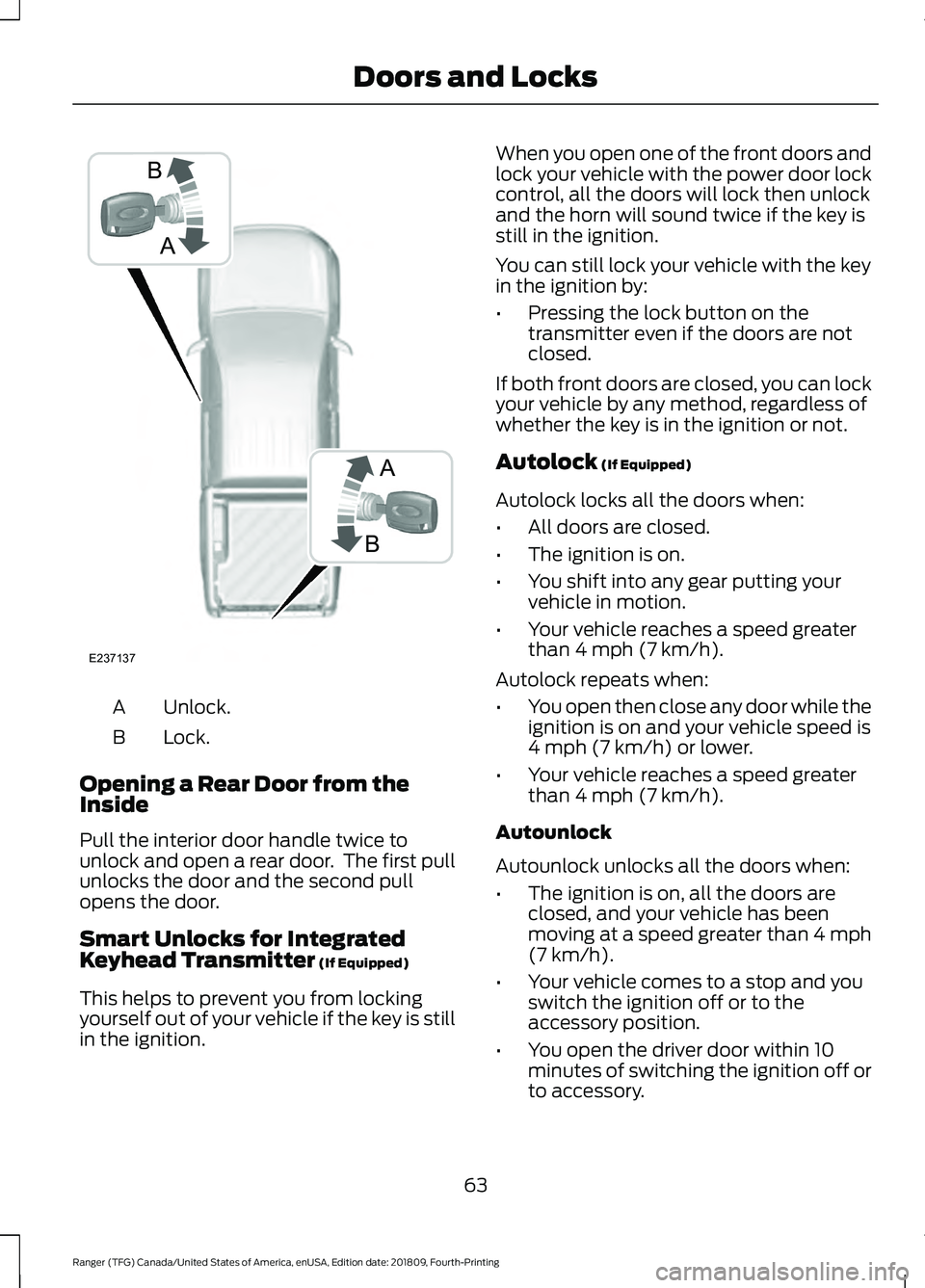
Unlock.
A
Lock.
B
Opening a Rear Door from the
Inside
Pull the interior door handle twice to
unlock and open a rear door. The first pull
unlocks the door and the second pull
opens the door.
Smart Unlocks for Integrated
Keyhead Transmitter (If Equipped)
This helps to prevent you from locking
yourself out of your vehicle if the key is still
in the ignition. When you open one of the front doors and
lock your vehicle with the power door lock
control, all the doors will lock then unlock
and the horn will sound twice if the key is
still in the ignition.
You can still lock your vehicle with the key
in the ignition by:
•
Pressing the lock button on the
transmitter even if the doors are not
closed.
If both front doors are closed, you can lock
your vehicle by any method, regardless of
whether the key is in the ignition or not.
Autolock
(If Equipped)
Autolock locks all the doors when:
• All doors are closed.
• The ignition is on.
• You shift into any gear putting your
vehicle in motion.
• Your vehicle reaches a speed greater
than
4 mph (7 km/h).
Autolock repeats when:
• You open then close any door while the
ignition is on and your vehicle speed is
4 mph (7 km/h)
or lower.
• Your vehicle reaches a speed greater
than
4 mph (7 km/h).
Autounlock
Autounlock unlocks all the doors when:
• The ignition is on, all the doors are
closed, and your vehicle has been
moving at a speed greater than 4 mph
(7 km/h)
.
• Your vehicle comes to a stop and you
switch the ignition off or to the
accessory position.
• You open the driver door within 10
minutes of switching the ignition off or
to accessory.
63
Ranger (TFG) Canada/United States of America, enUSA, Edition date: 201809, Fourth-Printing Doors and LocksA
B
B
A
E237137
Page 68 of 512
PASSIVE ANTI-THEFT
SYSTEM
Principle of Operation
The system prevents someone from
starting the engine with an incorrectly
coded key.
Coded Keys
If you lose a key, you can purchase a
replacement from an authorized dealer. If
possible, provide them with the key
number from the tag provided with the
original keys. You can also obtain extra
keys from an authorized dealer.
Note:
Have all of your remaining keys
erased and recoded if you lose a key. Have
replacement keys coded together with your
remaining keys. See an authorized dealer
for further information.
Note: Do not shield your keys with metal
objects. This may prevent the receiver from
recognizing a coded key.
Note: Do not leave a duplicate coded key
in the vehicle. Always take your keys and
lock all doors when leaving the vehicle.
Arming the Engine Immobilizer
When you switch the ignition off, the
engine immobilizer will arm automatically
after a short time.
Disarming the Engine Immobilizer
When you switch the ignition on, the engine
immobilizer will disarm automatically if
you use a correctly coded key.
If you are unable to start the engine with a
correctly coded key, have your vehicle
checked by an authorized dealer. ANTI-THEFT ALARM
Alarm System
Perimeter Alarm
The perimeter alarm is a deterrent against
unauthorized access to your vehicle
through the doors, luggage compartment
and the hood.
Panic Alarm (If Equipped)
The alarm can be activated using the
remote control.
Triggering the Alarm
•
If someone opens a door or the hood
without a valid key or remote control.
• If you switch the ignition on without a
valid key.
If the alarm sounds, the alarm horn sounds
for 30 seconds and the hazard warning
lamps flash for five minutes.
Any further attempts to carry out one of
the above will sound the alarm again.
Arming the Alarm
Press the lock button once to lock your
vehicle and arm the alarm.
Disarming the Alarm
Disarm the alarm by any of the following
actions:
• Unlock the doors with the key and
switch the ignition on with a correctly
coded key within 12 seconds.
• Unlock the doors or luggage
compartment using the remote control.
65
Ranger (TFG) Canada/United States of America, enUSA, Edition date: 201809, Fourth-Printing Security
Page 87 of 512
Vehicle Settings and Personalization
See General Information (page 90).
Engine Coolant Temperature
Gauge WARNING:
Do not remove the
coolant reservoir cap when the engine is
on or the cooling system is hot. Wait 10
minutes for the cooling system to cool
down. Cover the coolant reservoir cap
with a thick cloth to prevent the
possibility of scalding and slowly remove
the cap. Failure to follow this instruction
could result in personal injury.
Indicates engine coolant temperature. At
normal operating temperature, the level
indicator will be in the normal range. If the
engine coolant temperature exceeds the
normal range, stop your vehicle as soon as
safely possible, switch off the engine and
let the engine cool. Note:
Do not restart the engine until the
cause of overheating has been resolved.
Fuel Gauge
The fuel gauge indicates about how much
fuel is in the fuel tank.
The arrow adjacent to the fuel pump
symbol indicates on which side of your
vehicle the fuel filler door is located.
Note: The fuel gauge may vary slightly
when your vehicle is moving or on a slope.
Low Fuel Reminder
A low fuel level reminder displays and
sounds when the distance to empty
reaches
75 mi (120 km) to empty for
MyKey, and at 50 mi (80 km), 25 mi
(40 km), 10 mi (20 km) and 0 mi (0 km)
for all vehicle keys.
Note: The low fuel reminder can appear at
different fuel gauge positions depending on
fuel economy conditions. This variation is
normal.
84
Ranger (TFG) Canada/United States of America, enUSA, Edition date: 201809, Fourth-Printing Instrument Cluster
Page 92 of 512
Normally, it illuminates until the engine is
cranked and automatically turns off if no
malfunctions are present. However, if after
15 seconds it flashes eight times, this
indicates that your vehicle is not ready for
Inspection and Maintenance (I/M) testing.
See Emission Law (page 148).
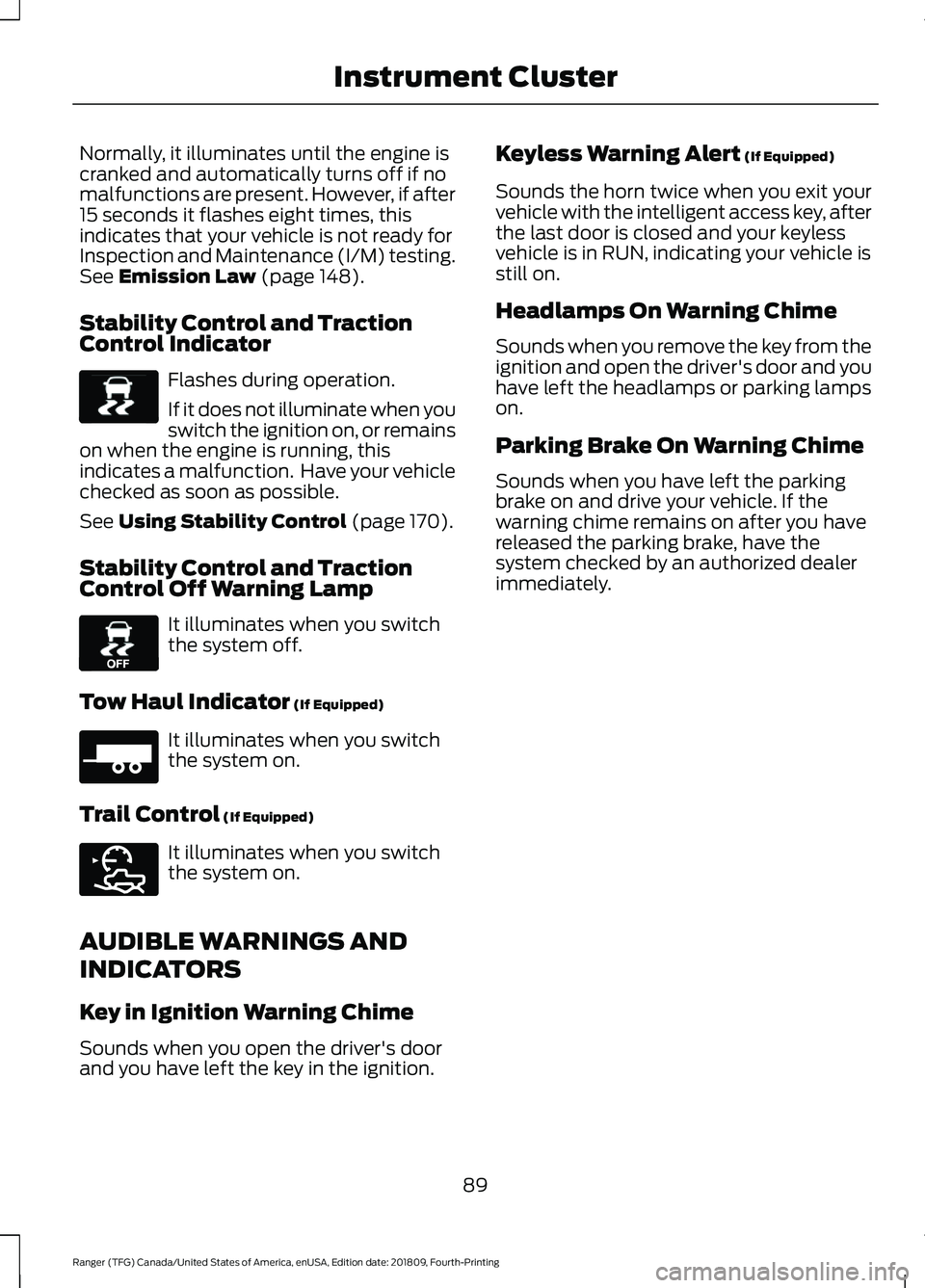
Stability Control and Traction
Control Indicator Flashes during operation.
If it does not illuminate when you
switch the ignition on, or remains
on when the engine is running, this
indicates a malfunction. Have your vehicle
checked as soon as possible.
See
Using Stability Control (page 170).
Stability Control and Traction
Control Off Warning Lamp It illuminates when you switch
the system off.
Tow Haul Indicator
(If Equipped) It illuminates when you switch
the system on.
Trail Control
(If Equipped) It illuminates when you switch
the system on.
AUDIBLE WARNINGS AND
INDICATORS
Key in Ignition Warning Chime
Sounds when you open the driver's door
and you have left the key in the ignition. Keyless Warning Alert
(If Equipped)
Sounds the horn twice when you exit your
vehicle with the intelligent access key, after
the last door is closed and your keyless
vehicle is in RUN, indicating your vehicle is
still on.
Headlamps On Warning Chime
Sounds when you remove the key from the
ignition and open the driver's door and you
have left the headlamps or parking lamps
on.
Parking Brake On Warning Chime
Sounds when you have left the parking
brake on and drive your vehicle. If the
warning chime remains on after you have
released the parking brake, have the
system checked by an authorized dealer
immediately.
89
Ranger (TFG) Canada/United States of America, enUSA, Edition date: 201809, Fourth-Printing Instrument ClusterE138639 E130458 E271981 E272858
Page 96 of 512
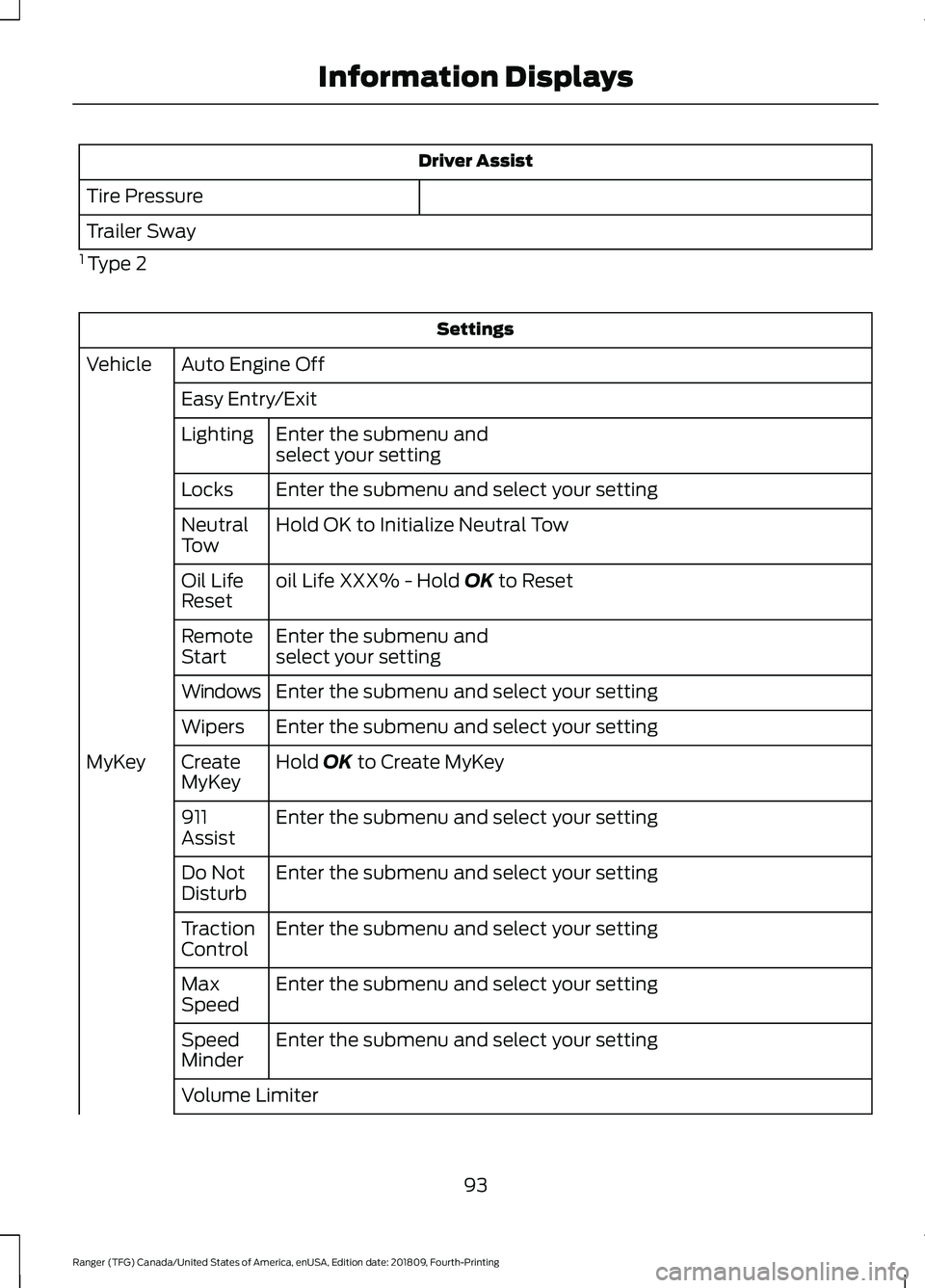
Driver Assist
Tire Pressure
Trailer Sway
1 Type 2 Settings
Auto Engine Off
Vehicle
Easy Entry/ExitEnter the submenu and
select your setting
Lighting
Enter the submenu and select your setting
Locks
Hold OK to Initialize Neutral Tow
Neutral
Tow
oil Life XXX% - Hold OK to Reset
Oil Life
Reset
Enter the submenu and
select your setting
Remote
Start
Enter the submenu and select your setting
Windows
Enter the submenu and select your setting
Wipers
Hold
OK to Create MyKey
Create
MyKey
MyKey
Enter the submenu and select your setting
911
Assist
Enter the submenu and select your setting
Do Not
Disturb
Enter the submenu and select your setting
Traction
Control
Enter the submenu and select your setting
Max
Speed
Enter the submenu and select your setting
Speed
Minder
Volume Limiter
93
Ranger (TFG) Canada/United States of America, enUSA, Edition date: 201809, Fourth-Printing Information Displays
Page 97 of 512
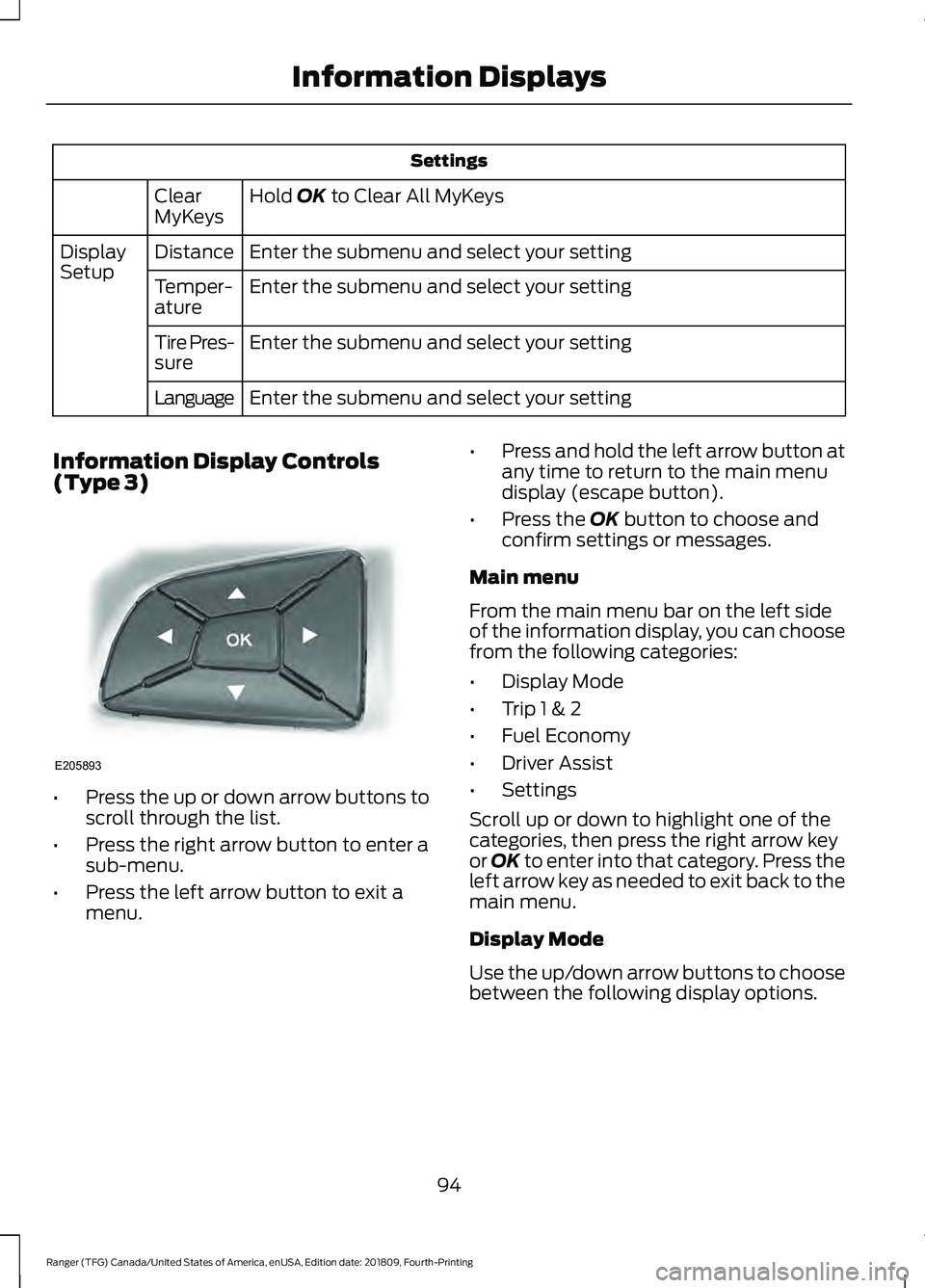
Settings
Hold OK to Clear All MyKeys
Clear
MyKeys
Enter the submenu and select your setting
Distance
Display
Setup
Enter the submenu and select your setting
Temper-
ature
Enter the submenu and select your setting
Tire Pres-
sure
Enter the submenu and select your setting
Language
Information Display Controls
(Type 3) •
Press the up or down arrow buttons to
scroll through the list.
• Press the right arrow button to enter a
sub-menu.
• Press the left arrow button to exit a
menu. •
Press and hold the left arrow button at
any time to return to the main menu
display (escape button).
• Press the
OK button to choose and
confirm settings or messages.
Main menu
From the main menu bar on the left side
of the information display, you can choose
from the following categories:
• Display Mode
• Trip 1 & 2
• Fuel Economy
• Driver Assist
• Settings
Scroll up or down to highlight one of the
categories, then press the right arrow key
or
OK to enter into that category. Press the
left arrow key as needed to exit back to the
main menu.
Display Mode
Use the up/down arrow buttons to choose
between the following display options.
94
Ranger (TFG) Canada/United States of America, enUSA, Edition date: 201809, Fourth-Printing Information DisplaysE205893