key FORD RANGER 2019 Workshop Manual
[x] Cancel search | Manufacturer: FORD, Model Year: 2019, Model line: RANGER, Model: FORD RANGER 2019Pages: 512, PDF Size: 7.63 MB
Page 395 of 512
To call a number in your contacts,
select:
Action and Description
Menu Item
You can then select the
name of the contact you
want to call. Any numbers
stored for that contact
display along with any
stored contact photos. You
can then select the
number that you want to
call. The system begins the
call.
Contacts
To call a number from your recent calls,
select: Action and Description
Menu Item
You can then select an
entry that you want to call.
The system begins the call.
Recent Call
List
To call a number that is not stored in
your phone, select: Action and Description
Menu Item
Select the digits of the
number you wish to call.
Phone
Keypad
The system begins the call.
Call
Pressing the backspace button deletes the
last digit you typed.
Receiving Calls
During an incoming call, an audible tone
sounds. Caller information appears in the
display if it is available. To accept the call, select: Menu Item
Accept
Note: You can also accept the call by
pressing the phone button on the steering
wheel.
To reject the call, select: Menu Item
Reject
Note: You can also reject the call by
pressing the phone button on the steering
wheel.
Ignore the call by doing nothing. SYNC 3
logs it as a missed call.
During a Phone Call
During a phone call, the contacts name
and number display on the screen along
with the call duration.
The phone status items are also visible:
• Signal Strength.
• Battery.
You can select any of the following during
an active phone call:
392
Ranger (TFG) Canada/United States of America, enUSA, Edition date: 201809, Fourth-Printing SYNC™ 3 (If Equipped)
Page 396 of 512
Item
Immediately end a
phone call. You can
also press the
button on the
steering wheel.
End Call
Press this to access
the phone keypad.
Keypad
You can switch the
microphone off so
the caller does not
hear you.
Mute Item
Privacy Transfer the call to
the cell phone or
back to SYNC 3.
Text Messaging
Note: Downloading and sending text
messages using Bluetooth are cell
phone-dependent features.
Note: Certain features in text messaging
are speed-dependent and not available
when your vehicle is traveling at speeds over
3 mph (5 km/h).
Receiving a Text Message
When a new message arrives, an audible tone sounds and the screen displays a
pop-up with the sender name and ID, if supported by your cell phone. You can
select: Action and Description
Menu Item
Have SYNC 3 read the message to you.
Hear It
View the text on the touchscreen.
View
To call the sender.
Call
You can select from 15 preset messages. Press the message
that you would like to use and confirm to send the message.
SYNC 3 confirms when the message is sent successfully.
Reply
To exit the screen.
Close
Smartphone Connectivity (If Equipped)
SYNC 3 allows you to use Apple CarPlay
and Android Auto to access your phone.
When you use Apple CarPlay or Android
Auto, you can:
• Make calls.
• Send and receive messages.
• Listen to music.
• Use your phone's voice assistant. Apple CarPlay and Android Auto disable
some SYNC 3 features.
Most Apple CarPlay and Android Auto
features use mobile data.
Apple CarPlay
Apple CarPlay requires an iPhone 5 or
newer with iOS 7.1 or newer. Updating to
the latest iOS version is recommended.
1. Plug your phone into a USB port. See
USB Port
(page 337).
393
Ranger (TFG) Canada/United States of America, enUSA, Edition date: 201809, Fourth-Printing SYNC™ 3
(If Equipped)
Page 420 of 512
Note:
Data, such as the Vehicle
Identification Number (VIN), SIM Card ID,
and data plan usage, is shared between us
and the vehicle network carrier to provide
the Vehicle Hotspot service in accordance
with your vehicle network carrier agreement,
coverage and availability, and may be used
to enable a seamless transition from an old
to new embedded modem and to confirm
any updates are successfully delivered.
Note: For your convenience data usage may
be available for monitoring under Settings
but may not reflect actual or current usage.
The vehicle network carrier is responsible
for providing information about your
account. Please contact the vehicle network
carrier for more information.
Note: If you do not have an active vehicle
hotspot data plan, open your web browser
and go to a website using the HTTP protocol
to be automatically redirected to the vehicle
network carrier landing page where you can
purchase data. Websites using HTTPS will
not automatically redirect
Note: We may need to update operating
system software on your vehicle, including
security updates and bug fixes, to keep
connected services current, like Vehicle
Hotspot, without prior notice to you. Ambient Lighting (If Equipped)
Tap a color once to active ambient lighting.
This sets the color to the highest intensity.
You can drag the colors up and down to
increase or decrease the intensity.
To switch ambient lighting off, press the
active color once or drag the active color
all the way down to zero intensity.
Vehicle
Note: Your vehicle may not have all of
these features.
You can select the following features to
update their settings.
Door Keypad Code
Select this button to add or erase a
personal door keypad code. To add or
erase a personal code, you first need to
enter the five-digit factory set code. You
can find this code on the owner's wallet
card in the glove box or from your
authorized dealer.
Camera Settings
To make adjustments using the touchscreen, select: Action and Description
Message
Camera Settings
Then select from the following: You can enable or disable this option using the slider.
Rear Camera
Delay
You can find more information on the rear-view camera system in the parking aids chapter
of your owner's manual.
417
Ranger (TFG) Canada/United States of America, enUSA, Edition date: 201809, Fourth-Printing SYNC™ 3
(If Equipped)
Page 432 of 512
Voice command issues
Possible solution
Possible cause
Issue
SYNC 3 applies the phonetic pronunciation
rules of the selected language to the
contact names stored on your cell phone.
You may not be saying
the name exactly as it
appears on your phone-
book.
The SYNC 3
voice control
system is having
trouble recog-
nizing foreign
names stored
on my cell
phone.
Helpful Hint: You can select your contact
manually. Press PHONE. Select the option
for phonebook and then contact name.
Press the soft-key option to hear it. SYNC
3 will read the contact name to you, giving
you some idea of the pronunciation it is
expecting.
SYNC 3 applies the phonetic pronunciation
rules of the selected language to the names
stored on your media player or USB flash
drive. It is able to make some exceptions
for very popular artist names (for example,
U2) such that you can always use the
English pronunciation for these artists.
You may be saying the
foreign names using the
currently selected
language for SYNC 3.
The SYNC 3
voice control
system is having
trouble recog-
nizing foreign
tracks, artists,
albums, genres
and playlist
names from my
media player or
USB flash drive.
SYNC 3 uses a synthetically generated
voice rather than pre-recorded human
voice.
SYNC 3 uses text-to-
speech voice prompt
technology.
The system
generates voice
prompts and
the pronunci-
ation of some
words may not
be accurate for
my language. SYNC 3 offers several new voice control
features for a wide range of languages.
Dialing a contact name directly from the
phonebook without pre-recording (for
example,
“call John Smith ”) or selecting a
track, artist, album, genre or playlist directly
from your media player (for example, "play
artist Madonna").
429
Ranger (TFG) Canada/United States of America, enUSA, Edition date: 201809, Fourth-Printing SYNC™ 3
(If Equipped)
Page 433 of 512
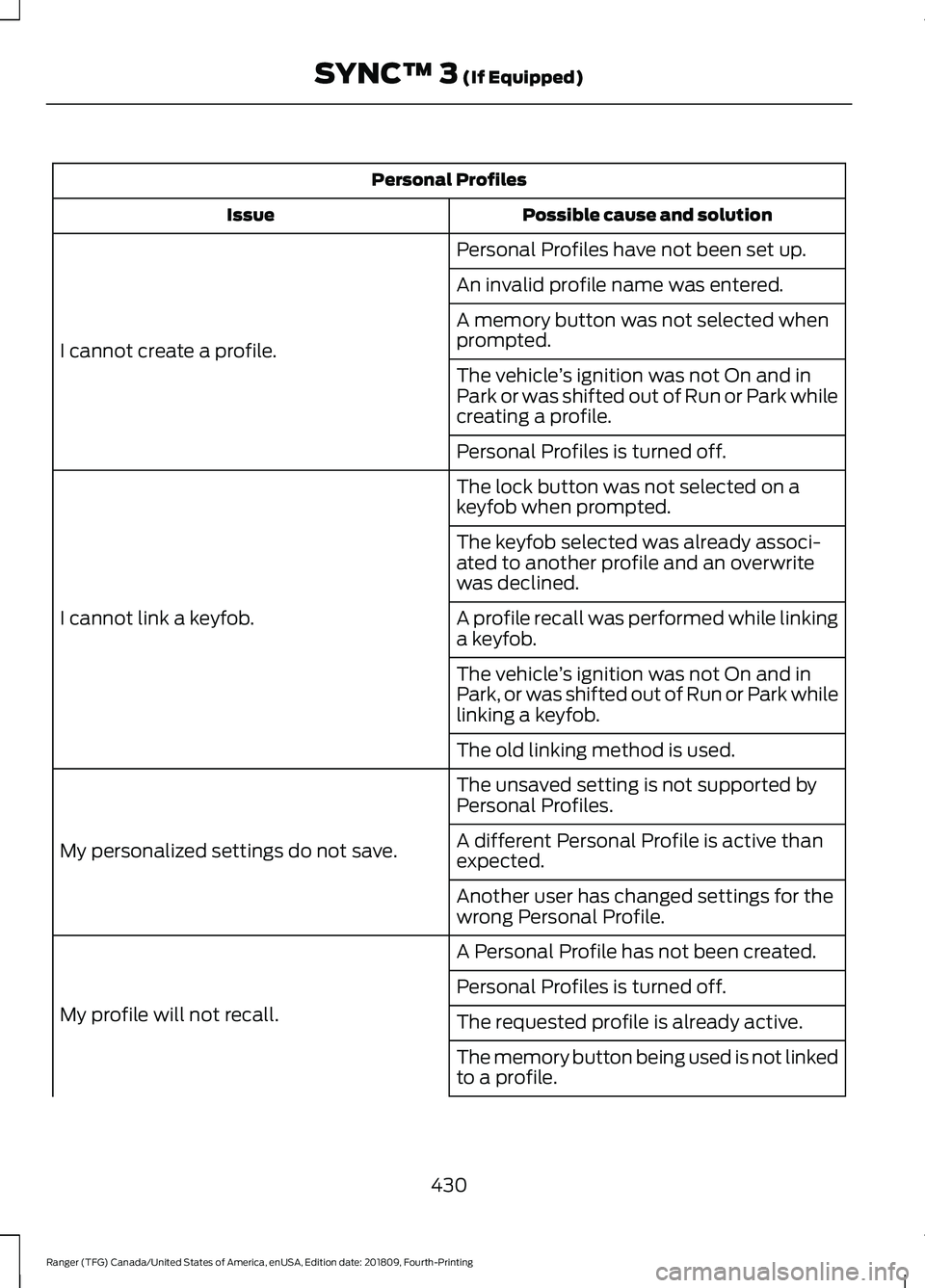
Personal Profiles
Possible cause and solution
Issue
Personal Profiles have not been set up.
I cannot create a profile. An invalid profile name was entered.
A memory button was not selected when
prompted.
The vehicle
’s ignition was not On and in
Park or was shifted out of Run or Park while
creating a profile.
Personal Profiles is turned off.
The lock button was not selected on a
keyfob when prompted.
I cannot link a keyfob. The keyfob selected was already associ-
ated to another profile and an overwrite
was declined.
A profile recall was performed while linking
a keyfob.
The vehicle
’s ignition was not On and in
Park, or was shifted out of Run or Park while
linking a keyfob.
The old linking method is used.
The unsaved setting is not supported by
Personal Profiles.
My personalized settings do not save. A different Personal Profile is active than
expected.
Another user has changed settings for the
wrong Personal Profile.
A Personal Profile has not been created.
My profile will not recall. Personal Profiles is turned off.
The requested profile is already active.
The memory button being used is not linked
to a profile.
430
Ranger (TFG) Canada/United States of America, enUSA, Edition date: 201809, Fourth-Printing SYNC™ 3 (If Equipped)
Page 434 of 512
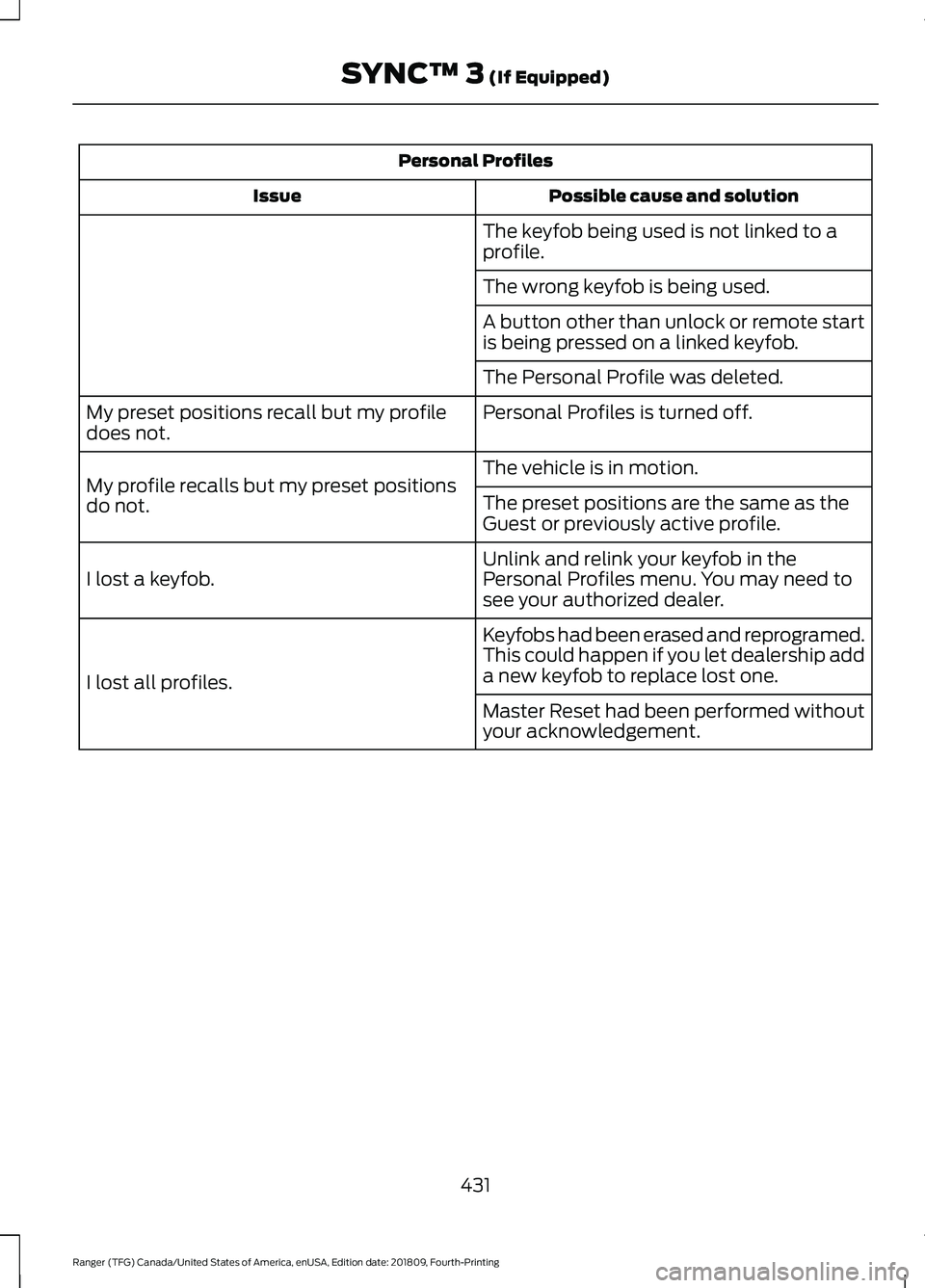
Personal Profiles
Possible cause and solution
Issue
The keyfob being used is not linked to a
profile.
The wrong keyfob is being used.
A button other than unlock or remote start
is being pressed on a linked keyfob.
The Personal Profile was deleted.
Personal Profiles is turned off.
My preset positions recall but my profile
does not.
The vehicle is in motion.
My profile recalls but my preset positions
do not. The preset positions are the same as the
Guest or previously active profile.
Unlink and relink your keyfob in the
Personal Profiles menu. You may need to
see your authorized dealer.
I lost a keyfob.
Keyfobs had been erased and reprogramed.
This could happen if you let dealership add
a new keyfob to replace lost one.
I lost all profiles.
Master Reset had been performed without
your acknowledgement.
431
Ranger (TFG) Canada/United States of America, enUSA, Edition date: 201809, Fourth-Printing SYNC™ 3 (If Equipped)
Page 436 of 512
For a complete listing of the accessories
that are available for your vehicle, please
contact your authorized dealer or visit the
online store web site:
Web Address (United States)
www.Accessories.Ford.com Web Address (Canada)
www.Accessories.Ford.ca
Ford Accessories are available for your
vehicle through an authorized Ford dealer.
Ford Motor Company will repair or replace
any properly authorized dealer-installed
Ford Original Accessory found to be
defective in factory-supplied materials or
workmanship during the warranty period,
as well as any component damaged by the
defective accessories.
Ford Motor Company will warrant your
Ford Original Accessory through the
warranty that provides the greatest
benefit:
• 24 months, unlimited mileage.
• The remainder of your new vehicle
limited warranty.
Contact an authorized dealer for details
and a copy of the warranty.
Exterior Style
• Chrome exhaust tips.
• Chrome kits.
• Fender flares*.
• Fog lamps*.
• Hood deflector.
• Splash guards.
• Step bars.
• Tailgate lock*.
• Tow hooks. Interior Style
•
Ambient lighting.
• Floor mats.
• Premium floor liners.
• Seat covers*.
Lifestyle
• Ash cup or smoker's package.
• Bed covers*.
• Bed liners.
• Bed mats.
• Bed rug*.
• Bed trays.
• Bluetooth speakers*.
• Hitch balls and tow bars.
• Rear seat entertainment*.
• Sport tents*.
• Trailer hitches, wiring harnesses and
accessories.
• Truck bed cargo organization and
management.
Peace of Mind
• Console vault*.
• Keyless entry keypad.
• Remote start.
• Roadside assistance*.
• Vehicle security systems.
• Wheel locks.
• Wheels.
433
Ranger (TFG) Canada/United States of America, enUSA, Edition date: 201809, Fourth-Printing Accessories
Page 497 of 512
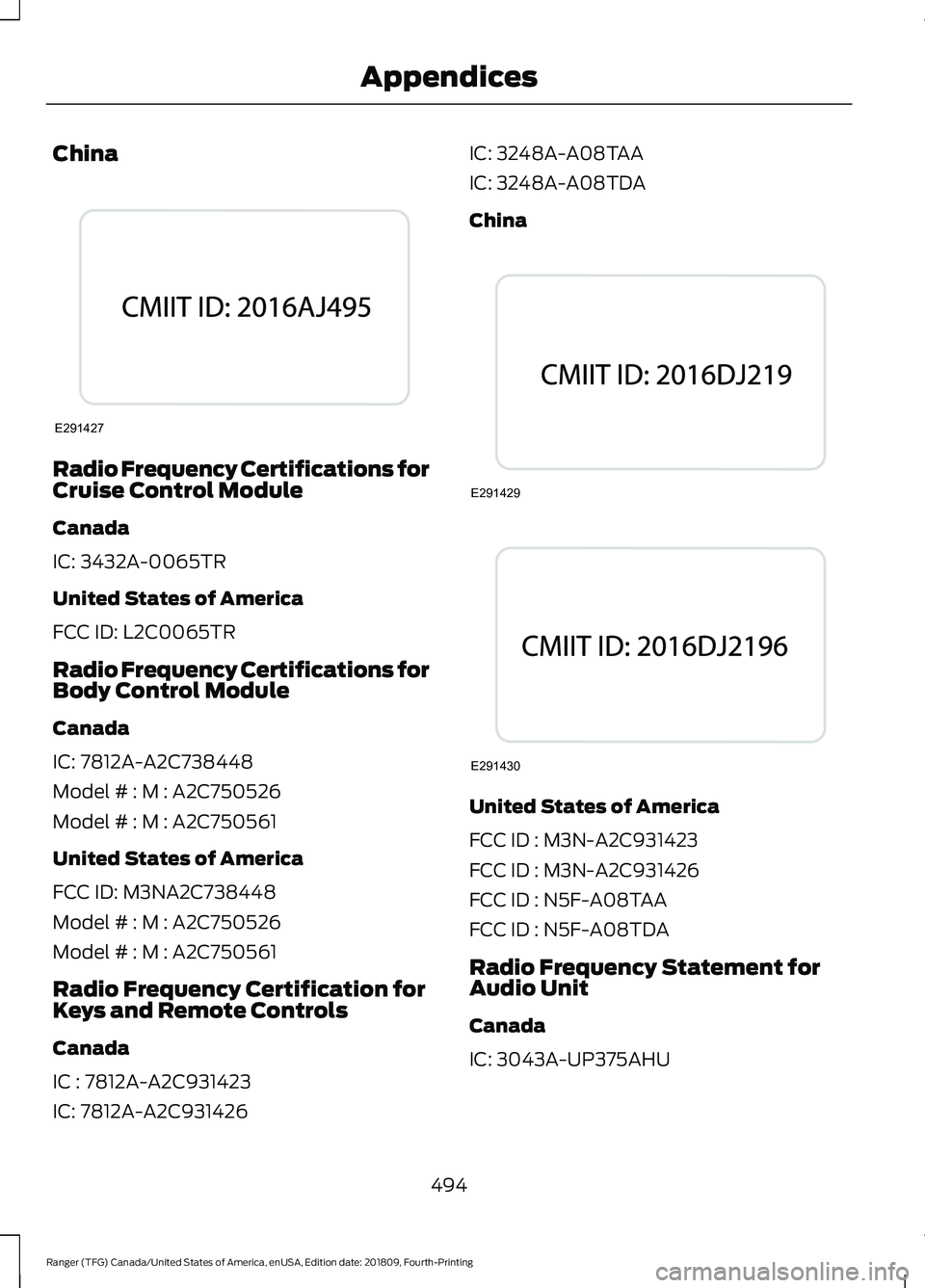
China
Radio Frequency Certifications for
Cruise Control Module
Canada
IC: 3432A-0065TR
United States of America
FCC ID: L2C0065TR
Radio Frequency Certifications for
Body Control Module
Canada
IC: 7812A-A2C738448
Model # : M : A2C750526
Model # : M : A2C750561
United States of America
FCC ID: M3NA2C738448
Model # : M : A2C750526
Model # : M : A2C750561
Radio Frequency Certification for
Keys and Remote Controls
Canada
IC : 7812A-A2C931423
IC: 7812A-A2C931426 IC: 3248A-A08TAA
IC: 3248A-A08TDA
China
United States of America
FCC ID : M3N-A2C931423
FCC ID : M3N-A2C931426
FCC ID : N5F-A08TAA
FCC ID : N5F-A08TDA
Radio Frequency Statement for
Audio Unit
Canada
IC: 3043A-UP375AHU
494
Ranger (TFG) Canada/United States of America, enUSA, Edition date: 201809, Fourth-Printing AppendicesE291427 E291429 E291430
Page 500 of 512
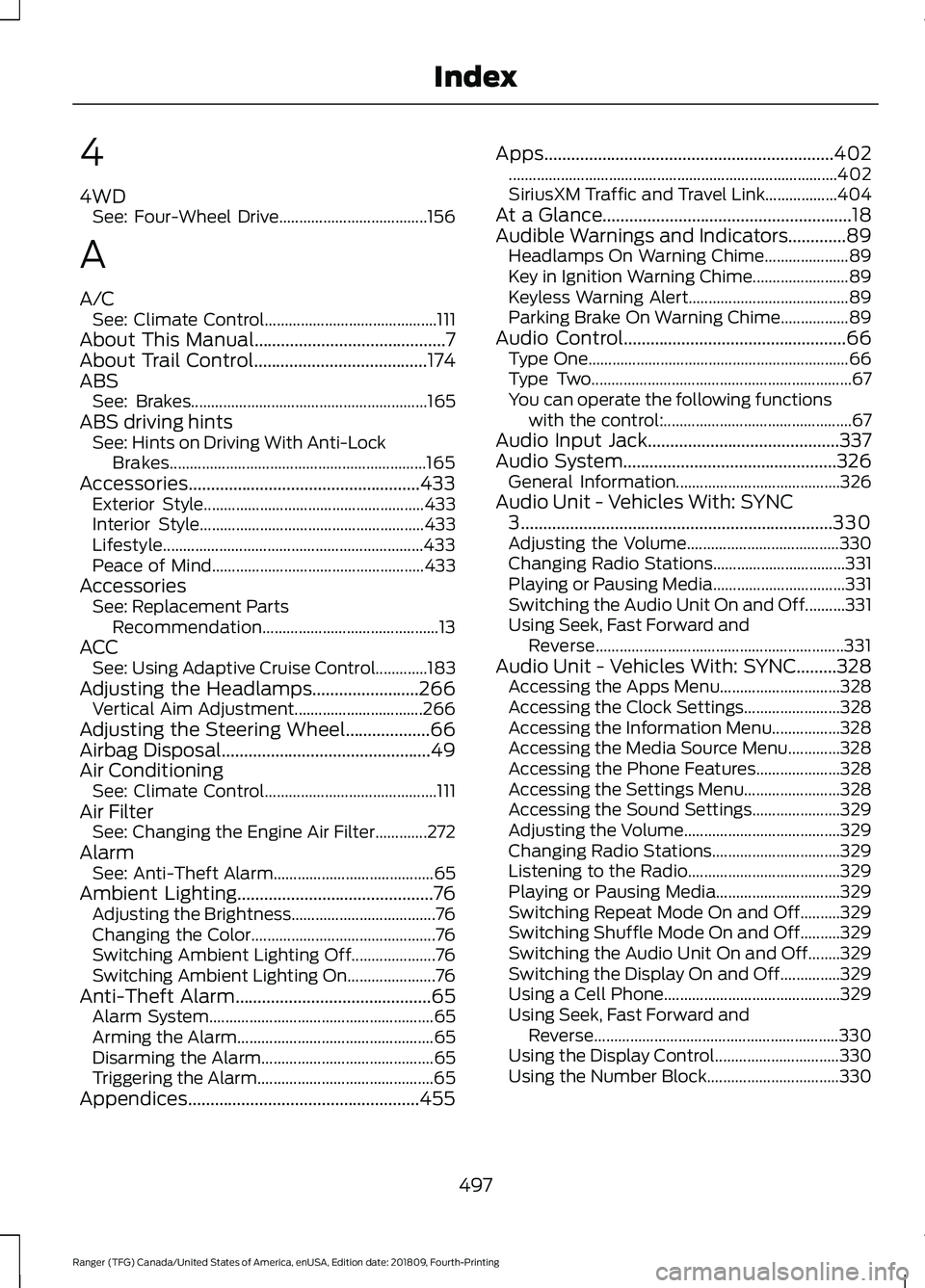
4
4WD
See: Four-Wheel Drive..................................... 156
A
A/C See: Climate Control........................................... 111
About This Manual...........................................7
About Trail Control.......................................174
ABS See: Brakes........................................................... 165
ABS driving hints See: Hints on Driving With Anti-Lock
Brakes................................................................ 165
Accessories....................................................433 Exterior Style....................................................... 433
Interior Style........................................................ 433
Lifestyle................................................................. 433
Peace of Mind..................................................... 433
Accessories See: Replacement Parts
Recommendation............................................ 13
ACC See: Using Adaptive Cruise Control.............183
Adjusting the Headlamps........................266 Vertical Aim Adjustment................................ 266
Adjusting the Steering Wheel...................66
Airbag Disposal
...............................................49
Air Conditioning See: Climate Control........................................... 111
Air Filter See: Changing the Engine Air Filter.............272
Alarm See: Anti-Theft Alarm........................................ 65
Ambient Lighting............................................76 Adjusting the Brightness.................................... 76
Changing the Color.............................................. 76
Switching Ambient Lighting Off..................... 76
Switching Ambient Lighting On...................... 76
Anti-Theft Alarm
............................................65
Alarm System........................................................ 65
Arming the Alarm................................................. 65
Disarming the Alarm........................................... 65
Triggering the Alarm............................................65
Appendices....................................................455 Apps.................................................................402
........................................................................\
.......... 402
SiriusXM Traffic and Travel Link.................. 404
At a Glance........................................................18
Audible Warnings and Indicators.............89 Headlamps On Warning Chime..................... 89
Key in Ignition Warning Chime........................ 89
Keyless Warning Alert........................................ 89
Parking Brake On Warning Chime.................89
Audio Control
..................................................66
Type One................................................................. 66
Type Two................................................................. 67
You can operate the following functions with the control:............................................... 67
Audio Input Jack...........................................337
Audio System................................................326 General Information......................................... 326
Audio Unit - Vehicles With: SYNC 3
......................................................................330
Adjusting the Volume...................................... 330
Changing Radio Stations................................. 331
Playing or Pausing Media................................. 331
Switching the Audio Unit On and Off..........331
Using Seek, Fast Forward and Reverse.............................................................. 331
Audio Unit - Vehicles With: SYNC.........328 Accessing the Apps Menu.............................. 328
Accessing the Clock Settings........................ 328
Accessing the Information Menu.................328
Accessing the Media Source Menu.............328
Accessing the Phone Features..................... 328
Accessing the Settings Menu........................ 328
Accessing the Sound Settings...................... 329
Adjusting the Volume....................................... 329
Changing Radio Stations................................ 329
Listening to the Radio...................................... 329
Playing or Pausing Media............................... 329
Switching Repeat Mode On and Off..........329
Switching Shuffle Mode On and Off..........329
Switching the Audio Unit On and Off........329
Switching the Display On and Off...............329
Using a Cell Phone............................................ 329
Using Seek, Fast Forward and Reverse............................................................. 330
Using the Display Control............................... 330
Using the Number Block................................. 330
497
Ranger (TFG) Canada/United States of America, enUSA, Edition date: 201809, Fourth-Printing Index
Page 502 of 512
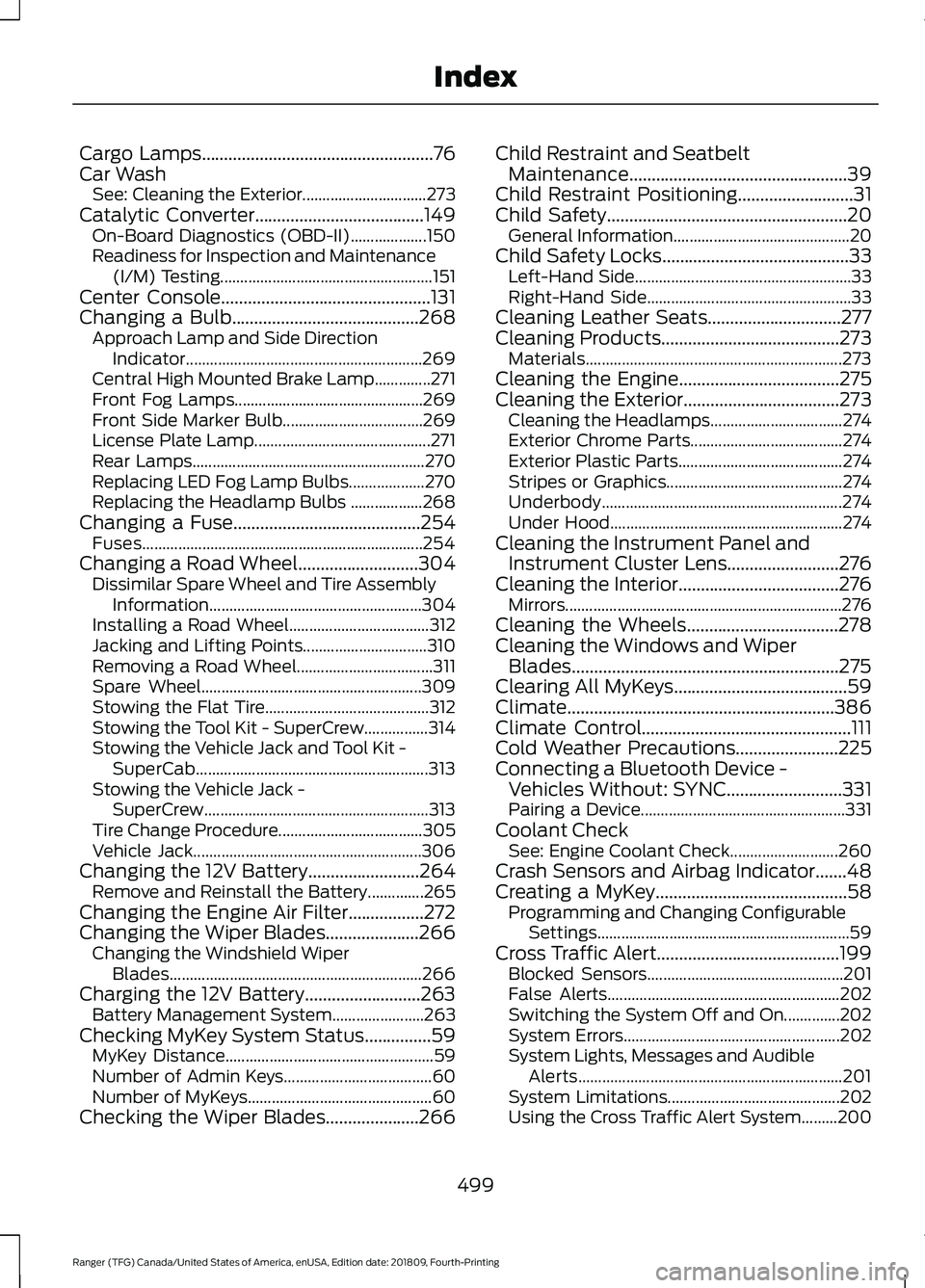
Cargo Lamps....................................................76
Car Wash See: Cleaning the Exterior............................... 273
Catalytic Converter
......................................149
On-Board Diagnostics (OBD-II)................... 150
Readiness for Inspection and Maintenance (I/M) Testing..................................................... 151
Center Console
...............................................131
Changing a Bulb..........................................268 Approach Lamp and Side Direction
Indicator........................................................... 269
Central High Mounted Brake Lamp..............271
Front Fog Lamps............................................... 269
Front Side Marker Bulb................................... 269
License Plate Lamp............................................ 271
Rear Lamps.......................................................... 270
Replacing LED Fog Lamp Bulbs................... 270
Replacing the Headlamp Bulbs .................. 268
Changing a Fuse
..........................................254
Fuses...................................................................... 254
Changing a Road Wheel...........................304 Dissimilar Spare Wheel and Tire Assembly
Information..................................................... 304
Installing a Road Wheel................................... 312
Jacking and Lifting Points............................... 310
Removing a Road Wheel.................................. 311
Spare Wheel....................................................... 309
Stowing the Flat Tire......................................... 312
Stowing the Tool Kit - SuperCrew................314
Stowing the Vehicle Jack and Tool Kit - SuperCab.......................................................... 313
Stowing the Vehicle Jack - SuperCrew........................................................ 313
Tire Change Procedure.................................... 305
Vehicle Jack......................................................... 306
Changing the 12V Battery.........................264 Remove and Reinstall the Battery..............265
Changing the Engine Air Filter.................272
Changing the Wiper Blades
.....................266
Changing the Windshield Wiper
Blades............................................................... 266
Charging the 12V Battery..........................263 Battery Management System....................... 263
Checking MyKey System Status...............59 MyKey Distance.................................................... 59
Number of Admin Keys..................................... 60
Number of MyKeys.............................................. 60
Checking the Wiper Blades.....................266 Child Restraint and Seatbelt
Maintenance.................................................39
Child Restraint Positioning
..........................31
Child Safety......................................................20 General Information............................................ 20
Child Safety Locks..........................................33 Left-Hand Side...................................................... 33
Right-Hand Side................................................... 33
Cleaning Leather Seats..............................277
Cleaning Products........................................273 Materials................................................................ 273
Cleaning the Engine....................................275
Cleaning the Exterior...................................273 Cleaning the Headlamps................................. 274
Exterior Chrome Parts...................................... 274
Exterior Plastic Parts......................................... 274
Stripes or Graphics............................................ 274
Underbody............................................................ 274
Under Hood.......................................................... 274
Cleaning the Instrument Panel and Instrument Cluster Lens
.........................276
Cleaning the Interior....................................276
Mirrors..................................................................... 276
Cleaning the Wheels..................................278
Cleaning the Windows and Wiper Blades............................................................275
Clearing All MyKeys
.......................................59
Climate............................................................386
Climate Control
...............................................111
Cold Weather Precautions.......................225
Connecting a Bluetooth Device - Vehicles Without: SYNC..........................331
Pairing a Device................................................... 331
Coolant Check See: Engine Coolant Check........................... 260
Crash Sensors and Airbag Indicator.......48
Creating a MyKey
...........................................58
Programming and Changing Configurable
Settings............................................................... 59
Cross Traffic Alert.........................................199 Blocked Sensors................................................. 201
False Alerts.......................................................... 202
Switching the System Off and On..............202
System Errors...................................................... 202
System Lights, Messages and Audible Alerts.................................................................. 201
System Limitations........................................... 202
Using the Cross Traffic Alert System.........200
499
Ranger (TFG) Canada/United States of America, enUSA, Edition date: 201809, Fourth-Printing Index