key FORD RANGER 2019 Owner's Manual
[x] Cancel search | Manufacturer: FORD, Model Year: 2019, Model line: RANGER, Model: FORD RANGER 2019Pages: 512, PDF Size: 7.63 MB
Page 100 of 512
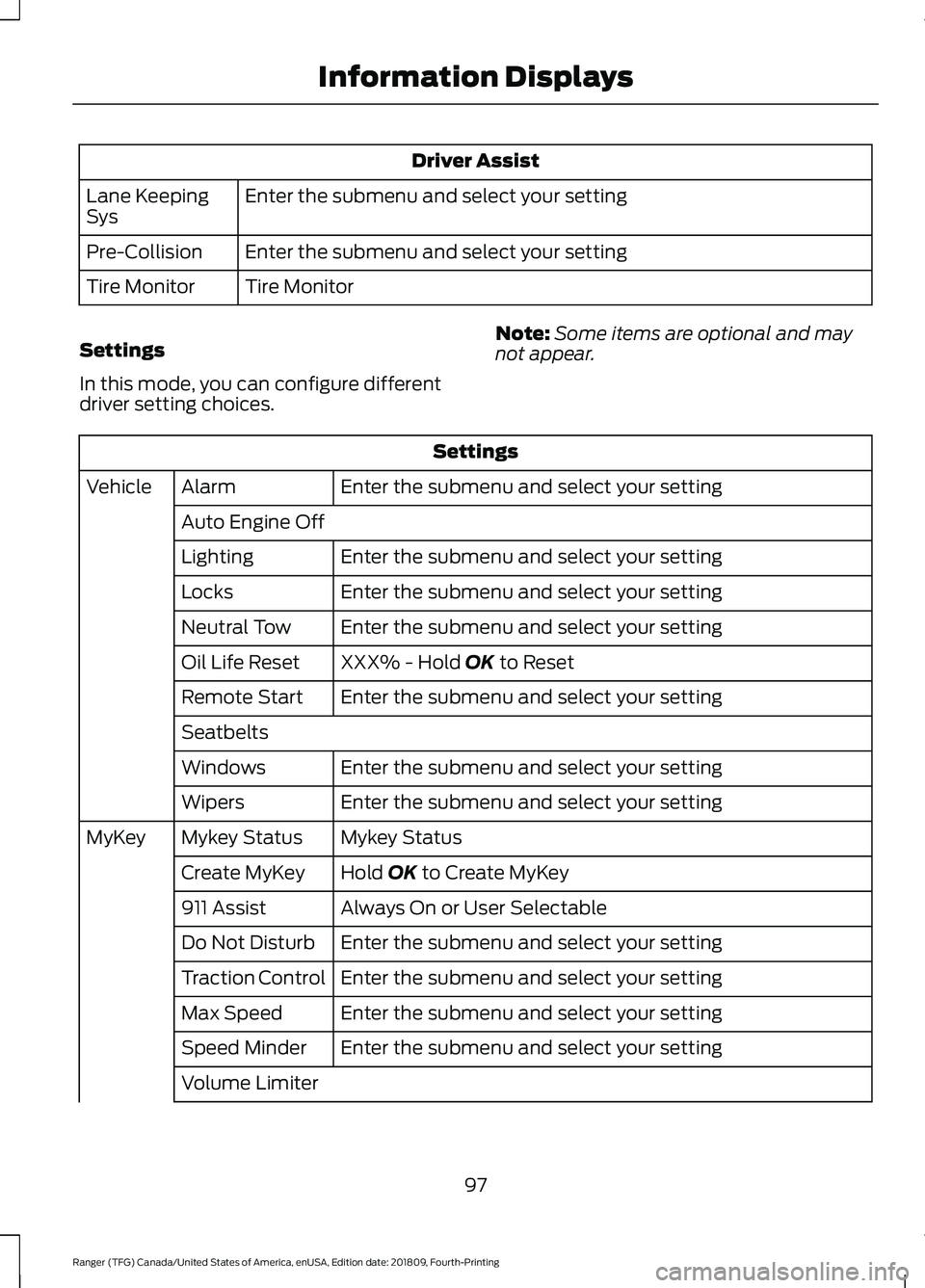
Driver Assist
Enter the submenu and select your setting
Lane Keeping
Sys
Enter the submenu and select your setting
Pre-Collision
Tire Monitor
Tire Monitor
Settings
In this mode, you can configure different
driver setting choices. Note:
Some items are optional and may
not appear. Settings
Enter the submenu and select your setting
Alarm
Vehicle
Auto Engine Off Enter the submenu and select your setting
Lighting
Enter the submenu and select your setting
Locks
Enter the submenu and select your setting
Neutral Tow
XXX% - Hold OK to Reset
Oil Life Reset
Enter the submenu and select your setting
Remote Start
Seatbelts
Enter the submenu and select your setting
Windows
Enter the submenu and select your setting
Wipers
Mykey Status
Mykey Status
MyKey
Hold
OK to Create MyKey
Create MyKey
Always On or User Selectable
911 Assist
Enter the submenu and select your setting
Do Not Disturb
Enter the submenu and select your setting
Traction Control
Enter the submenu and select your setting
Max Speed
Enter the submenu and select your setting
Speed Minder
Volume Limiter
97
Ranger (TFG) Canada/United States of America, enUSA, Edition date: 201809, Fourth-Printing Information Displays
Page 101 of 512
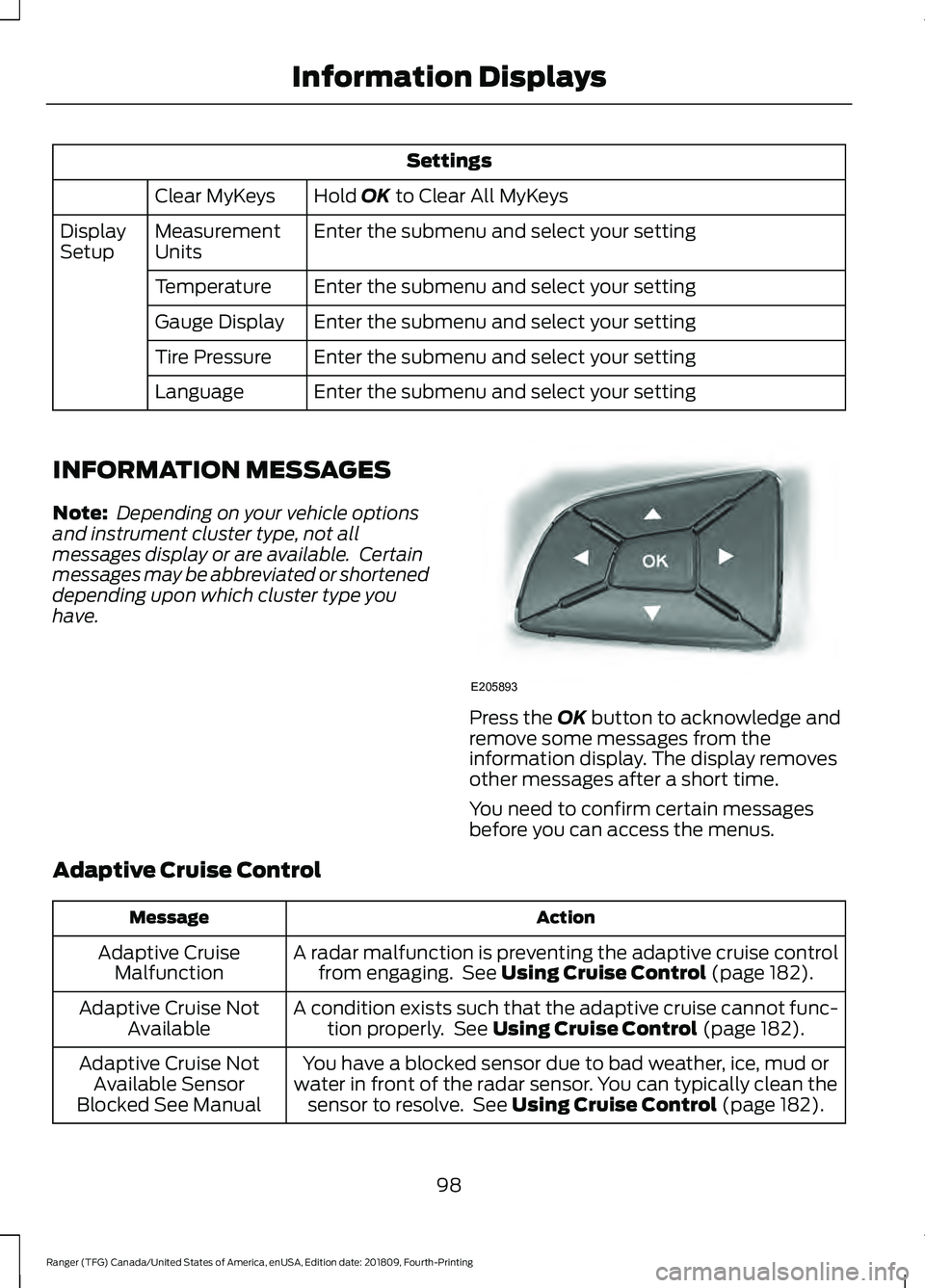
Settings
Hold OK to Clear All MyKeys
Clear MyKeys
Enter the submenu and select your setting
Measurement
Units
Display
Setup
Enter the submenu and select your setting
Temperature
Enter the submenu and select your setting
Gauge Display
Enter the submenu and select your setting
Tire Pressure
Enter the submenu and select your setting
Language
INFORMATION MESSAGES
Note: Depending on your vehicle options
and instrument cluster type, not all
messages display or are available. Certain
messages may be abbreviated or shortened
depending upon which cluster type you
have. Press the
OK button to acknowledge and
remove some messages from the
information display. The display removes
other messages after a short time.
You need to confirm certain messages
before you can access the menus.
Adaptive Cruise Control Action
Message
A radar malfunction is preventing the adaptive cruise controlfrom engaging. See
Using Cruise Control (page 182).
Adaptive Cruise
Malfunction
A condition exists such that the adaptive cruise cannot func-tion properly. See
Using Cruise Control (page 182).
Adaptive Cruise Not
Available
You have a blocked sensor due to bad weather, ice, mud or
water in front of the radar sensor. You can typically clean the sensor to resolve. See
Using Cruise Control (page 182).
Adaptive Cruise Not
Available Sensor
Blocked See Manual
98
Ranger (TFG) Canada/United States of America, enUSA, Edition date: 201809, Fourth-Printing Information DisplaysE205893
Page 107 of 512
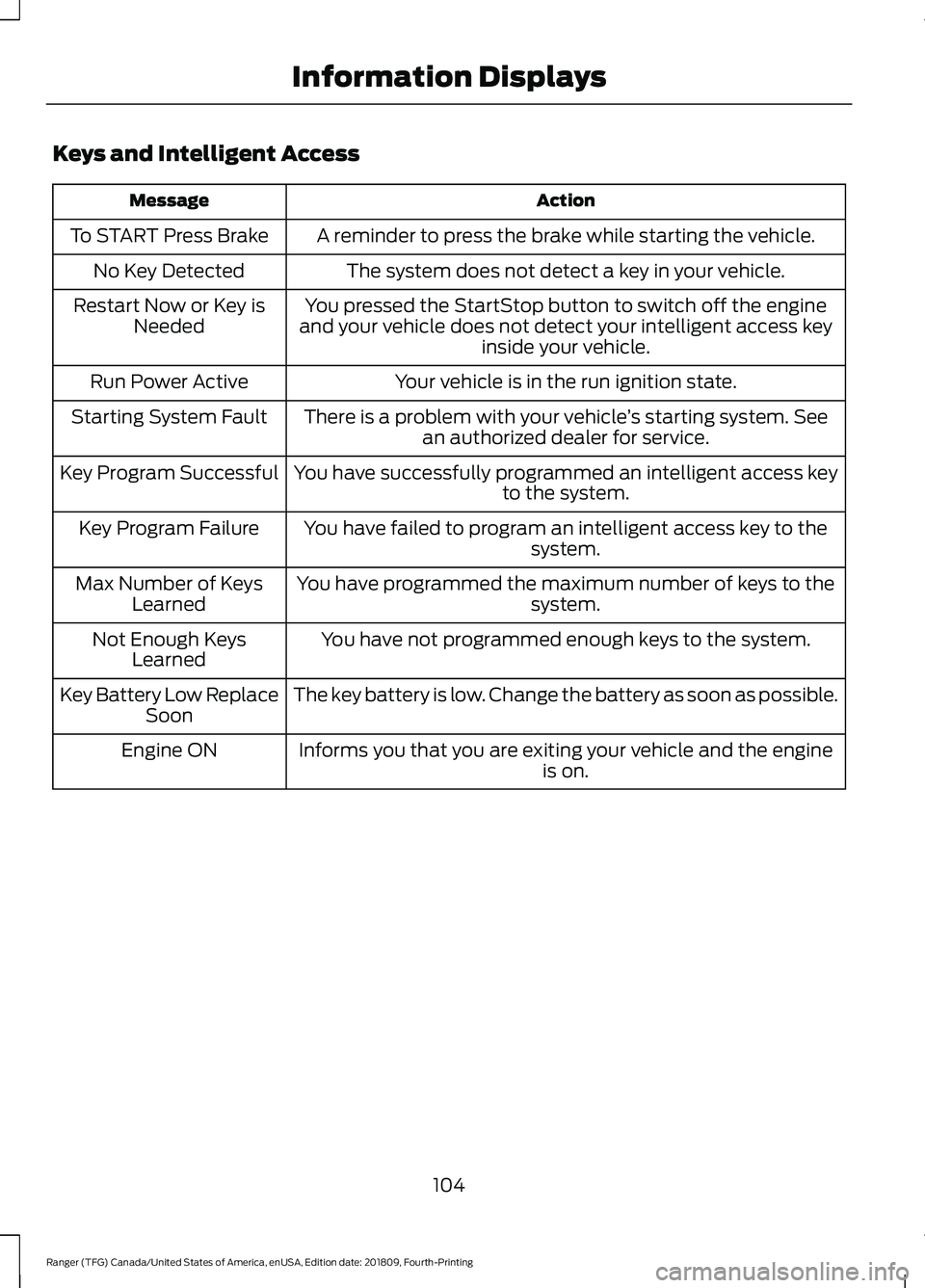
Keys and Intelligent Access
Action
Message
A reminder to press the brake while starting the vehicle.
To START Press Brake
The system does not detect a key in your vehicle.
No Key Detected
You pressed the StartStop button to switch off the engine
and your vehicle does not detect your intelligent access key inside your vehicle.
Restart Now or Key is
Needed
Your vehicle is in the run ignition state.
Run Power Active
There is a problem with your vehicle ’s starting system. See
an authorized dealer for service.
Starting System Fault
You have successfully programmed an intelligent access keyto the system.
Key Program Successful
You have failed to program an intelligent access key to thesystem.
Key Program Failure
You have programmed the maximum number of keys to the system.
Max Number of Keys
Learned
You have not programmed enough keys to the system.
Not Enough Keys
Learned
The key battery is low. Change the battery as soon as possible.
Key Battery Low Replace
Soon
Informs you that you are exiting your vehicle and the engine is on.
Engine ON
104
Ranger (TFG) Canada/United States of America, enUSA, Edition date: 201809, Fourth-Printing Information Displays
Page 109 of 512
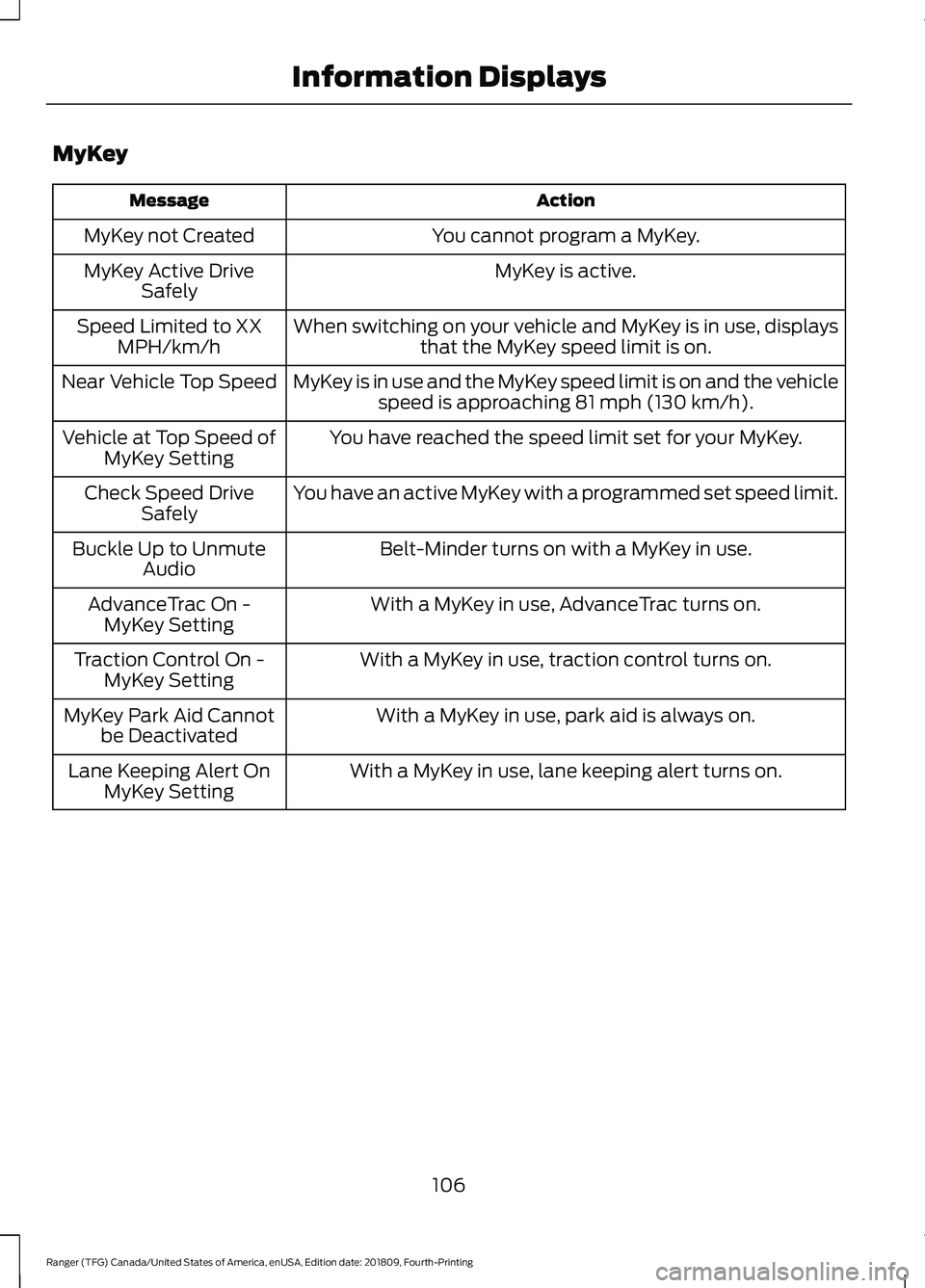
MyKey
Action
Message
You cannot program a MyKey.
MyKey not Created
MyKey is active.
MyKey Active Drive
Safely
When switching on your vehicle and MyKey is in use, displaysthat the MyKey speed limit is on.
Speed Limited to XX
MPH/km/h
MyKey is in use and the MyKey speed limit is on and the vehiclespeed is approaching 81 mph (130 km/h).
Near Vehicle Top Speed
You have reached the speed limit set for your MyKey.
Vehicle at Top Speed of
MyKey Setting
You have an active MyKey with a programmed set speed limit.
Check Speed Drive
Safely
Belt-Minder turns on with a MyKey in use.
Buckle Up to Unmute
Audio
With a MyKey in use, AdvanceTrac turns on.
AdvanceTrac On -
MyKey Setting
With a MyKey in use, traction control turns on.
Traction Control On -
MyKey Setting
With a MyKey in use, park aid is always on.
MyKey Park Aid Cannot
be Deactivated
With a MyKey in use, lane keeping alert turns on.
Lane Keeping Alert On
MyKey Setting
106
Ranger (TFG) Canada/United States of America, enUSA, Edition date: 201809, Fourth-Printing Information Displays
Page 134 of 512
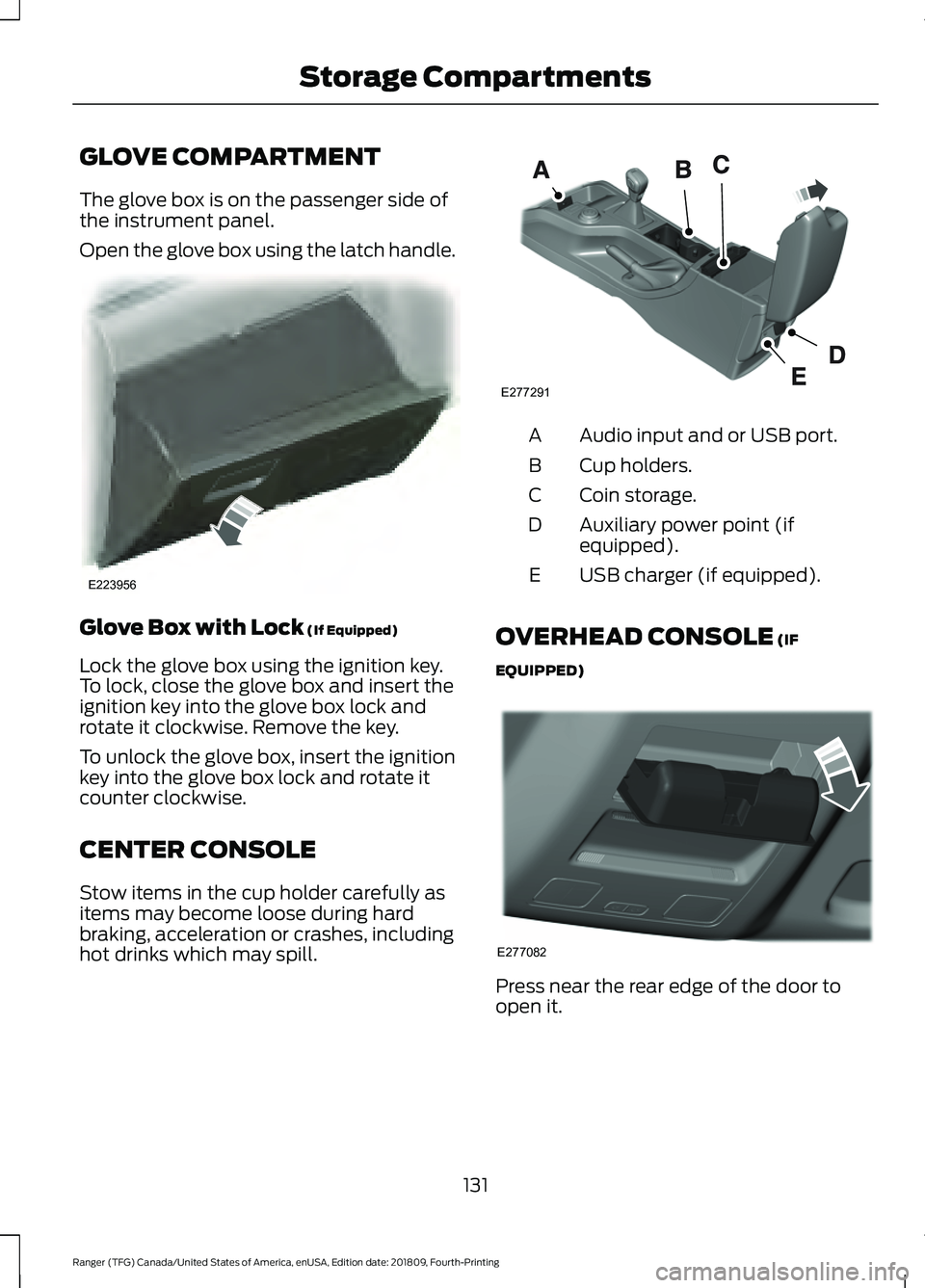
GLOVE COMPARTMENT
The glove box is on the passenger side of
the instrument panel.
Open the glove box using the latch handle.
Glove Box with Lock (If Equipped)
Lock the glove box using the ignition key.
To lock, close the glove box and insert the
ignition key into the glove box lock and
rotate it clockwise. Remove the key.
To unlock the glove box, insert the ignition
key into the glove box lock and rotate it
counter clockwise.
CENTER CONSOLE
Stow items in the cup holder carefully as
items may become loose during hard
braking, acceleration or crashes, including
hot drinks which may spill. Audio input and or USB port.
A
Cup holders.
B
Coin storage.
C
Auxiliary power point (if
equipped).
D
USB charger (if equipped).
E
OVERHEAD CONSOLE (IF
EQUIPPED) Press near the rear edge of the door to
open it.
131
Ranger (TFG) Canada/United States of America, enUSA, Edition date: 201809, Fourth-Printing Storage CompartmentsE223956 E277291 E277082
Page 136 of 512
GENERAL INFORMATION
WARNING: Extended idling at high
engine speeds can produce very high
temperatures in the engine and exhaust
system, creating the risk of fire or other
damage. WARNING: Do not park, idle or
drive your vehicle on dry grass or other
dry ground cover. The emission system
heats up the engine compartment and
exhaust system, creating the risk of fire. WARNING: Do not start the engine
in a closed garage or in other enclosed
areas. Exhaust fumes can be toxic.
Always open the garage door before you
start the engine. WARNING:
Exhaust leaks may
result in entry of harmful and potentially
lethal fumes into the passenger
compartment. If you smell exhaust
fumes inside your vehicle, have your
vehicle inspected immediately. Do not
drive if you smell exhaust fumes. WARNING:
Switching off the
engine when your vehicle is still moving
results in a significant decrease in
braking assistance. Higher effort is
required to apply the brakes and to stop
your vehicle. A significant decrease in
steering assistance could also occur. The
steering does not lock, but higher effort
could be required to steer your vehicle.
When you switch the ignition off, some
electrical circuits, for example airbags,
also turn off. If you unintentionally switch
the ignition off, shift into neutral (N) and
restart the engine. If you disconnect the battery, your vehicle
may exhibit some unusual driving
characteristics for approximately
5 mi
(8 km) after you reconnect it. This is
because the engine management system
must realign itself with the engine. You
can disregard any unusual driving
characteristics during this period.
The powertrain control system meets all
Canadian interference-causing equipment
standard requirements regulating the
impulse electrical field or radio noise.
When you start the engine, avoid pressing
the accelerator pedal before and during
operation. Only use the accelerator pedal
when you have difficulty starting the
engine.
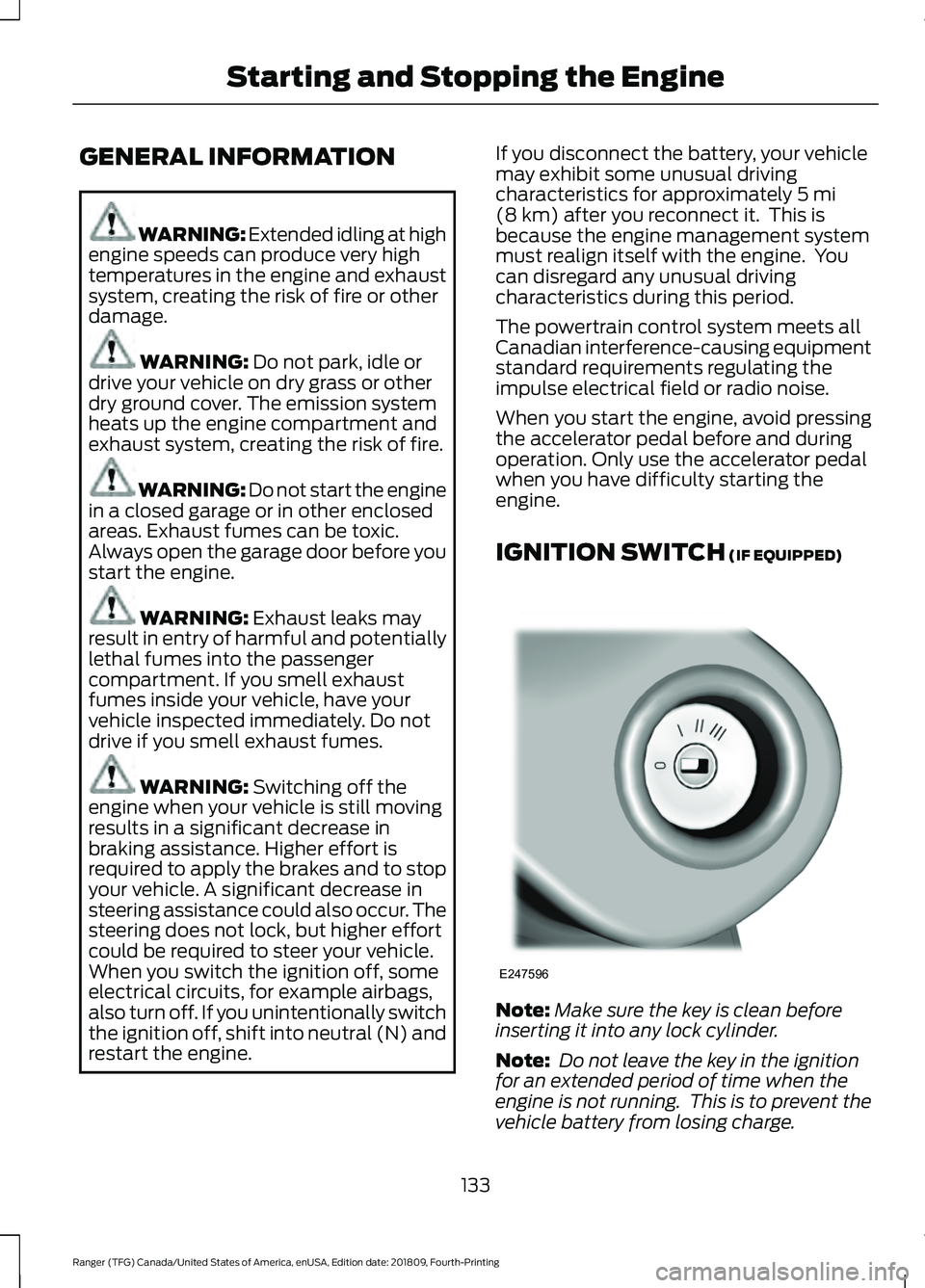
IGNITION SWITCH
(IF EQUIPPED) Note:
Make sure the key is clean before
inserting it into any lock cylinder.
Note: Do not leave the key in the ignition
for an extended period of time when the
engine is not running. This is to prevent the
vehicle battery from losing charge.
133
Ranger (TFG) Canada/United States of America, enUSA, Edition date: 201809, Fourth-Printing Starting and Stopping the EngineE247596
Page 137 of 512
Switching the Ignition Off
Turn the key to position 0.
Switching the Ignition to
Accessory Mode
Turn the key to position
I. Electrical
accessories, for example the radio, operate
without the engine running.
Switching the Ignition On
Turn the key to position
II. All electrical
circuits and accessories are operational
and the warning lamps and indicators
illuminate.
Starting the Engine
Turn the key to position
III. Release the
key when the engine starts.
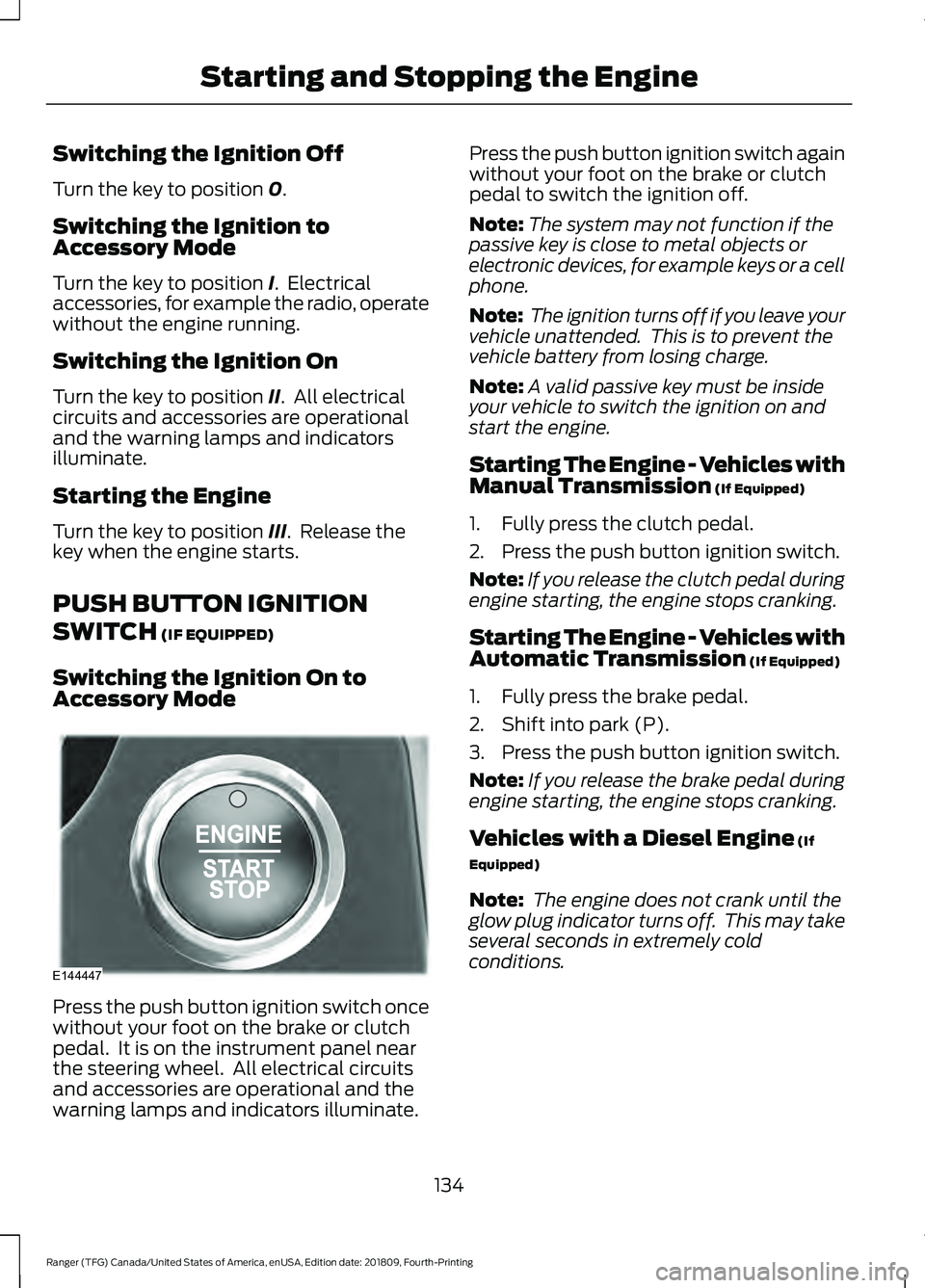
PUSH BUTTON IGNITION
SWITCH
(IF EQUIPPED)
Switching the Ignition On to
Accessory Mode Press the push button ignition switch once
without your foot on the brake or clutch
pedal. It is on the instrument panel near
the steering wheel. All electrical circuits
and accessories are operational and the
warning lamps and indicators illuminate. Press the push button ignition switch again
without your foot on the brake or clutch
pedal to switch the ignition off.
Note:
The system may not function if the
passive key is close to metal objects or
electronic devices, for example keys or a cell
phone.
Note: The ignition turns off if you leave your
vehicle unattended. This is to prevent the
vehicle battery from losing charge.
Note: A valid passive key must be inside
your vehicle to switch the ignition on and
start the engine.
Starting The Engine - Vehicles with
Manual Transmission
(If Equipped)
1. Fully press the clutch pedal.
2. Press the push button ignition switch.
Note: If you release the clutch pedal during
engine starting, the engine stops cranking.
Starting The Engine - Vehicles with
Automatic Transmission
(If Equipped)
1. Fully press the brake pedal.
2. Shift into park (P).
3. Press the push button ignition switch.
Note: If you release the brake pedal during
engine starting, the engine stops cranking.
Vehicles with a Diesel Engine
(If
Equipped)
Note: The engine does not crank until the
glow plug indicator turns off. This may take
several seconds in extremely cold
conditions.
134
Ranger (TFG) Canada/United States of America, enUSA, Edition date: 201809, Fourth-Printing Starting and Stopping the EngineE144447
Page 138 of 512
Failure to Start - Vehicles with
Manual Transmission (If Equipped)
The system does not function if:
• The passive key frequencies are
jammed.
• The key battery has no charge.
If you are unable to start the engine, do the
following:
1. Insert the passive key into the backup position. See
Passive Key Backup
Position (page 56).
2. With the passive key in this position, you can use the push button ignition
switch to switch the ignition on and
start the engine.
If the engine does not crank after you fully
press the clutch pedal and press the push
button ignition switch, do the following:
1. Fully press the clutch pedal and the brake pedal.
2. Press the push button ignition switch.
Stopping the Engine When Your
Vehicle is Stationary - Vehicles
with Manual Transmission (If Equipped)
Press the push button ignition switch.
Note: The ignition, all electrical circuits and
all warning lamps and indicators turn off.
Stopping the Engine When Your
Vehicle is Stationary - Vehicles
with Automatic Transmission
(If
Equipped)
1. Fully press the brake pedal.
2. Shift into park (P).
3. Press the push button ignition switch.
Note: The ignition, all electrical circuits and
all warning lamps and indicators turn off. Stopping the Engine When Your
Vehicle is Moving - Vehicles with
Manual Transmission
(If Equipped) WARNING:
Switching off the
engine when your vehicle is still moving
results in a significant decrease in
braking assistance. Higher effort is
required to apply the brakes and to stop
your vehicle. A significant decrease in
steering assistance could also occur. The
steering does not lock, but higher effort
could be required to steer your vehicle.
When you switch the ignition off, some
electrical circuits, for example airbags,
also turn off. If you unintentionally switch
the ignition off, shift into neutral (N) and
restart the engine.
1. Press and hold the push button ignition
switch until the engine stops, or press
it three times within two seconds.
2. Shift into neutral and use the brakes to
bring your vehicle to a safe stop.
3. Press the push button ignition switch.
Stopping the Engine When Your
Vehicle is Moving - Vehicles with
Automatic Transmission
(If Equipped) WARNING:
Switching off the
engine when your vehicle is still moving
results in a significant decrease in
braking assistance. Higher effort is
required to apply the brakes and to stop
your vehicle. A significant decrease in
steering assistance could also occur. The
steering does not lock, but higher effort
could be required to steer your vehicle.
When you switch the ignition off, some
electrical circuits, for example airbags,
also turn off. If you unintentionally switch
the ignition off, shift into neutral (N) and
restart the engine.
135
Ranger (TFG) Canada/United States of America, enUSA, Edition date: 201809, Fourth-Printing Starting and Stopping the Engine
Page 139 of 512
1.
Press and hold the push button ignition
switch until the engine stops, or press
it three times within two seconds.
2. Shift into neutral and use the brakes to
bring your vehicle to a safe stop.
3. Shift into park (P).
4. Press the push button ignition switch.
Fast Restart
The system allows you to start the engine
within 10 seconds of switching it off, even
if it does not detect a valid passive key. Within 10 seconds of switching the engine
off, fully press the brake or clutch pedal
and press the push button ignition switch.
After 10 seconds, you can no longer start
the engine if the system does not detect a
valid passive key.
When you start the engine, it remains
running until you press the push button
ignition switch, even if your vehicle does
not detect a valid passive key. If you open
and close a door when the engine is
running, the system searches for a valid
passive key.
Starting System Information Messages Action
Message
Displays if you switch the ignition on and do not start the
engine.
Full Accessory Power
Active
Displays when you start the engine as a reminder to fully
press the brake pedal.
To START Press Brake
Displays when you start the engine as a reminder to fully
press the clutch pedal.
To START Press Clutch
Displays when you start the engine as a reminder to fully
press the brake and clutch pedals.
To START Press Brake
and Clutch
Displays if the engine fails to start.
Cranking Time Exceeded
Displays if the system does not detect a valid passive key.
No Key Detected
Displays if you are unable to start the engine with a correctly
coded key. The system has detected a fault that requires
service. Have your vehicle checked as soon as possible.
Starting System Fault
Displays for 10 seconds if you switch the engine off and the
system does not detect a valid passive key. After 10 seconds,
you can no longer start the engine if the system does not
detect a valid passive key.
Restart Now or Key is
Needed
Key Outside Vehicle Audible
Warning
Sounds when you remove the passive key
from your vehicle and the engine is running. 136
Ranger (TFG) Canada/United States of America, enUSA, Edition date: 201809, Fourth-Printing Starting and Stopping the Engine
Page 142 of 512
AUTO-START-STOP
The system helps reduce fuel consumption
by automatically shutting off and restarting
the engine while your vehicle is stopped.
The engine will restart automatically when
you release the brake pedal. In some
situations, your vehicle may restart
automatically, for example:
•
To maintain interior comfort
• To recharge the battery
Note: Power assist steering is turned off
when the engine is off. WARNING: Apply the parking
brake, shift into park (P), switch the
ignition off and remove the key before
you leave your vehicle. Failure to follow
this instruction could result in personal
injury or death. WARNING:
Apply the parking
brake, shift into park (P), switch the
ignition off and remove the key before
you open the hood or have any service
or repair work completed. If you do not
switch the ignition off, the engine could
restart at any time. Failure to follow this
instruction could result in personal injury
or death. WARNING:
The system may
require the engine to automatically
restart when the auto-start-stop
indicator illuminates green or flashes
amber. Failure to follow this instruction
could result in personal injury.
The Auto-Start-Stop system status is
available at a glance within the information
display. See Information Displays (page
90
). Enabling Auto-Start-Stop
The system is automatically enabled every
time you start your vehicle if the following
conditions are met:
•
The Auto-Start-Stop button is not
pressed (not illuminated).
• Your vehicle exceeds an initial speed
of
3 mph (5 km/h) after you have
initially started the vehicle.
• Your vehicle is stopped.
• Your foot is on the brake pedal.
• The transmission is in drive (D).
• The driver's door is closed.
• There is adequate brake vacuum.
• The interior compartment has been
cooled or warmed to an acceptable
level.
• The front windshield defroster is off.
• The steering wheel is not turned rapidly
or is not at a sharp angle.
• The vehicle is not on a steep road
grade.
• The battery is within optimal operating
conditions (battery state of charge and
temperature in range).
• The engine coolant is at operating
temperature.
• Elevation is below approximately
12,000 ft (3,650 m)
.
• Ambient temperature is moderate. The green Auto-Start-Stop
indicator light on the instrument
cluster will illuminate to indicate
when the automatic engine stop occurs. If the instrument cluster is
equipped with a grey
Auto-Start-Stop indicator light,
it is illuminated when automatic engine
stop is not available due to one of the
above noted conditions not being met.
139
Ranger (TFG) Canada/United States of America, enUSA, Edition date: 201809, Fourth-Printing Unique Driving Characteristics E146361