reset FORD SUPER DUTY 2008 2.G Navigation System Manual
[x] Cancel search | Manufacturer: FORD, Model Year: 2008, Model line: SUPER DUTY, Model: FORD SUPER DUTY 2008 2.GPages: 164, PDF Size: 4.44 MB
Page 71 of 164
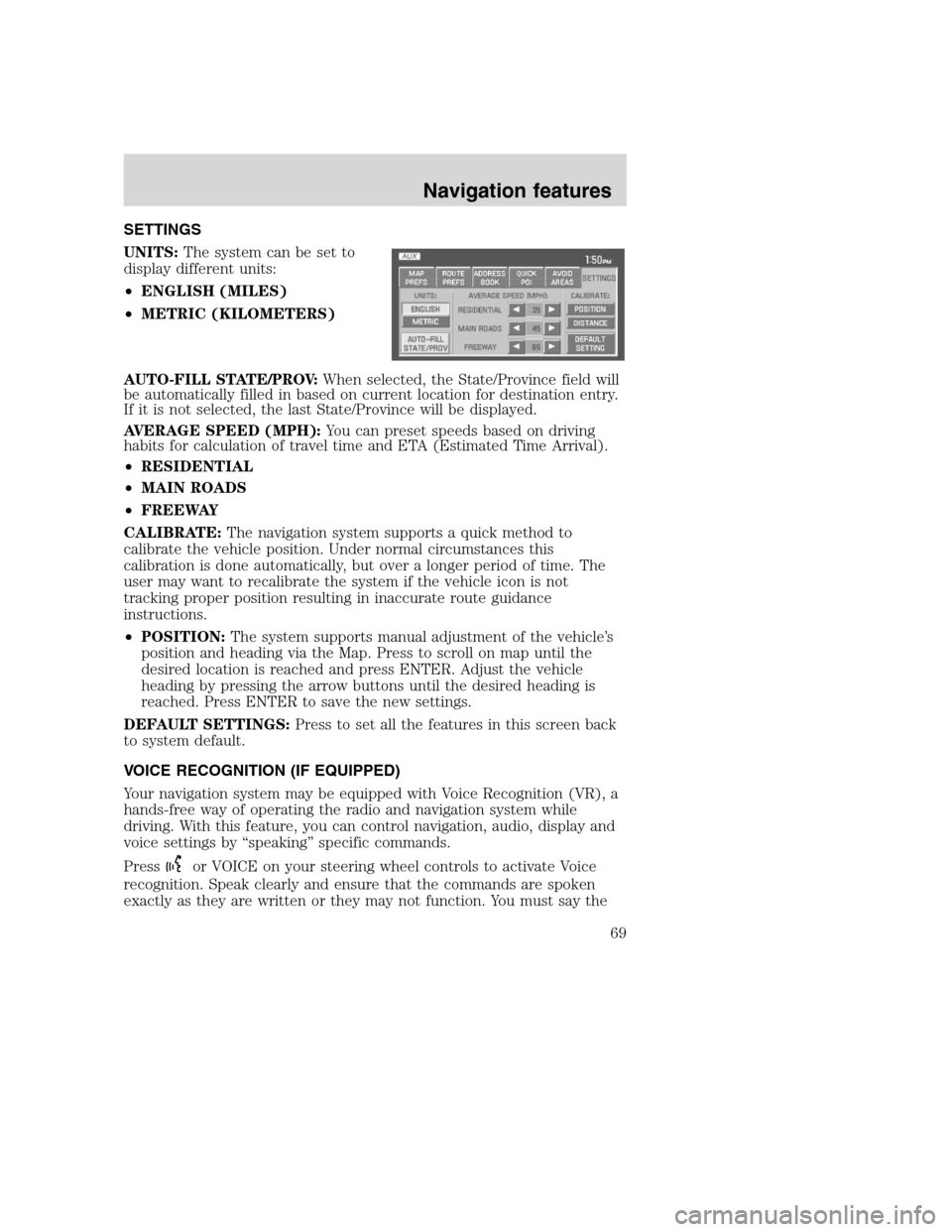
SETTINGS
UNITS:The system can be set to
display different units:
•ENGLISH (MILES)
•METRIC (KILOMETERS)
AUTO-FILL STATE/PROV:When selected, the State/Province field will
be automatically filled in based on current location for destination entry.
If it is not selected, the last State/Province will be displayed.
AVERAGE SPEED (MPH):You can preset speeds based on driving
habits for calculation of travel time and ETA (Estimated Time Arrival).
•RESIDENTIAL
•MAIN ROADS
•FREEWAY
CALIBRATE:The navigation system supports a quick method to
calibrate the vehicle position. Under normal circumstances this
calibration is done automatically, but over a longer period of time. The
user may want to recalibrate the system if the vehicle icon is not
tracking proper position resulting in inaccurate route guidance
instructions.
•POSITION:The system supports manual adjustment of the vehicle’s
position and heading via the Map. Press to scroll on map until the
desired location is reached and press ENTER. Adjust the vehicle
heading by pressing the arrow buttons until the desired heading is
reached. Press ENTER to save the new settings.
DEFAULT SETTINGS:Press to set all the features in this screen back
to system default.
VOICE RECOGNITION (IF EQUIPPED)
Your navigation system may be equipped with Voice Recognition (VR), a
hands-free way of operating the radio and navigation system while
driving. With this feature, you can control navigation, audio, display and
voice settings by “speaking” specific commands.
Press
or VOICE on your steering wheel controls to activate Voice
recognition. Speak clearly and ensure that the commands are spoken
exactly as they are written or they may not function. You must say the
2008(nv1)
Supplement
USA(fus)
Navigation features
69
Page 72 of 164
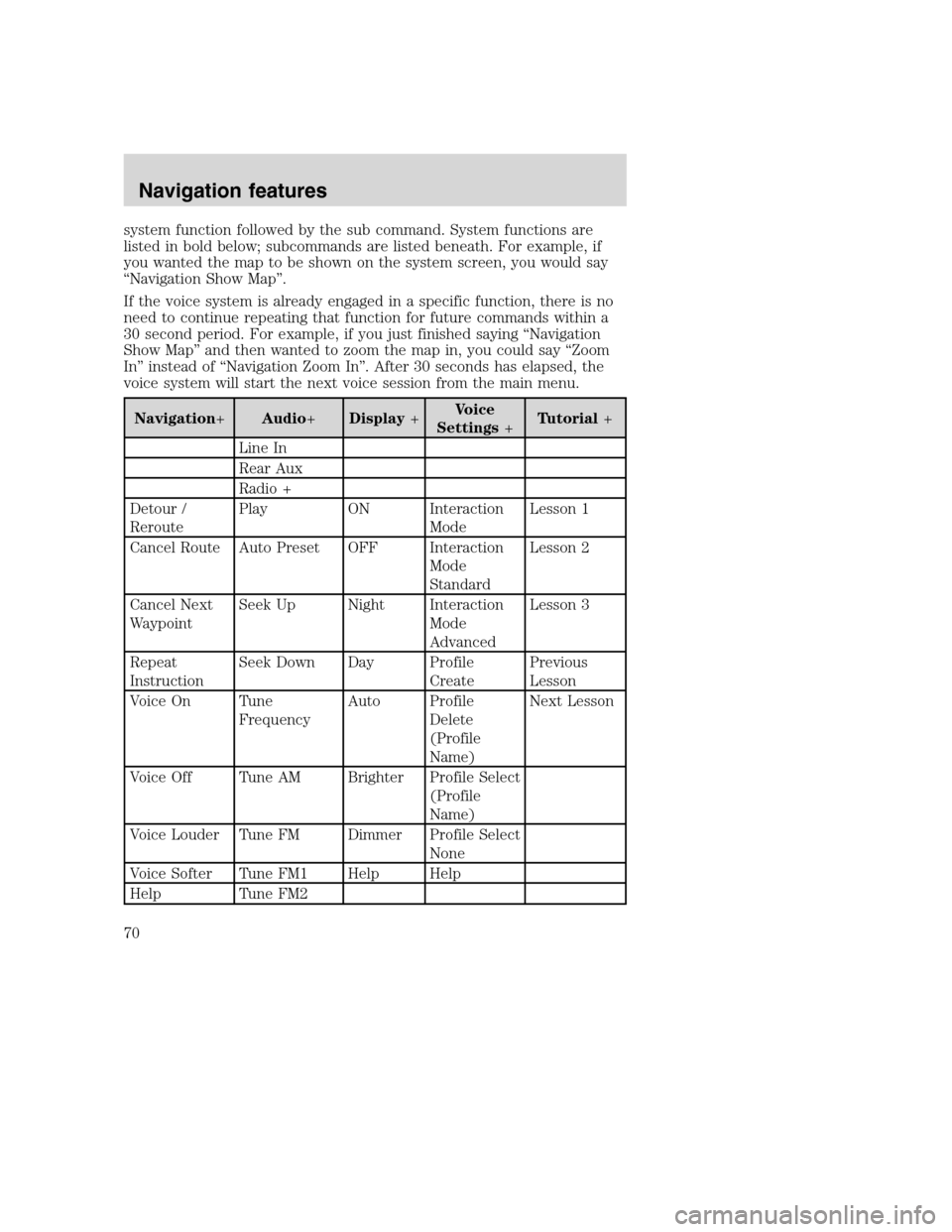
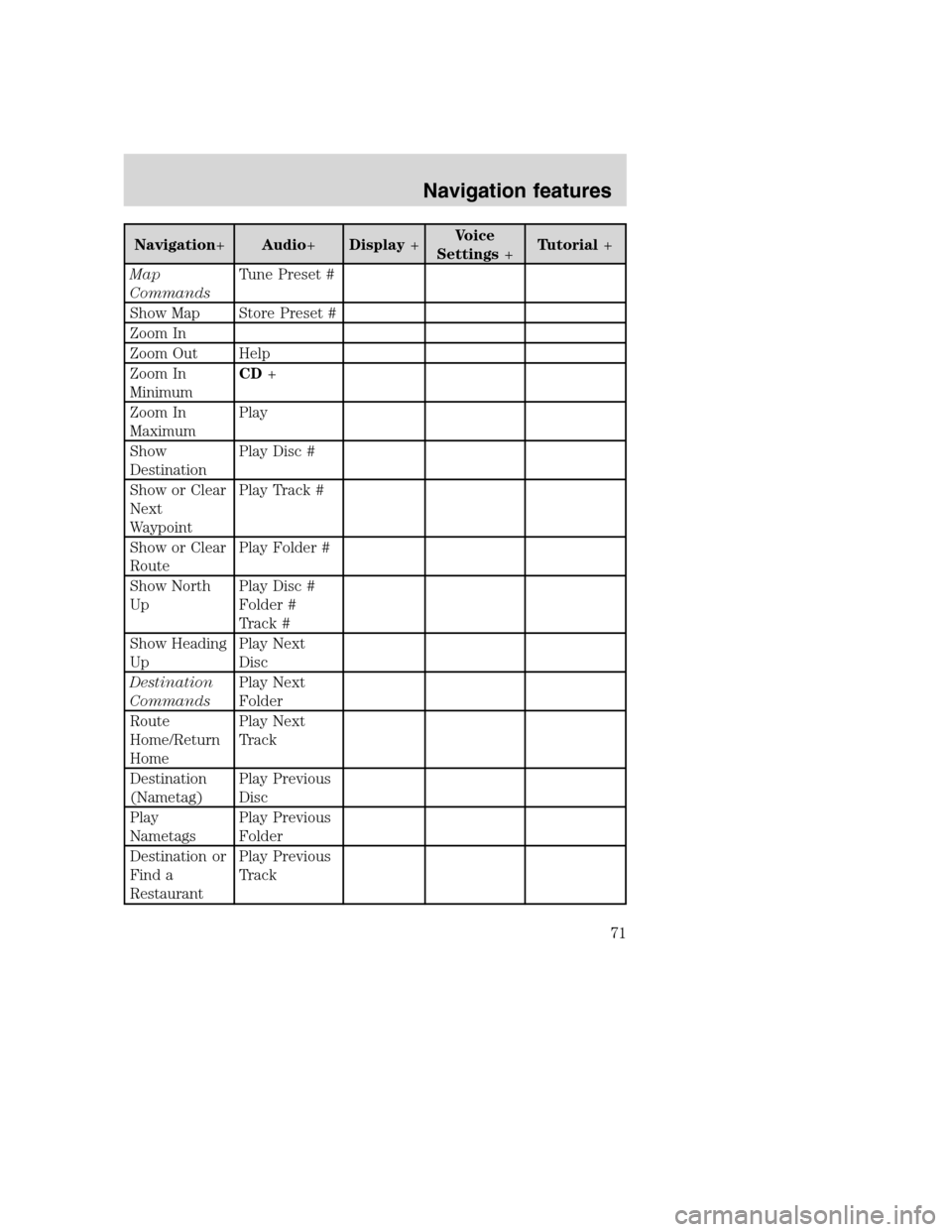
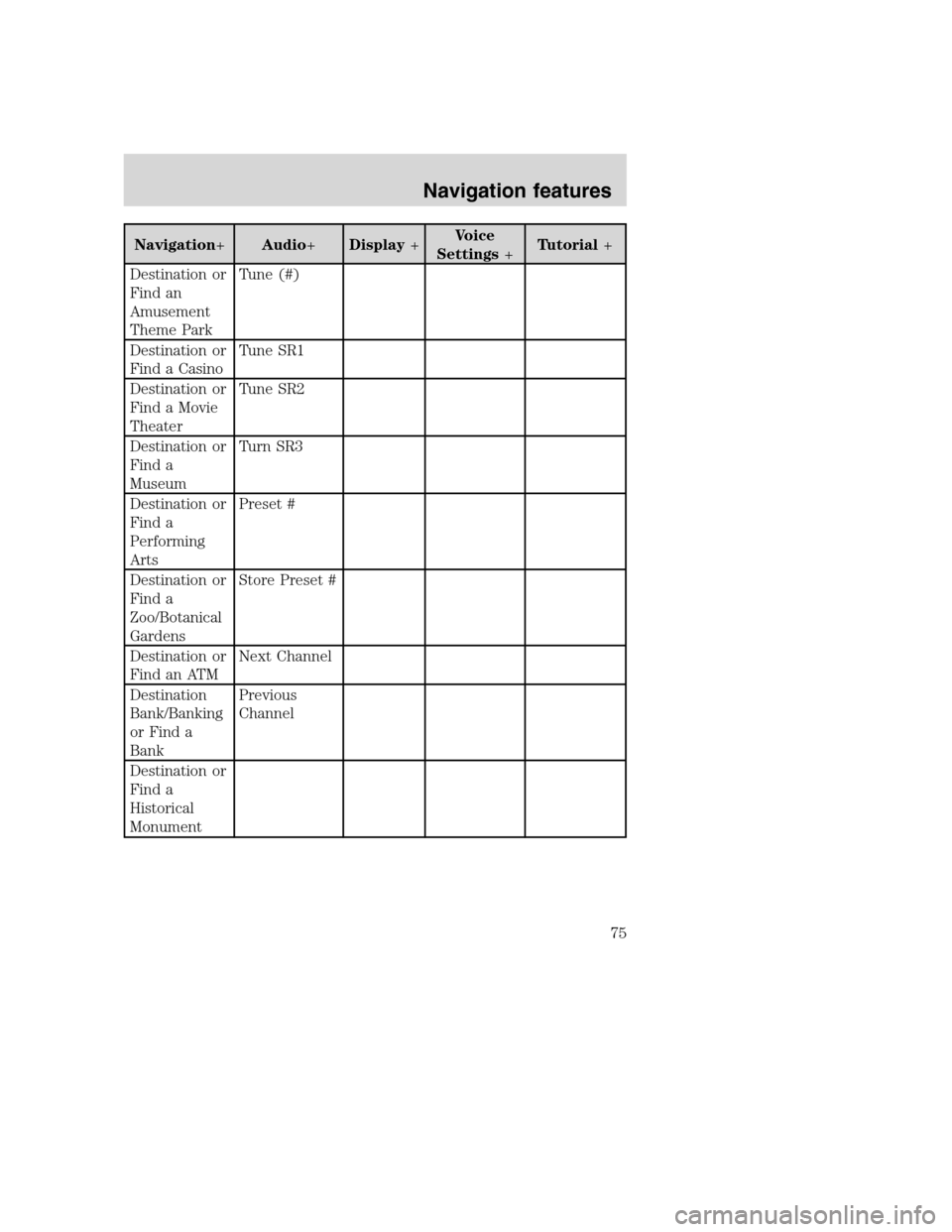
system function followed by the sub command. System functions are
listed in bold below; subcommands are listed beneath. For example, if
you wanted the map to be shown on the system screen, you would say
“Navigation Show Map”.
If the voice system is already engaged in a specific function, there is no
need to continue repeating that function for future commands within a
30 second period. For example, if you just finished saying “Navigation
Show Map” and then wanted to zoom the map in, you could say “Zoom
In” instead of “Navigation Zoom In”. After 30 seconds has elapsed, the
voice system will start the next voice session from the main menu.
Navigation+Audio+Display+Voice
Settings+Tutorial+
Line In
Rear Aux
Radio +
Detour /
ReroutePlay ON Interaction
ModeLesson 1
Cancel Route Auto Preset OFF Interaction
Mode
StandardLesson 2
Cancel Next
WaypointSeek Up Night Interaction
Mode
AdvancedLesson 3
Repeat
InstructionSeek Down Day Profile
CreatePrevious
Lesson
Voice On Tune
FrequencyAuto Profile
Delete
(Profile
Name)Next Lesson
Voice Off Tune AM Brighter Profile Select
(Profile
Name)
Voice Louder Tune FM Dimmer Profile Select
None
Voice Softer Tune FM1 Help Help
Help Tune FM2
2008(nv1)
Supplement
USA(fus)
Navigation features
70
Page 73 of 164
Navigation+Audio+Display+Voice
Settings+Tutorial+
Map
CommandsTune Preset #
Show Map Store Preset #
Zoom In
Zoom Out Help
Zoom In
MinimumCD+
Zoom In
MaximumPlay
Show
DestinationPlay Disc #
Show or Clear
Next
WaypointPlay Track #
Show or Clear
RoutePlay Folder #
Show North
UpPlay Disc #
Folder #
Track #
Show Heading
UpPlay Next
Disc
Destination
CommandsPlay Next
Folder
Route
Home/Return
HomePlay Next
Track
Destination
(Nametag)Play Previous
Disc
Play
NametagsPlay Previous
Folder
Destination or
Find a
RestaurantPlay Previous
Track
2008(nv1)
Supplement
USA(fus)
Navigation features
71
Page 77 of 164
Navigation+Audio+Display+Voice
Settings+Tutorial+
Destination or
Find an
Amusement
Theme ParkTune (#)
Destination or
Find a CasinoTune SR1
Destination or
Find a Movie
TheaterTune SR2
Destination or
Find a
MuseumTurn SR3
Destination or
Find a
Performing
ArtsPreset #
Destination or
Find a
Zoo/Botanical
GardensStore Preset #
Destination or
Find an ATMNext Channel
Destination
Bank/Banking
or Find a
BankPrevious
Channel
Destination or
Find a
Historical
Monument
2008(nv1)
Supplement
USA(fus)
Navigation features
75
Page 84 of 164
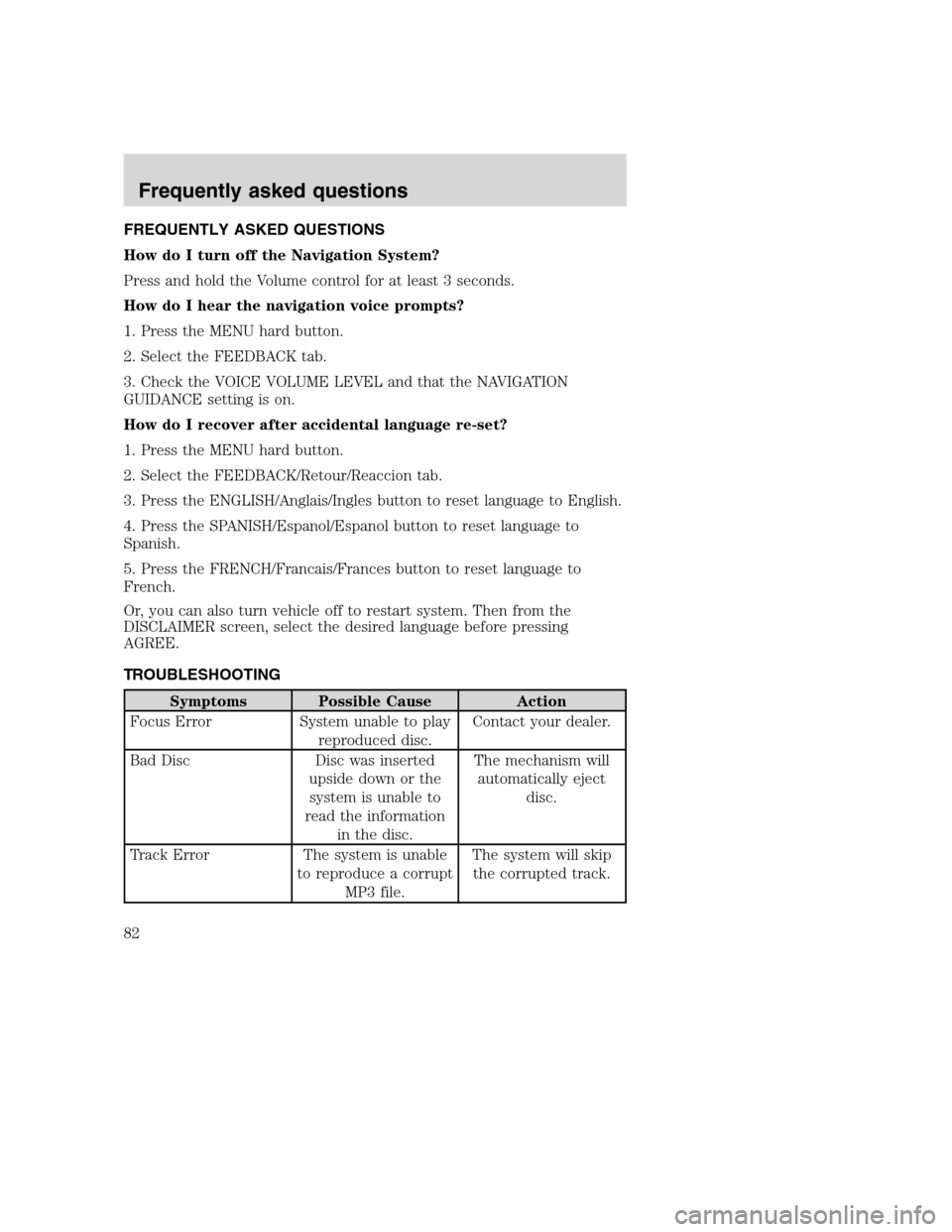
FREQUENTLY ASKED QUESTIONS
How do I turn off the Navigation System?
Press and hold the Volume control for at least 3 seconds.
How do I hear the navigation voice prompts?
1. Press the MENU hard button.
2. Select the FEEDBACK tab.
3. Check the VOICE VOLUME LEVEL and that the NAVIGATION
GUIDANCE setting is on.
How do I recover after accidental language re-set?
1. Press the MENU hard button.
2. Select the FEEDBACK/Retour/Reaccion tab.
3. Press the ENGLISH/Anglais/Ingles button to reset language to English.
4. Press the SPANISH/Espanol/Espanol button to reset language to
Spanish.
5. Press the FRENCH/Francais/Frances button to reset language to
French.
Or, you can also turn vehicle off to restart system. Then from the
DISCLAIMER screen, select the desired language before pressing
AGREE.
TROUBLESHOOTING
Symptoms Possible Cause Action
Focus Error System unable to play
reproduced disc.Contact your dealer.
Bad Disc Disc was inserted
upside down or the
system is unable to
read the information
in the disc.The mechanism will
automatically eject
disc.
Track Error The system is unable
to reproduce a corrupt
MP3 file.The system will skip
the corrupted track.
2008(nv1)
Supplement
USA(fus)
Frequently asked questions
82
Page 110 of 164
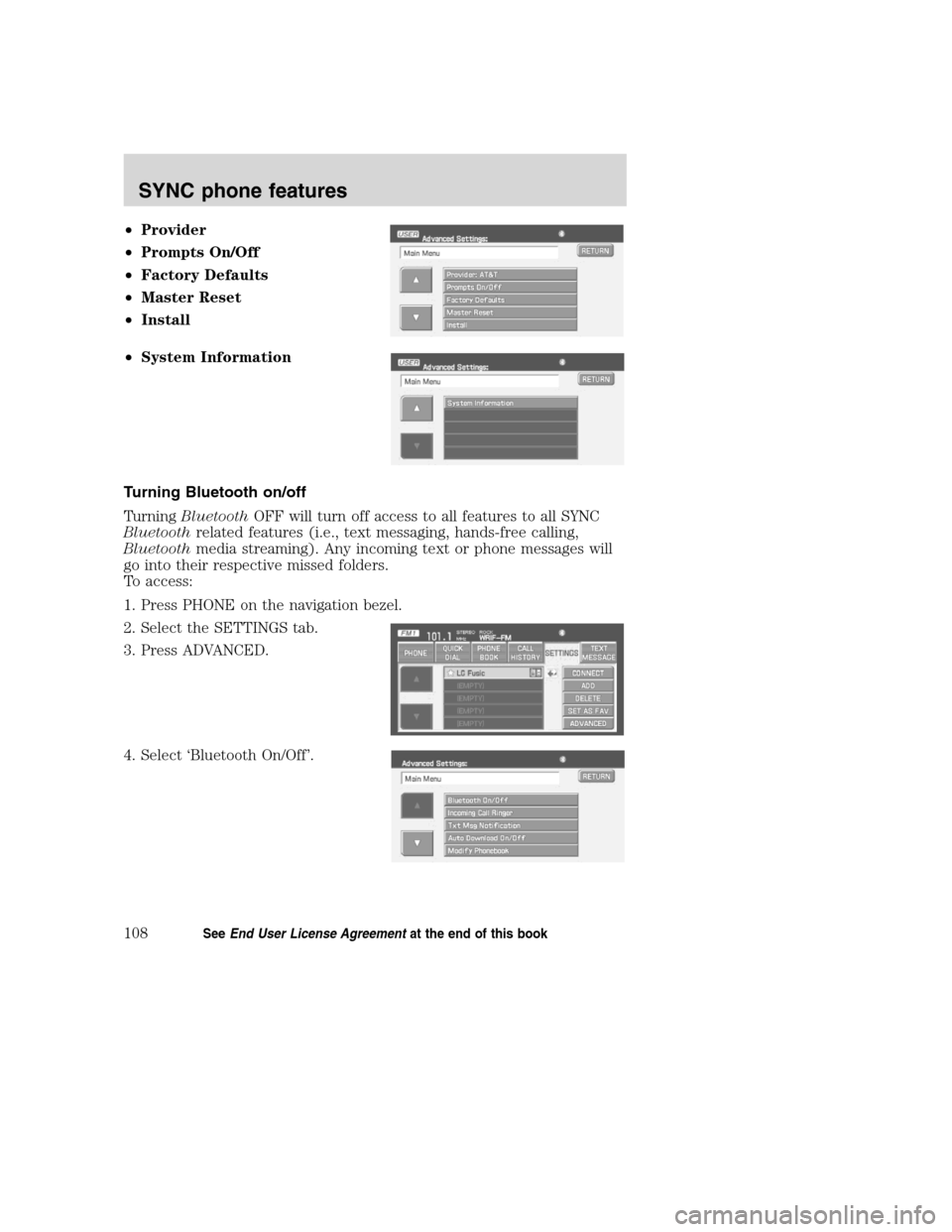
•Provider
•Prompts On/Off
•Factory Defaults
•Master Reset
•Install
•System Information
Turning Bluetooth on/off
TurningBluetoothOFF will turn off access to all features to all SYNC
Bluetoothrelated features (i.e., text messaging, hands-free calling,
Bluetoothmedia streaming). Any incoming text or phone messages will
go into their respective missed folders.
To access:
1. Press PHONE on the navigation bezel.
2. Select the SETTINGS tab.
3. Press ADVANCED.
4. Select ‘Bluetooth On/Off’.
2008(nv1)
Supplement
USA(fus)
SYNC phone features
108SeeEnd User License Agreementat the end of this book
Page 116 of 164
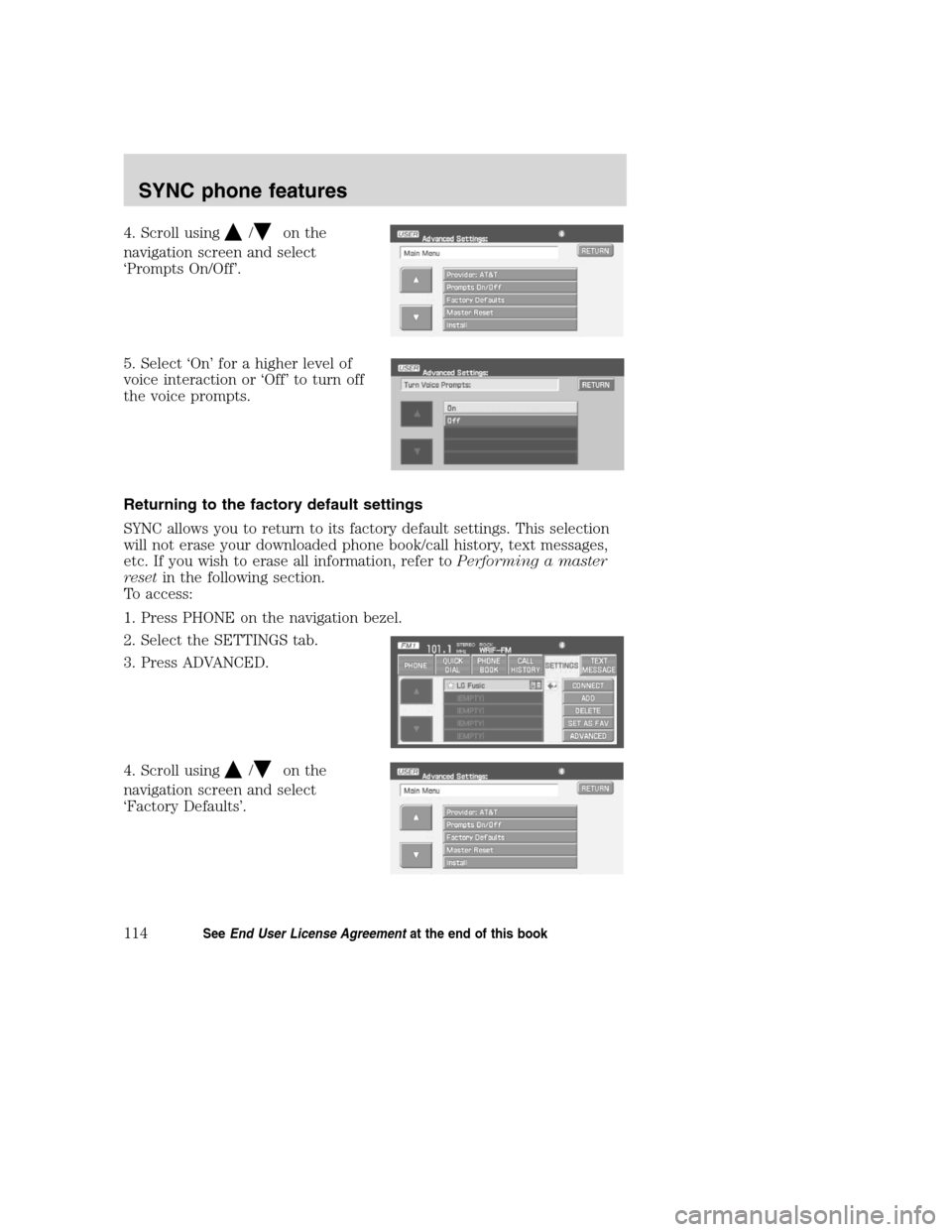
4. Scroll using/on the
navigation screen and select
‘Prompts On/Off’.
5. Select ‘On’ for a higher level of
voice interaction or ‘Off’ to turn off
the voice prompts.
Returning to the factory default settings
SYNC allows you to return to its factory default settings. This selection
will not erase your downloaded phone book/call history, text messages,
etc. If you wish to erase all information, refer toPerforming a master
resetin the following section.
To access:
1. Press PHONE on the navigation bezel.
2. Select the SETTINGS tab.
3. Press ADVANCED.
4. Scroll using
/on the
navigation screen and select
‘Factory Defaults’.
2008(nv1)
Supplement
USA(fus)
SYNC phone features
114SeeEnd User License Agreementat the end of this book
Page 117 of 164
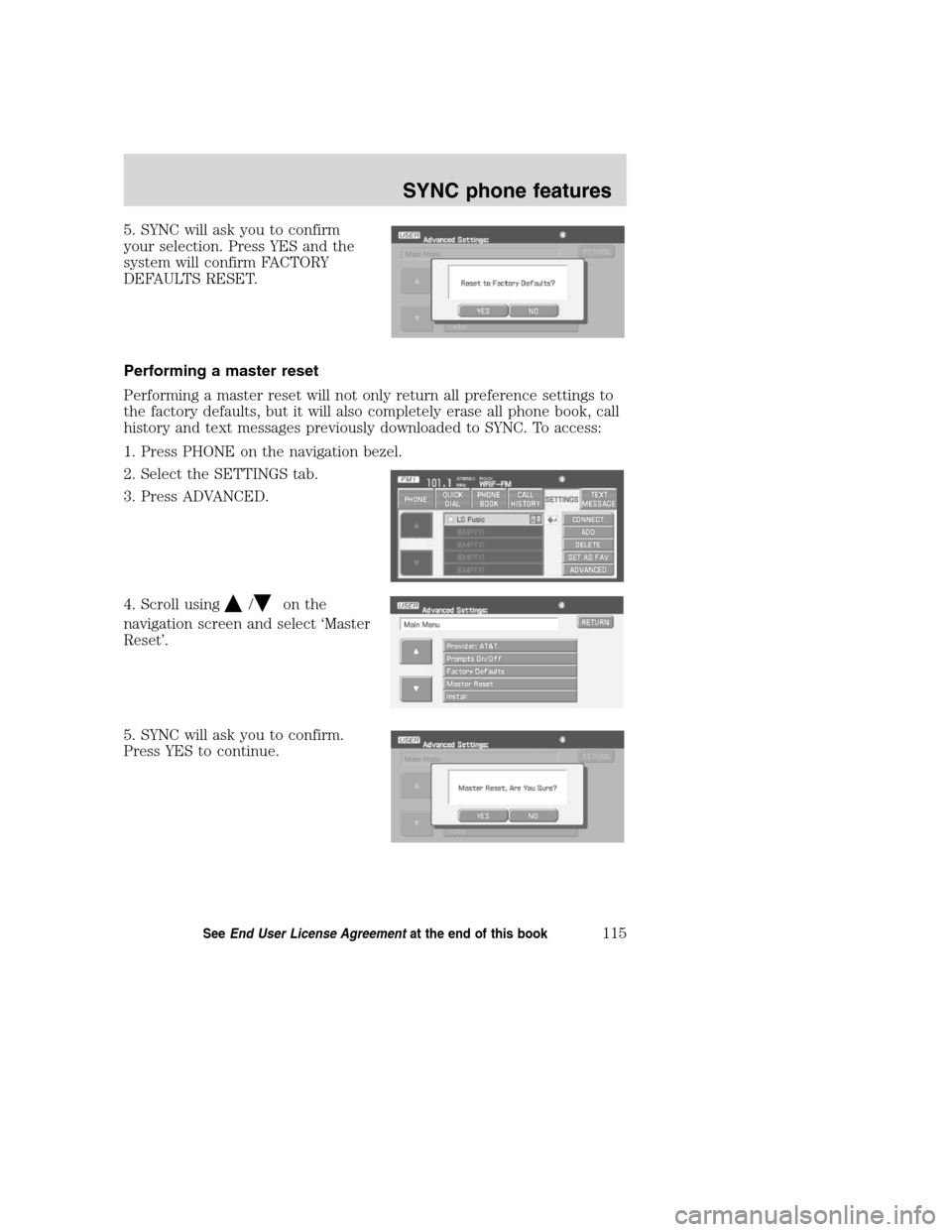
5. SYNC will ask you to confirm
your selection. Press YES and the
system will confirm FACTORY
DEFAULTS RESET.
Performing a master reset
Performing a master reset will not only return all preference settings to
the factory defaults, but it will also completely erase all phone book, call
history and text messages previously downloaded to SYNC. To access:
1. Press PHONE on the navigation bezel.
2. Select the SETTINGS tab.
3. Press ADVANCED.
4. Scroll using
/on the
navigation screen and select ‘Master
Reset’.
5. SYNC will ask you to confirm.
Press YES to continue.
2008(nv1)
Supplement
USA(fus)
SYNC phone features
115SeeEnd User License Agreementat the end of this book
Page 118 of 164
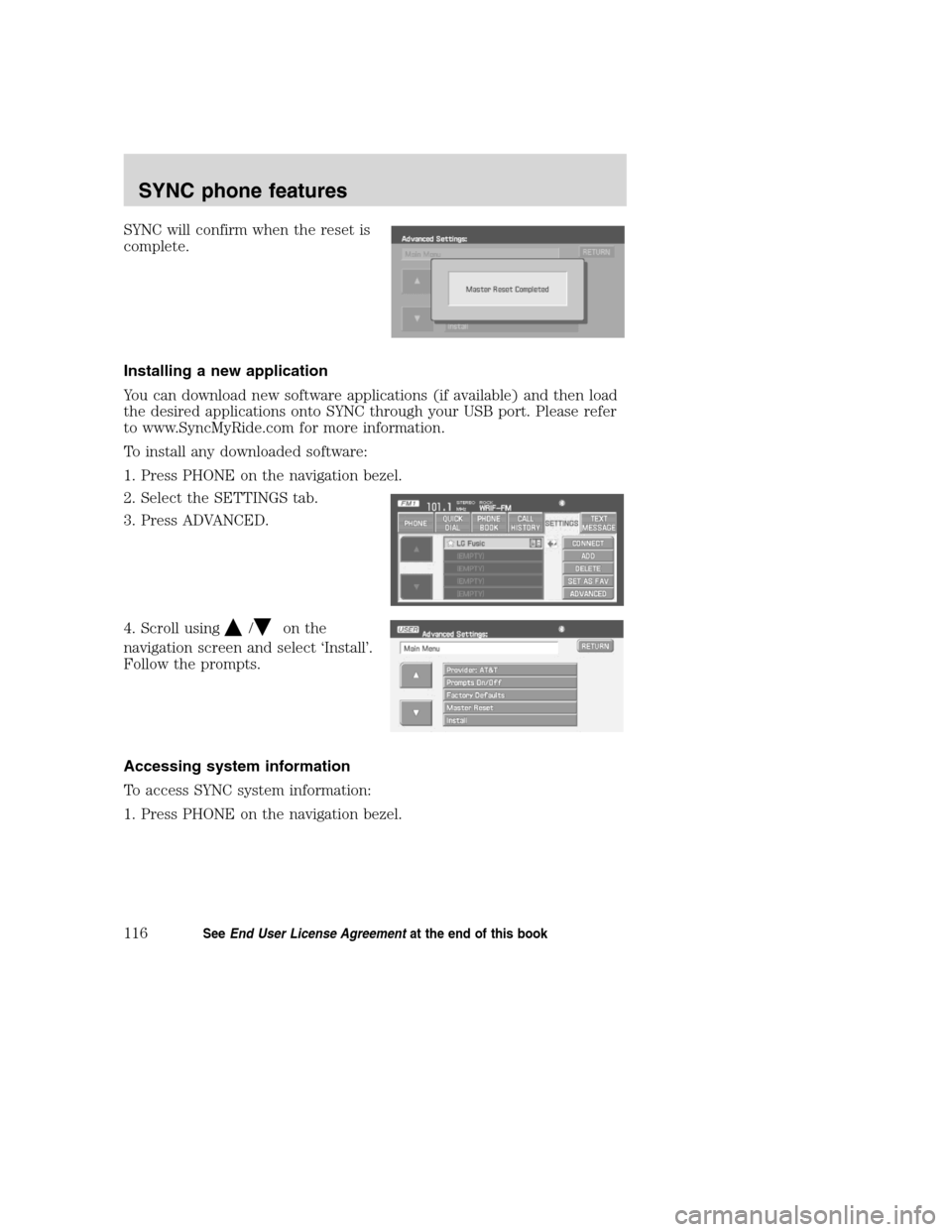
SYNC will confirm when the reset is
complete.
Installing a new application
You can download new software applications (if available) and then load
the desired applications onto SYNC through your USB port. Please refer
to www.SyncMyRide.com for more information.
To install any downloaded software:
1. Press PHONE on the navigation bezel.
2. Select the SETTINGS tab.
3. Press ADVANCED.
4. Scroll using
/on the
navigation screen and select ‘Install’.
Follow the prompts.
Accessing system information
To access SYNC system information:
1. Press PHONE on the navigation bezel.
2008(nv1)
Supplement
USA(fus)
SYNC phone features
116SeeEnd User License Agreementat the end of this book
Page 128 of 164
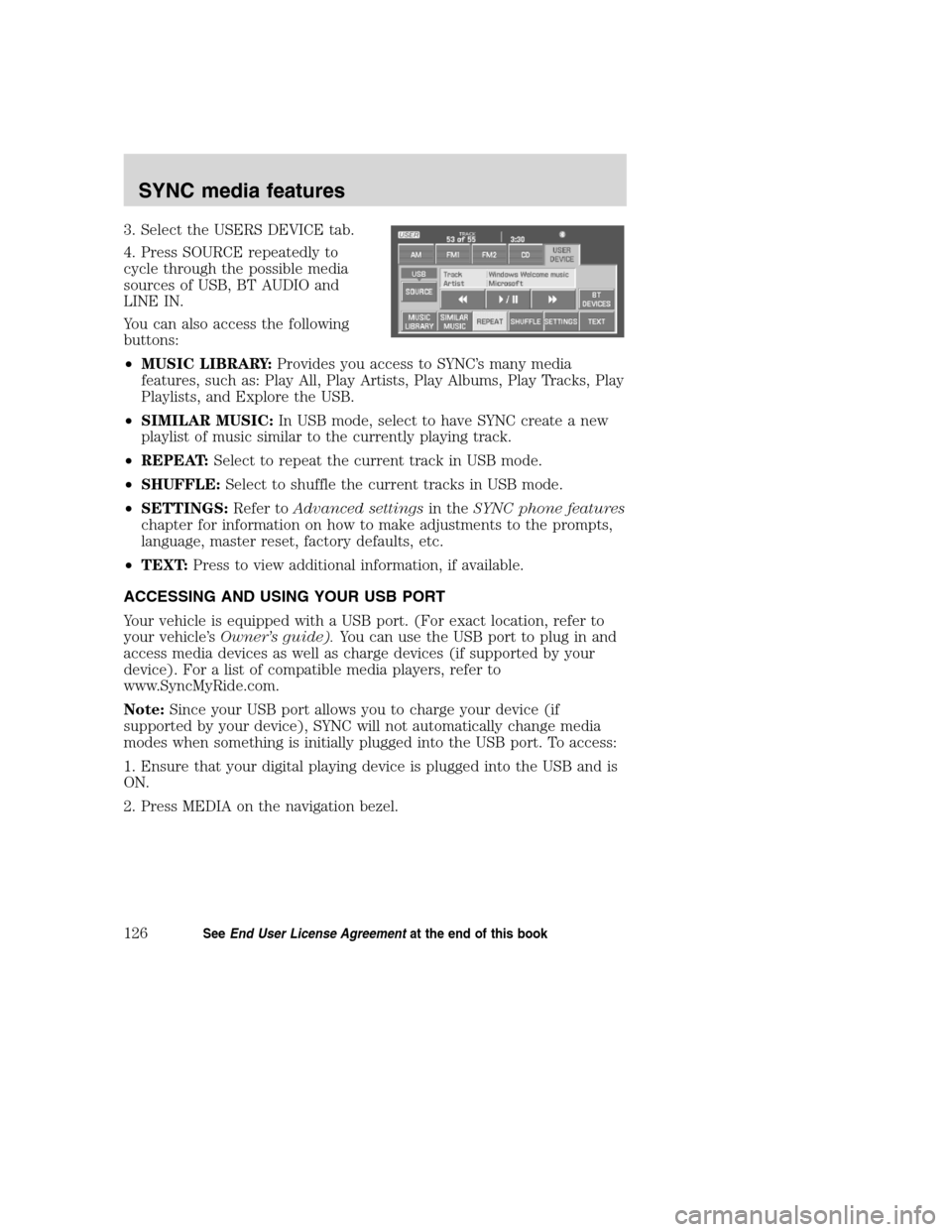
3. Select the USERS DEVICE tab.
4. Press SOURCE repeatedly to
cycle through the possible media
sources of USB, BT AUDIO and
LINE IN.
You can also access the following
buttons:
•MUSIC LIBRARY:Provides you access to SYNC’s many media
features, such as: Play All, Play Artists, Play Albums, Play Tracks, Play
Playlists, and Explore the USB.
•SIMILAR MUSIC:In USB mode, select to have SYNC create a new
playlist of music similar to the currently playing track.
•REPEAT:Select to repeat the current track in USB mode.
•SHUFFLE:Select to shuffle the current tracks in USB mode.
•SETTINGS:Refer toAdvanced settingsin theSYNC phone features
chapter for information on how to make adjustments to the prompts,
language, master reset, factory defaults, etc.
•TEXT:Press to view additional information, if available.
ACCESSING AND USING YOUR USB PORT
Your vehicle is equipped with a USB port. (For exact location, refer to
your vehicle’sOwner’s guide).You can use the USB port to plug in and
access media devices as well as charge devices (if supported by your
device). For a list of compatible media players, refer to
www.SyncMyRide.com.
Note:Since your USB port allows you to charge your device (if
supported by your device), SYNC will not automatically change media
modes when something is initially plugged into the USB port. To access:
1. Ensure that your digital playing device is plugged into the USB and is
ON.
2. Press MEDIA on the navigation bezel.
2008(nv1)
Supplement
USA(fus)
SYNC media features
126SeeEnd User License Agreementat the end of this book