wheel FORD SUPER DUTY 2013 3.G User Guide
[x] Cancel search | Manufacturer: FORD, Model Year: 2013, Model line: SUPER DUTY, Model: FORD SUPER DUTY 2013 3.GPages: 563, PDF Size: 7.27 MB
Page 103 of 563
GENERAL INFORMATION
WARNING:Driving while distracted can result in loss of vehicle
control, accident and injury. Ford strongly recommends that
drivers use extreme caution when using any device or feature that may
take their focus off the road. Your primary responsibility is the safe
operation of the vehicle. We recommend against the use of any
handheld device while driving and that you comply with all applicable
laws.
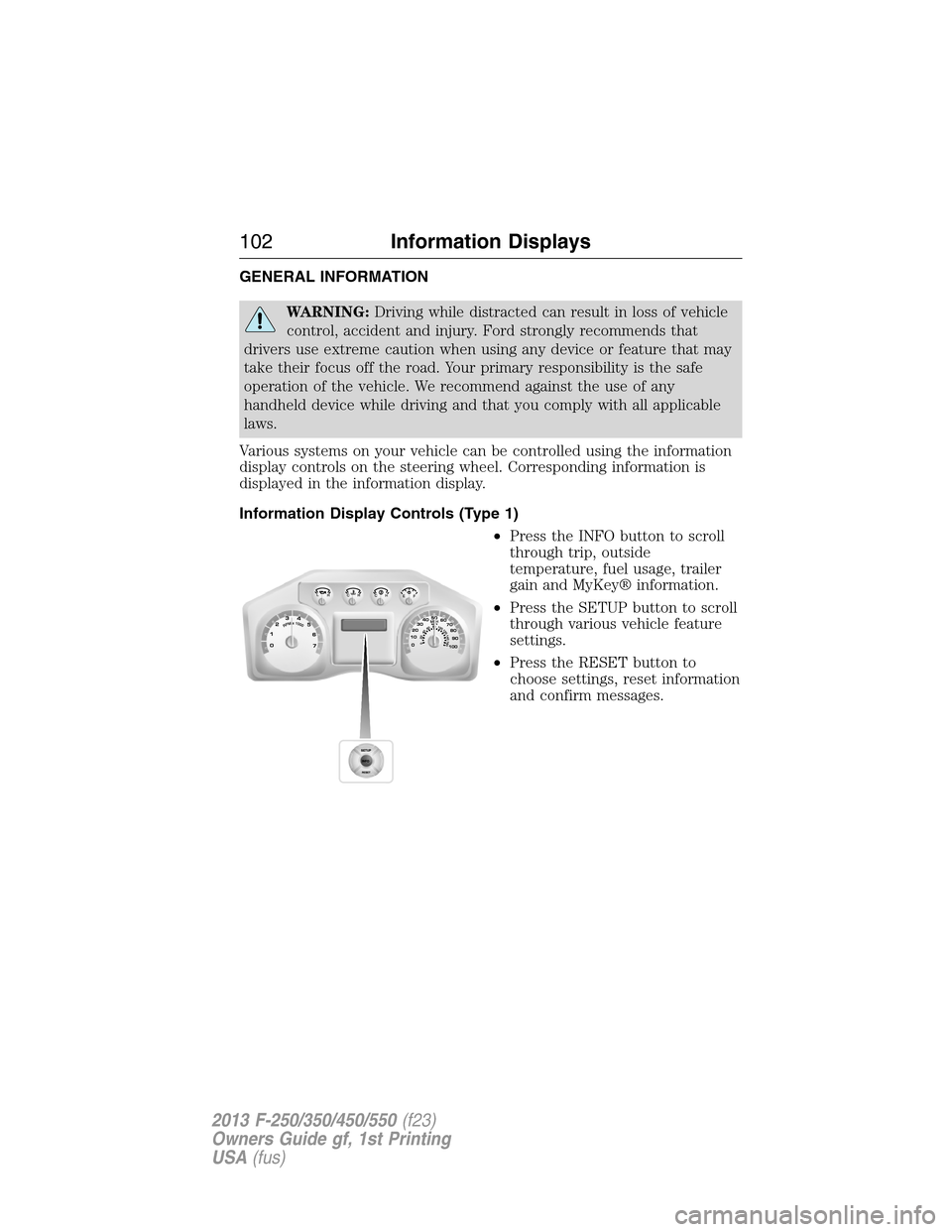
Various systems on your vehicle can be controlled using the information
display controls on the steering wheel. Corresponding information is
displayed in the information display.
Information Display Controls (Type 1)
•Press the INFO button to scroll
through trip, outside
temperature, fuel usage, trailer
gain and MyKey® information.
•Press the SETUP button to scroll
through various vehicle feature
settings.
•Press the RESET button to
choose settings, reset information
and confirm messages.
102Information Displays
2013 F-250/350/450/550(f23)
Owners Guide gf, 1st Printing
USA(fus)
Page 112 of 563
•Average MPG: shows the average fuel usage based on time. See Fuel
Hist. to change the time interval. Press and hold OK to reset this
value.
Truck Apps
In this mode, off-road information depicted with graphics and
trailer towing application options are available.
Note:Some items are optional and may not appear.
Truck Apps
Off Road Pitch and bank angle (in degrees): Displays the pitch
angle (front to rear) and bank angle (side to side) of the
road surface.
Steering angle (in degrees): Displays the steering angle
of the front wheels after the vehicle has been driven for
a period of time.
Differential lock/unlock: Displays the state (locked or
unlocked) of the electronic locking differential.
Energy flow: Displays the operating mode of the transfer
case: 4X2, 4X4 High or 4X4 Low.
Press OK for
InfoELD (Electronic Locking Differential)
Hill Descent Control
4X4 System
Traction Control
AdvanceTrac® + RSC
Information Displays111
2013 F-250/350/450/550(f23)
Owners Guide gf, 1st Printing
USA(fus)
Page 114 of 563
Truck Apps (cont’d)
Trailer
(cont’d)Press OK for
optionsConnection
Checklist (if
equipped)Conventional, Fifth Wheel
and Gooseneck. Use the
up/down arrows to
highlight one of these
choices and press OK to
display the connection
checklist. Follow the
on-screen instructions to
go through the connections
list.
Delete
TrailerUse the up/down arrows to
highlight the trailer you
want to delete and press
OK to delete. Follow the
on-screen prompts to exit
or confirm delete.
Information
ScreenTow Haul mode, Trailer
Brake Controller.
Rename
TrailerUse the up/down buttons
to highlight a trailer and
press OK to select it. Use
the up/down arrow buttons
to change the characters
as needed. When done,
press OK to accept the
change.
Reset Trailer
Mileage /
Kilometers
(if equipped)Use the up/down buttons
to select a trailer, then
press and hold OK to reset
the trailer mileage
(kilometers).
Information Displays11 3
2013 F-250/350/450/550(f23)
Owners Guide gf, 1st Printing
USA(fus)
Page 127 of 563
Door Messages Action / Description
X DOOR AJARDisplayed when the corresponding door is not
completely closed.
Drivetrain Messages Action / Description
LOCKING
DIFFERENTIAL
ENGAGED/
DISENGAGEDDisplayed when the electronic locking
differential is engaged.
LOCKING
DIFFERENTIAL
DISENGAGEDDisplayed when the electronic locking
differential is disengaged.
TO ENGAGE
LOCKING
DIFFERENTIAL
SLOW TO XX
MPH/KM/HDisplayed when the electronic locking
differential requests a certain speed
requirement to engage.
TO ENGAGE
LOCKING
DIFFERENTIAL
RELEASE
ACCELERATOR
PEDALDisplayed when the electronic locking
differential request the accelerator to be
released in order to engage.
SLOW VEHICLE TO
XX KM/H FOR ELDDisplayed when the vehicle speed requirement
for the electronic locking differential mode has
not been met.
SLOW VEHICLE TO
XX MPH FOR ELDDisplayed when the vehicle speed requirement
for the electronic locking differential mode has
not been met.
CHECK LOCKING
DIFFERENTIALDisplayed when an electronic locking
differential (ELD) system fault is present. For
more information, refer to theFour-Wheel
Drivechapter.
SHIFT TO PARKDisplays as a reminder to shift into park.
126Information Displays
2013 F-250/350/450/550(f23)
Owners Guide gf, 1st Printing
USA(fus)
Page 131 of 563
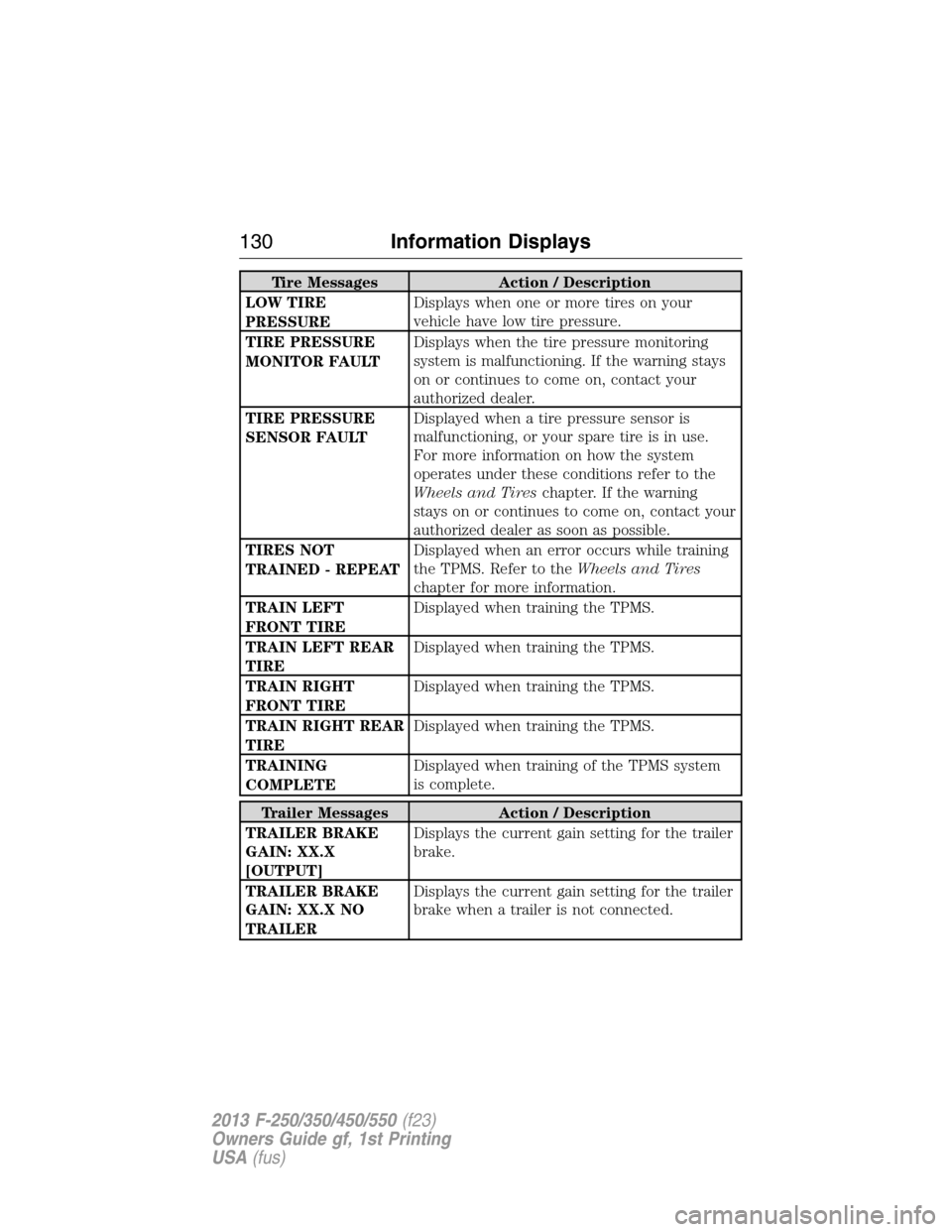
Tire Messages Action / Description
LOW TIRE
PRESSUREDisplays when one or more tires on your
vehicle have low tire pressure.
TIRE PRESSURE
MONITOR FAULTDisplays when the tire pressure monitoring
system is malfunctioning. If the warning stays
on or continues to come on, contact your
authorized dealer.
TIRE PRESSURE
SENSOR FAULTDisplayed when a tire pressure sensor is
malfunctioning, or your spare tire is in use.
For more information on how the system
operates under these conditions refer to the
Wheels and Tireschapter. If the warning
stays on or continues to come on, contact your
authorized dealer as soon as possible.
TIRES NOT
TRAINED - REPEATDisplayed when an error occurs while training
the TPMS. Refer to theWheels and Tires
chapter for more information.
TRAIN LEFT
FRONT TIREDisplayed when training the TPMS.
TRAIN LEFT REAR
TIREDisplayed when training the TPMS.
TRAIN RIGHT
FRONT TIREDisplayed when training the TPMS.
TRAIN RIGHT REAR
TIREDisplayed when training the TPMS.
TRAINING
COMPLETEDisplayed when training of the TPMS system
is complete.
Trailer Messages Action / Description
TRAILER BRAKE
GAIN: XX.X
[OUTPUT]Displays the current gain setting for the trailer
brake.
TRAILER BRAKE
GAIN: XX.X NO
TRAILERDisplays the current gain setting for the trailer
brake when a trailer is not connected.
130Information Displays
2013 F-250/350/450/550(f23)
Owners Guide gf, 1st Printing
USA(fus)
Page 132 of 563
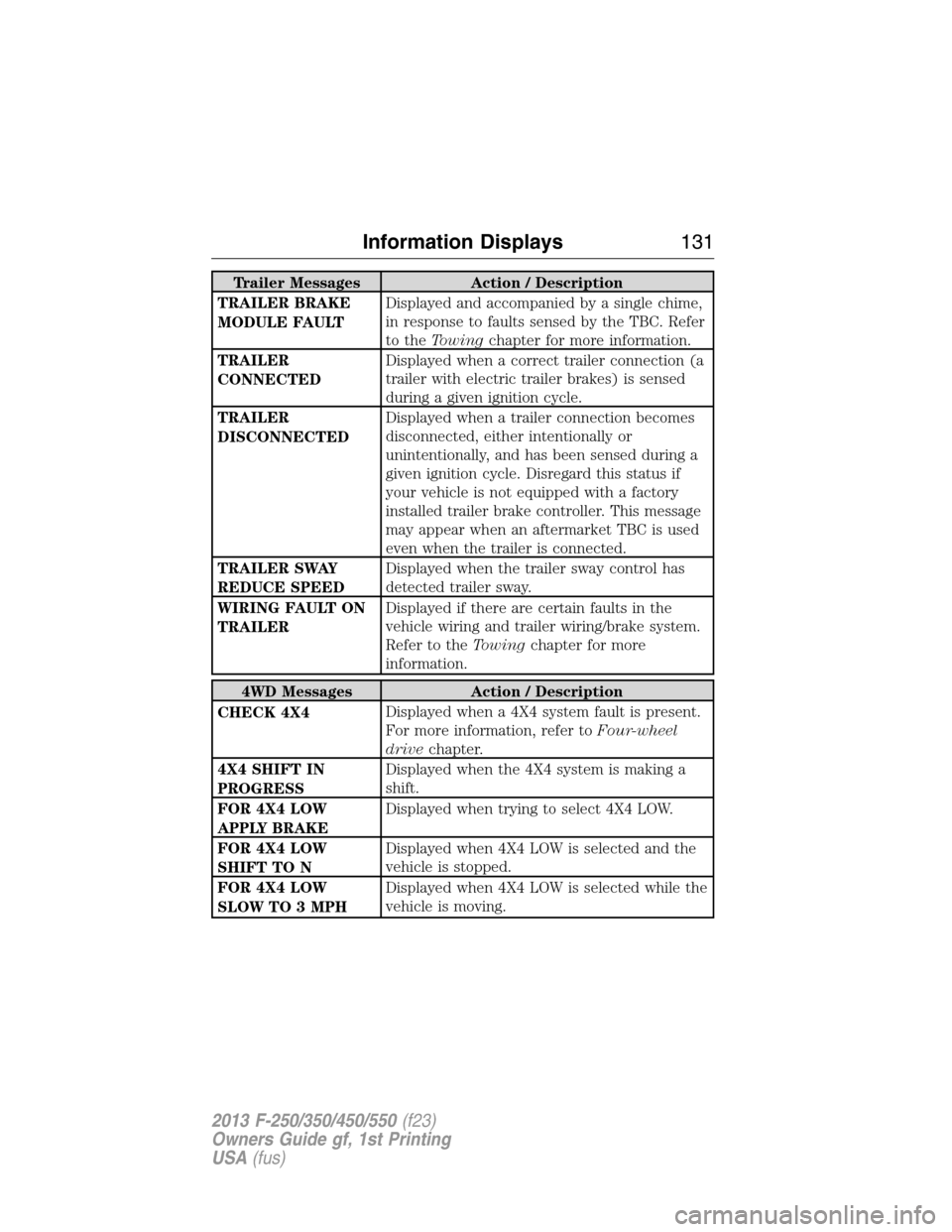
Trailer Messages Action / Description
TRAILER BRAKE
MODULE FAULTDisplayed and accompanied by a single chime,
in response to faults sensed by the TBC. Refer
to theTowingchapter for more information.
TRAILER
CONNECTEDDisplayed when a correct trailer connection (a
trailer with electric trailer brakes) is sensed
during a given ignition cycle.
TRAILER
DISCONNECTEDDisplayed when a trailer connection becomes
disconnected, either intentionally or
unintentionally, and has been sensed during a
given ignition cycle. Disregard this status if
your vehicle is not equipped with a factory
installed trailer brake controller. This message
may appear when an aftermarket TBC is used
even when the trailer is connected.
TRAILER SWAY
REDUCE SPEEDDisplayed when the trailer sway control has
detected trailer sway.
WIRING FAULT ON
TRAILERDisplayed if there are certain faults in the
vehicle wiring and trailer wiring/brake system.
Refer to theTowingchapter for more
information.
4WD Messages Action / Description
CHECK 4X4Displayed when a 4X4 system fault is present.
For more information, refer toFour-wheel
drivechapter.
4X4 SHIFT IN
PROGRESSDisplayed when the 4X4 system is making a
shift.
FOR 4X4 LOW
APPLY BRAKEDisplayed when trying to select 4X4 LOW.
FOR 4X4 LOW
SHIFT TO NDisplayed when 4X4 LOW is selected and the
vehicle is stopped.
FOR 4X4 LOW
SLOW TO 3 MPHDisplayed when 4X4 LOW is selected while the
vehicle is moving.
Information Displays131
2013 F-250/350/450/550(f23)
Owners Guide gf, 1st Printing
USA(fus)
Page 133 of 563
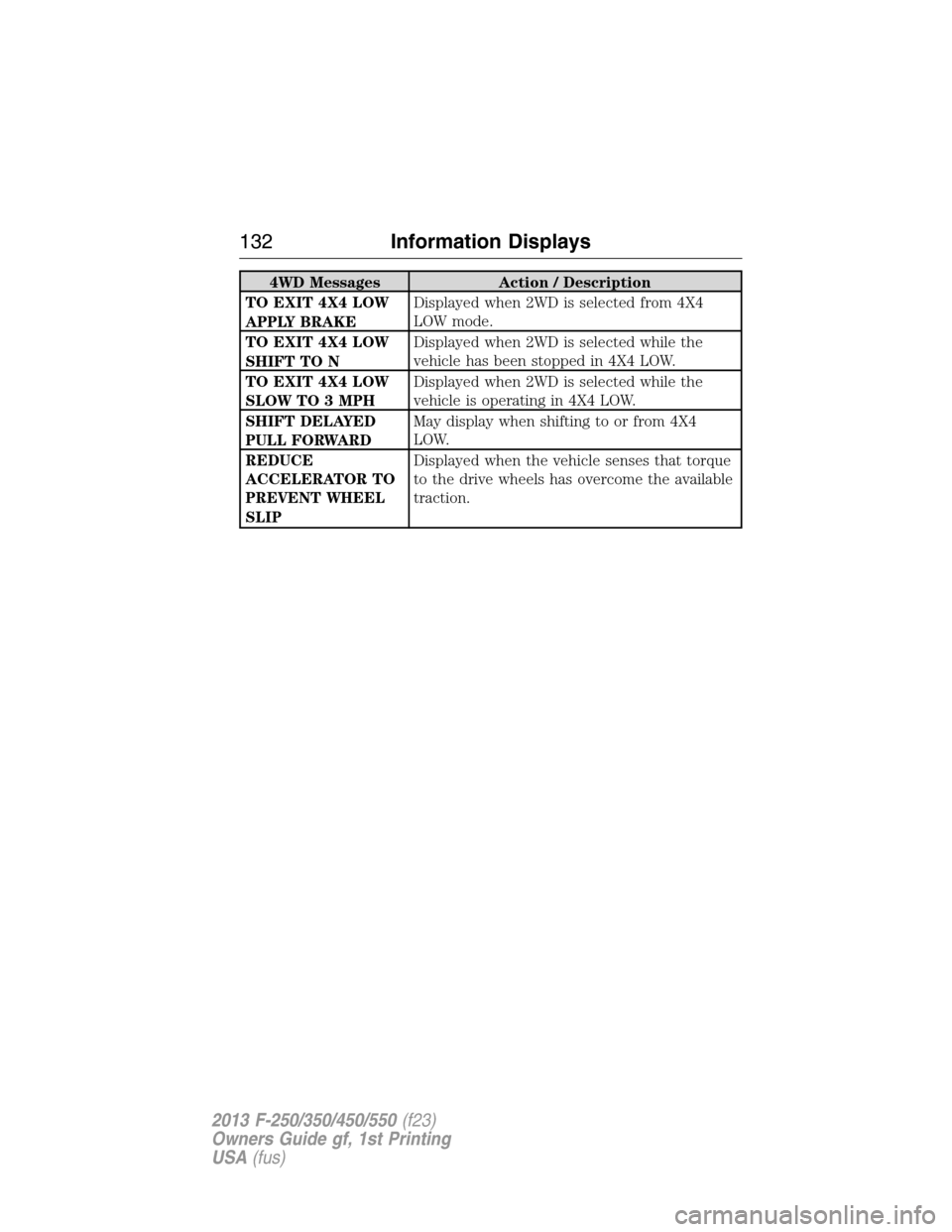
4WD Messages Action / Description
TO EXIT 4X4 LOW
APPLY BRAKEDisplayed when 2WD is selected from 4X4
LOW mode.
TO EXIT 4X4 LOW
SHIFT TO NDisplayed when 2WD is selected while the
vehicle has been stopped in 4X4 LOW.
TO EXIT 4X4 LOW
SLOW TO 3 MPHDisplayed when 2WD is selected while the
vehicle is operating in 4X4 LOW.
SHIFT DELAYED
PULL FORWARDMay display when shifting to or from 4X4
LOW.
REDUCE
ACCELERATOR TO
PREVENT WHEEL
SLIPDisplayed when the vehicle senses that torque
to the drive wheels has overcome the available
traction.
132Information Displays
2013 F-250/350/450/550(f23)
Owners Guide gf, 1st Printing
USA(fus)
Page 152 of 563
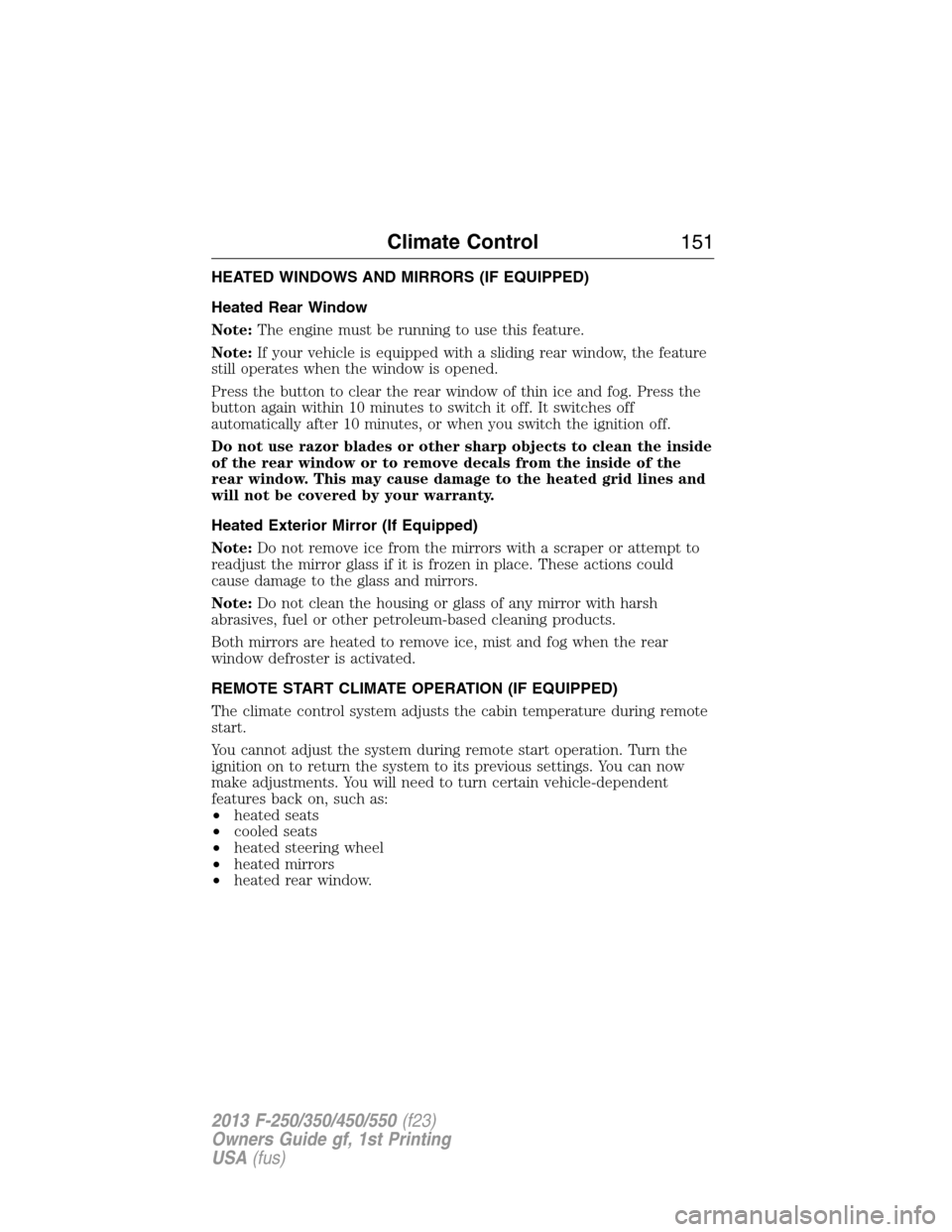
HEATED WINDOWS AND MIRRORS (IF EQUIPPED)
Heated Rear Window
Note:The engine must be running to use this feature.
Note:If your vehicle is equipped with a sliding rear window, the feature
still operates when the window is opened.
Press the button to clear the rear window of thin ice and fog. Press the
button again within 10 minutes to switch it off. It switches off
automatically after 10 minutes, or when you switch the ignition off.
Do not use razor blades or other sharp objects to clean the inside
of the rear window or to remove decals from the inside of the
rear window. This may cause damage to the heated grid lines and
will not be covered by your warranty.
Heated Exterior Mirror (If Equipped)
Note:Do not remove ice from the mirrors with a scraper or attempt to
readjust the mirror glass if it is frozen in place. These actions could
cause damage to the glass and mirrors.
Note:Do not clean the housing or glass of any mirror with harsh
abrasives, fuel or other petroleum-based cleaning products.
Both mirrors are heated to remove ice, mist and fog when the rear
window defroster is activated.
REMOTE START CLIMATE OPERATION (IF EQUIPPED)
The climate control system adjusts the cabin temperature during remote
start.
You cannot adjust the system during remote start operation. Turn the
ignition on to return the system to its previous settings. You can now
make adjustments. You will need to turn certain vehicle-dependent
features back on, such as:
•heated seats
•cooled seats
•heated steering wheel
•heated mirrors
•heated rear window.
Climate Control151
2013 F-250/350/450/550(f23)
Owners Guide gf, 1st Printing
USA(fus)
Page 153 of 563
Manual Climate Systems
In hot weather, the climate control system is set to MAX A/C.
In moderate weather, the system either heats or cools (based on
previous settings). The rear defroster and heated mirrors are not
automatically turned on.
In cold weather, maximum heat is provided in floor/defrost mode. The
rear defroster and heated mirrors are automatically turned on. If your
vehicle is equipped with a diesel engine and a supplemental heater, the
supplemental heater also turns on.
Automatic Climate Systems
Automatic Settings
The climate control system automatically sets the interior temperature to
72°F (22°C).
In hot weather, the system is set to 72°F (22°C). Cooled seats are set to
high (if available, and selected to AUTO in the information display).
In moderate weather, the system either heats or cools (based on
previous settings). The rear defroster, heated mirrors and heated/cooled
seats are not automatically turned on.
In cold weather, the system is set to 72°F (22°C). The heated seats and
heated steering wheel (if equipped) are set to high. The rear defroster
and heated mirrors are automatically turned on.
Heated and Cooled Devices
The climate control system controls other heated and cooled devices
inside the vehicle. These devices (if equipped) may also be switched on
during remote start. Heated devices are typically switched on during cold
weather, and cooled devices during hot weather. If your vehicle is
equipped with a diesel engine and a supplemental heater, the
supplemental heater also turns on.
152Climate Control
2013 F-250/350/450/550(f23)
Owners Guide gf, 1st Printing
USA(fus)
Page 154 of 563
SITTING IN THE CORRECT POSITION
WARNING:Sitting improperly out of position or with the seat
back reclined too far can take off weight from the seat cushion
and affect the passenger sensing system, resulting in serious injury or
death in a crash. Always sit upright against your seat back, with your
feet on the floor.
WARNING:Do not recline the seat back as this can cause the
occupant to slide under the seat’s safety belt, resulting in severe
personal injury in the event of a crash.
WARNING:Do not place objects higher than the seat backs to
reduce the risk of injury in a crash or during heavy braking or
when stopping suddenly.
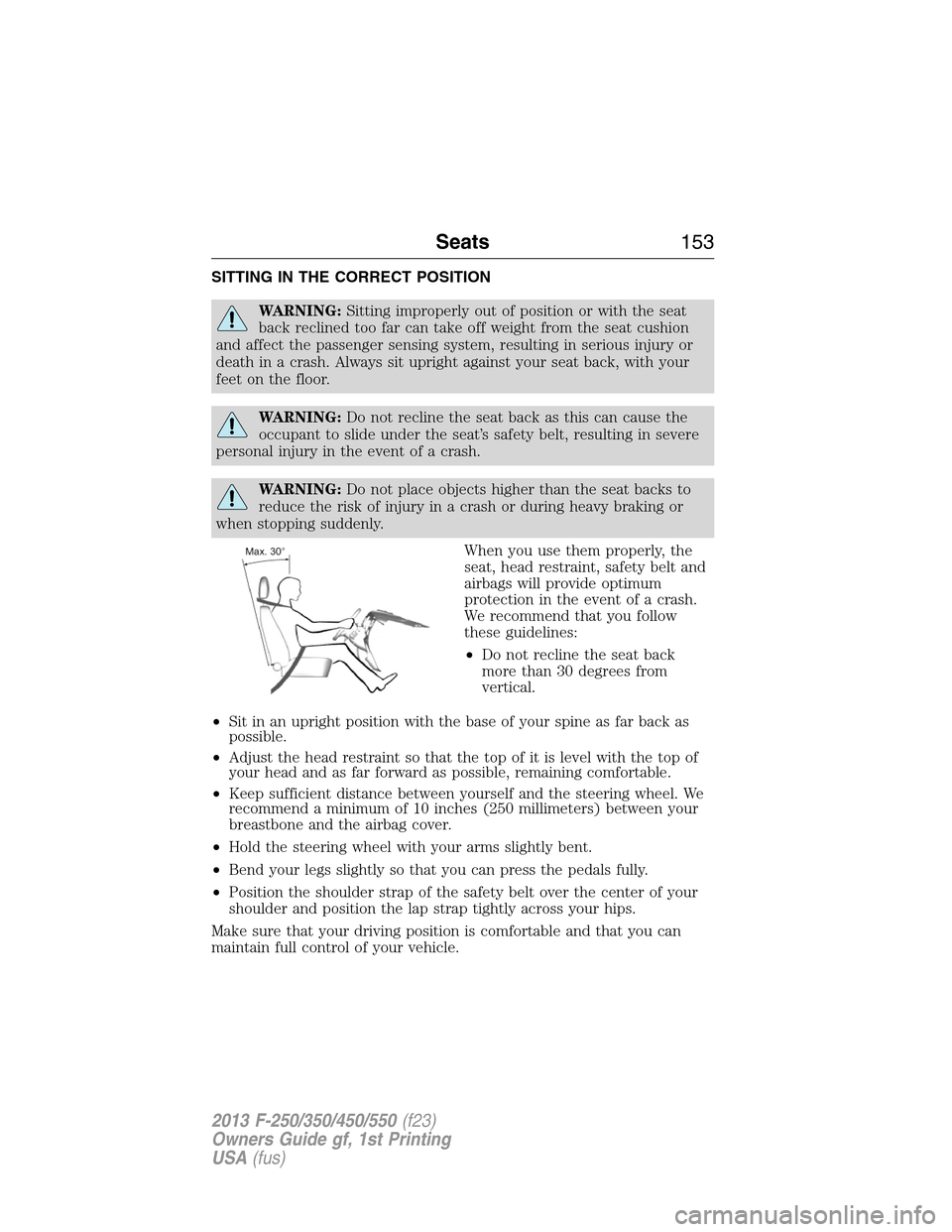
When you use them properly, the
seat, head restraint, safety belt and
airbags will provide optimum
protection in the event of a crash.
We recommend that you follow
these guidelines:
•Do not recline the seat back
more than 30 degrees from
vertical.
•Sit in an upright position with the base of your spine as far back as
possible.
•Adjust the head restraint so that the top of it is level with the top of
your head and as far forward as possible, remaining comfortable.
•Keep sufficient distance between yourself and the steering wheel. We
recommend a minimum of 10 inches (250 millimeters) between your
breastbone and the airbag cover.
•Hold the steering wheel with your arms slightly bent.
•Bend your legs slightly so that you can press the pedals fully.
•Position the shoulder strap of the safety belt over the center of your
shoulder and position the lap strap tightly across your hips.
Make sure that your driving position is comfortable and that you can
maintain full control of your vehicle.
Seats153
2013 F-250/350/450/550(f23)
Owners Guide gf, 1st Printing
USA(fus)