fuel filter FORD SUPER DUTY 2014 3.G Owners Manual
[x] Cancel search | Manufacturer: FORD, Model Year: 2014, Model line: SUPER DUTY, Model: FORD SUPER DUTY 2014 3.GPages: 458, PDF Size: 5.3 MB
Page 7 of 458
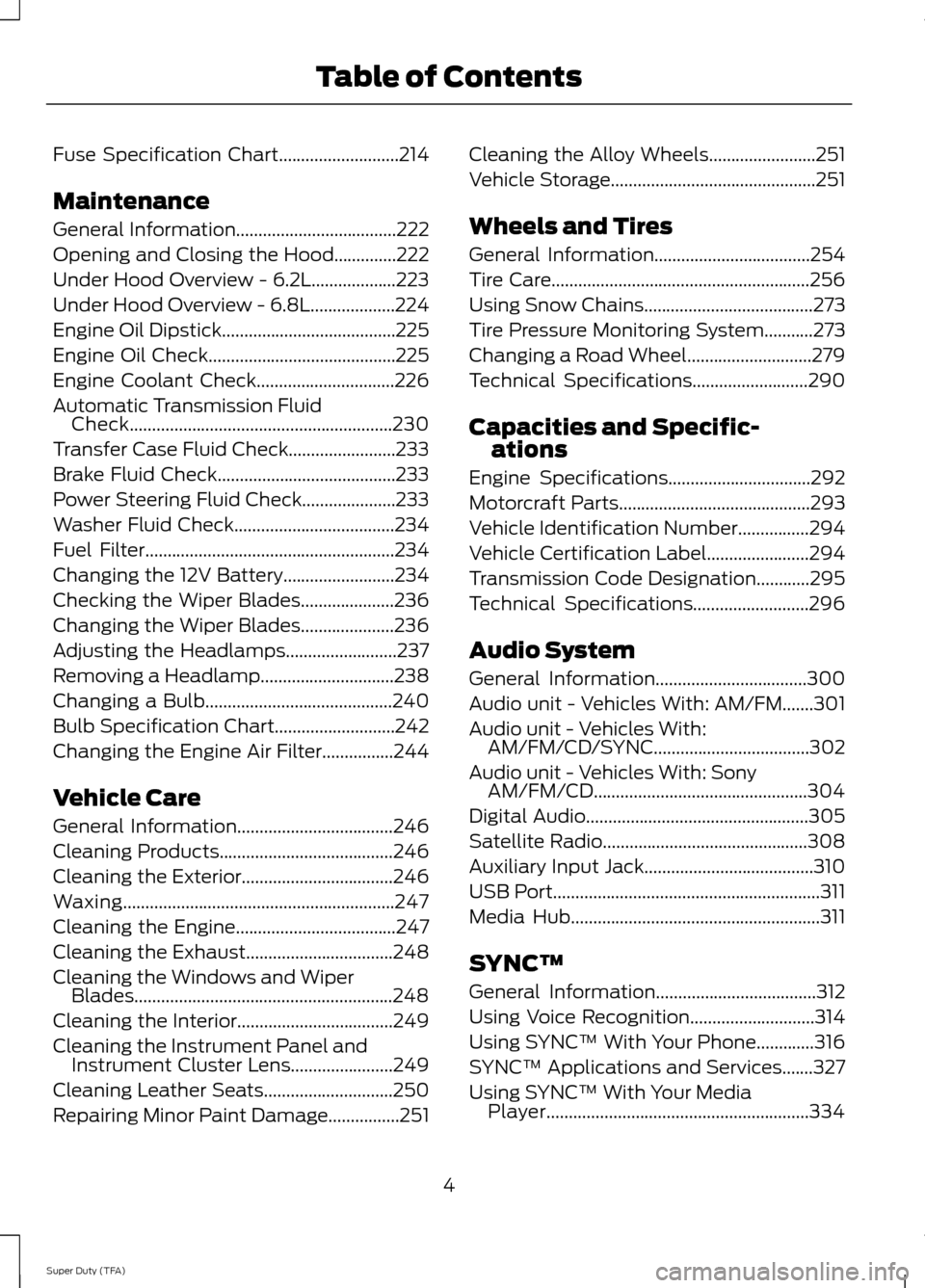
Fuse Specification Chart...........................214
Maintenance
General Information....................................222
Opening and Closing the Hood..............222
Under Hood Overview - 6.2L...................223
Under Hood Overview - 6.8L...................224
Engine Oil Dipstick.......................................225
Engine Oil Check..........................................225
Engine Coolant Check
...............................226
Automatic Transmission Fluid Check...........................................................230
Transfer Case Fluid Check........................233
Brake Fluid Check
........................................233
Power Steering Fluid Check.....................233
Washer Fluid Check....................................234
Fuel Filter
........................................................234
Changing the 12V Battery.........................234
Checking the Wiper Blades
.....................236
Changing the Wiper Blades.....................236
Adjusting the Headlamps.........................237
Removing a Headlamp..............................238
Changing a Bulb..........................................240
Bulb Specification Chart...........................242
Changing the Engine Air Filter................244
Vehicle Care
General Information
...................................246
Cleaning Products
.......................................246
Cleaning the Exterior..................................246
Waxing.............................................................247
Cleaning the Engine
....................................247
Cleaning the Exhaust.................................248
Cleaning the Windows and Wiper Blades..........................................................248
Cleaning the Interior...................................249
Cleaning the Instrument Panel and Instrument Cluster Lens.......................249
Cleaning Leather Seats
.............................250
Repairing Minor Paint Damage................251 Cleaning the Alloy Wheels
........................251
Vehicle Storage
..............................................251
Wheels and Tires
General Information
...................................254
Tire Care
..........................................................256
Using Snow Chains
......................................273
Tire Pressure Monitoring System
...........273
Changing a Road Wheel
............................279
Technical Specifications
..........................290
Capacities and Specific- ations
Engine Specifications
................................292
Motorcraft Parts
...........................................293
Vehicle Identification Number................294
Vehicle Certification Label.......................294
Transmission Code Designation............295
Technical Specifications..........................296
Audio System
General Information
..................................300
Audio unit - Vehicles With: AM/FM.......301
Audio unit - Vehicles With: AM/FM/CD/SYNC...................................302
Audio unit - Vehicles With: Sony AM/FM/CD................................................304
Digital Audio..................................................305
Satellite Radio
..............................................308
Auxiliary Input Jack......................................310
USB Port
............................................................311
Media Hub
........................................................311
SYNC™
General Information
....................................312
Using Voice Recognition............................314
Using SYNC™ With Your Phone.............316
SYNC™ Applications and Services
.......327
Using SYNC™ With Your Media Player...........................................................334
4
Super Duty (TFA) Table of Contents
Page 11 of 458
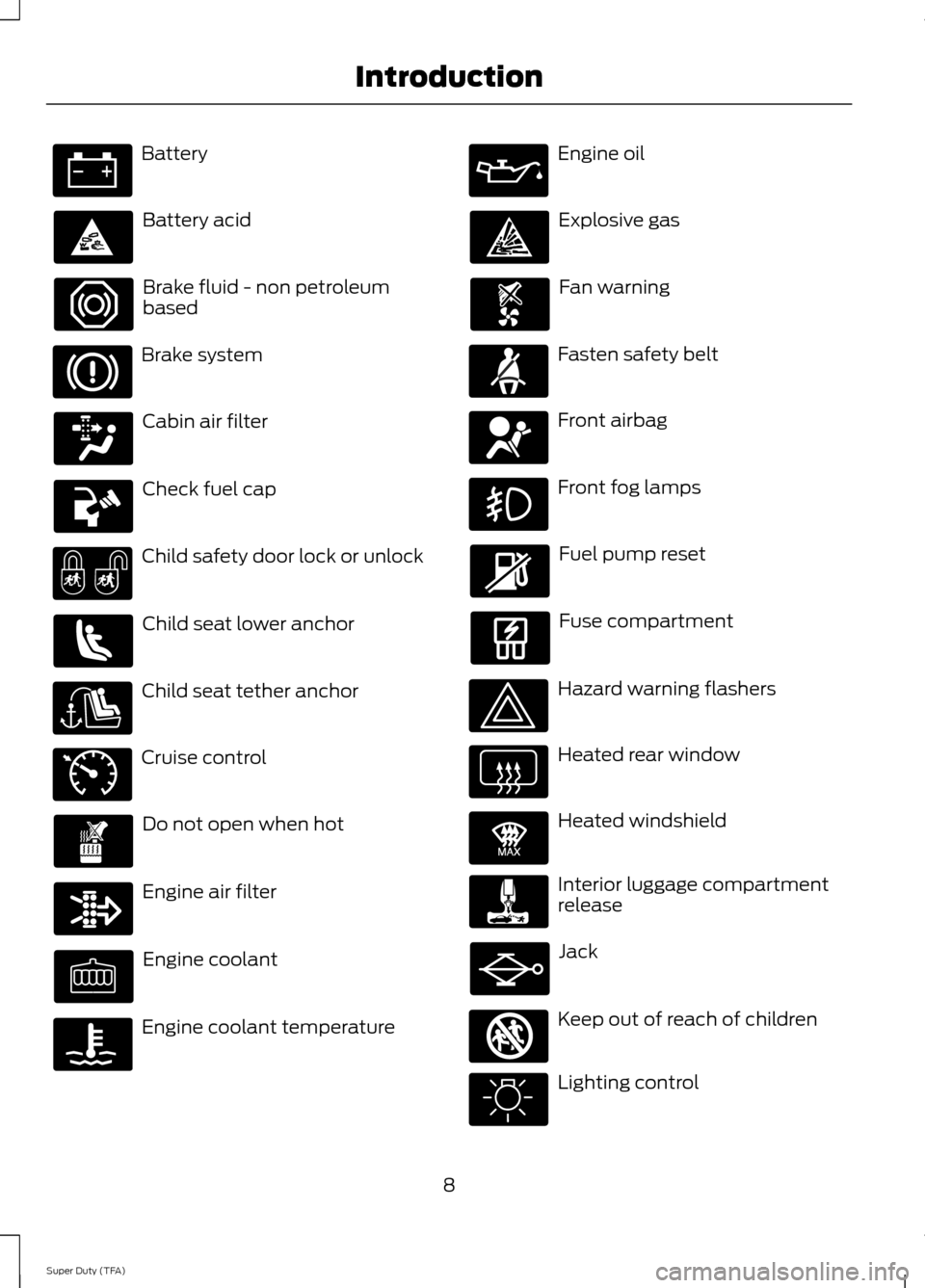
Battery
Battery acid
Brake fluid - non petroleum
based
Brake system
Cabin air filter
Check fuel cap
Child safety door lock or unlock
Child seat lower anchor
Child seat tether anchor
Cruise control
Do not open when hot
Engine air filter
Engine coolant
Engine coolant temperature Engine oil
Explosive gas
Fan warning
Fasten safety belt
Front airbag
Front fog lamps
Fuel pump reset
Fuse compartment
Hazard warning flashers
Heated rear window
Heated windshield
Interior luggage compartment
release
Jack
Keep out of reach of children
Lighting control
8
Super Duty (TFA) Introduction E71340 E91392 E161353
Page 84 of 458
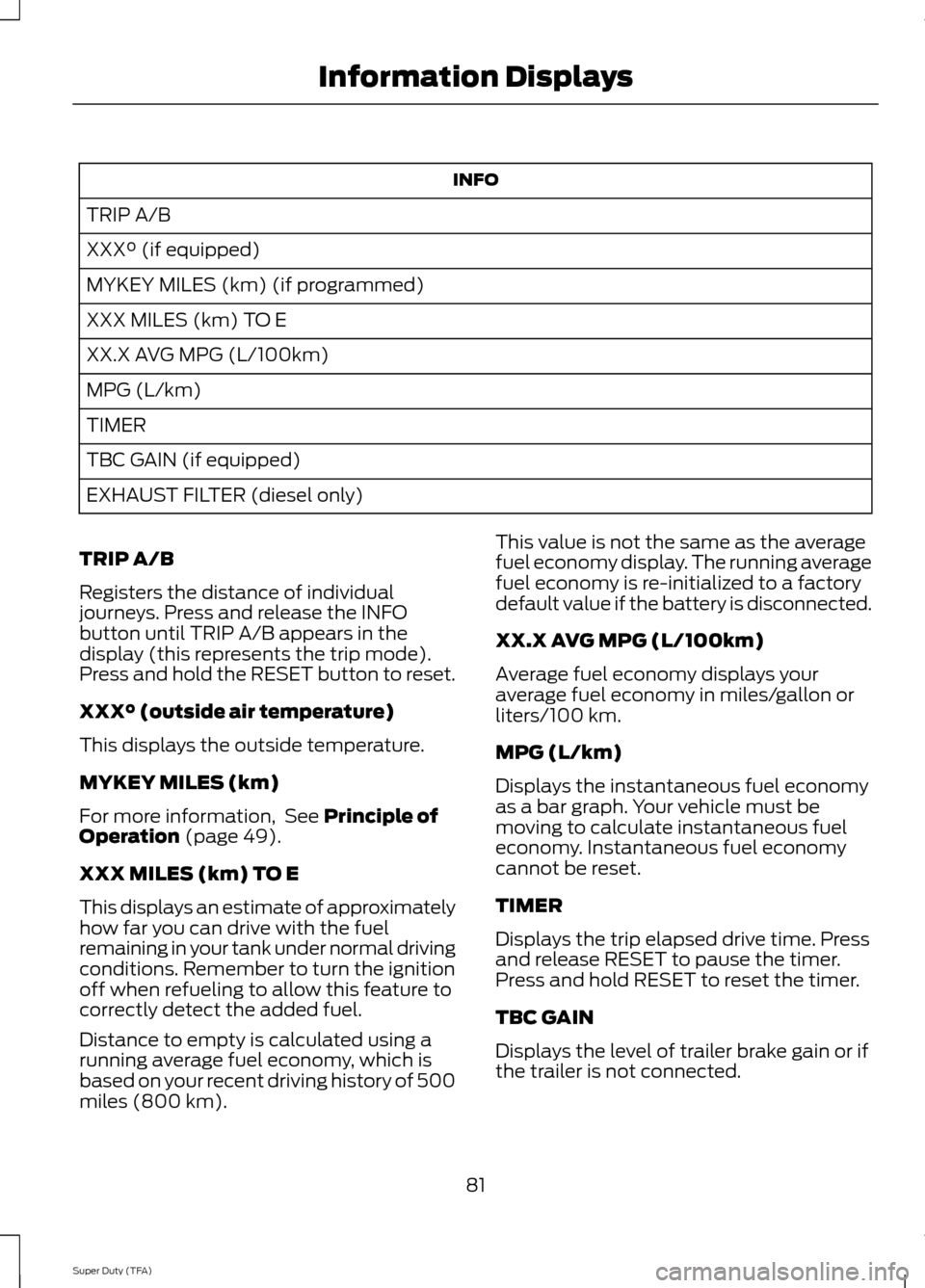
INFO
TRIP A/B
XXX° (if equipped)
MYKEY MILES (km) (if programmed)
XXX MILES (km) TO E
XX.X AVG MPG (L/100km)
MPG (L/km)
TIMER
TBC GAIN (if equipped)
EXHAUST FILTER (diesel only)
TRIP A/B
Registers the distance of individual
journeys. Press and release the INFO
button until TRIP A/B appears in the
display (this represents the trip mode).
Press and hold the RESET button to reset.
XXX° (outside air temperature)
This displays the outside temperature.
MYKEY MILES (km)
For more information, See Principle of
Operation (page 49).
XXX MILES (km) TO E
This displays an estimate of approximately
how far you can drive with the fuel
remaining in your tank under normal driving
conditions. Remember to turn the ignition
off when refueling to allow this feature to
correctly detect the added fuel.
Distance to empty is calculated using a
running average fuel economy, which is
based on your recent driving history of 500
miles (800 km). This value is not the same as the average
fuel economy display. The running average
fuel economy is re-initialized to a factory
default value if the battery is disconnected.
XX.X AVG MPG (L/100km)
Average fuel economy displays your
average fuel economy in miles/gallon or
liters/100 km.
MPG (L/km)
Displays the instantaneous fuel economy
as a bar graph. Your vehicle must be
moving to calculate instantaneous fuel
economy. Instantaneous fuel economy
cannot be reset.
TIMER
Displays the trip elapsed drive time. Press
and release RESET to pause the timer.
Press and hold RESET to reset the timer.
TBC GAIN
Displays the level of trailer brake gain or if
the trailer is not connected.
81
Super Duty (TFA) Information Displays
Page 85 of 458
EXHAUST FILTER
For more information, refer to the Diesel
supplement.
System check and vehicle feature
customization
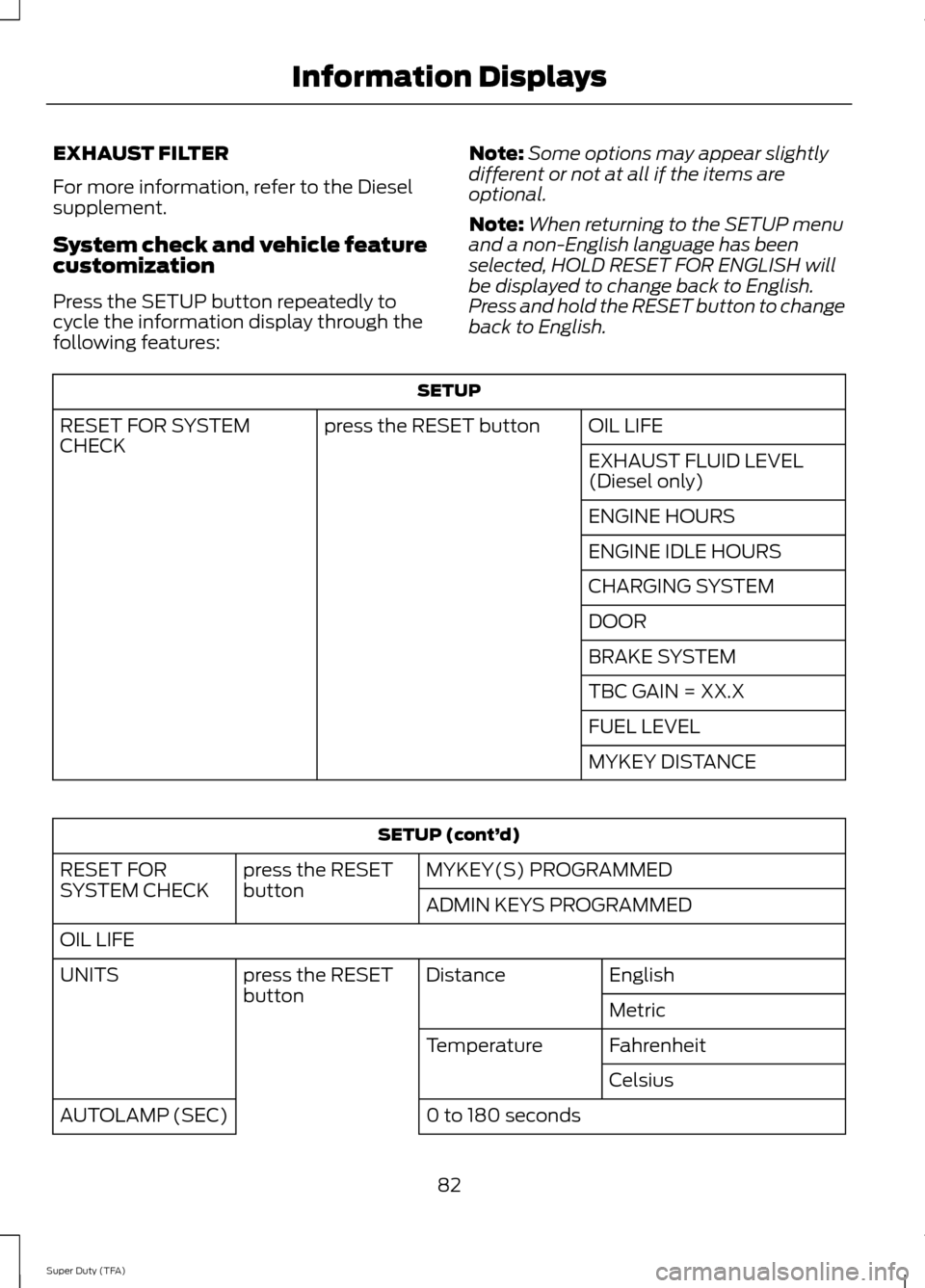
Press the SETUP button repeatedly to
cycle the information display through the
following features:
Note:
Some options may appear slightly
different or not at all if the items are
optional.
Note: When returning to the SETUP menu
and a non-English language has been
selected, HOLD RESET FOR ENGLISH will
be displayed to change back to English.
Press and hold the RESET button to change
back to English. SETUP
OIL LIFE
press the RESET button
RESET FOR SYSTEM
CHECK
EXHAUST FLUID LEVEL
(Diesel only)
ENGINE HOURS
ENGINE IDLE HOURS
CHARGING SYSTEM
DOOR
BRAKE SYSTEM
TBC GAIN = XX.X
FUEL LEVEL
MYKEY DISTANCESETUP (cont’
d)
MYKEY(S) PROGRAMMED
press the RESET
button
RESET FOR
SYSTEM CHECK
ADMIN KEYS PROGRAMMED
OIL LIFE English
Distance
press the RESET
button
UNITS
Metric
Fahrenheit
Temperature
Celsius
0 to 180 seconds
AUTOLAMP (SEC)
82
Super Duty (TFA) Information Displays
Page 88 of 458
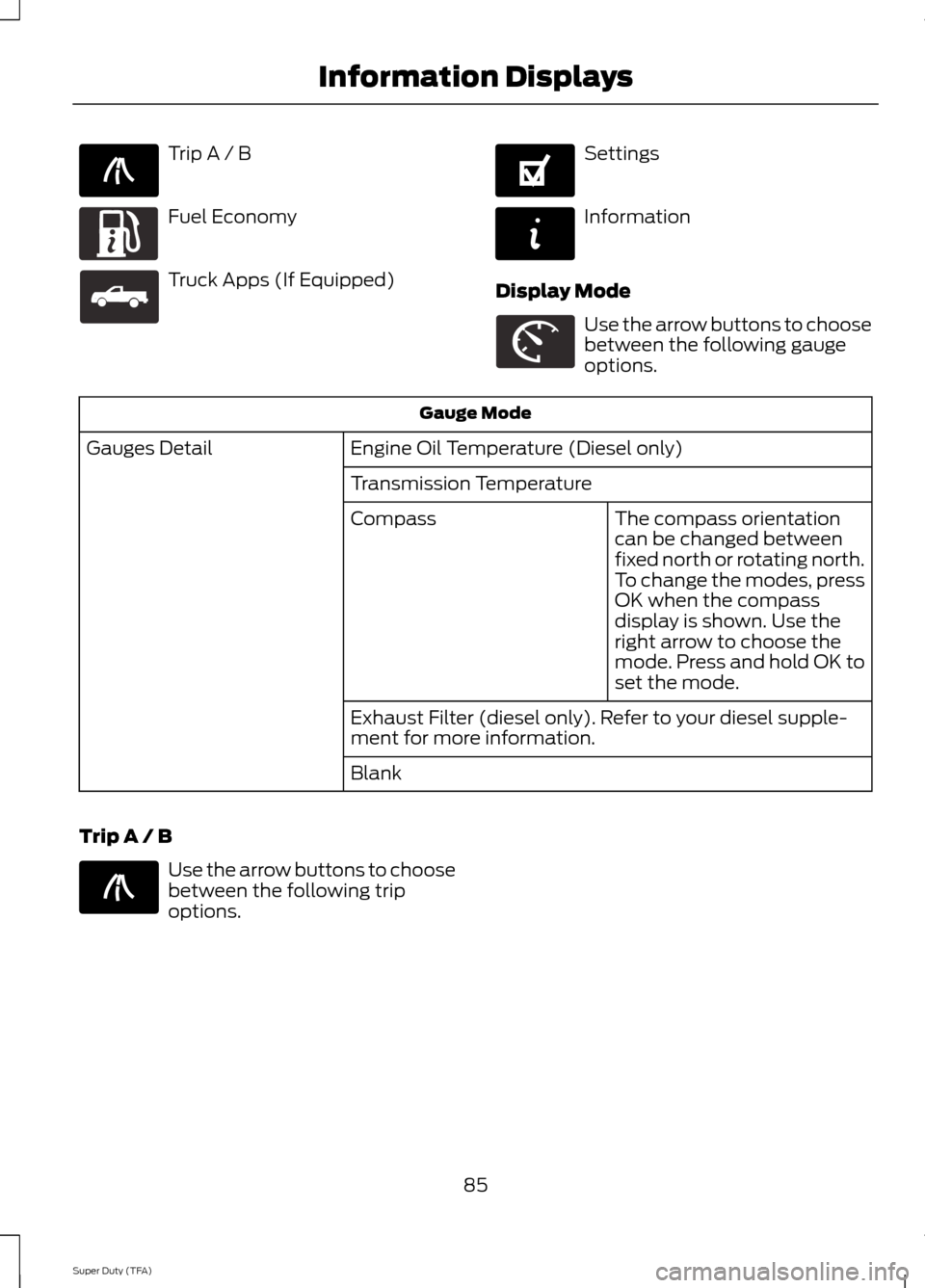
Trip A / B
Fuel Economy
Truck Apps (If Equipped) Settings
Information
Display Mode Use the arrow buttons to choose
between the following gauge
options.
Gauge Mode
Engine Oil Temperature (Diesel only)
Gauges Detail
Transmission TemperatureThe compass orientation
can be changed between
fixed north or rotating north.
To change the modes, press
OK when the compass
display is shown. Use the
right arrow to choose the
mode. Press and hold OK to
set the mode.
Compass
Exhaust Filter (diesel only). Refer to your diesel supple-
ment for more information.
Blank
Trip A / B Use the arrow buttons to choose
between the following trip
options.
85
Super Duty (TFA) Information DisplaysE138660 E163180 E163181 E144641 E144642 E163179 E138660
Page 92 of 458
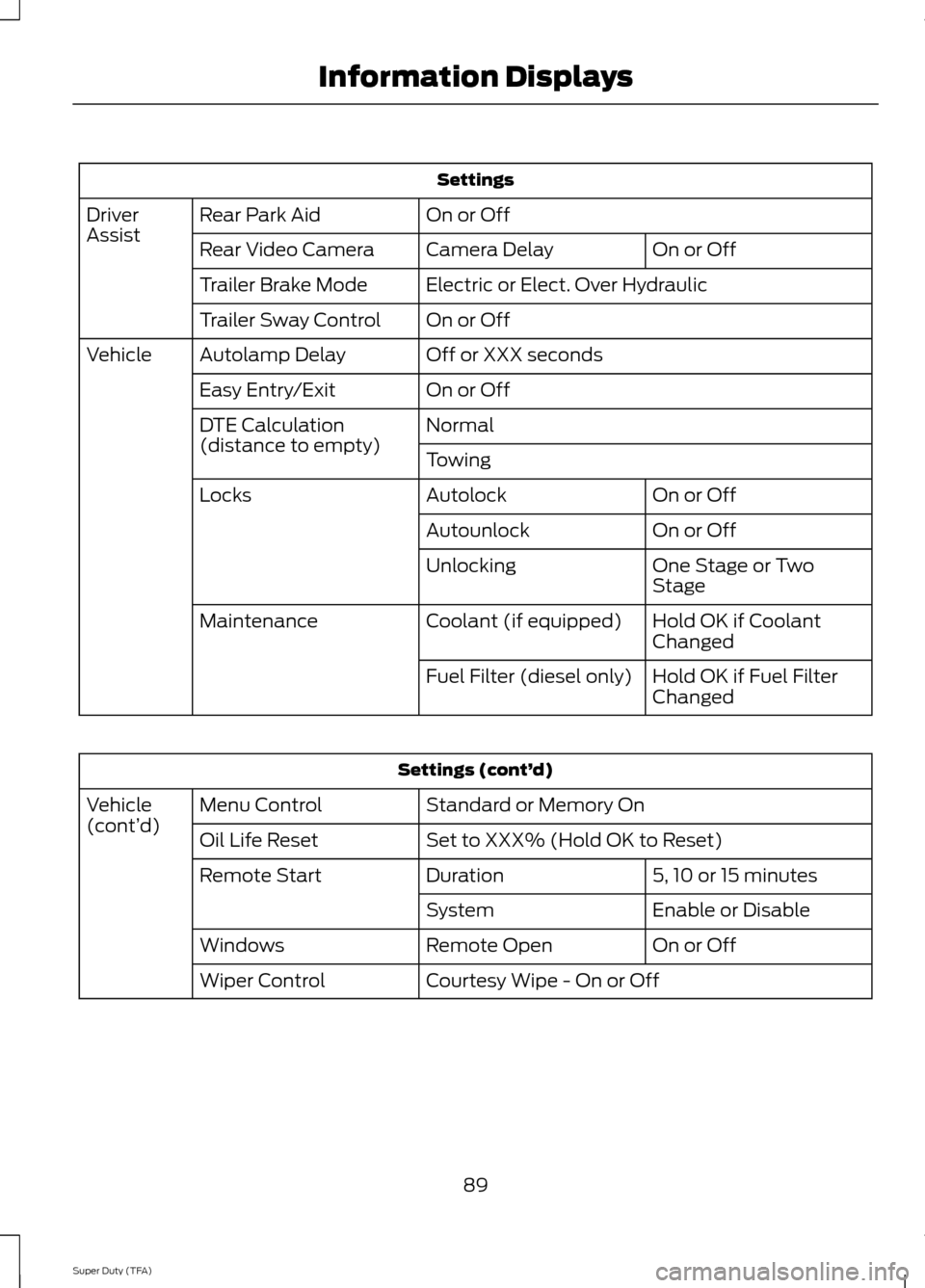
Settings
On or Off
Rear Park Aid
Driver
Assist
On or Off
Camera Delay
Rear Video Camera
Electric or Elect. Over Hydraulic
Trailer Brake Mode
On or Off
Trailer Sway Control
Off or XXX seconds
Autolamp Delay
Vehicle
On or Off
Easy Entry/Exit
Normal
DTE Calculation
(distance to empty)
Towing
On or Off
Autolock
Locks
On or Off
Autounlock
One Stage or Two
Stage
Unlocking
Hold OK if Coolant
Changed
Coolant (if equipped)
Maintenance
Hold OK if Fuel Filter
Changed
Fuel Filter (diesel only) Settings (cont’
d)
Standard or Memory On
Menu Control
Vehicle
(cont’ d)
Set to XXX% (Hold OK to Reset)
Oil Life Reset
5, 10 or 15 minutes
Duration
Remote Start
Enable or Disable
System
On or Off
Remote Open
Windows
Courtesy Wipe - On or Off
Wiper Control
89
Super Duty (TFA) Information Displays
Page 97 of 458
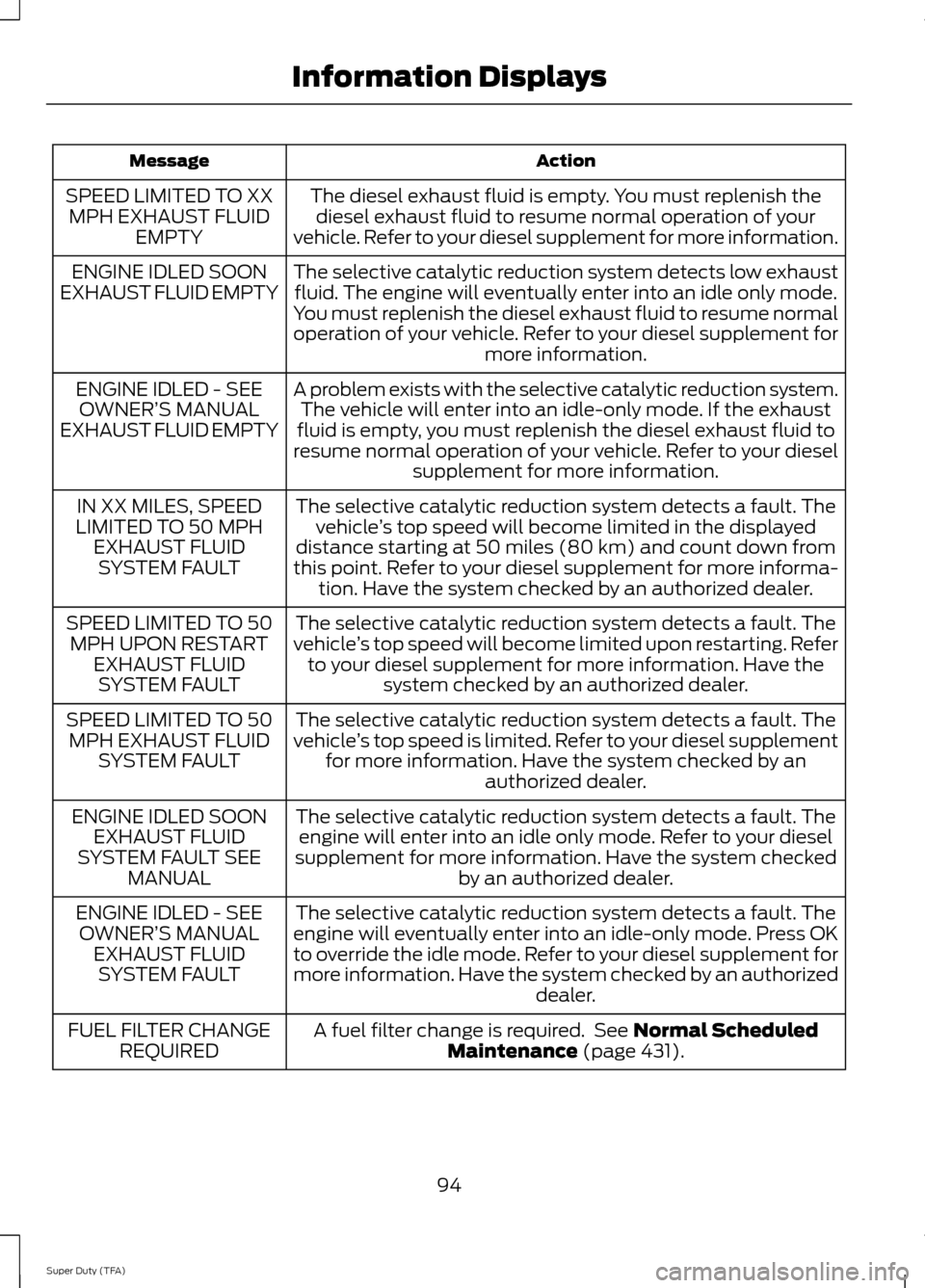
Action
Message
The diesel exhaust fluid is empty. You must replenish thediesel exhaust fluid to resume normal operation of your
vehicle. Refer to your diesel supplement for more information.
SPEED LIMITED TO XX
MPH EXHAUST FLUID EMPTY
The selective catalytic reduction system detects low exhaustfluid. The engine will eventually enter into an idle only mode.
You must replenish the diesel exhaust fluid to resume normal
operation of your vehicle. Refer to your diesel supplement for more information.
ENGINE IDLED SOON
EXHAUST FLUID EMPTY
A problem exists with the selective catalytic reduction system.The vehicle will enter into an idle-only mode. If the exhaust
fluid is empty, you must replenish the diesel exhaust fluid to
resume normal operation of your vehicle. Refer to your diesel supplement for more information.
ENGINE IDLED - SEE
OWNER’ S MANUAL
EXHAUST FLUID EMPTY
The selective catalytic reduction system detects a fault. Thevehicle ’s top speed will become limited in the displayed
distance starting at 50 miles (80 km) and count down from
this point. Refer to your diesel supplement for more informa- tion. Have the system checked by an authorized dealer.
IN XX MILES, SPEED
LIMITED TO 50 MPH EXHAUST FLUIDSYSTEM FAULT
The selective catalytic reduction system detects a fault. The
vehicle ’s top speed will become limited upon restarting. Refer
to your diesel supplement for more information. Have the system checked by an authorized dealer.
SPEED LIMITED TO 50
MPH UPON RESTART EXHAUST FLUIDSYSTEM FAULT
The selective catalytic reduction system detects a fault. The
vehicle ’s top speed is limited. Refer to your diesel supplement
for more information. Have the system checked by an authorized dealer.
SPEED LIMITED TO 50
MPH EXHAUST FLUID SYSTEM FAULT
The selective catalytic reduction system detects a fault. Theengine will enter into an idle only mode. Refer to your diesel
supplement for more information. Have the system checked by an authorized dealer.
ENGINE IDLED SOON
EXHAUST FLUID
SYSTEM FAULT SEE MANUAL
The selective catalytic reduction system detects a fault. The
engine will eventually enter into an idle-only mode. Press OK
to override the idle mode. Refer to your diesel supplement for
more information. Have the system checked by an authorized dealer.
ENGINE IDLED - SEE
OWNER’ S MANUAL
EXHAUST FLUID SYSTEM FAULT
A fuel filter change is required. See Normal Scheduled
Maintenance (page 431).
FUEL FILTER CHANGE
REQUIRED
94
Super Duty (TFA) Information Displays
Page 98 of 458
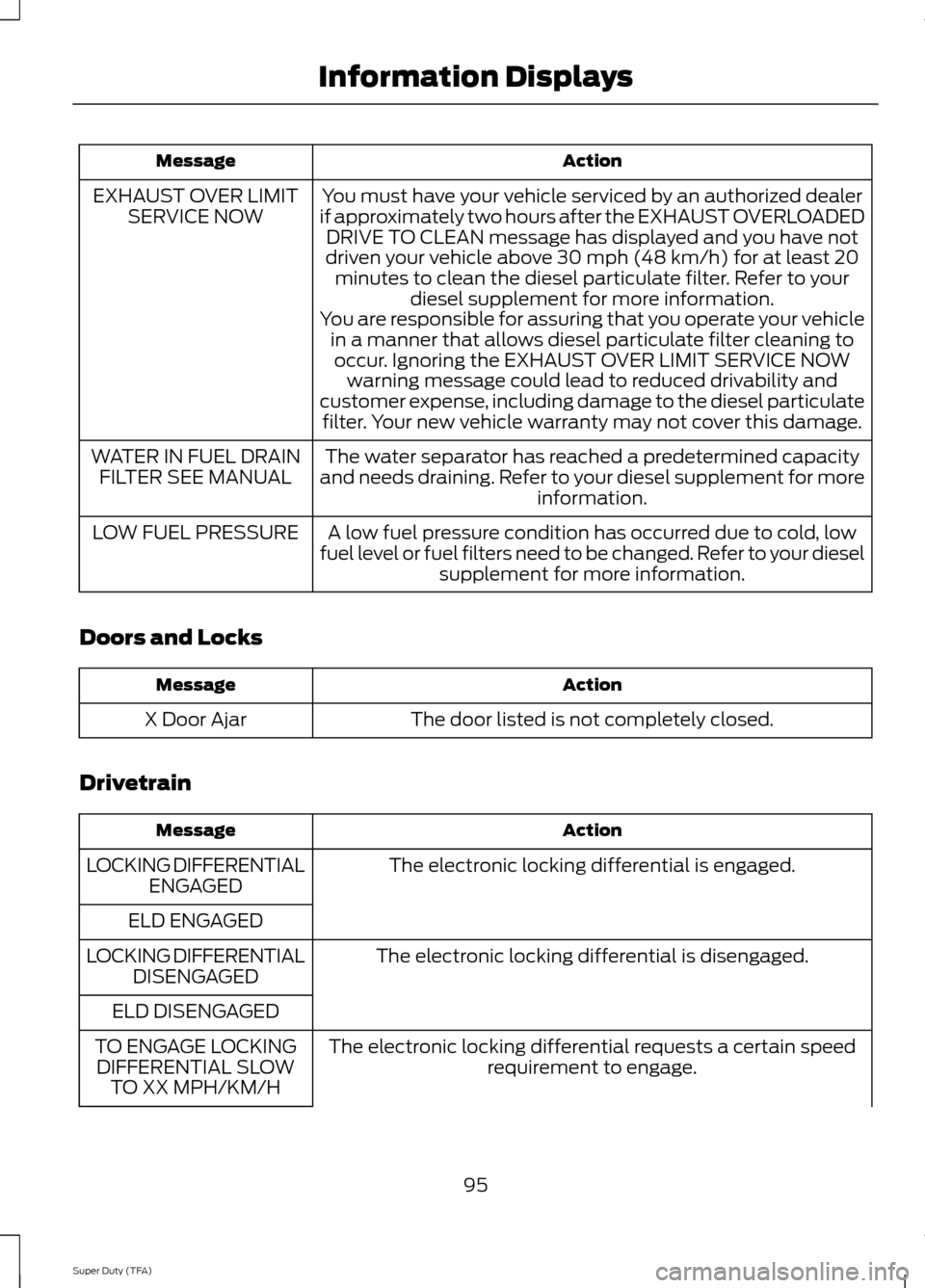
Action
Message
You must have your vehicle serviced by an authorized dealer
if approximately two hours after the EXHAUST OVERLOADED DRIVE TO CLEAN message has displayed and you have not
driven your vehicle above 30 mph (48 km/h) for at least 20 minutes to clean the diesel particulate filter. Refer to your diesel supplement for more information.
EXHAUST OVER LIMIT
SERVICE NOW
You are responsible for assuring that you operate your vehiclein a manner that allows diesel particulate filter cleaning tooccur. Ignoring the EXHAUST OVER LIMIT SERVICE NOW warning message could lead to reduced drivability and
customer expense, including damage to the diesel particulate filter. Your new vehicle warranty may not cover this damage.
The water separator has reached a predetermined capacity
and needs draining. Refer to your diesel supplement for more information.
WATER IN FUEL DRAIN
FILTER SEE MANUAL
A low fuel pressure condition has occurred due to cold, low
fuel level or fuel filters need to be changed. Refer to your diesel supplement for more information.
LOW FUEL PRESSURE
Doors and Locks Action
Message
The door listed is not completely closed.
X Door Ajar
Drivetrain Action
Message
The electronic locking differential is engaged.
LOCKING DIFFERENTIAL
ENGAGED
ELD ENGAGED The electronic locking differential is disengaged.
LOCKING DIFFERENTIAL
DISENGAGED
ELD DISENGAGED The electronic locking differential requests a certain speedrequirement to engage.
TO ENGAGE LOCKING
DIFFERENTIAL SLOW TO XX MPH/KM/H
95
Super Duty (TFA) Information Displays
Page 237 of 458
6. Recheck the fluid level in the reservoir.
Do not add fluid if the level is between
the MIN and MAX range.
7. If the fluid is low, add fluid in small amounts, continuously checking the
level until it is between the MIN and
MAX range. Refer to See Capacities
and Specifications (page 292). for the
proper fluid type. Be sure to put the cap
back on the reservoir.
WASHER FLUID CHECK WARNING
If you operate your vehicle in
temperatures below 40°F (5°C), use
washer fluid with antifreeze
protection. Failure to use washer fluid with
antifreeze protection in cold weather could
result in impaired windshield vision and
increase the risk of injury or accident. Add fluid to fill the reservoir if the level is
low. Only use a washer fluid that meets
Ford specifications. See
Capacities and
Specifications (page 292).
State or local regulations on volatile
organic compounds may restrict the use
of methanol, a common windshield washer
antifreeze additive. Washer fluids
containing non-methanol antifreeze
agents should be used only if they provide
cold weather protection without damaging
the vehicle ’s paint finish, wiper blades or
washer system.
FUEL FILTER
Your vehicle is equipped with a lifetime
fuel filter that is integrated with the fuel
tank. Regular maintenance or replacement
is not needed. CHANGING THE 12V BATTERY WARNINGS
This vehicle may be equipped with
more than one battery, removal of
cable from only one battery does not
disconnect the vehicle electrical system.
Be sure to disconnect cables from all
batteries when disconnecting power.
Failure to do so may cause serious
personal injury or property damage. Batteries normally produce explosive
gases which can cause personal
injury. Therefore, do not allow
flames, sparks or lighted substances to
come near the battery. When working near
the battery, always shield your face and
protect your eyes. Always provide proper
ventilation. When lifting a plastic-cased battery,
excessive pressure on the end walls
could cause acid to flow through the
vent caps, resulting in personal injury and
damage to the vehicle or battery. Lift the
battery with a battery carrier or with your
hands on opposite corners. Keep batteries out of reach of
children. Batteries contain sulfuric
acid. Avoid contact with skin, eyes or
clothing. Shield your eyes when working
near the battery to protect against possible
splashing of acid solution. In case of acid
contact with skin or eyes, flush
immediately with water for a minimum of
15 minutes and get prompt medical
attention. If acid is swallowed, call a
physician immediately. Note:
If your battery has a cover/shield,
make sure it is reinstalled after the battery
has been cleaned or replaced.
Note: Battery posts, terminals and related
accessories contain lead and lead
compounds. Wash hands after handling.
234
Super Duty (TFA) Maintenance
Page 255 of 458
•
Touch-up exposed or primed metal to
prevent rust.
• Cover chrome and stainless steel parts
with a thick coat of auto wax to prevent
discoloration. Re-wax as necessary
when your vehicle is washed.
• Lubricate all hood, door and trunk lid
hinges, and latches with a light grade
oil.
• Cover interior trim to prevent fading.
• Keep all rubber parts free from oil and
solvents.
Engine
• The engine oil and filter should be
changed prior to storage, as used
engine oil contain contaminates that
may cause engine damage.
• Start the engine every 15 days. Run at
fast idle until it reaches normal
operating temperature
• With your foot on the brake, shift
through all the gears while the engine
is running.
Fuel system
• Fill the fuel tank with high-quality fuel
until the first automatic shutoff of the
fuel pump nozzle.
Note: During extended periods of vehicle
storage (30 days or more), fuel may
deteriorate due to oxidation. Add a quality
gas stabilizer product to your vehicle's fuel
system whenever actual or expected
storage periods exceed 30 days. Follow the
instructions on the additive label. your
vehicle should then be operated at idle
speed to circulate the additive throughout
the fuel system. Cooling system
•
Protect against freezing temperatures.
• When removing your vehicle from
storage, check coolant fluid level.
Confirm there are no cooling system
leaks, and fluid is at the recommended
level.
Battery
• Check and recharge as necessary. Keep
connections clean.
• If storing your vehicle for more than 30
days without recharging the battery, it
may be advisable to disconnect the
battery cables to ensure battery charge
is maintained for quick starting.
Note: If battery cables are disconnected, it
will be necessary to reset memory features.
Brakes
• Make sure brakes and parking brake
are fully released.
Tires
• Maintain recommended air pressure.
Miscellaneous
• Make sure all linkages, cables, levers
and pins under your vehicle are covered
with grease to prevent rust.
• Move vehicles at least 25 feet (8
meters) every 15 days to lubricate
working parts and prevent corrosion.
Removing Vehicle From Storage
When your vehicle is ready to come out of
storage, do the following:
• Wash your vehicle to remove any dirt
or grease film build-up on window
surfaces.
• Check windshield wipers for any
deterioration.
252
Super Duty (TFA) Vehicle Care