lock FORD SUPER DUTY 2015 3.G Owners Manual
[x] Cancel search | Manufacturer: FORD, Model Year: 2015, Model line: SUPER DUTY, Model: FORD SUPER DUTY 2015 3.GPages: 470, PDF Size: 18.24 MB
Page 294 of 470
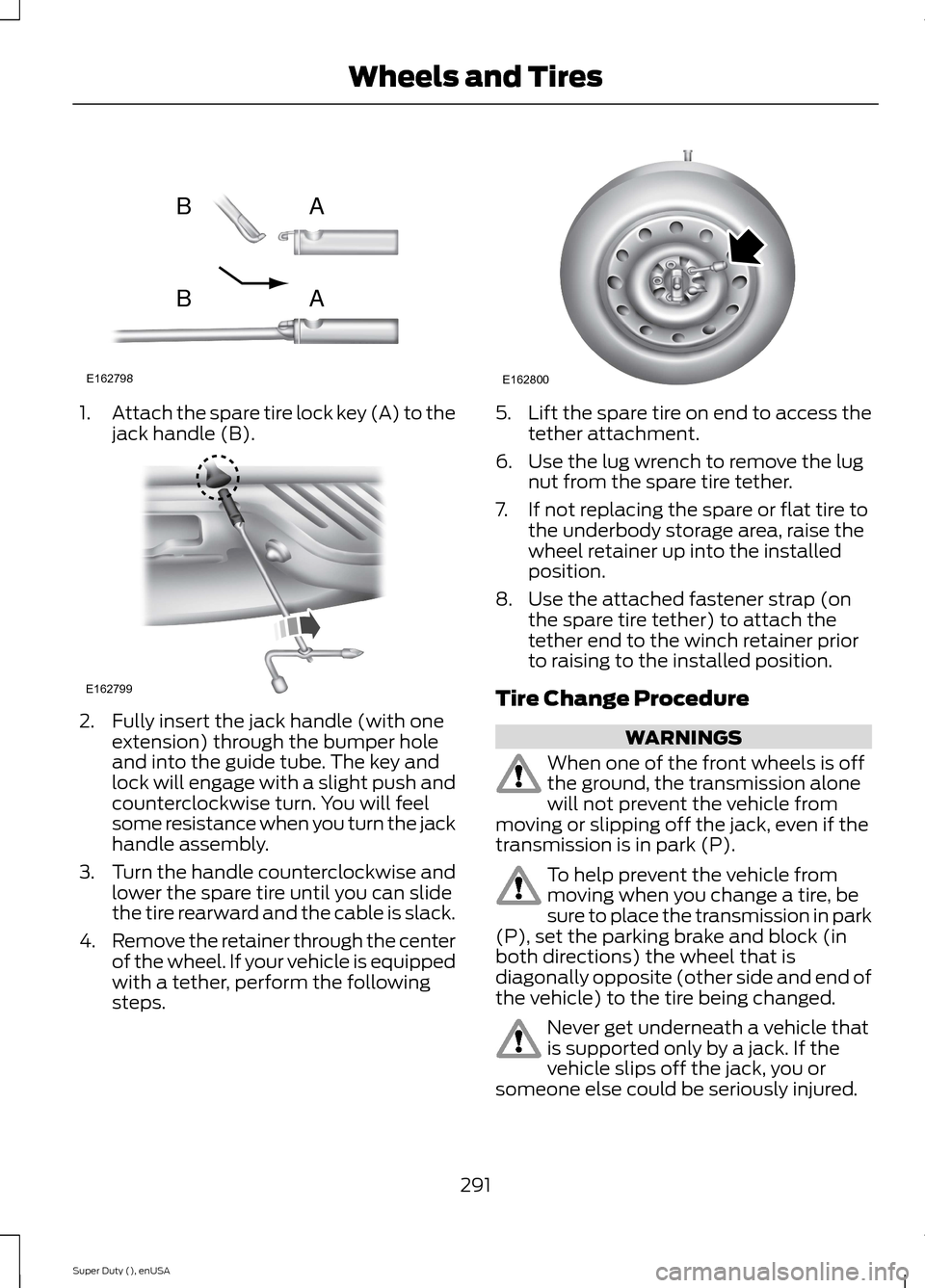
1.Attach the spare tire lock key (A) to thejack handle (B).
2.Fully insert the jack handle (with oneextension) through the bumper holeand into the guide tube. The key andlock will engage with a slight push andcounterclockwise turn. You will feelsome resistance when you turn the jackhandle assembly.
3.Turn the handle counterclockwise andlower the spare tire until you can slidethe tire rearward and the cable is slack.
4.Remove the retainer through the centerof the wheel. If your vehicle is equippedwith a tether, perform the followingsteps.
5.Lift the spare tire on end to access thetether attachment.
6.Use the lug wrench to remove the lugnut from the spare tire tether.
7.If not replacing the spare or flat tire tothe underbody storage area, raise thewheel retainer up into the installedposition.
8.Use the attached fastener strap (onthe spare tire tether) to attach thetether end to the winch retainer priorto raising to the installed position.
Tire Change Procedure
WARNINGS
When one of the front wheels is offthe ground, the transmission alonewill not prevent the vehicle frommoving or slipping off the jack, even if thetransmission is in park (P).
To help prevent the vehicle frommoving when you change a tire, besure to place the transmission in park(P), set the parking brake and block (inboth directions) the wheel that isdiagonally opposite (other side and end ofthe vehicle) to the tire being changed.
Never get underneath a vehicle thatis supported only by a jack. If thevehicle slips off the jack, you orsomeone else could be seriously injured.
291Super Duty (), enUSAWheels and TiresE162798ABAB E162799 E162800
Page 295 of 470
WARNINGS
Do not attempt to change a tire onthe side of the vehicle close tomoving traffic. Pull far enough off theroad to avoid the danger of being hit whenoperating the jack or changing the wheel.
Always use the jack provided asoriginal equipment with your vehicle.If using a jack other than the oneprovided as original equipment with yourvehicle, make sure the jack capacity isadequate for the vehicle weight, includingany vehicle cargo or modifications.
Note:Passengers should not remain in thevehicle when the vehicle is being jacked.
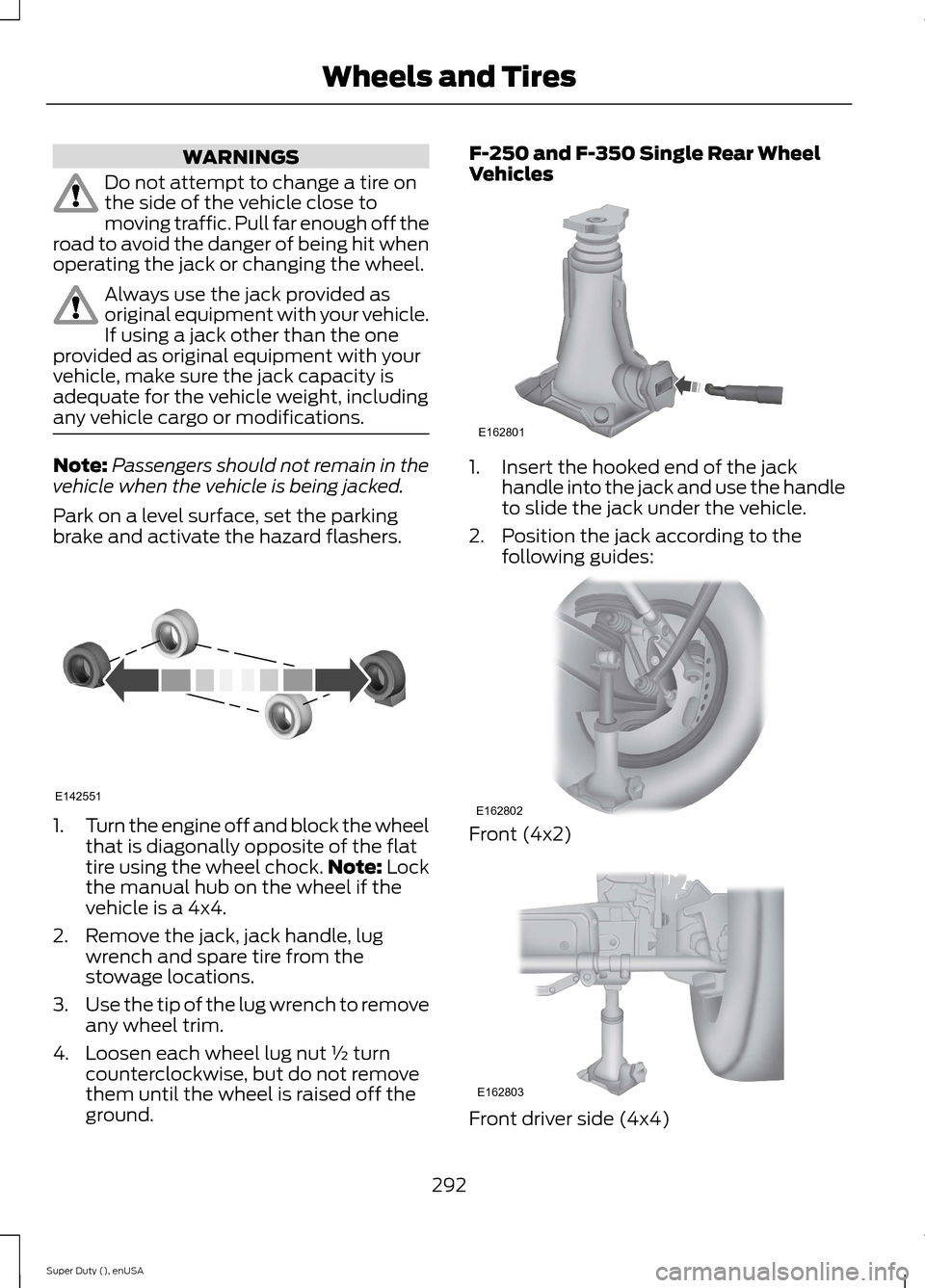
Park on a level surface, set the parkingbrake and activate the hazard flashers.
1.Turn the engine off and block the wheelthat is diagonally opposite of the flattire using the wheel chock.Note: Lockthe manual hub on the wheel if thevehicle is a 4x4.
2.Remove the jack, jack handle, lugwrench and spare tire from thestowage locations.
3.Use the tip of the lug wrench to removeany wheel trim.
4.Loosen each wheel lug nut ½ turncounterclockwise, but do not removethem until the wheel is raised off theground.
F-250 and F-350 Single Rear WheelVehicles
1.Insert the hooked end of the jackhandle into the jack and use the handleto slide the jack under the vehicle.
2.Position the jack according to thefollowing guides:
Front (4x2)
Front driver side (4x4)
292Super Duty (), enUSAWheels and TiresE142551 E162801 E162802 E162803
Page 296 of 470
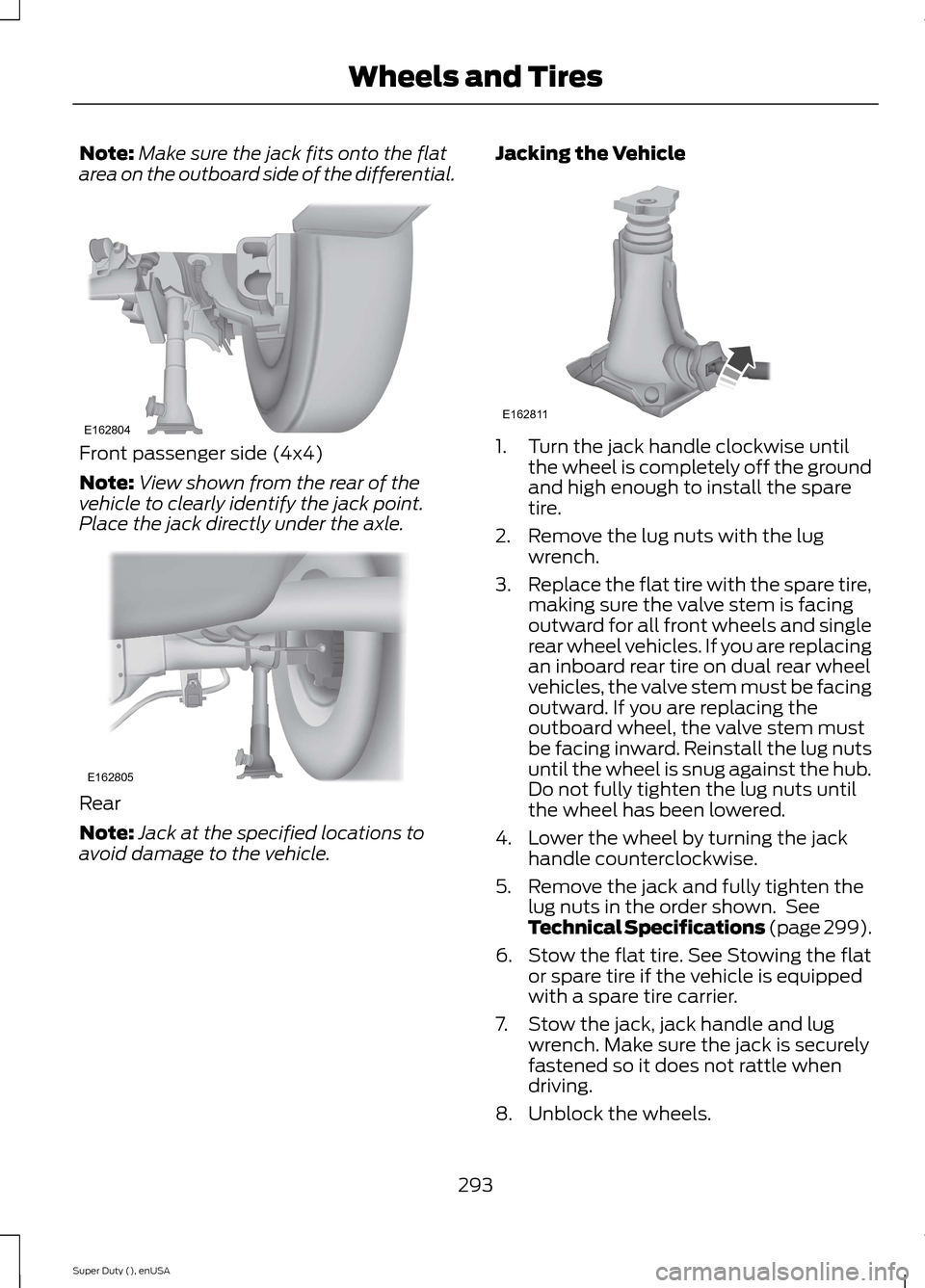
Note:Make sure the jack fits onto the flatarea on the outboard side of the differential.
Front passenger side (4x4)
Note:View shown from the rear of thevehicle to clearly identify the jack point.Place the jack directly under the axle.
Rear
Note:Jack at the specified locations toavoid damage to the vehicle.
Jacking the Vehicle
1.Turn the jack handle clockwise untilthe wheel is completely off the groundand high enough to install the sparetire.
2.Remove the lug nuts with the lugwrench.
3.Replace the flat tire with the spare tire,making sure the valve stem is facingoutward for all front wheels and singlerear wheel vehicles. If you are replacingan inboard rear tire on dual rear wheelvehicles, the valve stem must be facingoutward. If you are replacing theoutboard wheel, the valve stem mustbe facing inward. Reinstall the lug nutsuntil the wheel is snug against the hub.Do not fully tighten the lug nuts untilthe wheel has been lowered.
4.Lower the wheel by turning the jackhandle counterclockwise.
5.Remove the jack and fully tighten thelug nuts in the order shown. SeeTechnical Specifications (page 299).
6.Stow the flat tire. See Stowing the flator spare tire if the vehicle is equippedwith a spare tire carrier.
7.Stow the jack, jack handle and lugwrench. Make sure the jack is securelyfastened so it does not rattle whendriving.
8.Unblock the wheels.
293Super Duty (), enUSAWheels and TiresE162804 E162805 E162811
Page 297 of 470
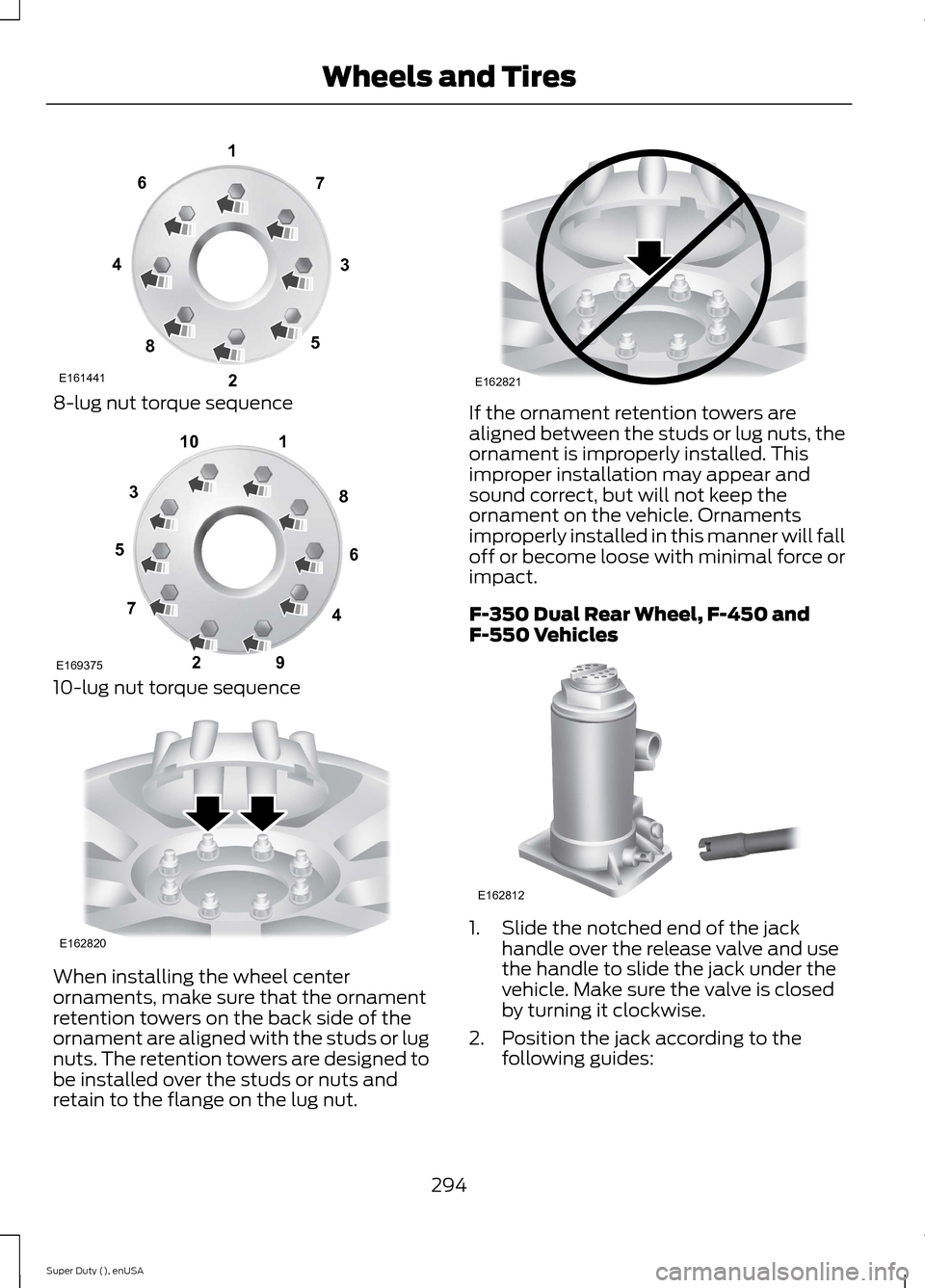
8-lug nut torque sequence
10-lug nut torque sequence
When installing the wheel centerornaments, make sure that the ornamentretention towers on the back side of theornament are aligned with the studs or lugnuts. The retention towers are designed tobe installed over the studs or nuts andretain to the flange on the lug nut.
If the ornament retention towers arealigned between the studs or lug nuts, theornament is improperly installed. Thisimproper installation may appear andsound correct, but will not keep theornament on the vehicle. Ornamentsimproperly installed in this manner will falloff or become loose with minimal force orimpact.
F-350 Dual Rear Wheel, F-450 andF-550 Vehicles
1.Slide the notched end of the jackhandle over the release valve and usethe handle to slide the jack under thevehicle. Make sure the valve is closedby turning it clockwise.
2.Position the jack according to thefollowing guides:
294Super Duty (), enUSAWheels and TiresE16144113427658 12345678910E169375 E162820 E162821 E162812
Page 299 of 470
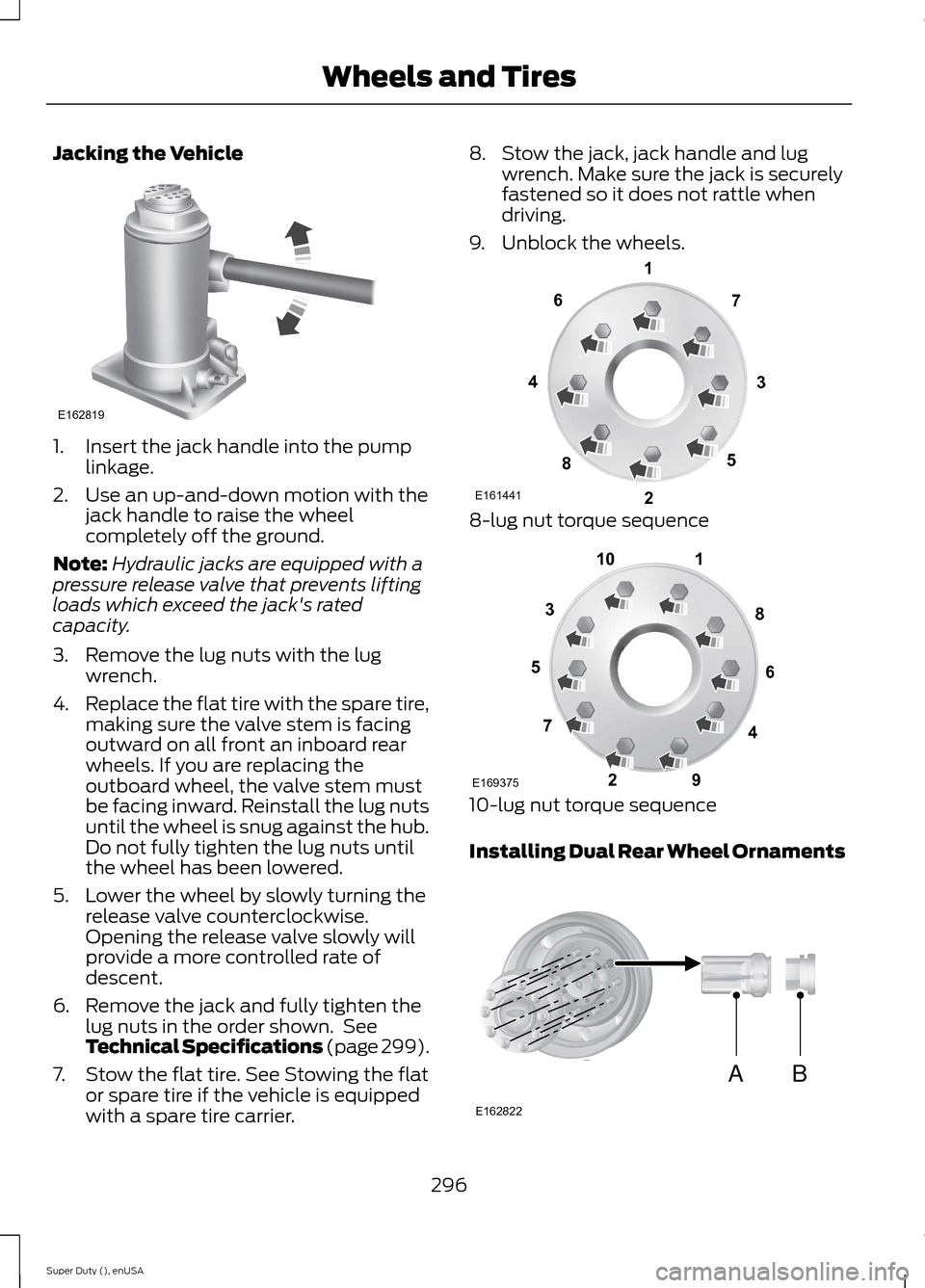
Jacking the Vehicle
1.Insert the jack handle into the pumplinkage.
2.Use an up-and-down motion with thejack handle to raise the wheelcompletely off the ground.
Note:Hydraulic jacks are equipped with apressure release valve that prevents liftingloads which exceed the jack's ratedcapacity.
3.Remove the lug nuts with the lugwrench.
4.Replace the flat tire with the spare tire,making sure the valve stem is facingoutward on all front an inboard rearwheels. If you are replacing theoutboard wheel, the valve stem mustbe facing inward. Reinstall the lug nutsuntil the wheel is snug against the hub.Do not fully tighten the lug nuts untilthe wheel has been lowered.
5.Lower the wheel by slowly turning therelease valve counterclockwise.Opening the release valve slowly willprovide a more controlled rate ofdescent.
6.Remove the jack and fully tighten thelug nuts in the order shown. SeeTechnical Specifications (page 299).
7.Stow the flat tire. See Stowing the flator spare tire if the vehicle is equippedwith a spare tire carrier.
8.Stow the jack, jack handle and lugwrench. Make sure the jack is securelyfastened so it does not rattle whendriving.
9.Unblock the wheels.
8-lug nut torque sequence
10-lug nut torque sequence
Installing Dual Rear Wheel Ornaments
296Super Duty (), enUSAWheels and TiresE162819 E16144113427658 12345678910E169375 ABE162822
Page 301 of 470
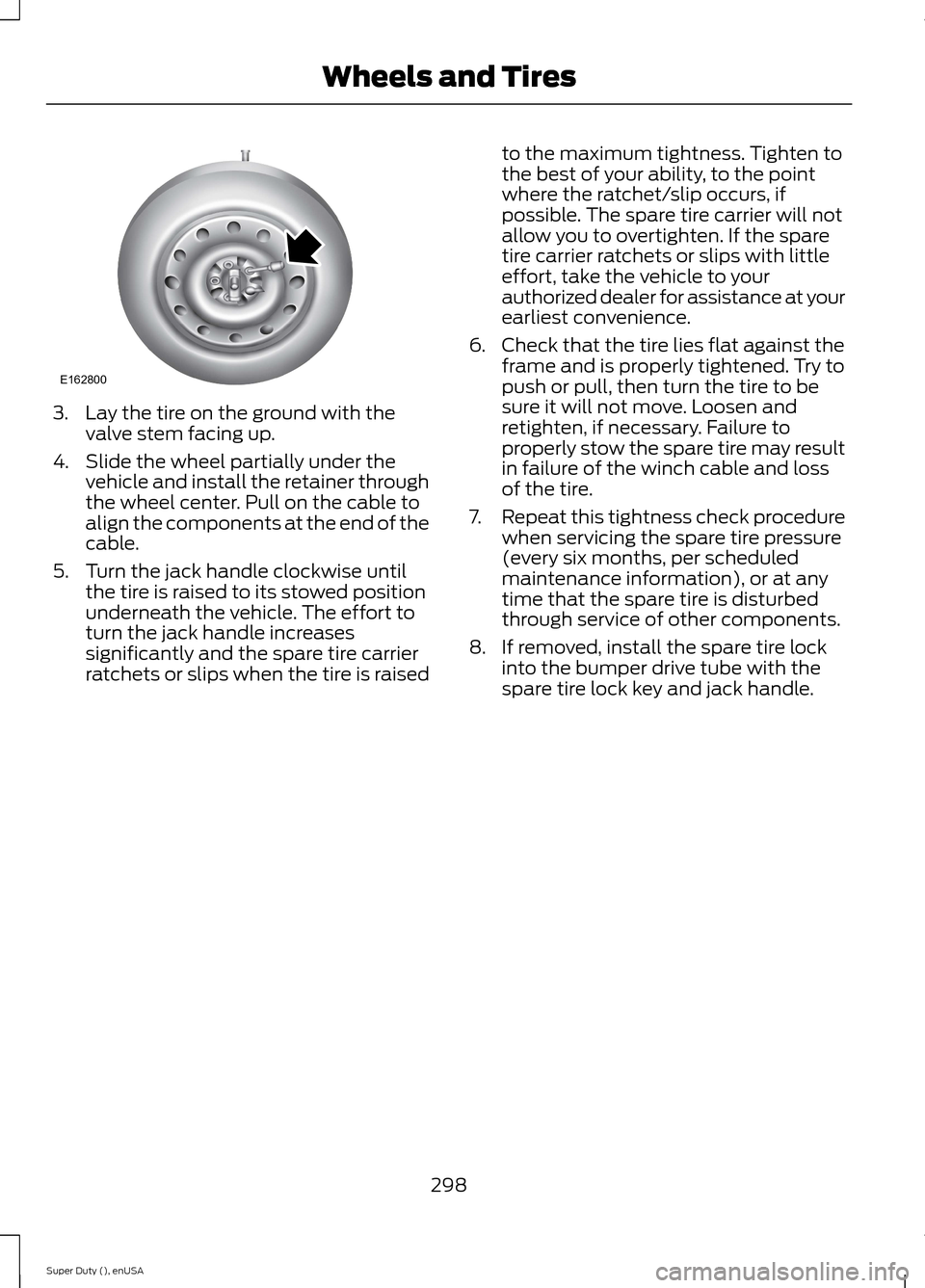
3.Lay the tire on the ground with thevalve stem facing up.
4.Slide the wheel partially under thevehicle and install the retainer throughthe wheel center. Pull on the cable toalign the components at the end of thecable.
5.Turn the jack handle clockwise untilthe tire is raised to its stowed positionunderneath the vehicle. The effort toturn the jack handle increasessignificantly and the spare tire carrierratchets or slips when the tire is raised
to the maximum tightness. Tighten tothe best of your ability, to the pointwhere the ratchet/slip occurs, ifpossible. The spare tire carrier will notallow you to overtighten. If the sparetire carrier ratchets or slips with littleeffort, take the vehicle to yourauthorized dealer for assistance at yourearliest convenience.
6.Check that the tire lies flat against theframe and is properly tightened. Try topush or pull, then turn the tire to besure it will not move. Loosen andretighten, if necessary. Failure toproperly stow the spare tire may resultin failure of the winch cable and lossof the tire.
7.Repeat this tightness check procedurewhen servicing the spare tire pressure(every six months, per scheduledmaintenance information), or at anytime that the spare tire is disturbedthrough service of other components.
8.If removed, install the spare tire lockinto the bumper drive tube with thespare tire lock key and jack handle.
298Super Duty (), enUSAWheels and TiresE162800
Page 309 of 470
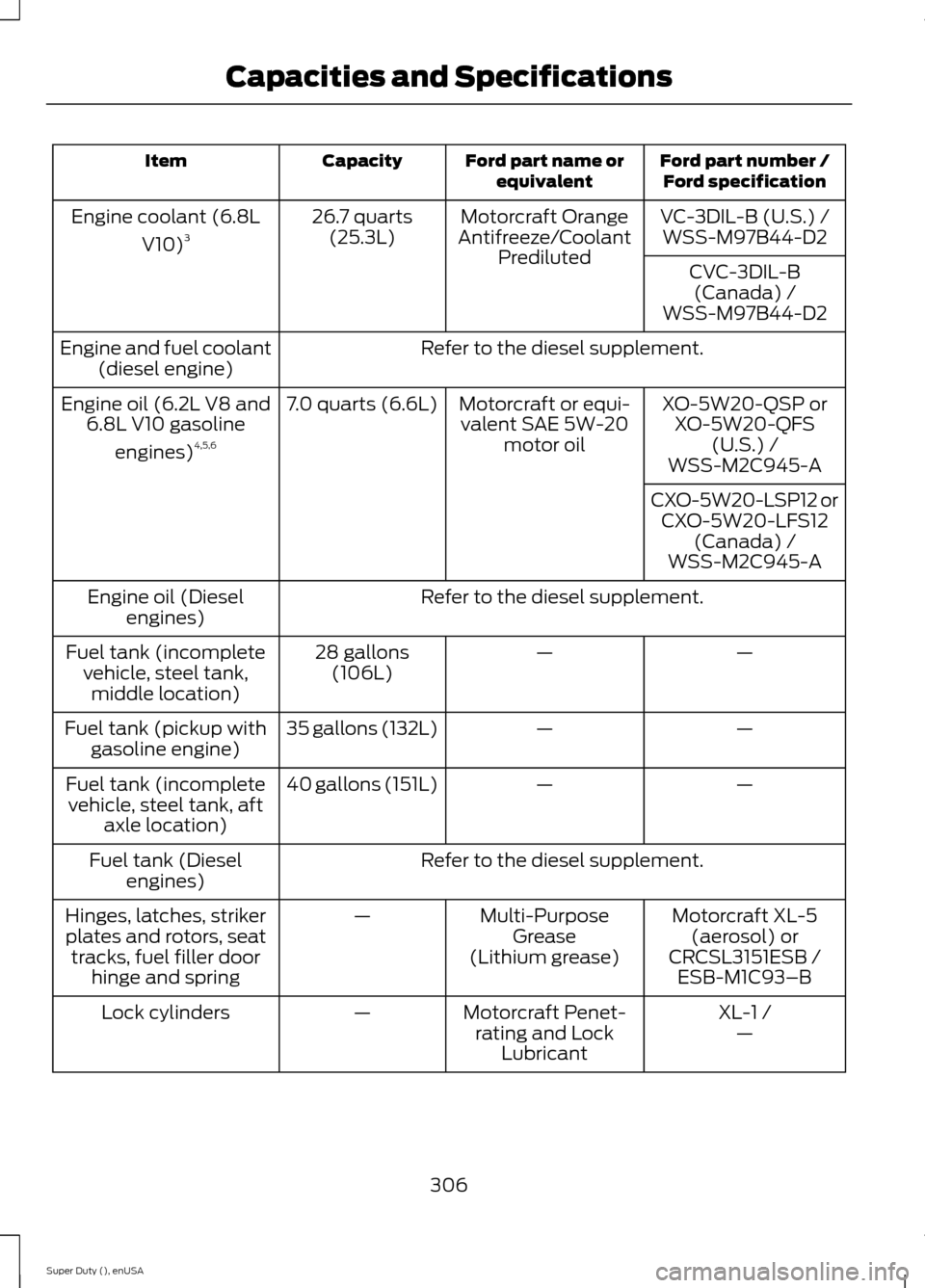
Ford part number /Ford specificationFord part name orequivalentCapacityItem
VC-3DIL-B (U.S.) /Motorcraft OrangeAntifreeze/CoolantPrediluted
26.7 quarts(25.3L)Engine coolant (6.8L
V10)3WSS-M97B44-D2
CVC-3DIL-B(Canada) /WSS-M97B44-D2
Refer to the diesel supplement.Engine and fuel coolant(diesel engine)
XO-5W20-QSP orXO-5W20-QFS(U.S.) /
Motorcraft or equi-valent SAE 5W-20motor oil
7.0 quarts (6.6L)Engine oil (6.2L V8 and6.8L V10 gasoline
engines)4,5,6WSS-M2C945-A
CXO-5W20-LSP12 orCXO-5W20-LFS12(Canada) /WSS-M2C945-A
Refer to the diesel supplement.Engine oil (Dieselengines)
——28 gallons(106L)Fuel tank (incompletevehicle, steel tank,middle location)
——35 gallons (132L)Fuel tank (pickup withgasoline engine)
——40 gallons (151L)Fuel tank (incompletevehicle, steel tank, aftaxle location)
Refer to the diesel supplement.Fuel tank (Dieselengines)
Motorcraft XL-5(aerosol) orCRCSL3151ESB /
Multi-PurposeGrease(Lithium grease)
—Hinges, latches, strikerplates and rotors, seattracks, fuel filler doorhinge and springESB-M1C93–B
XL-1 /Motorcraft Penet-rating and LockLubricant
—Lock cylinders—
306Super Duty (), enUSACapacities and Specifications
Page 315 of 470
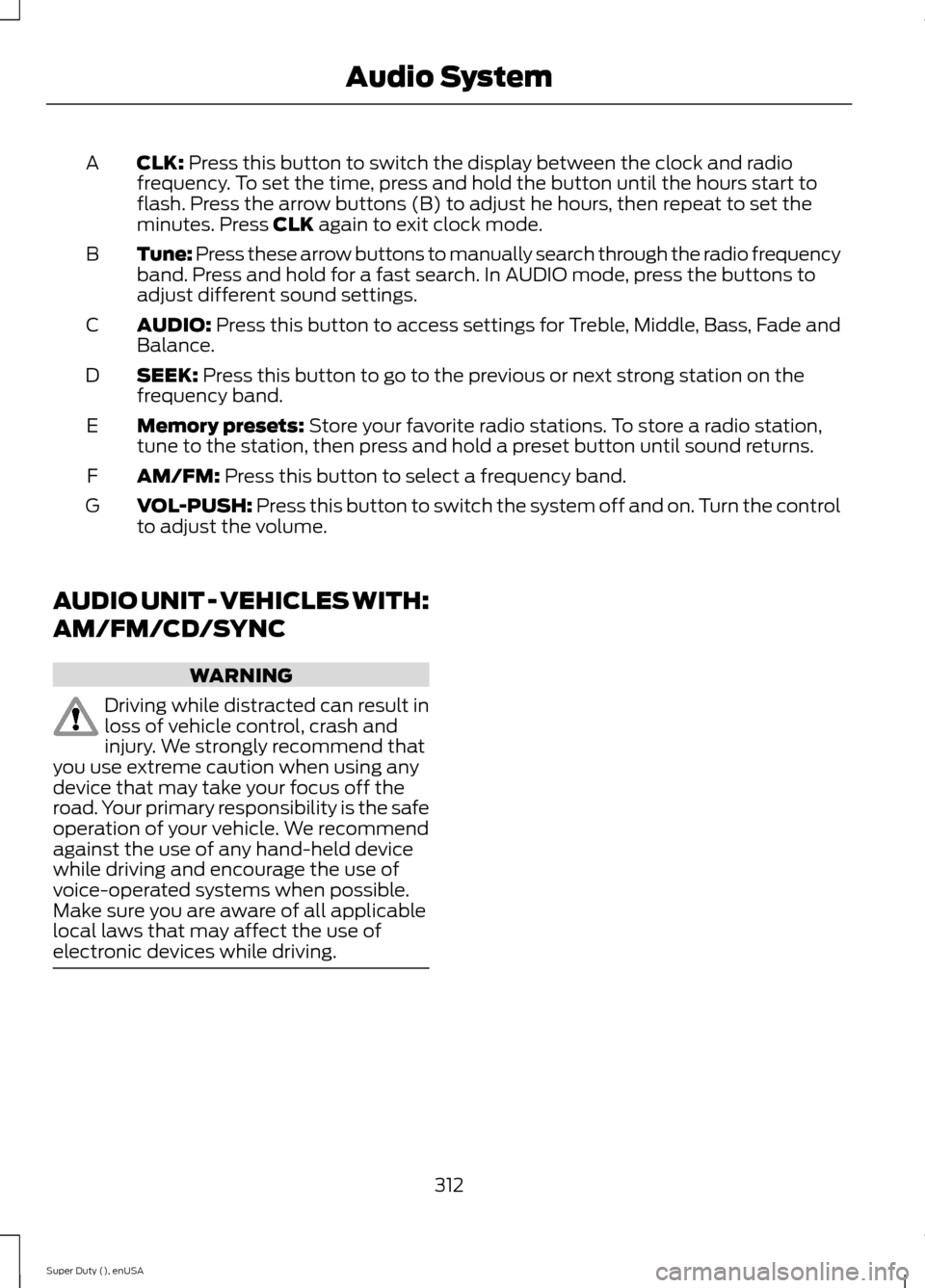
CLK: Press this button to switch the display between the clock and radiofrequency. To set the time, press and hold the button until the hours start toflash. Press the arrow buttons (B) to adjust he hours, then repeat to set theminutes. Press CLK again to exit clock mode.
A
Tune: Press these arrow buttons to manually search through the radio frequencyband. Press and hold for a fast search. In AUDIO mode, press the buttons toadjust different sound settings.
B
AUDIO: Press this button to access settings for Treble, Middle, Bass, Fade andBalance.C
SEEK: Press this button to go to the previous or next strong station on thefrequency band.D
Memory presets: Store your favorite radio stations. To store a radio station,tune to the station, then press and hold a preset button until sound returns.E
AM/FM: Press this button to select a frequency band.F
VOL-PUSH: Press this button to switch the system off and on. Turn the controlto adjust the volume.G
AUDIO UNIT - VEHICLES WITH:
AM/FM/CD/SYNC
WARNING
Driving while distracted can result inloss of vehicle control, crash andinjury. We strongly recommend thatyou use extreme caution when using anydevice that may take your focus off theroad. Your primary responsibility is the safeoperation of your vehicle. We recommendagainst the use of any hand-held devicewhile driving and encourage the use ofvoice-operated systems when possible.Make sure you are aware of all applicablelocal laws that may affect the use ofelectronic devices while driving.
312Super Duty (), enUSAAudio System
Page 323 of 470
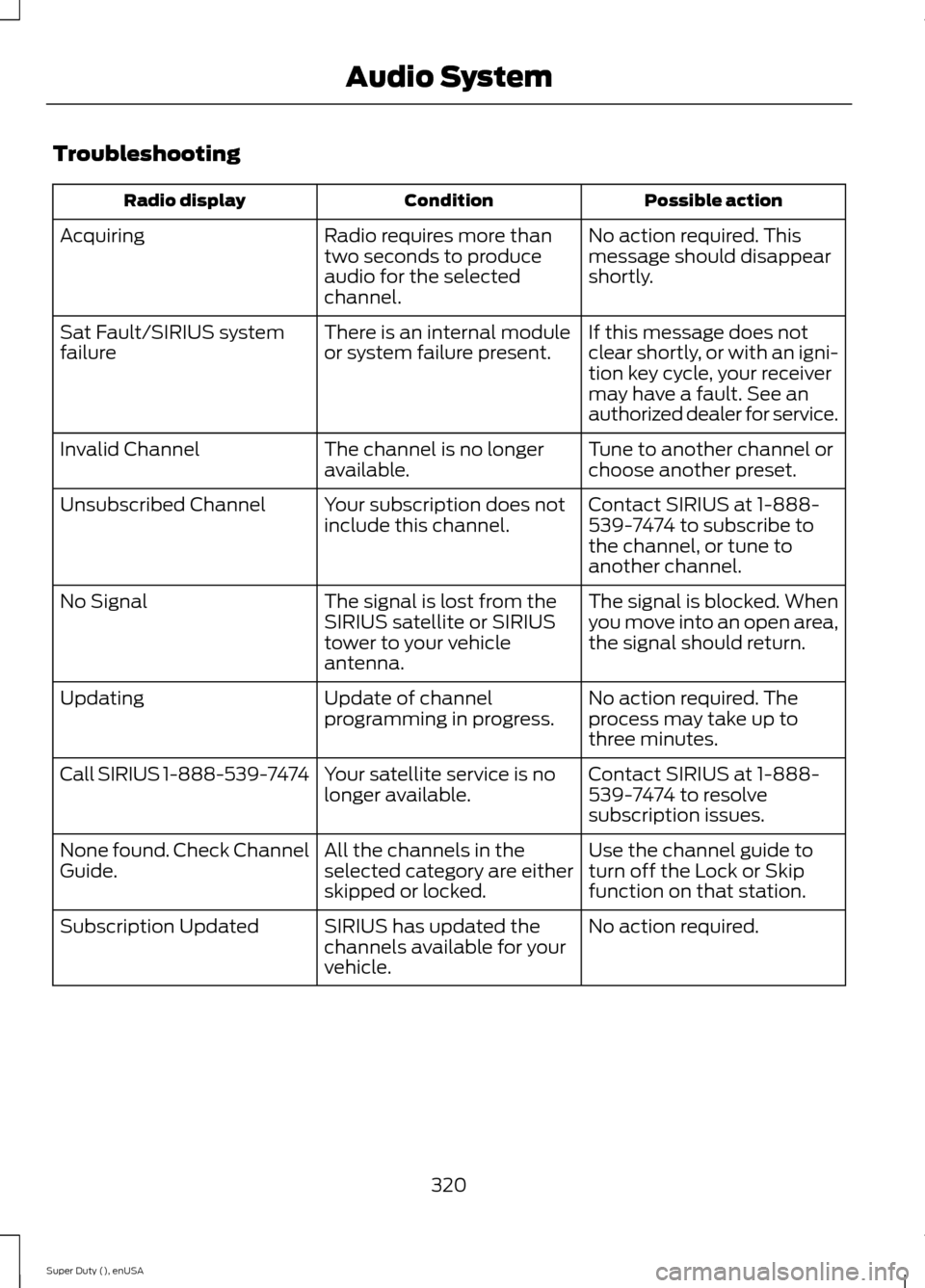
Troubleshooting
Possible actionConditionRadio display
No action required. Thismessage should disappearshortly.
Radio requires more thantwo seconds to produceaudio for the selectedchannel.
Acquiring
If this message does notclear shortly, or with an igni-tion key cycle, your receivermay have a fault. See anauthorized dealer for service.
There is an internal moduleor system failure present.Sat Fault/SIRIUS systemfailure
Tune to another channel orchoose another preset.The channel is no longeravailable.Invalid Channel
Contact SIRIUS at 1-888-539-7474 to subscribe tothe channel, or tune toanother channel.
Your subscription does notinclude this channel.Unsubscribed Channel
The signal is blocked. Whenyou move into an open area,the signal should return.
The signal is lost from theSIRIUS satellite or SIRIUStower to your vehicleantenna.
No Signal
No action required. Theprocess may take up tothree minutes.
Update of channelprogramming in progress.Updating
Contact SIRIUS at 1-888-539-7474 to resolvesubscription issues.
Your satellite service is nolonger available.Call SIRIUS 1-888-539-7474
Use the channel guide toturn off the Lock or Skipfunction on that station.
All the channels in theselected category are eitherskipped or locked.
None found. Check ChannelGuide.
No action required.SIRIUS has updated thechannels available for yourvehicle.
Subscription Updated
320Super Duty (), enUSAAudio System
Page 343 of 470
911 Assist May Not Work If
•Your cellular phone or 911 Assisthardware sustains damage in a crash.
•The vehicle's battery or the SYNCsystem has no power.
•The phone(s) thrown from your vehicleare the ones paired and connected tothe system.
911 Assist Privacy Notice
When you turn on 911 Assist, it maydisclose to emergency services that yourvehicle has been in a crash involving thedeployment of an airbag or activation ofthe fuel pump shut-off. Certain versions orupdates to 911 Assist may also be capableof electronically or verbally disclosing to911 operators your vehicle location or otherdetails about your vehicle or crash to assist911 operators to provide the mostappropriate emergency services. If you donot want to disclose this information, donot turn the feature on.
Vehicle Health Report
WARNING
Always follow scheduledmaintenance instructions, regularlyinspect your vehicle, and seek repairfor any damage or problem you suspect.Vehicle Health Report supplements, butcannot replace, normal maintenance andvehicle inspection. Vehicle Health Reportonly monitors certain systemselectronically monitored by your vehicleand will not monitor or report the statusof any other system, (such as brake liningwear). Failure to perform scheduledmaintenance and regularly inspect yourvehicle may result in vehicle damage andserious injury.
Note:This feature is only available in theUnited States.
Note:Your Vehicle Health Report featurerequires activation before use. Visitwww.SYNCMyRide.com to register. Thereis no fee or subscription associated withVehicle Health Report, but you must registerto use this feature.
Note:This feature may not functionproperly if you have enabled caller IDblocking on your cellular phone. Beforerunning a report, review the Vehicle HealthReport Privacy Notice.
Note:In order to allow a break-in period foryour vehicle, you may not be able to createa Vehicle Health Report until your vehicleodometer has reached 200 miles.
Note:Cellular phone and SMS charges mayapply when making a report.
Register for Vehicle Health Report and setyour report preferences atwww.SYNCMyRide.com. After registering,you can request a Vehicle Health Report(inside your vehicle). Return to youraccount at www.SYNCMyRide.com to viewyour report. You can also choose for SYNCto remind you automatically to run reportsat specific mileage intervals.
The system allows you to check yourvehicle's overall health in the form of adiagnostic report card. The vehicle healthreport contains valuable information suchas:
•Vehicle diagnostic information
•Scheduled maintenance
•Open recalls and Field Service Actions
•Items noted during vehicle inspectionsby an authorized dealer that still needservicing.
You can run a report (after your vehicle hasbeen running a minimum of 60 seconds)by pressing the voice button and saying"Vehicle health report", or pressing thephone button.
To run a report using the phone button:
340Super Duty (), enUSASYNC™ (If Equipped)