audio FORD SUPER DUTY 2015 3.G User Guide
[x] Cancel search | Manufacturer: FORD, Model Year: 2015, Model line: SUPER DUTY, Model: FORD SUPER DUTY 2015 3.GPages: 470, PDF Size: 18.24 MB
Page 316 of 470
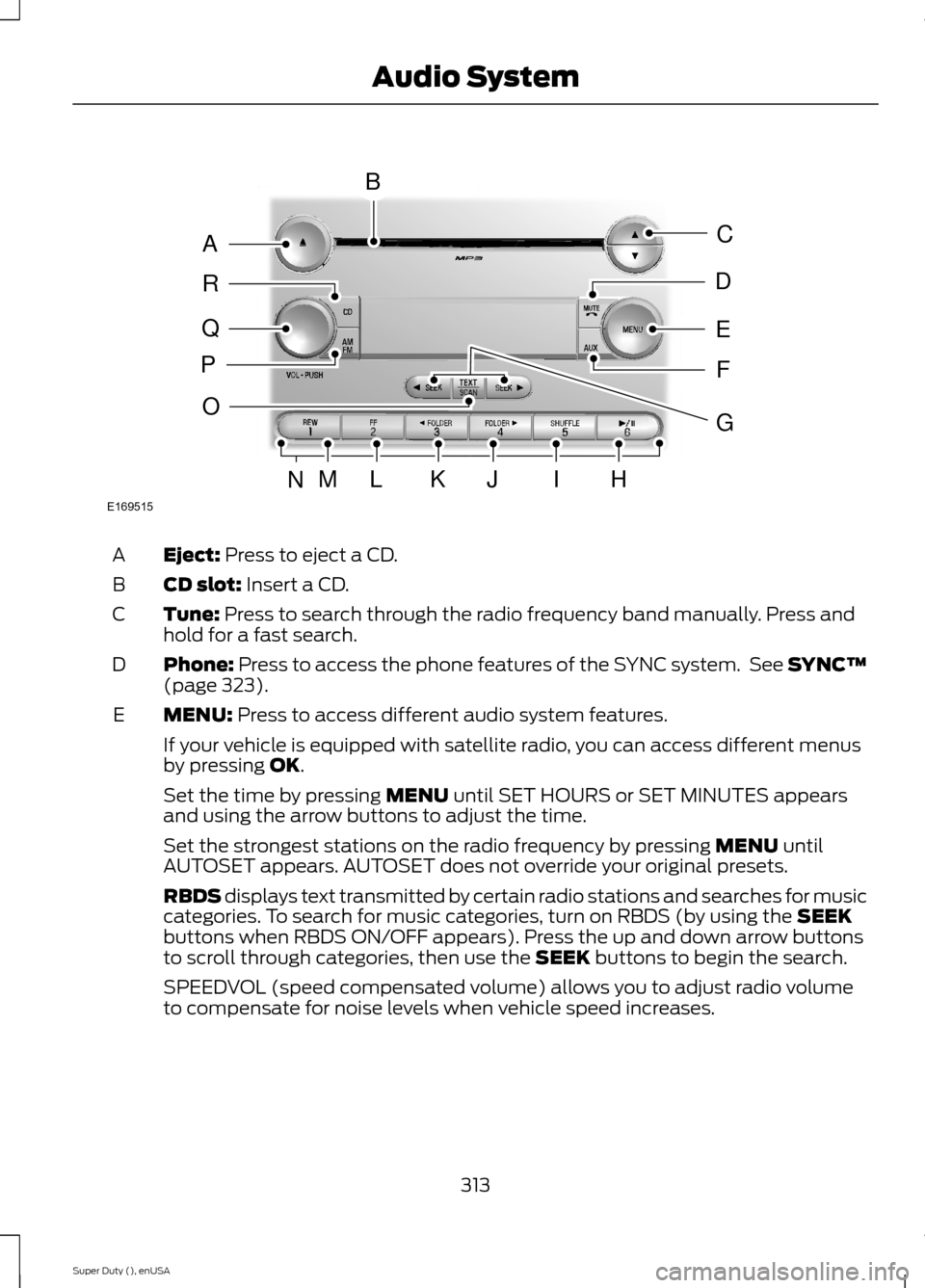
Eject: Press to eject a CD.A
CD slot: Insert a CD.B
Tune: Press to search through the radio frequency band manually. Press andhold for a fast search.C
Phone: Press to access the phone features of the SYNC system. See SYNC™(page 323).D
MENU: Press to access different audio system features.E
If your vehicle is equipped with satellite radio, you can access different menusby pressing OK.
Set the time by pressing MENU until SET HOURS or SET MINUTES appearsand using the arrow buttons to adjust the time.
Set the strongest stations on the radio frequency by pressing MENU untilAUTOSET appears. AUTOSET does not override your original presets.
RBDS displays text transmitted by certain radio stations and searches for musiccategories. To search for music categories, turn on RBDS (by using the SEEKbuttons when RBDS ON/OFF appears). Press the up and down arrow buttonsto scroll through categories, then use the SEEK buttons to begin the search.
SPEEDVOL (speed compensated volume) allows you to adjust radio volumeto compensate for noise levels when vehicle speed increases.
313Super Duty (), enUSAAudio SystemE169515BAQRPCEDFOMLKJIHNG
Page 317 of 470
Track/Folder is only available on MP3 files when in CD mode. In track mode,pressing the SEEK arrows allows you to scroll through all the tracks on the disc.In folder mode, pressing the SEEK arrows allows you to scroll through all thetracks within the selected folder. Press the FOLDER buttons to access otherfolders.
COMPRESS (Compression) is only available in CD and MP3 modes. Switchingcompression on brings the soft and loud passages together for a more consistentlistening level. Use the SEEK buttons and up and down arrow buttons to switchit on and off.
AUX: Press to access the media features of the SYNC system. See SYNC™(page 323).F
SEEK: In radio mode, press and release these buttons to go to the next (orprevious) preset radio station or disc track. In CD and MP3 modes, press thesebuttons to select the next (or previous) track, or press and hold to advance (orreverse) within the same track.
G
Play, Pause and OK: Play and Pause allow you to play or pause a track whenlistening to a CD.OK allows you to confirm commands with phone and mediafeatures of the SYNC system. See SYNC™ (page 323).
H
SHUFFLE: Play music on the selected CD or MP3 folder in random order.I
FOLDER >: Press to access the next folder on an MP3 disc.J
< FOLDER: Press to access the previous folder on an MP3 disc.K
FF: Press to fast forward in a CD track or MP3 file manually.L
REW: Press to rewind in a CD track or MP3 file manually.M
Memory presets: Store your favorite radio stations. To store a radio station,tune to the station, then press and hold a preset button until sound returns.N
TEXT/SCAN: In radio, CD and MP3 modes, press and hold to hear a briefsampling of radio stations, CD tracks or MP3 files. In CD and MP3 modes, pressand release to display track title, artist name and disc title. In text mode,sometimes the display requires additional text to show. When the < / > indicatoris on, press TEXT and then use the SEEK buttons to view the additional displaytext.
O
AM/FM: Press to select a frequency band.P
VOL-PUSH: Press to switch the system off and on. Turn it to adjust the volume.Q
CD: Press to enter CD or MP3 mode.R
314Super Duty (), enUSAAudio System
Page 318 of 470
AUDIO UNIT - VEHICLES WITH:
SONY AM/FM/CD
WARNING
Driving while distracted can result inloss of vehicle control, crash andinjury. We strongly recommend thatyou use extreme caution when using anydevice that may take your focus off theroad. Your primary responsibility is the safeoperation of your vehicle. We recommendagainst the use of any hand-held devicewhile driving and encourage the use ofvoice-operated systems when possible.Make sure you are aware of all applicablelocal laws that may affect the use ofelectronic devices while driving.
Note:The MyFord Touch system controlsmost of the audio features. See MyFordTouch™ (page 359).
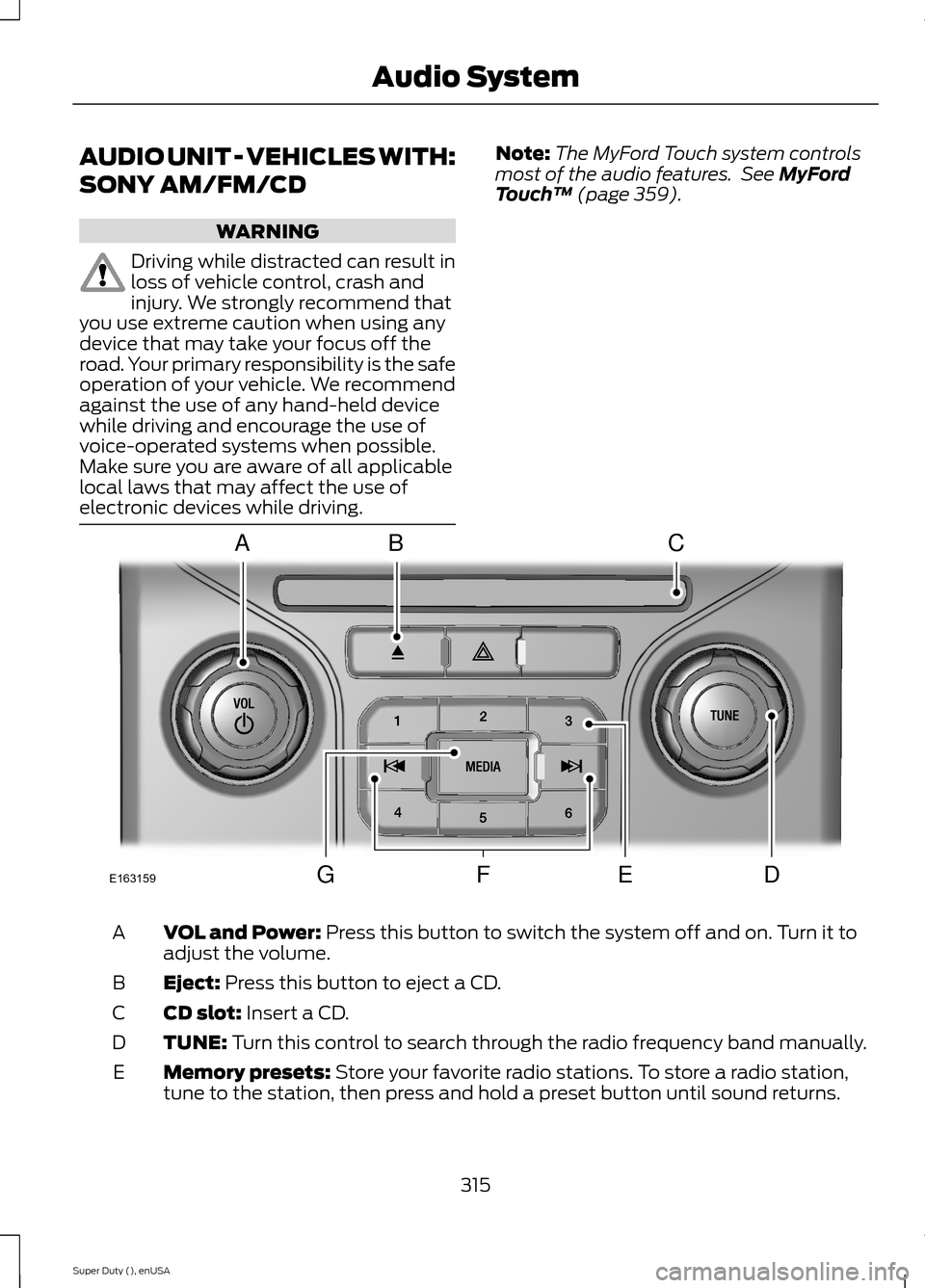
VOL and Power: Press this button to switch the system off and on. Turn it toadjust the volume.A
Eject: Press this button to eject a CD.B
CD slot: Insert a CD.C
TUNE: Turn this control to search through the radio frequency band manually.D
Memory presets: Store your favorite radio stations. To store a radio station,tune to the station, then press and hold a preset button until sound returns.E
315Super Duty (), enUSAAudio SystemE163159ABCDFEG
Page 319 of 470
Seek, Reverse and Fast Forward:F
In radio mode, select a frequency band and press one of these buttons. Thesystem stops at the first station it finds in that direction.
In Sirius mode, press these buttons to select the previous or next channel. If aspecific category is selected (such as Jazz, Rock or News), use these buttonsto find the previous or next channel in the selected category.
In CD mode, press these buttons to select the previous or next track.
MEDIA: Press this button to access different audio modes, such as AM, FM andA/V Input.G
DIGITAL RADIO
Note:HD Radio broadcasts are notavailable in all markets.
HD Radio technology is the digitalevolution of analog AM/FM radio. Yoursystem has a special receiver that allowsit to receive digital broadcasts (whereavailable) in addition to the analogbroadcasts, it already receives. Digitalbroadcasts provide a better sound qualitythan analog broadcasts with free,crystal-clear audio and no static ordistortion. For more information, and aguide to available stations andprogramming, please visitwww.hdradio.com.
When HD Radio is on and you tune to astation broadcasting HD Radio technology,you may notice the HD Radio logo on yourscreen. When this logo is available, youmay also see Title and Artist fieldson-screen.
The multicast indicator appears in FMmode (only) if the current station isbroadcasting multiple digital broadcasts.The highlighted numbers signify availabledigital channels where new or differentcontent is available. HD1 signifies the mainprogramming status and is available inanalog and digital broadcasts. Othermulticast stations (HD2 through HD7) areonly available digitally.
When HD Radio broadcasts are active, youcan access the following functions:
When HD Radio broadcasts are active, youcan access the following functions:
•Scan allows you to hear a briefsampling of all available stations. Thisfeature still works when HD Radioreception is on, although it does notscan for HD2-HD7 channels. You maysee the HD logo appear if the stationhas a digital broadcast.
•Memory presets allow you to save anactive channel as a memory preset.Touch and hold a memory preset slotuntil the sound returns. There is a briefmute while the radio saves the station.Sound returns when finished. Whenswitching to an HD2 or HD3 memorypreset, the sound mutes before thedigital audio plays, because the systemhas to reacquire the digital signal.
Note:As with any saved radio station, youcannot access the saved station if yourvehicle is outside the station’s receptionarea.
316Super Duty (), enUSAAudio System
Page 320 of 470
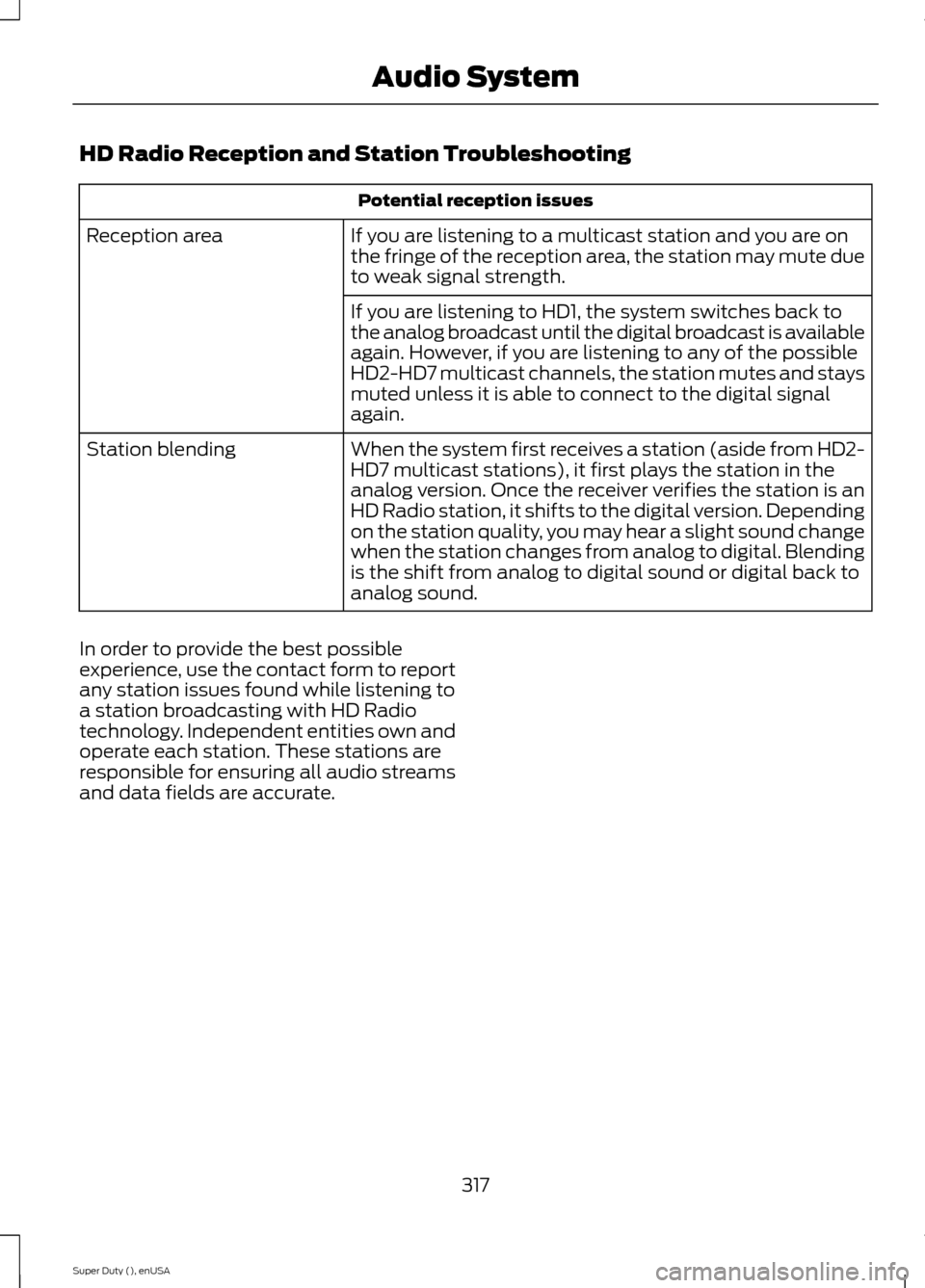
HD Radio Reception and Station Troubleshooting
Potential reception issues
If you are listening to a multicast station and you are onthe fringe of the reception area, the station may mute dueto weak signal strength.
Reception area
If you are listening to HD1, the system switches back tothe analog broadcast until the digital broadcast is availableagain. However, if you are listening to any of the possibleHD2-HD7 multicast channels, the station mutes and staysmuted unless it is able to connect to the digital signalagain.
When the system first receives a station (aside from HD2-HD7 multicast stations), it first plays the station in theanalog version. Once the receiver verifies the station is anHD Radio station, it shifts to the digital version. Dependingon the station quality, you may hear a slight sound changewhen the station changes from analog to digital. Blendingis the shift from analog to digital sound or digital back toanalog sound.
Station blending
In order to provide the best possibleexperience, use the contact form to reportany station issues found while listening toa station broadcasting with HD Radiotechnology. Independent entities own andoperate each station. These stations areresponsible for ensuring all audio streamsand data fields are accurate.
317Super Duty (), enUSAAudio System
Page 321 of 470
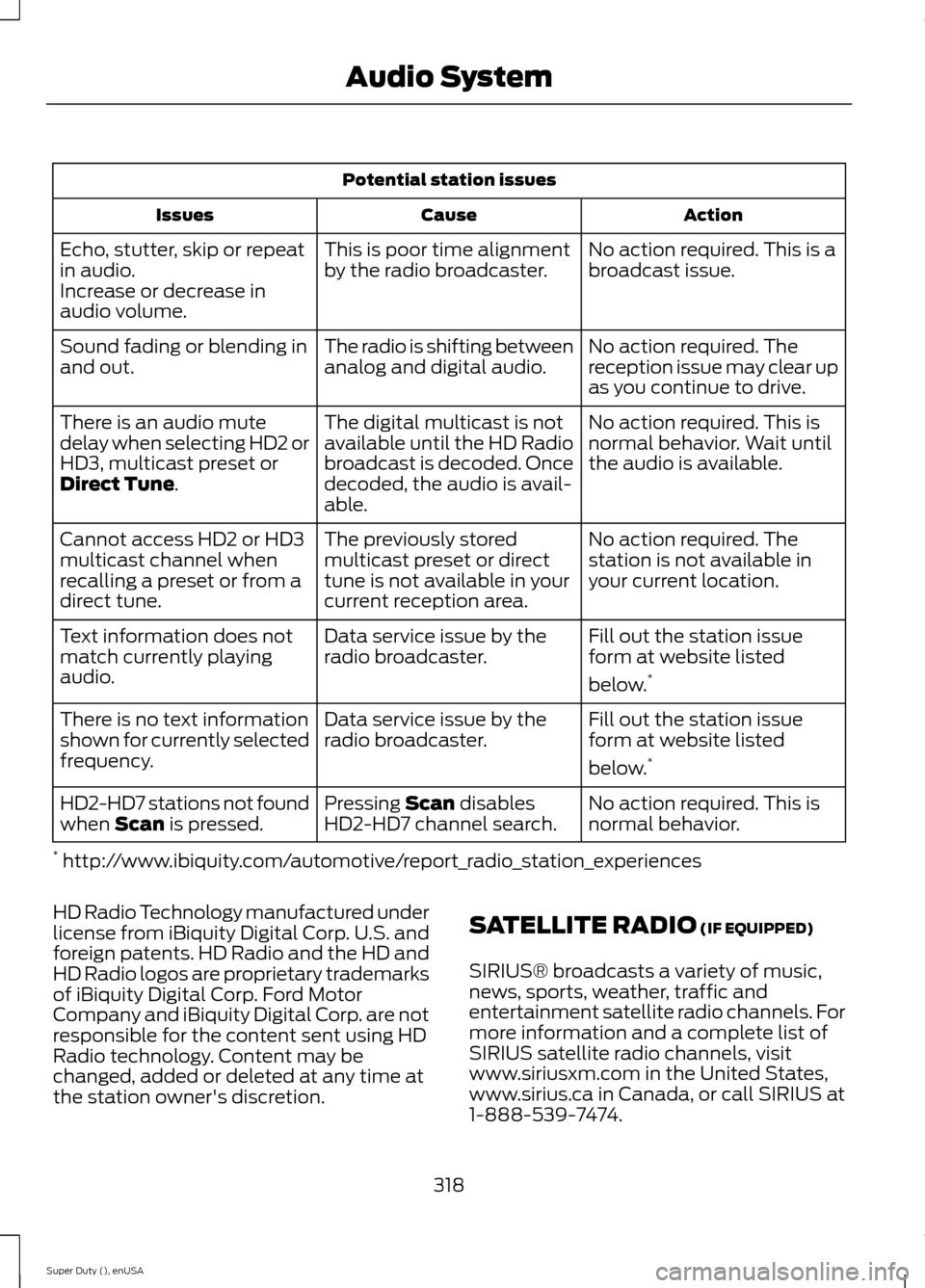
Potential station issues
ActionCauseIssues
No action required. This is abroadcast issue.This is poor time alignmentby the radio broadcaster.Echo, stutter, skip or repeatin audio.Increase or decrease inaudio volume.
No action required. Thereception issue may clear upas you continue to drive.
The radio is shifting betweenanalog and digital audio.Sound fading or blending inand out.
No action required. This isnormal behavior. Wait untilthe audio is available.
The digital multicast is notavailable until the HD Radiobroadcast is decoded. Oncedecoded, the audio is avail-able.
There is an audio mutedelay when selecting HD2 orHD3, multicast preset orDirect Tune.
No action required. Thestation is not available inyour current location.
The previously storedmulticast preset or directtune is not available in yourcurrent reception area.
Cannot access HD2 or HD3multicast channel whenrecalling a preset or from adirect tune.
Fill out the station issueform at website listed
below.*
Data service issue by theradio broadcaster.Text information does notmatch currently playingaudio.
Fill out the station issueform at website listed
below.*
Data service issue by theradio broadcaster.There is no text informationshown for currently selectedfrequency.
No action required. This isnormal behavior.Pressing Scan disablesHD2-HD7 channel search.HD2-HD7 stations not foundwhen Scan is pressed.
* http://www.ibiquity.com/automotive/report_radio_station_experiences
HD Radio Technology manufactured underlicense from iBiquity Digital Corp. U.S. andforeign patents. HD Radio and the HD andHD Radio logos are proprietary trademarksof iBiquity Digital Corp. Ford MotorCompany and iBiquity Digital Corp. are notresponsible for the content sent using HDRadio technology. Content may bechanged, added or deleted at any time atthe station owner's discretion.
SATELLITE RADIO (IF EQUIPPED)
SIRIUS® broadcasts a variety of music,news, sports, weather, traffic andentertainment satellite radio channels. Formore information and a complete list ofSIRIUS satellite radio channels, visitwww.siriusxm.com in the United States,www.sirius.ca in Canada, or call SIRIUS at1-888-539-7474.
318Super Duty (), enUSAAudio System
Page 322 of 470
Note:This receiver includes the eCosreal-time operating system. eCos ispublished under the eCos License.
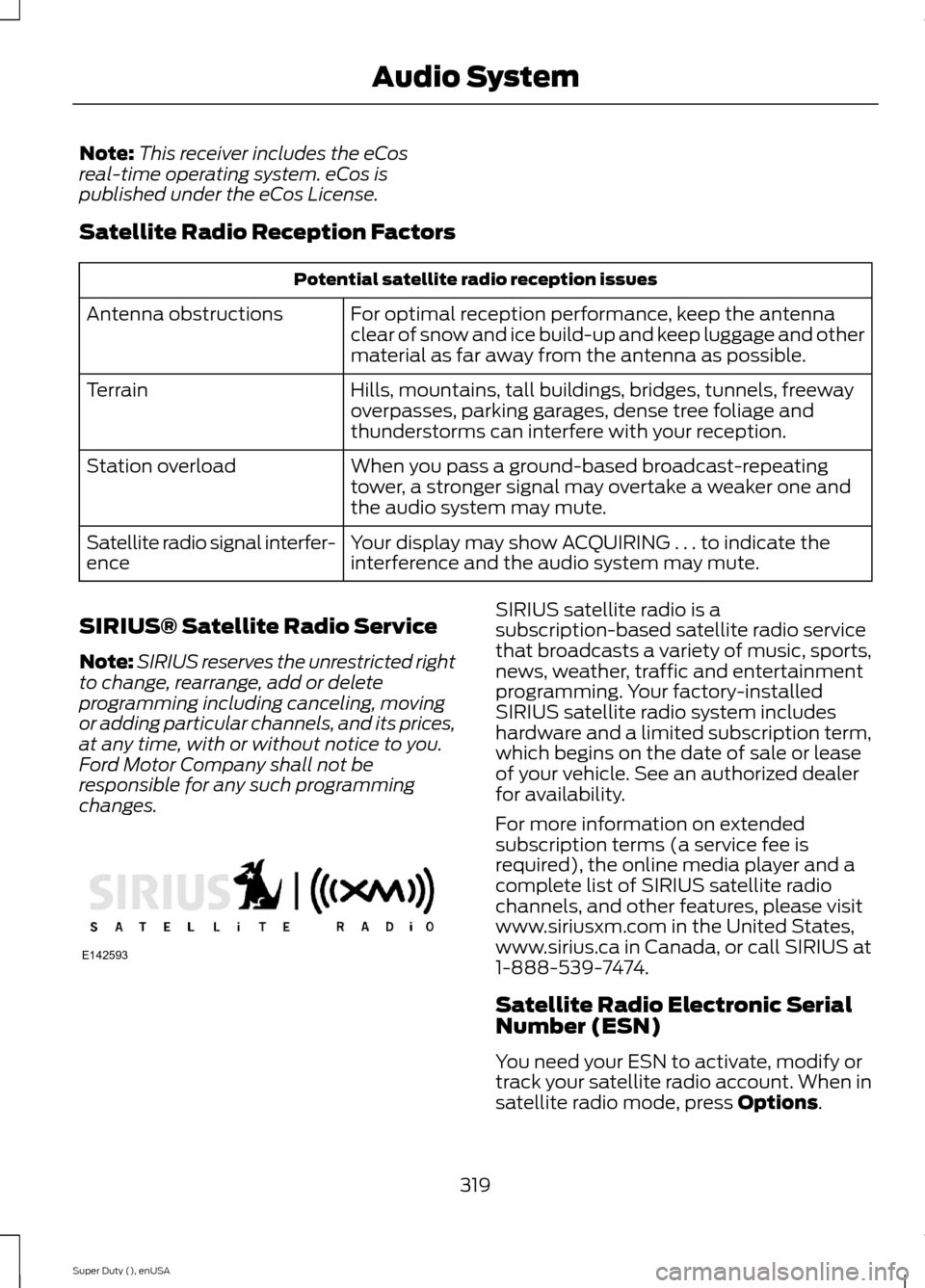
Satellite Radio Reception Factors
Potential satellite radio reception issues
For optimal reception performance, keep the antennaclear of snow and ice build-up and keep luggage and othermaterial as far away from the antenna as possible.
Antenna obstructions
Hills, mountains, tall buildings, bridges, tunnels, freewayoverpasses, parking garages, dense tree foliage andthunderstorms can interfere with your reception.
Terrain
When you pass a ground-based broadcast-repeatingtower, a stronger signal may overtake a weaker one andthe audio system may mute.
Station overload
Your display may show ACQUIRING . . . to indicate theinterference and the audio system may mute.Satellite radio signal interfer-ence
SIRIUS® Satellite Radio Service
Note:SIRIUS reserves the unrestricted rightto change, rearrange, add or deleteprogramming including canceling, movingor adding particular channels, and its prices,at any time, with or without notice to you.Ford Motor Company shall not beresponsible for any such programmingchanges.
SIRIUS satellite radio is asubscription-based satellite radio servicethat broadcasts a variety of music, sports,news, weather, traffic and entertainmentprogramming. Your factory-installedSIRIUS satellite radio system includeshardware and a limited subscription term,which begins on the date of sale or leaseof your vehicle. See an authorized dealerfor availability.
For more information on extendedsubscription terms (a service fee isrequired), the online media player and acomplete list of SIRIUS satellite radiochannels, and other features, please visitwww.siriusxm.com in the United States,www.sirius.ca in Canada, or call SIRIUS at1-888-539-7474.
Satellite Radio Electronic SerialNumber (ESN)
You need your ESN to activate, modify ortrack your satellite radio account. When insatellite radio mode, press Options.
319Super Duty (), enUSAAudio SystemE142593
Page 323 of 470
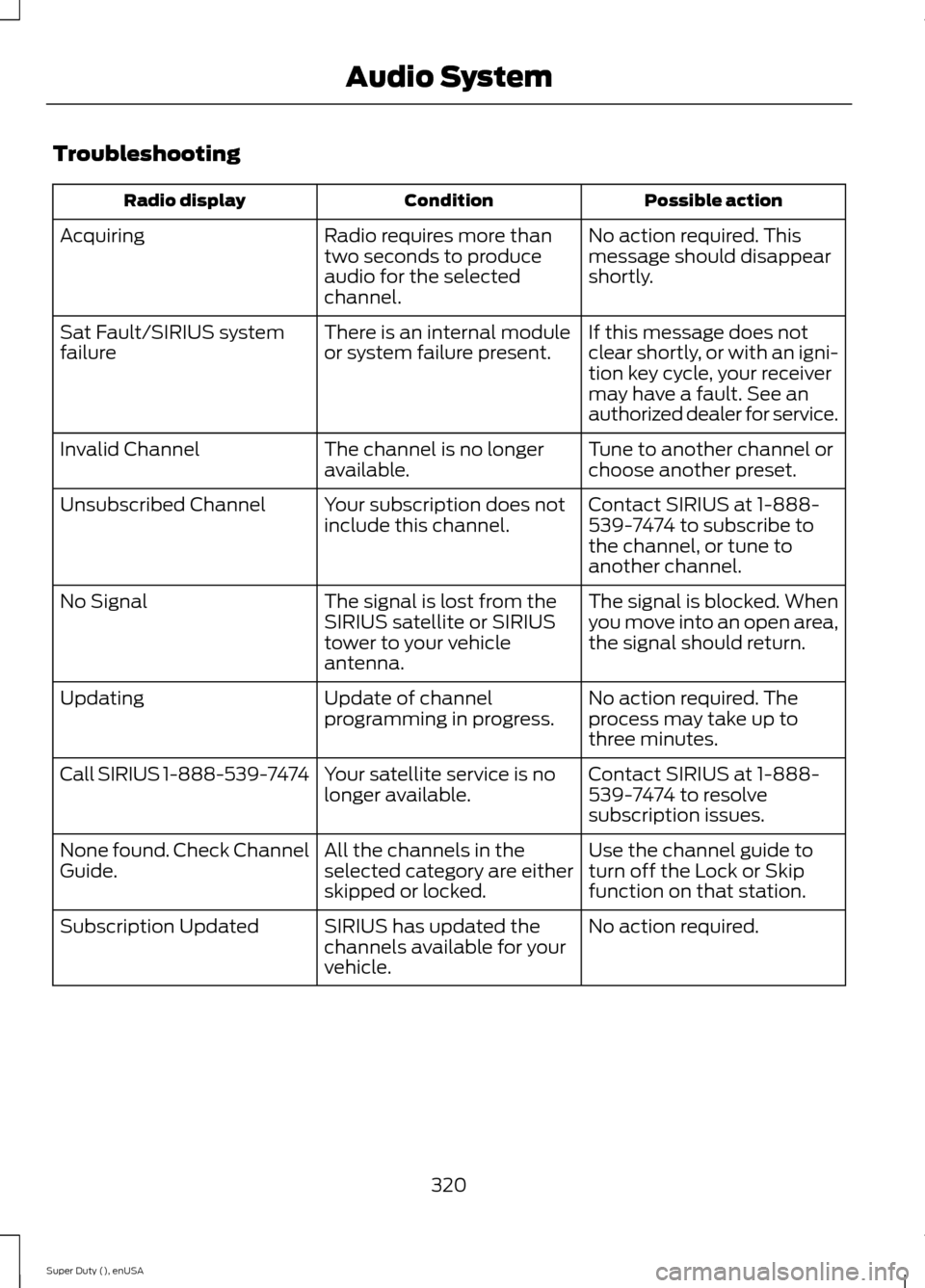
Troubleshooting
Possible actionConditionRadio display
No action required. Thismessage should disappearshortly.
Radio requires more thantwo seconds to produceaudio for the selectedchannel.
Acquiring
If this message does notclear shortly, or with an igni-tion key cycle, your receivermay have a fault. See anauthorized dealer for service.
There is an internal moduleor system failure present.Sat Fault/SIRIUS systemfailure
Tune to another channel orchoose another preset.The channel is no longeravailable.Invalid Channel
Contact SIRIUS at 1-888-539-7474 to subscribe tothe channel, or tune toanother channel.
Your subscription does notinclude this channel.Unsubscribed Channel
The signal is blocked. Whenyou move into an open area,the signal should return.
The signal is lost from theSIRIUS satellite or SIRIUStower to your vehicleantenna.
No Signal
No action required. Theprocess may take up tothree minutes.
Update of channelprogramming in progress.Updating
Contact SIRIUS at 1-888-539-7474 to resolvesubscription issues.
Your satellite service is nolonger available.Call SIRIUS 1-888-539-7474
Use the channel guide toturn off the Lock or Skipfunction on that station.
All the channels in theselected category are eitherskipped or locked.
None found. Check ChannelGuide.
No action required.SIRIUS has updated thechannels available for yourvehicle.
Subscription Updated
320Super Duty (), enUSAAudio System
Page 324 of 470
AUDIO INPUT JACK
WARNINGS
Driving while distracted can result inloss of vehicle control, crash andinjury. We strongly recommend thatyou use extreme caution when using anydevice that may take your focus off theroad. Your primary responsibility is the safeoperation of your vehicle. We recommendagainst the use of any hand-held devicewhile driving and encourage the use ofvoice-operated systems when possible.Make sure you are aware of all applicablelocal laws that may affect the use ofelectronic devices while driving.
For safety reasons, do not connector adjust the settings on yourportable music player while yourvehicle is moving.
Store the portable music player in asecure location, such as the centerconsole or the glove box, when yourvehicle is moving. Hard objects maybecome projectiles in a collision or suddenstop, which may increase the risk of seriousinjury. The audio extension cable must belong enough to allow the portable musicplayer to be safely stored while yourvehicle is moving.
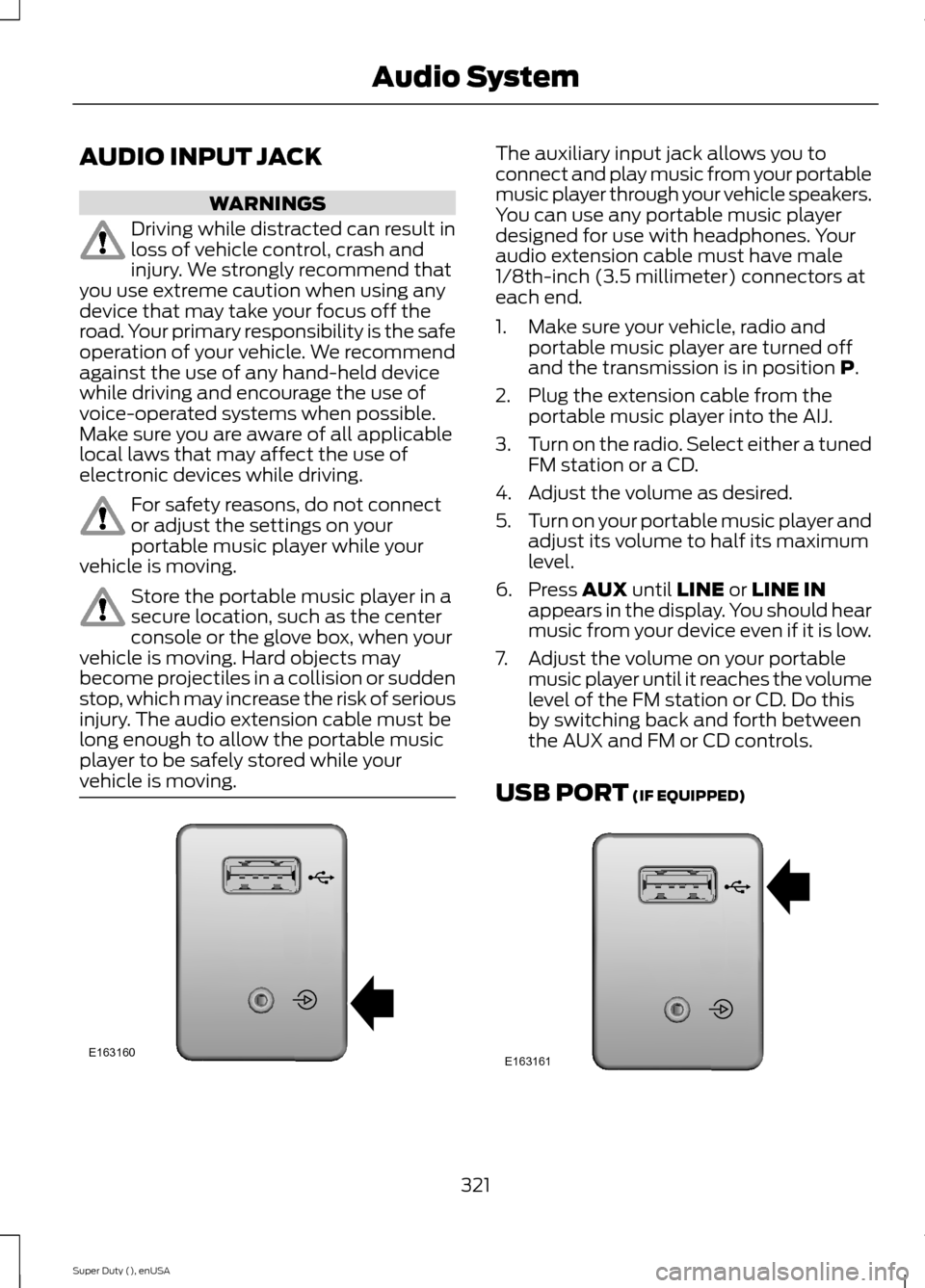
The auxiliary input jack allows you toconnect and play music from your portablemusic player through your vehicle speakers.You can use any portable music playerdesigned for use with headphones. Youraudio extension cable must have male1/8th-inch (3.5 millimeter) connectors ateach end.
1.Make sure your vehicle, radio andportable music player are turned offand the transmission is in position P.
2.Plug the extension cable from theportable music player into the AIJ.
3.Turn on the radio. Select either a tunedFM station or a CD.
4.Adjust the volume as desired.
5.Turn on your portable music player andadjust its volume to half its maximumlevel.
6.Press AUX until LINE or LINE INappears in the display. You should hearmusic from your device even if it is low.
7.Adjust the volume on your portablemusic player until it reaches the volumelevel of the FM station or CD. Do thisby switching back and forth betweenthe AUX and FM or CD controls.
USB PORT (IF EQUIPPED)
321Super Duty (), enUSAAudio SystemE163160 E163161
Page 325 of 470
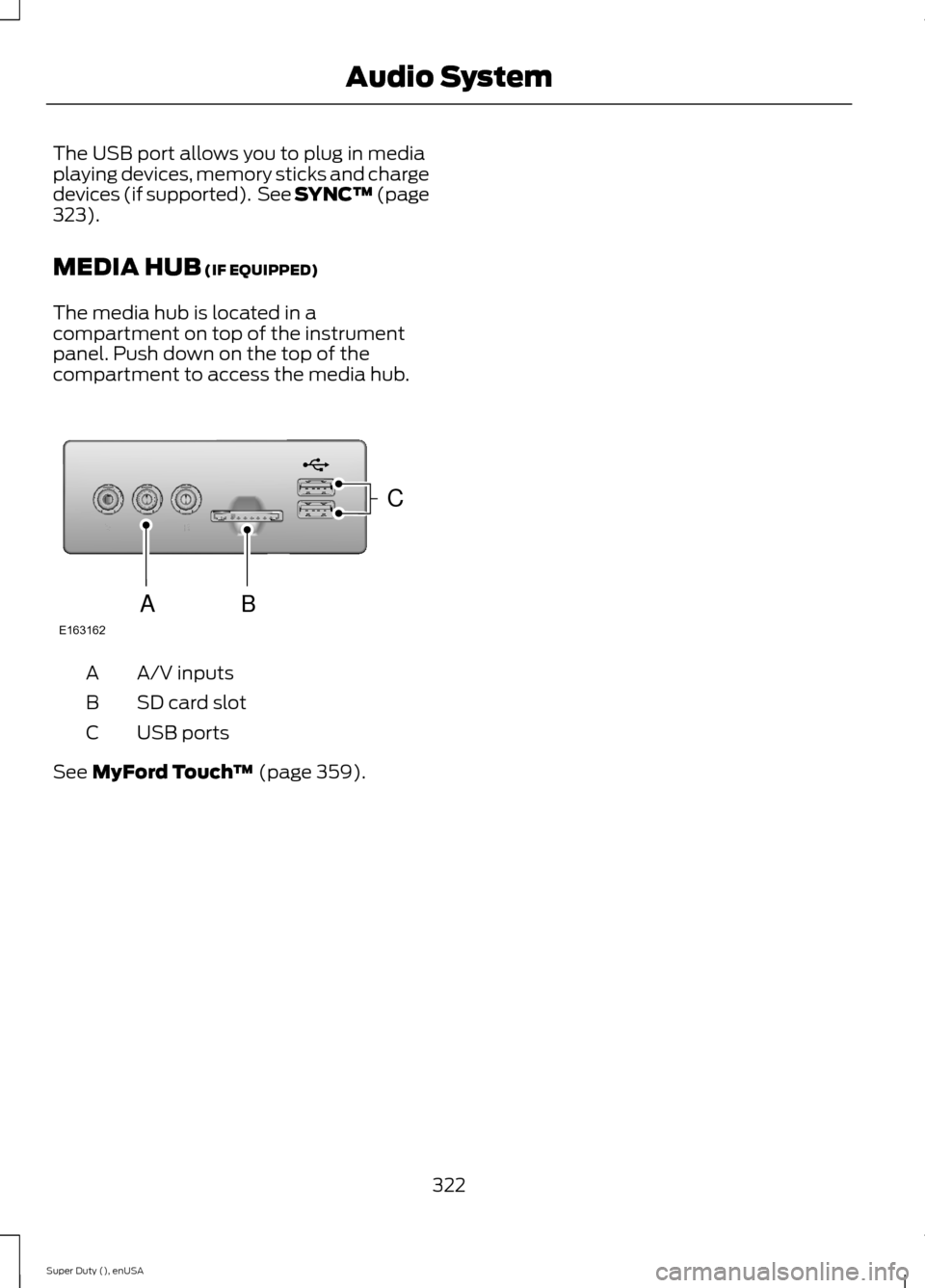
The USB port allows you to plug in mediaplaying devices, memory sticks and chargedevices (if supported). See SYNC™ (page323).
MEDIA HUB (IF EQUIPPED)
The media hub is located in acompartment on top of the instrumentpanel. Push down on the top of thecompartment to access the media hub.
A/V inputsA
SD card slotB
USB portsC
See MyFord Touch™ (page 359).
322Super Duty (), enUSAAudio SystemE163162CBA