bluetooth FORD SUPER DUTY 2015 3.G User Guide
[x] Cancel search | Manufacturer: FORD, Model Year: 2015, Model line: SUPER DUTY, Model: FORD SUPER DUTY 2015 3.GPages: 470, PDF Size: 18.24 MB
Page 341 of 470
You can:If you select:
Press OK to select.
This is a Bluetooth component, which can further helpyour phone with the exchange of text messages.MAP Profile
Exit the current menu.Return
SYNC™ APPLICATIONS AND
SERVICES (IF EQUIPPED)
In order for the following features to work,your cellular phone must be compatiblewith SYNC. To check your phone'scompatibility, visit www.SYNCMyRide.com,www.SYNCMyRide.ca orwww.syncmaroute.ca.
•SYNC Services*: Provides access totraffic, directions and information suchas travel, horoscopes, stock prices andmore.
•911 Assist: Can alert 911 in the event ofan emergency.
•Vehicle Health Report*: Provides adiagnostic and maintenance reportcard of your vehicle.*This is an optional feature and availablein the United States only.
911 Assist
WARNINGS
Unless the 911 Assist setting is set onbefore a crash, the system will notdial for help which could delayresponse time, potentially increasing therisk of serious injury or death after a crash.
WARNINGS
Do not wait for 911 Assist to make anemergency call if you can do ityourself. Dial emergency servicesimmediately to avoid delayed responsetime which could increase the risk ofserious injury or death after a crash. If youdo not hear 911 Assist within five secondsof the crash, the system or phone may bedamaged or non-functional.
Always place your phone in a securelocation in your vehicle so it does notbecome a projectile or get damagedin a crash. Failure to do so may causeserious injury to someone or damage thephone which could prevent 911 Assist fromworking properly.
Note:The SYNC 911 Assist feature must beset on before the incident.
Note:Before setting this feature on, makesure that you read the 911 Assist PrivacyNotice later in this section for importantinformation.
Note:If any user turns 911 Assist on or off,that setting applies for all paired phones. If911 Assist is turned off, either a voicemessage plays or a display message (oricon) comes on (or both) when your vehicleis started after a previously paired phoneconnects.
Note:Every phone operates differently.While SYNC 911 Assist works with mostcellular phones, some may have troubleusing this feature.
338Super Duty (), enUSASYNC™ (If Equipped)
Page 342 of 470
![FORD SUPER DUTY 2015 3.G User Guide If a crash deploys an airbag (excludingknee airbags and rear inflatable safetybelts [if equipped]) or activates the fuelpump shut-off, your SYNC-equippedvehicle may be able to contact emergencyservice](/img/11/5311/w960_5311-341.png "FORD SUPER DUTY 2015 3.G User Guide If a crash deploys an airbag (excludingknee airbags and rear inflatable safetybelts [if equipped]) or activates the fuelpump shut-off, your SYNC-equippedvehicle may be able to contact emergencyservice")
If a crash deploys an airbag (excludingknee airbags and rear inflatable safetybelts [if equipped]) or activates the fuelpump shut-off, your SYNC-equippedvehicle may be able to contact emergencyservices by dialing 911 through a paired andconnected Bluetooth-enabled phone. Youcan learn more about the 911 Assistfeature, visit www.SYNCMyRide.com,www.SYNCMyRide.ca orwww.syncmaroute.ca.
See Supplementary Restraints System(page 36). Important information aboutairbag deployment is in this chapter.
See Roadside Emergencies (page 212).Important information about the fuel pumpshut-off is in this chapter.
Setting 911 Assist On
1.Press the phone button to enter thephone menu.
2.Scroll to select 911 Assist.
3.Press OK to confirm and enter the 911Assist menu.
4.Scroll to select between On and Off.
5.Press OK when the desired optionappears in the radio display.Set On orSet Off appears in the display asconfirmation.
Off selections include:
•Off with reminder: Provides a displayand voice reminder at phoneconnection at vehicle start.
•Off without reminder: Provides adisplay reminder only without a voicereminder at phone connection.
To make sure that 911 Assist worksproperly:
•SYNC must be powered and workingproperly at the time of the incident andthroughout feature activation and use.
•The 911 Assist feature must be set onbefore the incident.
•You must pair and connect aBluetooth-enabled and compatiblecell phone to SYNC.
•A connected Bluetooth-enabled phonemust have the ability to make andmaintain an outgoing call at the timeof the incident.
•A connected Bluetooth-enabled phonemust have adequate network coverage,battery power and signal strength.
•The vehicle must have battery powerand be located in the U.S., Canada orin a territory in which 911 is theemergency number.
In the Event of a Crash
Not all crashes will deploy an airbag oractivate the fuel pump shut-off (thetriggers for 911 Assist). If a connected cellphone sustains damage or loses itsconnection to SYNC during a crash, SYNCwill search for and try to connect to apreviously paired cell phone; SYNC willthen attempt to call the emergencyservices.
Before making the call:
•SYNC provides a short window of time(about 10 seconds) to cancel the call.If you fail to cancel the call, SYNCattempts to dial 911.
•SYNC says the following, or a similarmessage: "SYNC will attempt to call911, to cancel the call, press Cancel onyour screen or press and hold thephone button on your steering wheel."
If you do not cancel the call, and SYNCmakes a successful call, a pre-recordedmessage plays for the 911 operator, andthen the occupant(s) in your vehicle is ableto talk with the operator. Be prepared toprovide your name, phone number andlocation immediately, because not all 911systems are capable of receiving thisinformation electronically.
339Super Duty (), enUSASYNC™ (If Equipped)
Page 345 of 470
Note:SYNC Services requires activationbefore use. Visit www.SYNCMyRide.com toregister and check your eligibility forcomplimentary services. Standard phoneand message rates may apply. Subscriptionmay be required. You must also have theactive SYNC Services Bluetooth-enabledcellular phone paired and connected to thesystem in order to connect to, and use,SYNC Services. See Using SYNC™ WithYour Phone (page 327).
Note:This feature does not functionproperly if you have enabled caller IDblocking on your cellular phone. Make sureyour cellular phone is not blocking caller IDbefore using SYNC Services.
Note:The driver is ultimately responsiblefor the safe operation of the vehicle, andtherefore, must evaluate whether it is safeto follow the suggested directions. Anynavigation features provided are only an aid.Make your driving decisions based on yourobservations of local conditions and existingtraffic regulations. Do not follow the routesuggestions if doing so would result in anunsafe or illegal maneuver, place you in anunsafe situation, or if you would be directedinto an area that you consider unsafe. Mapsused by this system may be inaccuratebecause of errors, changes in roads, trafficconditions or driving conditions.
Note:When you connect, the service usesGPS technology and advanced vehiclesensors to collect your vehicle's currentlocation, travel direction and speed to helpprovide you with the directions, trafficreports, or business searches you request.Further, to provide the services you request,for continuous improvement, the servicemay collect and record call details and voicecommunications. For more information, seeSYNC Services Terms and Conditions atwww.SYNCMyRide.com. If you do not wantFord or its service providers to collect yourvehicle travel information or otherinformation identified in the Terms andConditions, do not subscribe or use theservice.
SYNC Services uses advanced vehiclesensors, integrated GPS technology andcomprehensive map and traffic data, togive you personalized traffic reports,precise turn-by-turn directions, businesssearch, news, sports, weather and more.For a complete list of services, or to learnmore, please visit www.SYNCMyRide.com.
Connecting to SYNC Services UsingVoice Commands
1.Press the voice button.
2.When prompted, say "Services". Thisinitiates an outgoing call to SYNCServices using your paired andconnected Bluetooth-enabled cellularphone.
3.Once you connect to the service, followthe voice prompts to request thedesired service, such as Traffic orDirections. You can also say, "What aremy choices?" to receive a list ofavailable services from which tochoose.
4.Say, "Services" to return to the Servicesmain menu or for help, say, "Help".
342Super Duty (), enUSASYNC™ (If Equipped)
Page 347 of 470
SYNC Services quick tips
You can personalize your Services feature to providequicker access to your most used or favorite information.You can save address points such as work or home. Youcan also save favorite information like sports teams or anews category. You can learn more about personalizationby logging onto www.SYNCMyRide.com.
Personalizing
Press the voice button at any time (while connected toSYNC Services) to interrupt a voice prompt or an audioclip (such as a sports report) and say your voice command.
Push to interrupt
Your subscription is associated with your Bluetooth-enabled cellular phone number, not your VIN (VehicleIdentification Number). You can pair and connect yourphone to any vehicle equipped with SYNC Services andcontinue enjoying your personalized services.
Portable
You can even access your account outside your vehicle.Just use the number on your phone's call history. Trafficand Directions features do not function properly butinformation services and the 411 connect and text messagefeatures are available.
SYNC AppLink
Note:This feature is only available in theUnited States.
Note:You must pair and connect yoursmartphone to SYNC to access AppLink.
Note:iPhone users need to connect thephone to the USB port in order to start theapplication. We recommend you lock youriPhone after starting an application.
Note:The AppLink feature is not availableif your vehicle is equipped with the MyFordTouch or MyLincoln Touch system.
Note:Depending on your display type, youcan access AppLink from the media menu,the phone menu, or by using voicecommands. Once an app is running throughAppLink, you can control main features ofthe app through voice commands andsteering wheel controls.
To Access Using the Phone Menu
1.Press the phone button to access theSYNC phone menu on-screen.
2.Scroll to Mobile Apps and press OK toaccess a list of available applications.
3.Scroll through the list of availableapplications and press OK to select aparticular app.
4.Once an app is running through SYNC,you can access an app’s menu bypressing the MENU button to firstaccess the SYNC menu.
5.Select "SYNC-Media" by pressing OK.
6.Scroll until "
344Super Duty (), enUSASYNC™ (If Equipped)
Page 350 of 470
"USB"
"Similar music"
"What's playing?"
1
Voice command guide
Turn autoplay on to listen to music processed duringindexing. Turn autoplay off to allow the indexing process
to finish before the system plays any of your music.*
"Autoplay"
The system searches all the data from your indexed musicand, if available, begins to play the chosen type of music.You can only play genres of music that are present in theGENRE metadata tags that you have on your digital mediaplayer.
"Search genre" or "Playgenre"
The system compiles a playlist and then plays musicsimilar to what is currently playing from the USB port usingindexed metadata information.
"Similar music"
The system searches for specific artist, track or albuminformation from the music indexed through the USB port."Search" or "Play" artist,track or album
This allows you to make your previous command morespecific. For example, if you asked to search and play allmusic by a certain artist, you could then say, "Refinealbum" and choose a specific album from the list to view.If you then select Play, the system only plays music fromthat specific album.
"Refine"
*Indexing times can vary from device to device and with regard to the number of songsthe system needs to process.
Press the voice icon. When prompted, say,"Bluetooth audio", then any of thefollowing:
"BLUETOOTH AUDIO"
"Connections"
"Pause"
"Play"
"Play next track"
"Play previous track"
347Super Duty (), enUSASYNC™ (If Equipped)
Page 351 of 470
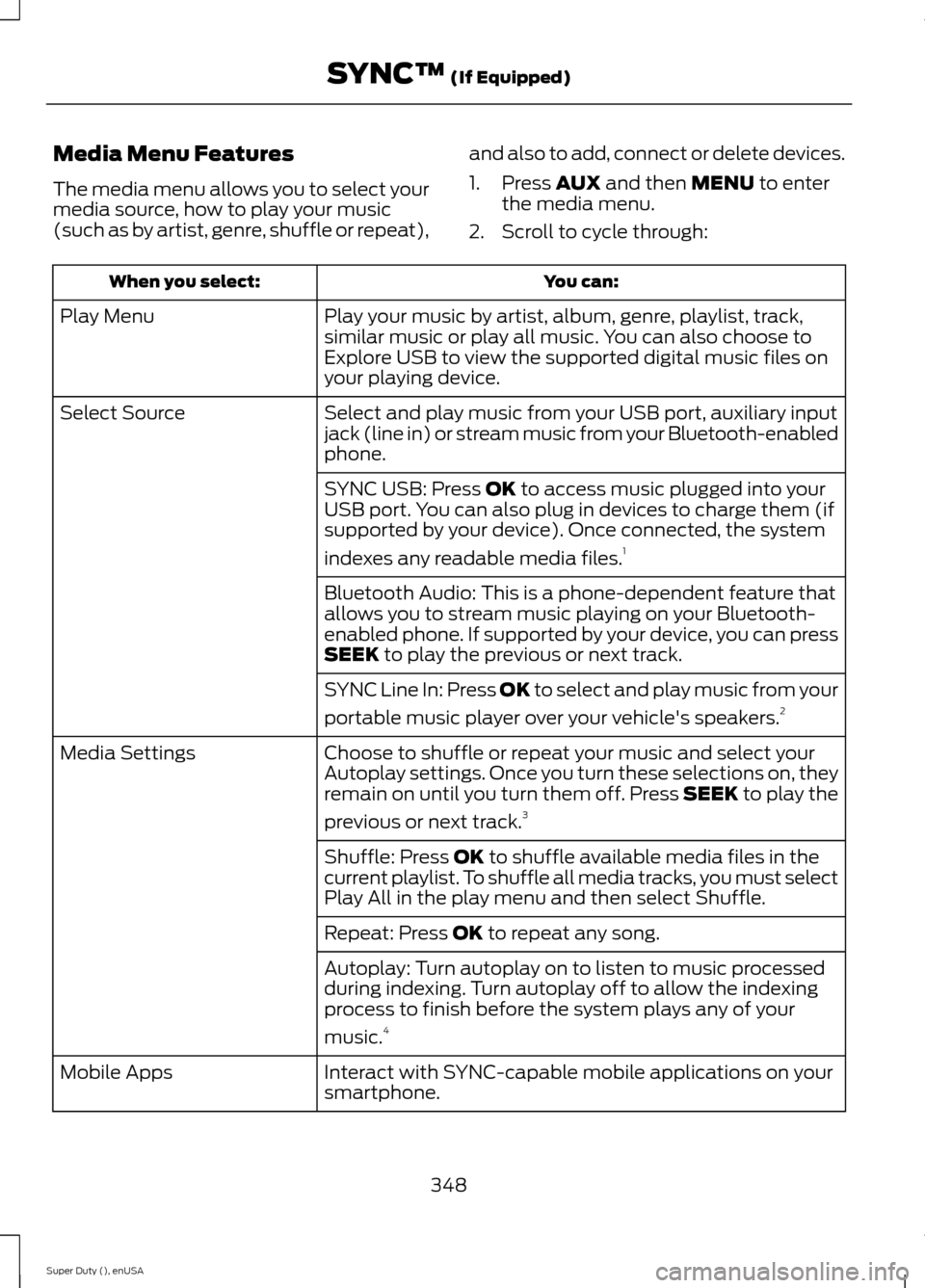
Media Menu Features
The media menu allows you to select yourmedia source, how to play your music(such as by artist, genre, shuffle or repeat),
and also to add, connect or delete devices.
1.Press AUX and then MENU to enterthe media menu.
2.Scroll to cycle through:
You can:When you select:
Play your music by artist, album, genre, playlist, track,similar music or play all music. You can also choose toExplore USB to view the supported digital music files onyour playing device.
Play Menu
Select and play music from your USB port, auxiliary inputjack (line in) or stream music from your Bluetooth-enabledphone.
Select Source
SYNC USB: Press OK to access music plugged into yourUSB port. You can also plug in devices to charge them (ifsupported by your device). Once connected, the system
indexes any readable media files.1
Bluetooth Audio: This is a phone-dependent feature thatallows you to stream music playing on your Bluetooth-enabled phone. If supported by your device, you can pressSEEK to play the previous or next track.
SYNC Line In: Press OK to select and play music from your
portable music player over your vehicle's speakers.2
Choose to shuffle or repeat your music and select yourAutoplay settings. Once you turn these selections on, theyremain on until you turn them off. Press SEEK to play the
previous or next track.3
Media Settings
Shuffle: Press OK to shuffle available media files in thecurrent playlist. To shuffle all media tracks, you must selectPlay All in the play menu and then select Shuffle.
Repeat: Press OK to repeat any song.
Autoplay: Turn autoplay on to listen to music processedduring indexing. Turn autoplay off to allow the indexingprocess to finish before the system plays any of your
music.4
Interact with SYNC-capable mobile applications on yoursmartphone.Mobile Apps
348Super Duty (), enUSASYNC™ (If Equipped)
Page 352 of 470
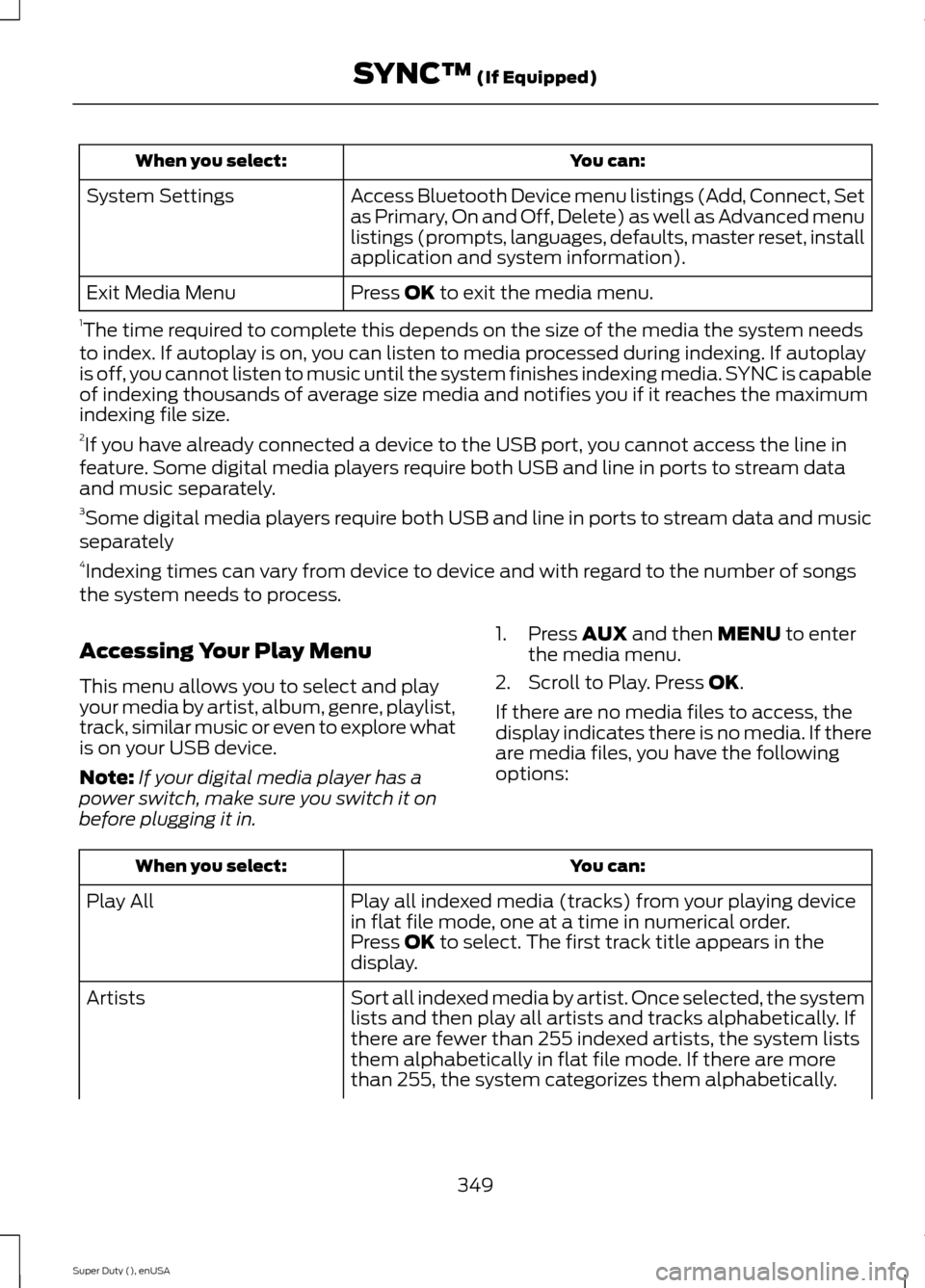
You can:When you select:
Access Bluetooth Device menu listings (Add, Connect, Setas Primary, On and Off, Delete) as well as Advanced menulistings (prompts, languages, defaults, master reset, installapplication and system information).
System Settings
Press OK to exit the media menu.Exit Media Menu
1The time required to complete this depends on the size of the media the system needsto index. If autoplay is on, you can listen to media processed during indexing. If autoplayis off, you cannot listen to music until the system finishes indexing media. SYNC is capableof indexing thousands of average size media and notifies you if it reaches the maximumindexing file size.2If you have already connected a device to the USB port, you cannot access the line infeature. Some digital media players require both USB and line in ports to stream dataand music separately.3Some digital media players require both USB and line in ports to stream data and musicseparately4Indexing times can vary from device to device and with regard to the number of songsthe system needs to process.
Accessing Your Play Menu
This menu allows you to select and playyour media by artist, album, genre, playlist,track, similar music or even to explore whatis on your USB device.
Note:If your digital media player has apower switch, make sure you switch it onbefore plugging it in.
1.Press AUX and then MENU to enterthe media menu.
2.Scroll to Play. Press OK.
If there are no media files to access, thedisplay indicates there is no media. If thereare media files, you have the followingoptions:
You can:When you select:
Play all indexed media (tracks) from your playing devicein flat file mode, one at a time in numerical order.Play All
Press OK to select. The first track title appears in thedisplay.
Sort all indexed media by artist. Once selected, the systemlists and then play all artists and tracks alphabetically. Ifthere are fewer than 255 indexed artists, the system liststhem alphabetically in flat file mode. If there are morethan 255, the system categorizes them alphabetically.
Artists
349Super Duty (), enUSASYNC™ (If Equipped)
Page 354 of 470
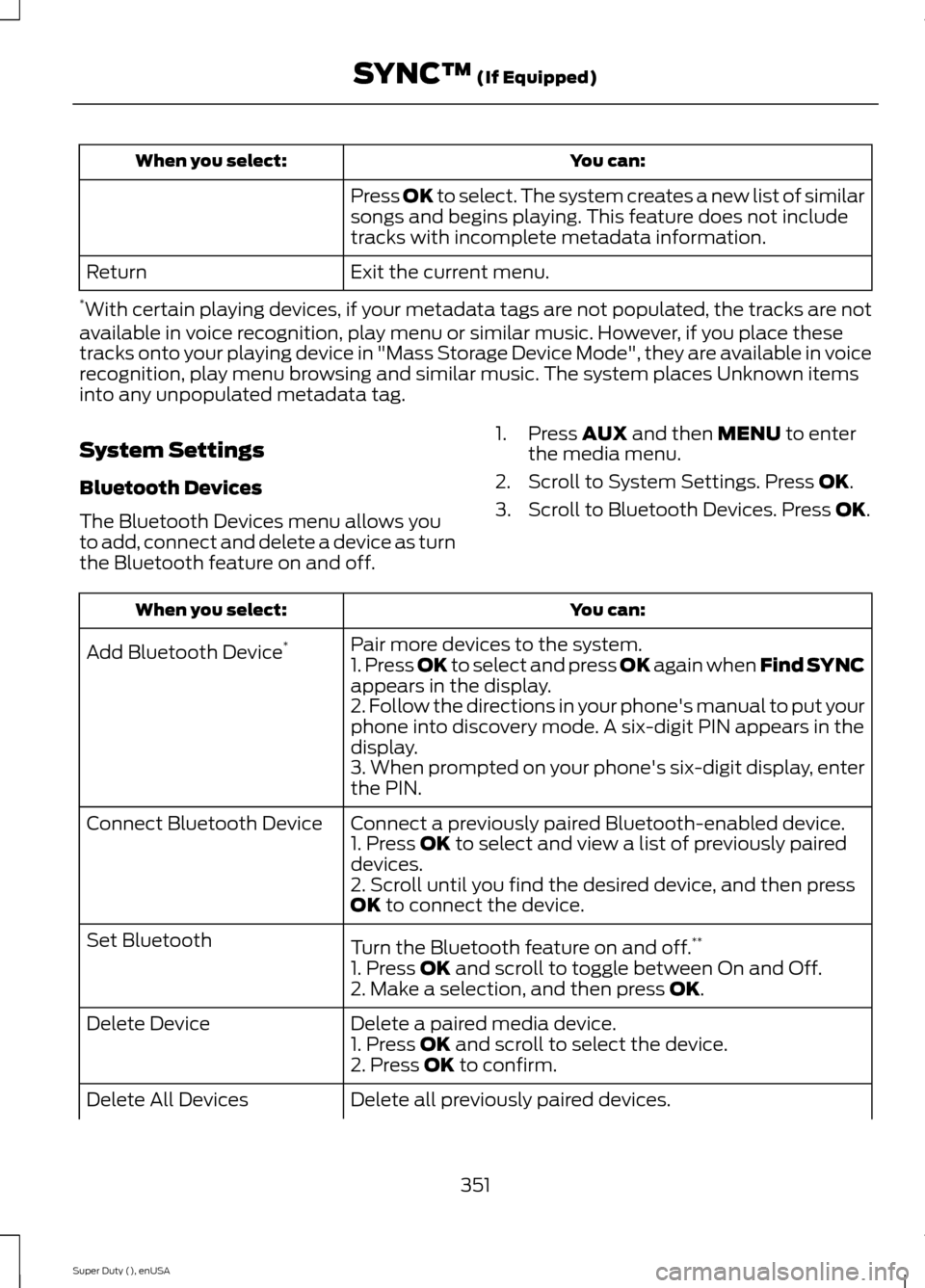
You can:When you select:
Press OK to select. The system creates a new list of similarsongs and begins playing. This feature does not includetracks with incomplete metadata information.
Exit the current menu.Return
*With certain playing devices, if your metadata tags are not populated, the tracks are notavailable in voice recognition, play menu or similar music. However, if you place thesetracks onto your playing device in "Mass Storage Device Mode", they are available in voicerecognition, play menu browsing and similar music. The system places Unknown itemsinto any unpopulated metadata tag.
System Settings
Bluetooth Devices
The Bluetooth Devices menu allows youto add, connect and delete a device as turnthe Bluetooth feature on and off.
1.Press AUX and then MENU to enterthe media menu.
2.Scroll to System Settings. Press OK.
3.Scroll to Bluetooth Devices. Press OK.
You can:When you select:
Pair more devices to the system.Add Bluetooth Device*1. Press OK to select and press OK again when Find SYNCappears in the display.2. Follow the directions in your phone's manual to put yourphone into discovery mode. A six-digit PIN appears in thedisplay.3. When prompted on your phone's six-digit display, enterthe PIN.
Connect a previously paired Bluetooth-enabled device.Connect Bluetooth Device1. Press OK to select and view a list of previously paireddevices.2. Scroll until you find the desired device, and then pressOK to connect the device.
Turn the Bluetooth feature on and off.**Set Bluetooth
1. Press OK and scroll to toggle between On and Off.2. Make a selection, and then press OK.
Delete a paired media device.Delete Device1. Press OK and scroll to select the device.2. Press OK to confirm.
Delete all previously paired devices.Delete All Devices
351Super Duty (), enUSASYNC™ (If Equipped)
Page 355 of 470
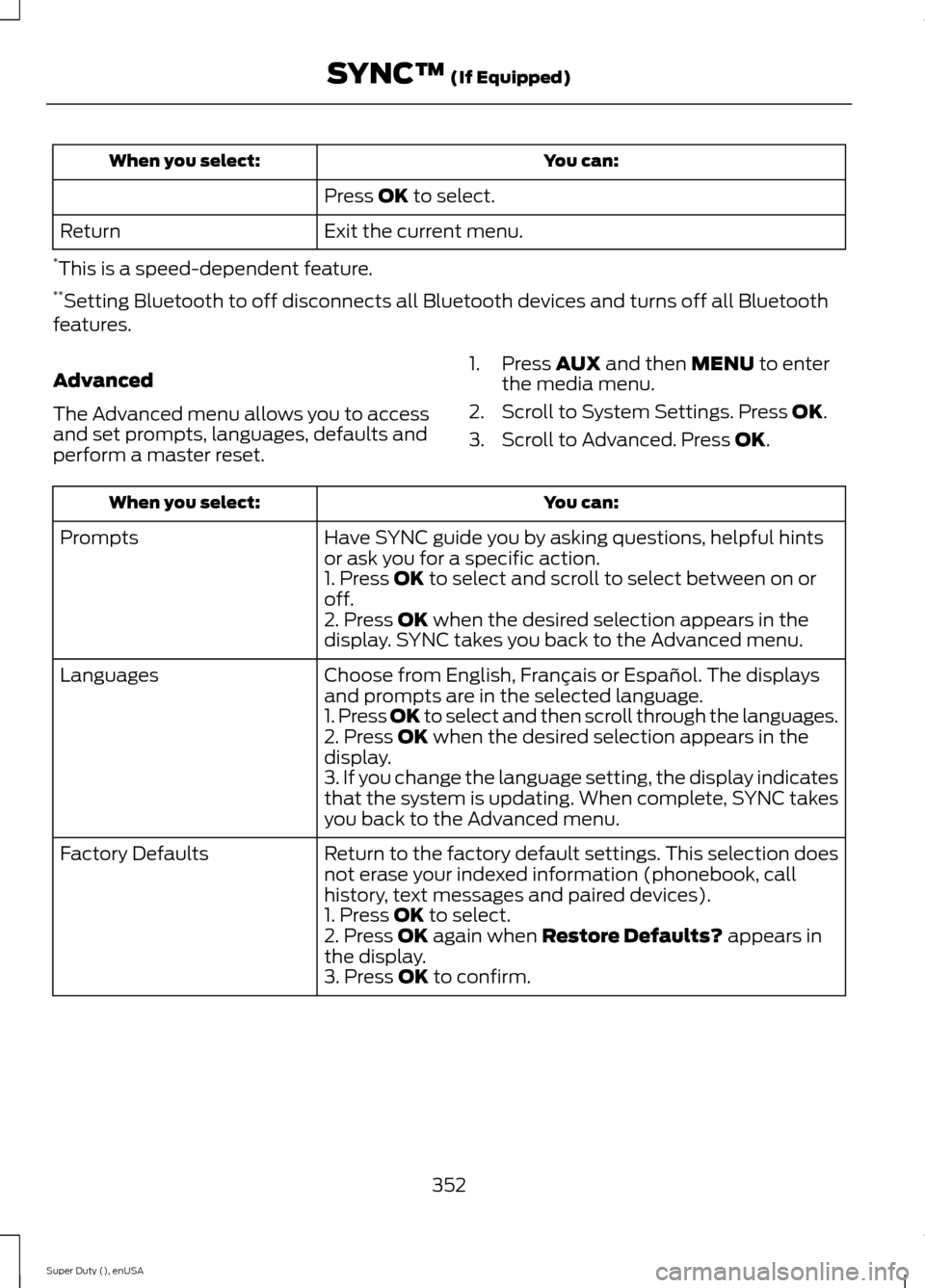
You can:When you select:
Press OK to select.
Exit the current menu.Return
*This is a speed-dependent feature.**Setting Bluetooth to off disconnects all Bluetooth devices and turns off all Bluetoothfeatures.
Advanced
The Advanced menu allows you to accessand set prompts, languages, defaults andperform a master reset.
1.Press AUX and then MENU to enterthe media menu.
2.Scroll to System Settings. Press OK.
3.Scroll to Advanced. Press OK.
You can:When you select:
Have SYNC guide you by asking questions, helpful hintsor ask you for a specific action.Prompts
1. Press OK to select and scroll to select between on oroff.2. Press OK when the desired selection appears in thedisplay. SYNC takes you back to the Advanced menu.
Choose from English, Français or Español. The displaysand prompts are in the selected language.Languages
1. Press OK to select and then scroll through the languages.2. Press OK when the desired selection appears in thedisplay.3. If you change the language setting, the display indicatesthat the system is updating. When complete, SYNC takesyou back to the Advanced menu.
Return to the factory default settings. This selection doesnot erase your indexed information (phonebook, callhistory, text messages and paired devices).
Factory Defaults
1. Press OK to select.2. Press OK again when Restore Defaults? appears inthe display.3. Press OK to confirm.
352Super Duty (), enUSASYNC™ (If Equipped)
Page 357 of 470
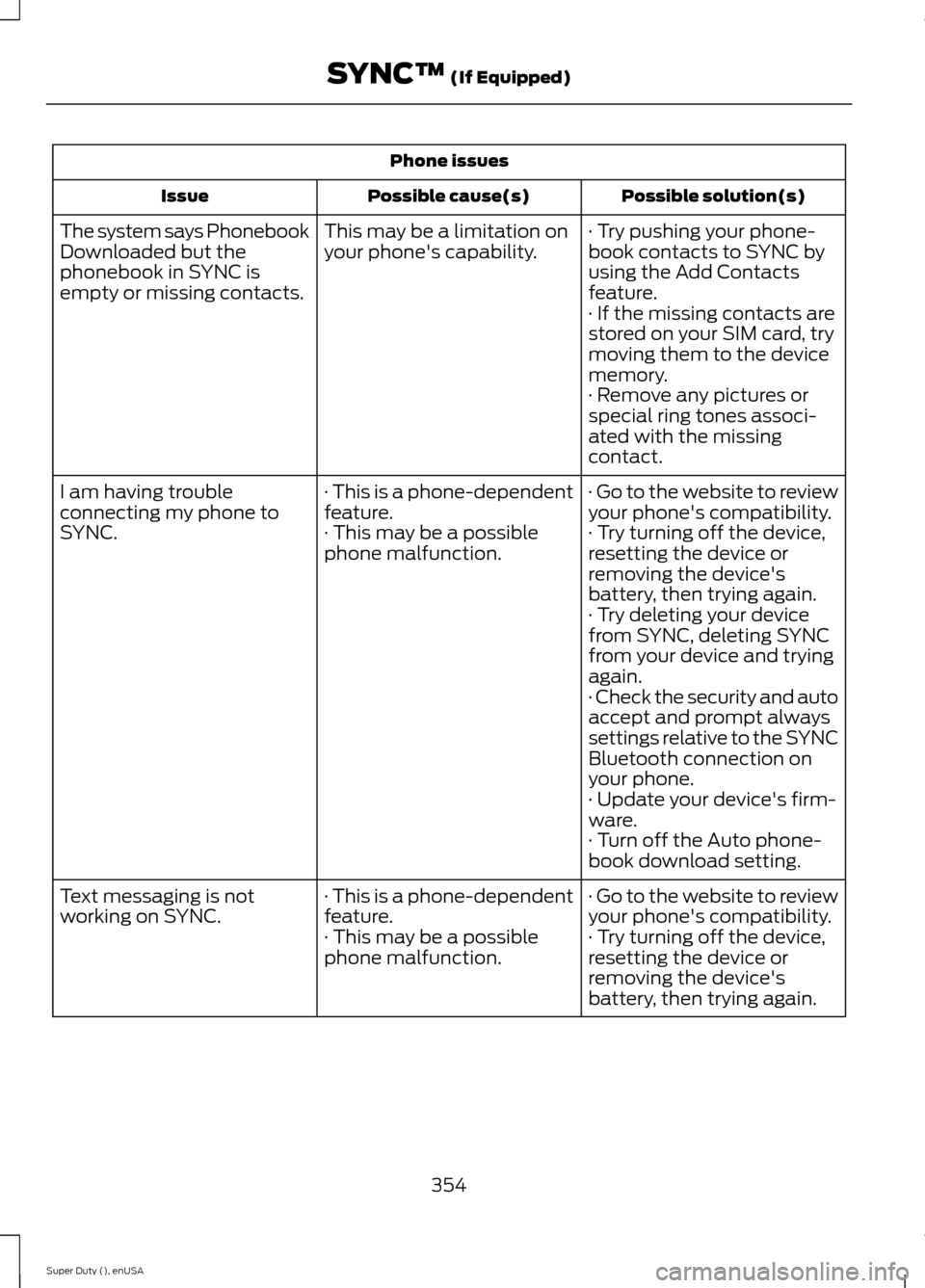
Phone issues
Possible solution(s)Possible cause(s)Issue
· Try pushing your phone-book contacts to SYNC byusing the Add Contactsfeature.
This may be a limitation onyour phone's capability.The system says PhonebookDownloaded but thephonebook in SYNC isempty or missing contacts.· If the missing contacts arestored on your SIM card, trymoving them to the devicememory.· Remove any pictures orspecial ring tones associ-ated with the missingcontact.
· Go to the website to reviewyour phone's compatibility.· This is a phone-dependentfeature.I am having troubleconnecting my phone toSYNC.· Try turning off the device,resetting the device orremoving the device'sbattery, then trying again.
· This may be a possiblephone malfunction.
· Try deleting your devicefrom SYNC, deleting SYNCfrom your device and tryingagain.· Check the security and autoaccept and prompt alwayssettings relative to the SYNCBluetooth connection onyour phone.· Update your device's firm-ware.· Turn off the Auto phone-book download setting.
· Go to the website to reviewyour phone's compatibility.· This is a phone-dependentfeature.Text messaging is notworking on SYNC.· Try turning off the device,resetting the device orremoving the device'sbattery, then trying again.
· This may be a possiblephone malfunction.
354Super Duty (), enUSASYNC™ (If Equipped)