display FORD SUPER DUTY 2015 3.G User Guide
[x] Cancel search | Manufacturer: FORD, Model Year: 2015, Model line: SUPER DUTY, Model: FORD SUPER DUTY 2015 3.GPages: 470, PDF Size: 18.24 MB
Page 64 of 470
Media
Press repeatedly to scroll through availableaudio modes.
Seek, Next or Previous
Press the seek button to:
•tune the radio to the next or previousstored preset
•play the next or the previous track.
Press and hold the seek button to:
•tune the radio to the next station up ordown the frequency band
•seek through a track.
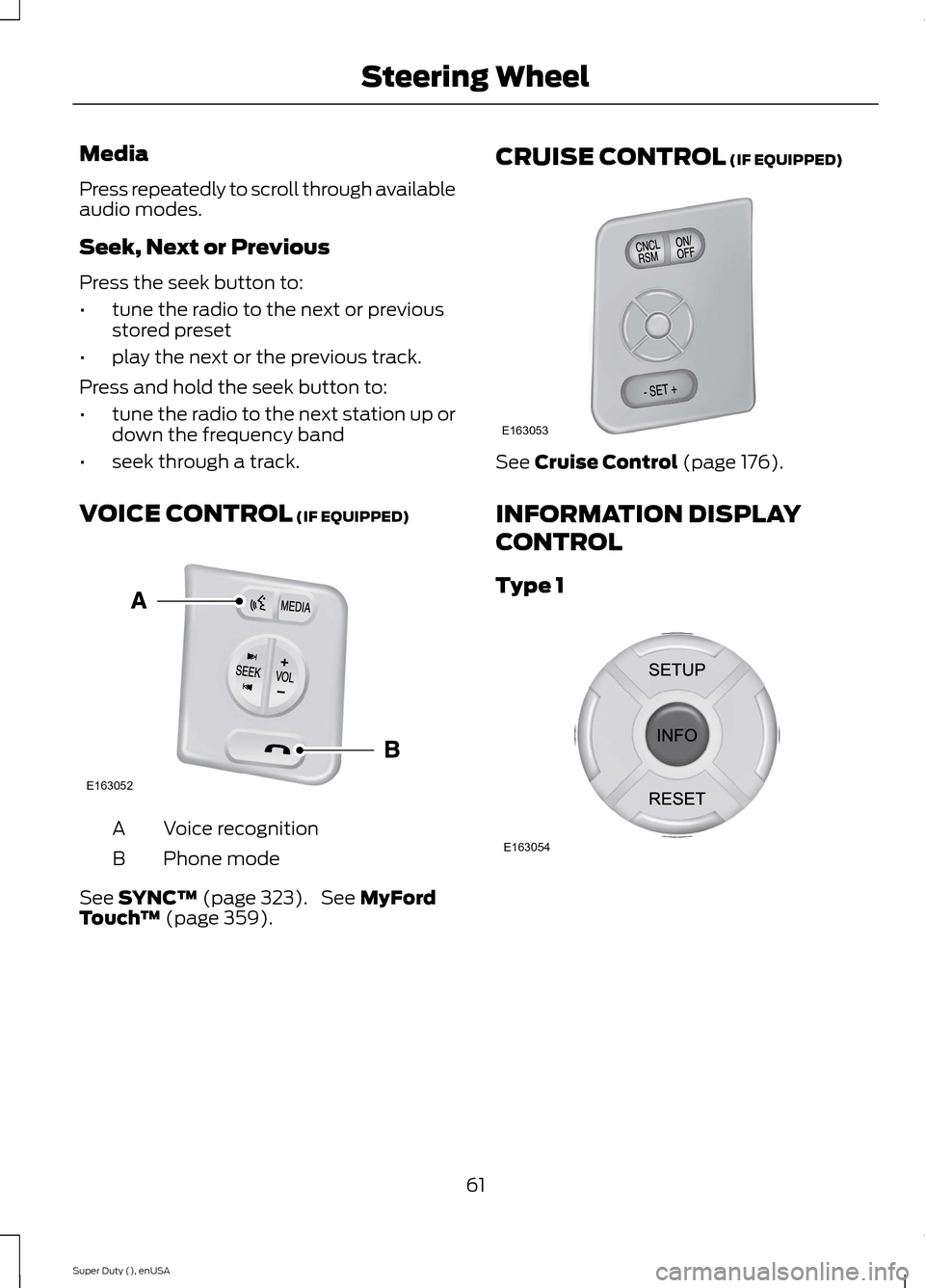
VOICE CONTROL (IF EQUIPPED)
Voice recognitionA
Phone modeB
See SYNC™ (page 323). See MyFordTouch™ (page 359).
CRUISE CONTROL (IF EQUIPPED)
See Cruise Control (page 176).
INFORMATION DISPLAY
CONTROL
Type 1
61Super Duty (), enUSASteering WheelE163052 E163053 E163054
Page 65 of 470
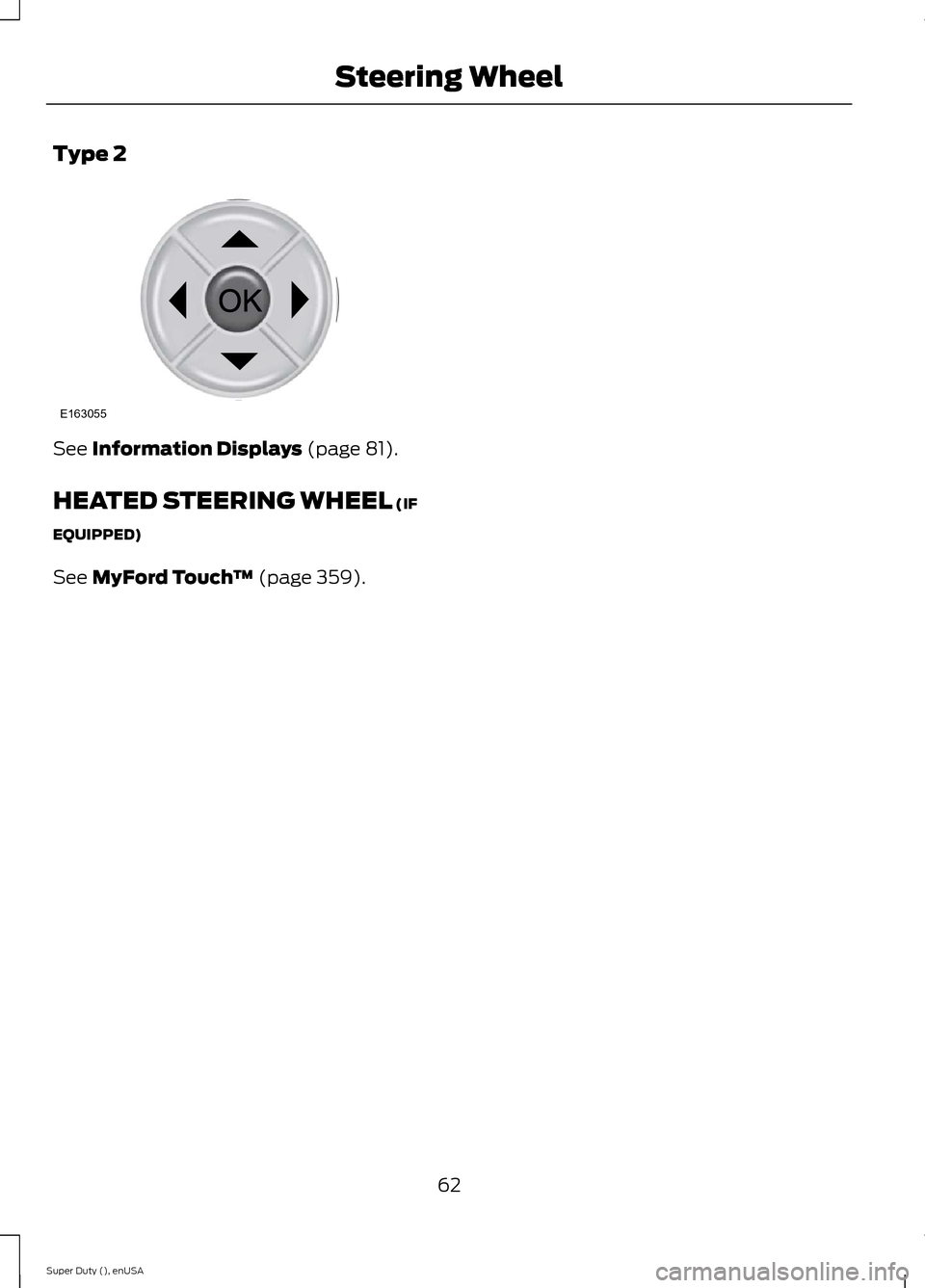
Type 2
See Information Displays (page 81).
HEATED STEERING WHEEL (IF
EQUIPPED)
See MyFord Touch™ (page 359).
62Super Duty (), enUSASteering WheelE163055
Page 67 of 470
WINDSHIELD WIPERS
Note:Fully defrost the windshield beforeswitching on the windshield wipers.
Note:Make sure the windshield wipers areswitched off before entering a car wash.
Note:Clean the windshield and wiperblades if they begin to leave streaks orsmears. If that does not resolve the issue,install new wiper blades.
Note:Do not operate the wipers on a drywindshield. This may scratch the glass,damage the wiper blades or cause the wipermotor to burn out. Always use thewindshield washers before wiping a drywindshield.
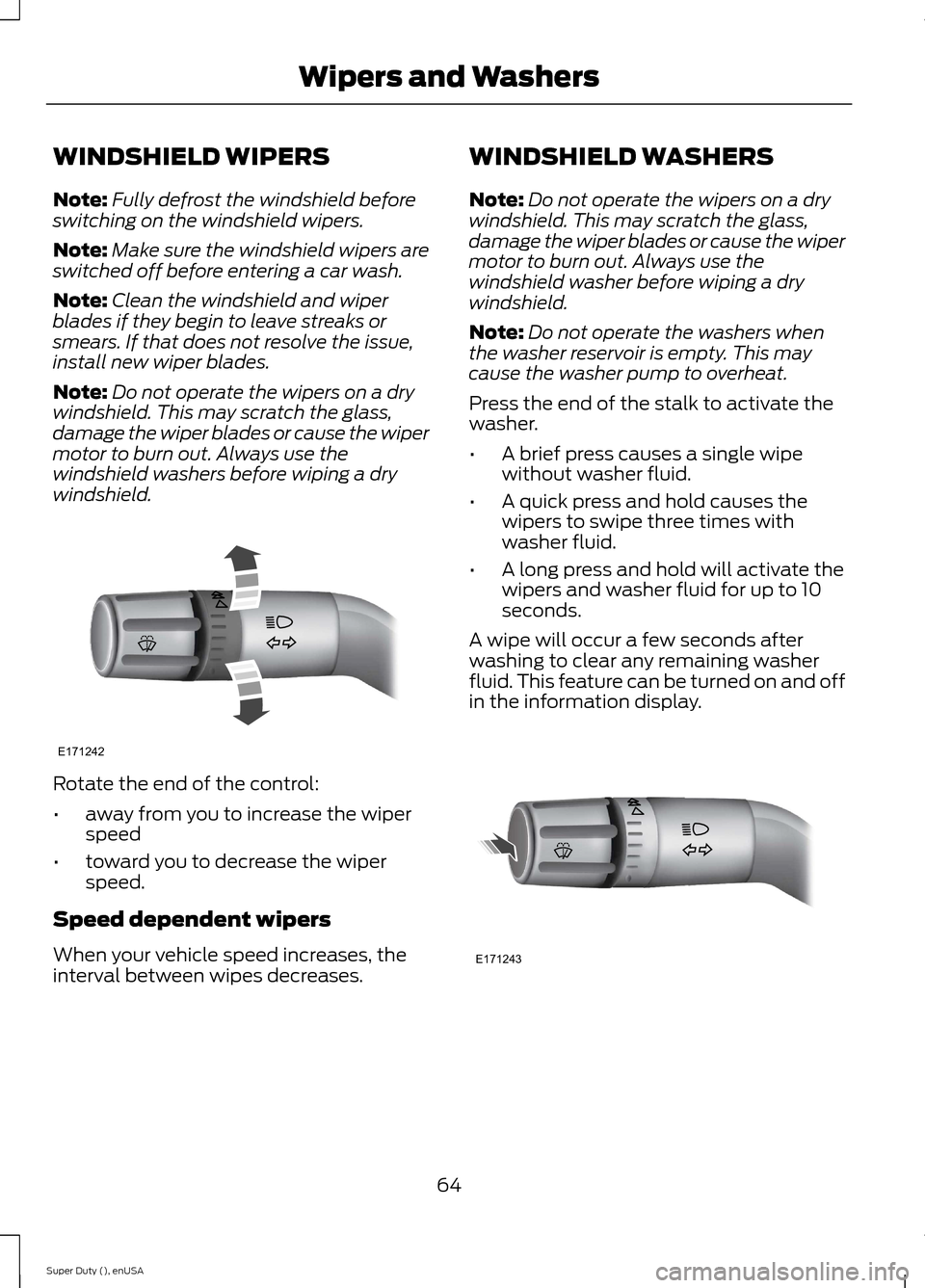
Rotate the end of the control:
•away from you to increase the wiperspeed
•toward you to decrease the wiperspeed.
Speed dependent wipers
When your vehicle speed increases, theinterval between wipes decreases.
WINDSHIELD WASHERS
Note:Do not operate the wipers on a drywindshield. This may scratch the glass,damage the wiper blades or cause the wipermotor to burn out. Always use thewindshield washer before wiping a drywindshield.
Note:Do not operate the washers whenthe washer reservoir is empty. This maycause the washer pump to overheat.
Press the end of the stalk to activate thewasher.
•A brief press causes a single wipewithout washer fluid.
•A quick press and hold causes thewipers to swipe three times withwasher fluid.
•A long press and hold will activate thewipers and washer fluid for up to 10seconds.
A wipe will occur a few seconds afterwashing to clear any remaining washerfluid. This feature can be turned on and offin the information display.
64Super Duty (), enUSAWipers and WashersE171242 E171243
Page 78 of 470
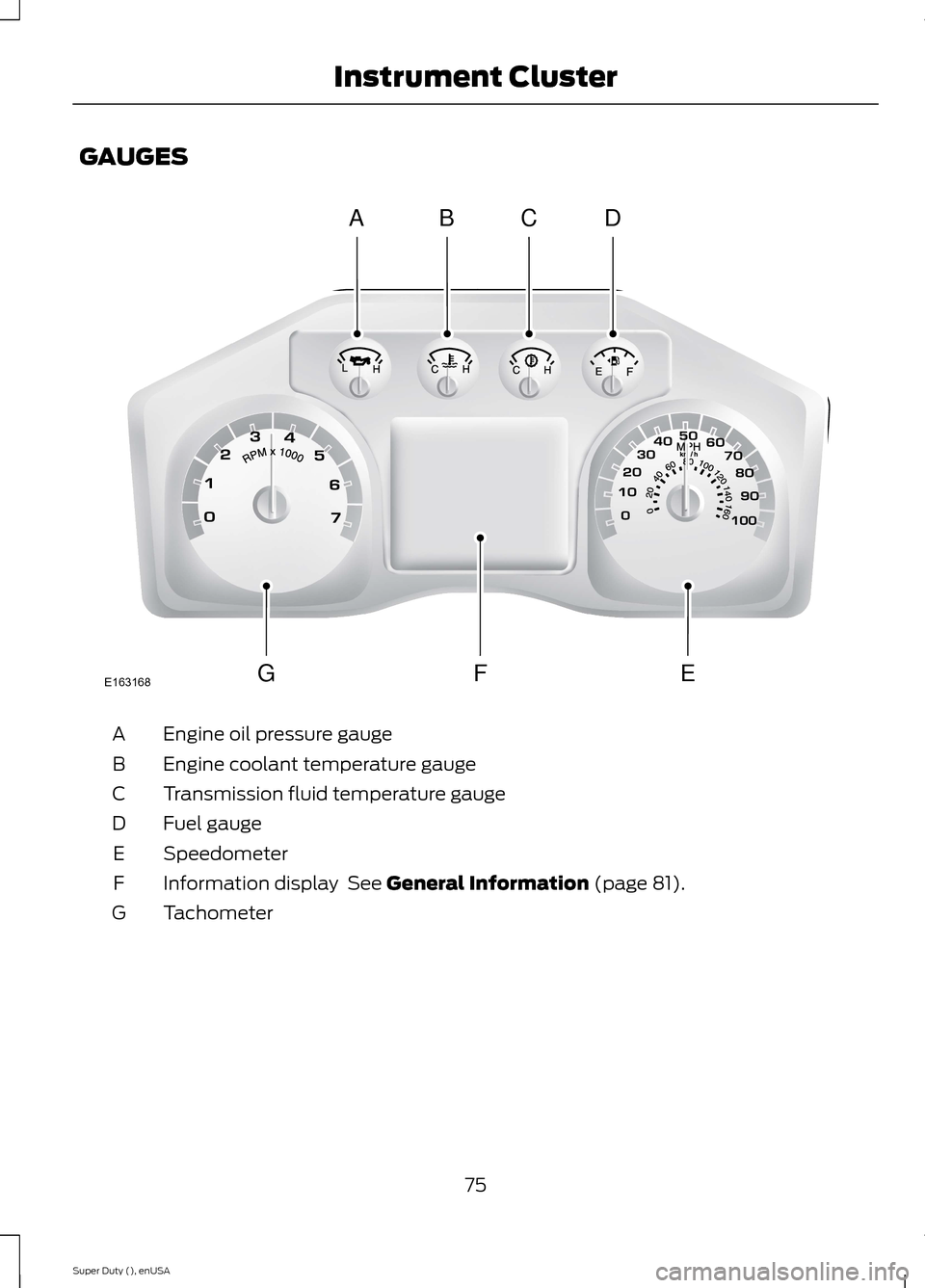
GAUGES
Engine oil pressure gaugeA
Engine coolant temperature gaugeB
Transmission fluid temperature gaugeC
Fuel gaugeD
SpeedometerE
Information display See General Information (page 81).F
TachometerG
75Super Duty (), enUSAInstrument ClusterABCDGFEE163168
Page 80 of 470
Variations:
Distance-to-emptyFuel gauge positionDriving type (fuel economyconditions)
35 miles to 80 miles (56 kmto 129 km)1/16thHighway driving
35 miles (56km)1/16thSevere duty driving (trailertowing, extended idle)
Information Display
Odometer
Located in the bottom of the informationdisplay Registers the accumulateddistance your vehicle has traveled.
Trip Computer
See General Information (page 81).
Vehicle Settings and Personalization
See General Information (page 81).
WARNING LAMPS AND
INDICATORS
The following warning lamps andindicators will alert you to a vehiclecondition that may become serious. Somelamps will illuminate when you start yourvehicle to make sure they work. If anylamps remain on after starting your vehicle,refer to the respective system warninglamp for further information.
Note:Some warning indicators appear inthe information display and function thesame as a warning lamp but do not displaywhen you start your vehicle.
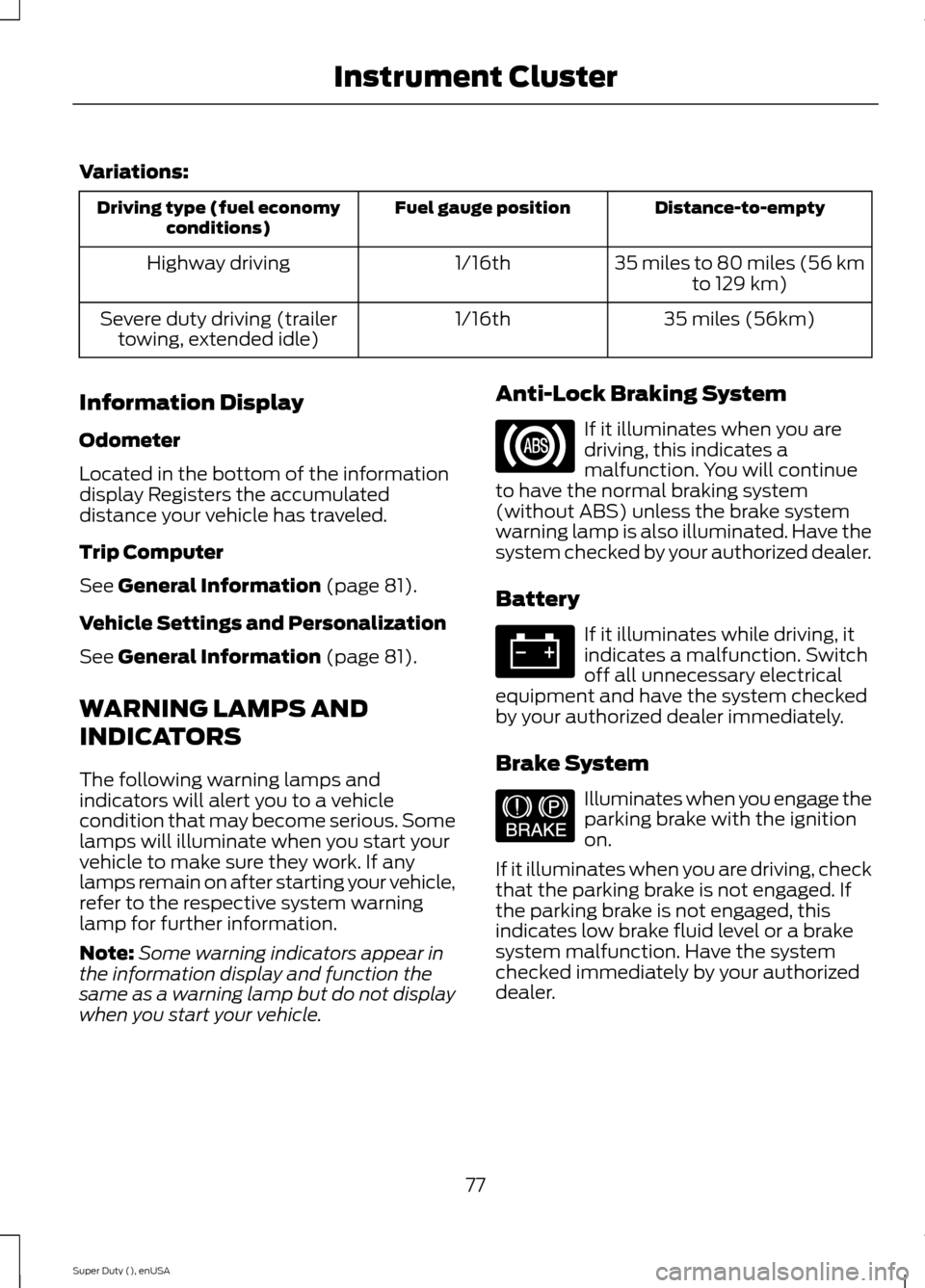
Anti-Lock Braking System
If it illuminates when you aredriving, this indicates amalfunction. You will continueto have the normal braking system(without ABS) unless the brake systemwarning lamp is also illuminated. Have thesystem checked by your authorized dealer.
Battery
If it illuminates while driving, itindicates a malfunction. Switchoff all unnecessary electricalequipment and have the system checkedby your authorized dealer immediately.
Brake System
Illuminates when you engage theparking brake with the ignitionon.
If it illuminates when you are driving, checkthat the parking brake is not engaged. Ifthe parking brake is not engaged, thisindicates low brake fluid level or a brakesystem malfunction. Have the systemchecked immediately by your authorizeddealer.
77Super Duty (), enUSAInstrument Cluster E144522
Page 81 of 470
WARNING
Driving your vehicle with the warninglamp on is dangerous. A significantdecrease in braking performancemay occur. It will take you longer to stopyour vehicle. Have your vehicle checked byyour authorized dealer immediately. Drivingextended distances with the parking brakeengaged can cause brake failure and therisk of personal injury.
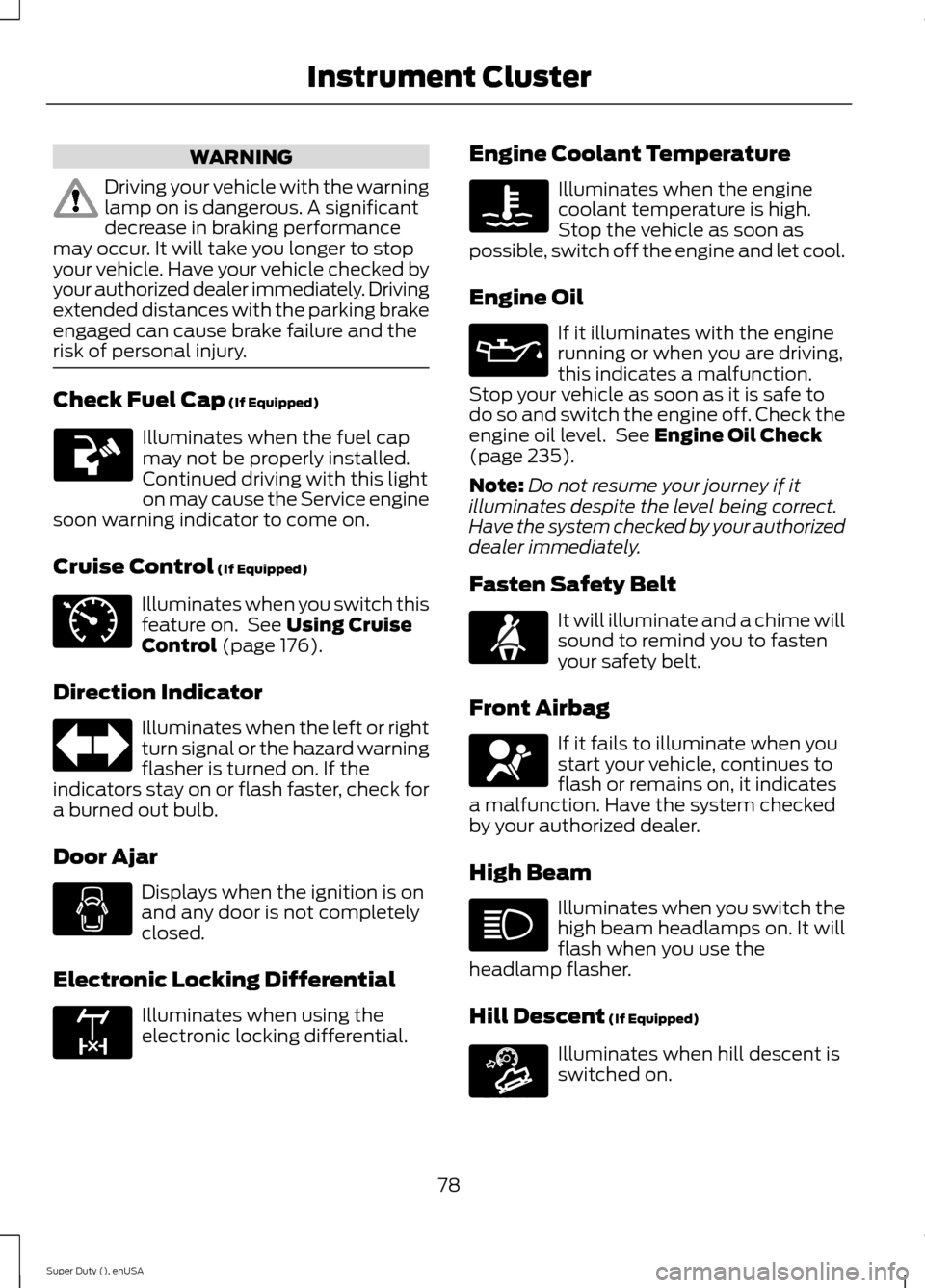
Check Fuel Cap (If Equipped)
Illuminates when the fuel capmay not be properly installed.Continued driving with this lighton may cause the Service enginesoon warning indicator to come on.
Cruise Control (If Equipped)
Illuminates when you switch thisfeature on. See Using CruiseControl (page 176).
Direction Indicator
Illuminates when the left or rightturn signal or the hazard warningflasher is turned on. If theindicators stay on or flash faster, check fora burned out bulb.
Door Ajar
Displays when the ignition is onand any door is not completelyclosed.
Electronic Locking Differential
Illuminates when using theelectronic locking differential.
Engine Coolant Temperature
Illuminates when the enginecoolant temperature is high.Stop the vehicle as soon aspossible, switch off the engine and let cool.
Engine Oil
If it illuminates with the enginerunning or when you are driving,this indicates a malfunction.Stop your vehicle as soon as it is safe todo so and switch the engine off. Check theengine oil level. See Engine Oil Check(page 235).
Note:Do not resume your journey if itilluminates despite the level being correct.Have the system checked by your authorizeddealer immediately.
Fasten Safety Belt
It will illuminate and a chime willsound to remind you to fastenyour safety belt.
Front Airbag
If it fails to illuminate when youstart your vehicle, continues toflash or remains on, it indicatesa malfunction. Have the system checkedby your authorized dealer.
High Beam
Illuminates when you switch thehigh beam headlamps on. It willflash when you use theheadlamp flasher.
Hill Descent (If Equipped)
Illuminates when hill descent isswitched on.
78Super Duty (), enUSAInstrument Cluster E71340 E163170 E163171
Page 83 of 470
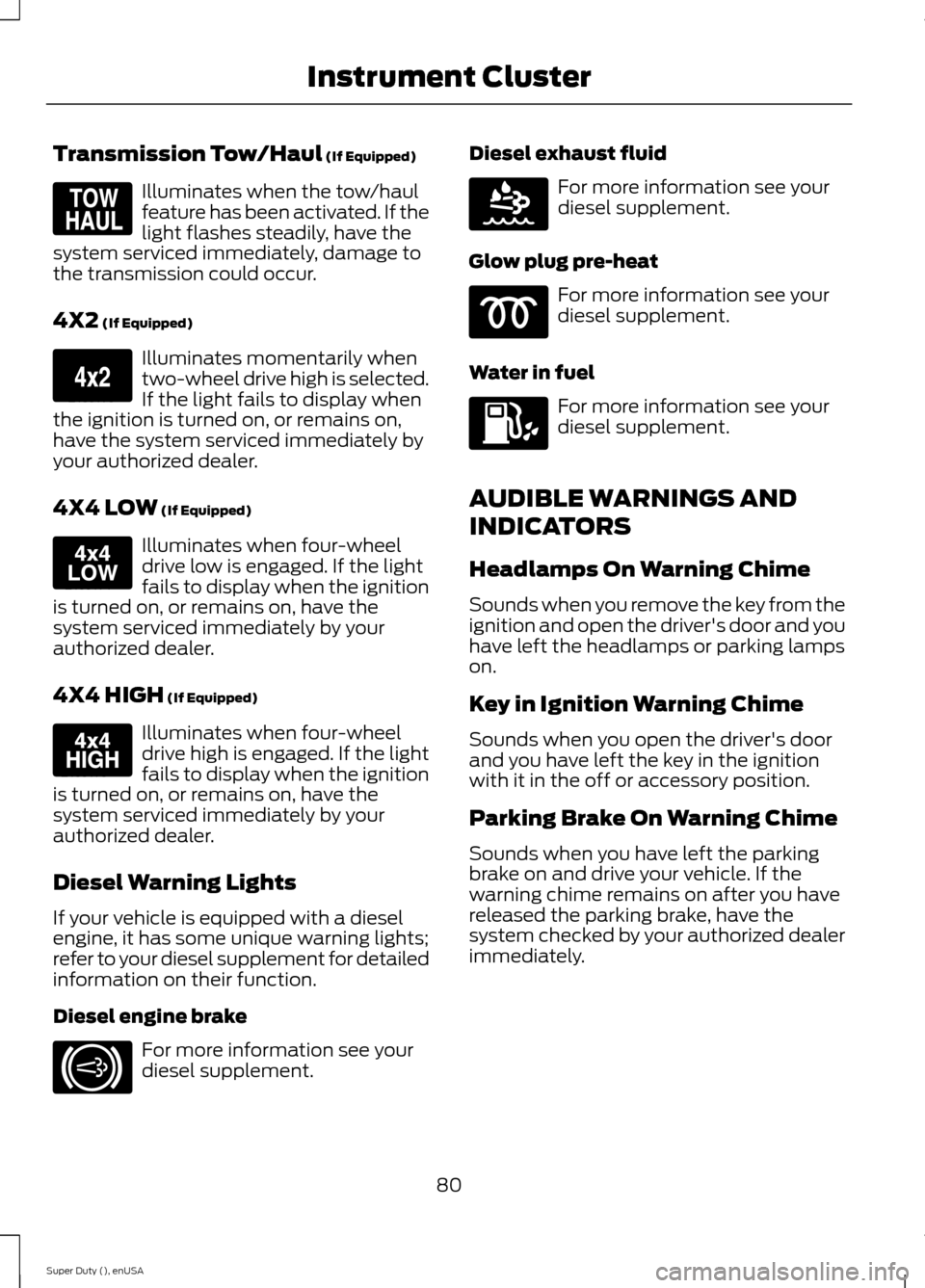
Transmission Tow/Haul (If Equipped)
Illuminates when the tow/haulfeature has been activated. If thelight flashes steadily, have thesystem serviced immediately, damage tothe transmission could occur.
4X2 (If Equipped)
Illuminates momentarily whentwo-wheel drive high is selected.If the light fails to display whenthe ignition is turned on, or remains on,have the system serviced immediately byyour authorized dealer.
4X4 LOW (If Equipped)
Illuminates when four-wheeldrive low is engaged. If the lightfails to display when the ignitionis turned on, or remains on, have thesystem serviced immediately by yourauthorized dealer.
4X4 HIGH (If Equipped)
Illuminates when four-wheeldrive high is engaged. If the lightfails to display when the ignitionis turned on, or remains on, have thesystem serviced immediately by yourauthorized dealer.
Diesel Warning Lights
If your vehicle is equipped with a dieselengine, it has some unique warning lights;refer to your diesel supplement for detailedinformation on their function.
Diesel engine brake
For more information see yourdiesel supplement.
Diesel exhaust fluid
For more information see yourdiesel supplement.
Glow plug pre-heat
For more information see yourdiesel supplement.
Water in fuel
For more information see yourdiesel supplement.
AUDIBLE WARNINGS AND
INDICATORS
Headlamps On Warning Chime
Sounds when you remove the key from theignition and open the driver's door and youhave left the headlamps or parking lampson.
Key in Ignition Warning Chime
Sounds when you open the driver's doorand you have left the key in the ignitionwith it in the off or accessory position.
Parking Brake On Warning Chime
Sounds when you have left the parkingbrake on and drive your vehicle. If thewarning chime remains on after you havereleased the parking brake, have thesystem checked by your authorized dealerimmediately.
80Super Duty (), enUSAInstrument ClusterE161509 E163173 E163174 E163175 E171217 E163176
Page 84 of 470
GENERAL INFORMATION
WARNING
Driving while distracted can result inloss of vehicle control, crash andinjury. We strongly recommend thatyou use extreme caution when using anydevice that may take your focus off theroad. Your primary responsibility is the safeoperation of your vehicle. We recommendagainst the use of any hand-held devicewhile driving and encourage the use ofvoice-operated systems when possible.Make sure you are aware of all applicablelocal laws that may affect the use ofelectronic devices while driving.
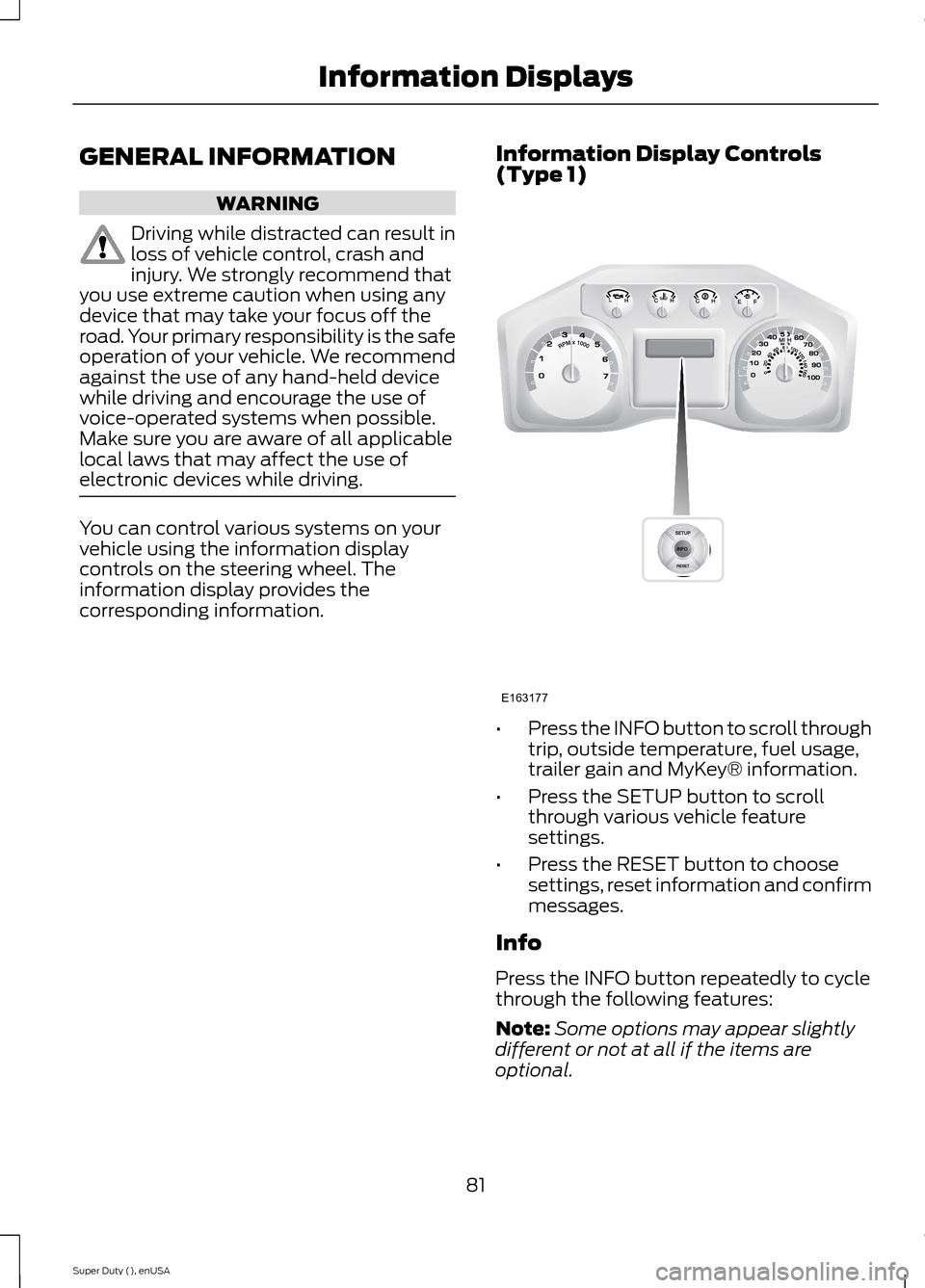
You can control various systems on yourvehicle using the information displaycontrols on the steering wheel. Theinformation display provides thecorresponding information.
Information Display Controls(Type 1)
•Press the INFO button to scroll throughtrip, outside temperature, fuel usage,trailer gain and MyKey® information.
•Press the SETUP button to scrollthrough various vehicle featuresettings.
•Press the RESET button to choosesettings, reset information and confirmmessages.
Info
Press the INFO button repeatedly to cyclethrough the following features:
Note:Some options may appear slightlydifferent or not at all if the items areoptional.
81Super Duty (), enUSAInformation DisplaysE163177
Page 85 of 470
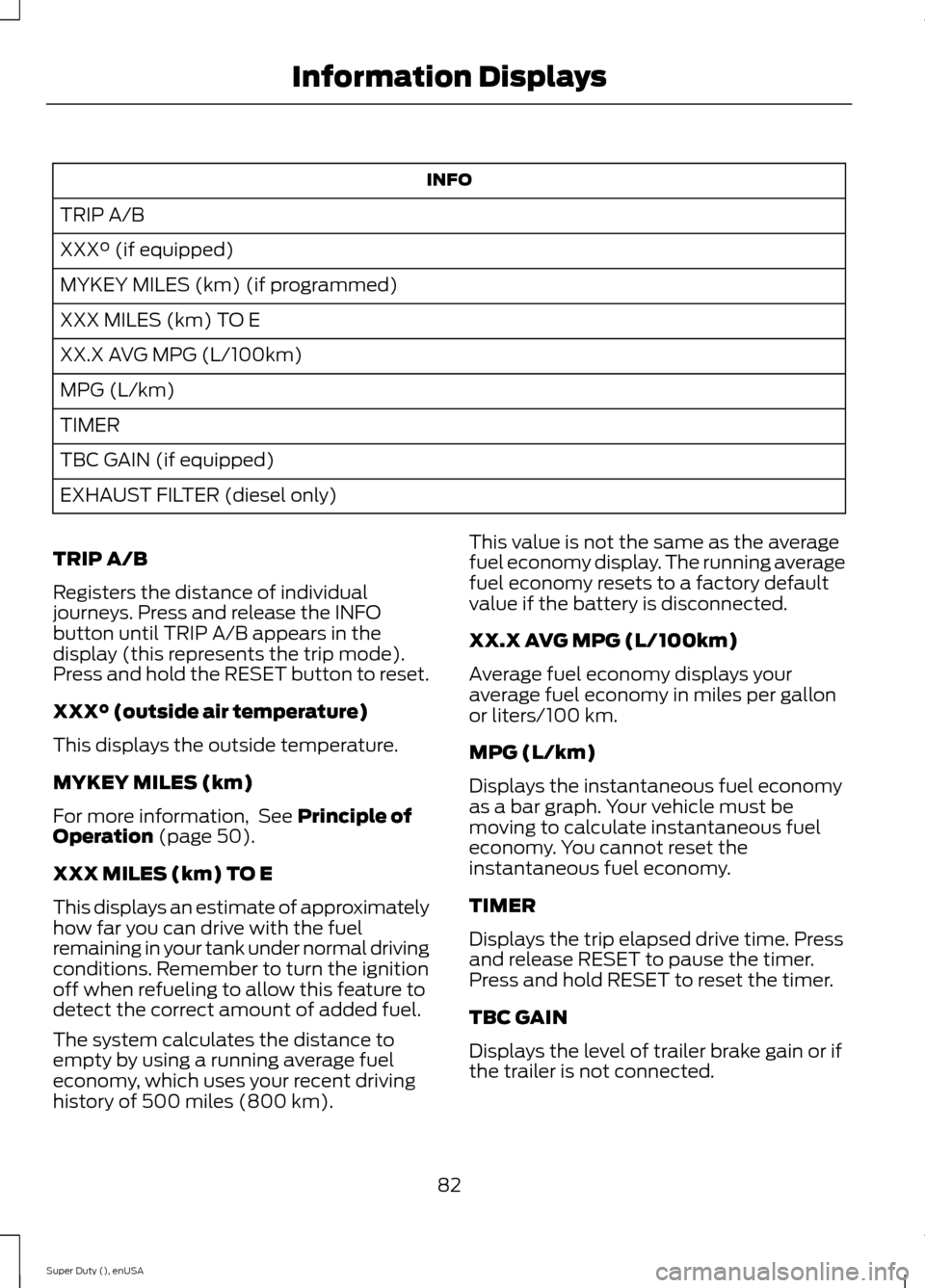
INFO
TRIP A/B
XXX° (if equipped)
MYKEY MILES (km) (if programmed)
XXX MILES (km) TO E
XX.X AVG MPG (L/100km)
MPG (L/km)
TIMER
TBC GAIN (if equipped)
EXHAUST FILTER (diesel only)
TRIP A/B
Registers the distance of individualjourneys. Press and release the INFObutton until TRIP A/B appears in thedisplay (this represents the trip mode).Press and hold the RESET button to reset.
XXX° (outside air temperature)
This displays the outside temperature.
MYKEY MILES (km)
For more information, See Principle ofOperation (page 50).
XXX MILES (km) TO E
This displays an estimate of approximatelyhow far you can drive with the fuelremaining in your tank under normal drivingconditions. Remember to turn the ignitionoff when refueling to allow this feature todetect the correct amount of added fuel.
The system calculates the distance toempty by using a running average fueleconomy, which uses your recent drivinghistory of 500 miles (800 km).
This value is not the same as the averagefuel economy display. The running averagefuel economy resets to a factory defaultvalue if the battery is disconnected.
XX.X AVG MPG (L/100km)
Average fuel economy displays youraverage fuel economy in miles per gallonor liters/100 km.
MPG (L/km)
Displays the instantaneous fuel economyas a bar graph. Your vehicle must bemoving to calculate instantaneous fueleconomy. You cannot reset theinstantaneous fuel economy.
TIMER
Displays the trip elapsed drive time. Pressand release RESET to pause the timer.Press and hold RESET to reset the timer.
TBC GAIN
Displays the level of trailer brake gain or ifthe trailer is not connected.
82Super Duty (), enUSAInformation Displays
Page 86 of 470
EXHAUST FILTER
For more information, refer to the Dieselsupplement.
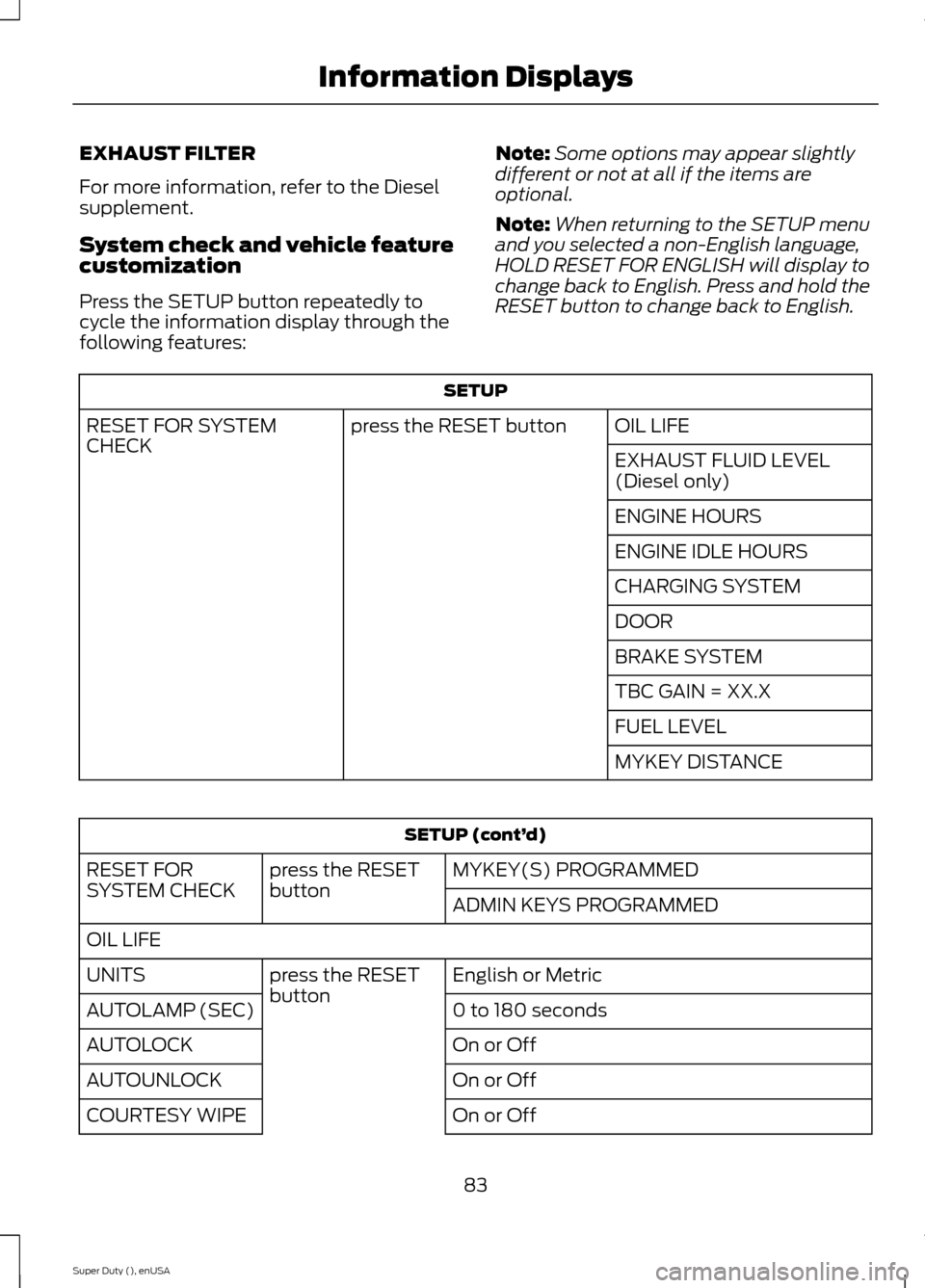
System check and vehicle featurecustomization
Press the SETUP button repeatedly tocycle the information display through thefollowing features:
Note:Some options may appear slightlydifferent or not at all if the items areoptional.
Note:When returning to the SETUP menuand you selected a non-English language,HOLD RESET FOR ENGLISH will display tochange back to English. Press and hold theRESET button to change back to English.
SETUP
OIL LIFEpress the RESET buttonRESET FOR SYSTEMCHECKEXHAUST FLUID LEVEL(Diesel only)
ENGINE HOURS
ENGINE IDLE HOURS
CHARGING SYSTEM
DOOR
BRAKE SYSTEM
TBC GAIN = XX.X
FUEL LEVEL
MYKEY DISTANCE
SETUP (cont’d)
MYKEY(S) PROGRAMMEDpress the RESETbuttonRESET FORSYSTEM CHECKADMIN KEYS PROGRAMMED
OIL LIFE
English or Metricpress the RESETbuttonUNITS
0 to 180 secondsAUTOLAMP (SEC)
On or OffAUTOLOCK
On or OffAUTOUNLOCK
On or OffCOURTESY WIPE
83Super Duty (), enUSAInformation Displays